FUNDAMENTALS OF DIGITALCOMPUTER 2
FIRST GENERATION
⮚The period of first generation was from 1940-1956
⮚The computers of first generation used vacuum tubes (thermionic valve based
machines)as the basic components for memory and circuitry for CPU (Central
Processing Unit).
⮚These tubes, like electric bulbs, produced a lot of heat and the installations used to
fuse frequently.
⮚Therefore, they were very expensive and only large organizations were able to
afford it.
⮚In this generation, mainly batch processing operating system was used.
⮚Punch cards, paper tape, and magnetic tape was used as input and output devices.
⮚The computers in this generation used machine code as the programming language.
GENERATION OF COMPUTERS
FUNDAMENTALS OF DIGITALCOMPUTER 4
The main features of the first generation are
−
⮚Vacuum tube technology
⮚Unreliable
⮚Supported machine language only
⮚Very costly
⮚Generated a lot of heat
⮚Slow input and output devices
⮚Huge size
⮚Need of AC
⮚Non-portable
⮚Consumed a lot of electricity
Some computers of this generation were −
⮚ENIAC
⮚EDVAC
⮚UNIVAC
⮚IBM-701
⮚IBM-650
5.
FUNDAMENTALS OF DIGITALCOMPUTER 5
⮚Advantages:
⮚It made use of vacuum tubes which are the only electronic component available during
those days.
⮚These computers could calculate in milliseconds.
⮚Disadvantages:
⮚These were very big in size, weight was about 30 tones.
⮚These computers were based on vacuum tubes.
⮚These computers were very costly.
⮚It could store only a small amount of information due to the presence of magnetic
drums.
⮚As the invention of first generation computers involves vacuum tubes, so another
disadvantage of these computers was, vacuum tubes require a large cooling system.
⮚Very less work efficiency.
⮚Limited programming capabilities and punch cards were used to take inputs.
⮚Large amount of energy consumption.
⮚Not reliable and constant maintenance is required.
6.
FUNDAMENTALS OF DIGITALCOMPUTER 6
SECOND GENERATION
⮚The period of second generation was from 1956-1963.
⮚In this generation, transistors were used that were cheaper, consumed less
power, more compact in size, more reliable and faster than the first generation
machines made of vacuum tubes.
⮚In this generation, magnetic cores were used as the primary memory and
magnetic tape and magnetic disks as secondary storage devices.
⮚In this generation, assembly language and high-level programming languages
like FORTRAN, COBOL were used.
⮚ The computers used batch processing and multiprogramming operating system.
7.
FUNDAMENTALS OF DIGITALCOMPUTER 7
SECOND GENERATION
transistor was invented by Shockley, Brattain and Bardeen in 1947 for
which they won the Nobel Prize.
A transistor is a semiconductor device that is used to increase the
power of the incoming signals by preserving the shape of the original
signal. It has three connections, which are emitter (E), base (B) and
collector (C).
The base of transistor is the gate through which the signal, needed to
be amplified, is sent.
The signal sent through the base of the transistor is generally a small
flow of electrons.
base terminal also acts as the input gate for the transistor.
The collector of the transistor is used to collect the amplified signal.
The emitter of the transistor acts as the output gate for emitting the
amplified signal to the external environment.
FUNDAMENTALS OF DIGITALCOMPUTER 9
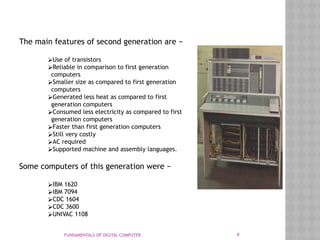
The main features of second generation are −
⮚Use of transistors
⮚Reliable in comparison to first generation
computers
⮚Smaller size as compared to first generation
computers
⮚Generated less heat as compared to first
generation computers
⮚Consumed less electricity as compared to first
generation computers
⮚Faster than first generation computers
⮚Still very costly
⮚AC required
⮚Supported machine and assembly languages.
Some computers of this generation were −
⮚IBM 1620
⮚IBM 7094
⮚CDC 1604
⮚CDC 3600
⮚UNIVAC 1108
10.
FUNDAMENTALS OF DIGITALCOMPUTER 10
Advantages:
⮚Due to the presence of transistors instead of vacuum tubes, the size of electron
component decreased. This resulted in reducing the size of a computer as compared to
first generation computers.
⮚Less energy and not produce as much heat as the first genration.
⮚Assembly language and punch cards were used for input.
⮚Low cost than first generation computers.
⮚Better speed, calculate data in microseconds.
⮚Better portability as compared to first generation,
Disadvantages:
⮚A cooling system was required.
⮚Constant maintenance was required.
⮚Only used for specific purposes.
11.
FUNDAMENTALS OF DIGITALCOMPUTER 11
THIRD GENERATION
⮚The period of third generation was from 1964-1975.
⮚ The computers of third generation used Integrated Circuits (ICs) in place of transistors.
⮚A single IC has many transistors, resistors, and capacitors along with the associated
circuitry onto a single silicon chip.
⮚The IC was invented by Jack Kilby and Robert Noyee
⮚This development made computers smaller in size, reliable, and efficient.
⮚In this generation remote processing, time-sharing, multiprogramming operating system
were used.
⮚ High-level languages (FORTRAN-II TO IV, COBOL, PASCAL PL/1, BASIC, ALGOL-68 etc.)
were used during this generation.
13.
FUNDAMENTALS OF DIGITALCOMPUTER 13
The main features of third generation are −
⮚IC used
⮚More reliable in comparison to previous two
generations
⮚Smaller size
⮚Generated less heat
⮚Faster
⮚Lesser maintenance
⮚Costly
⮚AC required
⮚Consumed lesser electricity
⮚Supported high-level language
Some computers of this generation were −
⮚IBM-360 series
⮚Honeywell-6000 series
⮚PDP (Personal Data Processor)
⮚IBM-370/168
⮚TDC-316
14.
FUNDAMENTALS OF DIGITALCOMPUTER 14
Advantages:
⮚These computers were cheaper as compared to second-generation computers.
⮚They were fast and reliable.
⮚Use of IC in the computer provides the small size of the computer.
⮚IC not only reduce the size of the computer but it also improves the performance of the
computer as compared to previous computers.
⮚This generation of computers has big storage capacity.
⮚Instead of punch cards, mouse and keyboard are used for input.
⮚They used an operating system for better resource management and used the concept of
time-sharing and multiple programming.
⮚These computers reduce the computational time from microseconds to nanoseconds.
Disadvantages:
⮚IC chips are difficult to maintain.
⮚The highly sophisticated technology required for the manufacturing of IC chips.
⮚Air conditioning is required.
15.
FUNDAMENTALS OF DIGITALCOMPUTER 15
FOURTH GENERATION
⮚The period of fourth generation was from 1975-1989.
⮚Computers of fourth generation used Very Large Scale Integrated (VLSI) circuits.
⮚VLSI circuits having about 5000 transistors and other circuit elements with their associated circuits
on a single chip made it possible to have microcomputers of fourth generation.
⮚Fourth generation computers became more powerful, compact, reliable, and affordable.
⮚ As a result, it gave rise to Personal Computer (PC) revolution.
⮚In this generation, time sharing, real time networks, distributed operating system were used.
⮚All the high-level languages like C, C++, DBASE etc., were used in this generation.
16.
FUNDAMENTALS OF DIGITALCOMPUTER 16
FOURTH GENERATION
ledd to the development of microprocessor
incorporates various components such as
CPU
Memory
Input and output control devices
17.
FUNDAMENTALS OF DIGITALCOMPUTER 17
The main features of fourth generation are −
⮚VLSI technology used
⮚Very cheap
⮚Portable and reliable
⮚Use of PCs
⮚Very small size
⮚Pipeline processing
⮚No AC required
⮚Concept of internet was introduced
⮚Great developments in the fields of networks
⮚Computers became easily available.
Some computers of this generation were −
⮚DEC 10
⮚STAR 1000
⮚PDP 11
⮚CRAY-1(Super Computer)
⮚CRAY-X-MP(Super Computer)
18.
FUNDAMENTALS OF DIGITALCOMPUTER 18
Advantages:-
⮚Fastest in computation and size get reduced as compared to the previous
generation of computer.
⮚Heat generated is negligible.
⮚Small in size as compared to previous generation computers.
⮚Less maintenance is required.
⮚All types of high-level language can be used in this type of computers.
Disadvantages:-
The Microprocessor design and fabrication are very complex.
Air conditioning is required in many cases due to the presence of ICs.
Advance technology is required to make the ICs.
19.
FUNDAMENTALS OF DIGITALCOMPUTER 19
FIFTH GENERATION
⮚The period of fifth generation is 1980-till date.
⮚In the fifth generation, VLSI technology became ULSI (Ultra Large Scale Integration)
technology, resulting in the production of microprocessor chips having ten million
electronic components.
⮚This generation is based on parallel processing hardware and AI (Artificial
Intelligence) software.
⮚AI is an emerging branch in computer science, which interprets the means and
method of making computers think like human beings.
⮚All the high-level languages like C and C++, Java, .Net etc., are used in this
generation.
20.
Some of theimprovements or developments
made during this generation of computers are as follows:
Σ Development of various portable computers such as laptop, pocket computer, Personal Digital
Assistant (PDA), etc.
Σ Development of Parallel Processors.
Σ Development of centralised computers called servers.
Σ Invention of optical disk technology.
Σ Invention of the Internet and its different services.
Some of the advantages of fi fth generation computers are as follows:
Σ They are the fastest and powerful computers till date.
Σ They are able to execute a large number of applications at the same time and that too at a
very high
speed.
Σ The use of ULSI technology helps in decreasing the size of these computers to a large extent.
Some
of the fi fth generation computers are so small in size that they can be used while traveling.
Σ The users of these computers fi nd it very comfortable to use them because of the several
additional
multimedia features.
Σ They are versatile for communications and resource sharing.
21.
FUNDAMENTALS OF DIGITALCOMPUTER 21
AI includes −
⮚Robotics
⮚Neural Networks
⮚Game Playing
⮚Development of expert systems to make decisions in real-life
situations
⮚Natural language understanding and generation
⮚The main features of fifth generation are −
⮚ULSI technology
⮚Development of true artificial intelligence
⮚Development of Natural language processing
⮚Advancement in Parallel Processing
⮚Advancement in Superconductor technology
⮚More user-friendly interfaces with multimedia features
⮚Availability of very powerful and compact computers at cheaper
rates.
Some computer types of this generation are −
⮚Desktop
⮚Laptop
⮚NoteBook
⮚UltraBook
⮚ChromeBook
22.
FUNDAMENTALS OF DIGITALCOMPUTER 22
Advantages:-
⮚It is more reliable and works faster.
⮚It is available in different sizes and unique features.
⮚It provides computers with more user-friendly interfaces with multimedia
features.
Disadvantages:-
⮚They need very low-level languages.
⮚They may make the human brains dull and doomed.
1. Based onoperating principles
2. Based on applications
3. Based on size and capability
25.
On the basisof operations performed and methods used to store and process
the data and information,
computers can be classifi ed into the following categories:
Σ Analog computers
Σ Digital computers
Σ Hybrid computers
26.
Analog computers
Represent datain the form of continuous electrical signal
Very fast in their operations
Results are not accurate
The electronic circuit employed in modern analog computers is generally
an Operational Amplifi er
(Op-Amp). It is made up of semiconductor integrated circuits. The three
different characteristic features of
Op-Amps are as follows:
Σ They have large voltage gain. The voltage gain of an amplifi er is defi
ned as the ratio of the output voltage to the input voltage.
Σ They have infi nite input resistance. The input resistance is defi ned as
the ratio of change in the input voltage to the change in input current.
Σ They have zero output resistance. The output resistance is the nominal
resistance measured with no load.
27.
Digital computers
digital informationprocessing system
store data in the form of 0’s or 1’s.
capable of performing analog data processing.
Fast and more reliable
More accurate results
Also employed in school,university and colleges.
Hardware components are
ALU
Control unit
Memory unit
I/O unit
28.
Hybrid computer
Encompasses thebest features of both computers
H/w components are mixture of analog and digital components.
Very fast efficient and reliable
Measured and processed in the form of electrical signal and stored with
digital components
Input form is varying input signal and converted into a set of discrete
values.
Example Heartbeat of the patient
29.
Based on Applications
Generalpurpose applications
work in all environment
versatile
perform distinct task
not efficient and consume more time in generating result.
Special purpose applications
only specified task
not versatile
speed and memory depend onthe task
Less expensive
efficient and less time in generating results.
31.
FUNDAMENTALS OF DIGITALCOMPUTER 31
⮚However, computer have different shapes and sizes and
perform different functions.
Following are the four different types of computers.
❖Microcomputer
❖Minicomputer
❖Mainframe Computer
❖Supercomputer
32.
FUNDAMENTALS OF DIGITALCOMPUTER 32
Microcomputer:-
⮚These are also known as personal computers (PCs).
⮚They are small in sizes and relatively inexpensive.
⮚They are highly flexible and designed for small scale personal use and business
application.
⮚These are based on microprocessor technology, a silicon chip containing the
important circuitry to perform operations.
⮚IBM, Dell, Sony, HP and Apple are the manufacturers of microcomputers.
Nowadays they have come more advance and powerful in technology.
⮚The business community uses personal computer for word processing, desktop
publication, inventory and accounting software like QuickBooks and
spreadsheets.
⮚ At home users perform surfing internet and playing games.
33.
FUNDAMENTALS OF DIGITALCOMPUTER 33
Minicomputer:-
⮚Compare to mainframe these are midrange computers, small in size and more
compact and less expensive.
⮚They are designed for computerization of data, scientific research, industrial
process, data collection and telephone switches.
⮚ Minicomputers are multiprocessing system and can support upto 200 user at a time
but the power of processing is not as great as the mainframe and supercomputers.
⮚ Timesharing, batch processing and online processing is available on these midrange
computers.
Examples of Minicomputers:-
⮚IBM System/3
⮚Honeywell 200
⮚TI-990
34.
FUNDAMENTALS OF DIGITALCOMPUTER 34
Mainframe Computer:-
⮚Mainframe computers can store huge amount of data.
⮚They are large in size and memory, power and expensive.
⮚These machines are capable to different operating system on the same time and
support time sharing and virtual memory.
⮚ Universities, banking institutions, stock exchanges, insurance companies are some
examples of using mainframe servers for maintaining students’ data, ATM
transactions, financial transactions, clients and employees’ records.
⮚The main difference between supercomputer and mainframes is that
supercomputer has a speed of calculations and mostly used for space scientific and
engineering related problems i.e. data crunching while mainframe servers are used
for transaction process.
Modern mainframes Computers:-
⮚IBM zSeries
⮚System z9
⮚System z10 servers
35.
Some of thecharacteristic features of mainframe computers are as
follows:
Σ A typical mainframe computer generally has a maximum of 16
microprocessors. However, some
modern mainframe computers can have more than 16
microprocessors.
Σ The RAM capacity of these computers lies between 128 MB and 8
GB.
Σ They are able to run multiple operating systems, and therefore,
termed ‘virtual machines’.
Σ They have different cabinets for primary storage, secondary
storage and I/O units.
Σ They can handle huge amount of I/O operations at the same time.
36.
FUNDAMENTALS OF DIGITALCOMPUTER 36
Supercomputer:-
⮚The term “super computer” is considered the most powerful computers in
performance and processing.
⮚Supercomputers are capable to solve immense mathematical calculations,
scientific problems and hence it is called number crunchers.
⮚They are difficult to design and need teamwork research and development.
First Ever Supercomputer:-
⮚The world first supercomputer CDC 6600 was released by designed by
Seymour Cray.
37.
The designers ofsuper computers use two different methods for optimising their
performance.
These methods are pipelining and parallelism.
Pipelining is a technique that allows the microprocessors to execute
the second instruction before the execution of the fi rst instruction is completed,
whereas parallelism allows the microprocessors to execute several instructions at the
same time.
In this type of computing, a large and complex problem is fi rst divided into smaller
problems, that are solved concurrently by the microprocessor
of the computer.
38.
FUNDAMENTALS OF DIGITALCOMPUTER 38
Fastest Supercomputer in the World:-
⮚In the run of supercomputers China is still No. 1.
⮚According to top500 list, since June 2013 Tianhe-2 is the fastest supercomputer in
the world developed by China’s National University of Defense Technology.
⮚ It is capable to perform 33.86 petaflops (quadrillions of calculations per second).
⮚ It can best use for simulation, analysis and government security applications.
Uses of Supercomputer:-
⮚Theses monster machines are capable to play their role in the field of weather
forecasting, quantum mechanics and physical simulation (spaceship aerodynamics
and testing of nuclear weapons.
⮚Another important application of supercomputer is oil exploration.
⮚A program can simulate areas where oil is likely to be found and can predict costs
and methods of findings and retrieving oil.
Examples of Some Supercomputer
⮚IBM Roadrunner
⮚Trinity by Cray Inc.
⮚IBM Sequoia
39.
FUNDAMENTALS OF DIGITALCOMPUTER 39
Just to know:
As of January 2018, Pratyush and Mihir are the fastest supercomputer
in India with a maximum speed of 6.8 PetaFlops at a total cost of INR
438.9 Crore.
Location: Indian Institute of Tropical Meteorolo...
Speed: 6.8 PetaFlops (10 to the power of 15) floating point operations
per second.
Purpose: Weather forecasting, Climate research
Active: 8 January 2018
Summit is the fastest and latest supercomputer in the world.
Belongs to usa. 143.5 petaflops
The computer System
Hardware
Physicalcomponents
Software
Application software
System software
People
System people
Users
Data
Qualitative Data
Quantiative Data