Generating XML Schemas from a canonical model - a practical exampleGeorge McGeachieMetadata Matters LimitedEnterprise Data WorldChicagoApril 5th, 2010
The ‘C’ wordManaging XSDs using a master (canonical) XML schemaThe flexibility of PowerDesignerThe XML Schema Model in PowerDesignerWhich Canonical Model Should You Use?Factors To Be ConsideredGenerating XML Models in Power DesignerEnterprise Data World, Chicago, April 5th 20112
About MeI’ve been involved with modelling and managing data and metadata for longer than I care to remember.When I first came across XML Schemas, I was struck by their simplicity and versatility. When I saw how some people use them, I realised that the days of unmanaged COBOL copybooks had returned to haunt me.This is my attempt to exorcise the XML demon.Enterprise Data World, Chicago, April 5th 20113
The ‘C’ wordIt’s difficult to avoid the word ‘Canonical’ when discussing standard XML messagesTo some, the message schemas are the ‘canonical’To others, the underlying model is the ‘canonical’When I use the word, I mean both of themEnterprise Data World, Chicago, April 5th 20114
Managing XSDs using a master (canonical) XML schemaAn XML master schema must be hierarchicalIt cannot easily show all the complex relationships between the data conceptsIt cannot be flexible enough to support multiple views of the dataYou need to understand XML to create, edit or read the modelEnterprise Data World, Chicago, April 5th 20115
Managing XSDs using a master (canonical) XML schemaHow would we integrate the metadata represented by a schema with our other metadata?Reverse-engineer it into a repository or modelling tool?How would weEnsure consistency of XSDs with each other?Enable impact analysis?Manage the variations necessary between dependent schemas?Enterprise Data World, Chicago, April 5th 20116
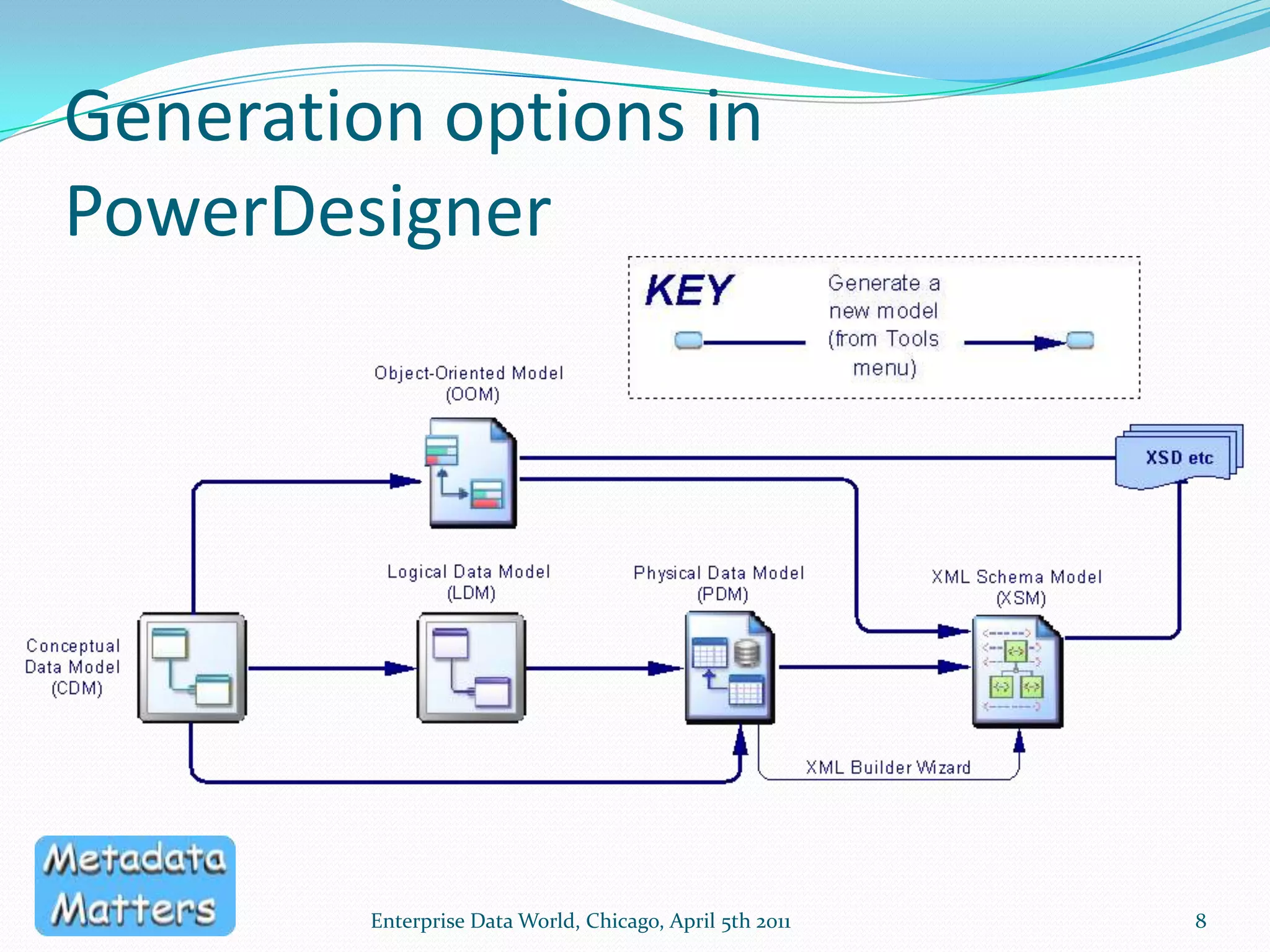
The flexibility of PowerDesignerEnterprise Data World, Chicago, April 5th 20117PowerDesigner has a dedicated XML Schema ModelSeveral different approaches supported out of the boxGenerating XSDs from a class modelGenerating an XML Schema model from a class model or a physical data model, then generating XSDsReverse-engineering existing XML Schemas into a class model or XML Schema ModelCan then generate a logical or conceptual view
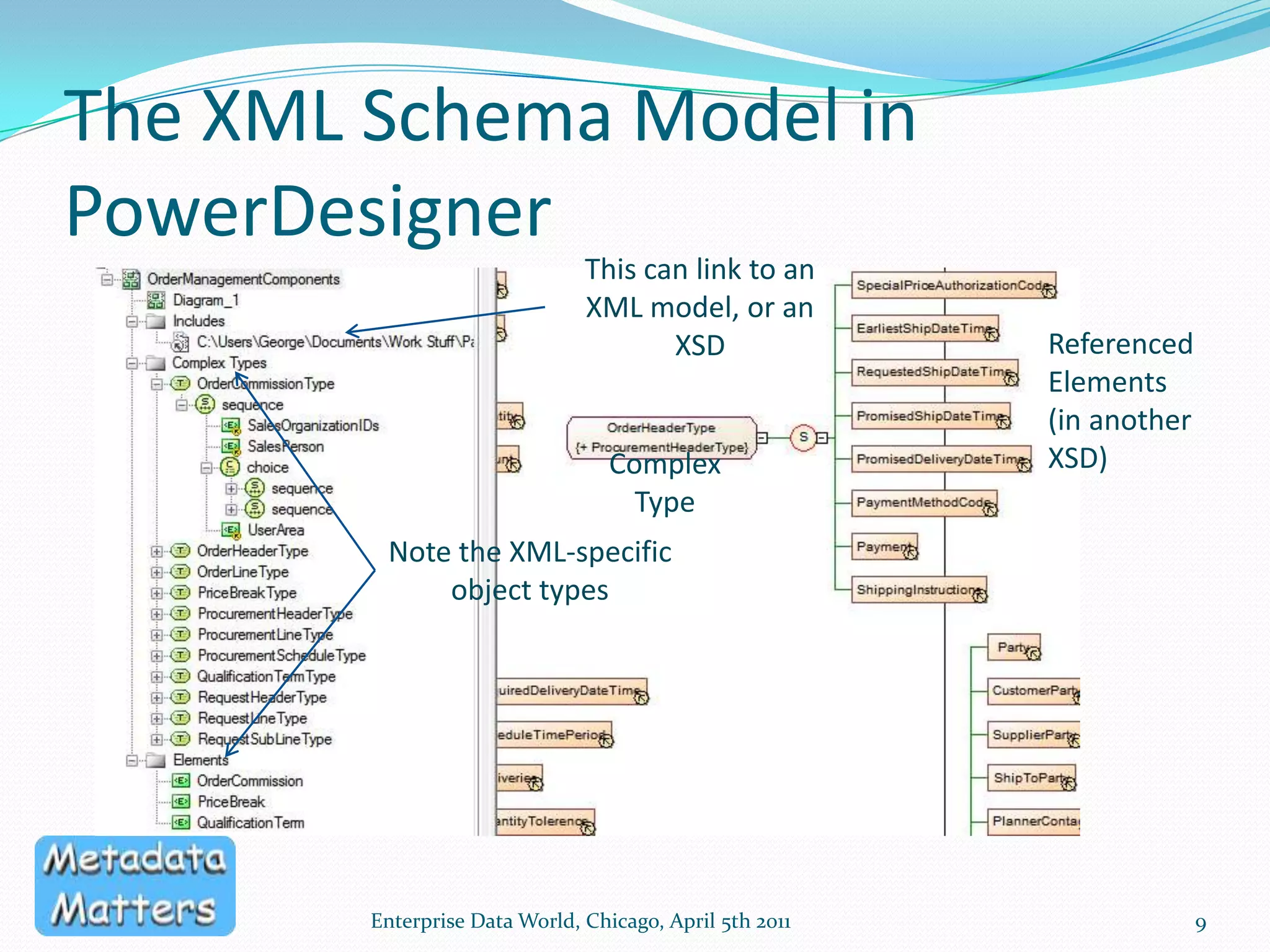
Generation options in PowerDesignerEnterprise Data World, Chicago, April 5th 20118
The XML Schema Model in PowerDesignerEnterprise Data World, Chicago, April 5th 20119This can link to an XML model, or an XSDReferencedElements (in another XSD)Complex TypeNote the XML-specific object types
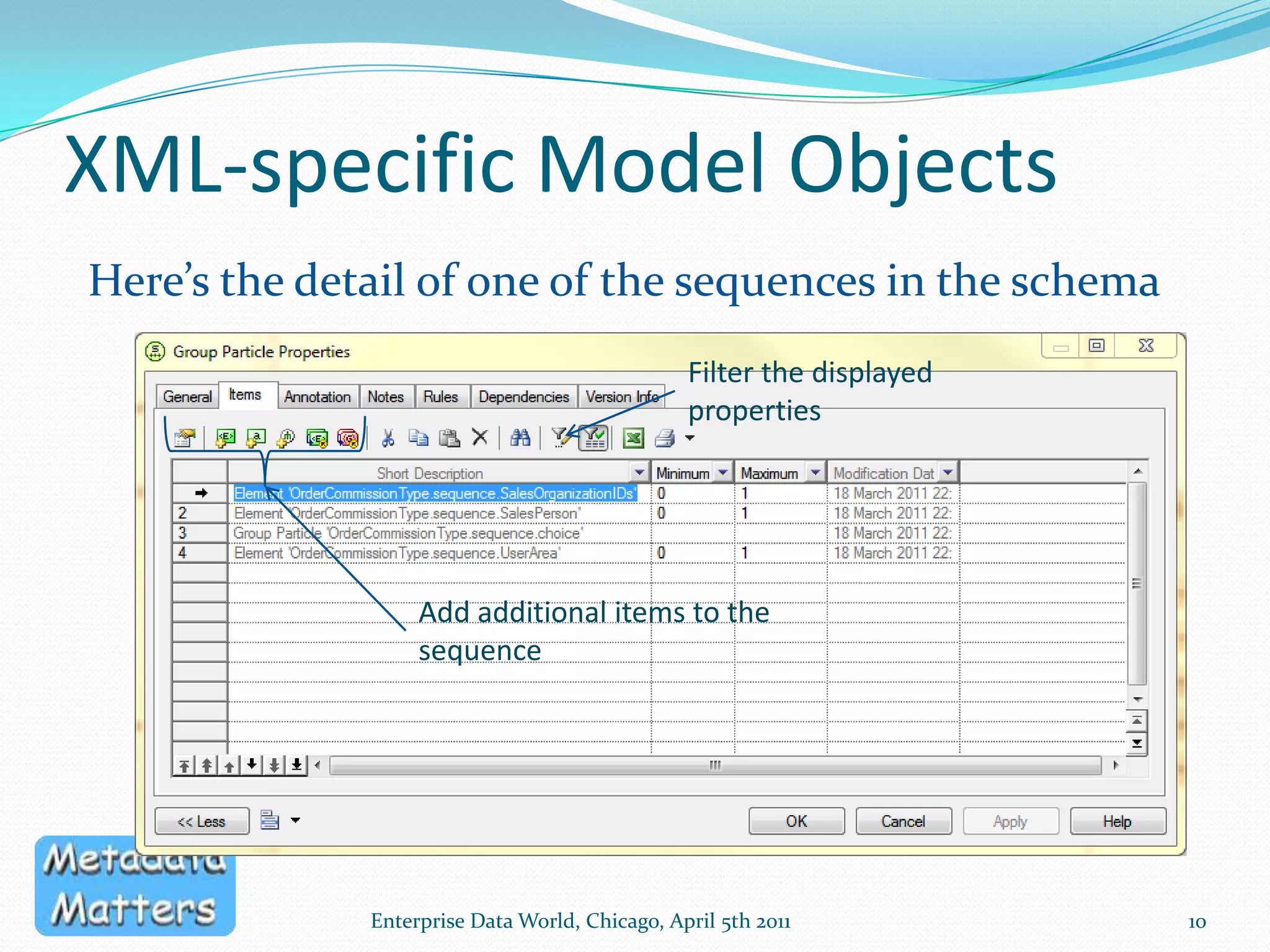
XML-specific Model Objects10Enterprise Data World, Chicago, April 5th 2011Here’s the detail of one of the sequences in the schemaFilter the displayed propertiesAdd additional items to the sequence
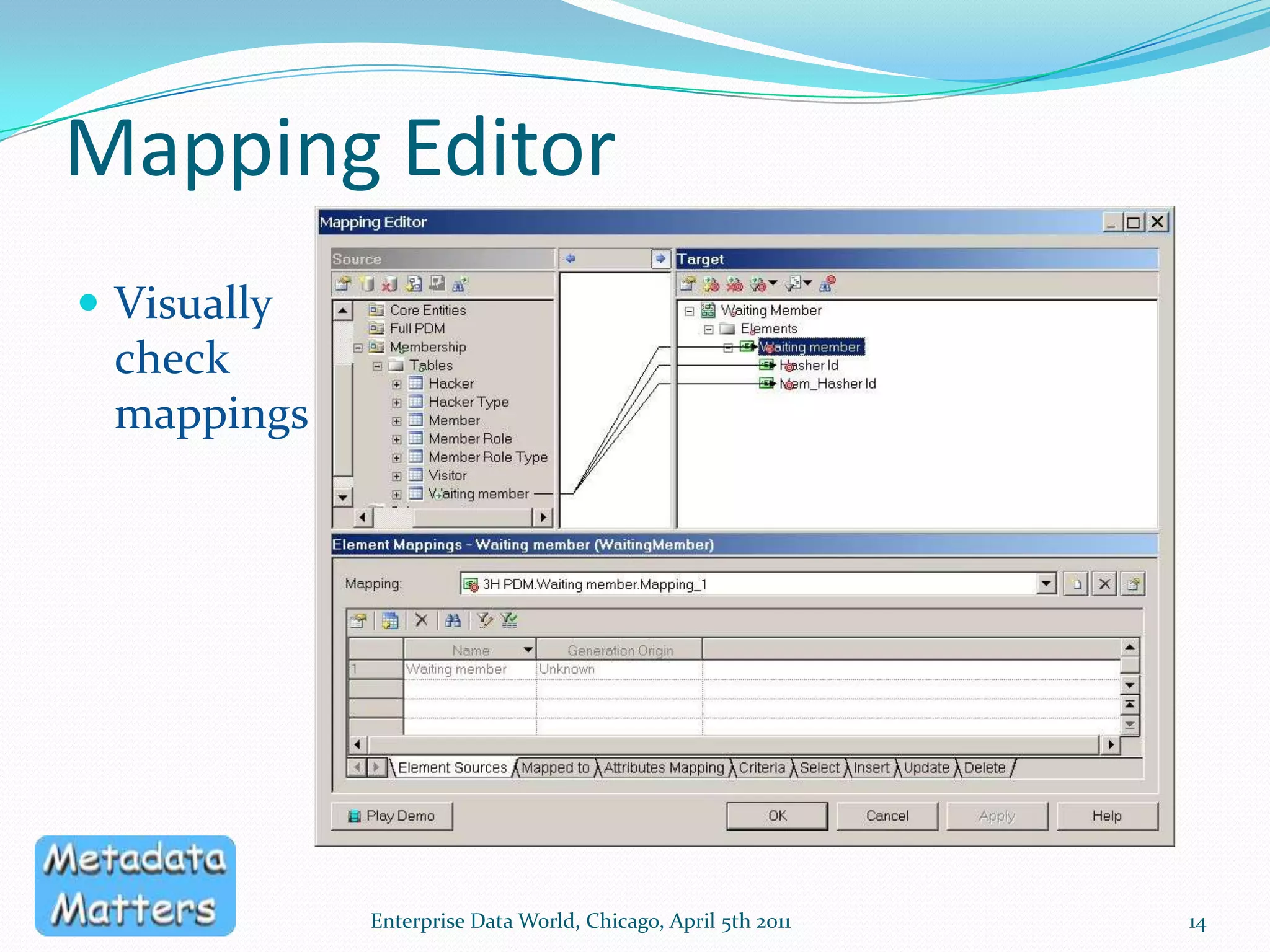
The XML ModelDedicated to modelling XML Schema1 schema per XML model, traceable to source modelsMapping Editor – drag and drop mappings between modelsSupports XSD, XDR and DTDMultiple Namespaces supportedCan use 1 XML model for multiple schemas in the same target namespaceEnterprise Data World, Chicago, April 5th 201111
The flexibility of PowerDesignerLinkages are automatically maintained between models as you generate themAdditional mappings can be added between any two modelsThe generation process can be customisedYou have control over the naming standards and data types used in each modelImpact and Lineage analysis is enabled by the generation and mapping linksEnterprise Data World, Chicago, April 5th 201112
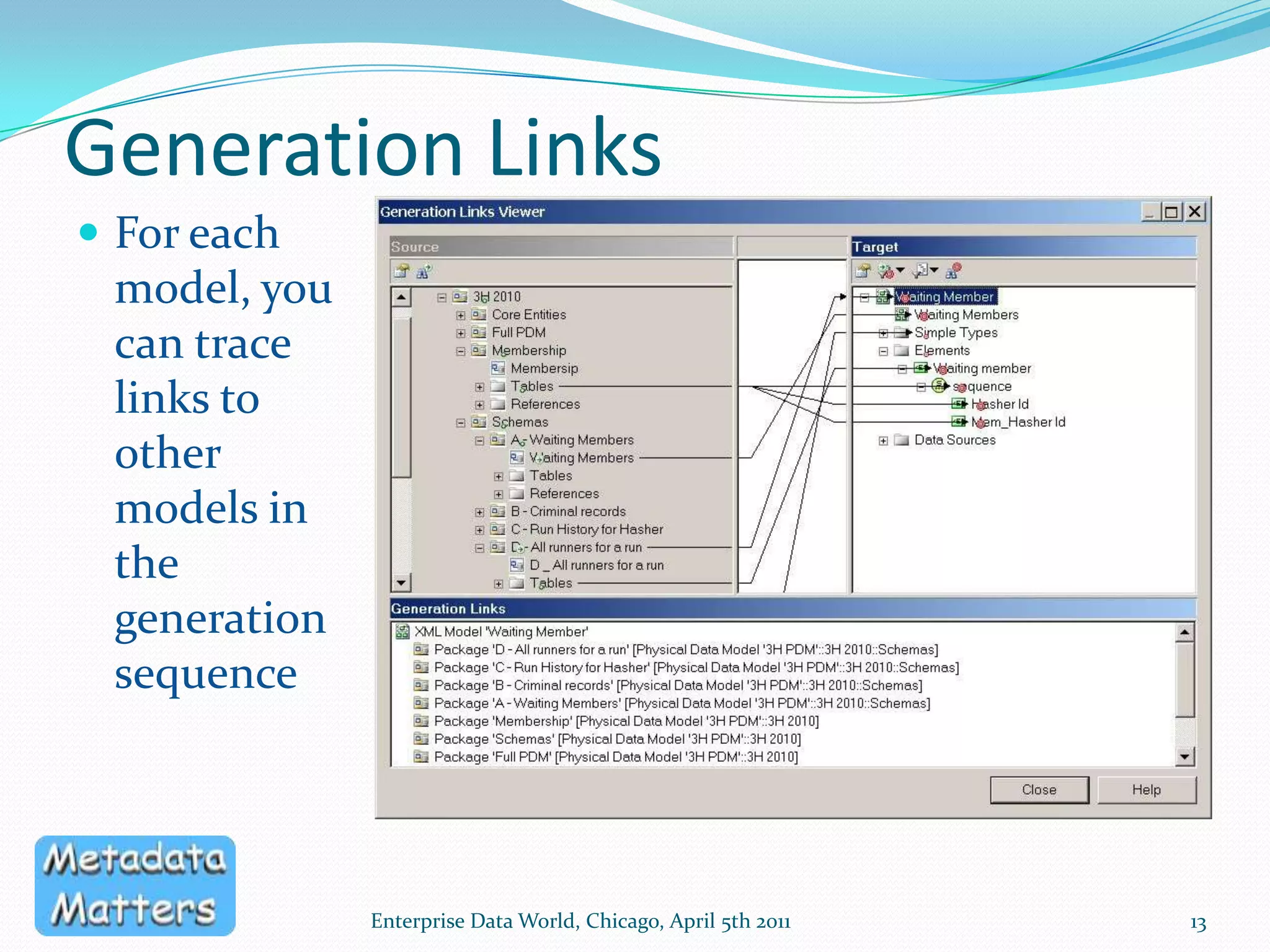
Generation LinksFor each model, you can trace links to other models in the generation sequenceEnterprise Data World, Chicago, April 5th 201113
Mapping EditorVisually check mappingsEnterprise Data World, Chicago, April 5th 201114
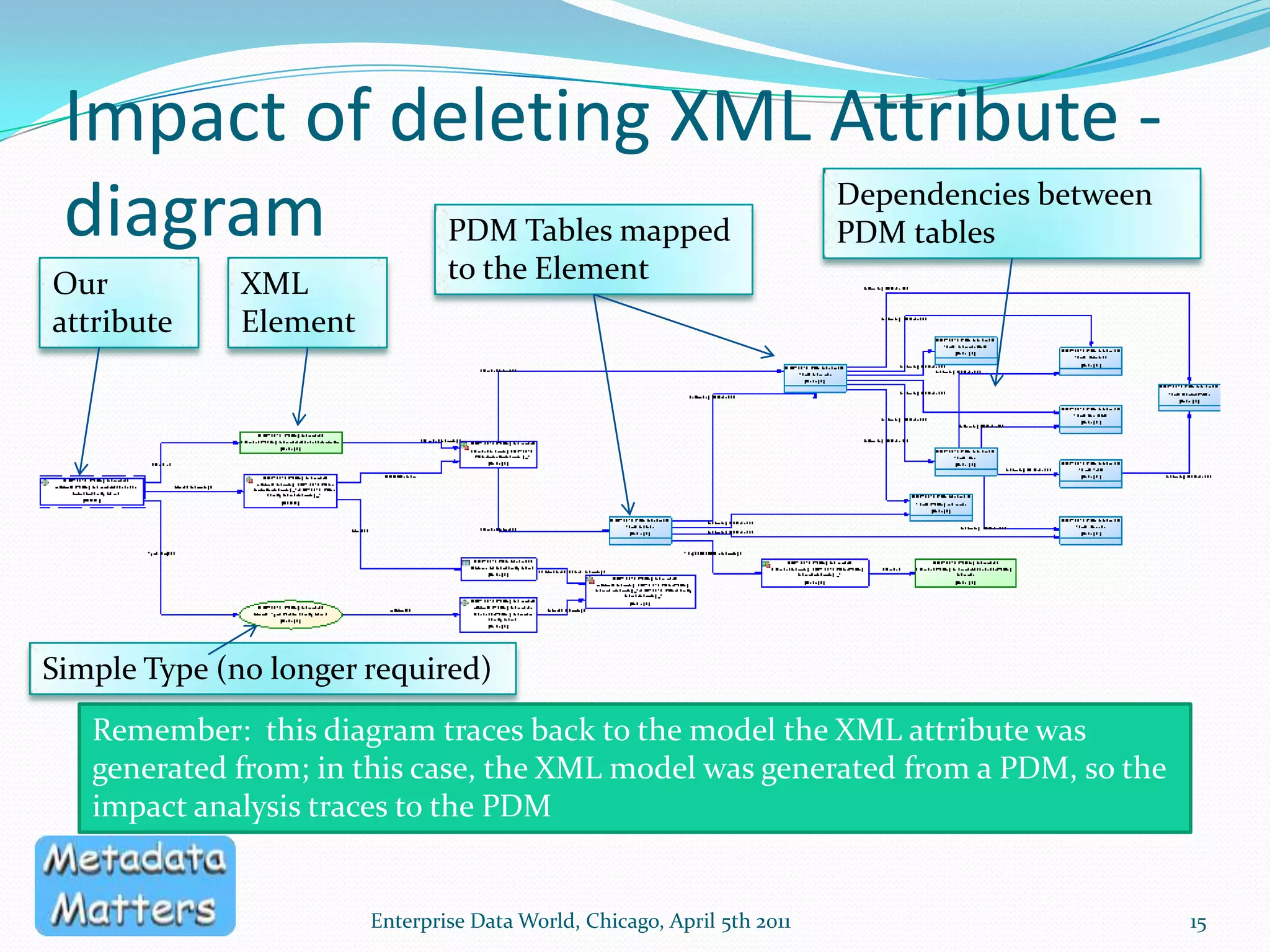
Impact of deleting XML Attribute - diagramEnterprise Data World, Chicago, April 5th 201115Dependencies between PDM tablesPDM Tables mapped to the ElementOur attributeXML ElementSimple Type (no longer required)Remember:  this diagram traces back to the model the XML attribute was generated from; in this case, the XML model was generated from a PDM, so the impact analysis traces to the PDM
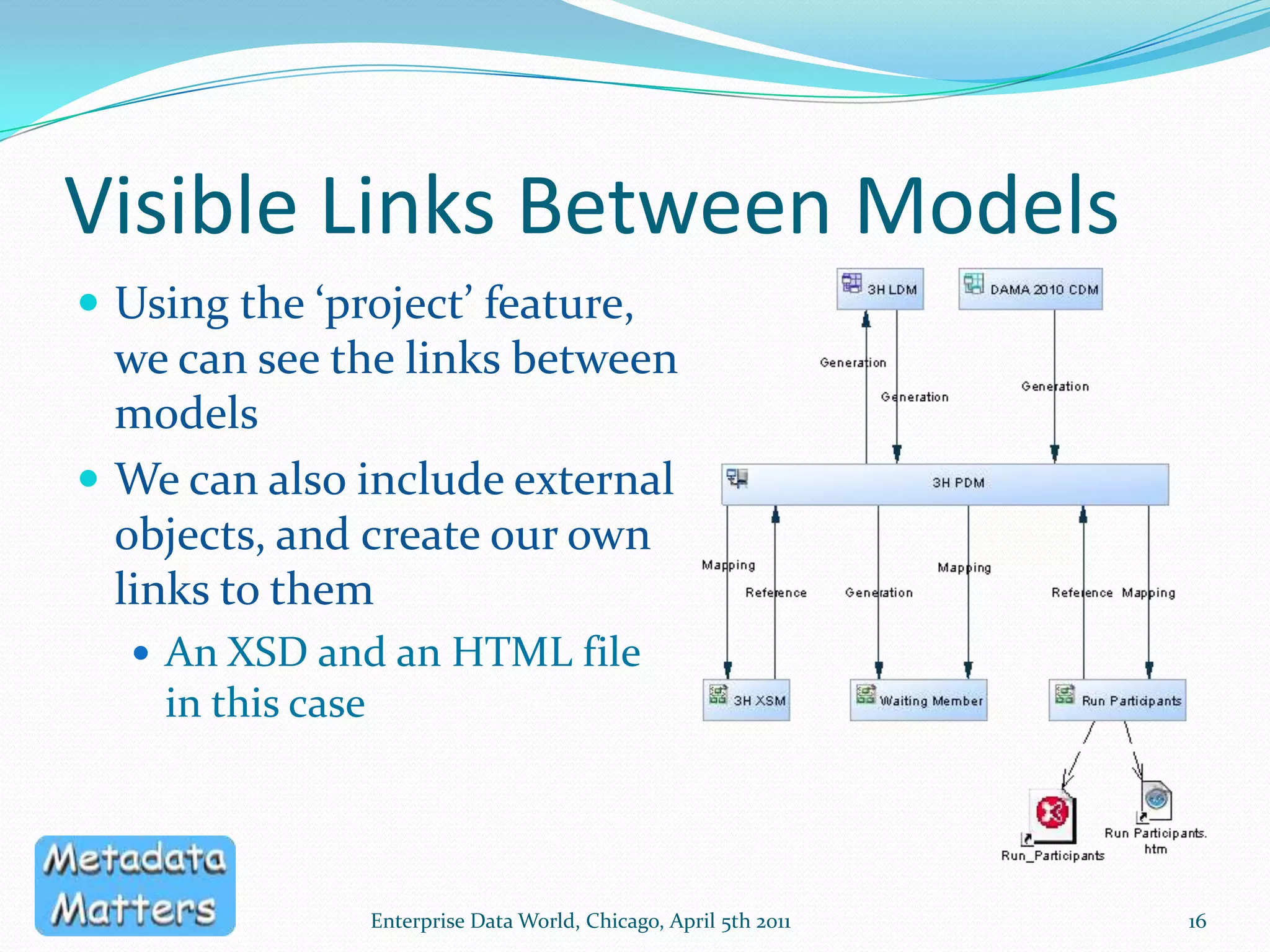
Visible Links Between ModelsUsing the ‘project’ feature, we can see the links between modelsWe can also include external objects, and create our own links to themAn XSD and an HTML file in this caseEnterprise Data World, Chicago, April 5th 201116
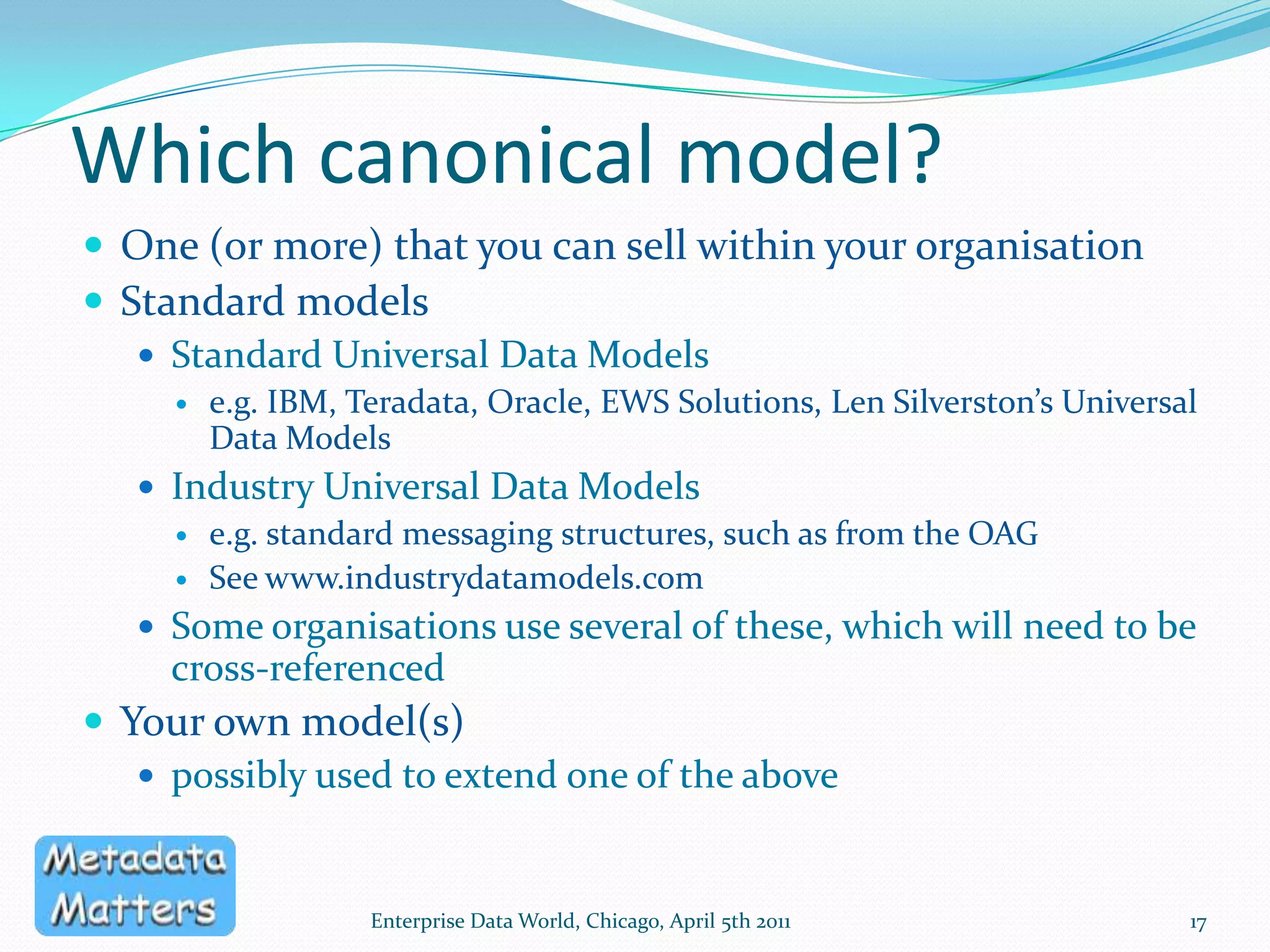
Which canonical model?One (or more) that you can sell within your organisationStandard modelsStandard Universal Data Modelse.g. IBM, Teradata, Oracle, EWS Solutions, Len Silverston’s Universal Data ModelsIndustry Universal Data Modelse.g. standard messaging structures, such as from the OAGSee www.industrydatamodels.com Some organisations use several of these, which will need to be cross-referencedYour own model(s)possibly used to extend one of the aboveEnterprise Data World, Chicago, April 5th 201117
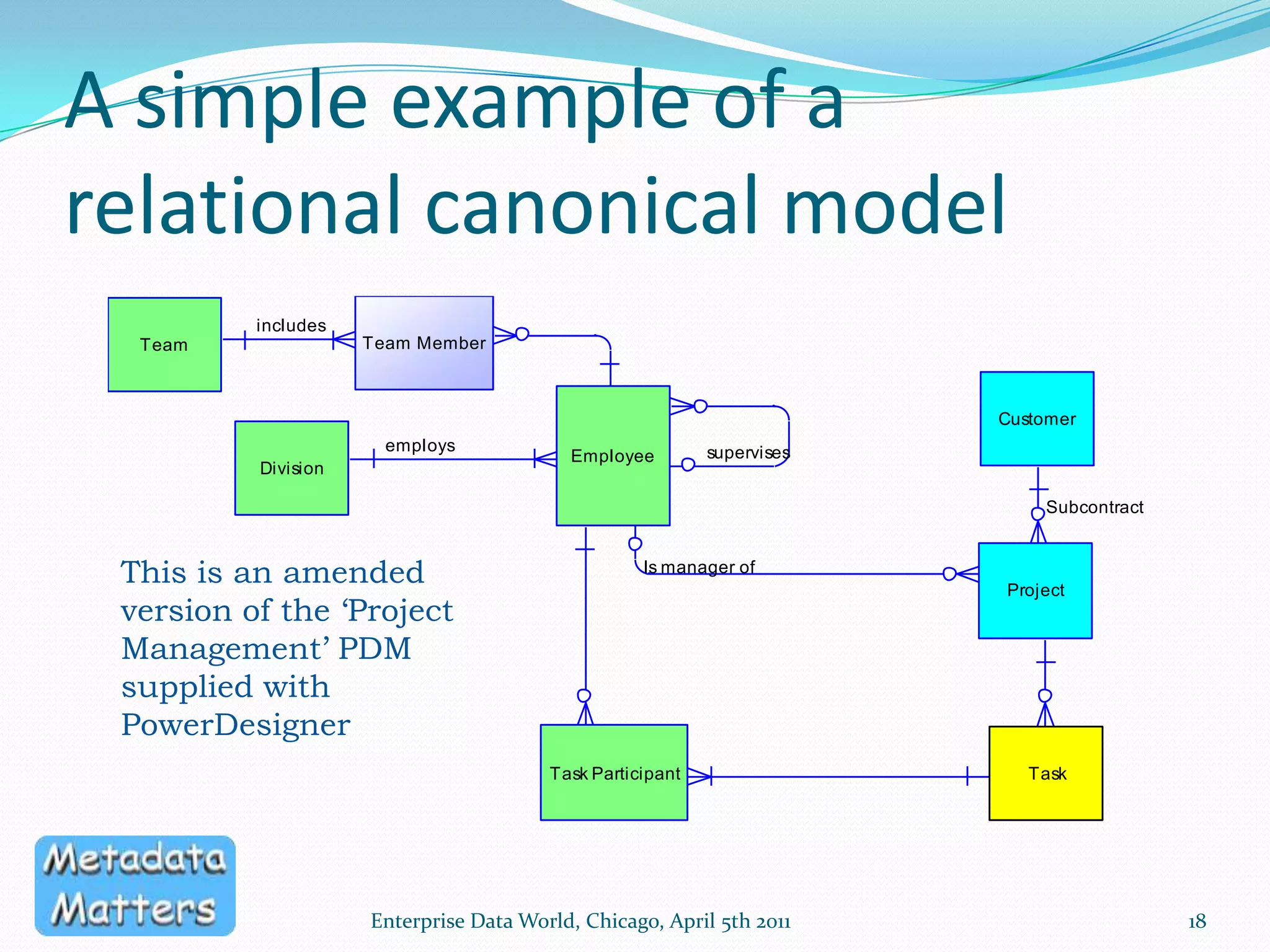
A simple example of a relational canonical modelEnterprise Data World, Chicago, April 5th 201118This is an amended version of the ‘Project Management’ PDM supplied with PowerDesigner
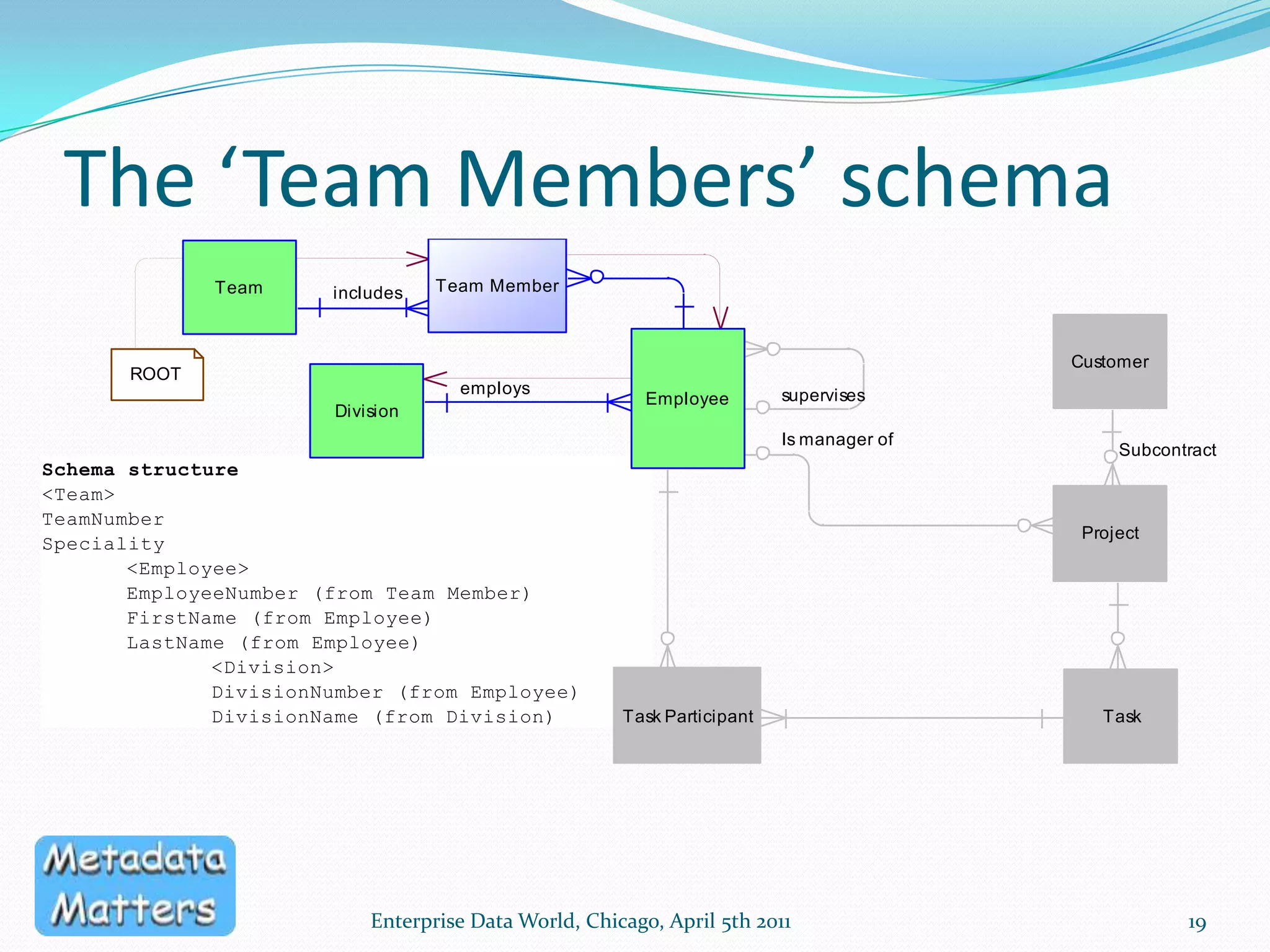
The ‘Team Members’ schemaEnterprise Data World, Chicago, April 5th 201119
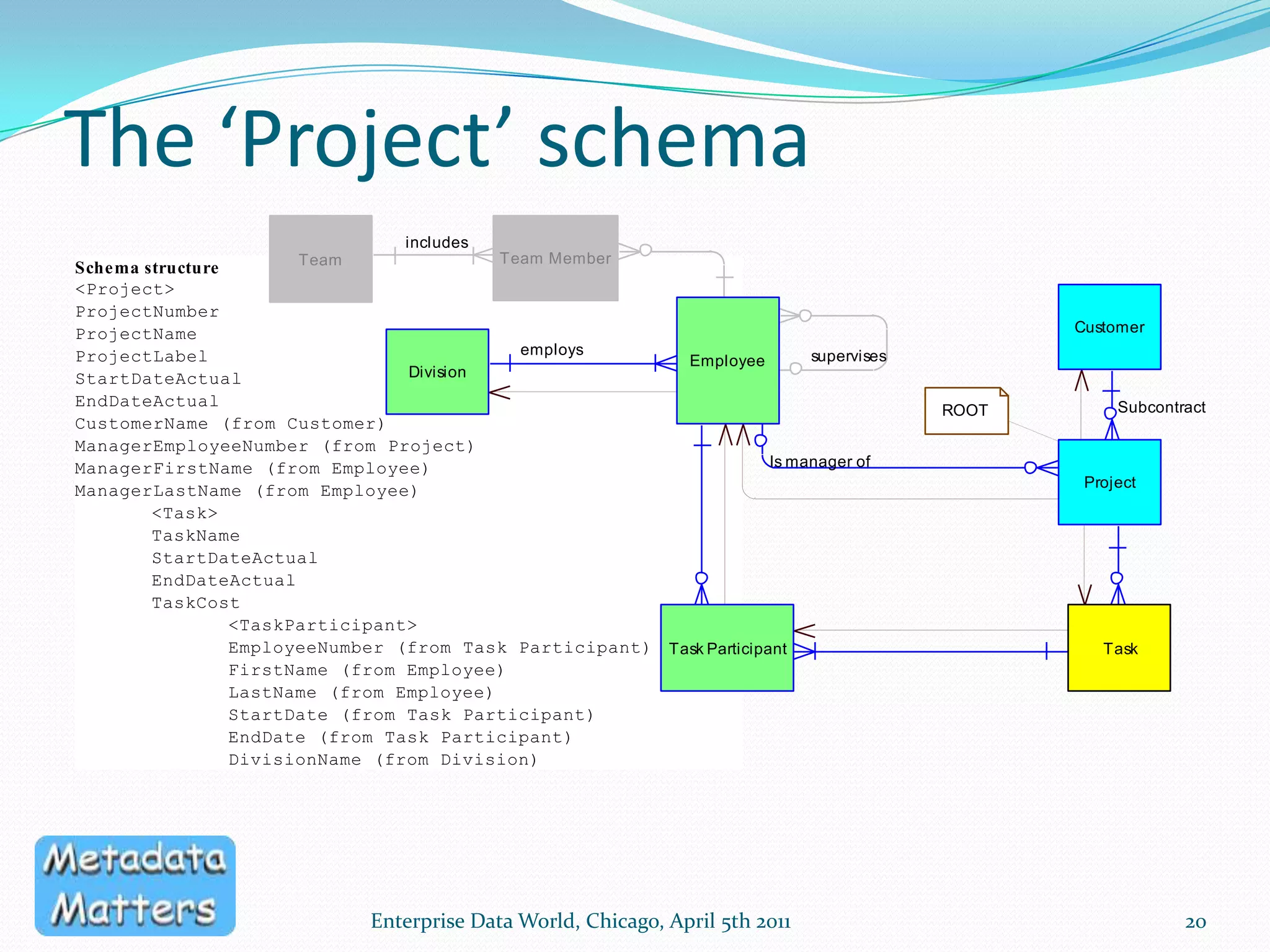
The ‘Project’ schemaEnterprise Data World, Chicago, April 5th 201120
Factors To Be ConsideredGenerating a Type Library vs. generating SchemasPhysical Design ChallengesModel Management Challenges21Enterprise Data World, Chicago, April 5th 2011
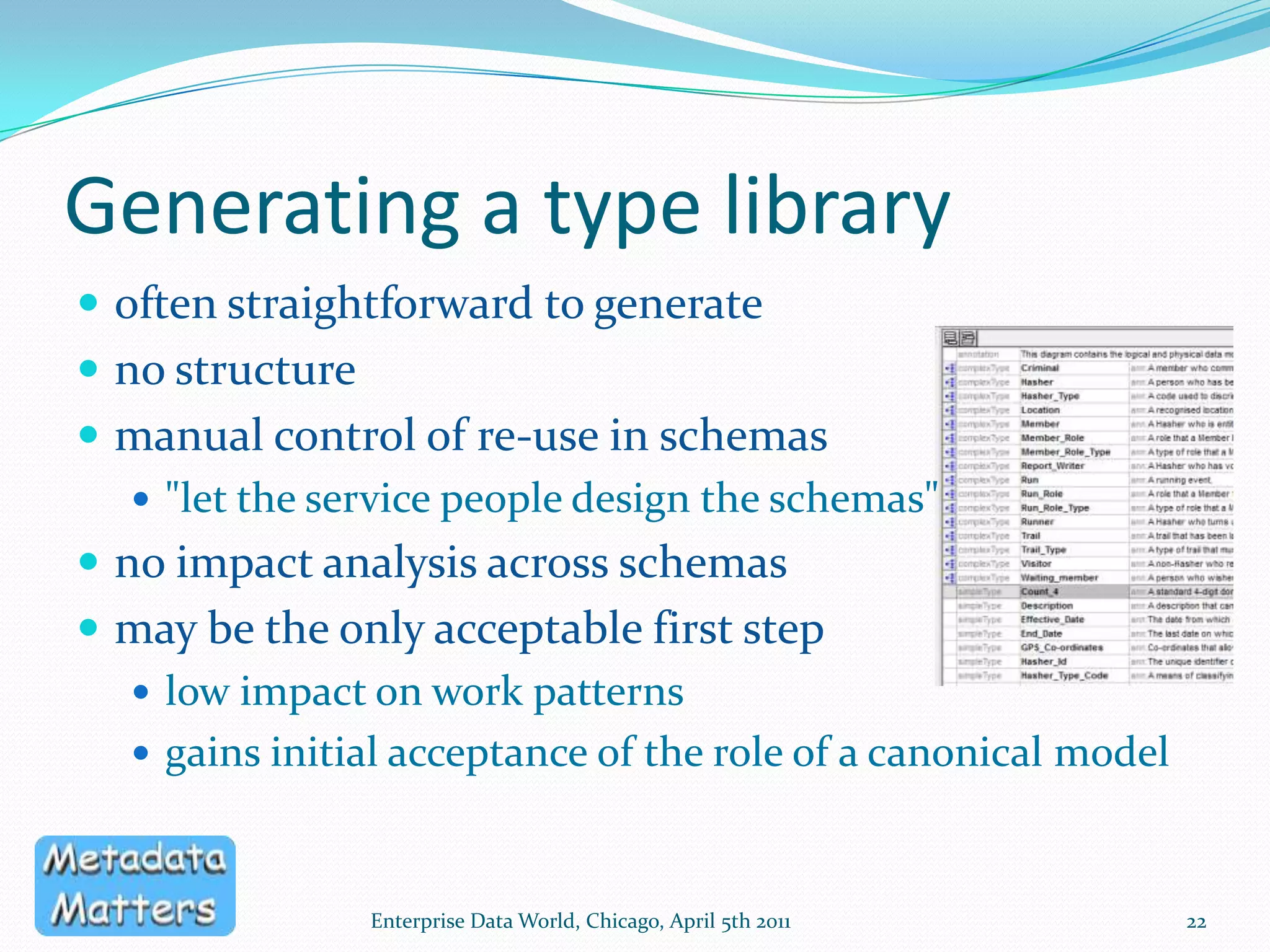
Generating a type libraryoften straightforward to generateno structuremanual control of re-use in schemas"let the service people design the schemas"no impact analysis across schemasmay be the only acceptable first steplow impact on work patternsgains initial acceptance of the role of a canonical modelEnterprise Data World, Chicago, April 5th 201122
Generating Individual SchemasA 'container' for each schemaModel, Submodel, Subject Area, Package etcdefines scopeprovides documentationfacilitates governanceComplete generationNothing changed post-generationRequires high degree of control over generation processEnterprise Data World, Chicago, April 5th 201123
Generating Individual Schemasall types can be localno need to 'include' or 'import' a base schemathe 'standard' types are used to generate the schema, rather than being referred to by the schemaThe standard types are in the canonical data modelpotential for impact analysiscan choose when to update each individual schemaEnterprise Data World, Chicago, April 5th 201124
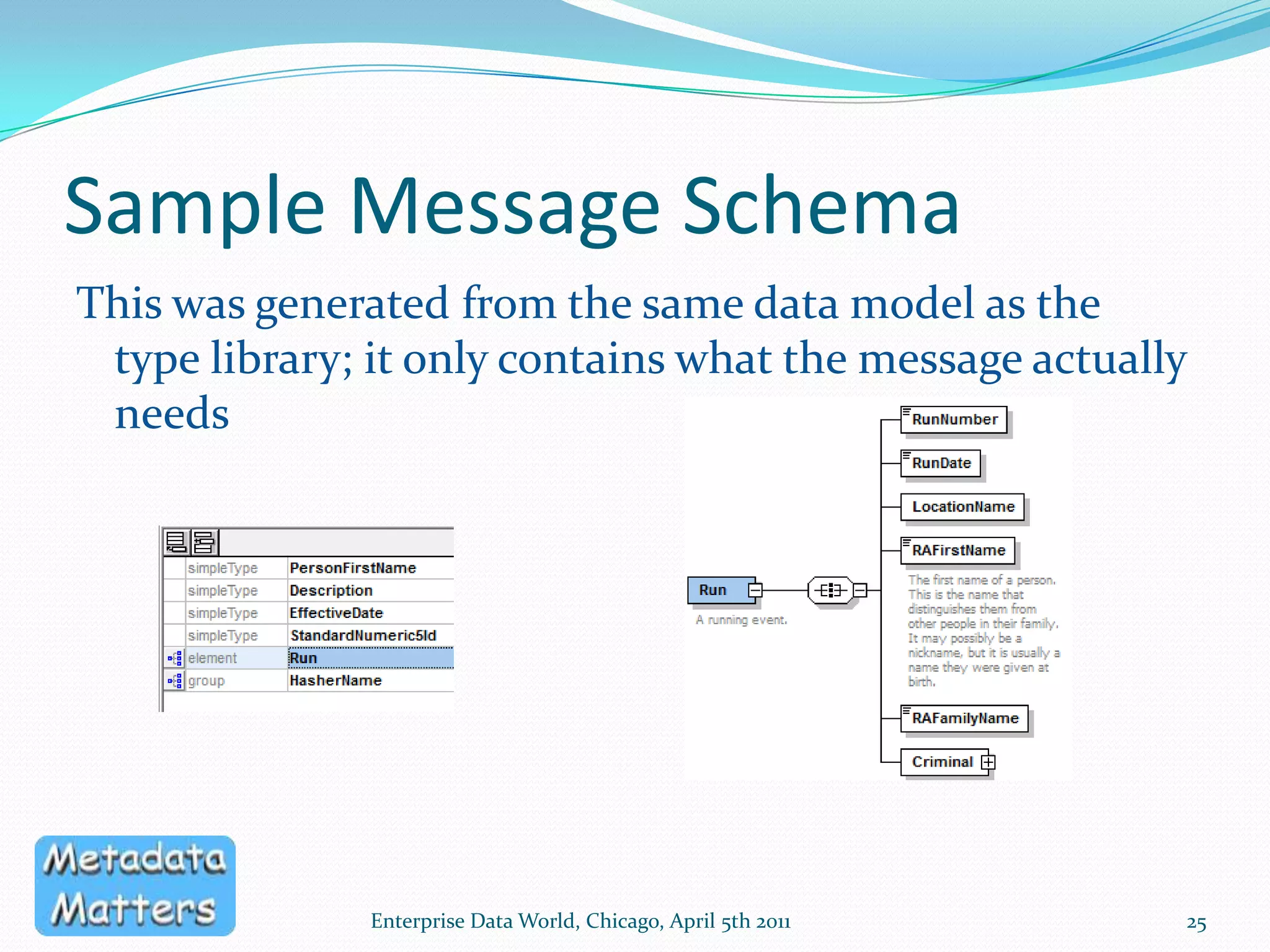
Sample Message SchemaThis was generated from the same data model as the type library; it only contains what the message actually needsEnterprise Data World, Chicago, April 5th 201125
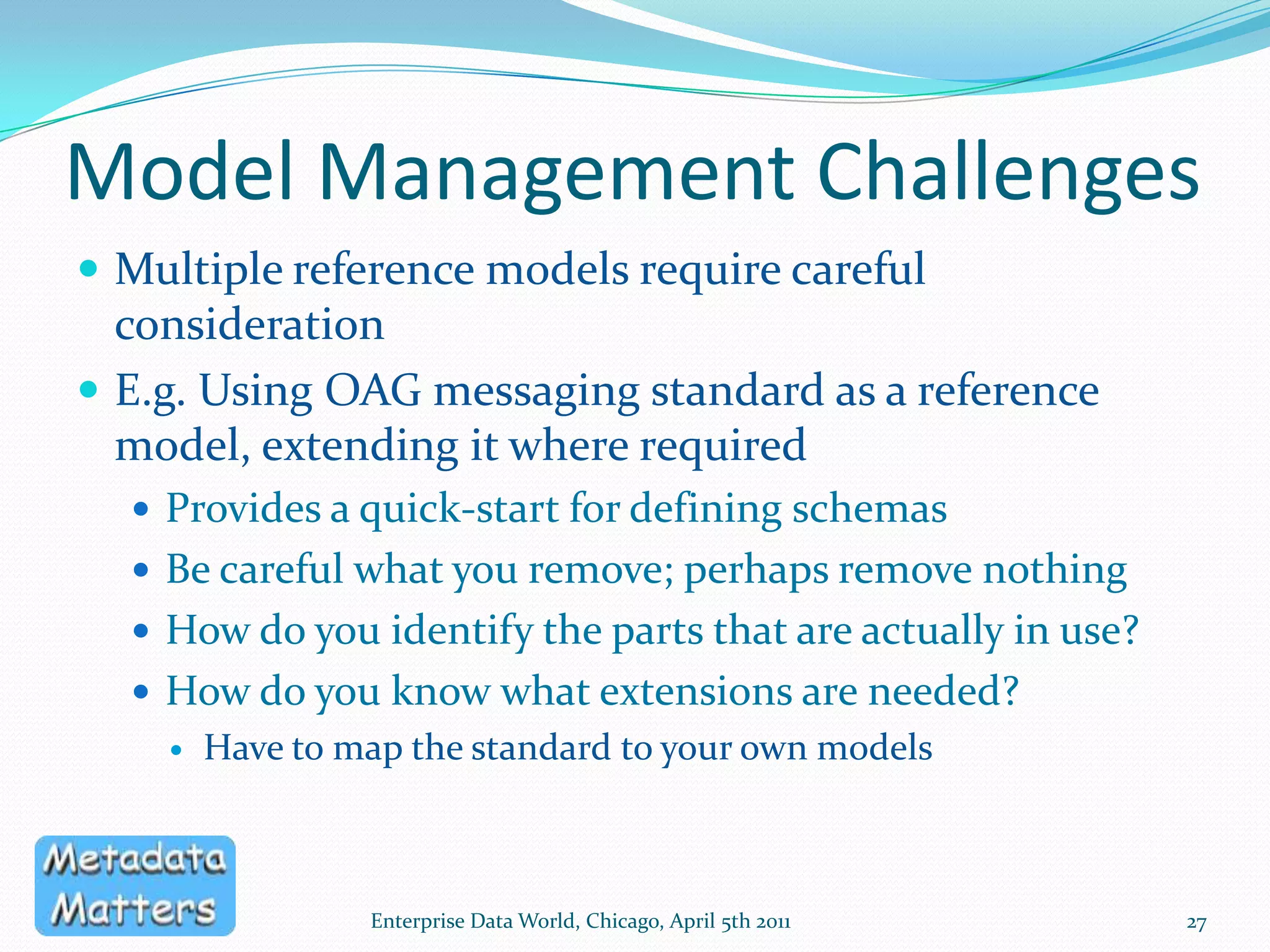
Physical Design ChallengesSome of these challenges are similar to those we face when we use a single Logical Data Model for designing multiple database schemasDifferences between SchemasHandling Sub-types and inherited attributesDenormalising attributes and entitiesData Type and Name conversionsScalability of Process Automating & future-proofing the generation processEnterprise Data World, Chicago, April 5th 201126
Model Management ChallengesMultiple reference models require careful considerationE.g. Using OAG messaging standard as a reference model, extending it where requiredProvides a quick-start for defining schemasBe careful what you remove; perhaps remove nothingHow do you identify the parts that are actually in use?How do you know what extensions are needed?Have to map the standard to your own modelsEnterprise Data World, Chicago, April 5th 201127
Generating XML Models in PowerDesignerTwo optionsGenerate XML Model using default options, from selected tables, and tinker the XML afterwardsUse XML Builder to design and generate almost exactly what is required, and then tinker the XML model28Enterprise Data World, Chicago, April 5th 2011
Contact MeTelephone: +44 (0) 20 8123 8756 (forwarded to mobile)UK mobile: +44 (0) 794 293 0648Skype: gmcgeachieTwitter: metadatajunkieEmail:  George.McGeachie @ MetadataMatters.comBlog: http://metadatajunkie.wordpress.com/Enterprise Data World, Chicago, April 5th 201129

Generating XML schemas from a Logical Data Model (EDW 2011)

  • 1.
    Generating XML Schemasfrom a canonical model - a practical exampleGeorge McGeachieMetadata Matters LimitedEnterprise Data WorldChicagoApril 5th, 2010
  • 2.
    The ‘C’ wordManagingXSDs using a master (canonical) XML schemaThe flexibility of PowerDesignerThe XML Schema Model in PowerDesignerWhich Canonical Model Should You Use?Factors To Be ConsideredGenerating XML Models in Power DesignerEnterprise Data World, Chicago, April 5th 20112
  • 3.
    About MeI’ve beeninvolved with modelling and managing data and metadata for longer than I care to remember.When I first came across XML Schemas, I was struck by their simplicity and versatility. When I saw how some people use them, I realised that the days of unmanaged COBOL copybooks had returned to haunt me.This is my attempt to exorcise the XML demon.Enterprise Data World, Chicago, April 5th 20113
  • 4.
    The ‘C’ wordIt’sdifficult to avoid the word ‘Canonical’ when discussing standard XML messagesTo some, the message schemas are the ‘canonical’To others, the underlying model is the ‘canonical’When I use the word, I mean both of themEnterprise Data World, Chicago, April 5th 20114
  • 5.
    Managing XSDs usinga master (canonical) XML schemaAn XML master schema must be hierarchicalIt cannot easily show all the complex relationships between the data conceptsIt cannot be flexible enough to support multiple views of the dataYou need to understand XML to create, edit or read the modelEnterprise Data World, Chicago, April 5th 20115
  • 6.
    Managing XSDs usinga master (canonical) XML schemaHow would we integrate the metadata represented by a schema with our other metadata?Reverse-engineer it into a repository or modelling tool?How would weEnsure consistency of XSDs with each other?Enable impact analysis?Manage the variations necessary between dependent schemas?Enterprise Data World, Chicago, April 5th 20116
  • 7.
    The flexibility ofPowerDesignerEnterprise Data World, Chicago, April 5th 20117PowerDesigner has a dedicated XML Schema ModelSeveral different approaches supported out of the boxGenerating XSDs from a class modelGenerating an XML Schema model from a class model or a physical data model, then generating XSDsReverse-engineering existing XML Schemas into a class model or XML Schema ModelCan then generate a logical or conceptual view
  • 8.
    Generation options inPowerDesignerEnterprise Data World, Chicago, April 5th 20118
  • 9.
    The XML SchemaModel in PowerDesignerEnterprise Data World, Chicago, April 5th 20119This can link to an XML model, or an XSDReferencedElements (in another XSD)Complex TypeNote the XML-specific object types
  • 10.
    XML-specific Model Objects10EnterpriseData World, Chicago, April 5th 2011Here’s the detail of one of the sequences in the schemaFilter the displayed propertiesAdd additional items to the sequence
  • 11.
    The XML ModelDedicatedto modelling XML Schema1 schema per XML model, traceable to source modelsMapping Editor – drag and drop mappings between modelsSupports XSD, XDR and DTDMultiple Namespaces supportedCan use 1 XML model for multiple schemas in the same target namespaceEnterprise Data World, Chicago, April 5th 201111
  • 12.
    The flexibility ofPowerDesignerLinkages are automatically maintained between models as you generate themAdditional mappings can be added between any two modelsThe generation process can be customisedYou have control over the naming standards and data types used in each modelImpact and Lineage analysis is enabled by the generation and mapping linksEnterprise Data World, Chicago, April 5th 201112
  • 13.
    Generation LinksFor eachmodel, you can trace links to other models in the generation sequenceEnterprise Data World, Chicago, April 5th 201113
  • 14.
    Mapping EditorVisually checkmappingsEnterprise Data World, Chicago, April 5th 201114
  • 15.
    Impact of deletingXML Attribute - diagramEnterprise Data World, Chicago, April 5th 201115Dependencies between PDM tablesPDM Tables mapped to the ElementOur attributeXML ElementSimple Type (no longer required)Remember: this diagram traces back to the model the XML attribute was generated from; in this case, the XML model was generated from a PDM, so the impact analysis traces to the PDM
  • 16.
    Visible Links BetweenModelsUsing the ‘project’ feature, we can see the links between modelsWe can also include external objects, and create our own links to themAn XSD and an HTML file in this caseEnterprise Data World, Chicago, April 5th 201116
  • 17.
    Which canonical model?One(or more) that you can sell within your organisationStandard modelsStandard Universal Data Modelse.g. IBM, Teradata, Oracle, EWS Solutions, Len Silverston’s Universal Data ModelsIndustry Universal Data Modelse.g. standard messaging structures, such as from the OAGSee www.industrydatamodels.com Some organisations use several of these, which will need to be cross-referencedYour own model(s)possibly used to extend one of the aboveEnterprise Data World, Chicago, April 5th 201117
  • 18.
    A simple exampleof a relational canonical modelEnterprise Data World, Chicago, April 5th 201118This is an amended version of the ‘Project Management’ PDM supplied with PowerDesigner
  • 19.
    The ‘Team Members’schemaEnterprise Data World, Chicago, April 5th 201119
  • 20.
    The ‘Project’ schemaEnterpriseData World, Chicago, April 5th 201120
  • 21.
    Factors To BeConsideredGenerating a Type Library vs. generating SchemasPhysical Design ChallengesModel Management Challenges21Enterprise Data World, Chicago, April 5th 2011
  • 22.
    Generating a typelibraryoften straightforward to generateno structuremanual control of re-use in schemas"let the service people design the schemas"no impact analysis across schemasmay be the only acceptable first steplow impact on work patternsgains initial acceptance of the role of a canonical modelEnterprise Data World, Chicago, April 5th 201122
  • 23.
    Generating Individual SchemasA'container' for each schemaModel, Submodel, Subject Area, Package etcdefines scopeprovides documentationfacilitates governanceComplete generationNothing changed post-generationRequires high degree of control over generation processEnterprise Data World, Chicago, April 5th 201123
  • 24.
    Generating Individual Schemasalltypes can be localno need to 'include' or 'import' a base schemathe 'standard' types are used to generate the schema, rather than being referred to by the schemaThe standard types are in the canonical data modelpotential for impact analysiscan choose when to update each individual schemaEnterprise Data World, Chicago, April 5th 201124
  • 25.
    Sample Message SchemaThiswas generated from the same data model as the type library; it only contains what the message actually needsEnterprise Data World, Chicago, April 5th 201125
  • 26.
    Physical Design ChallengesSomeof these challenges are similar to those we face when we use a single Logical Data Model for designing multiple database schemasDifferences between SchemasHandling Sub-types and inherited attributesDenormalising attributes and entitiesData Type and Name conversionsScalability of Process Automating & future-proofing the generation processEnterprise Data World, Chicago, April 5th 201126
  • 27.
    Model Management ChallengesMultiplereference models require careful considerationE.g. Using OAG messaging standard as a reference model, extending it where requiredProvides a quick-start for defining schemasBe careful what you remove; perhaps remove nothingHow do you identify the parts that are actually in use?How do you know what extensions are needed?Have to map the standard to your own modelsEnterprise Data World, Chicago, April 5th 201127
  • 28.
    Generating XML Modelsin PowerDesignerTwo optionsGenerate XML Model using default options, from selected tables, and tinker the XML afterwardsUse XML Builder to design and generate almost exactly what is required, and then tinker the XML model28Enterprise Data World, Chicago, April 5th 2011
  • 29.
    Contact MeTelephone: +44(0) 20 8123 8756 (forwarded to mobile)UK mobile: +44 (0) 794 293 0648Skype: gmcgeachieTwitter: metadatajunkieEmail: George.McGeachie @ MetadataMatters.comBlog: http://metadatajunkie.wordpress.com/Enterprise Data World, Chicago, April 5th 201129
  • 30.

Editor's Notes

  • #4 I’m a modeller at heart, not an XML Guru, and not a developer.
  • #5 Why use a canonical data model?In this presentation, I assume that the use of a canonical model is a given; we all see the need to manage our understanding and metadataSee Designing Canonicals for SOA: Bridging ER and XML Worlds Mehmet Orun & Jeff Pekrul, Genentechhttp://sfdama.org/Presentations/2007-02-07_Canonical_for_SOA_%20ER_XML.pdf
  • #6 It’s possible to manage the content of XML Schemas by using a single master (canonical) XML Schema, which defines all the allowed types. The hierarchical nature of an XML Schema makes it impossible for a master schema to do any more than specify the possible building blocks for schemas; it cannot govern the ways in which those building blocks are assembled. A canonical data model managed as an XSD can only be a type library; it cannot possibly control the ways in which the types can be assembledMany of the challenges (see later) we face when generating XSDs also apply to an XML Master Schema
  • #7 A stand-alone canonical XML schema is an island of metadata, providing no impact and lineage analysis capabilities
  • #8 The dedicated XML model in PowerDesigner enables us to manage XML schema designs in an integrated manner; have a look at the options in the next slide
  • #9 You can see how the XML Schema Model forms an integral part of the PowerDesigner model management philosophy.This slide only shows the ‘downward’ generation options; it also possible for a model to generate another model of the same type, or another model of a ‘higher’ type. E.g. a PDM can be generated from an XSM.
  • #10 This is an OAGi XML Schema, reverse-engineered into PowerDesigner. The only change I’ve made is to move some symbols closer to each other. This schema inherits all the simple types from other schemas, which is why there aren’t any here.
  • #20 The arrows show the navigation path through the model required to create the schema; note that some relationships are traversed from parent to child, others from child to parent. Also note that no attributes are extracted from the ‘Team Member’ entity; we use it as a route to the details of the Employee. The grey parts of the model are not used in this schema.
  • #21 A more complex schemaThe arrows show the navigation path through the model required to create the schema; note that some relationships are traversed from parent to child, others from child to parent. Also note that no attributes are extracted from the ‘Team Member’ entity; we use it as a route to the details of the Employee.
  • #27 Differences between SchemasAttribute and relationship optionality and cardinalityExcluding attributesFewer or more enumerationsDenormalising attributes and entitiesAttributes may appear in >1 element1 element may include attributes from multiple entitiesScalability of Process We can handle 5 XSDs, but what about 500 XSDs?
  • #29 From PDM