G E N E R A L C A P A B I L I T I E S
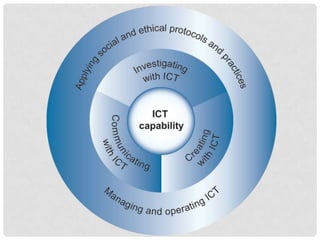
ICT
Link to all
capabilities
ICT: APPLYING SOCIAL AND ETHICAL
PROTOCOLS AND PRACTICES
Copyright and Web 2.0
• Whenever an image, piece of text, video, etc is
added to the internet copyright is automatically
attributed.
• Before copying and pasting permission must be
gained.
• When you copy and paste, eg images from a
google image search, you have no idea whether
you’re breaking the law.
• Supplying the web address of where you took it
from is not enough.
ICT: APPLYING SOCIAL AND ETHICAL
PROTOCOLS AND PRACTICES
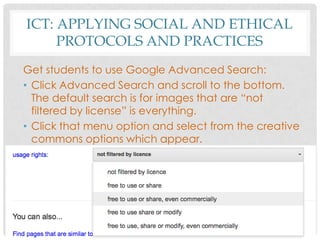
Get students to use Google Advanced Search:
• Click Advanced Search and scroll to the bottom.
The default search is for images that are “not
filtered by license” is everything.
• Click that menu option and select from the creative
commons options which appear.
ICT: APPLYING SOCIAL AND ETHICAL
PROTOCOLS AND PRACTICES
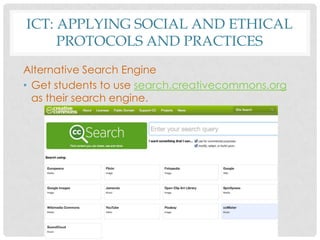
Alternative Search Engine
• Get students to use search.creativecommons.org
as their search engine.
ICT: APPLYING SOCIAL AND ETHICAL
PROTOCOLS AND PRACTICES
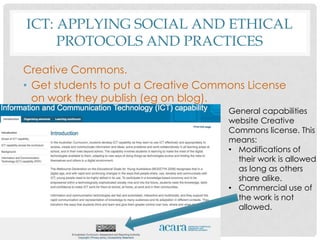
Creative Commons.
• Get students to put a Creative Commons License
on work they publish (eg on blog).
General capabilities
website Creative
Commons license. This
means:
• Modifications of
their work is allowed
as long as others
share alike.
• Commercial use of
the work is not
allowed.
ICT: APPLYING SOCIAL AND ETHICAL
PROTOCOLS AND PRACTICES
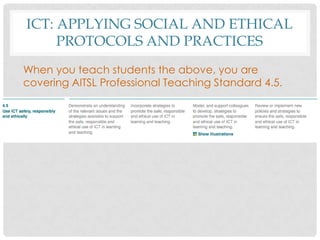
When you teach students the above, you are
covering AITSL Professional Teaching Standard 4.5.
ICT: APPLYING SOCIAL AND ETHICAL
PROTOCOLS AND PRACTICES
Go to:
• Creative Commons Website
creativecommons.org.au
• Selena Woodward’s Website (source of this
information) www.teachertechnologies.com
• Selena Woodward’s page on Creative Commons

General Capabilities ICT

  • 1.
    G E NE R A L C A P A B I L I T I E S ICT
  • 2.
  • 3.
    ICT: APPLYING SOCIALAND ETHICAL PROTOCOLS AND PRACTICES Copyright and Web 2.0 • Whenever an image, piece of text, video, etc is added to the internet copyright is automatically attributed. • Before copying and pasting permission must be gained. • When you copy and paste, eg images from a google image search, you have no idea whether you’re breaking the law. • Supplying the web address of where you took it from is not enough.
  • 4.
    ICT: APPLYING SOCIALAND ETHICAL PROTOCOLS AND PRACTICES Get students to use Google Advanced Search: • Click Advanced Search and scroll to the bottom. The default search is for images that are “not filtered by license” is everything. • Click that menu option and select from the creative commons options which appear.
  • 5.
    ICT: APPLYING SOCIALAND ETHICAL PROTOCOLS AND PRACTICES Alternative Search Engine • Get students to use search.creativecommons.org as their search engine.
  • 6.
    ICT: APPLYING SOCIALAND ETHICAL PROTOCOLS AND PRACTICES Creative Commons. • Get students to put a Creative Commons License on work they publish (eg on blog). General capabilities website Creative Commons license. This means: • Modifications of their work is allowed as long as others share alike. • Commercial use of the work is not allowed.
  • 7.
    ICT: APPLYING SOCIALAND ETHICAL PROTOCOLS AND PRACTICES When you teach students the above, you are covering AITSL Professional Teaching Standard 4.5.
  • 8.
    ICT: APPLYING SOCIALAND ETHICAL PROTOCOLS AND PRACTICES Go to: • Creative Commons Website creativecommons.org.au • Selena Woodward’s Website (source of this information) www.teachertechnologies.com • Selena Woodward’s page on Creative Commons