Adam Mukharil Bachtiar
English Class
Informatics Engineering 2011
Algorithms and Programming
Introduction of Dev Pascal,
Data Type, Value, and Identifier
Steps of the Day
Let’s Start
Dev Pascal Data Type
Value and
Identifier
Dev Pascal
Definition and Instalation
DefinitionofDEVPascal
An IDE (Integrated Development
Environment) for PASCAL language that was
built by BLOODSHEED. It’s Freeware.
HowtoMakeaProgramin
DEVPascal?
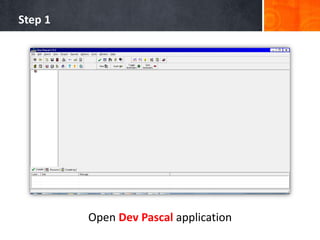
Step 1
Open Dev Pascal application
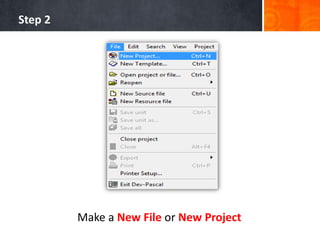
Step 2
Make a New File or New Project
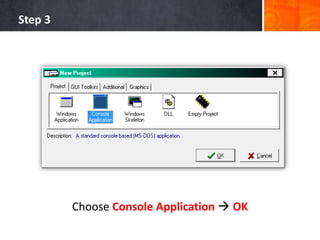
Step 3
Choose Console Application  OK
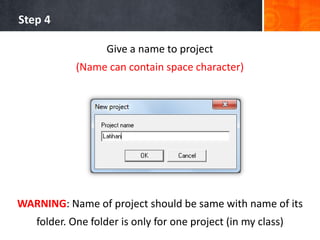
Step 4
Give a name to project
(Name can contain space character)
WARNING: Name of project should be same with name of its
folder. One folder is only for one project (in my class)
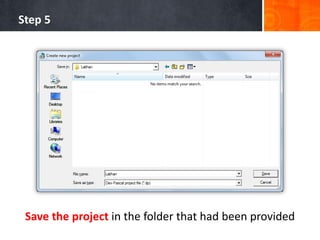
Step 5
Save the project in the folder that had been provided
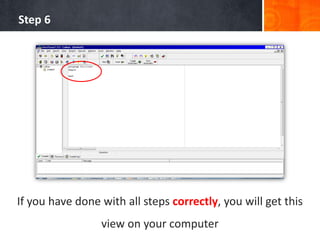
Step 6
If you have done with all steps correctly, you will get this
view on your computer
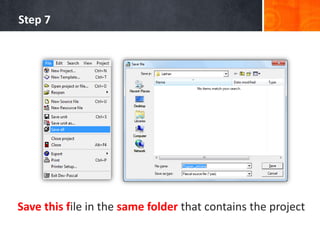
Step 7
Save this file in the same folder that contains the project
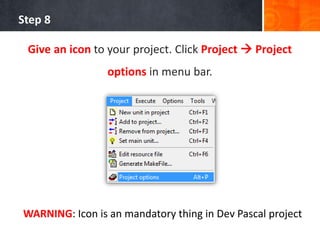
Step 8
Give an icon to your project. Click Project  Project
options in menu bar.
WARNING: Icon is an mandatory thing in Dev Pascal project
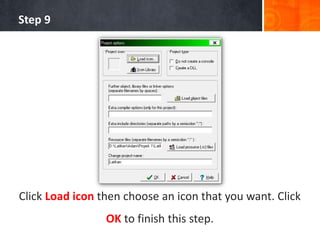
Step 9
Click Load icon then choose an icon that you want. Click
OK to finish this step.
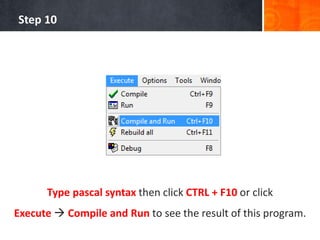
Step 10
Type pascal syntax then click CTRL + F10 or click
Execute  Compile and Run to see the result of this program.
Algorithm Notation
VS
Pascal Notation
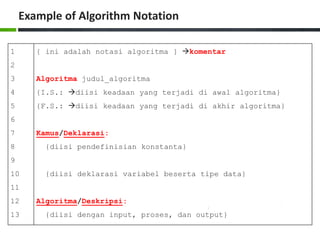
Example of Algorithm Notation
1
2
3
4
5
6
7
8
9
10
11
12
13
{ ini adalah notasi algoritma } komentar
Algoritma judul_algoritma
{I.S.: diisi keadaan yang terjadi di awal algoritma}
{F.S.: diisi keadaan yang terjadi di akhir algoritma}
Kamus/Deklarasi:
{diisi pendefinisian konstanta}
{diisi deklarasi variabel beserta tipe data}
Algoritma/Deskripsi:
{diisi dengan input, proses, dan output}
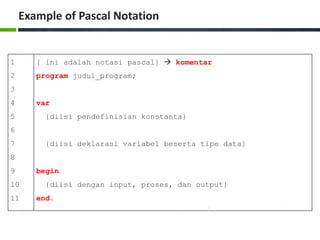
Example of Pascal Notation
1
2
3
4
5
6
7
8
9
10
11
{ ini adalah notasi pascal}  komentar
program judul_program;
var
{diisi pendefinisian konstanta}
{diisi deklarasi variabel beserta tipe data}
begin
{diisi dengan input, proses, dan output}
end.
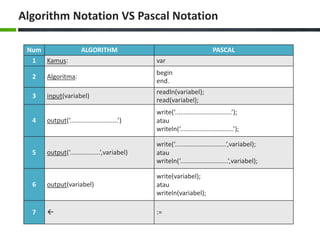
Algorithm Notation VS Pascal Notation
Num ALGORITHM PASCAL
1 Kamus: var
2 Algoritma:
begin
end.
3 input(variabel)
readln(variabel);
read(variabel);
4 output(‘...........................’)
write(‘................................’);
atau
writeln(‘..............................’);
5 output(‘.................’,variabel)
write(‘.............................’,variabel);
atau
writeln(‘...........................’,variabel);
6 output(variabel)
write(variabel);
atau
writeln(variabel);
7  :=
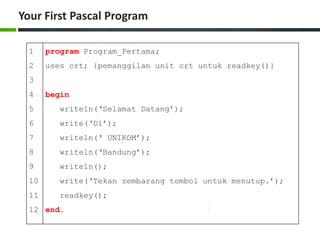
Your First Pascal Program
1
2
3
4
5
6
7
8
9
10
11
12
program Program_Pertama;
uses crt; {pemanggilan unit crt untuk readkey()}
begin
writeln(‘Selamat Datang’);
write(‘Di’);
writeln(‘ UNIKOM’);
writeln(‘Bandung’);
writeln();
write(‘Tekan sembarang tombol untuk menutup.’);
readkey();
end.
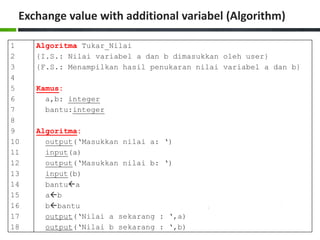
Exchange value with additional variabel (Algorithm)
1
2
3
4
5
6
7
8
9
10
11
12
13
14
15
16
17
18
Algoritma Tukar_Nilai
{I.S.: Nilai variabel a dan b dimasukkan oleh user}
{F.S.: Menampilkan hasil penukaran nilai variabel a dan b}
Kamus:
a,b: integer
bantu:integer
Algoritma:
output(‘Masukkan nilai a: ‘)
input(a)
output(‘Masukkan nilai b: ‘)
input(b)
bantua
ab
bbantu
output(‘Nilai a sekarang : ‘,a)
output(‘Nilai b sekarang : ‘,b)
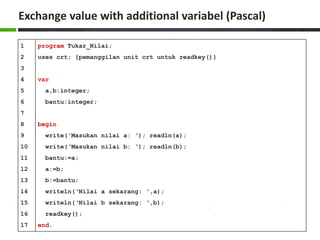
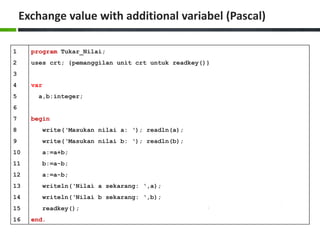
Exchange value with additional variabel (Pascal)
1
2
3
4
5
6
7
8
9
10
11
12
13
14
15
16
17
program Tukar_Nilai;
uses crt; {pemanggilan unit crt untuk readkey()}
var
a,b:integer;
bantu:integer;
begin
write(‘Masukan nilai a: ‘); readln(a);
write(‘Masukan nilai b: ‘); readln(b);
bantu:=a;
a:=b;
b:=bantu;
writeln(‘Nilai a sekarang: ‘,a);
writeln(‘Nilai b sekarang: ‘,b);
readkey();
end.
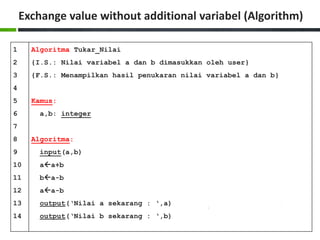
Exchange value without additional variabel (Algorithm)
1
2
3
4
5
6
7
8
9
10
11
12
13
14
Algoritma Tukar_Nilai
{I.S.: Nilai variabel a dan b dimasukkan oleh user}
{F.S.: Menampilkan hasil penukaran nilai variabel a dan b}
Kamus:
a,b: integer
Algoritma:
input(a,b)
aa+b
ba-b
aa-b
output(‘Nilai a sekarang : ‘,a)
output(‘Nilai b sekarang : ‘,b)
Exchange value with additional variabel (Pascal)
1
2
3
4
5
6
7
8
9
10
11
12
13
14
15
16
program Tukar_Nilai;
uses crt; {pemanggilan unit crt untuk readkey()}
var
a,b:integer;
begin
write(‘Masukan nilai a: ‘); readln(a);
write(‘Masukan nilai b: ‘); readln(b);
a:=a+b;
b:=a-b;
a:=a-b;
writeln(‘Nilai a sekarang: ‘,a);
writeln(‘Nilai b sekarang: ‘,b);
readkey();
end.
Data Type
Data Type in Algorithm and Pascal
KindofDataTypes
• Tipe Data Dasar (Predefined Data Type)
• Tipe Data Bentukan (user-defined Data Type)
Predefined Data Type
• Have been known in daily
life.
• Such as: logic number,
integer, real number,
characters, and string.
Logic Number
• Name : boolean
• Value : True and False
• Can be initialized as 0 or 1 in
number.
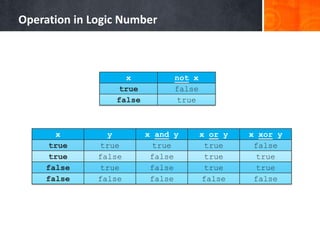
Operation in Logic Number
x not x
true false
false true
x y x and y x or y x xor y
true true true true false
true false false true true
false true false true true
false false false false false
Integer
• Name : integer
• Value : - (~) until + (~) (without .)
• Arithmetic : +, -, *, /, div, mod
• Comparison : < , ≤ , > , ≥ , = , ≠.
Real
• Name : real
• Value : - (~) until + (~)
• Arithmetic : +, -, *, /
• Comparison : < , ≤ , > , ≥ , = , ≠.
Characters
• Name : char
• Value : all alphabet, decimal number,
punctuation mark, arithmetic
operator, and ASCII
• Comparation : < , ≤ , > , ≥ , = , ≠.
String
• Name : String
• Value : set of characters (flanked
with ’ ’)
• Comparison : < , ≤ , > , ≥ , = , ≠.
User-defined Data Type
• Predefined Data Type that
was named with a new one.
• Structure type.
Modified Predefined Data Type
• Reason : Easy to remember and High readibility.
• Keyword : type
• Example:
type
pecahan : real { : can be replaced with = }
Structure Type
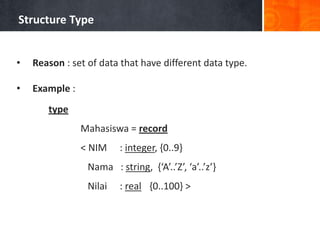
• Reason : set of data that have different data type.
• Example :
type
Mahasiswa = record
< NIM : integer, {0..9}
Nama : string, {‘A’..’Z’, ‘a’..’z’}
Nilai : real {0..100} >
Structure Type
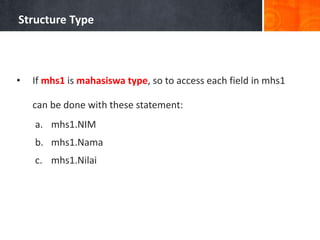
• If mhs1 is mahasiswa type, so to access each field in mhs1
can be done with these statement:
a. mhs1.NIM
b. mhs1.Nama
c. mhs1.Nilai
Data Type in Algorithm and Pascal
Algorithm Pascal Range in Pascal
boolean boolean true dan false
integer byte 0..255
shortint -128..127
word 0..65535
integer -32768..32767
longint -2147483648..2147483647
real real 2.9 x 10-39..1.7 x 1038
single 1.5 x 10-45..3.4 x 1038
double 5.0 x 10-324..1.7 x 10308
extended 3.4 x 10-4932..1.1 x 104932
char char
string string
string[n]
type
varrecord:record
< field1:type1,
field2:type2,
...
field_n:type_n >
type
varrecord=record
field1:type1;
field2:type2;
...
field_n:type_n;
end;
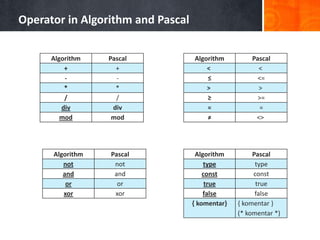
Operator in Algorithm and Pascal
Algorithm Pascal
+ +
- -
* *
/ /
div div
mod mod
Algorithm Pascal
< <
≤ <=
> >
≥ >=
= =
≠ <>
Algorithm Pascal
not not
and and
or or
xor xor
Algorithm Pascal
type type
const const
true true
false false
{ komentar} { komentar }
(* komentar *)
Identifier
Definition, Rules and Expression
DefinitionofIdentifier
Identifiers can be used to access something in
algorithm or program.
DefinitionofIdentifier
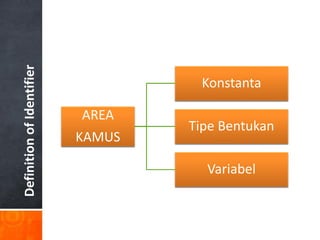
AREA
KAMUS
Konstanta
Tipe Bentukan
Variabel
Rules of Naming
• Name must be started with alphabet.
• Upper case and lower case are the same thing in Pascal (case
insensitive)  Suggest: should be consistent.
• Name only consists of alphabet, number, and underscore.
• Identifier can’t contain arithmetic operator, relational, and
punctuation mark, space.
• Choose the name that easy to remember.
Variable VS Constants
• Variable and Constants was used to store the value in
memory.
• Variable can change the value in the middle of running time.
• Constants will keep the value permanently while running
time.
Variable VS Constants
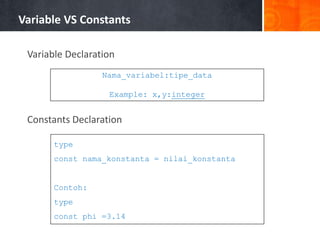
Variable Declaration
Constants Declaration
Nama_variabel:tipe_data
Example: x,y:integer
type
const nama_konstanta = nilai_konstanta
Contoh:
type
const phi =3.14
Math and Algorithm Notation
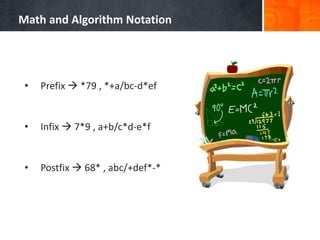
• Prefix  *79 , *+a/bc-d*ef
• Infix  7*9 , a+b/c*d-e*f
• Postfix  68* , abc/+def*-*
Math and Algorithm Notation
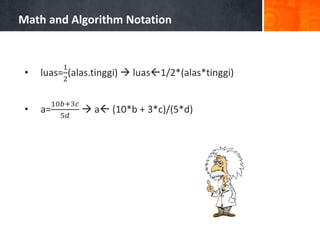
• luas=
1
2
(alas.tinggi)  luas1/2*(alas*tinggi)
• a=
10𝑏+3𝑐
5𝑑
 a (10*b + 3*c)/(5*d)
EXERCISE
Exercise 1
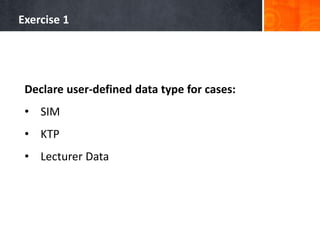
Declare user-defined data type for cases:
• SIM
• KTP
• Lecturer Data
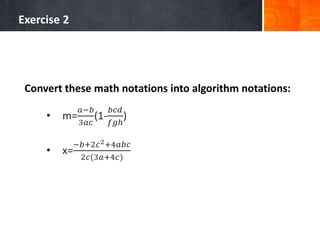
Exercise 2
Convert these math notations into algorithm notations:
• m=
𝑎−𝑏
3𝑎𝑐
(1-
𝑏𝑐𝑑
𝑓𝑔ℎ
)
• x=
−𝑏+2𝑐2+4𝑎𝑏𝑐
2𝑐(3𝑎+4𝑐)
Contact Person:
Adam Mukharil Bachtiar
Informatics Engineering UNIKOM
Jalan Dipati Ukur Nomor. 112-114 Bandung 40132
Email: adfbipotter@gmail.com
Blog: http://adfbipotter.wordpress.com
Copyright © Adam Mukharil Bachtiar 2011

Algorithm and Programming (Introduction of dev pascal, data type, value, and identifier)

  • 1.
    Adam Mukharil Bachtiar EnglishClass Informatics Engineering 2011 Algorithms and Programming Introduction of Dev Pascal, Data Type, Value, and Identifier
  • 2.
    Steps of theDay Let’s Start Dev Pascal Data Type Value and Identifier
  • 3.
  • 4.
    DefinitionofDEVPascal An IDE (IntegratedDevelopment Environment) for PASCAL language that was built by BLOODSHEED. It’s Freeware.
  • 5.
  • 6.
    Step 1 Open DevPascal application
  • 7.
    Step 2 Make aNew File or New Project
  • 8.
    Step 3 Choose ConsoleApplication  OK
  • 9.
    Step 4 Give aname to project (Name can contain space character) WARNING: Name of project should be same with name of its folder. One folder is only for one project (in my class)
  • 10.
    Step 5 Save theproject in the folder that had been provided
  • 11.
    Step 6 If youhave done with all steps correctly, you will get this view on your computer
  • 12.
    Step 7 Save thisfile in the same folder that contains the project
  • 13.
    Step 8 Give anicon to your project. Click Project  Project options in menu bar. WARNING: Icon is an mandatory thing in Dev Pascal project
  • 14.
    Step 9 Click Loadicon then choose an icon that you want. Click OK to finish this step.
  • 15.
    Step 10 Type pascalsyntax then click CTRL + F10 or click Execute  Compile and Run to see the result of this program.
  • 16.
  • 17.
    Example of AlgorithmNotation 1 2 3 4 5 6 7 8 9 10 11 12 13 { ini adalah notasi algoritma } komentar Algoritma judul_algoritma {I.S.: diisi keadaan yang terjadi di awal algoritma} {F.S.: diisi keadaan yang terjadi di akhir algoritma} Kamus/Deklarasi: {diisi pendefinisian konstanta} {diisi deklarasi variabel beserta tipe data} Algoritma/Deskripsi: {diisi dengan input, proses, dan output}
  • 18.
    Example of PascalNotation 1 2 3 4 5 6 7 8 9 10 11 { ini adalah notasi pascal}  komentar program judul_program; var {diisi pendefinisian konstanta} {diisi deklarasi variabel beserta tipe data} begin {diisi dengan input, proses, dan output} end.
  • 19.
    Algorithm Notation VSPascal Notation Num ALGORITHM PASCAL 1 Kamus: var 2 Algoritma: begin end. 3 input(variabel) readln(variabel); read(variabel); 4 output(‘...........................’) write(‘................................’); atau writeln(‘..............................’); 5 output(‘.................’,variabel) write(‘.............................’,variabel); atau writeln(‘...........................’,variabel); 6 output(variabel) write(variabel); atau writeln(variabel); 7  :=
  • 20.
    Your First PascalProgram 1 2 3 4 5 6 7 8 9 10 11 12 program Program_Pertama; uses crt; {pemanggilan unit crt untuk readkey()} begin writeln(‘Selamat Datang’); write(‘Di’); writeln(‘ UNIKOM’); writeln(‘Bandung’); writeln(); write(‘Tekan sembarang tombol untuk menutup.’); readkey(); end.
  • 22.
    Exchange value withadditional variabel (Algorithm) 1 2 3 4 5 6 7 8 9 10 11 12 13 14 15 16 17 18 Algoritma Tukar_Nilai {I.S.: Nilai variabel a dan b dimasukkan oleh user} {F.S.: Menampilkan hasil penukaran nilai variabel a dan b} Kamus: a,b: integer bantu:integer Algoritma: output(‘Masukkan nilai a: ‘) input(a) output(‘Masukkan nilai b: ‘) input(b) bantua ab bbantu output(‘Nilai a sekarang : ‘,a) output(‘Nilai b sekarang : ‘,b)
  • 23.
    Exchange value withadditional variabel (Pascal) 1 2 3 4 5 6 7 8 9 10 11 12 13 14 15 16 17 program Tukar_Nilai; uses crt; {pemanggilan unit crt untuk readkey()} var a,b:integer; bantu:integer; begin write(‘Masukan nilai a: ‘); readln(a); write(‘Masukan nilai b: ‘); readln(b); bantu:=a; a:=b; b:=bantu; writeln(‘Nilai a sekarang: ‘,a); writeln(‘Nilai b sekarang: ‘,b); readkey(); end.
  • 24.
    Exchange value withoutadditional variabel (Algorithm) 1 2 3 4 5 6 7 8 9 10 11 12 13 14 Algoritma Tukar_Nilai {I.S.: Nilai variabel a dan b dimasukkan oleh user} {F.S.: Menampilkan hasil penukaran nilai variabel a dan b} Kamus: a,b: integer Algoritma: input(a,b) aa+b ba-b aa-b output(‘Nilai a sekarang : ‘,a) output(‘Nilai b sekarang : ‘,b)
  • 25.
    Exchange value withadditional variabel (Pascal) 1 2 3 4 5 6 7 8 9 10 11 12 13 14 15 16 program Tukar_Nilai; uses crt; {pemanggilan unit crt untuk readkey()} var a,b:integer; begin write(‘Masukan nilai a: ‘); readln(a); write(‘Masukan nilai b: ‘); readln(b); a:=a+b; b:=a-b; a:=a-b; writeln(‘Nilai a sekarang: ‘,a); writeln(‘Nilai b sekarang: ‘,b); readkey(); end.
  • 26.
    Data Type Data Typein Algorithm and Pascal
  • 27.
    KindofDataTypes • Tipe DataDasar (Predefined Data Type) • Tipe Data Bentukan (user-defined Data Type)
  • 28.
    Predefined Data Type •Have been known in daily life. • Such as: logic number, integer, real number, characters, and string.
  • 29.
    Logic Number • Name: boolean • Value : True and False • Can be initialized as 0 or 1 in number.
  • 30.
    Operation in LogicNumber x not x true false false true x y x and y x or y x xor y true true true true false true false false true true false true false true true false false false false false
  • 31.
    Integer • Name :integer • Value : - (~) until + (~) (without .) • Arithmetic : +, -, *, /, div, mod • Comparison : < , ≤ , > , ≥ , = , ≠.
  • 32.
    Real • Name :real • Value : - (~) until + (~) • Arithmetic : +, -, *, / • Comparison : < , ≤ , > , ≥ , = , ≠.
  • 33.
    Characters • Name :char • Value : all alphabet, decimal number, punctuation mark, arithmetic operator, and ASCII • Comparation : < , ≤ , > , ≥ , = , ≠.
  • 34.
    String • Name :String • Value : set of characters (flanked with ’ ’) • Comparison : < , ≤ , > , ≥ , = , ≠.
  • 35.
    User-defined Data Type •Predefined Data Type that was named with a new one. • Structure type.
  • 36.
    Modified Predefined DataType • Reason : Easy to remember and High readibility. • Keyword : type • Example: type pecahan : real { : can be replaced with = }
  • 37.
    Structure Type • Reason: set of data that have different data type. • Example : type Mahasiswa = record < NIM : integer, {0..9} Nama : string, {‘A’..’Z’, ‘a’..’z’} Nilai : real {0..100} >
  • 38.
    Structure Type • Ifmhs1 is mahasiswa type, so to access each field in mhs1 can be done with these statement: a. mhs1.NIM b. mhs1.Nama c. mhs1.Nilai
  • 39.
    Data Type inAlgorithm and Pascal Algorithm Pascal Range in Pascal boolean boolean true dan false integer byte 0..255 shortint -128..127 word 0..65535 integer -32768..32767 longint -2147483648..2147483647 real real 2.9 x 10-39..1.7 x 1038 single 1.5 x 10-45..3.4 x 1038 double 5.0 x 10-324..1.7 x 10308 extended 3.4 x 10-4932..1.1 x 104932 char char string string string[n] type varrecord:record < field1:type1, field2:type2, ... field_n:type_n > type varrecord=record field1:type1; field2:type2; ... field_n:type_n; end;
  • 40.
    Operator in Algorithmand Pascal Algorithm Pascal + + - - * * / / div div mod mod Algorithm Pascal < < ≤ <= > > ≥ >= = = ≠ <> Algorithm Pascal not not and and or or xor xor Algorithm Pascal type type const const true true false false { komentar} { komentar } (* komentar *)
  • 41.
  • 42.
    DefinitionofIdentifier Identifiers can beused to access something in algorithm or program.
  • 43.
  • 44.
    Rules of Naming •Name must be started with alphabet. • Upper case and lower case are the same thing in Pascal (case insensitive)  Suggest: should be consistent. • Name only consists of alphabet, number, and underscore. • Identifier can’t contain arithmetic operator, relational, and punctuation mark, space. • Choose the name that easy to remember.
  • 45.
    Variable VS Constants •Variable and Constants was used to store the value in memory. • Variable can change the value in the middle of running time. • Constants will keep the value permanently while running time.
  • 46.
    Variable VS Constants VariableDeclaration Constants Declaration Nama_variabel:tipe_data Example: x,y:integer type const nama_konstanta = nilai_konstanta Contoh: type const phi =3.14
  • 47.
    Math and AlgorithmNotation • Prefix  *79 , *+a/bc-d*ef • Infix  7*9 , a+b/c*d-e*f • Postfix  68* , abc/+def*-*
  • 48.
    Math and AlgorithmNotation • luas= 1 2 (alas.tinggi)  luas1/2*(alas*tinggi) • a= 10𝑏+3𝑐 5𝑑  a (10*b + 3*c)/(5*d)
  • 49.
  • 50.
    Exercise 1 Declare user-defineddata type for cases: • SIM • KTP • Lecturer Data
  • 51.
    Exercise 2 Convert thesemath notations into algorithm notations: • m= 𝑎−𝑏 3𝑎𝑐 (1- 𝑏𝑐𝑑 𝑓𝑔ℎ ) • x= −𝑏+2𝑐2+4𝑎𝑏𝑐 2𝑐(3𝑎+4𝑐)
  • 52.
    Contact Person: Adam MukharilBachtiar Informatics Engineering UNIKOM Jalan Dipati Ukur Nomor. 112-114 Bandung 40132 Email: adfbipotter@gmail.com Blog: http://adfbipotter.wordpress.com Copyright © Adam Mukharil Bachtiar 2011