Cloud First
Architecture
Patterns and Practices for the Cloud
WELCOME
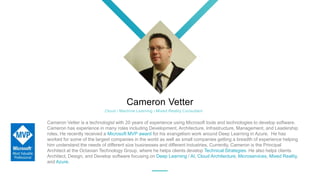
Cameron Vetter
Cameron Vetter is a technologist with 20 years of experience using Microsoft tools and technologies to develop software.
Cameron has experience in many roles including Development, Architecture, Infrastructure, Management, and Leadership
roles. He recently received a Microsoft MVP award for his evangelism work around Deep Learning in Azure. He has
worked for some of the largest companies in the world as well as small companies getting a breadth of experience helping
him understand the needs of different size businesses and different Industries. Currently, Cameron is the Principal
Architect at the Octavian Technology Group, where he helps clients develop Technical Strategies. He also helps clients
Architect, Design, and Develop software focusing on Deep Learning / AI, Cloud Architecture, Microservices, Mixed Reality,
and Azure.
Cloud / Machine Learning / Mixed Reality Consultant
A Partner to Advise and Support
About Us
Our team offers a decades of combined experience in
technology-related fields, and we leverage our expertise
to take a business-focused approach to helping
organizations solve real problems with proven solutions.
Octavian TG offers Cloud Architecture, Mixed Reality
Development, Data Science, Machine Learning,
Fractional CIO, and Agile trainers.
5
Why Azure?
Everything we talk about today can be applied to any major cloud providers’ offerings. I use Azure as example,
because they have the most sophisticated offering and I have the most familiarity with it.
Credit: Azure Architecture Center @ https://docs.microsoft.com/en-us/azure/architecture/
Introduction
Hosting Model
Architecture Styles
Design Principles
Best Practices
Cloud Design Patterns
Performance Antipatterns
Agenda
Question & Answer
Hosting Model
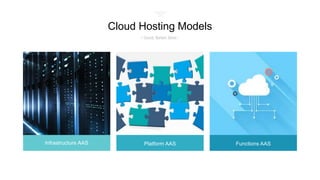
Infrastructure AAS Platform AAS Functions AAS
Cloud Hosting Models
/ Good, Better, Best /
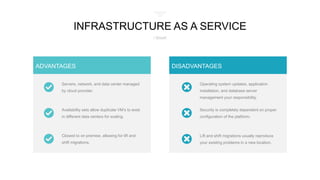
Servers, network, and data center managed
by cloud provider.
Availability sets allow duplicate VM’s to exist
in different data centers for scaling.
Closest to on premise, allowing for lift and
shift migrations.
ADVANTAGES
Security is completely dependent on proper
configuration of the platform.
Operating system updates, application
installation, and database server
management your responsibility.
Lift and shift migrations usually reproduce
your existing problems in a new location.
DISADVANTAGES
INFRASTRUCTURE AS A SERVICE
/ Good/
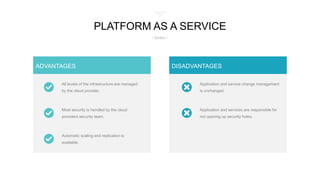
All levels of the infrastructure are managed
by the cloud provider.
Most security is handled by the cloud
providers security team.
Automatic scaling and replication is
available.
ADVANTAGES
Application and services are responsible for
not opening up security holes.
Application and service change management
is unchanged.
DISADVANTAGES
PLATFORM AS A SERVICE
/ Better /
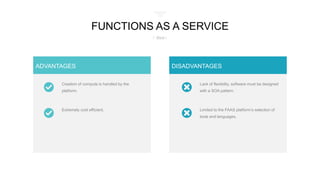
Creation of compute is handled by the
platform.
Extremely cost efficient.
ADVANTAGES
Limited to the FAAS platform’s selection of
tools and languages.
Lack of flexibility, software must be designed
with a SOA pattern.
DISADVANTAGES
FUNCTIONS AS A SERVICE
/ Best /
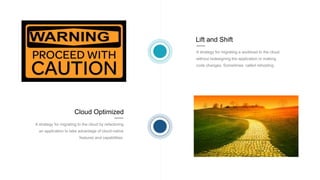
Lift and Shift
A strategy for migrating a workload to the cloud
without redesigning the application or making
code changes. Sometimes called rehosting.
Cloud Optimized
A strategy for migrating to the cloud by refactoring
an application to take advantage of cloud-native
features and capabilities.
Architecture Styles
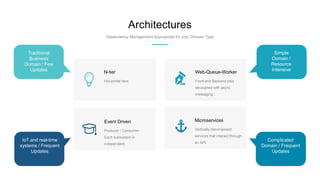
Architectures
Dependency Management Appropriate for your Domain Type
Vertically decomposed
services that interact through
an API
Microservices
Front and Backend jobs
decoupled with async
messaging
Web-Queue-Worker
Producer / Consumer.
Each subsystem is
independent.
Event Driven
Horizontal tiers
N-tier
Traditional
Business
Domain / Few
Updates
IoT and real-time
systems / Frequent
Updates
Simple
Domain /
Resource
Intensive
Complicated
Domain / Frequent
Updates
Design Principles
DESIGN FOR SELF
HEALING
In a distributed system, failures
happen. Design your application to
be self healing when failures occur.
MAKE EVERYTHING
REDUNDANT
Build redundancy into your
application, to avoid having single
points of failure.
MINIMIZE
DEPENDENICES
Minimize dependencies between
application services to achieve
scalability.
DESIGN TO SCALE
OUT
Design your application so that it can
scale horizontally, adding or
removing new instances as demand
requires.
PARTITION
AROUND LIMITS
Use partitioning to work around
database, network, and compute
limits.
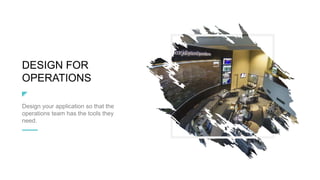
DESIGN FOR
OPERATIONS
Design your application so that the
operations team has the tools they
need.
USE MANAGED
SERVICES
When possible, use platform as a
service (PaaS) rather than
infrastructure as a service (IaaS).
USE THE BEST DATA
STORE FOR THE JOB
Pick the storage technology that is
the best fit for your data and how it
will be used.
DESIGN FOR
EVOLUTION
All successful applications change
over time. An evolutionary design is
key for continuous innovation.
BUILD FOR THE NEEDS OF
THE BUSINESS
Every design decision must be
justified by a business requirement.
Best Practices
Scalability
Scalability is the ability of a system to handle
increased load. There are two main ways that an
application can scale. Vertical scaling (scaling up)
means increasing the capacity of a resource, for
example by using a larger VM size. Horizontal scaling
(scaling out) is adding new instances of a resource,
such as VMs or database replicas.
The need to vertically scale signifies a problem.
Availability
Availability is the proportion of time that the system is
functional and working. It is usually measured as a
percentage of uptime. Application errors,
infrastructure problems, and system load can all
reduce availability.
SLA is a combined effort of the cloud provider and
the application architecture
Resiliency
Resiliency is the ability of the system to recover from
failures and continue to function. The goal of
resiliency is to return the application to a fully
functioning state after a failure occurs. Resiliency is
closely related to availability.
A system with poor availability has a problem with
resiliency
Management
and DevOps
Deployments must be reliable and predictable. They
should be automated to reduce the chance of human
error. Monitoring and diagnostics are crucial.
Failed deploys usually are a symptom of a problem
with your DevOps
Security
You must think about security throughout the entire
lifecycle of an application, from design and
implementation to deployment and operations. The
platform should provide protections against a variety
of threats, but you still need to build security into your
application and into your DevOps processes.
Don’t wait to start thinking about security until after
your first breech.
Cloud Design Patterns
Design Patterns
Anti-Corruption Layer
Implement a façade or adapter layer between a modern
application and a legacy system
Design Patterns
Backends for Frontends
Create separate backend services to be consumed by
specific frontend applications or interfaces.
Design Patterns
Circuit Breaker
Handle faults that might take a variable amount of time to
fix when connecting to a remote service or resource.

Design Patterns
Claim Check
Split a large message into a claim check and a payload to
avoid overwhelming a message bus.
Design Patterns
Competing Consumers
Enable multiple concurrent consumers to process
messages received on the same messaging channel.
Design Patterns
Federated Identity
Delegate authentication to an external identity provider.
Design Patterns
Publisher/Subscriber
Enable an application to announce events to multiple
interested consumers asynchronously, without coupling the
senders to the receivers.
Design Patterns
Strangler
Incrementally migrate a legacy system by gradually
replacing specific pieces of functionality with new
applications and services.
Antipatterns
Busy Database
PROBLEM
Database Code execution, such as stored
procedures and triggers are overused, putting
excessive load on the database server.
DETECTION
Monitor the volume of database activity,
compare it to the usage of the other tiers.
SOLUTION
Refactor processing to other application tiers,
limiting your database to data access
operations.
PROBLEM
Long synchronous tasks or excessive
background threads can cause decreased
response times
DETECTION
High latency on front end tasks and server
failures including 500 or 503 errors.
SOLUTION
Make all front end tasks asynchronous and
move resource intensive tasks to isolated
compute.
Busy Front End
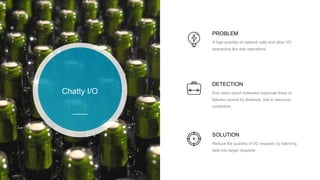
Chatty I/O
PROBLEM
A high quantity of network calls and other I/O
operations like disk operations.
DETECTION
End users report extended response times or
failures caused by timeouts, due to resource
contention.
SOLUTION
Reduce the quantity of I/O requests by batching
data into larger requests.
PROBLEM
Application retrieves lots more data than it
needs which often gets discarded. Improper use
of ORM tools to filter data retrieval in memory.
DETECTION
High latency and data store contention, Long
running queries are identified.
SOLUTION
Fetch only the data that you need. Optimize
ORM based requests to filter data at the
database server not in memory.
Extraneous
Fetching
Improper
Instantiation
PROBLEM
Using the wrong instantiation lifetime for
classes, Not using a Singleton pattern where
appropriate.
DETECTION
Exceptions related to exhaustion of resources,
increased memory usage and garbage
collection.
SOLUTION
Wrap classes in thread safe singleton’s when
they are safe for reuse. Use resource pooling
when appropriate.
PROBLEM
Putting all of an applications data into a single
data store, that may lead to resource contention
or be a poor fit for some of the data.
DETECTION
Sudden dramatic slow downs that lead to
eventual failures.
SOLUTION
Separate data according to use aligned with
how the data is used.
Monolithic
Persistence
No Caching
PROBLEM
Repeatedly fetching the same information from
a resource that is expensive. Repeatedly
constructing the same calls to a remote service.
DETECTION
Exceptions related to exhaustion of resources,
increased memory usage and garbage
collection.
SOLUTION
Reads should check a cache then retrieve the
data if it is not cached.
www.cameronvetter.com
Any Questions?
@poshporcupine Linkedin.com/in/cameronvetter

Cloud First Architecture

  • 1.
  • 2.
  • 3.
    Cameron Vetter Cameron Vetteris a technologist with 20 years of experience using Microsoft tools and technologies to develop software. Cameron has experience in many roles including Development, Architecture, Infrastructure, Management, and Leadership roles. He recently received a Microsoft MVP award for his evangelism work around Deep Learning in Azure. He has worked for some of the largest companies in the world as well as small companies getting a breadth of experience helping him understand the needs of different size businesses and different Industries. Currently, Cameron is the Principal Architect at the Octavian Technology Group, where he helps clients develop Technical Strategies. He also helps clients Architect, Design, and Develop software focusing on Deep Learning / AI, Cloud Architecture, Microservices, Mixed Reality, and Azure. Cloud / Machine Learning / Mixed Reality Consultant
  • 4.
    A Partner toAdvise and Support About Us Our team offers a decades of combined experience in technology-related fields, and we leverage our expertise to take a business-focused approach to helping organizations solve real problems with proven solutions. Octavian TG offers Cloud Architecture, Mixed Reality Development, Data Science, Machine Learning, Fractional CIO, and Agile trainers.
  • 5.
    5 Why Azure? Everything wetalk about today can be applied to any major cloud providers’ offerings. I use Azure as example, because they have the most sophisticated offering and I have the most familiarity with it. Credit: Azure Architecture Center @ https://docs.microsoft.com/en-us/azure/architecture/
  • 6.
    Introduction Hosting Model Architecture Styles DesignPrinciples Best Practices Cloud Design Patterns Performance Antipatterns Agenda Question & Answer
  • 7.
  • 8.
    Infrastructure AAS PlatformAAS Functions AAS Cloud Hosting Models / Good, Better, Best /
  • 9.
    Servers, network, anddata center managed by cloud provider. Availability sets allow duplicate VM’s to exist in different data centers for scaling. Closest to on premise, allowing for lift and shift migrations. ADVANTAGES Security is completely dependent on proper configuration of the platform. Operating system updates, application installation, and database server management your responsibility. Lift and shift migrations usually reproduce your existing problems in a new location. DISADVANTAGES INFRASTRUCTURE AS A SERVICE / Good/
  • 10.
    All levels ofthe infrastructure are managed by the cloud provider. Most security is handled by the cloud providers security team. Automatic scaling and replication is available. ADVANTAGES Application and services are responsible for not opening up security holes. Application and service change management is unchanged. DISADVANTAGES PLATFORM AS A SERVICE / Better /
  • 11.
    Creation of computeis handled by the platform. Extremely cost efficient. ADVANTAGES Limited to the FAAS platform’s selection of tools and languages. Lack of flexibility, software must be designed with a SOA pattern. DISADVANTAGES FUNCTIONS AS A SERVICE / Best /
  • 12.
    Lift and Shift Astrategy for migrating a workload to the cloud without redesigning the application or making code changes. Sometimes called rehosting. Cloud Optimized A strategy for migrating to the cloud by refactoring an application to take advantage of cloud-native features and capabilities.
  • 13.
  • 14.
    Architectures Dependency Management Appropriatefor your Domain Type Vertically decomposed services that interact through an API Microservices Front and Backend jobs decoupled with async messaging Web-Queue-Worker Producer / Consumer. Each subsystem is independent. Event Driven Horizontal tiers N-tier Traditional Business Domain / Few Updates IoT and real-time systems / Frequent Updates Simple Domain / Resource Intensive Complicated Domain / Frequent Updates
  • 15.
  • 16.
    DESIGN FOR SELF HEALING Ina distributed system, failures happen. Design your application to be self healing when failures occur.
  • 17.
    MAKE EVERYTHING REDUNDANT Build redundancyinto your application, to avoid having single points of failure.
  • 18.
  • 19.
    DESIGN TO SCALE OUT Designyour application so that it can scale horizontally, adding or removing new instances as demand requires.
  • 20.
    PARTITION AROUND LIMITS Use partitioningto work around database, network, and compute limits.
  • 21.
    DESIGN FOR OPERATIONS Design yourapplication so that the operations team has the tools they need.
  • 22.
    USE MANAGED SERVICES When possible,use platform as a service (PaaS) rather than infrastructure as a service (IaaS).
  • 23.
    USE THE BESTDATA STORE FOR THE JOB Pick the storage technology that is the best fit for your data and how it will be used.
  • 24.
    DESIGN FOR EVOLUTION All successfulapplications change over time. An evolutionary design is key for continuous innovation.
  • 25.
    BUILD FOR THENEEDS OF THE BUSINESS Every design decision must be justified by a business requirement.
  • 26.
  • 27.
    Scalability Scalability is theability of a system to handle increased load. There are two main ways that an application can scale. Vertical scaling (scaling up) means increasing the capacity of a resource, for example by using a larger VM size. Horizontal scaling (scaling out) is adding new instances of a resource, such as VMs or database replicas. The need to vertically scale signifies a problem.
  • 28.
    Availability Availability is theproportion of time that the system is functional and working. It is usually measured as a percentage of uptime. Application errors, infrastructure problems, and system load can all reduce availability. SLA is a combined effort of the cloud provider and the application architecture
  • 29.
    Resiliency Resiliency is theability of the system to recover from failures and continue to function. The goal of resiliency is to return the application to a fully functioning state after a failure occurs. Resiliency is closely related to availability. A system with poor availability has a problem with resiliency
  • 30.
    Management and DevOps Deployments mustbe reliable and predictable. They should be automated to reduce the chance of human error. Monitoring and diagnostics are crucial. Failed deploys usually are a symptom of a problem with your DevOps
  • 31.
    Security You must thinkabout security throughout the entire lifecycle of an application, from design and implementation to deployment and operations. The platform should provide protections against a variety of threats, but you still need to build security into your application and into your DevOps processes. Don’t wait to start thinking about security until after your first breech.
  • 32.
  • 33.
    Design Patterns Anti-Corruption Layer Implementa façade or adapter layer between a modern application and a legacy system Design Patterns Backends for Frontends Create separate backend services to be consumed by specific frontend applications or interfaces.
  • 34.
    Design Patterns Circuit Breaker Handlefaults that might take a variable amount of time to fix when connecting to a remote service or resource. Design Patterns Claim Check Split a large message into a claim check and a payload to avoid overwhelming a message bus.
  • 35.
    Design Patterns Competing Consumers Enablemultiple concurrent consumers to process messages received on the same messaging channel. Design Patterns Federated Identity Delegate authentication to an external identity provider.
  • 36.
    Design Patterns Publisher/Subscriber Enable anapplication to announce events to multiple interested consumers asynchronously, without coupling the senders to the receivers. Design Patterns Strangler Incrementally migrate a legacy system by gradually replacing specific pieces of functionality with new applications and services.
  • 37.
  • 38.
    Busy Database PROBLEM Database Codeexecution, such as stored procedures and triggers are overused, putting excessive load on the database server. DETECTION Monitor the volume of database activity, compare it to the usage of the other tiers. SOLUTION Refactor processing to other application tiers, limiting your database to data access operations.
  • 39.
    PROBLEM Long synchronous tasksor excessive background threads can cause decreased response times DETECTION High latency on front end tasks and server failures including 500 or 503 errors. SOLUTION Make all front end tasks asynchronous and move resource intensive tasks to isolated compute. Busy Front End
  • 40.
    Chatty I/O PROBLEM A highquantity of network calls and other I/O operations like disk operations. DETECTION End users report extended response times or failures caused by timeouts, due to resource contention. SOLUTION Reduce the quantity of I/O requests by batching data into larger requests.
  • 41.
    PROBLEM Application retrieves lotsmore data than it needs which often gets discarded. Improper use of ORM tools to filter data retrieval in memory. DETECTION High latency and data store contention, Long running queries are identified. SOLUTION Fetch only the data that you need. Optimize ORM based requests to filter data at the database server not in memory. Extraneous Fetching
  • 42.
    Improper Instantiation PROBLEM Using the wronginstantiation lifetime for classes, Not using a Singleton pattern where appropriate. DETECTION Exceptions related to exhaustion of resources, increased memory usage and garbage collection. SOLUTION Wrap classes in thread safe singleton’s when they are safe for reuse. Use resource pooling when appropriate.
  • 43.
    PROBLEM Putting all ofan applications data into a single data store, that may lead to resource contention or be a poor fit for some of the data. DETECTION Sudden dramatic slow downs that lead to eventual failures. SOLUTION Separate data according to use aligned with how the data is used. Monolithic Persistence
  • 44.
    No Caching PROBLEM Repeatedly fetchingthe same information from a resource that is expensive. Repeatedly constructing the same calls to a remote service. DETECTION Exceptions related to exhaustion of resources, increased memory usage and garbage collection. SOLUTION Reads should check a cache then retrieve the data if it is not cached.
  • 45.