Linux Basics
Part 2
VIM Editor
‱ vi improved
‱ Installed on most Linux machines
‱ Can be a bit confusing at first...
oCheat sheets FTW
‱ Other popular editors:
oemacs
onano
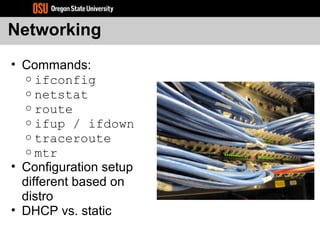
Networking
‱ Commands:
o ifconfig
o netstat
o route
o ifup / ifdown
o traceroute
o mtr
‱ Configuration setup
different based on
distro
‱ DHCP vs. static
SSH: Secure Shell
‱ Secure Remote Shell
o Encrypted
‱ Replaced un-secure rsh, rlogin, and telnet
‱ Useful tricks
o Port forwarding
o SOCKS proxy server
o Remote command automation
o Remote X applications
o Copy files securely
SSH Keys
‱ Public/Private key authentication
‱ No password “over the wire”
‱ ssh-agent – “passwordless” logins
‱ ssh-keygen
‱ RSA vs DSA
‱ Remote script automation
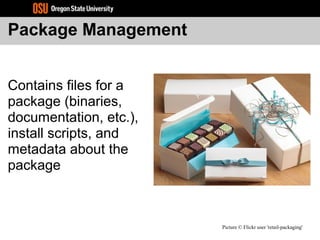
Package Management
Contains files for a
package (binaries,
documentation, etc.),
install scripts, and
metadata about the
package
Picture © Flickr user 'retail-packaging'
Benefits of Packages
‱ Easy to manage (install, upgrade, remove)
‱ Central database tracks all installed
packages on a system
‱ yum/apt (or similar tools) handles
dependency resolution
‱ Package repositories make it easy to
find/install common software
‱ Included/official repos vs. external repos
Package Dependencies
‱ What does this package need in order
to run?
osome other package? A certain
(version of a) library?
‱ What does this package provide?
oie. binary, library, etc.
‱ Simplifies package installation
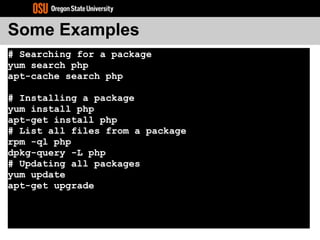
Some Examples
# Searching for a package
yum search php
apt-cache search php
# Installing a package
yum install php
apt-get install php
# List all files from a package
rpm -ql php
dpkg-query -L php
# Updating all packages
yum update
apt-get upgrade
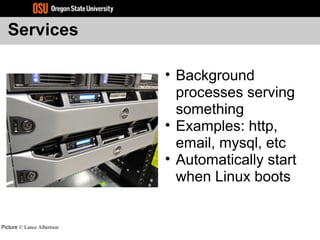
Services
‱ Background
processes serving
something
‱ Examples: http,
email, mysql, etc
‱ Automatically start
when Linux boots
Picture © Lance Albertson
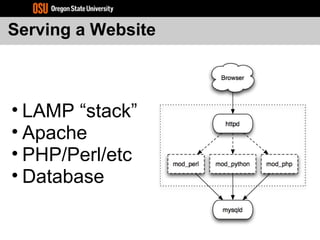
Serving a Website
‱ LAMP “stack”
‱ Apache
‱ PHP/Perl/etc
‱ Database
Apache: Web Server
‱ Easy to configure and use
‱ Very dynamic in uses
‱ Modular
‱ Widely used
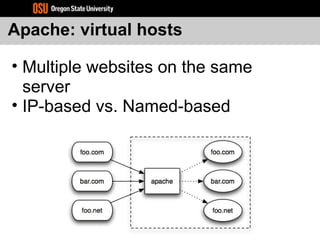
Apache: virtual hosts
‱ Multiple websites on the same
server
‱ IP-based vs. Named-based
Mysql: Database server
‱ Most commonly used database with webapps
‱ /etc/my.cnf – config
‱ /var/lib/mysql – data files
‱ Other Databases:
o postgresql
o sqlite
Caching
‱ High Traffic sites
‱ Database caching
‱ Memcached
‱ Op-code caching
‱ Static content caching
Configuration Management
‱ Infrastructure programming
language
‱ Defining your infrastructure
‱ Puppet
‱ CFEngine
‱ Chef
Wordpress Install
‱ Setup MySQL & Apache
‱ Create Virtual Host
‱ Create Database & user
‱ Unpack tarball
‱ Go to website
Questions?
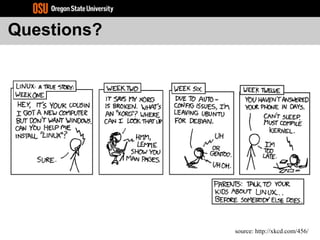
source: http://xkcd.com/456/

Linux basics (part 2)

  • 1.
  • 2.
    VIM Editor ‱ viimproved ‱ Installed on most Linux machines ‱ Can be a bit confusing at first... oCheat sheets FTW ‱ Other popular editors: oemacs onano
  • 3.
    Networking ‱ Commands: o ifconfig onetstat o route o ifup / ifdown o traceroute o mtr ‱ Configuration setup different based on distro ‱ DHCP vs. static
  • 4.
    SSH: Secure Shell ‱Secure Remote Shell o Encrypted ‱ Replaced un-secure rsh, rlogin, and telnet ‱ Useful tricks o Port forwarding o SOCKS proxy server o Remote command automation o Remote X applications o Copy files securely
  • 5.
    SSH Keys ‱ Public/Privatekey authentication ‱ No password “over the wire” ‱ ssh-agent – “passwordless” logins ‱ ssh-keygen ‱ RSA vs DSA ‱ Remote script automation
  • 6.
    Package Management Contains filesfor a package (binaries, documentation, etc.), install scripts, and metadata about the package Picture © Flickr user 'retail-packaging'
  • 7.
    Benefits of Packages ‱Easy to manage (install, upgrade, remove) ‱ Central database tracks all installed packages on a system ‱ yum/apt (or similar tools) handles dependency resolution ‱ Package repositories make it easy to find/install common software ‱ Included/official repos vs. external repos
  • 8.
    Package Dependencies ‱ Whatdoes this package need in order to run? osome other package? A certain (version of a) library? ‱ What does this package provide? oie. binary, library, etc. ‱ Simplifies package installation
  • 9.
    Some Examples # Searchingfor a package yum search php apt-cache search php # Installing a package yum install php apt-get install php # List all files from a package rpm -ql php dpkg-query -L php # Updating all packages yum update apt-get upgrade
  • 10.
    Services ‱ Background processes serving something ‱Examples: http, email, mysql, etc ‱ Automatically start when Linux boots Picture © Lance Albertson
  • 11.
    Serving a Website ‱LAMP “stack” ‱ Apache ‱ PHP/Perl/etc ‱ Database
  • 12.
    Apache: Web Server ‱Easy to configure and use ‱ Very dynamic in uses ‱ Modular ‱ Widely used
  • 13.
    Apache: virtual hosts ‱Multiple websites on the same server ‱ IP-based vs. Named-based
  • 14.
    Mysql: Database server ‱Most commonly used database with webapps ‱ /etc/my.cnf – config ‱ /var/lib/mysql – data files ‱ Other Databases: o postgresql o sqlite
  • 15.
    Caching ‱ High Trafficsites ‱ Database caching ‱ Memcached ‱ Op-code caching ‱ Static content caching
  • 16.
    Configuration Management ‱ Infrastructureprogramming language ‱ Defining your infrastructure ‱ Puppet ‱ CFEngine ‱ Chef
  • 17.
    Wordpress Install ‱ SetupMySQL & Apache ‱ Create Virtual Host ‱ Create Database & user ‱ Unpack tarball ‱ Go to website
  • 18.

Editor's Notes