The working of Form View control is same as
Detail View control but the default UI of Form
View control is different.
Detail View control displays the records in tabular
format. Form View control does not have
predefined layout but it depend upon template.
According to the need of application, we can
display the data with the help of template.
 We can insert, update, delete and paging the
record in Form View.
 Adding validation controls to a Form View is
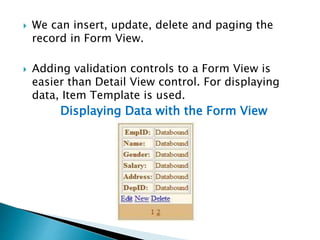
easier than Detail View control. For displaying
data, Item Template is used.
Displaying Data with the Form View
using System;
using System.Data;
using System.Data.SqlClient;
using System.Configuration;
using System.Web.UI.WebControls;
using System.Web.UI;
public partial class FormViewDemo :
System.Web.UI.Page
{
SqlConnection conn;
SqlDataAdapter adapter;
DataSet ds;
SqlCommand cmd;
string cs =
ConfigurationManager.ConnectionStrings["conStri
ng"].ConnectionString;
protected void Page_Load(object sender,
EventArgs e)
{
if (!IsPostBack)
{
PopulateFormView();
}
}
protected void PopulateFormView()
{
try
{
conn = new SqlConnection(cs);
adapter = new SqlDataAdapter("select *
from tblEmps", conn);
ds = new DataSet();
adapter.Fill(ds);
FormView1.DataSource = ds;
FormView1.DataBind();
}
 catch (Exception ex)
{
Label1.Text = "ERROR :: " + ex.Message;
}
}
protected void
FormView1_ModeChanging(object sender,
FormViewModeEventArgs e)
{
FormView1.ChangeMode(e.NewMode);
PopulateFormView();
}
}

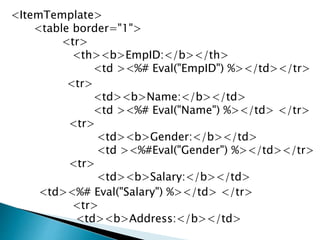
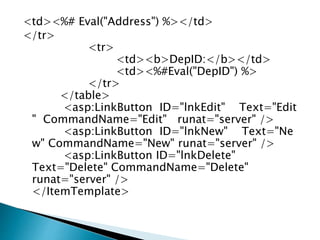
The ItemTemplate supports a databinding
expression that is used to bind the database
table column. The Eval() or Bind() method is used
to retrieves the values of these columns.
<ItemTemplate>
<table border="1">
<tr>
<th><b>EmpID:</b></th>
<td ><%# Eval("EmpID") %></td></tr>
<tr>
<td><b>Name:</b></td>
<td ><%# Eval("Name") %></td> </tr>
<tr>
<td><b>Gender:</b></td>
<td ><%#Eval("Gender") %></td></tr>
<tr>
<td><b>Salary:</b></td>
<td><%# Eval("Salary") %></td> </tr>
<tr>
<td><b>Address:</b></td>
<td><%# Eval("Address") %></td>
</tr>
<tr>
<td><b>DepID:</b></td>
<td><%#Eval("DepID") %>
</tr>
</table>
<asp:LinkButton ID="lnkEdit" Text="Edit
" CommandName="Edit" runat="server" />
<asp:LinkButton ID="lnkNew" Text="Ne
w" CommandName="New" runat="server" />
<asp:LinkButton ID="lnkDelete"
Text="Delete" CommandName="Delete"
runat="server" />
</ItemTemplate>
 We can perform paging with Form View
Control by using its AllowPaging property.
 By default Allow Paging property is false. Set
the value of Allow Paging property as true for
performing the paging.
 It will generate the paging link automatically.
Write code in Page Index Changing event as
follows.
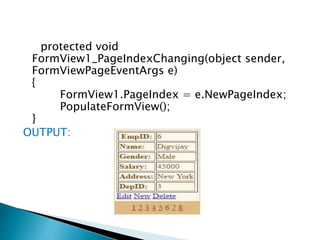
protected void
FormView1_PageIndexChanging(object sender,
FormViewPageEventArgs e)
{
FormView1.PageIndex = e.NewPageIndex;
PopulateFormView();
}
OUTPUT:
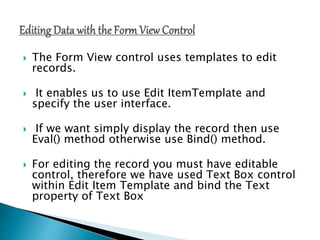
 The Form View control uses templates to edit
records.
 It enables us to use Edit ItemTemplate and
specify the user interface.
 If we want simply display the record then use
Eval() method otherwise use Bind() method.
 For editing the record you must have editable
control, therefore we have used Text Box control
within Edit Item Template and bind the Text
property of Text Box
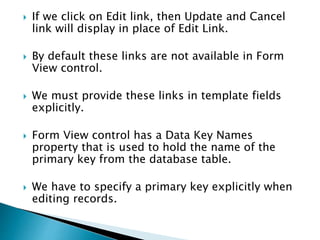
 If we click on Edit link, then Update and Cancel
link will display in place of Edit Link.
 By default these links are not available in Form
View control.
 We must provide these links in template fields
explicitly.
 Form View control has a Data Key Names
property that is used to hold the name of the
primary key from the database table.
 We have to specify a primary key explicitly when
editing records.
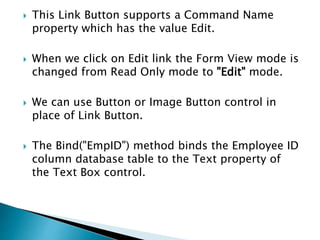
 This Link Button supports a Command Name
property which has the value Edit.
 When we click on Edit link the Form View mode is
changed from Read Only mode to "Edit" mode.
 We can use Button or Image Button control in
place of Link Button.
 The Bind("EmpID") method binds the Employee ID
column database table to the Text property of
the Text Box control.
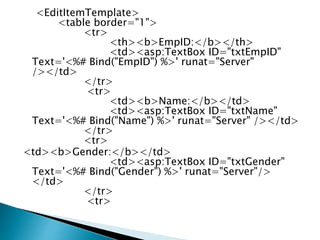
<EditItemTemplate>
<table border="1">
<tr>
<th><b>EmpID:</b></th>
<td><asp:TextBox ID="txtEmpID"
Text='<%# Bind("EmpID") %>' runat="Server"
/></td>
</tr>
<tr>
<td><b>Name:</b></td>
<td><asp:TextBox ID="txtName"
Text='<%# Bind("Name") %>' runat="Server" /></td>
</tr>
<tr>
<td><b>Gender:</b></td>
<td><asp:TextBox ID="txtGender"
Text='<%# Bind("Gender") %>' runat="Server"/>
</td>
</tr>
<tr>
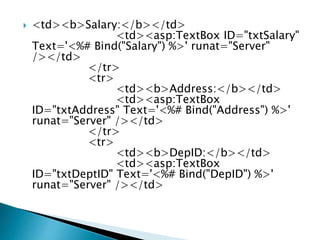
 <td><b>Salary:</b></td>
<td><asp:TextBox ID="txtSalary"
Text='<%# Bind("Salary") %>' runat="Server"
/></td>
</tr>
<tr>
<td><b>Address:</b></td>
<td><asp:TextBox
ID="txtAddress" Text='<%# Bind("Address") %>'
runat="Server" /></td>
</tr>
<tr>
<td><b>DepID:</b></td>
<td><asp:TextBox
ID="txtDeptID" Text='<%# Bind("DepID") %>'
runat="Server" /></td>
</tr>
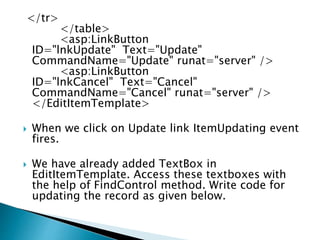
</table>
<asp:LinkButton
ID="lnkUpdate" Text="Update"
CommandName="Update" runat="server" />
<asp:LinkButton
ID="lnkCancel" Text="Cancel"
CommandName="Cancel" runat="server" />
</EditItemTemplate>
 When we click on Update link ItemUpdating event
fires.
 We have already added TextBox in
EditItemTemplate. Access these textboxes with
the help of FindControl method. Write code for
updating the record as given below.
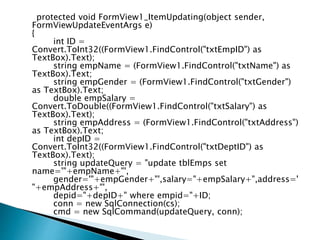
protected void FormView1_ItemUpdating(object sender,
FormViewUpdateEventArgs e)
{
int ID =
Convert.ToInt32((FormView1.FindControl("txtEmpID") as
TextBox).Text);
string empName = (FormView1.FindControl("txtName") as
TextBox).Text;
string empGender = (FormView1.FindControl("txtGender")
as TextBox).Text;
double empSalary =
Convert.ToDouble((FormView1.FindControl("txtSalary") as
TextBox).Text);
string empAddress = (FormView1.FindControl("txtAddress")
as TextBox).Text;
int depID =
Convert.ToInt32((FormView1.FindControl("txtDeptID") as
TextBox).Text);
string updateQuery = "update tblEmps set
name='"+empName+"',
gender='"+empGender+"',salary="+empSalary+",address='
"+empAddress+"',
depid="+depID+" where empid="+ID;
conn = new SqlConnection(cs);
cmd = new SqlCommand(updateQuery, conn);
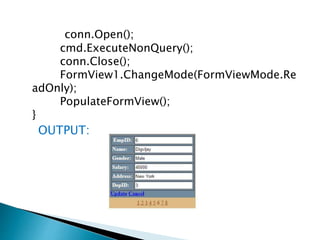
conn.Open();
cmd.ExecuteNonQuery();
conn.Close();
FormView1.ChangeMode(FormViewMode.Re
adOnly);
PopulateFormView();
}
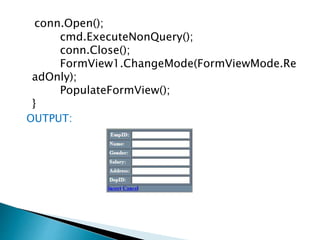
OUTPUT:
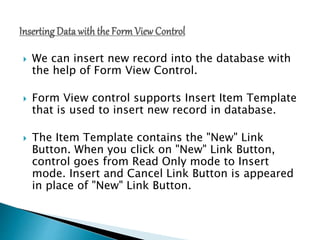
 We can insert new record into the database with
the help of Form View Control.
 Form View control supports Insert Item Template
that is used to insert new record in database.
 The Item Template contains the "New" Link
Button. When you click on "New" Link Button,
control goes from Read Only mode to Insert
mode. Insert and Cancel Link Button is appeared
in place of "New" Link Button.
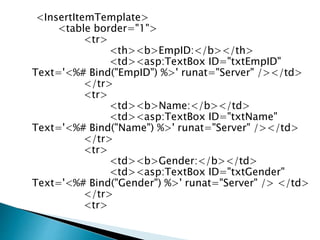
<InsertItemTemplate>
<table border="1">
<tr>
<th><b>EmpID:</b></th>
<td><asp:TextBox ID="txtEmpID"
Text='<%# Bind("EmpID") %>' runat="Server" /></td>
</tr>
<tr>
<td><b>Name:</b></td>
<td><asp:TextBox ID="txtName"
Text='<%# Bind("Name") %>' runat="Server" /></td>
</tr>
<tr>
<td><b>Gender:</b></td>
<td><asp:TextBox ID="txtGender"
Text='<%# Bind("Gender") %>' runat="Server" /> </td>
</tr>
<tr>
<td><b>Salary:</b></td>
<td><asp:TextBox ID="txtSalary"
Text='<%# Bind("Salary") %>' runat="Server"/>
</td>
</tr>
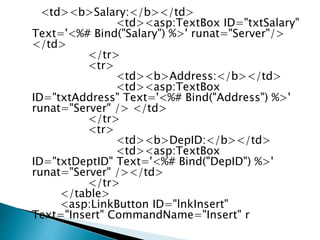
<tr>
<td><b>Address:</b></td>
<td><asp:TextBox
ID="txtAddress" Text='<%# Bind("Address") %>'
runat="Server" /> </td>
</tr>
<tr>
<td><b>DepID:</b></td>
<td><asp:TextBox
ID="txtDeptID" Text='<%# Bind("DepID") %>'
runat="Server" /></td>
</tr>
</table>
<asp:LinkButton ID="lnkInsert"
Text="Insert" CommandName="Insert" r
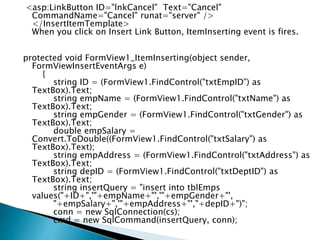
<asp:LinkButton ID="lnkCancel" Text="Cancel"
CommandName="Cancel" runat="server" />
</InsertItemTemplate>
When you click on Insert Link Button, ItemInserting event is fires.
protected void FormView1_ItemInserting(object sender,
FormViewInsertEventArgs e)
{
string ID = (FormView1.FindControl("txtEmpID") as
TextBox).Text;
string empName = (FormView1.FindControl("txtName") as
TextBox).Text;
string empGender = (FormView1.FindControl("txtGender") as
TextBox).Text;
double empSalary =
Convert.ToDouble((FormView1.FindControl("txtSalary") as
TextBox).Text);
string empAddress = (FormView1.FindControl("txtAddress") as
TextBox).Text;
string depID = (FormView1.FindControl("txtDeptID") as
TextBox).Text;
string insertQuery = "insert into tblEmps
values("+ID+",'"+empName+"','"+empGender+"',
"+empSalary+",'"+empAddress+"',"+depID+")";
conn = new SqlConnection(cs);
cmd = new SqlCommand(insertQuery, conn);
conn.Open();
cmd.ExecuteNonQuery();
conn.Close();
FormView1.ChangeMode(FormViewMode.Re
adOnly);
PopulateFormView();
}
OUTPUT:
form view

form view

  • 3.
    The working ofForm View control is same as Detail View control but the default UI of Form View control is different. Detail View control displays the records in tabular format. Form View control does not have predefined layout but it depend upon template. According to the need of application, we can display the data with the help of template.
  • 4.
     We caninsert, update, delete and paging the record in Form View.  Adding validation controls to a Form View is easier than Detail View control. For displaying data, Item Template is used. Displaying Data with the Form View
  • 5.
    using System; using System.Data; usingSystem.Data.SqlClient; using System.Configuration; using System.Web.UI.WebControls; using System.Web.UI; public partial class FormViewDemo : System.Web.UI.Page { SqlConnection conn; SqlDataAdapter adapter; DataSet ds; SqlCommand cmd; string cs = ConfigurationManager.ConnectionStrings["conStri ng"].ConnectionString; protected void Page_Load(object sender, EventArgs e)
  • 6.
    { if (!IsPostBack) { PopulateFormView(); } } protected voidPopulateFormView() { try { conn = new SqlConnection(cs); adapter = new SqlDataAdapter("select * from tblEmps", conn); ds = new DataSet(); adapter.Fill(ds); FormView1.DataSource = ds; FormView1.DataBind(); }
  • 7.
     catch (Exceptionex) { Label1.Text = "ERROR :: " + ex.Message; } } protected void FormView1_ModeChanging(object sender, FormViewModeEventArgs e) { FormView1.ChangeMode(e.NewMode); PopulateFormView(); } }  The ItemTemplate supports a databinding expression that is used to bind the database table column. The Eval() or Bind() method is used to retrieves the values of these columns.
  • 8.
    <ItemTemplate> <table border="1"> <tr> <th><b>EmpID:</b></th> <td ><%#Eval("EmpID") %></td></tr> <tr> <td><b>Name:</b></td> <td ><%# Eval("Name") %></td> </tr> <tr> <td><b>Gender:</b></td> <td ><%#Eval("Gender") %></td></tr> <tr> <td><b>Salary:</b></td> <td><%# Eval("Salary") %></td> </tr> <tr> <td><b>Address:</b></td>
  • 9.
    <td><%# Eval("Address") %></td> </tr> <tr> <td><b>DepID:</b></td> <td><%#Eval("DepID")%> </tr> </table> <asp:LinkButton ID="lnkEdit" Text="Edit " CommandName="Edit" runat="server" /> <asp:LinkButton ID="lnkNew" Text="Ne w" CommandName="New" runat="server" /> <asp:LinkButton ID="lnkDelete" Text="Delete" CommandName="Delete" runat="server" /> </ItemTemplate>
  • 10.
     We canperform paging with Form View Control by using its AllowPaging property.  By default Allow Paging property is false. Set the value of Allow Paging property as true for performing the paging.  It will generate the paging link automatically. Write code in Page Index Changing event as follows.
  • 11.
    protected void FormView1_PageIndexChanging(object sender, FormViewPageEventArgse) { FormView1.PageIndex = e.NewPageIndex; PopulateFormView(); } OUTPUT:
  • 12.
     The FormView control uses templates to edit records.  It enables us to use Edit ItemTemplate and specify the user interface.  If we want simply display the record then use Eval() method otherwise use Bind() method.  For editing the record you must have editable control, therefore we have used Text Box control within Edit Item Template and bind the Text property of Text Box
  • 13.
     If weclick on Edit link, then Update and Cancel link will display in place of Edit Link.  By default these links are not available in Form View control.  We must provide these links in template fields explicitly.  Form View control has a Data Key Names property that is used to hold the name of the primary key from the database table.  We have to specify a primary key explicitly when editing records.
  • 14.
     This LinkButton supports a Command Name property which has the value Edit.  When we click on Edit link the Form View mode is changed from Read Only mode to "Edit" mode.  We can use Button or Image Button control in place of Link Button.  The Bind("EmpID") method binds the Employee ID column database table to the Text property of the Text Box control.
  • 15.
    <EditItemTemplate> <table border="1"> <tr> <th><b>EmpID:</b></th> <td><asp:TextBox ID="txtEmpID" Text='<%#Bind("EmpID") %>' runat="Server" /></td> </tr> <tr> <td><b>Name:</b></td> <td><asp:TextBox ID="txtName" Text='<%# Bind("Name") %>' runat="Server" /></td> </tr> <tr> <td><b>Gender:</b></td> <td><asp:TextBox ID="txtGender" Text='<%# Bind("Gender") %>' runat="Server"/> </td> </tr> <tr>
  • 16.
     <td><b>Salary:</b></td> <td><asp:TextBox ID="txtSalary" Text='<%#Bind("Salary") %>' runat="Server" /></td> </tr> <tr> <td><b>Address:</b></td> <td><asp:TextBox ID="txtAddress" Text='<%# Bind("Address") %>' runat="Server" /></td> </tr> <tr> <td><b>DepID:</b></td> <td><asp:TextBox ID="txtDeptID" Text='<%# Bind("DepID") %>' runat="Server" /></td>
  • 17.
    </tr> </table> <asp:LinkButton ID="lnkUpdate" Text="Update" CommandName="Update" runat="server"/> <asp:LinkButton ID="lnkCancel" Text="Cancel" CommandName="Cancel" runat="server" /> </EditItemTemplate>  When we click on Update link ItemUpdating event fires.  We have already added TextBox in EditItemTemplate. Access these textboxes with the help of FindControl method. Write code for updating the record as given below.
  • 18.
    protected void FormView1_ItemUpdating(objectsender, FormViewUpdateEventArgs e) { int ID = Convert.ToInt32((FormView1.FindControl("txtEmpID") as TextBox).Text); string empName = (FormView1.FindControl("txtName") as TextBox).Text; string empGender = (FormView1.FindControl("txtGender") as TextBox).Text; double empSalary = Convert.ToDouble((FormView1.FindControl("txtSalary") as TextBox).Text); string empAddress = (FormView1.FindControl("txtAddress") as TextBox).Text; int depID = Convert.ToInt32((FormView1.FindControl("txtDeptID") as TextBox).Text); string updateQuery = "update tblEmps set name='"+empName+"', gender='"+empGender+"',salary="+empSalary+",address=' "+empAddress+"', depid="+depID+" where empid="+ID; conn = new SqlConnection(cs); cmd = new SqlCommand(updateQuery, conn);
  • 19.
  • 20.
     We caninsert new record into the database with the help of Form View Control.  Form View control supports Insert Item Template that is used to insert new record in database.  The Item Template contains the "New" Link Button. When you click on "New" Link Button, control goes from Read Only mode to Insert mode. Insert and Cancel Link Button is appeared in place of "New" Link Button.
  • 21.
    <InsertItemTemplate> <table border="1"> <tr> <th><b>EmpID:</b></th> <td><asp:TextBox ID="txtEmpID" Text='<%#Bind("EmpID") %>' runat="Server" /></td> </tr> <tr> <td><b>Name:</b></td> <td><asp:TextBox ID="txtName" Text='<%# Bind("Name") %>' runat="Server" /></td> </tr> <tr> <td><b>Gender:</b></td> <td><asp:TextBox ID="txtGender" Text='<%# Bind("Gender") %>' runat="Server" /> </td> </tr> <tr>
  • 22.
    <td><b>Salary:</b></td> <td><asp:TextBox ID="txtSalary" Text='<%# Bind("Salary")%>' runat="Server"/> </td> </tr> <tr> <td><b>Address:</b></td> <td><asp:TextBox ID="txtAddress" Text='<%# Bind("Address") %>' runat="Server" /> </td> </tr> <tr> <td><b>DepID:</b></td> <td><asp:TextBox ID="txtDeptID" Text='<%# Bind("DepID") %>' runat="Server" /></td> </tr> </table> <asp:LinkButton ID="lnkInsert" Text="Insert" CommandName="Insert" r
  • 23.
    <asp:LinkButton ID="lnkCancel" Text="Cancel" CommandName="Cancel"runat="server" /> </InsertItemTemplate> When you click on Insert Link Button, ItemInserting event is fires. protected void FormView1_ItemInserting(object sender, FormViewInsertEventArgs e) { string ID = (FormView1.FindControl("txtEmpID") as TextBox).Text; string empName = (FormView1.FindControl("txtName") as TextBox).Text; string empGender = (FormView1.FindControl("txtGender") as TextBox).Text; double empSalary = Convert.ToDouble((FormView1.FindControl("txtSalary") as TextBox).Text); string empAddress = (FormView1.FindControl("txtAddress") as TextBox).Text; string depID = (FormView1.FindControl("txtDeptID") as TextBox).Text; string insertQuery = "insert into tblEmps values("+ID+",'"+empName+"','"+empGender+"', "+empSalary+",'"+empAddress+"',"+depID+")"; conn = new SqlConnection(cs); cmd = new SqlCommand(insertQuery, conn);
  • 24.