
Strings in C#
Dr. Neeraj Kumar Pandey
Strings in C#
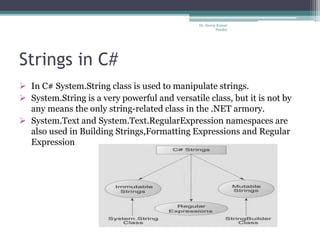
 In C# System.String class is used to manipulate strings.
 System.String is a very powerful and versatile class, but it is not by
any means the only string-related class in the .NET armory.
 System.Text and System.Text.RegularExpression namespaces are
also used in Building Strings,Formatting Expressions and Regular
Expression
Dr. Neeraj Kumar
Pandey
Immutable Strings
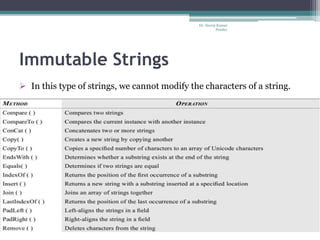
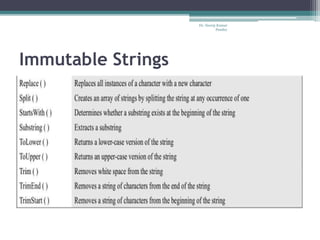
 In this type of strings, we cannot modify the characters of a string.
Dr. Neeraj Kumar
Pandey
Immutable Strings
Dr. Neeraj Kumar
Pandey
Comparing Strings
Compare() Method
int n=string.Compare(s1,s2);
 Zero interger, if s1 is equal to s2
 A positive Integer (1) , if s1 is greater than s2
 A negative integer(-1), if s1 is less than s2
Equals() Method
There are two versions of Equals method. They are implemented as follows:-
bool b1= s2.Equals(s1);
bool b2= string.Equals(s2,s1);
These methods returns a Boolean value true if s1 and s2 are equal, otherwise false.
The == Operator
bool b3= (s1==s2); //b3 is true if they are equal
We very often use such statements in decision statements, like:-
if(s1==s2)
Dr. Neeraj Kumar
Pandey
Mutable Strings
 This type of strings are modifiable using the StringBuilder class.
StringBuilder str1=new StringBuilder(“hello”);
StringBuilder str2=new StringBuilder();
 They can grow dynamically as more characters are added to them.
 They can grow either unbounded or up to a configurable maximum.
 Mutable Strings are also known as dynamic strings.
Dr. Neeraj Kumar
Pandey
Mutable Strings(Contd..)
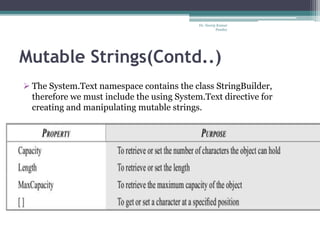
 The System.Text namespace contains the class StringBuilder,
therefore we must include the using System.Text directive for
creating and manipulating mutable strings.
Dr. Neeraj Kumar
Pandey
Mutable String Program
using System;
using System.Text;
class strbuild
{
public static void Main()
{
string str1,str2;
Console.WriteLine("Enter first string");
str1=Console.ReadLine();
Console.WriteLine("Enter Second string");
str2=Console.ReadLine();
StringBuilder s1 = new StringBuilder(str1);
StringBuilder s2 = new StringBuilder(str2);
//1.Appending a String
s1.Append("Smile");
// Console.WriteLine("String After Append :" +s1);
//2.Append Format
s2.AppendFormat("1)s2 after Append Format {0}",s2);
s1.AppendFormat("2)s1 after Append Format {0}",s1);
//3.Ensure Capacity
int x=s1.EnsureCapacity(30);
//4.Inserting a String
s2.Insert(3,"Life");
//5.Remove
s1.Remove(5,3);
//6.Replace
s2.Replace('A', '*');
//7.Capacity
int y= s1.Capacity;
Console.WriteLine("Capacity is"+y);
s1.Capacity=100;
y=s1.Capacity;
Console.WriteLine("New Capacity is"+y);
//8.Length
int z = s1.Length;
int v = s2.Length;
Console.WriteLine(" Length of s1 "+ z);
Console.WriteLine("Length of s2"+ v);
//9.MaxCapacity
int c= s1.MaxCapacity;
Console.WriteLine("Max Capacity"+s1);
//10.setting a character
int n=s2.Length;
s2[n-1]='@';
}
}
Dr. Neeraj Kumar
Pandey
Regular Expression
 A regular expression may be applied to a text to accomplish tasks
such as :-
 To locate substring and return them
 To modify one or more substrings and return them
 To identify substrings that begins with or end with a pattern of
characters.
 To find all the words that begin with a group of characters and end
with some other characters
 To find all the occurrences of a substring pattern.
 System.Text.RegualrExpressions supports a number of classes that
can be used for searching, matching and modifying a text
document.The important classes are:-
 Regex, MathCollection, Match.
Dr. Neeraj Kumar
Pandey
Regular Expression Program
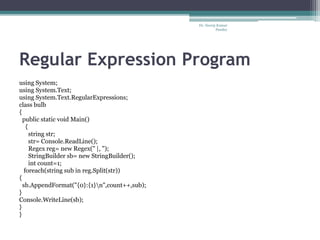
using System;
using System.Text;
using System.Text.RegularExpressions;
class bulb
{
public static void Main()
{
string str;
str= Console.ReadLine();
Regex reg= new Regex(" |, ");
StringBuilder sb= new StringBuilder();
int count=1;
foreach(string sub in reg.Split(str))
{
sb.AppendFormat("{0}:{1}n",count++,sub);
}
Console.WriteLine(sb);
}
}
Dr. Neeraj Kumar
Pandey

Strings in c#

  • 1.
    Strings in C# Dr.Neeraj Kumar Pandey
  • 2.
    Strings in C# In C# System.String class is used to manipulate strings.  System.String is a very powerful and versatile class, but it is not by any means the only string-related class in the .NET armory.  System.Text and System.Text.RegularExpression namespaces are also used in Building Strings,Formatting Expressions and Regular Expression Dr. Neeraj Kumar Pandey
  • 3.
    Immutable Strings  Inthis type of strings, we cannot modify the characters of a string. Dr. Neeraj Kumar Pandey
  • 4.
  • 5.
    Comparing Strings Compare() Method intn=string.Compare(s1,s2);  Zero interger, if s1 is equal to s2  A positive Integer (1) , if s1 is greater than s2  A negative integer(-1), if s1 is less than s2 Equals() Method There are two versions of Equals method. They are implemented as follows:- bool b1= s2.Equals(s1); bool b2= string.Equals(s2,s1); These methods returns a Boolean value true if s1 and s2 are equal, otherwise false. The == Operator bool b3= (s1==s2); //b3 is true if they are equal We very often use such statements in decision statements, like:- if(s1==s2) Dr. Neeraj Kumar Pandey
  • 6.
    Mutable Strings  Thistype of strings are modifiable using the StringBuilder class. StringBuilder str1=new StringBuilder(“hello”); StringBuilder str2=new StringBuilder();  They can grow dynamically as more characters are added to them.  They can grow either unbounded or up to a configurable maximum.  Mutable Strings are also known as dynamic strings. Dr. Neeraj Kumar Pandey
  • 7.
    Mutable Strings(Contd..)  TheSystem.Text namespace contains the class StringBuilder, therefore we must include the using System.Text directive for creating and manipulating mutable strings. Dr. Neeraj Kumar Pandey
  • 8.
    Mutable String Program usingSystem; using System.Text; class strbuild { public static void Main() { string str1,str2; Console.WriteLine("Enter first string"); str1=Console.ReadLine(); Console.WriteLine("Enter Second string"); str2=Console.ReadLine(); StringBuilder s1 = new StringBuilder(str1); StringBuilder s2 = new StringBuilder(str2); //1.Appending a String s1.Append("Smile"); // Console.WriteLine("String After Append :" +s1); //2.Append Format s2.AppendFormat("1)s2 after Append Format {0}",s2); s1.AppendFormat("2)s1 after Append Format {0}",s1); //3.Ensure Capacity int x=s1.EnsureCapacity(30); //4.Inserting a String s2.Insert(3,"Life"); //5.Remove s1.Remove(5,3); //6.Replace s2.Replace('A', '*'); //7.Capacity int y= s1.Capacity; Console.WriteLine("Capacity is"+y); s1.Capacity=100; y=s1.Capacity; Console.WriteLine("New Capacity is"+y); //8.Length int z = s1.Length; int v = s2.Length; Console.WriteLine(" Length of s1 "+ z); Console.WriteLine("Length of s2"+ v); //9.MaxCapacity int c= s1.MaxCapacity; Console.WriteLine("Max Capacity"+s1); //10.setting a character int n=s2.Length; s2[n-1]='@'; } } Dr. Neeraj Kumar Pandey
  • 9.
    Regular Expression  Aregular expression may be applied to a text to accomplish tasks such as :-  To locate substring and return them  To modify one or more substrings and return them  To identify substrings that begins with or end with a pattern of characters.  To find all the words that begin with a group of characters and end with some other characters  To find all the occurrences of a substring pattern.  System.Text.RegualrExpressions supports a number of classes that can be used for searching, matching and modifying a text document.The important classes are:-  Regex, MathCollection, Match. Dr. Neeraj Kumar Pandey
  • 10.
    Regular Expression Program usingSystem; using System.Text; using System.Text.RegularExpressions; class bulb { public static void Main() { string str; str= Console.ReadLine(); Regex reg= new Regex(" |, "); StringBuilder sb= new StringBuilder(); int count=1; foreach(string sub in reg.Split(str)) { sb.AppendFormat("{0}:{1}n",count++,sub); } Console.WriteLine(sb); } } Dr. Neeraj Kumar Pandey