




Flex 4 Deep Dive: UI and Dev mostly development stuff  | a little bit of design stuff
Who are we? RJ Owen Senior Developer at EffectiveUI Andy McIntosh Experience Architect at EffectiveUI Experienced Flex Developers, men in the trenches, the kind of guys who know what it’s like out there.
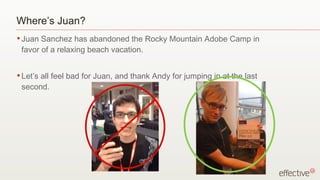
Where’s Juan? Juan Sanchez has abandoned the Rocky Mountain Adobe Camp in favor of a relaxing beach vacation. Let’s all feel bad for Juan, and thank Andy for jumping in at the last second.
Who are you? Software designers and developers Some Flex experience in Flex 3 Interested in building better interfaces
What will we talk about? Today we’ll cover: Language updates in Flex 4 MXML graphics and the new Flash Text Engine Effects and Animations Containers and Layout Components, Custom and Otherwise Component Lifecycle, Skins Credit where it’s due: Our talk draws from Ely Greenfield’s “Flex 4 Migration” presentation from Adobe MAX 2008
Flex T-Shirt Store Demo Built for Adobe R&D team in 2 weeks
Changes in 2009 Some MXML languages changes to support the new features of Flex 4
What’s new in Flex 4? A lot: Spark components Skin components, dynamic layout FXG - declarative graphics Flash Catalyst integration Styles are different States are different “ Groups” vs. “Child Lists”; new container types Enhanced Text renderer New MXML tags Effects and Animation Chrome, Scrolling Updated component lifestyle, architecture Designer / Developer contract We’ve got our work cut out for us.
Fundamental Changes Designer / Developer Workflow Developer Designer Workflow
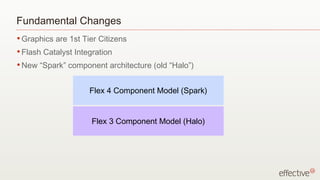
Fundamental Changes Graphics are 1st Tier Citizens Flash Catalyst Integration New “Spark” component architecture (old “Halo”) Flex 3 Component Model (Halo) Flex 4 Component Model (Spark)
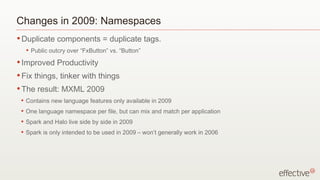
Changes in 2009: Namespaces Duplicate components = duplicate tags. Public outcry over “FxButton” vs. “Button” Improved Productivity Fix things, tinker with things The result: MXML 2009 Contains new language features only available in 2009 One language namespace per file, but can mix and match per application Spark and Halo live side by side in 2009 Spark is only intended to be used in 2009 – won’t generally work in 2006
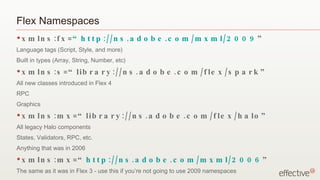
Flex Namespaces xmlns:fx= “http://ns.adobe.com/mxml/2009 ” Language tags (Script, Style, and more) Built in types (Array, String, Number, etc) xmlns:s=“library://ns.adobe.com/flex/spark” All new classes introduced in Flex 4 RPC Graphics xmlns:mx=“library://ns.adobe.com/flex/halo” All legacy Halo components States, Validators, RPC, etc. Anything that was in 2006 xmlns:mx=“ http://ns.adobe.com/mxml/2006 ” The same as it was in Flex 3 - use this if you’re not going to use 2009 namespaces
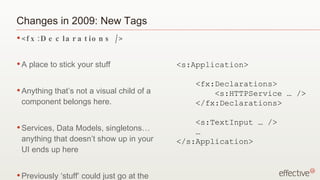
Changes in 2009: New Tags <fx:Declarations /> A place to stick your stuff Anything that’s not a visual child of a component belongs here. Services, Data Models, singletons…anything that doesn’t show up in your UI ends up here Previously ‘stuff’ could just go at the top of the file <s:Application> <fx:Declarations> <s:HTTPService … /> </fx:Declarations> <s:TextInput … /> … </s:Application>
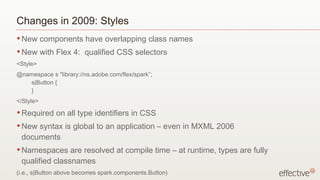
Changes in 2009: Styles New components have overlapping class names New with Flex 4:  qualified CSS selectors <Style> @namespace s &quot;library://ns.adobe.com/flex/spark”; s|Button { } </Style> Required on all type identifiers in CSS New syntax is global to an application – even in MXML 2006 documents Namespaces are resolved at compile time – at runtime, types are fully qualified classnames (i.e., s|Button above becomes spark.components.Button)
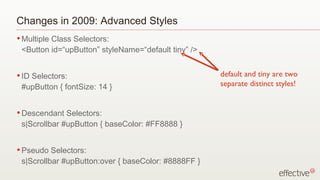
Changes in 2009: Advanced Styles Multiple Class Selectors:  <Button id=“upButton” styleName=“default tiny” /> ID Selectors:  #upButton { fontSize: 14 } Descendant Selectors:  s|Scrollbar #upButton { baseColor: #FF8888 } Pseudo Selectors:  s|Scrollbar #upButton:over { baseColor: #8888FF } default and tiny are two separate distinct styles!
Changes in 2009: States - what’s broken? States in Flex 3 and below suck Overly verbose Really awkward to use - AddChild children, RemoveChild children, etc. Hard to optimize We never ever ever use them.  Ever. Okay, Andy uses them all the time, but he hates them.
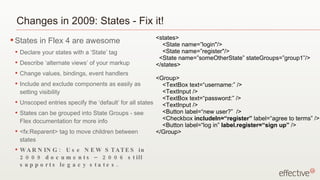
Changes in 2009: States - Fix it! States in Flex 4 are awesome Declare your states with a ‘State’ tag Describe ‘alternate views’ of your markup Change values, bindings, event handlers Include and exclude components as easily as setting visibility Unscoped entries specify the ‘default’ for all states States can be grouped into State Groups - see Flex documentation for more info <fx:Reparent> tag to move children between states WARNING:  Use NEW STATES in 2009 documents – 2006 still supports legacy states. <states> <State name=”login&quot;/> <State name=”register&quot;/> <State name=”someOtherState” stateGroups=”group1”/> </states> <Group> <TextBox text=“username:” /> <TextInput /> <TextBox text=“password:” /> <TextInput /> <Button label=“new user?”  /> <Checkbox  includeIn=“register”  label=“agree to terms” /> <Button label=“log in”  label.register=“sign up”  /> </Group>
MXML for Graphics and new Text rendering Flex 4 provides a declarative graphics language that makes drawing vector art easier (but not really “easy.”) Flex 4 makes deliberate use of the new text rendering engine in Flash Player 10 (FTE) to allow you to manipulate text in the way you’d expect (FINALLY.)
MXML Graphics MXML Graphics library providing rich primitive support Simple Shape primitives  (Rectangles, rounded rects,  ellipses, circles) Complex Paths (Linear, Quadratic, and Bezier curve segments) Full range of fills and strokes  (solid, transparent, bitmap, linear and radial gradients) Masking, filters, blend modes, and more. (blur, glow, dropshadow, screen, multiply…) Color and 2D transformations (rotate, scale, tint, brighten…) Integrated text,  bitmaps Anyone heard of “Degrafa?”
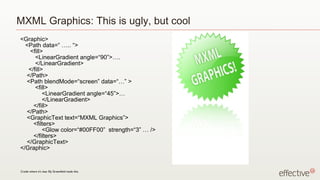
MXML Graphics: This is ugly, but cool <Graphic> <Path data=“ ….. “> <fill> <LinearGradient angle=“90”>…. </LinearGradient> </fill> </Path> <Path blendMode=“screen” data=“…” > <fill> <LinearGradient angle=“45”>… </LinearGradient> </fill> </Path> <GraphicText text=“MXML Graphics”> <filters> <Glow color=“#00FF00”  strength=“3” … /> </filters> </GraphicText> </Graphic> Credit where it’s due: Ely Greenfield made this.
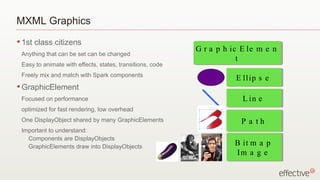
MXML Graphics 1st class citizens Anything that can be set can be changed  Easy to animate with effects, states, transitions, code Freely mix and match with Spark components GraphicElement Focused on performance optimized for fast rendering, low overhead One DisplayObject shared by many GraphicElements Important to understand:  Components are DisplayObjects GraphicElements draw into DisplayObjects GraphicElement Ellipse Line Path Bitmap Image
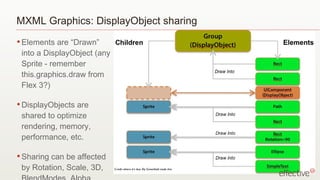
MXML Graphics: DisplayObject sharing Elements are “Drawn” into a DisplayObject (any Sprite - remember this.graphics.draw from Flex 3?) DisplayObjects are shared to optimize rendering, memory, performance, etc. Sharing can be affected by Rotation, Scale, 3D, BlendModes, Alpha, Filters, siblings Credit where it’s due: Ely Greenfield made this.
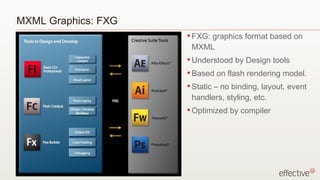
MXML Graphics: FXG FXG: graphics format based on MXML Understood by Design tools Based on flash rendering model. Static – no binding, layout, event handlers, styling, etc. Optimized by compiler
Text in Flex 4 FTE: New low level text engine (player 10) Stands for “Flash Text Engine” TLF: New text layout library built on top of FTE. “ Text Library for Flash?”  Might also stand for “Totally Like Fireballs”,“Typical Lightning Flamboyance” or “Tumultuous Latex Fusion” Benefits: Soft hyphens (we know you’ve all been missing those!) Baseline control (e.g., superscripts and subscripts) Right, center, and decimal tabs Vertical justification Multiple columns Ligatures, capitalization styles, digit styles Integrated Rendering of device fonts (a.k.a. I can fade and rotate my text FINALLY) Bi-Directional text etc.
Text in Flex 4: New Text components Spark Introduces 3 new ‘Primitive’ Text components: SimpleText (Label, sorta) RichText (Text, sorta) careful - these do NOT extend UIComponent!! RichEditableText (editable TextField) 2 new skinnable text Spark components (based on the primitives): TextInput TextArea (Creatively named identically to the current components.)
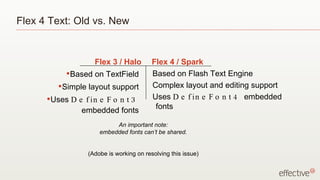
Flex 4 Text: Old vs. New Based on TextField Simple layout support Uses  DefineFont3  embedded fonts Based on Flash Text Engine Complex layout and editing support Uses  DefineFont4  embedded fonts Flex 3 / Halo Flex 4 / Spark An important note: embedded fonts can’t be shared. (Adobe is working on resolving this issue)
Effects and Animation We’re just going to touch on this, but it’s much improved over Flex 3.
Effects and Animation What’s wrong with Flex’s animation now? Make use of the new Elements (graphics) Designed for more advanced tools (i.e. Flast Catalyst) More Flexible Animate Animates arbitrary targets (GraphicElements and more) Animates arbitrary types (floats, integers, colors, vectors, paths) Animates along arbitrary motion paths Auto-reversing behavior for mirroring transitions (easy fix for “flickering” animations) Precision timing for executing compound transitions
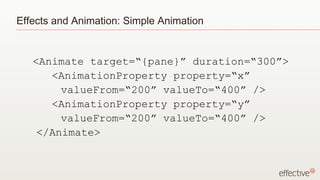
Effects and Animation: Simple Animation <Animate target=“{pane}” duration=“300”> <AnimationProperty property=“x”  valueFrom=“200” valueTo=“400” /> <AnimationProperty property=“y”  valueFrom=“200” valueTo=“400” /> </Animate>
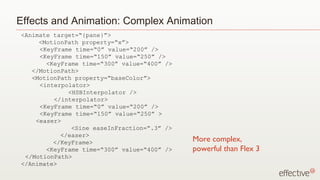
Effects and Animation: Complex Animation <Animate target=“{pane}”> <MotionPath property=“x”>   <KeyFrame time=“0” value=“200” />   <KeyFrame time=“150” value=“250” />   <KeyFrame time=“300” value=“400” />   </MotionPath>   <MotionPath property=“baseColor”>   <interpolator>   <HSBInterpolator />   </interpolator>   <KeyFrame time=“0” value=“200” />   <KeyFrame time=“150” value=“250” >   <easer> <Sine easeInFraction=“.3” /> </easer> </KeyFrame>   <KeyFrame time=“300” value=“400” />   </MotionPath> </Animate> More complex, powerful than Flex 3
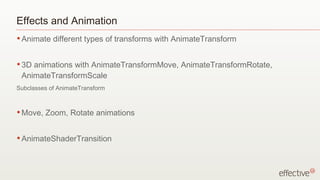
Effects and Animation Animate different types of transforms with AnimateTransform 3D animations with AnimateTransformMove, AnimateTransformRotate, AnimateTransformScale Subclasses of AnimateTransform Move, Zoom, Rotate animations AnimateShaderTransition
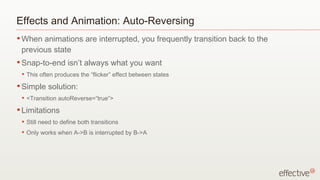
Effects and Animation: Auto-Reversing When animations are interrupted, you frequently transition back to the previous state Snap-to-end isn’t always what you want This often produces the “flicker” effect between states Simple solution: <Transition autoReverse=“true”> Limitations Still need to define both transitions Only works when A->B is interrupted by B->A
Containers and Layout Separating Containers from Layout to make both more powerful
Containers: what’s broken? mx.core.Container is the root container in Flex 3 Extends from UIComponent; complex component lifecycle Too many capabilities we don’t need scrollbar policies - always turning scroll-bars off Rigid layout rules tightly-bound with container’s business logic Can’t support our new GraphicElements No built-in support for transforms and 3D effects
Containers: Fix it! Group Lowest level container in Spark framework Supports both UIComponents and GraphicElements Only the bare essentials: Layout (through delegates) Containment Basic Flash player features (transforms, etc.) Introducing “DataGroup: The basis of any “List” based container Anything that uses ItemRenderers Ely: “Repeater done Right” In Spark, everything displayable resides in a Group
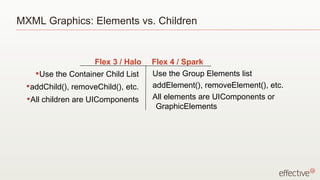
MXML Graphics: Elements vs. Children Use the Container Child List addChild(), removeChild(), etc. All children are UIComponents Use the Group Elements list addElement(), removeElement(), etc. All elements are UIComponents or GraphicElements Flex 3 / Halo Flex 4 / Spark
Layout: what’s broken? Layout is intimately tied to containment Layout code and container code are tightly coupled Very difficult to make lists that CONTAIN objects in the same way DISPLAY them differently Example: any ordered container (list) has a single layout available in Flex 3 DataProviders offered some of the solution; decouple data from visualization Flex 4 abstracts the view a step farther with Layout classes
Layout: Fix it! All layout classes extend LayoutBase VerticalLayout, HorizontalLayout, TileLayout, BasicLayout (Canvas) Basis of layout for all containers, lists, skins, etc. The goal: clean layout, easy extension, consistent behavior Big difference: layouts can support transforms Example: Ryan Campbell’s layout demo http://www.bobjim.com/2009/06/16/heres-5-3d-layouts-for-flex-4/
Components Custom and otherwise
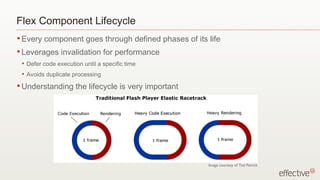
Flex Component Lifecycle Every component goes through defined phases of its life Leverages invalidation for performance Defer code execution until a specific time Avoids duplicate processing Understanding the lifecycle is very important Image courtesy of Ted Patrick
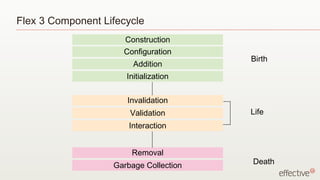
Flex 3 Component Lifecycle Construction Configuration Addition Initialization Invalidation Validation Interaction Removal Garbage Collection Birth Life Death
Components: what’s broken? In Halo, components were rigid Hard to extend “ Monkey patching” to make small changes to component view Example: HTML text in the panel title bar
Components: Fix it! Separate data, logic and behavior from visuals, states, animation and layout Create component-logic with no assumption about appearance Create component-view without digging into the logic
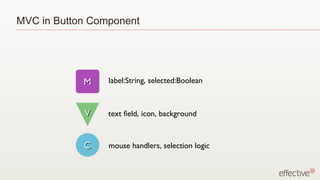
MVC in Button Component label:String, selected:Boolean text field, icon, background mouse handlers, selection logic M V C
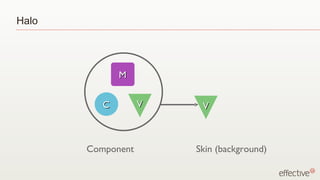
Halo Component Skin (background) M V C V
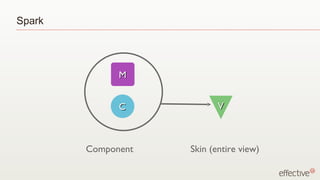
Spark Component Skin (entire view) M C V
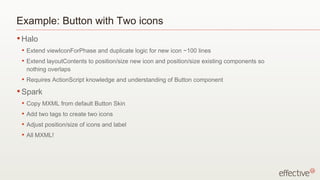
Example: Button with Two icons Halo Extend viewIconForPhase and duplicate logic for new icon ~100 lines Extend layoutContents to position/size new icon and position/size existing components so nothing overlaps Requires ActionScript knowledge and understanding of Button component Spark Copy MXML from default Button Skin Add two tags to create two icons Adjust position/size of icons and label All MXML!
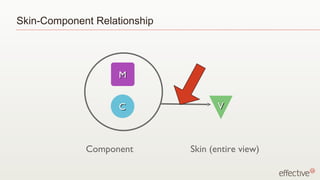
Skin-Component Relationship Component Skin (entire view) M C V
Skin Parts Component specifies optional/required skin parts as metadata [SkinPart(required=”true”)] public var labelElement:SimpleText; Skin implements skin parts Exception thrown if required part is not found
Skin States Defined in the component using metadata [SkinState(“up”)] [SkinState(“down”)] Current state is passed to the skin from the component All states are required.  An exception will be thrown if a state is not implemented in the skin
Data Data can be pushed to a skin part from the component (recommended) or, data can be pulled from the component by the skin using data-binding [HostComponent(&quot;spark.components.Button&quot;)] Pulling can be error-prone and costly Pushing promotes encapsulation
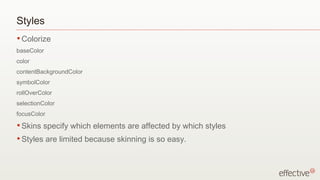
Styles Colorize baseColor color contentBackgroundColor symbolColor rollOverColor selectionColor focusColor Skins specify which elements are affected by which styles Styles are limited because skinning is so easy.
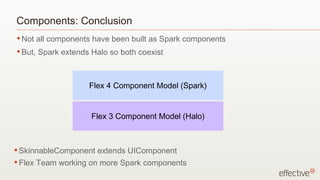
Components: Conclusion Not all components have been built as Spark components But, Spark extends Halo so both coexist Flex 3 Component Model (Halo) Flex 4 Component Model (Spark) SkinnableComponent extends UIComponent Flex Team working on more Spark components
Any questions? RJ Owen [email_address] twitter: rjowen Andy McIntosh [email_address] twitter: andymcintosh www.effectiveui.com [email_address] .com
Bibliography and More Reading Ely Greenfield’s “Flex 4 Migration” talk from Adobe Max, 2008 Mrinal Wadhwa’s talk on Component LifeCycle http://weblog.mrinalwadhwa.com/2009/06/21/flex-4-component-lifecycle/ Ryan Campbell’s blog post on Layout in Flex 4 http://www.bobjim.com/2009/06/16/heres-5-3d-layouts-for-flex-4/
page heading samples! some text (line 2 indented) goes in a list this is what it  looks like Some text goes into a paragraph, this is what it looks like. Some text goes into a paragraph, this is what it looks like. Some text goes into a paragraph, this is what it looks like. Some text goes into a paragraph, this is what it looks like. list heading object Some text goes into  a paragraph, this is what  it looks like. 3

Flex 4 Deep Dive

  • 1.
    Flex 4 DeepDive: UI and Dev mostly development stuff | a little bit of design stuff
  • 2.
    Who are we?RJ Owen Senior Developer at EffectiveUI Andy McIntosh Experience Architect at EffectiveUI Experienced Flex Developers, men in the trenches, the kind of guys who know what it’s like out there.
  • 3.
    Where’s Juan? JuanSanchez has abandoned the Rocky Mountain Adobe Camp in favor of a relaxing beach vacation. Let’s all feel bad for Juan, and thank Andy for jumping in at the last second.
  • 4.
    Who are you?Software designers and developers Some Flex experience in Flex 3 Interested in building better interfaces
  • 5.
    What will wetalk about? Today we’ll cover: Language updates in Flex 4 MXML graphics and the new Flash Text Engine Effects and Animations Containers and Layout Components, Custom and Otherwise Component Lifecycle, Skins Credit where it’s due: Our talk draws from Ely Greenfield’s “Flex 4 Migration” presentation from Adobe MAX 2008
  • 6.
    Flex T-Shirt StoreDemo Built for Adobe R&D team in 2 weeks
  • 7.
    Changes in 2009Some MXML languages changes to support the new features of Flex 4
  • 8.
    What’s new inFlex 4? A lot: Spark components Skin components, dynamic layout FXG - declarative graphics Flash Catalyst integration Styles are different States are different “ Groups” vs. “Child Lists”; new container types Enhanced Text renderer New MXML tags Effects and Animation Chrome, Scrolling Updated component lifestyle, architecture Designer / Developer contract We’ve got our work cut out for us.
  • 9.
    Fundamental Changes Designer/ Developer Workflow Developer Designer Workflow
  • 10.
    Fundamental Changes Graphicsare 1st Tier Citizens Flash Catalyst Integration New “Spark” component architecture (old “Halo”) Flex 3 Component Model (Halo) Flex 4 Component Model (Spark)
  • 11.
    Changes in 2009:Namespaces Duplicate components = duplicate tags. Public outcry over “FxButton” vs. “Button” Improved Productivity Fix things, tinker with things The result: MXML 2009 Contains new language features only available in 2009 One language namespace per file, but can mix and match per application Spark and Halo live side by side in 2009 Spark is only intended to be used in 2009 – won’t generally work in 2006
  • 12.
    Flex Namespaces xmlns:fx=“http://ns.adobe.com/mxml/2009 ” Language tags (Script, Style, and more) Built in types (Array, String, Number, etc) xmlns:s=“library://ns.adobe.com/flex/spark” All new classes introduced in Flex 4 RPC Graphics xmlns:mx=“library://ns.adobe.com/flex/halo” All legacy Halo components States, Validators, RPC, etc. Anything that was in 2006 xmlns:mx=“ http://ns.adobe.com/mxml/2006 ” The same as it was in Flex 3 - use this if you’re not going to use 2009 namespaces
  • 13.
    Changes in 2009:New Tags <fx:Declarations /> A place to stick your stuff Anything that’s not a visual child of a component belongs here. Services, Data Models, singletons…anything that doesn’t show up in your UI ends up here Previously ‘stuff’ could just go at the top of the file <s:Application> <fx:Declarations> <s:HTTPService … /> </fx:Declarations> <s:TextInput … /> … </s:Application>
  • 14.
    Changes in 2009:Styles New components have overlapping class names New with Flex 4: qualified CSS selectors <Style> @namespace s &quot;library://ns.adobe.com/flex/spark”; s|Button { } </Style> Required on all type identifiers in CSS New syntax is global to an application – even in MXML 2006 documents Namespaces are resolved at compile time – at runtime, types are fully qualified classnames (i.e., s|Button above becomes spark.components.Button)
  • 15.
    Changes in 2009:Advanced Styles Multiple Class Selectors: <Button id=“upButton” styleName=“default tiny” /> ID Selectors: #upButton { fontSize: 14 } Descendant Selectors: s|Scrollbar #upButton { baseColor: #FF8888 } Pseudo Selectors: s|Scrollbar #upButton:over { baseColor: #8888FF } default and tiny are two separate distinct styles!
  • 16.
    Changes in 2009:States - what’s broken? States in Flex 3 and below suck Overly verbose Really awkward to use - AddChild children, RemoveChild children, etc. Hard to optimize We never ever ever use them. Ever. Okay, Andy uses them all the time, but he hates them.
  • 17.
    Changes in 2009:States - Fix it! States in Flex 4 are awesome Declare your states with a ‘State’ tag Describe ‘alternate views’ of your markup Change values, bindings, event handlers Include and exclude components as easily as setting visibility Unscoped entries specify the ‘default’ for all states States can be grouped into State Groups - see Flex documentation for more info <fx:Reparent> tag to move children between states WARNING: Use NEW STATES in 2009 documents – 2006 still supports legacy states. <states> <State name=”login&quot;/> <State name=”register&quot;/> <State name=”someOtherState” stateGroups=”group1”/> </states> <Group> <TextBox text=“username:” /> <TextInput /> <TextBox text=“password:” /> <TextInput /> <Button label=“new user?” /> <Checkbox includeIn=“register” label=“agree to terms” /> <Button label=“log in” label.register=“sign up” /> </Group>
  • 18.
    MXML for Graphicsand new Text rendering Flex 4 provides a declarative graphics language that makes drawing vector art easier (but not really “easy.”) Flex 4 makes deliberate use of the new text rendering engine in Flash Player 10 (FTE) to allow you to manipulate text in the way you’d expect (FINALLY.)
  • 19.
    MXML Graphics MXMLGraphics library providing rich primitive support Simple Shape primitives (Rectangles, rounded rects, ellipses, circles) Complex Paths (Linear, Quadratic, and Bezier curve segments) Full range of fills and strokes (solid, transparent, bitmap, linear and radial gradients) Masking, filters, blend modes, and more. (blur, glow, dropshadow, screen, multiply…) Color and 2D transformations (rotate, scale, tint, brighten…) Integrated text, bitmaps Anyone heard of “Degrafa?”
  • 20.
    MXML Graphics: Thisis ugly, but cool <Graphic> <Path data=“ ….. “> <fill> <LinearGradient angle=“90”>…. </LinearGradient> </fill> </Path> <Path blendMode=“screen” data=“…” > <fill> <LinearGradient angle=“45”>… </LinearGradient> </fill> </Path> <GraphicText text=“MXML Graphics”> <filters> <Glow color=“#00FF00” strength=“3” … /> </filters> </GraphicText> </Graphic> Credit where it’s due: Ely Greenfield made this.
  • 21.
    MXML Graphics 1stclass citizens Anything that can be set can be changed Easy to animate with effects, states, transitions, code Freely mix and match with Spark components GraphicElement Focused on performance optimized for fast rendering, low overhead One DisplayObject shared by many GraphicElements Important to understand: Components are DisplayObjects GraphicElements draw into DisplayObjects GraphicElement Ellipse Line Path Bitmap Image
  • 22.
    MXML Graphics: DisplayObjectsharing Elements are “Drawn” into a DisplayObject (any Sprite - remember this.graphics.draw from Flex 3?) DisplayObjects are shared to optimize rendering, memory, performance, etc. Sharing can be affected by Rotation, Scale, 3D, BlendModes, Alpha, Filters, siblings Credit where it’s due: Ely Greenfield made this.
  • 23.
    MXML Graphics: FXGFXG: graphics format based on MXML Understood by Design tools Based on flash rendering model. Static – no binding, layout, event handlers, styling, etc. Optimized by compiler
  • 24.
    Text in Flex4 FTE: New low level text engine (player 10) Stands for “Flash Text Engine” TLF: New text layout library built on top of FTE. “ Text Library for Flash?” Might also stand for “Totally Like Fireballs”,“Typical Lightning Flamboyance” or “Tumultuous Latex Fusion” Benefits: Soft hyphens (we know you’ve all been missing those!) Baseline control (e.g., superscripts and subscripts) Right, center, and decimal tabs Vertical justification Multiple columns Ligatures, capitalization styles, digit styles Integrated Rendering of device fonts (a.k.a. I can fade and rotate my text FINALLY) Bi-Directional text etc.
  • 25.
    Text in Flex4: New Text components Spark Introduces 3 new ‘Primitive’ Text components: SimpleText (Label, sorta) RichText (Text, sorta) careful - these do NOT extend UIComponent!! RichEditableText (editable TextField) 2 new skinnable text Spark components (based on the primitives): TextInput TextArea (Creatively named identically to the current components.)
  • 26.
    Flex 4 Text:Old vs. New Based on TextField Simple layout support Uses DefineFont3 embedded fonts Based on Flash Text Engine Complex layout and editing support Uses DefineFont4 embedded fonts Flex 3 / Halo Flex 4 / Spark An important note: embedded fonts can’t be shared. (Adobe is working on resolving this issue)
  • 27.
    Effects and AnimationWe’re just going to touch on this, but it’s much improved over Flex 3.
  • 28.
    Effects and AnimationWhat’s wrong with Flex’s animation now? Make use of the new Elements (graphics) Designed for more advanced tools (i.e. Flast Catalyst) More Flexible Animate Animates arbitrary targets (GraphicElements and more) Animates arbitrary types (floats, integers, colors, vectors, paths) Animates along arbitrary motion paths Auto-reversing behavior for mirroring transitions (easy fix for “flickering” animations) Precision timing for executing compound transitions
  • 29.
    Effects and Animation:Simple Animation <Animate target=“{pane}” duration=“300”> <AnimationProperty property=“x” valueFrom=“200” valueTo=“400” /> <AnimationProperty property=“y” valueFrom=“200” valueTo=“400” /> </Animate>
  • 30.
    Effects and Animation:Complex Animation <Animate target=“{pane}”> <MotionPath property=“x”> <KeyFrame time=“0” value=“200” /> <KeyFrame time=“150” value=“250” /> <KeyFrame time=“300” value=“400” /> </MotionPath> <MotionPath property=“baseColor”> <interpolator> <HSBInterpolator /> </interpolator> <KeyFrame time=“0” value=“200” /> <KeyFrame time=“150” value=“250” > <easer> <Sine easeInFraction=“.3” /> </easer> </KeyFrame> <KeyFrame time=“300” value=“400” /> </MotionPath> </Animate> More complex, powerful than Flex 3
  • 31.
    Effects and AnimationAnimate different types of transforms with AnimateTransform 3D animations with AnimateTransformMove, AnimateTransformRotate, AnimateTransformScale Subclasses of AnimateTransform Move, Zoom, Rotate animations AnimateShaderTransition
  • 32.
    Effects and Animation:Auto-Reversing When animations are interrupted, you frequently transition back to the previous state Snap-to-end isn’t always what you want This often produces the “flicker” effect between states Simple solution: <Transition autoReverse=“true”> Limitations Still need to define both transitions Only works when A->B is interrupted by B->A
  • 33.
    Containers and LayoutSeparating Containers from Layout to make both more powerful
  • 34.
    Containers: what’s broken?mx.core.Container is the root container in Flex 3 Extends from UIComponent; complex component lifecycle Too many capabilities we don’t need scrollbar policies - always turning scroll-bars off Rigid layout rules tightly-bound with container’s business logic Can’t support our new GraphicElements No built-in support for transforms and 3D effects
  • 35.
    Containers: Fix it!Group Lowest level container in Spark framework Supports both UIComponents and GraphicElements Only the bare essentials: Layout (through delegates) Containment Basic Flash player features (transforms, etc.) Introducing “DataGroup: The basis of any “List” based container Anything that uses ItemRenderers Ely: “Repeater done Right” In Spark, everything displayable resides in a Group
  • 36.
    MXML Graphics: Elementsvs. Children Use the Container Child List addChild(), removeChild(), etc. All children are UIComponents Use the Group Elements list addElement(), removeElement(), etc. All elements are UIComponents or GraphicElements Flex 3 / Halo Flex 4 / Spark
  • 37.
    Layout: what’s broken?Layout is intimately tied to containment Layout code and container code are tightly coupled Very difficult to make lists that CONTAIN objects in the same way DISPLAY them differently Example: any ordered container (list) has a single layout available in Flex 3 DataProviders offered some of the solution; decouple data from visualization Flex 4 abstracts the view a step farther with Layout classes
  • 38.
    Layout: Fix it!All layout classes extend LayoutBase VerticalLayout, HorizontalLayout, TileLayout, BasicLayout (Canvas) Basis of layout for all containers, lists, skins, etc. The goal: clean layout, easy extension, consistent behavior Big difference: layouts can support transforms Example: Ryan Campbell’s layout demo http://www.bobjim.com/2009/06/16/heres-5-3d-layouts-for-flex-4/
  • 39.
  • 40.
    Flex Component LifecycleEvery component goes through defined phases of its life Leverages invalidation for performance Defer code execution until a specific time Avoids duplicate processing Understanding the lifecycle is very important Image courtesy of Ted Patrick
  • 41.
    Flex 3 ComponentLifecycle Construction Configuration Addition Initialization Invalidation Validation Interaction Removal Garbage Collection Birth Life Death
  • 42.
    Components: what’s broken?In Halo, components were rigid Hard to extend “ Monkey patching” to make small changes to component view Example: HTML text in the panel title bar
  • 43.
    Components: Fix it!Separate data, logic and behavior from visuals, states, animation and layout Create component-logic with no assumption about appearance Create component-view without digging into the logic
  • 44.
    MVC in ButtonComponent label:String, selected:Boolean text field, icon, background mouse handlers, selection logic M V C
  • 45.
    Halo Component Skin(background) M V C V
  • 46.
    Spark Component Skin(entire view) M C V
  • 47.
    Example: Button withTwo icons Halo Extend viewIconForPhase and duplicate logic for new icon ~100 lines Extend layoutContents to position/size new icon and position/size existing components so nothing overlaps Requires ActionScript knowledge and understanding of Button component Spark Copy MXML from default Button Skin Add two tags to create two icons Adjust position/size of icons and label All MXML!
  • 48.
    Skin-Component Relationship ComponentSkin (entire view) M C V
  • 49.
    Skin Parts Componentspecifies optional/required skin parts as metadata [SkinPart(required=”true”)] public var labelElement:SimpleText; Skin implements skin parts Exception thrown if required part is not found
  • 50.
    Skin States Definedin the component using metadata [SkinState(“up”)] [SkinState(“down”)] Current state is passed to the skin from the component All states are required. An exception will be thrown if a state is not implemented in the skin
  • 51.
    Data Data canbe pushed to a skin part from the component (recommended) or, data can be pulled from the component by the skin using data-binding [HostComponent(&quot;spark.components.Button&quot;)] Pulling can be error-prone and costly Pushing promotes encapsulation
  • 52.
    Styles Colorize baseColorcolor contentBackgroundColor symbolColor rollOverColor selectionColor focusColor Skins specify which elements are affected by which styles Styles are limited because skinning is so easy.
  • 53.
    Components: Conclusion Notall components have been built as Spark components But, Spark extends Halo so both coexist Flex 3 Component Model (Halo) Flex 4 Component Model (Spark) SkinnableComponent extends UIComponent Flex Team working on more Spark components
  • 54.
    Any questions? RJOwen [email_address] twitter: rjowen Andy McIntosh [email_address] twitter: andymcintosh www.effectiveui.com [email_address] .com
  • 55.
    Bibliography and MoreReading Ely Greenfield’s “Flex 4 Migration” talk from Adobe Max, 2008 Mrinal Wadhwa’s talk on Component LifeCycle http://weblog.mrinalwadhwa.com/2009/06/21/flex-4-component-lifecycle/ Ryan Campbell’s blog post on Layout in Flex 4 http://www.bobjim.com/2009/06/16/heres-5-3d-layouts-for-flex-4/
  • 56.
    page heading samples!some text (line 2 indented) goes in a list this is what it looks like Some text goes into a paragraph, this is what it looks like. Some text goes into a paragraph, this is what it looks like. Some text goes into a paragraph, this is what it looks like. Some text goes into a paragraph, this is what it looks like. list heading object Some text goes into a paragraph, this is what it looks like. 3