
Adobe Flex
vs.
HTML 5
Adobe Flex
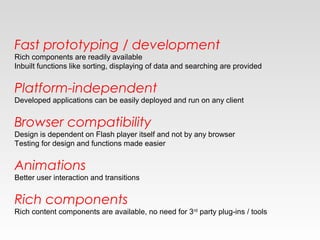
Fast prototyping / development
Rich components are readily available
Inbuilt functions like sorting, displaying of data and searching are provided
Platform-independent
Developed applications can be easily deployed and run on any client
Browser compatibility
Design is dependent on Flash player itself and not by any browser
Testing for design and functions made easier
Animations
Better user interaction and transitions
Rich components
Rich content components are available, no need for 3rd
party plug-ins / tools
HTML 5
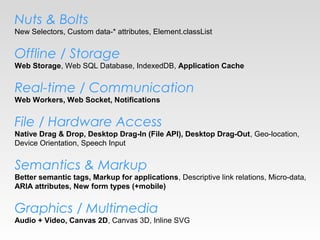
Nuts & Bolts
New Selectors, Custom data-* attributes, Element.classList
Offline / Storage
Web Storage, Web SQL Database, IndexedDB, Application Cache
Real-time / Communication
Web Workers, Web Socket, Notifications
File / Hardware Access
Native Drag & Drop, Desktop Drag-In (File API), Desktop Drag-Out, Geo-location,
Device Orientation, Speech Input
Semantics & Markup
Better semantic tags, Markup for applications, Descriptive link relations, Micro-data,
ARIA attributes, New form types (+mobile)
Graphics / Multimedia
Audio + Video, Canvas 2D, Canvas 3D, Inline SVG
Web Storage
• All entered data is saved on local storage
• Prevent unexpected loss of data
• Restore once browser re-opens
Application Cache
• Configurable to only reload updated
content
Web Workers
• Asynchronous processing of javascript
with event handling
Web Socket
• Full-duplex, bi-directional communication
over the web. Both the server and client
can send data at any time or even at the
same time
• Sends without overhead of http headers
Notifications
• Sends requests to RESTful applications
and parses result into a notification box
Native Drag & Drop
• Able to select any portion of text, image
into droppable area
Desktop Drag-in (File API)
• Advanced file API for filtering and
manipulating files dragged-in
Desktop Drag-out
• Files can be instantly downloadable to
desktop upon drag-out
Better semantic tags
• Better semantic tags to segment and
format paragraphs and text
Markup for Applications
• Additional tags for data, progress bar, etc.
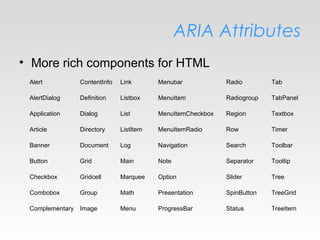
ARIA Attributes
• More rich components for HTML
Alert ContentInfo Link Menubar Radio Tab
AlertDialog Definition Listbox MenuItem Radiogroup TabPanel
Application Dialog List MenuItemCheckbox Region Textbox
Article Directory ListItem MenuItemRadio Row Timer
Banner Document Log Navigation Search Toolbar
Button Grid Main Note Separator Tooltip
Checkbox Gridcell Marquee Option Slider Tree
Combobox Group Math Presentation SpinButton TreeGrid
Complementary Image Menu ProgressBar Status TreeItem
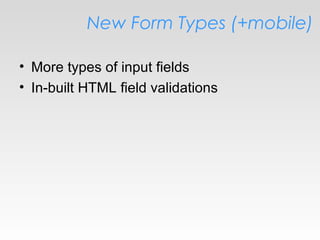
New Form Types (+mobile)
• More types of input fields
• In-built HTML field validations
Audio + Video
• Audio & Video HTML tags to replace flash
Canvas 2D
• Drawing made simple with javascript
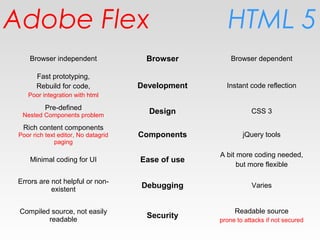
HTML 5Adobe Flex
Browser independent Browser Browser dependent
Fast prototyping,
Rebuild for code,
Poor integration with html
Development Instant code reflection
Pre-defined
Nested Components problem
Design CSS 3
Rich content components
Poor rich text editor, No datagrid
paging
Components jQuery tools
Minimal coding for UI Ease of use
A bit more coding needed,
but more flexible
Errors are not helpful or non-
existent
Debugging Varies
Compiled source, not easily
readable
Security
Readable source
prone to attacks if not secured

Flex vs HTML5

  • 1.
  • 2.
  • 3.
    Fast prototyping /development Rich components are readily available Inbuilt functions like sorting, displaying of data and searching are provided Platform-independent Developed applications can be easily deployed and run on any client Browser compatibility Design is dependent on Flash player itself and not by any browser Testing for design and functions made easier Animations Better user interaction and transitions Rich components Rich content components are available, no need for 3rd party plug-ins / tools
  • 4.
  • 5.
    Nuts & Bolts NewSelectors, Custom data-* attributes, Element.classList Offline / Storage Web Storage, Web SQL Database, IndexedDB, Application Cache Real-time / Communication Web Workers, Web Socket, Notifications File / Hardware Access Native Drag & Drop, Desktop Drag-In (File API), Desktop Drag-Out, Geo-location, Device Orientation, Speech Input Semantics & Markup Better semantic tags, Markup for applications, Descriptive link relations, Micro-data, ARIA attributes, New form types (+mobile) Graphics / Multimedia Audio + Video, Canvas 2D, Canvas 3D, Inline SVG
  • 6.
    Web Storage • Allentered data is saved on local storage • Prevent unexpected loss of data • Restore once browser re-opens
  • 7.
    Application Cache • Configurableto only reload updated content
  • 8.
    Web Workers • Asynchronousprocessing of javascript with event handling
  • 9.
    Web Socket • Full-duplex,bi-directional communication over the web. Both the server and client can send data at any time or even at the same time • Sends without overhead of http headers
  • 10.
    Notifications • Sends requeststo RESTful applications and parses result into a notification box
  • 11.
    Native Drag &Drop • Able to select any portion of text, image into droppable area
  • 12.
    Desktop Drag-in (FileAPI) • Advanced file API for filtering and manipulating files dragged-in
  • 13.
    Desktop Drag-out • Filescan be instantly downloadable to desktop upon drag-out
  • 14.
    Better semantic tags •Better semantic tags to segment and format paragraphs and text
  • 15.
    Markup for Applications •Additional tags for data, progress bar, etc.
  • 16.
    ARIA Attributes • Morerich components for HTML Alert ContentInfo Link Menubar Radio Tab AlertDialog Definition Listbox MenuItem Radiogroup TabPanel Application Dialog List MenuItemCheckbox Region Textbox Article Directory ListItem MenuItemRadio Row Timer Banner Document Log Navigation Search Toolbar Button Grid Main Note Separator Tooltip Checkbox Gridcell Marquee Option Slider Tree Combobox Group Math Presentation SpinButton TreeGrid Complementary Image Menu ProgressBar Status TreeItem
  • 17.
    New Form Types(+mobile) • More types of input fields • In-built HTML field validations
  • 18.
    Audio + Video •Audio & Video HTML tags to replace flash
  • 19.
    Canvas 2D • Drawingmade simple with javascript
  • 20.
    HTML 5Adobe Flex Browserindependent Browser Browser dependent Fast prototyping, Rebuild for code, Poor integration with html Development Instant code reflection Pre-defined Nested Components problem Design CSS 3 Rich content components Poor rich text editor, No datagrid paging Components jQuery tools Minimal coding for UI Ease of use A bit more coding needed, but more flexible Errors are not helpful or non- existent Debugging Varies Compiled source, not easily readable Security Readable source prone to attacks if not secured