
RoboHelp - Overview 01/23/12
Agenda What is Online Help? What is a Help-authoring tool (HAT)? Different Help-authoring tools available Features available in Robohelp Difference between Robohelp and Webworks Publisher 01/23/12
Help-authoring tool  Online Help: Documentation/Help in electronic format A  help-authoring tool  or  HAT  is a software program to create online help manuals Online Help file formats: Adobe  Portable Document Format  (PDF) Hypertext Markup Language ( HTML ) Microsoft WinHelp  (.HLP) – based on Rich Text Format Microsoft Compressed HTML Help  (.CHM) Mac OS X  Help (.HELP) Sun JavaHelp  (.js) 01/23/12
01/23/12 Help-authoring tool  The basic functions of help-authoring tools are:  File Input/Create => Edit => Help Output File Input Formats : HATs obtain their source text either by importing it from a file produced by another program, or by allowing the author to create the text within the tool using a text editor. File formats that can be imported include  HTML ,  Microsoft Word , MIF ( FrameMaker  Interchange Format) and compiled help formats such as  Microsoft WinHelp  and  Microsoft Compressed HTML Help . The ability to import compiled help formats is useful when the source text for those files has been lost. Help Output Formats : The output from a HAT can be either a specialised help file in a format such as WinHelp or Microsoft Compiled HTML (CHM), or a general-purpose document file such as Adobe  PDF  or  HTML .
01/23/12 Help-authoring tool  Some HATs provide extra functions like: Automatic or assisted  index  generation Automatic  table of contents Spelling checker Image editing Image hotspot editing Import and export of text in  XML  files, for exchange with  computer-assisted translation  programs
Common Help-Authoring Tools(HAT) Some common help authoring tools include: RoboHelp: An easy-to-use tool to create professional Help systems and documentation for desktop and web-based applications AuthorIT : A collaborative authoring tool used for single-source content management.  Chm maker : An easy-to-use help authoring tool for creating help files in CHM format.  Doc-To-Help : An authoring tool that creates various online Help formats and printed manuals from Microsoft Word or HTML source documents. Webworks Publisher  in association with  Adobe FrameMaker : The most common tool for large technical documents. Epic Editor : An  XML -based authoring tool.   01/23/12
About RoboHelp RoboHelp is a Help authoring tool (HAT) created by the eHelp Corporation and now owned by Macromedia.  Used by technical writers to create help files in various formats, including: FlashHelp Microsoft WinHelp Microsoft Compressed HTML Help Sun JavaHelp WebHelp Oracle Help for Java XML  Microsoft Word  PDF 01/23/12
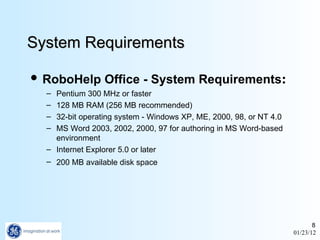
System Requirements RoboHelp Office - System Requirements : Pentium 300 MHz or faster  128 MB RAM (256 MB recommended)  32-bit operating system - Windows XP, ME, 2000, 98, or NT 4.0  MS Word 2003, 2002, 2000, 97 for authoring in MS Word-based environment  Internet Explorer 5.0 or later  200 MB available disk space   01/23/12
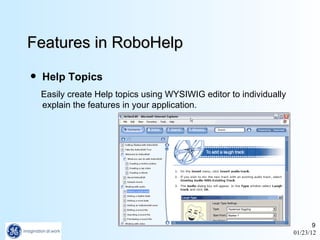
Features in RoboHelp Help Topics Easily create Help topics using WYSIWIG editor to individually explain the features in your application. 01/23/12
Features in RoboHelp Graphics Integrate graphics, such as screenshots of particular application features, into your Help topics. 01/23/12
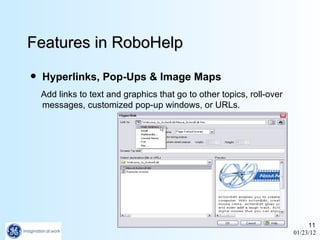
Features in RoboHelp Hyperlinks, Pop-Ups & Image Maps Add links to text and graphics that go to other topics, roll-over messages, customized pop-up windows, or URLs. 01/23/12
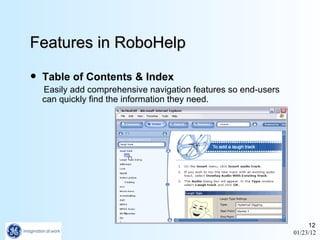
Features in RoboHelp Table of Contents & Index Easily add comprehensive navigation features so end-users can quickly find the information they need. 01/23/12
Features in RoboHelp Search Function Include a powerful natural language search or full-text search. (Natural language requires RoboHelp Office Pro.) 01/23/12
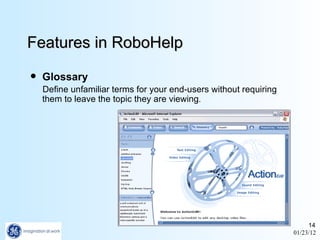
Features in RoboHelp Glossary Define unfamiliar terms for your end-users without requiring them to leave the topic they are viewing . 01/23/12
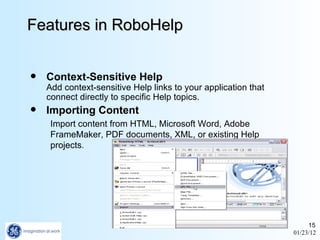
Features in RoboHelp Context-Sensitive Help Add context-sensitive Help links to your application that connect directly to specific Help topics. Importing Content Import content from HTML, Microsoft Word, Adobe FrameMaker, PDF documents, XML, or existing Help projects . 01/23/12
Features in RoboHelp Automated Wizards Table of Contents Composer Index Designer Glossary Wizard Browse Sequence Editor Related Topic Wizard 01/23/12
Features in RoboHelp Single Sourcing Generate multiple online formats from a single project, including  FlashHelp WebHelp HTML Help WinHelp JavaHelp Oracle Help for Java HTML XML 01/23/12
Difference b/w RoboHelp & Webworks Publisher Webworks Publisher generates files that are ready to be compiled in the Microsoft Help Compiler. Unlike RoboHelp, you do not modify the source files directly.  RoboHelp provides an  easy-to-use  interfaces, but the problem is that you have to export the information out of FrameMaker to RTF, and you lose a lot of formatting this way.  Spend weeks in cleaning up the RTF output from RoboHelp before you can really develop the help.  If you use in your Online Help, look at direct conversion alternatives from FrameMaker to WinHelp to avoid redoing all your formatting. 01/23/12

RoboHelp 2002 - overview

  • 1.
  • 2.
    Agenda What isOnline Help? What is a Help-authoring tool (HAT)? Different Help-authoring tools available Features available in Robohelp Difference between Robohelp and Webworks Publisher 01/23/12
  • 3.
    Help-authoring tool Online Help: Documentation/Help in electronic format A help-authoring tool or HAT is a software program to create online help manuals Online Help file formats: Adobe Portable Document Format (PDF) Hypertext Markup Language ( HTML ) Microsoft WinHelp (.HLP) – based on Rich Text Format Microsoft Compressed HTML Help (.CHM) Mac OS X Help (.HELP) Sun JavaHelp (.js) 01/23/12
  • 4.
    01/23/12 Help-authoring tool The basic functions of help-authoring tools are: File Input/Create => Edit => Help Output File Input Formats : HATs obtain their source text either by importing it from a file produced by another program, or by allowing the author to create the text within the tool using a text editor. File formats that can be imported include HTML , Microsoft Word , MIF ( FrameMaker Interchange Format) and compiled help formats such as Microsoft WinHelp and Microsoft Compressed HTML Help . The ability to import compiled help formats is useful when the source text for those files has been lost. Help Output Formats : The output from a HAT can be either a specialised help file in a format such as WinHelp or Microsoft Compiled HTML (CHM), or a general-purpose document file such as Adobe PDF or HTML .
  • 5.
    01/23/12 Help-authoring tool Some HATs provide extra functions like: Automatic or assisted index generation Automatic table of contents Spelling checker Image editing Image hotspot editing Import and export of text in XML files, for exchange with computer-assisted translation programs
  • 6.
    Common Help-Authoring Tools(HAT)Some common help authoring tools include: RoboHelp: An easy-to-use tool to create professional Help systems and documentation for desktop and web-based applications AuthorIT : A collaborative authoring tool used for single-source content management. Chm maker : An easy-to-use help authoring tool for creating help files in CHM format. Doc-To-Help : An authoring tool that creates various online Help formats and printed manuals from Microsoft Word or HTML source documents. Webworks Publisher in association with Adobe FrameMaker : The most common tool for large technical documents. Epic Editor : An XML -based authoring tool. 01/23/12
  • 7.
    About RoboHelp RoboHelpis a Help authoring tool (HAT) created by the eHelp Corporation and now owned by Macromedia. Used by technical writers to create help files in various formats, including: FlashHelp Microsoft WinHelp Microsoft Compressed HTML Help Sun JavaHelp WebHelp Oracle Help for Java XML Microsoft Word PDF 01/23/12
  • 8.
    System Requirements RoboHelpOffice - System Requirements : Pentium 300 MHz or faster 128 MB RAM (256 MB recommended) 32-bit operating system - Windows XP, ME, 2000, 98, or NT 4.0 MS Word 2003, 2002, 2000, 97 for authoring in MS Word-based environment Internet Explorer 5.0 or later 200 MB available disk space 01/23/12
  • 9.
    Features in RoboHelpHelp Topics Easily create Help topics using WYSIWIG editor to individually explain the features in your application. 01/23/12
  • 10.
    Features in RoboHelpGraphics Integrate graphics, such as screenshots of particular application features, into your Help topics. 01/23/12
  • 11.
    Features in RoboHelpHyperlinks, Pop-Ups & Image Maps Add links to text and graphics that go to other topics, roll-over messages, customized pop-up windows, or URLs. 01/23/12
  • 12.
    Features in RoboHelpTable of Contents & Index Easily add comprehensive navigation features so end-users can quickly find the information they need. 01/23/12
  • 13.
    Features in RoboHelpSearch Function Include a powerful natural language search or full-text search. (Natural language requires RoboHelp Office Pro.) 01/23/12
  • 14.
    Features in RoboHelpGlossary Define unfamiliar terms for your end-users without requiring them to leave the topic they are viewing . 01/23/12
  • 15.
    Features in RoboHelpContext-Sensitive Help Add context-sensitive Help links to your application that connect directly to specific Help topics. Importing Content Import content from HTML, Microsoft Word, Adobe FrameMaker, PDF documents, XML, or existing Help projects . 01/23/12
  • 16.
    Features in RoboHelpAutomated Wizards Table of Contents Composer Index Designer Glossary Wizard Browse Sequence Editor Related Topic Wizard 01/23/12
  • 17.
    Features in RoboHelpSingle Sourcing Generate multiple online formats from a single project, including FlashHelp WebHelp HTML Help WinHelp JavaHelp Oracle Help for Java HTML XML 01/23/12
  • 18.
    Difference b/w RoboHelp& Webworks Publisher Webworks Publisher generates files that are ready to be compiled in the Microsoft Help Compiler. Unlike RoboHelp, you do not modify the source files directly. RoboHelp provides an easy-to-use interfaces, but the problem is that you have to export the information out of FrameMaker to RTF, and you lose a lot of formatting this way. Spend weeks in cleaning up the RTF output from RoboHelp before you can really develop the help. If you use in your Online Help, look at direct conversion alternatives from FrameMaker to WinHelp to avoid redoing all your formatting. 01/23/12