XML based user interaction through Rich Interfaces - SVG - MULTIMEDIA DOCUMENT Stéphane Sire (speaking)
PLAN Part 1 Rich User Interaction Style Part 2 Iterative Design and supportive technologies Part 3 SVG and alike
PART 1 Rich User Interaction Style
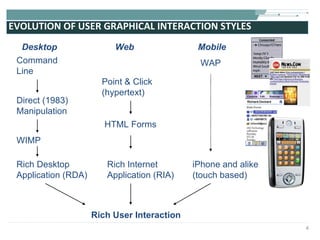
EVOLUTION OF USER GRAPHICAL INTERACTION STYLES Desktop Web Mobile Command Line Direct (1983) Manipulation Point & Click (hypertext) HTML Forms WAP Rich User Interaction WIMP Rich Desktop Application (RDA) Rich Internet Application (RIA) iPhone and alike (touch based)
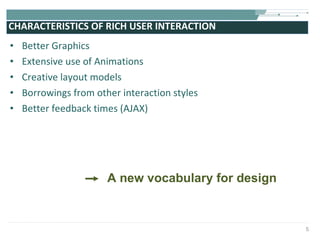
CHARACTERISTICS OF RICH USER INTERACTION Better Graphics Extensive use of Animations  Creative layout models Borrowings from other interaction styles Better feedback times (AJAX) A new vocabulary for design
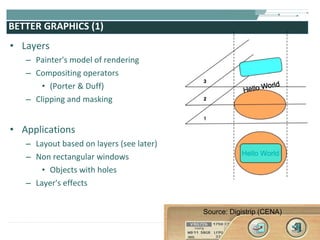
BETTER GRAPHICS (1) Layers Painter's model of rendering Compositing operators  (Porter & Duff) Clipping and masking Applications Layout based on layers (see later) Non rectangular windows Objects with holes Layer's effects Source: Digistrip (CENA)
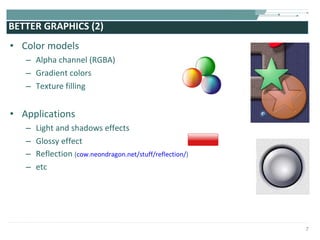
BETTER GRAPHICS (2) Color models Alpha channel (RGBA) Gradient colors Texture filling Applications Light and shadows effects Glossy effect Reflection  ( cow.neondragon.net/stuff/reflection/ ) etc
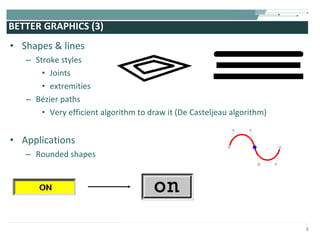
BETTER GRAPHICS (3)  Shapes & lines Stroke styles Joints extremities  B ézier  paths Very efficient algorithm to draw it (De Casteljeau algorithm) Applications Rounded shapes
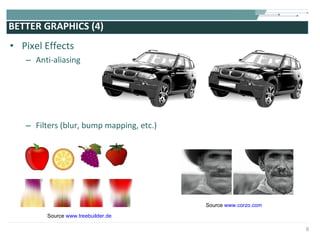
BETTER GRAPHICS (4) Pixel Effects Anti-aliasing Filters (blur, bump mapping, etc.) Source  www.corzo.com Source  www.treebuilder.de
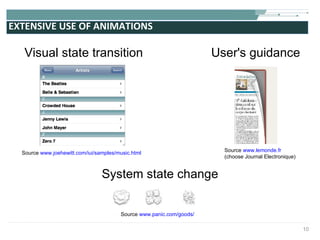
EXTENSIVE USE OF ANIMATIONS User's guidance System state change Visual state transition Source  www.joehewitt.com/iui/samples/music.html Source  www.lemonde.fr (choose Journal Electronique) Source  www.panic.com/goods/
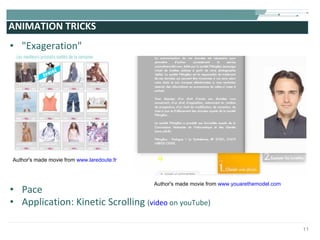
ANIMATION TRICKS "Exageration" Pace Application: Kinetic Scrolling  ( video  on youTube) Author's made movie from  www.laredoute.fr    Author's made movie from  www.youarethemodel.com
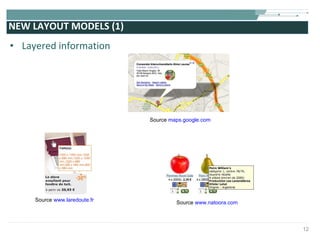
NEW LAYOUT MODELS (1) Layered information Source  www.laredoute.fr Source  www.natoora.com Source  maps.google.com
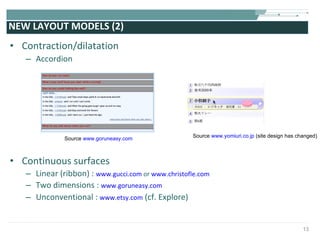
NEW LAYOUT MODELS (2) Contraction/dilatation Accordion Continuous surfaces Linear (ribbon) :  www.gucci.com  or  www.christofle.com Two dimensions :  www.goruneasy.com Unconventional :  www.etsy.com  (cf. Explore) Source  www.goruneasy.com Source  www.yomiuri.co.jp  (site design has changed)
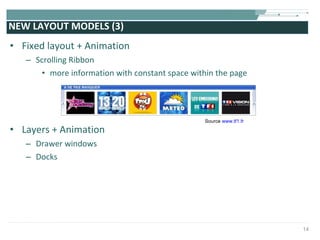
NEW LAYOUT MODELS (3) Fixed layout + Animation Scrolling Ribbon more information with constant space within the page Layers + Animation Drawer windows Docks Source  www.tf1.fr
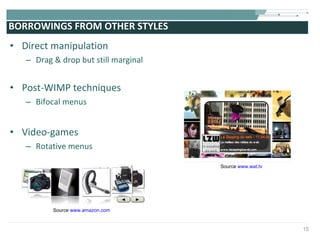
BORROWINGS FROM OTHER STYLES Direct manipulation Drag & drop but still marginal Post-WIMP techniques Bifocal menus Video-games Rotative menus Source  www.amazon.com Source  www.wat.tv
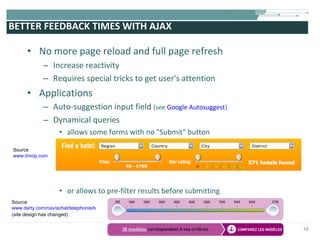
BETTER FEEDBACK TIMES WITH AJAX No more page reload and full page refresh Increase reactivity Requires special tricks to get user's attention  Applications Auto-suggestion input field  (see  Google Autosuggest ) Dynamical queries allows some forms with no "Submit" button or allows to pre-filter results before submitting Source www.trivop.com Source www.darty.com/nav/achat/telephonie/telephonie_mobile/telephone_portable/guide.html (site design has changed)
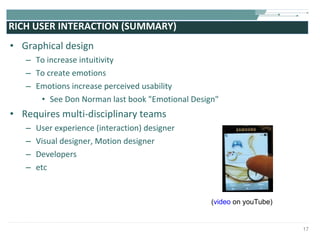
RICH USER INTERACTION (SUMMARY) Graphical design To increase intuitivity To create emotions Emotions increase perceived usability See Don Norman last book "Emotional Design"  Requires multi-disciplinary teams  User experience (interaction) designer Visual designer, Motion designer Developers etc ( video  on youTube)
PART 2 Iterative Design and Supportive Technologies
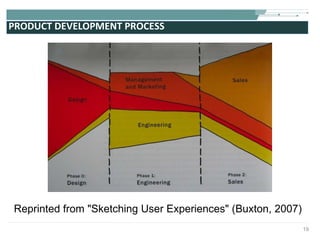
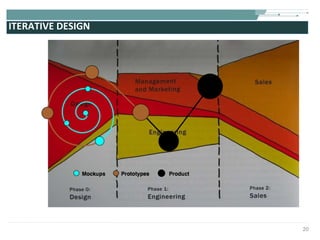
PRODUCT DEVELOPMENT PROCESS Reprinted from "Sketching User Experiences" (Buxton, 2007)
ITERATIVE DESIGN
CLOSE TO AGILE SOFTWARE DEVELOPMENT Agile Manigesto  (source  agilemanifesto.org ) Individuals and interactions over processes and tools  Working software over comprehensive documentation  Customer collaboration over contract negotiation  Responding to change over following a plan See also Extreme Programming Web version the permanent Beta
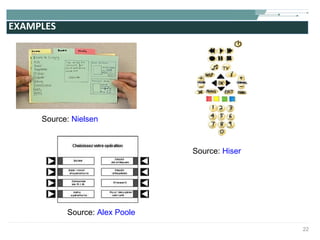
EXAMPLES Source:  Nielsen Source:  Hiser Source:  Alex Poole
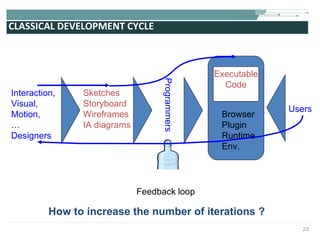
CLASSICAL DEVELOPMENT CYCLE Users Sketches Storyboard Wireframes IA diagrams Programmers Interaction, Visual, Motion, … Designers Executable Code Browser Plugin Runtime Env. Feedback loop How to increase the number of iterations ?
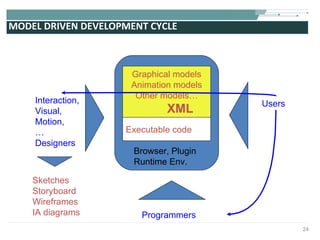
MODEL DRIVEN DEVELOPMENT CYCLE Users Sketches Storyboard Wireframes IA diagrams Programmers Interaction, Visual, Motion, … Designers Graphical models Animation models Other models… XML Browser, Plugin Runtime Env. Executable code
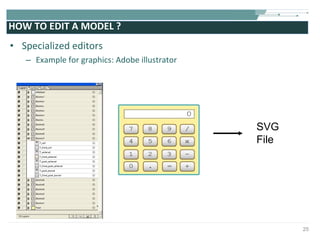
HOW TO EDIT A MODEL ? Specialized editors  Example for graphics: Adobe illustrator SVG File
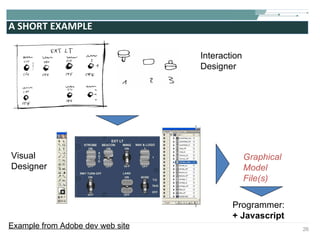
A SHORT EXAMPLE  Interaction Designer Visual  Designer Programmer: + Javascript  Graphical Model File(s) Example from Adobe dev web site
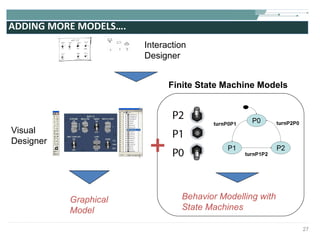
ADDING MORE MODELS….  Interaction Designer Visual  Designer Graphical Model Behavior Modelling with State Machines Finite State Machine Models
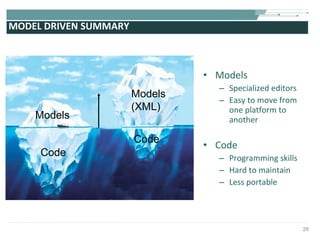
MODEL DRIVEN SUMMARY Models Specialized editors Easy to move from one platform to another Code Programming skills Hard to maintain Less portable Models Models (XML) Code Code
PART 3 Web Standards for Graphical Design: SVG and alike
W3C STANDARDS (1) Mainly "Models"  XML based languages From "Draft" to "Recommendation" status Models both for output and input modalities HTML, XHTML, XForms, SMIL, MathML, VoiceXML, SCXML, InkML, EMMA, …, and  SVG Some "Code" too Application Programming Interfaces (APIs) DOM (3 levels) API for manipulating models loaded into memory as trees Many more APIs (events, load and save, progression, etc.) XMLHttpRequest Ajax programming
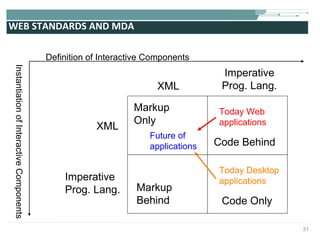
WEB STANDARDS AND MDA Markup  Only Code Behind  Markup  Behind Code Only XML XML Imperative Prog. Lang. Imperative Prog. Lang. Definition of Interactive Components Instantiation of Interactive Components Today Web applications Future of  applications Today Desktop applications
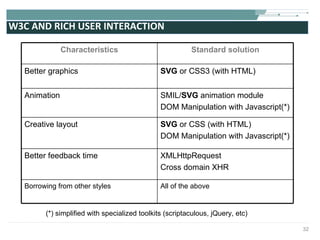
W3C AND RICH USER INTERACTION (*) simplified with specialized toolkits (scriptaculous, jQuery, etc)  Characteristics Standard solution Better graphics SVG  or CSS3 (with HTML)  Animation SMIL/ SVG  animation module  DOM Manipulation with Javascript(*) Creative layout SVG  or CSS (with HTML) DOM Manipulation with Javascript(*) Better feedback time XMLHttpRequest  Cross domain XHR Borrowing from other styles All of the above
SVG HISTORY S calable  V ector  G raphic Started in 1998 1st draft: February 1999 SVG 1.1 recommendation 2003 http://www.w3.org/TR/SVG11/   SVG 1.2 Tiny candidate recommendation 2006 http://www.w3.org/TR/SVGMobile12/ SVG 1.2 Full to come later Working Group with main software editors Sun, Adobe, Apple, Microsoft, Corel, Ilog, HP, Canon, Autodesk, etc.
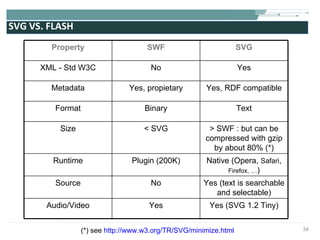
SVG VS. FLASH (*) see  http://www.w3.org/TR/SVG/minimize.html Property SWF SVG XML - Std W3C No Yes Metadata Yes, propietary Yes, RDF compatible Format Binary Text Size < SVG > SWF : but can be compressed with gzip by about 80% (*) Runtime Plugin (200K) Native (Opera,  Safari ,  Firefox, … ) Source No Yes (text is searchable and selectable) Audio/Video Yes Yes (SVG 1.2 Tiny)
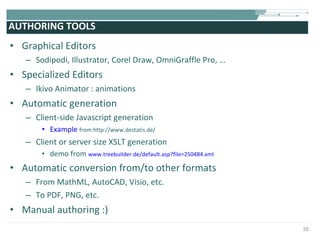
AUTHORING TOOLS Graphical Editors Sodipodi, Illustrator, Corel Draw, OmniGraffle Pro, … Specialized Editors Ikivo Animator : animations Automatic generation  Client-side Javascript generation Example   from http://www.destatis.de/ Client or server size XSLT generation demo from  www.treebuilder.de/default.asp?file=250484.xml Automatic conversion from/to other formats From MathML, AutoCAD, Visio, etc. To PDF, PNG, etc. Manual authoring :)
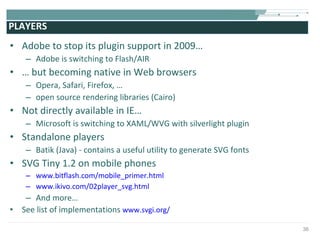
PLAYERS Adobe to stop its plugin support in 2009… Adobe is switching to Flash/AIR …  but becoming native in Web browsers Opera, Safari, Firefox, … open source rendering libraries (Cairo) Not directly available in IE… Microsoft is switching to XAML/WVG with silverlight plugin Standalone players Batik (Java) - contains a useful utility to generate SVG fonts SVG Tiny 1.2 on mobile phones www.bitflash.com/mobile_primer.html www.ikivo.com/02player_svg.html And more… See list of implementations  www.svgi.org/
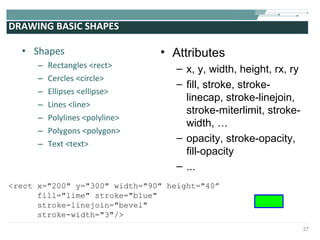
DRAWING BASIC SHAPES Shapes Rectangles <rect>   Cercles <circle> Ellipses <ellipse>   Lines <line> Polylines <polyline> Polygons <polygon>   Text <text> Attributes x, y, width, height, rx, ry fill, stroke, stroke-linecap, stroke-linejoin, stroke-miterlimit, stroke-width, … opacity, stroke-opacity, fill-opacity ... <rect x=&quot;200&quot; y=&quot;300&quot; width=&quot;90&quot; height=&quot;40” fill=&quot;lime&quot; stroke=&quot;blue&quot;  stroke-linejoin=&quot;bevel&quot;  stroke-width=&quot;3&quot;/>
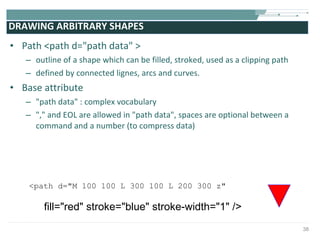
DRAWING ARBITRARY SHAPES Path <path d=&quot;path data&quot; > outline of a shape which can be filled, stroked, used as a clipping path  defined by connected lignes, arcs and curves.  Base attribute &quot;path data&quot; : complex vocabulary  &quot;,&quot; and EOL are allowed in &quot;path data&quot;, spaces are optional between a command and a number (to compress data) <path d=&quot;M 100 100 L 300 100 L 200 300 z&quot; fill=&quot;red&quot; stroke=&quot;blue&quot; stroke-width=&quot;1&quot; />
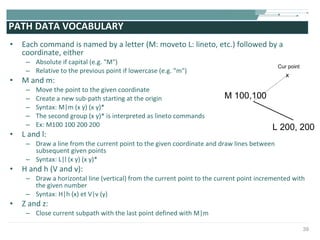
PATH DATA VOCABULARY Each command is named by a letter (M: moveto L: lineto, etc.) followed by a coordinate, either Absolute if capital (e.g. &quot;M&quot;) Relative to the previous point if lowercase (e.g. &quot;m&quot;) M and m: Move the point to the given coordinate Create a new sub-path starting at the origin Syntax: M|m (x y) (x y)* The second group (x y)* is interpreted as lineto commands Ex: M100 100 200 200 L and l: Draw a line from the current point to the given coordinate and draw lines between subsequent given points Syntax: L|l (x y) (x y)* H and h (V and v): Draw a horizontal line (vertical) from the current point to the current point incremented with the given number Syntax: H|h (x) et V|v (y) Z and z: Close current subpath with the last point defined with M|m M 100,100 L 200, 200 x Cur point
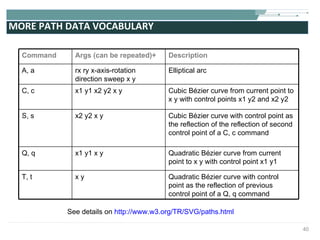
MORE PATH DATA VOCABULARY See details on  http://www.w3.org/TR/SVG/paths.html Command Args (can be repeated)+ Description A, a rx ry x-axis-rotation direction sweep x y Elliptical arc C, c x1 y1 x2 y2 x y  Cubic B ézier curve from current point to x y with control points x1 y2 and x2 y2 S, s x2 y2 x y  Cubic B ézier curve with control point as the reflection of the reflection of second control point of a C, c command Q, q x1 y1 x y  Quadratic B ézier curve from current point to x y with control point x1 y1 T, t x y Quadratic B ézier curve with control point as the reflection of previous control point of a Q, q command
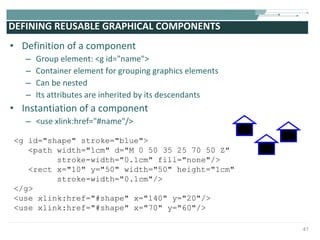
DEFINING REUSABLE GRAPHICAL COMPONENTS Definition of a component Group element: <g id=&quot;name&quot;> Container element for grouping graphics elements Can be nested Its attributes are inherited by its descendants Instantiation of a component <use xlink:href=&quot;#name&quot;/> <g id=&quot;shape&quot; stroke=&quot;blue&quot;> <path width=&quot;1cm&quot; d=&quot;M 0 50 35 25 70 50 Z&quot;  stroke-width=&quot;0.1cm&quot; fill=&quot;none&quot;/>  <rect x=&quot;10&quot; y=&quot;50&quot; width=&quot;50&quot; height=&quot;1cm&quot;  stroke-width=&quot;0.1cm&quot;/>  </g> <use xlink:href=&quot;#shape&quot; x=&quot;140&quot; y=&quot;20&quot;/> <use xlink:href=&quot;#shape&quot; x=&quot;70&quot; y=&quot;60&quot;/>
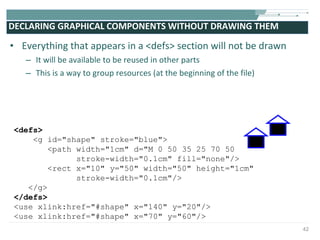
DECLARING GRAPHICAL COMPONENTS WITHOUT DRAWING THEM  Everything that appears in a <defs> section will not be drawn It will be available to be reused in other parts This is a way to group resources (at the beginning of the file) <defs> <g id=&quot;shape&quot; stroke=&quot;blue&quot;> <path width=&quot;1cm&quot; d=&quot;M 0 50 35 25 70 50 Z&quot;  stroke-width=&quot;0.1cm&quot; fill=&quot;none&quot;/>  <rect x=&quot;10&quot; y=&quot;50&quot; width=&quot;50&quot; height=&quot;1cm&quot;  stroke-width=&quot;0.1cm&quot;/>  </g> </defs> <use xlink:href=&quot;#shape&quot; x=&quot;140&quot; y=&quot;20&quot;/> <use xlink:href=&quot;#shape&quot; x=&quot;70&quot; y=&quot;60&quot;/>
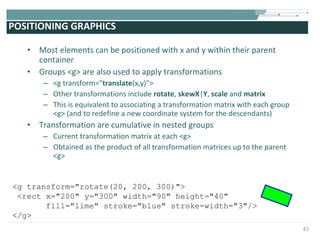
POSITIONING GRAPHICS Most elements can be positioned with x and y within their parent container Groups <g> are also used to apply transformations <g transform=&quot; translate (x,y)&quot;> Other transformations include  rotate ,  skewX | Y ,  scale  and  matrix This is equivalent to associating a transformation matrix with each group <g> (and to redefine a new coordinate system for the descendants) Transformation are cumulative in nested groups Current transformation matrix at each <g> Obtained as the product of all transformation matrices up to the parent <g> <g transform=&quot;rotate(20, 200, 300)&quot;> <rect x=&quot;200&quot; y=&quot;300&quot; width=&quot;90&quot; height=&quot;40&quot; fill=&quot;lime&quot; stroke=&quot;blue&quot; stroke-width=&quot;3&quot;/> </g>
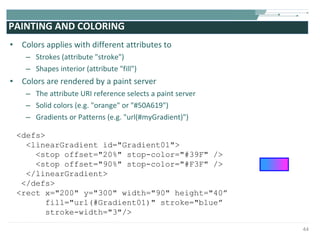
PAINTING AND COLORING Colors applies with different attributes to Strokes (attribute &quot;stroke&quot;) Shapes interior (attribute &quot;fill&quot;) Colors are rendered by a paint server The attribute URI reference selects a paint server Solid colors (e.g. &quot;orange&quot; or &quot;#50A619&quot;) Gradients or Patterns (e.g. &quot;url(#myGradient)&quot;) <defs> <linearGradient id=&quot;Gradient01&quot;> <stop offset=&quot;20%&quot; stop-color=&quot;#39F&quot; /> <stop offset=&quot;90%&quot; stop-color=&quot;#F3F&quot; /> </linearGradient>  </defs> <rect x=&quot;200&quot; y=&quot;300&quot; width=&quot;90&quot; height=&quot;40” fill=&quot;url(#Gradient01)&quot; stroke=&quot;blue” stroke-width=&quot;3&quot;/>
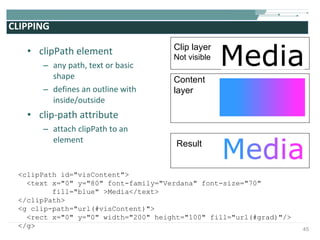
CLIPPING clipPath element any path, text or basic shape defines an outline with inside/outside clip-path attribute attach clipPath to an element  Clip layer Not visible Content layer Result <clipPath id=&quot;visContent&quot;> <text x=&quot;0&quot; y=&quot;80&quot; font-family=&quot;Verdana&quot; font-size=&quot;70&quot;  fill=&quot;blue&quot; >Media</text>  </clipPath> <g clip-path=&quot;url(#visContent)&quot;> <rect x=&quot;0&quot; y=&quot;0&quot; width=&quot;200&quot; height=&quot;100&quot; fill=&quot;url(#grad)&quot;/> </g>
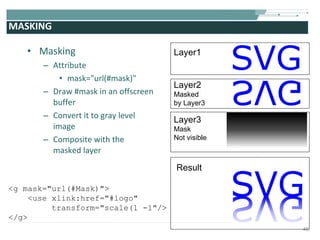
MASKING Masking Attribute mask=&quot;url(#mask)&quot; Draw #mask in an offscreen buffer Convert it to gray level image Composite with the masked layer Layer1 Layer2 Masked  by Layer3 Result Layer3 Mask Not visible <g mask=&quot;url(#Mask)&quot;> <use xlink:href=&quot;#logo&quot; transform=&quot;scale(1 -1&quot;/> </g>
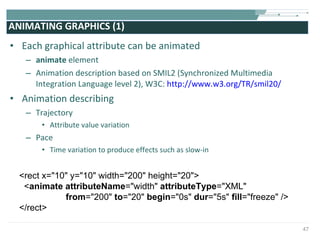
ANIMATING GRAPHICS (1) Each graphical attribute can be animated animate  element Animation description based on SMIL2 (Synchronized Multimedia Integration Language level 2), W3C:  http://www.w3.org/TR/smil20/  Animation describing Trajectory Attribute value variation Pace Time variation to produce effects such as slow-in <rect x=&quot;10&quot; y=&quot;10&quot; width=&quot;200&quot; height=&quot;20&quot;>  < animate attributeName =&quot;width&quot;  attributeType =&quot;XML&quot;  from =&quot;200&quot;  to =&quot;20&quot;  begin =&quot;0s&quot;  dur =&quot;5s&quot;  fill =&quot;freeze&quot;   />  </rect>
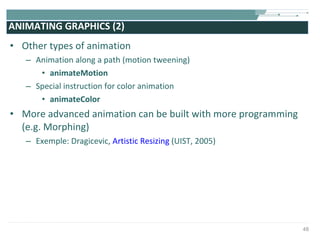
ANIMATING GRAPHICS (2) Other types of animation Animation along a path (motion tweening) animateMotion Special instruction for color animation animateColor More advanced animation can be built with more programming (e.g. Morphing) Exemple: Dragicevic,  Artistic Resizing  (UIST, 2005)
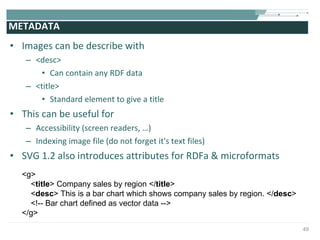
METADATA Images can be describe with  <desc> Can contain any RDF data <title> Standard element to give a title This can be useful for  Accessibility (screen readers, …) Indexing image file (do not forget it's text files) SVG 1.2 also introduces attributes for RDFa & microformats  <g>  < title > Company sales by region </ title >  < desc > This is a bar chart which shows company sales by region. </ desc >  <!-- Bar chart defined as vector data -->  </g>
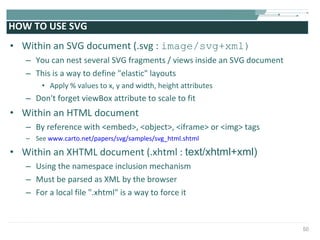
HOW TO USE SVG Within an SVG document (.svg :  image/svg+xml) You can nest several SVG fragments / views inside an SVG document This is a way to define &quot;elastic&quot; layouts Apply % values to x, y and width, height attributes Don't forget viewBox attribute to scale to fit Within an HTML document By reference with <embed>, <object>, <iframe> or <img> tags See  www.carto.net/papers/svg/samples/svg_html.shtml Within an XHTML document (.xhtml :  text/xhtml+xml) Using the namespace inclusion mechanism Must be parsed as XML by the browser For a local file &quot;.xhtml&quot; is a way to force it
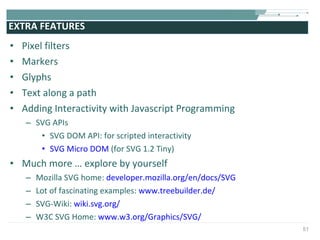
EXTRA FEATURES  Pixel filters  Markers Glyphs Text along a path Adding Interactivity with Javascript Programming SVG APIs SVG DOM API: for scripted interactivity SVG Micro DOM  (for SVG 1.2 Tiny)  Much more … explore by yourself  Mozilla SVG home:  developer.mozilla.org/en/docs/SVG Lot of fascinating examples:  www.treebuilder.de/ SVG-Wiki:  wiki.svg.org/ W3C SVG Home:  www.w3.org/Graphics/SVG/
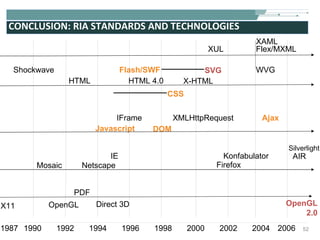
CONCLUSION: RIA STANDARDS AND TECHNOLOGIES X11 1987 1992 1994 2002 2004 Shockwave HTML HTML 4.0 Flash/SWF X-HTML SVG Javascript DOM XMLHttpRequest Ajax CSS IFrame 1990 1996 1998 2000 2006 OpenGL PDF Direct 3D OpenGL 2.0 Mosaic Netscape IE Firefox Konfabulator AIR Silverlight XAML Flex/MXML XUL WVG
CREDITS Web sources indicated directly on the slides, otherwise (many thanks to them): Illustrations p7 CENA Digistrip  www.tls.cena.fr/divisions/PII/toccata/composants/digistrips.html Demos p10 SVG Slot Machine –  www.treebuilder.de p30 Adobe Airbus A321 Panel demo –  www.adobe.com/svg/demos/main.html Book Sketching User Experience, Bill Buxton, Morgan Kaufman by Elsevier inc. 2007 –  www.billbuxton.com Article Combining SVG and models of interaction to build highly interactive user interfaces,  S. Chatty, A. Lemort, S. Sire, J-L. Vinot, SVGOpen 2005 –   www.svgopen.org/2005/papers/CombiningSVGModelsBuildInteractiveUserInterfaces/
EXTRA SLIDES
COMPLETE SVG FILE EXAMPLE <?xml version=&quot;1.0&quot; encoding=&quot;utf-8&quot;?> <!DOCTYPE svg [  <!-- entities etc. here -->  ]> <svg version=&quot;1.1&quot; baseProfile=&quot;full&quot; xmlns=&quot;http://www.w3.org/2000/svg&quot; xmlns:xlink=&quot;http://www.w3.org/1999/xlink&quot; width=&quot;8cm&quot; height=&quot;6cm&quot;> <defs> <!-- resources to be reused --> <linearGradient id=&quot;Gradient01&quot;> <stop offset=&quot;20%&quot; stop-color=&quot;#39F&quot; /> <stop offset=&quot;90%&quot; stop-color=&quot;#F3F&quot; /> </linearGradient>  <rect id=&quot;shape&quot; width=&quot;1cm&quot; height=&quot;1cm&quot; stroke=&quot;blue&quot; stroke-width=&quot;0.1cm&quot;/>  </defs> <!-- content -->   <rect x=&quot;.1cm&quot; y=&quot;.1cm&quot; width=&quot;7.9cm&quot; height=&quot;5.9cm&quot; fill=&quot;none&quot; stroke=&quot;black&quot; stroke-width=&quot;1px&quot; /> <use x=&quot;1cm&quot; y=&quot;1cm&quot; xlink:href=&quot;#shape&quot; fill=&quot;#BBB&quot;/> <use x=&quot;4cm&quot; y=&quot;1cm&quot; xlink:href=&quot;#shape&quot; fill=&quot;url(#Gradient01)&quot;/>  <use x=&quot;1cm&quot; y=&quot;4cm&quot; xlink:href=&quot;#shape&quot; fill=&quot;url(#Gradient01)&quot;/>  <use x=&quot;4cm&quot; y=&quot;4cm&quot; xlink:href=&quot;#shape&quot; fill=&quot;blue&quot;/>  </svg>

Rich User Interaction with SVG

  • 1.
    XML based userinteraction through Rich Interfaces - SVG - MULTIMEDIA DOCUMENT Stéphane Sire (speaking)
  • 2.
    PLAN Part 1Rich User Interaction Style Part 2 Iterative Design and supportive technologies Part 3 SVG and alike
  • 3.
    PART 1 RichUser Interaction Style
  • 4.
    EVOLUTION OF USERGRAPHICAL INTERACTION STYLES Desktop Web Mobile Command Line Direct (1983) Manipulation Point & Click (hypertext) HTML Forms WAP Rich User Interaction WIMP Rich Desktop Application (RDA) Rich Internet Application (RIA) iPhone and alike (touch based)
  • 5.
    CHARACTERISTICS OF RICHUSER INTERACTION Better Graphics Extensive use of Animations Creative layout models Borrowings from other interaction styles Better feedback times (AJAX) A new vocabulary for design
  • 6.
    BETTER GRAPHICS (1)Layers Painter's model of rendering Compositing operators (Porter & Duff) Clipping and masking Applications Layout based on layers (see later) Non rectangular windows Objects with holes Layer's effects Source: Digistrip (CENA)
  • 7.
    BETTER GRAPHICS (2)Color models Alpha channel (RGBA) Gradient colors Texture filling Applications Light and shadows effects Glossy effect Reflection ( cow.neondragon.net/stuff/reflection/ ) etc
  • 8.
    BETTER GRAPHICS (3) Shapes & lines Stroke styles Joints extremities B ézier paths Very efficient algorithm to draw it (De Casteljeau algorithm) Applications Rounded shapes
  • 9.
    BETTER GRAPHICS (4)Pixel Effects Anti-aliasing Filters (blur, bump mapping, etc.) Source www.corzo.com Source www.treebuilder.de
  • 10.
    EXTENSIVE USE OFANIMATIONS User's guidance System state change Visual state transition Source www.joehewitt.com/iui/samples/music.html Source www.lemonde.fr (choose Journal Electronique) Source www.panic.com/goods/
  • 11.
    ANIMATION TRICKS &quot;Exageration&quot;Pace Application: Kinetic Scrolling ( video on youTube) Author's made movie from www.laredoute.fr Author's made movie from www.youarethemodel.com
  • 12.
    NEW LAYOUT MODELS(1) Layered information Source www.laredoute.fr Source www.natoora.com Source maps.google.com
  • 13.
    NEW LAYOUT MODELS(2) Contraction/dilatation Accordion Continuous surfaces Linear (ribbon) : www.gucci.com or www.christofle.com Two dimensions : www.goruneasy.com Unconventional : www.etsy.com (cf. Explore) Source www.goruneasy.com Source www.yomiuri.co.jp (site design has changed)
  • 14.
    NEW LAYOUT MODELS(3) Fixed layout + Animation Scrolling Ribbon more information with constant space within the page Layers + Animation Drawer windows Docks Source www.tf1.fr
  • 15.
    BORROWINGS FROM OTHERSTYLES Direct manipulation Drag & drop but still marginal Post-WIMP techniques Bifocal menus Video-games Rotative menus Source www.amazon.com Source www.wat.tv
  • 16.
    BETTER FEEDBACK TIMESWITH AJAX No more page reload and full page refresh Increase reactivity Requires special tricks to get user's attention Applications Auto-suggestion input field (see Google Autosuggest ) Dynamical queries allows some forms with no &quot;Submit&quot; button or allows to pre-filter results before submitting Source www.trivop.com Source www.darty.com/nav/achat/telephonie/telephonie_mobile/telephone_portable/guide.html (site design has changed)
  • 17.
    RICH USER INTERACTION(SUMMARY) Graphical design To increase intuitivity To create emotions Emotions increase perceived usability See Don Norman last book &quot;Emotional Design&quot; Requires multi-disciplinary teams User experience (interaction) designer Visual designer, Motion designer Developers etc ( video on youTube)
  • 18.
    PART 2 IterativeDesign and Supportive Technologies
  • 19.
    PRODUCT DEVELOPMENT PROCESSReprinted from &quot;Sketching User Experiences&quot; (Buxton, 2007)
  • 20.
  • 21.
    CLOSE TO AGILESOFTWARE DEVELOPMENT Agile Manigesto (source agilemanifesto.org ) Individuals and interactions over processes and tools Working software over comprehensive documentation Customer collaboration over contract negotiation Responding to change over following a plan See also Extreme Programming Web version the permanent Beta
  • 22.
    EXAMPLES Source: Nielsen Source: Hiser Source: Alex Poole
  • 23.
    CLASSICAL DEVELOPMENT CYCLEUsers Sketches Storyboard Wireframes IA diagrams Programmers Interaction, Visual, Motion, … Designers Executable Code Browser Plugin Runtime Env. Feedback loop How to increase the number of iterations ?
  • 24.
    MODEL DRIVEN DEVELOPMENTCYCLE Users Sketches Storyboard Wireframes IA diagrams Programmers Interaction, Visual, Motion, … Designers Graphical models Animation models Other models… XML Browser, Plugin Runtime Env. Executable code
  • 25.
    HOW TO EDITA MODEL ? Specialized editors Example for graphics: Adobe illustrator SVG File
  • 26.
    A SHORT EXAMPLE Interaction Designer Visual Designer Programmer: + Javascript Graphical Model File(s) Example from Adobe dev web site
  • 27.
    ADDING MORE MODELS…. Interaction Designer Visual Designer Graphical Model Behavior Modelling with State Machines Finite State Machine Models
  • 28.
    MODEL DRIVEN SUMMARYModels Specialized editors Easy to move from one platform to another Code Programming skills Hard to maintain Less portable Models Models (XML) Code Code
  • 29.
    PART 3 WebStandards for Graphical Design: SVG and alike
  • 30.
    W3C STANDARDS (1)Mainly &quot;Models&quot; XML based languages From &quot;Draft&quot; to &quot;Recommendation&quot; status Models both for output and input modalities HTML, XHTML, XForms, SMIL, MathML, VoiceXML, SCXML, InkML, EMMA, …, and SVG Some &quot;Code&quot; too Application Programming Interfaces (APIs) DOM (3 levels) API for manipulating models loaded into memory as trees Many more APIs (events, load and save, progression, etc.) XMLHttpRequest Ajax programming
  • 31.
    WEB STANDARDS ANDMDA Markup Only Code Behind Markup Behind Code Only XML XML Imperative Prog. Lang. Imperative Prog. Lang. Definition of Interactive Components Instantiation of Interactive Components Today Web applications Future of applications Today Desktop applications
  • 32.
    W3C AND RICHUSER INTERACTION (*) simplified with specialized toolkits (scriptaculous, jQuery, etc) Characteristics Standard solution Better graphics SVG or CSS3 (with HTML) Animation SMIL/ SVG animation module DOM Manipulation with Javascript(*) Creative layout SVG or CSS (with HTML) DOM Manipulation with Javascript(*) Better feedback time XMLHttpRequest Cross domain XHR Borrowing from other styles All of the above
  • 33.
    SVG HISTORY Scalable V ector G raphic Started in 1998 1st draft: February 1999 SVG 1.1 recommendation 2003 http://www.w3.org/TR/SVG11/ SVG 1.2 Tiny candidate recommendation 2006 http://www.w3.org/TR/SVGMobile12/ SVG 1.2 Full to come later Working Group with main software editors Sun, Adobe, Apple, Microsoft, Corel, Ilog, HP, Canon, Autodesk, etc.
  • 34.
    SVG VS. FLASH(*) see http://www.w3.org/TR/SVG/minimize.html Property SWF SVG XML - Std W3C No Yes Metadata Yes, propietary Yes, RDF compatible Format Binary Text Size < SVG > SWF : but can be compressed with gzip by about 80% (*) Runtime Plugin (200K) Native (Opera, Safari , Firefox, … ) Source No Yes (text is searchable and selectable) Audio/Video Yes Yes (SVG 1.2 Tiny)
  • 35.
    AUTHORING TOOLS GraphicalEditors Sodipodi, Illustrator, Corel Draw, OmniGraffle Pro, … Specialized Editors Ikivo Animator : animations Automatic generation Client-side Javascript generation Example from http://www.destatis.de/ Client or server size XSLT generation demo from www.treebuilder.de/default.asp?file=250484.xml Automatic conversion from/to other formats From MathML, AutoCAD, Visio, etc. To PDF, PNG, etc. Manual authoring :)
  • 36.
    PLAYERS Adobe tostop its plugin support in 2009… Adobe is switching to Flash/AIR … but becoming native in Web browsers Opera, Safari, Firefox, … open source rendering libraries (Cairo) Not directly available in IE… Microsoft is switching to XAML/WVG with silverlight plugin Standalone players Batik (Java) - contains a useful utility to generate SVG fonts SVG Tiny 1.2 on mobile phones www.bitflash.com/mobile_primer.html www.ikivo.com/02player_svg.html And more… See list of implementations www.svgi.org/
  • 37.
    DRAWING BASIC SHAPESShapes Rectangles <rect> Cercles <circle> Ellipses <ellipse> Lines <line> Polylines <polyline> Polygons <polygon> Text <text> Attributes x, y, width, height, rx, ry fill, stroke, stroke-linecap, stroke-linejoin, stroke-miterlimit, stroke-width, … opacity, stroke-opacity, fill-opacity ... <rect x=&quot;200&quot; y=&quot;300&quot; width=&quot;90&quot; height=&quot;40” fill=&quot;lime&quot; stroke=&quot;blue&quot; stroke-linejoin=&quot;bevel&quot; stroke-width=&quot;3&quot;/>
  • 38.
    DRAWING ARBITRARY SHAPESPath <path d=&quot;path data&quot; > outline of a shape which can be filled, stroked, used as a clipping path defined by connected lignes, arcs and curves. Base attribute &quot;path data&quot; : complex vocabulary &quot;,&quot; and EOL are allowed in &quot;path data&quot;, spaces are optional between a command and a number (to compress data) <path d=&quot;M 100 100 L 300 100 L 200 300 z&quot; fill=&quot;red&quot; stroke=&quot;blue&quot; stroke-width=&quot;1&quot; />
  • 39.
    PATH DATA VOCABULARYEach command is named by a letter (M: moveto L: lineto, etc.) followed by a coordinate, either Absolute if capital (e.g. &quot;M&quot;) Relative to the previous point if lowercase (e.g. &quot;m&quot;) M and m: Move the point to the given coordinate Create a new sub-path starting at the origin Syntax: M|m (x y) (x y)* The second group (x y)* is interpreted as lineto commands Ex: M100 100 200 200 L and l: Draw a line from the current point to the given coordinate and draw lines between subsequent given points Syntax: L|l (x y) (x y)* H and h (V and v): Draw a horizontal line (vertical) from the current point to the current point incremented with the given number Syntax: H|h (x) et V|v (y) Z and z: Close current subpath with the last point defined with M|m M 100,100 L 200, 200 x Cur point
  • 40.
    MORE PATH DATAVOCABULARY See details on http://www.w3.org/TR/SVG/paths.html Command Args (can be repeated)+ Description A, a rx ry x-axis-rotation direction sweep x y Elliptical arc C, c x1 y1 x2 y2 x y Cubic B ézier curve from current point to x y with control points x1 y2 and x2 y2 S, s x2 y2 x y Cubic B ézier curve with control point as the reflection of the reflection of second control point of a C, c command Q, q x1 y1 x y Quadratic B ézier curve from current point to x y with control point x1 y1 T, t x y Quadratic B ézier curve with control point as the reflection of previous control point of a Q, q command
  • 41.
    DEFINING REUSABLE GRAPHICALCOMPONENTS Definition of a component Group element: <g id=&quot;name&quot;> Container element for grouping graphics elements Can be nested Its attributes are inherited by its descendants Instantiation of a component <use xlink:href=&quot;#name&quot;/> <g id=&quot;shape&quot; stroke=&quot;blue&quot;> <path width=&quot;1cm&quot; d=&quot;M 0 50 35 25 70 50 Z&quot; stroke-width=&quot;0.1cm&quot; fill=&quot;none&quot;/> <rect x=&quot;10&quot; y=&quot;50&quot; width=&quot;50&quot; height=&quot;1cm&quot; stroke-width=&quot;0.1cm&quot;/> </g> <use xlink:href=&quot;#shape&quot; x=&quot;140&quot; y=&quot;20&quot;/> <use xlink:href=&quot;#shape&quot; x=&quot;70&quot; y=&quot;60&quot;/>
  • 42.
    DECLARING GRAPHICAL COMPONENTSWITHOUT DRAWING THEM Everything that appears in a <defs> section will not be drawn It will be available to be reused in other parts This is a way to group resources (at the beginning of the file) <defs> <g id=&quot;shape&quot; stroke=&quot;blue&quot;> <path width=&quot;1cm&quot; d=&quot;M 0 50 35 25 70 50 Z&quot; stroke-width=&quot;0.1cm&quot; fill=&quot;none&quot;/> <rect x=&quot;10&quot; y=&quot;50&quot; width=&quot;50&quot; height=&quot;1cm&quot; stroke-width=&quot;0.1cm&quot;/> </g> </defs> <use xlink:href=&quot;#shape&quot; x=&quot;140&quot; y=&quot;20&quot;/> <use xlink:href=&quot;#shape&quot; x=&quot;70&quot; y=&quot;60&quot;/>
  • 43.
    POSITIONING GRAPHICS Mostelements can be positioned with x and y within their parent container Groups <g> are also used to apply transformations <g transform=&quot; translate (x,y)&quot;> Other transformations include rotate , skewX | Y , scale and matrix This is equivalent to associating a transformation matrix with each group <g> (and to redefine a new coordinate system for the descendants) Transformation are cumulative in nested groups Current transformation matrix at each <g> Obtained as the product of all transformation matrices up to the parent <g> <g transform=&quot;rotate(20, 200, 300)&quot;> <rect x=&quot;200&quot; y=&quot;300&quot; width=&quot;90&quot; height=&quot;40&quot; fill=&quot;lime&quot; stroke=&quot;blue&quot; stroke-width=&quot;3&quot;/> </g>
  • 44.
    PAINTING AND COLORINGColors applies with different attributes to Strokes (attribute &quot;stroke&quot;) Shapes interior (attribute &quot;fill&quot;) Colors are rendered by a paint server The attribute URI reference selects a paint server Solid colors (e.g. &quot;orange&quot; or &quot;#50A619&quot;) Gradients or Patterns (e.g. &quot;url(#myGradient)&quot;) <defs> <linearGradient id=&quot;Gradient01&quot;> <stop offset=&quot;20%&quot; stop-color=&quot;#39F&quot; /> <stop offset=&quot;90%&quot; stop-color=&quot;#F3F&quot; /> </linearGradient> </defs> <rect x=&quot;200&quot; y=&quot;300&quot; width=&quot;90&quot; height=&quot;40” fill=&quot;url(#Gradient01)&quot; stroke=&quot;blue” stroke-width=&quot;3&quot;/>
  • 45.
    CLIPPING clipPath elementany path, text or basic shape defines an outline with inside/outside clip-path attribute attach clipPath to an element Clip layer Not visible Content layer Result <clipPath id=&quot;visContent&quot;> <text x=&quot;0&quot; y=&quot;80&quot; font-family=&quot;Verdana&quot; font-size=&quot;70&quot; fill=&quot;blue&quot; >Media</text> </clipPath> <g clip-path=&quot;url(#visContent)&quot;> <rect x=&quot;0&quot; y=&quot;0&quot; width=&quot;200&quot; height=&quot;100&quot; fill=&quot;url(#grad)&quot;/> </g>
  • 46.
    MASKING Masking Attributemask=&quot;url(#mask)&quot; Draw #mask in an offscreen buffer Convert it to gray level image Composite with the masked layer Layer1 Layer2 Masked by Layer3 Result Layer3 Mask Not visible <g mask=&quot;url(#Mask)&quot;> <use xlink:href=&quot;#logo&quot; transform=&quot;scale(1 -1&quot;/> </g>
  • 47.
    ANIMATING GRAPHICS (1)Each graphical attribute can be animated animate element Animation description based on SMIL2 (Synchronized Multimedia Integration Language level 2), W3C: http://www.w3.org/TR/smil20/ Animation describing Trajectory Attribute value variation Pace Time variation to produce effects such as slow-in <rect x=&quot;10&quot; y=&quot;10&quot; width=&quot;200&quot; height=&quot;20&quot;> < animate attributeName =&quot;width&quot; attributeType =&quot;XML&quot; from =&quot;200&quot; to =&quot;20&quot; begin =&quot;0s&quot; dur =&quot;5s&quot; fill =&quot;freeze&quot; /> </rect>
  • 48.
    ANIMATING GRAPHICS (2)Other types of animation Animation along a path (motion tweening) animateMotion Special instruction for color animation animateColor More advanced animation can be built with more programming (e.g. Morphing) Exemple: Dragicevic, Artistic Resizing (UIST, 2005)
  • 49.
    METADATA Images canbe describe with <desc> Can contain any RDF data <title> Standard element to give a title This can be useful for Accessibility (screen readers, …) Indexing image file (do not forget it's text files) SVG 1.2 also introduces attributes for RDFa & microformats <g> < title > Company sales by region </ title > < desc > This is a bar chart which shows company sales by region. </ desc > <!-- Bar chart defined as vector data --> </g>
  • 50.
    HOW TO USESVG Within an SVG document (.svg : image/svg+xml) You can nest several SVG fragments / views inside an SVG document This is a way to define &quot;elastic&quot; layouts Apply % values to x, y and width, height attributes Don't forget viewBox attribute to scale to fit Within an HTML document By reference with <embed>, <object>, <iframe> or <img> tags See www.carto.net/papers/svg/samples/svg_html.shtml Within an XHTML document (.xhtml : text/xhtml+xml) Using the namespace inclusion mechanism Must be parsed as XML by the browser For a local file &quot;.xhtml&quot; is a way to force it
  • 51.
    EXTRA FEATURES Pixel filters Markers Glyphs Text along a path Adding Interactivity with Javascript Programming SVG APIs SVG DOM API: for scripted interactivity SVG Micro DOM (for SVG 1.2 Tiny) Much more … explore by yourself Mozilla SVG home: developer.mozilla.org/en/docs/SVG Lot of fascinating examples: www.treebuilder.de/ SVG-Wiki: wiki.svg.org/ W3C SVG Home: www.w3.org/Graphics/SVG/
  • 52.
    CONCLUSION: RIA STANDARDSAND TECHNOLOGIES X11 1987 1992 1994 2002 2004 Shockwave HTML HTML 4.0 Flash/SWF X-HTML SVG Javascript DOM XMLHttpRequest Ajax CSS IFrame 1990 1996 1998 2000 2006 OpenGL PDF Direct 3D OpenGL 2.0 Mosaic Netscape IE Firefox Konfabulator AIR Silverlight XAML Flex/MXML XUL WVG
  • 53.
    CREDITS Web sourcesindicated directly on the slides, otherwise (many thanks to them): Illustrations p7 CENA Digistrip www.tls.cena.fr/divisions/PII/toccata/composants/digistrips.html Demos p10 SVG Slot Machine – www.treebuilder.de p30 Adobe Airbus A321 Panel demo – www.adobe.com/svg/demos/main.html Book Sketching User Experience, Bill Buxton, Morgan Kaufman by Elsevier inc. 2007 – www.billbuxton.com Article Combining SVG and models of interaction to build highly interactive user interfaces, S. Chatty, A. Lemort, S. Sire, J-L. Vinot, SVGOpen 2005 – www.svgopen.org/2005/papers/CombiningSVGModelsBuildInteractiveUserInterfaces/
  • 54.
  • 55.
    COMPLETE SVG FILEEXAMPLE <?xml version=&quot;1.0&quot; encoding=&quot;utf-8&quot;?> <!DOCTYPE svg [ <!-- entities etc. here --> ]> <svg version=&quot;1.1&quot; baseProfile=&quot;full&quot; xmlns=&quot;http://www.w3.org/2000/svg&quot; xmlns:xlink=&quot;http://www.w3.org/1999/xlink&quot; width=&quot;8cm&quot; height=&quot;6cm&quot;> <defs> <!-- resources to be reused --> <linearGradient id=&quot;Gradient01&quot;> <stop offset=&quot;20%&quot; stop-color=&quot;#39F&quot; /> <stop offset=&quot;90%&quot; stop-color=&quot;#F3F&quot; /> </linearGradient> <rect id=&quot;shape&quot; width=&quot;1cm&quot; height=&quot;1cm&quot; stroke=&quot;blue&quot; stroke-width=&quot;0.1cm&quot;/> </defs> <!-- content --> <rect x=&quot;.1cm&quot; y=&quot;.1cm&quot; width=&quot;7.9cm&quot; height=&quot;5.9cm&quot; fill=&quot;none&quot; stroke=&quot;black&quot; stroke-width=&quot;1px&quot; /> <use x=&quot;1cm&quot; y=&quot;1cm&quot; xlink:href=&quot;#shape&quot; fill=&quot;#BBB&quot;/> <use x=&quot;4cm&quot; y=&quot;1cm&quot; xlink:href=&quot;#shape&quot; fill=&quot;url(#Gradient01)&quot;/> <use x=&quot;1cm&quot; y=&quot;4cm&quot; xlink:href=&quot;#shape&quot; fill=&quot;url(#Gradient01)&quot;/> <use x=&quot;4cm&quot; y=&quot;4cm&quot; xlink:href=&quot;#shape&quot; fill=&quot;blue&quot;/> </svg>