

Sasha Goldshtein
CTO, SELA Group

@goldshtn
blog.sashag.net

First Steps in Android
Development

© Copyright SELA software & Education Labs Ltd. | 14-18 Baruch Hirsch St Bnei Brak, 51202 Israel | www.selagroup.com
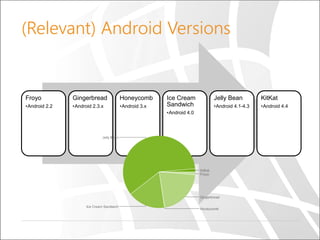
(Relevant) Android Versions

Froyo

Gingerbread

Honeycomb

•Android 2.2

•Android 2.3.x

•Android 3.x

Ice Cream
Sandwich
•Android 4.0

Jelly Bean

KitKat

•Android 4.1-4.3

•Android 4.4
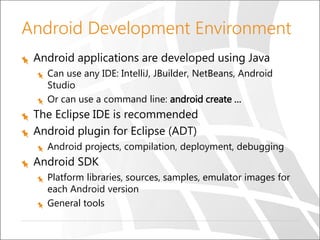
Android Development Environment
Android applications are developed using Java
Can use any IDE: IntelliJ, JBuilder, NetBeans, Android
Studio
Or can use a command line: android create …

The Eclipse IDE is recommended
Android plugin for Eclipse (ADT)
Android projects, compilation, deployment, debugging

Android SDK
Platform libraries, sources, samples, emulator images for
each Android version
General tools
Hello World

Demo
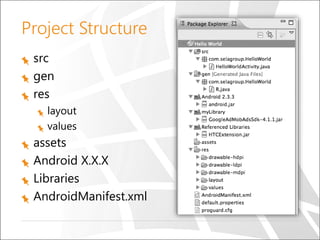
Project Structure
src
gen
res
layout
values

assets
Android X.X.X
Libraries
AndroidManifest.xml
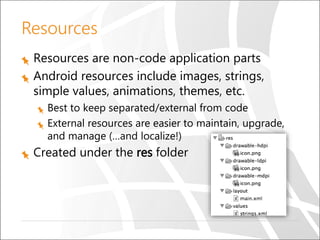
Resources
Resources are non-code application parts
Android resources include images, strings,
simple values, animations, themes, etc.
Best to keep separated/external from code
External resources are easier to maintain, upgrade,
and manage (…and localize!)

Created under the res folder
Layout Resources
Layouts specify the UI
Decouple presentation layer from code
Enable designing UI in XML
Can be referenced as any other resource from other
layouts

Usually, each layout XML file = view
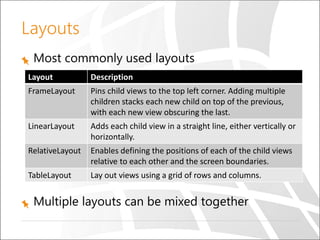
Layouts
Most commonly used layouts
Layout

Description

FrameLayout

Pins child views to the top left corner. Adding multiple
children stacks each new child on top of the previous,
with each new view obscuring the last.

LinearLayout

Adds each child view in a straight line, either vertically or
horizontally.

RelativeLayout

Enables defining the positions of each of the child views
relative to each other and the screen boundaries.

TableLayout

Lay out views using a grid of rows and columns.

Multiple layouts can be mixed together
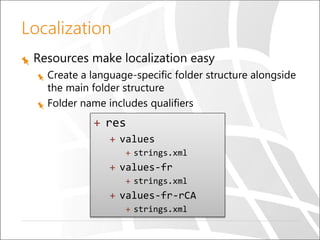
Localization
Resources make localization easy
Create a language-specific folder structure alongside
the main folder structure
Folder name includes qualifiers

+ res
+ values
+ strings.xml

+ values-fr
+ strings.xml

+ values-fr-rCA
+ strings.xml
Code and User Interface Separation
Strive to define most of the UI in XML files, and
write only code in Java files
Clean code/UI separation provides flexibility and
easy maintenance
Makes it easier to adjust for various types of
hardware devices (similar to resource localization)

UI elements can be manipulated from code
Use findViewById to get UI element instance from
code
Connecting UI to Code

Demo
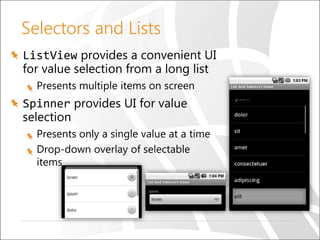
Selectors and Lists
ListView provides a convenient UI
for value selection from a long list
Presents multiple items on screen

Spinner provides UI for value
selection
Presents only a single value at a time
Drop-down overlay of selectable
items
ListView and Adapters

Demo
Summary
Android development environment
Resources, layouts, views
It’s just another
{language, IDE, UI framework}
The rest is just details: data, networking,
preferences, styling, …
Questions
Sasha Goldshtein
CTO, SELA Group

@goldshtn
blog.sashag.net

First Steps in Android Development

  • 1.
    Sasha Goldshtein CTO, SELAGroup @goldshtn blog.sashag.net First Steps in Android Development © Copyright SELA software & Education Labs Ltd. | 14-18 Baruch Hirsch St Bnei Brak, 51202 Israel | www.selagroup.com
  • 2.
    (Relevant) Android Versions Froyo Gingerbread Honeycomb •Android2.2 •Android 2.3.x •Android 3.x Ice Cream Sandwich •Android 4.0 Jelly Bean KitKat •Android 4.1-4.3 •Android 4.4
  • 3.
    Android Development Environment Androidapplications are developed using Java Can use any IDE: IntelliJ, JBuilder, NetBeans, Android Studio Or can use a command line: android create … The Eclipse IDE is recommended Android plugin for Eclipse (ADT) Android projects, compilation, deployment, debugging Android SDK Platform libraries, sources, samples, emulator images for each Android version General tools
  • 4.
  • 5.
  • 6.
    Resources Resources are non-codeapplication parts Android resources include images, strings, simple values, animations, themes, etc. Best to keep separated/external from code External resources are easier to maintain, upgrade, and manage (…and localize!) Created under the res folder
  • 7.
    Layout Resources Layouts specifythe UI Decouple presentation layer from code Enable designing UI in XML Can be referenced as any other resource from other layouts Usually, each layout XML file = view
  • 8.
    Layouts Most commonly usedlayouts Layout Description FrameLayout Pins child views to the top left corner. Adding multiple children stacks each new child on top of the previous, with each new view obscuring the last. LinearLayout Adds each child view in a straight line, either vertically or horizontally. RelativeLayout Enables defining the positions of each of the child views relative to each other and the screen boundaries. TableLayout Lay out views using a grid of rows and columns. Multiple layouts can be mixed together
  • 9.
    Localization Resources make localizationeasy Create a language-specific folder structure alongside the main folder structure Folder name includes qualifiers + res + values + strings.xml + values-fr + strings.xml + values-fr-rCA + strings.xml
  • 10.
    Code and UserInterface Separation Strive to define most of the UI in XML files, and write only code in Java files Clean code/UI separation provides flexibility and easy maintenance Makes it easier to adjust for various types of hardware devices (similar to resource localization) UI elements can be manipulated from code Use findViewById to get UI element instance from code
  • 11.
  • 12.
    Selectors and Lists ListViewprovides a convenient UI for value selection from a long list Presents multiple items on screen Spinner provides UI for value selection Presents only a single value at a time Drop-down overlay of selectable items
  • 13.
  • 14.
    Summary Android development environment Resources,layouts, views It’s just another {language, IDE, UI framework} The rest is just details: data, networking, preferences, styling, …
  • 15.
    Questions Sasha Goldshtein CTO, SELAGroup @goldshtn blog.sashag.net