1
Line Following and Extremum Seeking
Light Sensing Using Programmable Robots
Team Enigma
Technische Universität - Berlin
Berlin, Germany
Ariana Mirian – Computer Engineer
amiriam@umich.edu
Jinhao Ping – Computer Scientist
jinhping@umich.edu
Rossen Pomakov – Electrical Engineer
ropomak@umich.edu
Nikki Schumaker – Computer Engineer
nikvsch@umich.edu
Lindsey Stolzenfeld – Computer Engineer
lstolz@umich.edu
Our team was asked to work with the Polulu
M3PI robots and complete two tasks: The first
task was to implement a PID controller for a line
following function. The second task was to
perfect an extremum seeking control algorithm.
The purpose of this report is to present our
results and findings and make recommendations
for optimizing the controller.
I. INTRODUCTION
The Polulu M3PI robot was used for this project.
Code for this specific robot is compiled on the
MBed website. Libraries that can be used with this
robot can also be downloaded from there.
The project was divided into two different parts.
The goal of the first part was to mimic the Kiva
robots that are used by the online retailer Amazon,
for the purpose of warehouse automation. Instead of
utilizing magnetic strips in the ground, like the Kiva
robots do, our task was to develop a controller
which utilized the M3PI’s reflectance sensor to
follow a black line on the ground.
This first task was divided into several different
tracks, each with their own challenges. We initially
started the project by programming the robot to
travel around a simple circle track. The simple
circle track exemplified the basic line following
functions of the robot. We then incorporated turns
at 90 degrees in the second track. The third track
had designated “storage units” at several locations,
between which intersections were present. It was
also in the third track that our team incorporated
both a manual and automatic turn selection via a
Bluetooth module, meaning that the user could
indicate the robot’s next destination via a Bluetooth
command from a computer. Finally, the fourth track
contained multiple sharp turns at angles of 90
degrees and greater. The fourth track was where our
proportional control was prominently utilized.
The second task was to implement an extremum
seeking controller, which allows the robot to travel
to the steepest part of a field’s gradient. When
placed on a gradient, the robot could successfully
recognize the darkest spot and converge around this
spot indefinitely. The extremum seeking control
mainly relied on the perturbation signal and the
sensor measurement, which was normalized by the
high pass filter.
The Polulu M3PI robot was utilized for all parts of
this project. The code for it was compiled using the
compiler available on the MBed website,
www.mbed.org. The MBed website is a repository
for libraries that are available to all users of the
Polulu robots. The MBed library is already included
in every new program that is created on the MBed
compiler. This library includes basic functions for
the M3PI robot, including a timer function, a
filesystem function, and an analogin function.
Additional libraries were added depending on the
need of the program. Nikolas Goldin’s library,
m3pi_ng (an extension of Chris Style’s library), was
2
utilized with all programs since it had basic
functions for moving the robot, such as turning left,
right, and going backwards. The m3pi_ng library
also had a line positioning function, one that was
used for the basic tracks. The line positioning
function was modified for our specific needs, as we
will discuss later. For Bluetooth functionality, the
btbee library was utilized. It assisted in initializing
the Bluetooth connection between the robot and
computer.
II. PID CONTROL & LINE FOLLWING
A. Introduction to PID and Line Following
A PID (Proportional, Integral, Derivative) controller
is very commonly used in control applications. The
purpose of the PID controller is to produce a desired
linear response from the robot or computer using
feedback control. The control system takes the raw
output from the system and feeds it back into the
PID control, shifting the values through
proportional control, integral control, or derivative
control. The proportional control utilizes the current
proportional value of the control error; the integral
control utilizes the past values of the control error
through integration; and the derivative control
utilizes the control error through derivative gain.
Fig. 1. Diagram of PID Control [1].
Our first task was to mimic the Kiva robots (See
Fig. 2). Kiva robots are used in organizations such
as in Amazon’s warehouses, in order to make the
retrieval of products more efficient. The Kiva robots
are signaled to go to a specific storage unit by
following a magnetic strip on the ground. The Kiva
robot then lifts the storage unit and follows the
magnetic track to the main area of the warehouse,
where a worker is presented with the inventory item
in question. Afterwards, the Kiva robot returns the
storage unit back to its original location. In our task,
we had to use the M3PI robot to similarly follow the
lines on various tracks. Eventually, we programmed
the robot to go to an assigned “storage unit” via
Bluetooth, mimicking the job of the Kiva robots. A
PID controller was used in order to make the
movement of the robot smoother and the turning of
the robot more accurate. The PID controller also
allowed the robot to function at a higher speed
without oscillating as much.
Fig. 2. Image of Amazon’s Kiva Robots [3].
B. Beginning Tests
Our first step in working with the M3PI robot was
to read and understand the library of functions that
had been provided for us. To do this, we wrote our
first program called AlphaRun. This program’s only
effect was to make the robot move each of the
motors forward and backward separately.
When we ran this code, we discovered that the
library functions “left_motor()” and “right_motor()”
were swapped when sent to the M3PI. This meant
that the “left_motor()” moved the right motor and
the “right _motor()” moved the left motor. To set
the speed of the robot, we assigned values between
one and negative one, with positive values moving
the robot forward and negative in the opposite
direction. Instead of changing the library, we chose
to simply make a note of the swap and proceeded
with calling the “opposite” command when moving
the motors. We did in order to avoid having to
reimport a modified library into every program that
we wrote in the MBed compiler; otherwise we
could have created a hazard, possibly causing
simple mistakes that could have had disastrous
effects on our code.
Our second step in becoming more familiar with the
M3PI robot was to learn about the light sensors and
their default orientation with respect to brightness.
3
To do this, we wrote a program called
BetaCalibrationLine. This code calibrated the
sensors, read the calibrated data using the
calibrated_sensor command, and displayed the
results to the M3PI’s screen using the printf
command, repeating this process five times. Using
this code, we were able to determine that the
threshold of the sensor - its ability to identify shades
of black and white - was approximately 300 on a
scale of 0 to 1000.
C. Simple Line Following
Having learned more about the functionality of the
M3PI robot, our next step was to implement simple
line following code. This was done in the program
SimpleLineFollow and corresponded to the first
track that we were provided with:
Fig. 3. Simple Line Following
For our simple line following code, we made use of
a function provided in the library called
line_position. This function returns the position of
the line underneath the robot as a floating number
between negative one and one, where negative one
indicates that the line is far left, zero indicates it is
centered, and one indicates it’s far right under the
robot’s sensors. We combined this function with the
equations for a proportional controller to determine
the change in the motor speeds.
𝐿𝑒𝑓𝑡 𝑀𝑜𝑡𝑜𝑟 𝑆𝑝𝑒𝑒𝑑 = 𝐵𝑎𝑠𝑒 𝑆𝑝𝑒𝑒𝑑 + 𝐾𝑝 ∙ 𝐿𝑖𝑛𝑒 𝑃𝑜𝑠𝑖𝑡𝑖𝑜𝑛
𝑅𝑖𝑔ℎ𝑡 𝑀𝑜𝑡𝑜𝑟 𝑆𝑝𝑒𝑒𝑑 = 𝐵𝑎𝑠𝑒 𝑆𝑝𝑒𝑒𝑑 − 𝐾𝑝 ∙ 𝐿𝑖𝑛𝑒 𝑃𝑜𝑠𝑖𝑡𝑖𝑜𝑛
The most difficult component of this program was
the constant Kp. This constant depends on the speed
of the robot and was determined mostly through
trial and error. It calculates and alters the magnitude
by which the robot needs to correct itself to remain
adequately aligned with the line. We first
determined that for higher robot speeds, a higher Kp
value was necessary and for lower robot speeds, a
lower value was satisfactory. For this first track we
set a speed of 0.3 with a Kp value of 0.5. If the robot
calculated a value that was too high (or too low) for
the motors to handle, then the speed was set at 0.7
as a default.
D. Intersections
After completing the simple line following program
for the first track, our next step was to analyze the
second track and determine how to modify the code
we had written to handle the new feature of this
track- intersections. We decided that we would need
to use the outer left and right light sensors to
identify intersections the robot had arrived at. This
also meant that we could not use those sensors to
determine the line’s position. Because of this, we
had to write our own line position function that
relied solely on the three middle sensors for
positioning.
To write this function, we first researched how the
function in the library worked. We realized that the
library function normalized the output of the M3PI
robot, thus determining the position of the line
using a weighted average of all five sensors. After
learning this, we implemented the following
equation in our function line_pos, which utilized the
middle three sensors (the sensors start at 0):
Line Position
𝑠𝑒𝑛𝑠𝑜𝑟_1 ∙ 0 + 𝑠𝑒𝑛𝑠𝑜𝑟_2 ∙ 1000 + 𝑠𝑒𝑛𝑠𝑜𝑟_3 ∙ 2000
𝑠𝑒𝑛𝑠𝑜𝑟_1 + 𝑠𝑒𝑛𝑠𝑜𝑟_2 + 𝑠𝑒𝑛𝑠𝑜𝑟_3
Normalized Line Position
𝑙𝑖𝑛𝑒 𝑝𝑜𝑠𝑖𝑡𝑖𝑜𝑛 − 1000
1000
Having tested the new line position function in the
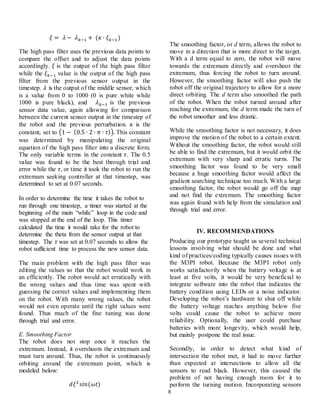
previous track’s code, we began working on how to
turn the robot a particular direction after
recognizing an intersection. After creating a new
program for this second track, we worked on
programing the robot to perform 90 degree turn.
4
Fig. 4. Diagram of motion for a 90 degree right turn.
After detecting the intersection (or 90 degree turn)
by using the sensor data from the outer two sensors,
the robot’s sensor locations are similar to the red
dot positions depicted in the leftmost image above
(Fig. 4). We decided that for this turning motion,
the robot should pivot on the right wheel until the
outermost right sensor returned values that were
below a preset threshold (and thus detected white).
The final turning action places the robot in the
relative position shown in the rightmost Figure.
From this position, the line following code is called
and adjusts the robot so that it is centered over the
horizontal line. After determining the general
process, we created correct turning functions for
each intersection encountered. Next, we designed a
predetermined path for the second track. For this,
we wrote a switch statement to determine the
actions of the robot for each unique intersection so
that the correct turning function was performed.
However, we discovered one technical problem that
became apparent when working on Track 2 (the
track with 90 degree angles) that factored into all
other tracks as well: battery usage. This was our
main problem at this stage. Our robot could only
function correctly when the battery life was above
five volts. In order to amend this problem, we
printed the battery voltage to the M3PI screen to
ensure that it had an adequate amount of battery life
to function correctly. Anything below a voltage of
five volts could cause erratic behavior.
E. Bluetooth and Automated Intersection Handling
Our first goal when starting the third track was to
create specific functions for each type of
intersection and possible direction. We
implemented these functions in a program called
ThirdTrack, using the same method used to create
the code for turning the robot for the SecondTrack
program. Once we created each of these functions,
we set a predetermined path for Track 3 and wrote a
switch statement to call the correct turning function
for that intersection type and desired direction.
However, we discovered two technical problems:
The first was the “slow stop” problem. Using our
previous code from Track 3, we programmed the
robot to stop and initiate a while loop when
approaching a crossroad. This allowed the robot to
determine which conditions were met and decide
which direction to navigate. However, we
discovered that the robot failed to stop at the center
of the intersection because one motor would run
faster than the other (hardware problem). When the
robot stopped, it would slightly change its position,
resulting in erroneous action due to incorrect
conditions being met. At this point, we added a
“slow stop” function from the library to ensure ideal
functionality.
Another complication was the robot’s ability to turn
precisely. When stopped at an intersection, the
robot would be positioned slightly ahead, causing
issues when trying to turn at intersections. This
occurred because the robot had to further enter the
intersection to ensure all the sensors read black. To
avoid this, we made it reverse before turning to
allow the robot sufficient room to make the turning
motion correctly. We did this by using negative
values in the left_motor and right_motor functions.
After completing the code for the predetermined
path, we progressed to writing the code to
communicate between the robot and another device,
using Bluetooth. We achieved this link by using a
Bluetooth module attached to the MBed controller
called a btbee. This module allowed us to send
messages to the M3PI from a computer terminal
such as a laptop. The code that was run on the
computer was written in Python and used a serial
Bluetooth port to establish a direct link between the
robot and computer. The terminal would prompt the
user with a welcome message and proceed to ask
for user input. Once the answer was received, the
message was sent to the robot via the Bluetooth
module and interpreted as a command. Depending
on the code used, the robot sent a query to the
terminal any time the robot required user input. This
5
included reaching the desired storage unit in
automatic mode, or reaching a turn in manual mode
for our ThirdTrackStorageUnits track.
While the python code used to implement the
communication between the robot and the computer
was fairly straightforward, there were some issues
that arose nevertheless. Due to the unique identifiers
on each robot’s Bluetooth module chip, every robot
had a different Bluetooth device registered in the
computer’s devices list. This meant that every robot
required a different serial port number opened when
communicating. Therefore, when using different
robots, the code had to be adapted to match the
correct port number associated with that robot’s
unique Bluetooth module. To counteract this, we
simply used the same robot during code testing.
While establishing the code for Bluetooth
communication, we simultaneously began working
on the code to handle the robot’s motion. We
decided that we would have two modes of
operation: Automatic and Manual. To accomplish
this, we divided the main class of the program into
two sections. At the beginning of the main class of
our new program ThirdTrackStorageUnits, the
program asks the user which mode to run in. This
decided which section of the main function code
will be run.
In Manual mode, the M3PI robot follows the line it
is placed on until it detects an intersection by using
the outermost sensors to detect black or white. After
detecting an intersection, the robot asks for
directions and waits until it receives a valid
directional command from the terminal. At this
point in the project we already had each of the
turning functions from the previous code
completed. We just needed a way to automatically
determine what type of intersection the robot was at
to enable the correct turning function to be called.
We implemented this in a function called
determine_intersection. This function starts from
the position where the robot detects the intersection
and moves forward over the intersection, taking and
saving samples of the light values. Based on the
results from these samples, it determines which
directions it can move, and returns that information.
If the robot receives an invalid directional command
for the current intersection it is present, it prints an
error message to both the terminal and to the
M3PI’s screen.
While writing the code for the Manual mode
operation, we encountered numerous problems and
inconsistent results from our functions. We
determined that these problems were caused by the
robot not being perfectly centered over the
intersection. This caused it to either incorrectly
determine the intersection type or incorrectly
execute the turning functions.
To repair the intersection centering problem, we
first looked at the proportional controller values.
We determined that the value we were using, 0.3,
was too high. Through testing, we determined that
more accurate results were seen with a Kp value of
0.25.
However, the problem persisted even after the robot
was more centered over the intersection. To
counteract the issue with determining the
intersection type, we programmed the robot to take
additional samples, as shown in Fig. 5 below.
Fig. 5. Movement during intersection determination
Previously, the robot had only used the sample
taken from the last timestep to determine the
intersection type. By adding the previous two
samples, we increased the accuracy of the function
and removed all errors relating to intersection
determination and incorrect turning function calls.
In Automatic mode, the M3PI robot sends a prompt
to the terminal and waits at its current position until
a correct command is given by the user. After
receiving a correct command, it proceeds to the
indicated storage unit and asks for another storage
unit destination. To accomplish this, we created
twenty functions that would proceed with line
following until reaching an intersection. When the
robot reaches an intersection, the program calls the
correct turning function for the desired path, similar
6
to the previous predetermined paths for Track 2 and
Track 3.
While writing the code for the Automatic operation
we encountered problems with the turning
functions. These problems arose out of the
differences between operation in Manual and
Automatic modes. In Manual mode the robot moves
forward to determine the intersection type and then
stops before every turn to ask for directions from
the terminal. In Automatic mode the robot continues
along a smooth path without calling the
determine_intersection function or stopping to ask
for input from the user. However both modes call
the same functions when turning. Most of the
functions still worked as expected, however the
function to complete a U-turn exhibited extremely
erratic behavior. To solve this problem we called
the slowstop function before calling our created
Uturn_intersection function in each of the storage
unit navigation functions. By calling this function
we ensured that that robot would come to a stop in
approximately the same place as it would have in
Manual operation.
F. Sharp Turns and P Controller vs. Speed
For the final track, we realized that we would not
need to handle any intersections, but instead would
need to handle sharp turns. Thus in the program
FourthTrack, we returned to the original line
following code. This code uses the provided
line_position function, utilizing all five sensor
readings to determine the position of the line. The
inclusion of the two outermost sensors allowed the
robot to accurately estimate the position of the line
when it is far to the left or right.
For the advanced line following in this track, the
focus was determining how fast we could drive the
robot’s motors without losing track of the line at
any of the sharp corners. After steadily increasing
the speed and Kp control constant, we concluded
that the optimal configuration for this track was a
speed of 0.35 and a Kp value of 0.4.
III. EXTREMUM SEEKING
A. Introduction to Extremum Seeking Control
Part II of our assigned project was to implement
extremum seeking controller to the MBed Polulu
robot. Applying extremum seeking control to the
MBed robot allowed the robot to find the darkest
area of the track based upon the gradient. Extremum
seeking control requires the robot to use its
programmed code to determine its path and arrive at
a desired destination. This theory is also used in
GPS systems, where the computer has no prior
knowledge of its location and must find its path to
the final destination [2].
Fig. 6. SISO systemused in gradient determination. (Moeck)
Our extremum seeking control utilized a single
input, single output system (SISO system). The
SISO system uses the gradient to determine which
direction to turn, until it finds the extremum of the
environment. In out project, we were given a map
with a gradient that became darker as the middle of
the map was approached. Thus, the robot had to
find the darkest spot on the map. Gradient based
optimization allows the controller to find the input
that would allow for a steady state output, or a
steady path to the extremum. The robot’s
perturbation frequency, or the frequency at which it
operates, dictates how quickly the robot can find the
extremum. If the robot cannot receive input and
determine the output through the various
calculations before the next, the robot will not be
able to find the steepest part of the gradient, thus
never approaching the maximum. To complete this
portion of the project, we first started with a
MATLAB simulation of the extremum seeking
algorithm. We then tried to apply that simulation in
several steps. We programmed the robot to move in
a sinusoidal path in order to determine the
perturbation frequency. Next, we added the high
pass filter, the perturbation frequency, and
determined numbers used in the calculations
7
(explained below) through trial and error. The trial
and error process produced numbers that allowed
the robot to work and find the extremum. The
smoothing factor, or stabilizing factor, was then
added in order to make the turning of the robot less
severe as it searched for the extremum. The
smoothing factor was also determined by trial and
error. Below is the complete equation, where 𝜉 is
the output of the high pass filter [4].
𝜃̇ = 𝑎𝜔 cos( 𝜔𝑡) + 𝑐𝜉 sin( 𝜔𝑡) − 𝑑𝜉2
sin(𝑤𝑡) [3]
𝜃̇ = 𝑡𝑢𝑟𝑛𝑖𝑛𝑔 𝑎𝑛𝑔𝑙𝑒
𝛼 = 𝑎𝑚𝑝𝑙𝑖𝑡𝑢𝑑𝑒 𝑜𝑓 𝑝𝑒𝑟𝑡𝑢𝑟𝑏𝑎𝑡𝑖𝑜𝑛
𝜔 = 𝑜𝑠𝑐𝑖𝑙𝑙𝑎𝑡𝑖𝑜𝑛 𝑓𝑟𝑒𝑞𝑢𝑒𝑛𝑐𝑦
𝑡 = 𝑐𝑢𝑟𝑟𝑒𝑛𝑡 𝑡𝑖𝑚𝑒
𝑐 = 𝑐𝑜𝑛𝑠𝑡𝑎𝑛𝑡 𝑣𝑎𝑙𝑢𝑒
𝜉 = 𝑜𝑢𝑡𝑝𝑢𝑡 𝑜𝑓 ℎ𝑖𝑔ℎ 𝑝𝑎𝑠𝑠 𝑓𝑖𝑙𝑡𝑒𝑟
𝑑 = 𝑠𝑚𝑜𝑜𝑡ℎ𝑖𝑛𝑔 𝑓𝑎𝑐𝑡𝑜𝑟
B. Simulation
Using MATLAB for the implementation of a
control system model, we determined the optimal
variable values in order to accurately read the field
gradient. This model was the precursor to the code
we used for the extremum seeking algorithm in the
M3PI. Using MATLAB allowed us to quickly
change variable values in order to find the optimal
output at different frequencies of perturbation.
Fig. 7. MATLAB simulation of the systemmodel.
We used a high pass filter to suppress any offset or
low-frequency oscillation. The high pass filter does
this in frequency domain, where periodic signals of
a certain frequency are represented as spikes (Dirac
delta functions) at the particular frequency. The
high pass filter attenuates the signal below the
specified cutoff frequency, while keeping the
frequencies above the cutoff at a gain factor of one.
The output of the high pass filter was then mixed
with a sine signal at a frequency 𝜔. Additionally,
this signal was also mixed with a constant DC
signal as well as an additional cosine signal again at
the same frequency 𝜔. This was done in order to
smooth out the turning of the robot. After the cosine
term, the signal was passed back through the
system, making up the whole feedback loop, as
shown in the equation above.
C. Cosine Shaped Path and Perturbations
To determine the gradient change, the robot must
travel in a cosine shaped path. This cosine shaped
path allows the robot to determine which direction
to turn, depending on the extremum that it is
seeking:
𝑎𝜔 cos( 𝜔𝑡)
The amplitude of perturbation, or 𝑎, was determined
to be 𝜋/4 according to the simulation results. This
value determines the amplitude of the cosine wave
that the robot will use to travel. 𝜔 is equal to the
value of π, and is the period of the cosine wave. The
current time value 𝑡 inputs the current time of the
robot, which is initiated at the beginning of the
code. The current time value allows the robot to
travel along the cosine wave accurately, since the
cosine wave changes with time.
While there was no problem with the code, there
were some problems with the hardware. When
simulating a cosine-shaped path with the robot, the
right motor would move slightly faster than the left
motor even though the inputs for both motors were
the same value.
D. High-Pass Filter
Since the cosine wave equation produced values
that were offset, a high pass filter was implemented
to correct the offset and remove low frequency
oscillation and allow the robot to use all values in
the duration of the program:
8
𝜉 = 𝜆 − 𝜆 𝑘−1 + (𝜅 ∙ 𝜉 𝑘−1)
The high pass filter uses the previous data points to
compare the offset and to adjust the data points
accordingly. 𝜉 is the output of the high pass filter
while the 𝜉 𝑘−1 value is the output of the high pass
filter from the previous sensor output in the
timestep. 𝜆 is the output of the middle sensor, which
is a value from 0 to 1000 (0 is pure white while
1000 is pure black), and 𝜆 𝑘−1 is the previous
sensor data value, again allowing for comparison
between the current sensor output in the timestep of
the robot and the previous perturbation. 𝜅 is the
constant, set to (1 − (0.5 ∙ 2 ∙ 𝜋 ∙ 𝜏)). This constant
was determined by manipulating the original
equation of the high pass filter into a discrete form.
The only variable terms in the constant 𝜏. The 0.5
value was found to be the best through trial and
error while the 𝜏, or time it took the robot to run the
extremum seeking controller at that timestep, was
determined to set at 0.07 seconds.
In order to determine the time it takes the robot to
run through one timestep, a timer was started at the
beginning of the main “while” loop in the code and
was stopped at the end of the loop. This timer
calculated the time it would take for the robot to
determine the theta from the sensor output at that
timestep. The 𝜏 was set at 0.07 seconds to allow the
robot sufficient time to process the new sensor data.
The main problem with the high pass filter was
editing the values so that the robot would work in
an efficiently. The robot would act erratically with
the wrong values and thus time was spent with
guessing the correct values and implementing them
on the robot. With many wrong values, the robot
would not even operate until the right values were
found. Thus much of the fine tuning was done
through trial and error.
E. Smoothing Factor
The robot does not stop once it reaches the
extremum. Instead, it overshoots the extremum and
must turn around. Thus, the robot is continuously
orbiting around the extremum point, which is
modeled below:
𝑑𝜉2
𝑠𝑖𝑛(𝜔𝑡)
The smoothing factor, or d term, allows the robot to
move in a direction that is more direct to the target.
With a d term equal to zero, the robot will move
towards the extremum directly and overshoot the
extremum, thus forcing the robot to turn around.
However, the smoothing factor will also push the
robot off the original trajectory to allow for a more
direct orbiting. The d term also smoothed the path
of the robot. When the robot turned around after
reaching the extremum, the d term made the turn of
the robot smoother and less drastic.
While the smoothing factor is not necessary, it does
improve the motion of the robot to a certain extent.
Without the smoothing factor, the robot would still
be able to find the extremum, but it would orbit the
extremum with very sharp and erratic turns. The
smoothing factor was found to be very small
because a huge smoothing factor would affect the
gradient searching technique too much. With a large
smoothing factor, the robot would go off the map
and not find the extremum. The smoothing factor
was again found with help from the simulation and
through trial and error.
IV. RECOMMENDATIONS
Producing our prototype taught us several technical
lessons involving what should be done and what
kind of practices/coding typically causes issues with
the M3PI robot. Because the M3PI robot only
works satisfactorily when the battery voltage is at
least at five volts, it would be very beneficial to
integrate software into the robot that indicates the
battery condition using LEDs or a noise indicator.
Developing the robot’s hardware to shut off while
the battery voltage reaches anything below five
volts could cause the robot to achieve more
reliability. Optionally, the user could purchase
batteries with more longevity, which would help,
but mainly postpone the real issue.
Secondly, in order to detect what kind of
intersection the robot met, it had to move further
than expected at intersections to allow all the
sensors to read black. However, this caused the
problem of not having enough room for it to
perform the turning motion. Incorporating sensors
9
that can see further ahead would prevent this issue.
Also, depending on circumstances in a real world
environment, the user may be able to change the
right angle crossroad into a more circular turn to
meet the robot’s turning requirement.
Also, creating a graphical program to control the
Bluetooth chip on the M3PI robot would be a great
asset to invest in. Having to use Python code with
C++ to communicate with the Bluetooth device on
the M3PI caused additional challenges. If this robot
were to be operated by an end user, it would be
much easier for them to control the robot with a
GUI (graphical user interface) rather than type in a
command-line/terminal interface.
Equipping the robot with sensors that can read the
luminosity of the surface under it, rather than the
reflection coefficient of the surface, would improve
the capabilities of the robot. If this were
implemented, the robot could be programmed to
follow a moving light source, for example. This
would expand the robot’s functionality.
There were also some LED lights at the bottom of
the robot that could affect the sensor detection if the
upgraded sensors we recommended earlier were
implemented. Ideally, operating the robot without
the LED lights on the bottom would prevent this
potential problem. This change would create a more
accurate sensing system in the M3PI robot.
REFERENCES
[1] Keller, A. A. (2009). Optimal Economic Stabilization
Policy under Uncertainty, Advanced Technologies,
Kankesu Jayanthakumaran (Ed.), ISBN: 978-953-307-
009-4, InTech, DOI: 10.5772/8222. Retrieved from:
http://www.intechopen.com/books/advanced-
technologies/optimal-economic-stabilization-policy-
under-uncertainty
[2] Cochran, K. & Krstic, M. (2009). Nonholonomic source
seeking with tuning of angular velocity. IEEE
Transactions on Automatic Control, 54, 717-731.
[3] N.A. (2012). Following amazon’s new robots in a
massive warehouse. 22 Words. Retrieved from:
http://twentytwowords.com/dev2/2012/03/29/following-
amazons-new-robots-in-a-massive-warehouse/
[4] Bothie, M. R., Gelber, G., King, R., Moeck, J. P., &
Paschereit, C. O. (2007). Two-parameter extremum
seeking for control of thermoacoustic instabilities and
characterization of linear growth. AIAA Aerospace
Sciences Meeting and Exhibit.
10
APPENDIX A
AlphaRun Code
/*
Written by: Ariana Mirian, Jinhao Ping, Rossen Pomakov, Nikki Schumaker, Lindsey Stolzenfeld
This code programs the m3pi robot to move (turn left(forward), turn left(backward), turn
right(forward), turn right(backward)).
*/
#include "mbed.h"
#include "m3pi_ng.h"
DigitalOut myled(LED1);
Timer timer;
m3pi pi;
int main() {
//Action:left f
pi.right_motor(0); //Set the speed of right motor 0
pi.left_motor(0.2); //Set the speed of left motor 0.2
pi.printf("left f"); //Print "left f"
wait(2); //Wait for 2 seconds
pi.cls(); //Clear the screen
//Action:left b
pi.left_motor(-0.2); //Set the speed of left motor -0.2
pi.printf("left b"); //Print “left b"
wait(2); //Wait for 2 seconds
pi.cls(); //Clear the screen
//Right f
pi.left_motor(0); //Set the speed of left motor 0
pi.right_motor(0.2); //Set the speed of right motor 0.2
pi.printf("right f"); //Print "right f"
wait(2); //Wait for 2 seconds
pi.cls(); //Clear the screen
//Right b
pi.right_motor(-0.2); //Set the speed of right motor -0.2
pi.printf("right b"); //Print "right b"
wait(2); //Wait for 2 seconds
pi.cls(); //Clear the screen
pi.left_motor(0); //Set the speed of left motor 0
pi.right_motor(0); //Set the speed of right motor 0
return (0);
}
11
APPENDIX B
BetaCalibrationLine Code
/*
*Written by:
*Ariana Mirian, Jinhao Ping, Rossen Pomakov, Lindsey Stolzenfeld
*June 2013
*
*This code is used to determine what light values are seen when
*a light sensor is placed over a black line or near a black line
*/
#include "mbed.h"
#include "m3pi_ng.h"
DigitalOut myled(LED1);
m3pi pi;
int main() {
//initialization of variables
int data[5];
int time =0;
//auto calibration of light sensors
char c = pi.sensor_auto_calibrate();
while(time <= 5){
//input calibrated sensor data
pi.calibrated_sensor(data);
//print the calibrated data values to the screen
for(int i = 0; i <5; i++){
pi.printf("%i", data[i]);
wait (2);
pi.cls();
}
//increment the loop counter variable
time++;
}
return (0);
}
12
APPENDIX C
SimpleLineFollow
#include "mbed.h"
#include "m3pi_ng.h"
DigitalOut myled(LED1);
m3pi pi;
int main() {
int data[5];
char c = pi.sensor_auto_calibrate();
float speed=0.3;
float turning_speed = 0.2;
float returnedvalue;
pi.calibrated_sensor(data);
float delta;
while(1) {
pi.calibrated_sensor(data);
returnedvalue= pi.line_position();
delta= returnedvalue * 0.5;
pi.right_motor(0.3+delta);
pi.left_motor(0.3-delta);
}
return (0);
}
13
APPENDIX D
SecondTrack Code
/*
Written by: Team Enigma (Composed of Ariana Mirian, Jinhao Ping, Rossen Pomakov, Nikki Schumaker,
Lindsey Stolzenfeld)
This code programs the m3pi robot to operate on the second track printout. We call functions from
the "mbed.h" and "m3pi_ng.h" libraries to command the robot more efficiently and precisely. We
also call function "determine_intersection" to detect when the robot reaches an intersection. The
first operation the robot performs is calibration it's five sensors while on a line on the track.
Next, having detected which direction to face, it goes forward while checking current sensor
readings and feeding them back into the system to accurately adhere to the line on the track. The
robot uses this line following function to smoothen the motion of operation.
*/
#include "mbed.h"
#include "m3pi_ng.h"
DigitalOut myled(LED1);
m3pi pi;
int determine_intersection (){
//Declarations & Function to determine action at an intersection
int data[5];
pi.forward(0.2);
wait(0.1);
pi.stop();
//Obtain calibrated data
pi.calibrated_sensor(data);
//Distinguish between the types of intersections encountered
if (data[2]>300){
if (data[0] > 300){
if (data[4] > 300){
return 1;
}
else {
return 3;
}
}
else {
if (data[4] >300){
return 4;
}
}
} else if (data[4]> 300 && data[0] > 300){
return 2;
}
else if (data[4]>300){
return 5;
}else
return 6;
return 7;
};
//Returns 1 if it is a crossroad
//Returns 2 if the intersection is a "T" (left and right)
//Returns 3 if it is cross road going forward and left
//Returns 4 if it is a crossroad going forward and right
//Returns 5 if is a right turn
14
//Returns 6 if it is a left turn
//Main function & Declarations
int main() {
int data[5];
int crossings = 0;
//Auto calibration
char c = pi.sensor_auto_calibrate();
float returnedvalue;
//Obtain calibrated data
pi.calibrated_sensor(data);
float delta;
float waittime=0.08;
while(1) {
//Receive data from sensors
pi.calibrated_sensor(data);
//Generate line position
returnedvalue= pi.line_pos();
//P control
delta= returnedvalue * 0.25;
pi.right_motor(0.2+delta);
pi.left_motor(0.2-delta);
if (data[0]>300 || data[4] >300){
//Action for first intersection
if(crossings == 0){
wait(waittime);
//Turn left when either of the outside sensors sees black
while (data[0]>300 || data[4]> 300){
pi.right_motor(0);
pi.left_motor(0.2);
pi.calibrated_sensor(data);
}
//Increment "crossings" variable
crossings++;
}
//Action for second intersection
else if(crossings == 1){
wait (waittime*2);
//One middle sensor detects black
while (data[1] > 300 || data[2]>300 || data[3]>300){
pi.left(0.2);
pi.calibrated_sensor(data);
}
//Three middle sensors detect black
while (data[1] <300 && data[2]<300 && data[3]<300){
pi.left(0.2);
pi.calibrated_sensor(data);
}
//Increment "crossings" variable
crossings++;
//Action for third intersection
}else if (crossings == 2){
wait(waittime);
//Outer sensors detect black
while (data[0]>300 || data[4]> 300){
pi.right_motor(0);
pi.left_motor(0.2);
15
pi.calibrated_sensor(data);
}
//Increment "crossings" variable
crossings++;
//Action for fourth intersection
}else if (crossings == 3){
wait(waittime);
//Outer sensors detect black
while (data[0]>300 || data[4]> 300){
pi.right_motor(0.2);
pi.left_motor(0);
pi.calibrated_sensor(data);
}
//Increment "crossings" variable
crossings++;
}else{
pi.stop();
}
}
}
return (0);
}
16
APPENDIX E
ThirdTrack Code
/*
*Written by: Ariana Mirian, Jinhao Ping, Rossen Pomakov, Nikki Schumaker, Lindsey Stolzenfield
*Team Enigma
*May-June 2013
*
*Code that runs the robot on a predetermined track on track 3
*Robot will go left, right ,right, left, right, u -turn, left, right,
*right, left, u-turn, right, forward, left, right
*Sensors are number 0-4, with 0 being the leftmost sensor and 4 being
*the rightmost sensor
*/
#include "mbed.h"
#include "m3pi_ng.h"
DigitalOut myled(LED1); //turns on an LED
m3pi pi;// robot object
float turning_speed = 0.2; //variable for tunring speed
int intersection_thresh_hold = 400; //threshold for the intersection. threshold for distinguishing
white and black
//0 is white and 1000 is black
int determine_intersection (){//determines what type of interesection the robot is at
int data[5];//array to place sensor data in
pi.forward(0.2);//moves forward to determine whether there is a forward path to the
intersection
wait(0.1);
pi.stop();//stop
pi.calibrated_sensor(data);//auto calibrates the sensor
if (data[2]>400){//if the middle sensor sees black
if (data[0] > 400){//if the leftmost sensor sees black
if (data[4] > 400){//if the rightmost sensor sees black (Crossroads)
return 1;
}
else {//if it is a Left T (left and forward)
return 3;
}
}else {//if it is a right T (right and forward)
if (data[4] >400){
return 4;
}
}
} else if (data[4]> 400 && data[0] > 400){//if there is no foward direction
return 2;
}
17
else if (data[4]>400){//right turn
return 5;
}else //if there is an error or if the robot runs off the track
return 6;
return 7;
};
//returns 1 if it is a crossroad
//returns 2 if the intersection is a "T" (left and right)
//returns 3 if it is cross road going forward and left
// returns 4 if it is a crossroad going forward and right
//returns 5 if is a right turn
//returns 6 if it is a left turn
//function that corresponds to a left turn at a crossroads
void crossroads_left(){
int data[5];
pi.calibrated_sensor(data);
while (data[0]>400 || data[4]> 400){//while eitherof the outside sensors sees black
pi.right_motor(0); //turn left
pi.left_motor(turning_speed);
pi.calibrated_sensor(data); //recalibrate the sensors so new data can be used in the while
loop
}
}
//function that corresponds to a right turn at a crossroad
void crossroads_right(){
int data[5];
pi.calibrated_sensor(data);
while (data[0]>400 || data[4]> 400){//while eitherof the outside sensors sees black
pi.right_motor(turning_speed); //turn right
pi.left_motor(0);
pi.calibrated_sensor(data);
}
}
//function that corresponds to a forward at a crossroad
void crossroads_forward(){
int data[5];
pi.calibrated_sensor(data);
while (data[0]>400 || data[4]> 400){//while eitherof the outside sensors sees black
pi.right_motor(turning_speed); //go forward
pi.left_motor(turning_speed);
pi.calibrated_sensor(data);
}
}
//function that corresponds to a left turn at a T (only possible paths are right and left)
void T_left(){
int data[5];
pi.calibrated_sensor(data);
while (data[0]>400 || data[4]> 400){//while eitherof the outside sensors sees black
pi.right_motor(-turning_speed); //turn left on a cetral piviot
pi.left_motor(turning_speed);
pi.calibrated_sensor(data);
18
}
}
//function that corresponds to a right turn at a T (only possible paths are right and left)
void T_right(){
int data[5];
pi.calibrated_sensor(data);
while (data[0]>400 || data[4]> 400){//while eitherof the outside sensors sees black
pi.right_motor(turning_speed); //turn right on a cetral piviot
pi.left_motor(-turning_speed);
pi.calibrated_sensor(data);
}
}
//function that corresponds to a forward motion
void partialT_forward(){
int data[5];
pi.calibrated_sensor(data);
while (data[0]>400 || data[4]> 400){//while eitherof the outside sensors sees black
pi.right_motor(turning_speed); //go forward
pi.left_motor(turning_speed);
pi.calibrated_sensor(data);
}
}
//function that corresponds to a left turn at an intersection where the robot can only go forward
or left
void partialT_left(){
int data[5];
pi.calibrated_sensor(data);
while (data[0]>400){//while the left sensor sees black
pi.right_motor(0); //turn left
pi.left_motor(turning_speed);
pi.calibrated_sensor(data);
}
}
//function that corresponds to a right turn at an intersection where the robot can only go forward
or left
void partialT_right(){
int data[5];
pi.calibrated_sensor(data);
while (data[4]> 400){//while the right sensor sees black
pi.right_motor(turning_speed); //turn right
pi.left_motor(0);
pi.calibrated_sensor(data);
}
}
//function that corresponds to a U turn
void Uturn_intersection(){
int data[5];
pi.calibrated_sensor(data);
while(data[0]>400 && data[4]>400){//both outside sensors see black
pi.backward(0.15);
pi.calibrated_sensor(data);
19
}wait(0.1);
while (data[0]<400){//while the leftmost sensor sees white
pi.left_motor(turning_speed);//turn the robot on a central pivot
pi.right_motor(-turning_speed);
pi.calibrated_sensor(data);
}
while (data[1]<400){//while the left middle sensor sees white
pi.left_motor(turning_speed);//turn the robot left on a central pivot
pi.right_motor(-turning_speed);
pi.calibrated_sensor(data);
}
}
//function that corresponds to a 90 degree turn
void left_90(){
int data[5];
pi.calibrated_sensor(data);
while(data[0]>400){//while the leftmost sensor sees black
pi.left_motor(turning_speed);//turn left on a right wheel pivot
pi.right_motor(0);
pi.calibrated_sensor(data);
}
}
//function that corresponds to a 90 degree right turn
void right_90(){
int data[5];
pi.calibrated_sensor(data);
while(data[4]>400){//While the rightmost sensor sees white
pi.left_motor(0);//turn right on a left wheel pivot
pi.right_motor(turning_speed);
pi.calibrated_sensor(data);
}
}
int main() {
int data[5];
int crossings = 1;//counter for the switch statement
char c = pi.sensor_auto_calibrate();//auto calibration
float returnedvalue;
pi.calibrated_sensor(data);//calibrated data and puts it into "data"
float delta;//variable for proportion control
while(1) {
pi.calibrated_sensor(data);//get data from sensors
returnedvalue= pi.line_pos();//get average sensor data only from the middle three sensors
delta= returnedvalue * 0.25;//P control
pi.right_motor(0.2+delta);//implement P control in motors
pi.left_motor(0.2-delta);
if (data[0]>600 || data[4] >600){//if either of the outside sensors sees black
switch(crossings){//switch statement for a predetermined track
pi.printf("%i",crossings);
case 1:
left_90();
crossings++;
pi.stop();
break;
case 2:
20
right_90();
crossings++;
pi.stop();
break;
case 3:
crossroads_right();
crossings++;
pi.stop();
break;
case 4:
left_90();
crossings++;
pi.stop();
case 5:
right_90();
crossings++;
pi.stop();
break;
case 6:
Uturn_intersection();
crossings++;
pi.stop();
break;
case 7:
left_90();
crossings++;
pi.stop();
break;
case 8:
right_90();
crossings++;
pi.stop();
break;
case 9:
crossroads_right();
crossings++;
pi.stop();
break;
case 10:
T_left();
crossings++;
pi.stop();
break;
case 11:
Uturn_intersection();
crossings++;
pi.stop();
break;
case 12:
partialT_right();
crossings++;
pi.stop();
break;
case 13:
crossroads_forward();
crossings++;
pi.stop();
21
break;
case 14:
left_90();
crossings++;
pi.stop();
break;
case 15:
right_90();
crossings++;
pi.stop();
break;
default:
pi.stop();
}
}
}
return (0);
}
22
APPENDIX F
ThirdTrackStorageUnits Code
#include "mbed.h"
#include "m3pi_ng.h"
#include "btbee.h"
// Link Button
DigitalIn m3pi_pb(p21);
//Robot and Bluetooth declarations
m3pi pi;
btbee btbee;
//LED Declarations // Innermost first
DigitalOut r1(p13);
DigitalOut r2(p14);
DigitalOut r3(p15);
DigitalOut r4(p16);
DigitalOut r5(p17);
DigitalOut r6(p18);
DigitalOut r7(p19);
DigitalOut r8(p20);
//function declarations
//Turning functions
int determine_intersection ();
void crossroads_left();
void crossroads_right();
void crossroads_forward();
void T_left();
void T_right();
void partialT_forward();
void partialT_left();
void partialT_right();
void Uturn_intersection();
void Uturn_deadend();
void left_90();
void right_90();
//Storage Unit functions
void storage0_to_storage1 ();
void storage0_to_storage2 ();
void storage0_to_storage3 ();
void storage0_to_storage4 ();
void storage1_to_storage0 ();
void storage1_to_storage2 ();
void storage1_to_storage3 ();
void storage1_to_storage4 ();
void storage2_to_storage0 ();
void storage2_to_storage1 ();
void storage2_to_storage3 ();
void storage2_to_storage4 ();
void storage3_to_storage0 ();
void storage3_to_storage1 ();
23
void storage3_to_storage2 ();
void storage3_to_storage4 ();
void storage4_to_storage0 ();
void storage4_to_storage1 ();
void storage4_to_storage2 ();
void storage4_to_storage3 ();
int main() {
//Initialization
int storage_unit=0;
char c = pi.sensor_auto_calibrate();
bool manual = false;
//variables for reading from the bluetooth card
char input[20];
int read_length = 0;
int length_array=20;
m3pi_pb.mode(PullUp); // expected would be 1 when pb is pressed, 0 when not, opposite is the
case
//Initialization of bluetooth card
btbee.reset();
btbee.baud(115200);
//wait until button is pressed to indicate that link has been
//established between computer and bluetooth card
while(m3pi_pb) {
r1=!r1;
wait(0.1);
}
//ask for input to determine which mode the robot will run in.
//Manual indicates asking for a direction at each intersection
//Automatic indicates asking for a desired storage unit destination at each storage unit
btbee.printf("Welcome to m3pi control!n-Manual or Automatic?n");
while(!btbee.readable()){
r1=!r1;
wait(0.1);
}
//read input from bluetooth card to determine mode of operation
if(btbee.readable()){
btbee.read_all(input, length_array, &read_length);
pi.locate(0,0);
if(input[0] == 'm'){
manual = true;
pi.printf("Manual");
}else{
pi.printf("Automatic");
}
}
while(true){
//if Manual operation was selected
if(manual){
24
//initialization of variables needed for light sensor values and P-control
int data[5];
float returnedvalue;
float delta;
//initial intake and storage of light sensor values into 'data'
pi.calibrated_sensor(data);
while(1) {
//get data from sensors
pi.calibrated_sensor(data);
//determine position of black line using the middle three light sensors
returnedvalue= pi.line_pos();
//determine P control value
delta= returnedvalue * 0.25;
//set speed values for each of the motors
pi.right_motor(0.2+delta);
pi.left_motor(0.2-delta);
//if we are at an intersection
if (data[0]>400 || data[4] >400){
//determine what type of intersection we are at
int type = determine_intersection();
//print the type of intersection to the m3pi's screen
pi.cls();
pi.printf("%i", type);
wait(2);
//variable to determine if the choice of turning direction is
valid at this intersection
bool turn_choice = true;
while(turn_choice){//if the robot has not yet recieved a valid turn choice,
keep asking for direction
//ask for input to determine which direction to turn
//r indicates right, f indicates forward, l indicates
left, u indicates a u-turn.
btbee.printf("-Which direction? n");
//wait until input is readable(with flashing led
indicator)
while(!btbee.readable()){
r1=!r1;
wait(0.1);
}
//read input
btbee.read_all(input, length_array, &read_length);
25
//if input is 'r' for right, call the correct turning
function for the type of intersection
//and set turn_choice to false to indicate that a proper
turning direction has been called and executed
//if right is not an option at this intersection, print
error messages to both the robot's screen and the computer terminal
if(input[0] == 'r'){
if(type == 1){
crossroads_right();
turn_choice = false;
}else if(type == 2){
T_right();
turn_choice = false;
}else if(type == 4){
partialT_right();
turn_choice = false;
}else if(type == 5){
right_90();
turn_choice = false;
}else{
pi.printf("ERROR");
btbee.printf("ERROR: NOT AN ACTUAL ROADn");
wait(1);
pi.cls();
}
//if input is 'l' for left, call the correct turning
function for the type of intersection
//and set turn_choice to false to indicate that a proper
turning direction has been called and executed
//if left is not an option at this intersection, print
error messages to both the robot's screen and the computer terminal
}else if(input[0] == 'l'){
if(type == 1){
crossroads_left();
turn_choice = false;
}else if(type == 2){
T_left();
turn_choice = false;
}else if(type == 3){
partialT_left();
turn_choice = false;
}else if(type == 6){
left_90();
turn_choice = false;
}else{
pi.printf("ERROR");
btbee.printf("ERROR: NOT AN ACTUAL ROADn");
wait(1);
pi.cls();
}
//if input is 'f' for forward call the correct turning
function for the type of intersection
//and set turn_choice to false to indicate that a proper
turning direction has been called and executed
//if forward is not an option at this intersection, print
error messages to both the robot's screen and the computer terminal
}else if(input[0]== 'f'){
26
if(type == 1){
crossroads_forward();
turn_choice = false;
}else if(type == 3){
partialT_forward();
turn_choice = false;
}else if(type == 4){
partialT_forward();
turn_choice = false;
}else{
pi.printf("ERROR");
btbee.printf("ERROR: NOT AN ACTUAL ROADn");
wait(1);
pi.cls();
}
//if input is 'u' for u-turn, call the correct turning
function
//and set turn_choice to false to indicate that a proper
turning direction has been called and executed
}else if(input[0]== 'u'){
Uturn_intersection();
turn_choice = false;
}
}
}
}
//else if Automatic operation was selected
//ASSUMES THAT ROBOT IS STARTED AT STORAGE UNIT 0
}else{
while (1){
//ask for input to determine which storage unit to go to
//input should be only the number of the desired storage unit('1' for
storage unit 1)
btbee.printf("-Which storage unit? nCurrently at %i n", storage_unit);
//wait until bluetooth input is readable(with flashing led indicator)
while(!btbee.readable()){
r1=!r1;
wait(0.1);
}
//read input from bluetooth card
btbee.read_all(input, length_array, &read_length);
//if the robot is currently at storage unit 0, call the correct function
to go to the desired storage unit
if(storage_unit == 0){
if(input[0] == '1'){
storage0_to_storage1 ();
storage_unit=1;
}else if(input[0] == '2'){
storage0_to_storage2 ();
storage_unit=2;
}else if(input[0] == '3'){
storage0_to_storage3 ();
storage_unit=3;
}else if(input[0] == '4'){
27
storage0_to_storage4 ();
storage_unit=4;
}
//if the robot is currently at storage unit 1, call the correct function
to go to the desired storage unit
}else if(storage_unit == 1){
if(input[0] == '0'){
storage1_to_storage0 ();
storage_unit=0;
}else if(input[0] == '2'){
storage1_to_storage2 ();
storage_unit=2;
}else if(input[0] == '3'){
storage1_to_storage3 ();
storage_unit=3;
}else if(input[0] == '4'){
storage1_to_storage4 ();
storage_unit=4;
}
//if the robot is currently at storage unit 2, call the correct function
to go to the desired storage unit
}else if(storage_unit == 2){
if(input[0] == '0'){
storage2_to_storage0 ();
storage_unit=0;
}else if(input[0] == '1'){
storage2_to_storage1 ();
storage_unit=1;
}else if(input[0] == '3'){
storage2_to_storage3 ();
storage_unit=3;
}else if(input[0] == '4'){
storage2_to_storage4 ();
storage_unit=4;
}
//if the robot is currently at storage unit 3, call the correct function
to go to the desired storage unit
}else if(storage_unit == 3){
if(input[0] == '0'){
storage3_to_storage0 ();
storage_unit=0;
}else if(input[0] == '1'){
storage3_to_storage1 ();
storage_unit=1;
}else if(input[0] == '2'){
storage3_to_storage2 ();
storage_unit=2;
}else if(input[0] == '4'){
storage3_to_storage4 ();
storage_unit=4;
}
//if the robot is currently at storage unit 4, call the correct function
to go to the desired storage unit
28
}else if(storage_unit == 4){
if(input[0] == '0'){
storage4_to_storage0 ();
storage_unit=0;
}else if(input[0] == '1'){
storage4_to_storage1 ();
storage_unit=1;
}else if(input[0] == '2'){
storage4_to_storage2 ();
storage_unit=2;
}else if(input[0] == '3'){
storage4_to_storage3 ();
storage_unit=3;
}
}
}
}
}
return(0);
}
/*
*Function to determine which type of intersection the robot is currently at
*REQUIRES: robot is at an intersection
*MODIFIES: position of the robot
*EFFECTS: returns the type of intersection as given by an integer code:
*returns 1 if it is a crossroad ( -|- )
*returns 2 if the intersection is a "T" (left and right)
*returns 3 if it is crossroad going forward and left( -| )
*returns 4 if it is a crossroad going forward and right( |- )
*returns 5 if is a right turn
*returns 6 if it is a left turn
*returns 7 if error
*/
int determine_intersection(){
//initialization of data arrays
int data[5];
int data1[5];
int data2[5];
//intake of data at three different points over the intersection to ensure proper
determination
pi.calibrated_sensor(data);
pi.forward(0.2);
wait(0.05);
pi.calibrated_sensor(data1);
pi.slowstop(0.2, 0.05, 4);
pi.calibrated_sensor(data2);
//determination of intersection type based on light values of the three collected arrays
if (data2[2]>400){
if (data[0] > 400 || data1[0] > 400){
if (data[4] > 400 || data1[4] > 400){
return 1;
}else {
return 3;
}
29
}else{
if (data[4] >400 || data1[4] > 400){
return 4;
}
}
}else if ((data[4]> 400 && data[0] > 400)||(data1[4]>400 && data1[0]>400)){
return 2;
}else if (data[4]>400 || data1[4] >400){
return 5;
}else if (data[0]>400 || data1[0] > 400){
return 6;
}
return 7;
}
/*
*Function to turn left at a crossroads intersection
*REQUIRES: robot is at a crossroads intersection
*MODIFIES: position of the robot
*EFFECTS: turns the robot left
*/
void crossroads_left(){
//initialization of sensor data
int data[5];
pi.calibrated_sensor(data);
//move backwards before the turn to center the robot on the intersection
while(data[0]< 600 && data[4]< 600){
pi.backward(0.1);
pi.calibrated_sensor(data);
}
wait(0.15);
//while either of the outside sensors sees black, turn left
while (data[0]>400 || data[4]> 400){
pi.right_motor(0);
pi.left_motor(0.15);
pi.calibrated_sensor(data);
}
//keep turning left until the robot is centered over the intended black line
while(data[3]<300){
pi.right_motor(0);
pi.left_motor(0.15);
pi.calibrated_sensor(data);
}
}
/*
*Function to turn right at a crossroads intersection
*REQUIRES: robot is at a crossroads intersection
*MODIFIES: position of the robot
*EFFECTS: turns the robot right
*/
void crossroads_right(){
//initialization of sensor data
int data[5];
30
pi.calibrated_sensor(data);
//move backwards before the turn to center the robot on the intersection
while(data[0]< 400 && data[4]<400){
pi.backward(0.1);
wait(0.2);
pi.calibrated_sensor(data);
}
//while eitherof the outside sensors sees black, turn right
while (data[0]>400 || data[4]> 400){
pi.right_motor(0.15);
pi.left_motor(0);
pi.calibrated_sensor(data);
}
}
/*
*Function to go forward at a crossroads intersection
*REQUIRES: robot is at a crossroads intersection
*MODIFIES: position of the robot
*EFFECTS: robot goes forward through the intersection
*/
void crossroads_forward(){
//initialization of sensor data
int data[5];
pi.calibrated_sensor(data);
//while eitherof the outside sensors sees black, go forward
while (data[0]>400 || data[4]> 400){
pi.right_motor(0.15);
pi.left_motor(0.15);
pi.calibrated_sensor(data);
}
}
/*
*Function to turn left at a "T" intersection
*REQUIRES: robot is at a "T" intersection
*MODIFIES: position of the robot
*EFFECTS: turns the robot left
*/
void T_left(){
//initialization of sensor data
int data[5];
pi.calibrated_sensor(data);
//move the robot backwards until it is centered over the intersection
while(data[1] <300 && data[2] < 300 && data[3] < 300){
pi.backward(0.1);
pi.calibrated_sensor(data);
}
//while eitherof the outside sensors sees black, turn left on a left piviot
while (data[0]>400 || data[4]> 400){
pi.right_motor(0);
pi.left_motor(0.15);
31
pi.calibrated_sensor(data);
}
}
/*
*Function to turn right at a "T" intersection
*REQUIRES: robot is at a "T" intersection
*MODIFIES: position of the robot
*EFFECTS: turns the robot right
*/
void T_right(){
//initialization of sensor data
int data[5];
pi.calibrated_sensor(data);
//move backwards before the turn to center the robot over the intersection
while(data[1] <300 && data[2] < 300 && data[3] < 300){
pi.backward(0.1);
pi.calibrated_sensor(data);
}
//while either of the outside sensors sees black, turn right on a right pivot
while (data[0]>400 || data[4]> 400){
pi.printf("second");
pi.right_motor(0.15);
pi.left_motor(0);
pi.calibrated_sensor(data);
}
}
/*
*Function to go forward at a left or right only crossroads ( -| ) or ( |- )
*REQUIRES: robot is the correct type of intersection
*MODIFIES: position of the robot
*EFFECTS: moves robot forward through the intersection
*/
void partialT_forward(){
int data[5];
pi.calibrated_sensor(data);
while(data[1] <300 && data[2] < 300 && data[3] < 300){
pi.backward(0.1);
wait(0.2);
pi.calibrated_sensor(data);
}
while (data[0]>400 || data[4]> 400){//while eitherof the outside sensors sees black
pi.right_motor(0.15); //go forward
pi.left_motor(0.15);
pi.calibrated_sensor(data);
}
}
/*
*Function to go left at left or forward only crossroads ( -| )
*REQUIRES: robot is the correct type of intersection
*MODIFIES: position of the robot
*EFFECTS: turns robot left
*/
32
void partialT_left(){
//initialization for sensor data
int data[5];
pi.calibrated_sensor(data);
//move backwards until the robot is centered over the intersection
while(data[1] <300 || data[2] < 300 || data[3] < 300){
pi.backward(0.1);
wait(0.2);
pi.calibrated_sensor(data);
}
//while the outermost right sensor sees white, turn left
while (data[4]<400){
pi.right_motor(0);
pi.left_motor(0.15);
pi.calibrated_sensor(data);
}
//while the outermost right sensor sees black, keep turnning left
while (data[4]>400){
pi.right_motor(0);
pi.left_motor(0.15);
pi.calibrated_sensor(data);
}
//while the inner right sensor sees white, turn left to bring the
//robot to a position centered over the new intended black line
while (data[3]<400){
pi.right_motor(0);
pi.left_motor(0.15);
pi.calibrated_sensor(data);
}
}
/*
*Function to go right at right or forward only crossroads ( | - )
*REQUIRES: robot is the correct type of intersection
*MODIFIES: position of the robot
*EFFECTS: turns robot right
*/
void partialT_right(){
//initialization of sensor data
int data[5];
pi.calibrated_sensor(data);
//move the robot backwards until it is centered over the intersection
while(data[1] <300 && data[2] < 300 && data[3] < 300){
pi.backward(0.1);
wait(0.2);
pi.calibrated_sensor(data);
}
//while the right outermost sensor sees black, turn right
while (data[4]> 400){
pi.right_motor(0.15);
pi.left_motor(0);
33
pi.calibrated_sensor(data);
}
}
/*
*Function to make a U-turn at any intersection
*REQUIRES: robot is at an intersection
*MODIFIES: position of the robot
*EFFECTS: turns robot 180 degrees
*/
void Uturn_intersection(){
//initialization of sensor data
int data[5];
pi.calibrated_sensor(data);
//moves the robot backwards to be centered over the intersection
while(data[1] <300 && data[2] < 300 && data[3] < 300){
pi.backward(0.1);
pi.calibrated_sensor(data);
}
//moves the robot backwards over the intersection before turning it around
while(data[0]>400 || data[4]>400){
pi.backward(0.15);
pi.calibrated_sensor(data);
}
wait(0.03);
pi.slowstop(0.15, 0.05, 4);
pi.calibrated_sensor(data);
wait(0.2);
//turns the robot left on a central pivot until the outermost left sensor sees black
while (data[0]<400){
pi.left_motor(0.15);
pi.right_motor(-0.15);
pi.calibrated_sensor(data);
}
//keeps turning the robot left around the central pivot until the inner right sensor sees
black(this means that the robot will be centored over the line)
while (data[3]<400){
pi.left_motor(0.15);
pi.right_motor(-0.15);
pi.calibrated_sensor(data);
r5=1;
}
pi.cls();
}
/*
*Function to go left at a left 90 degree angle turn
*REQUIRES: robot is the correct type of intersection
*MODIFIES: position of the robot
*EFFECTS: turns robot left
*/
void left_90(){
//initialization of sensor data
34
int data[5];
pi.calibrated_sensor(data);
//moves the robot backwards until it is centered over the turn
while(data[1] <300 && data[2] < 300 && data[3] < 300){
pi.backward(0.1);
pi.calibrated_sensor(data);
}
//turns the robot left around a left pivot until the outermost left sensor sees black
while(data[0]>400){
pi.left_motor(0.15);
pi.right_motor(0);
pi.calibrated_sensor(data);
}
}
/*
*Function to go right at a right 90 degree angle turn
*REQUIRES: robot is the correct type of intersection
*MODIFIES: position of the robot
*EFFECTS: turns robot right
*/
void right_90(){
//initialization of sensor data
int data[5];
pi.calibrated_sensor(data);
//moves the robot backwards until it is centored over the turn
while(data[1] <300 || data[2] < 300 || data[3] < 300){
pi.backward(0.1);
pi.calibrated_sensor(data);
}
//turns the robot right on a right pivot until the outermost right sensor sees black
while(data[4]>400){
pi.left_motor(0);
pi.right_motor(0.15);
pi.calibrated_sensor(data);
}
}
/*
*Function to guide the robot from storage unit 0 to storage unit 1
*REQUIRES: robot is starting from the correct storage unit
*MODIFIES: position of the robot
*EFFECTS: moves the robot from storage unity 0 to storage unit 1 using both line following and by
calling the turning functions
*/
void storage0_to_storage1 (){
//initialization of variables for sensor values and P control
int data[5];
int crossings = 1;
float returnedvalue;
float delta;
//iputs calibrated data and stores it into "data"
35
pi.calibrated_sensor(data);
//while we have not reached the expected number of intersections
while(crossings<5) {
//get data from sensors
pi.calibrated_sensor(data);
returnedvalue= pi.line_pos();
//P control
delta= returnedvalue * 0.25;
//motor control
pi.right_motor(0.2+delta);
pi.left_motor(0.2-delta);
//if the robot is at an intersection, determine what intersection it is and call the
appropriate function
if (data[0]>300 || data[4] >300){
switch(crossings){
case 1:
left_90();
crossings++;
pi.stop();
break;
case 2:
right_90();
crossings++;
pi.stop();
break;
case 3:
crossroads_left();
crossings++;
pi.stop();
break;
case 4:
Uturn_intersection();
crossings++;
pi.stop();
break;
default:
pi.stop();
}
}
}
}
/*
*Function to guide the robot from storage unit 0 to storage unit 2
*REQUIRES: robot is starting from the correct storage unit
*MODIFIES: position of the robot
*EFFECTS: moves the robot from storage unity 0 to storage unit 2 using both line following and by
calling the turning functions
*/
void storage0_to_storage2 (){
//initialization of variables for sensor values and P control
int data[5];
36
int crossings = 1;
float returnedvalue;
float delta;
//iputs calibrated data and stores it into "data"
pi.calibrated_sensor(data);
//while we have not reached the expected number of intersections
while(crossings<7) {
//get data from sensors
pi.calibrated_sensor(data);
returnedvalue= pi.line_pos();
//P control
delta= returnedvalue * 0.25;
//motor control
pi.right_motor(0.2+delta);
pi.left_motor(0.2-delta);
//if the robot is at an intersection, determine what intersection it is and call the
appropriate function
if (data[0]>600 || data[4] >600){
switch(crossings){
case 1:
left_90();
crossings++;
pi.stop();
break;
case 2:
right_90();
crossings++;
pi.stop();
break;
case 3:
crossroads_right();
crossings++;
pi.stop();
break;
case 4:
left_90();
crossings++;
pi.stop();
break;
case 5:
right_90();
crossings++;
pi.stop();
break;
case 6:
Uturn_intersection();
crossings++;
pi.stop();
break;
default:
pi.stop();
pi.printf("%i",crossings);
37
}
}
}
}
/*
*Function to guide the robot from storage unit 0 to storage unit 3
*REQUIRES: robot is starting from the correct storage unit
*MODIFIES: position of the robot
*EFFECTS: moves the robot from storage unity 0 to storage unit 3 using both line following and by
calling the turning functions
*/
void storage0_to_storage3 (){
//initialization of variables for sensor values and P control
int data[5];
int crossings = 1;
float returnedvalue;
float delta;
//iputs calibrated data and stores it into "data"
pi.calibrated_sensor(data);
//while we have not reached the expected number of intersections
while(crossings<6) {
//get data from sensors
pi.calibrated_sensor(data);
returnedvalue= pi.line_pos();
//P control
delta= returnedvalue * 0.25;
//motor control
pi.right_motor(0.2+delta);
pi.left_motor(0.2-delta);
//if the robot is at an intersection, determine what intersection it is and call the
appropriate function
if (data[0]>600 || data[4] >600){
switch(crossings){
case 1:
left_90();
crossings++;
pi.stop();
break;
case 2:
right_90();
crossings++;
pi.stop();
break;
case 3:
crossroads_forward();
crossings++;
pi.stop();
break;
case 4:
T_right();
crossings++;
38
pi.stop();
break;
case 5:
Uturn_intersection();
crossings++;
pi.stop();
break;
default:
pi.stop();
pi.printf("%i",crossings);
}
}
}
}
/*
*Function to guide the robot from storage unit 0 to storage unit 4
*REQUIRES: robot is starting from the correct storage unit
*MODIFIES: position of the robot
*EFFECTS: moves the robot from storage unity 0 to storage unit 4 using both line following and by
calling the turning functions
*/
void storage0_to_storage4 (){
//initialization of variables for sensor values and P control
int data[5];
int crossings = 1;
float returnedvalue;
float delta;
//iputs calibrated data and stores it into "data"
pi.calibrated_sensor(data);
//while we have not reached the expected number of intersections
while(crossings<3) {
//get data from sensors
pi.calibrated_sensor(data);
returnedvalue= pi.line_pos();
//P control
delta= returnedvalue * 0.25;
//motor control
pi.right_motor(0.2+delta);
pi.left_motor(0.2-delta);
//if the robot is at an intersection, determine what intersection it is and call the
appropriate function
if (data[0]>600 || data[4] >600){
switch(crossings){
case 1:
left_90();
crossings++;
pi.stop();
break;
case 2:
right_90();
crossings++;
39
pi.stop();
break;
case 3:
crossroads_forward();
crossings++;
pi.stop();
break;
case 4:
T_left();
crossings++;
pi.stop();
break;
case 5:
Uturn_intersection();
crossings++;
pi.stop();
break;
default:
pi.stop();
pi.printf("%i",crossings);
}
}
}
}
/*
*Function to guide the robot from storage unit 1 to storage unit 0
*REQUIRES: robot is starting from the correct storage unit
*MODIFIES: position of the robot
*EFFECTS: moves the robot from storage unity 1 to storage unit 0 using both line following and by
calling the turning functions
*/
void storage1_to_storage0 (){
//initialization of variables for sensor values and P control
int data[5];
int crossings = 1;
float returnedvalue;
float delta;
//iputs calibrated data and stores it into "data"
pi.calibrated_sensor(data);
//while we have not reached the expected number of intersections
while(crossings<5) {
//get data from sensors
pi.calibrated_sensor(data);
returnedvalue= pi.line_pos();
//P control
delta= returnedvalue * 0.25;
//motor control
pi.right_motor(0.2+delta);
pi.left_motor(0.2-delta);
40
//if the robot is at an intersection, determine what intersection it is and call the
appropriate function
if (data[0]>600 || data[4] >600){
switch(crossings){
case 1:
crossroads_right();
crossings++;
pi.stop();
break;
case 2:
left_90();
crossings++;
pi.stop();
break;
case 3:
right_90();
crossings++;
pi.stop();
break;
case 4:
Uturn_intersection();
crossings++;
pi.stop();
break;
default:
pi.stop();
pi.printf("%i",crossings);
}
}
}
}
/*
*Function to guide the robot from storage unit 1 to storage unit 0
*REQUIRES: robot is starting from the correct storage unit
*MODIFIES: position of the robot
*EFFECTS: moves the robot from storage unity 1 to storage unit 0 using both line following and by
calling the turning functions
*/
void storage1_to_storage2 (){
//initialization of variables for sensor values and P control
int data[5];
int crossings = 1;
float returnedvalue;
float delta;
//iputs calibrated data and stores it into "data"
pi.calibrated_sensor(data);
//while we have not reached the expected number of intersections
while(crossings<5) {
//get data from sensors
pi.calibrated_sensor(data);
returnedvalue= pi.line_pos();
//P control
41
delta= returnedvalue * 0.25;
//motor control
pi.right_motor(0.2+delta);
pi.left_motor(0.2-delta);
//if the robot is at an intersection, determine what intersection it is and call the
appropriate function
if (data[0]>600 || data[4] >600){
switch(crossings){
case 1:
crossroads_forward();
crossings++;
pi.printf("%i", crossings);
pi.stop();
break;
case 2:
left_90();
crossings++;
pi.stop();
break;
case 3:
right_90();
crossings++;
pi.stop();
break;
case 4:
Uturn_intersection();
crossings++;
pi.stop();
break;
default:
pi.stop();
}
}
}
}
/*
*Function to guide the robot from storage unit 1 to storage unit 2
*REQUIRES: robot is starting from the correct storage unit
*MODIFIES: position of the robot
*EFFECTS: moves the robot from storage unity 1 to storage unit 2 using both line following and by
calling the turning functions
*/
void storage1_to_storage3 (){
//initialization of variables for sensor values and P control
int data[5];
int crossings = 1;
float returnedvalue;
float delta;
//iputs calibrated data and stores it into "data"
pi.calibrated_sensor(data);
42
//while we have not reached the expected number of intersections
while(crossings<4) {
//get data from sensors
pi.calibrated_sensor(data);
returnedvalue= pi.line_pos();
//P control
delta= returnedvalue * 0.25;
//motor control
pi.right_motor(0.2+delta);
pi.left_motor(0.2-delta);
//if the robot is at an intersection, determine what intersection it is and call the
appropriate function
if (data[0]>600 || data[4] >600){
switch(crossings){
case 1:
crossroads_left();
crossings++;
pi.stop();
break;
case 2:
T_right();
crossings++;
pi.stop();
break;
case 3:
Uturn_intersection();
crossings++;
pi.stop();
break;
default:
pi.stop();
pi.printf("%i",crossings);
}
}
}
}
/*
*Function to guide the robot from storage unit 1 to storage unit 3
*REQUIRES: robot is starting from the correct storage unit
*MODIFIES: position of the robot
*EFFECTS: moves the robot from storage unity 1 to storage unit 3 using both line following and by
calling the turning functions
*/
void storage1_to_storage4 (){
//initialization of variables for sensor values and P control
int data[5];
int crossings = 1;
float returnedvalue;
float delta;
//iputs calibrated data and stores it into "data"
pi.calibrated_sensor(data);
43
//while we have not reached the expected number of intersections
while(crossings<4) {
//get data from sensors
pi.calibrated_sensor(data);
returnedvalue= pi.line_pos();
//P control
delta= returnedvalue * 0.25;
//motor control
pi.right_motor(0.2+delta);
pi.left_motor(0.2-delta);
//if the robot is at an intersection, determine what intersection it is and call the
appropriate function
if (data[0]>600 || data[4] >600){
switch(crossings){
case 1:
crossroads_left();
crossings++;
pi.stop();
break;
case 2:
T_left();
crossings++;
pi.stop();
break;
case 3:
Uturn_intersection();
crossings++;
pi.stop();
break;
default:
pi.stop();
pi.printf("%i",crossings);
}
}
}
}
/*
*Function to guide the robot from storage unit 1 to storage unit 4
*REQUIRES: robot is starting from the correct storage unit
*MODIFIES: position of the robot
*EFFECTS: moves the robot from storage unity 1 to storage unit 4 using both line following and by
calling the turning functions
*/
void storage2_to_storage0 (){
//initialization of variables for sensor values and P control
int data[5];
int crossings = 1;
float returnedvalue;
float delta;
//iputs calibrated data and stores it into "data"
44
pi.calibrated_sensor(data);
//while we have not reached the expected number of intersections
while(crossings<7) {
//get data from sensors
pi.calibrated_sensor(data);
returnedvalue= pi.line_pos();
//P control
delta= returnedvalue * 0.25;
//motor control
pi.right_motor(0.2+delta);
pi.left_motor(0.2-delta);
//if the robot is at an intersection, determine what intersection it is and call the
appropriate function
if (data[0]>600 || data[4] >600){
switch(crossings){
case 1:
left_90();
crossings++;
pi.stop();
break;
case 2:
right_90();
crossings++;
pi.stop();
break;
case 3:
crossroads_left();
crossings++;
pi.stop();
break;
case 4:
left_90();
crossings++;
pi.stop();
break;
case 5:
right_90();
crossings++;
pi.stop();
break;
case 6:
Uturn_intersection();
crossings++;
pi.stop();
break;
default:
pi.stop();
pi.printf("%i",crossings);
}
}
}
}
45
/*
*Function to guide the robot from storage unit 2 to storage unit 0
*REQUIRES: robot is starting from the correct storage unit
*MODIFIES: position of the robot
*EFFECTS: moves the robot from storage unity 2 to storage unit 0 using both line following and by
calling the turning functions
*/
void storage2_to_storage1 (){
//initialization of variables for sensor values and P control
int data[5];
int crossings = 1;
float returnedvalue;
float delta;
//iputs calibrated data and stores it into "data"
pi.calibrated_sensor(data);
//while we have not reached the expected number of intersections
while(crossings<5) {
//get data from sensors
pi.calibrated_sensor(data);
returnedvalue= pi.line_pos();
//P control
delta= returnedvalue * 0.25;
//motor control
pi.right_motor(0.2+delta);
pi.left_motor(0.2-delta);
//if the robot is at an intersection, determine what intersection it is and call the
appropriate function
if (data[0]>600 || data[4] >600){
switch(crossings){
case 1:
left_90();
crossings++;
pi.stop();
break;
case 2:
right_90();
crossings++;
pi.stop();
break;
case 3:
crossroads_forward();
crossings++;
pi.stop();
break;
case 4:
Uturn_intersection();
crossings++;
pi.stop();
break;
default:
pi.stop();
pi.printf("%i",crossings);
46
}
}
}
}
/*
*Function to guide the robot from storage unit 2 to storage unit 1
*REQUIRES: robot is starting from the correct storage unit
*MODIFIES: position of the robot
*EFFECTS: moves the robot from storage unity 2 to storage unit 1 using both line following and by
calling the turning functions
*/
void storage2_to_storage3 (){
//initialization of variables for sensor values and P control
int data[5];
int crossings = 1;
float returnedvalue;
float delta;
//iputs calibrated data and stores it into "data"
pi.calibrated_sensor(data);
//while we have not reached the expected number of intersections
while(crossings<6) {
//get data from sensors
pi.calibrated_sensor(data);
returnedvalue= pi.line_pos();
//P control
delta= returnedvalue * 0.25;
//motor control
pi.right_motor(0.2+delta);
pi.left_motor(0.2-delta);
//if the robot is at an intersection, determine what intersection it is and call the
appropriate function
if (data[0]>600 || data[4] >600){
switch(crossings){
case 1:
left_90();
crossings++;
pi.stop();
break;
case 2:
right_90();
crossings++;
pi.stop();
break;
case 3:
crossroads_right();
crossings++;
pi.stop();
break;
case 4:
partialT_right();
47
crossings++;
pi.stop();
break;
case 5:
Uturn_intersection();
crossings++;
pi.stop();
break;
default:
pi.stop();
pi.printf("%i",crossings);
}
}
}
}
/*
*Function to guide the robot from storage unit 2 to storage unit 3
*REQUIRES: robot is starting from the correct storage unit
*MODIFIES: position of the robot
*EFFECTS: moves the robot from storage unity 2 to storage unit 3 using both line following and by
calling the turning functions
*/
void storage2_to_storage4 (){
//initialization of variables for sensor values and P control
int data[5];
int crossings = 1;
float returnedvalue;
float delta;
//iputs calibrated data and stores it into "data"
pi.calibrated_sensor(data);
//while we have not reached the expected number of intersections
while(crossings<6) {
//get data from sensors
pi.calibrated_sensor(data);
returnedvalue= pi.line_pos();
//P control
delta= returnedvalue * 0.25;
//motor control
pi.right_motor(0.2+delta);
pi.left_motor(0.2-delta);
//if the robot is at an intersection, determine what intersection it is and call the
appropriate function
if (data[0]>600 || data[4] >600){
switch(crossings){
case 1:
left_90();
crossings++;
pi.stop();
break;
case 2:
48
right_90();
crossings++;
pi.stop();
break;
case 3:
crossroads_right();
crossings++;
pi.stop();
break;
case 4:
partialT_left();
crossings++;
pi.stop();
break;
case 5:
Uturn_intersection();
crossings++;
pi.stop();
break;
default:
pi.stop();
pi.printf("%i",crossings);
}
}
}
}
/*
*Function to guide the robot from storage unit 2 to storage unit 4
*REQUIRES: robot is starting from the correct storage unit
*MODIFIES: position of the robot
*EFFECTS: moves the robot from storage unity 2 to storage unit 4 using both line following and by
calling the turning functions
*/
void storage3_to_storage0 (){
//initialization of variables for sensor values and P control
int data[5];
int crossings = 1;
float returnedvalue;
float delta;
//iputs calibrated data and stores it into "data"
pi.calibrated_sensor(data);
//while we have not reached the expected number of intersections
while(crossings<6) {
//get data from sensors
pi.calibrated_sensor(data);
returnedvalue= pi.line_pos();
//P control
delta= returnedvalue * 0.25;
//motor control
pi.right_motor(0.2+delta);
pi.left_motor(0.2-delta);
49
//if the robot is at an intersection, determine what intersection it is and call the
appropriate function
if (data[0]>600 || data[4] >600){
switch(crossings){
case 1:
partialT_left();
crossings++;
pi.stop();
break;
case 2:
crossroads_forward();
crossings++;
pi.stop();
break;
case 3:
left_90();
crossings++;
pi.stop();
break;
case 4:
right_90();
crossings++;
pi.stop();
break;
case 5:
Uturn_intersection();
crossings++;
pi.stop();
break;
default:
pi.stop();
pi.printf("%i",crossings);
}
}
}
}
/*
*Function to guide the robot from storage unit 3 to storage unit 0
*REQUIRES: robot is starting from the correct storage unit
*MODIFIES: position of the robot
*EFFECTS: moves the robot from storage unity 3 to storage unit 0 using both line following and by
calling the turning functions
*/
void storage3_to_storage1 (){
//initialization of variables for sensor values and P control
int data[5];
int crossings = 1;
float returnedvalue;
float delta;
//iputs calibrated data and stores it into "data"
pi.calibrated_sensor(data);
50
//while we have not reached the expected number of intersections
while(crossings<4) {
//get data from sensors
pi.calibrated_sensor(data);
returnedvalue= pi.line_pos();
//P control
delta= returnedvalue * 0.25;
//motor control
pi.right_motor(0.2+delta);
pi.left_motor(0.2-delta);
//if the robot is at an intersection, determine what intersection it is and call the
appropriate function
if (data[0]>600 || data[4] >600){
switch(crossings){
case 1:
partialT_left();
crossings++;
pi.stop();
break;
case 2:
crossroads_right();
crossings++;
pi.stop();
break;
case 3:
Uturn_intersection();
crossings++;
pi.stop();
break;
default:
pi.stop();
pi.printf("%i",crossings);
}
}
}
}
/*
*Function to guide the robot from storage unit 3 to storage unit 1
*REQUIRES: robot is starting from the correct storage unit
*MODIFIES: position of the robot
*EFFECTS: moves the robot from storage unity 3 to storage unit 1 using both line following and by
calling the turning functions
*/
void storage3_to_storage2 (){
//initialization of variables for sensor values and P control
int data[5];
int crossings = 1;
float returnedvalue;
float delta;
//iputs calibrated data and stores it into "data"
pi.calibrated_sensor(data);
51
//while we have not reached the expected number of intersections
while(crossings<3) {
//get data from sensors
pi.calibrated_sensor(data);
returnedvalue= pi.line_pos();
//P control
delta= returnedvalue * 0.25;
//motor control
pi.right_motor(0.2+delta);
pi.left_motor(0.2-delta);
//if the robot is at an intersection, determine what intersection it is and call the
appropriate function
if (data[0]>600 || data[4] >600){
switch(crossings){
case 1:
partialT_left();
crossings++;
pi.stop();
break;
case 2:
crossroads_left();
crossings++;
pi.stop();
break;
case 3:
left_90();
crossings++;
pi.stop();
break;
case 4:
right_90();
crossings++;
pi.stop();
break;
case 5:
Uturn_intersection();
crossings++;
pi.stop();
break;
default:
pi.stop();
pi.printf("%i",crossings);
}
}
}
}
/*
*Function to guide the robot from storage unit 3 to storage unit 1
*REQUIRES: robot is starting from the correct storage unit
*MODIFIES: position of the robot
52
*EFFECTS: moves the robot from storage unity 3 to storage unit 1 using both line following and by
calling the turning functions
*/
void storage3_to_storage4 (){
//initialization of variables for sensor values and P control
int data[5];
int crossings = 1;
float returnedvalue;
float delta;
//iputs calibrated data and stores it into "data"
pi.calibrated_sensor(data);
//while we have not reached the expected number of intersections
while(crossings<3) {
//get data from sensors
pi.calibrated_sensor(data);
returnedvalue= pi.line_pos();
//P control
delta= returnedvalue * 0.25;
//motor control
pi.right_motor(0.2+delta);
pi.left_motor(0.2-delta);
//if the robot is at an intersection, determine what intersection it is and call the
appropriate function
if (data[0]>600 || data[4] >600){
switch(crossings){
case 1:
partialT_forward();
crossings++;
pi.stop();
break;
case 2:
Uturn_intersection();
crossings++;
pi.stop();
break;
default:
pi.stop();
pi.printf("%i",crossings);
}
}
}
}
/*
*Function to guide the robot from storage unit 4 to storage unit 0
*REQUIRES: robot is starting from the correct storage unit
*MODIFIES: position of the robot
*EFFECTS: moves the robot from storage unity 4 to storage unit 0 using both line following and by
calling the turning functions
*/
void storage4_to_storage0 (){
53
//initialization of variables for sensor values and P control
int data[5];
int crossings = 1;
float returnedvalue;
float delta;
//iputs calibrated data and stores it into "data"
pi.calibrated_sensor(data);
//while we have not reached the expected number of intersections
while(crossings<6) {
//get data from sensors
pi.calibrated_sensor(data);
returnedvalue= pi.line_pos();
//P control
delta= returnedvalue * 0.25;
//motor control
pi.right_motor(0.2+delta);
pi.left_motor(0.2-delta);
//if the robot is at an intersection, determine what intersection it is and call the
appropriate function
if (data[0]>600 || data[4] >600){
switch(crossings){
case 1:
partialT_right();
crossings++;
pi.stop();
break;
case 2:
crossroads_forward();
crossings++;
pi.stop();
break;
case 3:
left_90();
crossings++;
pi.stop();
break;
case 4:
right_90();
crossings++;
pi.stop();
break;
case 5:
Uturn_intersection();
crossings++;
pi.stop();
break;
default:
pi.stop();
pi.printf("%i",crossings);
}
}
54
}
}
/*
*Function to guide the robot from storage unit 4 to storage unit 1
*REQUIRES: robot is starting from the correct storage unit
*MODIFIES: position of the robot
*EFFECTS: moves the robot from storage unity 4 to storage unit 1 using both line following and by
calling the turning functions
*/
void storage4_to_storage1 (){
//initialization of variables for sensor values and P control
int data[5];
int crossings = 1;
float returnedvalue;
float delta;
//iputs calibrated data and stores it into "data"
pi.calibrated_sensor(data);
//while we have not reached the expected number of intersections
while(crossings<4) {
//get data from sensors
pi.calibrated_sensor(data);
returnedvalue= pi.line_pos();
//P control
delta= returnedvalue * 0.25;
//motor control
pi.right_motor(0.2+delta);
pi.left_motor(0.2-delta);
//if the robot is at an intersection, determine what intersection it is and call the
appropriate function
if (data[0]>600 || data[4] >600){
switch(crossings){
case 1:
partialT_right();
crossings++;
pi.stop();
break;
case 2:
crossroads_right();
crossings++;
pi.stop();
break;
case 3:
Uturn_intersection();
crossings++;
pi.stop();
break;
default:
pi.stop();
pi.printf("%i",crossings);
}
}
55
}
}
/*
*Function to guide the robot from storage unit 4 to storage unit 2
*REQUIRES: robot is starting from the correct storage unit
*MODIFIES: position of the robot
*EFFECTS: moves the robot from storage unity 4 to storage unit 2 using both line following and by
calling the turning functions
*/
void storage4_to_storage2 (){
//initialization of variables for sensor values and P control
int data[5];
int crossings = 1;
float returnedvalue;
float delta;
//input of calibrated data and stores it into "data"
pi.calibrated_sensor(data);
//while we have not reached the expected number of intersections
while(crossings<6) {
//get data from sensors
pi.calibrated_sensor(data);
returnedvalue= pi.line_pos();
//P control
delta= returnedvalue * 0.25;
//motor control
pi.right_motor(0.2+delta);
pi.left_motor(0.2-delta);
//if the robot is at an intersection, determine what intersection it is and
call the appropriate function
if (data[0]>600 || data[4] >600){
switch(crossings){
case 1:
partialT_right();
crossings++;
pi.stop();
break;
case 2:
crossroads_left();
crossings++;
pi.stop();
break;
case 3:
left_90();
crossings++;
pi.stop();
break;
case 4:
right_90();
crossings++;
pi.stop();
break;
case 5:
Uturn_intersection();
56
crossings++;
pi.stop();
break;
default:
pi.stop();
pi.printf("%i",crossings);
}
}
}
}
/*
*Function to guide the robot from storage unit 4 to storage unit 3
*REQUIRES: robot is starting from the correct storage unit
*MODIFIES: position of the robot
*EFFECTS: moves the robot from storage unity 4 to storage unit 3 using both line following and by
calling the turning functions
*/
void storage4_to_storage3 (){
//initialization of variables for sensor values and P control
int data[5];
int crossings = 1;
float returnedvalue;
float delta;
//iputs calibrated data and stores it into "data"
pi.calibrated_sensor(data);
//while we have not reached the expected number of intersections
while(crossings<3) {
//get data from sensors
pi.calibrated_sensor(data);
returnedvalue= pi.line_pos();
//P control
delta= returnedvalue * 0.25;
//motor control
pi.right_motor(0.2+delta);
pi.left_motor(0.2-delta);
//if the robot is at an intersection, determine what intersection it is and
call the appropriate function
if (data[0]>600 || data[4] >600){
switch(crossings){
case 1:
partialT_forward();
crossings++;
pi.stop();
break;
case 2:
Uturn_intersection();
crossings++;
pi.stop();
break;
default:
pi.stop();
57
pi.printf("%i",crossings);
}
}
APPENDIX G
Bluetooth Code
//Bluetooth code via Python
import serial
portnum = 7; #this is the number of the
com port
cp = serial.Serial(portnum-1); #minus one as numbering starts at
zero
print cp
run=1; #used to keep the loop running
while (run):
if (cp.inWaiting()>0):
line=cp.readline();
print line
if(line[0] == "-"):
var=raw_input(": ")
cp.write(var);
if (var == "exit"): #closes communication if 'exit' is typed
into prompt
run=0;
cp.close();
58
APPENDIX H
Fourth Track Code
/*
*Written by:
*Ariana Mirian, Jinhao Ping, Rossen Pomakov, Lindsey Stolzenfeld
*June 2013
*
*This code is used to follow a fourth line following track that has
*no intersections but does have many extremely sharp turns
*/
#include "mbed.h"
#include "m3pi_ng.h"
DigitalOut myled(LED1);
m3pi pi;
int main() {
//variable declarations
//array for light value storage
int data[5];
//float for value returned by the line position function. will have a value between
-1 and 1
float returnedvalue;
//float for current battery level
float battery;
//float for the change in motor speed as determined by the P control
float delta;
//auto calibration
char c = pi.sensor_auto_calibrate();
//inputs calibrated data and puts it into "data"
pi.calibrated_sensor(data);
//display the current battery value to the m3pi's screen
battery = pi.battery();
pi.printf("%g", battery);
wait(1);
//follow the line indefinatly
while(1) {
//get data from sensors
pi.calibrated_sensor(data);
//determine where the ling is positioned underneath the robot using all 5 sensors
returnedvalue= pi.line_position();
//P control
59
delta= returnedvalue * 0.4;
//change motor values according to P control values
pi.right_motor(0.35+delta);
pi.left_motor(0.35-delta);
}
return 0;
}
60
APPENDIX I
Hail to the Victors Code
//Hail to the Victors Dance
//Team Enigma
#include "mbed.h"
#include "m3pi_ng.h"
#include "btbee.h"
btbee btbee;
DigitalOut r1(p13); //LED Declarations
DigitalOut r2(p14);
DigitalOut r3(p15);
DigitalOut r4(p16);
DigitalOut r5(p17);
DigitalOut r6(p18);
DigitalOut r7(p19);
DigitalOut r8(p20);
DigitalIn m3pi_pb(p21); //Button Declaration
m3pi pi;
int i = 0;
int main() {
//char hail[] =
{'V','1','5','O','4','E','4','C','8','D','8','E','8','C','8','D','8'
,'E','8','F','4','D','8','E','8','F','8','D','8','E','8','F','8','G'
,'4','A','4','E','1','6','E','1','6','F','8','C','8','D','8','E','8'
,'G','8','E','8','D','8','C','4'}; //Array of notes + their duration
wait(1);
float speed=1.0; //setting rotaion speed for the motors
pi.playtune(hail, 59); //play tune
wait(8);
pi.left_motor(-speed); //start spin
pi.right_motor(speed);
pi.playtune(hail, 59); //play tune a 2nd time
wait(7.5);
pi.left_motor(0); //stop turning
pi.right_motor(0);
wait(1);
pi.left_motor(-speed); //begin spinning
pi.right_motor(speed);
while(i<50){
61
r1=0; r2=0; r3=0; r4=0; r5=0; r6=0; r7=1; r8=1; //G Starts
wait(0.002);
r1=0; r2=0; r3=0; r4=0; r5=0; r6=1; r7=0; r8=1;
wait(0.002);
r1=0; r2=0; r3=0; r4=0; r5=1; r6=0; r7=0; r8=1;
wait(0.002);
r1=0; r2=0; r3=0; r4=1; r5=0; r6=0; r7=0; r8=1;
wait(0.002);
r1=0; r2=0; r3=1; r4=0; r5=1; r6=0; r7=1; r8=0;
wait(0.002);
r1=0; r2=1; r3=0; r4=0; r5=1; r6=1; r7=0; r8=0;
wait(0.002);
r1=1; r2=0; r3=0; r4=0; r5=1; r6=0; r7=0; r8=0;
wait(0.002);
r1=1; r2=0; r3=0; r4=0; r5=0; r6=0; r7=1; r8=1; //O Starts
wait(0.002);
r1=1; r2=0; r3=1; r4=0; r5=0; r6=1; r7=0; r8=1;
wait(0.002);
r1=1; r2=1; r3=0; r4=0; r5=1; r6=0; r7=0; r8=1;
wait(0.002);
r1=0; r2=0; r3=0; r4=1; r5=0; r6=0; r7=0; r8=1;
wait(0.002);
r1=0; r2=0; r3=1; r4=0; r5=0; r6=0; r7=1; r8=0;
wait(0.002);
r1=0; r2=1; r3=0; r4=0; r5=0; r6=1; r7=0; r8=0;
wait(0.002);
r1=1; r2=0; r3=0; r4=0; r5=1; r6=0; r7=0; r8=0;
wait(0.002);
r1=1; r2=0; r3=0; r4=1; r5=0; r6=0; r7=0; r8=0;
wait(0.002);
r1=1; r2=0; r3=1; r4=0; r5=0; r6=0; r7=0; r8=0;
wait(0.002);
r1=1; r2=1; r3=0; r4=0; r5=0; r6=0; r7=0; r8=0;
wait(0.002);
r1=0; r2=0; r3=0; r4=0; r5=0; r6=0; r7=0; r8=1; //18 B Starts
wait(0.002);
r1=0; r2=0; r3=0; r4=0; r5=0; r6=0; r7=1; r8=1;
wait(0.002);
r1=0; r2=0; r3=0; r4=0; r5=0; r6=1; r7=0; r8=1;
wait(0.002);
r1=0; r2=0; r3=0; r4=0; r5=1; r6=0; r7=0; r8=1;
wait(0.002);
r1=0; r2=0; r3=0; r4=1; r5=0; r6=0; r7=0; r8=1;
wait(0.002);
r1=0; r2=0; r3=1; r4=1; r5=0; r6=0; r7=1; r8=0;
wait(0.002);
r1=0; r2=1; r3=0; r4=1; r5=0; r6=1; r7=0; r8=0;
wait(0.002);
r1=1; r2=0; r3=0; r4=1; r5=1; r6=0; r7=0; r8=0;
wait(0.002);
r1=1; r2=0; r3=1; r4=0; r5=0; r6=0; r7=0; r8=0; //L Starts
wait(0.002);
r1=1; r2=0; r3=1; r4=0; r5=0; r6=0; r7=0; r8=1;
wait(0.002);
r1=1; r2=1; r3=0; r4=0; r5=0; r6=0; r7=1; r8=1;
wait(0.002);
r1=0; r2=0; r3=0; r4=0; r5=0; r6=1; r7=0; r8=1;
62
wait(0.002);
r1=0; r2=0; r3=0; r4=0; r5=1; r6=0; r7=0; r8=1;
wait(0.002);
r1=0; r2=0; r3=0; r4=1; r5=0; r6=0; r7=0; r8=1;
wait(0.002);
r1=0; r2=0; r3=1; r4=0; r5=0; r6=0; r7=0; r8=0; //U Starts
wait(0.002);
r1=0; r2=1; r3=0; r4=0; r5=0; r6=0; r7=0; r8=0;
wait(0.002);
r1=1; r2=0; r3=0; r4=0; r5=0; r6=0; r7=0; r8=0;
wait(0.002);
r1=0; r2=0; r3=0; r4=0; r5=0; r6=0; r7=1; r8=0;
wait(0.002);
r1=0; r2=0; r3=0; r4=0; r5=0; r6=1; r7=0; r8=1;
wait(0.002);
r1=0; r2=0; r3=0; r4=0; r5=1; r6=0; r7=0; r8=1;
wait(0.002);
r1=0; r2=0; r3=0; r4=1; r5=0; r6=0; r7=0; r8=1;
wait(0.002);
r1=0; r2=0; r3=1; r4=0; r5=0; r6=0; r7=1; r8=0; //E Starts
wait(0.002);
r1=0; r2=1; r3=0; r4=0; r5=0; r6=1; r7=0; r8=0;
wait(0.002);
r1=1; r2=0; r3=0; r4=0; r5=1; r6=0; r7=0; r8=0;
wait(0.002);
r1=0; r2=0; r3=0; r4=1; r5=0; r6=0; r7=0; r8=1;
wait(0.002);
r1=0; r2=0; r3=1; r4=0; r5=0; r6=0; r7=1; r8=1;
wait(0.002);
r1=0; r2=1; r3=0; r4=0; r5=0; r6=1; r7=0; r8=1;
wait(0.002);
r1=1; r2=0; r3=0; r4=0; r5=1; r6=0; r7=0; r8=1;
wait(0.002);
r1=0; r2=0; r3=0; r4=1; r5=0; r6=0; r7=0; r8=1;
wait(0.002);
r1=0; r2=0; r3=1; r4=1; r5=0; r6=0; r7=0; r8=0;
wait(0.002);
r1=0; r2=1; r3=0; r4=1; r5=0; r6=0; r7=0; r8=0;
wait(0.002);
r1=1; r2=0; r3=0; r4=1; r5=0; r6=0; r7=0; r8=0;
wait(0.002);
r1=1; r2=0; r3=0; r4=1; r5=0; r6=0; r7=0; r8=1;
wait(0.002);
r1=1; r2=0; r3=0; r4=0; r5=0; r6=0; r7=0; r8=0;
wait(0.002);
r1=1; r2=0; r3=0; r4=0; r5=0; r6=1; r7=0; r8=0;
wait(0.002);
r1=1; r2=0; r3=0; r4=0; r5=1; r6=0; r7=0; r8=0;
wait(0.002);
r1=0; r2=0; r3=0; r4=1; r5=0; r6=0; r7=0; r8=0;
wait(0.002);
r1=0; r2=0; r3=1; r4=0; r5=0; r6=0; r7=0; r8=0;
wait(0.002);
r1=0; r2=1; r3=0; r4=0; r5=0; r6=0; r7=0; r8=0;
wait(0.002);
r1=1; r2=0; r3=0; r4=0; r5=0; r6=0; r7=0; r8=0;
wait(0.002);
63
r1=0; r2=0; r3=0; r4=0; r5=0; r6=0; r7=0; r8=0; //Rest
Interval
wait(0.122);
i=i+1; //Repeat the sequence 50 times
}
pi.left_motor(0); //Turn off motors
pi.right_motor(0);
return(0);
}
64
Appendix J
Extremum Seeking Controller
//Exxtremum Seeking Controller
#include "mbed.h"
#include <math.h>
#include "m3pi_ng.h"
Timer timer;//timer object
m3pi pi;//robot
DigitalOut r1(p13);//DigitalOut are LED objects
DigitalOut r2(p14);
DigitalOut r3(p15);
DigitalOut r4(p16);
DigitalOut r5(p17);
DigitalOut r6(p18);
DigitalOut r7(p19);
DigitalOut r8(p20);
DigitalIn r20(p21);//DigitalIn is button
LocalFileSystem local ("local");//allows us to write to the mbed harddrive
int main() {
int t_sim = 500;//simulation time
double dt=0.07;//Time it takes for one sample to be taken by the robot
char c= pi.sensor_auto_calibrate();//calibrates the sensors (DO SO ON A CLEAR BLACK AND WHITE
GERADIENT)
int sensor_data[5];//array used to hold in sensor values
double Y_k1 = 0;//previous value of the output of the high pass control
double Y_k = 0;//high pass control output
double U_k1 = 0;//previous sensor value
double U_k = 0;//current sensor value
double PI = 3.1415926535;
double C = 1-(0.5*2*PI*dt);//C term to be used in high pass control
FILE *fp = fopen ("/local/out.txt", "a");//opens files that allow data
FILE *gp = fopen ("/local/in.txt", "a");//to be written to the mbed harddrive in real time
FILE *hp = fopen ("/local/motor.txt", "a");
int counter=0;//keeps track of run time of robot
double omega_pert = PI;
double a_pert = PI/4;//amplitude of perturbation
float cur_time = 0;//keeps track of current time
float a=0;//angle of turning
float b =0;//TAKE OUT AFTER PERFECTED
float left;//speed for left motor
float right;//speed for right motor
r20.mode(PullUp);//activates button
65
while (r20){//while button is not pressed
r1=1;//turn on the LEDs listed in an alternating fashion
wait(0.05);
r1=0;
r2=1;
wait(0.05);
r2=0;
r3=1;
wait(0.05);
r3=0;
r4=1;
wait(0.05);
r4=0;
r5=1;
wait(0.05);
r5=0;
r6=1;
wait(0.05);
r6=0;
r7=1;
wait(0.05);
r7=0;
r8=1;
wait(0.05);
r8=0;
}wait(2);//after button is pressed, wait two seconds
timer.start();
while(counter<t_sim){//while 500 samples have not been taken
cur_time = timer.read();
//get calibrated sensor data and place into array
pi.calibrated_sensor(sensor_data);
//only use the center sebsir valye for simplicity
U_k=sensor_data[2];
fprintf(gp, "%g ", U_k);//Prints sensor data to the TXT file labeled IN
//high pass filter
Y_k = U_k - U_k1+ (C*Y_k1);
fprintf(fp, "%g ", Y_k); //prints output from high pass filter to the TXT filed labeled OUT
//angle of turning
a = (a_pert *cos(cur_time*omega_pert)) + ((sin(cur_time*omega_pert)*Y_k*0.005))- (pow(Y_k, 2)
* sin(cur_time*omega_pert)*0.000000005);
b= (sin(cur_time * omega_pert)*Y_k*0.005);
fprintf(hp, "%g ", b);//prints the output of the gain portion to the file MOTOR
left = 0.1 + a/5;//variable for left and right motors, respectively.
right = 0.1 - a/5;//a is divided by 5 to provide some turning motion
if(left>0.7){//restricts speed so robot does not reach bad command
left=0.7;
}
if(left<-0.7){
66
left=-0.7;
}
if(right<-0.7){
right = -0.7;
}
if(right>0.7){
right=0.7;
}
pi.left_motor(left);
pi.right_motor(right);
counter++;
Y_k1 = Y_k;
U_k1 = U_k;
while(timer.read()-cur_time < dt){
}
}
pi.stop();
fclose (fp);
fclose(gp);
fclose (hp);
wait(1);
pi.printf("Extremum!");
wait(3);
return 0;
}

Final Lab Documentation

  • 1.
    1 Line Following andExtremum Seeking Light Sensing Using Programmable Robots Team Enigma Technische Universität - Berlin Berlin, Germany Ariana Mirian – Computer Engineer amiriam@umich.edu Jinhao Ping – Computer Scientist jinhping@umich.edu Rossen Pomakov – Electrical Engineer ropomak@umich.edu Nikki Schumaker – Computer Engineer nikvsch@umich.edu Lindsey Stolzenfeld – Computer Engineer lstolz@umich.edu Our team was asked to work with the Polulu M3PI robots and complete two tasks: The first task was to implement a PID controller for a line following function. The second task was to perfect an extremum seeking control algorithm. The purpose of this report is to present our results and findings and make recommendations for optimizing the controller. I. INTRODUCTION The Polulu M3PI robot was used for this project. Code for this specific robot is compiled on the MBed website. Libraries that can be used with this robot can also be downloaded from there. The project was divided into two different parts. The goal of the first part was to mimic the Kiva robots that are used by the online retailer Amazon, for the purpose of warehouse automation. Instead of utilizing magnetic strips in the ground, like the Kiva robots do, our task was to develop a controller which utilized the M3PI’s reflectance sensor to follow a black line on the ground. This first task was divided into several different tracks, each with their own challenges. We initially started the project by programming the robot to travel around a simple circle track. The simple circle track exemplified the basic line following functions of the robot. We then incorporated turns at 90 degrees in the second track. The third track had designated “storage units” at several locations, between which intersections were present. It was also in the third track that our team incorporated both a manual and automatic turn selection via a Bluetooth module, meaning that the user could indicate the robot’s next destination via a Bluetooth command from a computer. Finally, the fourth track contained multiple sharp turns at angles of 90 degrees and greater. The fourth track was where our proportional control was prominently utilized. The second task was to implement an extremum seeking controller, which allows the robot to travel to the steepest part of a field’s gradient. When placed on a gradient, the robot could successfully recognize the darkest spot and converge around this spot indefinitely. The extremum seeking control mainly relied on the perturbation signal and the sensor measurement, which was normalized by the high pass filter. The Polulu M3PI robot was utilized for all parts of this project. The code for it was compiled using the compiler available on the MBed website, www.mbed.org. The MBed website is a repository for libraries that are available to all users of the Polulu robots. The MBed library is already included in every new program that is created on the MBed compiler. This library includes basic functions for the M3PI robot, including a timer function, a filesystem function, and an analogin function. Additional libraries were added depending on the need of the program. Nikolas Goldin’s library, m3pi_ng (an extension of Chris Style’s library), was
  • 2.
    2 utilized with allprograms since it had basic functions for moving the robot, such as turning left, right, and going backwards. The m3pi_ng library also had a line positioning function, one that was used for the basic tracks. The line positioning function was modified for our specific needs, as we will discuss later. For Bluetooth functionality, the btbee library was utilized. It assisted in initializing the Bluetooth connection between the robot and computer. II. PID CONTROL & LINE FOLLWING A. Introduction to PID and Line Following A PID (Proportional, Integral, Derivative) controller is very commonly used in control applications. The purpose of the PID controller is to produce a desired linear response from the robot or computer using feedback control. The control system takes the raw output from the system and feeds it back into the PID control, shifting the values through proportional control, integral control, or derivative control. The proportional control utilizes the current proportional value of the control error; the integral control utilizes the past values of the control error through integration; and the derivative control utilizes the control error through derivative gain. Fig. 1. Diagram of PID Control [1]. Our first task was to mimic the Kiva robots (See Fig. 2). Kiva robots are used in organizations such as in Amazon’s warehouses, in order to make the retrieval of products more efficient. The Kiva robots are signaled to go to a specific storage unit by following a magnetic strip on the ground. The Kiva robot then lifts the storage unit and follows the magnetic track to the main area of the warehouse, where a worker is presented with the inventory item in question. Afterwards, the Kiva robot returns the storage unit back to its original location. In our task, we had to use the M3PI robot to similarly follow the lines on various tracks. Eventually, we programmed the robot to go to an assigned “storage unit” via Bluetooth, mimicking the job of the Kiva robots. A PID controller was used in order to make the movement of the robot smoother and the turning of the robot more accurate. The PID controller also allowed the robot to function at a higher speed without oscillating as much. Fig. 2. Image of Amazon’s Kiva Robots [3]. B. Beginning Tests Our first step in working with the M3PI robot was to read and understand the library of functions that had been provided for us. To do this, we wrote our first program called AlphaRun. This program’s only effect was to make the robot move each of the motors forward and backward separately. When we ran this code, we discovered that the library functions “left_motor()” and “right_motor()” were swapped when sent to the M3PI. This meant that the “left_motor()” moved the right motor and the “right _motor()” moved the left motor. To set the speed of the robot, we assigned values between one and negative one, with positive values moving the robot forward and negative in the opposite direction. Instead of changing the library, we chose to simply make a note of the swap and proceeded with calling the “opposite” command when moving the motors. We did in order to avoid having to reimport a modified library into every program that we wrote in the MBed compiler; otherwise we could have created a hazard, possibly causing simple mistakes that could have had disastrous effects on our code. Our second step in becoming more familiar with the M3PI robot was to learn about the light sensors and their default orientation with respect to brightness.
  • 3.
    3 To do this,we wrote a program called BetaCalibrationLine. This code calibrated the sensors, read the calibrated data using the calibrated_sensor command, and displayed the results to the M3PI’s screen using the printf command, repeating this process five times. Using this code, we were able to determine that the threshold of the sensor - its ability to identify shades of black and white - was approximately 300 on a scale of 0 to 1000. C. Simple Line Following Having learned more about the functionality of the M3PI robot, our next step was to implement simple line following code. This was done in the program SimpleLineFollow and corresponded to the first track that we were provided with: Fig. 3. Simple Line Following For our simple line following code, we made use of a function provided in the library called line_position. This function returns the position of the line underneath the robot as a floating number between negative one and one, where negative one indicates that the line is far left, zero indicates it is centered, and one indicates it’s far right under the robot’s sensors. We combined this function with the equations for a proportional controller to determine the change in the motor speeds. 𝐿𝑒𝑓𝑡 𝑀𝑜𝑡𝑜𝑟 𝑆𝑝𝑒𝑒𝑑 = 𝐵𝑎𝑠𝑒 𝑆𝑝𝑒𝑒𝑑 + 𝐾𝑝 ∙ 𝐿𝑖𝑛𝑒 𝑃𝑜𝑠𝑖𝑡𝑖𝑜𝑛 𝑅𝑖𝑔ℎ𝑡 𝑀𝑜𝑡𝑜𝑟 𝑆𝑝𝑒𝑒𝑑 = 𝐵𝑎𝑠𝑒 𝑆𝑝𝑒𝑒𝑑 − 𝐾𝑝 ∙ 𝐿𝑖𝑛𝑒 𝑃𝑜𝑠𝑖𝑡𝑖𝑜𝑛 The most difficult component of this program was the constant Kp. This constant depends on the speed of the robot and was determined mostly through trial and error. It calculates and alters the magnitude by which the robot needs to correct itself to remain adequately aligned with the line. We first determined that for higher robot speeds, a higher Kp value was necessary and for lower robot speeds, a lower value was satisfactory. For this first track we set a speed of 0.3 with a Kp value of 0.5. If the robot calculated a value that was too high (or too low) for the motors to handle, then the speed was set at 0.7 as a default. D. Intersections After completing the simple line following program for the first track, our next step was to analyze the second track and determine how to modify the code we had written to handle the new feature of this track- intersections. We decided that we would need to use the outer left and right light sensors to identify intersections the robot had arrived at. This also meant that we could not use those sensors to determine the line’s position. Because of this, we had to write our own line position function that relied solely on the three middle sensors for positioning. To write this function, we first researched how the function in the library worked. We realized that the library function normalized the output of the M3PI robot, thus determining the position of the line using a weighted average of all five sensors. After learning this, we implemented the following equation in our function line_pos, which utilized the middle three sensors (the sensors start at 0): Line Position 𝑠𝑒𝑛𝑠𝑜𝑟_1 ∙ 0 + 𝑠𝑒𝑛𝑠𝑜𝑟_2 ∙ 1000 + 𝑠𝑒𝑛𝑠𝑜𝑟_3 ∙ 2000 𝑠𝑒𝑛𝑠𝑜𝑟_1 + 𝑠𝑒𝑛𝑠𝑜𝑟_2 + 𝑠𝑒𝑛𝑠𝑜𝑟_3 Normalized Line Position 𝑙𝑖𝑛𝑒 𝑝𝑜𝑠𝑖𝑡𝑖𝑜𝑛 − 1000 1000 Having tested the new line position function in the previous track’s code, we began working on how to turn the robot a particular direction after recognizing an intersection. After creating a new program for this second track, we worked on programing the robot to perform 90 degree turn.
  • 4.
    4 Fig. 4. Diagramof motion for a 90 degree right turn. After detecting the intersection (or 90 degree turn) by using the sensor data from the outer two sensors, the robot’s sensor locations are similar to the red dot positions depicted in the leftmost image above (Fig. 4). We decided that for this turning motion, the robot should pivot on the right wheel until the outermost right sensor returned values that were below a preset threshold (and thus detected white). The final turning action places the robot in the relative position shown in the rightmost Figure. From this position, the line following code is called and adjusts the robot so that it is centered over the horizontal line. After determining the general process, we created correct turning functions for each intersection encountered. Next, we designed a predetermined path for the second track. For this, we wrote a switch statement to determine the actions of the robot for each unique intersection so that the correct turning function was performed. However, we discovered one technical problem that became apparent when working on Track 2 (the track with 90 degree angles) that factored into all other tracks as well: battery usage. This was our main problem at this stage. Our robot could only function correctly when the battery life was above five volts. In order to amend this problem, we printed the battery voltage to the M3PI screen to ensure that it had an adequate amount of battery life to function correctly. Anything below a voltage of five volts could cause erratic behavior. E. Bluetooth and Automated Intersection Handling Our first goal when starting the third track was to create specific functions for each type of intersection and possible direction. We implemented these functions in a program called ThirdTrack, using the same method used to create the code for turning the robot for the SecondTrack program. Once we created each of these functions, we set a predetermined path for Track 3 and wrote a switch statement to call the correct turning function for that intersection type and desired direction. However, we discovered two technical problems: The first was the “slow stop” problem. Using our previous code from Track 3, we programmed the robot to stop and initiate a while loop when approaching a crossroad. This allowed the robot to determine which conditions were met and decide which direction to navigate. However, we discovered that the robot failed to stop at the center of the intersection because one motor would run faster than the other (hardware problem). When the robot stopped, it would slightly change its position, resulting in erroneous action due to incorrect conditions being met. At this point, we added a “slow stop” function from the library to ensure ideal functionality. Another complication was the robot’s ability to turn precisely. When stopped at an intersection, the robot would be positioned slightly ahead, causing issues when trying to turn at intersections. This occurred because the robot had to further enter the intersection to ensure all the sensors read black. To avoid this, we made it reverse before turning to allow the robot sufficient room to make the turning motion correctly. We did this by using negative values in the left_motor and right_motor functions. After completing the code for the predetermined path, we progressed to writing the code to communicate between the robot and another device, using Bluetooth. We achieved this link by using a Bluetooth module attached to the MBed controller called a btbee. This module allowed us to send messages to the M3PI from a computer terminal such as a laptop. The code that was run on the computer was written in Python and used a serial Bluetooth port to establish a direct link between the robot and computer. The terminal would prompt the user with a welcome message and proceed to ask for user input. Once the answer was received, the message was sent to the robot via the Bluetooth module and interpreted as a command. Depending on the code used, the robot sent a query to the terminal any time the robot required user input. This
  • 5.
    5 included reaching thedesired storage unit in automatic mode, or reaching a turn in manual mode for our ThirdTrackStorageUnits track. While the python code used to implement the communication between the robot and the computer was fairly straightforward, there were some issues that arose nevertheless. Due to the unique identifiers on each robot’s Bluetooth module chip, every robot had a different Bluetooth device registered in the computer’s devices list. This meant that every robot required a different serial port number opened when communicating. Therefore, when using different robots, the code had to be adapted to match the correct port number associated with that robot’s unique Bluetooth module. To counteract this, we simply used the same robot during code testing. While establishing the code for Bluetooth communication, we simultaneously began working on the code to handle the robot’s motion. We decided that we would have two modes of operation: Automatic and Manual. To accomplish this, we divided the main class of the program into two sections. At the beginning of the main class of our new program ThirdTrackStorageUnits, the program asks the user which mode to run in. This decided which section of the main function code will be run. In Manual mode, the M3PI robot follows the line it is placed on until it detects an intersection by using the outermost sensors to detect black or white. After detecting an intersection, the robot asks for directions and waits until it receives a valid directional command from the terminal. At this point in the project we already had each of the turning functions from the previous code completed. We just needed a way to automatically determine what type of intersection the robot was at to enable the correct turning function to be called. We implemented this in a function called determine_intersection. This function starts from the position where the robot detects the intersection and moves forward over the intersection, taking and saving samples of the light values. Based on the results from these samples, it determines which directions it can move, and returns that information. If the robot receives an invalid directional command for the current intersection it is present, it prints an error message to both the terminal and to the M3PI’s screen. While writing the code for the Manual mode operation, we encountered numerous problems and inconsistent results from our functions. We determined that these problems were caused by the robot not being perfectly centered over the intersection. This caused it to either incorrectly determine the intersection type or incorrectly execute the turning functions. To repair the intersection centering problem, we first looked at the proportional controller values. We determined that the value we were using, 0.3, was too high. Through testing, we determined that more accurate results were seen with a Kp value of 0.25. However, the problem persisted even after the robot was more centered over the intersection. To counteract the issue with determining the intersection type, we programmed the robot to take additional samples, as shown in Fig. 5 below. Fig. 5. Movement during intersection determination Previously, the robot had only used the sample taken from the last timestep to determine the intersection type. By adding the previous two samples, we increased the accuracy of the function and removed all errors relating to intersection determination and incorrect turning function calls. In Automatic mode, the M3PI robot sends a prompt to the terminal and waits at its current position until a correct command is given by the user. After receiving a correct command, it proceeds to the indicated storage unit and asks for another storage unit destination. To accomplish this, we created twenty functions that would proceed with line following until reaching an intersection. When the robot reaches an intersection, the program calls the correct turning function for the desired path, similar
  • 6.
    6 to the previouspredetermined paths for Track 2 and Track 3. While writing the code for the Automatic operation we encountered problems with the turning functions. These problems arose out of the differences between operation in Manual and Automatic modes. In Manual mode the robot moves forward to determine the intersection type and then stops before every turn to ask for directions from the terminal. In Automatic mode the robot continues along a smooth path without calling the determine_intersection function or stopping to ask for input from the user. However both modes call the same functions when turning. Most of the functions still worked as expected, however the function to complete a U-turn exhibited extremely erratic behavior. To solve this problem we called the slowstop function before calling our created Uturn_intersection function in each of the storage unit navigation functions. By calling this function we ensured that that robot would come to a stop in approximately the same place as it would have in Manual operation. F. Sharp Turns and P Controller vs. Speed For the final track, we realized that we would not need to handle any intersections, but instead would need to handle sharp turns. Thus in the program FourthTrack, we returned to the original line following code. This code uses the provided line_position function, utilizing all five sensor readings to determine the position of the line. The inclusion of the two outermost sensors allowed the robot to accurately estimate the position of the line when it is far to the left or right. For the advanced line following in this track, the focus was determining how fast we could drive the robot’s motors without losing track of the line at any of the sharp corners. After steadily increasing the speed and Kp control constant, we concluded that the optimal configuration for this track was a speed of 0.35 and a Kp value of 0.4. III. EXTREMUM SEEKING A. Introduction to Extremum Seeking Control Part II of our assigned project was to implement extremum seeking controller to the MBed Polulu robot. Applying extremum seeking control to the MBed robot allowed the robot to find the darkest area of the track based upon the gradient. Extremum seeking control requires the robot to use its programmed code to determine its path and arrive at a desired destination. This theory is also used in GPS systems, where the computer has no prior knowledge of its location and must find its path to the final destination [2]. Fig. 6. SISO systemused in gradient determination. (Moeck) Our extremum seeking control utilized a single input, single output system (SISO system). The SISO system uses the gradient to determine which direction to turn, until it finds the extremum of the environment. In out project, we were given a map with a gradient that became darker as the middle of the map was approached. Thus, the robot had to find the darkest spot on the map. Gradient based optimization allows the controller to find the input that would allow for a steady state output, or a steady path to the extremum. The robot’s perturbation frequency, or the frequency at which it operates, dictates how quickly the robot can find the extremum. If the robot cannot receive input and determine the output through the various calculations before the next, the robot will not be able to find the steepest part of the gradient, thus never approaching the maximum. To complete this portion of the project, we first started with a MATLAB simulation of the extremum seeking algorithm. We then tried to apply that simulation in several steps. We programmed the robot to move in a sinusoidal path in order to determine the perturbation frequency. Next, we added the high pass filter, the perturbation frequency, and determined numbers used in the calculations
  • 7.
    7 (explained below) throughtrial and error. The trial and error process produced numbers that allowed the robot to work and find the extremum. The smoothing factor, or stabilizing factor, was then added in order to make the turning of the robot less severe as it searched for the extremum. The smoothing factor was also determined by trial and error. Below is the complete equation, where 𝜉 is the output of the high pass filter [4]. 𝜃̇ = 𝑎𝜔 cos( 𝜔𝑡) + 𝑐𝜉 sin( 𝜔𝑡) − 𝑑𝜉2 sin(𝑤𝑡) [3] 𝜃̇ = 𝑡𝑢𝑟𝑛𝑖𝑛𝑔 𝑎𝑛𝑔𝑙𝑒 𝛼 = 𝑎𝑚𝑝𝑙𝑖𝑡𝑢𝑑𝑒 𝑜𝑓 𝑝𝑒𝑟𝑡𝑢𝑟𝑏𝑎𝑡𝑖𝑜𝑛 𝜔 = 𝑜𝑠𝑐𝑖𝑙𝑙𝑎𝑡𝑖𝑜𝑛 𝑓𝑟𝑒𝑞𝑢𝑒𝑛𝑐𝑦 𝑡 = 𝑐𝑢𝑟𝑟𝑒𝑛𝑡 𝑡𝑖𝑚𝑒 𝑐 = 𝑐𝑜𝑛𝑠𝑡𝑎𝑛𝑡 𝑣𝑎𝑙𝑢𝑒 𝜉 = 𝑜𝑢𝑡𝑝𝑢𝑡 𝑜𝑓 ℎ𝑖𝑔ℎ 𝑝𝑎𝑠𝑠 𝑓𝑖𝑙𝑡𝑒𝑟 𝑑 = 𝑠𝑚𝑜𝑜𝑡ℎ𝑖𝑛𝑔 𝑓𝑎𝑐𝑡𝑜𝑟 B. Simulation Using MATLAB for the implementation of a control system model, we determined the optimal variable values in order to accurately read the field gradient. This model was the precursor to the code we used for the extremum seeking algorithm in the M3PI. Using MATLAB allowed us to quickly change variable values in order to find the optimal output at different frequencies of perturbation. Fig. 7. MATLAB simulation of the systemmodel. We used a high pass filter to suppress any offset or low-frequency oscillation. The high pass filter does this in frequency domain, where periodic signals of a certain frequency are represented as spikes (Dirac delta functions) at the particular frequency. The high pass filter attenuates the signal below the specified cutoff frequency, while keeping the frequencies above the cutoff at a gain factor of one. The output of the high pass filter was then mixed with a sine signal at a frequency 𝜔. Additionally, this signal was also mixed with a constant DC signal as well as an additional cosine signal again at the same frequency 𝜔. This was done in order to smooth out the turning of the robot. After the cosine term, the signal was passed back through the system, making up the whole feedback loop, as shown in the equation above. C. Cosine Shaped Path and Perturbations To determine the gradient change, the robot must travel in a cosine shaped path. This cosine shaped path allows the robot to determine which direction to turn, depending on the extremum that it is seeking: 𝑎𝜔 cos( 𝜔𝑡) The amplitude of perturbation, or 𝑎, was determined to be 𝜋/4 according to the simulation results. This value determines the amplitude of the cosine wave that the robot will use to travel. 𝜔 is equal to the value of π, and is the period of the cosine wave. The current time value 𝑡 inputs the current time of the robot, which is initiated at the beginning of the code. The current time value allows the robot to travel along the cosine wave accurately, since the cosine wave changes with time. While there was no problem with the code, there were some problems with the hardware. When simulating a cosine-shaped path with the robot, the right motor would move slightly faster than the left motor even though the inputs for both motors were the same value. D. High-Pass Filter Since the cosine wave equation produced values that were offset, a high pass filter was implemented to correct the offset and remove low frequency oscillation and allow the robot to use all values in the duration of the program:
  • 8.
    8 𝜉 = 𝜆− 𝜆 𝑘−1 + (𝜅 ∙ 𝜉 𝑘−1) The high pass filter uses the previous data points to compare the offset and to adjust the data points accordingly. 𝜉 is the output of the high pass filter while the 𝜉 𝑘−1 value is the output of the high pass filter from the previous sensor output in the timestep. 𝜆 is the output of the middle sensor, which is a value from 0 to 1000 (0 is pure white while 1000 is pure black), and 𝜆 𝑘−1 is the previous sensor data value, again allowing for comparison between the current sensor output in the timestep of the robot and the previous perturbation. 𝜅 is the constant, set to (1 − (0.5 ∙ 2 ∙ 𝜋 ∙ 𝜏)). This constant was determined by manipulating the original equation of the high pass filter into a discrete form. The only variable terms in the constant 𝜏. The 0.5 value was found to be the best through trial and error while the 𝜏, or time it took the robot to run the extremum seeking controller at that timestep, was determined to set at 0.07 seconds. In order to determine the time it takes the robot to run through one timestep, a timer was started at the beginning of the main “while” loop in the code and was stopped at the end of the loop. This timer calculated the time it would take for the robot to determine the theta from the sensor output at that timestep. The 𝜏 was set at 0.07 seconds to allow the robot sufficient time to process the new sensor data. The main problem with the high pass filter was editing the values so that the robot would work in an efficiently. The robot would act erratically with the wrong values and thus time was spent with guessing the correct values and implementing them on the robot. With many wrong values, the robot would not even operate until the right values were found. Thus much of the fine tuning was done through trial and error. E. Smoothing Factor The robot does not stop once it reaches the extremum. Instead, it overshoots the extremum and must turn around. Thus, the robot is continuously orbiting around the extremum point, which is modeled below: 𝑑𝜉2 𝑠𝑖𝑛(𝜔𝑡) The smoothing factor, or d term, allows the robot to move in a direction that is more direct to the target. With a d term equal to zero, the robot will move towards the extremum directly and overshoot the extremum, thus forcing the robot to turn around. However, the smoothing factor will also push the robot off the original trajectory to allow for a more direct orbiting. The d term also smoothed the path of the robot. When the robot turned around after reaching the extremum, the d term made the turn of the robot smoother and less drastic. While the smoothing factor is not necessary, it does improve the motion of the robot to a certain extent. Without the smoothing factor, the robot would still be able to find the extremum, but it would orbit the extremum with very sharp and erratic turns. The smoothing factor was found to be very small because a huge smoothing factor would affect the gradient searching technique too much. With a large smoothing factor, the robot would go off the map and not find the extremum. The smoothing factor was again found with help from the simulation and through trial and error. IV. RECOMMENDATIONS Producing our prototype taught us several technical lessons involving what should be done and what kind of practices/coding typically causes issues with the M3PI robot. Because the M3PI robot only works satisfactorily when the battery voltage is at least at five volts, it would be very beneficial to integrate software into the robot that indicates the battery condition using LEDs or a noise indicator. Developing the robot’s hardware to shut off while the battery voltage reaches anything below five volts could cause the robot to achieve more reliability. Optionally, the user could purchase batteries with more longevity, which would help, but mainly postpone the real issue. Secondly, in order to detect what kind of intersection the robot met, it had to move further than expected at intersections to allow all the sensors to read black. However, this caused the problem of not having enough room for it to perform the turning motion. Incorporating sensors
  • 9.
    9 that can seefurther ahead would prevent this issue. Also, depending on circumstances in a real world environment, the user may be able to change the right angle crossroad into a more circular turn to meet the robot’s turning requirement. Also, creating a graphical program to control the Bluetooth chip on the M3PI robot would be a great asset to invest in. Having to use Python code with C++ to communicate with the Bluetooth device on the M3PI caused additional challenges. If this robot were to be operated by an end user, it would be much easier for them to control the robot with a GUI (graphical user interface) rather than type in a command-line/terminal interface. Equipping the robot with sensors that can read the luminosity of the surface under it, rather than the reflection coefficient of the surface, would improve the capabilities of the robot. If this were implemented, the robot could be programmed to follow a moving light source, for example. This would expand the robot’s functionality. There were also some LED lights at the bottom of the robot that could affect the sensor detection if the upgraded sensors we recommended earlier were implemented. Ideally, operating the robot without the LED lights on the bottom would prevent this potential problem. This change would create a more accurate sensing system in the M3PI robot. REFERENCES [1] Keller, A. A. (2009). Optimal Economic Stabilization Policy under Uncertainty, Advanced Technologies, Kankesu Jayanthakumaran (Ed.), ISBN: 978-953-307- 009-4, InTech, DOI: 10.5772/8222. Retrieved from: http://www.intechopen.com/books/advanced- technologies/optimal-economic-stabilization-policy- under-uncertainty [2] Cochran, K. & Krstic, M. (2009). Nonholonomic source seeking with tuning of angular velocity. IEEE Transactions on Automatic Control, 54, 717-731. [3] N.A. (2012). Following amazon’s new robots in a massive warehouse. 22 Words. Retrieved from: http://twentytwowords.com/dev2/2012/03/29/following- amazons-new-robots-in-a-massive-warehouse/ [4] Bothie, M. R., Gelber, G., King, R., Moeck, J. P., & Paschereit, C. O. (2007). Two-parameter extremum seeking for control of thermoacoustic instabilities and characterization of linear growth. AIAA Aerospace Sciences Meeting and Exhibit.
  • 10.
    10 APPENDIX A AlphaRun Code /* Writtenby: Ariana Mirian, Jinhao Ping, Rossen Pomakov, Nikki Schumaker, Lindsey Stolzenfeld This code programs the m3pi robot to move (turn left(forward), turn left(backward), turn right(forward), turn right(backward)). */ #include "mbed.h" #include "m3pi_ng.h" DigitalOut myled(LED1); Timer timer; m3pi pi; int main() { //Action:left f pi.right_motor(0); //Set the speed of right motor 0 pi.left_motor(0.2); //Set the speed of left motor 0.2 pi.printf("left f"); //Print "left f" wait(2); //Wait for 2 seconds pi.cls(); //Clear the screen //Action:left b pi.left_motor(-0.2); //Set the speed of left motor -0.2 pi.printf("left b"); //Print “left b" wait(2); //Wait for 2 seconds pi.cls(); //Clear the screen //Right f pi.left_motor(0); //Set the speed of left motor 0 pi.right_motor(0.2); //Set the speed of right motor 0.2 pi.printf("right f"); //Print "right f" wait(2); //Wait for 2 seconds pi.cls(); //Clear the screen //Right b pi.right_motor(-0.2); //Set the speed of right motor -0.2 pi.printf("right b"); //Print "right b" wait(2); //Wait for 2 seconds pi.cls(); //Clear the screen pi.left_motor(0); //Set the speed of left motor 0 pi.right_motor(0); //Set the speed of right motor 0 return (0); }
  • 11.
    11 APPENDIX B BetaCalibrationLine Code /* *Writtenby: *Ariana Mirian, Jinhao Ping, Rossen Pomakov, Lindsey Stolzenfeld *June 2013 * *This code is used to determine what light values are seen when *a light sensor is placed over a black line or near a black line */ #include "mbed.h" #include "m3pi_ng.h" DigitalOut myled(LED1); m3pi pi; int main() { //initialization of variables int data[5]; int time =0; //auto calibration of light sensors char c = pi.sensor_auto_calibrate(); while(time <= 5){ //input calibrated sensor data pi.calibrated_sensor(data); //print the calibrated data values to the screen for(int i = 0; i <5; i++){ pi.printf("%i", data[i]); wait (2); pi.cls(); } //increment the loop counter variable time++; } return (0); }
  • 12.
    12 APPENDIX C SimpleLineFollow #include "mbed.h" #include"m3pi_ng.h" DigitalOut myled(LED1); m3pi pi; int main() { int data[5]; char c = pi.sensor_auto_calibrate(); float speed=0.3; float turning_speed = 0.2; float returnedvalue; pi.calibrated_sensor(data); float delta; while(1) { pi.calibrated_sensor(data); returnedvalue= pi.line_position(); delta= returnedvalue * 0.5; pi.right_motor(0.3+delta); pi.left_motor(0.3-delta); } return (0); }
  • 13.
    13 APPENDIX D SecondTrack Code /* Writtenby: Team Enigma (Composed of Ariana Mirian, Jinhao Ping, Rossen Pomakov, Nikki Schumaker, Lindsey Stolzenfeld) This code programs the m3pi robot to operate on the second track printout. We call functions from the "mbed.h" and "m3pi_ng.h" libraries to command the robot more efficiently and precisely. We also call function "determine_intersection" to detect when the robot reaches an intersection. The first operation the robot performs is calibration it's five sensors while on a line on the track. Next, having detected which direction to face, it goes forward while checking current sensor readings and feeding them back into the system to accurately adhere to the line on the track. The robot uses this line following function to smoothen the motion of operation. */ #include "mbed.h" #include "m3pi_ng.h" DigitalOut myled(LED1); m3pi pi; int determine_intersection (){ //Declarations & Function to determine action at an intersection int data[5]; pi.forward(0.2); wait(0.1); pi.stop(); //Obtain calibrated data pi.calibrated_sensor(data); //Distinguish between the types of intersections encountered if (data[2]>300){ if (data[0] > 300){ if (data[4] > 300){ return 1; } else { return 3; } } else { if (data[4] >300){ return 4; } } } else if (data[4]> 300 && data[0] > 300){ return 2; } else if (data[4]>300){ return 5; }else return 6; return 7; }; //Returns 1 if it is a crossroad //Returns 2 if the intersection is a "T" (left and right) //Returns 3 if it is cross road going forward and left //Returns 4 if it is a crossroad going forward and right //Returns 5 if is a right turn
  • 14.
    14 //Returns 6 ifit is a left turn //Main function & Declarations int main() { int data[5]; int crossings = 0; //Auto calibration char c = pi.sensor_auto_calibrate(); float returnedvalue; //Obtain calibrated data pi.calibrated_sensor(data); float delta; float waittime=0.08; while(1) { //Receive data from sensors pi.calibrated_sensor(data); //Generate line position returnedvalue= pi.line_pos(); //P control delta= returnedvalue * 0.25; pi.right_motor(0.2+delta); pi.left_motor(0.2-delta); if (data[0]>300 || data[4] >300){ //Action for first intersection if(crossings == 0){ wait(waittime); //Turn left when either of the outside sensors sees black while (data[0]>300 || data[4]> 300){ pi.right_motor(0); pi.left_motor(0.2); pi.calibrated_sensor(data); } //Increment "crossings" variable crossings++; } //Action for second intersection else if(crossings == 1){ wait (waittime*2); //One middle sensor detects black while (data[1] > 300 || data[2]>300 || data[3]>300){ pi.left(0.2); pi.calibrated_sensor(data); } //Three middle sensors detect black while (data[1] <300 && data[2]<300 && data[3]<300){ pi.left(0.2); pi.calibrated_sensor(data); } //Increment "crossings" variable crossings++; //Action for third intersection }else if (crossings == 2){ wait(waittime); //Outer sensors detect black while (data[0]>300 || data[4]> 300){ pi.right_motor(0); pi.left_motor(0.2);
  • 15.
    15 pi.calibrated_sensor(data); } //Increment "crossings" variable crossings++; //Actionfor fourth intersection }else if (crossings == 3){ wait(waittime); //Outer sensors detect black while (data[0]>300 || data[4]> 300){ pi.right_motor(0.2); pi.left_motor(0); pi.calibrated_sensor(data); } //Increment "crossings" variable crossings++; }else{ pi.stop(); } } } return (0); }
  • 16.
    16 APPENDIX E ThirdTrack Code /* *Writtenby: Ariana Mirian, Jinhao Ping, Rossen Pomakov, Nikki Schumaker, Lindsey Stolzenfield *Team Enigma *May-June 2013 * *Code that runs the robot on a predetermined track on track 3 *Robot will go left, right ,right, left, right, u -turn, left, right, *right, left, u-turn, right, forward, left, right *Sensors are number 0-4, with 0 being the leftmost sensor and 4 being *the rightmost sensor */ #include "mbed.h" #include "m3pi_ng.h" DigitalOut myled(LED1); //turns on an LED m3pi pi;// robot object float turning_speed = 0.2; //variable for tunring speed int intersection_thresh_hold = 400; //threshold for the intersection. threshold for distinguishing white and black //0 is white and 1000 is black int determine_intersection (){//determines what type of interesection the robot is at int data[5];//array to place sensor data in pi.forward(0.2);//moves forward to determine whether there is a forward path to the intersection wait(0.1); pi.stop();//stop pi.calibrated_sensor(data);//auto calibrates the sensor if (data[2]>400){//if the middle sensor sees black if (data[0] > 400){//if the leftmost sensor sees black if (data[4] > 400){//if the rightmost sensor sees black (Crossroads) return 1; } else {//if it is a Left T (left and forward) return 3; } }else {//if it is a right T (right and forward) if (data[4] >400){ return 4; } } } else if (data[4]> 400 && data[0] > 400){//if there is no foward direction return 2; }
  • 17.
    17 else if (data[4]>400){//rightturn return 5; }else //if there is an error or if the robot runs off the track return 6; return 7; }; //returns 1 if it is a crossroad //returns 2 if the intersection is a "T" (left and right) //returns 3 if it is cross road going forward and left // returns 4 if it is a crossroad going forward and right //returns 5 if is a right turn //returns 6 if it is a left turn //function that corresponds to a left turn at a crossroads void crossroads_left(){ int data[5]; pi.calibrated_sensor(data); while (data[0]>400 || data[4]> 400){//while eitherof the outside sensors sees black pi.right_motor(0); //turn left pi.left_motor(turning_speed); pi.calibrated_sensor(data); //recalibrate the sensors so new data can be used in the while loop } } //function that corresponds to a right turn at a crossroad void crossroads_right(){ int data[5]; pi.calibrated_sensor(data); while (data[0]>400 || data[4]> 400){//while eitherof the outside sensors sees black pi.right_motor(turning_speed); //turn right pi.left_motor(0); pi.calibrated_sensor(data); } } //function that corresponds to a forward at a crossroad void crossroads_forward(){ int data[5]; pi.calibrated_sensor(data); while (data[0]>400 || data[4]> 400){//while eitherof the outside sensors sees black pi.right_motor(turning_speed); //go forward pi.left_motor(turning_speed); pi.calibrated_sensor(data); } } //function that corresponds to a left turn at a T (only possible paths are right and left) void T_left(){ int data[5]; pi.calibrated_sensor(data); while (data[0]>400 || data[4]> 400){//while eitherof the outside sensors sees black pi.right_motor(-turning_speed); //turn left on a cetral piviot pi.left_motor(turning_speed); pi.calibrated_sensor(data);
  • 18.
    18 } } //function that correspondsto a right turn at a T (only possible paths are right and left) void T_right(){ int data[5]; pi.calibrated_sensor(data); while (data[0]>400 || data[4]> 400){//while eitherof the outside sensors sees black pi.right_motor(turning_speed); //turn right on a cetral piviot pi.left_motor(-turning_speed); pi.calibrated_sensor(data); } } //function that corresponds to a forward motion void partialT_forward(){ int data[5]; pi.calibrated_sensor(data); while (data[0]>400 || data[4]> 400){//while eitherof the outside sensors sees black pi.right_motor(turning_speed); //go forward pi.left_motor(turning_speed); pi.calibrated_sensor(data); } } //function that corresponds to a left turn at an intersection where the robot can only go forward or left void partialT_left(){ int data[5]; pi.calibrated_sensor(data); while (data[0]>400){//while the left sensor sees black pi.right_motor(0); //turn left pi.left_motor(turning_speed); pi.calibrated_sensor(data); } } //function that corresponds to a right turn at an intersection where the robot can only go forward or left void partialT_right(){ int data[5]; pi.calibrated_sensor(data); while (data[4]> 400){//while the right sensor sees black pi.right_motor(turning_speed); //turn right pi.left_motor(0); pi.calibrated_sensor(data); } } //function that corresponds to a U turn void Uturn_intersection(){ int data[5]; pi.calibrated_sensor(data); while(data[0]>400 && data[4]>400){//both outside sensors see black pi.backward(0.15); pi.calibrated_sensor(data);
  • 19.
    19 }wait(0.1); while (data[0]<400){//while theleftmost sensor sees white pi.left_motor(turning_speed);//turn the robot on a central pivot pi.right_motor(-turning_speed); pi.calibrated_sensor(data); } while (data[1]<400){//while the left middle sensor sees white pi.left_motor(turning_speed);//turn the robot left on a central pivot pi.right_motor(-turning_speed); pi.calibrated_sensor(data); } } //function that corresponds to a 90 degree turn void left_90(){ int data[5]; pi.calibrated_sensor(data); while(data[0]>400){//while the leftmost sensor sees black pi.left_motor(turning_speed);//turn left on a right wheel pivot pi.right_motor(0); pi.calibrated_sensor(data); } } //function that corresponds to a 90 degree right turn void right_90(){ int data[5]; pi.calibrated_sensor(data); while(data[4]>400){//While the rightmost sensor sees white pi.left_motor(0);//turn right on a left wheel pivot pi.right_motor(turning_speed); pi.calibrated_sensor(data); } } int main() { int data[5]; int crossings = 1;//counter for the switch statement char c = pi.sensor_auto_calibrate();//auto calibration float returnedvalue; pi.calibrated_sensor(data);//calibrated data and puts it into "data" float delta;//variable for proportion control while(1) { pi.calibrated_sensor(data);//get data from sensors returnedvalue= pi.line_pos();//get average sensor data only from the middle three sensors delta= returnedvalue * 0.25;//P control pi.right_motor(0.2+delta);//implement P control in motors pi.left_motor(0.2-delta); if (data[0]>600 || data[4] >600){//if either of the outside sensors sees black switch(crossings){//switch statement for a predetermined track pi.printf("%i",crossings); case 1: left_90(); crossings++; pi.stop(); break; case 2:
  • 20.
    20 right_90(); crossings++; pi.stop(); break; case 3: crossroads_right(); crossings++; pi.stop(); break; case 4: left_90(); crossings++; pi.stop(); case5: right_90(); crossings++; pi.stop(); break; case 6: Uturn_intersection(); crossings++; pi.stop(); break; case 7: left_90(); crossings++; pi.stop(); break; case 8: right_90(); crossings++; pi.stop(); break; case 9: crossroads_right(); crossings++; pi.stop(); break; case 10: T_left(); crossings++; pi.stop(); break; case 11: Uturn_intersection(); crossings++; pi.stop(); break; case 12: partialT_right(); crossings++; pi.stop(); break; case 13: crossroads_forward(); crossings++; pi.stop();
  • 21.
  • 22.
    22 APPENDIX F ThirdTrackStorageUnits Code #include"mbed.h" #include "m3pi_ng.h" #include "btbee.h" // Link Button DigitalIn m3pi_pb(p21); //Robot and Bluetooth declarations m3pi pi; btbee btbee; //LED Declarations // Innermost first DigitalOut r1(p13); DigitalOut r2(p14); DigitalOut r3(p15); DigitalOut r4(p16); DigitalOut r5(p17); DigitalOut r6(p18); DigitalOut r7(p19); DigitalOut r8(p20); //function declarations //Turning functions int determine_intersection (); void crossroads_left(); void crossroads_right(); void crossroads_forward(); void T_left(); void T_right(); void partialT_forward(); void partialT_left(); void partialT_right(); void Uturn_intersection(); void Uturn_deadend(); void left_90(); void right_90(); //Storage Unit functions void storage0_to_storage1 (); void storage0_to_storage2 (); void storage0_to_storage3 (); void storage0_to_storage4 (); void storage1_to_storage0 (); void storage1_to_storage2 (); void storage1_to_storage3 (); void storage1_to_storage4 (); void storage2_to_storage0 (); void storage2_to_storage1 (); void storage2_to_storage3 (); void storage2_to_storage4 (); void storage3_to_storage0 (); void storage3_to_storage1 ();
  • 23.
    23 void storage3_to_storage2 (); voidstorage3_to_storage4 (); void storage4_to_storage0 (); void storage4_to_storage1 (); void storage4_to_storage2 (); void storage4_to_storage3 (); int main() { //Initialization int storage_unit=0; char c = pi.sensor_auto_calibrate(); bool manual = false; //variables for reading from the bluetooth card char input[20]; int read_length = 0; int length_array=20; m3pi_pb.mode(PullUp); // expected would be 1 when pb is pressed, 0 when not, opposite is the case //Initialization of bluetooth card btbee.reset(); btbee.baud(115200); //wait until button is pressed to indicate that link has been //established between computer and bluetooth card while(m3pi_pb) { r1=!r1; wait(0.1); } //ask for input to determine which mode the robot will run in. //Manual indicates asking for a direction at each intersection //Automatic indicates asking for a desired storage unit destination at each storage unit btbee.printf("Welcome to m3pi control!n-Manual or Automatic?n"); while(!btbee.readable()){ r1=!r1; wait(0.1); } //read input from bluetooth card to determine mode of operation if(btbee.readable()){ btbee.read_all(input, length_array, &read_length); pi.locate(0,0); if(input[0] == 'm'){ manual = true; pi.printf("Manual"); }else{ pi.printf("Automatic"); } } while(true){ //if Manual operation was selected if(manual){
  • 24.
    24 //initialization of variablesneeded for light sensor values and P-control int data[5]; float returnedvalue; float delta; //initial intake and storage of light sensor values into 'data' pi.calibrated_sensor(data); while(1) { //get data from sensors pi.calibrated_sensor(data); //determine position of black line using the middle three light sensors returnedvalue= pi.line_pos(); //determine P control value delta= returnedvalue * 0.25; //set speed values for each of the motors pi.right_motor(0.2+delta); pi.left_motor(0.2-delta); //if we are at an intersection if (data[0]>400 || data[4] >400){ //determine what type of intersection we are at int type = determine_intersection(); //print the type of intersection to the m3pi's screen pi.cls(); pi.printf("%i", type); wait(2); //variable to determine if the choice of turning direction is valid at this intersection bool turn_choice = true; while(turn_choice){//if the robot has not yet recieved a valid turn choice, keep asking for direction //ask for input to determine which direction to turn //r indicates right, f indicates forward, l indicates left, u indicates a u-turn. btbee.printf("-Which direction? n"); //wait until input is readable(with flashing led indicator) while(!btbee.readable()){ r1=!r1; wait(0.1); } //read input btbee.read_all(input, length_array, &read_length);
  • 25.
    25 //if input is'r' for right, call the correct turning function for the type of intersection //and set turn_choice to false to indicate that a proper turning direction has been called and executed //if right is not an option at this intersection, print error messages to both the robot's screen and the computer terminal if(input[0] == 'r'){ if(type == 1){ crossroads_right(); turn_choice = false; }else if(type == 2){ T_right(); turn_choice = false; }else if(type == 4){ partialT_right(); turn_choice = false; }else if(type == 5){ right_90(); turn_choice = false; }else{ pi.printf("ERROR"); btbee.printf("ERROR: NOT AN ACTUAL ROADn"); wait(1); pi.cls(); } //if input is 'l' for left, call the correct turning function for the type of intersection //and set turn_choice to false to indicate that a proper turning direction has been called and executed //if left is not an option at this intersection, print error messages to both the robot's screen and the computer terminal }else if(input[0] == 'l'){ if(type == 1){ crossroads_left(); turn_choice = false; }else if(type == 2){ T_left(); turn_choice = false; }else if(type == 3){ partialT_left(); turn_choice = false; }else if(type == 6){ left_90(); turn_choice = false; }else{ pi.printf("ERROR"); btbee.printf("ERROR: NOT AN ACTUAL ROADn"); wait(1); pi.cls(); } //if input is 'f' for forward call the correct turning function for the type of intersection //and set turn_choice to false to indicate that a proper turning direction has been called and executed //if forward is not an option at this intersection, print error messages to both the robot's screen and the computer terminal }else if(input[0]== 'f'){
  • 26.
    26 if(type == 1){ crossroads_forward(); turn_choice= false; }else if(type == 3){ partialT_forward(); turn_choice = false; }else if(type == 4){ partialT_forward(); turn_choice = false; }else{ pi.printf("ERROR"); btbee.printf("ERROR: NOT AN ACTUAL ROADn"); wait(1); pi.cls(); } //if input is 'u' for u-turn, call the correct turning function //and set turn_choice to false to indicate that a proper turning direction has been called and executed }else if(input[0]== 'u'){ Uturn_intersection(); turn_choice = false; } } } } //else if Automatic operation was selected //ASSUMES THAT ROBOT IS STARTED AT STORAGE UNIT 0 }else{ while (1){ //ask for input to determine which storage unit to go to //input should be only the number of the desired storage unit('1' for storage unit 1) btbee.printf("-Which storage unit? nCurrently at %i n", storage_unit); //wait until bluetooth input is readable(with flashing led indicator) while(!btbee.readable()){ r1=!r1; wait(0.1); } //read input from bluetooth card btbee.read_all(input, length_array, &read_length); //if the robot is currently at storage unit 0, call the correct function to go to the desired storage unit if(storage_unit == 0){ if(input[0] == '1'){ storage0_to_storage1 (); storage_unit=1; }else if(input[0] == '2'){ storage0_to_storage2 (); storage_unit=2; }else if(input[0] == '3'){ storage0_to_storage3 (); storage_unit=3; }else if(input[0] == '4'){
  • 27.
    27 storage0_to_storage4 (); storage_unit=4; } //if therobot is currently at storage unit 1, call the correct function to go to the desired storage unit }else if(storage_unit == 1){ if(input[0] == '0'){ storage1_to_storage0 (); storage_unit=0; }else if(input[0] == '2'){ storage1_to_storage2 (); storage_unit=2; }else if(input[0] == '3'){ storage1_to_storage3 (); storage_unit=3; }else if(input[0] == '4'){ storage1_to_storage4 (); storage_unit=4; } //if the robot is currently at storage unit 2, call the correct function to go to the desired storage unit }else if(storage_unit == 2){ if(input[0] == '0'){ storage2_to_storage0 (); storage_unit=0; }else if(input[0] == '1'){ storage2_to_storage1 (); storage_unit=1; }else if(input[0] == '3'){ storage2_to_storage3 (); storage_unit=3; }else if(input[0] == '4'){ storage2_to_storage4 (); storage_unit=4; } //if the robot is currently at storage unit 3, call the correct function to go to the desired storage unit }else if(storage_unit == 3){ if(input[0] == '0'){ storage3_to_storage0 (); storage_unit=0; }else if(input[0] == '1'){ storage3_to_storage1 (); storage_unit=1; }else if(input[0] == '2'){ storage3_to_storage2 (); storage_unit=2; }else if(input[0] == '4'){ storage3_to_storage4 (); storage_unit=4; } //if the robot is currently at storage unit 4, call the correct function to go to the desired storage unit
  • 28.
    28 }else if(storage_unit ==4){ if(input[0] == '0'){ storage4_to_storage0 (); storage_unit=0; }else if(input[0] == '1'){ storage4_to_storage1 (); storage_unit=1; }else if(input[0] == '2'){ storage4_to_storage2 (); storage_unit=2; }else if(input[0] == '3'){ storage4_to_storage3 (); storage_unit=3; } } } } } return(0); } /* *Function to determine which type of intersection the robot is currently at *REQUIRES: robot is at an intersection *MODIFIES: position of the robot *EFFECTS: returns the type of intersection as given by an integer code: *returns 1 if it is a crossroad ( -|- ) *returns 2 if the intersection is a "T" (left and right) *returns 3 if it is crossroad going forward and left( -| ) *returns 4 if it is a crossroad going forward and right( |- ) *returns 5 if is a right turn *returns 6 if it is a left turn *returns 7 if error */ int determine_intersection(){ //initialization of data arrays int data[5]; int data1[5]; int data2[5]; //intake of data at three different points over the intersection to ensure proper determination pi.calibrated_sensor(data); pi.forward(0.2); wait(0.05); pi.calibrated_sensor(data1); pi.slowstop(0.2, 0.05, 4); pi.calibrated_sensor(data2); //determination of intersection type based on light values of the three collected arrays if (data2[2]>400){ if (data[0] > 400 || data1[0] > 400){ if (data[4] > 400 || data1[4] > 400){ return 1; }else { return 3; }
  • 29.
    29 }else{ if (data[4] >400|| data1[4] > 400){ return 4; } } }else if ((data[4]> 400 && data[0] > 400)||(data1[4]>400 && data1[0]>400)){ return 2; }else if (data[4]>400 || data1[4] >400){ return 5; }else if (data[0]>400 || data1[0] > 400){ return 6; } return 7; } /* *Function to turn left at a crossroads intersection *REQUIRES: robot is at a crossroads intersection *MODIFIES: position of the robot *EFFECTS: turns the robot left */ void crossroads_left(){ //initialization of sensor data int data[5]; pi.calibrated_sensor(data); //move backwards before the turn to center the robot on the intersection while(data[0]< 600 && data[4]< 600){ pi.backward(0.1); pi.calibrated_sensor(data); } wait(0.15); //while either of the outside sensors sees black, turn left while (data[0]>400 || data[4]> 400){ pi.right_motor(0); pi.left_motor(0.15); pi.calibrated_sensor(data); } //keep turning left until the robot is centered over the intended black line while(data[3]<300){ pi.right_motor(0); pi.left_motor(0.15); pi.calibrated_sensor(data); } } /* *Function to turn right at a crossroads intersection *REQUIRES: robot is at a crossroads intersection *MODIFIES: position of the robot *EFFECTS: turns the robot right */ void crossroads_right(){ //initialization of sensor data int data[5];
  • 30.
    30 pi.calibrated_sensor(data); //move backwards beforethe turn to center the robot on the intersection while(data[0]< 400 && data[4]<400){ pi.backward(0.1); wait(0.2); pi.calibrated_sensor(data); } //while eitherof the outside sensors sees black, turn right while (data[0]>400 || data[4]> 400){ pi.right_motor(0.15); pi.left_motor(0); pi.calibrated_sensor(data); } } /* *Function to go forward at a crossroads intersection *REQUIRES: robot is at a crossroads intersection *MODIFIES: position of the robot *EFFECTS: robot goes forward through the intersection */ void crossroads_forward(){ //initialization of sensor data int data[5]; pi.calibrated_sensor(data); //while eitherof the outside sensors sees black, go forward while (data[0]>400 || data[4]> 400){ pi.right_motor(0.15); pi.left_motor(0.15); pi.calibrated_sensor(data); } } /* *Function to turn left at a "T" intersection *REQUIRES: robot is at a "T" intersection *MODIFIES: position of the robot *EFFECTS: turns the robot left */ void T_left(){ //initialization of sensor data int data[5]; pi.calibrated_sensor(data); //move the robot backwards until it is centered over the intersection while(data[1] <300 && data[2] < 300 && data[3] < 300){ pi.backward(0.1); pi.calibrated_sensor(data); } //while eitherof the outside sensors sees black, turn left on a left piviot while (data[0]>400 || data[4]> 400){ pi.right_motor(0); pi.left_motor(0.15);
  • 31.
    31 pi.calibrated_sensor(data); } } /* *Function to turnright at a "T" intersection *REQUIRES: robot is at a "T" intersection *MODIFIES: position of the robot *EFFECTS: turns the robot right */ void T_right(){ //initialization of sensor data int data[5]; pi.calibrated_sensor(data); //move backwards before the turn to center the robot over the intersection while(data[1] <300 && data[2] < 300 && data[3] < 300){ pi.backward(0.1); pi.calibrated_sensor(data); } //while either of the outside sensors sees black, turn right on a right pivot while (data[0]>400 || data[4]> 400){ pi.printf("second"); pi.right_motor(0.15); pi.left_motor(0); pi.calibrated_sensor(data); } } /* *Function to go forward at a left or right only crossroads ( -| ) or ( |- ) *REQUIRES: robot is the correct type of intersection *MODIFIES: position of the robot *EFFECTS: moves robot forward through the intersection */ void partialT_forward(){ int data[5]; pi.calibrated_sensor(data); while(data[1] <300 && data[2] < 300 && data[3] < 300){ pi.backward(0.1); wait(0.2); pi.calibrated_sensor(data); } while (data[0]>400 || data[4]> 400){//while eitherof the outside sensors sees black pi.right_motor(0.15); //go forward pi.left_motor(0.15); pi.calibrated_sensor(data); } } /* *Function to go left at left or forward only crossroads ( -| ) *REQUIRES: robot is the correct type of intersection *MODIFIES: position of the robot *EFFECTS: turns robot left */
  • 32.
    32 void partialT_left(){ //initialization forsensor data int data[5]; pi.calibrated_sensor(data); //move backwards until the robot is centered over the intersection while(data[1] <300 || data[2] < 300 || data[3] < 300){ pi.backward(0.1); wait(0.2); pi.calibrated_sensor(data); } //while the outermost right sensor sees white, turn left while (data[4]<400){ pi.right_motor(0); pi.left_motor(0.15); pi.calibrated_sensor(data); } //while the outermost right sensor sees black, keep turnning left while (data[4]>400){ pi.right_motor(0); pi.left_motor(0.15); pi.calibrated_sensor(data); } //while the inner right sensor sees white, turn left to bring the //robot to a position centered over the new intended black line while (data[3]<400){ pi.right_motor(0); pi.left_motor(0.15); pi.calibrated_sensor(data); } } /* *Function to go right at right or forward only crossroads ( | - ) *REQUIRES: robot is the correct type of intersection *MODIFIES: position of the robot *EFFECTS: turns robot right */ void partialT_right(){ //initialization of sensor data int data[5]; pi.calibrated_sensor(data); //move the robot backwards until it is centered over the intersection while(data[1] <300 && data[2] < 300 && data[3] < 300){ pi.backward(0.1); wait(0.2); pi.calibrated_sensor(data); } //while the right outermost sensor sees black, turn right while (data[4]> 400){ pi.right_motor(0.15); pi.left_motor(0);
  • 33.
    33 pi.calibrated_sensor(data); } } /* *Function to makea U-turn at any intersection *REQUIRES: robot is at an intersection *MODIFIES: position of the robot *EFFECTS: turns robot 180 degrees */ void Uturn_intersection(){ //initialization of sensor data int data[5]; pi.calibrated_sensor(data); //moves the robot backwards to be centered over the intersection while(data[1] <300 && data[2] < 300 && data[3] < 300){ pi.backward(0.1); pi.calibrated_sensor(data); } //moves the robot backwards over the intersection before turning it around while(data[0]>400 || data[4]>400){ pi.backward(0.15); pi.calibrated_sensor(data); } wait(0.03); pi.slowstop(0.15, 0.05, 4); pi.calibrated_sensor(data); wait(0.2); //turns the robot left on a central pivot until the outermost left sensor sees black while (data[0]<400){ pi.left_motor(0.15); pi.right_motor(-0.15); pi.calibrated_sensor(data); } //keeps turning the robot left around the central pivot until the inner right sensor sees black(this means that the robot will be centored over the line) while (data[3]<400){ pi.left_motor(0.15); pi.right_motor(-0.15); pi.calibrated_sensor(data); r5=1; } pi.cls(); } /* *Function to go left at a left 90 degree angle turn *REQUIRES: robot is the correct type of intersection *MODIFIES: position of the robot *EFFECTS: turns robot left */ void left_90(){ //initialization of sensor data
  • 34.
    34 int data[5]; pi.calibrated_sensor(data); //moves therobot backwards until it is centered over the turn while(data[1] <300 && data[2] < 300 && data[3] < 300){ pi.backward(0.1); pi.calibrated_sensor(data); } //turns the robot left around a left pivot until the outermost left sensor sees black while(data[0]>400){ pi.left_motor(0.15); pi.right_motor(0); pi.calibrated_sensor(data); } } /* *Function to go right at a right 90 degree angle turn *REQUIRES: robot is the correct type of intersection *MODIFIES: position of the robot *EFFECTS: turns robot right */ void right_90(){ //initialization of sensor data int data[5]; pi.calibrated_sensor(data); //moves the robot backwards until it is centored over the turn while(data[1] <300 || data[2] < 300 || data[3] < 300){ pi.backward(0.1); pi.calibrated_sensor(data); } //turns the robot right on a right pivot until the outermost right sensor sees black while(data[4]>400){ pi.left_motor(0); pi.right_motor(0.15); pi.calibrated_sensor(data); } } /* *Function to guide the robot from storage unit 0 to storage unit 1 *REQUIRES: robot is starting from the correct storage unit *MODIFIES: position of the robot *EFFECTS: moves the robot from storage unity 0 to storage unit 1 using both line following and by calling the turning functions */ void storage0_to_storage1 (){ //initialization of variables for sensor values and P control int data[5]; int crossings = 1; float returnedvalue; float delta; //iputs calibrated data and stores it into "data"
  • 35.
    35 pi.calibrated_sensor(data); //while we havenot reached the expected number of intersections while(crossings<5) { //get data from sensors pi.calibrated_sensor(data); returnedvalue= pi.line_pos(); //P control delta= returnedvalue * 0.25; //motor control pi.right_motor(0.2+delta); pi.left_motor(0.2-delta); //if the robot is at an intersection, determine what intersection it is and call the appropriate function if (data[0]>300 || data[4] >300){ switch(crossings){ case 1: left_90(); crossings++; pi.stop(); break; case 2: right_90(); crossings++; pi.stop(); break; case 3: crossroads_left(); crossings++; pi.stop(); break; case 4: Uturn_intersection(); crossings++; pi.stop(); break; default: pi.stop(); } } } } /* *Function to guide the robot from storage unit 0 to storage unit 2 *REQUIRES: robot is starting from the correct storage unit *MODIFIES: position of the robot *EFFECTS: moves the robot from storage unity 0 to storage unit 2 using both line following and by calling the turning functions */ void storage0_to_storage2 (){ //initialization of variables for sensor values and P control int data[5];
  • 36.
    36 int crossings =1; float returnedvalue; float delta; //iputs calibrated data and stores it into "data" pi.calibrated_sensor(data); //while we have not reached the expected number of intersections while(crossings<7) { //get data from sensors pi.calibrated_sensor(data); returnedvalue= pi.line_pos(); //P control delta= returnedvalue * 0.25; //motor control pi.right_motor(0.2+delta); pi.left_motor(0.2-delta); //if the robot is at an intersection, determine what intersection it is and call the appropriate function if (data[0]>600 || data[4] >600){ switch(crossings){ case 1: left_90(); crossings++; pi.stop(); break; case 2: right_90(); crossings++; pi.stop(); break; case 3: crossroads_right(); crossings++; pi.stop(); break; case 4: left_90(); crossings++; pi.stop(); break; case 5: right_90(); crossings++; pi.stop(); break; case 6: Uturn_intersection(); crossings++; pi.stop(); break; default: pi.stop(); pi.printf("%i",crossings);
  • 37.
    37 } } } } /* *Function to guidethe robot from storage unit 0 to storage unit 3 *REQUIRES: robot is starting from the correct storage unit *MODIFIES: position of the robot *EFFECTS: moves the robot from storage unity 0 to storage unit 3 using both line following and by calling the turning functions */ void storage0_to_storage3 (){ //initialization of variables for sensor values and P control int data[5]; int crossings = 1; float returnedvalue; float delta; //iputs calibrated data and stores it into "data" pi.calibrated_sensor(data); //while we have not reached the expected number of intersections while(crossings<6) { //get data from sensors pi.calibrated_sensor(data); returnedvalue= pi.line_pos(); //P control delta= returnedvalue * 0.25; //motor control pi.right_motor(0.2+delta); pi.left_motor(0.2-delta); //if the robot is at an intersection, determine what intersection it is and call the appropriate function if (data[0]>600 || data[4] >600){ switch(crossings){ case 1: left_90(); crossings++; pi.stop(); break; case 2: right_90(); crossings++; pi.stop(); break; case 3: crossroads_forward(); crossings++; pi.stop(); break; case 4: T_right(); crossings++;
  • 38.
    38 pi.stop(); break; case 5: Uturn_intersection(); crossings++; pi.stop(); break; default: pi.stop(); pi.printf("%i",crossings); } } } } /* *Function toguide the robot from storage unit 0 to storage unit 4 *REQUIRES: robot is starting from the correct storage unit *MODIFIES: position of the robot *EFFECTS: moves the robot from storage unity 0 to storage unit 4 using both line following and by calling the turning functions */ void storage0_to_storage4 (){ //initialization of variables for sensor values and P control int data[5]; int crossings = 1; float returnedvalue; float delta; //iputs calibrated data and stores it into "data" pi.calibrated_sensor(data); //while we have not reached the expected number of intersections while(crossings<3) { //get data from sensors pi.calibrated_sensor(data); returnedvalue= pi.line_pos(); //P control delta= returnedvalue * 0.25; //motor control pi.right_motor(0.2+delta); pi.left_motor(0.2-delta); //if the robot is at an intersection, determine what intersection it is and call the appropriate function if (data[0]>600 || data[4] >600){ switch(crossings){ case 1: left_90(); crossings++; pi.stop(); break; case 2: right_90(); crossings++;
  • 39.
    39 pi.stop(); break; case 3: crossroads_forward(); crossings++; pi.stop(); break; case 4: T_left(); crossings++; pi.stop(); break; case5: Uturn_intersection(); crossings++; pi.stop(); break; default: pi.stop(); pi.printf("%i",crossings); } } } } /* *Function to guide the robot from storage unit 1 to storage unit 0 *REQUIRES: robot is starting from the correct storage unit *MODIFIES: position of the robot *EFFECTS: moves the robot from storage unity 1 to storage unit 0 using both line following and by calling the turning functions */ void storage1_to_storage0 (){ //initialization of variables for sensor values and P control int data[5]; int crossings = 1; float returnedvalue; float delta; //iputs calibrated data and stores it into "data" pi.calibrated_sensor(data); //while we have not reached the expected number of intersections while(crossings<5) { //get data from sensors pi.calibrated_sensor(data); returnedvalue= pi.line_pos(); //P control delta= returnedvalue * 0.25; //motor control pi.right_motor(0.2+delta); pi.left_motor(0.2-delta);
  • 40.
    40 //if the robotis at an intersection, determine what intersection it is and call the appropriate function if (data[0]>600 || data[4] >600){ switch(crossings){ case 1: crossroads_right(); crossings++; pi.stop(); break; case 2: left_90(); crossings++; pi.stop(); break; case 3: right_90(); crossings++; pi.stop(); break; case 4: Uturn_intersection(); crossings++; pi.stop(); break; default: pi.stop(); pi.printf("%i",crossings); } } } } /* *Function to guide the robot from storage unit 1 to storage unit 0 *REQUIRES: robot is starting from the correct storage unit *MODIFIES: position of the robot *EFFECTS: moves the robot from storage unity 1 to storage unit 0 using both line following and by calling the turning functions */ void storage1_to_storage2 (){ //initialization of variables for sensor values and P control int data[5]; int crossings = 1; float returnedvalue; float delta; //iputs calibrated data and stores it into "data" pi.calibrated_sensor(data); //while we have not reached the expected number of intersections while(crossings<5) { //get data from sensors pi.calibrated_sensor(data); returnedvalue= pi.line_pos(); //P control
  • 41.
    41 delta= returnedvalue *0.25; //motor control pi.right_motor(0.2+delta); pi.left_motor(0.2-delta); //if the robot is at an intersection, determine what intersection it is and call the appropriate function if (data[0]>600 || data[4] >600){ switch(crossings){ case 1: crossroads_forward(); crossings++; pi.printf("%i", crossings); pi.stop(); break; case 2: left_90(); crossings++; pi.stop(); break; case 3: right_90(); crossings++; pi.stop(); break; case 4: Uturn_intersection(); crossings++; pi.stop(); break; default: pi.stop(); } } } } /* *Function to guide the robot from storage unit 1 to storage unit 2 *REQUIRES: robot is starting from the correct storage unit *MODIFIES: position of the robot *EFFECTS: moves the robot from storage unity 1 to storage unit 2 using both line following and by calling the turning functions */ void storage1_to_storage3 (){ //initialization of variables for sensor values and P control int data[5]; int crossings = 1; float returnedvalue; float delta; //iputs calibrated data and stores it into "data" pi.calibrated_sensor(data);
  • 42.
    42 //while we havenot reached the expected number of intersections while(crossings<4) { //get data from sensors pi.calibrated_sensor(data); returnedvalue= pi.line_pos(); //P control delta= returnedvalue * 0.25; //motor control pi.right_motor(0.2+delta); pi.left_motor(0.2-delta); //if the robot is at an intersection, determine what intersection it is and call the appropriate function if (data[0]>600 || data[4] >600){ switch(crossings){ case 1: crossroads_left(); crossings++; pi.stop(); break; case 2: T_right(); crossings++; pi.stop(); break; case 3: Uturn_intersection(); crossings++; pi.stop(); break; default: pi.stop(); pi.printf("%i",crossings); } } } } /* *Function to guide the robot from storage unit 1 to storage unit 3 *REQUIRES: robot is starting from the correct storage unit *MODIFIES: position of the robot *EFFECTS: moves the robot from storage unity 1 to storage unit 3 using both line following and by calling the turning functions */ void storage1_to_storage4 (){ //initialization of variables for sensor values and P control int data[5]; int crossings = 1; float returnedvalue; float delta; //iputs calibrated data and stores it into "data" pi.calibrated_sensor(data);
  • 43.
    43 //while we havenot reached the expected number of intersections while(crossings<4) { //get data from sensors pi.calibrated_sensor(data); returnedvalue= pi.line_pos(); //P control delta= returnedvalue * 0.25; //motor control pi.right_motor(0.2+delta); pi.left_motor(0.2-delta); //if the robot is at an intersection, determine what intersection it is and call the appropriate function if (data[0]>600 || data[4] >600){ switch(crossings){ case 1: crossroads_left(); crossings++; pi.stop(); break; case 2: T_left(); crossings++; pi.stop(); break; case 3: Uturn_intersection(); crossings++; pi.stop(); break; default: pi.stop(); pi.printf("%i",crossings); } } } } /* *Function to guide the robot from storage unit 1 to storage unit 4 *REQUIRES: robot is starting from the correct storage unit *MODIFIES: position of the robot *EFFECTS: moves the robot from storage unity 1 to storage unit 4 using both line following and by calling the turning functions */ void storage2_to_storage0 (){ //initialization of variables for sensor values and P control int data[5]; int crossings = 1; float returnedvalue; float delta; //iputs calibrated data and stores it into "data"
  • 44.
    44 pi.calibrated_sensor(data); //while we havenot reached the expected number of intersections while(crossings<7) { //get data from sensors pi.calibrated_sensor(data); returnedvalue= pi.line_pos(); //P control delta= returnedvalue * 0.25; //motor control pi.right_motor(0.2+delta); pi.left_motor(0.2-delta); //if the robot is at an intersection, determine what intersection it is and call the appropriate function if (data[0]>600 || data[4] >600){ switch(crossings){ case 1: left_90(); crossings++; pi.stop(); break; case 2: right_90(); crossings++; pi.stop(); break; case 3: crossroads_left(); crossings++; pi.stop(); break; case 4: left_90(); crossings++; pi.stop(); break; case 5: right_90(); crossings++; pi.stop(); break; case 6: Uturn_intersection(); crossings++; pi.stop(); break; default: pi.stop(); pi.printf("%i",crossings); } } } }
  • 45.
    45 /* *Function to guidethe robot from storage unit 2 to storage unit 0 *REQUIRES: robot is starting from the correct storage unit *MODIFIES: position of the robot *EFFECTS: moves the robot from storage unity 2 to storage unit 0 using both line following and by calling the turning functions */ void storage2_to_storage1 (){ //initialization of variables for sensor values and P control int data[5]; int crossings = 1; float returnedvalue; float delta; //iputs calibrated data and stores it into "data" pi.calibrated_sensor(data); //while we have not reached the expected number of intersections while(crossings<5) { //get data from sensors pi.calibrated_sensor(data); returnedvalue= pi.line_pos(); //P control delta= returnedvalue * 0.25; //motor control pi.right_motor(0.2+delta); pi.left_motor(0.2-delta); //if the robot is at an intersection, determine what intersection it is and call the appropriate function if (data[0]>600 || data[4] >600){ switch(crossings){ case 1: left_90(); crossings++; pi.stop(); break; case 2: right_90(); crossings++; pi.stop(); break; case 3: crossroads_forward(); crossings++; pi.stop(); break; case 4: Uturn_intersection(); crossings++; pi.stop(); break; default: pi.stop(); pi.printf("%i",crossings);
  • 46.
    46 } } } } /* *Function to guidethe robot from storage unit 2 to storage unit 1 *REQUIRES: robot is starting from the correct storage unit *MODIFIES: position of the robot *EFFECTS: moves the robot from storage unity 2 to storage unit 1 using both line following and by calling the turning functions */ void storage2_to_storage3 (){ //initialization of variables for sensor values and P control int data[5]; int crossings = 1; float returnedvalue; float delta; //iputs calibrated data and stores it into "data" pi.calibrated_sensor(data); //while we have not reached the expected number of intersections while(crossings<6) { //get data from sensors pi.calibrated_sensor(data); returnedvalue= pi.line_pos(); //P control delta= returnedvalue * 0.25; //motor control pi.right_motor(0.2+delta); pi.left_motor(0.2-delta); //if the robot is at an intersection, determine what intersection it is and call the appropriate function if (data[0]>600 || data[4] >600){ switch(crossings){ case 1: left_90(); crossings++; pi.stop(); break; case 2: right_90(); crossings++; pi.stop(); break; case 3: crossroads_right(); crossings++; pi.stop(); break; case 4: partialT_right();
  • 47.
    47 crossings++; pi.stop(); break; case 5: Uturn_intersection(); crossings++; pi.stop(); break; default: pi.stop(); pi.printf("%i",crossings); } } } } /* *Function toguide the robot from storage unit 2 to storage unit 3 *REQUIRES: robot is starting from the correct storage unit *MODIFIES: position of the robot *EFFECTS: moves the robot from storage unity 2 to storage unit 3 using both line following and by calling the turning functions */ void storage2_to_storage4 (){ //initialization of variables for sensor values and P control int data[5]; int crossings = 1; float returnedvalue; float delta; //iputs calibrated data and stores it into "data" pi.calibrated_sensor(data); //while we have not reached the expected number of intersections while(crossings<6) { //get data from sensors pi.calibrated_sensor(data); returnedvalue= pi.line_pos(); //P control delta= returnedvalue * 0.25; //motor control pi.right_motor(0.2+delta); pi.left_motor(0.2-delta); //if the robot is at an intersection, determine what intersection it is and call the appropriate function if (data[0]>600 || data[4] >600){ switch(crossings){ case 1: left_90(); crossings++; pi.stop(); break; case 2:
  • 48.
    48 right_90(); crossings++; pi.stop(); break; case 3: crossroads_right(); crossings++; pi.stop(); break; case 4: partialT_left(); crossings++; pi.stop(); break; case5: Uturn_intersection(); crossings++; pi.stop(); break; default: pi.stop(); pi.printf("%i",crossings); } } } } /* *Function to guide the robot from storage unit 2 to storage unit 4 *REQUIRES: robot is starting from the correct storage unit *MODIFIES: position of the robot *EFFECTS: moves the robot from storage unity 2 to storage unit 4 using both line following and by calling the turning functions */ void storage3_to_storage0 (){ //initialization of variables for sensor values and P control int data[5]; int crossings = 1; float returnedvalue; float delta; //iputs calibrated data and stores it into "data" pi.calibrated_sensor(data); //while we have not reached the expected number of intersections while(crossings<6) { //get data from sensors pi.calibrated_sensor(data); returnedvalue= pi.line_pos(); //P control delta= returnedvalue * 0.25; //motor control pi.right_motor(0.2+delta); pi.left_motor(0.2-delta);
  • 49.
    49 //if the robotis at an intersection, determine what intersection it is and call the appropriate function if (data[0]>600 || data[4] >600){ switch(crossings){ case 1: partialT_left(); crossings++; pi.stop(); break; case 2: crossroads_forward(); crossings++; pi.stop(); break; case 3: left_90(); crossings++; pi.stop(); break; case 4: right_90(); crossings++; pi.stop(); break; case 5: Uturn_intersection(); crossings++; pi.stop(); break; default: pi.stop(); pi.printf("%i",crossings); } } } } /* *Function to guide the robot from storage unit 3 to storage unit 0 *REQUIRES: robot is starting from the correct storage unit *MODIFIES: position of the robot *EFFECTS: moves the robot from storage unity 3 to storage unit 0 using both line following and by calling the turning functions */ void storage3_to_storage1 (){ //initialization of variables for sensor values and P control int data[5]; int crossings = 1; float returnedvalue; float delta; //iputs calibrated data and stores it into "data" pi.calibrated_sensor(data);
  • 50.
    50 //while we havenot reached the expected number of intersections while(crossings<4) { //get data from sensors pi.calibrated_sensor(data); returnedvalue= pi.line_pos(); //P control delta= returnedvalue * 0.25; //motor control pi.right_motor(0.2+delta); pi.left_motor(0.2-delta); //if the robot is at an intersection, determine what intersection it is and call the appropriate function if (data[0]>600 || data[4] >600){ switch(crossings){ case 1: partialT_left(); crossings++; pi.stop(); break; case 2: crossroads_right(); crossings++; pi.stop(); break; case 3: Uturn_intersection(); crossings++; pi.stop(); break; default: pi.stop(); pi.printf("%i",crossings); } } } } /* *Function to guide the robot from storage unit 3 to storage unit 1 *REQUIRES: robot is starting from the correct storage unit *MODIFIES: position of the robot *EFFECTS: moves the robot from storage unity 3 to storage unit 1 using both line following and by calling the turning functions */ void storage3_to_storage2 (){ //initialization of variables for sensor values and P control int data[5]; int crossings = 1; float returnedvalue; float delta; //iputs calibrated data and stores it into "data" pi.calibrated_sensor(data);
  • 51.
    51 //while we havenot reached the expected number of intersections while(crossings<3) { //get data from sensors pi.calibrated_sensor(data); returnedvalue= pi.line_pos(); //P control delta= returnedvalue * 0.25; //motor control pi.right_motor(0.2+delta); pi.left_motor(0.2-delta); //if the robot is at an intersection, determine what intersection it is and call the appropriate function if (data[0]>600 || data[4] >600){ switch(crossings){ case 1: partialT_left(); crossings++; pi.stop(); break; case 2: crossroads_left(); crossings++; pi.stop(); break; case 3: left_90(); crossings++; pi.stop(); break; case 4: right_90(); crossings++; pi.stop(); break; case 5: Uturn_intersection(); crossings++; pi.stop(); break; default: pi.stop(); pi.printf("%i",crossings); } } } } /* *Function to guide the robot from storage unit 3 to storage unit 1 *REQUIRES: robot is starting from the correct storage unit *MODIFIES: position of the robot
  • 52.
    52 *EFFECTS: moves therobot from storage unity 3 to storage unit 1 using both line following and by calling the turning functions */ void storage3_to_storage4 (){ //initialization of variables for sensor values and P control int data[5]; int crossings = 1; float returnedvalue; float delta; //iputs calibrated data and stores it into "data" pi.calibrated_sensor(data); //while we have not reached the expected number of intersections while(crossings<3) { //get data from sensors pi.calibrated_sensor(data); returnedvalue= pi.line_pos(); //P control delta= returnedvalue * 0.25; //motor control pi.right_motor(0.2+delta); pi.left_motor(0.2-delta); //if the robot is at an intersection, determine what intersection it is and call the appropriate function if (data[0]>600 || data[4] >600){ switch(crossings){ case 1: partialT_forward(); crossings++; pi.stop(); break; case 2: Uturn_intersection(); crossings++; pi.stop(); break; default: pi.stop(); pi.printf("%i",crossings); } } } } /* *Function to guide the robot from storage unit 4 to storage unit 0 *REQUIRES: robot is starting from the correct storage unit *MODIFIES: position of the robot *EFFECTS: moves the robot from storage unity 4 to storage unit 0 using both line following and by calling the turning functions */ void storage4_to_storage0 (){
  • 53.
    53 //initialization of variablesfor sensor values and P control int data[5]; int crossings = 1; float returnedvalue; float delta; //iputs calibrated data and stores it into "data" pi.calibrated_sensor(data); //while we have not reached the expected number of intersections while(crossings<6) { //get data from sensors pi.calibrated_sensor(data); returnedvalue= pi.line_pos(); //P control delta= returnedvalue * 0.25; //motor control pi.right_motor(0.2+delta); pi.left_motor(0.2-delta); //if the robot is at an intersection, determine what intersection it is and call the appropriate function if (data[0]>600 || data[4] >600){ switch(crossings){ case 1: partialT_right(); crossings++; pi.stop(); break; case 2: crossroads_forward(); crossings++; pi.stop(); break; case 3: left_90(); crossings++; pi.stop(); break; case 4: right_90(); crossings++; pi.stop(); break; case 5: Uturn_intersection(); crossings++; pi.stop(); break; default: pi.stop(); pi.printf("%i",crossings); } }
  • 54.
    54 } } /* *Function to guidethe robot from storage unit 4 to storage unit 1 *REQUIRES: robot is starting from the correct storage unit *MODIFIES: position of the robot *EFFECTS: moves the robot from storage unity 4 to storage unit 1 using both line following and by calling the turning functions */ void storage4_to_storage1 (){ //initialization of variables for sensor values and P control int data[5]; int crossings = 1; float returnedvalue; float delta; //iputs calibrated data and stores it into "data" pi.calibrated_sensor(data); //while we have not reached the expected number of intersections while(crossings<4) { //get data from sensors pi.calibrated_sensor(data); returnedvalue= pi.line_pos(); //P control delta= returnedvalue * 0.25; //motor control pi.right_motor(0.2+delta); pi.left_motor(0.2-delta); //if the robot is at an intersection, determine what intersection it is and call the appropriate function if (data[0]>600 || data[4] >600){ switch(crossings){ case 1: partialT_right(); crossings++; pi.stop(); break; case 2: crossroads_right(); crossings++; pi.stop(); break; case 3: Uturn_intersection(); crossings++; pi.stop(); break; default: pi.stop(); pi.printf("%i",crossings); } }
  • 55.
    55 } } /* *Function to guidethe robot from storage unit 4 to storage unit 2 *REQUIRES: robot is starting from the correct storage unit *MODIFIES: position of the robot *EFFECTS: moves the robot from storage unity 4 to storage unit 2 using both line following and by calling the turning functions */ void storage4_to_storage2 (){ //initialization of variables for sensor values and P control int data[5]; int crossings = 1; float returnedvalue; float delta; //input of calibrated data and stores it into "data" pi.calibrated_sensor(data); //while we have not reached the expected number of intersections while(crossings<6) { //get data from sensors pi.calibrated_sensor(data); returnedvalue= pi.line_pos(); //P control delta= returnedvalue * 0.25; //motor control pi.right_motor(0.2+delta); pi.left_motor(0.2-delta); //if the robot is at an intersection, determine what intersection it is and call the appropriate function if (data[0]>600 || data[4] >600){ switch(crossings){ case 1: partialT_right(); crossings++; pi.stop(); break; case 2: crossroads_left(); crossings++; pi.stop(); break; case 3: left_90(); crossings++; pi.stop(); break; case 4: right_90(); crossings++; pi.stop(); break; case 5: Uturn_intersection();
  • 56.
    56 crossings++; pi.stop(); break; default: pi.stop(); pi.printf("%i",crossings); } } } } /* *Function to guidethe robot from storage unit 4 to storage unit 3 *REQUIRES: robot is starting from the correct storage unit *MODIFIES: position of the robot *EFFECTS: moves the robot from storage unity 4 to storage unit 3 using both line following and by calling the turning functions */ void storage4_to_storage3 (){ //initialization of variables for sensor values and P control int data[5]; int crossings = 1; float returnedvalue; float delta; //iputs calibrated data and stores it into "data" pi.calibrated_sensor(data); //while we have not reached the expected number of intersections while(crossings<3) { //get data from sensors pi.calibrated_sensor(data); returnedvalue= pi.line_pos(); //P control delta= returnedvalue * 0.25; //motor control pi.right_motor(0.2+delta); pi.left_motor(0.2-delta); //if the robot is at an intersection, determine what intersection it is and call the appropriate function if (data[0]>600 || data[4] >600){ switch(crossings){ case 1: partialT_forward(); crossings++; pi.stop(); break; case 2: Uturn_intersection(); crossings++; pi.stop(); break; default: pi.stop();
  • 57.
    57 pi.printf("%i",crossings); } } APPENDIX G Bluetooth Code //Bluetoothcode via Python import serial portnum = 7; #this is the number of the com port cp = serial.Serial(portnum-1); #minus one as numbering starts at zero print cp run=1; #used to keep the loop running while (run): if (cp.inWaiting()>0): line=cp.readline(); print line if(line[0] == "-"): var=raw_input(": ") cp.write(var); if (var == "exit"): #closes communication if 'exit' is typed into prompt run=0; cp.close();
  • 58.
    58 APPENDIX H Fourth TrackCode /* *Written by: *Ariana Mirian, Jinhao Ping, Rossen Pomakov, Lindsey Stolzenfeld *June 2013 * *This code is used to follow a fourth line following track that has *no intersections but does have many extremely sharp turns */ #include "mbed.h" #include "m3pi_ng.h" DigitalOut myled(LED1); m3pi pi; int main() { //variable declarations //array for light value storage int data[5]; //float for value returned by the line position function. will have a value between -1 and 1 float returnedvalue; //float for current battery level float battery; //float for the change in motor speed as determined by the P control float delta; //auto calibration char c = pi.sensor_auto_calibrate(); //inputs calibrated data and puts it into "data" pi.calibrated_sensor(data); //display the current battery value to the m3pi's screen battery = pi.battery(); pi.printf("%g", battery); wait(1); //follow the line indefinatly while(1) { //get data from sensors pi.calibrated_sensor(data); //determine where the ling is positioned underneath the robot using all 5 sensors returnedvalue= pi.line_position(); //P control
  • 59.
    59 delta= returnedvalue *0.4; //change motor values according to P control values pi.right_motor(0.35+delta); pi.left_motor(0.35-delta); } return 0; }
  • 60.
    60 APPENDIX I Hail tothe Victors Code //Hail to the Victors Dance //Team Enigma #include "mbed.h" #include "m3pi_ng.h" #include "btbee.h" btbee btbee; DigitalOut r1(p13); //LED Declarations DigitalOut r2(p14); DigitalOut r3(p15); DigitalOut r4(p16); DigitalOut r5(p17); DigitalOut r6(p18); DigitalOut r7(p19); DigitalOut r8(p20); DigitalIn m3pi_pb(p21); //Button Declaration m3pi pi; int i = 0; int main() { //char hail[] = {'V','1','5','O','4','E','4','C','8','D','8','E','8','C','8','D','8' ,'E','8','F','4','D','8','E','8','F','8','D','8','E','8','F','8','G' ,'4','A','4','E','1','6','E','1','6','F','8','C','8','D','8','E','8' ,'G','8','E','8','D','8','C','4'}; //Array of notes + their duration wait(1); float speed=1.0; //setting rotaion speed for the motors pi.playtune(hail, 59); //play tune wait(8); pi.left_motor(-speed); //start spin pi.right_motor(speed); pi.playtune(hail, 59); //play tune a 2nd time wait(7.5); pi.left_motor(0); //stop turning pi.right_motor(0); wait(1); pi.left_motor(-speed); //begin spinning pi.right_motor(speed); while(i<50){
  • 61.
    61 r1=0; r2=0; r3=0;r4=0; r5=0; r6=0; r7=1; r8=1; //G Starts wait(0.002); r1=0; r2=0; r3=0; r4=0; r5=0; r6=1; r7=0; r8=1; wait(0.002); r1=0; r2=0; r3=0; r4=0; r5=1; r6=0; r7=0; r8=1; wait(0.002); r1=0; r2=0; r3=0; r4=1; r5=0; r6=0; r7=0; r8=1; wait(0.002); r1=0; r2=0; r3=1; r4=0; r5=1; r6=0; r7=1; r8=0; wait(0.002); r1=0; r2=1; r3=0; r4=0; r5=1; r6=1; r7=0; r8=0; wait(0.002); r1=1; r2=0; r3=0; r4=0; r5=1; r6=0; r7=0; r8=0; wait(0.002); r1=1; r2=0; r3=0; r4=0; r5=0; r6=0; r7=1; r8=1; //O Starts wait(0.002); r1=1; r2=0; r3=1; r4=0; r5=0; r6=1; r7=0; r8=1; wait(0.002); r1=1; r2=1; r3=0; r4=0; r5=1; r6=0; r7=0; r8=1; wait(0.002); r1=0; r2=0; r3=0; r4=1; r5=0; r6=0; r7=0; r8=1; wait(0.002); r1=0; r2=0; r3=1; r4=0; r5=0; r6=0; r7=1; r8=0; wait(0.002); r1=0; r2=1; r3=0; r4=0; r5=0; r6=1; r7=0; r8=0; wait(0.002); r1=1; r2=0; r3=0; r4=0; r5=1; r6=0; r7=0; r8=0; wait(0.002); r1=1; r2=0; r3=0; r4=1; r5=0; r6=0; r7=0; r8=0; wait(0.002); r1=1; r2=0; r3=1; r4=0; r5=0; r6=0; r7=0; r8=0; wait(0.002); r1=1; r2=1; r3=0; r4=0; r5=0; r6=0; r7=0; r8=0; wait(0.002); r1=0; r2=0; r3=0; r4=0; r5=0; r6=0; r7=0; r8=1; //18 B Starts wait(0.002); r1=0; r2=0; r3=0; r4=0; r5=0; r6=0; r7=1; r8=1; wait(0.002); r1=0; r2=0; r3=0; r4=0; r5=0; r6=1; r7=0; r8=1; wait(0.002); r1=0; r2=0; r3=0; r4=0; r5=1; r6=0; r7=0; r8=1; wait(0.002); r1=0; r2=0; r3=0; r4=1; r5=0; r6=0; r7=0; r8=1; wait(0.002); r1=0; r2=0; r3=1; r4=1; r5=0; r6=0; r7=1; r8=0; wait(0.002); r1=0; r2=1; r3=0; r4=1; r5=0; r6=1; r7=0; r8=0; wait(0.002); r1=1; r2=0; r3=0; r4=1; r5=1; r6=0; r7=0; r8=0; wait(0.002); r1=1; r2=0; r3=1; r4=0; r5=0; r6=0; r7=0; r8=0; //L Starts wait(0.002); r1=1; r2=0; r3=1; r4=0; r5=0; r6=0; r7=0; r8=1; wait(0.002); r1=1; r2=1; r3=0; r4=0; r5=0; r6=0; r7=1; r8=1; wait(0.002); r1=0; r2=0; r3=0; r4=0; r5=0; r6=1; r7=0; r8=1;
  • 62.
    62 wait(0.002); r1=0; r2=0; r3=0;r4=0; r5=1; r6=0; r7=0; r8=1; wait(0.002); r1=0; r2=0; r3=0; r4=1; r5=0; r6=0; r7=0; r8=1; wait(0.002); r1=0; r2=0; r3=1; r4=0; r5=0; r6=0; r7=0; r8=0; //U Starts wait(0.002); r1=0; r2=1; r3=0; r4=0; r5=0; r6=0; r7=0; r8=0; wait(0.002); r1=1; r2=0; r3=0; r4=0; r5=0; r6=0; r7=0; r8=0; wait(0.002); r1=0; r2=0; r3=0; r4=0; r5=0; r6=0; r7=1; r8=0; wait(0.002); r1=0; r2=0; r3=0; r4=0; r5=0; r6=1; r7=0; r8=1; wait(0.002); r1=0; r2=0; r3=0; r4=0; r5=1; r6=0; r7=0; r8=1; wait(0.002); r1=0; r2=0; r3=0; r4=1; r5=0; r6=0; r7=0; r8=1; wait(0.002); r1=0; r2=0; r3=1; r4=0; r5=0; r6=0; r7=1; r8=0; //E Starts wait(0.002); r1=0; r2=1; r3=0; r4=0; r5=0; r6=1; r7=0; r8=0; wait(0.002); r1=1; r2=0; r3=0; r4=0; r5=1; r6=0; r7=0; r8=0; wait(0.002); r1=0; r2=0; r3=0; r4=1; r5=0; r6=0; r7=0; r8=1; wait(0.002); r1=0; r2=0; r3=1; r4=0; r5=0; r6=0; r7=1; r8=1; wait(0.002); r1=0; r2=1; r3=0; r4=0; r5=0; r6=1; r7=0; r8=1; wait(0.002); r1=1; r2=0; r3=0; r4=0; r5=1; r6=0; r7=0; r8=1; wait(0.002); r1=0; r2=0; r3=0; r4=1; r5=0; r6=0; r7=0; r8=1; wait(0.002); r1=0; r2=0; r3=1; r4=1; r5=0; r6=0; r7=0; r8=0; wait(0.002); r1=0; r2=1; r3=0; r4=1; r5=0; r6=0; r7=0; r8=0; wait(0.002); r1=1; r2=0; r3=0; r4=1; r5=0; r6=0; r7=0; r8=0; wait(0.002); r1=1; r2=0; r3=0; r4=1; r5=0; r6=0; r7=0; r8=1; wait(0.002); r1=1; r2=0; r3=0; r4=0; r5=0; r6=0; r7=0; r8=0; wait(0.002); r1=1; r2=0; r3=0; r4=0; r5=0; r6=1; r7=0; r8=0; wait(0.002); r1=1; r2=0; r3=0; r4=0; r5=1; r6=0; r7=0; r8=0; wait(0.002); r1=0; r2=0; r3=0; r4=1; r5=0; r6=0; r7=0; r8=0; wait(0.002); r1=0; r2=0; r3=1; r4=0; r5=0; r6=0; r7=0; r8=0; wait(0.002); r1=0; r2=1; r3=0; r4=0; r5=0; r6=0; r7=0; r8=0; wait(0.002); r1=1; r2=0; r3=0; r4=0; r5=0; r6=0; r7=0; r8=0; wait(0.002);
  • 63.
    63 r1=0; r2=0; r3=0;r4=0; r5=0; r6=0; r7=0; r8=0; //Rest Interval wait(0.122); i=i+1; //Repeat the sequence 50 times } pi.left_motor(0); //Turn off motors pi.right_motor(0); return(0); }
  • 64.
    64 Appendix J Extremum SeekingController //Exxtremum Seeking Controller #include "mbed.h" #include <math.h> #include "m3pi_ng.h" Timer timer;//timer object m3pi pi;//robot DigitalOut r1(p13);//DigitalOut are LED objects DigitalOut r2(p14); DigitalOut r3(p15); DigitalOut r4(p16); DigitalOut r5(p17); DigitalOut r6(p18); DigitalOut r7(p19); DigitalOut r8(p20); DigitalIn r20(p21);//DigitalIn is button LocalFileSystem local ("local");//allows us to write to the mbed harddrive int main() { int t_sim = 500;//simulation time double dt=0.07;//Time it takes for one sample to be taken by the robot char c= pi.sensor_auto_calibrate();//calibrates the sensors (DO SO ON A CLEAR BLACK AND WHITE GERADIENT) int sensor_data[5];//array used to hold in sensor values double Y_k1 = 0;//previous value of the output of the high pass control double Y_k = 0;//high pass control output double U_k1 = 0;//previous sensor value double U_k = 0;//current sensor value double PI = 3.1415926535; double C = 1-(0.5*2*PI*dt);//C term to be used in high pass control FILE *fp = fopen ("/local/out.txt", "a");//opens files that allow data FILE *gp = fopen ("/local/in.txt", "a");//to be written to the mbed harddrive in real time FILE *hp = fopen ("/local/motor.txt", "a"); int counter=0;//keeps track of run time of robot double omega_pert = PI; double a_pert = PI/4;//amplitude of perturbation float cur_time = 0;//keeps track of current time float a=0;//angle of turning float b =0;//TAKE OUT AFTER PERFECTED float left;//speed for left motor float right;//speed for right motor r20.mode(PullUp);//activates button
  • 65.
    65 while (r20){//while buttonis not pressed r1=1;//turn on the LEDs listed in an alternating fashion wait(0.05); r1=0; r2=1; wait(0.05); r2=0; r3=1; wait(0.05); r3=0; r4=1; wait(0.05); r4=0; r5=1; wait(0.05); r5=0; r6=1; wait(0.05); r6=0; r7=1; wait(0.05); r7=0; r8=1; wait(0.05); r8=0; }wait(2);//after button is pressed, wait two seconds timer.start(); while(counter<t_sim){//while 500 samples have not been taken cur_time = timer.read(); //get calibrated sensor data and place into array pi.calibrated_sensor(sensor_data); //only use the center sebsir valye for simplicity U_k=sensor_data[2]; fprintf(gp, "%g ", U_k);//Prints sensor data to the TXT file labeled IN //high pass filter Y_k = U_k - U_k1+ (C*Y_k1); fprintf(fp, "%g ", Y_k); //prints output from high pass filter to the TXT filed labeled OUT //angle of turning a = (a_pert *cos(cur_time*omega_pert)) + ((sin(cur_time*omega_pert)*Y_k*0.005))- (pow(Y_k, 2) * sin(cur_time*omega_pert)*0.000000005); b= (sin(cur_time * omega_pert)*Y_k*0.005); fprintf(hp, "%g ", b);//prints the output of the gain portion to the file MOTOR left = 0.1 + a/5;//variable for left and right motors, respectively. right = 0.1 - a/5;//a is divided by 5 to provide some turning motion if(left>0.7){//restricts speed so robot does not reach bad command left=0.7; } if(left<-0.7){
  • 66.
    66 left=-0.7; } if(right<-0.7){ right = -0.7; } if(right>0.7){ right=0.7; } pi.left_motor(left); pi.right_motor(right); counter++; Y_k1= Y_k; U_k1 = U_k; while(timer.read()-cur_time < dt){ } } pi.stop(); fclose (fp); fclose(gp); fclose (hp); wait(1); pi.printf("Extremum!"); wait(3); return 0; }