1
FIELD ATTACHMENT LOGBOOK:
First week:
Department: information technology section: SWITCH AND DATA
Date:25-29/06/2018
DAT
E
OPERATION/TASK TOOLS AND
EQUIPMENT
HOURS LESSONLEARNED
25/06
/18
Configuration and
connection of the network
switch to ODF
Switch, SFP (
smallest form
fact plug-gable
ODF )
08:00
13:00
How ODFC, switch,
SFP, fiber optical it is
working together
26/06
/18
learning services offered
by TTCL
Fiber optical
cable, copper
wire, jumper
wire and drop
wire
08:00
13:00
Services offered by
TTCL company
1. voice services
2. Data services
27/06
/18
learning wired
transmission by using
copper wire
Copper wire 08:00
13:00
Wire transmission
 Copper wire
28/06
/18
learning wired
transmission by using fiber
optical cable
Parch cord,SFP
and switch
08:00
13:00
Wire transmission
 Fiber optical
cable
29/06
/18
learning wireless
transmission
Coaxial cable,
IDU,ODF,ROU
TER,SWITCH
and satellite dish
08:00
13:00
Wireless
transmission(satellite
)between two
connection LANS
Daily work place supervision
comments……………………………………………………………………………………………………
…………………………
Name………………………………………………………………….signature……………………………
……………………
Date……………………………………………………………
2
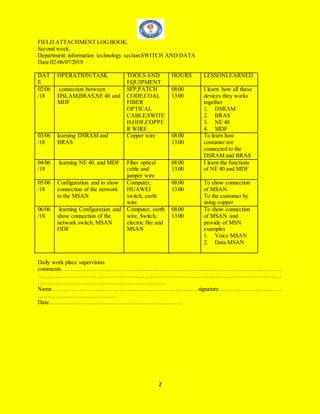
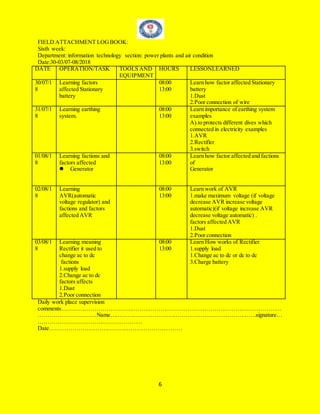
FIELD ATTACHMENT LOGBOOK:
Second week:
Department: information technology section:SWITCH AND DATA
Date:02-06/07/2018
DAT
E
OPERATION/TASK TOOLS AND
EQUIPMENT
HOURS LESSONLEARNED
02/06
/18
connection between
DSLAM,BRAS,NE 40 and
MDF
SFP,PATCH
CODE,COAL
FIBER
OPTICAL
CABLE,SWITC
H,ODF,COPPE
R WIRE
08:00
13:00
I learn how all these
devices they works
together
1. DSRAM
2. BRAS
3. NE 40
4. MDF
03/06
/18
learning DSRAM and
BRAS
Copper wire 08:00
13:00
To learn how
costumer are
connected to the
DSRAM and BRAS
04/06
/18
learning NE 40, and MDF Fiber optical
cable and
jumper wire
08:00
13:00
I learn the functions
of NE 40 and MDF
05/06
/18
Configuration and to show
connection of the network
to the MSAN
Computer,
HUAWEI
switch, earth
wire
08:00
13:00
To show connection
of MSAN
To the customer by
using copper
06/06
/18
learning Configuration and
show connection of the
network switch, MSAN
ODF
Computer, earth
wire, Switch,
electric fire and
MSAN
08:00
13:00
To show connection
of MSAN and
provide of MSN
examples
1. Voice MSAN
2. Data MSAN
Daily work place supervision
comments……………………………………………………………………………………………………
………………………………………………………………………………………………………………
…………………………………………………………
Name………………………………………………………………….signature……………………………
………………………………….
Date……………………………………………………………
3
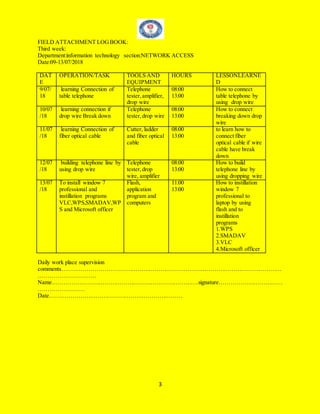
FIELD ATTACHMENT LOGBOOK:
Third week:
Department:information technology section:NETWORK ACCESS
Date:09-13/07/2018
DAT
E
OPERATION/TASK TOOLS AND
EQUIPMENT
HOURS LESSONLEARNE
D
9/07/
18
learning Connection of
table telephone
Telephone
tester,amplifier,
drop wire
08:00
13:00
How to connect
table telephone by
using drop wire
10/07
/18
learning connection if
drop wire Break down
Telephone
tester,drop wire
08:00
13:00
How to connect
breaking down drop
wire
11/07
/18
learning Connection of
fiber optical cable
Cutter, ladder
and fiber optical
cable
08:00
13:00
to learn how to
connect fiber
optical cable if wire
cable have break
down
12/07
/18
building telephone line by
using drop wire
Telephone
tester,drop
wire, amplifier
08:00
13:00
How to build
telephone line by
using dropping wire
13/07
/18
To install window 7
professional and
instillation programs
VLC,WPS,SMADAV,WP
S and Microsoft officer
Flash,
application
program and
computers
11:00
13:00
How to instillation
window 7
professional to
laptop by using
flash and to
instillation
programs
1.WPS
2.SMADAV
3.VLC
4.Microsoft officer
Daily work place supervision
comments……………………………………………………………………………………………………
…………………………
Name………………………………………………………………….signature……………………………
……………………
Date……………………………………………………………
4
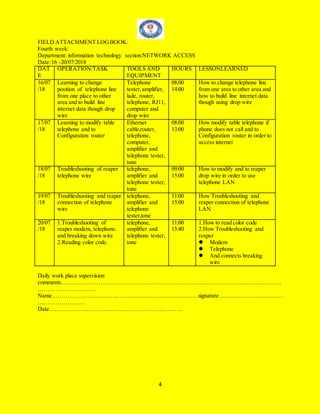
FIELD ATTACHMENT LOGBOOK:
Fourth week:
Department: information technology section:NETWORK ACCESS
Date:16 -20/07/2018
DAT
E
OPERATION/TASK TOOLS AND
EQUIPMENT
HOURS LESSONLEARNED
16/07
/18
Learning to change
position of telephone line
from one place to other
area and to build line
internet data though drop
wire
Telephone
tester,amplifier,
lade, router,
telephone, RJ11,
computer and
drop wire
08:00
14:00
How to change telephone line
from one area to other area and
how to build line internet data
though using drop wire
17/07
/18
Learning to modify table
telephone and to
Configuration router
Ethernet
cable,router,
telephone,
computer,
amplifier and
telephone tester,
tone
08:00
13:00
How modify table telephone if
phone does not call and to
Configuration router in order to
access internet
18/07
/18
Troubleshooting of reaper
telephone wire
telephone,
amplifier and
telephone tester,
tone
09:00
15:00
How to modify and to reaper
drop wire in order to use
telephone LAN
19/07
/18
Troubleshooting and reaper
connection of telephone
wire
telephone,
amplifier and
telephone
tester,tone
11:00
15:00
How Troubleshooting and
reaper connection of telephone
LAN
20/07
/18
1.Troubleshooting of
reaper modem, telephone.
and breaking down wire
2.Reading color code.
telephone,
amplifier and
telephone tester,
tone
11:00
15:40
1.How to read color code
2.How Troubleshooting and
reaper
 Modem
 Telephone
 And connects breaking
wire
Daily work place supervision
comments……………………………………………………………………………………………………
…………………………
Name………………………………………………………………….signature……………………………
……………………
Date……………………………………………………………
5
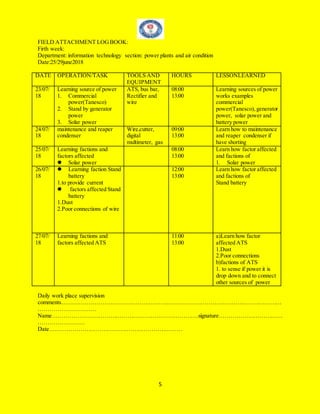
FIELD ATTACHMENT LOGBOOK:
Firth week:
Department: information technology section: power plants and air condition
Date:25/29june2018
DATE OPERATION/TASK TOOLS AND
EQUIPMENT
HOURS LESSONLEARNED
23/07/
18
Learning source of power
1. Commercial
power(Tanesco)
2. Stand by generator
power
3. Solar power
ATS, bus bar,
Rectifier and
wire
08:00
13:00
Learning sources of power
works examples
commercial
power(Tanesco), generator
power, solar power and
battery power
24/07/
18
maintenance and reaper
condenser
Wire,cutter,
digital
multimeter, gas
09:00
13:00
Learn how to maintenance
and reaper condenser if
have shorting
25/07/
18
Learning factions and
factors affected
 Solar power
08:00
13:00
Learn how factor affected
and factions of
1. Solar power
26/07/
18
 Learning faction Stand
battery
1.to provide current
 factors affected Stand
battery
1.Dust
2.Poor connections of wire
12:00
13:00
Learn how factor affected
and factions of
Stand battery
27/07/
18
Learning factions and
factors affected ATS
11:00
13:00
a)Learn how factor
affected ATS
1.Dust
2.Poor connections
b)factions of ATS
1. to sense if power it is
drop down and to connect
other sources of power
Daily work place supervision
comments……………………………………………………………………………………………………
…………………………
Name………………………………………………………………….signature……………………………
……………………
Date……………………………………………………………
6
FIELD ATTACHMENT LOGBOOK:
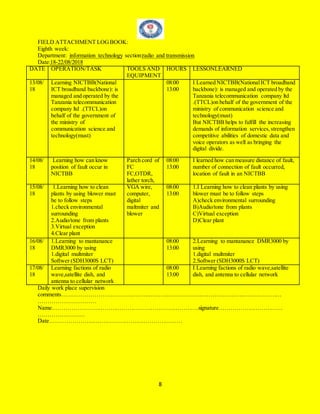
Sixth week:
Department: information technology section: power plants and air condition
Date:30-03/07-08/2018
DATE OPERATION/TASK TOOLS AND
EQUIPMENT
HOURS LESSONLEARNED
30/07/1
8
Learning factors
affected Stationary
battery
08:00
13:00
Learn how factor affected Stationary
battery
1.Dust
2.Poor connection of wire
31/07/1
8
Learning earthing
system.
08:00
13:00
Learn importance of earthing system
examples
A).to protects different dives which
connected in electricity examples
1.AVR
2.Rectifier
3.switch
01/08/1
8
Learning factions and
factors affected
 Generator
08:00
13:00
Learn how factor affected and factions
of
Generator
02/08/1
8
Learning
AVR(automatic
voltage regulator) and
factions and factors
affected AVR
08:00
13:00
Learn work of AVR
1.make maximum voltage (if voltage
decrease AVR increase voltage
automatic)(if voltage increase AVR
decrease voltage automatic) .
factors affected AVR
1.Dust
2.Poor connection
03/08/1
8
Learning meaning
Rectifier it used to
change ac to dc
factions
1.supply load
2.Change ac to dc
factors affects
1.Dust
2.Poor connection
08:00
13:00
Learn How works of Rectifier
1.supply load
1.Change ac to dc or dc to dc
3.Charge battery
Daily work place supervision
comments……………………………………………………………………………………………………
…………………………Name………………………………………………………………….signature…
………………………………………………
Date……………………………………………………………
7
FIELD ATTACHMENT LOGBOOK:
Seventh week:
Department: information technology section: radio and transmission
Date:11-15/08/2018
DATE OPERATION/TASK TOOLS AND
EQUIPMENT
HOUR
S
LESSONLEARNED
06/08/1
8
1. learning history of
TTCL during provide
service to customer before
2000 year
2.Learning factions of
radio wave
3.Learning transmission
media
08:00
13:00
1.I Learned history TTCL during provide
services to customer before 2000 years
2.Learning Advantage of radio wave :
Able to Transmit Large Quantities of
Data Microwave radio systems can
broadcast large quantities of information
because of their high
frequencies.Microwave repeaters also give
microwave communication systems the
ability to transmit data over extremely long
distances.
07/08/1
8
1.Learning factions
NICTBB
2.Learning ADM
08:00
13:00
1.Learned how work NICTBB
To connect vodacom, air-tel, tingo and
other company in order to provide service
of bandwidth
08/08/1
8
09/08/1
8
Learning faction satellite
dish
08:00
13:00
I Learned factions of satellite dish
To transmitter information from one place
to other place for faster
10/08/1
8
Learning different of SDH
and PDH
08:00
13:00
SDH is very useful equipment that is used
for the telecommunication sector in easy
transfer of data. Earlier PDH was widely
used but due to some of its weakness,SDH
has replaced the use of PHD. But not
applications are still used mainly by PDH,
and also, its cheaper.
Daily work place supervision
comments……………………………………………………………………………………………………
…………………………
Name………………………………………………………………….signature……………………………
……………………
Date……………………………………………………………
8
FIELD ATTACHMENT LOGBOOK:
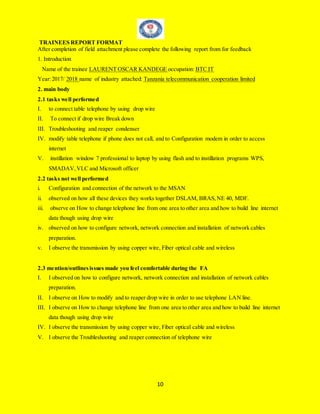
Eighth week:
Department: information technology section:radio and transmission
Date:18-22/08/2018
DATE OPERATION/TASK TOOLS AND
EQUIPMENT
HOURS LESSONLEARNED
13/08/
18
Learning NICTBB(National
ICT broadband backbone): is
managed and operated by the
Tanzania telecommunication
company ltd .(TTCL)on
behalf of the government of
the ministry of
communication science and
technology(must)
08:00
13:00
I Learned NICTBB(NationalICT broadband
backbone): is managed and operated by the
Tanzania telecommunication company ltd
.(TTCL)on behalf of the government of the
ministry of communication science and
technology(must)
But NICTBB helps to fulfill the increasing
demands of information services,strengthen
competitive abilities of domestic data and
voice operators as well as bringing the
digital divide.
14/08/
18
Learning how can know
position of fault occur in
NICTBB
Parch cord of
FC
FC,OTDR,
lather torch,
08:00
13:00
I learned how can measure distance of fault,
number of connection of fault occurred,
location of fault in an NICTBB
15/08/
18
1.Learning how to clean
plants by using blower must
be to follow steps
1.check environmental
surrounding
2.Audio/tone from plants
3.Virtual exception
4.Clear plant
VGA wire,
computer,
digital
maltmiter and
blower
08:00
13:00
1.I Learning how to clean plants by using
blower must be to follow steps
A)check environmental surrounding
B)Audio/tone from plants
C)Virtual exception
D)Clear plant
16/08/
18
1.Learning to mantanance
DMR3000 by using
1.digital multmiter
Softwer (SDH3000S LCT)
08:00
13:00
2.Learning to mantanance DMR3000 by
using
1.digital multmiter
2.Softwer (SDH3000S LCT)
17/08/
18
Learning factions of radio
wave,satellite dish, and
antenna to cellular network
08:00
13:00
I Learning factions of radio wave,satellite
dish, and antenna to cellular network
Daily work place supervision
comments……………………………………………………………………………………………………
…………………………
Name………………………………………………………………….signature……………………………
……………………
Date……………………………………………………………
9
WEKKYLY REPORT SUMMARY
Department: information technology sections : SWITCH AND DATA,NETWORK ACCESS ,power
plants and air condition and radio and transmission.
Date from:25/06/2018 to 17/08/2018
Sequences of operations for main jobs
Week no operation Tool,equipment,machinery
1 Configuration and connection of
the network switch to ODF
Switch, SFP and ODF
2 Learning connections between
DSLAM, BRAS,NE 40 and MDF
SFP,Patch,cord,fiber optical cable, switch, copper
wire and ODF
3 Building telephone line by using
drop wire
Telephone tester,drop wire, amplifier
4 Learning to modify table telephone
and to configuration router
Ethernet cable,router, telephone, computer, amplifier
and telephone tester,tone
5 maintenance and reaper condenser Wire,cutter, digital multimeter, gas
6 Learning AVR(automatic voltage
regulator) and factions and factors
affected AVR
Wire,cutter, digital multimeter
7 1.Learning factions NICTBB
2.Learning ADM
3.Learning faction satellite dish
Fiber optical cable, coaxial cable,radio wave
8 I learned how can measure distance
of fault, number of connection of
fault occurred, location of fault in
an NICTBB
Parch cord of FC FC,OTDR, lather torch
10
TRAINEES REPORT FORMAT
After completion of field attachment please complete the following report from for feedback
1. Introduction
Name of the trainee LAURENT OSCAR KANDEGE occupation: BTC IT
Year:2017/ 2018 name of industry attached: Tanzania telecommunication cooperation limited
2. main body
2.1 tasks well performed
I. to connect table telephone by using drop wire
II. To connect if drop wire Break down
III. Troubleshooting and reaper condenser
IV. modify table telephone if phone does not call, and to Configuration modem in order to access
internet
V. instillation window 7 professional to laptop by using flash and to instillation programs WPS,
SMADAV,VLC and Microsoft officer
2.2 tasks not well performed
i. Configuration and connection of the network to the MSAN
ii. observed on how all these devices they works together DSLAM, BRAS,NE 40, MDF.
iii. observe on How to change telephone line from one area to other area and how to build line internet
data though using drop wire
iv. observed on how to configure network, network connection and installation of network cables
preparation.
v. I observe the transmission by using copper wire, Fiber optical cable and wireless
2.3 mention/outlinesissues made you feel comfortable during the FA
I. I observed on how to configure network, network connection and installation of network cables
preparation.
II. I observe on How to modify and to reaper drop wire in order to use telephone LAN line.
III. I observe on How to change telephone line from one area to other area and how to build line internet
data though using drop wire
IV. I observe the transmission by using copper wire, Fiber optical cable and wireless
V. I observe the Troubleshooting and reaper connection of telephone wire
11
2.4 mention/outlinesissues made you feel uncomfortable during the FA
I. On Troubleshooting of reaper telephone wire
II. On connection between DSLAM,BRAS,NE 40 and MDF
III. On Configuration and connection of the network switch to ODF
IV. On Troubleshooting of reaper modem, telephone table
V. On Building telephone line by using drop wire
2.5 mention newknowledge and skills gained
i. I have learned services offered by TTCL(Services offered by TTCL company (1)voice services (2)
Data services
ii. learning transmission by using copper wire, Fiber optical cable and wireless
iii. I learn how all these devices they works together DSRAM, BRAS,NE 40, MDF
iv. Learning Configuration and to show connection of the network to the MSAN.
v. Learning How to connect table telephone by using drop wire
2.6 challenge faced during FA
I. First the adaption of the working environment, at the first time it was very hard to adopt the
surrounding because the much attention and silence is needed at the area of field work.
II. I faced the personal problems in which some tools like phone tester,amplifier, tone, three m and
device like MSAN ,DP,MDF,ODF,SFP which does not show in my eyes .
III. I faced the challenge during the network installation due to that the RJ45 breakup during the
installation of cable.
2.7 Recommendation for improvement
i. Field practice expanded my knowledge and skills from one level to another because I have learned
many and new things to an institution I was practiced.
ii. But there are challenges we need to face in order to make us unique competitor and be the stronger
competition on the outside market such as the practices training subject such as networking,
telephone troubleshooting, telephone maintenance and programming (command code)
….……………………………………………..
NAMED AND SIGNATURE
12

Field attachment log book

  • 1.
    1 FIELD ATTACHMENT LOGBOOK: Firstweek: Department: information technology section: SWITCH AND DATA Date:25-29/06/2018 DAT E OPERATION/TASK TOOLS AND EQUIPMENT HOURS LESSONLEARNED 25/06 /18 Configuration and connection of the network switch to ODF Switch, SFP ( smallest form fact plug-gable ODF ) 08:00 13:00 How ODFC, switch, SFP, fiber optical it is working together 26/06 /18 learning services offered by TTCL Fiber optical cable, copper wire, jumper wire and drop wire 08:00 13:00 Services offered by TTCL company 1. voice services 2. Data services 27/06 /18 learning wired transmission by using copper wire Copper wire 08:00 13:00 Wire transmission  Copper wire 28/06 /18 learning wired transmission by using fiber optical cable Parch cord,SFP and switch 08:00 13:00 Wire transmission  Fiber optical cable 29/06 /18 learning wireless transmission Coaxial cable, IDU,ODF,ROU TER,SWITCH and satellite dish 08:00 13:00 Wireless transmission(satellite )between two connection LANS Daily work place supervision comments…………………………………………………………………………………………………… ………………………… Name………………………………………………………………….signature…………………………… …………………… Date……………………………………………………………
  • 2.
    2 FIELD ATTACHMENT LOGBOOK: Secondweek: Department: information technology section:SWITCH AND DATA Date:02-06/07/2018 DAT E OPERATION/TASK TOOLS AND EQUIPMENT HOURS LESSONLEARNED 02/06 /18 connection between DSLAM,BRAS,NE 40 and MDF SFP,PATCH CODE,COAL FIBER OPTICAL CABLE,SWITC H,ODF,COPPE R WIRE 08:00 13:00 I learn how all these devices they works together 1. DSRAM 2. BRAS 3. NE 40 4. MDF 03/06 /18 learning DSRAM and BRAS Copper wire 08:00 13:00 To learn how costumer are connected to the DSRAM and BRAS 04/06 /18 learning NE 40, and MDF Fiber optical cable and jumper wire 08:00 13:00 I learn the functions of NE 40 and MDF 05/06 /18 Configuration and to show connection of the network to the MSAN Computer, HUAWEI switch, earth wire 08:00 13:00 To show connection of MSAN To the customer by using copper 06/06 /18 learning Configuration and show connection of the network switch, MSAN ODF Computer, earth wire, Switch, electric fire and MSAN 08:00 13:00 To show connection of MSAN and provide of MSN examples 1. Voice MSAN 2. Data MSAN Daily work place supervision comments…………………………………………………………………………………………………… ……………………………………………………………………………………………………………… ………………………………………………………… Name………………………………………………………………….signature…………………………… …………………………………. Date……………………………………………………………
  • 3.
    3 FIELD ATTACHMENT LOGBOOK: Thirdweek: Department:information technology section:NETWORK ACCESS Date:09-13/07/2018 DAT E OPERATION/TASK TOOLS AND EQUIPMENT HOURS LESSONLEARNE D 9/07/ 18 learning Connection of table telephone Telephone tester,amplifier, drop wire 08:00 13:00 How to connect table telephone by using drop wire 10/07 /18 learning connection if drop wire Break down Telephone tester,drop wire 08:00 13:00 How to connect breaking down drop wire 11/07 /18 learning Connection of fiber optical cable Cutter, ladder and fiber optical cable 08:00 13:00 to learn how to connect fiber optical cable if wire cable have break down 12/07 /18 building telephone line by using drop wire Telephone tester,drop wire, amplifier 08:00 13:00 How to build telephone line by using dropping wire 13/07 /18 To install window 7 professional and instillation programs VLC,WPS,SMADAV,WP S and Microsoft officer Flash, application program and computers 11:00 13:00 How to instillation window 7 professional to laptop by using flash and to instillation programs 1.WPS 2.SMADAV 3.VLC 4.Microsoft officer Daily work place supervision comments…………………………………………………………………………………………………… ………………………… Name………………………………………………………………….signature…………………………… …………………… Date……………………………………………………………
  • 4.
    4 FIELD ATTACHMENT LOGBOOK: Fourthweek: Department: information technology section:NETWORK ACCESS Date:16 -20/07/2018 DAT E OPERATION/TASK TOOLS AND EQUIPMENT HOURS LESSONLEARNED 16/07 /18 Learning to change position of telephone line from one place to other area and to build line internet data though drop wire Telephone tester,amplifier, lade, router, telephone, RJ11, computer and drop wire 08:00 14:00 How to change telephone line from one area to other area and how to build line internet data though using drop wire 17/07 /18 Learning to modify table telephone and to Configuration router Ethernet cable,router, telephone, computer, amplifier and telephone tester, tone 08:00 13:00 How modify table telephone if phone does not call and to Configuration router in order to access internet 18/07 /18 Troubleshooting of reaper telephone wire telephone, amplifier and telephone tester, tone 09:00 15:00 How to modify and to reaper drop wire in order to use telephone LAN 19/07 /18 Troubleshooting and reaper connection of telephone wire telephone, amplifier and telephone tester,tone 11:00 15:00 How Troubleshooting and reaper connection of telephone LAN 20/07 /18 1.Troubleshooting of reaper modem, telephone. and breaking down wire 2.Reading color code. telephone, amplifier and telephone tester, tone 11:00 15:40 1.How to read color code 2.How Troubleshooting and reaper  Modem  Telephone  And connects breaking wire Daily work place supervision comments…………………………………………………………………………………………………… ………………………… Name………………………………………………………………….signature…………………………… …………………… Date……………………………………………………………
  • 5.
    5 FIELD ATTACHMENT LOGBOOK: Firthweek: Department: information technology section: power plants and air condition Date:25/29june2018 DATE OPERATION/TASK TOOLS AND EQUIPMENT HOURS LESSONLEARNED 23/07/ 18 Learning source of power 1. Commercial power(Tanesco) 2. Stand by generator power 3. Solar power ATS, bus bar, Rectifier and wire 08:00 13:00 Learning sources of power works examples commercial power(Tanesco), generator power, solar power and battery power 24/07/ 18 maintenance and reaper condenser Wire,cutter, digital multimeter, gas 09:00 13:00 Learn how to maintenance and reaper condenser if have shorting 25/07/ 18 Learning factions and factors affected  Solar power 08:00 13:00 Learn how factor affected and factions of 1. Solar power 26/07/ 18  Learning faction Stand battery 1.to provide current  factors affected Stand battery 1.Dust 2.Poor connections of wire 12:00 13:00 Learn how factor affected and factions of Stand battery 27/07/ 18 Learning factions and factors affected ATS 11:00 13:00 a)Learn how factor affected ATS 1.Dust 2.Poor connections b)factions of ATS 1. to sense if power it is drop down and to connect other sources of power Daily work place supervision comments…………………………………………………………………………………………………… ………………………… Name………………………………………………………………….signature…………………………… …………………… Date……………………………………………………………
  • 6.
    6 FIELD ATTACHMENT LOGBOOK: Sixthweek: Department: information technology section: power plants and air condition Date:30-03/07-08/2018 DATE OPERATION/TASK TOOLS AND EQUIPMENT HOURS LESSONLEARNED 30/07/1 8 Learning factors affected Stationary battery 08:00 13:00 Learn how factor affected Stationary battery 1.Dust 2.Poor connection of wire 31/07/1 8 Learning earthing system. 08:00 13:00 Learn importance of earthing system examples A).to protects different dives which connected in electricity examples 1.AVR 2.Rectifier 3.switch 01/08/1 8 Learning factions and factors affected  Generator 08:00 13:00 Learn how factor affected and factions of Generator 02/08/1 8 Learning AVR(automatic voltage regulator) and factions and factors affected AVR 08:00 13:00 Learn work of AVR 1.make maximum voltage (if voltage decrease AVR increase voltage automatic)(if voltage increase AVR decrease voltage automatic) . factors affected AVR 1.Dust 2.Poor connection 03/08/1 8 Learning meaning Rectifier it used to change ac to dc factions 1.supply load 2.Change ac to dc factors affects 1.Dust 2.Poor connection 08:00 13:00 Learn How works of Rectifier 1.supply load 1.Change ac to dc or dc to dc 3.Charge battery Daily work place supervision comments…………………………………………………………………………………………………… …………………………Name………………………………………………………………….signature… ……………………………………………… Date……………………………………………………………
  • 7.
    7 FIELD ATTACHMENT LOGBOOK: Seventhweek: Department: information technology section: radio and transmission Date:11-15/08/2018 DATE OPERATION/TASK TOOLS AND EQUIPMENT HOUR S LESSONLEARNED 06/08/1 8 1. learning history of TTCL during provide service to customer before 2000 year 2.Learning factions of radio wave 3.Learning transmission media 08:00 13:00 1.I Learned history TTCL during provide services to customer before 2000 years 2.Learning Advantage of radio wave : Able to Transmit Large Quantities of Data Microwave radio systems can broadcast large quantities of information because of their high frequencies.Microwave repeaters also give microwave communication systems the ability to transmit data over extremely long distances. 07/08/1 8 1.Learning factions NICTBB 2.Learning ADM 08:00 13:00 1.Learned how work NICTBB To connect vodacom, air-tel, tingo and other company in order to provide service of bandwidth 08/08/1 8 09/08/1 8 Learning faction satellite dish 08:00 13:00 I Learned factions of satellite dish To transmitter information from one place to other place for faster 10/08/1 8 Learning different of SDH and PDH 08:00 13:00 SDH is very useful equipment that is used for the telecommunication sector in easy transfer of data. Earlier PDH was widely used but due to some of its weakness,SDH has replaced the use of PHD. But not applications are still used mainly by PDH, and also, its cheaper. Daily work place supervision comments…………………………………………………………………………………………………… ………………………… Name………………………………………………………………….signature…………………………… …………………… Date……………………………………………………………
  • 8.
    8 FIELD ATTACHMENT LOGBOOK: Eighthweek: Department: information technology section:radio and transmission Date:18-22/08/2018 DATE OPERATION/TASK TOOLS AND EQUIPMENT HOURS LESSONLEARNED 13/08/ 18 Learning NICTBB(National ICT broadband backbone): is managed and operated by the Tanzania telecommunication company ltd .(TTCL)on behalf of the government of the ministry of communication science and technology(must) 08:00 13:00 I Learned NICTBB(NationalICT broadband backbone): is managed and operated by the Tanzania telecommunication company ltd .(TTCL)on behalf of the government of the ministry of communication science and technology(must) But NICTBB helps to fulfill the increasing demands of information services,strengthen competitive abilities of domestic data and voice operators as well as bringing the digital divide. 14/08/ 18 Learning how can know position of fault occur in NICTBB Parch cord of FC FC,OTDR, lather torch, 08:00 13:00 I learned how can measure distance of fault, number of connection of fault occurred, location of fault in an NICTBB 15/08/ 18 1.Learning how to clean plants by using blower must be to follow steps 1.check environmental surrounding 2.Audio/tone from plants 3.Virtual exception 4.Clear plant VGA wire, computer, digital maltmiter and blower 08:00 13:00 1.I Learning how to clean plants by using blower must be to follow steps A)check environmental surrounding B)Audio/tone from plants C)Virtual exception D)Clear plant 16/08/ 18 1.Learning to mantanance DMR3000 by using 1.digital multmiter Softwer (SDH3000S LCT) 08:00 13:00 2.Learning to mantanance DMR3000 by using 1.digital multmiter 2.Softwer (SDH3000S LCT) 17/08/ 18 Learning factions of radio wave,satellite dish, and antenna to cellular network 08:00 13:00 I Learning factions of radio wave,satellite dish, and antenna to cellular network Daily work place supervision comments…………………………………………………………………………………………………… ………………………… Name………………………………………………………………….signature…………………………… …………………… Date……………………………………………………………
  • 9.
    9 WEKKYLY REPORT SUMMARY Department:information technology sections : SWITCH AND DATA,NETWORK ACCESS ,power plants and air condition and radio and transmission. Date from:25/06/2018 to 17/08/2018 Sequences of operations for main jobs Week no operation Tool,equipment,machinery 1 Configuration and connection of the network switch to ODF Switch, SFP and ODF 2 Learning connections between DSLAM, BRAS,NE 40 and MDF SFP,Patch,cord,fiber optical cable, switch, copper wire and ODF 3 Building telephone line by using drop wire Telephone tester,drop wire, amplifier 4 Learning to modify table telephone and to configuration router Ethernet cable,router, telephone, computer, amplifier and telephone tester,tone 5 maintenance and reaper condenser Wire,cutter, digital multimeter, gas 6 Learning AVR(automatic voltage regulator) and factions and factors affected AVR Wire,cutter, digital multimeter 7 1.Learning factions NICTBB 2.Learning ADM 3.Learning faction satellite dish Fiber optical cable, coaxial cable,radio wave 8 I learned how can measure distance of fault, number of connection of fault occurred, location of fault in an NICTBB Parch cord of FC FC,OTDR, lather torch
  • 10.
    10 TRAINEES REPORT FORMAT Aftercompletion of field attachment please complete the following report from for feedback 1. Introduction Name of the trainee LAURENT OSCAR KANDEGE occupation: BTC IT Year:2017/ 2018 name of industry attached: Tanzania telecommunication cooperation limited 2. main body 2.1 tasks well performed I. to connect table telephone by using drop wire II. To connect if drop wire Break down III. Troubleshooting and reaper condenser IV. modify table telephone if phone does not call, and to Configuration modem in order to access internet V. instillation window 7 professional to laptop by using flash and to instillation programs WPS, SMADAV,VLC and Microsoft officer 2.2 tasks not well performed i. Configuration and connection of the network to the MSAN ii. observed on how all these devices they works together DSLAM, BRAS,NE 40, MDF. iii. observe on How to change telephone line from one area to other area and how to build line internet data though using drop wire iv. observed on how to configure network, network connection and installation of network cables preparation. v. I observe the transmission by using copper wire, Fiber optical cable and wireless 2.3 mention/outlinesissues made you feel comfortable during the FA I. I observed on how to configure network, network connection and installation of network cables preparation. II. I observe on How to modify and to reaper drop wire in order to use telephone LAN line. III. I observe on How to change telephone line from one area to other area and how to build line internet data though using drop wire IV. I observe the transmission by using copper wire, Fiber optical cable and wireless V. I observe the Troubleshooting and reaper connection of telephone wire
  • 11.
    11 2.4 mention/outlinesissues madeyou feel uncomfortable during the FA I. On Troubleshooting of reaper telephone wire II. On connection between DSLAM,BRAS,NE 40 and MDF III. On Configuration and connection of the network switch to ODF IV. On Troubleshooting of reaper modem, telephone table V. On Building telephone line by using drop wire 2.5 mention newknowledge and skills gained i. I have learned services offered by TTCL(Services offered by TTCL company (1)voice services (2) Data services ii. learning transmission by using copper wire, Fiber optical cable and wireless iii. I learn how all these devices they works together DSRAM, BRAS,NE 40, MDF iv. Learning Configuration and to show connection of the network to the MSAN. v. Learning How to connect table telephone by using drop wire 2.6 challenge faced during FA I. First the adaption of the working environment, at the first time it was very hard to adopt the surrounding because the much attention and silence is needed at the area of field work. II. I faced the personal problems in which some tools like phone tester,amplifier, tone, three m and device like MSAN ,DP,MDF,ODF,SFP which does not show in my eyes . III. I faced the challenge during the network installation due to that the RJ45 breakup during the installation of cable. 2.7 Recommendation for improvement i. Field practice expanded my knowledge and skills from one level to another because I have learned many and new things to an institution I was practiced. ii. But there are challenges we need to face in order to make us unique competitor and be the stronger competition on the outside market such as the practices training subject such as networking, telephone troubleshooting, telephone maintenance and programming (command code) ….…………………………………………….. NAMED AND SIGNATURE
  • 12.