+
Facilitating a
Feedback Loop
through GradeMark
and TurningPoint:
A Workshop
Dr Christie Harner, Dr Alison Graham, Dr Sara
Marsham, and Miss Caitlin Oliver
15th Durham
Blackboard
Users’
Conference
6th - 7th
January 2015
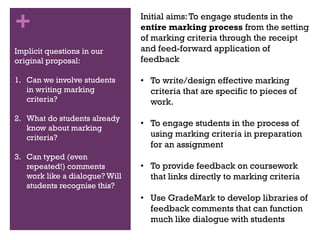
+ Aims of ProjectInitial aims:To engage students in the
entire marking process from the setting
of marking criteria through the receipt
and feed-forward application of
feedback
• To write/design effective marking
criteria that are specific to pieces of
work.
• To engage students in the process of
using marking criteria in preparation
for an assignment
• To provide feedback on coursework
that links directly to marking criteria
• Use GradeMark to develop libraries of
feedback comments that can function
much like dialogue with students
Implicit questions in our
original proposal:
1. Can we involve students
in writing marking
criteria?
2. What do students already
know about marking
criteria?
3. Can typed (even
repeated!) comments
work like a dialogue? Will
students recognise this?
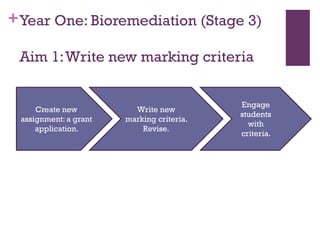
+Year One: Bioremediation (Stage 3)
Aim 1:Write new marking criteria
Create new
assignment: a grant
application.
Write new
marking criteria.
Revise.
Engage
students
with
criteria.
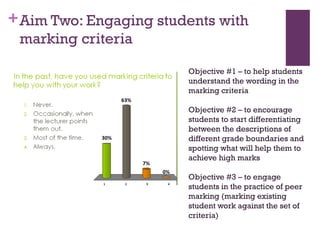
+Aim Two: Engaging students with
marking criteria
Objective #1 – to help students
understand the wording in the
marking criteria
Objective #2 – to encourage
students to start differentiating
between the descriptions of
different grade boundaries and
spotting what will help them to
achieve high marks
Objective #3 – to engage
students in the practice of peer
marking (marking existing
student work against the set of
criteria)
+
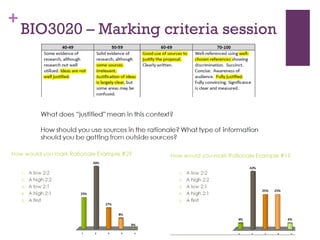
BIO3020 – Marking criteria session
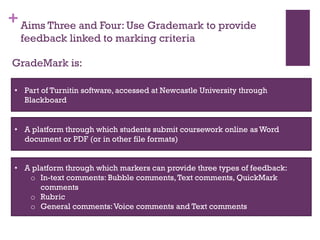
+Aims Three and Four: Use Grademark to provide
feedback linked to marking criteria
GradeMark is:
• Part of Turnitin software, accessed at Newcastle University through
Blackboard
• A platform through which students submit coursework online as Word
document or PDF (or in other file formats)
• A platform through which markers can provide three types of feedback:
o In-text comments: Bubble comments,Text comments, QuickMark
comments
o Rubric
o General comments:Voice comments and Text comments
+
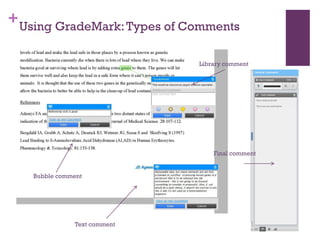
Library comment
Text comment
Bubble comment
Final comment
Using GradeMark:Types of Comments
+
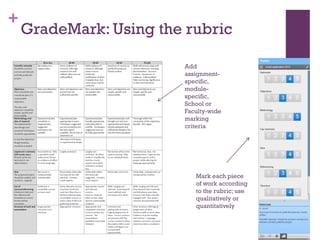
Add
assignment-
specific,
module-
specific,
School or
Faculty-wide
marking
criteria
Mark each piece
of work according
to the rubric; use
qualitatively or
quantitatively
GradeMark: Using the rubric
+
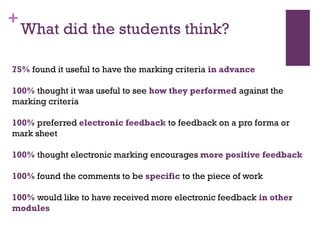
What did the students think?
75% found it useful to have the marking criteria in advance
100% thought it was useful to see how they performed against the
marking criteria
100% preferred electronic feedback to feedback on a pro forma or
mark sheet
100% thought electronic marking encourages more positive feedback
100% found the comments to be specific to the piece of work
100% would like to have received more electronic feedback in other
modules
+
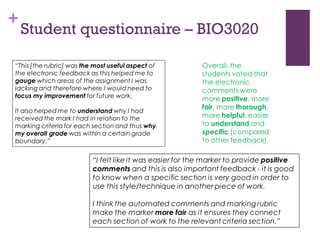
Student questionnaire – BIO3020
+
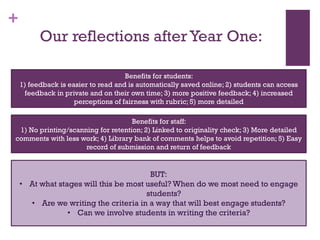
Our reflections afterYear One:
Benefits for students:
1) feedback is easier to read and is automatically saved online; 2) students can access
feedback in private and on their own time; 3) more positive feedback; 4) increased
perceptions of fairness with rubric; 5) more detailed
Benefits for staff:
1) No printing/scanning for retention; 2) Linked to originality check; 3) More detailed
comments with less work; 4) Library bank of comments helps to avoid repetition; 5) Easy
record of submission and return of feedback
BUT:
• At what stages will this be most useful? When do we most need to engage
students?
• Are we writing the criteria in a way that will best engage students?
• Can we involve students in writing the criteria?
+
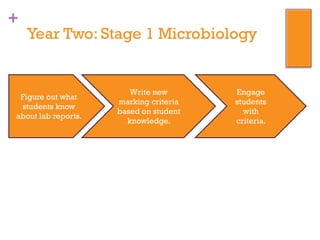
Year Two: Stage 1 Microbiology
Figure out what
students know
about lab reports.
Write new
marking criteria
based on student
knowledge.
Engage
students
with
criteria.
+
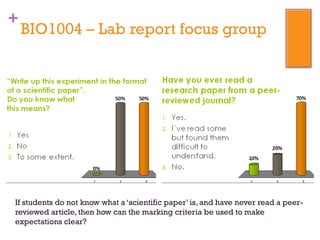
BIO1004 – Lab report focus group
If students do not know what a ‘scientific paper’ is, and have never read a peer-
reviewed article, then how can the marking criteria be used to make
expectations clear?
+
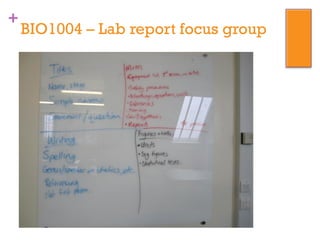
BIO1004 – Lab report focus group
+
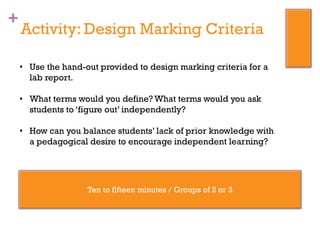
Activity: Design Marking Criteria
• Use the hand-out provided to design marking criteria for a
lab report.
• What terms would you define? What terms would you ask
students to ‘figure out’ independently?
• How can you balance students’ lack of prior knowledge with
a pedagogical desire to encourage independent learning?
Ten to fifteen minutes / Groups of 2 or 3
+
Activity: Design Marking Criteria
• What do your criteria look like?
• What guidelines should we remember when we’re writing
criteria?
• How can we make sure that we include the student
perspective?
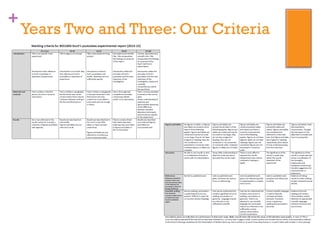
+
Years Two and Three: Our Criteria
+
Our reflections & questions for you:
Are there ‘good practice’ guidelines for writing marking criteria?
Can students be engaged to write the marking criteria themselves?
What strategies can be used to engage students with marking criteria?
What is the balance between in-class time and independent engagement?
What next?

Facilitating a feedback loop through GradeMark and TurningPoint: A workshop

  • 1.
    + Facilitating a Feedback Loop throughGradeMark and TurningPoint: A Workshop Dr Christie Harner, Dr Alison Graham, Dr Sara Marsham, and Miss Caitlin Oliver 15th Durham Blackboard Users’ Conference 6th - 7th January 2015
  • 2.
    + Aims ofProjectInitial aims:To engage students in the entire marking process from the setting of marking criteria through the receipt and feed-forward application of feedback • To write/design effective marking criteria that are specific to pieces of work. • To engage students in the process of using marking criteria in preparation for an assignment • To provide feedback on coursework that links directly to marking criteria • Use GradeMark to develop libraries of feedback comments that can function much like dialogue with students Implicit questions in our original proposal: 1. Can we involve students in writing marking criteria? 2. What do students already know about marking criteria? 3. Can typed (even repeated!) comments work like a dialogue? Will students recognise this?
  • 3.
    +Year One: Bioremediation(Stage 3) Aim 1:Write new marking criteria Create new assignment: a grant application. Write new marking criteria. Revise. Engage students with criteria.
  • 4.
    +Aim Two: Engagingstudents with marking criteria Objective #1 – to help students understand the wording in the marking criteria Objective #2 – to encourage students to start differentiating between the descriptions of different grade boundaries and spotting what will help them to achieve high marks Objective #3 – to engage students in the practice of peer marking (marking existing student work against the set of criteria)
  • 5.
    + BIO3020 – Markingcriteria session
  • 6.
    +Aims Three andFour: Use Grademark to provide feedback linked to marking criteria GradeMark is: • Part of Turnitin software, accessed at Newcastle University through Blackboard • A platform through which students submit coursework online as Word document or PDF (or in other file formats) • A platform through which markers can provide three types of feedback: o In-text comments: Bubble comments,Text comments, QuickMark comments o Rubric o General comments:Voice comments and Text comments
  • 7.
    + Library comment Text comment Bubblecomment Final comment Using GradeMark:Types of Comments
  • 8.
    + Add assignment- specific, module- specific, School or Faculty-wide marking criteria Mark eachpiece of work according to the rubric; use qualitatively or quantitatively GradeMark: Using the rubric
  • 9.
    + What did thestudents think? 75% found it useful to have the marking criteria in advance 100% thought it was useful to see how they performed against the marking criteria 100% preferred electronic feedback to feedback on a pro forma or mark sheet 100% thought electronic marking encourages more positive feedback 100% found the comments to be specific to the piece of work 100% would like to have received more electronic feedback in other modules
  • 10.
  • 11.
    + Our reflections afterYearOne: Benefits for students: 1) feedback is easier to read and is automatically saved online; 2) students can access feedback in private and on their own time; 3) more positive feedback; 4) increased perceptions of fairness with rubric; 5) more detailed Benefits for staff: 1) No printing/scanning for retention; 2) Linked to originality check; 3) More detailed comments with less work; 4) Library bank of comments helps to avoid repetition; 5) Easy record of submission and return of feedback BUT: • At what stages will this be most useful? When do we most need to engage students? • Are we writing the criteria in a way that will best engage students? • Can we involve students in writing the criteria?
  • 12.
    + Year Two: Stage1 Microbiology Figure out what students know about lab reports. Write new marking criteria based on student knowledge. Engage students with criteria.
  • 13.
    + BIO1004 – Labreport focus group If students do not know what a ‘scientific paper’ is, and have never read a peer- reviewed article, then how can the marking criteria be used to make expectations clear?
  • 14.
    + BIO1004 – Labreport focus group
  • 15.
    + Activity: Design MarkingCriteria • Use the hand-out provided to design marking criteria for a lab report. • What terms would you define? What terms would you ask students to ‘figure out’ independently? • How can you balance students’ lack of prior knowledge with a pedagogical desire to encourage independent learning? Ten to fifteen minutes / Groups of 2 or 3
  • 16.
    + Activity: Design MarkingCriteria • What do your criteria look like? • What guidelines should we remember when we’re writing criteria? • How can we make sure that we include the student perspective?
  • 17.
    + Years Two andThree: Our Criteria
  • 18.
    + Our reflections &questions for you: Are there ‘good practice’ guidelines for writing marking criteria? Can students be engaged to write the marking criteria themselves? What strategies can be used to engage students with marking criteria? What is the balance between in-class time and independent engagement? What next?