+
Using GradeMark to
improve feedback and
engage students in the
marking process
Dr Sara Marsham
School of Marine Science & Technology
sara.marsham@ncl.ac.uk
Dr Alison Graham
School of Biology
alison.graham@ncl.ac.uk
School of Marine
Science and
Technology
Staff Meeting
19th December
2016
@sara_marine
@alisonigraham
+
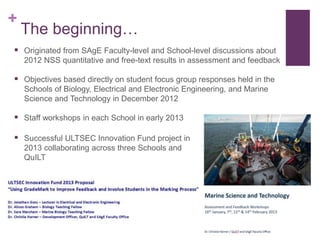
The beginning…
 Originated from SAgE Faculty-level and School-level discussions about
2012 NSS quantitative and free-text results in assessment and feedback
 Objectives based directly on student focus group responses held in the
Schools of Biology, Electrical and Electronic Engineering, and Marine
Science and Technology in December 2012
 Staff workshops in each School in early 2013
 Successful ULTSEC Innovation Fund project in
2013 collaborating across three Schools and
QuILT
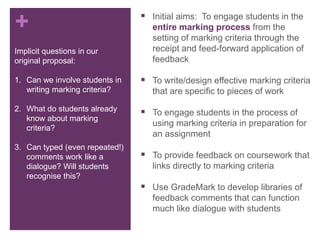
+ Aims of Project Initial aims: To engage students in the
entire marking process from the
setting of marking criteria through the
receipt and feed-forward application of
feedback
 To write/design effective marking criteria
that are specific to pieces of work
 To engage students in the process of
using marking criteria in preparation for
an assignment
 To provide feedback on coursework that
links directly to marking criteria
 Use GradeMark to develop libraries of
feedback comments that can function
much like dialogue with students
Implicit questions in our
original proposal:
1. Can we involve students in
writing marking criteria?
2. What do students already
know about marking
criteria?
3. Can typed (even repeated!)
comments work like a
dialogue? Will students
recognise this?
+
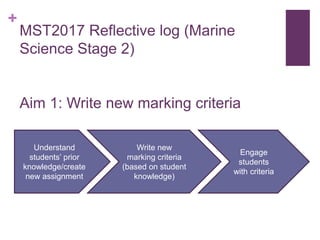
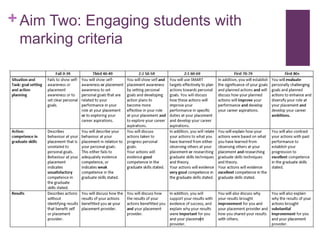
MST2017 Reflective log (Marine
Science Stage 2)
Aim 1: Write new marking criteria
Understand
students’ prior
knowledge/create
new assignment
Write new
marking criteria
(based on student
knowledge)
Engage
students
with criteria
+
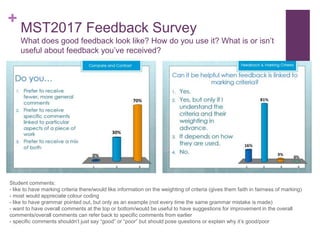
MST2017 Feedback Survey
What does good feedback look like? How do you use it? What is or isn’t
useful about feedback you’ve received?
Student comments:
- like to have marking criteria there/would like information on the weighting of criteria (gives them faith in fairness of marking)
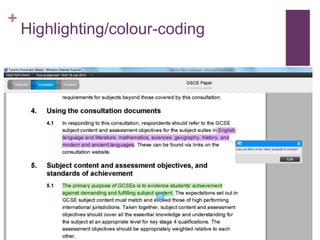
- most would appreciate colour coding
- like to have grammar pointed out, but only as an example (not every time the same grammar mistake is made)
- want to have overall comments at the top or bottom/would be useful to have suggestions for improvement in the overall
comments/overall comments can refer back to specific comments from earlier
- specific comments shouldn’t just say “good” or “poor” but should pose questions or explain why it’s good/poor
+ Aim Two: Engaging students with
marking criteria
+
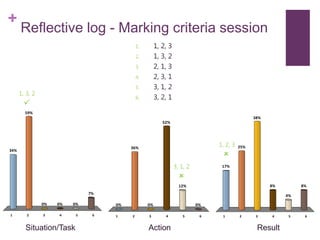
Reflective log - Marking criteria session
1 2 3 4 5 6
34%
59%
7%
0%0%0%
1. 1, 2, 3
2. 1, 3, 2
3. 2, 1, 3
4. 2, 3, 1
5. 3, 1, 2
6. 3, 2, 1
1 2 3 4 5 6
0%
36%
0%
12%
52%
0%
1 2 3 4 5 6
17%
25%
8%
4%
8%
38%
1, 3, 2

3, 1, 2

1, 2, 3

Situation/Task Action Result
+ Aims Three and Four: Use GradeMark to provide
feedback linked to marking criteria
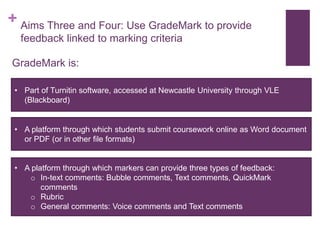
GradeMark is:
• Part of Turnitin software, accessed at Newcastle University through VLE
(Blackboard)
• A platform through which students submit coursework online as Word document
or PDF (or in other file formats)
• A platform through which markers can provide three types of feedback:
o In-text comments: Bubble comments, Text comments, QuickMark
comments
o Rubric
o General comments: Voice comments and Text comments
+
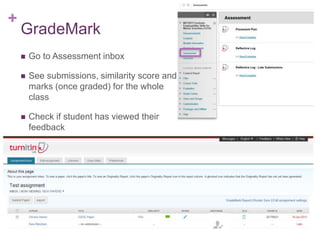
GradeMark
 Go to Assessment inbox
 See submissions, similarity score and
marks (once graded) for the whole
class
 Check if student has viewed their
feedback
+
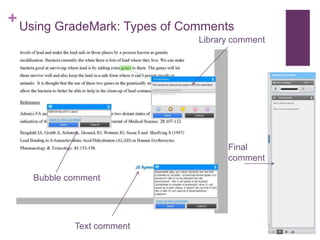
Library comment
Text comment
Bubble comment
Final
comment
Using GradeMark: Types of Comments
+
Highlighting/colour-coding
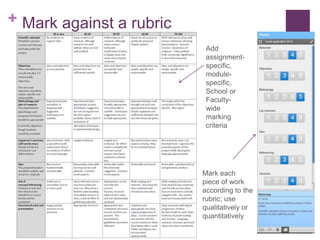
+ Mark against a rubric
Add
assignment-
specific,
module-
specific,
School or
Faculty-
wide
marking
criteria
Mark each
piece of work
according to the
rubric; use
qualitatively or
quantitatively
+
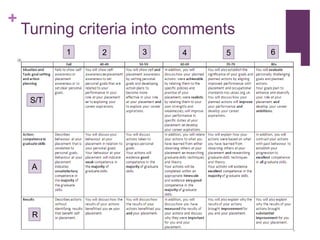
Turning criteria into comments
S/T
A
R
1 2 3 4 5 6
+
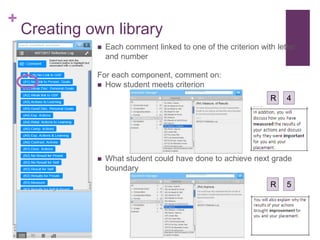
Creating own library
 Each comment linked to one of the criterion with letter
and number
For each component, comment on:
 How student meets criterion
 What student could have done to achieve next grade
boundary
R 4
R 5
+
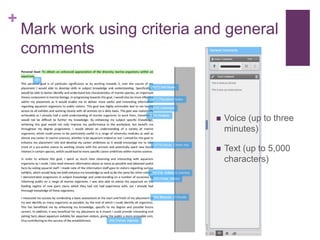
Mark work using criteria and general
comments
 Voice (up to three
minutes)
 Text (up to 5,000
characters)
+
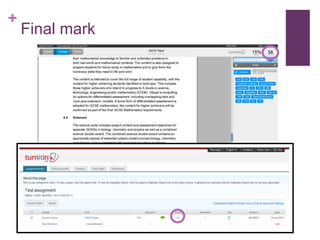
Final mark
+
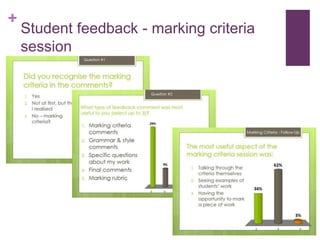
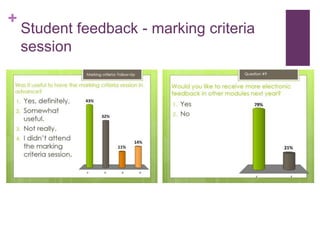
Student feedback - marking criteria
session
+
Student feedback - marking criteria
session
+
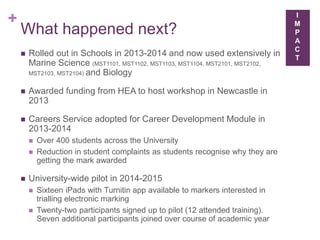
What did the students think?
75% found it useful to have the marking criteria in advance
100% thought it was useful to see how they performed against the
marking criteria
53% preferred electronic feedback to feedback on a pro-forma or mark
sheet
69% thought electronic feedback makes it easier to understand comments
about grammar
80% thought electronic marking encourages more positive feedback
50% found the comments to be specific to the piece of work
+
What happened next?
 Rolled out in Schools in 2013-2014 and now used extensively in
Marine Science (MST1101, MST1102, MST1103, MST1104, MST2101, MST2102,
MST2103, MST2104) and Biology
 Awarded funding from HEA to host workshop in Newcastle in
2013
 Careers Service adopted for Career Development Module in
2013-2014
 Over 400 students across the University
 Reduction in student complaints as students recognise why they are
getting the mark awarded
 University-wide pilot in 2014-2015
 Sixteen iPads with Turnitin app available to markers interested in
trialling electronic marking
 Twenty-two participants signed up to pilot (12 attended training).
Seven additional participants joined over course of academic year
I
M
P
A
C
T
+
What happened next?
 Faculty Innovator of the Year Award in 2014
 Scheme extended across University in 2015-2016 - shifted
focus towards its use on PCs
 Introduced in a number of programmes, and support for
academic units to use this approach is now mainstreamed
 An example of a Faculty Enhancement Project for the
QAA Review
 Recognised by PVC L&T and awarded further funding in
2016 for dissemination
 Manuscript in prep for submission to Assessment &
Evaluation in Higher Education
I
M
P
A
C
T
+
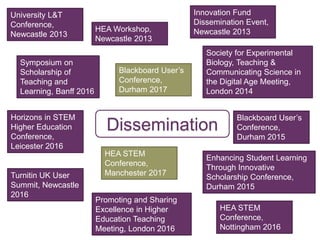
Dissemination
University L&T
Conference,
Newcastle 2013
HEA Workshop,
Newcastle 2013
Blackboard User’s
Conference,
Durham 2015
Enhancing Student Learning
Through Innovative
Scholarship Conference,
Durham 2015
Promoting and Sharing
Excellence in Higher
Education Teaching
Meeting, London 2016
Symposium on
Scholarship of
Teaching and
Learning, Banff 2016
HEA STEM
Conference,
Manchester 2017
Blackboard User’s
Conference,
Durham 2017
HEA STEM
Conference,
Nottingham 2016
Horizons in STEM
Higher Education
Conference,
Leicester 2016
Turnitin UK User
Summit, Newcastle
2016
Society for Experimental
Biology, Teaching &
Communicating Science in
the Digital Age Meeting,
London 2014
Innovation Fund
Dissemination Event,
Newcastle 2013
+
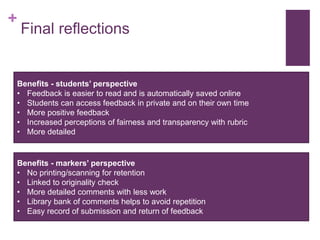
Final reflections
Benefits - students’ perspective
• Feedback is easier to read and is automatically saved online
• Students can access feedback in private and on their own time
• More positive feedback
• Increased perceptions of fairness and transparency with rubric
• More detailed
Benefits - markers’ perspective
• No printing/scanning for retention
• Linked to originality check
• More detailed comments with less work
• Library bank of comments helps to avoid repetition
• Easy record of submission and return of feedback
+
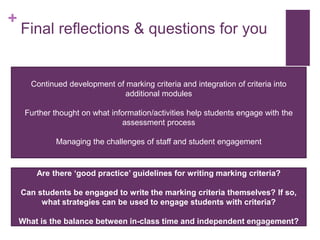
Final reflections & questions for you
Continued development of marking criteria and integration of criteria into
additional modules
Further thought on what information/activities help students engage with the
assessment process
Managing the challenges of staff and student engagement
Are there ‘good practice’ guidelines for writing marking criteria?
Can students be engaged to write the marking criteria themselves? If so,
what strategies can be used to engage students with criteria?
What is the balance between in-class time and independent engagement?
+
Thank you for listening
Any questions?
Our thanks to all
of our students
who took part and
shared their
opinions
Thanks to
Newcastle
University
Innovation Fund
for funding the
original work &
ongoing support
Dr Sara Marsham
School of Marine Science & Technology
sara.marsham@ncl.ac.uk
Dr Alison Graham
School of Biology
alison.graham@ncl.ac.uk
@sara_marine
@alisonigraham
http://www.slideshare.net/SaraMarsham/presentations
School of Marine
Science and
Technology
Staff Meeting
19th December
2016

Using GradeMark to engage students in the feedback process

  • 1.
    + Using GradeMark to improvefeedback and engage students in the marking process Dr Sara Marsham School of Marine Science & Technology sara.marsham@ncl.ac.uk Dr Alison Graham School of Biology alison.graham@ncl.ac.uk School of Marine Science and Technology Staff Meeting 19th December 2016 @sara_marine @alisonigraham
  • 2.
    + The beginning…  Originatedfrom SAgE Faculty-level and School-level discussions about 2012 NSS quantitative and free-text results in assessment and feedback  Objectives based directly on student focus group responses held in the Schools of Biology, Electrical and Electronic Engineering, and Marine Science and Technology in December 2012  Staff workshops in each School in early 2013  Successful ULTSEC Innovation Fund project in 2013 collaborating across three Schools and QuILT
  • 3.
    + Aims ofProject Initial aims: To engage students in the entire marking process from the setting of marking criteria through the receipt and feed-forward application of feedback  To write/design effective marking criteria that are specific to pieces of work  To engage students in the process of using marking criteria in preparation for an assignment  To provide feedback on coursework that links directly to marking criteria  Use GradeMark to develop libraries of feedback comments that can function much like dialogue with students Implicit questions in our original proposal: 1. Can we involve students in writing marking criteria? 2. What do students already know about marking criteria? 3. Can typed (even repeated!) comments work like a dialogue? Will students recognise this?
  • 4.
    + MST2017 Reflective log(Marine Science Stage 2) Aim 1: Write new marking criteria Understand students’ prior knowledge/create new assignment Write new marking criteria (based on student knowledge) Engage students with criteria
  • 5.
    + MST2017 Feedback Survey Whatdoes good feedback look like? How do you use it? What is or isn’t useful about feedback you’ve received? Student comments: - like to have marking criteria there/would like information on the weighting of criteria (gives them faith in fairness of marking) - most would appreciate colour coding - like to have grammar pointed out, but only as an example (not every time the same grammar mistake is made) - want to have overall comments at the top or bottom/would be useful to have suggestions for improvement in the overall comments/overall comments can refer back to specific comments from earlier - specific comments shouldn’t just say “good” or “poor” but should pose questions or explain why it’s good/poor
  • 6.
    + Aim Two:Engaging students with marking criteria
  • 7.
    + Reflective log -Marking criteria session 1 2 3 4 5 6 34% 59% 7% 0%0%0% 1. 1, 2, 3 2. 1, 3, 2 3. 2, 1, 3 4. 2, 3, 1 5. 3, 1, 2 6. 3, 2, 1 1 2 3 4 5 6 0% 36% 0% 12% 52% 0% 1 2 3 4 5 6 17% 25% 8% 4% 8% 38% 1, 3, 2  3, 1, 2  1, 2, 3  Situation/Task Action Result
  • 8.
    + Aims Threeand Four: Use GradeMark to provide feedback linked to marking criteria GradeMark is: • Part of Turnitin software, accessed at Newcastle University through VLE (Blackboard) • A platform through which students submit coursework online as Word document or PDF (or in other file formats) • A platform through which markers can provide three types of feedback: o In-text comments: Bubble comments, Text comments, QuickMark comments o Rubric o General comments: Voice comments and Text comments
  • 9.
    + GradeMark  Go toAssessment inbox  See submissions, similarity score and marks (once graded) for the whole class  Check if student has viewed their feedback
  • 10.
    + Library comment Text comment Bubblecomment Final comment Using GradeMark: Types of Comments
  • 11.
  • 12.
    + Mark againsta rubric Add assignment- specific, module- specific, School or Faculty- wide marking criteria Mark each piece of work according to the rubric; use qualitatively or quantitatively
  • 13.
    + Turning criteria intocomments S/T A R 1 2 3 4 5 6
  • 14.
    + Creating own library Each comment linked to one of the criterion with letter and number For each component, comment on:  How student meets criterion  What student could have done to achieve next grade boundary R 4 R 5
  • 15.
    + Mark work usingcriteria and general comments  Voice (up to three minutes)  Text (up to 5,000 characters)
  • 16.
  • 17.
    + Student feedback -marking criteria session
  • 18.
    + Student feedback -marking criteria session
  • 19.
    + What did thestudents think? 75% found it useful to have the marking criteria in advance 100% thought it was useful to see how they performed against the marking criteria 53% preferred electronic feedback to feedback on a pro-forma or mark sheet 69% thought electronic feedback makes it easier to understand comments about grammar 80% thought electronic marking encourages more positive feedback 50% found the comments to be specific to the piece of work
  • 20.
    + What happened next? Rolled out in Schools in 2013-2014 and now used extensively in Marine Science (MST1101, MST1102, MST1103, MST1104, MST2101, MST2102, MST2103, MST2104) and Biology  Awarded funding from HEA to host workshop in Newcastle in 2013  Careers Service adopted for Career Development Module in 2013-2014  Over 400 students across the University  Reduction in student complaints as students recognise why they are getting the mark awarded  University-wide pilot in 2014-2015  Sixteen iPads with Turnitin app available to markers interested in trialling electronic marking  Twenty-two participants signed up to pilot (12 attended training). Seven additional participants joined over course of academic year I M P A C T
  • 21.
    + What happened next? Faculty Innovator of the Year Award in 2014  Scheme extended across University in 2015-2016 - shifted focus towards its use on PCs  Introduced in a number of programmes, and support for academic units to use this approach is now mainstreamed  An example of a Faculty Enhancement Project for the QAA Review  Recognised by PVC L&T and awarded further funding in 2016 for dissemination  Manuscript in prep for submission to Assessment & Evaluation in Higher Education I M P A C T
  • 22.
    + Dissemination University L&T Conference, Newcastle 2013 HEAWorkshop, Newcastle 2013 Blackboard User’s Conference, Durham 2015 Enhancing Student Learning Through Innovative Scholarship Conference, Durham 2015 Promoting and Sharing Excellence in Higher Education Teaching Meeting, London 2016 Symposium on Scholarship of Teaching and Learning, Banff 2016 HEA STEM Conference, Manchester 2017 Blackboard User’s Conference, Durham 2017 HEA STEM Conference, Nottingham 2016 Horizons in STEM Higher Education Conference, Leicester 2016 Turnitin UK User Summit, Newcastle 2016 Society for Experimental Biology, Teaching & Communicating Science in the Digital Age Meeting, London 2014 Innovation Fund Dissemination Event, Newcastle 2013
  • 23.
    + Final reflections Benefits -students’ perspective • Feedback is easier to read and is automatically saved online • Students can access feedback in private and on their own time • More positive feedback • Increased perceptions of fairness and transparency with rubric • More detailed Benefits - markers’ perspective • No printing/scanning for retention • Linked to originality check • More detailed comments with less work • Library bank of comments helps to avoid repetition • Easy record of submission and return of feedback
  • 24.
    + Final reflections &questions for you Continued development of marking criteria and integration of criteria into additional modules Further thought on what information/activities help students engage with the assessment process Managing the challenges of staff and student engagement Are there ‘good practice’ guidelines for writing marking criteria? Can students be engaged to write the marking criteria themselves? If so, what strategies can be used to engage students with criteria? What is the balance between in-class time and independent engagement?
  • 25.
    + Thank you forlistening Any questions? Our thanks to all of our students who took part and shared their opinions Thanks to Newcastle University Innovation Fund for funding the original work & ongoing support Dr Sara Marsham School of Marine Science & Technology sara.marsham@ncl.ac.uk Dr Alison Graham School of Biology alison.graham@ncl.ac.uk @sara_marine @alisonigraham http://www.slideshare.net/SaraMarsham/presentations School of Marine Science and Technology Staff Meeting 19th December 2016

Editor's Notes

  • #3 Intro to Innovation fund, etc.
  • #5 Introductory slide – talking about the process of writing the criteria and what went into that. Maybe worth mentioning why we didn’t involve students in the writing process (because they just weren’t familiar enough?)
  • #8 Engagement sessions with students - Structured differently – had three examples of reflective essays (a 1st, a 2:1 and a 2:2). We first discussed the criteria. Students then worked in groups, using the criteria, to rank each of the examples. We then discussed the three exemplars, against the criteria, as a group. Were not very good at ranking, but when we gave them specific examples of S/T, A and R, they could correctly assign them to the grade boundary.
  • #9 Overview of GradeMark
  • #10 Overview of GradeMark
  • #24 Moderation more obvious Data on feedback viewed Also increases consistency across markers