Design and File Preparation for
        Flexographic Printing

We know that a great deal of time and effor t goes into creating the perfect design for
your packaging, and our goal is to make the transition from concept to finished package
simple and successful!

By taking the time to understand the capabilities of our equipment and by clearly
communicating your expectations, you can greatly reduce lead times and production
costs.

BEFORE YOU START…

• Make sure that you have an accurate dieline.
• Familiarize yourself with any packaging regulations and restrictions that apply to the
product that is being packed.
• Review and understand the capabilities specific to flexographic printing at Star Pack-
aging, as outlined in this guide.

BEFORE YOU FINALIZE YOUR DESIGN…

We encourage you to include our graphics depar tment in your design process and
invite you to forward files to us for review. We can review your design and help
pinpoint elements that might not reproduce well on press, giving you the oppor tunity
to make adjustments that adhere to the integrity of your design prior to submitting the
design for your customer’s final approval.


                                            1
Table of Contents

Dielines ..................................................................................................... 3
Colors ........................................................................................................ 3
  Number of Colors ..................................................................................... 3
  Spot Colors ................................................................................................ 3
  Screens ....................................................................................................... 4
  Special note about imitation metallic inks ................................................ 4
  Gradients .................................................................................................... 4
  CMYK Images ............................................................................................. 5
 Trap ............................................................................................................. 5
Type ............................................................................................................ 6
  Positive Text ................................................................................................ 6
  Reverse Text ............................................................................................... 6
  Dropshadows ............................................................................................. 7
  Adobe® Photoshop® and Text ...................................................................... 7
  Fonts vs. Outlines ....................................................................................... 8
Bar Codes ................................................................................................. 8
Tone Scales ............................................................................................. 8
File Format and Transfer ................................................................ 9
Quick Reference Guide ................................................................... 10
Additional Resources .................................................................. 10
Contact Information ........................................................................ 10


                                                        2
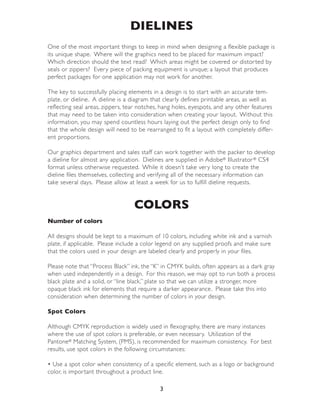
DIELINES
One of the most impor tant things to keep in mind when designing a flexible package is
its unique shape. Where will the graphics need to be placed for maximum impact?
Which direction should the text read? Which areas might be covered or distor ted by
seals or zippers? Every piece of packing equipment is unique; a layout that produces
perfect packages for one application may not work for another.

The key to successfully placing elements in a design is to star t with an accurate tem-
plate, or dieline. A dieline is a diagram that clearly defines printable areas, as well as
reflecting seal areas, zippers, tear notches, hang holes, eyespots, and any other features
that may need to be taken into consideration when creating your layout. Without this
information, you may spend countless hours laying out the perfect design only to find
that the whole design will need to be rearranged to fit a layout with completely differ-
ent propor tions.

Our graphics depar tment and sales staff can work together with the packer to develop
a dieline for almost any application. Dielines are supplied in Adobe® Illustrator ® CS4
format unless otherwise requested. While it doesn’t take very long to create the
dieline files themselves, collecting and verifying all of the necessary information can
take several days. Please allow at least a week for us to fulfill dieline requests.


                                  COLORS
Number of colors

All designs should be kept to a maximum of 10 colors, including white ink and a varnish
plate, if applicable. Please include a color legend on any supplied proofs and make sure
that the colors used in your design are labeled clearly and properly in your files.

Please note that “Process Black” ink, the “K” in CMYK builds, often appears as a dark gray
when used independently in a design. For this reason, we may opt to run both a process
black plate and a solid, or “line black,” plate so that we can utilize a stronger, more
opaque black ink for elements that require a darker appearance. Please take this into
consideration when determining the number of colors in your design.

Spot Colors

Although CMYK reproduction is widely used in flexography, there are many instances
where the use of spot colors is preferable, or even necessary. Utilization of the
Pantone® Matching System, (PMS), is recommended for maximum consistency. For best
results, use spot colors in the following circumstances:

• Use a spot color when consistency of a specific element, such as a logo or background
color, is impor tant throughout a product line.

                                            3
• Use a spot color for text, in order to maintain optimal legibility.
• Spot colors should be utilized for elements that require vibrant color. Please keep in
mind that custom colors that are conver ted to CMYK do not always maintain their
original brilliance or hue.

If we are required to match a custom color, please supply any materials necessary for
matching. We will supply ink swatches, called ink drawdowns, from our ink manufac-
turer for approval of specially matched colors prior to production. We will not supply
drawdowns of PMS colors unless specifically requested.

Screens

Screens can range from 85 lpi to 133 lpi, depending on the design. If a specific lpi is
required, this must be communicated prior to file separation.

Combining screened and solid print areas on the same plate presents a challenge on
press. Enough ink must be applied to the plate to produce adequate density in the
solid areas without applying too much ink, causing the ink to fill in the spaces between
the dots of the screen. When ink builds up in the spaces between the dots, the
screened areas will appear “dir ty”. If we identify a situation where combining screens
and solid areas on the same plate may compromise your design, an alternative treat-
ment may be suggested.

A special note about imitation metallic inks

While the use of imitation metallic inks can enhance a design, we do not recommend
using tints, or screens of these inks. The pigments used to create the metallic appearance
have a tendency to fill in the negative spaces in the screens, making them appear “dir ty”.

Gradients

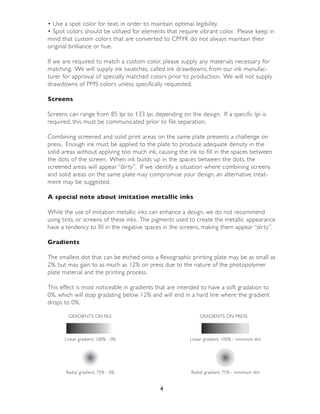
The smallest dot that can be etched onto a flexographic printing plate may be as small as
2%, but may gain to as much as 12% on press due to the nature of the photopolymer
plate material and the printing process.

This effect is most noticeable in gradients that are intended to have a soft gradation to
0%, which will stop gradating below 12% and will end in a hard line where the gradient
drops to 0%.

        GRADIENTS ON FILE                                    GRADIENTS ON PRESS


      Linear gradient, 100% - 0%                         Linear gradient, 100% - minimum dot


       Radial gradient, 75% - 0%                         Radial gradient, 75% - minimum dot


                                             4
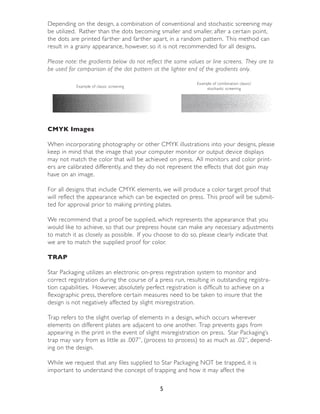
Depending on the design, a combination of conventional and stochastic screening may
be utilized. Rather than the dots becoming smaller and smaller, after a cer tain point,
the dots are printed far ther and far ther apar t, in a random pattern. This method can
result in a grainy appearance, however, so it is not recommended for all designs.

Please note: the gradients below do not reflect the same values or line screens. They are to
be used for comparison of the dot pattern at the lighter end of the gradients only.

                                                            Example of combination classic/
           Example of classic screening
                                                                stochastic screening


CMYK Images

When incorporating photography or other CMYK illustrations into your designs, please
keep in mind that the image that your computer monitor or output device displays
may not match the color that will be achieved on press. All monitors and color print-
ers are calibrated differently, and they do not represent the effects that dot gain may
have on an image.

For all designs that include CMYK elements, we will produce a color target proof that
will reflect the appearance which can be expected on press. This proof will be submit-
ted for approval prior to making printing plates.

We recommend that a proof be supplied, which represents the appearance that you
would like to achieve, so that our prepress house can make any necessary adjustments
to match it as closely as possible. If you choose to do so, please clearly indicate that
we are to match the supplied proof for color.

TRAP

Star Packaging utilizes an electronic on-press registration system to monitor and
correct registration during the course of a press run, resulting in outstanding registra-
tion capabilities. However, absolutely perfect registration is difficult to achieve on a
flexographic press, therefore cer tain measures need to be taken to insure that the
design is not negatively affected by slight misregistration.

Trap refers to the slight overlap of elements in a design, which occurs wherever
elements on different plates are adjacent to one another. Trap prevents gaps from
appearing in the print in the event of slight misregistration on press. Star Packaging’s
trap may vary from as little as .007”, (process to process) to as much as .02”, depend-
ing on the design.

While we request that any files supplied to Star Packaging NOT be trapped, it is
impor tant to understand the concept of trapping and how it may affect the

                                             5
appearance of your design.

For instance…

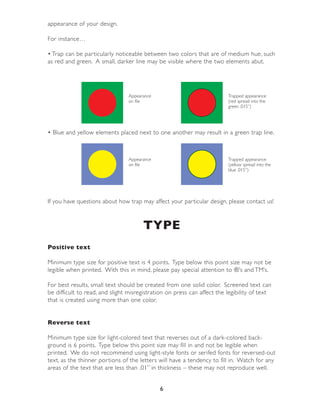
• Trap can be par ticularly noticeable between two colors that are of medium hue, such
as red and green. A small, darker line may be visible where the two elements abut.


                                Appearance                               Trapped appearance
                                on file                                  (red spread into the
                                                                         green .015”)


• Blue and yellow elements placed next to one another may result in a green trap line.


                                Appearance                               Trapped appearance
                                on file                                  (yellow spread into the
                                                                         blue .015”)


If you have questions about how trap may affect your par ticular design, please contact us!


                                      TYPE
Positive text

Minimum type size for positive text is 4 points. Type below this point size may not be
legible when printed. With this in mind, please pay special attention to ®’s and TM’s.

For best results, small text should be created from one solid color. Screened text can
be difficult to read, and slight misregistration on press can affect the legibility of text
that is created using more than one color.


Reverse text

Minimum type size for light-colored text that reverses out of a dark-colored back-
ground is 6 points. Type below this point size may fill in and not be legible when
printed. We do not recommend using light-style fonts or serifed fonts for reversed-out
text, as the thinner por tions of the letters will have a tendency to fill in. Watch for any
areas of the text that are less than .01” in thickness – these may not reproduce well.


                                             6
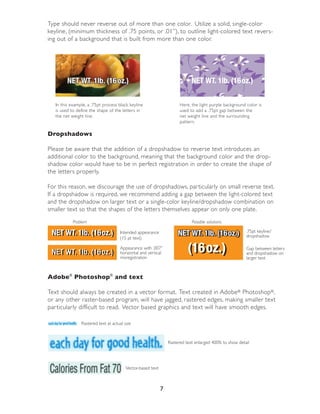
Type should never reverse out of more than one color. Utilize a solid, single-color
keyline, (minimum thickness of .75 points, or .01”), to outline light-colored text revers-
ing out of a background that is built from more than one color.


         NET WT. 1lb. (16 oz.)
                      (16oz.)                                                NET WT. 1lb. (16oz.)

   In this example, a .75pt process black keyline                      Here, the light purple background color is
   is used to define the shape of the letters in                       used to add a .75pt gap between the
   the net weight line.                                                net weight line and the surrounding
                                                                       pattern.

Dropshadows

Please be aware that the addition of a dropshadow to reverse text introduces an
additional color to the background, meaning that the background color and the drop-
shadow color would have to be in perfect registration in order to create the shape of
the letters properly.

For this reason, we discourage the use of dropshadows, par ticularly on small reverse text.
If a dropshadow is required, we recommend adding a gap between the light-colored text
and the dropshadow on larger text or a single-color keyline/dropshadow combination on
smaller text so that the shapes of the letters themselves appear on only one plate.
            Problem                                                          Possible solutions

 NET WT. 1lb. (16oz.)
 NET WT. 1lb. (16oz.)                Intended appearance              NET WT. 1lb. (16oz.)
                                                                      NET WT. 1lb. (16oz.)               .75pt keyline/
                                                                                                         dropshadow
                                     (15 pt text)

                                     Appearance with .007”
                                     horizontal and vertical
                                     misregistration
                                                                           (16oz.)
                                                                           (16 oz.)
                                                                           (16 oz.)                      Gap between letters
                                                                                                         and dropshadow on
                                                                                                         larger text


Adobe® Photoshop® and text

Text should always be created in a vector format. Text created in Adobe® Photoshop®,
or any other raster-based program, will have jagged, rastered edges, making smaller text
par ticularly difficult to read. Vector based graphics and text will have smooth edges.

                Rastered text at actual size


                                                                 Rastered text enlarged 400% to show detail


                                         Vector-based text


                                                             7
Fonts vs. Outlines

While conver ting text to outlines eliminates the possibility of text reflowing or fonts
not viewing or reproducing properly, it limits our ability to edit or resize text in the
event that revisions need to be made to the content or layout of the text. Should text
revisions be necessary, we may not be able to duplicate the appearance of the copy if
we cannot identify or do not have the font that was originally used.

For best results, we recommend that two versions of the file be supplied, one with the
text conver ted to outlines and one with live text.


                                     BAR CODES
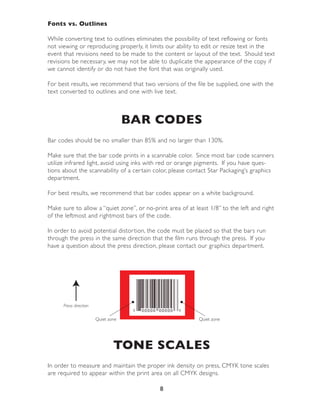
Bar codes should be no smaller than 85% and no larger than 130%.

Make sure that the bar code prints in a scannable color. Since most bar code scanners
utilize infrared light, avoid using inks with red or orange pigments. If you have ques-
tions about the scannability of a cer tain color, please contact Star Packaging’s graphics
depar tment.

For best results, we recommend that bar codes appear on a white background.

Make sure to allow a “quiet zone”, or no-print area of at least 1/8” to the left and right
of the leftmost and rightmost bars of the code.

In order to avoid potential distor tion, the code must be placed so that the bars run
through the press in the same direction that the film runs through the press. If you
have a question about the press direction, please contact our graphics depar tment.


      Press direction

                        Quiet zone                          Quiet zone


                                TONE SCALES
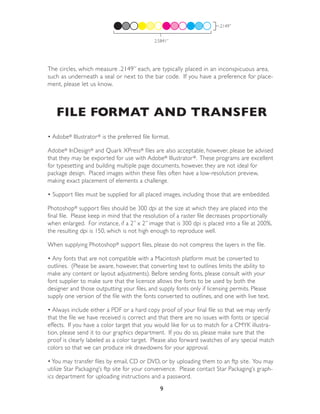
In order to measure and maintain the proper ink density on press, CMYK tone scales
are required to appear within the print area on all CMYK designs.

                                            8
.2149”


                                             2.5841”


The circles, which measure .2149” each, are typically placed in an inconspicuous area,
such as underneath a seal or next to the bar code. If you have a preference for place-
ment, please let us know.


   FILE FORMAT AND TRANSFER
• Adobe® Illustrator ® is the preferred file format.

Adobe® InDesign® and Quark XPress® files are also acceptable, however, please be advised
that they may be exported for use with Adobe® Illustrator ®. These programs are excellent
for typesetting and building multiple page documents, however, they are not ideal for
package design. Placed images within these files often have a low-resolution preview,
making exact placement of elements a challenge.

• Support files must be supplied for all placed images, including those that are embedded.

Photoshop® support files should be 300 dpi at the size at which they are placed into the
final file. Please keep in mind that the resolution of a raster file decreases proportionally
when enlarged. For instance, if a 2” x 2” image that is 300 dpi is placed into a file at 200%,
the resulting dpi is 150, which is not high enough to reproduce well.

When supplying Photoshop® support files, please do not compress the layers in the file.

• Any fonts that are not compatible with a Macintosh platform must be converted to
outlines. (Please be aware, however, that converting text to outlines limits the ability to
make any content or layout adjustments). Before sending fonts, please consult with your
font supplier to make sure that the licensce allows the fonts to be used by both the
designer and those outputting your files, and supply fonts only if licensing permits. Please
supply one version of the file with the fonts converted to outlines, and one with live text.

• Always include either a PDF or a hard copy proof of your final file so that we may verify
that the file we have received is correct and that there are no issues with fonts or special
effects. If you have a color target that you would like for us to match for a CMYK illustra-
tion, please send it to our graphics department. If you do so, please make sure that the
proof is clearly labeled as a color target. Please also forward swatches of any special match
colors so that we can produce ink drawdowns for your approval.

• You may transfer files by email, CD or DVD, or by uploading them to an ftp site. You may
utilize Star Packaging’s ftp site for your convenience. Please contact Star Packaging’s graph-
ics department for uploading instructions and a password.
                                                9
QUICK REFERENCE GUIDE
Maximum number of colors: 10
Line screen: 85 lpi - 133 lpi
Trap size: .007” - .02” (.01” typical for line-to-line or process-to-line)
Minimum type size (positive text): 4 points
Minimum type size (reverse text): 6 points (larger for serifed fonts)
Minimum rule size (positive): .33 points
Minimum rule size (reverse): .75 points
Bar Code size: 85% - 130%


         ADDITIONAL RESOURCES
To establish new bar code numbers:
GS1 (formerly the Uniform Code Council):           http://www.uc-council.org/

FDA Food Labeling Guide*:
http://www.cfsan.fda.gov/~dms/2lg-toc.html


USDA Meat and Poultry Labeling Guide*:
http://www.fsis.usda.gov/PDF/Labeling_Requirements_Guide.pdf

To purchase a comprehensive guide to technical specifications and industry standards
for the flexographic printing industry: http://www.flexography.org/edutrain/first.cfm

* Star Packaging serves many different industries, each with their own set of varied and
complex labeling requirements. It is our customers’ responsibility to verify that their pack-
aging meets any requirements set forth by regulatory agencies governing their industry.


          CONTACT INFORMATION
If you have any questions or concerns about the information presented in this guide, or
if you would like for us to review your design, please contact us:


Robyn Bley                                          Shaun Thacker
Graphics and Prepress Coordinator                   Assistant Graphics and Prepress
                                                    Coordinator
Office hours: 6:00AM EST - 2:30PM EST
Direct: (404) 924-2707                              Office hours: 8:00AM EST - 5:00PM EST
Toll-Free direct: (866) 688-1309                    Direct: (404) 924-2723
Fax: (404) 835-1453                                 sthacker@starpackagingcorp.com
rbley@starpackagingcorp.com

                                              10

Star design-prep-guide

  • 1.
    Design and FilePreparation for Flexographic Printing We know that a great deal of time and effor t goes into creating the perfect design for your packaging, and our goal is to make the transition from concept to finished package simple and successful! By taking the time to understand the capabilities of our equipment and by clearly communicating your expectations, you can greatly reduce lead times and production costs. BEFORE YOU START… • Make sure that you have an accurate dieline. • Familiarize yourself with any packaging regulations and restrictions that apply to the product that is being packed. • Review and understand the capabilities specific to flexographic printing at Star Pack- aging, as outlined in this guide. BEFORE YOU FINALIZE YOUR DESIGN… We encourage you to include our graphics depar tment in your design process and invite you to forward files to us for review. We can review your design and help pinpoint elements that might not reproduce well on press, giving you the oppor tunity to make adjustments that adhere to the integrity of your design prior to submitting the design for your customer’s final approval. 1
  • 2.
    Table of Contents Dielines..................................................................................................... 3 Colors ........................................................................................................ 3 Number of Colors ..................................................................................... 3 Spot Colors ................................................................................................ 3 Screens ....................................................................................................... 4 Special note about imitation metallic inks ................................................ 4 Gradients .................................................................................................... 4 CMYK Images ............................................................................................. 5 Trap ............................................................................................................. 5 Type ............................................................................................................ 6 Positive Text ................................................................................................ 6 Reverse Text ............................................................................................... 6 Dropshadows ............................................................................................. 7 Adobe® Photoshop® and Text ...................................................................... 7 Fonts vs. Outlines ....................................................................................... 8 Bar Codes ................................................................................................. 8 Tone Scales ............................................................................................. 8 File Format and Transfer ................................................................ 9 Quick Reference Guide ................................................................... 10 Additional Resources .................................................................. 10 Contact Information ........................................................................ 10 2
  • 3.
    DIELINES One of themost impor tant things to keep in mind when designing a flexible package is its unique shape. Where will the graphics need to be placed for maximum impact? Which direction should the text read? Which areas might be covered or distor ted by seals or zippers? Every piece of packing equipment is unique; a layout that produces perfect packages for one application may not work for another. The key to successfully placing elements in a design is to star t with an accurate tem- plate, or dieline. A dieline is a diagram that clearly defines printable areas, as well as reflecting seal areas, zippers, tear notches, hang holes, eyespots, and any other features that may need to be taken into consideration when creating your layout. Without this information, you may spend countless hours laying out the perfect design only to find that the whole design will need to be rearranged to fit a layout with completely differ- ent propor tions. Our graphics depar tment and sales staff can work together with the packer to develop a dieline for almost any application. Dielines are supplied in Adobe® Illustrator ® CS4 format unless otherwise requested. While it doesn’t take very long to create the dieline files themselves, collecting and verifying all of the necessary information can take several days. Please allow at least a week for us to fulfill dieline requests. COLORS Number of colors All designs should be kept to a maximum of 10 colors, including white ink and a varnish plate, if applicable. Please include a color legend on any supplied proofs and make sure that the colors used in your design are labeled clearly and properly in your files. Please note that “Process Black” ink, the “K” in CMYK builds, often appears as a dark gray when used independently in a design. For this reason, we may opt to run both a process black plate and a solid, or “line black,” plate so that we can utilize a stronger, more opaque black ink for elements that require a darker appearance. Please take this into consideration when determining the number of colors in your design. Spot Colors Although CMYK reproduction is widely used in flexography, there are many instances where the use of spot colors is preferable, or even necessary. Utilization of the Pantone® Matching System, (PMS), is recommended for maximum consistency. For best results, use spot colors in the following circumstances: • Use a spot color when consistency of a specific element, such as a logo or background color, is impor tant throughout a product line. 3
  • 4.
    • Use aspot color for text, in order to maintain optimal legibility. • Spot colors should be utilized for elements that require vibrant color. Please keep in mind that custom colors that are conver ted to CMYK do not always maintain their original brilliance or hue. If we are required to match a custom color, please supply any materials necessary for matching. We will supply ink swatches, called ink drawdowns, from our ink manufac- turer for approval of specially matched colors prior to production. We will not supply drawdowns of PMS colors unless specifically requested. Screens Screens can range from 85 lpi to 133 lpi, depending on the design. If a specific lpi is required, this must be communicated prior to file separation. Combining screened and solid print areas on the same plate presents a challenge on press. Enough ink must be applied to the plate to produce adequate density in the solid areas without applying too much ink, causing the ink to fill in the spaces between the dots of the screen. When ink builds up in the spaces between the dots, the screened areas will appear “dir ty”. If we identify a situation where combining screens and solid areas on the same plate may compromise your design, an alternative treat- ment may be suggested. A special note about imitation metallic inks While the use of imitation metallic inks can enhance a design, we do not recommend using tints, or screens of these inks. The pigments used to create the metallic appearance have a tendency to fill in the negative spaces in the screens, making them appear “dir ty”. Gradients The smallest dot that can be etched onto a flexographic printing plate may be as small as 2%, but may gain to as much as 12% on press due to the nature of the photopolymer plate material and the printing process. This effect is most noticeable in gradients that are intended to have a soft gradation to 0%, which will stop gradating below 12% and will end in a hard line where the gradient drops to 0%. GRADIENTS ON FILE GRADIENTS ON PRESS Linear gradient, 100% - 0% Linear gradient, 100% - minimum dot Radial gradient, 75% - 0% Radial gradient, 75% - minimum dot 4
  • 5.
    Depending on thedesign, a combination of conventional and stochastic screening may be utilized. Rather than the dots becoming smaller and smaller, after a cer tain point, the dots are printed far ther and far ther apar t, in a random pattern. This method can result in a grainy appearance, however, so it is not recommended for all designs. Please note: the gradients below do not reflect the same values or line screens. They are to be used for comparison of the dot pattern at the lighter end of the gradients only. Example of combination classic/ Example of classic screening stochastic screening CMYK Images When incorporating photography or other CMYK illustrations into your designs, please keep in mind that the image that your computer monitor or output device displays may not match the color that will be achieved on press. All monitors and color print- ers are calibrated differently, and they do not represent the effects that dot gain may have on an image. For all designs that include CMYK elements, we will produce a color target proof that will reflect the appearance which can be expected on press. This proof will be submit- ted for approval prior to making printing plates. We recommend that a proof be supplied, which represents the appearance that you would like to achieve, so that our prepress house can make any necessary adjustments to match it as closely as possible. If you choose to do so, please clearly indicate that we are to match the supplied proof for color. TRAP Star Packaging utilizes an electronic on-press registration system to monitor and correct registration during the course of a press run, resulting in outstanding registra- tion capabilities. However, absolutely perfect registration is difficult to achieve on a flexographic press, therefore cer tain measures need to be taken to insure that the design is not negatively affected by slight misregistration. Trap refers to the slight overlap of elements in a design, which occurs wherever elements on different plates are adjacent to one another. Trap prevents gaps from appearing in the print in the event of slight misregistration on press. Star Packaging’s trap may vary from as little as .007”, (process to process) to as much as .02”, depend- ing on the design. While we request that any files supplied to Star Packaging NOT be trapped, it is impor tant to understand the concept of trapping and how it may affect the 5
  • 6.
    appearance of yourdesign. For instance… • Trap can be par ticularly noticeable between two colors that are of medium hue, such as red and green. A small, darker line may be visible where the two elements abut. Appearance Trapped appearance on file (red spread into the green .015”) • Blue and yellow elements placed next to one another may result in a green trap line. Appearance Trapped appearance on file (yellow spread into the blue .015”) If you have questions about how trap may affect your par ticular design, please contact us! TYPE Positive text Minimum type size for positive text is 4 points. Type below this point size may not be legible when printed. With this in mind, please pay special attention to ®’s and TM’s. For best results, small text should be created from one solid color. Screened text can be difficult to read, and slight misregistration on press can affect the legibility of text that is created using more than one color. Reverse text Minimum type size for light-colored text that reverses out of a dark-colored back- ground is 6 points. Type below this point size may fill in and not be legible when printed. We do not recommend using light-style fonts or serifed fonts for reversed-out text, as the thinner por tions of the letters will have a tendency to fill in. Watch for any areas of the text that are less than .01” in thickness – these may not reproduce well. 6
  • 7.
    Type should neverreverse out of more than one color. Utilize a solid, single-color keyline, (minimum thickness of .75 points, or .01”), to outline light-colored text revers- ing out of a background that is built from more than one color. NET WT. 1lb. (16 oz.) (16oz.) NET WT. 1lb. (16oz.) In this example, a .75pt process black keyline Here, the light purple background color is is used to define the shape of the letters in used to add a .75pt gap between the the net weight line. net weight line and the surrounding pattern. Dropshadows Please be aware that the addition of a dropshadow to reverse text introduces an additional color to the background, meaning that the background color and the drop- shadow color would have to be in perfect registration in order to create the shape of the letters properly. For this reason, we discourage the use of dropshadows, par ticularly on small reverse text. If a dropshadow is required, we recommend adding a gap between the light-colored text and the dropshadow on larger text or a single-color keyline/dropshadow combination on smaller text so that the shapes of the letters themselves appear on only one plate. Problem Possible solutions NET WT. 1lb. (16oz.) NET WT. 1lb. (16oz.) Intended appearance NET WT. 1lb. (16oz.) NET WT. 1lb. (16oz.) .75pt keyline/ dropshadow (15 pt text) Appearance with .007” horizontal and vertical misregistration (16oz.) (16 oz.) (16 oz.) Gap between letters and dropshadow on larger text Adobe® Photoshop® and text Text should always be created in a vector format. Text created in Adobe® Photoshop®, or any other raster-based program, will have jagged, rastered edges, making smaller text par ticularly difficult to read. Vector based graphics and text will have smooth edges. Rastered text at actual size Rastered text enlarged 400% to show detail Vector-based text 7
  • 8.
    Fonts vs. Outlines Whileconver ting text to outlines eliminates the possibility of text reflowing or fonts not viewing or reproducing properly, it limits our ability to edit or resize text in the event that revisions need to be made to the content or layout of the text. Should text revisions be necessary, we may not be able to duplicate the appearance of the copy if we cannot identify or do not have the font that was originally used. For best results, we recommend that two versions of the file be supplied, one with the text conver ted to outlines and one with live text. BAR CODES Bar codes should be no smaller than 85% and no larger than 130%. Make sure that the bar code prints in a scannable color. Since most bar code scanners utilize infrared light, avoid using inks with red or orange pigments. If you have ques- tions about the scannability of a cer tain color, please contact Star Packaging’s graphics depar tment. For best results, we recommend that bar codes appear on a white background. Make sure to allow a “quiet zone”, or no-print area of at least 1/8” to the left and right of the leftmost and rightmost bars of the code. In order to avoid potential distor tion, the code must be placed so that the bars run through the press in the same direction that the film runs through the press. If you have a question about the press direction, please contact our graphics depar tment. Press direction Quiet zone Quiet zone TONE SCALES In order to measure and maintain the proper ink density on press, CMYK tone scales are required to appear within the print area on all CMYK designs. 8
  • 9.
    .2149” 2.5841” The circles, which measure .2149” each, are typically placed in an inconspicuous area, such as underneath a seal or next to the bar code. If you have a preference for place- ment, please let us know. FILE FORMAT AND TRANSFER • Adobe® Illustrator ® is the preferred file format. Adobe® InDesign® and Quark XPress® files are also acceptable, however, please be advised that they may be exported for use with Adobe® Illustrator ®. These programs are excellent for typesetting and building multiple page documents, however, they are not ideal for package design. Placed images within these files often have a low-resolution preview, making exact placement of elements a challenge. • Support files must be supplied for all placed images, including those that are embedded. Photoshop® support files should be 300 dpi at the size at which they are placed into the final file. Please keep in mind that the resolution of a raster file decreases proportionally when enlarged. For instance, if a 2” x 2” image that is 300 dpi is placed into a file at 200%, the resulting dpi is 150, which is not high enough to reproduce well. When supplying Photoshop® support files, please do not compress the layers in the file. • Any fonts that are not compatible with a Macintosh platform must be converted to outlines. (Please be aware, however, that converting text to outlines limits the ability to make any content or layout adjustments). Before sending fonts, please consult with your font supplier to make sure that the licensce allows the fonts to be used by both the designer and those outputting your files, and supply fonts only if licensing permits. Please supply one version of the file with the fonts converted to outlines, and one with live text. • Always include either a PDF or a hard copy proof of your final file so that we may verify that the file we have received is correct and that there are no issues with fonts or special effects. If you have a color target that you would like for us to match for a CMYK illustra- tion, please send it to our graphics department. If you do so, please make sure that the proof is clearly labeled as a color target. Please also forward swatches of any special match colors so that we can produce ink drawdowns for your approval. • You may transfer files by email, CD or DVD, or by uploading them to an ftp site. You may utilize Star Packaging’s ftp site for your convenience. Please contact Star Packaging’s graph- ics department for uploading instructions and a password. 9
  • 10.
    QUICK REFERENCE GUIDE Maximumnumber of colors: 10 Line screen: 85 lpi - 133 lpi Trap size: .007” - .02” (.01” typical for line-to-line or process-to-line) Minimum type size (positive text): 4 points Minimum type size (reverse text): 6 points (larger for serifed fonts) Minimum rule size (positive): .33 points Minimum rule size (reverse): .75 points Bar Code size: 85% - 130% ADDITIONAL RESOURCES To establish new bar code numbers: GS1 (formerly the Uniform Code Council): http://www.uc-council.org/ FDA Food Labeling Guide*: http://www.cfsan.fda.gov/~dms/2lg-toc.html USDA Meat and Poultry Labeling Guide*: http://www.fsis.usda.gov/PDF/Labeling_Requirements_Guide.pdf To purchase a comprehensive guide to technical specifications and industry standards for the flexographic printing industry: http://www.flexography.org/edutrain/first.cfm * Star Packaging serves many different industries, each with their own set of varied and complex labeling requirements. It is our customers’ responsibility to verify that their pack- aging meets any requirements set forth by regulatory agencies governing their industry. CONTACT INFORMATION If you have any questions or concerns about the information presented in this guide, or if you would like for us to review your design, please contact us: Robyn Bley Shaun Thacker Graphics and Prepress Coordinator Assistant Graphics and Prepress Coordinator Office hours: 6:00AM EST - 2:30PM EST Direct: (404) 924-2707 Office hours: 8:00AM EST - 5:00PM EST Toll-Free direct: (866) 688-1309 Direct: (404) 924-2723 Fax: (404) 835-1453 sthacker@starpackagingcorp.com rbley@starpackagingcorp.com 10