


Exploring Git in 
Visual Studio 2013 
C# Corner – 15th November
Agenda 
- Basic Git Terms 
- How to use Git in 
Visual Studio 2013
Git - Basic Terms 
Git 
- is a distributed Version Control System 
- serves to monitor changes in files and undo them 
- make the files available to other in form of a repo (repository) 
- can get updates from other repos as well
Git - Basic Terms 
GitHub 
A Git repository web-based hosting service, which offers 
all of the distributed revision control.
Git - Basic Terms 
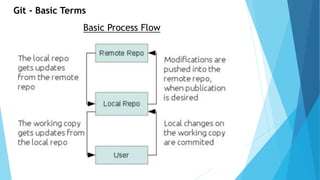
Basic Process Flow
Git - Basic Terms 
Clone 
A term used for copying a remote repo 
locally, which contains the entire history of 
the git repo being cloned.
Git - Basic Terms 
Fork 
A fork is a personal copy of another user's 
repository that lives on your account
Git - Basic Terms 
Commit 
A fork is a personal copy of another user's 
repository that lives on your account
Git - Basic Terms 
Pull 
A term used for copying a remote repo 
locally, which contains the entire history of 
the git repo being cloned.
Git - Basic Terms 
Push 
Pushing refers to sending your committed 
changes to a remote repository such as 
GitHub.com
Git - Basic Terms 
Branch 
A branch is a parallel version of a 
repository. It is contained within the 
repository, but does not affect the primary 
or master branch.
Git - Basic Terms 
Checkout 
Process of switching to a new branch 
context
Git - Basic Terms 
Merge 
Merging takes the changes from one branch 
(in the same repository or from a fork), and 
applies them into another.
Git - Basic Terms 
Remote 
A Repo or version of something - that 
is hosted on a server.
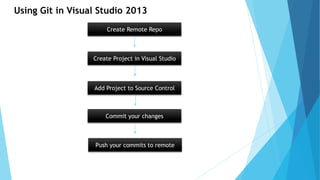
Using Git in Visual Studio 2013 
Create Remote Repo 
Create Project in Visual Studio 
Add Project to Source Control 
Commit your changes 
Push your commits to remote
My Credentials 
• C# Corner MVP / Author / Speaker 
• Microsoft Certified Professional 
• Developer - .NET Stack 
• Twitter: @sunny_delhi 
• Email: sunnyk_sharma@outlook.com 
• FB: bit.ly/sunnykumar 
Sunny K Sharma
Thank You!

Exploring Git in Visual Studio 2013

  • 1.
    Exploring Git in Visual Studio 2013 C# Corner – 15th November
  • 2.
    Agenda - BasicGit Terms - How to use Git in Visual Studio 2013
  • 3.
    Git - BasicTerms Git - is a distributed Version Control System - serves to monitor changes in files and undo them - make the files available to other in form of a repo (repository) - can get updates from other repos as well
  • 4.
    Git - BasicTerms GitHub A Git repository web-based hosting service, which offers all of the distributed revision control.
  • 5.
    Git - BasicTerms Basic Process Flow
  • 6.
    Git - BasicTerms Clone A term used for copying a remote repo locally, which contains the entire history of the git repo being cloned.
  • 7.
    Git - BasicTerms Fork A fork is a personal copy of another user's repository that lives on your account
  • 8.
    Git - BasicTerms Commit A fork is a personal copy of another user's repository that lives on your account
  • 9.
    Git - BasicTerms Pull A term used for copying a remote repo locally, which contains the entire history of the git repo being cloned.
  • 10.
    Git - BasicTerms Push Pushing refers to sending your committed changes to a remote repository such as GitHub.com
  • 11.
    Git - BasicTerms Branch A branch is a parallel version of a repository. It is contained within the repository, but does not affect the primary or master branch.
  • 12.
    Git - BasicTerms Checkout Process of switching to a new branch context
  • 13.
    Git - BasicTerms Merge Merging takes the changes from one branch (in the same repository or from a fork), and applies them into another.
  • 14.
    Git - BasicTerms Remote A Repo or version of something - that is hosted on a server.
  • 15.
    Using Git inVisual Studio 2013 Create Remote Repo Create Project in Visual Studio Add Project to Source Control Commit your changes Push your commits to remote
  • 17.
    My Credentials •C# Corner MVP / Author / Speaker • Microsoft Certified Professional • Developer - .NET Stack • Twitter: @sunny_delhi • Email: sunnyk_sharma@outlook.com • FB: bit.ly/sunnykumar Sunny K Sharma
  • 18.