Data Science
Exploratory data analysis
of 2017 US Employment data
using R – Use Case
Chetan Khanzode
Data Source
• Bureau of Labor Statistics (BLS)mission is the collection, analysis, and
dissemination of essential economic information to support public and
private decision-making.
• Data from Quarterly Census of Employment and Wages for year 2017
https://www.bls.gov/
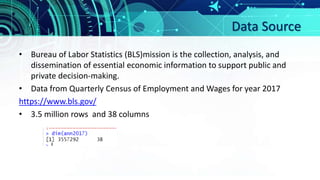
• 3.5 million rows and 38 columns
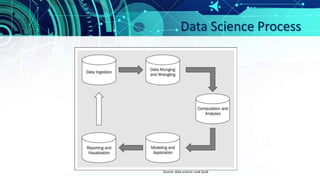
Data Science Process
Source: data science cook book
R Packages Used
• library(data.table)
• library(plyr)
• library(dplyr)
• library(stringr)
• library(ggplot2)
• library(maps)
• library(bit64)
• library(RColorBrewer)
• library(choroplethr)
Import the data
Use fread function from the data.table package which is significantly faster
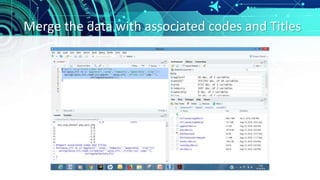
Merge the data with associated codes and Titles
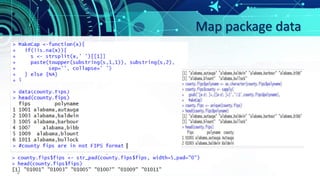
Map package data
• Purpose is to look at the geographical distribution of
wages across the US.
• Map package has US map for both at the state-and
county-levels and the data required to make the
maps can be extracted.
• Then align our employment data with the map data
so that the correct data is represented at the right
location on the map.
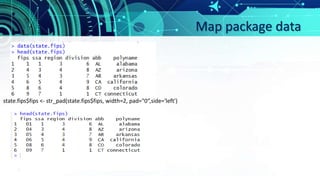
Map package data
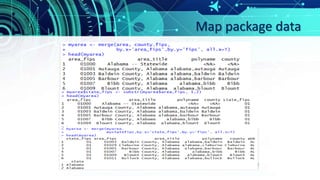
Map package data
state.fips$fips <- str_pad(state.fips$fips, width=2, pad="0“,side='left')
Map package data
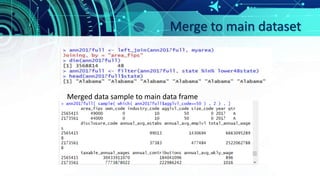
Merge to main dataset
Merged data sample to main data frame
Geospatial data visualization
library(ggplot2)
library(RColorBrewer)
state_df <- map_data('state')
county_df <- map_data('county')
transform_mapdata <- function(x){
names(x)[5:6] <- c('state','county')
for(u in c('state','county')){
x[,u] <- sapply(x[,u],MakeCap)
}
return(x)
}
state_df <- transform_mapdata(state_df)
county_df <- transform_mapdata(county_df)
chor <- left_join(county_df, d.cty)
ggplot(chor, aes(long,lat, group=group))+
geom_polygon(aes(fill=wage))+
geom_path( color='white',alpha=0.5,size=0.2)+
geom_polygon(data=state_df, color='black',fill=NA)+
scale_fill_brewer(palette='PuRd')+
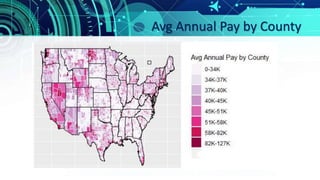
labs(x='',y='', fill='Avg Annual Pay by county')+
theme(axis.text.x=element_blank(), axis.text.y=element_blank(),
axis.ticks.x=element_blank(), axis.ticks.y=element_blank())
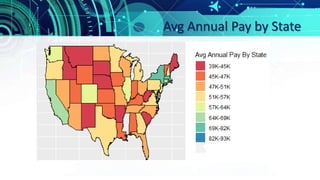
chor <- left_join(state_df, d.state)
ggplot(chor, aes(long,lat, group=group))+
geom_polygon(aes(fill=wage))+
geom_path( color='white',alpha=0.5,size=0.2)+
geom_polygon(data=state_df, color='black',fill=NA)+
scale_fill_brewer(palette='Spectral')+
labs(x='',y='', fill='Avg Annual Pay By State')+
theme(axis.text.x=element_blank(), axis.text.y=element_blank(),
axis.ticks.x=element_blank(), axis.ticks.y=element_blank())
#The two functions filter and select are from dplyr.
d.cty <- filter(ann2017full, agglvl_code==70)%>%
select(state,county,abb, avg_annual_pay,
annual_avg_emplvl)%>%
mutate(wage=comDiscretize(avg_annual_pay),
empquantile=comDiscretize(annual_avg_emplvl))
Avg Annual Pay by County
Avg Annual Pay by State
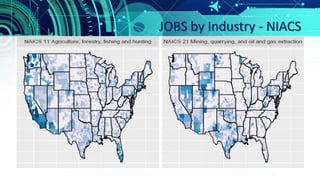
JOBS by Industry - NIACS
d.sectors <- filter(ann2017full, industry_code %in%
c(11,21,54,52),
own_code==5, # Private sector
agglvl_code == 74 # county-level
) %>%
select(state,county,industry_code, own_code,agglvl_code,
industry_title, own_title, avg_annual_pay,
annual_avg_emplvl)%>%
mutate(wage=comDiscretize(avg_annual_pay),
emplevel=comDiscretize(annual_avg_emplvl))
d.sectors <- filter(d.sectors, !is.na(industry_code))
chor <- left_join(county_df, d.sectors)
ggplot(chor, aes(long,lat,group=group))+
geom_polygon(aes(fill=emplevel))+
geom_polygon(data=state_df, color='black',fill=NA)+
scale_fill_brewer(palette='PuBu')+
facet_wrap(~industry_title, ncol=2, as.table=T)+
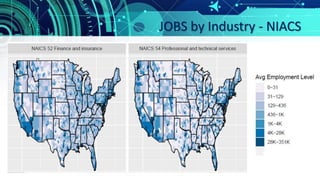
labs(fill='Avg Employment Level',x='',y='')+
theme(axis.text.x=element_blank(),
axis.text.y=element_blank(),
axis.ticks.x=element_blank(),
axis.ticks.y=element_blank())
JOBS by Industry - NIACS
Thank You
References
https://www.bls.gov/
https://cran.r-project.org/web/packages/data.table/vignettes/datatable-intro.html
https://www.rdocumentation.org/packages/plyr/versions/1.8.4
https://cran.r-project.org/web/packages/dplyr/vignettes/dplyr.html
https://cran.r-project.org/web/packages/stringr/vignettes/stringr.html
https://www.statmethods.net/advgraphs/ggplot2.html
https://www.r-graph-gallery.com/map/
Practical data science book

Exploratory data analysis of 2017 US Employment data using R

  • 1.
    Data Science Exploratory dataanalysis of 2017 US Employment data using R – Use Case Chetan Khanzode
  • 2.
    Data Source • Bureauof Labor Statistics (BLS)mission is the collection, analysis, and dissemination of essential economic information to support public and private decision-making. • Data from Quarterly Census of Employment and Wages for year 2017 https://www.bls.gov/ • 3.5 million rows and 38 columns
  • 3.
    Data Science Process Source:data science cook book
  • 4.
    R Packages Used •library(data.table) • library(plyr) • library(dplyr) • library(stringr) • library(ggplot2) • library(maps) • library(bit64) • library(RColorBrewer) • library(choroplethr)
  • 5.
    Import the data Usefread function from the data.table package which is significantly faster
  • 6.
    Merge the datawith associated codes and Titles
  • 7.
    Map package data •Purpose is to look at the geographical distribution of wages across the US. • Map package has US map for both at the state-and county-levels and the data required to make the maps can be extracted. • Then align our employment data with the map data so that the correct data is represented at the right location on the map.
  • 8.
  • 9.
    Map package data state.fips$fips<- str_pad(state.fips$fips, width=2, pad="0“,side='left')
  • 10.
  • 11.
    Merge to maindataset Merged data sample to main data frame
  • 12.
    Geospatial data visualization library(ggplot2) library(RColorBrewer) state_df<- map_data('state') county_df <- map_data('county') transform_mapdata <- function(x){ names(x)[5:6] <- c('state','county') for(u in c('state','county')){ x[,u] <- sapply(x[,u],MakeCap) } return(x) } state_df <- transform_mapdata(state_df) county_df <- transform_mapdata(county_df) chor <- left_join(county_df, d.cty) ggplot(chor, aes(long,lat, group=group))+ geom_polygon(aes(fill=wage))+ geom_path( color='white',alpha=0.5,size=0.2)+ geom_polygon(data=state_df, color='black',fill=NA)+ scale_fill_brewer(palette='PuRd')+ labs(x='',y='', fill='Avg Annual Pay by county')+ theme(axis.text.x=element_blank(), axis.text.y=element_blank(), axis.ticks.x=element_blank(), axis.ticks.y=element_blank()) chor <- left_join(state_df, d.state) ggplot(chor, aes(long,lat, group=group))+ geom_polygon(aes(fill=wage))+ geom_path( color='white',alpha=0.5,size=0.2)+ geom_polygon(data=state_df, color='black',fill=NA)+ scale_fill_brewer(palette='Spectral')+ labs(x='',y='', fill='Avg Annual Pay By State')+ theme(axis.text.x=element_blank(), axis.text.y=element_blank(), axis.ticks.x=element_blank(), axis.ticks.y=element_blank()) #The two functions filter and select are from dplyr. d.cty <- filter(ann2017full, agglvl_code==70)%>% select(state,county,abb, avg_annual_pay, annual_avg_emplvl)%>% mutate(wage=comDiscretize(avg_annual_pay), empquantile=comDiscretize(annual_avg_emplvl))
  • 13.
    Avg Annual Payby County
  • 14.
  • 15.
    JOBS by Industry- NIACS d.sectors <- filter(ann2017full, industry_code %in% c(11,21,54,52), own_code==5, # Private sector agglvl_code == 74 # county-level ) %>% select(state,county,industry_code, own_code,agglvl_code, industry_title, own_title, avg_annual_pay, annual_avg_emplvl)%>% mutate(wage=comDiscretize(avg_annual_pay), emplevel=comDiscretize(annual_avg_emplvl)) d.sectors <- filter(d.sectors, !is.na(industry_code)) chor <- left_join(county_df, d.sectors) ggplot(chor, aes(long,lat,group=group))+ geom_polygon(aes(fill=emplevel))+ geom_polygon(data=state_df, color='black',fill=NA)+ scale_fill_brewer(palette='PuBu')+ facet_wrap(~industry_title, ncol=2, as.table=T)+ labs(fill='Avg Employment Level',x='',y='')+ theme(axis.text.x=element_blank(), axis.text.y=element_blank(), axis.ticks.x=element_blank(), axis.ticks.y=element_blank())
  • 16.
  • 17.
  • 18.
  • 19.