Agathi Deligiannakou Yevgen Revtyuk
      Anastasia Papavasileiou Lilya Kolesnyk
             Eleni Polymeraki
              Christina Volioti
           Apostolos Mavridis
         Thrasyvoulos Tsiatsos

Department of Informatics Faculty of Management
1) Introduction
2) About EICL Project
3) Scenario of the Educational Activity
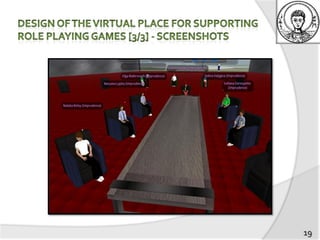
4) Design of the Virtual Place for
   Supporting Role Playing Games
5) Evaluation
6) Conclusions


                                          2
   GBL: Excellent tool for
     facilitating situated learning
     promoting active learning


   Transfer of an educational activity from the
    traditional classroom to a virtual world

   Collaboration between two universities of
    different disciplines and from different
    countries in the context of EICL

                                                   3
2 main goals

   Virtual & international collaboration
     among postgraduate students from AUTH and IFNTUOG
     for implementing the game-based scenario in the virtual
      educational place
     With the use of an open source platform (OpenSim)


   Conducting of the game-based collaborative learning activity
     undergraduate students of IFNTUOG
     “Investment Management” subject


     IFNTUOG provided the scenario
     AUTH created the virtual environment to support it

                                                                   4
Hypotheses to be assessed

1.       If the virtual world and the representations of
         the objects were understandable

2.       If the students prefer to conduct this activity
         through the virtual or traditional classroom

3.       If OpenSim is suitable for
          collaborative distance learning
          role-playing scenario

                                                           5
International binomial between a Greek and
   an Ukrainian university to support:

 International co-operation of teachers &
  students…
 in order to improve the learning process…
 by using e-tools in pilot courses


                                              6
7
Timeline of the steps and the collaboration
                                   2 weeks   3 weeks    1 week    1 week   1 week   1 week

Communication and
collaboration between AUTH
team and IFNTUOG assistant
(via e-mail or skype)
First familiarization session of
IFNTUOG tutor (face-face)
Creation of the virtual world by
AUTH team
Second familiarization session
(of IFNTUOG assistant)
Third familiarization (of
IFNTUOG undergraduate
students)
Improvement of the Virtual
place by AUTH team
Online Role Playing Simulation
Evaluation,
Statistics &
Conclusions
                                                                                             8
IFNTUOG students participated as:


                                                        Roles


   try themselves as a part of one of the investments process
    negotiating sides
     calculate payback term & cost of the project, analyze their decisions
      in conditions of limited time

                                                                              9
1. Tutor’s familiarization
2. Assistant’s familiarization
         Guide her in the virtual world & show functionalities
         Comments & improvements
3.       Undergraduate student’s familiarization
         Navigation & use of objects


        AUTH team
         made corrections & took recommendations
         Sent a pre-test questionnaire

                                                                  10
Outside the Virtual World
Process lasting 20’

   Start-uppers received the detailed description of their project
     calculated its cost
     prepared their presentation


   Investors got the description of the Start-upper’s project
     different in some details
     each had his own amount of money
     decide with the whole Committee whether to invest or not


   Moderator was the teacher’s assistant from IFNTUOG


                                                                      11
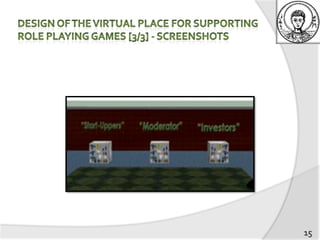
Inside the Virtual World

   Passing through the Role Assignment Room to choose
    outfit depending on the role

   Technical Supporters uploaded the presentations

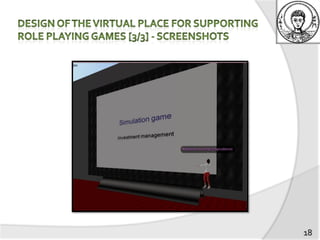
   In the Conference Room
     each start-upper met the Credit Committee and tried to
      persuade them to invest – 5’
     Investors asked questions & made a decision – 5’
     Moderator was observing, announced which side has
      been more benefited, made a short discussion with the
      audience – 5’

                                                               12
   OpenSim is an open source platform for hosting
    virtual worlds based on client-server architecture


                       Welcome area


                                           Conference
                                             Room

           Role Assignment
                Room


                                                         13
Role
             Assignment   Clothing Boxes
                Room


                            Chairs
Simulation

                             Board
             Conference
               Room
                             Clock


                            Discussion


                                           14
15
16
17
18
19
Method of evaluation cycles [1 cycle]
 Pre-analysis phase
     Questionnaire about user’s profile
   Usability phase
     Expert’s evaluation
     Student’s familiarization
   Learning phase
     12 students answered 64 questions about the
      virtual world and its objects

                                                    20
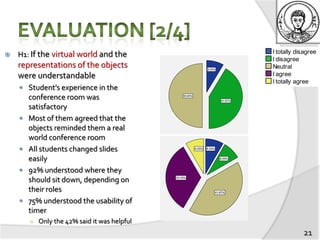
   H1: If the virtual world and the
    representations of the objects
    were understandable
     Student’s experience in the
        conference room was
        satisfactory
       Most of them agreed that the
        objects reminded them a real
        world conference room
       All students changed slides
        easily
       92% understood where they
        should sit down, depending on
        their roles
       75% understood the usability of
        timer
        ○ Only the 42% said it was helpful
                                             21
   H2: If the students prefer
    to conduct this activity
    through the virtual or
    traditional classroom
     85% would be interested
      to attend lectures
      through OpenSim
     92% found the virtual
      collaboration more
      interesting


                                 22
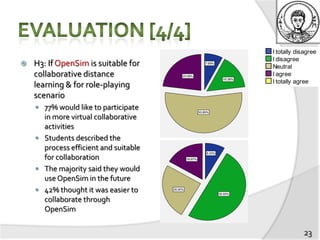
   H3: If OpenSim is suitable for
    collaborative distance
    learning & for role-playing
    scenario
     77% would like to participate
      in more virtual collaborative
      activities
     Students described the
      process efficient and suitable
      for collaboration
     The majority said they would
      use OpenSim in the future
     42% thought it was easier to
      collaborate through
      OpenSim

                                       23
Experience evaluation after interview
   Communication was fast & efficient –technology definitely helped
   Collaboration was fruitful
   Different terminology, culture & language did not cause any difficulties
   Pleased with the outcome


    For computer specialists:
      Co-existence of Computer Science with another subject is interesting
      ICT is a science that can facilitate all others


    For investment managers:
      Students were interested in using OpenSim into real situations

                                                                               24
   Integration of Sloodle in OpenSim’s environment
     Users will be able to transfer digital learning material from Moodle to
      OpenSim


   Calculator
     Users will be able to make calculations inside the virtual world using a
      virtual calculator


                                                                          25
papavasa@csd.auth.gr

Exploiting 3D virtual environments

  • 1.
    Agathi Deligiannakou YevgenRevtyuk Anastasia Papavasileiou Lilya Kolesnyk Eleni Polymeraki Christina Volioti Apostolos Mavridis Thrasyvoulos Tsiatsos Department of Informatics Faculty of Management
  • 2.
    1) Introduction 2) AboutEICL Project 3) Scenario of the Educational Activity 4) Design of the Virtual Place for Supporting Role Playing Games 5) Evaluation 6) Conclusions 2
  • 3.
    GBL: Excellent tool for  facilitating situated learning  promoting active learning  Transfer of an educational activity from the traditional classroom to a virtual world  Collaboration between two universities of different disciplines and from different countries in the context of EICL 3
  • 4.
    2 main goals  Virtual & international collaboration  among postgraduate students from AUTH and IFNTUOG  for implementing the game-based scenario in the virtual educational place  With the use of an open source platform (OpenSim)  Conducting of the game-based collaborative learning activity  undergraduate students of IFNTUOG  “Investment Management” subject  IFNTUOG provided the scenario  AUTH created the virtual environment to support it 4
  • 5.
    Hypotheses to beassessed 1. If the virtual world and the representations of the objects were understandable 2. If the students prefer to conduct this activity through the virtual or traditional classroom 3. If OpenSim is suitable for  collaborative distance learning  role-playing scenario 5
  • 6.
    International binomial betweena Greek and an Ukrainian university to support:  International co-operation of teachers & students…  in order to improve the learning process…  by using e-tools in pilot courses 6
  • 7.
  • 8.
    Timeline of thesteps and the collaboration 2 weeks 3 weeks 1 week 1 week 1 week 1 week Communication and collaboration between AUTH team and IFNTUOG assistant (via e-mail or skype) First familiarization session of IFNTUOG tutor (face-face) Creation of the virtual world by AUTH team Second familiarization session (of IFNTUOG assistant) Third familiarization (of IFNTUOG undergraduate students) Improvement of the Virtual place by AUTH team Online Role Playing Simulation Evaluation, Statistics & Conclusions 8
  • 9.
    IFNTUOG students participatedas: Roles  try themselves as a part of one of the investments process negotiating sides  calculate payback term & cost of the project, analyze their decisions in conditions of limited time 9
  • 10.
    1. Tutor’s familiarization 2.Assistant’s familiarization  Guide her in the virtual world & show functionalities  Comments & improvements 3. Undergraduate student’s familiarization  Navigation & use of objects  AUTH team  made corrections & took recommendations  Sent a pre-test questionnaire 10
  • 11.
    Outside the VirtualWorld Process lasting 20’  Start-uppers received the detailed description of their project  calculated its cost  prepared their presentation  Investors got the description of the Start-upper’s project  different in some details  each had his own amount of money  decide with the whole Committee whether to invest or not  Moderator was the teacher’s assistant from IFNTUOG 11
  • 12.
    Inside the VirtualWorld  Passing through the Role Assignment Room to choose outfit depending on the role  Technical Supporters uploaded the presentations  In the Conference Room  each start-upper met the Credit Committee and tried to persuade them to invest – 5’  Investors asked questions & made a decision – 5’  Moderator was observing, announced which side has been more benefited, made a short discussion with the audience – 5’ 12
  • 13.
    OpenSim is an open source platform for hosting virtual worlds based on client-server architecture Welcome area Conference Room Role Assignment Room 13
  • 14.
    Role Assignment Clothing Boxes Room Chairs Simulation Board Conference Room Clock Discussion 14
  • 15.
  • 16.
  • 17.
  • 18.
  • 19.
  • 20.
    Method of evaluationcycles [1 cycle]  Pre-analysis phase  Questionnaire about user’s profile  Usability phase  Expert’s evaluation  Student’s familiarization  Learning phase  12 students answered 64 questions about the virtual world and its objects 20
  • 21.
    H1: If the virtual world and the representations of the objects were understandable  Student’s experience in the conference room was satisfactory  Most of them agreed that the objects reminded them a real world conference room  All students changed slides easily  92% understood where they should sit down, depending on their roles  75% understood the usability of timer ○ Only the 42% said it was helpful 21
  • 22.
    H2: If the students prefer to conduct this activity through the virtual or traditional classroom  85% would be interested to attend lectures through OpenSim  92% found the virtual collaboration more interesting 22
  • 23.
    H3: If OpenSim is suitable for collaborative distance learning & for role-playing scenario  77% would like to participate in more virtual collaborative activities  Students described the process efficient and suitable for collaboration  The majority said they would use OpenSim in the future  42% thought it was easier to collaborate through OpenSim 23
  • 24.
    Experience evaluation afterinterview  Communication was fast & efficient –technology definitely helped  Collaboration was fruitful  Different terminology, culture & language did not cause any difficulties  Pleased with the outcome  For computer specialists:  Co-existence of Computer Science with another subject is interesting  ICT is a science that can facilitate all others  For investment managers:  Students were interested in using OpenSim into real situations 24
  • 25.
    Integration of Sloodle in OpenSim’s environment  Users will be able to transfer digital learning material from Moodle to OpenSim  Calculator  Users will be able to make calculations inside the virtual world using a virtual calculator 25
  • 26.