What is a computer?
Examples of Planning for Computing in the Primary Sector
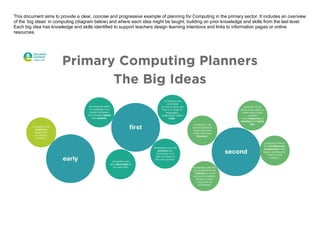
This document aims to provide a clear, concise and progressive example of planning for Computing in the primary sector. It includes an overview
of the ‘big ideas’ in computing (diagram below) and where each idea might be taught, building on prior knowledge and skills from the last level.
Each big idea has knowledge and skills identified to support teachers design learning intentions and links to information pages or online
resources.
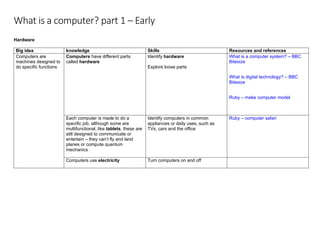
What is a computer? part 1 – Early
Hardware
Big idea knowledge Skills Resources and references
Computers are
machines designed to
do specific functions
Computers have different parts
called hardware
Identify hardware
Explore loose parts
What is a computer system? – BBC
Bitesize
What is digital technology? – BBC
Bitesize
Ruby – make computer model
Each computer is made to do a
specific job, although some are
multifunctional, like tablets, these are
still designed to communicate or
entertain – they can’t fly and land
planes or compute quantum
mechanics
Identify computers in common
appliances or daily uses, such as
TVs, cars and the office
Ruby – computer safari
Computers use electricity Turn computers on and off
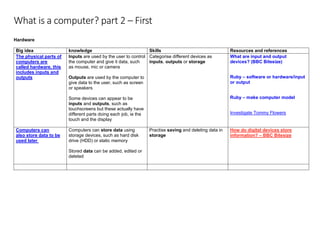
What is a computer? part 2 – First
Hardware
Big idea knowledge Skills Resources and references
The physical parts of
computers are
called hardware, this
includes inputs and
outputs
Inputs are used by the user to control
the computer and give it data, such
as mouse, mic or camera
Outputs are used by the computer to
give data to the user, such as screen
or speakers
Some devices can appear to be
inputs and outputs, such as
touchscreens but these actually have
different parts doing each job, ie the
touch and the display
Categorise different devices as
inputs, outputs or storage
What are input and output
devices? (BBC Bitesize)
Ruby – software or hardware/input
or output
Ruby – make computer model
Investigate Tommy Flowers
Computers can
also store data to be
used later
Computers can store data using
storage devices, such as hard disk
drive (HDD) or static memory
Stored data can be added, edited or
deleted
Practise saving and deleting data in
storage
How do digital devices store
information? – BBC Bitesize
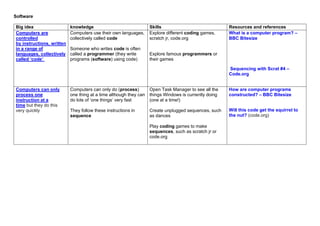
Software
Big idea knowledge Skills Resources and references
Computers are
controlled
by instructions, written
in a range of
languages, collectively
called ‘code’
Computers use their own languages,
collectively called code
Someone who writes code is often
called a programmer (they write
programs (software) using code)
Explore different coding games,
scratch jr, code.org
Explore famous programmers or
their games
What is a computer program? –
BBC Bitesize
Sequencing with Scrat #4 –
Code.org
Computers can only
process one
instruction at a
time but they do this
very quickly
Computers can only do (process)
one thing at a time although they can
do lots of ‘one things’ very fast
They follow these instructions in
sequence
Open Task Manager to see all the
things Windows is currently doing
(one at a time!)
Create unplugged sequences, such
as dances
Play coding games to make
sequences, such as scratch jr or
code.org
How are computer programs
constructed? – BBC Bitesize
Will this code get the squirrel to
the nut? (code.org)
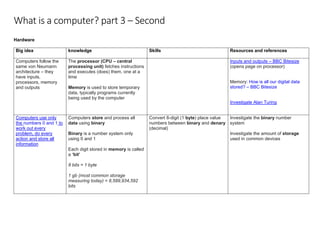
What is a computer? part 3 – Second
Hardware
Big idea knowledge Skills Resources and references
Computers follow the
same von Neumann
architecture – they
have inputs,
processors, memory
and outputs
The processor (CPU – central
processing unit) fetches instructions
and executes (does) them, one at a
time
Memory is used to store temporary
data, typically programs currently
being used by the computer
Inputs and outputs – BBC Bitesize
(opens page on processor)
Memory: How is all our digital data
stored? – BBC Bitesize
Investigate Alan Turing
Computers use only
the numbers 0 and 1 to
work out every
problem, do every
action and store all
information
Computers store and process all
data using binary
Binary is a number system only
using 0 and 1
Each digit stored in memory is called
a ‘bit’
8 bits = 1 byte
1 gb (most common storage
measuring today) = 8,589,934,592
bits
Convert 8-digit (1 byte) place value
numbers between binary and denary
(decimal)
Investigate the binary number
system
Investigate the amount of storage
used in common devices
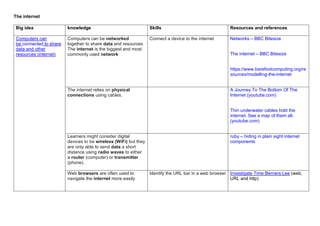
The internet
Big idea knowledge Skills Resources and references
Computers can
be connected to share
data and other
resources (internet)
Computers can be networked
together to share data and resources
The internet is the biggest and most
commonly used network
Connect a device to the internet Networks – BBC Bitesize
The internet – BBC Bitesize
https://www.barefootcomputing.org/re
sources/modelling-the-internet
The internet relies on physical
connections using cables.
A Journey To The Bottom Of The
Internet (youtube.com)
Thin underwater cables hold the
internet. See a map of them all.
(youtube.com)
Learners might consider digital
devices to be wireless (WiFi) but they
are only able to send data a short
distance using radio waves to either
a router (computer) or transmitter
(phone).
ruby – hiding in plain sight internet
components
Web browsers are often used to
navigate the internet more easily
Identify the URL bar in a web browser Investigate Time Berners Lee (web,
URL and http)
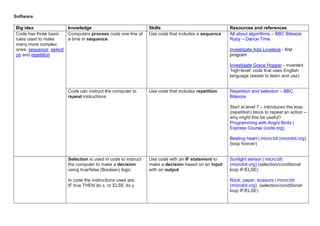
Software
Big idea knowledge Skills Resources and references
Code has three basic
rules used to make
many more complex
ones: sequence, selecti
on and repetition
Computers process code one line at
a time in sequence
Use code that includes a sequence All about algorithms – BBC Bitesize
Ruby – Dance Time
Investigate Ada Lovelace - first
program
Investigate Grace Hopper - invented
‘high-level’ code that uses English
language (easier to learn and use)
Code can instruct the computer to
repeat instructions
Use code that includes repetition Repetition and selection – BBC
Bitesize
Start at level 7 – introduces the loop
(repetition) block to repeat an action –
why might this be useful?
Programming with Angry Birds |
Express Course (code.org)
Beating heart | micro:bit (microbit.org)
(loop forever)
Selection is used in code to instruct
the computer to make a decision
using true/false (Boolean) logic
In code the instructions used are:
IF true THEN do x, or ELSE do y
Use code with an IF statement to
make a decision based on an input
with an output
Sunlight sensor | micro:bit
(microbit.org) (selection/conditional
loop IF/ELSE)
Rock, paper, scissors | micro:bit
(microbit.org) (selection/conditional
loop IF/ELSE)

Examples of Planning for Computing in the Primary Sector.pdf

  • 1.
    What is acomputer? Examples of Planning for Computing in the Primary Sector
  • 2.
    This document aimsto provide a clear, concise and progressive example of planning for Computing in the primary sector. It includes an overview of the ‘big ideas’ in computing (diagram below) and where each idea might be taught, building on prior knowledge and skills from the last level. Each big idea has knowledge and skills identified to support teachers design learning intentions and links to information pages or online resources.
  • 3.
    What is acomputer? part 1 – Early Hardware Big idea knowledge Skills Resources and references Computers are machines designed to do specific functions Computers have different parts called hardware Identify hardware Explore loose parts What is a computer system? – BBC Bitesize What is digital technology? – BBC Bitesize Ruby – make computer model Each computer is made to do a specific job, although some are multifunctional, like tablets, these are still designed to communicate or entertain – they can’t fly and land planes or compute quantum mechanics Identify computers in common appliances or daily uses, such as TVs, cars and the office Ruby – computer safari Computers use electricity Turn computers on and off
  • 4.
    What is acomputer? part 2 – First Hardware Big idea knowledge Skills Resources and references The physical parts of computers are called hardware, this includes inputs and outputs Inputs are used by the user to control the computer and give it data, such as mouse, mic or camera Outputs are used by the computer to give data to the user, such as screen or speakers Some devices can appear to be inputs and outputs, such as touchscreens but these actually have different parts doing each job, ie the touch and the display Categorise different devices as inputs, outputs or storage What are input and output devices? (BBC Bitesize) Ruby – software or hardware/input or output Ruby – make computer model Investigate Tommy Flowers Computers can also store data to be used later Computers can store data using storage devices, such as hard disk drive (HDD) or static memory Stored data can be added, edited or deleted Practise saving and deleting data in storage How do digital devices store information? – BBC Bitesize
  • 5.
    Software Big idea knowledgeSkills Resources and references Computers are controlled by instructions, written in a range of languages, collectively called ‘code’ Computers use their own languages, collectively called code Someone who writes code is often called a programmer (they write programs (software) using code) Explore different coding games, scratch jr, code.org Explore famous programmers or their games What is a computer program? – BBC Bitesize Sequencing with Scrat #4 – Code.org Computers can only process one instruction at a time but they do this very quickly Computers can only do (process) one thing at a time although they can do lots of ‘one things’ very fast They follow these instructions in sequence Open Task Manager to see all the things Windows is currently doing (one at a time!) Create unplugged sequences, such as dances Play coding games to make sequences, such as scratch jr or code.org How are computer programs constructed? – BBC Bitesize Will this code get the squirrel to the nut? (code.org)
  • 6.
    What is acomputer? part 3 – Second Hardware Big idea knowledge Skills Resources and references Computers follow the same von Neumann architecture – they have inputs, processors, memory and outputs The processor (CPU – central processing unit) fetches instructions and executes (does) them, one at a time Memory is used to store temporary data, typically programs currently being used by the computer Inputs and outputs – BBC Bitesize (opens page on processor) Memory: How is all our digital data stored? – BBC Bitesize Investigate Alan Turing Computers use only the numbers 0 and 1 to work out every problem, do every action and store all information Computers store and process all data using binary Binary is a number system only using 0 and 1 Each digit stored in memory is called a ‘bit’ 8 bits = 1 byte 1 gb (most common storage measuring today) = 8,589,934,592 bits Convert 8-digit (1 byte) place value numbers between binary and denary (decimal) Investigate the binary number system Investigate the amount of storage used in common devices
  • 7.
    The internet Big ideaknowledge Skills Resources and references Computers can be connected to share data and other resources (internet) Computers can be networked together to share data and resources The internet is the biggest and most commonly used network Connect a device to the internet Networks – BBC Bitesize The internet – BBC Bitesize https://www.barefootcomputing.org/re sources/modelling-the-internet The internet relies on physical connections using cables. A Journey To The Bottom Of The Internet (youtube.com) Thin underwater cables hold the internet. See a map of them all. (youtube.com) Learners might consider digital devices to be wireless (WiFi) but they are only able to send data a short distance using radio waves to either a router (computer) or transmitter (phone). ruby – hiding in plain sight internet components Web browsers are often used to navigate the internet more easily Identify the URL bar in a web browser Investigate Time Berners Lee (web, URL and http)
  • 8.
    Software Big idea knowledgeSkills Resources and references Code has three basic rules used to make many more complex ones: sequence, selecti on and repetition Computers process code one line at a time in sequence Use code that includes a sequence All about algorithms – BBC Bitesize Ruby – Dance Time Investigate Ada Lovelace - first program Investigate Grace Hopper - invented ‘high-level’ code that uses English language (easier to learn and use) Code can instruct the computer to repeat instructions Use code that includes repetition Repetition and selection – BBC Bitesize Start at level 7 – introduces the loop (repetition) block to repeat an action – why might this be useful? Programming with Angry Birds | Express Course (code.org) Beating heart | micro:bit (microbit.org) (loop forever) Selection is used in code to instruct the computer to make a decision using true/false (Boolean) logic In code the instructions used are: IF true THEN do x, or ELSE do y Use code with an IF statement to make a decision based on an input with an output Sunlight sensor | micro:bit (microbit.org) (selection/conditional loop IF/ELSE) Rock, paper, scissors | micro:bit (microbit.org) (selection/conditional loop IF/ELSE)