EVO MOUSE AND MAGIC CUBE 
Presented by 
KHATAVKAR CHAITRALI JAYANT 
Class: B.E 
Dept.: Electronics and Telecommunication 
1
Outline 
 Video 
 Introduction 
 History 
 Concept 
 Technology used 
 Components 
 Function & Working 
 Advantages 
 Conclusion 
2
CCoonncceepptt 
 evomouseTurn any flat surface into a touch 3
IInnttrroodduuccttiioonn 
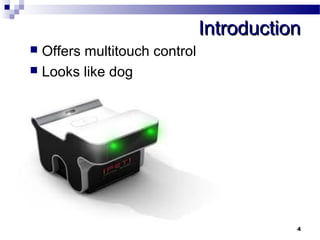
 Offers multitouch control 
 Looks like dog 
4
HHiissttoorryy 
 First mouse 
 Roller Ball mouse 
 Optical mouse 
 Laser mouse 
 Gyroscopic mouse 
5
EEvvoo mmoouussee 
 New evolution of computer mouse 
 Dog shaped device, turns any surface 
into Touch pad 
 Tracking the finger and do anything 
regular mouse can do 
 Requires small space 
 Works on flat surfaces 
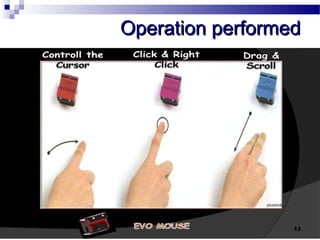
 Control the curser 
6
TTeecchhnnoollooggyy uusseedd 
 2 principle components used 
 3D electronic perception sensor chips 
-enables electronic component to form 3D 
 Image processing software 
-Physical process used to convert image 
signal into image 
7
PPrriinncciippllee 
8 
 Use the time of flight principle to detect 
the motion of object
CCoommppoonneennttss 
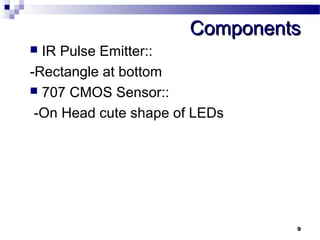
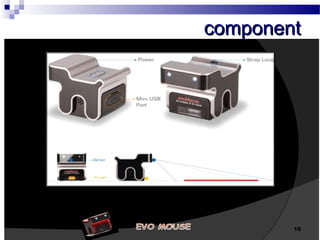
 IR Pulse Emitter:: 
-Rectangle at bottom 
 707 CMOS Sensor:: 
-On Head cute shape of LEDs 
9
ccoommppoonneenntt 
10
SSeett UUpp 
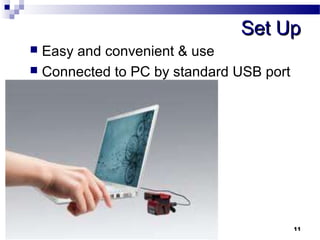
 Easy and convenient & use 
 Connected to PC by standard USB port 
11
WWoorrkkiinngg 
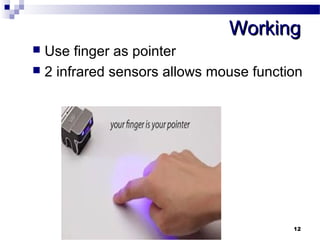
 Use finger as pointer 
 2 infrared sensors allows mouse function 
12
OOppeerraattiioonn ppeerrffoorrmmeedd 
13
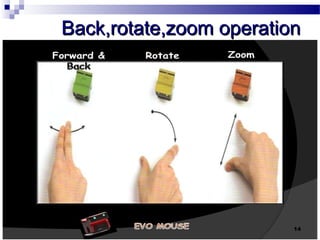
BBaacckk,rroottaattee,zzoooomm ooppeerraattiioonn 
14
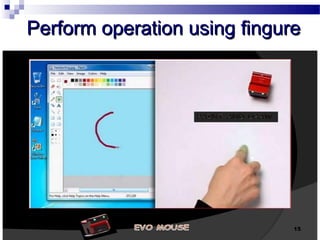
PPeerrffoorrmm ooppeerraattiioonn uussiinngg ffiinngguurree 
15
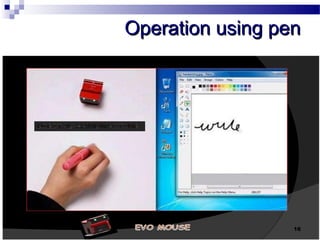
OOppeerraattiioonn uussiinngg ppeenn 
16
AAddvvaannttaaggeess 
 Less space required 
 Connect via Bluetooth/ Wired via USB 
 Works with PCs & Laptops with all 
operating system 
17
MMAAGGIICC CCUUBBEE 
a 18
CCoonncceepptt 
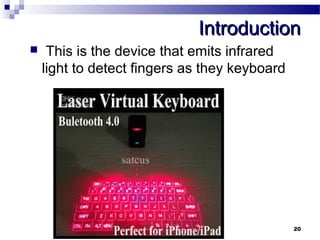
 evomouseCelluon Magic Cube (Projection Keyboard).19
IInnttrroodduuccttiioonn 
 This is the device that emits infrared 
light to detect fingers as they keyboard 
20
HHiissttoorryy 
21 
 Quarty keyboard 
-It is based on microprocessor & 
microcontroller
VViirrttuuaall KKeeyybbooaarrdd 
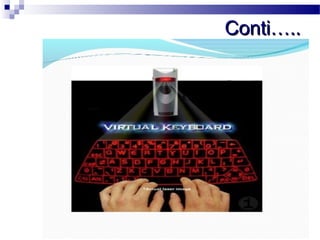
 Smaller in size & faster 
 Uses sensor technology 
 User work on surface 
 Device detect movement of fingures 
 Input data by typing on image 
22
CCoonnttii…….... 
23
TTeecchhnnoollooggyy uusseedd 
 System having 3 modules 
1.Sensor module 
2.IR light source 
3.Pattern projector 
24
TTeecchh…… 
 Sensor module 
-operates by locating user’s finguers in 3D 
space & tracking intended keystrokes. 
 IR-Light source 
-emits infrared light 
-helps to recognize hand movements & 
pressing of keys 
25
TTeecchh…….. 
 Pattern projector 
-image projected on flat surface 
-projected image of QWERTY keyboard 
26
WWoorrkkiinngg 
 emits infrared light from the lower end to 
detect objects such as fingers. 
 object passes through the area 
illuminated by the infrared light source, 
any infrared light reflecting off the object 
is detected by the sensor. 
 To perform operation movement of 
fingure neccessry. 
27
CCoonnttii…….... 
 No problem of detecting fingure while 
infrared reflected wave in appropriate 
amount 
 amount of reflected infrared light is too 
high, the keystroke become too sensitive 
or a “hovering” effect may occur. 
 Hovering: keystroke is recognized before 
your finger touches the projection 
surface. 
28
AAddjjuussttiinngg sseennssiittiivviittyy 
 Magic Cube features sensitivity 
adjustment for better accuracy 
 To increase sensitivity, press and hold 
FN key and tap .> key 
 To lower sensitivity, press and hold FN 
key and tap < key 
29
CCoonnddiittiioonn ttoo aavvooiidd 
 1. Avoid direct sunlight. 
 2. Avoid low color temperature light 
source, such as tungsten, halogen, or 
incandescent lamp. 
 3. Avoid uneven or irregular surfaces. 
Place the product on flat surfaces. 
 4. Avoid a table or surface that is as 
transparent or reflective as glass or 
mirror. 
30
CCoonnttii…… 
 5. Avoid placing any objects within the 
space between the main unit and the 
laser projected keyboard layout. 
31
AAddvvaannttaaggeess 
 Portability 
 Speed of text accuracy 
 Large typing space 
 Flexibility 
 Alternative keyboard layouts 
32

Evo mouse and magic cibe