Wireless Optical Mouse MSE 4001 December 4, 2008 Joseph Koplar, Tony Tenaglier, Adam Wentworth, Sarah Winiarz
Part 1: History
Reasoning Behind the Mouse Douglas Engelbart’s  Augmented Human Intellect: A Conceptual Framework Goal of this systematic study was to improve methods for solving problems Find specific factors that limit human capability To develop new techniques, procedures and systems  Stated 3 processing capabilities Human capability Artifact executing process capability Combination In search for methods to simplify and allow for more complex problems
Evolution of the Mouse 1965 2-wheel analog mechanism  (SRI) 1984   Apple Lisa 1 Graphical User Interface Microsoft electro-optical  1999   1966   Orbit X-Y Ball Tracker 1968   Englebart’s NLS (first digital) 1973   Xerox Alto  1981 Xerox 8010 Star First Optical  1991   Logitech MouseMan Cordless 1995   Logitech Trackman Marble (optical) Logitech MX1000 Laser Cordless Mouse 2004   Razer DeathAdder Infrared  2006   Sun Microsystems Laser Mouse  Gyration Air Mouse 2001
Douglas Engelbart’s Mouse Invented in the 1965’s at the Stanford Research Institute (SRI) by Douglas Engebart and his colleges Composed of a 5-button key pad and a wooden box with two wheels Users would input a basic  command using the key pad  and use the wooden box to  point to where on the screen  the command was to be executed Users had to tilt the wooden box off of one wheel to move it in one direction Position was tracked by having the wheels turn variable resistors attached to an analog to digital converter
Early Optical Mice Around 1980, two types of optical mice appeared Both required special mouse pads to operate One type used multiple IR sensors with a special IR absorbing grid on a mouse pad The other used an optical sensor with a patterned mouse pad The optical sensor had the advantage of not requiring its orientation to be constant, as it used itself as a coordinate reference
Photo Examples of Early Optical Mice Above: Photos of the Xerox 8010 Star Mouse, one of the first optical mice To the right: The optical sensor in a Microsoft IntelliMouse Explorer v1.0 Above and to the right: One version of the nMOS Sensor  used in some of the first optical mice
Mechanical vs. Optical Mechanical Inverted trackball Moving parts Low accuracy Optical Less mechanical failure, no rolling parts No mouse pad needed Disadvantages Cannot track motion on glossy/transparent surfaces Higher power usage, only detrimental to wireless mouse Power can be saved when not in use by implementing additional low-power states (standby/sleep)
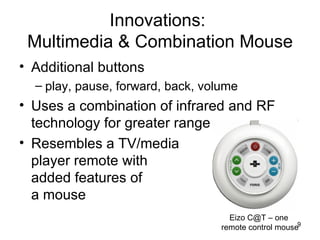
Innovations:  Multimedia & Combination Mouse Additional buttons  play, pause, forward, back, volume Uses a combination of infrared and RF technology for greater range Resembles a TV/media player remote with added features of a mouse Eizo C@T – one  remote control mouse
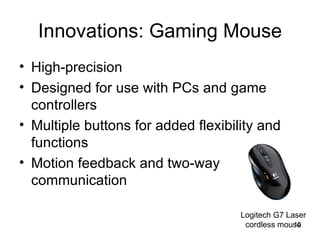
Innovations: Gaming Mouse High-precision Designed for use with PCs and game controllers Multiple buttons for added flexibility and functions Motion feedback and two-way communication Logitech G7 Laser cordless mouse
Control mouse pointer by waving the mouse in the air Patented by Gyration Uses miniature gyroscopes track the motion of the mouse  as you wave it in the air Uses electromagnetic transducer  and sensors  detect rotation in two axes at the same time Innovations: Motion-Based Mouse Gyration ULTRA GT Cordless Optical Mouse
Permit only authorized users  Integrated fingerprint reader either in the receiver or mouse Enhances security and  adds convenience Software registers finger- prints and stores information  about authorized users can also encrypt and decrypt  files Innovations: Biometric Mouse Wireless IntelliMouse Explorer with Fingerprint Reader
Innovations:  Tilting Scroll Wheel Mouse Scroll onscreen both horizontally and vertically Scroll wheel is positioned on a combination fulcrum and lever Another method involves a  touch scroll panel that  responds to your finger sliding  horizontally and vertically Logitech V500 Cordless Optical Notebook Mouse
Future Outlook Interactive interfaces  inspired by gaming More intuitive and natural  technologies Motion-based Users movements interpreted  as commands Touch screens Microsoft Surface computer Touch screen computers HP TouchSmart (above) Microsoft Surface (below)
Future Outlook Facial recognition systems Emotiv Epoc headset Reads neural activity uses 16 electrodes to  measure conscious  thoughts, emotions,  facial expressions  and the rotation of the  head  Thought-Controlled Gaming Headset
Part 2: Optical Components
Optical Mouse Basics First optical mouse to not need a mouse pad was introduced by Agilent Technologies in 1999 Light emitting diode (or a semiconducting laser) provides surface illumination Complimentary metal-oxide semiconductor (CMOS) sensor images the surface at 1500 times a second The images get translated into a signal which is sent to the Digital signal processor (DSP)
Optical Mouse Basics The chip with the CMOS image sensor and associated processing electronics is on the top, the L.E.D. is to the right, and the surface beneath the mouse as the CMOS sensor sees it (although the image would be grey scale) is on the bottom.
Light Emitting Diodes (LEDs) A simple LED is a p-n junction  LEDs capitalize on a charge carrier recombination effect that is normally undesirable in rectifiers The color of light emitted by a LED is dependent on the band gap in the semiconducting material and its overall construction
Light Emitting Diodes (LEDs) To the left is a pictorial representation of the band structure in a rectifier or diode. To the right is an example of how the internal construction of an L.E.D. affects its ultimate output. Although the output from this diode is blue and yellow, humans will perceive this output to be white.
The Semiconductor Laser Introduced to the consumer in 2004, laser mice use a infrared semiconducting laser as a light source Lasers are a source of coherent light (in phase with the same wavelength) Lasers produce speckle patterns that allow resolving of shiny and glossy surfaces Lasers work by using self-generated photons to ‘stimulate’ the production of even more photons
The Semiconductor Laser To the left and right: Speckle Patterns created by lasers
MOSFET Transistors MOSFETs or Metal-Oxide-Semiconductor Field-Effect Transistors are a type of electronic voltage valve NMOSFETs feature a n-doped ‘channel’ PMOSFETs do not have a ‘channel’  Both types use an applied electric current between the gate and base to change the charge carrier concentration in the vicinity of the source and drain These two devices together create CMOS  technology
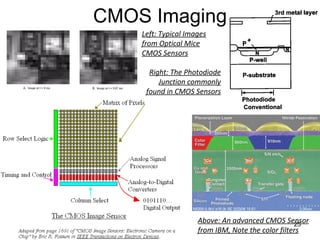
CMOS Imaging CMOS technology is used for its low power consumption, heat dissipation, and has the sensor and related processing electronics on one single chip To be an optical sensor, part of either a NMOSFET or PMOSFET component is used as a photodiode A photodiode can be thought  of a reverse L.E.D. where current is generated when it the diode is exposed to light Commonly, the photodiode is a thin, transparent layer of p-doped semiconducting material on top of a n-doped layer inside a p-doped semiconducting material The output from the photodiode can be amplified inside the pixel in what is called an “active pixel” Optical mice typically employ a 18 by 18 pixel sensor to take low-resolution, grey-scale images of a surface
CMOS Imaging Above: An advanced CMOS Sensor from IBM, Note the color filters Left: Typical Images from Optical Mice CMOS Sensors Right: The Photodiode Junction commonly found in CMOS Sensors
DSP (Digital Signal Processing) CMOS sends image to DSP DSP detects changes in patterns between movements DSP then calculates how far the mouse has moved using a coordinate system This process occurs over 1,000x a second so it appears to be relatively smooth
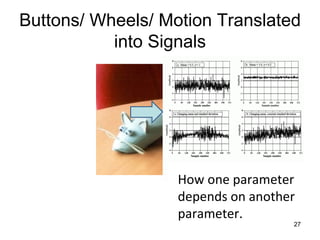
Buttons/ Wheels/ Motion Translated into Signals How one parameter depends on another parameter.
Histogram/PMF (Probability Mass Function)/ PDF (Probability Density Function) Histogram Displays the number of samples at a particular value. PMF Estimation based upon the histogram. PDF Shows that the signal can take on a continuous range of values.
Accuracy and Precision Ways to describe the error.
DSP Steps DSP DSP Architecture
DSP Main use is to convert the signals to digital forms through algorithms.  Separates information from background noise. Has the possibility of reprogrammable hardware.  Conveying information is more reliable with minimum noise effects. Advantages of DSP
What does all of this mean for Material Scientists? Use of semiconductor applications. Transistors and capacitors to perform the needed tasks the electrical engineer desires.
Part 3: Wireless Technology
Uses some form of energy  (radio frequency (RF),  infrared light, laser light, etc.)  to transfer information without  the use of wires.  Telecommunications TV/ Gaming controllers Radios Satellite TV Bluetooth Wireless Applications
How Wireless Works Information transmitted without wires using radio frequencies (RF) Requires two components Transmitter    sends radio signal to receiver Receiver    accepts signal from transmitter, decodes signal and sends to computer Transmitter  (inside mouse) Receiver  (connected to computer)
Wireless communication spans the spectrum from 9 kHz to 300 GHz 1 Hertz is equal to 1 cycle/period per second  Wireless mice commonly operate with RF types 802.11b or 802.11g Standards set by IEEE (Institute of Electrical and Electronics Engineers) for wireless networking Use 2.4 GHz frequency  Stable Rapid transfer of data (6.5 - 11 Mbps) Ability to travel through walls Lack of interference from other household appliances Frequency
Radio Frequencies, Wavelength, and Applications Image: http://en.wikipedia.org/wiki/Radio_frequency
Process by which the wireless transmitter  and receiver are coordinated  Manual or automatic  process Requires operating at same  frequencies on same channel  using same identification  code Used to eliminate  interference Pairing http://www.bluetomorrow.com/images/stories/passkeyconnected.jpg
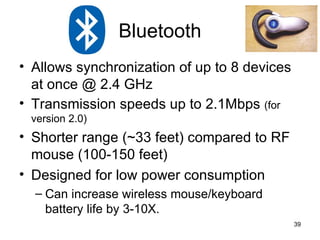
Allows synchronization of up to 8 devices at once @ 2.4 GHz Transmission speeds up to 2.1Mbps  (for version 2.0) Shorter range (~33 feet) compared to RF mouse (100-150 feet) Designed for low power consumption Can increase wireless mouse/keyboard battery life by 3-10X. Bluetooth
Bluetooth Security Utilizes frequency hopping Data is “chopped up” and sent over 79 different channels (1MHz wide each) to prevent hacking Users can establish “trusted devices” that can exchange data without asking permission  If another device tries to establish a connection, the user has to decide to allow it
Signal/Noise Ratio When transmitting a signal, a wave is created by the emitter with a certain frequency as seen before. A receiver will “hear” this wave, decode it and send the signal to be processed.  Transmitting a signal over double the distance will produce a wave with ½ the amplitude, and amplification is  needed.
However, the more amplification you need, the more noise will appear in the signal, until a clear signal is not identifiable.  To fix this problem, the periods of the known wave are precisely “cut up” and summed together. The parts of the signal that are of the emitted wave will sum all positive or negative while the noise is random, (i.e. sometimes positive, sometimes negative) and will cancel out when summed.
Once the signal is summed, it is divided by the number of periods  n  that were summed to provide a clearer signal.  When you sum  n  periods, the signal to noise ratio increases by a factor of  √ n . Transmitters and receivers must therefore run at the same frequency and be equally precise to effectively sum the same period of the wave and produce a meaningful result. Same frequencies  Different frequencies  (sum  ≈  0)
Questions??

Mse%204001%20 Wireless%20 Optical%20 Mouse

  • 1.
    Wireless Optical MouseMSE 4001 December 4, 2008 Joseph Koplar, Tony Tenaglier, Adam Wentworth, Sarah Winiarz
  • 2.
  • 3.
    Reasoning Behind theMouse Douglas Engelbart’s Augmented Human Intellect: A Conceptual Framework Goal of this systematic study was to improve methods for solving problems Find specific factors that limit human capability To develop new techniques, procedures and systems Stated 3 processing capabilities Human capability Artifact executing process capability Combination In search for methods to simplify and allow for more complex problems
  • 4.
    Evolution of theMouse 1965 2-wheel analog mechanism (SRI) 1984 Apple Lisa 1 Graphical User Interface Microsoft electro-optical 1999 1966 Orbit X-Y Ball Tracker 1968 Englebart’s NLS (first digital) 1973 Xerox Alto 1981 Xerox 8010 Star First Optical 1991 Logitech MouseMan Cordless 1995 Logitech Trackman Marble (optical) Logitech MX1000 Laser Cordless Mouse 2004 Razer DeathAdder Infrared 2006 Sun Microsystems Laser Mouse Gyration Air Mouse 2001
  • 5.
    Douglas Engelbart’s MouseInvented in the 1965’s at the Stanford Research Institute (SRI) by Douglas Engebart and his colleges Composed of a 5-button key pad and a wooden box with two wheels Users would input a basic command using the key pad and use the wooden box to point to where on the screen the command was to be executed Users had to tilt the wooden box off of one wheel to move it in one direction Position was tracked by having the wheels turn variable resistors attached to an analog to digital converter
  • 6.
    Early Optical MiceAround 1980, two types of optical mice appeared Both required special mouse pads to operate One type used multiple IR sensors with a special IR absorbing grid on a mouse pad The other used an optical sensor with a patterned mouse pad The optical sensor had the advantage of not requiring its orientation to be constant, as it used itself as a coordinate reference
  • 7.
    Photo Examples ofEarly Optical Mice Above: Photos of the Xerox 8010 Star Mouse, one of the first optical mice To the right: The optical sensor in a Microsoft IntelliMouse Explorer v1.0 Above and to the right: One version of the nMOS Sensor used in some of the first optical mice
  • 8.
    Mechanical vs. OpticalMechanical Inverted trackball Moving parts Low accuracy Optical Less mechanical failure, no rolling parts No mouse pad needed Disadvantages Cannot track motion on glossy/transparent surfaces Higher power usage, only detrimental to wireless mouse Power can be saved when not in use by implementing additional low-power states (standby/sleep)
  • 9.
    Innovations: Multimedia& Combination Mouse Additional buttons play, pause, forward, back, volume Uses a combination of infrared and RF technology for greater range Resembles a TV/media player remote with added features of a mouse Eizo C@T – one remote control mouse
  • 10.
    Innovations: Gaming MouseHigh-precision Designed for use with PCs and game controllers Multiple buttons for added flexibility and functions Motion feedback and two-way communication Logitech G7 Laser cordless mouse
  • 11.
    Control mouse pointerby waving the mouse in the air Patented by Gyration Uses miniature gyroscopes track the motion of the mouse as you wave it in the air Uses electromagnetic transducer and sensors detect rotation in two axes at the same time Innovations: Motion-Based Mouse Gyration ULTRA GT Cordless Optical Mouse
  • 12.
    Permit only authorizedusers Integrated fingerprint reader either in the receiver or mouse Enhances security and adds convenience Software registers finger- prints and stores information about authorized users can also encrypt and decrypt files Innovations: Biometric Mouse Wireless IntelliMouse Explorer with Fingerprint Reader
  • 13.
    Innovations: TiltingScroll Wheel Mouse Scroll onscreen both horizontally and vertically Scroll wheel is positioned on a combination fulcrum and lever Another method involves a touch scroll panel that responds to your finger sliding horizontally and vertically Logitech V500 Cordless Optical Notebook Mouse
  • 14.
    Future Outlook Interactiveinterfaces inspired by gaming More intuitive and natural technologies Motion-based Users movements interpreted as commands Touch screens Microsoft Surface computer Touch screen computers HP TouchSmart (above) Microsoft Surface (below)
  • 15.
    Future Outlook Facialrecognition systems Emotiv Epoc headset Reads neural activity uses 16 electrodes to measure conscious thoughts, emotions, facial expressions and the rotation of the head Thought-Controlled Gaming Headset
  • 16.
    Part 2: OpticalComponents
  • 17.
    Optical Mouse BasicsFirst optical mouse to not need a mouse pad was introduced by Agilent Technologies in 1999 Light emitting diode (or a semiconducting laser) provides surface illumination Complimentary metal-oxide semiconductor (CMOS) sensor images the surface at 1500 times a second The images get translated into a signal which is sent to the Digital signal processor (DSP)
  • 18.
    Optical Mouse BasicsThe chip with the CMOS image sensor and associated processing electronics is on the top, the L.E.D. is to the right, and the surface beneath the mouse as the CMOS sensor sees it (although the image would be grey scale) is on the bottom.
  • 19.
    Light Emitting Diodes(LEDs) A simple LED is a p-n junction LEDs capitalize on a charge carrier recombination effect that is normally undesirable in rectifiers The color of light emitted by a LED is dependent on the band gap in the semiconducting material and its overall construction
  • 20.
    Light Emitting Diodes(LEDs) To the left is a pictorial representation of the band structure in a rectifier or diode. To the right is an example of how the internal construction of an L.E.D. affects its ultimate output. Although the output from this diode is blue and yellow, humans will perceive this output to be white.
  • 21.
    The Semiconductor LaserIntroduced to the consumer in 2004, laser mice use a infrared semiconducting laser as a light source Lasers are a source of coherent light (in phase with the same wavelength) Lasers produce speckle patterns that allow resolving of shiny and glossy surfaces Lasers work by using self-generated photons to ‘stimulate’ the production of even more photons
  • 22.
    The Semiconductor LaserTo the left and right: Speckle Patterns created by lasers
  • 23.
    MOSFET Transistors MOSFETsor Metal-Oxide-Semiconductor Field-Effect Transistors are a type of electronic voltage valve NMOSFETs feature a n-doped ‘channel’ PMOSFETs do not have a ‘channel’ Both types use an applied electric current between the gate and base to change the charge carrier concentration in the vicinity of the source and drain These two devices together create CMOS technology
  • 24.
    CMOS Imaging CMOStechnology is used for its low power consumption, heat dissipation, and has the sensor and related processing electronics on one single chip To be an optical sensor, part of either a NMOSFET or PMOSFET component is used as a photodiode A photodiode can be thought of a reverse L.E.D. where current is generated when it the diode is exposed to light Commonly, the photodiode is a thin, transparent layer of p-doped semiconducting material on top of a n-doped layer inside a p-doped semiconducting material The output from the photodiode can be amplified inside the pixel in what is called an “active pixel” Optical mice typically employ a 18 by 18 pixel sensor to take low-resolution, grey-scale images of a surface
  • 25.
    CMOS Imaging Above:An advanced CMOS Sensor from IBM, Note the color filters Left: Typical Images from Optical Mice CMOS Sensors Right: The Photodiode Junction commonly found in CMOS Sensors
  • 26.
    DSP (Digital SignalProcessing) CMOS sends image to DSP DSP detects changes in patterns between movements DSP then calculates how far the mouse has moved using a coordinate system This process occurs over 1,000x a second so it appears to be relatively smooth
  • 27.
    Buttons/ Wheels/ MotionTranslated into Signals How one parameter depends on another parameter.
  • 28.
    Histogram/PMF (Probability MassFunction)/ PDF (Probability Density Function) Histogram Displays the number of samples at a particular value. PMF Estimation based upon the histogram. PDF Shows that the signal can take on a continuous range of values.
  • 29.
    Accuracy and PrecisionWays to describe the error.
  • 30.
    DSP Steps DSPDSP Architecture
  • 31.
    DSP Main useis to convert the signals to digital forms through algorithms. Separates information from background noise. Has the possibility of reprogrammable hardware. Conveying information is more reliable with minimum noise effects. Advantages of DSP
  • 32.
    What does allof this mean for Material Scientists? Use of semiconductor applications. Transistors and capacitors to perform the needed tasks the electrical engineer desires.
  • 33.
    Part 3: WirelessTechnology
  • 34.
    Uses some formof energy (radio frequency (RF), infrared light, laser light, etc.) to transfer information without the use of wires. Telecommunications TV/ Gaming controllers Radios Satellite TV Bluetooth Wireless Applications
  • 35.
    How Wireless WorksInformation transmitted without wires using radio frequencies (RF) Requires two components Transmitter  sends radio signal to receiver Receiver  accepts signal from transmitter, decodes signal and sends to computer Transmitter (inside mouse) Receiver (connected to computer)
  • 36.
    Wireless communication spansthe spectrum from 9 kHz to 300 GHz 1 Hertz is equal to 1 cycle/period per second Wireless mice commonly operate with RF types 802.11b or 802.11g Standards set by IEEE (Institute of Electrical and Electronics Engineers) for wireless networking Use 2.4 GHz frequency Stable Rapid transfer of data (6.5 - 11 Mbps) Ability to travel through walls Lack of interference from other household appliances Frequency
  • 37.
    Radio Frequencies, Wavelength,and Applications Image: http://en.wikipedia.org/wiki/Radio_frequency
  • 38.
    Process by whichthe wireless transmitter and receiver are coordinated Manual or automatic process Requires operating at same frequencies on same channel using same identification code Used to eliminate interference Pairing http://www.bluetomorrow.com/images/stories/passkeyconnected.jpg
  • 39.
    Allows synchronization ofup to 8 devices at once @ 2.4 GHz Transmission speeds up to 2.1Mbps (for version 2.0) Shorter range (~33 feet) compared to RF mouse (100-150 feet) Designed for low power consumption Can increase wireless mouse/keyboard battery life by 3-10X. Bluetooth
  • 40.
    Bluetooth Security Utilizesfrequency hopping Data is “chopped up” and sent over 79 different channels (1MHz wide each) to prevent hacking Users can establish “trusted devices” that can exchange data without asking permission If another device tries to establish a connection, the user has to decide to allow it
  • 41.
    Signal/Noise Ratio Whentransmitting a signal, a wave is created by the emitter with a certain frequency as seen before. A receiver will “hear” this wave, decode it and send the signal to be processed. Transmitting a signal over double the distance will produce a wave with ½ the amplitude, and amplification is needed.
  • 42.
    However, the moreamplification you need, the more noise will appear in the signal, until a clear signal is not identifiable. To fix this problem, the periods of the known wave are precisely “cut up” and summed together. The parts of the signal that are of the emitted wave will sum all positive or negative while the noise is random, (i.e. sometimes positive, sometimes negative) and will cancel out when summed.
  • 43.
    Once the signalis summed, it is divided by the number of periods n that were summed to provide a clearer signal. When you sum n periods, the signal to noise ratio increases by a factor of √ n . Transmitters and receivers must therefore run at the same frequency and be equally precise to effectively sum the same period of the wave and produce a meaningful result. Same frequencies Different frequencies (sum ≈ 0)
  • 44.