PROLOGICFIRST
Web-based Multi-venue
Events & Catering
Software
Events & Catering
PROLOGICFIRST
Scope
Integrated software including
– Venue and function scheduling,
– Clients database & contracts,
– Food & Beverage and other services,
– Reporting and correspondence and
– Intelligent eMinders
PROLOGICFIRST
Unique features
• Web based,
• Multi-venue,
• Shared clients database,
• Central bookings and bookings at each venue,
• Integrated with back office systems for
materials, costing and accounting.
PROLOGICFIRST
Multi-venue Log-In
Log in as a central user with access
to all sites or as a venue specific
user.
PROLOGICFIRST
Quick Launch Menu
Keyboard
Shortcuts for quick
launch of menu
options
PROLOGICFIRST
Customization and Configuration
PROLOGICFIRST
Customization
Customized to each venue or chain.
PROLOGICFIRST
Customization
YOU CAN MAINTAIN DEFAULT TEMPLATES FOR TERMS & CONDITIONS AND THE SAME CAN BE
CUSTOMISED WHILE GENERATING SPECFIC CONTRACTS
PROLOGICFIRST
YOU CAN SET UP EVENT TYPES required for rates, MIS statistics
Event Types
Event Tasks
Customization
PROLOGICFIRST
YOU CAN SET UP EVENT TYPES required for rates, MIS statistics
Customization
Set Up Types
Cancellation Reasons
PROLOGICFIRST
Customization
Bookable venue spaces and space
combinations. Capacity per space
per set-up type.
PROLOGICFIRST
Venue Rentals
Standard pricing is
defined per venue-
space per set-up
time. Higher prices
may be set-up for
Premium dates. Of
course, these can be
edited during sales.
PROLOGICFIRST
Standard Menus / Packages
Create standard
packages for
reference These
packages may be
edited during the
sales process and
new packages can
be created on-the-
fly. The packages
may be priced any
way while creating
contract
PROLOGICFIRST
Bookings and Contracts
PROLOGICFIRST
Booking Diary for a Venue
Daily View of venue booking diary for all
Venues. Click on a date / time to view
booking details.
Unique
PROLOGICFIRST
Booking Diary for a Venue
Daily View of venue booking diary for a
single venue. Click on a date / time to
view booking details.
PROLOGICFIRST
Booking Diary for a Venue
Weekly View of venue booking diary for all
venues. Click on a date / time to view booking
details.
Unique
PROLOGICFIRST
Booking Diary for a Venue
Weekly View of venue booking diary a selected
venue. Click on a date / time to view booking
details.
PROLOGICFIRST
Booking Diary for a Venue
Monthly View of venue booking diary for all
venues. Click on a date / time to view booking
details.
Unique
PROLOGICFIRST
Booking Diary for a Venue
Monthly View of venue booking diary for a
selected venue. Click on a date / time to view
booking details.
PROLOGICFIRST
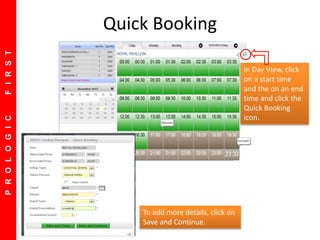
Quick Booking
In Day View, click
on a start time
and the on an end
time and click the
Quick Booking
icon.
To add more details, click on
Save and Continue.
PROLOGICFIRST
Unique!
• View latest availability on any day at any
venue / space.
• Create / manage any booking at any venue on
any date.
PROLOGICFIRST
Booking Details
Multiple functions within a
single event booking.
Multiple function spaces and
set-up per event booking.
PROLOGICFIRST
Menu & Pricing
• Use standard package, modify a standard package or build a new one
while negotiating a booking.
• Add rental, F&B and equipment per function / event.
PROLOGICFIRST
Cost Calculator
• Estimate event cost based on Chef’s estimate of portions per item that
will be served.
• Add cost of 3rd party rental / fees for equipment or additional services.
Negotiate event
pricing based on
cost information
and target
margins.
Option to
compare pre-
event cost
estimate with
post-event actual
cost record.
Unique
PROLOGICFIRST
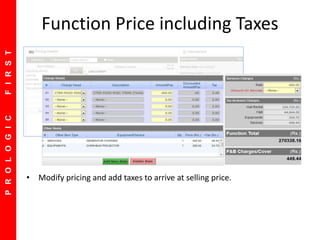
Function Price including Taxes
• Modify pricing and add taxes to arrive at selling price.
PROLOGICFIRST
Add equipment and services
PROLOGICFIRST
Schedule Departmental Tasks
Notification / reminder sent
to concerned Departments
prior the function.
PROLOGICFIRST
Event Notes and Terms
• Add internal event notes for specific or all functions.
• Modify standard terms to event-specific terms. The modified terms will
be merged with the Event Proposal / Contract.
PROLOGICFIRST
Deposits & Payment
• Accept and record deposits and payments. The payment due is
summarized on the right.
• When used in standalone mode, Payment Receipts are generated from
the system.
PROLOGICFIRST
Deposits & Payment
• Contracts may be tentative, confirmed, finalized or cancelled.
• Amendments to Confirmed contracts are tracked.
• Finalized Contracts may be amended, but, only with supervisory access.
PROLOGICFIRST
Default Screen showing this week events
Future Events are shown on top
Settlement Status of in Progress Events
 Option to Print Function Sheet
Option to E-Mail Contracts
Option to send reminder letters
Option to Sort on Date, Time, Room
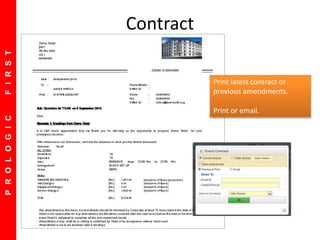
Contract
Print latest contract or
previous amendments.
Print or email.
PROLOGICFIRST
Operations
PROLOGICFIRST
Default Screen showing this week events
Future Events are shown on top
Settlement Status of in Progress Events
 Option to Print Function Sheet
Option to E-Mail Contracts
Option to send reminder letters
Option to Sort on Date, Time, Room
Multi-function Events List
PROLOGICFIRST
Default Screen showing this week events
Future Events are shown on top
Settlement Status of in Progress Events
 Option to Print Function Sheet
Option to E-Mail Contracts
Option to send reminder letters
Option to Sort on Date, Time, Room
Multi-function Events List
View summary of
events. Default
view – next 7
days.
Print Contracts
and Function
Sheets.
Add items to
Contracts.
Start or close
events, including
invoicing.
PROLOGICFIRST
Default Screen showing this week events
Future Events are shown on top
Settlement Status of in Progress Events
 Option to Print Function Sheet
Option to E-Mail Contracts
Option to send reminder letters
Option to Sort on Date, Time, Room
Print latest or amended
Function Prospectus.
Highlight changes to FP.
Function Prospectus
Mail directly to Departments
for action.
PROLOGICFIRST
Default Screen showing this week events
Future Events are shown on top
Settlement Status of in Progress Events
 Option to Print Function Sheet
Option to E-Mail Contracts
Option to send reminder letters
Option to Sort on Date, Time, Room
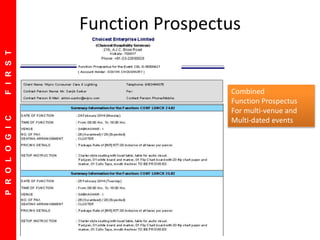
Function Prospectus
Combined
Function Prospectus
For multi-venue and
Multi-dated events
PROLOGICFIRST
Daily Function List
PROLOGICFIRST
Department wise Task List
PROLOGICFIRST
Event Operations
START A FUNCTION
Contract cannot be amended
once you do this unless you have
special access rights
EVENT STATUS
• Confirmation may be linked to
deposit policy
• Contract cannot be amended
once finalized unless you have
special access rights
PROLOGICFIRST
Add items during event
PROLOGICFIRST
Close Event & Invoice
Finalize Guest Count. Add
any additional items /
charges and Invoice.
Events may be invoiced only
when all Functions have
ended.
PROLOGICFIRST
Invoice
PROLOGICFIRST
Sales & Marketing
Rich Reporting
PROLOGICFIRST
Default Screen showing this week events
Future Events are shown on top
Settlement Status of in Progress Events
 Option to Print Function Sheet
Option to E-Mail Contracts
Option to send reminder letters
Option to Sort on Date, Time, Room
YOU CAN SET UP VENUE WISE AND SALES MAN WISE YEARLY AS WELL AS MONTHLY TARGET.
You can specify yearly budget which may be distributed in any manner across months
Set Budgets
PROLOGICFIRST
Client’s Database
List of Clients
with contact
information.
Drill down to
past events and
details of past
events.
PROLOGICFIRST
Client Profile
Link with
Accounts
Receivables.
Classify clients.
Example –
• Credit
approved
• Blacklist
PROLOGICFIRST
Future Bookings Register
PROLOGICFIRST
Event Type wise Bookings Register
PROLOGICFIRST
Cancelled / Lost Events
PROLOGICFIRST
Sales Register
PROLOGICFIRST
Payment Register
PROLOGICFIRST
Daily Activity Summary
PROLOGICFIRST
Venue wise Business
PROLOGICFIRST
Venue wise Budget Variance
PROLOGICFIRST
Salesman wise Business
PROLOGICFIRST
Salesman wise Budget / Variance
PROLOGICFIRST
Revenue Head wise Business
PROLOGICFIRST
Average F&B Revenue per Cover
by Venue
PROLOGICFIRST
Average Revenue per Cover
by F&B Item
PROLOGICFIRST
Event Type wise Business
PROLOGICFIRST
Venue wise Occupancy
PROLOGICFIRST
Daily Flash Report
PROLOGICFIRST
Notional Contract Cost
Estimate of cost based on standard costs entered by
the user into the system … hence notional.
PROLOGICFIRST
Payments Outstanding
Useful when the system is
used in standalone
configuration. Else, will be
reported by Back Office
Accounting software.
PROLOGICFIRST
Dashboard
PROLOGICFIRST
Integration
PROLOGICFIRST
Integrate with Touché POS for
invoicing or generate invoices
stand-alone. Optionally, share client
profiles across venues.
Integrate with Web Prol’IFIC for
back office functions like
Receivables, Materials
Management, F&B Costing and
Back Office Accounting.
Integration
PROLOGICFIRST
Thank you.
www.prologicfirst.com

Event & Catering (Banquet Solution)