How did you use media
technologies in the
construction and research,
planning and evaluation
stages?
MILO MARSHALL
Research
 Upon starting my research, I was met with the use of varying
platforms to present my findings. I was given a variety of programs
and online slideshow websites to host my work and show said work
as an info-graphic. Most of which I had already encountered
before, but had to become acquainted with again before I could
progress with a professional outcome. Some of these programs and
websites include: Photoshop, Prezi.com, and Microsoft Word.
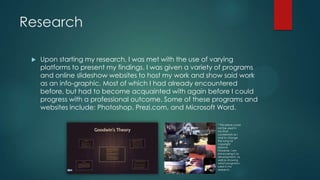
* This piece could
not be used in
my final
coursework as I
had to change
the song for
copyright
reasons.
However, I am
showcasing it as
development, as
well as showing
which programs I
used in my
research.
Prezi.com
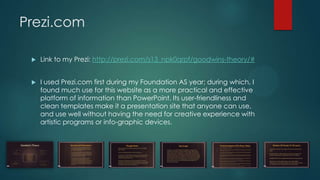
 Link to my Prezi: http://prezi.com/s13_npk0qrpf/goodwins-theory/#
 I used Prezi.com first during my Foundation AS year; during which, I
found much use for this website as a more practical and effective
platform of information than PowerPoint. Its user-friendliness and
clean templates make it a presentation site that anyone can use,
and use well without having the need for creative experience with
artistic programs or info-graphic devices.
Photoshop
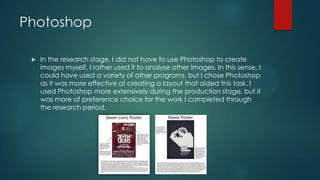
 In the research stage, I did not have to use Photoshop to create
images myself, I rather used it to analyse other images. In this sense, I
could have used a variety of other programs, but I chose Photoshop
as it was more effective at creating a layout that aided this task. I
used Photoshop more extensively during the production stage, but it
was more of preference choice for the work I completed through
the research period.
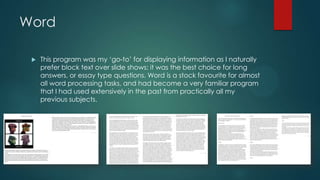
Word
 This program was my „go-to‟ for displaying information as I naturally
prefer block text over slide shows; it was the best choice for long
answers, or essay type questions. Word is a stock favourite for almost
all word processing tasks, and had become a very familiar program
that I had used extensively in the past from practically all my
previous subjects.
Successes
 I feel as though the majority of the research stage was a success; in
the sense that each task was completed to the specification.
 The Prezi work was completed with a practically efficient way of
displaying the information, as well as it being in a different form than
that of being either block text, or presentation.
 The Word work had allowed me to easily choose the layout needed
for comparisons and analyses of music videos, Digipaks, and
technical aspects of other videos.
 Overall the research stage was completed to a degree that I feel
was of an in depth nature.
Pre-Production
 In the Pre-Production stage, most of my work was completed as a
Word document for ease of comparing and analysing. The only
exception was creating an animatic; which would involve using
Sony Vegas. I would also have to create a questionnaire, this would
need the website SurveyMonkey.com.
 The Pre-Production stage mostly included getting things ready to
start creating our music video; we needed to have a plan for the
music video, which was the animatic. And once we had a song
choice, we needed evidence to support that we had tried to
contact the label of the artist to ask for permission. Upon doing this,
we needed to analyse said song to aid with the animatic.
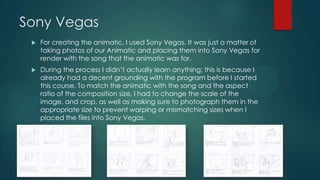
Sony Vegas
 For creating the animatic, I used Sony Vegas. It was just a matter of
taking photos of our Animatic and placing them into Sony Vegas for
render with the song that the animatic was for.
 During the process I didn‟t actually learn anything; this is because I
already had a decent grounding with the program before I started
this course. To match the animatic with the song and the aspect
ratio of the composition size, I had to change the scale of the
image, and crop, as well as making sure to photograph them in the
appropriate size to prevent warping or mismatching sizes when I
placed the files into Sony Vegas.
Word
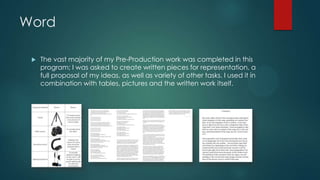
 The vast majority of my Pre-Production work was completed in this
program; I was asked to create written pieces for representation, a
full proposal of my ideas, as well as variety of other tasks. I used it in
combination with tables, pictures and the written work itself.
Successes
 As I already had a strong grounding in Sony Vegas, I was able to
quickly and efficiently create my animatic video without issue.
 I succeeded in acquiring permission for use of a song for my Music
Video, however, a problem did occur with this later.
 As my video would be an animation, I did not need permission to
film on private property, as I would not be filming at all.
Problems
 My song permission was nullified when my music video idea was
denied by the exam board. The song I had chosen only worked with
that song, so I had to pick a new one. The next song I chose I was
unable to receive a response from the label, so I had to just state in
my video that the song use was for non-profit educational purposes,
and this coincided with the “fair use” act
 The animatic was also nullified after my second idea became
redundant due to a shortage of cast halfway towards completion.
At this stage with 2 months being spent on working towards ideas
that had to be cancelled, I was quickly falling behind.
 To overcome this happening again, I decided to create an
animation that meant that no-one could prevent the video‟s
completion due to unavailability.
Production
 The Production stage was where the bulk of the marks came to, it
involved creating a Digipak, music video, and poster. It involved
using 3 programs: Cinema 4D, Adobe After Effects, and Adobe
Photoshop.
After Effects
 After Effects is a program that I had used extensively before I started this course; I used it in a variety of
hobbies, so I had a strong grounding with it. It was this reason that I chose it over the other video editing
programs available.
 After Effects is a program that I preferred over Sony Vegas, and was invaluable when working in 3D
space. I was able to create 3D cameras to work with text layers; of which I was able to manipulate x, y,
and z rotation. Also, the ability to work in the z plane allowed for little distortion as opposed to having two
text layers of different sizes.
 With After Effects, there were a variety of effects, transitions and animations that I could mix and match
to create a desired effect, many of which were just basic manipulation, because for typographical
animations, minimalism often works to your advantage.
 Masks were also used extensively in my music video, as I was able to individually animate the layer, as
well as its mask to create differing transitions that deviate from the norm.
 Parenting layers to other objects also became a necessity for when I had collaborations of two layers I
did not want to pre-compose, I would therefor “pick-whip” these layers and parent them to other layers
to create 2 layers that acted as one, when changing properties of the “parent” layer, the same changes
would be applied to the “child” layer. This meant I had cut the animation time in half for needing only to
animate one layer, without having to worry about continuity between them.
 The use of the graph editor was impeccable to creating key frames that allowed me to animate
movements in any specific way I chose. By using the graph editor I was able to change the velocity of
movements from that of a linear movement, to a curved graph of differing gradients.
 After Effects was the program I used for my Music Video, as well as my Poster. I chose After Effects over
Photoshop to create a still image as it contained the necessary 3rd Party effects required to gain my
desired result.
Cinema 4D
 Cinema 4D was a program used mostly for 3D modelling, it was for
this reason that I chose to use it to create the abstract object shown
in my poster. I did not require it for anything else, but it was the best
choice for creating the object itself.
 To create the object I had to create textures and lights to make sure
they interacted with the composition of the object as desired; the
lights themselves had to placed in a 3D plane but still acting as a 3
point light rig. Each light created different length shadows and was
of differing intensities, this made the texture I had placed on the
object better for drawing attention to for the audience.
Photoshop
 I used Photoshop to create my Digipak. This worked well as there
were a collection of layer styles and filters I could mix and match to
aid the connotations of the music. In the end I settled for a grungy
cut-out effect that gave the album a “raw” appeal to it.
 I used a set of photos of the band, as well as the venues they
performed at to recolour them as black and white. To do this I
selected the “Hue and Saturation” adjustment and changed the
saturation down to a very negative number. After I had done this I
selected the “Cut-out” filter to give the photos a fragmentary look.
Successes
 Photoshop‟s adjustment layers and pre-made filters made creating
my desired look quick, as well as intuitive.
 After Effects ease of 3D manipulation allowed me to animate
multiple layers at once, thus saving time I would have spent
animating each independently.
Problems
 Finding photos I was allowed to use was at first a tedious task, but
after some research, I learned that there is a set filter to sift through
the images until it only showed images I could use for photo editing.
Overall
 Working in different drives was at first a new thing to me, but over
time, I learned to keep constant backups on the school‟s shared
documents to prevent file corruption critically affecting my project‟s
completion date.

Question 4

  • 1.
    How did youuse media technologies in the construction and research, planning and evaluation stages? MILO MARSHALL
  • 2.
    Research  Upon startingmy research, I was met with the use of varying platforms to present my findings. I was given a variety of programs and online slideshow websites to host my work and show said work as an info-graphic. Most of which I had already encountered before, but had to become acquainted with again before I could progress with a professional outcome. Some of these programs and websites include: Photoshop, Prezi.com, and Microsoft Word. * This piece could not be used in my final coursework as I had to change the song for copyright reasons. However, I am showcasing it as development, as well as showing which programs I used in my research.
  • 3.
    Prezi.com  Link tomy Prezi: http://prezi.com/s13_npk0qrpf/goodwins-theory/#  I used Prezi.com first during my Foundation AS year; during which, I found much use for this website as a more practical and effective platform of information than PowerPoint. Its user-friendliness and clean templates make it a presentation site that anyone can use, and use well without having the need for creative experience with artistic programs or info-graphic devices.
  • 4.
    Photoshop  In theresearch stage, I did not have to use Photoshop to create images myself, I rather used it to analyse other images. In this sense, I could have used a variety of other programs, but I chose Photoshop as it was more effective at creating a layout that aided this task. I used Photoshop more extensively during the production stage, but it was more of preference choice for the work I completed through the research period.
  • 5.
    Word  This programwas my „go-to‟ for displaying information as I naturally prefer block text over slide shows; it was the best choice for long answers, or essay type questions. Word is a stock favourite for almost all word processing tasks, and had become a very familiar program that I had used extensively in the past from practically all my previous subjects.
  • 6.
    Successes  I feelas though the majority of the research stage was a success; in the sense that each task was completed to the specification.  The Prezi work was completed with a practically efficient way of displaying the information, as well as it being in a different form than that of being either block text, or presentation.  The Word work had allowed me to easily choose the layout needed for comparisons and analyses of music videos, Digipaks, and technical aspects of other videos.  Overall the research stage was completed to a degree that I feel was of an in depth nature.
  • 7.
    Pre-Production  In thePre-Production stage, most of my work was completed as a Word document for ease of comparing and analysing. The only exception was creating an animatic; which would involve using Sony Vegas. I would also have to create a questionnaire, this would need the website SurveyMonkey.com.  The Pre-Production stage mostly included getting things ready to start creating our music video; we needed to have a plan for the music video, which was the animatic. And once we had a song choice, we needed evidence to support that we had tried to contact the label of the artist to ask for permission. Upon doing this, we needed to analyse said song to aid with the animatic.
  • 8.
    Sony Vegas  Forcreating the animatic, I used Sony Vegas. It was just a matter of taking photos of our Animatic and placing them into Sony Vegas for render with the song that the animatic was for.  During the process I didn‟t actually learn anything; this is because I already had a decent grounding with the program before I started this course. To match the animatic with the song and the aspect ratio of the composition size, I had to change the scale of the image, and crop, as well as making sure to photograph them in the appropriate size to prevent warping or mismatching sizes when I placed the files into Sony Vegas.
  • 9.
    Word  The vastmajority of my Pre-Production work was completed in this program; I was asked to create written pieces for representation, a full proposal of my ideas, as well as variety of other tasks. I used it in combination with tables, pictures and the written work itself.
  • 10.
    Successes  As Ialready had a strong grounding in Sony Vegas, I was able to quickly and efficiently create my animatic video without issue.  I succeeded in acquiring permission for use of a song for my Music Video, however, a problem did occur with this later.  As my video would be an animation, I did not need permission to film on private property, as I would not be filming at all.
  • 11.
    Problems  My songpermission was nullified when my music video idea was denied by the exam board. The song I had chosen only worked with that song, so I had to pick a new one. The next song I chose I was unable to receive a response from the label, so I had to just state in my video that the song use was for non-profit educational purposes, and this coincided with the “fair use” act  The animatic was also nullified after my second idea became redundant due to a shortage of cast halfway towards completion. At this stage with 2 months being spent on working towards ideas that had to be cancelled, I was quickly falling behind.  To overcome this happening again, I decided to create an animation that meant that no-one could prevent the video‟s completion due to unavailability.
  • 12.
    Production  The Productionstage was where the bulk of the marks came to, it involved creating a Digipak, music video, and poster. It involved using 3 programs: Cinema 4D, Adobe After Effects, and Adobe Photoshop.
  • 13.
    After Effects  AfterEffects is a program that I had used extensively before I started this course; I used it in a variety of hobbies, so I had a strong grounding with it. It was this reason that I chose it over the other video editing programs available.  After Effects is a program that I preferred over Sony Vegas, and was invaluable when working in 3D space. I was able to create 3D cameras to work with text layers; of which I was able to manipulate x, y, and z rotation. Also, the ability to work in the z plane allowed for little distortion as opposed to having two text layers of different sizes.  With After Effects, there were a variety of effects, transitions and animations that I could mix and match to create a desired effect, many of which were just basic manipulation, because for typographical animations, minimalism often works to your advantage.  Masks were also used extensively in my music video, as I was able to individually animate the layer, as well as its mask to create differing transitions that deviate from the norm.  Parenting layers to other objects also became a necessity for when I had collaborations of two layers I did not want to pre-compose, I would therefor “pick-whip” these layers and parent them to other layers to create 2 layers that acted as one, when changing properties of the “parent” layer, the same changes would be applied to the “child” layer. This meant I had cut the animation time in half for needing only to animate one layer, without having to worry about continuity between them.  The use of the graph editor was impeccable to creating key frames that allowed me to animate movements in any specific way I chose. By using the graph editor I was able to change the velocity of movements from that of a linear movement, to a curved graph of differing gradients.  After Effects was the program I used for my Music Video, as well as my Poster. I chose After Effects over Photoshop to create a still image as it contained the necessary 3rd Party effects required to gain my desired result.
  • 14.
    Cinema 4D  Cinema4D was a program used mostly for 3D modelling, it was for this reason that I chose to use it to create the abstract object shown in my poster. I did not require it for anything else, but it was the best choice for creating the object itself.  To create the object I had to create textures and lights to make sure they interacted with the composition of the object as desired; the lights themselves had to placed in a 3D plane but still acting as a 3 point light rig. Each light created different length shadows and was of differing intensities, this made the texture I had placed on the object better for drawing attention to for the audience.
  • 15.
    Photoshop  I usedPhotoshop to create my Digipak. This worked well as there were a collection of layer styles and filters I could mix and match to aid the connotations of the music. In the end I settled for a grungy cut-out effect that gave the album a “raw” appeal to it.  I used a set of photos of the band, as well as the venues they performed at to recolour them as black and white. To do this I selected the “Hue and Saturation” adjustment and changed the saturation down to a very negative number. After I had done this I selected the “Cut-out” filter to give the photos a fragmentary look.
  • 16.
    Successes  Photoshop‟s adjustmentlayers and pre-made filters made creating my desired look quick, as well as intuitive.  After Effects ease of 3D manipulation allowed me to animate multiple layers at once, thus saving time I would have spent animating each independently.
  • 17.
    Problems  Finding photosI was allowed to use was at first a tedious task, but after some research, I learned that there is a set filter to sift through the images until it only showed images I could use for photo editing.
  • 18.
    Overall  Working indifferent drives was at first a new thing to me, but over time, I learned to keep constant backups on the school‟s shared documents to prevent file corruption critically affecting my project‟s completion date.