Evaluation
In what ways does your media product use, develop or challenge
any conventions of real media products?
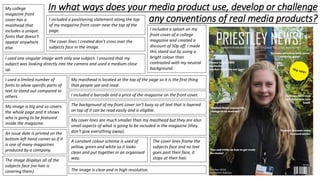
My college
magazine front
cover has a
masthead that
includes a unique
fonts that doesn’t
appear anywhere
else.
I included a positioning statement along the top
of my magazine front cover near the top of the
page.
The cover lines I created don’t cross over the
subjects face in the image.
I included a splash on my
front cover of a college
magazine and created a
discount of 50p off. I made
this stand out by using a
bright colour than
contrasted with my neutral
background.
I used one singular image with only one subject. I ensured that my
subject was looking directly into the camera and used a medium close
up.
I used a limited number of
fonts to allow specific parts of
text to stand out compared to
others.
My masthead is located at the top of the page so it is the first thing
that people see and read.
I included a barcode and a price of the magazine on the front cover.
My image is big and so covers
the whole page and it shows
who is going to be featured
inside the magazine.
The background of my front cover isn’t busy so all text that is layered
on top of it can be read easily and is eligible.
My cover lines are much smaller than my masthead but they are also
small aspects of what is going to be included in the magazine (they
don’t give everything away).
The cover lines frame the
subjects face and no text
goes past their face, it
stops at their hair.
An issue date is printed on the
bottom left hand corner as if it
is one of many magazines
produced by a company.
The image displays all of the
subjects face (no hair is
covering them). The image is clear and in high resolution.
A constant colour scheme is used of
yellow, green and white so it looks
clean and put together in an organised
way.
In what ways does your media product use, develop or challenge
any conventions of real media products?
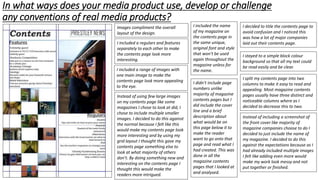
Images compliment the overall
layout of the design.
I included a regulars and features
separately to each other to make
the contents page look more
interesting.
I included the name
of my magazine on
the contents page in
the same unique,
original font and style
that won’t be used
again throughout the
magazine unless for
the name.I included a range of images with
one main image to make the
contents page look more appealing
to the eye.
I decided to title the contents page to
avoid confusion and I noticed this
was how a lot of major companies
laid out their contents page.
I stayed to a simple block colour
background so that all my text could
be read easily and be clear.
I split my contents page into two
columns to make it easy to read and
appealing. Most magazine contents
pages usually have three distinct and
noticeable columns where as I
decided to decrease this to two.
I didn’t include page
numbers unlike
majority of magazine
contents pages but I
did include the cover
line and a brief
description about
what would be on
this page below it to
make the reader
want to go onto that
page and read what I
had created. This was
done in all the
magazine contents
pages that I looked at
and analysed.
Instead of including a screenshot of
the front cover like majority of
magazine companies choose to do I
decided to just include the name of
my magazine. I decided to do this
against the expectations because as I
had already included multiple images
I felt like adding even more would
make my work look messy and not
put together or finished.
Instead of using few large images
on my contents page like some
magazines I chose to look at did, I
chose to include multiple smaller
images. I decided to do this against
the normal because I felt like this
would make my contents page look
more interesting and by using my
grid layout I thought this gave my
contents page something else to
look at what majority of others
don’t. By doing something new and
interesting on the contents page I
thought this would make the
readers more intrigued.
How did you use new media technologies in the construction of
your media product?
Photoshop
I used Photoshop in order to create my front cover. Tools I used in Photoshop were the text, colour
picker, and importing a image. Overall I found Photoshop fairly straight forward when creating this
front cover. I found it easy to navigate my way around and also I thought it was easy to use and
place some of my work exactly where I wanted to. I found Photoshop easier to use than
QuarkXPress and I am more pleased with my outcome that was created in Photoshop rather than
the one created in QuarkXPress. I think the front cover I created on Photoshop looked more
professional and put to together than what I created in QuarkXPress. I tried to use a range of
different tools and techniques in Photoshop and overall I am very pleased with the front cover that
I managed to create.
QuarkXPress
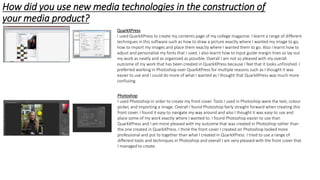
I used QuarkXPress to create my contents page of my college magazine. I learnt a range of different
techniques in this software such as how to draw a picture exactly where I wanted my image to go,
how to import my images and place them exactly where I wanted them to go. Also I learnt how to
adjust and personalise my fonts that I used. I also learnt how to input guide margin lines so lay out
my work as neatly and as organised as possible. Overall I am not so pleased with my overall
outcome of my work that has been created in QuarkXPress because I feel that it looks unfinished. I
preferred working in Photoshop over QuarkXPress for multiple reasons such as I thought it was
easier to use and I could do more of what I wanted as I thought that QuarkXPress was much more
confusing.
What are the strengths and weaknesses of both the product and
your use of new media technologies?
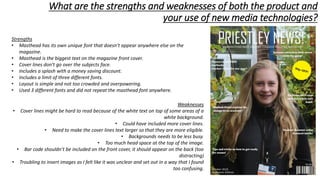
Strengths
• Masthead has its own unique font that doesn’t appear anywhere else on the
magazine.
• Masthead is the biggest text on the magazine front cover.
• Cover lines don’t go over the subjects face.
• Includes a splash with a money saving discount.
• Includes a limit of three different fonts.
• Layout is simple and not too crowded and overpowering.
• Used 3 different fonts and did not repeat the masthead font anywhere.
Weaknesses
• Cover lines might be hard to read because of the white text on top of some areas of a
white background.
• Could have included more cover lines.
• Need to make the cover lines text larger so that they are more eligible.
• Backgrounds needs to be less busy.
• Too much head space at the top of the image.
• Bar code shouldn’t be included on the front cover, it should appear on the back (too
distracting)
• Troubling to insert images as I felt like it was unclear and set out in a way that I found
too confusing.
What are the strengths and weaknesses of both the product and
your use of new media technologies?
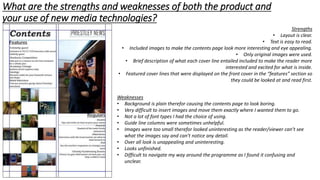
Strengths
• Layout is clear.
• Text is easy to read.
• Included images to make the contents page look more interesting and eye appealing.
• Only original images were used.
• Brief description of what each cover line entailed included to make the reader more
interested and excited for what is inside.
• Featured cover lines that were displayed on the front cover in the “features” section so
they could be looked at and read first.
Weaknesses
• Background is plain therefor causing the contents page to look boring.
• Very difficult to insert images and move them exactly where I wanted them to go.
• Not a lot of font types I had the choice of using.
• Guide line columns were sometimes unhelpful.
• Images were too small therefor looked uninteresting as the reader/viewer can’t see
what the images say and can’t notice any detail.
• Over all look is unappealing and uninteresting.
• Looks unfinished.
• Difficult to navigate my way around the programme as I found it confusing and
unclear.

Evaluation

  • 1.
  • 2.
    In what waysdoes your media product use, develop or challenge any conventions of real media products? My college magazine front cover has a masthead that includes a unique fonts that doesn’t appear anywhere else. I included a positioning statement along the top of my magazine front cover near the top of the page. The cover lines I created don’t cross over the subjects face in the image. I included a splash on my front cover of a college magazine and created a discount of 50p off. I made this stand out by using a bright colour than contrasted with my neutral background. I used one singular image with only one subject. I ensured that my subject was looking directly into the camera and used a medium close up. I used a limited number of fonts to allow specific parts of text to stand out compared to others. My masthead is located at the top of the page so it is the first thing that people see and read. I included a barcode and a price of the magazine on the front cover. My image is big and so covers the whole page and it shows who is going to be featured inside the magazine. The background of my front cover isn’t busy so all text that is layered on top of it can be read easily and is eligible. My cover lines are much smaller than my masthead but they are also small aspects of what is going to be included in the magazine (they don’t give everything away). The cover lines frame the subjects face and no text goes past their face, it stops at their hair. An issue date is printed on the bottom left hand corner as if it is one of many magazines produced by a company. The image displays all of the subjects face (no hair is covering them). The image is clear and in high resolution. A constant colour scheme is used of yellow, green and white so it looks clean and put together in an organised way.
  • 3.
    In what waysdoes your media product use, develop or challenge any conventions of real media products? Images compliment the overall layout of the design. I included a regulars and features separately to each other to make the contents page look more interesting. I included the name of my magazine on the contents page in the same unique, original font and style that won’t be used again throughout the magazine unless for the name.I included a range of images with one main image to make the contents page look more appealing to the eye. I decided to title the contents page to avoid confusion and I noticed this was how a lot of major companies laid out their contents page. I stayed to a simple block colour background so that all my text could be read easily and be clear. I split my contents page into two columns to make it easy to read and appealing. Most magazine contents pages usually have three distinct and noticeable columns where as I decided to decrease this to two. I didn’t include page numbers unlike majority of magazine contents pages but I did include the cover line and a brief description about what would be on this page below it to make the reader want to go onto that page and read what I had created. This was done in all the magazine contents pages that I looked at and analysed. Instead of including a screenshot of the front cover like majority of magazine companies choose to do I decided to just include the name of my magazine. I decided to do this against the expectations because as I had already included multiple images I felt like adding even more would make my work look messy and not put together or finished. Instead of using few large images on my contents page like some magazines I chose to look at did, I chose to include multiple smaller images. I decided to do this against the normal because I felt like this would make my contents page look more interesting and by using my grid layout I thought this gave my contents page something else to look at what majority of others don’t. By doing something new and interesting on the contents page I thought this would make the readers more intrigued.
  • 4.
    How did youuse new media technologies in the construction of your media product? Photoshop I used Photoshop in order to create my front cover. Tools I used in Photoshop were the text, colour picker, and importing a image. Overall I found Photoshop fairly straight forward when creating this front cover. I found it easy to navigate my way around and also I thought it was easy to use and place some of my work exactly where I wanted to. I found Photoshop easier to use than QuarkXPress and I am more pleased with my outcome that was created in Photoshop rather than the one created in QuarkXPress. I think the front cover I created on Photoshop looked more professional and put to together than what I created in QuarkXPress. I tried to use a range of different tools and techniques in Photoshop and overall I am very pleased with the front cover that I managed to create. QuarkXPress I used QuarkXPress to create my contents page of my college magazine. I learnt a range of different techniques in this software such as how to draw a picture exactly where I wanted my image to go, how to import my images and place them exactly where I wanted them to go. Also I learnt how to adjust and personalise my fonts that I used. I also learnt how to input guide margin lines so lay out my work as neatly and as organised as possible. Overall I am not so pleased with my overall outcome of my work that has been created in QuarkXPress because I feel that it looks unfinished. I preferred working in Photoshop over QuarkXPress for multiple reasons such as I thought it was easier to use and I could do more of what I wanted as I thought that QuarkXPress was much more confusing.
  • 5.
    What are thestrengths and weaknesses of both the product and your use of new media technologies? Strengths • Masthead has its own unique font that doesn’t appear anywhere else on the magazine. • Masthead is the biggest text on the magazine front cover. • Cover lines don’t go over the subjects face. • Includes a splash with a money saving discount. • Includes a limit of three different fonts. • Layout is simple and not too crowded and overpowering. • Used 3 different fonts and did not repeat the masthead font anywhere. Weaknesses • Cover lines might be hard to read because of the white text on top of some areas of a white background. • Could have included more cover lines. • Need to make the cover lines text larger so that they are more eligible. • Backgrounds needs to be less busy. • Too much head space at the top of the image. • Bar code shouldn’t be included on the front cover, it should appear on the back (too distracting) • Troubling to insert images as I felt like it was unclear and set out in a way that I found too confusing.
  • 6.
    What are thestrengths and weaknesses of both the product and your use of new media technologies? Strengths • Layout is clear. • Text is easy to read. • Included images to make the contents page look more interesting and eye appealing. • Only original images were used. • Brief description of what each cover line entailed included to make the reader more interested and excited for what is inside. • Featured cover lines that were displayed on the front cover in the “features” section so they could be looked at and read first. Weaknesses • Background is plain therefor causing the contents page to look boring. • Very difficult to insert images and move them exactly where I wanted them to go. • Not a lot of font types I had the choice of using. • Guide line columns were sometimes unhelpful. • Images were too small therefor looked uninteresting as the reader/viewer can’t see what the images say and can’t notice any detail. • Over all look is unappealing and uninteresting. • Looks unfinished. • Difficult to navigate my way around the programme as I found it confusing and unclear.