Evaluation question 4
“How did you use media technologies in the construction,
research and planning and evaluation stages?”
BLOGGER
I used blogger to create a blog in which I could present my work on. Blogger is a very convenient and easy tool to use which has the
advantage of being accessible on all platforms.
Blogger has a default layout which allows posts to be categorised and labelled clearly whilst posts are simply structured and easy to
navigate, which is a convenience factor. Through using blogger I can also show my progress and mock ups, which wouldn’t be possible
on a physical copy (too time consuming).
Using blogger is more economical and less time consuming as physical copies would be expensive to print to a high standard and would
take more time to prepare them to a presentable standard e.g. if I wanted to change a small element a whole new magazine would have
to be printed.
GOOGLE
Throughout my research and planning, I used google multiple times to gather data about codes and conventions of existing magazine
cover pages, contents pages, adverts, billboards and websites.
Google allowed me to quickly access and obtain vital data needed for my research and planning. Without Google, my research and
planning task would have taken much longer than it did as I would have needed to track down and obtain various hard copies of regional
magazines, which would have been incredibly difficult as some magazines e.g. Sussex Life is not available in my demographic.
Using Google allowed me to construct a ‘viewed list’ - which showed the different elements of magazines that I had researched.
This helped me to gather codes and conventions to use or challenge within my production.
Google is much more economical than if I had to purchase multiple copies to reference from or had to travel many miles to view
different billboards.
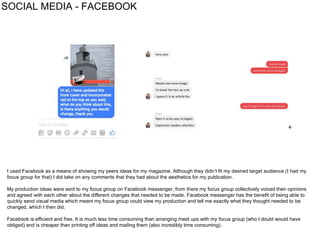
SOCIAL MEDIA - FACEBOOK
I used Facebook as a means of showing my peers ideas for my magazine. Although they didn’t fit my desired target audience (I had my
focus group for that) I did take on any comments that they had about the aesthetics for my publication.
My production ideas were sent to my focus group on Facebook messenger, from there my focus group collectively voiced their opinions
and agreed with each other about the different changes that needed to be made. Facebook messenger has the benefit of being able to
quickly send visual media which meant my focus group could view my production and tell me exactly what they thought needed to be
changed, which I then did.
Facebook is efficient and free. It is much less time consuming than arranging meet ups with my focus group (who I doubt would have
obliged) and is cheaper than printing off ideas and mailing them (also incredibly time consuming).
WIX
I used Wix to design my whole website. Wix allows the user to use pre-made templates which can be further edited and modified to suit
personal preferences. I found Wix to be a very convenient tool to use as it was very simple to learn.
Wix allowed me to efficiently add in photos, create galleries, adverts and articles. There were a number of colour options, which allowed
me to fully adopt my magazine’s house style into my website. This created a synergy between my main production and website so it
showed consistency throughout. Wix allowed make my ancillary aesthetic and easy to navigate - which made it appealing as a website.
Google Mail
When gathering contact information from my target audience (at the end of my questionnaire), some didn’t have Facebook so I contacted
them via email. Although email isn’t as efficient as contacting via Facebook, it is free and less time consuming than physically mailing my
target audience copies.
Google mail proved to be a key factor in contacting and gathering information from my focus group as through email my focus group
responded with various feedback and changes that they felt necessary to make.
Using google mail impacted my production because of the constructive feedback I received from my target audience through this software.
Photoshop proved to be an essential tool when producing my magazine. The software allowed me to manipulate and design the
production, as well as structuring pages to suit exact needs. I was also able to edit texts and photographs e.g. change the brightness and
contrast to create high-key imagery. Photoshop is very useful as it allowed me to fully create and edit my productions, without having to
switch to an alternative tool which helped efficiency.
Without Photoshop I wouldn’t have been able to produce a product of quality, which would be unconventional.
Below is an example of how I used photoshop:
1 - original photo 2 - added the text (header, tag line, price etc) and used stock
image of a barcode to make the front cover of the magazine,
then skewed it to get the perspective and positioned so it looked
like it was on top of a magazine pile.
3 - used polygonal lasso tool to cut out the image from number 2, the
app store logo, the play store logo, and the QR code (made using
online QR code maker with link to blog).Then used same text as
magazine cover but changed to navy to stand out, and put the
background as the original photo from the magazine cover and
reduced opacity to keep colour consistency and to keep the main
photo of the magazine stack as the main point of focus.
4 - took image from 3 and pasted onto
this photo of a bus stop in London and
skewed it using the transform tool.
5 - took a stock image of hands holding a phone and used the polygonal
lasso tool to remove what was on the screen originally.Then took small
section of the bus stop advert containing the QR code section and added the
blue features to imitate a generic QR code scanning app, which passers by
would use to scan the QR code on the bus advert.Lastly added finishing
touches such as the shine on the phone screen, tidied up the edges of the
bus stop and the phone edges using the feathering feature of the lasso tool.
Finished Product
With scannable QR code - links to my blog.
PHOTOSHOP
KEYNOTE AND
SLIDESHARE
I used Keynote to create my research and planning and evaluation documents.
Keynote is a very simple software to use, and helped my research and planning/evaluation be presented in a simple, aesthetic way.
If I did not have access to software like this I would have had to type my notes on Blogger directly, which would have seriously altered the
fluidity and presentation, hindering my production.
Keynote doesn’t allow me to directly upload documents onto Blogger, so I had to save Keynotes as a Powerpoint document and then use
Slideshare to upload it to Blogger (Slideshares can be uploaded directly to Blogger).
In order to achieve the highest quality photos I could, I used a Nikon D3300. This camera helped me to create high quality images on an
easy to use DSLR. The camera is quick to learn, which allowed me more time to focus on the actual photographs being taken, rather than
taking time to learn how to use it, which helped with efficiency.
The camera also has an SD card slot, which allowed to me quickly transfer raw images to my computer, from there I used photoshop to
edit them to the standard I wanted.
If I didn’t have a camera of this quality to use (24.2 megapixels) then I couldn’t have produced such high quality imagery in as quick a time
as this camera allowed me to, which I believe would have heavily affected my production and not followed common conventions for high
quality imagery in regional magazines.
CAMERA USED
YOUTUBE
YouTube was used quite a lot in my production. I used YouTube to watch numerous Photoshop tutorials as I only had basic knowledge of
the software before. Photoshop was very useful when producing my billboard as I used it to create a reflection effect on a phone screen.
Although the camera I used was simple to use, I did watch a couple tutorials on YouTube when learning how to change aperture. The
settings on this camera were different to the Nikon I used for my foundation project so it was just a case of learning where everything was.
Especially with Photoshop, I found Youtube to be a very useful tool which helped me to create visual content to a much higher standard
than if I hadn’t watched videos to learn about the software.

Eval 4

  • 1.
    Evaluation question 4 “Howdid you use media technologies in the construction, research and planning and evaluation stages?”
  • 2.
    BLOGGER I used bloggerto create a blog in which I could present my work on. Blogger is a very convenient and easy tool to use which has the advantage of being accessible on all platforms. Blogger has a default layout which allows posts to be categorised and labelled clearly whilst posts are simply structured and easy to navigate, which is a convenience factor. Through using blogger I can also show my progress and mock ups, which wouldn’t be possible on a physical copy (too time consuming). Using blogger is more economical and less time consuming as physical copies would be expensive to print to a high standard and would take more time to prepare them to a presentable standard e.g. if I wanted to change a small element a whole new magazine would have to be printed.
  • 3.
    GOOGLE Throughout my researchand planning, I used google multiple times to gather data about codes and conventions of existing magazine cover pages, contents pages, adverts, billboards and websites. Google allowed me to quickly access and obtain vital data needed for my research and planning. Without Google, my research and planning task would have taken much longer than it did as I would have needed to track down and obtain various hard copies of regional magazines, which would have been incredibly difficult as some magazines e.g. Sussex Life is not available in my demographic. Using Google allowed me to construct a ‘viewed list’ - which showed the different elements of magazines that I had researched. This helped me to gather codes and conventions to use or challenge within my production. Google is much more economical than if I had to purchase multiple copies to reference from or had to travel many miles to view different billboards.
  • 4.
    SOCIAL MEDIA -FACEBOOK I used Facebook as a means of showing my peers ideas for my magazine. Although they didn’t fit my desired target audience (I had my focus group for that) I did take on any comments that they had about the aesthetics for my publication. My production ideas were sent to my focus group on Facebook messenger, from there my focus group collectively voiced their opinions and agreed with each other about the different changes that needed to be made. Facebook messenger has the benefit of being able to quickly send visual media which meant my focus group could view my production and tell me exactly what they thought needed to be changed, which I then did. Facebook is efficient and free. It is much less time consuming than arranging meet ups with my focus group (who I doubt would have obliged) and is cheaper than printing off ideas and mailing them (also incredibly time consuming).
  • 5.
    WIX I used Wixto design my whole website. Wix allows the user to use pre-made templates which can be further edited and modified to suit personal preferences. I found Wix to be a very convenient tool to use as it was very simple to learn. Wix allowed me to efficiently add in photos, create galleries, adverts and articles. There were a number of colour options, which allowed me to fully adopt my magazine’s house style into my website. This created a synergy between my main production and website so it showed consistency throughout. Wix allowed make my ancillary aesthetic and easy to navigate - which made it appealing as a website.
  • 6.
    Google Mail When gatheringcontact information from my target audience (at the end of my questionnaire), some didn’t have Facebook so I contacted them via email. Although email isn’t as efficient as contacting via Facebook, it is free and less time consuming than physically mailing my target audience copies. Google mail proved to be a key factor in contacting and gathering information from my focus group as through email my focus group responded with various feedback and changes that they felt necessary to make. Using google mail impacted my production because of the constructive feedback I received from my target audience through this software.
  • 7.
    Photoshop proved tobe an essential tool when producing my magazine. The software allowed me to manipulate and design the production, as well as structuring pages to suit exact needs. I was also able to edit texts and photographs e.g. change the brightness and contrast to create high-key imagery. Photoshop is very useful as it allowed me to fully create and edit my productions, without having to switch to an alternative tool which helped efficiency. Without Photoshop I wouldn’t have been able to produce a product of quality, which would be unconventional. Below is an example of how I used photoshop: 1 - original photo 2 - added the text (header, tag line, price etc) and used stock image of a barcode to make the front cover of the magazine, then skewed it to get the perspective and positioned so it looked like it was on top of a magazine pile. 3 - used polygonal lasso tool to cut out the image from number 2, the app store logo, the play store logo, and the QR code (made using online QR code maker with link to blog).Then used same text as magazine cover but changed to navy to stand out, and put the background as the original photo from the magazine cover and reduced opacity to keep colour consistency and to keep the main photo of the magazine stack as the main point of focus. 4 - took image from 3 and pasted onto this photo of a bus stop in London and skewed it using the transform tool. 5 - took a stock image of hands holding a phone and used the polygonal lasso tool to remove what was on the screen originally.Then took small section of the bus stop advert containing the QR code section and added the blue features to imitate a generic QR code scanning app, which passers by would use to scan the QR code on the bus advert.Lastly added finishing touches such as the shine on the phone screen, tidied up the edges of the bus stop and the phone edges using the feathering feature of the lasso tool. Finished Product With scannable QR code - links to my blog. PHOTOSHOP
  • 8.
    KEYNOTE AND SLIDESHARE I usedKeynote to create my research and planning and evaluation documents. Keynote is a very simple software to use, and helped my research and planning/evaluation be presented in a simple, aesthetic way. If I did not have access to software like this I would have had to type my notes on Blogger directly, which would have seriously altered the fluidity and presentation, hindering my production. Keynote doesn’t allow me to directly upload documents onto Blogger, so I had to save Keynotes as a Powerpoint document and then use Slideshare to upload it to Blogger (Slideshares can be uploaded directly to Blogger).
  • 9.
    In order toachieve the highest quality photos I could, I used a Nikon D3300. This camera helped me to create high quality images on an easy to use DSLR. The camera is quick to learn, which allowed me more time to focus on the actual photographs being taken, rather than taking time to learn how to use it, which helped with efficiency. The camera also has an SD card slot, which allowed to me quickly transfer raw images to my computer, from there I used photoshop to edit them to the standard I wanted. If I didn’t have a camera of this quality to use (24.2 megapixels) then I couldn’t have produced such high quality imagery in as quick a time as this camera allowed me to, which I believe would have heavily affected my production and not followed common conventions for high quality imagery in regional magazines. CAMERA USED
  • 10.
    YOUTUBE YouTube was usedquite a lot in my production. I used YouTube to watch numerous Photoshop tutorials as I only had basic knowledge of the software before. Photoshop was very useful when producing my billboard as I used it to create a reflection effect on a phone screen. Although the camera I used was simple to use, I did watch a couple tutorials on YouTube when learning how to change aperture. The settings on this camera were different to the Nikon I used for my foundation project so it was just a case of learning where everything was. Especially with Photoshop, I found Youtube to be a very useful tool which helped me to create visual content to a much higher standard than if I hadn’t watched videos to learn about the software.