4. How did you use media technologies in the construction and
research, planning and evaluation stages?
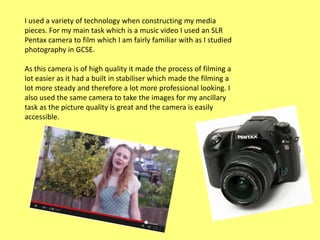
I used a variety of technology when constructing my media
pieces. For my main task which is a music video I used an SLR
Pentax camera to film which I am fairly familiar with as I studied
photography in GCSE.
As this camera is of high quality it made the process of filming a
lot easier as it had a built in stabiliser which made the filming a
lot more steady and therefore a lot more professional looking. I
also used the same camera to take the images for my ancillary
task as the picture quality is great and the camera is easily
accessible.
To make and edit my video I used Adobe Premier Pro as this is a high
quality, modern program with lots of options for editing allowing me
to edit detailed aspects of my video making it as professional looking
as possible and also as looking modern and up to date.

However Premier Pro is a very complicated program to use and I did
struggle with it at first. Also towards the end of the process when
uploading my final draft it would not work. However with time and
practise I gained confidence using the software.
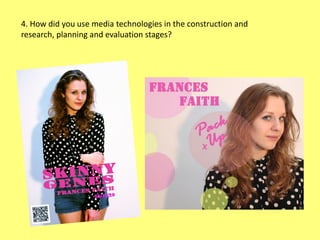
When creating the magazine advertisement and album digipack I used Adobe
Photoshop CS4 as this is a advanced software and I was familiar with using it.
This software allowed me to manipulate my images, I found the tools efficient
and detailed allowing for the best possible outcome for the products.
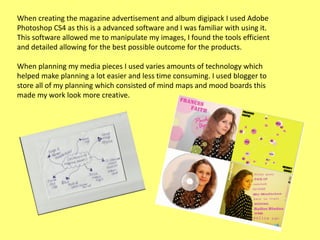
When planning my media pieces I used varies amounts of technology which
helped make planning a lot easier and less time consuming. I used blogger to
store all of my planning which consisted of mind maps and mood boards this
made my work look more creative.
When uploading audience feedback I took images on my Iphone and
uploaded them to my pc so that I could display the actual feedback in
the audiences own words rather then just write it on my document.
I also used Social Media sites to gather audience feedback such as face
book, where I messaged a picture of my finished album digipack to
members of my target audience which is females aged 16-26 and asked
them what their thoughts were on the finished album digipack. I then
print screened this, pasted it to paint and uploaded it to a post on
blogger.
Before constructing and planning my media pieces I used Youtube to research
existing media products such as music videos and songs. This helped me
decide which song I was going to use and the conventions of pre existing
music videos.
I also used Wikipedia for information on record labels as wikipedia contained
information of artist signed to the label. However information from wikipedia
can also be invalid as members of the public can edit their own comments
into it.
When doing my evaluation I used a variety of sites to display my answers. For
example I used Mix Book which is a free online site that allows me to display my
evaluation in the form of a book which is a creative and unique way.

I also used slide share to display some of my evaluation as this is an effective
and easy way to display power point presentation documents. I then embedded
the html code to my post on blogger. This was less time consuming than if I had
just print screened the power point presentation and uploaded the images onto
the post

Question 4

  • 1.
    4. How didyou use media technologies in the construction and research, planning and evaluation stages?
  • 2.
    I used avariety of technology when constructing my media pieces. For my main task which is a music video I used an SLR Pentax camera to film which I am fairly familiar with as I studied photography in GCSE. As this camera is of high quality it made the process of filming a lot easier as it had a built in stabiliser which made the filming a lot more steady and therefore a lot more professional looking. I also used the same camera to take the images for my ancillary task as the picture quality is great and the camera is easily accessible.
  • 3.
    To make andedit my video I used Adobe Premier Pro as this is a high quality, modern program with lots of options for editing allowing me to edit detailed aspects of my video making it as professional looking as possible and also as looking modern and up to date. However Premier Pro is a very complicated program to use and I did struggle with it at first. Also towards the end of the process when uploading my final draft it would not work. However with time and practise I gained confidence using the software.
  • 4.
    When creating themagazine advertisement and album digipack I used Adobe Photoshop CS4 as this is a advanced software and I was familiar with using it. This software allowed me to manipulate my images, I found the tools efficient and detailed allowing for the best possible outcome for the products. When planning my media pieces I used varies amounts of technology which helped make planning a lot easier and less time consuming. I used blogger to store all of my planning which consisted of mind maps and mood boards this made my work look more creative.
  • 5.
    When uploading audiencefeedback I took images on my Iphone and uploaded them to my pc so that I could display the actual feedback in the audiences own words rather then just write it on my document. I also used Social Media sites to gather audience feedback such as face book, where I messaged a picture of my finished album digipack to members of my target audience which is females aged 16-26 and asked them what their thoughts were on the finished album digipack. I then print screened this, pasted it to paint and uploaded it to a post on blogger.
  • 6.
    Before constructing andplanning my media pieces I used Youtube to research existing media products such as music videos and songs. This helped me decide which song I was going to use and the conventions of pre existing music videos. I also used Wikipedia for information on record labels as wikipedia contained information of artist signed to the label. However information from wikipedia can also be invalid as members of the public can edit their own comments into it.
  • 7.
    When doing myevaluation I used a variety of sites to display my answers. For example I used Mix Book which is a free online site that allows me to display my evaluation in the form of a book which is a creative and unique way. I also used slide share to display some of my evaluation as this is an effective and easy way to display power point presentation documents. I then embedded the html code to my post on blogger. This was less time consuming than if I had just print screened the power point presentation and uploaded the images onto the post