Ethernet communication with robot

• Protocol: TCPIP
• Server: External System
• Client: Robot
• . All the required VI’s are present in
   function palette under Data
   Communication->protocols->tcpip.
• Setting Up The Server.
• Main VI
• Sub VI


Note:this presentaion is part of project visit ->ayushdewan.wordpress.com
for complete details
Setting Up The Server

• First client sends a signal to server to start the communication and the
  server replies with a data packet which in our case is a XML string.
  Therefore “TCP Listen.vi” is used which waits for an incoming signal.
• As it is evident from the flowchart that after receiving the request from
  client data is sent to robot therefore we will use “TCP write.vi “ .
• After This robot replies with a XML string and “TCP Read.vi” is used for
  receiving the data packet.
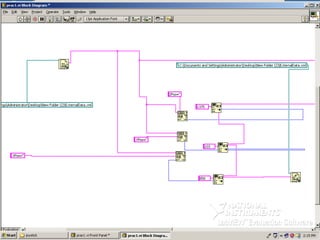
MAIN VI
• Refer fig1
• ExternalData.xml is updated with coordinates of home position(figure3).
• Outer while loop runs continuously ,waiting for an incoming connection
  and after receiving the request the inner loop is executed.
• Contents of file ExternalData.xml are read using Read from text file.vi
  and is sent to robot using TCPwrite.vi.
• Robot sends a data packet and it is received using TCPread.vi.
• To send new data errorout of TCPread.vi is used.It is a cluster of 3
  elements and one of them is a Boolean. When there is no error its value is
  false .
• A case structure is used and it has two cases either false or true. Errorout
  of TCP read.vi is connected to its input after inversion using not gate.
  Whenever server reads the data successfully it calls the structure and SUB
  VI is called.
SUB VI

•   Refer Fig2
•   Instead of using the received data for current coordinates content of ExternalData.Xml is used which has
    the last sent coordinates using Read from text file.vi(6).
•   After reading the data we use Matchpattern.vi(1) to get the positon of values of X,Y,Z in the file.
•   Different match pattern.vi is used for each coordinate.
•   Offset is used to extract the values of coordinates using String subset.vi(2).
•   Coordinates from String subset is the form of string and is converted to an integer using Frac/Exp string to
    number vi(3).
•   These coordinates are added to the increment value obtained from joystick.
•   New coordinate values are converted to string using Number to fractional string VI(5).
•   Using Replace substring vi (4)the values of coordinates are updated in externaldata.xml.
•
•   Three replace substring vi’s are used , the output of first vi will be the input of second and output of
    second will be the input of 3RD and output of 3RD will be the final string which is written in file
    EXternalData.xml .
•   After the increment is calculated by moving the joystick ,button 2 is pressed which terminates the while
    loop and data is written to externaldata.xml using write to text file VI(7).
•   After the file is written, inner loop of main vi starts to execute and contents of updated externaldata.xml is
    sent to robot.
•   This process continues and there is continuous exchange of XML strings between external pc and robot.

Ethernet communication with robot

  • 1.
    Ethernet communication withrobot • Protocol: TCPIP • Server: External System • Client: Robot • . All the required VI’s are present in function palette under Data Communication->protocols->tcpip. • Setting Up The Server. • Main VI • Sub VI Note:this presentaion is part of project visit ->ayushdewan.wordpress.com for complete details
  • 2.
    Setting Up TheServer • First client sends a signal to server to start the communication and the server replies with a data packet which in our case is a XML string. Therefore “TCP Listen.vi” is used which waits for an incoming signal. • As it is evident from the flowchart that after receiving the request from client data is sent to robot therefore we will use “TCP write.vi “ . • After This robot replies with a XML string and “TCP Read.vi” is used for receiving the data packet.
  • 6.
    MAIN VI • Referfig1 • ExternalData.xml is updated with coordinates of home position(figure3). • Outer while loop runs continuously ,waiting for an incoming connection and after receiving the request the inner loop is executed. • Contents of file ExternalData.xml are read using Read from text file.vi and is sent to robot using TCPwrite.vi. • Robot sends a data packet and it is received using TCPread.vi. • To send new data errorout of TCPread.vi is used.It is a cluster of 3 elements and one of them is a Boolean. When there is no error its value is false . • A case structure is used and it has two cases either false or true. Errorout of TCP read.vi is connected to its input after inversion using not gate. Whenever server reads the data successfully it calls the structure and SUB VI is called.
  • 7.
    SUB VI • Refer Fig2 • Instead of using the received data for current coordinates content of ExternalData.Xml is used which has the last sent coordinates using Read from text file.vi(6). • After reading the data we use Matchpattern.vi(1) to get the positon of values of X,Y,Z in the file. • Different match pattern.vi is used for each coordinate. • Offset is used to extract the values of coordinates using String subset.vi(2). • Coordinates from String subset is the form of string and is converted to an integer using Frac/Exp string to number vi(3). • These coordinates are added to the increment value obtained from joystick. • New coordinate values are converted to string using Number to fractional string VI(5). • Using Replace substring vi (4)the values of coordinates are updated in externaldata.xml. • • Three replace substring vi’s are used , the output of first vi will be the input of second and output of second will be the input of 3RD and output of 3RD will be the final string which is written in file EXternalData.xml . • After the increment is calculated by moving the joystick ,button 2 is pressed which terminates the while loop and data is written to externaldata.xml using write to text file VI(7). • After the file is written, inner loop of main vi starts to execute and contents of updated externaldata.xml is sent to robot. • This process continues and there is continuous exchange of XML strings between external pc and robot.