TP2: Web Services Using JAX-RS
Abdessattar Ettaieb 1
TP2 : Web Services using JAX-RS
Goal: Create a Web Service using JAX-RS and Netbeans
ARS1/2 – 2016/2017
TP2: Web Services Using JAX-RS
Abdessattar Ettaieb 2
I. REST Web Services Type
I.1. REST presentation
REST (Representational State Transfer) is an architectural style based on Web standards and http protocol. It
was presented the first time by Roy Fielding en 2000.
Within a REST based architecture:
 Resource: is a resource accessible through interfaces based on http standards
 A REST server provides access to the resources and REST client that access and modify these
resources.
 Each resources must support http common operations
 Resource is represented using text, xml, json etc. but, REST client can suggest specific
representation through HTTP.
I.2. http Methods
Methods PUT, GET, POST and DELETE used in the architectures based on REST are:
 GET defines the access in read mode to the resource
 PUT creates a new resource
 DELETE deletes a resource
 POST updates/creates the resource
II. JAX-RS Presentation
JA-RS is a Java programming language API spec that provides support in creating web services according to
the Representational State Transfer (REST) architectural pattern. JAX-RS uses annotations, introduced in Java
SE 5, to simplify the development and deployment of web service clients and endpoints.
III. First Application JAX-RS : Helloworld
III.1. Création du service web
To create a RESTful Web Service using NetBeans IDE and Glassfish you need to install and configure them first
(done in the first TP1).
Steps to create Helloworld application:
1. Open NetBeans IDE, Create a simple Web Application, name it HelloWorldApplication.
2. Right-Click on the project and select New -> RESTful Web Services from Patterns.
 design pattern: Simple Root Resource
 Package Name: helloWorld
 Path : helloworld
 Class Name : HelloWorld
 MIME Type: text/html
TP2: Web Services Using JAX-RS
Abdessattar Ettaieb 3
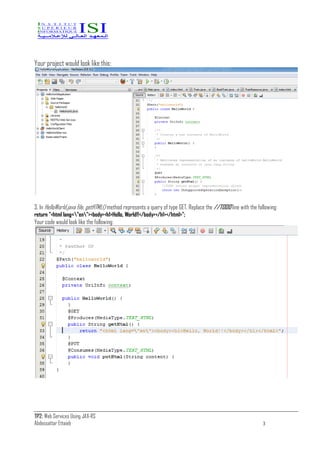
Your project would look like this:
3. In HelloWorld.java file, getHTML() method represents a query of type GET. Replace the //TODO line with the following:
return "<html lang="en"><body><h1>Hello, World!!</body></h1></html>";
Your code would look like the following:
TP2: Web Services Using JAX-RS
Abdessattar Ettaieb 4
III.2. Web Service Test
To test the Web Service follow these steps:
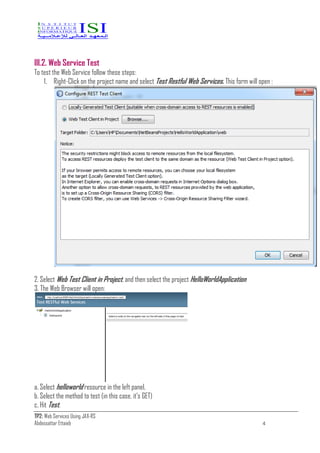
1. Right-Click on the project name and select Test Restful Web Services. This form will open :
2. Select Web Test Client in Project, and then select the project HelloWorldApplication
3. The Web Browser will open:
a. Select helloworld resource in the left panel.
b. Select the method to test (in this case, it’s GET)
c. Hit Test.
TP2: Web Services Using JAX-RS
Abdessattar Ettaieb 5
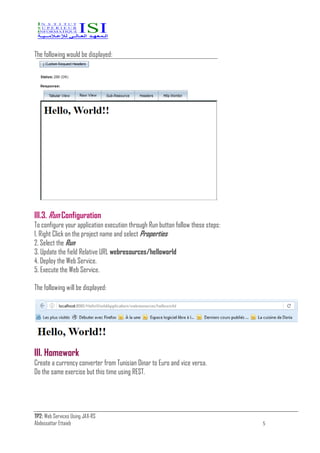
The following would be displayed:
III.3. Run Configuration
To configure your application execution through Run button follow these steps:
1. Right Click on the project name and select Properties
2. Select the Run
3. Update the field Relative URL webresources/helloworld
4. Deploy the Web Service.
5. Execute the Web Service.
The following will be displayed:
III. Homework
Create a currency converter from Tunisian Dinar to Euro and vice versa.
Do the same exercise but this time using REST.

E-Services TP2 ISI by Ettaieb Abdessattar

  • 1.
    TP2: Web ServicesUsing JAX-RS Abdessattar Ettaieb 1 TP2 : Web Services using JAX-RS Goal: Create a Web Service using JAX-RS and Netbeans ARS1/2 – 2016/2017
  • 2.
    TP2: Web ServicesUsing JAX-RS Abdessattar Ettaieb 2 I. REST Web Services Type I.1. REST presentation REST (Representational State Transfer) is an architectural style based on Web standards and http protocol. It was presented the first time by Roy Fielding en 2000. Within a REST based architecture:  Resource: is a resource accessible through interfaces based on http standards  A REST server provides access to the resources and REST client that access and modify these resources.  Each resources must support http common operations  Resource is represented using text, xml, json etc. but, REST client can suggest specific representation through HTTP. I.2. http Methods Methods PUT, GET, POST and DELETE used in the architectures based on REST are:  GET defines the access in read mode to the resource  PUT creates a new resource  DELETE deletes a resource  POST updates/creates the resource II. JAX-RS Presentation JA-RS is a Java programming language API spec that provides support in creating web services according to the Representational State Transfer (REST) architectural pattern. JAX-RS uses annotations, introduced in Java SE 5, to simplify the development and deployment of web service clients and endpoints. III. First Application JAX-RS : Helloworld III.1. Création du service web To create a RESTful Web Service using NetBeans IDE and Glassfish you need to install and configure them first (done in the first TP1). Steps to create Helloworld application: 1. Open NetBeans IDE, Create a simple Web Application, name it HelloWorldApplication. 2. Right-Click on the project and select New -> RESTful Web Services from Patterns.  design pattern: Simple Root Resource  Package Name: helloWorld  Path : helloworld  Class Name : HelloWorld  MIME Type: text/html
  • 3.
    TP2: Web ServicesUsing JAX-RS Abdessattar Ettaieb 3 Your project would look like this: 3. In HelloWorld.java file, getHTML() method represents a query of type GET. Replace the //TODO line with the following: return "<html lang="en"><body><h1>Hello, World!!</body></h1></html>"; Your code would look like the following:
  • 4.
    TP2: Web ServicesUsing JAX-RS Abdessattar Ettaieb 4 III.2. Web Service Test To test the Web Service follow these steps: 1. Right-Click on the project name and select Test Restful Web Services. This form will open : 2. Select Web Test Client in Project, and then select the project HelloWorldApplication 3. The Web Browser will open: a. Select helloworld resource in the left panel. b. Select the method to test (in this case, it’s GET) c. Hit Test.
  • 5.
    TP2: Web ServicesUsing JAX-RS Abdessattar Ettaieb 5 The following would be displayed: III.3. Run Configuration To configure your application execution through Run button follow these steps: 1. Right Click on the project name and select Properties 2. Select the Run 3. Update the field Relative URL webresources/helloworld 4. Deploy the Web Service. 5. Execute the Web Service. The following will be displayed: III. Homework Create a currency converter from Tunisian Dinar to Euro and vice versa. Do the same exercise but this time using REST.