University of Polytechnics Romania , faculty of Computers and 
automatics 
PHD student Name : Salman Hussam 
PHD project title : “USING LOG FILES TO IMPROVE WORK EFFICIENCY “ 
The title that I will underline in this essay is : 
“Sending the data already 
gathered from the client to the 
Server.”
A) Introduction: 
as I believe that spending a lot of time at work is becoming a social 
problem , and people do not have time for family ,sport and other 
activities , I created “LOGGER” , it is a monitoring application for 
employees at work, it controls the time they spent on social media 
while they are at work , it is also an application that interfere with the 
user by sending alarm massages when it thinks it’s the need to and 
alarm the users to get back to work so they finish work early and go 
back to family/sports , social activities so there will be time for 
everything ! 
It seems obvious that the need to accurately measure time spent on 
different activities is paramount in order to efficiently manage one's life 
and business, yet there are very few tools that actually facilitate that. 
not only tools showing the time spent, but also analyzing the gathered 
data and combining information from as many sources and people as 
possible to allow for a scientific tracking of time. 
I will input here as data about statistics on how many hours people 
spend at work, how many are actually work, internet browsing habits, 
time used by people at home on computers, the lawsuits on employers 
not paying the time it takes for computers to boot up or for workers to 
prepare for work before actually performing it, ..etc 
On average, men spent seven more hours per week (39.7) in the 
workforce than women (32.8) in 2007. 
Between 1976 and 2007, the number of weekly hours declined for 
men and increased slightly for women. On average, in 2007, men
spent 60 minutes less at work, while women spent 18 minutes more at 
work than they did in before 2007 
B) I will be speaking in this essay about “ 
Sending the gatherd data to the Server “ : 
1.1 Several requirements surfaced in the analysis stage 
1.2 Analyzing Data 
1.3 Presenting information 
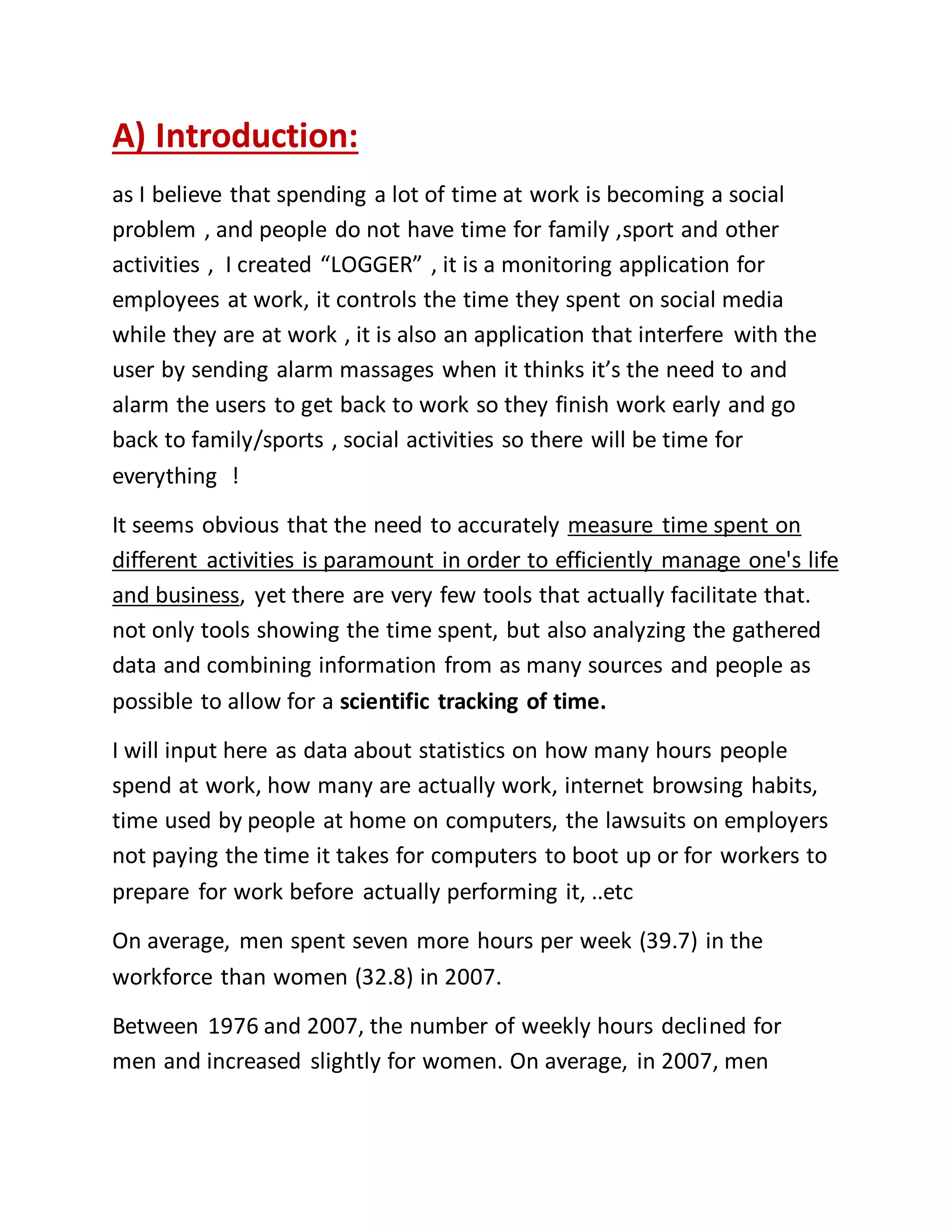
As a client-server application, the “Logger” is based on a communication interface 
between the two machines. This communication is highly required for the data 
recorded to be sent and stored on the server side. This is why, the communication 
method is very important. For this, I had to choose between a web service and a 
WCF service as a communication medium. The web service provides an efficient 
way of facilitating communication between applications, but it has limitations.
One major drawback is that the communication can happen only over HTTP 
(hypertext transfer protocol). Another one is that it provides simplex 
communication and there is no other way to have halp-duplex or even full-duplex 
communication. These are the main reasons that a “Logger” type application can’t 
use a web service for sending data to the server. ((Example of HTTP 
communication)) 
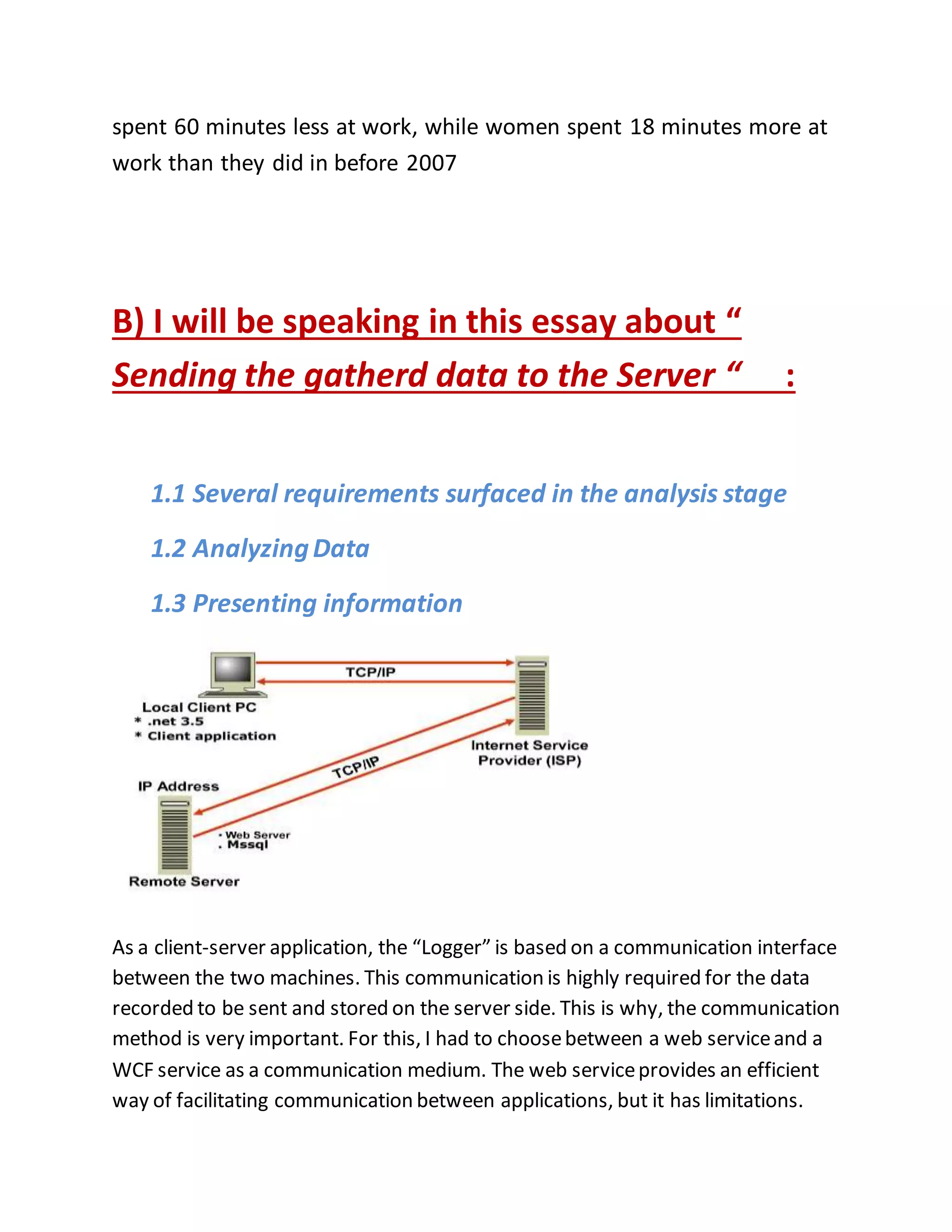
This image presents 
how the server 
receives the Client's 
requests and direct 
them to the other 
servers that handle 
this request depending 
on its Type 
But the Master server 
is the only one who 
Receives the information directly from client 
-------------------- 
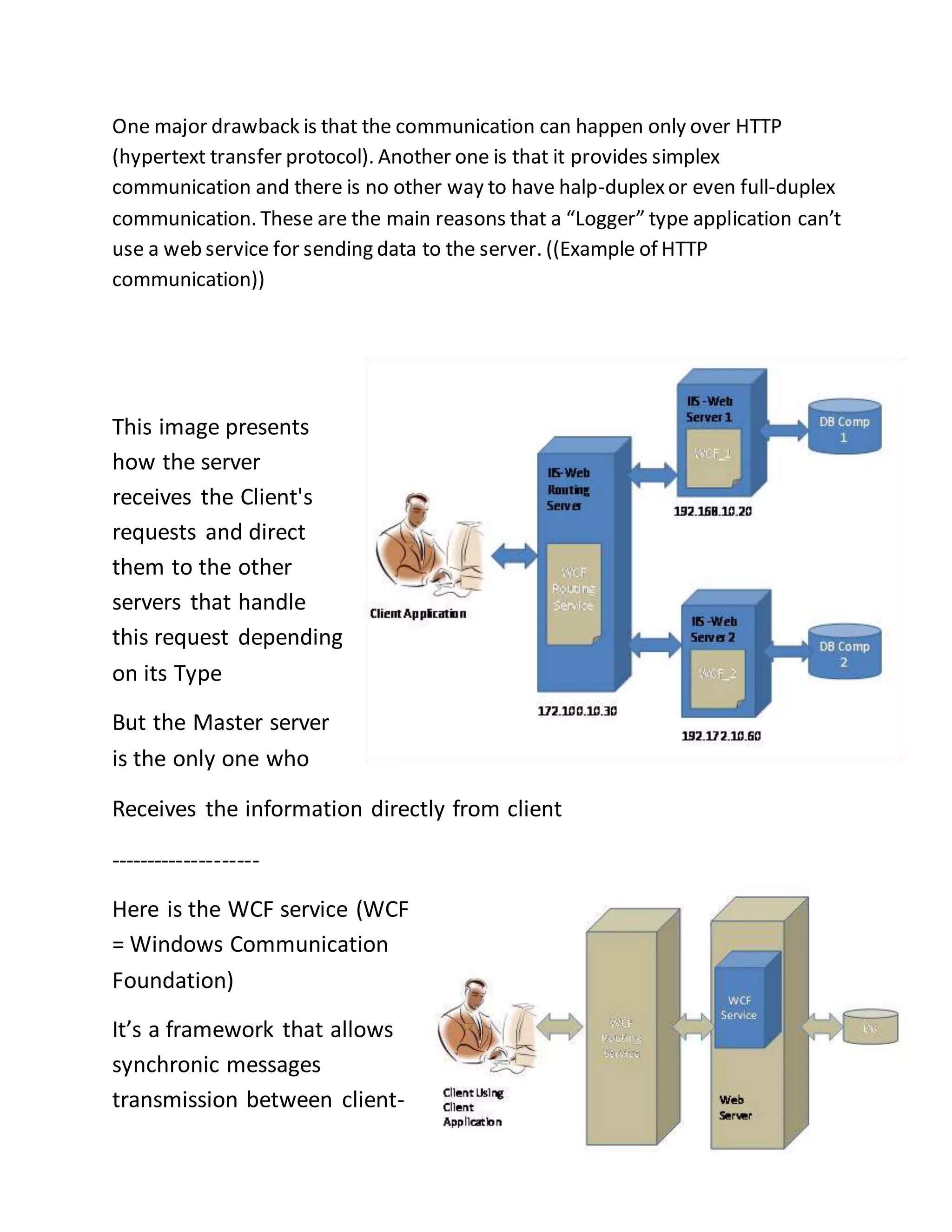
Here is the WCF service (WCF 
= Windows Communication 
Foundation) 
It’s a framework that allows 
synchronic messages 
transmission between client-
server ,  server-oriented  such that Client is not waiting any response 
message from server … 
The WCF (Wondows Communication Foundation), provides what web services 
don’t. WCF offers other protocols for data communication and even half/full 
duplex communication. By using WCF, we can define a communication service 
and setup and then configure it so we can use it via HTTP, TCP, IPC or even 
Message Queues. 
Another explanation of WCF is that it is a framework which was designed for 
developers who want to develop distributed service-oriented applications. The 
WCF is used by developers to create, host, consume and secure services by using 
the Microsoft platform. In this way, developers could concentrate on 
implementing theirs applications and not the communication environment with 
protocols and low level details. 
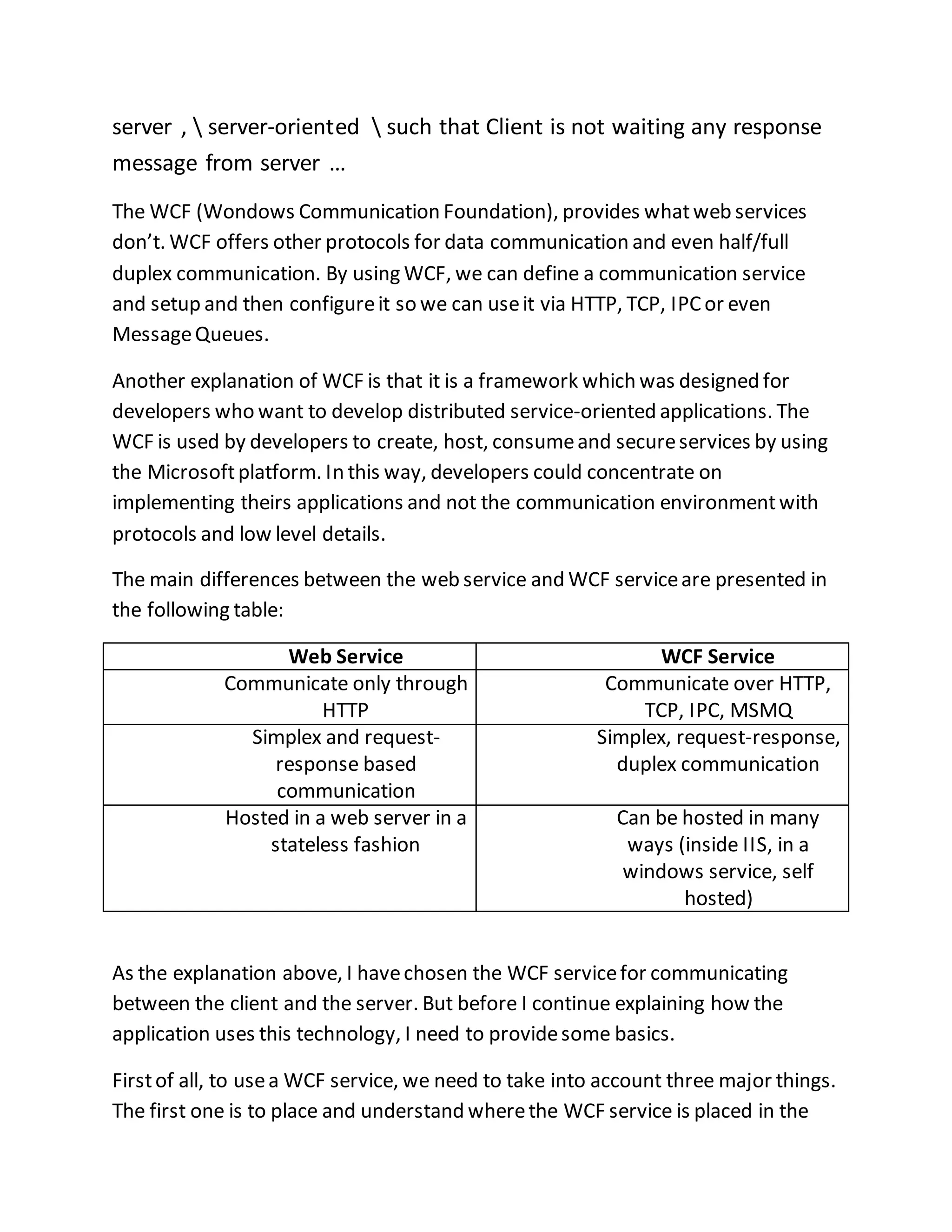
The main differences between the web service and WCF service are presented in 
the following table: 
Web Service WCF Service 
Communicate only through 
HTTP 
Communicate over HTTP, 
TCP, IPC, MSMQ 
Simplex and request-response 
based 
communication 
Simplex, request-response, 
duplex communication 
Hosted in a web server in a 
stateless fashion 
Can be hosted in many 
ways (inside IIS, in a 
windows service, self 
hosted) 
As the explanation above, I have chosen the WCF service for communicating 
between the client and the server. But before I continue explaining how the 
application uses this technology, I need to provide some basics. 
First of all, to use a WCF service, we need to take into account three major things. 
The first one is to place and understand where the WCF service is placed in the
perspective of the client. The second one is to provide access to the client 
thorough protocols and message formats. And the third one is to know what 
functionality the WCF service will provide to the client. 
After understanding and choosing the right options for the WCF service, one can 
start creating the communication between the client and the server. Because the 
WCF has the concept of endpoints, it will allow client applications to 
communicate with the WCF service. 
1.1 Several requirements surfaced in the analysis stage 
Now that the mechanisms to gathering data were perfected, it was just 
a matter of sending the data to the Server. 
* the connection must be authorized, meaning that not just anyone 
should be able to communicate with the server. 
- In the same time, there are considerations prohibiting the application 
to query the user for the proper credentials. 
* the data must be protected from “prying eyes”, meaning that it must 
be encrypted somehow. 
* the size of the package must be as small as possible, due to possible 
constraints on the network speed. 
- the data must take the form of a string, as the webservice uses XML to 
send it. 
As we mentioned above the data should be protected while sending , 
and send in a seccured environment , so One way of doing an 
authorized connection is to use an OAuth (Open Authorization). This
open standard provides a secure way to access a server’ resources on 
the behalf of a resource owner . 
This type of authentication is commonly used by major web sites like 
Google, Facebook and Twitter , so the users don’t have to worry about 
their access credentials being compromised. 
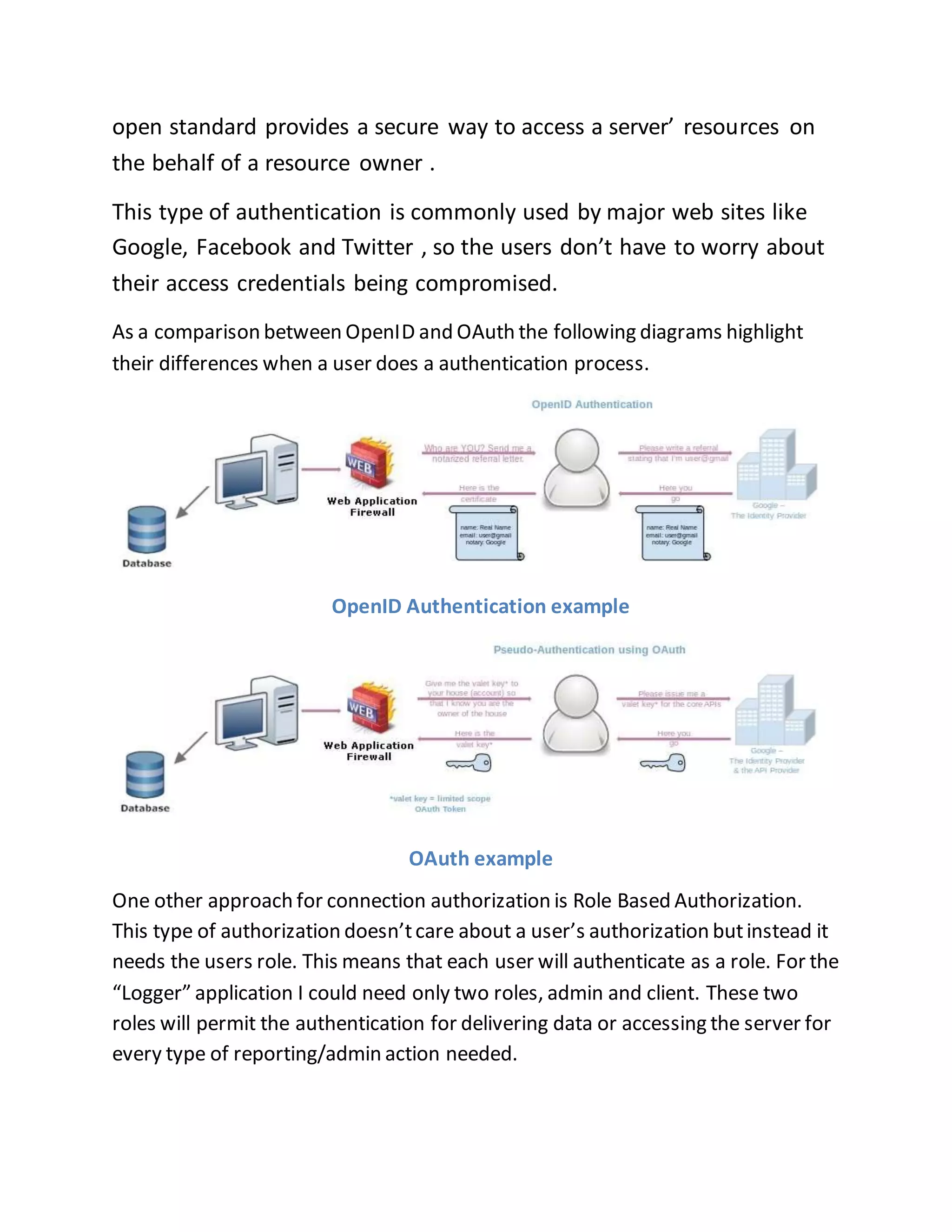
As a comparison between OpenID and OAuth the following diagrams highlight 
their differences when a user does a authentication process. 
OpenID Authentication example 
OAuth example 
One other approach for connection authorization is Role Based Authorization. 
This type of authorization doesn’t care about a user’s authorization but instead it 
needs the users role. This means that each user will authenticate as a role. For the 
“Logger” application I could need only two roles, admin and client. These two 
roles will permit the authentication for delivering data or accessing the server for 
every type of reporting/admin action needed.
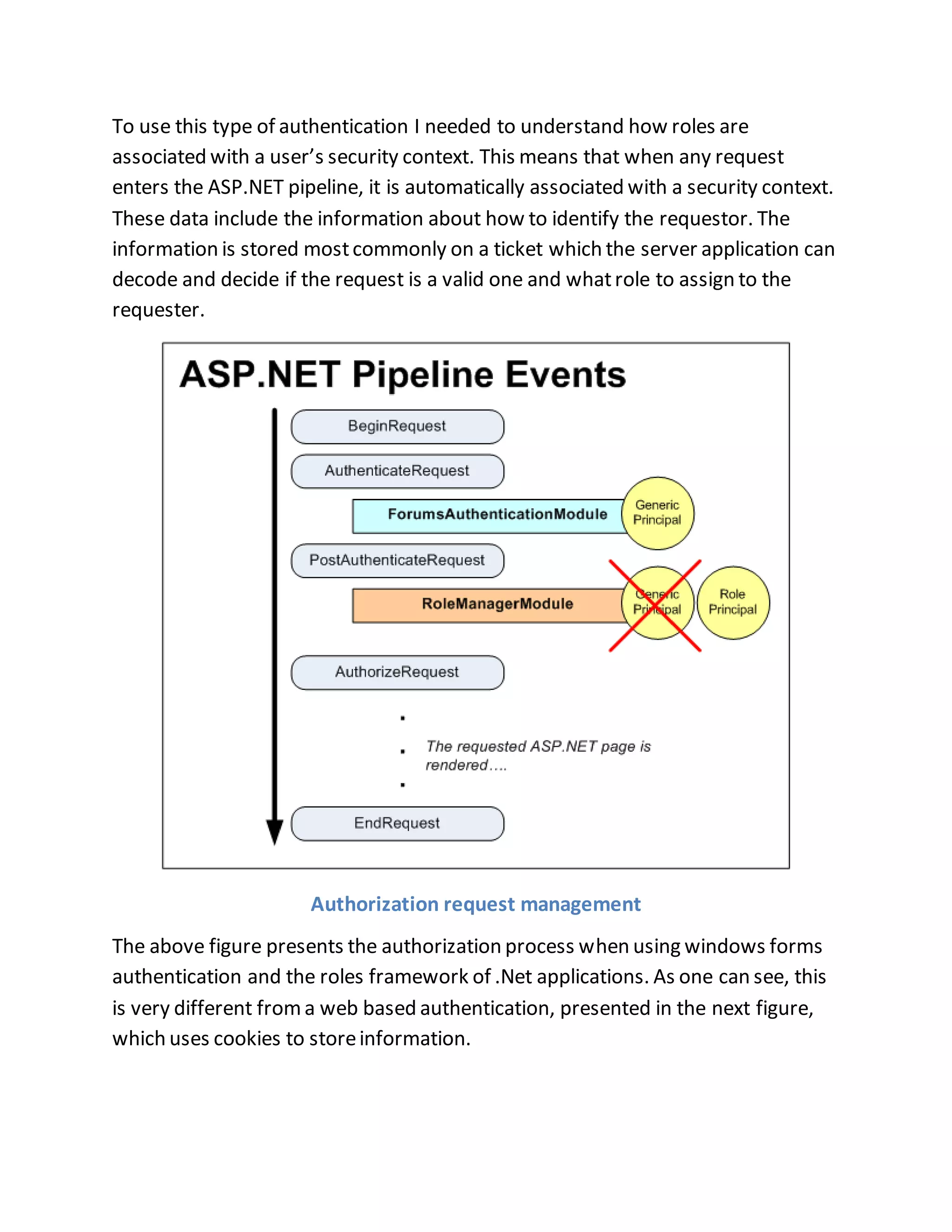
To use this type of authentication I needed to understand how roles are 
associated with a user’s security context. This means that when any request 
enters the ASP.NET pipeline, it is automatically associated with a security context. 
These data include the information about how to identify the requestor. The 
information is stored most commonly on a ticket which the server application can 
decode and decide if the request is a valid one and what role to assign to the 
requester. 
Authorization request management 
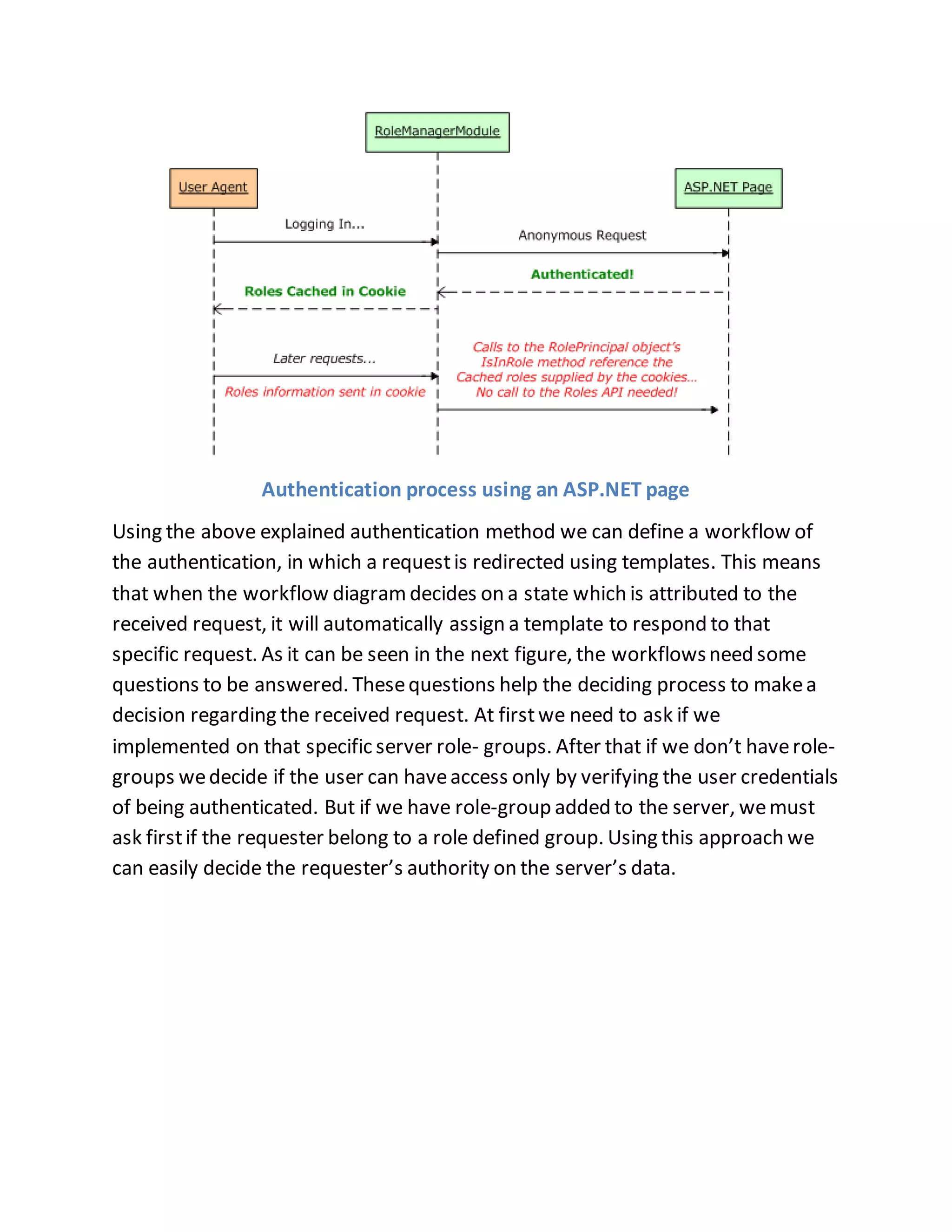
The above figure presents the authorization process when using windows forms 
authentication and the roles framework of .Net applications. As one can see, this 
is very different from a web based authentication, presented in the next figure, 
which uses cookies to store information.
Authentication process using an ASP.NET page 
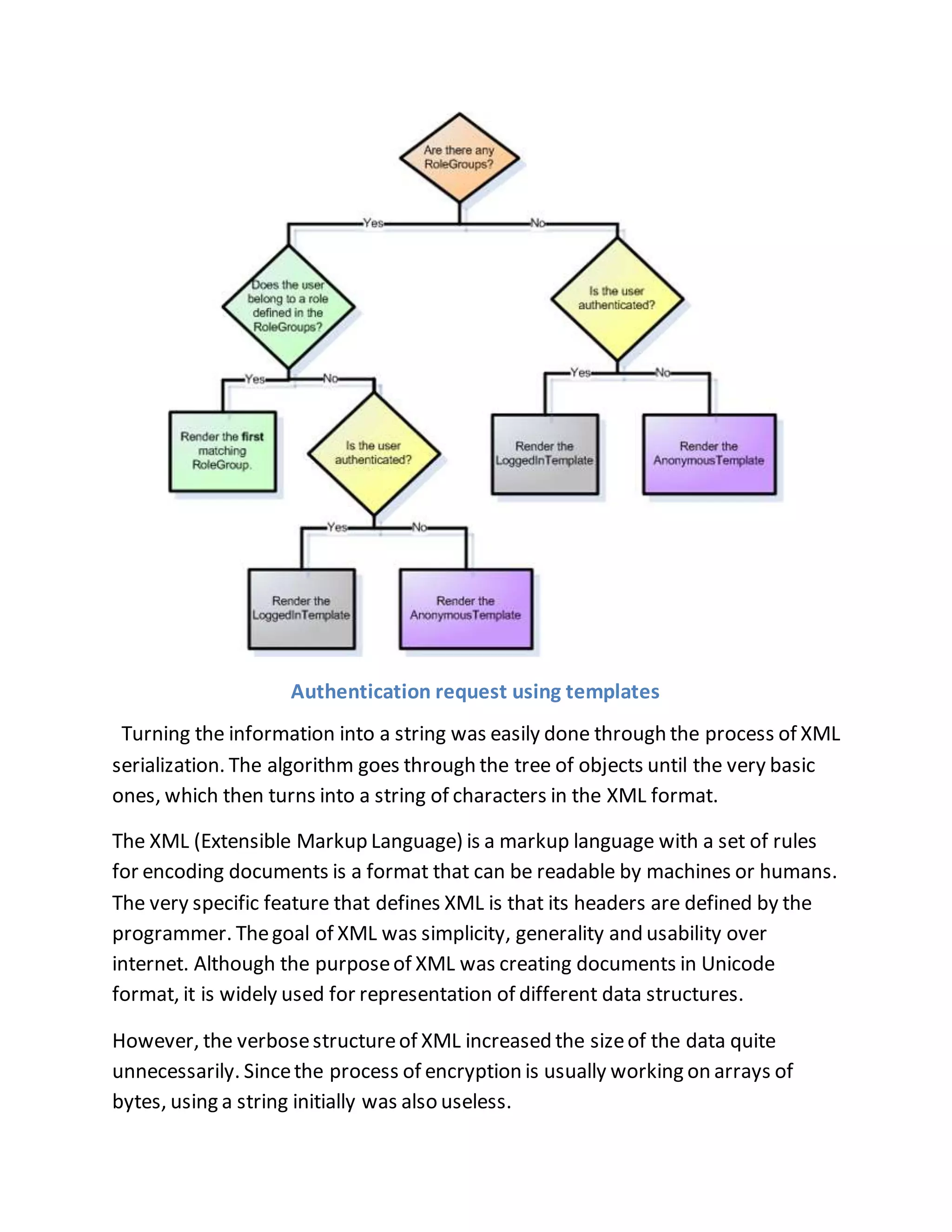
Using the above explained authentication method we can define a workflow of 
the authentication, in which a request is redirected using templates. This means 
that when the workflow diagram decides on a state which is attributed to the 
received request, it will automatically assign a template to respond to that 
specific request. As it can be seen in the next figure, the workflows need some 
questions to be answered. These questions help the deciding process to make a 
decision regarding the received request. At first we need to ask if we 
implemented on that specific server role- groups. After that if we don’t have role-groups 
we decide if the user can have access only by verifying the user credentials 
of being authenticated. But if we have role-group added to the server, we must 
ask first if the requester belong to a role defined group. Using this approach we 
can easily decide the requester’s authority on the server’s data.
Authentication request using templates 
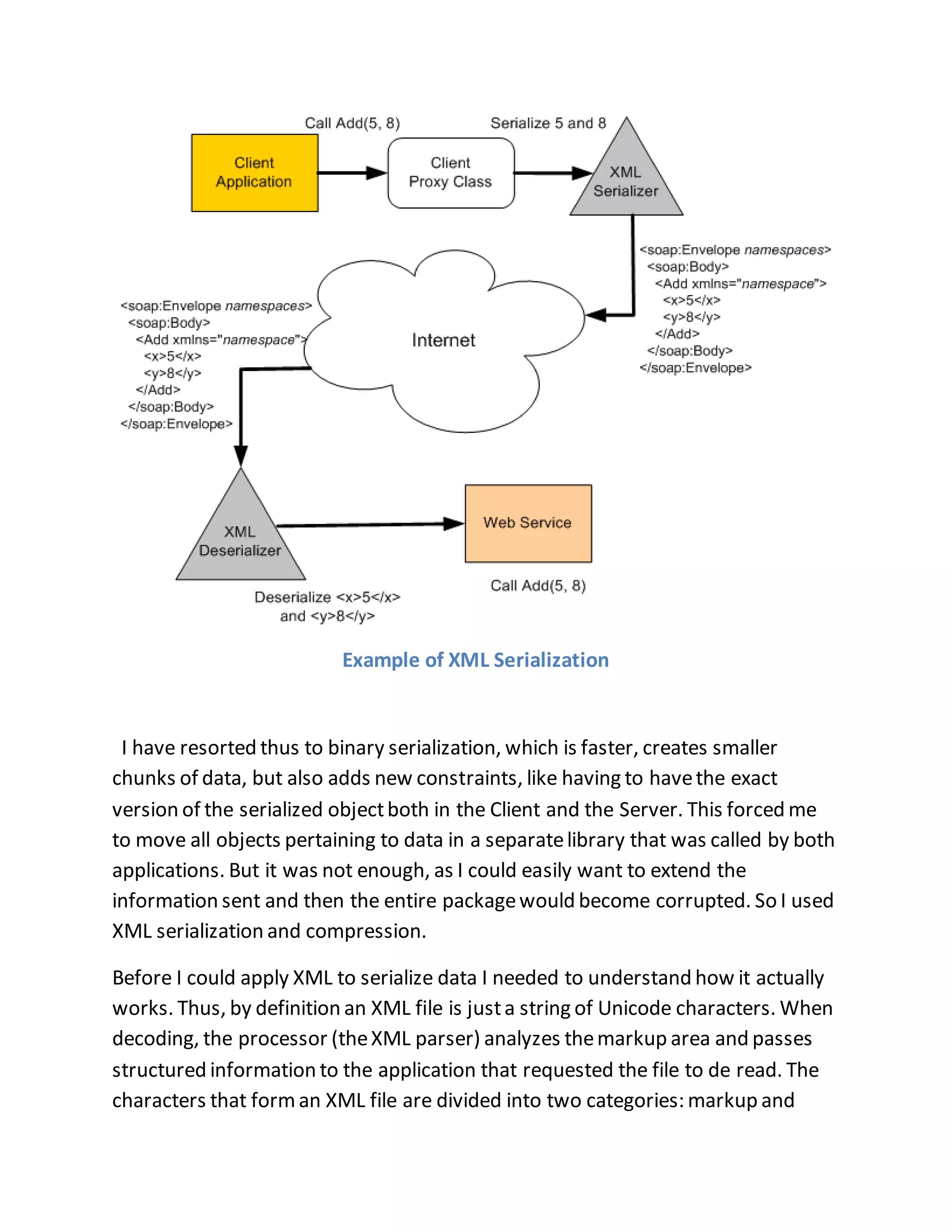
Turning the information into a string was easily done through the process of XML 
serialization. The algorithm goes through the tree of objects until the very basic 
ones, which then turns into a string of characters in the XML format. 
The XML (Extensible Markup Language) is a markup language with a set of rules 
for encoding documents is a format that can be readable by machines or humans. 
The very specific feature that defines XML is that its headers are defined by the 
programmer. The goal of XML was simplicity, generality and usability over 
internet. Although the purpose of XML was creating documents in Unicode 
format, it is widely used for representation of different data structures. 
However, the verbose structure of XML increased the size of the data quite 
unnecessarily. Since the process of encryption is usually working on arrays of 
bytes, using a string initially was also useless.
Example of XML Serialization 
I have resorted thus to binary serialization, which is faster, creates smaller 
chunks of data, but also adds new constraints, like having to have the exact 
version of the serialized object both in the Client and the Server. This forced me 
to move all objects pertaining to data in a separate library that was called by both 
applications. But it was not enough, as I could easily want to extend the 
information sent and then the entire package would become corrupted. So I used 
XML serialization and compression. 
Before I could apply XML to serialize data I needed to understand how it actually 
works. Thus, by definition an XML file is just a string of Unicode characters. When 
decoding, the processor (the XML parser) analyzes the markup area and passes 
structured information to the application that requested the file to de read. The 
characters that form an XML file are divided into two categories: markup and
content. The characters that form the markup area can be distinguished by the 
characters ‘<’ and ‘>’ that groups them, or even ‘&’ and ‘;’. The markup area that 
begins with ‘<’ and ends with ‘>’ are called tags and are of three types: start-tags, 
end-tags and empty-element tags. The elements of an XML file are marked by 
starting and ending tags, and can contain other tags that are called children tags 
and information. 
For my application, the XML encryption had to solve a few issues, one being that 
it must be hard enough against cracking, the other that it doesn't require too 
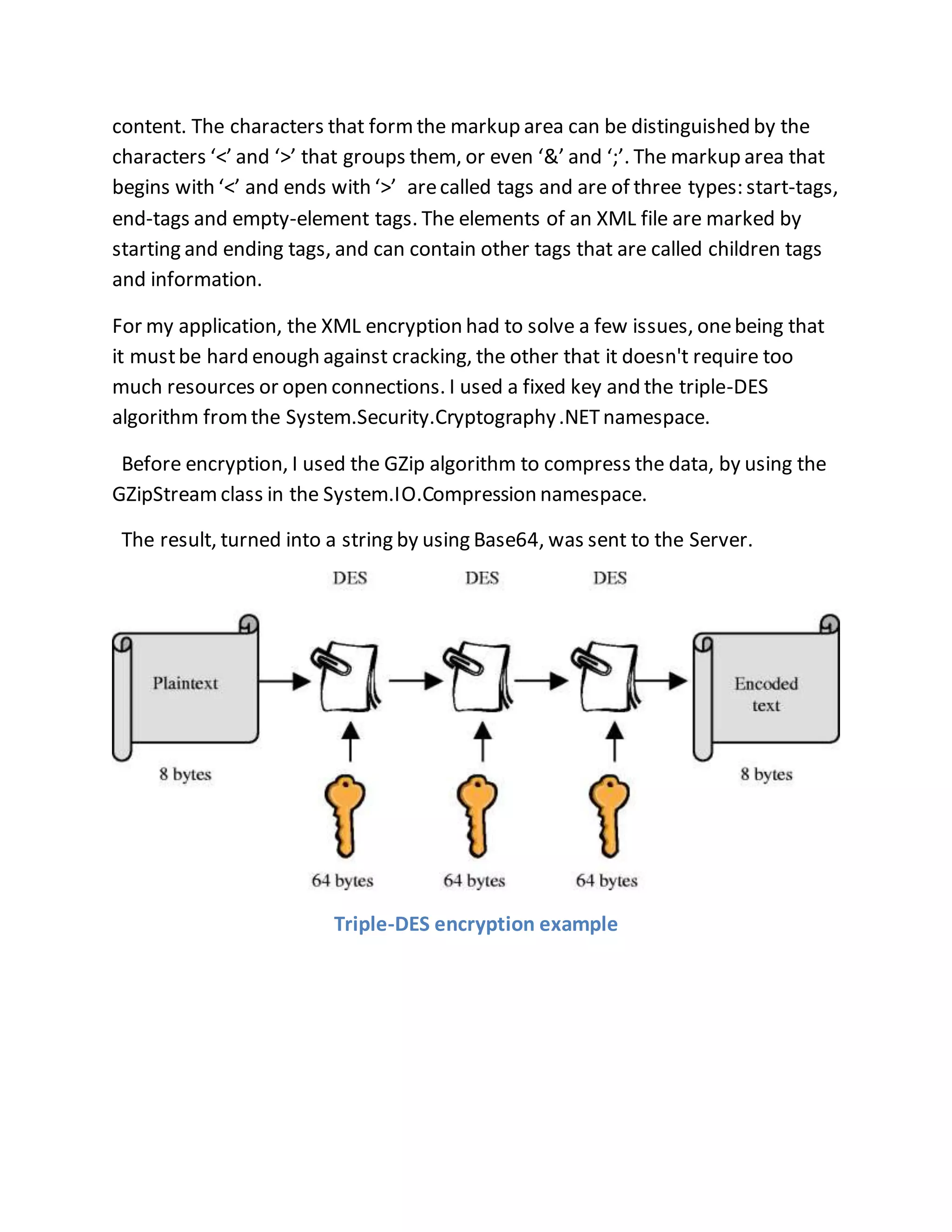
much resources or open connections. I used a fixed key and the triple-DES 
algorithm from the System.Security.Cryptography .NET namespace. 
Before encryption, I used the GZip algorithm to compress the data, by using the 
GZipStream class in the System.IO.Compression namespace. 
The result, turned into a string by using Base64, was sent to the Server. 
Triple-DES encryption example
1.2 Analyzing Data 
The tests have allowed for gathering a 
lot of data and it showed things that 
were not taken into account at the 
time the application was designed. 
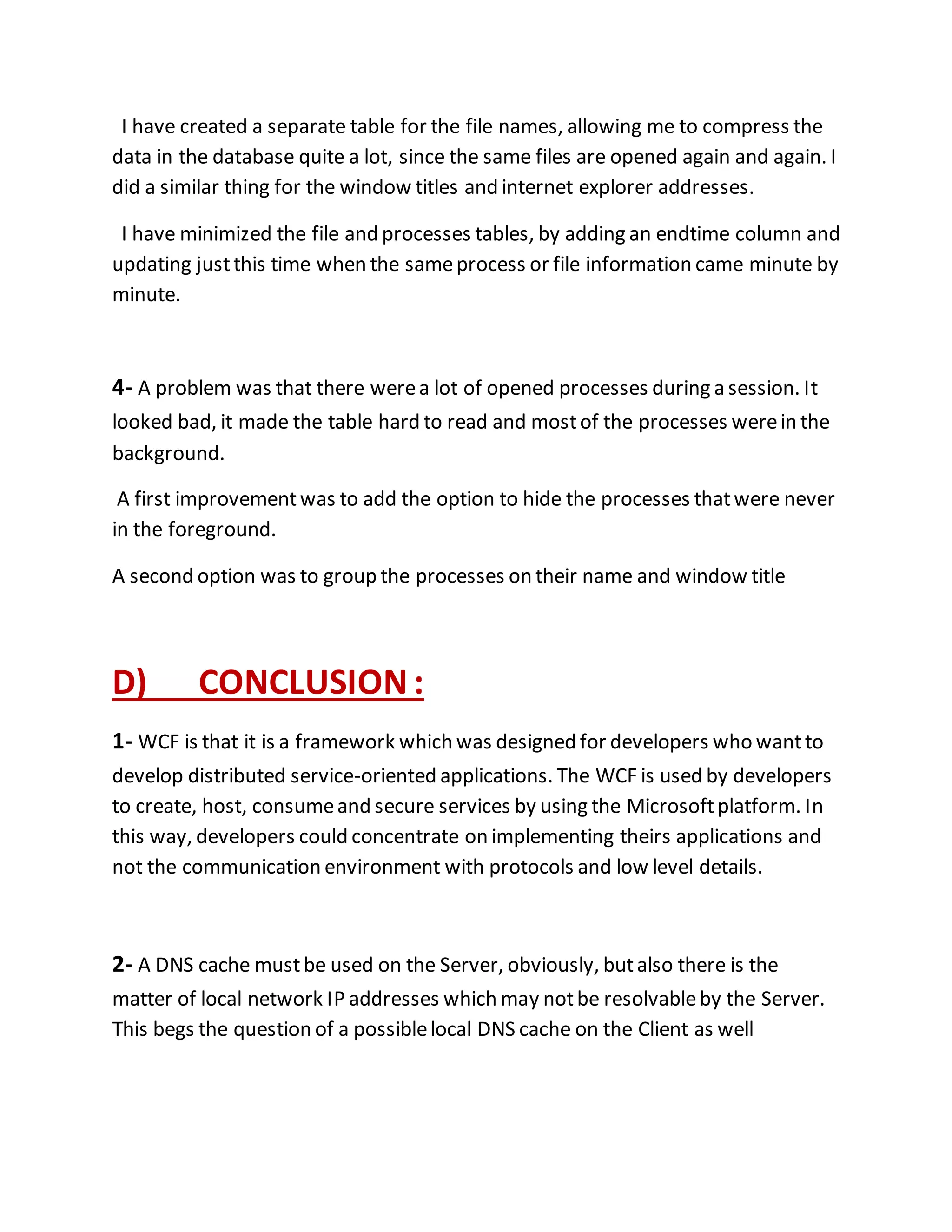
The kernel method that I had used to 
list the open files did not only show 
files, but all the file handles that were 
opened, including devices, registry 
keys and special internal kernel 
BaseNamedObjects 
Even for an idle computer, the number of such kernel files, temporary 
files or log files averages 700 , and can reach 4500 during intense usage. 
1.3 Presenting information 
A brilliant idea would be to Google the information. I mean, why not? 
Isn't Google a search engine for web pages, files and images? I could 
imitate the simple textual nature 
of the Google query engine and 
then allow the application to show 
links to different related 
information, But this is not 
database centric, but more 
focused on context and meaning. 
SO , 
I created a web-query-interface 
database centric, one that allows
to create customized queries on multi dimensional data. Like OnLine 
Analytical Processing . 
C) RESAULTS : 
1- I have tried to do the communication through HTTP but One major 
drawback is that it provides simplex communication and there is no other way to 
have halp-duplex or even full-duplex communication. These are the main reasons 
that a “Logger” type application can’t use a web service for sending data to the 
server so I used WCF service. 
2- With large sets of information like that, there is always a struggle between the 
speed of the inserting of data - which is better if data is not normalized or 
constrained in any way, Of course, I tried to satisfy both in the same time by 
adding as many indexes I could think of and then trying to insert lots of data and 
failing miserably. The highlight of this experiment was the prospective client 
calling furiously that all his computers are running slow. I had only added an SQL 
index to the open file table. 
The only solution was to create two storage spaces, one where the data would 
be dumped easily and another where it would be stored in a ready-to-read state. I 
also added to the web service an asynchronous process that made the transition 
in the background, organising the data from one store to the other 
3- It became quickly apparent that simply adding new file information to a file 
table was not going to work. Every minute a list of files was sent to the server and 
it was large. Moreover, the full path of the file changed is usually quite long. 
Processes also have the full path information of the file that started them.
I have created a separate table for the file names, allowing me to compress the 
data in the database quite a lot, since the same files are opened again and again. I 
did a similar thing for the window titles and internet explorer addresses. 
I have minimized the file and processes tables, by adding an endtime column and 
updating just this time when the same process or file information came minute by 
minute. 
4- A problem was that there were a lot of opened processes during a session. It 
looked bad, it made the table hard to read and most of the processes were in the 
background. 
A first improvement was to add the option to hide the processes that were never 
in the foreground. 
A second option was to group the processes on their name and window title 
D) CONCLUSION : 
1- WCF is that it is a framework which was designed for developers who want to 
develop distributed service-oriented applications. The WCF is used by developers 
to create, host, consume and secure services by using the Microsoft platform. In 
this way, developers could concentrate on implementing theirs applications and 
not the communication environment with protocols and low level details. 
2- A DNS cache must be used on the Server, obviously, but also there is the 
matter of local network IP addresses which may not be resolvable by the Server. 
This begs the question of a possible local DNS cache on the Client as well
3- We can be sure that the process ids are unique if the start time is constant so 
by grouping data by the start time of the “ Logger “ process , the integer uniquely 
identifying a process can not be duplicated anymore if the computer is restarted! 
4- I am convinced that a lot of information resides in the way people use the 
mouse. I believe one can infere emotional state and even personal identity from 
it. One could conceivably detect the usage of a computer for games from it, I 
didn’t attempt to find such algorithms in this study. 
THE END …

Sending the data already gathered from the client to the Server

  • 1.
    University of PolytechnicsRomania , faculty of Computers and automatics PHD student Name : Salman Hussam PHD project title : “USING LOG FILES TO IMPROVE WORK EFFICIENCY “ The title that I will underline in this essay is : “Sending the data already gathered from the client to the Server.”
  • 2.
    A) Introduction: asI believe that spending a lot of time at work is becoming a social problem , and people do not have time for family ,sport and other activities , I created “LOGGER” , it is a monitoring application for employees at work, it controls the time they spent on social media while they are at work , it is also an application that interfere with the user by sending alarm massages when it thinks it’s the need to and alarm the users to get back to work so they finish work early and go back to family/sports , social activities so there will be time for everything ! It seems obvious that the need to accurately measure time spent on different activities is paramount in order to efficiently manage one's life and business, yet there are very few tools that actually facilitate that. not only tools showing the time spent, but also analyzing the gathered data and combining information from as many sources and people as possible to allow for a scientific tracking of time. I will input here as data about statistics on how many hours people spend at work, how many are actually work, internet browsing habits, time used by people at home on computers, the lawsuits on employers not paying the time it takes for computers to boot up or for workers to prepare for work before actually performing it, ..etc On average, men spent seven more hours per week (39.7) in the workforce than women (32.8) in 2007. Between 1976 and 2007, the number of weekly hours declined for men and increased slightly for women. On average, in 2007, men
  • 3.
    spent 60 minutesless at work, while women spent 18 minutes more at work than they did in before 2007 B) I will be speaking in this essay about “ Sending the gatherd data to the Server “ : 1.1 Several requirements surfaced in the analysis stage 1.2 Analyzing Data 1.3 Presenting information As a client-server application, the “Logger” is based on a communication interface between the two machines. This communication is highly required for the data recorded to be sent and stored on the server side. This is why, the communication method is very important. For this, I had to choose between a web service and a WCF service as a communication medium. The web service provides an efficient way of facilitating communication between applications, but it has limitations.
  • 4.
    One major drawbackis that the communication can happen only over HTTP (hypertext transfer protocol). Another one is that it provides simplex communication and there is no other way to have halp-duplex or even full-duplex communication. These are the main reasons that a “Logger” type application can’t use a web service for sending data to the server. ((Example of HTTP communication)) This image presents how the server receives the Client's requests and direct them to the other servers that handle this request depending on its Type But the Master server is the only one who Receives the information directly from client -------------------- Here is the WCF service (WCF = Windows Communication Foundation) It’s a framework that allows synchronic messages transmission between client-
  • 5.
    server , server-oriented such that Client is not waiting any response message from server … The WCF (Wondows Communication Foundation), provides what web services don’t. WCF offers other protocols for data communication and even half/full duplex communication. By using WCF, we can define a communication service and setup and then configure it so we can use it via HTTP, TCP, IPC or even Message Queues. Another explanation of WCF is that it is a framework which was designed for developers who want to develop distributed service-oriented applications. The WCF is used by developers to create, host, consume and secure services by using the Microsoft platform. In this way, developers could concentrate on implementing theirs applications and not the communication environment with protocols and low level details. The main differences between the web service and WCF service are presented in the following table: Web Service WCF Service Communicate only through HTTP Communicate over HTTP, TCP, IPC, MSMQ Simplex and request-response based communication Simplex, request-response, duplex communication Hosted in a web server in a stateless fashion Can be hosted in many ways (inside IIS, in a windows service, self hosted) As the explanation above, I have chosen the WCF service for communicating between the client and the server. But before I continue explaining how the application uses this technology, I need to provide some basics. First of all, to use a WCF service, we need to take into account three major things. The first one is to place and understand where the WCF service is placed in the
  • 6.
    perspective of theclient. The second one is to provide access to the client thorough protocols and message formats. And the third one is to know what functionality the WCF service will provide to the client. After understanding and choosing the right options for the WCF service, one can start creating the communication between the client and the server. Because the WCF has the concept of endpoints, it will allow client applications to communicate with the WCF service. 1.1 Several requirements surfaced in the analysis stage Now that the mechanisms to gathering data were perfected, it was just a matter of sending the data to the Server. * the connection must be authorized, meaning that not just anyone should be able to communicate with the server. - In the same time, there are considerations prohibiting the application to query the user for the proper credentials. * the data must be protected from “prying eyes”, meaning that it must be encrypted somehow. * the size of the package must be as small as possible, due to possible constraints on the network speed. - the data must take the form of a string, as the webservice uses XML to send it. As we mentioned above the data should be protected while sending , and send in a seccured environment , so One way of doing an authorized connection is to use an OAuth (Open Authorization). This
  • 7.
    open standard providesa secure way to access a server’ resources on the behalf of a resource owner . This type of authentication is commonly used by major web sites like Google, Facebook and Twitter , so the users don’t have to worry about their access credentials being compromised. As a comparison between OpenID and OAuth the following diagrams highlight their differences when a user does a authentication process. OpenID Authentication example OAuth example One other approach for connection authorization is Role Based Authorization. This type of authorization doesn’t care about a user’s authorization but instead it needs the users role. This means that each user will authenticate as a role. For the “Logger” application I could need only two roles, admin and client. These two roles will permit the authentication for delivering data or accessing the server for every type of reporting/admin action needed.
  • 8.
    To use thistype of authentication I needed to understand how roles are associated with a user’s security context. This means that when any request enters the ASP.NET pipeline, it is automatically associated with a security context. These data include the information about how to identify the requestor. The information is stored most commonly on a ticket which the server application can decode and decide if the request is a valid one and what role to assign to the requester. Authorization request management The above figure presents the authorization process when using windows forms authentication and the roles framework of .Net applications. As one can see, this is very different from a web based authentication, presented in the next figure, which uses cookies to store information.
  • 9.
    Authentication process usingan ASP.NET page Using the above explained authentication method we can define a workflow of the authentication, in which a request is redirected using templates. This means that when the workflow diagram decides on a state which is attributed to the received request, it will automatically assign a template to respond to that specific request. As it can be seen in the next figure, the workflows need some questions to be answered. These questions help the deciding process to make a decision regarding the received request. At first we need to ask if we implemented on that specific server role- groups. After that if we don’t have role-groups we decide if the user can have access only by verifying the user credentials of being authenticated. But if we have role-group added to the server, we must ask first if the requester belong to a role defined group. Using this approach we can easily decide the requester’s authority on the server’s data.
  • 10.
    Authentication request usingtemplates Turning the information into a string was easily done through the process of XML serialization. The algorithm goes through the tree of objects until the very basic ones, which then turns into a string of characters in the XML format. The XML (Extensible Markup Language) is a markup language with a set of rules for encoding documents is a format that can be readable by machines or humans. The very specific feature that defines XML is that its headers are defined by the programmer. The goal of XML was simplicity, generality and usability over internet. Although the purpose of XML was creating documents in Unicode format, it is widely used for representation of different data structures. However, the verbose structure of XML increased the size of the data quite unnecessarily. Since the process of encryption is usually working on arrays of bytes, using a string initially was also useless.
  • 11.
    Example of XMLSerialization I have resorted thus to binary serialization, which is faster, creates smaller chunks of data, but also adds new constraints, like having to have the exact version of the serialized object both in the Client and the Server. This forced me to move all objects pertaining to data in a separate library that was called by both applications. But it was not enough, as I could easily want to extend the information sent and then the entire package would become corrupted. So I used XML serialization and compression. Before I could apply XML to serialize data I needed to understand how it actually works. Thus, by definition an XML file is just a string of Unicode characters. When decoding, the processor (the XML parser) analyzes the markup area and passes structured information to the application that requested the file to de read. The characters that form an XML file are divided into two categories: markup and
  • 12.
    content. The charactersthat form the markup area can be distinguished by the characters ‘<’ and ‘>’ that groups them, or even ‘&’ and ‘;’. The markup area that begins with ‘<’ and ends with ‘>’ are called tags and are of three types: start-tags, end-tags and empty-element tags. The elements of an XML file are marked by starting and ending tags, and can contain other tags that are called children tags and information. For my application, the XML encryption had to solve a few issues, one being that it must be hard enough against cracking, the other that it doesn't require too much resources or open connections. I used a fixed key and the triple-DES algorithm from the System.Security.Cryptography .NET namespace. Before encryption, I used the GZip algorithm to compress the data, by using the GZipStream class in the System.IO.Compression namespace. The result, turned into a string by using Base64, was sent to the Server. Triple-DES encryption example
  • 13.
    1.2 Analyzing Data The tests have allowed for gathering a lot of data and it showed things that were not taken into account at the time the application was designed. The kernel method that I had used to list the open files did not only show files, but all the file handles that were opened, including devices, registry keys and special internal kernel BaseNamedObjects Even for an idle computer, the number of such kernel files, temporary files or log files averages 700 , and can reach 4500 during intense usage. 1.3 Presenting information A brilliant idea would be to Google the information. I mean, why not? Isn't Google a search engine for web pages, files and images? I could imitate the simple textual nature of the Google query engine and then allow the application to show links to different related information, But this is not database centric, but more focused on context and meaning. SO , I created a web-query-interface database centric, one that allows
  • 14.
    to create customizedqueries on multi dimensional data. Like OnLine Analytical Processing . C) RESAULTS : 1- I have tried to do the communication through HTTP but One major drawback is that it provides simplex communication and there is no other way to have halp-duplex or even full-duplex communication. These are the main reasons that a “Logger” type application can’t use a web service for sending data to the server so I used WCF service. 2- With large sets of information like that, there is always a struggle between the speed of the inserting of data - which is better if data is not normalized or constrained in any way, Of course, I tried to satisfy both in the same time by adding as many indexes I could think of and then trying to insert lots of data and failing miserably. The highlight of this experiment was the prospective client calling furiously that all his computers are running slow. I had only added an SQL index to the open file table. The only solution was to create two storage spaces, one where the data would be dumped easily and another where it would be stored in a ready-to-read state. I also added to the web service an asynchronous process that made the transition in the background, organising the data from one store to the other 3- It became quickly apparent that simply adding new file information to a file table was not going to work. Every minute a list of files was sent to the server and it was large. Moreover, the full path of the file changed is usually quite long. Processes also have the full path information of the file that started them.
  • 15.
    I have createda separate table for the file names, allowing me to compress the data in the database quite a lot, since the same files are opened again and again. I did a similar thing for the window titles and internet explorer addresses. I have minimized the file and processes tables, by adding an endtime column and updating just this time when the same process or file information came minute by minute. 4- A problem was that there were a lot of opened processes during a session. It looked bad, it made the table hard to read and most of the processes were in the background. A first improvement was to add the option to hide the processes that were never in the foreground. A second option was to group the processes on their name and window title D) CONCLUSION : 1- WCF is that it is a framework which was designed for developers who want to develop distributed service-oriented applications. The WCF is used by developers to create, host, consume and secure services by using the Microsoft platform. In this way, developers could concentrate on implementing theirs applications and not the communication environment with protocols and low level details. 2- A DNS cache must be used on the Server, obviously, but also there is the matter of local network IP addresses which may not be resolvable by the Server. This begs the question of a possible local DNS cache on the Client as well
  • 16.
    3- We canbe sure that the process ids are unique if the start time is constant so by grouping data by the start time of the “ Logger “ process , the integer uniquely identifying a process can not be duplicated anymore if the computer is restarted! 4- I am convinced that a lot of information resides in the way people use the mouse. I believe one can infere emotional state and even personal identity from it. One could conceivably detect the usage of a computer for games from it, I didn’t attempt to find such algorithms in this study. THE END …