ESBapps
Location Intelligent, Mobile and Cloud based Enterprise
                   Business Solution
What's ESBapps ?
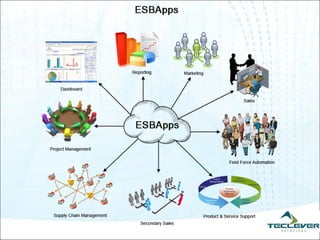
 ESBapps, solution where you can manage your complete business. You can Track,
   Monitor and Control
     Sales/ Purchases
     Inventory
     Activity
     HR
     Field Employee
 Dashboard approach, Analyze and Forecast your Business based on widgets on
  Dashboard. Widgets can be customized to the customer’s Requirements.
 Locations Intelligent, Track your Sales/ Service/ Support/ Delivery etc. Employee. Which
  not only increases company's productivity, but also helps your employee planning there
  route optimization.
 Location based search, Assign a task on the move, Search for the people in 'x' Km
  radius in 'x' Location to attend a new Lead/ Service.
Mobile app, Alerts and Reports
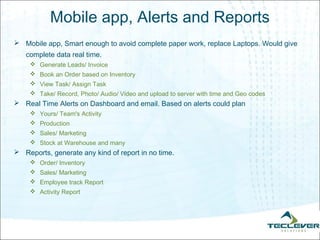
 Mobile app, Smart enough to avoid complete paper work, replace Laptops. Would give
   complete data real time.
     Generate Leads/ Invoice
     Book an Order based on Inventory
     View Task/ Assign Task
     Take/ Record, Photo/ Audio/ Video and upload to server with time and Geo codes
 Real Time Alerts on Dashboard and email. Based on alerts could plan
     Yours/ Team's Activity
     Production
     Sales/ Marketing
     Stock at Warehouse and many 
 Reports, generate any kind of report in no time.
     Order/ Inventory
     Sales/ Marketing
     Employee track Report
     Activity Report
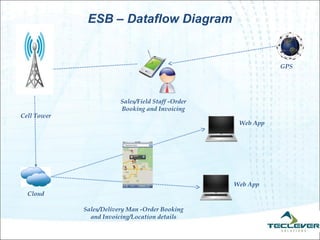
ESB – Dataflow Diagram


                                                               GPS


                         Sales/Field Staff -Order
                         Booking and Invoicing
Cell Tower
                                                     Web App


                                                    Web App
  Cloud

             Sales/Delivery Man -Order Booking
               and Invoicing/Location details
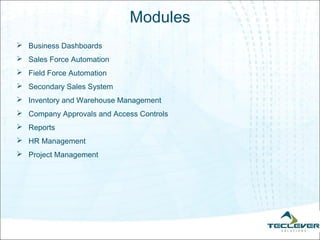
Modules
 Business Dashboards
 Sales Force Automation
 Field Force Automation
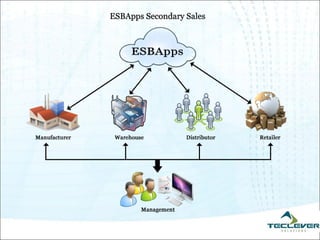
 Secondary Sales System
 Inventory and Warehouse Management
 Company Approvals and Access Controls
 Reports
 HR Management
 Project Management
Business Dashboard
 When you are driving down the road, a quick glance at your car's dashboard gives you a
   lot of information. In an instant, you know how fast you're going, how much fuel you have
   remaining and whether the engine is overheating.
 Why not have a business dashboard? You can drive your company by using the
   information on your business dashboard
 What is a dashboard and how does it work
     Dashboards are easier ways to access information within large data sets and to analyze that
       information in hopes of managing performance, making better decisions and lowering overall
       costs.
     Organizations can choose charts, graphs, maps and almost any visualization imaginable to use
       within their dashboards
     Each organization will have its own business needs and corporate culture, identifying the proper
       metrics, providing the right level of detail to end users, and making sure the information is timely
       are all aspects that should be considered  irrespective of the type of dashboard being deployed. 
Sales Force Automation
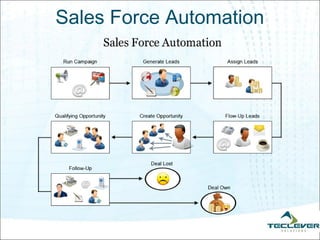
 Sales force automation (SFA) is a program that automates business tasks such as
    inventory control, sales processing, and tracking of customer interactions, as well as
    analyzing sales forecasts and performance


   Automate Routine Sales Activities and Increase Productivity
 Avoid Duplication of Work
 Access your data Anywhere, Anytime
 Go-Green: Avoid Paper
 Assign and Track activity to Sales Team, Sales Managers and track tasks at team
    levels, individual levels and at target levels
 Extend Sales Team Operations to their Mobile, avoid expensive laptops
Sales Force Automation
Field Force Automation
 System
    Tracking the Position of Sales/Delivery Employees on MAP in Near Real Time
    Defining the Landmark / Customer Place / Zone on Map – Alerts based on violation of the
     same
    Dealer wise – Monitoring Groups
    Company Level Calendar setup for Personal, Automatic Reporting based on Calendar and
     Leave
    Quick response time to Customer
 Reports
      Tracking
      Back Tracking - last 30 days (Configurable)
      Submit of Photographs and Audio from mobile
      Submit On Duty/Off Duty
 Alerts
      No movement for a Pre Defined time
      Mobile Switch off
      Press Alarm Button –Send SMScall and Blinking Status on Map
      Update InformationFeedback from Field
      Violation of Zones setup
Secondary Sales System- Advantages
 Better Demand and Supply Forecast
 Improved Supply Chain Management & Production Planning
 Reduce Inventory Holding Time
 Cuts down the time spent on Manual Reporting by Sales Team so that core sales
    activities are enhanced
      Sale team spends important working hours maintaining reports, which could have been spent
         on business generation.
         Non Accurate report
   Avoids channel conflict and data misappropriation
 Avoid unexpected product launch delay due to poor market analysis forecast
 Measures sales performance of retailers and sales representatives
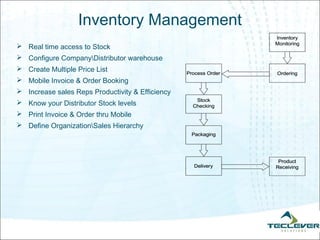
Inventory Management
 Real time access to Stock
 Configure CompanyDistributor warehouse
 Create Multiple Price List
 Mobile Invoice & Order Booking
 Increase sales Reps Productivity & Efficiency
 Know your Distributor Stock levels
 Print Invoice & Order thru Mobile
 Define OrganizationSales Hierarchy
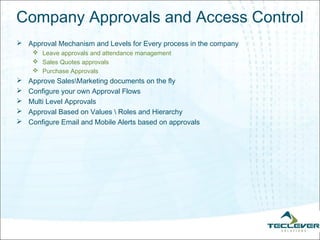
Company Approvals and Access Control
 Approval Mechanism and Levels for Every process in the company
      Leave approvals and attendance management
      Sales Quotes approvals
      Purchase Approvals
   Approve SalesMarketing documents on the fly
   Configure your own Approval Flows
   Multi Level Approvals
   Approval Based on Values  Roles and Hierarchy
   Configure Email and Mobile Alerts based on approvals
ESB Advantages
   Proactive System - Driven by Dashboards, Alerts and Tasks
   Keeps the employees on the tasks by constantly pushing data to be on their toes
   Built in Location Intelligence
   Mobile based Application Extensions
      Data Access In the Field
      Less Cost of Ownership
      Automatic Data Collection
   Extensible and Scalable Solution for future business data
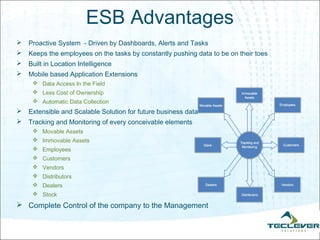
   Tracking and Monitoring of every conceivable elements
      Movable Assets
      Immovable Assets
      Employees
      Customers
      Vendors
      Distributors
      Dealers
      Stock
 Complete Control of the company to the Management
ESB – Product Look & Feel-Web
            Client
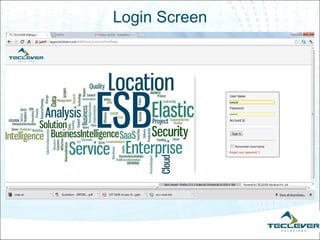
Login Screen
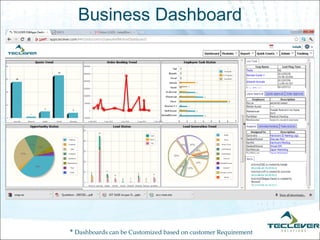
Business Dashboard


* Dashboards can be Customized based on customer Requirement
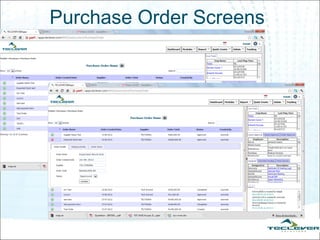
Purchase Order Screens
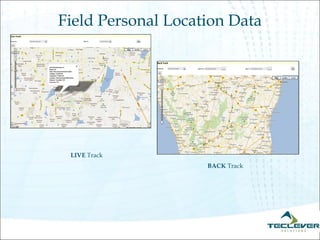
Field Personal Location Data


 LIVE Track
                    BACK Track
ESB – Product Look & Feel-Mobile
             Client
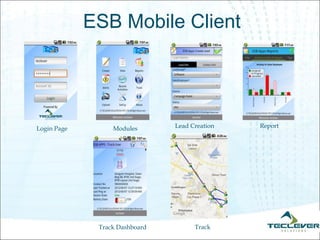
ESB Mobile Client


Login Page        Modules       Lead Creation   Report


              Track Dashboard         Track
Contact us
    info@teclever.com

Sri Lanka : +94 750 33 6008
  India : +91 92431 76459

      Thank you..!!

Esb apps v0.4.1ppt

  • 1.
    ESBapps Location Intelligent, Mobileand Cloud based Enterprise Business Solution
  • 2.
    What's ESBapps ? ESBapps, solution where you can manage your complete business. You can Track, Monitor and Control  Sales/ Purchases  Inventory  Activity  HR  Field Employee  Dashboard approach, Analyze and Forecast your Business based on widgets on Dashboard. Widgets can be customized to the customer’s Requirements.  Locations Intelligent, Track your Sales/ Service/ Support/ Delivery etc. Employee. Which not only increases company's productivity, but also helps your employee planning there route optimization.  Location based search, Assign a task on the move, Search for the people in 'x' Km radius in 'x' Location to attend a new Lead/ Service.
  • 4.
    Mobile app, Alertsand Reports  Mobile app, Smart enough to avoid complete paper work, replace Laptops. Would give complete data real time.  Generate Leads/ Invoice  Book an Order based on Inventory  View Task/ Assign Task  Take/ Record, Photo/ Audio/ Video and upload to server with time and Geo codes  Real Time Alerts on Dashboard and email. Based on alerts could plan  Yours/ Team's Activity  Production  Sales/ Marketing  Stock at Warehouse and many   Reports, generate any kind of report in no time.  Order/ Inventory  Sales/ Marketing  Employee track Report  Activity Report
  • 5.
    ESB – DataflowDiagram GPS Sales/Field Staff -Order Booking and Invoicing Cell Tower Web App Web App Cloud Sales/Delivery Man -Order Booking and Invoicing/Location details
  • 6.
    Modules  Business Dashboards Sales Force Automation  Field Force Automation  Secondary Sales System  Inventory and Warehouse Management  Company Approvals and Access Controls  Reports  HR Management  Project Management
  • 7.
    Business Dashboard  Whenyou are driving down the road, a quick glance at your car's dashboard gives you a lot of information. In an instant, you know how fast you're going, how much fuel you have remaining and whether the engine is overheating.  Why not have a business dashboard? You can drive your company by using the information on your business dashboard  What is a dashboard and how does it work  Dashboards are easier ways to access information within large data sets and to analyze that information in hopes of managing performance, making better decisions and lowering overall costs.  Organizations can choose charts, graphs, maps and almost any visualization imaginable to use within their dashboards  Each organization will have its own business needs and corporate culture, identifying the proper metrics, providing the right level of detail to end users, and making sure the information is timely are all aspects that should be considered  irrespective of the type of dashboard being deployed. 
  • 8.
    Sales Force Automation Sales force automation (SFA) is a program that automates business tasks such as inventory control, sales processing, and tracking of customer interactions, as well as analyzing sales forecasts and performance  Automate Routine Sales Activities and Increase Productivity  Avoid Duplication of Work  Access your data Anywhere, Anytime  Go-Green: Avoid Paper  Assign and Track activity to Sales Team, Sales Managers and track tasks at team levels, individual levels and at target levels  Extend Sales Team Operations to their Mobile, avoid expensive laptops
  • 9.
  • 10.
    Field Force Automation System  Tracking the Position of Sales/Delivery Employees on MAP in Near Real Time  Defining the Landmark / Customer Place / Zone on Map – Alerts based on violation of the same  Dealer wise – Monitoring Groups  Company Level Calendar setup for Personal, Automatic Reporting based on Calendar and Leave  Quick response time to Customer  Reports  Tracking  Back Tracking - last 30 days (Configurable)  Submit of Photographs and Audio from mobile  Submit On Duty/Off Duty  Alerts  No movement for a Pre Defined time  Mobile Switch off  Press Alarm Button –Send SMScall and Blinking Status on Map  Update InformationFeedback from Field  Violation of Zones setup
  • 11.
    Secondary Sales System-Advantages  Better Demand and Supply Forecast  Improved Supply Chain Management & Production Planning  Reduce Inventory Holding Time  Cuts down the time spent on Manual Reporting by Sales Team so that core sales activities are enhanced  Sale team spends important working hours maintaining reports, which could have been spent on business generation.  Non Accurate report  Avoids channel conflict and data misappropriation  Avoid unexpected product launch delay due to poor market analysis forecast  Measures sales performance of retailers and sales representatives
  • 13.
    Inventory Management  Realtime access to Stock  Configure CompanyDistributor warehouse  Create Multiple Price List  Mobile Invoice & Order Booking  Increase sales Reps Productivity & Efficiency  Know your Distributor Stock levels  Print Invoice & Order thru Mobile  Define OrganizationSales Hierarchy
  • 14.
    Company Approvals andAccess Control  Approval Mechanism and Levels for Every process in the company  Leave approvals and attendance management  Sales Quotes approvals  Purchase Approvals  Approve SalesMarketing documents on the fly  Configure your own Approval Flows  Multi Level Approvals  Approval Based on Values Roles and Hierarchy  Configure Email and Mobile Alerts based on approvals
  • 15.
    ESB Advantages  Proactive System - Driven by Dashboards, Alerts and Tasks  Keeps the employees on the tasks by constantly pushing data to be on their toes  Built in Location Intelligence  Mobile based Application Extensions  Data Access In the Field  Less Cost of Ownership  Automatic Data Collection  Extensible and Scalable Solution for future business data  Tracking and Monitoring of every conceivable elements  Movable Assets  Immovable Assets  Employees  Customers  Vendors  Distributors  Dealers  Stock  Complete Control of the company to the Management
  • 16.
    ESB – ProductLook & Feel-Web Client
  • 17.
  • 18.
    Business Dashboard * Dashboardscan be Customized based on customer Requirement
  • 19.
  • 20.
    Field Personal LocationData LIVE Track BACK Track
  • 21.
    ESB – ProductLook & Feel-Mobile Client
  • 22.
    ESB Mobile Client LoginPage Modules Lead Creation Report Track Dashboard Track
  • 23.
    Contact us info@teclever.com Sri Lanka : +94 750 33 6008 India : +91 92431 76459 Thank you..!!