ePortfolios
              for Higher Education
                   July 31, 2012


Don Presant
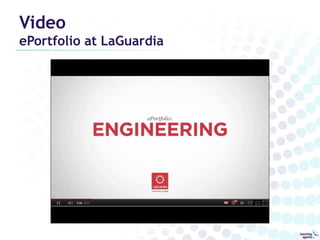
Video
ePortfolio at LaGuardia
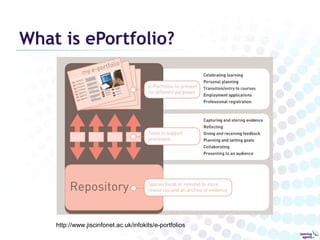
What is ePortfolio?


    http://www.jiscinfonet.ac.uk/infokits/e-portfolios
Personal Planning and Learning
Online Locker, Interactive Workbook
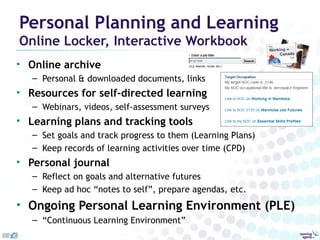
• Online archive
   – Personal & downloaded documents, links
• Resources for self-directed learning
   – Webinars, videos, self-assessment surveys
• Learning plans and tracking tools
   – Set goals and track progress to them (Learning Plans)
   – Keep records of learning activities over time (CPD)
• Personal journal
   – Reflect on goals and alternative futures
   – Keep ad hoc “notes to self”, prepare agendas, etc.
• Ongoing Personal Learning Environment (PLE)
   – “Continuous Learning Environment”
Employment & related purposes
Demonstrate, assess & improve Human Capital
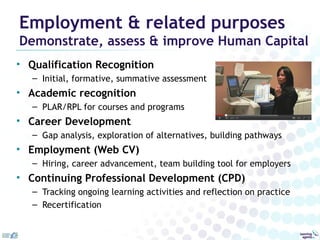
• Qualification Recognition
   – Initial, formative, summative assessment
• Academic recognition
   – PLAR/RPL for courses and programs
• Career Development
   – Gap analysis, exploration of alternatives, building pathways
• Employment (Web CV)
   – Hiring, career advancement, team building tool for employers
• Continuing Professional Development (CPD)
   – Tracking ongoing learning activities and reflection on practice
   – Recertification
ePortfolios & Higher Education
Points of Convergence
• Institution/Program admission
  – Assessment, gap training
• Undergraduate learning
  – First year general studies
  – Course specific/program wide
  – Work experience, internships
• Capstone
  – Graduate Attributes
  – Employability (“School to work”)
• Continuing Education/ Professional Development
• Personal Learning Environment
Benefits

• Supports undergraduate learning
  – Embedded learning activities
• Holistic view of the graduate
  – Diverse evidence aligned to graduate outcomes
  – Interdisciplinary, lifewide
• Supports professional identity development
  – Scaffolded reflection
• Ongoing professional development tool
  – Personal Learning Environment
Affordances of “e”
•   Information Management capabilities
     – Collecting, archiving, making different versions
•   Easy sharing
     – “One to many”, digital copies, links to specific pages
•   Collaboration
     – Easy to add comments, edit, mentor, coach
     – Can integrate with other ICT systems
•   Measurement
     – Link to frameworks, rubrics, track learning over time
•   Easy to illustrate/demonstrate with multimedia
     – Pictures, PowerPoint, Audio, Video
•   Integration with Internet skills
     – Online research: documents, networks
     – Internet literacy
     – Builds personal network, grooms digital identity
Evidence
to demonstrate outcomes
• Authentic Evidence or Documentation
  – Artefacts: assignments, reports, presentations, videos,
    images of objects, etc.
• Explanations or Reflections
  – Curation of evidence, learning journals, etc.
• Validation Entries or Observations (3rd party)
  – Evaluations, testimonials, etc.

…more than scanned documents – images, videos,
 audio clips, forum entries, newsfeeds, etc.
Success Factors
Student perspective
•   Watch the frame of reference
    – Emphasize “internal” (personal values & interests) over “external”
      (expectations of employers & recruiters)
•   Focus on learning, not just assessment
    – PLE, lifelong companion, personal narrative
    – Private, shared and public space
•   Start early and monitor progress
•   Emphasize content over technology
•   Opportunities for peer interaction
    – Peer review, brainstorming, portfolio buddies, presenting portfolios
•   Take small steps with lots of scaffolding
    – Simple tasks to begin, provide examples
    – Provide technical and content support and feedback
•   Eat your own dog food (i.e. build your own eportfolio)
Success Factors
Organizational perspective
• Burning platform
  – Program outcomes, impact on accreditation
• Principles of change management
  – Accelerating vs. accepting the maxim: “change
    happens one retirement at a time”
• Faculty portfolios (“eportfolio is good for you”)
  – Graduate portfolios
  – Hiring Portfolios
  – Continuing Professional Development
• Department portfolio to support accreditation
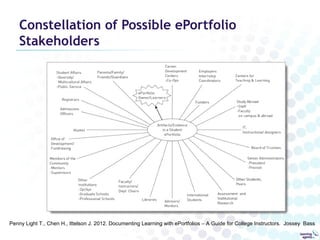
Constellation of Possible ePortfolio
    Stakeholders


Penny Light T., Chen H., Ittelson J. 2012. Documenting Learning with ePortfolios – A Guide for College Instructors. Jossey Bass
Don Presant
   don@learningagents.ca
careerportfolio.mb.ca


Link to the support page
  for this presentation:
bit.ly/eP4HigherEd

ePortfolios for Higher Education

  • 1.
    ePortfolios for Higher Education July 31, 2012 Don Presant
  • 2.
  • 3.
    What is ePortfolio? http://www.jiscinfonet.ac.uk/infokits/e-portfolios
  • 4.
    Personal Planning andLearning Online Locker, Interactive Workbook • Online archive – Personal & downloaded documents, links • Resources for self-directed learning – Webinars, videos, self-assessment surveys • Learning plans and tracking tools – Set goals and track progress to them (Learning Plans) – Keep records of learning activities over time (CPD) • Personal journal – Reflect on goals and alternative futures – Keep ad hoc “notes to self”, prepare agendas, etc. • Ongoing Personal Learning Environment (PLE) – “Continuous Learning Environment”
  • 5.
    Employment & relatedpurposes Demonstrate, assess & improve Human Capital • Qualification Recognition – Initial, formative, summative assessment • Academic recognition – PLAR/RPL for courses and programs • Career Development – Gap analysis, exploration of alternatives, building pathways • Employment (Web CV) – Hiring, career advancement, team building tool for employers • Continuing Professional Development (CPD) – Tracking ongoing learning activities and reflection on practice – Recertification
  • 6.
    ePortfolios & HigherEducation Points of Convergence • Institution/Program admission – Assessment, gap training • Undergraduate learning – First year general studies – Course specific/program wide – Work experience, internships • Capstone – Graduate Attributes – Employability (“School to work”) • Continuing Education/ Professional Development • Personal Learning Environment
  • 7.
    Benefits • Supports undergraduatelearning – Embedded learning activities • Holistic view of the graduate – Diverse evidence aligned to graduate outcomes – Interdisciplinary, lifewide • Supports professional identity development – Scaffolded reflection • Ongoing professional development tool – Personal Learning Environment
  • 8.
    Affordances of “e” • Information Management capabilities – Collecting, archiving, making different versions • Easy sharing – “One to many”, digital copies, links to specific pages • Collaboration – Easy to add comments, edit, mentor, coach – Can integrate with other ICT systems • Measurement – Link to frameworks, rubrics, track learning over time • Easy to illustrate/demonstrate with multimedia – Pictures, PowerPoint, Audio, Video • Integration with Internet skills – Online research: documents, networks – Internet literacy – Builds personal network, grooms digital identity
  • 9.
    Evidence to demonstrate outcomes •Authentic Evidence or Documentation – Artefacts: assignments, reports, presentations, videos, images of objects, etc. • Explanations or Reflections – Curation of evidence, learning journals, etc. • Validation Entries or Observations (3rd party) – Evaluations, testimonials, etc. …more than scanned documents – images, videos, audio clips, forum entries, newsfeeds, etc.
  • 10.
    Success Factors Student perspective • Watch the frame of reference – Emphasize “internal” (personal values & interests) over “external” (expectations of employers & recruiters) • Focus on learning, not just assessment – PLE, lifelong companion, personal narrative – Private, shared and public space • Start early and monitor progress • Emphasize content over technology • Opportunities for peer interaction – Peer review, brainstorming, portfolio buddies, presenting portfolios • Take small steps with lots of scaffolding – Simple tasks to begin, provide examples – Provide technical and content support and feedback • Eat your own dog food (i.e. build your own eportfolio)
  • 11.
    Success Factors Organizational perspective •Burning platform – Program outcomes, impact on accreditation • Principles of change management – Accelerating vs. accepting the maxim: “change happens one retirement at a time” • Faculty portfolios (“eportfolio is good for you”) – Graduate portfolios – Hiring Portfolios – Continuing Professional Development • Department portfolio to support accreditation
  • 12.
    Constellation of PossibleePortfolio Stakeholders Penny Light T., Chen H., Ittelson J. 2012. Documenting Learning with ePortfolios – A Guide for College Instructors. Jossey Bass
  • 13.
    Don Presant don@learningagents.ca careerportfolio.mb.ca Link to the support page for this presentation: bit.ly/eP4HigherEd

Editor's Notes

  • #3 QUICK NOTES Collection of your work thru your college life – you learn from your experiences Flexible, revisable, reviewable Learn who they are what they can do, focus on their growth and present to outside audiences EG: Mech 101 – model of bridge Easy to use, learn in 10-15 minutes Students express selves in their portfolios – look and feel – very important Education, projects , course internships, jobs.. Documented, archived work – analyze back and plan forward Keep track of progress – improvement in writing, calculus, etc. Keep work stored in one place, helps make a resume (and for interview), help move to a new college Holistic picture of who you are, what you’re interested in – career, extracurricular, - and how well you did your work Use portfolio to present selves to help transition (to new school, job, etc.)
  • #9 Organizational ITC systems: LMS, corporate eRecruitment, HR systems and Job Banks
  • #11 Frame of Reference: Matt Elliot and Jennifer Turns Simple tasks to begin: enter profile information, annotate artefact Prompts for reflection, structured reflection