
Message-Driven Beans
                      1
By: Abdalla Mahmoud


Contents
            Message-Driven Beans ........................................................................ 1
             Contents ........................................................................................... 1
             1. Introduction ................................................................................... 3
             2. Synchronous vs. Asynchronous Messaging ......................................... 3
             3. The Need for Messaging................................................................... 4
             4. Java Messaging Service ................................................................... 4
               4.1. JMS Elements ........................................................................... 5
                 4.1.1. Messaging Server ................................................................ 5
                 4.1.2. Messaging Client.................................................................. 5
                   4.1.2.1. Producer ....................................................................... 0
                   4.1.2.2. Consumer ..................................................................... 0
                 4.1.3. Destination ......................................................................... 5
             5. Configuring a Destination................................................................. 6
               5.1. Topic Destination ...................................................................... 6
               5.2. Queue Destination ..................................................................... 6
             6. Message-Driven Beans (Consumer) ................................................... 7
               6.1. Consumer for Topic Destination................................................... 7
               6.2. Consumer for Queue Destination ................................................. 7
             7. JMS Application Client (Producer) ...................................................... 8
               7.1. Producer for Topic Destination .................................................... 8
               7.2. Producer for Queue Destination ................................................... 9


1. http://www.abdallamahmoud.com


                                                     1
2
1. Introduction
  The concept of messaging in computer science is very close to the real-world's concept.
Suppose the following situations:

     •   You   talk with your friend face to face.
     •   You   talk with your friend on cell phone.
     •   You   talk with your friend online.
     •   You   leave a written message for your friend with her mom.
     •   You   send an SMS to your friend.
     •   You   send a written mail to your friend.
     •   You   send an e-Mail to your friend.

In the first three situations, you are doing a conversation with your friend. A conversation is
really a way of sending messages to each others. There's a live contact between you and your
friend. In the later situations, you are also messaging your friend. However, there is no live
contact between you and your friend. In software design we call, the first case synchronous
messaging, the later case asynchronous messaging.


2. Synchronous vs. Asynchronous Messaging
   Synchronous messaging occurs when two parties are in touch, i.e. both are up. Receiver
processes messages instantaneously then sends a feedback to the sender to continue
functioning.

Asynchronous messaging occurs when two parties are not in touch, i.e. no party is required
to be up in the same time. Receiver processes messages whenever it receives it, and does
not send a feedback to the sender.


                                               3
3. The Need for Messaging
In software design, objects and components need to message each others, i.e. invoking each
others' services. Synchronous messaging naturally follows of method invocation. Objects and
components invoke each others' services via message passing. The message of the sender
includes the method signature and arguments to that method. The feedback of the receiver
includes the return value of that method.

In some cases, notably in distributed systems, asynchronous messaging should also be
supported. Examples of such cases where asynchronous messaging include:

     •   System or business errors reporting.
     •   System performance reports.
     •   Service activation queues.
     •   Business events tracking.
     •   Business dashboards.


4. Java Messaging Service
Java Messaging Service, or JMS, is an API for accessing enterprise asynchronous messaging
systems. A JMS-compliant messaging server typically implements the JMS API. Clients use
the JMS API to access the messaging service.


                                                4
4.1. JMS Elements

4.1.1. Messaging Server

The messaging server is responsible for directly receiving the message from the producer
client and routing it to the consumer client. The messaging server is provided by the Java EE
application server.

4.1.2. Messaging Client

A messaging client is either a sender to a message or a receiver to a message.
       4.1.2.1. Producer
       A messaging client sending a message. The messaging producer can be any Java
       EE enterprise component.

       4.1.2.2. Consumer
       A messaging client whose role is receiving messages. The messaging consumer in
       Java EE is a message-driven bean.


4.1.3. Destination

Messages are sent to logical destinations rather than physical destinations. The producer
and consumer do not know about each others. The producer sends the message to a logical
destination, where the consumer is registered to this logical destination. The messaging
server is responsible for routing messages sent to a specific destination to its registered
consumers.

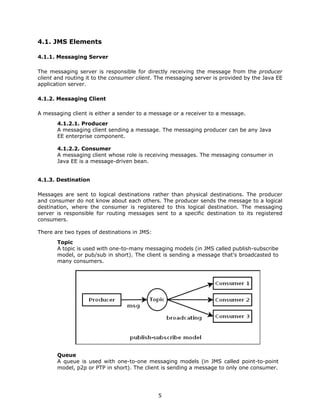
There are two types of destinations in JMS:
       Topic
       A topic is used with one-to-many messaging models (in JMS called publish-subscribe
       model, or pub/sub in short). The client is sending a message that's broadcasted to
       many consumers.


       Queue
       A queue is used with one-to-one messaging models (in JMS called point-to-point
       model, p2p or PTP in short). The client is sending a message to only one consumer.


                                              5
5. Configuring a Destination

5.1. Topic Destination

    • Create the following file in the JBoss deploy folder.
    • File name should ends with -service.xml
    • Text in bold is any given name to the topic destination.

file: deploymyTopic-service.xml
<server>
   <mbean code="org.jboss.mq.server.jmx.Topic"
      name="jboss.mq.destination:service=Topic,name=myTopic">
      <attribute name="JNDIName">myTopic</attribute>
      <depends optional-attribute-name="DestinationManager">
              jboss.mq:service=DestinationManager
      </depends>
   </mbean>
</server>


5.2. Queue Destination

    • Create the following file in the JBoss deploy folder.
    • File name should ends with -service.xml
    • Text in bold is any given name to the queue destination.

file: deploymyQueue-service.xml
<server>
   <mbean code="org.jboss.mq.server.jmx.Queue"
      name="jboss.mq.destination:service=Queue,name=myQueue">
      <attribute name="JNDIName">myQueue</attribute>
      <depends optional-attribute-name="DestinationManager">
           jboss.mq:service=DestinationManager
      </depends>


                                            6
</mbean>
</server>


6. Message-Driven Beans (Consumer)
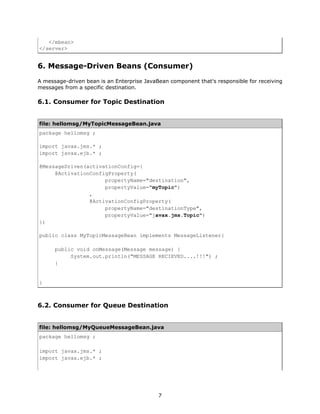
A message-driven bean is an Enterprise JavaBean component that's responsible for receiving
messages from a specific destination.

6.1. Consumer for Topic Destination


file: hellomsg/MyTopicMessageBean.java
package hellomsg ;

import javax.jms.* ;
import javax.ejb.* ;

@MessageDriven(activationConfig={
     @ActivationConfigProperty(
                     propertyName="destination",
                     propertyValue="myTopic")
                ,
                @ActivationConfigProperty(
                     propertyName="destinationType",
                     propertyValue="javax.jms.Topic")
})

public class MyTopicMessageBean implements MessageListener{

      public void onMessage(Message message) {
           System.out.println("MESSAGE RECIEVED....!!!") ;
      }


}


6.2. Consumer for Queue Destination


file: hellomsg/MyQueueMessageBean.java
package hellomsg ;

import javax.jms.* ;
import javax.ejb.* ;


                                            7
@MessageDriven(activationConfig={
     @ActivationConfigProperty(
                     propertyName="destination",
                     propertyValue="myQueue")
                ,
                @ActivationConfigProperty(
                     propertyName="destinationType",
                     propertyValue="javax.jms.Queue")
})

public class MyQueueMessageBean implements MessageListener{

      public void onMessage(Message message) {
           System.out.println("MESSAGE RECIEVED....!!!") ;
      }


}


7. JMS Application Client (Producer)

7.1. Producer for Topic Destination

file: TopicClient.java
import javax.naming.* ;
import javax.jms.* ;

public class TopicClient {

    public static void main(String[] args) {

      try {
         //1. get a reference to the JNDI environment
         InitialContext ctx = new InitialContext() ;
         //2. get a reference to the JMS connection factory
         ConnectionFactory cf = (ConnectionFactory)
ctx.lookup("ConnectionFactory") ;
         //3. get a reference to the destination topic
         Topic myTopic = (Topic) ctx.lookup("myTopic") ;
         //4. Create a connection with the provided JMS server
         Connection conn = cf.createConnection() ;
         //5. Create a thread of communication
         Session session = conn.createSession(false,
Session.AUTO_ACKNOWLEDGE) ;
         //6. Create a message producer object
         MessageProducer producer = session.createProducer(myTopic) ;
         //7. Create a text message
         TextMessage msg = session.createTextMessage() ;


                                      8
msg.setText("Hello from the Topic Client") ;
           //8. Send the message
           producer.send(msg) ;
           //9. Close the Connection
           conn.close() ;
        }
        catch(Exception e) {
           e.printStackTrace() ;
        }

    }

}


7.2. Producer for Queue Destination

file: QueueClient.java
import javax.naming.* ;
import javax.jms.* ;

public class QueueClient {

    public static void main(String[] args) {

      try {
         //1. get a reference to the JNDI environment
         InitialContext ctx = new InitialContext() ;
         //2. get a reference to the JMS connection factory
         ConnectionFactory cf = (ConnectionFactory)
ctx.lookup("ConnectionFactory") ;
         //3. get a reference to the destination queue
         Queue myQueue = (Queue) ctx.lookup("myQueue") ;
         //4. Create a connection with the provided JMS server
         Connection conn = cf.createConnection() ;
         //5. Create a thread of communication
         Session session = conn.createSession(false,
Session.AUTO_ACKNOWLEDGE) ;
         //6. Create a message producer object
         MessageProducer producer = session.createProducer(myQueue) ;
         //7. Create a text message
         TextMessage msg = session.createTextMessage() ;
         msg.setText("Hello from the Queue Client") ;
         //8. Send the message
         producer.send(msg) ;
         //9. Close the Connection
         conn.close() ;
      }
      catch(Exception e) {
         e.printStackTrace() ;
      }


                                       9
}

}


        10

Message Driven Beans (6)

  • 1.
    Message-Driven Beans 1 By: Abdalla Mahmoud Contents Message-Driven Beans ........................................................................ 1 Contents ........................................................................................... 1 1. Introduction ................................................................................... 3 2. Synchronous vs. Asynchronous Messaging ......................................... 3 3. The Need for Messaging................................................................... 4 4. Java Messaging Service ................................................................... 4 4.1. JMS Elements ........................................................................... 5 4.1.1. Messaging Server ................................................................ 5 4.1.2. Messaging Client.................................................................. 5 4.1.2.1. Producer ....................................................................... 0 4.1.2.2. Consumer ..................................................................... 0 4.1.3. Destination ......................................................................... 5 5. Configuring a Destination................................................................. 6 5.1. Topic Destination ...................................................................... 6 5.2. Queue Destination ..................................................................... 6 6. Message-Driven Beans (Consumer) ................................................... 7 6.1. Consumer for Topic Destination................................................... 7 6.2. Consumer for Queue Destination ................................................. 7 7. JMS Application Client (Producer) ...................................................... 8 7.1. Producer for Topic Destination .................................................... 8 7.2. Producer for Queue Destination ................................................... 9 1. http://www.abdallamahmoud.com 1
  • 2.
  • 3.
    1. Introduction The concept of messaging in computer science is very close to the real-world's concept. Suppose the following situations: • You talk with your friend face to face. • You talk with your friend on cell phone. • You talk with your friend online. • You leave a written message for your friend with her mom. • You send an SMS to your friend. • You send a written mail to your friend. • You send an e-Mail to your friend. In the first three situations, you are doing a conversation with your friend. A conversation is really a way of sending messages to each others. There's a live contact between you and your friend. In the later situations, you are also messaging your friend. However, there is no live contact between you and your friend. In software design we call, the first case synchronous messaging, the later case asynchronous messaging. 2. Synchronous vs. Asynchronous Messaging Synchronous messaging occurs when two parties are in touch, i.e. both are up. Receiver processes messages instantaneously then sends a feedback to the sender to continue functioning. Asynchronous messaging occurs when two parties are not in touch, i.e. no party is required to be up in the same time. Receiver processes messages whenever it receives it, and does not send a feedback to the sender. 3
  • 4.
    3. The Needfor Messaging In software design, objects and components need to message each others, i.e. invoking each others' services. Synchronous messaging naturally follows of method invocation. Objects and components invoke each others' services via message passing. The message of the sender includes the method signature and arguments to that method. The feedback of the receiver includes the return value of that method. In some cases, notably in distributed systems, asynchronous messaging should also be supported. Examples of such cases where asynchronous messaging include: • System or business errors reporting. • System performance reports. • Service activation queues. • Business events tracking. • Business dashboards. 4. Java Messaging Service Java Messaging Service, or JMS, is an API for accessing enterprise asynchronous messaging systems. A JMS-compliant messaging server typically implements the JMS API. Clients use the JMS API to access the messaging service. 4
  • 5.
    4.1. JMS Elements 4.1.1.Messaging Server The messaging server is responsible for directly receiving the message from the producer client and routing it to the consumer client. The messaging server is provided by the Java EE application server. 4.1.2. Messaging Client A messaging client is either a sender to a message or a receiver to a message. 4.1.2.1. Producer A messaging client sending a message. The messaging producer can be any Java EE enterprise component. 4.1.2.2. Consumer A messaging client whose role is receiving messages. The messaging consumer in Java EE is a message-driven bean. 4.1.3. Destination Messages are sent to logical destinations rather than physical destinations. The producer and consumer do not know about each others. The producer sends the message to a logical destination, where the consumer is registered to this logical destination. The messaging server is responsible for routing messages sent to a specific destination to its registered consumers. There are two types of destinations in JMS: Topic A topic is used with one-to-many messaging models (in JMS called publish-subscribe model, or pub/sub in short). The client is sending a message that's broadcasted to many consumers. Queue A queue is used with one-to-one messaging models (in JMS called point-to-point model, p2p or PTP in short). The client is sending a message to only one consumer. 5
  • 6.
    5. Configuring aDestination 5.1. Topic Destination • Create the following file in the JBoss deploy folder. • File name should ends with -service.xml • Text in bold is any given name to the topic destination. file: deploymyTopic-service.xml <server> <mbean code="org.jboss.mq.server.jmx.Topic" name="jboss.mq.destination:service=Topic,name=myTopic"> <attribute name="JNDIName">myTopic</attribute> <depends optional-attribute-name="DestinationManager"> jboss.mq:service=DestinationManager </depends> </mbean> </server> 5.2. Queue Destination • Create the following file in the JBoss deploy folder. • File name should ends with -service.xml • Text in bold is any given name to the queue destination. file: deploymyQueue-service.xml <server> <mbean code="org.jboss.mq.server.jmx.Queue" name="jboss.mq.destination:service=Queue,name=myQueue"> <attribute name="JNDIName">myQueue</attribute> <depends optional-attribute-name="DestinationManager"> jboss.mq:service=DestinationManager </depends> 6
  • 7.
    </mbean> </server> 6. Message-Driven Beans(Consumer) A message-driven bean is an Enterprise JavaBean component that's responsible for receiving messages from a specific destination. 6.1. Consumer for Topic Destination file: hellomsg/MyTopicMessageBean.java package hellomsg ; import javax.jms.* ; import javax.ejb.* ; @MessageDriven(activationConfig={ @ActivationConfigProperty( propertyName="destination", propertyValue="myTopic") , @ActivationConfigProperty( propertyName="destinationType", propertyValue="javax.jms.Topic") }) public class MyTopicMessageBean implements MessageListener{ public void onMessage(Message message) { System.out.println("MESSAGE RECIEVED....!!!") ; } } 6.2. Consumer for Queue Destination file: hellomsg/MyQueueMessageBean.java package hellomsg ; import javax.jms.* ; import javax.ejb.* ; 7
  • 8.
    @MessageDriven(activationConfig={ @ActivationConfigProperty( propertyName="destination", propertyValue="myQueue") , @ActivationConfigProperty( propertyName="destinationType", propertyValue="javax.jms.Queue") }) public class MyQueueMessageBean implements MessageListener{ public void onMessage(Message message) { System.out.println("MESSAGE RECIEVED....!!!") ; } } 7. JMS Application Client (Producer) 7.1. Producer for Topic Destination file: TopicClient.java import javax.naming.* ; import javax.jms.* ; public class TopicClient { public static void main(String[] args) { try { //1. get a reference to the JNDI environment InitialContext ctx = new InitialContext() ; //2. get a reference to the JMS connection factory ConnectionFactory cf = (ConnectionFactory) ctx.lookup("ConnectionFactory") ; //3. get a reference to the destination topic Topic myTopic = (Topic) ctx.lookup("myTopic") ; //4. Create a connection with the provided JMS server Connection conn = cf.createConnection() ; //5. Create a thread of communication Session session = conn.createSession(false, Session.AUTO_ACKNOWLEDGE) ; //6. Create a message producer object MessageProducer producer = session.createProducer(myTopic) ; //7. Create a text message TextMessage msg = session.createTextMessage() ; 8
  • 9.
    msg.setText("Hello from theTopic Client") ; //8. Send the message producer.send(msg) ; //9. Close the Connection conn.close() ; } catch(Exception e) { e.printStackTrace() ; } } } 7.2. Producer for Queue Destination file: QueueClient.java import javax.naming.* ; import javax.jms.* ; public class QueueClient { public static void main(String[] args) { try { //1. get a reference to the JNDI environment InitialContext ctx = new InitialContext() ; //2. get a reference to the JMS connection factory ConnectionFactory cf = (ConnectionFactory) ctx.lookup("ConnectionFactory") ; //3. get a reference to the destination queue Queue myQueue = (Queue) ctx.lookup("myQueue") ; //4. Create a connection with the provided JMS server Connection conn = cf.createConnection() ; //5. Create a thread of communication Session session = conn.createSession(false, Session.AUTO_ACKNOWLEDGE) ; //6. Create a message producer object MessageProducer producer = session.createProducer(myQueue) ; //7. Create a text message TextMessage msg = session.createTextMessage() ; msg.setText("Hello from the Queue Client") ; //8. Send the message producer.send(msg) ; //9. Close the Connection conn.close() ; } catch(Exception e) { e.printStackTrace() ; } 9
  • 10.
    } } 10