NSERVICEBUS

Inspired by: The course authored by Udi Dahan


                 Oslo/Fagdag
          Espen Ekvang/Tomas Jansson
                  01/03/2013
AGENDA                   2


• Intro
• Messaging and queues
• Testing
• SOA
• Saga
INTRO                                  3


• Fallacies of distributed computing
• Why NServiceBus?
• Bus vs. Broker
• Service orientation
• Excercises
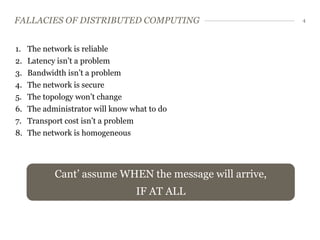
FALLACIES OF DISTRIBUTED COMPUTING                       4


1.   The network is reliable
2.   Latency isn’t a problem
3.   Bandwidth isn’t a problem
4.   The network is secure
5.   The topology won’t change
6.   The administrator will know what to do
7.   Transport cost isn’t a problem
8.   The network is homogeneous


            Cant’ assume WHEN the message will arrive,
                                  IF AT ALL
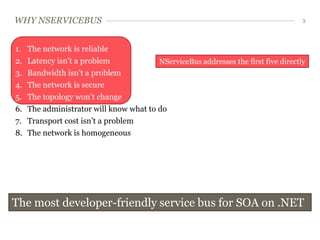
WHY NSERVICEBUS                                                                     5


1.   The network is reliable
2.   Latency isn’t a problem            NServiceBus addresses the first five directly
3.   Bandwidth isn’t a problem
4.   The network is secure
5.   The topology won’t change
6.   The administrator will know what to do
7.   Transport cost isn’t a problem
8.   The network is homogeneous


The most developer-friendly service bus for SOA on .NET
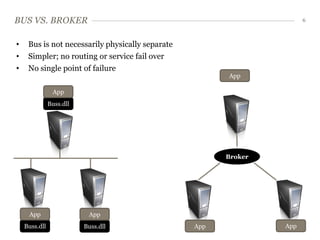
BUS VS. BROKER                                                         6


•    Bus is not necessarily physically separate
•    Simpler; no routing or service fail over
•    No single point of failure
                                                        App

                App
               Buss.dll


                                                        Broker


     App                   App
    Buss.dll              Buss.dll                App            App
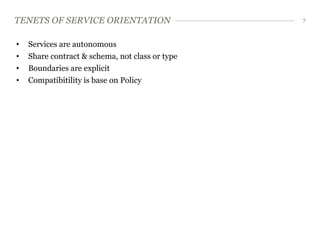
TENETS OF SERVICE ORIENTATION                    7


•   Services are autonomous
•   Share contract & schema, not class or type
•   Boundaries are explicit
•   Compatibitility is base on Policy
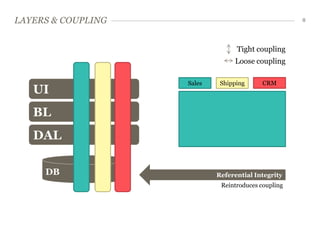
LAYERS & COUPLING                                    8


                                  Tight coupling
                                 Loose coupling

                    Sales    Shipping      CRM
   UI
   BL
   DAL

     DB                     Referential Integrity
                             Reintroduces coupling
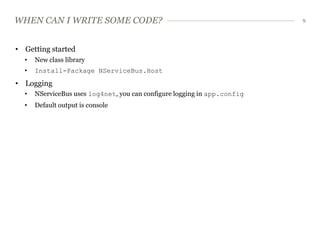
WHEN CAN I WRITE SOME CODE?                                               9


• Getting started
  •   New class library
  •   Install-Package NServiceBus.Host
• Logging
  •   NServiceBus uses log4net, you can configure logging in app.config
  •   Default output is console
EXERCISES     10


HELLO WORLD


LOGGING
MESSAGING AND QUEUES           11


• Store & forward
• Dangers of store & forward
• Request/Response
• Messaging and NServiceBus
• Exercises
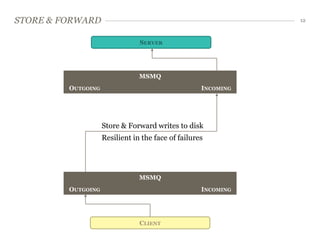
STORE & FORWARD                                                12


                                SERVER


                                MSMQ
         OUTGOING                                   INCOMING


                    Store & Forward writes to disk
                    Resilient in the face of failures


                                MSMQ
         OUTGOING                                   INCOMING


                                CLIENT
DANGERS OF STORE & FORWARD                                                           13


• If target is offline for an extended period of timemessages can fill up the disk
  • Can cause a server to crash


• Especially problematic in B2B integration
  • 1 MB/message, 100 message/sec = 6GB/minute


• Solution – discard messages after a while
  •   Use [TimeToBeReceived("00:01:00")] on the message definition
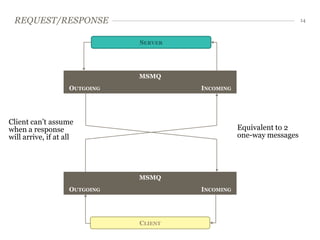
REQUEST/RESPONSE                                                     14


                               SERVER


                               MSMQ
                    OUTGOING            INCOMING


Client can’t assume
when a response                                    Equivalent to 2
will arrive, if at all                             one-way messages


                               MSMQ
                    OUTGOING            INCOMING


                               CLIENT
REQUEST/RESPONSE                                                                  15


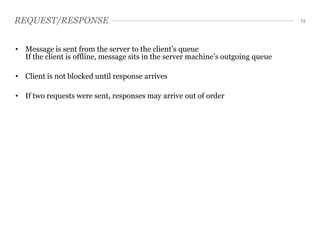
• Message is sent from the server to the client’s queue
  If the client is offline, message sits in the server machine’s outgoing queue

• Client is not blocked until response arrives

• If two requests were sent, responses may arrive out of order
WARNING! THIS IS NOT RPC                                                                16


• Do NOT try to implement regular request/response patterns on top of messaging
• The client should be designed so that it can continue operating if a response never
  comes


Differences from RPC
• RPC is easy to code
  • After invoking a web service
  • Next line of code assumes we’ve got a response


• RPC problems
  • Can’t reason about the time between one line of code and another


• Messaging makes this all explicit
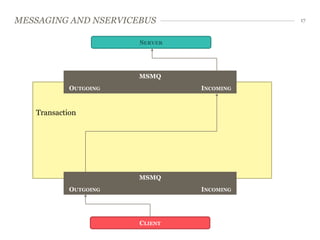
MESSAGING AND NSERVICEBUS                  17


                       SERVER


                       MSMQ
            OUTGOING            INCOMING


   Transaction


                       MSMQ
            OUTGOING            INCOMING


                       CLIENT
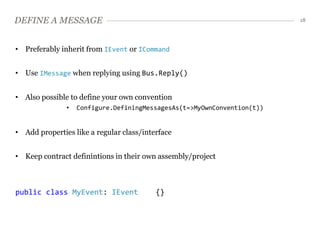
DEFINE A MESSAGE                                                         18


• Preferably inherit from IEvent or ICommand


• Use IMessage when replying using Bus.Reply()


• Also possible to define your own convention
               •   Configure.DefiningMessagesAs(t=>MyOwnConvention(t))


• Add properties like a regular class/interface


• Keep contract definintions in their own assembly/project


public class MyEvent: IEvent              {}
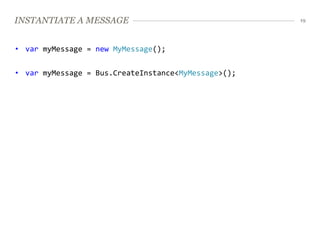
INSTANTIATE A MESSAGE                                19


• var myMessage = new MyMessage();


• var myMessage = Bus.CreateInstance<MyMessage>();
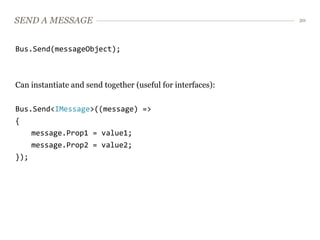
SEND A MESSAGE                                               20


Bus.Send(messageObject);


Can instantiate and send together (useful for interfaces):

Bus.Send<IMessage>((message) =>
{
    message.Prop1 = value1;
    message.Prop2 = value2;
});
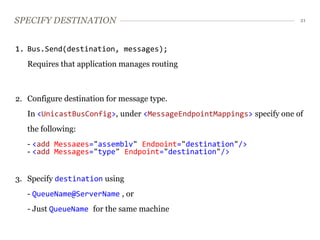
SPECIFY DESTINATION                                                    21


1. Bus.Send(destination, messages);
   Requires that application manages routing


2. Configure destination for message type.
   In <UnicastBusConfig>, under <MessageEndpointMappings> specify one of
   the following:
   - <add Messages="assembly" Endpoint="destination"/>
   - <add Messages="type" Endpoint="destination"/>


3. Specify destination using
   - QueueName@ServerName , or
   - Just QueueName for the same machine
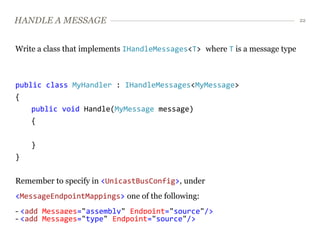
HANDLE A MESSAGE                                                             22


Write a class that implements IHandleMessages<T> where T is a message type


public class MyHandler : IHandleMessages<MyMessage>
{
    public void Handle(MyMessage message)
    {


    }
}


Remember to specify in <UnicastBusConfig>, under
<MessageEndpointMappings> one of the following:
- <add Messages="assembly" Endpoint="source"/>
- <add Messages="type" Endpoint="source"/>
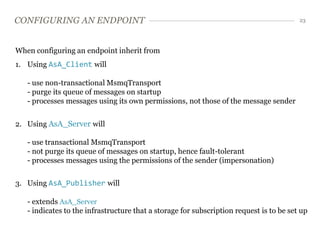
CONFIGURING AN ENDPOINT                                                                  23


When configuring an endpoint inherit from
1. Using AsA_Client will

   - use non-transactional MsmqTransport
   - purge its queue of messages on startup
   - processes messages using its own permissions, not those of the message sender


2. Using AsA_Server will

   - use transactional MsmqTransport
   - not purge its queue of messages on startup, hence fault-tolerant
   - processes messages using the permissions of the sender (impersonation)


3. Using AsA_Publisher will

   - extends AsA_Server
   - indicates to the infrastructure that a storage for subscription request is to be set up
EXERCISES                      24


ONE-WAY MESSAGING (CLIENT)


PROCESSING MESSAGES (SERVER)


EXCEPTIONS
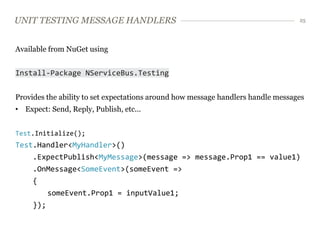
UNIT TESTING MESSAGE HANDLERS                                                     25


Available from NuGet using


Install-Package NServiceBus.Testing


Provides the ability to set expectations around how message handlers handle messages
• Expect: Send, Reply, Publish, etc...


Test.Initialize();
Test.Handler<MyHandler>()
     .ExpectPublish<MyMessage>(message => message.Prop1 == value1)
     .OnMessage<SomeEvent>(someEvent =>
     {
        someEvent.Prop1 = inputValue1;
     });
EXERCISE       26


UNIT TESTING
SAGA                 27


• Definition
• Saga declaration
• Saga ending
• Saga testing
• Exercise
SAGA - DEFINITION                                                                28


A Saga:


•   Is a pattern for implementing long-lived transaction by using a series of
    shorter transactions


•   Holds relevant state to needed to process mulitple messages in a ”saga entity”

•   Are initiated by a message (event/command)
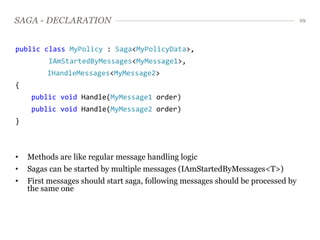
SAGA - DECLARATION                                                                29


public class MyPolicy : Saga<MyPolicyData>,
         IAmStartedByMessages<MyMessage1>,
         IHandleMessages<MyMessage2>
{
     public void Handle(MyMessage1 order)
     public void Handle(MyMessage2 order)
}


•   Methods are like regular message handling logic
•   Sagas can be started by multiple messages (IAmStartedByMessages<T>)
•   First messages should start saga, following messages should be processed by
    the same one
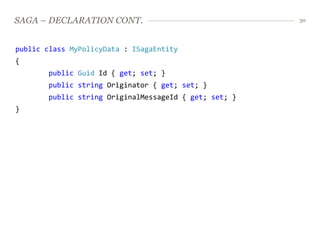
SAGA – DECLARATION CONT.                               30


public class MyPolicyData : ISagaEntity
{
       public Guid Id { get; set; }
       public string Originator { get; set; }
       public string OriginalMessageId { get; set; }
}
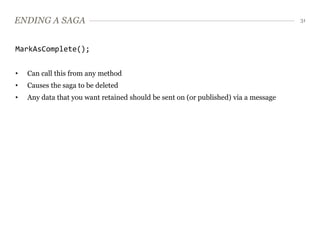
ENDING A SAGA                                                                        31


MarkAsComplete();


•   Can call this from any method
•   Causes the saga to be deleted
•   Any data that you want retained should be sent on (or published) via a message
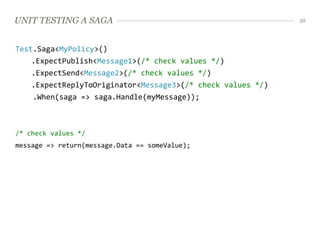
UNIT TESTING A SAGA                                          32


Test.Saga<MyPolicy>()
    .ExpectPublish<Message1>(/* check values */)
    .ExpectSend<Message2>(/* check values */)
    .ExpectReplyToOriginator<Message3>(/* check values */)
    .When(saga => saga.Handle(myMessage));


/* check values */
message => return(message.Data == someValue);
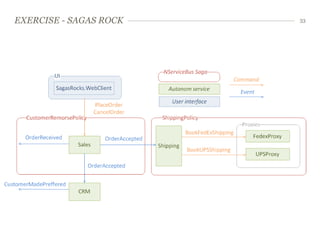
EXERCISE - SAGAS ROCK   33
EXTRA EXERCISES               34


TIMEOUT
CUSTOM XML NAMESPACE
CONFIGURABLE ROUTING
DEPENDENCY INJECTION
WEB-APP HOSTING
FULL DUPLEX
DISTRIBUTION GROUP EXERCISE

Introduction to NServiceBus

  • 1.
    NSERVICEBUS Inspired by: Thecourse authored by Udi Dahan Oslo/Fagdag Espen Ekvang/Tomas Jansson 01/03/2013
  • 2.
    AGENDA 2 • Intro • Messaging and queues • Testing • SOA • Saga
  • 3.
    INTRO 3 • Fallacies of distributed computing • Why NServiceBus? • Bus vs. Broker • Service orientation • Excercises
  • 4.
    FALLACIES OF DISTRIBUTEDCOMPUTING 4 1. The network is reliable 2. Latency isn’t a problem 3. Bandwidth isn’t a problem 4. The network is secure 5. The topology won’t change 6. The administrator will know what to do 7. Transport cost isn’t a problem 8. The network is homogeneous Cant’ assume WHEN the message will arrive, IF AT ALL
  • 5.
    WHY NSERVICEBUS 5 1. The network is reliable 2. Latency isn’t a problem NServiceBus addresses the first five directly 3. Bandwidth isn’t a problem 4. The network is secure 5. The topology won’t change 6. The administrator will know what to do 7. Transport cost isn’t a problem 8. The network is homogeneous The most developer-friendly service bus for SOA on .NET
  • 6.
    BUS VS. BROKER 6 • Bus is not necessarily physically separate • Simpler; no routing or service fail over • No single point of failure App App Buss.dll Broker App App Buss.dll Buss.dll App App
  • 7.
    TENETS OF SERVICEORIENTATION 7 • Services are autonomous • Share contract & schema, not class or type • Boundaries are explicit • Compatibitility is base on Policy
  • 8.
    LAYERS & COUPLING 8 Tight coupling Loose coupling Sales Shipping CRM UI BL DAL DB Referential Integrity Reintroduces coupling
  • 9.
    WHEN CAN IWRITE SOME CODE? 9 • Getting started • New class library • Install-Package NServiceBus.Host • Logging • NServiceBus uses log4net, you can configure logging in app.config • Default output is console
  • 10.
    EXERCISES 10 HELLO WORLD LOGGING
  • 11.
    MESSAGING AND QUEUES 11 • Store & forward • Dangers of store & forward • Request/Response • Messaging and NServiceBus • Exercises
  • 12.
    STORE & FORWARD 12 SERVER MSMQ OUTGOING INCOMING Store & Forward writes to disk Resilient in the face of failures MSMQ OUTGOING INCOMING CLIENT
  • 13.
    DANGERS OF STORE& FORWARD 13 • If target is offline for an extended period of timemessages can fill up the disk • Can cause a server to crash • Especially problematic in B2B integration • 1 MB/message, 100 message/sec = 6GB/minute • Solution – discard messages after a while • Use [TimeToBeReceived("00:01:00")] on the message definition
  • 14.
    REQUEST/RESPONSE 14 SERVER MSMQ OUTGOING INCOMING Client can’t assume when a response Equivalent to 2 will arrive, if at all one-way messages MSMQ OUTGOING INCOMING CLIENT
  • 15.
    REQUEST/RESPONSE 15 • Message is sent from the server to the client’s queue If the client is offline, message sits in the server machine’s outgoing queue • Client is not blocked until response arrives • If two requests were sent, responses may arrive out of order
  • 16.
    WARNING! THIS ISNOT RPC 16 • Do NOT try to implement regular request/response patterns on top of messaging • The client should be designed so that it can continue operating if a response never comes Differences from RPC • RPC is easy to code • After invoking a web service • Next line of code assumes we’ve got a response • RPC problems • Can’t reason about the time between one line of code and another • Messaging makes this all explicit
  • 17.
    MESSAGING AND NSERVICEBUS 17 SERVER MSMQ OUTGOING INCOMING Transaction MSMQ OUTGOING INCOMING CLIENT
  • 18.
    DEFINE A MESSAGE 18 • Preferably inherit from IEvent or ICommand • Use IMessage when replying using Bus.Reply() • Also possible to define your own convention • Configure.DefiningMessagesAs(t=>MyOwnConvention(t)) • Add properties like a regular class/interface • Keep contract definintions in their own assembly/project public class MyEvent: IEvent {}
  • 19.
    INSTANTIATE A MESSAGE 19 • var myMessage = new MyMessage(); • var myMessage = Bus.CreateInstance<MyMessage>();
  • 20.
    SEND A MESSAGE 20 Bus.Send(messageObject); Can instantiate and send together (useful for interfaces): Bus.Send<IMessage>((message) => { message.Prop1 = value1; message.Prop2 = value2; });
  • 21.
    SPECIFY DESTINATION 21 1. Bus.Send(destination, messages); Requires that application manages routing 2. Configure destination for message type. In <UnicastBusConfig>, under <MessageEndpointMappings> specify one of the following: - <add Messages="assembly" Endpoint="destination"/> - <add Messages="type" Endpoint="destination"/> 3. Specify destination using - QueueName@ServerName , or - Just QueueName for the same machine
  • 22.
    HANDLE A MESSAGE 22 Write a class that implements IHandleMessages<T> where T is a message type public class MyHandler : IHandleMessages<MyMessage> { public void Handle(MyMessage message) { } } Remember to specify in <UnicastBusConfig>, under <MessageEndpointMappings> one of the following: - <add Messages="assembly" Endpoint="source"/> - <add Messages="type" Endpoint="source"/>
  • 23.
    CONFIGURING AN ENDPOINT 23 When configuring an endpoint inherit from 1. Using AsA_Client will - use non-transactional MsmqTransport - purge its queue of messages on startup - processes messages using its own permissions, not those of the message sender 2. Using AsA_Server will - use transactional MsmqTransport - not purge its queue of messages on startup, hence fault-tolerant - processes messages using the permissions of the sender (impersonation) 3. Using AsA_Publisher will - extends AsA_Server - indicates to the infrastructure that a storage for subscription request is to be set up
  • 24.
    EXERCISES 24 ONE-WAY MESSAGING (CLIENT) PROCESSING MESSAGES (SERVER) EXCEPTIONS
  • 25.
    UNIT TESTING MESSAGEHANDLERS 25 Available from NuGet using Install-Package NServiceBus.Testing Provides the ability to set expectations around how message handlers handle messages • Expect: Send, Reply, Publish, etc... Test.Initialize(); Test.Handler<MyHandler>() .ExpectPublish<MyMessage>(message => message.Prop1 == value1) .OnMessage<SomeEvent>(someEvent => { someEvent.Prop1 = inputValue1; });
  • 26.
    EXERCISE 26 UNIT TESTING
  • 27.
    SAGA 27 • Definition • Saga declaration • Saga ending • Saga testing • Exercise
  • 28.
    SAGA - DEFINITION 28 A Saga: • Is a pattern for implementing long-lived transaction by using a series of shorter transactions • Holds relevant state to needed to process mulitple messages in a ”saga entity” • Are initiated by a message (event/command)
  • 29.
    SAGA - DECLARATION 29 public class MyPolicy : Saga<MyPolicyData>, IAmStartedByMessages<MyMessage1>, IHandleMessages<MyMessage2> { public void Handle(MyMessage1 order) public void Handle(MyMessage2 order) } • Methods are like regular message handling logic • Sagas can be started by multiple messages (IAmStartedByMessages<T>) • First messages should start saga, following messages should be processed by the same one
  • 30.
    SAGA – DECLARATIONCONT. 30 public class MyPolicyData : ISagaEntity { public Guid Id { get; set; } public string Originator { get; set; } public string OriginalMessageId { get; set; } }
  • 31.
    ENDING A SAGA 31 MarkAsComplete(); • Can call this from any method • Causes the saga to be deleted • Any data that you want retained should be sent on (or published) via a message
  • 32.
    UNIT TESTING ASAGA 32 Test.Saga<MyPolicy>() .ExpectPublish<Message1>(/* check values */) .ExpectSend<Message2>(/* check values */) .ExpectReplyToOriginator<Message3>(/* check values */) .When(saga => saga.Handle(myMessage)); /* check values */ message => return(message.Data == someValue);
  • 33.
  • 34.
    EXTRA EXERCISES 34 TIMEOUT CUSTOM XML NAMESPACE CONFIGURABLE ROUTING DEPENDENCY INJECTION WEB-APP HOSTING FULL DUPLEX DISTRIBUTION GROUP EXERCISE