ENHANCE VIRTUAL MACHINE
SECURITY IN OPENSTACK USING
SURICATA IPS
NOR ASHILA BINTI MOHD RASHID
BACHELOR OF COMPUTER SCIENCE (COMPUTER NETWORK SECURITY) WITH
HONOURS
MATRIC NO.: 044184
SUPERVISOR: DR. WAN NOR SHUHADAH
OBJECTIVES
• To do research on OpenStack cloud platform and Suricata based
Intrusion Prevention System.
• To configure OpenStack cloud platform.
• To configure Suricata based Intrusion Prevention System.
• To integrate and test OpenStack cloud platform with Suricata
Intrusion Prevention System.
PROBLEMS STATEMENT
• Instances are the individual virtual machines that run on physical compute nodes
inside the cloud. Users can launch any number of instances from the same image. As
known, there are a lot of vulnerabilities appear in the cloud. Then, how to secure our
instances or virtual machine from black hat communities in the cloud?
• Virtual machine is vulnerable to attacks
• Due to many number of intruders rising day by day.
• May potentially be disrupted by DoS attack
• The internet shared resources.
• Security and mechanism at physical network are not able to monitor the traffic over
virtualized network.
SCOPE & FRAMEWORK
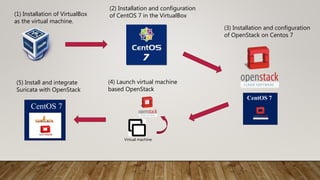
(1) Installation of VirtualBox
as the virtual machine.
CentOS 7
Virtual machine
CentOS 7
(2) Installation and configuration
of CentOS 7 in the VirtualBox
(3) Installation and configuration
of OpenStack on Centos 7
(4) Launch virtual machine
based OpenStack
(5) Install and integrate
Suricata with OpenStack
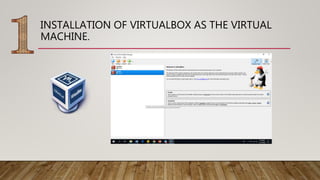
INSTALLATION OF VIRTUALBOX AS THE VIRTUAL
MACHINE.
INSTALLATION AND CONFIGURATION OF CENTOS 7
IN THE VIRTUALBOX
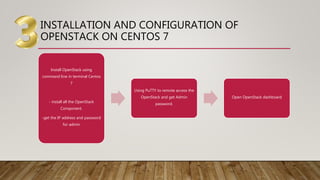
INSTALLATION AND CONFIGURATION OF
OPENSTACK ON CENTOS 7
Install OpenStack using
command line in terminal Centos
7
- install all the OpenStack
Component.
-get the IP address and password
for admin
Using PuTTY to remote access the
OpenStack and get Admin
password.
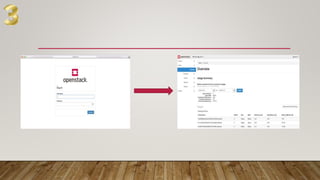
Open OpenStack dashboard
PROOF OF CONCEPT
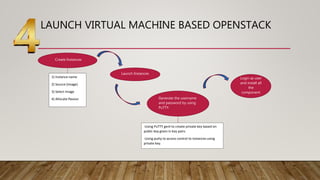
LAUNCH VIRTUAL MACHINE BASED OPENSTACK
• Create Instances
1) Instance name
2) Source (Image)
3) Select Image
4) Allocate flavour
Launch Instances
Generate the username
and password by using
PuTTY.
-Using PuTTY gent to create private key based on
public key given in key pairs.
-Using putty to access control to instances using
private key.
Login as user
and install all
the
component
INSTALL AND INTEGRATE SURICATA WITH OPENSTACK
1. Deploy OpenStack with Contrail SDN
that will bring NFV into the cloud.
2. Create a VM image with the Suricata
IDPS installed.
3. Configure the Contrail SDN to run an
IDPS service instance (VNF) and steer
traffic to this instance for further
analysis.
To enable Suricata IDPS as a
virtual network function
(VNF) on OpenStack.
 Go to the Contrail web UI
 Open the Service
Templates panel in
the Configure tab.
 Create an IPS template
service.
NETWORK
PACKET CAPTURE
DECODE & STREAM APPLICATION LAYER
DETECTDETECTDETECT
OUTPUT
Architecture of Suricata
IPS
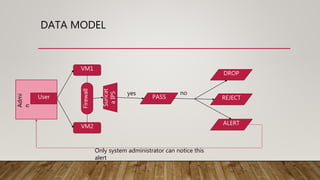
DATA MODEL
User
VM1
VM2
Firewall
Suricat
aIPS
PASS
DROP
REJECT
ALERT
yes no
Admi
n
Only system administrator can notice this
alert
EXPECTED RESULT
• Improve virtual machine security using Suricata based Intrusion
Prevention System
• Secure Virtual Machine based OpenStack cloud platform.
EXAMPLE OUTPUT
10/06/2012-11:40:49.018377 [Drop] [**] [1:1:0] facebook is blocked [**] [Classification: Potential Corporate Privacy Violation] [Priority: 1]
{TCP} 192.168.122.48:57113 -> 173.252.100.16:80 10/06/2012-11:40:49.020955 [Drop] [**] [1:1:0] facebook is blocked [**] [Classification:
Potential Corporate Privacy Violation]
[Priority: 1] {TCP} 192.168.122.48:57114 -> 173.252.100.16:80 10/06/2012-11:40:51.991876 [Drop] [**] [1:1:0] facebook is blocked [**]
[Classification: Potential Corporate Privacy Violation] [Priority: 1] {TCP} 192.168.122.48:57115 -> 173.252.100.16:80
Create local.rules in /etc/suricata/rules/ using a text editor.
drop tcp any any -> any any (msg:"facebook is blocked"; content:"facebook.com";
http_header; nocase; classtype:policy-violation; sid:1;)
Restart Suricata:
service suricata restart
Now open Firefox, and try to go to http://www.facebook.com/, the
request should time out.
The logfile /var/log/suricata/fast.log will have:
REFERENCES
• 1. https://geek-university.com/oracle-virtualbox/what-is-oracle-vm-virtualbox/
• 2.https://pdfs.semanticscholar.org/9f1d/635bf58d80cf15b89ab99fb2d17bcbca6d0b.p
df?_ga=2.115730752.794654359.1544485224-1575586317.1544485224
• 3. https://docs.openstack.org/security-guide/introduction/introduction-to-
openstack.html
• 4. https://hub.packtpub.com/openstack-networking-nutshell/amp/
• 5. https://www.centosblog.com/what-is-centos/
• 6. file:///C:/Users/user/Downloads/SnortandSuricataIDPStoolsoverview-
RomanFekolkin.pdf
• 7. https://docs.openstack.org/security-guide/networking/securing-services.html

Enhance Virtual Machine Security in OpenStack Using Suricata IPS

  • 1.
    ENHANCE VIRTUAL MACHINE SECURITYIN OPENSTACK USING SURICATA IPS NOR ASHILA BINTI MOHD RASHID BACHELOR OF COMPUTER SCIENCE (COMPUTER NETWORK SECURITY) WITH HONOURS MATRIC NO.: 044184 SUPERVISOR: DR. WAN NOR SHUHADAH
  • 2.
    OBJECTIVES • To doresearch on OpenStack cloud platform and Suricata based Intrusion Prevention System. • To configure OpenStack cloud platform. • To configure Suricata based Intrusion Prevention System. • To integrate and test OpenStack cloud platform with Suricata Intrusion Prevention System.
  • 3.
    PROBLEMS STATEMENT • Instancesare the individual virtual machines that run on physical compute nodes inside the cloud. Users can launch any number of instances from the same image. As known, there are a lot of vulnerabilities appear in the cloud. Then, how to secure our instances or virtual machine from black hat communities in the cloud? • Virtual machine is vulnerable to attacks • Due to many number of intruders rising day by day. • May potentially be disrupted by DoS attack • The internet shared resources. • Security and mechanism at physical network are not able to monitor the traffic over virtualized network.
  • 4.
  • 5.
    (1) Installation ofVirtualBox as the virtual machine. CentOS 7 Virtual machine CentOS 7 (2) Installation and configuration of CentOS 7 in the VirtualBox (3) Installation and configuration of OpenStack on Centos 7 (4) Launch virtual machine based OpenStack (5) Install and integrate Suricata with OpenStack
  • 6.
    INSTALLATION OF VIRTUALBOXAS THE VIRTUAL MACHINE.
  • 7.
    INSTALLATION AND CONFIGURATIONOF CENTOS 7 IN THE VIRTUALBOX
  • 8.
    INSTALLATION AND CONFIGURATIONOF OPENSTACK ON CENTOS 7 Install OpenStack using command line in terminal Centos 7 - install all the OpenStack Component. -get the IP address and password for admin Using PuTTY to remote access the OpenStack and get Admin password. Open OpenStack dashboard
  • 9.
  • 11.
    LAUNCH VIRTUAL MACHINEBASED OPENSTACK • Create Instances 1) Instance name 2) Source (Image) 3) Select Image 4) Allocate flavour Launch Instances Generate the username and password by using PuTTY. -Using PuTTY gent to create private key based on public key given in key pairs. -Using putty to access control to instances using private key. Login as user and install all the component
  • 12.
    INSTALL AND INTEGRATESURICATA WITH OPENSTACK 1. Deploy OpenStack with Contrail SDN that will bring NFV into the cloud. 2. Create a VM image with the Suricata IDPS installed. 3. Configure the Contrail SDN to run an IDPS service instance (VNF) and steer traffic to this instance for further analysis. To enable Suricata IDPS as a virtual network function (VNF) on OpenStack.  Go to the Contrail web UI  Open the Service Templates panel in the Configure tab.  Create an IPS template service.
  • 14.
    NETWORK PACKET CAPTURE DECODE &STREAM APPLICATION LAYER DETECTDETECTDETECT OUTPUT Architecture of Suricata IPS
  • 15.
  • 16.
    EXPECTED RESULT • Improvevirtual machine security using Suricata based Intrusion Prevention System • Secure Virtual Machine based OpenStack cloud platform.
  • 17.
    EXAMPLE OUTPUT 10/06/2012-11:40:49.018377 [Drop][**] [1:1:0] facebook is blocked [**] [Classification: Potential Corporate Privacy Violation] [Priority: 1] {TCP} 192.168.122.48:57113 -> 173.252.100.16:80 10/06/2012-11:40:49.020955 [Drop] [**] [1:1:0] facebook is blocked [**] [Classification: Potential Corporate Privacy Violation] [Priority: 1] {TCP} 192.168.122.48:57114 -> 173.252.100.16:80 10/06/2012-11:40:51.991876 [Drop] [**] [1:1:0] facebook is blocked [**] [Classification: Potential Corporate Privacy Violation] [Priority: 1] {TCP} 192.168.122.48:57115 -> 173.252.100.16:80 Create local.rules in /etc/suricata/rules/ using a text editor. drop tcp any any -> any any (msg:"facebook is blocked"; content:"facebook.com"; http_header; nocase; classtype:policy-violation; sid:1;) Restart Suricata: service suricata restart Now open Firefox, and try to go to http://www.facebook.com/, the request should time out. The logfile /var/log/suricata/fast.log will have:
  • 18.
    REFERENCES • 1. https://geek-university.com/oracle-virtualbox/what-is-oracle-vm-virtualbox/ •2.https://pdfs.semanticscholar.org/9f1d/635bf58d80cf15b89ab99fb2d17bcbca6d0b.p df?_ga=2.115730752.794654359.1544485224-1575586317.1544485224 • 3. https://docs.openstack.org/security-guide/introduction/introduction-to- openstack.html • 4. https://hub.packtpub.com/openstack-networking-nutshell/amp/ • 5. https://www.centosblog.com/what-is-centos/ • 6. file:///C:/Users/user/Downloads/SnortandSuricataIDPStoolsoverview- RomanFekolkin.pdf • 7. https://docs.openstack.org/security-guide/networking/securing-services.html