DOE-HDBK-1016/1-93
ENGINEERING SYMBOLOGY, PRINTS, AND DRAWINGS
ABSTRACT
The Engineering Symbology, Prints, and Drawings Handbook was developed to assist
nuclear facility operating contractors in providing operators, maintenance personnel, and
technical staff with the necessary fundamentals training to ensure a basic understanding of
engineering prints, their use, and their function. The handbook includes information on
engineering fluid drawings and prints; piping and instrument drawings; major symbols and
conventions; electronic diagrams and schematics; logic circuits and diagrams; and fabrication,
construction, and architectural drawings. This information will provide personnel with a
foundation for reading, interpreting, and using the engineering prints and drawings that are
associated with various DOE nuclear facility operations and maintenance.
Key Words:Training Material, Print Reading, Piping and Instrument Drawings, Schematics,
Electrical Diagrams, Block Diagrams, Logic Diagrams, Fabrication Drawings, Construction
Drawings, Architectural Drawings
Rev. 0 PR
DOE-HDBK-1016/1-93
ENGINEERING SYMBOLOGY, PRINTS, AND DRAWINGS
OVERVIEW
The Department of Energy Fundamentals Handbook entitled Engineering Symbology,
Prints, and Drawings was prepared as an information resource for personnel who are responsible
for the operation of the Department's nuclear facilities. A basic understanding of engineering
prints and drawings is necessary for DOE nuclear facility operators, maintenance personnel, and
the technical staff to safely operate and maintain the facility and facility support systems. The
information in the handbook is presented to provide a foundation for applying engineering
concepts to the job. This knowledge will improve personnel understanding of the impact that
their actions may have on the safe and reliable operation of facility components and systems.
The Engineering Symbology, Prints, and Drawings handbook consists of six modules
that are contained in two volumes. The following is a brief description of the information
presented in each module of the handbook.
Volume 1 of 2
Module 1 - Introduction to Print Reading
This module introduces each type of drawing and its various formats. It also
reviews the information contained in the non-drawing areas of a drawing.
Module 2 - Engineering Fluid Diagrams and Prints
This module introduces engineering fluid diagrams and prints (PIDs); reviews
the common symbols and conventions used on PIDs; and provides several
examples of how to read a PID.
Module 3 - Electrical Diagrams and Schematics
This module reviews the major symbols and conventions used on electrical
schematics and single line drawings and provides several examples of reading
electrical prints.
Rev. 0 PR
DOE-HDBK-1016/1-93
ENGINEERING SYMBOLOGY, PRINTS, AND DRAWINGS
OVERVIEW (Cont.)
Volume 2 of 2
Module 4 - Electronic Diagrams and Schematics
This module reviews electronic schematics and block diagrams. It covers the
major symbols used and provides several examples of reading these types of
diagrams.
Module 5 - Logic Diagrams
This module introduces the basic symbols and common conventions used on logic
diagrams. It explains how logic prints are used to represent a component's
control circuits. Truth tables are also briefly discusses and several examples of
reading logic diagrams are provided.
Module 6 - Engineering Fabrication, Construction, and Architectural Drawings
This module reviews fabrication, construction, and architectural drawings and
introduces the symbols and conventions used to dimension and tolerance these
types of drawings.
The information contained in this handbook is by no means all encompassing. An
attempt to present the entire subject of engineering drawings would be impractical. However,
the Engineering Symbology, Prints, and Drawings handbook does present enough information
to provide the reader with a fundamental knowledge level sufficient to understand the advanced
theoretical concepts presented in other subject areas, and to improve understanding of basic
system operation and equipment operations.
Rev. 0 PR
Department of Energy
Fundamentals Handbook
ENGINEERING SYMBOLOGY, PRINTS,
AND DRAWINGS
Module 1
Introduction to Print Reading
Introduction To Print Reading DOE-HDBK-1016/1-93 TABLE OF CONTENTS
TABLE OF CONTENTS
LIST OF FIGURES . . . . . . . . . . . . . . . . . . . . . . . . . . . . . . . . . . . . . . . . . . . . . . . . . . ii
LIST OF TABLES . . . . . . . . . . . . . . . . . . . . . . . . . . . . . . . . . . . . . . . . . . . . . . . . . . . iii
REFERENCES . . . . . . . . . . . . . . . . . . . . . . . . . . . . . . . . . . . . . . . . . . . . . . . . . . . . iv
OBJECTIVES . . . . . . . . . . . . . . . . . . . . . . . . . . . . . . . . . . . . . . . . . . . . . . . . . . . . . v
INTRODUCTION TO PRINT READING . . . . . . . . . . . . . . . . . . . . . . . . . . . . . . . . . 1
Introduction . . . . . . . . . . . . . . . . . . . . . . . . . . . . . . . . . . . . . . . . . . . . . . . . . 1
Anatomy of a Drawing . . . . . . . . . . . . . . . . . . . . . . . . . . . . . . . . . . . . . . . . . . 2
The Title Block . . . . . . . . . . . . . . . . . . . . . . . . . . . . . . . . . . . . . . . . . . . . . . . 2
Grid System . . . . . . . . . . . . . . . . . . . . . . . . . . . . . . . . . . . . . . . . . . . . . . . . . 5
Revision Block . . . . . . . . . . . . . . . . . . . . . . . . . . . . . . . . . . . . . . . . . . . . . . . 6
Changes . . . . . . . . . . . . . . . . . . . . . . . . . . . . . . . . . . . . . . . . . . . . . . . . . . . . 7
Notes and Legend . . . . . . . . . . . . . . . . . . . . . . . . . . . . . . . . . . . . . . . . . . . . . 8
Summary . . . . . . . . . . . . . . . . . . . . . . . . . . . . . . . . . . . . . . . . . . . . . . . . . . . 9
INTRODUCTION TO THE TYPES OF DRAWINGS,
VIEWS, AND PERSPECTIVES . . . . . . . . . . . . . . . . . . . . . . . . . . . . . . . . . . . . . . . . 10
Categories of Drawings . . . . . . . . . . . . . . . . . . . . . . . . . . . . . . . . . . . . . . . . . 10
Piping and Instrument Drawings (PIDs) . . . . . . . . . . . . . . . . . . . . . . . . . . . . . 10
Electrical Single Lines and Schematics . . . . . . . . . . . . . . . . . . . . . . . . . . . . . . . 11
Electronic Diagrams and Schematics . . . . . . . . . . . . . . . . . . . . . . . . . . . . . . . . 13
Logic Diagrams and Prints . . . . . . . . . . . . . . . . . . . . . . . . . . . . . . . . . . . . . . . 14
Fabrication, Construction, and Architectural Drawings . . . . . . . . . . . . . . . . . . . . 14
Drawing Format . . . . . . . . . . . . . . . . . . . . . . . . . . . . . . . . . . . . . . . . . . . . . . 16
Views and Perspectives . . . . . . . . . . . . . . . . . . . . . . . . . . . . . . . . . . . . . . . . . 19
Summary . . . . . . . . . . . . . . . . . . . . . . . . . . . . . . . . . . . . . . . . . . . . . . . . . . . 22
Rev. 0 Page i PR-01
LIST OF FIGURES DOE-HDBK-1016/1-93 Introduction To Print Reading
LIST OF FIGURES
Figure 1 Title Block . . . . . . . . . . . . . . . . . . . . . . . . . . . . . . . . . . . . . . . . . . . . . . . . . 3
Figure 2 Example of a Grid . . . . . . . . . . . . . . . . . . . . . . . . . . . . . . . . . . . . . . . . . . . . 5
Figure 3 Revision Block . . . . . . . . . . . . . . . . . . . . . . . . . . . . . . . . . . . . . . . . . . . . . . 6
Figure 4 Methods of Denoting Changes . . . . . . . . . . . . . . . . . . . . . . . . . . . . . . . . . . . . 7
Figure 5 Notes and Legends . . . . . . . . . . . . . . . . . . . . . . . . . . . . . . . . . . . . . . . . . . . 8
Figure 6 Example PID . . . . . . . . . . . . . . . . . . . . . . . . . . . . . . . . . . . . . . . . . . . . . 10
Figure 7 Example of a Single Line . . . . . . . . . . . . . . . . . . . . . . . . . . . . . . . . . . . . . . 11
Figure 8 Example of a Schematic . . . . . . . . . . . . . . . . . . . . . . . . . . . . . . . . . . . . . . . 12
Figure 9 Example of an Electronic Diagram . . . . . . . . . . . . . . . . . . . . . . . . . . . . . . . 13
Figure 10 Example of a Logic Print . . . . . . . . . . . . . . . . . . . . . . . . . . . . . . . . . . . . . 14
Figure 11 Example of a Fabrication Drawing . . . . . . . . . . . . . . . . . . . . . . . . . . . . . . . 15
Figure 12 Example of a Single Line PID . . . . . . . . . . . . . . . . . . . . . . . . . . . . . . . . 16
Figure 13 Example Pictorial . . . . . . . . . . . . . . . . . . . . . . . . . . . . . . . . . . . . . . . . . . . 17
Figure 14 Example of an Assembly Drawing . . . . . . . . . . . . . . . . . . . . . . . . . . . . . . . 17
Figure 15 Example of a Cutaway . . . . . . . . . . . . . . . . . . . . . . . . . . . . . . . . . . . . . . . 18
Figure 16 Example Orthographic Projection . . . . . . . . . . . . . . . . . . . . . . . . . . . . . . . . 19
Figure 17 Orthographic Projections . . . . . . . . . . . . . . . . . . . . . . . . . . . . . . . . . . . . . . 20
Figure 18 Example of an Isometric . . . . . . . . . . . . . . . . . . . . . . . . . . . . . . . . . . . . . . 21
PR-01 Page ii Rev. 0
Introduction To Print Reading DOE-HDBK-1016/1-93 LIST OF TABLES
LIST OF TABLES
NONE
Rev. 0 Page iii PR-01
REFERENCES DOE-HDBK-1016/1-93 Introduction To Print Reading
REFERENCES
ANSI Y14.5M - 1982, Dimensioning and Tolerancing, American National Standards
Institute.
ANSI Y32.2 - 1975, Graphic Symbols for Electrical and Electronic Diagrams, American
National Standards Institute.
Gasperini, Richard E., Digital Troubleshooting, Movonics Company; Los Altos,
California, 1976.
Jensen - Helsel, Engineering Drawing and Design, Second Ed., McGraw-Hill Book
Company, New York, 1979.
Lenk, John D., Handbook of Logic Circuits, Reston Publishing Company, Reston,
Virginia, 1972.
Wickes, William E., Logic Design with Integrated Circuits, John Wiley  Sons, Inc,
1968.
Naval Auxiliary Machinery, United States Naval Institute, Annapolis, Maryland, 1951.
TPC Training Systems, Reading Schematics and Symbols, Technical Publishing Company,
Barrington, Illinois, 1974.
Arnell, Alvin, Standard Graphical Symbols, McGraw-Hill Book Company, 1963.
George Mashe, Systems Summary of a Westinghouse Pressurized Water Reactor,
Westinghouse Electric Corporation, 1971.
Zappe, R.W., Valve Selection Handbook, Gulf Publishing Company, Houston, Texas,
1968.
PR-01 Page iv Rev. 0
Introduction To Print Reading DOE-HDBK-1016/1-93 OBJECTIVES
TERMINAL OBJECTIVE
1.0 Given an engineering print, READ and INTERPRET the information contained in the
title block, the notes and legend, the revision block, and the drawing grid.
ENABLING OBJECTIVES
1.1 STATE the five types of information provided in the title block of an engineering
drawing.
1.2 STATE how the grid system on an engineering drawing is used to locate a piece of
equipment.
1.3 STATE the three types of information provided in the revision block of an engineering
drawing.
1.4 STATE the purpose of the notes and legend section of an engineering drawing.
1.5 LIST the five drawing categories used on engineering drawings.
Rev. 0 Page v PR-01
DOE-HDBK-1016/1-93 Introduction to Print Reading
Intentionally Left Blank.
PR-01 Page vi Rev. 0
Introduction To Print Reading DOE-HDBK-1016/1-93 INTRODUCTION TO PRINT READING
INTRODUCTION TO PRINT READING
A through knowledge of the information presented in the title block, the revision
block, the notes and legend, and the drawing grid is necessary before a drawing
can be read. This information is displayed in the areas surrounding the graphic
portion of the drawing.
EO 1.1 STATE the five types of information provided in the title block
of an engineering drawing.
EO 1.2 STATE how the grid system on an engineering drawing is used
to locate a piece of equipment.
EO 1.3 STATE the three types of information provided in the revision
block of an engineering drawing.
EO 1.4 STATE the purpose of the notes and legend section of an
engineering drawing.
Introduction
The ability to read and understand information contained on drawings is essential to perform most
engineering-related jobs. Engineering drawings are the industry's means of communicating
detailed and accurate information on how to fabricate, assemble, troubleshoot, repair, and operate
a piece of equipment or a system. To understand how to read a drawing it is necessary to be
familiar with the standard conventions, rules, and basic symbols used on the various types of
drawings. But before learning how to read the actual drawing, an understanding of the
information contained in the various non-drawing areas of a print is also necessary. This chapter
will address the information most commonly seen in the non-drawing areas of a nuclear grade
engineering type drawing. Because of the extreme variation in format, location of information,
and types of information presented on drawings from vendor to vendor and site to site, all
drawings will not necessarily contain the following information or format, but will usually be
similar in nature.
In this handbook the terms print, drawing, and diagram are used interchangeably to denote the
complete drawing. This includes the graphic portion, the title block, the grid system, the revision
block, and the notes and legend. When the words print, drawing, or diagram, appear in quotes,
the word is referring only to the actual graphic portion of the drawing.
Rev. 0 PR-01Page 1
INTRODUCTION TO PRINT READING DOE-HDBK-1016/1-93 Introduction To Print Reading
Anatomy of a Drawing
A generic engineering drawing can be divided into the following five major areas or parts.
1. Title block
2. Grid system
3. Revision block
4. Notes and legends
5. Engineering drawing (graphic portion)
The information contained in the drawing itself will be covered in subsequent modules. This
module will cover the non-drawing portions of a print. The first four parts listed above provide
important information about the actual drawing. The ability to understand the information
contained in these areas is as important as being able to read the drawing itself. Failure to
understand these areas can result in improper use or the misinterpretation of the drawing.
The Title Block
The title block of a drawing, usually located on the bottom or lower right hand corner, contains
all the information necessary to identify the drawing and to verify its validity. A title block is
divided into several areas as illustrated by Figure 1.
First Area of the Title Block
The first area of the title block contains the drawing title, the drawing number, and lists
the location, the site, or the vendor. The drawing title and the drawing number are used
for identification and filing purposes. Usually the number is unique to the drawing and
is comprised of a code that contains information about the drawing such as the site,
system, and type of drawing. The drawing number may also contain information such as
the sheet number, if the drawing is part of a series, or it may contain the revision level.
Drawings are usually filed by their drawing number because the drawing title may be
common to several prints or series of prints.
Second Area of the Title Block
The second area of the title block contains the signatures and approval dates, which
provide information as to when and by whom the component/system was designed and
when and by whom the drawing was drafted and verified for final approval. This
information can be invaluable in locating further data on the system/component design or
operation. These names can also help in the resolution of a discrepancy between the
drawing and another source of information.
PR-01 Rev. 0Page 2
Introduction To Print Reading DOE-HDBK-1016/1-93 INTRODUCTION TO PRINT READING
Third Area of the Title Block
Figure 1 Title Block
The third area of the title block is the reference block. The reference block lists other
drawings that are related to the system/component, or it can list all the other drawings that
are cross-referenced on the drawing, depending on the site's or vendor's conventions. The
reference block can be extremely helpful in tracing down additional information on the
system or component.
Other information may also be contained in the title block and will vary from site to site and
vendor to vendor. Some examples are contract numbers and drawing scale.
Rev. 0 PR-01Page 3
INTRODUCTION TO PRINT READING DOE-HDBK-1016/1-93 Introduction To Print Reading
Drawing Scale
All drawings can be classified as either drawings with scale or those not drawn to scale.
Drawings without a scale usually are intended to present only functional information about
the component or system. Prints drawn to scale allow the figures to be rendered
accurately and precisely. Scale drawings also allow components and systems that are too
large to be drawn full size to be drawn in a more convenient and easy to read size. The
opposite is also true. A very small component can be scaled up, or enlarged, so that its
details can be seen when drawn on paper.
Scale drawings usually present the information used to fabricate or construct a component
or system. If a drawing is drawn to scale, it can be used to obtain information such as
physical dimensions, tolerances, and materials that allows the fabrication or construction
of the component or system. Every dimension of a component or system does not have
to be stated in writing on the drawing because the user can actually measure the distance
(e.g., the length of a part) from the drawing and divide or multiply by the stated scale to
obtain the correct measurements.
The scale of a drawing is usually presented as a ratio and is read as illustrated in the
following examples.
1 = 1 Read as 1 inch (on the drawing) equals 1 inch (on the actual
component or system). This can also be stated as FULL SIZE in
the scale block of the drawing. The measured distance on the
drawing is the actual distance or size of the component.
3/8 = 1' Read as 3/8 inch (on the drawing) equals 1 foot (on the actual
component or system). This is called 3/8 scale. For example, if a
component part measures 6/8 inch on the drawing, the actual
component measures 2 feet.
1/2 = 1' Read as 1/2 inch (on the drawing) equals 1 foot (on the actual
component or system). This is called 1/2 scale. For example, if a
component part measures 1-1/2 inches on the drawing the actual
component measures 3 feet.
PR-01 Rev. 0Page 4
Introduction To Print Reading DOE-HDBK-1016/1-93 INTRODUCTION TO PRINT READING
Grid System
Because drawings tend to be large and complex, finding a specific point or piece of equipment
on a drawing can be quite difficult. This is especially true when one wire or pipe run is
continued on a second drawing. To help locate a specific point on a referenced print, most
drawings, especially Piping and Instrument Drawings (PID) and electrical schematic drawings,
have a grid system. The grid can consist of letters, numbers, or both that run horizontally and
vertically around the drawing as illustrated on Figure 2. Like a city map, the drawing is divided
into smaller blocks, each having a unique two letter or number identifier. For example, when a
pipe is continued from one drawing to another, not only is the second drawing referenced on the
first drawing, but so are the grid coordinates locating the continued pipe. Therefore the search
for the pipe contained in the block is much easier than searching the whole drawing.
Figure 2 Example of a Grid
Rev. 0 PR-01Page 5
INTRODUCTION TO PRINT READING DOE-HDBK-1016/1-93 Introduction To Print Reading
Revision Block
As changes to a component or system are made, the drawings depicting the component or system
must be redrafted and reissued. When a drawing is first issued, it is called revision zero, and the
revision block is empty. As each revision is made to the drawing, an entry is placed in the
revision block. This entry will provide the revision number, a title or summary of the revision,
and the date of the revision. The revision number may also appear at the end of the drawing
number or in its own separate block, as shown in Figure 2, Figure 3. As the component or
system is modified, and the drawing is updated to reflect the changes, the revision number is
increased by one, and the revision number in the revision block is changed to indicate the new
revision number. For example, if a Revision 2 drawing is modified, the new drawing showing
the latest modifications will have the same drawing number, but its revision level will be
increased to 3. The old Revision 2 drawing will be filed and maintained in the filing system for
historical purposes.
Figure 3 Revision Block
PR-01 Rev. 0Page 6
Introduction To Print Reading DOE-HDBK-1016/1-93 INTRODUCTION TO PRINT READING
Changes
There are two common methods of indicating where a revision has changed a drawing that
contains a system diagram. The first is the cloud method, where each change is enclosed by a
hand-drawn cloud shape, as shown in Figure 4. The second method involves placing a circle (or
triangle or other shape) with the revision number next to each effected portion of the drawing,
as shown in Figure 4. The cloud method indicates changes from the most recent revision only,
whereas the second method indicates all revisions to the drawing because all of the previous
revision circles remain on the drawing.
The revision number and revision block are especially useful in researching the evolution of a
Figure 4 Methods of Denoting Changes
specific system or component through the comparison of the various revisions.
Rev. 0 PR-01Page 7
INTRODUCTION TO PRINT READING DOE-HDBK-1016/1-93 Introduction To Print Reading
Notes and Legend
Drawings are comprised of symbols and lines that represent components or systems. Although
a majority of the symbols and lines are self-explanatory or standard (as described in later
modules), a few unique symbols and conventions must be explained for each drawing. The notes
and legends section of a drawing lists and explains any special symbols and conventions used on
the drawing, as illustrated on Figure 5. Also listed in the notes section is any information the
designer or draftsman felt was necessary to correctly use or understand the drawing. Because
of the importance of understanding all of the symbols and conventions used on a drawing, the
notes and legend section must be reviewed before reading a drawing.
Figure 5 Notes and Legends
PR-01 Rev. 0Page 8
Introduction To Print Reading DOE-HDBK-1016/1-93 INTRODUCTION TO PRINT READING
Summary
The important information in this chapter is summarized below.
Introduction to Print Reading Summary
The title block of a drawing contains:
the drawing title
the drawing number
location, site, or vendor issuing the drawing
the design, review, and approval signatures
the reference block
The grid system of a drawing allows information to be more easily identified
using the coordinates provided by the grid. The coordinate letters and/or
numbers break down the drawing into smaller blocks.
The revision block of a drawing provides the revision number, a title or summary
of the revision, and the date of the revision, for each revision.
The notes and legend section of a drawing provides explanations of special
symbols or conventions used on the drawing and any additional information the
designer or draftsman felt was necessary to understand the drawing.
Rev. 0 PR-01Page 9
INTRODUCTION TO THE TYPES DOE-HDBK-1016/1-93 Introduction To Print Reading
OF DRAWINGS, VIEWS, AND PERSPECTIVES
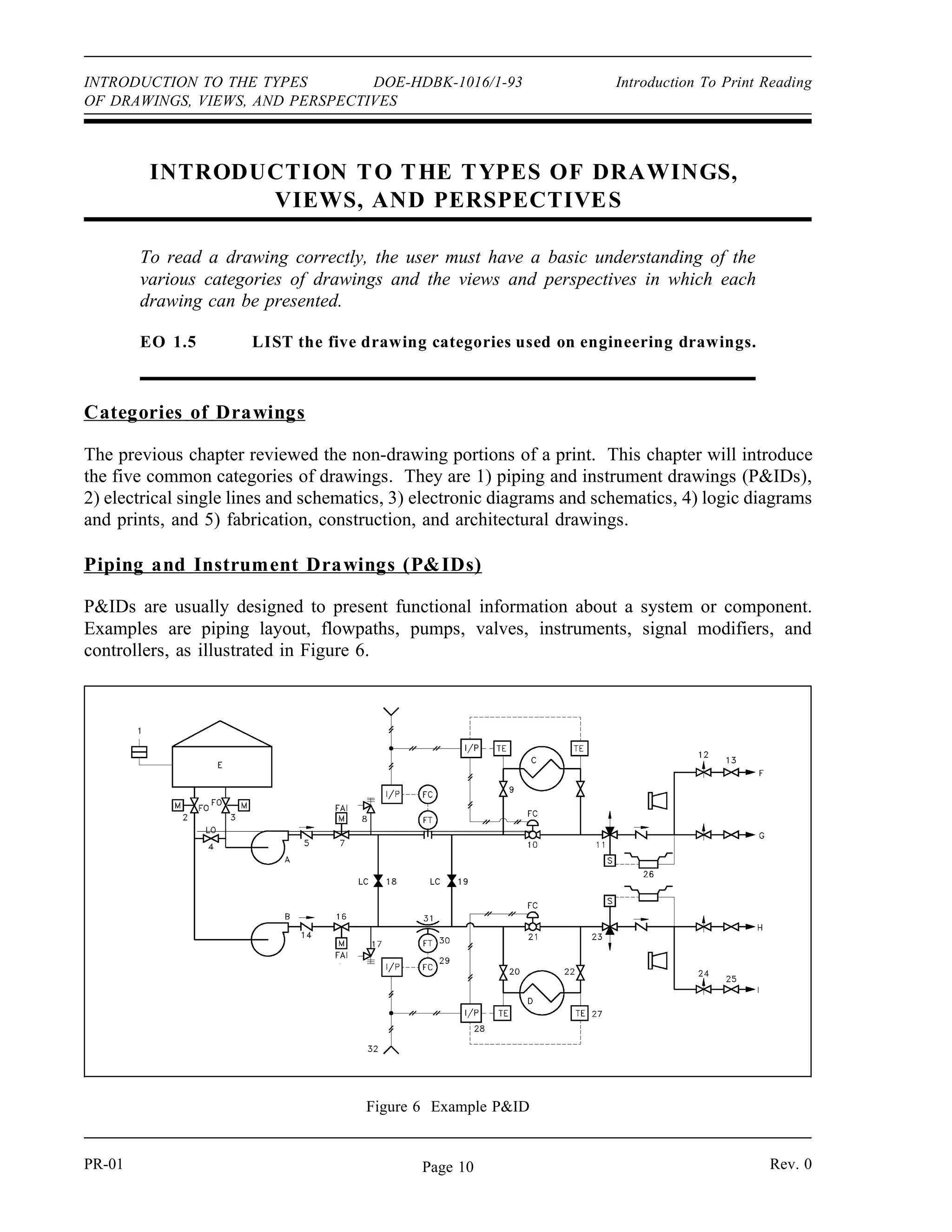
Figure 6 Example PID
INTRODUCTION TO THE TYPES OF DRAWINGS,
VIEWS, AND PERSPECTIVES
To read a drawing correctly, the user must have a basic understanding of the
various categories of drawings and the views and perspectives in which each
drawing can be presented.
EO 1.5 LIST the five drawing categories used on engineering drawings.
Categories of Drawings
The previous chapter reviewed the non-drawing portions of a print. This chapter will introduce
the five common categories of drawings. They are 1) piping and instrument drawings (PIDs),
2) electrical single lines and schematics, 3) electronic diagrams and schematics, 4) logic diagrams
and prints, and 5) fabrication, construction, and architectural drawings.
Piping and Instrument Drawings (PIDs)
PIDs are usually designed to present functional information about a system or component.
Examples are piping layout, flowpaths, pumps, valves, instruments, signal modifiers, and
controllers, as illustrated in Figure 6.
PR-01 Rev. 0Page 10
Introduction To Print Reading DOE-HDBK-1016/1-93 INTRODUCTION TO THE TYPES
OF DRAWINGS, VIEWS, AND PERSPECTIVES
As a rule PIDs do not have a drawing scale and present only the relationship or sequence
between components. Just because two pieces of equipment are drawn next to each other does
not indicate that in the plant the equipment is even in the same building; it is just the next part
or piece of the system. These drawings only present information on how a system functions, not
the actual physical relationships.
Because PIDs provide the most concise format for how a system should function, they are used
extensively in the operation, repair, and modification of the plant.
Electrical Single Lines and Schematics
Electrical single lines and
Figure 7 Example of a Single Line
schematics are designed to
present functional information
about the electrical design of a
system or component. They
provide the same types of
information about electrical
systems that PIDs provide
for piping and instrument
systems. Like PIDs,
electrical prints are not usually
drawn to scale. Examples of
typical single lines are site or
building power distribution,
system power distribution, and
motor control centers.
Figure 7 is an example of an
electrical single line.
Electrical schematics provide a
more detailed level of
information about an electrical
system or component than the
single lines. Electrical
schematic drawings present
information such as the individual relays, relay contacts, fuses, motors, lights, and instrument
sensors. Examples of typical schematics are valve actuating circuits, motor start circuits, and
breaker circuits.
Rev. 0 PR-01Page 11
INTRODUCTION TO THE TYPES DOE-HDBK-1016/1-93 Introduction to Print Reading
OF DRAWINGS, VIEWS, AND PERSPECTIVES
Figure 8 is an example of a motor start circuit schematic. Electrical single lines and schematics
provide the most concise format for depicting how electrical systems should function, and are
used extensively in the operation, repair, and modification of the plant.
Figure 8 Example of a Schematic
PR-01 Rev. 0Page 12
Introduction to Print Reading DOE-HDBK-1016/1-93 INTRODUCTION TO THE TYPES
OF DRAWINGS, VIEWS, AND PERSPECTIVES
Electronic Diagrams and Schematics
Electronic diagrams and schematics are designed to present information about the individual
components (resistors, transistors, and capacitors) used in a circuit, as illustrated in Figure 9.
These drawings are usually used by circuit designers and electronics repair personnel.
Figure 9 Example of an Electronic Diagram
Rev. 0 PR-01Page 13
INTRODUCTION TO THE TYPES DOE-HDBK-1016/1-93 Introduction to Print Reading
OF DRAWINGS, VIEWS, AND PERSPECTIVES
Logic Diagrams and Prints
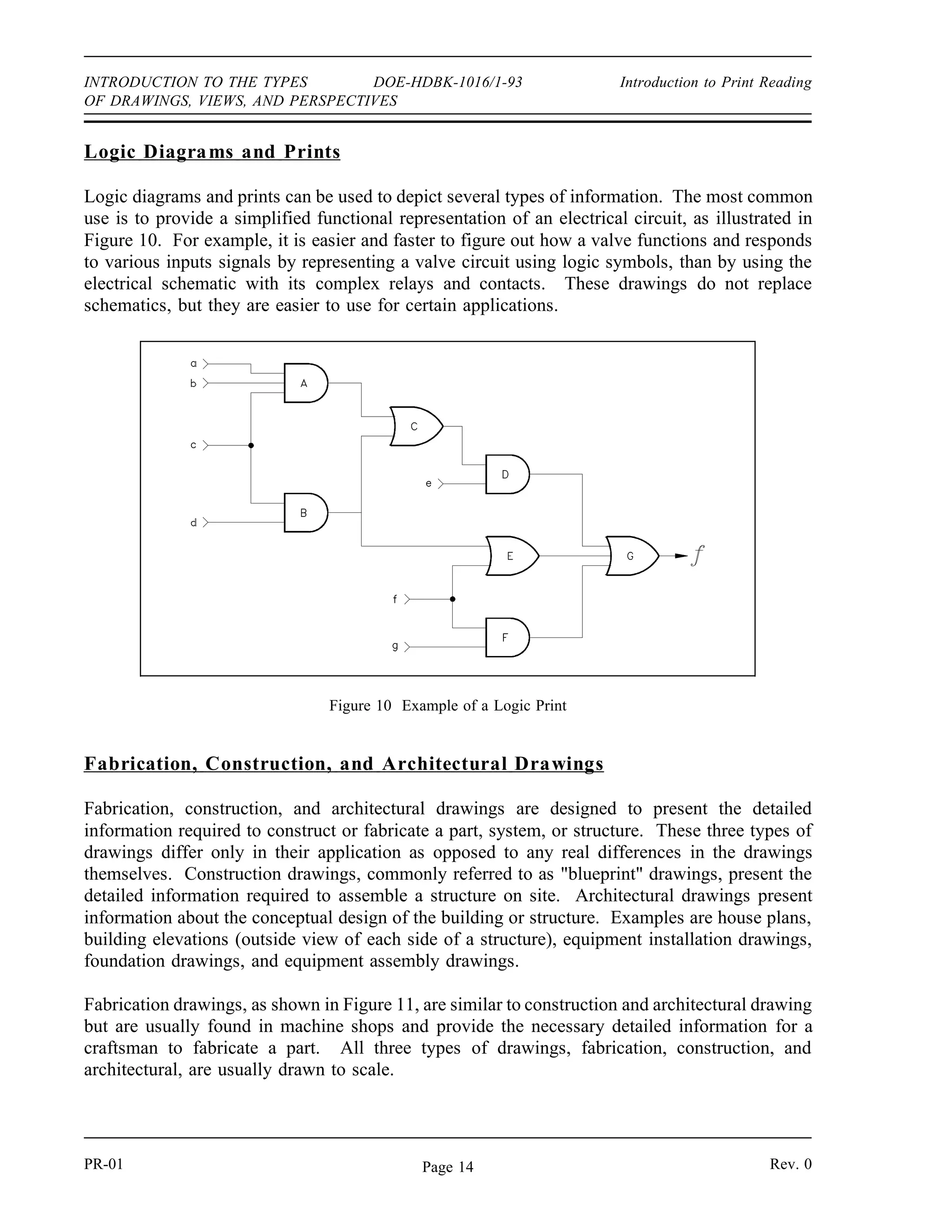
Logic diagrams and prints can be used to depict several types of information. The most common
use is to provide a simplified functional representation of an electrical circuit, as illustrated in
Figure 10. For example, it is easier and faster to figure out how a valve functions and responds
to various inputs signals by representing a valve circuit using logic symbols, than by using the
electrical schematic with its complex relays and contacts. These drawings do not replace
schematics, but they are easier to use for certain applications.
Figure 10 Example of a Logic Print
Fabrication, Construction, and Architectural Drawings
Fabrication, construction, and architectural drawings are designed to present the detailed
information required to construct or fabricate a part, system, or structure. These three types of
drawings differ only in their application as opposed to any real differences in the drawings
themselves. Construction drawings, commonly referred to as blueprint drawings, present the
detailed information required to assemble a structure on site. Architectural drawings present
information about the conceptual design of the building or structure. Examples are house plans,
building elevations (outside view of each side of a structure), equipment installation drawings,
foundation drawings, and equipment assembly drawings.
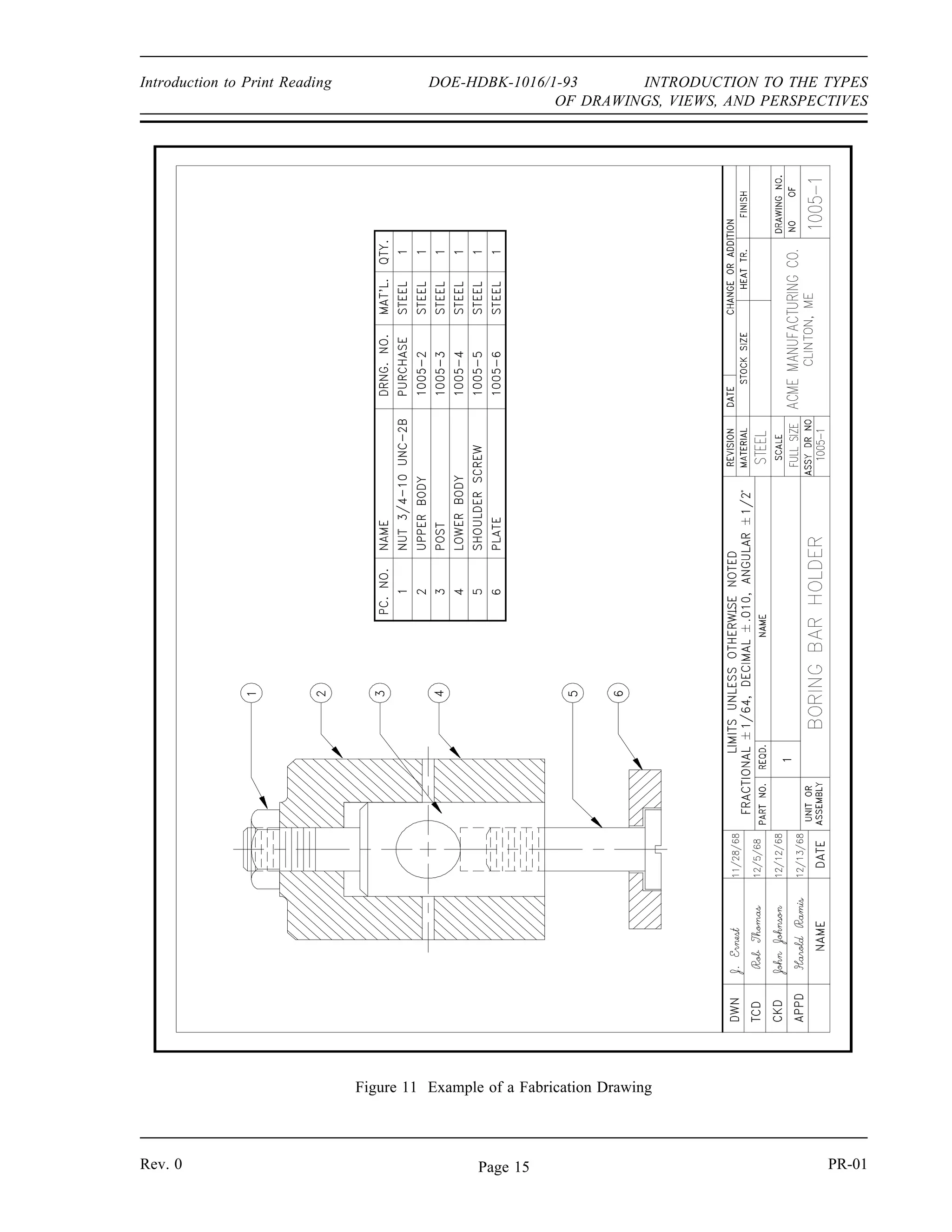
Fabrication drawings, as shown in Figure 11, are similar to construction and architectural drawing
but are usually found in machine shops and provide the necessary detailed information for a
craftsman to fabricate a part. All three types of drawings, fabrication, construction, and
architectural, are usually drawn to scale.
PR-01 Rev. 0Page 14
Introduction to Print Reading DOE-HDBK-1016/1-93 INTRODUCTION TO THE TYPES
OF DRAWINGS, VIEWS, AND PERSPECTIVES
Figure 11 Example of a Fabrication Drawing
Rev. 0 PR-01Page 15
INTRODUCTION TO THE TYPES DOE-HDBK-1016/1-93 Introduction to Print Reading
OF DRAWINGS, VIEWS, AND PERSPECTIVES
Drawing Format
PIDs, fabrication, construction, and architectural drawings can be presented using one of several
different formats. The standard formats are single line, pictorial or double line, and cutaway.
Each format provides specific information about a component or system.
Single Line Drawings
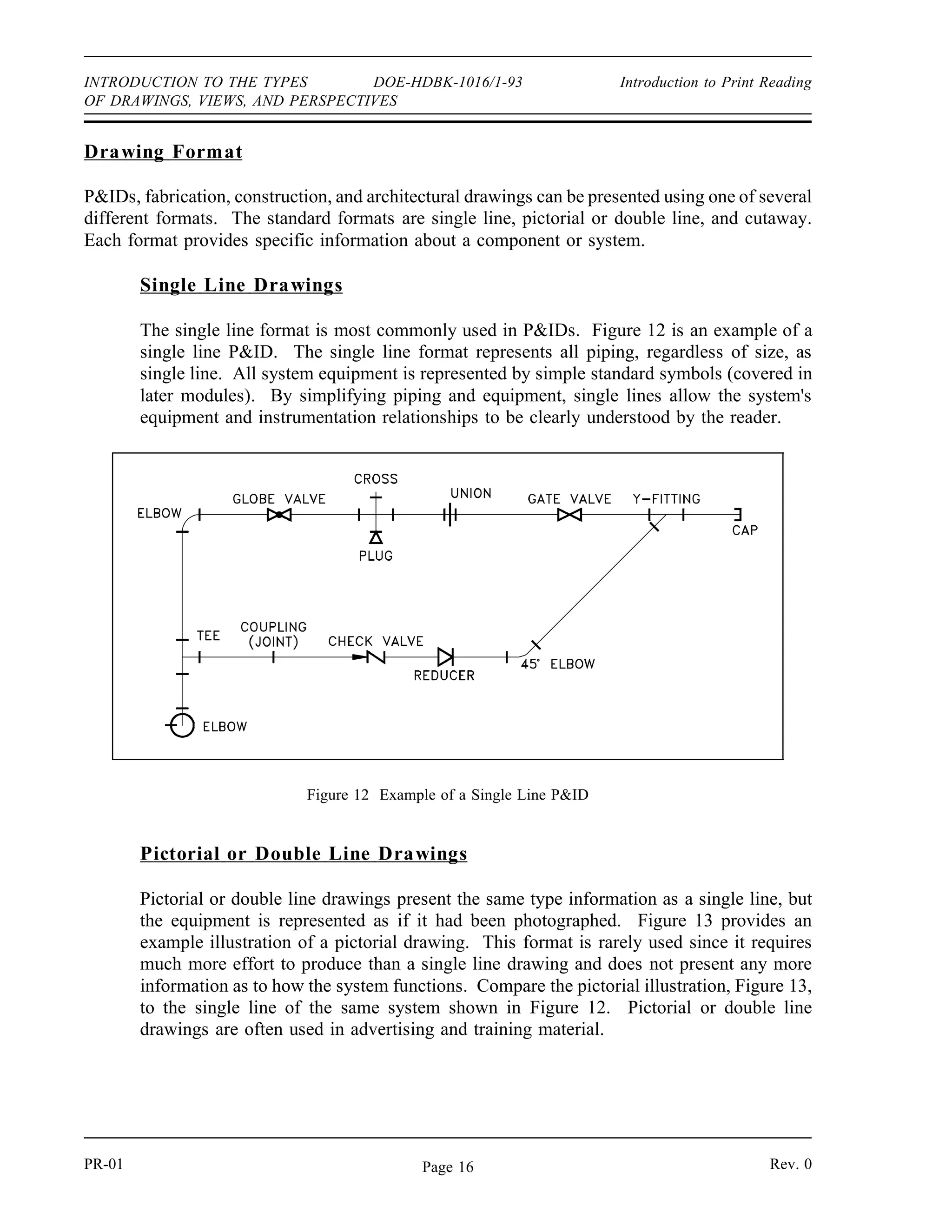
The single line format is most commonly used in PIDs. Figure 12 is an example of a
single line PID. The single line format represents all piping, regardless of size, as
single line. All system equipment is represented by simple standard symbols (covered in
later modules). By simplifying piping and equipment, single lines allow the system's
equipment and instrumentation relationships to be clearly understood by the reader.
Pictorial or Double Line Drawings
Figure 12 Example of a Single Line PID
Pictorial or double line drawings present the same type information as a single line, but
the equipment is represented as if it had been photographed. Figure 13 provides an
example illustration of a pictorial drawing. This format is rarely used since it requires
much more effort to produce than a single line drawing and does not present any more
information as to how the system functions. Compare the pictorial illustration, Figure 13,
to the single line of the same system shown in Figure 12. Pictorial or double line
drawings are often used in advertising and training material.
PR-01 Rev. 0Page 16
Introduction To Print Reading DOE-HDBK-1O16/1-93 INTRODUCTION TO THE TYPES
OF DRAWINGS, VIEWS, AND PERSPECTIVES
Figure 13 Example Pictorial
Assembly Drawings
Assembly drawing are a special application of pictorial drawings that are common in the
engineering field. As seen in Figure 14, an assembly drawing is a pictorial view of the
object with all the components shown as they go together. This type pictorial is usually
found in vendor manuals and is used for parts identification and general information
relative to the assembly of the component.
Figure 14 Example of an Assembly Drawing
Rev. 0 Page 17 PR-01
INTRODUCTION TO THE TYPES DOE-HDBK1016/1-93 Introduction To Print Reading
OF DRAWINGS, VIEWS, AND PERSPECTIVES
PR-01 Page 18 Rev. 0
Figure 15 Example of a Cutaway
Cutaway Drawings
A cutaway drawing is another special type of pictorial drawing. In a cutaway, as the
name implies, the component or system has a portion cut away to reveal the internal
parts of the component or system. Figure 15 is an illustration of a cutaway. This
type of drawing is extremely helpful in the maintenance and training areas where the
way internal parts are assembled is important.
Introduction To Print Reading DOE-HDBK-1016/1-93 INTRODUCTION TO THE TYPES
OF DRAWINGS, VIEWS, AND PERSPECTIVES
Views and Perspectives
In addition to the different drawing formats, there are different views or perspectives in which
the formats can be drawn. The most commonly used are the orthographic projection and the
isometric projection.
Orthographic Projections
Orthographic projection is widely used for fabrication and construction type drawings,
as shown in Figure 16. Orthographic projections present the component or system
through the use of three views, These are a top view, a side view, and a front view.
Other views, such as a bottom view, are used to more fully depict the component or
system when necessary.
Figure 16 Example Orthographic Projection
PR-01 Page 19 PR-01Rev. 0 Page 19 PR-01
INTRODUCTION TO THE TYPES DOE-HDBK-1016/1-93 Introduction To Print Reading
OF DRAWINGS, VIEWS, AND PERSPECTIVES
Figure 17 shows how each of the three views is obtained. The orthographic projection
is typically drawn to scale and shows all components in their proper relationships to each
other. The three views, when provided with dimensions and a drawing scale, contain
information that is necessary to fabricate or construct the component or system.
Figure 17 Orthographic Projections
PR-01 Rev. 0Page 20
Introduction To Print Reading DOE-HDBK-1016/1-93 INTRODUCTION TO THE TYPES
OF DRAWINGS, VIEWS, AND PERSPECTIVES
Isometric Projection
The isometric projection presents a single view of the component or system. The view
is commonly from above and at an angle of 30°. This provides a more realistic three-
dimensional view. As shown on Figure 18, this view makes it easier to see how the
system looks and how its various portions or parts are related to one another. Isometric
projections may or may not be drawn to a scale.
Figure 18 Example of an Isometric
Rev. 0 PR-01Page 21
INTRODUCTION TO THE TYPES DOE-HDBK-1016/1-93 Introduction To Print Reading
OF DRAWINGS, VIEWS, AND PERSPECTIVES
Summary
The important information in this chapter is summarized below.
Drawing Types, Views, and Perspectives Summary
• The five engineering drawing categories are:
PIDs
Electrical single lines and schematics
Electronic diagrams and schematics
Logic diagrams and prints
Fabrication, construction, and architectural drawings
PR-01 Rev. 0Page 22
ENGINEERING SYMBOLOGY, PRINTS,
AND DRAWINGS
Module 2
Engineering Fluid
Diagrams and Prints
Engineering Fluid Diagrams and Prints DOE-HDBK-1016/1-93 TABLE OF CONTENTS
TABLE OF CONTENTS
LIST OF FIGURES . . . . . . . . . . . . . . . . . . . . . . . . . . . . . . . . . . . . . . . . . . . . . . . . iii
LIST OF TABLES . . . . . . . . . . . . . . . . . . . . . . . . . . . . . . . . . . . . . . . . . . . . . . . . . v
REFERENCES . . . . . . . . . . . . . . . . . . . . . . . . . . . . . . . . . . . . . . . . . . . . . . . . . . . vi
OBJECTIVES . . . . . . . . . . . . . . . . . . . . . . . . . . . . . . . . . . . . . . . . . . . . . . . . . . . . vii
ENGINEERING FLUIDS DIAGRAMS AND PRINTS . . . . . . . . . . . . . . . . . . . . . . . . 1
Symbology . . . . . . . . . . . . . . . . . . . . . . . . . . . . . . . . . . . . . . . . . . . . . . . . . 2
Valve Symbols . . . . . . . . . . . . . . . . . . . . . . . . . . . . . . . . . . . . . . . . . . . . . . . 3
Valve Actuators . . . . . . . . . . . . . . . . . . . . . . . . . . . . . . . . . . . . . . . . . . . . . . 4
Control Valve Designations . . . . . . . . . . . . . . . . . . . . . . . . . . . . . . . . . . . . . . 6
Piping Systems . . . . . . . . . . . . . . . . . . . . . . . . . . . . . . . . . . . . . . . . . . . . . . 7
Instrumentation . . . . . . . . . . . . . . . . . . . . . . . . . . . . . . . . . . . . . . . . . . . . . . 8
Sensing Devices and Detectors . . . . . . . . . . . . . . . . . . . . . . . . . . . . . . . . . . . 10
Modifiers and Transmitters . . . . . . . . . . . . . . . . . . . . . . . . . . . . . . . . . . . . . 11
Indicators and Recorders . . . . . . . . . . . . . . . . . . . . . . . . . . . . . . . . . . . . . . . 12
Controllers . . . . . . . . . . . . . . . . . . . . . . . . . . . . . . . . . . . . . . . . . . . . . . . . 12
Examples of Simple Instrument Loops . . . . . . . . . . . . . . . . . . . . . . . . . . . . . 13
Components . . . . . . . . . . . . . . . . . . . . . . . . . . . . . . . . . . . . . . . . . . . . . . . . 13
Miscellaneous PID Symbols . . . . . . . . . . . . . . . . . . . . . . . . . . . . . . . . . . . 15
Summary . . . . . . . . . . . . . . . . . . . . . . . . . . . . . . . . . . . . . . . . . . . . . . . . . 15
READING ENGINEERING PIDs . . . . . . . . . . . . . . . . . . . . . . . . . . . . . . . . . . . . 16
Standards and Conventions for Valve Status . . . . . . . . . . . . . . . . . . . . . . . . . . 16
Summary . . . . . . . . . . . . . . . . . . . . . . . . . . . . . . . . . . . . . . . . . . . . . . . . . 17
PID PRINT READING EXAMPLE . . . . . . . . . . . . . . . . . . . . . . . . . . . . . . . . . . . 18
Example . . . . . . . . . . . . . . . . . . . . . . . . . . . . . . . . . . . . . . . . . . . . . . . . . . 18
Summary . . . . . . . . . . . . . . . . . . . . . . . . . . . . . . . . . . . . . . . . . . . . . . . . . 22
Rev. 0 Page i PR-02
TABLE OF CONTENTS DOE-HDBK-1016/1-93 Engineering Fluid Diagrams and Prints
TABLE OF CONTENTS
FLUID POWER PIDs . . . . . . . . . . . . . . . . . . . . . . . . . . . . . . . . . . . . . . . . . . . . 23
Fluid Power Diagrams and Schematics . . . . . . . . . . . . . . . . . . . . . . . . . . . . . 23
Pumps . . . . . . . . . . . . . . . . . . . . . . . . . . . . . . . . . . . . . . . . . . . . . . . . . . . 23
Reservoirs . . . . . . . . . . . . . . . . . . . . . . . . . . . . . . . . . . . . . . . . . . . . . . . . . 24
Actuator . . . . . . . . . . . . . . . . . . . . . . . . . . . . . . . . . . . . . . . . . . . . . . . . . . 24
Piping . . . . . . . . . . . . . . . . . . . . . . . . . . . . . . . . . . . . . . . . . . . . . . . . . . . . 26
Valves . . . . . . . . . . . . . . . . . . . . . . . . . . . . . . . . . . . . . . . . . . . . . . . . . . . 27
Reading Fluid Power Diagrams . . . . . . . . . . . . . . . . . . . . . . . . . . . . . . . . . . 30
Types of Fluid Power Diagrams . . . . . . . . . . . . . . . . . . . . . . . . . . . . . . . . . . 33
Summary . . . . . . . . . . . . . . . . . . . . . . . . . . . . . . . . . . . . . . . . . . . . . . . . . 35
PR-02 Page ii Rev. 0
Engineering Fluid Diagrams and Prints DOE-HDBK-1016/1-93 LIST OF FIGURES
LIST OF FIGURES
Figure 1 Valve Symbols . . . . . . . . . . . . . . . . . . . . . . . . . . . . . . . . . . . . . . . . . . . . . . 3
Figure 2 Valve Actuator Symbols . . . . . . . . . . . . . . . . . . . . . . . . . . . . . . . . . . . . . . . 4
Figure 3 Remotely Controlled Valve . . . . . . . . . . . . . . . . . . . . . . . . . . . . . . . . . . . . . 4
Figure 4 Level Control Valve . . . . . . . . . . . . . . . . . . . . . . . . . . . . . . . . . . . . . . . . . . 5
Figure 5 Control Valves with Valve Positioners . . . . . . . . . . . . . . . . . . . . . . . . . . . . . . 6
Figure 6 Control Valve Designations . . . . . . . . . . . . . . . . . . . . . . . . . . . . . . . . . . . . . 6
Figure 7 Piping Symbols . . . . . . . . . . . . . . . . . . . . . . . . . . . . . . . . . . . . . . . . . . . . . 7
Figure 8 More Piping Symbols . . . . . . . . . . . . . . . . . . . . . . . . . . . . . . . . . . . . . . . . . 8
Figure 9 Detector and Sensing Device Symbols . . . . . . . . . . . . . . . . . . . . . . . . . . . . . 10
Figure 10 Transmitters and Instruments . . . . . . . . . . . . . . . . . . . . . . . . . . . . . . . . . . 11
Figure 11 Indicators and Recorders . . . . . . . . . . . . . . . . . . . . . . . . . . . . . . . . . . . . . 12
Figure 12 Controllers . . . . . . . . . . . . . . . . . . . . . . . . . . . . . . . . . . . . . . . . . . . . . . . 12
Figure 13 Signal Conditioners . . . . . . . . . . . . . . . . . . . . . . . . . . . . . . . . . . . . . . . . . 12
Figure 14 Instrumentation System Examples . . . . . . . . . . . . . . . . . . . . . . . . . . . . . . . 13
Figure 15 Symbols for Major Components . . . . . . . . . . . . . . . . . . . . . . . . . . . . . . . . 14
Figure 16 Miscellaneous Symbols . . . . . . . . . . . . . . . . . . . . . . . . . . . . . . . . . . . . . . 15
Figure 17 Valve Status Symbols . . . . . . . . . . . . . . . . . . . . . . . . . . . . . . . . . . . . . . . 16
Figure 18 Exercise PID . . . . . . . . . . . . . . . . . . . . . . . . . . . . . . . . . . . . . . . . . . . . 19
Figure 19 Fluid Power Pump and Compressor Symbols . . . . . . . . . . . . . . . . . . . . . . . 23
Figure 20 Fluid Power Reservoir Symbols . . . . . . . . . . . . . . . . . . . . . . . . . . . . . . . . 24
Figure 21 Symbols for Linear Actuators . . . . . . . . . . . . . . . . . . . . . . . . . . . . . . . . . . 25
Rev. 0 Page iii PR-02
LIST OF FIGURES DOE-HDBK-1016/1-93 Engineering Fluid Diagrams and Prints
LIST OF FIGURES (Cont.)
Figure 22 Symbols for Rotary Actuators . . . . . . . . . . . . . . . . . . . . . . . . . . . . . . . . . . 26
Figure 23 Fluid Power Line Symbols . . . . . . . . . . . . . . . . . . . . . . . . . . . . . . . . . . . . 26
Figure 24 Valve Operation . . . . . . . . . . . . . . . . . . . . . . . . . . . . . . . . . . . . . . . . . . . 27
Figure 25 Valve Symbol Development . . . . . . . . . . . . . . . . . . . . . . . . . . . . . . . . . . . 28
Figure 26 Fluid Power Valve Symbols . . . . . . . . . . . . . . . . . . . . . . . . . . . . . . . . . . . 29
Figure 27 Simple Hydraulic Power System . . . . . . . . . . . . . . . . . . . . . . . . . . . . . . . . 30
Figure 28 Line Diagram of Figure 27 . . . . . . . . . . . . . . . . . . . . . . . . . . . . . . . . . . . . 30
Figure 29 Typical Fluid Power Diagram . . . . . . . . . . . . . . . . . . . . . . . . . . . . . . . . . . 31
Figure 30 Pictorial Fluid Power Diagram . . . . . . . . . . . . . . . . . . . . . . . . . . . . . . . . . 33
Figure 31 Cutaway Fluid Power Diagram . . . . . . . . . . . . . . . . . . . . . . . . . . . . . . . . 34
Figure 32 Schematic Fluid Power Diagram . . . . . . . . . . . . . . . . . . . . . . . . . . . . . . . . 34
PR-02 Page iv Rev. 0
Engineering Fluid Diagrams and Prints DOE-HDBK-1016/1-93 LIST OF TABLES
LIST OF TABLES
Table 1 Instrument Identifiers . . . . . . . . . . . . . . . . . . . . . . . . . . . . . . . . . . . . . . . . . . 9
Rev. 0 Page v PR-02
REFERENCES DOE-HDBK-1016/1-93 Engineering Fluid Diagrams and Prints
REFERENCES
ANSI Y14.5M - 1982, Dimensioning and Tolerancing, American National Standards
Institute.
ANSI Y32.2 - 1975, Graphic Symbols for Electrical and Electronic Diagrams, American
National Standards Institute.
Gasperini, Richard E., Digital Troubleshooting, Movonics Company; Los Altos,
California, 1976.
Jensen - Helsel, Engineering Drawing and Design, Second Ed., McGraw-Hill Book
Company, New York, 1979.
Lenk, John D., Handbook of Logic Circuits, Reston Publishing Company, Reston,
Virginia, 1972.
Wickes, William E., Logic Design with Integrated Circuits, John Wiley  Sons, Inc,
1968.
Naval Auxiliary Machinery, United States Naval Institute, Annapolis, Maryland, 1951.
TPC Training Systems, Reading Schematics and Symbols, Technical Publishing Company,
Barrington, Illinois, 1974.
Arnell, Alvin, Standard Graphical Symbols, McGraw-Hill Book Company, 1963.
George Mashe, Systems Summary of a Westinghouse Pressurized Water Reactor,
Westinghouse Electric Corporation, 1971.
Zappe, R.W., Valve Selection Handbook, Gulf Publishing Company, Houston, Texas,
1968.
PR-02 Page vi Rev. 0
Engineering Fluid Diagrams and Prints DOE-HDBK-1016/1-93 OBJECTIVES
TERMINAL OBJECTIVE
1.0 Given an engineering print, READ and INTERPRET facility engineering Piping and
Instrument Drawings.
ENABLING OBJECTIVES
1.1 IDENTIFY the symbols used on engineering PIDs for the following types of valves:
a. Globe valve g. Relief valve
b. Gate valve h. Rupture disk
c. Ball valve i. Three-way valve
d. Check valve j. Four-way valve
e. Stop check valve k. Throttle (needle) valve
f. Butterfly valve l. Pressure regulator
1.2 IDENTIFY the symbols used on engineering PIDs for the following types of valve
operators:
a. Diaphragm valve operator
b. Motor valve operator
c. Solenoid valve operator
d. Piston (hydraulic) valve operator
e. Hand (manual) valve operator
f. Reach-rod valve operator
1.3 IDENTIFY the symbols used on engineering PIDs for educators and ejectors.
1.4 IDENTIFY the symbols used on engineering PIDs for the following lines:
a. Process
b. Pneumatic
c. Hydraulic
d. Inert gas
e. Instrument signal (electrical)
f. Instrument capillary
g. Electrical
Rev. 0 Page vii PR-02
OBJECTIVES DOE-HDBK-1016/1-93 Engineering Fluid Diagrams and Prints
ENABLING OBJECTIVES (cont.)
1.5 IDENTIFY the symbols used on engineering PIDs for the following basic types of
instrumentation:
a. Differential pressure cell
b. Temperature element
c. Venturi
d. Orifice
e. Rotometer
f. Conductivity or salinity cell
g. Radiation detector
1.6 IDENTIFY the symbols used on engineering PIDs to denote the location, either local
or board mounted, of instruments, indicators, and controllers.
1.7 IDENTIFY the symbols used on engineering PIDs for the following types of instrument
signal controllers and modifiers:
a. Proportional
b. Proportional-integral
c. Proportional-integral-differential
d. Square root extractors
1.8 IDENTIFY the symbols used on engineering PIDs for the following types of system
components:
a. Centrifugal pumps
b. Positive displacement pumps
c. Heat exchangers
d. Compressors
e. Fans
f. Tanks
g. Filters/strainers
PR-02 Page viii Rev. 0
Engineering Fluid Diagrams and Prints DOE-HDBK-1016/1-93 OBJECTIVES
ENABLING OBJECTIVES (cont.)
1.9 STATE how the following valve conditions are depicted on an engineering PID:
a. Open valve
b. Closed valve
c. Throttled valve
d. Combination valves (3- or 4-way valve)
e. Locked-closed valve
f. Locked-open valve
g. Fail-open valve
h. Fail-closed valve
i. Fail-as-is valve
1.10 Given an engineering PID, IDENTIFY components and DETERMINE the flowpath(s)
for a given valve lineup.
1.11 IDENTIFY the symbols used on engineering fluid power drawings for the following
components:
a. Pump
b. Compressor
c. Reservoir
d. Actuators
e. Piping and piping junctions
f. Valves
1.12 Given a fluid power type drawing, DETERMINE the operation or resultant action of the
stated component when hydraulic pressure is applied/removed.
Rev. 0 Page ix PR-02
DOE-HDBK-1016/1-93 Engineer Fluid Diagrams and Prints
Intentionally Left Blank.
PR-02 Page x Rev. 0
DOE-HDBK-1016/1-93
Engineering Fluid Diagrams and Prints ENGINEERING FLUIDS DIAGRAMS AND PRINTS
ENGINEERING FLUIDS DIAGRAMS AND PRINTS
To read and understand engineering fluid diagrams and prints, usually referred
to as PIDs, an individual must be familiar with the basic symbols.
EO 1.1 IDENTIFY the symbols used on engineering PIDs for the
following types of valves:
a. Globe valve g. Relief valve
b. Gate valve h. Rupture disk
c. Ball valve i. Three-way valve
d. Check valve j. Four-way valve
e. Stop check valve k. Throttle (needle) valve
f. Butterfly valve l. Pressure regulator
EO 1.2 IDENTIFY the symbols used on engineering PIDs for the
following types of valve operators:
a. Diaphragm valve operator
b. Motor valve operator
c. Solenoid valve operator
d. Piston (hydraulic) valve operator
e. Hand (manual) valve operator
f. Reach rod valve operator
EO 1.3 IDENTIFY the symbols used on engineering PIDs for
educators and ejectors.
EO 1.4 IDENTIFY the symbols used on engineering PIDs for the
following lines:
a. Process
b. Pneumatic
c. Hydraulic
d. Inert gas
e. Instrument signal (electrical)
f. Instrument capillary
g. Electrical
Rev. 0 PR-02Page 1
DOE-HDBK-1016/1-93
ENGINEERING FLUIDS DIAGRAMS AND PRINTS Engineering Fluid Diagrams and Prints
EO 1.5 IDENTIFY the symbols used on engineering PIDs for the
following basic types of instrumentation:
a. Differential pressure cell
b. Temperature element
c. Venturi
d. Orifice
e. Rotometer
f. Conductivity or
salinity cell
g. Radiation detector
EO 1.6 IDENTIFY the symbols used on engineering PIDs to denote
the location, either local or board mounted, of instruments,
indicators, and controllers.
EO 1.7 IDENTIFY the symbols used on engineering PIDs for the
following types of instrument signal modifiers:
a. Proportional
b. Proportional-integral
c. Proportional-integral-differential
d. Square root extractors
EO 1.8 IDENTIFY the symbols used on engineering PIDs for the
following types of system components:
a. Centrifugal pumps
b. Positive displacement pumps
c. Heat exchangers
d. Compressors
e. Fans
f. Tanks
g. Filters/strainers
Symbology
To read and interpret piping and instrument drawings (PIDs), the reader must learn the meaning
of the symbols. This chapter discusses the common symbols that are used to depict fluid system
components. When the symbology is mastered, the reader will be able to interpret most PIDs.
The reader should note that this chapter is only representative of fluid system symbology, rather
than being all-inclusive. The symbols presented herein are those most commonly used in
engineering PIDs. The reader may expand his or her knowledge by obtaining and studying the
appropriate drafting standards used at his or her facility.
PR-02 Rev. 0Page 2
DOE-HDBK-1016/1-93
Engineering Fluid Diagrams and Prints ENGINEERING FLUIDS DIAGRAMS AND PRINTS
Valve Symbols
Valves are used to control the direction, flow rate, and pressure of fluids. Figure 1 shows the
symbols that depict the major valve types.
It shoud be noted that globe and gate valves will often be depicted by the same valve symbol.
In such cases, information concerning the valve type may be conveyed by the component
identification number or by the notes and legend section of the drawing; however, in many
instances even that may not hold true.
DOE-HDBK-1016/1-93
ENGINEERING FLUIDS DIAGRAMS AND PRINTS Engineering Fluid Diagrams and Prints
Valve Actuators
Some valves are provided with actuators to allow remote operation, to increase mechanical
advantage, or both. Figure 2 shows the symbols for the common valve actuators. Note that
although each is shown attached to a gate valve, an actuator can be attached to any type of valve
body. If no actuator is shown on a valve symbol, it may be assumed the valve is equipped only
with a handwheel for manual operation.
The combination of a valve and an actuator is commonly called a control valve. Control valves
Figure 2 Valve Actuator Symbols
are symbolized by combining the appropriate valve symbol and actuator symbol, as illustrated
in Figure 2. Control valves can be configured in many different ways. The most commonly
found configurations are to manually control the actuator from a remote operating station, to
automatically control the actuator from an instrument, or both.
In many cases, remote control of a valve is accomplished
Figure 3 Remotely Controlled Valve
by using an intermediate, small control valve to operate
the actuator of the process control valve. The
intermediate control valve is placed in the line supplying
motive force to the process control valve, as shown in
Figure 3. In this example, air to the process air-operated
control valve is controlled by the solenoid-operated,
3-way valve in the air supply line. The 3-way valve may
supply air to the control valve's diaphragm or vent the
diaphragm to the atmosphere.
PR-02 Rev. 0Page 4
DOE-HDBK-1016/1-93
Engineering Fluid Diagrams and Prints ENGINEERING FLUIDS DIAGRAMS AND PRINTS
Note that the symbols alone in Figure 3 do not provide the reader with enough information to
determine whether applying air pressure to the diaphragm opens or closes the process control
valve, or whether energizing the solenoid pressurizes or vents the diaphragm. Further, Figure 3
is incomplete in that it does not show the electrical portion of the valve control system nor does
it identify the source of the motive force (compressed air). Although Figure 3 informs the reader
of the types of mechanical components in the control system and how they interconnect, it does
not provide enough information to determine how those components react to a control signal.
Control valves operated by an instrument signal are symbolized in the same manner as those
shown previously, except the output of the controlling instrument goes to the valve actuator.
Figure 4 shows a level instrument (designated LC) that controls the level in the tank by
positioning an air-operated diaphragm control valve. Again, note that Figure 4 does not contain
enough information to enable the reader to determine how the control valve responds to a change
in level.
Figure 4 Level Control Valve
An additional aspect of some control valves is a valve positioner, which allows more precise
control of the valve. This is especially useful when instrument signals are used to control the
valve. An example of a valve positioner is a set of limit switches operated by the motion of the
valve. A positioner is symbolized by a square box on the stem of the control valve actuator. The
positioner may have lines attached for motive force, instrument signals, or both. Figure 5 shows
two examples of valves equipped with positioners. Note that, although these examples are more
detailed than those of Figure 3 and Figure 4, the reader still does not have sufficient information
to fully determine response of the control valve to a change in control signal.
Rev. 0 PR-02Page 5
DOE-HDBK-1016/1-93
ENGINEERING FLUIDS DIAGRAMS AND PRINTS Engineering Fluid Diagrams and Prints
Figure 5 Control Valves with Valve Positioners
In Example A of Figure 5, the reader can reasonably assume that opening of the control valve
is in some way proportional to the level it controls and that the solenoid valve provides an
override of the automatic control signals. However, the reader cannot ascertain whether it opens
or closes the control valve. Also, the reader cannot determine in which direction the valve moves
in response to a change in the control parameter. In Example B of Figure 5, the reader can make
the same general assumptions as in Example A, except the control signal is unknown. Without
additional information, the reader can only assume the air supply provides both the control signal
and motive force for positioning the control valve. Even when valves are equipped with
positioners, the positioner symbol may appear only on detailed system diagrams. Larger, overall
system diagrams usually do not show this much detail and may only show the examples of
Figure 5 as air-operated valves with no special features.
Control Valve Designations
Figure 6 Control Valve Designations
A control valve may serve any number of functions within a fluid system. To differentiate
between valve uses, a balloon labeling system is used to identify the function of a control valve,
as shown in Figure 6. The common convention
is that the first letter used in the valve designator
indicates the parameter to be controlled by the
valve. For example:
F = flow
T = temperature
L = level
P = pressure
H = hand (manually operated valve)
The second letter is usually a C and identifies
the valve as a controller, or active component, as
opposed to a hand-operated valve. The third
letter is a V to indicate that the piece of
equipment is a valve.
PR-02 Rev. 0Page 6
DOE-HDBK-1016/1-93
Engineering Fluid Diagrams and Prints ENGINEERING FLUIDS DIAGRAMS AND PRINTS
Piping Systems
Figure 7 Piping Symbols
The piping of a single system may
contain more than a single medium.
For example, although the main
process flow line may carry water, the
associated auxiliary piping may carry
compressed air, inert gas, or hydraulic
fluid. Also, a fluid system diagram
may also depict instrument signals and
electrical wires as well as piping.
Figure 7 shows commonly used
symbols for indicating the medium
carried by the piping and for
differentiating between piping,
instrumentation signals, and electrical
wires. Note that, although the
auxiliary piping symbols identify their
mediums, the symbol for the process
flow line does not identify its medium.
Rev. 0 PR-02Page 7
DOE-HDBK-1016/1-93
ENGINEERING FLUIDS DIAGRAMS AND PRINTS Engineering Fluid Diagrams and Prints
The diagram may also depict
Figure 8 More Piping Symbols
the individual fittings
comprising the piping runs
depending on its intended use.
Figure 8 shows symbols used
to depict pipe fittings.
Instrumentation
One of the main purposes of a
PID is to provide functional
information about how
instrumentation in a system or
piece of equipment interfaces
with the system or piece of
equipment. Because of this, a
large amount of the symbology
appearing on PIDs depicts
instrumentation and instrument
loops.
The symbols used to represent
instruments and their loops can
be divided into four categories.
Generally each of these four
categories uses the component
identifying (labeling) scheme identified in Table 1. The first column of Table 1 lists the letters
used to identify the parameter being sensed or monitored by the loop or instrument. The second
column lists the letters used to indicate the type of indicator or controller. The third column lists
the letters used to indicate the type of component. The fourth column lists the letters used to
indicate the type of signals that are being modified by a modifier.
PR-02 Rev. 0Page 8
DOE-HDBK-1016/1-93
Engineering Fluid Diagrams and Prints ENGINEERING FLUIDS DIAGRAMS AND PRINTS
TABLE 1
Instrument Identifiers
Sensed Parameter
Type of Indicator
or Controller Type of Component Type of signal
F = flow
T = temperature
P = pressure
I = current
L = level
V = voltage
Z = position
R = recorder
I = indicator
C = controller
T = transmitter
M = modifier
E = element
I = current
V = voltage
P = pneumatic
The first three columns above are combined such that the resulting instrument identifier indicates
its sensed parameter, the function of the instrument, and the type of instrument. The fourth
column is used only in the case of an instrument modifier and is used to indicate the types of
signals being modified. The following is a list of example instrument identifiers constructed from
Table 1.
FIC = flow indicating controller
FM = flow modifier
PM = pressure modifier
TE = temperature element
TR = temperature recorder
LIC = level indicating controller
TT = temperature transmitter
PT = pressure transmitter
FE = flow element
FI = flow indicator
TI = temperature indicator
FC = flow controller
Rev. 0 PR-02Page 9
DOE-HDBK-1016/1-93
ENGINEERING FLUIDS DIAGRAMS AND PRINTS Engineering Fluid Diagrams and Prints
Sensing Devices and Detectors
The parameters of any system are monitored for indication, control, or both. To create a usable
signal, a device must be inserted into the system to detect the desired parameter. In some cases,
a device is used to create special conditions so that another device can supply the necessary
measurement. Figure 9 shows the symbols used for the various sensors and detectors.
Figure 9 Detector and Sensing Device Symbols
PR-02 Rev. 0Page 10
DOE-HDBK-1016/1-93
Engineering Fluid Diagrams and Prints ENGINEERING FLUIDS DIAGRAMS AND PRINTS
Modifiers and Transmitters
Sensors and detectors by themselves are not sufficient to create usable system indications. Each
sensor or detector must be coupled with appropriate modifiers and/or transmitters. The
exceptions are certain types of local instrumentation having mechanical readouts, such as bourdon
tube pressure gages and bimetallic thermometers. Figure 10 illustrates various examples of
modifiers and transmitters. Figure 10 also illustrates the common notations used to indicate the
location of an instrument, i.e., local or board mounted.
Transmitters are used to
Figure 10 Transmitters and Instruments
convert the signal from a
sensor or detector to a
form that can be sent to a
r e m o t e p o i n t f o r
processing, controlling, or
monitoring. The output
can be electronic (voltage
or current), pneumatic, or
hydraulic. Figure 10
illustrates symbols for
several specific types of
transmitters.
The reader should note that
modifiers may only be
identified by the type of
input and output signal
(such as I/P for one that
converts an electrical input
to a pneumatic output)
rather than by the
monitored parameter (such
as PM for pressure
modifier).
Rev. 0 PR-02Page 11
DOE-HDBK-1016/1-93
ENGINEERING FLUIDS DIAGRAMS AND PRINTS Engineering Fluid Diagrams and Prints
Indicators and Recorders
Figure 11 Indicators and Recorders
Indicators and recorders are
instruments that convert the signal
generated by an instrument loop
into a readable form. The
indicator or recorder may be
locally or board mounted, and like
modifiers and transmitters this
information is indicated by the
type of symbol used. Figure 11
provides examples of the symbols
used for indicators and recorders
and how their location is denoted.
Controllers
Controllers process the signal from
an instrument loop and use it to
position or manipulate some other
system component. Generally they
are denoted by placing a C in
the balloon after the controlling
parameter as shown in Figure 12.
There are controllers that serve to
process a signal and create a new
signal. These include proportional
controllers, proportional-integral
controllers, and proportional-integral-differential controllers. The symbols for these controllers
are illustrated in Figure 13. Note that these types of controllers are also called signal
conditioners.
Figure 12 Controllers Figure 13 Signal Conditioners
PR-02 Rev. 0Page 12
DOE-HDBK-1016/1-93
Engineering Fluid Diagrams and Prints ENGINEERING FLUIDS DIAGRAMS AND PRINTS
Examples of Simple Instrument Loops
Figure 14 shows two examples of
Figure 14 Instrumentation System Examples
simple instrument loops. Figure 14
(A) shows a temperature transmitter
(TT), which generates two electrical
signals. One signal goes to a board-
mounted temperature recorder (TR) for
display. The second signal is sent to
a proportional-integral-derivative (PID)
controller, the output of which is sent
to a current-to-pneumatic modifier
(I/P). In the I/P modifier, the electric
signal is converted into a pneumatic
signal, commonly 3 psi to 15 psi,
which in turn operates the valve. The
function of the complete loop is to
modify flow based on process fluid
temperature. Note that there is not
enough information to determine how
flow and temperature are related and
what the setpoint is, but in some
instances the setpoint is stated on a
PID. Knowing the setpoint and
purpose of the system will usually be
sufficient to allow the operation of the
instrument loop to be determined.
The pneumatic level transmitter (LT) illustrated in Figure 14 (B) senses tank level. The output
of the level transmitter is pneumatic and is routed to a board-mounted level modifier (LM). The
level modifier conditions the signal (possibly boosts or mathematically modifies the signal) and
uses the modified signal for two purposes. The modifier drives a board-mounted recorder (LR)
for indication, and it sends a modified pneumatic signal to the diaphragm-operated level control
valve. Notice that insufficient information exists to determine the relationship between sensed
tank level and valve operation.
Components
Within every fluid system there are major components such as pumps, tanks, heat exchangers,
and fans. Figure 15 shows the engineering symbols for the most common major components.
Rev. 0 PR-02Page 13
DOE-HDBK-1016/1-93
ENGINEERING FLUIDS DIAGRAMS AND PRINTS Engineering Fluid Diagrams and Prints
Figure 15 Symbols for Major Components
PR-02 Rev. 0Page 14
DOE-HDBK-1016/1-93
Engineering Fluid Diagrams and Prints ENGINEERING FLUIDS DIAGRAMS AND PRINTS
Miscellaneous PID Symbols
In addition to the normal symbols used on PIDs to represent specific pieces of equipment, there
are miscellaneous symbols that are used to guide or provide additional information about the
drawing. Figure 16 lists and explains four of the more common miscellaneous symbols.
Figure 16 Miscellaneous Symbols
Summary
The important information in this chapter is summarized below.
Engineering Fluids Diagrams and Prints Summary
In this chapter the common symbols found on PIDs for valves, valve operators, process
piping, instrumentation, and common system components were reviewed.
Rev. 0 PR-02Page 15
READING ENGINEERING PIDs DOE-HDBK-1016/1-93 Engineering Fluid Diagrams and Prints
READING ENGINEERING PIDs
Standards and conventions have been developed to provide consistency from
drawing to drawing. To accurately interpret a drawing, these standards and
conventions must be understood.
EO 1.9 STATE how the following valve conditions are depicted on an
engineering PID drawing:
a. Open valve
b. Closed valve
c. Throttled valve
d. Combination valves
(3- or 4- way valve)
e. Locked-closed valve
f. Locked-open valve
g. Fail-open valves
h. Fail-closed valve
i. Fail-as-is valve
Standards and Conventions for Valve Status
Before a diagram or print can be
Figure 17 Valve Status Symbols
properly read and understood, the
basic conventions used by PIDs
to denote valve positions and
failure modes must be understood.
The reader must be able to
determine the valve position, know
if this position is normal, know
how the valve will fail, and in
some cases know if the valve is
normally locked in that position.
Figure 17 illustrates the symbols
used to indicate valve status.
Unless otherwise stated, PIDs
indicate valves in their normal
position. This is usually
interpreted as the normal or
primary flowpath for the system.
An exception is safety systems,
which are normally shown in their
standby or non-accident condition.
3-way valves are sometimes drawn in the position that they will fail to instead of always being
drawn in their normal position. This will either be defined as the standard by the system of
drawings or noted in some manner on the individual drawings.
PR-02 Rev. 0Page 16
Engineering Fluid Diagrams and Prints DOE-HDBK-1016/1-93 READING ENGINEERING PIDs
Summary
The important information in this chapter is summarized below.
Reading Engineering PIDs Summary
This chapterreviewed thebasic symbology,common standards,and conventions used on
PIDs, such as valve conditions and modes of failure. This information, with the
symbology learned in the preceding chapter, provides the information necessary to read
and interpret most PIDs.
Rev. 0 PR-02Page 17
PID PRINT READING EXAMPLE DOE-HDBK-1016/1-93 Engineering Fluid Diagrams and Prints
PID PRINT READING EXAMPLE
The ability to read and understand prints is achieved through the repetitive
reading of prints.
EO 1.10 Given an engineering PID, IDENTIFY components and
DETERMINE the flowpath(s) for a given valve lineup.
Example
At this point, all the symbols for valves and major components have been presented, as have the
conventions for identifying the condition of a system. Refer to Figure 18 as necessary to answer
the following questions. The answers are provided in the back of this section so that you may
judge your own knowledge level.
PR-02 Rev.0Page 18
Engineering Fluid Diagrams and Prints DOE-HDBK-1016/1-93 PID PRINT READING EXAMPLE
Figure 18 Exercise PID
Rev. 0 PR-02Page 19
PID PRINT READING EXAMPLE DOE-HDBK-1016/1-93 Engineering Fluid Diagrams and Prints
1. Identify the following components by letter or number.
a. Centrifugal pump
b. Heat exchanger
c. Tank
d. Venturi
e. Rupture disc
f. Relief valve
g. Motor-operated valve
h. Air-operated valve
i. Throttle valve
j. Conductivity cell
k. Air line
l. Current-to-pneumatic converter
m. Check valve
n. A locked-closed valve
o. A closed valve
p. A locked-open valve
q. A solenoid valve
2. What is the controlling parameter for Valves 10 and 21?
3. Which valves would need to change position in order for Pump B to supply flow to only
points G and H?
4. Which valves will fail open? Fail closed? Fail as is?
PR-02 Rev.0Page 20
Engineering Fluid Diagrams and Prints DOE-HDBK-1016/1-93 PID PRINT READING EXAMPLE
Answers for questions on Figure 18
1. a. A or B
b. C or D
c. E
d. 31
e. 1
f. 8 or 17
g. 2,3,7 or 16
h. 10, 21
i. 12 or 24
j. 26
k. 32
l. 28
m. 5 or 14
n. 18 or 19
o. 18 or 19
p. 4
q. 11 or 23
2. Temperature as sensed by the temperature elements (TE)
3. Open 18 and/or 19
Shut 13 and 25
4. Fail Open: 2 and 3
Fail Closed: 10 and 21
Fail as is: 7 and 16
Rev. 0 PR-02Page 21
PID PRINT READING EXAMPLE DOE-HDBK-1016/1-93 Engineering Fluid Diagrams and Prints
Summary
The important information in this chapter is summarized below.
PID Print Reading Example Summary
This chapter provided the student with examples in applying the material
learned in Chapters 1 and 2.
PR-02 Rev.0Page 22
Engineering Fluid Diagrams and Prints DOE-HDBK-1016/1-93 FLUID POWER PIDs
FLUID POWER PIDs
Fluid power diagrams and schematics require an independent review because they
use a unique set of symbols and conventions.
EO 1.11 IDENTIFY the symbols used on engineering fluid power
drawings for the following components:
a. Pump d. Actuators
b. Compressor e. Piping and piping junctions
c. Reservoir f. Valves
EO 1.12 Given a fluid power type drawing, DETERMINE the operation
or resultant action of the stated component when hydraulic
pressure is applied/removed.
Fluid Power Diagrams and Schematics
Different symbology is used when dealing with systems that operate with fluid power. Fluid
power includes either gas (such as air) or hydraulic (such as water or oil) motive media. Some
of the symbols used in fluid power systems are the same or similar to those already discussed,
but many are entirely different.
Figure 19 Fluid Power Pump and
Compressor Symbols
Fluid power systems are divided into five basic parts:
pumps, reservoirs, actuators, valves, and lines.
Pumps
In the broad area of fluid power, two categories of
pump symbols are used, depending on the motive
media being used (i.e., hydraulic or pneumatic). The
basic symbol for the pump is a circle containing one
or more arrow heads indicating the direction(s) of
flow with the points of the arrows in contact with the
circle. Hydraulic pumps are shown by solid arrow
heads. Pneumatic compressors are represented by
hollow arrow heads. Figure 19 provides common
symbols used for pumps (hydraulic) and compressors
(pneumatic) in fluid power diagrams.
Rev. 0 PR-02Page 23
FLUID POWER PIDs DOE-HDBK-1016/1-93 Engineering Fluid Diagrams and Prints
Reservoirs
Reservoirs provide a location for storage of the motive media (hydraulic fluid or compressed gas).
Although the symbols used to represent reservoirs vary widely, certain conventions are used to
indicate how a reservoir handles the fluid. Pneumatic reservoirs are usually simple tanks and
their symbology is usually some variation of the cylinder shown in Figure 20. Hydraulic
reservoirs can be much more complex in terms of how the fluid is admitted to and removed from
the tank. To convey this information, symbology conventions have been developed. These
symbols are in Figure 20.
Figure 20 Fluid Power Reservoir Symbols
Actuator
An actuator in a fluid power system is any device that converts the hydraulic or pneumatic
pressure into mechanical work. Actuators are classified as linear actuators and rotary actuators.
Linear actuators have some form of piston device. Figure 21 illustrates several types of linear
actuators and their drawing symbols.
PR-02 Rev. 0Page 24
Engineering Fluid Diagrams and Prints DOE-HDBK-1016/1-93 FLUID POWER PIDs
Rotary actuators are generally called motors and may be fixed or variable. Several of the more
Figure 21 Symbols for Linear Actuators
common rotary symbols are shown in Figure 22. Note the similarity between rotary motor
symbols in Figure 22 and the pump symbols shown in Figure 19. The difference between them
is that the point of the arrow touches the circle in a pump and the tail of the arrow touches the
circle in a motor.
Rev. 0 PR-02Page 25
FLUID POWER PIDs DOE-HDBK-1016/1-93 Engineering Fluid Diagrams and Prints
Figure 22 Symbols for Rotary Actuators
Piping
The sole purpose of piping in a fluid power system is to transport the working media, at pressure,
from one point to another. The symbols for the various lines and termination points are shown
in Figure 23.
Figure 23 Fluid Power Line Symbols
PR-02 Rev. 0Page 26
Engineering Fluid Diagrams and Prints DOE-HDBK-1016/1-93 FLUID POWER PIDs
Valves
Valves are the most complicated symbols in fluid power systems. Valves provide the control that
is required to ensure that the motive media is routed to the correct point when needed. Fluid
power system diagrams require much more complex valve symbology than standard PIDs due
to the complicated valving used in fluid power systems. In a typical PID, a valve opens, closes,
or throttles the process fluid, but is rarely required to route the process fluid in any complex
manner (three- and four-way valves being the common exceptions). In fluid power systems it
is common for a valve to have three to eight pipes attached to the valve body, with the valve
being capable of routing the fluid, or several separate fluids, in any number of combinations of
input and output flowpaths.
The symbols used to represent fluid power valves must contain much more information than the
standard PID valve symbology. To meet this need, the valve symbology shown in the
following figures was developed for fluid power PIDs. Figure 24, a cutaway view, provides
an example of the internal complexity of a simple fluid power type valve. Figure 24 illustrates
a four-way/three-position valve and how it operates to vary the flow of the fluid. Note that in
Figure 24 the operator of the valve is not identified, but like a standard process fluid valve the
valve could be operated by a diaphragm, motor, hydraulic, solenoid, or manual operator. Fluid
power valves, when electrically operated by a solenoid, are drawn in the de-energized position.
Energizing the solenoid will cause the valve to shift to the other port. If the valve is operated
by other than a solenoid or is a multiport valve, the information necessary to determine how the
valve operates will be provided on each drawing or on its accompanying legend print.
Figure 24 Valve Operation
Rev. 0 PR-02Page 27
FLUID POWER PIDs DOE-HDBK-1016/1-93 Engineering Fluid Diagrams and Prints
Refer to Figure 25 to see how the valve in Figure 24 is transformed into a usable symbol.
Figure 25 Valve Symbol Development
PR-02 Rev. 0Page 28
Engineering Fluid Diagrams and Prints DOE-HDBK-1016/1-93 FLUID POWER PIDs
Figure 26 shows symbols for the various valve types used in fluid power systems.
Figure 26 Fluid Power Valve Symbols
Rev. 0 PR-02Page 29
FLUID POWER PIDs DOE-HDBK-1016/1-93 Engineering Fluid Diagrams and Prints
Reading Fluid Power Diagrams
Figure 27 Simple Hydraulic Power System
Using the symbology previously
discussed, a fluid power diagram can
now be read. But before reading some
complex examples, let's look at a
simple hydraulic system and convert it
into a fluid power diagram.
Using the drawing in Figure 27, the
left portion of Figure 28 lists each part
and its fluid power symbol. The right
side of Figure 28 shows the fluid
power diagram that represents the
drawing in Figure 27.
Figure 28 Line Diagram of Simple Hydraulic Power System
PR-02 Rev. 0Page 30
Engineering Fluid Diagrams and Prints DOE-HDBK-1016/1-93 FLUID POWER PIDs
With an understanding of the principles involved in reading fluid power diagram, any diagram
can be interpreted. Figure 29 shows the kind of diagram that is likely to be encountered in the
engineering field. To read this diagram, a step-by-step interpretation of what is happening in the
system will be presented.
Figure 29 Typical Fluid Power Diagram
The first step is to get an overall view of what is happening. The arrows between A and B in
the lower right-hand corner of the figure indicate that the system is designed to press or clamp
some type of part between two sections of the machine. Hydraulic systems are often used in
press work or other applications where the work piece must be held in place.
Rev. 0 PR-02Page 31
FLUID POWER PIDs DOE-HDBK-1016/1-93 Engineering Fluid Diagrams and Prints
With the basic function understood, a detailed study of the diagram can be accomplished using
a step-by-step analysis of each numbered local area in the diagram.
LOCAL AREA NUMBER 1
Symbol for an open reservoir with a strainer. The strainer is used to clean the oil before
it enters the system.
LOCAL AREA NUMBER 2
Fixed displacement pump, electrically operated. This pump provides hydraulic pressure
to the system.
LOCAL AREA NUMBER 3
Symbol for a relief valve with separate pressure gage. The relief valve is spring operated
and protects the system from over pressurization. It also acts as an unloader valve to
relieve pressure when the cylinder is not in operation. When system pressure exceeds its
setpoint, the valve opens and returns the hydraulic fluid back to the reservoir. The gage
provides a reading of how much pressure is in the system.
LOCAL AREA NUMBER 4
Composite symbol for a 4-way, 2-position valve. Pushbutton PB-1 is used to activate the
valve by energizing the S-1 solenoid (note the valve is shown in the de-energized
position). As shown, the high pressure hydraulic fluid is being routed from Port 1 to Port
3 and then to the bottom chamber of the piston. This drives and holds the piston in local
area #5 in the retracted position. When the piston is fully retracted and hydraulic pressure
builds, the unloader (relief) valve will lift and maintain the system's pressure at setpoint.
When PB-1 is pushed and S-1 energized, the 1-2 ports are aligned and 3-4 ports are
aligned. This allows hydraulic fluid to enter the top chamber of the piston and drive it
down. The fluid in the bottom chamber drains though the 3-4 ports back into the
reservoir. The piston will continue to travel down until either PB-1 is released or full
travel is reached, at which point the unloader (relief) valve will lift.
LOCAL AREA NUMBER 5
Actuating cylinder and piston. The cylinder is designed to receive fluid in either the
upper or lower chambers. The system is designed so that when pressure is applied to the
top chamber, the bottom chamber is aligned to drain back to the reservoir. When pressure
is applied to the bottom chamber, the top chamber is aligned so that it drains back to the
reservoir.
PR-02 Rev. 0Page 32
Engineering Fluid Diagrams and Prints DOE-HDBK-1016/1-93 FLUID POWER PIDs
Types of Fluid Power Diagrams
Several kinds of diagrams can be used to show how systems work. With an understanding of
how to interpret Figure 29, a reader will be able to interpret all of the diagrams that follow.
A pictorial diagram shows the physical arrangement of the elements in a system. The
components are outline drawings that show the external shape of each item. Pictorial drawings
do not show the internal function of the elements and are not especially valuable for maintenance
or troubleshooting. Figure 30 shows a pictorial diagram of a system.
A cutaway diagram shows both the physical arrangement and the operation of the different
Figure 30 Pictorial Fluid Power Diagram
components. It is generally used for instructional purposes because it explains the functions
while showing how the system is arranged. Because these diagrams require so much space, they
are not usually used for complicated systems. Figure 31 shows the system represented in
Figure 30 in cutaway diagram format and illustrates the similarities and differences between the
two types of diagrams.
Rev. 0 PR-02Page 33
FLUID POWER PIDs DOE-HDBK-1016/1-93 Engineering Fluid Diagrams and Prints
Figure 31 Cutaway Fluid Power Diagram
A schematic diagram uses symbols to show the elements in a system. Schematics are designed
to supply the functional information of the system. They do not accurately represent the relative
location of the components. Schematics are useful in maintenance work, and understanding them
is an important part of troubleshooting. Figure 32 is a schematic diagram of the system
illustrated in Figure 30 and Figure 31.
Figure 32 Schematic Fluid Power Diagram
PR-02 Rev. 0Page 34
Engineering Fluid Diagrams and Prints DOE-HDBK-1016/1-93 FLUID POWER PIDs
Summary
The important information in this chapter is summarized below.
Fluid Power PIDs Summary
This chapter reviewed the most commonly used symbols on fluid power
diagrams and the basic standards and conventions for reading and
interpreting fluid power diagrams.
Rev. 0 PR-02Page 35
FLUID POWER PIDs DOE-HDBK-1016/1-93 Engineering Fluid Diagrams and Prints
Intentionally Left Blank
PR-02 Rev. 0Page 36
ENGINEERING SYMBOLOGY, PRINTS,
AND DRAWINGS
Module 3
Electrical Diagrams and Schematics
Electrical Diagrams and Schematics DOE-HDBK-1016/1-93 TABLE OF CONTENTS
TABLE OF CONTENTS
LIST OF FIGURES . . . . . . . . . . . . . . . . . . . . . . . . . . . . . . . . . . . . . . . . . . . . . . . . . . ii
LIST OF TABLES . . . . . . . . . . . . . . . . . . . . . . . . . . . . . . . . . . . . . . . . . . . . . . . . . . iii
REFERENCES . . . . . . . . . . . . . . . . . . . . . . . . . . . . . . . . . . . . . . . . . . . . . . . . . . . . . iv
OBJECTIVES . . . . . . . . . . . . . . . . . . . . . . . . . . . . . . . . . . . . . . . . . . . . . . . . . . . . . . v
ELECTRICAL DIAGRAMS AND SCHEMATICS . . . . . . . . . . . . . . . . . . . . . . . . . . . . 1
Symbology . . . . . . . . . . . . . . . . . . . . . . . . . . . . . . . . . . . . . . . . . . . . . . . . . . . 2
Transformers . . . . . . . . . . . . . . . . . . . . . . . . . . . . . . . . . . . . . . . . . . . . . . . . . 2
Switches . . . . . . . . . . . . . . . . . . . . . . . . . . . . . . . . . . . . . . . . . . . . . . . . . . . . . 3
Fuses and Breakers . . . . . . . . . . . . . . . . . . . . . . . . . . . . . . . . . . . . . . . . . . . . . 5
Relays, Contacts, Connectors, Lines, Resistors,
and Miscellaneous Electrical Components . . . . . . . . . . . . . . . . . . . . . . . . 6
Large Components . . . . . . . . . . . . . . . . . . . . . . . . . . . . . . . . . . . . . . . . . . . . . 7
Types of Electrical Diagrams or Schematics . . . . . . . . . . . . . . . . . . . . . . . . . . . . 9
Reading Electrical Diagrams and Schematics . . . . . . . . . . . . . . . . . . . . . . . . . . 14
Summary . . . . . . . . . . . . . . . . . . . . . . . . . . . . . . . . . . . . . . . . . . . . . . . . . . . 17
ELECTRICAL WIRING AND SCHEMATIC DIAGRAM
READING EXAMPLES . . . . . . . . . . . . . . . . . . . . . . . . . . . . . . . . . . . . . . . . . . . . . . 18
Examples . . . . . . . . . . . . . . . . . . . . . . . . . . . . . . . . . . . . . . . . . . . . . . . . . . . 18
Summary . . . . . . . . . . . . . . . . . . . . . . . . . . . . . . . . . . . . . . . . . . . . . . . . . . . 23
Rev. 0 Page i PR-03
LIST OF FIGURES DOE-HDBK-1016/1-93 Electrical Diagrams and Schematics
LIST OF FIGURES
Figure 1 Basic Transformer Symbols . . . . . . . . . . . . . . . . . . . . . . . . . . . . . . . . . . . . . . 2
Figure 2 Transformer Polarity . . . . . . . . . . . . . . . . . . . . . . . . . . . . . . . . . . . . . . . . . . . 2
Figure 3 Switches and Switch Symbols . . . . . . . . . . . . . . . . . . . . . . . . . . . . . . . . . . . . . 3
Figure 4 Switch and Switch Status Symbology . . . . . . . . . . . . . . . . . . . . . . . . . . . . . . . 4
Figure 5 Fuse and Circuit Breaker Symbols . . . . . . . . . . . . . . . . . . . . . . . . . . . . . . . . . 5
Figure 6 3-phase and Removable Breaker Symbols . . . . . . . . . . . . . . . . . . . . . . . . . . . . 6
Figure 7 Common Electrical Component Symbols . . . . . . . . . . . . . . . . . . . . . . . . . . . . . 7
Figure 8 Large Common Electrical Components . . . . . . . . . . . . . . . . . . . . . . . . . . . . . . 8
Figure 9 Comparison of an Electrical Schematic and a Pictorial Diagram . . . . . . . . . . . . . 9
Figure 10 Comparison of an Electrical Schematic and a Wiring Diagram . . . . . . . . . . . . 10
Figure 11 Wiring Diagram of a Car's Electrical Circuit . . . . . . . . . . . . . . . . . . . . . . . . 11
Figure 12 Schematic of a Car's Electrical Circuit . . . . . . . . . . . . . . . . . . . . . . . . . . . . . 12
Figure 13 Example Electrical Single Line . . . . . . . . . . . . . . . . . . . . . . . . . . . . . . . . . . 13
Figure 14 Examples of Relays and Relay Contacts . . . . . . . . . . . . . . . . . . . . . . . . . . . . 14
Figure 15 Ganged Switch Symbology . . . . . . . . . . . . . . . . . . . . . . . . . . . . . . . . . . . . . 15
Figure 16 Three-Phase Symbols . . . . . . . . . . . . . . . . . . . . . . . . . . . . . . . . . . . . . . . . . 16
Figure 17 Example 1 . . . . . . . . . . . . . . . . . . . . . . . . . . . . . . . . . . . . . . . . . . . . . . . . 19
Figure 18 Example 2 . . . . . . . . . . . . . . . . . . . . . . . . . . . . . . . . . . . . . . . . . . . . . . . . 20
PR-03 Page ii Rev. 0
Electrical Diagrams and Schematics DOE-HDBK-1016/1-93 LIST OF TABLES
LIST OF TABLES
Table 1 Comparison Between Wiring and Schematic Diagrams . . . . . . . . . . . . . . . . . . . 9
Rev. 0 Page iii PR-03
REFERENCES DOE-HDBK-1016/1-93 Electrical Diagrams and Schematics
REFERENCES
ANSI Y14.5M - 1982, Dimensioning and Tolerancing, American National Standards Institute.
ANSI Y32.2 - 1975, Graphic Symbols for Electrical and Electronic Diagrams, American
National Standards Institute.
Gasperini, Richard E., Digital Troubleshooting, Movonics Company; Los Altos,
California, 1976.
Jensen - Helsel, Engineering Drawing and Design, Second Ed., McGraw-Hill Book
Company, New York, 1979.
Lenk, John D., Handbook of Logic Circuits, Reston Publishing Company, Reston,
Virginia, 1972.
Wickes, William E., Logic Design with Integrated Circuits, John Wiley  Sons, Inc,
1968.
Naval Auxiliary Machinery, United States Naval Institute, Annapolis, Maryland, 1951.
TPC Training Systems, Reading Schematics and Symbols, Technical Publishing Company,
Barrington, Illinois, 1974.
Arnell, Alvin, Standard Graphical Symbols, McGraw-Hill Book Company, 1963.
George Mashe, Systems Summary of a Westinghouse Pressurized Water Reactor,
Westinghouse Electric Corporation, 1971.
Zappe, R.W., Valve Selection Handbook, Gulf Publishing Company, Houston, Texas,
1968.
PR-03 Page iv Rev. 0
Electrical Diagrams and Schematics DOE-HDBK-1016/1-93 OBJECTIVES
TERMINAL OBJECTIVE
1.0 Given an electrical print, READ and INTERPRET facility electrical diagrams and
schematics.
ENABLING OBJECTIVES
1.1 IDENTIFY the symbols used on engineering electrical drawings for the following
components:
a. Single-phase circuit breaker
(open/closed)
b. Three-phase circuit breaker
(open/closed)
c. Thermal overload
d. a contact
e. b contact
f. Time-delay contacts
g. Relay
h. Potential transformer
i. Current transformer
j. Single-phase transformer
k. Delta-wound transformer
l. Wye-wound transformer
m. Electric motor
n. Meters
o. Junctions
p. In-line fuses
q. Single switch
r. Multiple-position switch
s. Pushbutton switch
t. Limit switches
u. Turbine-driven generator
v. Motor-generator set
w. Generator (wye or delta)
x. Diesel-driven generator
y. Battery
1.2 Given an electrical drawing of a circuit containing a transformer, DETERMINE the
direction of current flow, as shown by the transformer's symbol.
1.3 IDENTIFY the symbols and/or codes used on engineering electrical drawings to depict
the relationship between the following components:
a. Relay and its contacts
b. Switch and its contacts
c. Interlocking device and its interlocked equipment
Rev. 0 Page v PR-03
OBJECTIVES DOE-HDBK-1016/1-93 Electrical Diagrams and Schematics
ENABLING OBJECTIVES (Cont.)
1.4 STATE the condition in which all electrical devices are shown, unless otherwise noted
on the diagram or schematic.
1.5 Given a simple electrical schematic and initial conditions, DETERMINE the condition of
the specified component (i.e., energized/de-energized, open/closed).
1.6 Given a simple electrical schematic and initial conditions, IDENTIFY the power sources
and/or loads and their status (i.e., energized or de-energized).
PR-03 Page vi Rev. 0
DOE-HDBK-1016/1-93
Electrical Diagrams and Schematics ELECTRICAL DIAGRAMS AND SCHEMATICS
ELECTRICAL DIAGRAMS AND SCHEMATICS
To read and interpret electrical diagrams and schematics, the basic symbols and
conventions used in the drawing must be understood. This chapter concentrates
on how electrical components are represented on diagrams and schematics. The
function of the individual electrical components and the theory behind their
operation is covered in more detail in the Electrical Science Handbook.
EO 1.1 IDENTIFY the symbols used on engineering electrical drawings for
the following components:
a. Single-phase circuit breaker
(open/closed)
b. Three-phase circuit breaker
(open/closed)
c. Thermal overload
d. a contact
e. b contact
f. Time-delay contacts
g. Relay
h. Potential transformer
i. Current transformer
j. Single-phase transformer
k. Delta-wound transformer
l. Wye-wound transformer
m. Electric motor
n. Meters
o. Junctions
p. In-line fuses
q. Single switch
r. Multiple-position switch
s. Pushbutton switch
t. Limit switches
u. Turbine-driven generator
v. Motor-generator set
w. Generator (wye or delta)
x. Diesel-driven generator
y. Battery
EO 1.2 Given an electrical drawing of a circuit containing a transformer,
DETERMINE the direction of current flow, as shown by the
transformer's symbol.
EO 1.3 IDENTIFY the symbols and/or codes used on engineering electrical
drawings to depict the relationship between the following components:
a. Relay and its contacts
b. Switch and its contacts
c. Interlocking device and its interlocked equipment
EO 1.4 STATE the condition in which all electrical devices are shown, unless
otherwise noted on the diagram or schematic.
EO 1.5 Given a simple electrical schematic and initial conditions, DETERMINE
the condition of the specified component (i.e., energized/de-energized,
open/closed).
Rev. 0 PR-03Page 1
DOE-HDBK-1016/1-93
ELECTRICAL DIAGRAMS AND SCHEMATICS Electrical Diagrams and Schematics
Symbology
To read and interpret electrical
Figure 1 Basic Transformer Symbols
diagrams and schematics, the
reader must first be well
versed in what the many
symbols represent. This
chapter discusses the common
symbols used to depict the
many components in electrical
systems. Once mastered, this
knowledge should enable the
reader to successfully
understand most electrical
diagrams and schematics.
The information that follows
provides details on the basic
symbols used to represent
components in electrical
transmission, switching,
control, and protection
diagrams and schematics.
Transformers
The basic symbols for the
various types of transformers
are shown in Figure 1 (A). Figure 1 (B) shows how the basic symbol for the transformer is
modified to represent specific types and transformer applications.
In addition to the transformer
DOE-HDBK-1016/1-93
Electrical Diagrams and Schematics ELECTRICAL DIAGRAMS AND SCHEMATICS
On the primary side of the transformer the dot indicates current in; on the secondary side the dot
indicates current out.
If at a given instant the current is flowing into the transformer at the dotted end of the primary
coil, it will be flowing out of the transformer at the dotted end of the secondary coil. The current
flow for a transformer using the dot symbology is illustrated in Figure 2.
Switches
Figure 3 shows the most common types of switches and their symbols. The term pole, as used
to describe the switches in Figure 3, refers to the number of points at which current can enter
a switch. Single pole and double pole switches are shown, but a switch may have as many poles
as it requires to perform its function. The term throw used in Figure 3 refers to the number
of circuits that each pole of a switch can complete or control.
Figure 3 Switches and Switch Symbols
Rev. 0 PR-03Page 3
DOE-HDBK-1016/1-93
ELECTRICAL DIAGRAMS AND SCHEMATICS Electrical Diagrams and Schematics
Figure 4 provides the common symbols that are used to denote automatic switches and explains
how the symbol indicates switch status or actuation.
Figure 4 Switch and Switch Status Symbology
PR-03 Rev. 0Page 4
DOE-HDBK-1016/1-93
Electrical Diagrams and Schematics ELECTRICAL DIAGRAMS AND SCHEMATICS
Fuses and Breakers
Figure 5 depicts basic fuse and circuit breaker symbols for single-phase applications. In addition
to the graphic symbol, most drawings will also provide the rating of the fuse next to the symbol.
The rating is usually in amps.
Figure 5 Fuse and Circuit Breaker Symbols
Rev. 0 PR-03Page 5
DOE-HDBK-1016/1-93
ELECTRICAL DIAGRAMS AND SCHEMATICS Electrical Diagrams and Schematics
When fuses, breakers, or switches are used in three-phase systems, the three-phase symbol
combines the single-phase symbol in triplicate as shown in Figure 6. Also shown is the symbol
for a removable breaker, which is a standard breaker symbol placed between a set of chevrons.
The chevrons represent the point at which the breaker disconnects from the circuit when
removed.
Figure 6 Three-phase and Removable Breaker Symbols
Relays, Contacts, Connectors, Lines, Resistors,
and Miscellaneous Electrical Components
Figure 7 shows the common symbols for relays, contacts, connectors, lines, resistors, and other
miscellaneous electrical components.
PR-03 Rev. 0Page 6
DOE-HDBK-1016/1-93
Electrical Diagrams and Schematics ELECTRICAL DIAGRAMS AND SCHEMATICS
Figure 7 Common Electrical Component Symbols
Large Components
The symbols in Figure 8 are used to identify the larger components that may be found in an
electrical diagram or schematic. The detail used for these symbols will vary when used in system
diagrams. Usually the amount of detail will reflect the relative importance of a component to
the particular diagram.
Rev. 0 PR-03Page 7
DOE-HDBK-1016/1-93
ELECTRICAL DIAGRAMS AND SCHEMATICS Electrical Diagrams and Schematics
Figure 8 Large Common Electrical Components
PR-03 Rev. 0Page 8
DOE-HDBK-1016/1-93
Electrical Diagrams and Schematics ELECTRICAL DIAGRAMS AND SCHEMATICS
Types of Electrical Diagrams or Schematics
There are three ways to show electrical circuits. They are wiring, schematic, and pictorial
diagrams. The two most commonly used are the wiring diagram and the schematic diagram.
The uses of these two types of diagrams are compared in Table 1.
TABLE 1
Comparison Between Wiring and Schematic Diagrams
Wiring Diagrams Schematic Diagrams
1. Emphasize connections between
elements of a circuit or system
2. Use horizontal and vertical lines to
represent the wires
3. Use simplified pictorials that clearly
resemble circuit/system components
4. Place equipment and wiring on
drawing to approximate actual
physical location in real circuit
1. Emphasize flow of system
2. Use horizontal and vertical lines to
show system flow
3. Use symbols that indicate function of
equipment, but the symbols do not
look like the actual equipment
4. Drawing layout is done to show the
flow of the system as it functions,
not the physical layout of the
equipment
The pictorial diagram is usually
Figure 9 Comparison of an Electrical Schematic
and a Pictorial Diagram
not found in engineering
applications for the reasons shown
in the following example.
Figure 9 provides a simple
example of how a schematic
diagram compares to a pictorial
equivalent. As can be seen, the
pictorial version is not nearly as
useful as the schematic, especially
if you were trying to obtain
enough information to repair a
circuit or determine how it
operates.
Rev. 0 PR-03Page 9
DOE-HDBK-1016/1-93
ELECTRICAL DIAGRAMS AND SCHEMATICS Electrical Diagrams and Schematics
Figure 10 provides an example of the relationship between a schematic diagram (Figure 10A) and
a wiring diagram (Figure 10B) for an air drying unit. A more complex example, the electrical
circuit of an automobile, is shown in wiring diagram format in Figure 11 and in schematic format
in Figure 12. Notice that the wiring diagram (Figure 11), uses both pictorial representations and
schematic symbols. The schematic (Figure 12) drops all pictorial representations and depicts the
electrical system only in symbols.
Figure 10 Comparison of an Electrical Schematic and a Wiring Diagram
PR-03 Rev. 0Page 10
DOE-HDBK-1016/1-93
Electrical Diagrams and Schematics ELECTRICAL DIAGRAMS AND SCHEMATICS
Figure 11 Wiring Diagram of a Car's Electrical Circuit
Rev. 0 PR-03Page 11
DOE-HDBK-1016/1-93
ELECTRICAL DIAGRAMS AND SCHEMATICS Electrical Diagrams and Schematics
Figure 12 Schematic of a Car's Electrical Circuit
When dealing with a large power distribution system, a special type of schematic diagram called
an electrical single line is used to show all or part of the system. This type of diagram depicts
the major power sources, breakers, loads, and protective devices, thereby providing a useful
overall view of the flow of power in a large electrical power distribution system.
On power distribution single lines, even if it is a 3-phase system, each load is commonly
represented by only a simple circle with a description of the load and its power rating (running
power consumption). Unless otherwise stated, the common units are kilowatts (kW). Figure 13
shows a portion of an electrical distribution system at a nuclear power plant.
PR-03 Rev. 0Page 12
DOE-HDBK-1016/1-93
Electrical Diagrams and Schematics ELECTRICAL DIAGRAMS AND SCHEMATICS
Figure 13 Example Electrical Single Line
Rev. 0 PR-03Page 13
DOE-HDBK-1016/1-93
ELECTRICAL DIAGRAMS AND SCHEMATICS Electrical Diagrams and Schematics
Reading Electrical Diagrams and Schematics
To read electrical system diagrams and schematics properly, the condition or state of each
component must first be understood. For electrical schematics that detail individual relays and
contacts, the components are always shown in the de-energized condition (also called the shelf-
state).
To associate the proper relay with the contact(s) that it operates, each relay is assigned a specific
number and/or letter combination. The number/letter code for each relay is carried by all
associated contacts. Figure 14 (A) shows a simple schematic containing a coil (M1) and its
contact. If space permits, the relationship may be emphasized by drawing a dashed line
(symbolizing a mechanical connection) between the relay and its contact(s) or a dashed box
around them as shown in Figure 14 (B). Figure 14 (C) illustrates a switch and a second set of
contacts that are operated by the switch.
Figure 14 Examples of Relays and Relay Contacts
PR-03 Rev. 0Page 14
DOE-HDBK-1016/1-93
Electrical Diagrams and Schematics ELECTRICAL DIAGRAMS AND SCHEMATICS
When a switch is used in a circuit, it may contain several sets of contacts or small switches
internal to it. The internal switches are shown individually on a schematic. In many cases, the
position of one internal switch will effect the position of another. Such switches are called
ganged switches and are symbolized by connecting them with a dashed line as shown in
Figure 15 (A). In that example, closing Switch 1 also closes Switch 2. The dashed line is also
used to indicate a mechanical interlock between two circuit components. Figure 15 (B) shows
two breakers with an interlock between them.
In system single line diagrams, transformers are often represented by the symbol for a single-
Figure 15 Ganged Switch Symbology
phase air core transformer; however, that does not necessarily mean that the transformer has an
air core or that it is single phase. Single line system diagrams are intended to convey only
general functional information, similar to the type of information presented on a PID for a
piping system. The reader must investigate further if more detail is required. In diagrams
Rev. 0 PR-03Page 15
DOE-HDBK-1016/1-93
ELECTRICAL DIAGRAMS AND SCHEMATICS Electrical Diagrams and Schematics
depicting three-phase systems, a small symbol may be placed to the side of the transformer
primary and secondary to indicate the type of transformer windings that are used.
Figure 16 (A) shows the most commonly used symbols to indicate how the phases are connected
in three-phase windings. Figure 16 (B) illustrates examples of how these symbols appear in a
three-phase single line diagram.
Figure 16 Three-Phase Symbols
PR-03 Rev. 0Page 16
DOE-HDBK-1016/1-93
Electrical Diagrams and Schematics ELECTRICAL DIAGRAMS AND SCHEMATICS
Summary
The important information in this chapter is summarized below.
Electrical Diagrams and Schematics Summary
This chapter covered the common symbols used on electrical diagrams and
schematics to represent the basic electrical components.
Polarity on a transformer is defined by dots placed on the primary and secondary
windings. On the primary side, the dot indicates current in; on the secondary, the
dot indicates current out.
Switches, relays, and interlocked equipment commonly use dashed lines or boxes
to indicate the relationship between them and other components.
Electrical components, such as relays, are drawn in the de-energized state unless
otherwise noted on the diagram.
Rev. 0 PR-03Page 17
ELECTRICAL WIRING DOE-HDBK-1016/1-93 Electrical Diagrams and Schematics
AND SCHEMATIC DIAGRAM READING EXAMPLES
ELECTRICAL WIRING AND SCHEMATIC DIAGRAM
READING EXAMPLES
This chapter contains several examples that will help to build, through practice,
on the knowledge gained in reading electrical wiring and schematic diagrams.
1.6 Given a simple electrical schematic and initial conditions, IDENTIFY
the power sources and/or loads and their status (i.e., energized or de-
energized).
Examples
To aid in understanding the symbology and diagrams discussed in this module refer to Figure 17
and Figure 18. Then answer the questions asked about each. The answers for each example are
given on the page following the questions.
Referring to Figure 17:
1. What type of diagram is it?
2. What is the rating on the fuses protecting the motor controller circuit?
Refer to the number at the far left to locate the following lines.
3. What is the component labeled ITDR in line 13?
4. Which lines contain limit switches?
5. Which lines contain pushbutton switches?
6. How many contacts are operated from relay 8CR?
7. What component is represented by the symbol on the far right of line 4?
PR-03 Rev. 0Page 18
Electrical Diagrams and Schematics DOE-HDBK-1016/1-93 ELECTRICAL WIRING
AND SCHEMATIC DIAGRAM READING EXAMPLES
Figure 17 Example 1
Rev. 0 PR-03Page 19
ELECTRICAL WIRING DOE-HDBK-1016/1-93 Electrical Diagrams and Schematics
AND SCHEMATIC DIAGRAM READING EXAMPLES
Answers to questions on Figure 17.
1. Schematic
2. 10 amps
3. A time delay closing switch
4. Lines 7, 9, 11, 12, 14, and 15
5. Lines 3, 4, 5, 6, and 18
6. 4.
7. A green lamp
Figure 18 Example 2
PR-03 Rev. 0Page 20
Electrical Diagrams and Schematics DOE-HDBK-1016/1-93 ELECTRICAL WIRING
AND SCHEMATIC DIAGRAM READING EXAMPLES
Referring to Figure 18.
1. What type of diagram is Figure 18?
2. How many current transformers are in the diagram?
3. What type of circuit breakers are shown?
4. What is the voltage on the main bus?
5. What is the voltage entering the transformer in the lower left corner?
6. Classify the transformer in the upper left corner.
7. What is the component in the lower left corner?
Rev. 0 PR-03Page 21
ELECTRICAL WIRING DOE-HDBK-1016/1-93 Electrical Diagrams and Schematics
AND SCHEMATIC DIAGRAM READING EXAMPLES
Answers to questions on Figure 18.
1. System diagram
2. 3. If you said 4, the one in the upper right is a potential transformer.
3. Drawout type.
4. 4.16 kV or 4160 V.
5. 480 V.
6. Delta primary, grounded wye secondary.
7. (Emergency) diesel generator
PR-03 Rev. 0Page 22
Electrical Diagrams and Schematics DOE-HDBK-1016/1-93 ELECTRICAL WIRING
AND SCHEMATIC DIAGRAM READING EXAMPLES
Summary
The important information in this chapter is summarized below.
Electrical Wiring and Schematic Diagram Reading Example Summary
This chapter reviewed the material presented in this module through
the practice reading examples.
Rev. 0 PR-03Page 23
ELECTRICAL WIRING DOE-HDBK-1016/1-93 Electrical Diagrams and Schematics
AND SCHEMATIC DIAGRAM READING EXAMPLES
Intentionally Left Blank.
PR-03 Rev. 0Page 24
Department of Energy
Fundamentals Handbook
ENGINEERING SYMBOLOGY, PRINTS,
AND DRAWINGS
Module 4
Electronic Diagrams and Schematics
Electronic Diagrams and Schematics DOE-HDBK-1016/2-93 TABLE OF CONTENTS
TABLE OF CONTENTS
LIST OF FIGURES
LIST OF TABLES
REFERENCES
OBJECTIVES
ELECTRONIC DIAGRAMS AND SCHEMATICS
Introduction
Electronic Schematic Drawing Symbology
Examples of Electronic Schematic Diagrams
Reading Electronic Prints, Diagrams, and Schematics
Block Drawing Symbology
Examples of Block Diagrams
Summary
EXAMPLES
Example 1
Example 2
Summary
ii
iii
iv
v
1
1
2
5
7
12
12
17
18
18
22
23
Rev. 0 Page i P R - 0 4
LIST OF FIGURES DOE-HDBK-1016/2-93 Electronic Diagrams and Schematics
LIST OF FIGURES
Figure
Figure
Figure
Figure
Figure
Figure
Figure
Figure
Figure
Figure
Figure
Figure
Figure
Figure
Figure
Figure
Figure
1
2
3
4
5
6
7
8
9
10
11
12
1 3
14
15
16
17
Electronic Symbols 3
Electronic Symbols (Continued) 4
5
6
7
8
9
9
10
10
11
12
13
15
16
19
22
Example of an Electronic Schematic Diagram
Comparison of an Electronic Schematic Diagram
and its Pictorial Layout Diagram
Transformer Polarity Markings
Schematic Showing Power Supply Connections
NPN Transistor-Conducting
NPN Transistor-Nonconducting
PNP Transistor
Diode
Bistable Symbols
Example Blocks
Example Block Diagram
Example of a Combined Drawing, PID, Electrical Single Line,
and Electronic Block Diagram
.
CombinationExample
Example
Example
Diagram of Electrical Single Line, and Block Diagram
1
2
PR-04 Page ii Rev. 0
Electronic Diagrams and Schematics DOE-HDBK-1016/2-93 LIST OF TABLES
LIST OF TABLES
NONE
Rev. 0 Page iii P R - 0 4
REFERENCES DOE-HDBK-1016/2-93 Electronic Diagrams and Schematics
REFERENCES
ANSI Y14.5M - 1982, Dimensioning and Tolerancing, American National Standards
Institute.
ANSI Y32.2 -1975, Graphic Symbols for Electrical and Electronic Diagrams, American
National Standards Institute.
Gasperini, Richard E., Digital Troubleshooting, Movonics Company; Los Altos,
California, 1976.
Jensen - Helsel, Engineering Drawing and Design, Second Ed., McGraw-Hill Book
Company, New York, 1979.
Lenk, John D., Handbook of Logic Circuits, Reston Publishing Company, Reston,
Virginia, 1972.
Wickes, William E., Logic Design with Integrated Circuits, John Wiley  Sons Inc,
1968.
Naval Auxiliary Machinery, United States Naval Institute, Annapolis, Maryland, 1951.
TPC Training Systems, Reading Schematics and Symbols, Technical Publishing
Company, Barrington, Illinois, 1974.
Arnell, Alvin, Standard Graphica1 Symbols, McGraw-Hill Book Company, 1963.
George Mashe, Systems Summary of a Westinghouse Pressurized Water Reactor,
Westinghouse Electric Corporation, 1971.
Zappe, R. W., Valve Selection Handbook, Gulf Publishing Company, Houston, Texas,
1968. .
PR-04 Page iv Rev. 0
Electronic Diagrams and Schematics DOE-HDBK-1016/2-93 OBJECTIVES
a.
p.
q.
g.
j.
y.
aa.
.
TERMINAL OBJECTIVE
1.0 Given a block diagram, print, or schematic, IDENTIFY the basic component symbols
as presented in this module.
ENABLING OBJECTIVES
1.1 IDENTIFY the symbols used on engineering electronic block diagrams, prints, and
schematics, for the following components.
b.
c.
d.
e.
f.
h.
i.
k.
1.
m.
n.
Fixed resistor
Variable resistor
Tapped resistor
Fixed capacitor
Variable capacitor
Fixed inductor
Variable inductor
Diode
Light emitting diode (LED)
Ammeter
Voltmeter
Wattmeter
Chassis ground
Circuit ground
o.
r.
s.
t .
u.
v.
w.
x.
z.
bb.
Fuse
Plug
Headset
Light bulb
Silicon controlled rectifier (SCR)
Half wave rectifier
Full wave rectifier
Oscillator
Potentiometer
Rheostat
Antenna
Amplifier
PNP and NPN transistors
Junction
1.2 STATE the purpose of a block diagram and an electronic schematic diagram.
Rev. 0 Page v PR-04
.
.
DOE-HDBK-1016/2-93 Electronic Diagrams and Schematics
Intentionally Left Blank.
PR-04 Page vi Rev. 0
DOE-HDBK-1016/2-93
Electronic Diagrams and Schematics ELECTRONIC DIAGRAMS, PRINTS, AND SCHEMATICS
Rev. 0 Page 1 PR-04
ELECTRONIC DIAGRAMS,
PRINTS, AND SCHEMATICS
To read and understand an electronic diagram or electronic schematic,
the basic symbols and conventions must be understood.
EO 1.1 IDENTIFY the symbols used on engineering
electronic block diagrams, prints, and schematics, for
the following components.
a. Fixed resistor n. Circuit ground
b. Variable o. Fuse
resistor p. Plug
c. Tapped resistor q. Headset
d. Fixed capacitor r. Light bulb
e. Variable s. Silicon controlled rectifier
capacitor (SCR)
f. Fixed inductor t. Half wave bridge rectifier
g. Variable u. Full wave rectifier
inductor v. Oscillator
h. Diode w. Potentiometer
i. Light emitting x. Rheostat
diode (LED) y. Antenna
j. Ammeter z. Amplifier
k. Voltmeter aa. PNP and NPN transistors
l. Wattmeter bb. Junction
m. Chassis ground
EO 1.2 STATE the purpose of a block diagram and an
electronic schematic diagram.
Introduction
Electronic prints fall into two basic categories, electronic schematics and block diagrams.
Electronic schematics represent the most detailed category of electronic drawings. They depict
every component in a circuit, the component's technical information (such as its ratings), and
how each component is wired into the circuit. Block diagrams are the simplest type of drawing.
As the name implies, block diagrams represent any part, component, or system as a simple
geometric shape, with each block capable of representing a single component (such as a relay)
or an entire system. The intended use of the drawing dictates the level of detail provided by
DOE-HDBK-1016/2-93
ELECTRONIC DIAGRAMS, PRINTS, AND SCHEMATICS Electronic Diagrams and Schematics
PR-04 Page 2 Rev. 0
each block. This chapter will review the basic symbols and conventions used in both types of
drawings.
Electronic Schematic Drawing Symbology
Of all the different types of electronic drawings, electronic schematics provide the most detail
and information about a circuit. Each electronic component in a given circuit will be depicted
and in most cases its rating or other applicable component information will be provided. This
type of drawing provides the level of information needed to troubleshoot electronic circuits.
Electronic schematics are the most difficult type of drawing to read, because they require a very
high level of knowledge as to how each of the electronic components affects, or is affected by,
an electrical current. This chapter reviews only the symbols commonly used in depicting the
many components in electronic systems. Once mastered, this knowledge should enable the
reader to obtain a functional understanding of most electronic prints and schematics.
Figure 1 and Figure 2 illustrate the most common electronic symbols used on electronic
schematics.
DOE-HDBK-1016/2-93
ElectronicDiagramsandSchematicsELECTRONICDIAGRAMS,PRINTS,ANDSCHEMATICS
Rev.0Page3PR-04
Figure1ElectronicSymbols
DOE-HDBK-1016/2-93
ELECTRONICDIAGRAMS,PRINTS,ANDSCHEMATICSElectronicDiagramsandSchematics
PR-04Page4Rev.0
Figure2ElectronicSymbols(Continued)
DOE-HDBK-1016/2-93
Electronic Diagrams and Schematics ELECTRONIC DIAGRAMS, PRINTS, AND SCHEMATICS
Rev. 0 Page 5 PR-04
Figure 3 Example of an Electronic Schematic Diagram
Examples of Electronic Schematic Diagrams
Electronic schematics use symbols for each component found in an electrical circuit, no matter
how small. The schematics do not show placement or scale, merely function and flow. From this,
the actual workings of a piece of electronic equipment can be determined. Figure 3 is an example
of an electronic schematic diagram.
A second type of electronic schematic diagram, the pictorial layout diagram, is actually not so
much an electronic schematic as a pictorial of how the electronic circuit actually looks. These
drawings show the actual layout of the components on the circuit board. This provides a
two-dimensional drawing, usually looking down from the top, detailing the components in their
location. Shown in Figure 4 is the schematic for a circuit and the same circuit drawn in pictorial
or layout format for comparison. Normally the pictorial layout would be accompanied by a parts
list.
DOE-HDBK-1016/2-93
ELECTRONIC DIAGRAMS, PRINTS, AND SCHEMATICS Electronic Diagrams and Schematics
PR-04 Page 6 Rev. 0
Figure 4 Comparison of an Electronic Schematic Diagram and its Pictorial Layout Diagram
SECONDARYPRIMARY
DOE-HDBK-1016/2-93
Electronic Diagrams and Schematics ELECTRONIC DIAGRAMS, PRINTS, AND SCHEMATICS
Rev. 0 Page 7 PR-04
Figure 5 Transformer Polarity Markings
Reading Electronic Prints, Diagrams and Schematics
To properly read prints and schematics, the reader must identify the condition of the components
shown and also follow the events that occur as the circuit functions. As with electrical systems,
the relays and contacts shown are always in the de-energized condition. Modern electronic
systems usually contain few, if any, relays or contacts, so these will normally play a minor role.
Electronic schematics are more difficult to read than electrical schematics, especially when solid
state devices are used (The Electronic Science Fundamental Handbook discusses electrical
schematics in detail). Knowledge of the workings of these devices is necessary to determine
current flow. In this section, only the basics will be covered to assist in reading skills.
The first observation in dealing with a detailed electronic schematic is the source and polarity of
power. Generally, power will be shown one of two ways, either as an input transformer, or as
a numerical value. When power is supplied by a transformer, polarity marks will aid in
determining current flow. In this convention, dots on the primary and secondary indicate current
flow into the primary and out of the secondary at a given instant of time. In Figure 5, the current
is into the top of the primary and out of the bottom of the secondary.
Generally, the electrical power source is indicated at the point where it enters a particular
schematic. These values are stated numerically with polarity assigned (+15 volts, -15 volts).
These markings are usually at the top and bottom of schematics, but not always. In the example
shown in Figure 6, power is shown at both the top and bottom in a circuit using two power
sources. Unless specified as an Alternating Current (AC) power source, the voltages can
normally be assumed to be Direct Current (DC).
DOE-HDBK-1016/2-93
ELECTRONIC DIAGRAMS, PRINTS, AND SCHEMATICS Electronic Diagrams and Schematics
PR-04 Page 8 Rev. 0
Figure 6 Schematic Showing Power Supply Connections
In any circuit, a ground must be established to create a complete current path. Ground is usually
depicted by the use of the ground symbol that was shown previously. The direction of current
flow can be determined by observing the polarity of the power supplies. When polarities are
shown, current flow can be established and ground may not always be shown.
With the power sources located and the ground point established, operation of the devices can
be determined.
The most common semiconductor devices are the transistor and the diode. They are made from
materials like silicone and germanium, and have electrical properties intermediate between
conductors and insulators. The semiconductor will be one of two varieties, the PNP or NPN.
The designation indicates the direction the electrons move through the device. The direction of
DOE-HDBK-1016/2-93
Electronic Diagrams and Schematics ELECTRONIC DIAGRAMS, PRINTS, AND SCHEMATICS
Rev. 0 Page 9 PR-04
Figure 7 NPN Transistor-Conducting
Figure 8 NPN Transistor-Nonconducting
the arrow indicates type, as shown in Figure 2. There are, however, many different ways to install
a transistor to achieve different operational characteristics. These are too numerous to cover here,
so only the most common and basic configuration (the common emitter) will be shown.
Even though transistors contain multiple junctions of p- or n-type material, current flow is
generally in the same direction. Using conventional current flow (i.e. from + to -), current will
travel through the transistor from most positive to least positive and in the direction of the arrow
on the emitter. In Figure 7, the transistor has a positive power supply with ground on the emitter.
If the input is also positive, the transistor will conduct.
If the input goes negative, as in Figure 8, the conduction of the device stops because the input,
or in this case the base junction, controls the transistor condition. Notice that when current flows,
it does so in the direction of the arrow.
DOE-HDBK-1016/2-93
ELECTRONIC DIAGRAMS, PRINTS, AND SCHEMATICS Electronic Diagrams and Schematics
PR-04 Page 10 Rev. 0
Figure 9 PNP Transistor
Figure 10 Diode
Figure 9 uses a PNP transistor. The same rules apply as above except that this time polarities of
power must change to allow current flow.
The same rules that apply to transistors hold true with diodes. However, diodes are simpler than
transistors because they have only one junction and conduct in only one direction, as indicated
in Figure 10. The diode symbol, like the transistor symbol, shows the direction of conduction by
the direction of the arrow, which is from positive to negative.
Although these simple rules will not allow you to read all electronic schematics, they will aid in
understanding some of the basic concepts.
DOE-HDBK-1016/2-93
Electronic Diagrams and Schematics ELECTRONIC DIAGRAMS, PRINTS, AND SCHEMATICS
Rev. 0 Page 11 PR-04
Figure 11 Bistable Symbols
An item that may cause confusion when reading electronic prints or schematics is the markings
used to show bistable operation. In most cases, bistables will be indicated by a box or circle, as
shown in Figure 11 (A). The lines in or around these bistables not only mark them as bistables,
but also indicate how they function.
Figure 11 (B) shows the various conventions used to indicate bistable operation. Commonly,
one circuit will interface with other circuits, which requires a method that allows the reader to
follow one wire or signal path from the first drawing to the second. This may be done in many
ways, but generally the line or conductor to be continued will end at a terminal board. This
board will be labeled and numbered with the continuation drawing indicated (a separate drawing
may exist for each line). With the next drawing in hand, only the terminal board that matches
the previous number needs to be found to continue. In cases where terminal boards are not
used, the conductor should end with a number (usually a single digit) and also the next drawing
number. To assist in locating the continuation, coordinates are provided on some drawings that
indicate the location of the continuation on the second drawing. The continuation point on the
second drawing will also reference back to the first drawing and the coordinates of the
continuation.
DOE-HDBK-1016/2-93
ELECTRONIC DIAGRAMS, PRINTS, AND SCHEMATICS Electronic Diagrams and Schematics
PR-04 Page 12 Rev. 0
Figure 12 Example Blocks
Block Drawing Symbology
Not all electronics prints are drawn to the level of detail depicting the individual resistors and
capacitors, nor is this level of information always necessary. These simpler drawings are called
block diagrams. Block diagrams provide a means of representing any type of electronic circuit
or system in a simple graphic format. Block diagrams are designed to present flow or functional
information about the circuit or system, not detailed component data. The symbols shown in
Figure 12 are used in block diagrams.
When block diagrams are used, the basic blocks shown above (Figure 12) can be used for
almost anything. Whatever the block represents will be written inside. Note that block
diagrams are presented in this chapter with electronic schematics because block diagrams are
commonly found with complex schematic diagrams to help present or summarize their flow or
functional information. The use of block diagrams is not restricted to electronic circuits. Block
diagrams are used extensively to show complex instrument channels and other complex systems
when only the flowpath of the signal is important.
Examples of Block Diagrams
The block diagram is the most basic and easiest to understand of all the types of engineering
prints. It consists of simple blocks that can represent as much, or as little, as desired. An
example of a block diagram is shown in Figure 13.
This particular block diagram represents an instrumentation channel used to measure the
neutron flux, indicate the measured flux, and generate output signals for use by other systems.
DOE-HDBK-1016/2-93
Electronic Diagrams and Schematics ELECTRONIC DIAGRAMS, PRINTS, AND SCHEMATICS
Rev. 0 Page 13 PR-04
Figure 13 Example Block Diagram
Each block represents a stage in the development of a signal that is used to display on the meter
at the bottom or to send to systems outside the bounds of the drawing. Notice that not all blocks
are equal. Some represent multiple functions, while others represent only a simple stage or single
bistable circuit in a larger component. The creator of the block diagram decides the content of
each block based on the intended use of the drawing.
Each of the type of drawing reviewed in this and previous modules is not always distinct and
separate. In many cases, two or more types of drawings will be combined into a single print.
This allows the necessary information to be presented in a clear and concise format.
DOE-HDBK-1016/2-93
ELECTRONIC DIAGRAMS, PRINTS, AND SCHEMATICS Electronic Diagrams and Schematics
PR-04 Page 14 Rev. 0
Figure 14 provides a sample illustration of how the various types of drawings can be combined.
In this example, mechanical symbols are used to represent the process system and the valves
controlled by the electrical circuit; electrical single line symbols are used to show the solenoid
relays and contacts used in the system; and electronic block symbols are used for the controllers,
summers, I/P converter, and bistables.
DOE-HDBK-1016/2-93
ElectronicDiagramsandSchematicsELECTRONICDIAGRAMS,PRINTS,ANDSCHEMATICS
Rev.0Page15PR-04
Figure14ExampleofaCombinedDrawing,PID,ElectricalSingleLine,andElectronicBlockDiagram
DOE-HDBK-1016/2-93
ELECTRONIC DIAGRAMS, PRINTS, AND SCHEMATICS Electronic Diagrams and Schematics
PR-04 Page 16 Rev. 0
Figure 15 Example Combination Diagram of Electrical Single Line, and Block Diagram
Figure 15 illustrates the use of an electronic block diagram combined with an electrical single line
diagram. This drawing represents a portion of the generator protection circuitry of a nuclear
power generating plant.
DOE-HDBK-1016/2-93
Electronic Diagrams and Schematics ELECTRONIC DIAGRAMS, PRINTS, AND SCHEMATICS
Rev. 0 Page 17 PR-04
Electronic Diagrams, Prints, and Schematics Summary
This chapter covered the common symbols used to represent the basic electronic
components used on electronic diagrams, prints, and schematics.
A block diagram presents the flow or functional information about a circuit, but it
is not a detailed depiction of the circuit.
An electronic schematic diagram presents the detailed information about the circuit,
each of its components, and how they are wired into the circuit.
Summary
The important information in this chapter is summarized below.
EXAMPLES DOE-HDBK-1016/2-93 Electronic Diagrams and Schematics
EXAMPLES
This chapter provides
module.
several exercises to reinforce the material presented in this
Example 1
To assist in your understanding of reading symbols and schematics, answer the following
following figures. The answers to each example are given on the pagequestions concerning the
following the questions.
PR-04 Page 18 Rev. 0
Figure 16 Example 1
Electronic Diagrams and Schematics DOE-HDBK-1016/2-93 EXAMPLES
Rev. 0 Page 19 PR-04
EXAMPLES DOE-HDBK-1016/2-93 Electronic Diagrams and Schematics
Refer to Figure 16 to answer the following:
1. List the number which corresponds to
c.
a.
b.
d.
e.
f.
h.
g.
.
j.
i.
k.
coil or inductor
PNP transistor
diode
positive power supply
fixed resistor
capacitor
NPN transistor
variable resistor
negative power supply
circuit ground
potentiometer
the listed component.
2. What is the value of R13? (Include units)
3. With the input to Q1 at -15 volts, will the transistor be conducting or nonconducting?
Why?
4. What is the value of C1? (Include units)
PR-04 Page 20 Rev. 0
Electronic Diagrams and Schematics DOE-HDBK-1016/2-93 EXAMPLES
Answers to questions
1. a.10 d. 7
b . 2 e . 4
c . 3 f . 9
on Figure 16
g.1 j. 11
h.6 k. 5
i.8
2. 3.3 kilo-ohm, or 3300 ohms.
3. Nonconducting, because the potential of the base (-15 v) is not positive relative to the
emitter (-15 v).
4. 50 microfarads or 0.000050 farads.
Rev. 0 Page 21 PR-04
EXAMPLES DOE-HDBK-1016/2-93 Electronic Diagrams and Schematics
Example 2
b.
Figure 17 Example 2
Refer to Figure 17 to answer the following:
a. How many resistors are there in the circuit?
How many transistors are there? , and are they PNP or NPN transistors?
c.
d.
e.
f.
What is CR4?
How many power supplies are there feeding the circuit and its components?
How many capacitors are in the circuit?
Q2 will conduct when the output of U2 is a positive or negative voltage?
PR-04 Page 22 Rev. 0
Electronic Diagram and Schematics DOE-HDBK-1016/2-93 EXAMPLES
Answers to questions on Figure 17
a . Seven resistors, R11, R13, R14, R20,
b. Two, both are NPN type transistors.
c. Diode
R12, Rl, RL
d. Two power supplies, a 1-5 VDC to the U2 amplifier and 24 VDC battery in the circuit.
e. One, C7
f. NPN transistors conduct when their base junction is positive
Summary
The important information in this chapter is summarized below.
Exercise Summary
This chapter reviewed the material presented in this module through
practice print reading exercises.
Rev. 0 Page 23 PR-04
EXAMPLES DOE-HDBK-1016/2-93 Electronic Diagrams and Schematics
Intentionally Left Blank
PR-04 Page 24 Rev. 0
Department of Energy
Fundamentals Handbook
ENGINEERING SYMBOLOGY, PRINTS,
AND DRAWINGS
Module 5
Logic Diagrams
Logic Diagrams DOE-HDBK-1016/2-93 TABLE OF CONTENTS
TABLE OF CONTENTS
LIST OF FIGURES . . . . . . . . . . . . . . . . . . . . . . . . . . . . . . . . . . . . . . . . . . . . . . . . . . ii
LIST OF TABLES . . . . . . . . . . . . . . . . . . . . . . . . . . . . . . . . . . . . . . . . . . . . . . . . . . . iii
REFERENCES . . . . . . . . . . . . . . . . . . . . . . . . . . . . . . . . . . . . . . . . . . . . . . . . . . . . iv
OBJECTIVES . . . . . . . . . . . . . . . . . . . . . . . . . . . . . . . . . . . . . . . . . . . . . . . . . . . . . v
ENGINEERING LOGIC DIAGRAMS . . . . . . . . . . . . . . . . . . . . . . . . . . . . . . . . . . . . 1
Introduction . . . . . . . . . . . . . . . . . . . . . . . . . . . . . . . . . . . . . . . . . . . . . . . . . 1
Symbology . . . . . . . . . . . . . . . . . . . . . . . . . . . . . . . . . . . . . . . . . . . . . . . . . . 4
Time Delays . . . . . . . . . . . . . . . . . . . . . . . . . . . . . . . . . . . . . . . . . . . . . . . . . 6
Complex Logic Devices . . . . . . . . . . . . . . . . . . . . . . . . . . . . . . . . . . . . . . . . . 8
Summary . . . . . . . . . . . . . . . . . . . . . . . . . . . . . . . . . . . . . . . . . . . . . . . . . . . 10
TRUTH TABLES AND EXERCISES . . . . . . . . . . . . . . . . . . . . . . . . . . . . . . . . . . . . 11
Truth Tables . . . . . . . . . . . . . . . . . . . . . . . . . . . . . . . . . . . . . . . . . . . . . . . . . 11
Reading Logic Diagrams . . . . . . . . . . . . . . . . . . . . . . . . . . . . . . . . . . . . . . . . 13
Examples . . . . . . . . . . . . . . . . . . . . . . . . . . . . . . . . . . . . . . . . . . . . . . . . . . . 13
Example 1 . . . . . . . . . . . . . . . . . . . . . . . . . . . . . . . . . . . . . . . . . . . . . . . . . . 14
Example 2 . . . . . . . . . . . . . . . . . . . . . . . . . . . . . . . . . . . . . . . . . . . . . . . . . . 16
Summary . . . . . . . . . . . . . . . . . . . . . . . . . . . . . . . . . . . . . . . . . . . . . . . . . . . 20
Rev. 0 Page i PR-05
LIST OF FIGURES DOE-HDBK-1016/2-93 Logic Diagrams
LIST OF FIGURES
Figure 1 Example of a Pump Start Circuit Schematic Diagram . . . . . . . . . . . . . . . . . . . . 2
Figure 2 Example of Pump Start Circuit as a Logic Diagram . . . . . . . . . . . . . . . . . . . . . 3
Figure 3 Basic Logic Symbols . . . . . . . . . . . . . . . . . . . . . . . . . . . . . . . . . . . . . . . . . . 5
Figure 4 Conventions for Depicting Multiple Inputs . . . . . . . . . . . . . . . . . . . . . . . . . . . 5
Figure 5 COINCIDENCE Gate . . . . . . . . . . . . . . . . . . . . . . . . . . . . . . . . . . . . . . . . . 6
Figure 6 EXCLUSIVE OR and EXCLUSIVE NOR Gates . . . . . . . . . . . . . . . . . . . . . . . 6
Figure 7 Type One Time Delay Device . . . . . . . . . . . . . . . . . . . . . . . . . . . . . . . . . . . . 7
Figure 8 Type Two Time Delay Device . . . . . . . . . . . . . . . . . . . . . . . . . . . . . . . . . . . 7
Figure 9 Type Three Time Delay Device . . . . . . . . . . . . . . . . . . . . . . . . . . . . . . . . . . . 8
Figure 10 Symbols for Complex Logic Devices . . . . . . . . . . . . . . . . . . . . . . . . . . . . . . 9
Figure 11 Truth Tables . . . . . . . . . . . . . . . . . . . . . . . . . . . . . . . . . . . . . . . . . . . . . . 12
Figure 12 Logic Gate Status Notation . . . . . . . . . . . . . . . . . . . . . . . . . . . . . . . . . . . . 13
Figure 13 Example 1 . . . . . . . . . . . . . . . . . . . . . . . . . . . . . . . . . . . . . . . . . . . . . . . . 14
Figure 14 Example 2 . . . . . . . . . . . . . . . . . . . . . . . . . . . . . . . . . . . . . . . . . . . . . . . . 16
PR-05 Page ii Rev. 0
Logic Diagrams DOE-HDBK-1016/2-93 LIST OF TABLES
LIST OF TABLES
NONE
Rev. 0 Page iii PR-05
REFERENCES DOE-HDBK-1016/2-93 Logic Diagrams
REFERENCES
ANSI Y14.5M - 1982, Dimensioning and Tolerancing, American National Standards
Institute.
ANSI Y32.2 - 1975, Graphic Symbols for Electrical and Electronic Diagrams, American
National Standards Institute.
Gasperini, Richard E., Digital Troubleshooting, Movonics Company; Los Altos,
California, 1976.
Jensen - Helsel, Engineering Drawing and Design, Second Ed., McGraw-Hill Book
Company, New York, 1979.
Lenk, John D., Handbook of Logic Circuits, Reston Publishing Company, Reston,
Virginia, 1972.
Wickes, William E., Logic Design with Integrated Circuits, John Wiley  Sons, Inc,
1968.
Naval Auxiliary Machinery, United States Naval Institute, Annapolis, Maryland, 1951.
TPC Training Systems, Reading Schematics and Symbols, Technical Publishing Company,
Barrington, Illinois, 1974.
Arnell, Alvin, Standard Graphical Symbols, McGraw-Hill Book Company, 1963.
George Mashe, Systems Summary of a Westinghouse Pressurized Water Reactor,
Westinghouse Electric Corporation, 1971.
Zappe, R.W., Valve Selection Handbook, Gulf Publishing Company, Houston, Texas,
1968.
PR-05 Page iv Rev. 0
Logic Diagrams DOE-HDBK-1016/2-93 OBJECTIVES
TERMINAL OBJECTIVE
1.0 Given a logic diagram, READ and INTERPRET the diagrams.
ENABLING OBJECTIVES
1.1 IDENTIFY the symbols used on logic diagrams to represent the following components:
a. AND gate h. Adder
b. NAND gate i. Time-delay
c. COINCIDENCE gate j. Counter
d. OR gate k. Shift register
e. NOR gate l. Flip-flop
f. EXCLUSIVE OR gate m. Logic memories
g. NOT gate or inverter
1.2 EXPLAIN the operation of the three types of time delay devices.
1.3 DEVELOP the truth tables for the following logic gates:
a. AND gate d. NAND gate
b. OR gate e. NOR gate
c. NOT gate f. EXCLUSIVE OR gate
1.4 IDENTIFY the symbols used to denote a logical 1 (or high) and a logical 0 (or low) as
used in logic diagrams.
1.5 Given a logic diagram and appropriate information, DETERMINE the output of each
component and the logic circuit.
Rev. 0 Page v PR-05
DOE-HDBK-1016/2-93 Logic Diagrams
Intentionally Left Blank.
PR-05 Page vi Rev. 0
Logic Diagrams DOE-HDBK-1016/2-93 ENGINEERING LOGIC DIAGRAMS
Rev. 0 Page 1 PR-05
ENGINEERING LOGIC DIAGRAMS
This chapter will review the symbols and conventions used on logic diagrams.
EO 1.1 IDENTIFY the symbols used on logic diagrams to represent
the following components:
a. AND gate h. Adder
b. NAND gate i. Time-delay
c. COINCIDENCE gate j. Counter
d. OR gate k. Shift register
e. NOR gate l. Flip-flop
f. EXCLUSIVE OR gate m. Logic memories
g. NOT gate or inverter
EO 1.2 EXPLAIN the operation of the three types of time delay
devices.
Introduction
Logic diagrams have many uses. In the solid state industry, they are used as the principal
diagram for the design of solid state components such as computer chips. They are used by
mathematicians to help solve logical problems (called boolean algebra). However, their principle
application at DOE facilities is their ability to present component and system operational
information. The use of logic symbology results in a diagram that allows the user to determine
the operation of a given component or system as the various input signals change.
To read and interpret logic diagrams, the reader must understand what each of the specialized
symbols represent. This chapter discusses the common symbols used on logic diagrams. When
mastered, this knowledge should enable the reader to understand most logic diagrams.
Facility operators and technical staff personnel commonly see logic symbols on equipment
diagrams. The logic symbols, called gates, depict the operation/start/stop circuits of components
and systems. The following two figures, which use a common facility start/stop pump circuit
as an example, clearly demonstrate the reasons for learning to read logic diagrams. Figure 1
presents a schematic for a large pump, and Figure 2 shows the same pump circuit using only
logic gates. It is obvious that when the basic logic symbols are understood, figuring out how
the pump operates and how it will respond to various combinations of inputs using the logic
diagram is fast and easy, as compared to laboriously tracing through the relays and contacts of
the schematic diagram for the same information.
ENGINEERINGLOGICDIAGRAMSDOE-HDBK-1016/2-93LogicDiagrams
PR-05Page2Rev.0
Figure1ExampleofaPumpStartCircuitSchematicDiagram
Logic Diagrams DOE-HDBK-1016/2-93 ENGINEERING LOGIC DIAGRAMS
Rev. 0 Page 3 PR-05
Figure 2 Example of Figure 1 Pump Start Circuit as a Logic Diagram
ENGINEERING LOGIC DIAGRAMS DOE-HDBK-1016/2-93 Logic Diagrams
PR-05 Page 4 Rev. 0
Symbology
There are three basic types of logic gates. They are AND, OR, and NOT gates. Each gate
is a very simple device that only has two states, on and off. The states of a gate are also
commonly referred to as high or low, 1 or 0, or True or False, where on = high = 1 = True,
and off = low = 0 = False. The state of the gate, also referred to as its output, is determined
by the status of the inputs to the gate, with each type of gate responding differently to the
various possible combinations of inputs. Specifically, these combinations are as follows.
AND gate - provides an output (on) when all its inputs are on. When any one of the
inputs is off, the gate's output is off.
OR gate - provides an output (on) when any one or more of its inputs is on. The gate
is off only when all of its inputs are off.
NOT gate - provides a reversal of the input. If the input is on, the output will be off.
If the input is off, the output will be on.
Because the NOT gate is frequently used in conjunction with AND and OR gates, special
symbols have been developed to represent these combinations. The combination of an AND
gate and a NOT gate is called a NAND gate. The combination of an OR gate with a NOT
gate is called a NOR gate.
NAND gate - is the opposite (NOT) of an AND gate's output. It provides an output
(on) except when all the inputs are on.
NOR gate - is the opposite (NOT) of an OR gate's output. It provides an output only
when all inputs are off.
Figure 3 illustrates the symbols covering the three basic logic gates plus NAND and NOR
gates. The IEEE/ANSI symbols are used most often; however, other symbol conventions are
provided on Figure 3 for information.
Logic Diagrams DOE-HDBK-1016/2-93 ENGINEERING LOGIC DIAGRAMS
Rev. 0 Page 5 PR-05
Figure 3 Basic Logic Symbols
Figure 4 Conventions for Depicting Multiple Inputs
The AND gate has a common variation called a COINCIDENCE gate. Logic gates are not
limited to two inputs. Theoretically, there is no limit to the number of inputs a gate can have.
But, as the number of inputs increases, the symbol must be altered to accommodate the
increased inputs. There are two basic ways to show multiple inputs. Figure 4 demonstrates
both methods, using an OR gate as an example. The symbols used in Figure 4 are used
extensively in computer logic diagrams. Process control logic diagrams usually use the
symbology shown in Figure 2.
ENGINEERING LOGIC DIAGRAMS DOE-HDBK-1016/2-93 Logic Diagrams
PR-05 Page 6 Rev. 0
Figure 5 COINCIDENCE Gate
Figure 6 EXCLUSIVE OR and EXCLUSIVE NOR Gates
The COINCIDENCE gate behaves like an AND gate
except that only a specific number of the total number
of inputs needs to be on for the gate's output to be on.
The symbol for a COINCIDENCE gate is shown in
Figure 5. The fraction in the logic symbol indicates that
the AND gate is a COINCIDENCE gate. The
numerator of the fraction indicates the number of inputs
that must be on for the gate to be on. The denominator
states the total number of inputs to the gate.
Two variations of the OR gate are the EXCLUSIVE
OR and its opposite, the EXCLUSIVE NOR. The
EXCLUSIVE OR and the EXCLUSIVE NOR are
symbolized by adding a line on the back of the standard
OR or NOR gate's symbol, as illustrated in Figure 6.
EXCLUSIVE OR - provides an output (on) when only one of the inputs is on. Any
other combination results in no output (off).
EXCLUSIVE NOR - is the opposite (NOT) of an EXCLUSIVE OR gate's output. It
provides an output only when all inputs are on or when all inputs are off.
Time Delays
When logic diagrams are used to represent start/stop/operate circuits, the diagrams must also
be able to symbolize the various timing devices found in the actual circuits. There are three
major types of timers. They are 1) the Type-One Time Delay Device, 2) the Type-Two Time
Delay Device, and 3) The Type-Three Time Delay Device.
Logic Diagrams DOE-HDBK-1016/2-93 ENGINEERING LOGIC DIAGRAMS
Rev. 0 Page 7 PR-05
Figure 7 Type One Time Delay Device
Figure 8 Type Two Time Delay Device
Upon receipt of the input signal, the Type-One Time Delay Device delays the output
(on) for the specified period of time, but the output will stop (off) as soon as the input
signal is removed, as illustrated by Figure 7. The symbol for this type of timer is
illustrated in Figure 7.
The Type-Two Time Delay Device provides an output signal (on) immediately upon
reciept of the input signal, but the output is maintained only for a specified period of
time once the input signal (off) has been removed. Figure 8 demonstrates the signal
response, and Figure 8 illustrates the symbol used to denote this type of timer.
ENGINEERING LOGIC DIAGRAMS DOE-HDBK-1016/2-93 Logic Diagrams
PR-05 Page 8 Rev. 0
Figure 9 Type-Three Time Delay Device
Upon reciept of an input signal, Type-Three Time Delay Devices provide an output
signal for a specified period of time, regardless of the duration of the input. Figure 9
demonstrates the signal response and illustrates the symbol used to denote the timer.
Complex Logic Devices
In addition to the seven basic logic gates, there are several complex logic devices that may be
encountered in the use of logic prints.
Memory devices - In many circuits, a device that can remember the last command or
the last position is required for a circuit to function. Like the AND and OR gates,
memory devices have been designed to work with on/off signals. The two input signals
to a memory device are called set and reset. Figure 10 shows the common symbols
used for memory devices.
Logic Diagrams DOE-HDBK-1016/2-93 ENGINEERING LOGIC DIAGRAMS
Rev. 0 Page 9 PR-05
Figure 10 Symbols for Complex Logic Devices
Flop-flop - As the name implies, a flip-flop is a device in which as one or more of its
inputs changes, the output changes. A flip-flop is a complex circuit constructed from
OR and NOT gates, but is used so frequently in complex circuits that it has its own
symbol. Figure 10 shows the common symbol used for a flip-flop.
ENGINEERING LOGIC DIAGRAMS DOE-HDBK-1016/2-93 Logic Diagrams
PR-05 Page 10 Rev. 0
Engineering Logic Diagrams Summary
This chapter reviewed the seven basic symbols used on logic diagrams and the
symbols used for six of the more complex logic devices.
There are three types of time delay devices:
Type One - delays the output signal for a specified period of time
Type Two - only generates an output for the specified period of time
Type Three - receipt of an input signal triggers the device to output a
signal for the specified time, regardless of the duration of the input
This device, although occasionally used on component and system type logic diagrams,
is principally used in solid state logic diagrams (computers).
Binary counter - Several types of binary counters exist, all of which are constructed of
flip-flops. The purpose of a counter is to allow a computer to count higher than 1,
which is the highest number a single flip-flop can represent. By ganging flip-flops,
higher binary numbers can be constructed. Figure 10 illustrates a common symbol used
for a binary counter.
Shift register - Is a storage device constructed of flip-flops that is used in computers to
provide temporary storage of a binary word. Figure 10 shows the common symbol used
for a shift register.
Half adder - Is a logic circuit that is used in computer circuits to allow the computer to
carry numbers when it is performing mathematical operations (for example to perform
the addition of 9 + 2, a single 10s unit must be carried from the ones column to the
tens column). Figure 10 illustrates the symbol used for a half adder.
Summary
The important information in this chapter is summarized below.
Logic Diagrams DOE-HDBK-1016/2-93 TRUTH TABLES AND EXERCISES
Rev. 0 Page 11 PR-05
TRUTH TABLES AND EXERCISES
Truth tables offer a simple and easy to understand tool that can be used to
determine the output of any logic gate or circuit for all input combinations.
EO 1.3 DEVELOP the truth tables for the following logic gates:
a. AND gate d. NAND gate
b. OR gate e. NOR gate
c. NOT gate f. EXCLUSIVE OR gate
EO 1.4 IDENTIFY the symbols used to denote a logical 1 (or high)
and a logical 0 (or low) as used in logic diagrams.
EO 1.5 Given a logic diagram and appropriate information,
DETERMINE the output of each component and the logic
circuit.
Truth Tables
When a logic gate has only two inputs, or the logic circuit to be analyzed has only one or two
gates, it is fairly easy to remember how a specific gate responds and determine the output of
the gate or circuit. But as the number of inputs and/or the complexity of the circuit grows, it
becomes more difficult to determine the output of the gate or circuit. Truth tables, as illustrated
in Figure 11, are tools designed to help solve this problem. A truth table has a column for the
input of each gate and column for the output of each gate. The number of rows needed is based
on the number of inputs, so that every combination of input signal is listed (mathematically the
number of rows is 2 , where n = number of inputs). In truth tables, the on and off status of then
inputs and outputs is represented using 0s and 1s. As previously stated 0 = off and 1 = on.
Figure 11 lists truth tables for the seven basic logic gates. Compare each gate's truth table with
its definition given earlier in this module, and verify for yourself that they are stating the same
thing.
TRUTH TABLES AND EXERCISES DOE-HDBK-1016/2-93 Logic Diagrams
PR-05 Page 12 Rev. 0
Figure 11 Truth Tables
Logic Diagrams DOE-HDBK-1016/2-93 TRUTH TABLES AND EXERCISES
Rev. 0 Page 13 PR-05
Figure 12 Logic Gate Status Notation
Reading Logic Diagrams
When reading logic prints the reader usually must decide the input values to each gate. But
occasionally the print will provide information as to the normal state of each logic gate. This
is denoted by a symbol similar to the bistable symbol, as shown in Figure 12. The symbol is
drawn so that the first part of the square wave indicates the normal state of the gate. The
second part of the square wave indicates the off-normal state of the gate. Figure 12 also
illustrates how this notation is applied.
Reading a logic diagram that does not provide information on the status of the gates is not any
more difficult. It simply requires the reader to choose the initial conditions, determine the
response of the circuits, and modify the inputs as needed. The following exercises will illustrate
how to read some simple logic diagrams.
Examples
To aid in understanding the material presented in this module, practice reading the following
logic diagrams by answering the questions. The answers are on page 18.
TRUTH TABLES AND EXERCISES DOE-HDBK-1016/2-93 Logic Diagrams
PR-05 Page 14 Rev. 0
Figure 13 Example 1
Example 1
Refer to Figure 13 to answer the following questions. Figure 13 illustrates a logic diagram of
a simple fan start circuit.
Logic Diagrams DOE-HDBK-1016/2-93 TRUTH TABLES AND EXERCISES
Rev. 0 Page 15 PR-05
1. Identify by number the following logic symbols:
a. AND
b. OR
c. Time delay
d. Retentive-Memory
2. How long must the safety signal be present before the time delay (1) will pass an output
(on) signal to Gate 2?
3. Under what conditions will Gate 2 turn on?
4. Under what conditions will the low flow alarm (5) sound?
5. Since the control switch is always in the AUTO position (due to the spring return
feature), what logic gate keeps the continuous on signal that is generated by the control
switch being in the AUTO position from starting the fan? What signal must also be
present to allow the AUTO signal to start the fan?
6. If 12 minutes after first receiving a safety signal, with the fan control switch in the
AUTO position, the safety signal is removed (off), what will happen to the fan? Why?
7. How many ways can the fan be started? How many ways can the fan be stopped?
TRUTH TABLES AND EXERCISES DOE-HDBK-1016/2-93 Logic Diagrams
PR-05 Page 16 Rev. 0
Figure 14 Example 2
Example 2
Refer to Figure 14 to answer the following questions. Figure 14 illustrates a simple valve
control circuit. Flow control valve (FCV) 1-147 is an air-operated valve, with its air controlled
by flow solenoid valve (FSV) 1-147, which is shown in its de-energized position.
Logic Diagrams DOE-HDBK-1016/2-93 TRUTH TABLES AND EXERCISES
Rev. 0 Page 17 PR-05
1. Identify by number the following logic symbols.
a. AND
b. OR
c. NOT
2. As drawn, with the hand switch in the AUTO position and no safety signal present,
what is the status of the two inputs to Gate 4, on or off?
3. Since electrical components are drawn in their de-energized state, and using the answer
from Question 2, is the flow solenoid valve (FSV-1-147) in its correct position? Why?
4. How many ways can FSV-1-147 be energized? De-energized?
5. If a safety signal is present, can FCV-1-147 (valve FSV-1-147 energized) be opened?
Why?
TRUTH TABLES AND EXERCISES DOE-HDBK-1016/2-93 Logic Diagrams
PR-05 Page 18 Rev. 0
Answers to example 1.
1. a. 2
b. 3
c. 1
d. 4
2. The safety signal must be received for greater than 10 minutes before it will pass
through the time delay. If the safety signal is removed before 10 minutes has elapsed
no signal will be passed to Gate 2.
3. Gate 2 will turn on when the hand-switch is in the AUTO position and a safety signal
has been received for greater than 10 minutes.
4. If flow switch (FS) 30-38 senses less than 20,000 cfm, 45 seconds after the fan has
started, or the same condition exists on the 1B-B fan, the alarm will sound.
5. AND Gate 2 prevents the on signal from passing until a safety signal is also received
(10 minutes).
6. Ten minutes after receiving the safety signal, the fan started. At 12 minutes, removing
the safety signal only removes the continuous start signal to the fan. The fan will
continue to run until the hand switch is placed in the stop position. Further, with the
removal of the safety signal, the fan will remain stopped when the hand switch spring
returns to the AUTO position. Note that if the hand switch is placed in the stop
position while the safety signal is present, the fan will stop, but will restart as soon as
the switch spring returns to the AUTO position.
7. It can be started by two signals - START and AUTO plus a safety signal.
It can be stopped by one signal - STOP (but will only remain stopped if no safety signal
is present or the switch is held in the stopped position).
Answers to example number 2.
1. a. 1  4
b. 2
c. 3
2. Right input is - on - this is because the hand control switch is in the AUTO position, and
the AUTO switch contacts are made up, resulting in an on signal. Therefore the hand-
switch CLOSE position contacts are open, resulting in an off signal. The off signal is
reversed in the NOT gate and becomes an on signal.
Logic Diagrams DOE-HDBK-1016/2-93 TRUTH TABLES AND EXERCISES
Rev. 0 Page 19 PR-05
Left input is - off -. To determine this, the status of the gates feeding the left input must
be determined.
Looking at the OR gate (2) above it
The right input to the OR gate is - off - because the hand control switch
is in the AUTO position. The OPEN position contacts are not made up,
resulting in an off signal.
The left input to the OR gate comes from the AND gate (1) above it.
Looking at the three inputs to the AND gate. The bottom input
is - on - because the hand control switch is in the AUTO position
and the AUTO contacts are made up, resulting in an on signal.
The middle input to the AND gate is - on - because the NOT gate
reverses the off safety signal.
The top input is - off - because the valve is not fully open,
resulting in the generation of an off signal. Note this is the signal
that, once the valve has traveled to the fully open position, allows
the valve to remain open after the hand switch is allowed to
spring return to the AUTO position.
Now that all the inputs are known, we can work back through the circuit to determine
the status of the left input to the AND gate (4).
Because the one input, the top, to the AND gate (1) is off, the output of
the AND gate is off. Therefore, the left input into the OR gate (2) is off.
Therefore, because both the left and right inputs to the OR gate (2) are
off the output of the OR gate (1) is off.
3. Yes, de-energized is correct because the left input of the AND gate (4) is off and its right
input is on. But because it is an AND gate and both its inputs are not on, it will not pass
an on signal to the solenoid to energize it.
4. It can be energized one way - the hand switch can be momentarily placed in the OPEN
position.
It can be de-energized two ways - the hand switch can be placed in the CLOSE position,
or, if the valve is open and a safety signal is received, the valve will automatically close.
5. Yes, the valve can be opened, but it will not remain open when the hand switch is
allowed to spring return to the AUTO position. This is because the safety signal's NOT
gate removes the on signal that allows the AND gate (1) to output an on signal and
energize the solenoid.
TRUTH TABLES AND EXERCISES DOE-HDBK-1016/2-93 Logic Diagrams
PR-05 Page 20 Rev. 0
Truth Tables and Exercises Summary
The normal and off-normal status of each logic gate can be symbolized by the use
of a symbol similar to the bistable.
The first part of the square wave indicates the normal state of
the gate.
The second part of the square wave indicates the off-normal state
of the gate.
This chapter presented the truth tables for each of the seven basic logic gates.
This chapter reviewed several examples of how to read logic diagrams of simple
pump and valve circuits.
Summary
The important information in this chapter is summarized below.
Department of Energy
Fundamentals Handbook
ENGINEERING SYMBOLOGY, PRINTS,
AND DRAWINGS
Module 6
Engineering Fabrication, Construction,
and Architectural Drawings
DOE-HDBK-1016/2-93
Engineering Fabrication, Construction, and Architectural Drawings TABLE OF CONTENTS
TABLE OF CONTENTS
LIST OF FIGURES . . . . . . . . . . . . . . . . . . . . . . . . . . . . . . . . . . . . . . . . . . . . . . . . . . ii
LIST OF TABLES . . . . . . . . . . . . . . . . . . . . . . . . . . . . . . . . . . . . . . . . . . . . . . . . . . . iii
REFERENCES . . . . . . . . . . . . . . . . . . . . . . . . . . . . . . . . . . . . . . . . . . . . . . . . . . . . iv
OBJECTIVES . . . . . . . . . . . . . . . . . . . . . . . . . . . . . . . . . . . . . . . . . . . . . . . . . . . . . v
ENGINEERING FABRICATION, CONSTRUCTION,
AND ARCHITECTURAL DRAWINGS . . . . . . . . . . . . . . . . . . . . . . . . . . . . . . . . . . . 1
Introduction . . . . . . . . . . . . . . . . . . . . . . . . . . . . . . . . . . . . . . . . . . . . . . . . . 1
Dimensioning Drawings . . . . . . . . . . . . . . . . . . . . . . . . . . . . . . . . . . . . . . . . . 5
Dimensioning and Tolerance Symbology, Rules, and Conventions . . . . . . . . . . . 6
Summary . . . . . . . . . . . . . . . . . . . . . . . . . . . . . . . . . . . . . . . . . . . . . . . . . . . 12
ENGINEERING FABRICATION, CONSTRUCTION,
AND ARCHITECTURAL DRAWING, EXAMPLES . . . . . . . . . . . . . . . . . . . . . . . . . . 13
Examples . . . . . . . . . . . . . . . . . . . . . . . . . . . . . . . . . . . . . . . . . . . . . . . . . . . 13
Example 1 . . . . . . . . . . . . . . . . . . . . . . . . . . . . . . . . . . . . . . . . . . . . . . . . . . 13
Example 2 . . . . . . . . . . . . . . . . . . . . . . . . . . . . . . . . . . . . . . . . . . . . . . . . . . 14
Example 3 . . . . . . . . . . . . . . . . . . . . . . . . . . . . . . . . . . . . . . . . . . . . . . . . . . 15
Summary . . . . . . . . . . . . . . . . . . . . . . . . . . . . . . . . . . . . . . . . . . . . . . . . . . . 17
Rev. 0 Page i PR-06
DOE-HDBK-1016/2-93
LIST OF FIGURES Engineering Fabrication, Construction, and Architectural Drawings
LIST OF FIGURES
Figure 1 Example of a Fabrication Drawing . . . . . . . . . . . . . . . . . . . . . . . . . . . . . . . . . 2
Figure 2 Example of a Construction Drawing . . . . . . . . . . . . . . . . . . . . . . . . . . . . . . . . 3
Figure 3 Example of an Architectural Drawing . . . . . . . . . . . . . . . . . . . . . . . . . . . . . . 4
Figure 4 Types of Dimensioning Lines . . . . . . . . . . . . . . . . . . . . . . . . . . . . . . . . . . . . 6
Figure 5 Example of Dimensioning Notation . . . . . . . . . . . . . . . . . . . . . . . . . . . . . . . . 7
Figure 6 Symbology Used in Tolerancing Drawings . . . . . . . . . . . . . . . . . . . . . . . . . . . 9
Figure 7 Examples of Tolerance Symbology . . . . . . . . . . . . . . . . . . . . . . . . . . . . . . . 10
Figure 8 Example of Tolerancing . . . . . . . . . . . . . . . . . . . . . . . . . . . . . . . . . . . . . . . 11
Figure 9 Example 1 . . . . . . . . . . . . . . . . . . . . . . . . . . . . . . . . . . . . . . . . . . . . . . . . 13
Figure 10 Example 2 . . . . . . . . . . . . . . . . . . . . . . . . . . . . . . . . . . . . . . . . . . . . . . . . 14
Figure 11 Example 3 . . . . . . . . . . . . . . . . . . . . . . . . . . . . . . . . . . . . . . . . . . . . . . . . 15
PR-06 Page ii Rev. 0
DOE-HDBK-1016/2-93
Engineering Fabrication, Construction, and Architectural Drawings LIST OF TABLES
LIST OF TABLES
NONE
Rev. 0 Page iii PR-06
DOE-HDBK-1016/2-93
REFERENCES Engineering Fabrication, Construction, and Architectural Drawings
REFERENCES
ANSI Y14.5M - 1982, Dimensioning and Tolerancing, American National Standards
Institute.
ANSI Y32.2 - 1975, Graphic Symbols for Electrical and Electronic Diagrams, American
National Standards Institute.
Gasperini, Richard E., Digital Troubleshooting, Movonics Company; Los Altos,
California, 1976.
Jensen - Helsel, Engineering Drawing and Design, Second Ed., McGraw-Hill Book
Company, New York, 1979.
Lenk, John D., Handbook of Logic Circuits, Reston Publishing Company, Reston,
Virginia, 1972.
Wickes, William E., Logic Design with Integrated Circuits, John Wiley  Sons, Inc,
1968.
Naval Auxiliary Machinery, United States Naval Institute, Annapolis, Maryland, 1951.
TPC Training Systems, Reading Schematics and Symbols, Technical Publishing Company,
Barrington, Illinois, 1974.
Arnell, Alvin, Standard Graphical Symbols, McGraw-Hill Book Company, 1963.
George Mashe, Systems Summary of a Westinghouse Pressurized Water Reactor,
Westinghouse Electric Corporation, 1971.
Zappe, R.W., Valve Selection Handbook, Gulf Publishing Company, Houston, Texas,
1968.
PR-06 Page iv Rev. 0
DOE-HDBK-1016/2-93
Engineering Fabrication, Construction, and Architectural Drawings OBJECTIVES
TERMINAL OBJECTIVE
1.0 Given an engineering fabrication, construction, or architectural drawing, READ and
INTERPRET basic dimensional and tolerance symbology, and basic fabrication,
construction, or architectural symbology.
ENABLING OBJECTIVES
1.1 STATE the purpose of engineering fabrication, construction, and architectural drawings.
1.2 Given an engineering fabrication, construction, or architectural drawing, DETERMINE
the specified dimensions of an object.
1.3 Given an engineering fabrication, construction, or architectural drawing, DETERMINE
the maximum and minimum dimensions or location of an object or feature from the stated
drawing tolerance.
Rev. 0 Page v PR-06
DOE-HDBK-1016/2-93
Engineering Fabrication, Construction, and Architectural Drawings
Intentionally Left Blank.
PR-06 Page vi Rev. 0
DOE-HDBK-1016/2-93
Engineering Fabrication, ENGINEERING FABRICATION, CONSTRUCTION,
Construction, and Architectural Drawings AND ARCHITECTURAL DRAWINGS
Rev. 0 Page 1 PR-06
ENGINEERING FABRICATION, CONSTRUCTION,
AND ARCHITECTURAL DRAWINGS
This chapter describes the basic symbology used in the dimensions and tolerances
of engineering fabrication, construction, and architectural drawings. Knowledge
of this information will make these types of prints easier to read and understand.
EO 1.1 STATE the purpose of engineering fabrication, construction,
and architectural drawings.
EO 1.2 Given an engineering fabrication, construction, or architectural
drawing, DETERMINE the specified dimensions of an object.
EO 1.3 Given an engineering fabrication, construction, or architectural
drawing, DETERMINE the maximum and minimum
dimensions or location of an object or feature from the stated
drawing tolerance.
Introduction
This chapter will describe engineering fabrication, construction, and architectural drawings.
These three types of drawings represent the category of drawings commonly referred to as
blueprints. Fabrication, construction, and architectural drawings differ from PIDs, electrical
prints, and logic diagrams in that they are drawn to scale and provide the component's physical
dimensions so that the part, component, or structure can be manufactured or assembled.
Although fabrication and construction drawings are presented as separate categories, both supply
information about the manufacture or assembly of a component or structure. The only real
difference between the two is the subject matter. A fabrication drawing provides information
on how a single part is machined or fabricated in a machine shop, whereas a construction
drawing provides the construction or assembly of large multi-component structures or systems.
Fabrication drawings, also called machine drawings, are principally found in and around
machine and fabrication shops where the actual machine work is performed. The drawing
usually depicts the part or component as an orthographic projection (see module 1 for
definition) with each view containing the necessary dimensions. Figure 1 is an example of a
fabrication drawing. In this case, the drawing is a centering rest that is used to support material
as it is being machined.
DOE-HDBK-1016/2-93
ENGINEERING FABRICATION, CONSTRUCTION, Engineering Fabrication,
AND ARCHITECTURAL DRAWINGS Construction, and Architectural Drawings
PR-06 Page 2 Rev. 0
Figure 1 Example of a Fabrication Drawing
DOE-HDBK-1016/2-93
Engineering Fabrication, ENGINEERING FABRICATION, CONSTRUCTION,
Construction, and Architectural Drawings AND ARCHITECTURAL DRAWINGS
Rev. 0 Page 3 PR-06
Figure 2 Example of a Construction Drawing
Construction drawings are found principally at sites where the construction of a structure or
system is being performed. These drawings usually depict each structure/system or portion of
a structure/system as an orthographic projection with each view containing the necessary
dimensions required for assembly. Figure 2 provides an example of a construction print for a
section of a steel roof truss.
Architectural drawings are used by architects in the conceptual design of buildings and
structures. These drawings do not provide detailed information on how the structure or
building is to be built, but rather they provide information on how the designer wants the
building to appear and how it will function. Examples of this are location-size-type of doors,
windows, rooms, flow of people, storage areas, and location of equipment. These drawings can
be presented in several formats, including orthographic, isometric, plan, elevation, or
perspective. Figure 3 provides an example of an architectural drawing, of a county library.
DOE-HDBK-1016/2-93
ENGINEERINGFABRICATION,CONSTRUCTION,EngineeringFabrication,
ANDARCHITECTURALDRAWINGSConstruction,andArchitecturalDrawings
PR-06Page4Rev.0
Figure3ExampleofanArchitecturalDrawing
DOE-HDBK-1016/2-93
Engineering Fabrication, ENGINEERING FABRICATION, CONSTRUCTION,
Construction, and Architectural Drawings AND ARCHITECTURAL DRAWINGS
Rev. 0 Page 5 PR-06
Dimensioning Drawings
For any engineering fabrication, construction, or architectural drawing to be of value, exact
information concerning the various dimensions and their tolerances must be provided by the
drawing. Drawings usually denote dimensions and tolerances per the American National
Standards Institute (ANSI) standards. These standards are explained in detail in Dimensioning
and Tolerancing, ANSI Y14.5M - 1982. This section will review the basic methods of denoting
dimensions and tolerances on drawings per the ANSI standards.
Dimensions on a drawing can be expressed in one of two ways. In the first method, the drawing
is drafted to scale and any measurement is obtained by measuring the drawing and correcting for
the scale. In the second method, the actual dimensions of the component are specified on the
drawing. The second method is the preferred method because it reduces the chances of error
and allows greater accuracy and drawing flexibility. Because even the simplest component has
several dimensions that must be stated (and each dimension must have a tolerance), a drawing
can quickly become cluttered with dimensions. To reduce this problem, the ANSI standards
provide rules and conventions for dimensioning a drawing. The basic rules and conventions
must be understood before a dimensioned drawing can be correctly read.
DOE-HDBK-1016/2-93
ENGINEERING FABRICATION, CONSTRUCTION, Engineering Fabrication,
AND ARCHITECTURAL DRAWINGS Construction, and Architectural Drawings
PR-06 Page 6 Rev. 0
Figure 4 Types of Dimensioning Lines
Dimensioning and Tolerance Symbology, Rules, and Conventions
When actual dimensions are specified on a print, the basic line symbols that are illustrated by
Figure 4 are used.
DOE-HDBK-1016/2-93
Engineering Fabrication, ENGINEERING FABRICATION, CONSTRUCTION,
Construction, and Architectural Drawings AND ARCHITECTURAL DRAWINGS
Rev. 0 Page 7 PR-06
Figure 5 Example of Dimensioning Notation
Figure 5 provides examples of the various methods used on drawings to indicate linear, circular
and angular dimensions.
DOE-HDBK-1016/2-93
ENGINEERING FABRICATION, CONSTRUCTION, Engineering Fabrication,
AND ARCHITECTURAL DRAWINGS Construction, and Architectural Drawings
PR-06 Page 8 Rev. 0
When a drawing is dimensioned, each dimension must have a tolerance. In many cases, the
tolerance is not stated, but is set to an implied standard. An example is the blueprint for a
house. The measurements are not usually given stated tolerances, but it is implied that the
carpenter will build the building to the normal tolerances of his trade (1/8-1/4 inch), and the
design and use of the blueprints allow for this kind of error. Another method of expressing
tolerances on a drawing is to state in the title block, or in a note, a global tolerance for all
measurements on the drawing.
The last method is to state the tolerance for a specified dimension with the measurement. This
method is usually used in conjunction with one of the other two tolerancing methods. This type
of notation is commonly used for a dimension that requires a higher level of accuracy than the
remainder of the drawing. Figure 6 provides several examples of how this type of tolerancing
notation can appear on a drawing.
Tolerances are applied to more than just linear dimensions, such as 1 + 0.1 inches. They can
apply to any dimension, including the radius, the degree of out-of-round, the allowable out-of-
square, the surface condition, or any other parameter that effects the shape and size of the
object. These types of tolerances are called geometric tolerances. Geometric tolerances state
the maximum allowable variation of a form or its position from the perfect geometry implied
on the drawing. The term geometry refers to various forms, such as a plane, a cylinder, a cone,
a square, or a hexagon. Theoretically these are perfect forms, but because it is impossible to
produce perfect forms, it may be necessary to specify the amount of variation permitted. These
tolerances specify either the diameter or the width of a tolerance zone within which a surface
or the axis of a cylinder or a hole must be if the part is to meet the required accuracy for proper
function and fit. The methods of indicating geometric tolerances by means of geometric
characteristic symbols are shown in Figure 6. Examples of tolerance symbology are shown in
Figure 7.
DOE-HDBK-1016/2-93
Engineering Fabrication, ENGINEERING FABRICATION, CONSTRUCTION,
Construction, and Architectural Drawings AND ARCHITECTURAL DRAWINGS
Rev. 0 Page 9 PR-06
Figure 6 Symbology Used in Tolerancing Drawings
DOE-HDBK-1016/2-93
ENGINEERING FABRICATION, CONSTRUCTION, Engineering Fabrication,
AND ARCHITECTURAL DRAWINGS Construction, and Architectural Drawings
PR-06 Page 10 Rev. 0
Figure 7 Examples of Tolerance Symbology
DOE-HDBK-1016/2-93
Engineering Fabrication, ENGINEERING FABRICATION, CONSTRUCTION,
Construction, and Architectural Drawings AND ARCHITECTURAL DRAWINGS
Rev. 0 Page 11 PR-06
Figure 8 Example of Tolerancing
Because tolerances allow a part or the placement of a part or feature to vary or have a range,
all of an object's dimensions can not be specified. This allows the unspecified, and therefor non-
toleranced, dimension to absorb the errors in the critical dimensions. As illustrated in Figure
8 (A) for example, all of the internal dimensions plus each dimension's maximum tolerance adds
up to more than the specified overall dimension and its maximum tolerance. In this case the
length of each step plus its maximum tolerance is 1 1/10 inches, for a maximum object length
of 3 3/10 inches. However the drawing also specifies that the total length of the object cannot
exceed 3 1/10 inches. A drawing dimensioned in this manner is not correct, and one of the
following changes must be made if the part is to be correctly manufactured.
To prevent this type of conflict, the designer must either specify different tolerances for each
of the dimensions so that the length of each smaller dimension plus its maximum error adds up
to a value within the overall dimension plus its tolerance, or leave one of the dimensions off,
as illustrated in Figure 8 (B) (the preferred method).
DOE-HDBK-1016/2-93
ENGINEERING FABRICATION, CONSTRUCTION, Engineering Fabrication,
AND ARCHITECTURAL DRAWINGS Construction, and Architectural Drawings
PR-06 Page 12 Rev. 0
Engineering Fabrication, Construction,
and Architectural Drawings Summary
The purpose of a fabrication drawing is to provide the information necessary to
manufacture and machine components.
The purpose of construction drawings is to provide the information necessary to
build and assemble structures and systems.
The purpose of architectural drawings is to provide conceptual information about
buildings and structures.
This chapter reviewed the basic symbology used in dimensioning engineering
fabrication, construction, and architectural drawings.
Summary
The important information in this chapter is summarized below.
DOE-HDBK-1016/2-93
Engineering Fabrication, ENGINEERING FABRICATION, CONSTRUCTION,
Construction, and Architectural Drawings AND ARCHITECTURAL DRAWINGS, EXAMPLES
Rev. 0 Page 13 PR-06
Figure 9 Example 1
ENGINEERING FABRICATION, CONSTRUCTION,
AND ARCHITECTURAL DRAWING, EXAMPLES
The information presented in the previous chapter is reviewed in this chapter
through the performance of reading drawing examples.
Examples
To aid in understanding the material presented in this module, practice reading the following
prints by answering the questions. The answers are on the page following the last example.
Example 1
DOE-HDBK-1016/2-93
ENGINEERING FABRICATION, CONSTRUCTION, Engineering Fabrication,
AND ARCHITECTURAL DRAWINGS, EXAMPLES Construction, and Architectural Drawings
PR-06 Page 14 Rev. 0
Figure 10 Example 2
1. What is the overall height of the structure?
2. What is the width (front-to-back) of the structure?
3. What is the difference between the width (front-to-back) and the width (side-to-side) of
the base of the structure?
Example 2
1. What is the geometric characteristic being given a tolerance?
2. What is the maximum diameter of the shaft?
3. What is the minimum diameter of the shaft?
DOE-HDBK-1016/2-93
Engineering Fabrication, ENGINEERING FABRICATION, CONSTRUCTION,
Construction, and Architectural Drawings AND ARCHITECTURAL DRAWINGS, EXAMPLES
Rev. 0 Page 15 PR-06
Figure 11 Example 3
Example 3
1. What is the geometric characteristic being given a tolerance?
2. What is the maximum length of the cylinder?
3. What is the minimum length of the cylinder?
DOE-HDBK-1016/2-93
ENGINEERING FABRICATION, CONSTRUCTION, Engineering Fabrication,
AND ARCHITECTURAL DRAWINGS, EXAMPLES Construction, and Architectural Drawings
PR-06 Page 16 Rev. 0
Answers to example 1.
1. 5' 6
2. 4' 1
3. 9 (4' 10 side-to-side distance - 4' 1 front-to-back distance)
Answers to example 2.
1. Using Figure 6, the straight line in the geometric characteristic box indicates
straightness. This implies that the surface must be straight to with in 0.02 inches.
2. 16.00 inches
3. 15.89 inches
Answers to example 3.
1. Using Figure 6, the circle with two parallel bars in the geometric characteristic box
indicates Cylindricity, or how close to being a perfect cylinder it must be (in this case
0.25 inches).
2. 4.15 inches. The nominal length of 4.1 plus the tolerance of 0.05.
3. 4.05 inches. The nominal length of 4.1 minus the tolerance of 0.05.
DOE-HDBK-1016/2-93
Engineering Fabrication, ENGINEERING FABRICATION, CONSTRUCTION,
Construction, and Architectural Drawings AND ARCHITECTURAL DRAWINGS, EXAMPLES
Rev. 0 Page 17 PR-06
Engineering Fabrication, Construction,
and Architectural Drawing Exercise Summary
This chapter reviewed the material on dimensioning and tolerancing
engineering fabrication, construction, and architectural drawings.
Summary
The important information in this chapter is summarized below.
DOE-HDBK-1016/2-93
ENGINEERING FABRICATION, CONSTRUCTION, Engineering Fabrication,
AND ARCHITECTURAL DRAWINGS, EXAMPLES Construction, and Architectural Drawings
PR-06 Page 18 Rev. 0
end of text.
CONCLUDING MATERIAL
Review activities: Preparing activity:
DOE - ANL-W, BNL, EGG Idaho, DOE - NE-73
EGG Mound, EGG Rocky Flats, Project Number 6910-0022
LLNL, LANL, MMES, ORAU, REECo,
WHC, WINCO, WEMCO, and WSRC.

Engineering symbology-prints-and-drawings-handbook

  • 1.
    DOE-HDBK-1016/1-93 ENGINEERING SYMBOLOGY, PRINTS,AND DRAWINGS ABSTRACT The Engineering Symbology, Prints, and Drawings Handbook was developed to assist nuclear facility operating contractors in providing operators, maintenance personnel, and technical staff with the necessary fundamentals training to ensure a basic understanding of engineering prints, their use, and their function. The handbook includes information on engineering fluid drawings and prints; piping and instrument drawings; major symbols and conventions; electronic diagrams and schematics; logic circuits and diagrams; and fabrication, construction, and architectural drawings. This information will provide personnel with a foundation for reading, interpreting, and using the engineering prints and drawings that are associated with various DOE nuclear facility operations and maintenance. Key Words:Training Material, Print Reading, Piping and Instrument Drawings, Schematics, Electrical Diagrams, Block Diagrams, Logic Diagrams, Fabrication Drawings, Construction Drawings, Architectural Drawings Rev. 0 PR
  • 2.
    DOE-HDBK-1016/1-93 ENGINEERING SYMBOLOGY, PRINTS,AND DRAWINGS OVERVIEW The Department of Energy Fundamentals Handbook entitled Engineering Symbology, Prints, and Drawings was prepared as an information resource for personnel who are responsible for the operation of the Department's nuclear facilities. A basic understanding of engineering prints and drawings is necessary for DOE nuclear facility operators, maintenance personnel, and the technical staff to safely operate and maintain the facility and facility support systems. The information in the handbook is presented to provide a foundation for applying engineering concepts to the job. This knowledge will improve personnel understanding of the impact that their actions may have on the safe and reliable operation of facility components and systems. The Engineering Symbology, Prints, and Drawings handbook consists of six modules that are contained in two volumes. The following is a brief description of the information presented in each module of the handbook. Volume 1 of 2 Module 1 - Introduction to Print Reading This module introduces each type of drawing and its various formats. It also reviews the information contained in the non-drawing areas of a drawing. Module 2 - Engineering Fluid Diagrams and Prints This module introduces engineering fluid diagrams and prints (PIDs); reviews the common symbols and conventions used on PIDs; and provides several examples of how to read a PID. Module 3 - Electrical Diagrams and Schematics This module reviews the major symbols and conventions used on electrical schematics and single line drawings and provides several examples of reading electrical prints. Rev. 0 PR
  • 3.
    DOE-HDBK-1016/1-93 ENGINEERING SYMBOLOGY, PRINTS,AND DRAWINGS OVERVIEW (Cont.) Volume 2 of 2 Module 4 - Electronic Diagrams and Schematics This module reviews electronic schematics and block diagrams. It covers the major symbols used and provides several examples of reading these types of diagrams. Module 5 - Logic Diagrams This module introduces the basic symbols and common conventions used on logic diagrams. It explains how logic prints are used to represent a component's control circuits. Truth tables are also briefly discusses and several examples of reading logic diagrams are provided. Module 6 - Engineering Fabrication, Construction, and Architectural Drawings This module reviews fabrication, construction, and architectural drawings and introduces the symbols and conventions used to dimension and tolerance these types of drawings. The information contained in this handbook is by no means all encompassing. An attempt to present the entire subject of engineering drawings would be impractical. However, the Engineering Symbology, Prints, and Drawings handbook does present enough information to provide the reader with a fundamental knowledge level sufficient to understand the advanced theoretical concepts presented in other subject areas, and to improve understanding of basic system operation and equipment operations. Rev. 0 PR
  • 5.
    Department of Energy FundamentalsHandbook ENGINEERING SYMBOLOGY, PRINTS, AND DRAWINGS Module 1 Introduction to Print Reading
  • 7.
    Introduction To PrintReading DOE-HDBK-1016/1-93 TABLE OF CONTENTS TABLE OF CONTENTS LIST OF FIGURES . . . . . . . . . . . . . . . . . . . . . . . . . . . . . . . . . . . . . . . . . . . . . . . . . . ii LIST OF TABLES . . . . . . . . . . . . . . . . . . . . . . . . . . . . . . . . . . . . . . . . . . . . . . . . . . . iii REFERENCES . . . . . . . . . . . . . . . . . . . . . . . . . . . . . . . . . . . . . . . . . . . . . . . . . . . . iv OBJECTIVES . . . . . . . . . . . . . . . . . . . . . . . . . . . . . . . . . . . . . . . . . . . . . . . . . . . . . v INTRODUCTION TO PRINT READING . . . . . . . . . . . . . . . . . . . . . . . . . . . . . . . . . 1 Introduction . . . . . . . . . . . . . . . . . . . . . . . . . . . . . . . . . . . . . . . . . . . . . . . . . 1 Anatomy of a Drawing . . . . . . . . . . . . . . . . . . . . . . . . . . . . . . . . . . . . . . . . . . 2 The Title Block . . . . . . . . . . . . . . . . . . . . . . . . . . . . . . . . . . . . . . . . . . . . . . . 2 Grid System . . . . . . . . . . . . . . . . . . . . . . . . . . . . . . . . . . . . . . . . . . . . . . . . . 5 Revision Block . . . . . . . . . . . . . . . . . . . . . . . . . . . . . . . . . . . . . . . . . . . . . . . 6 Changes . . . . . . . . . . . . . . . . . . . . . . . . . . . . . . . . . . . . . . . . . . . . . . . . . . . . 7 Notes and Legend . . . . . . . . . . . . . . . . . . . . . . . . . . . . . . . . . . . . . . . . . . . . . 8 Summary . . . . . . . . . . . . . . . . . . . . . . . . . . . . . . . . . . . . . . . . . . . . . . . . . . . 9 INTRODUCTION TO THE TYPES OF DRAWINGS, VIEWS, AND PERSPECTIVES . . . . . . . . . . . . . . . . . . . . . . . . . . . . . . . . . . . . . . . . 10 Categories of Drawings . . . . . . . . . . . . . . . . . . . . . . . . . . . . . . . . . . . . . . . . . 10 Piping and Instrument Drawings (PIDs) . . . . . . . . . . . . . . . . . . . . . . . . . . . . . 10 Electrical Single Lines and Schematics . . . . . . . . . . . . . . . . . . . . . . . . . . . . . . . 11 Electronic Diagrams and Schematics . . . . . . . . . . . . . . . . . . . . . . . . . . . . . . . . 13 Logic Diagrams and Prints . . . . . . . . . . . . . . . . . . . . . . . . . . . . . . . . . . . . . . . 14 Fabrication, Construction, and Architectural Drawings . . . . . . . . . . . . . . . . . . . . 14 Drawing Format . . . . . . . . . . . . . . . . . . . . . . . . . . . . . . . . . . . . . . . . . . . . . . 16 Views and Perspectives . . . . . . . . . . . . . . . . . . . . . . . . . . . . . . . . . . . . . . . . . 19 Summary . . . . . . . . . . . . . . . . . . . . . . . . . . . . . . . . . . . . . . . . . . . . . . . . . . . 22 Rev. 0 Page i PR-01
  • 8.
    LIST OF FIGURESDOE-HDBK-1016/1-93 Introduction To Print Reading LIST OF FIGURES Figure 1 Title Block . . . . . . . . . . . . . . . . . . . . . . . . . . . . . . . . . . . . . . . . . . . . . . . . . 3 Figure 2 Example of a Grid . . . . . . . . . . . . . . . . . . . . . . . . . . . . . . . . . . . . . . . . . . . . 5 Figure 3 Revision Block . . . . . . . . . . . . . . . . . . . . . . . . . . . . . . . . . . . . . . . . . . . . . . 6 Figure 4 Methods of Denoting Changes . . . . . . . . . . . . . . . . . . . . . . . . . . . . . . . . . . . . 7 Figure 5 Notes and Legends . . . . . . . . . . . . . . . . . . . . . . . . . . . . . . . . . . . . . . . . . . . 8 Figure 6 Example PID . . . . . . . . . . . . . . . . . . . . . . . . . . . . . . . . . . . . . . . . . . . . . 10 Figure 7 Example of a Single Line . . . . . . . . . . . . . . . . . . . . . . . . . . . . . . . . . . . . . . 11 Figure 8 Example of a Schematic . . . . . . . . . . . . . . . . . . . . . . . . . . . . . . . . . . . . . . . 12 Figure 9 Example of an Electronic Diagram . . . . . . . . . . . . . . . . . . . . . . . . . . . . . . . 13 Figure 10 Example of a Logic Print . . . . . . . . . . . . . . . . . . . . . . . . . . . . . . . . . . . . . 14 Figure 11 Example of a Fabrication Drawing . . . . . . . . . . . . . . . . . . . . . . . . . . . . . . . 15 Figure 12 Example of a Single Line PID . . . . . . . . . . . . . . . . . . . . . . . . . . . . . . . . 16 Figure 13 Example Pictorial . . . . . . . . . . . . . . . . . . . . . . . . . . . . . . . . . . . . . . . . . . . 17 Figure 14 Example of an Assembly Drawing . . . . . . . . . . . . . . . . . . . . . . . . . . . . . . . 17 Figure 15 Example of a Cutaway . . . . . . . . . . . . . . . . . . . . . . . . . . . . . . . . . . . . . . . 18 Figure 16 Example Orthographic Projection . . . . . . . . . . . . . . . . . . . . . . . . . . . . . . . . 19 Figure 17 Orthographic Projections . . . . . . . . . . . . . . . . . . . . . . . . . . . . . . . . . . . . . . 20 Figure 18 Example of an Isometric . . . . . . . . . . . . . . . . . . . . . . . . . . . . . . . . . . . . . . 21 PR-01 Page ii Rev. 0
  • 9.
    Introduction To PrintReading DOE-HDBK-1016/1-93 LIST OF TABLES LIST OF TABLES NONE Rev. 0 Page iii PR-01
  • 10.
    REFERENCES DOE-HDBK-1016/1-93 IntroductionTo Print Reading REFERENCES ANSI Y14.5M - 1982, Dimensioning and Tolerancing, American National Standards Institute. ANSI Y32.2 - 1975, Graphic Symbols for Electrical and Electronic Diagrams, American National Standards Institute. Gasperini, Richard E., Digital Troubleshooting, Movonics Company; Los Altos, California, 1976. Jensen - Helsel, Engineering Drawing and Design, Second Ed., McGraw-Hill Book Company, New York, 1979. Lenk, John D., Handbook of Logic Circuits, Reston Publishing Company, Reston, Virginia, 1972. Wickes, William E., Logic Design with Integrated Circuits, John Wiley Sons, Inc, 1968. Naval Auxiliary Machinery, United States Naval Institute, Annapolis, Maryland, 1951. TPC Training Systems, Reading Schematics and Symbols, Technical Publishing Company, Barrington, Illinois, 1974. Arnell, Alvin, Standard Graphical Symbols, McGraw-Hill Book Company, 1963. George Mashe, Systems Summary of a Westinghouse Pressurized Water Reactor, Westinghouse Electric Corporation, 1971. Zappe, R.W., Valve Selection Handbook, Gulf Publishing Company, Houston, Texas, 1968. PR-01 Page iv Rev. 0
  • 11.
    Introduction To PrintReading DOE-HDBK-1016/1-93 OBJECTIVES TERMINAL OBJECTIVE 1.0 Given an engineering print, READ and INTERPRET the information contained in the title block, the notes and legend, the revision block, and the drawing grid. ENABLING OBJECTIVES 1.1 STATE the five types of information provided in the title block of an engineering drawing. 1.2 STATE how the grid system on an engineering drawing is used to locate a piece of equipment. 1.3 STATE the three types of information provided in the revision block of an engineering drawing. 1.4 STATE the purpose of the notes and legend section of an engineering drawing. 1.5 LIST the five drawing categories used on engineering drawings. Rev. 0 Page v PR-01
  • 12.
    DOE-HDBK-1016/1-93 Introduction toPrint Reading Intentionally Left Blank. PR-01 Page vi Rev. 0
  • 13.
    Introduction To PrintReading DOE-HDBK-1016/1-93 INTRODUCTION TO PRINT READING INTRODUCTION TO PRINT READING A through knowledge of the information presented in the title block, the revision block, the notes and legend, and the drawing grid is necessary before a drawing can be read. This information is displayed in the areas surrounding the graphic portion of the drawing. EO 1.1 STATE the five types of information provided in the title block of an engineering drawing. EO 1.2 STATE how the grid system on an engineering drawing is used to locate a piece of equipment. EO 1.3 STATE the three types of information provided in the revision block of an engineering drawing. EO 1.4 STATE the purpose of the notes and legend section of an engineering drawing. Introduction The ability to read and understand information contained on drawings is essential to perform most engineering-related jobs. Engineering drawings are the industry's means of communicating detailed and accurate information on how to fabricate, assemble, troubleshoot, repair, and operate a piece of equipment or a system. To understand how to read a drawing it is necessary to be familiar with the standard conventions, rules, and basic symbols used on the various types of drawings. But before learning how to read the actual drawing, an understanding of the information contained in the various non-drawing areas of a print is also necessary. This chapter will address the information most commonly seen in the non-drawing areas of a nuclear grade engineering type drawing. Because of the extreme variation in format, location of information, and types of information presented on drawings from vendor to vendor and site to site, all drawings will not necessarily contain the following information or format, but will usually be similar in nature. In this handbook the terms print, drawing, and diagram are used interchangeably to denote the complete drawing. This includes the graphic portion, the title block, the grid system, the revision block, and the notes and legend. When the words print, drawing, or diagram, appear in quotes, the word is referring only to the actual graphic portion of the drawing. Rev. 0 PR-01Page 1
  • 14.
    INTRODUCTION TO PRINTREADING DOE-HDBK-1016/1-93 Introduction To Print Reading Anatomy of a Drawing A generic engineering drawing can be divided into the following five major areas or parts. 1. Title block 2. Grid system 3. Revision block 4. Notes and legends 5. Engineering drawing (graphic portion) The information contained in the drawing itself will be covered in subsequent modules. This module will cover the non-drawing portions of a print. The first four parts listed above provide important information about the actual drawing. The ability to understand the information contained in these areas is as important as being able to read the drawing itself. Failure to understand these areas can result in improper use or the misinterpretation of the drawing. The Title Block The title block of a drawing, usually located on the bottom or lower right hand corner, contains all the information necessary to identify the drawing and to verify its validity. A title block is divided into several areas as illustrated by Figure 1. First Area of the Title Block The first area of the title block contains the drawing title, the drawing number, and lists the location, the site, or the vendor. The drawing title and the drawing number are used for identification and filing purposes. Usually the number is unique to the drawing and is comprised of a code that contains information about the drawing such as the site, system, and type of drawing. The drawing number may also contain information such as the sheet number, if the drawing is part of a series, or it may contain the revision level. Drawings are usually filed by their drawing number because the drawing title may be common to several prints or series of prints. Second Area of the Title Block The second area of the title block contains the signatures and approval dates, which provide information as to when and by whom the component/system was designed and when and by whom the drawing was drafted and verified for final approval. This information can be invaluable in locating further data on the system/component design or operation. These names can also help in the resolution of a discrepancy between the drawing and another source of information. PR-01 Rev. 0Page 2
  • 15.
    Introduction To PrintReading DOE-HDBK-1016/1-93 INTRODUCTION TO PRINT READING Third Area of the Title Block Figure 1 Title Block The third area of the title block is the reference block. The reference block lists other drawings that are related to the system/component, or it can list all the other drawings that are cross-referenced on the drawing, depending on the site's or vendor's conventions. The reference block can be extremely helpful in tracing down additional information on the system or component. Other information may also be contained in the title block and will vary from site to site and vendor to vendor. Some examples are contract numbers and drawing scale. Rev. 0 PR-01Page 3
  • 16.
    INTRODUCTION TO PRINTREADING DOE-HDBK-1016/1-93 Introduction To Print Reading Drawing Scale All drawings can be classified as either drawings with scale or those not drawn to scale. Drawings without a scale usually are intended to present only functional information about the component or system. Prints drawn to scale allow the figures to be rendered accurately and precisely. Scale drawings also allow components and systems that are too large to be drawn full size to be drawn in a more convenient and easy to read size. The opposite is also true. A very small component can be scaled up, or enlarged, so that its details can be seen when drawn on paper. Scale drawings usually present the information used to fabricate or construct a component or system. If a drawing is drawn to scale, it can be used to obtain information such as physical dimensions, tolerances, and materials that allows the fabrication or construction of the component or system. Every dimension of a component or system does not have to be stated in writing on the drawing because the user can actually measure the distance (e.g., the length of a part) from the drawing and divide or multiply by the stated scale to obtain the correct measurements. The scale of a drawing is usually presented as a ratio and is read as illustrated in the following examples. 1 = 1 Read as 1 inch (on the drawing) equals 1 inch (on the actual component or system). This can also be stated as FULL SIZE in the scale block of the drawing. The measured distance on the drawing is the actual distance or size of the component. 3/8 = 1' Read as 3/8 inch (on the drawing) equals 1 foot (on the actual component or system). This is called 3/8 scale. For example, if a component part measures 6/8 inch on the drawing, the actual component measures 2 feet. 1/2 = 1' Read as 1/2 inch (on the drawing) equals 1 foot (on the actual component or system). This is called 1/2 scale. For example, if a component part measures 1-1/2 inches on the drawing the actual component measures 3 feet. PR-01 Rev. 0Page 4
  • 17.
    Introduction To PrintReading DOE-HDBK-1016/1-93 INTRODUCTION TO PRINT READING Grid System Because drawings tend to be large and complex, finding a specific point or piece of equipment on a drawing can be quite difficult. This is especially true when one wire or pipe run is continued on a second drawing. To help locate a specific point on a referenced print, most drawings, especially Piping and Instrument Drawings (PID) and electrical schematic drawings, have a grid system. The grid can consist of letters, numbers, or both that run horizontally and vertically around the drawing as illustrated on Figure 2. Like a city map, the drawing is divided into smaller blocks, each having a unique two letter or number identifier. For example, when a pipe is continued from one drawing to another, not only is the second drawing referenced on the first drawing, but so are the grid coordinates locating the continued pipe. Therefore the search for the pipe contained in the block is much easier than searching the whole drawing. Figure 2 Example of a Grid Rev. 0 PR-01Page 5
  • 18.
    INTRODUCTION TO PRINTREADING DOE-HDBK-1016/1-93 Introduction To Print Reading Revision Block As changes to a component or system are made, the drawings depicting the component or system must be redrafted and reissued. When a drawing is first issued, it is called revision zero, and the revision block is empty. As each revision is made to the drawing, an entry is placed in the revision block. This entry will provide the revision number, a title or summary of the revision, and the date of the revision. The revision number may also appear at the end of the drawing number or in its own separate block, as shown in Figure 2, Figure 3. As the component or system is modified, and the drawing is updated to reflect the changes, the revision number is increased by one, and the revision number in the revision block is changed to indicate the new revision number. For example, if a Revision 2 drawing is modified, the new drawing showing the latest modifications will have the same drawing number, but its revision level will be increased to 3. The old Revision 2 drawing will be filed and maintained in the filing system for historical purposes. Figure 3 Revision Block PR-01 Rev. 0Page 6
  • 19.
    Introduction To PrintReading DOE-HDBK-1016/1-93 INTRODUCTION TO PRINT READING Changes There are two common methods of indicating where a revision has changed a drawing that contains a system diagram. The first is the cloud method, where each change is enclosed by a hand-drawn cloud shape, as shown in Figure 4. The second method involves placing a circle (or triangle or other shape) with the revision number next to each effected portion of the drawing, as shown in Figure 4. The cloud method indicates changes from the most recent revision only, whereas the second method indicates all revisions to the drawing because all of the previous revision circles remain on the drawing. The revision number and revision block are especially useful in researching the evolution of a Figure 4 Methods of Denoting Changes specific system or component through the comparison of the various revisions. Rev. 0 PR-01Page 7
  • 20.
    INTRODUCTION TO PRINTREADING DOE-HDBK-1016/1-93 Introduction To Print Reading Notes and Legend Drawings are comprised of symbols and lines that represent components or systems. Although a majority of the symbols and lines are self-explanatory or standard (as described in later modules), a few unique symbols and conventions must be explained for each drawing. The notes and legends section of a drawing lists and explains any special symbols and conventions used on the drawing, as illustrated on Figure 5. Also listed in the notes section is any information the designer or draftsman felt was necessary to correctly use or understand the drawing. Because of the importance of understanding all of the symbols and conventions used on a drawing, the notes and legend section must be reviewed before reading a drawing. Figure 5 Notes and Legends PR-01 Rev. 0Page 8
  • 21.
    Introduction To PrintReading DOE-HDBK-1016/1-93 INTRODUCTION TO PRINT READING Summary The important information in this chapter is summarized below. Introduction to Print Reading Summary The title block of a drawing contains: the drawing title the drawing number location, site, or vendor issuing the drawing the design, review, and approval signatures the reference block The grid system of a drawing allows information to be more easily identified using the coordinates provided by the grid. The coordinate letters and/or numbers break down the drawing into smaller blocks. The revision block of a drawing provides the revision number, a title or summary of the revision, and the date of the revision, for each revision. The notes and legend section of a drawing provides explanations of special symbols or conventions used on the drawing and any additional information the designer or draftsman felt was necessary to understand the drawing. Rev. 0 PR-01Page 9
  • 22.
    INTRODUCTION TO THETYPES DOE-HDBK-1016/1-93 Introduction To Print Reading OF DRAWINGS, VIEWS, AND PERSPECTIVES Figure 6 Example PID INTRODUCTION TO THE TYPES OF DRAWINGS, VIEWS, AND PERSPECTIVES To read a drawing correctly, the user must have a basic understanding of the various categories of drawings and the views and perspectives in which each drawing can be presented. EO 1.5 LIST the five drawing categories used on engineering drawings. Categories of Drawings The previous chapter reviewed the non-drawing portions of a print. This chapter will introduce the five common categories of drawings. They are 1) piping and instrument drawings (PIDs), 2) electrical single lines and schematics, 3) electronic diagrams and schematics, 4) logic diagrams and prints, and 5) fabrication, construction, and architectural drawings. Piping and Instrument Drawings (PIDs) PIDs are usually designed to present functional information about a system or component. Examples are piping layout, flowpaths, pumps, valves, instruments, signal modifiers, and controllers, as illustrated in Figure 6. PR-01 Rev. 0Page 10
  • 23.
    Introduction To PrintReading DOE-HDBK-1016/1-93 INTRODUCTION TO THE TYPES OF DRAWINGS, VIEWS, AND PERSPECTIVES As a rule PIDs do not have a drawing scale and present only the relationship or sequence between components. Just because two pieces of equipment are drawn next to each other does not indicate that in the plant the equipment is even in the same building; it is just the next part or piece of the system. These drawings only present information on how a system functions, not the actual physical relationships. Because PIDs provide the most concise format for how a system should function, they are used extensively in the operation, repair, and modification of the plant. Electrical Single Lines and Schematics Electrical single lines and Figure 7 Example of a Single Line schematics are designed to present functional information about the electrical design of a system or component. They provide the same types of information about electrical systems that PIDs provide for piping and instrument systems. Like PIDs, electrical prints are not usually drawn to scale. Examples of typical single lines are site or building power distribution, system power distribution, and motor control centers. Figure 7 is an example of an electrical single line. Electrical schematics provide a more detailed level of information about an electrical system or component than the single lines. Electrical schematic drawings present information such as the individual relays, relay contacts, fuses, motors, lights, and instrument sensors. Examples of typical schematics are valve actuating circuits, motor start circuits, and breaker circuits. Rev. 0 PR-01Page 11
  • 24.
    INTRODUCTION TO THETYPES DOE-HDBK-1016/1-93 Introduction to Print Reading OF DRAWINGS, VIEWS, AND PERSPECTIVES Figure 8 is an example of a motor start circuit schematic. Electrical single lines and schematics provide the most concise format for depicting how electrical systems should function, and are used extensively in the operation, repair, and modification of the plant. Figure 8 Example of a Schematic PR-01 Rev. 0Page 12
  • 25.
    Introduction to PrintReading DOE-HDBK-1016/1-93 INTRODUCTION TO THE TYPES OF DRAWINGS, VIEWS, AND PERSPECTIVES Electronic Diagrams and Schematics Electronic diagrams and schematics are designed to present information about the individual components (resistors, transistors, and capacitors) used in a circuit, as illustrated in Figure 9. These drawings are usually used by circuit designers and electronics repair personnel. Figure 9 Example of an Electronic Diagram Rev. 0 PR-01Page 13
  • 26.
    INTRODUCTION TO THETYPES DOE-HDBK-1016/1-93 Introduction to Print Reading OF DRAWINGS, VIEWS, AND PERSPECTIVES Logic Diagrams and Prints Logic diagrams and prints can be used to depict several types of information. The most common use is to provide a simplified functional representation of an electrical circuit, as illustrated in Figure 10. For example, it is easier and faster to figure out how a valve functions and responds to various inputs signals by representing a valve circuit using logic symbols, than by using the electrical schematic with its complex relays and contacts. These drawings do not replace schematics, but they are easier to use for certain applications. Figure 10 Example of a Logic Print Fabrication, Construction, and Architectural Drawings Fabrication, construction, and architectural drawings are designed to present the detailed information required to construct or fabricate a part, system, or structure. These three types of drawings differ only in their application as opposed to any real differences in the drawings themselves. Construction drawings, commonly referred to as blueprint drawings, present the detailed information required to assemble a structure on site. Architectural drawings present information about the conceptual design of the building or structure. Examples are house plans, building elevations (outside view of each side of a structure), equipment installation drawings, foundation drawings, and equipment assembly drawings. Fabrication drawings, as shown in Figure 11, are similar to construction and architectural drawing but are usually found in machine shops and provide the necessary detailed information for a craftsman to fabricate a part. All three types of drawings, fabrication, construction, and architectural, are usually drawn to scale. PR-01 Rev. 0Page 14
  • 27.
    Introduction to PrintReading DOE-HDBK-1016/1-93 INTRODUCTION TO THE TYPES OF DRAWINGS, VIEWS, AND PERSPECTIVES Figure 11 Example of a Fabrication Drawing Rev. 0 PR-01Page 15
  • 28.
    INTRODUCTION TO THETYPES DOE-HDBK-1016/1-93 Introduction to Print Reading OF DRAWINGS, VIEWS, AND PERSPECTIVES Drawing Format PIDs, fabrication, construction, and architectural drawings can be presented using one of several different formats. The standard formats are single line, pictorial or double line, and cutaway. Each format provides specific information about a component or system. Single Line Drawings The single line format is most commonly used in PIDs. Figure 12 is an example of a single line PID. The single line format represents all piping, regardless of size, as single line. All system equipment is represented by simple standard symbols (covered in later modules). By simplifying piping and equipment, single lines allow the system's equipment and instrumentation relationships to be clearly understood by the reader. Pictorial or Double Line Drawings Figure 12 Example of a Single Line PID Pictorial or double line drawings present the same type information as a single line, but the equipment is represented as if it had been photographed. Figure 13 provides an example illustration of a pictorial drawing. This format is rarely used since it requires much more effort to produce than a single line drawing and does not present any more information as to how the system functions. Compare the pictorial illustration, Figure 13, to the single line of the same system shown in Figure 12. Pictorial or double line drawings are often used in advertising and training material. PR-01 Rev. 0Page 16
  • 29.
    Introduction To PrintReading DOE-HDBK-1O16/1-93 INTRODUCTION TO THE TYPES OF DRAWINGS, VIEWS, AND PERSPECTIVES Figure 13 Example Pictorial Assembly Drawings Assembly drawing are a special application of pictorial drawings that are common in the engineering field. As seen in Figure 14, an assembly drawing is a pictorial view of the object with all the components shown as they go together. This type pictorial is usually found in vendor manuals and is used for parts identification and general information relative to the assembly of the component. Figure 14 Example of an Assembly Drawing Rev. 0 Page 17 PR-01
  • 30.
    INTRODUCTION TO THETYPES DOE-HDBK1016/1-93 Introduction To Print Reading OF DRAWINGS, VIEWS, AND PERSPECTIVES PR-01 Page 18 Rev. 0 Figure 15 Example of a Cutaway Cutaway Drawings A cutaway drawing is another special type of pictorial drawing. In a cutaway, as the name implies, the component or system has a portion cut away to reveal the internal parts of the component or system. Figure 15 is an illustration of a cutaway. This type of drawing is extremely helpful in the maintenance and training areas where the way internal parts are assembled is important.
  • 31.
    Introduction To PrintReading DOE-HDBK-1016/1-93 INTRODUCTION TO THE TYPES OF DRAWINGS, VIEWS, AND PERSPECTIVES Views and Perspectives In addition to the different drawing formats, there are different views or perspectives in which the formats can be drawn. The most commonly used are the orthographic projection and the isometric projection. Orthographic Projections Orthographic projection is widely used for fabrication and construction type drawings, as shown in Figure 16. Orthographic projections present the component or system through the use of three views, These are a top view, a side view, and a front view. Other views, such as a bottom view, are used to more fully depict the component or system when necessary. Figure 16 Example Orthographic Projection PR-01 Page 19 PR-01Rev. 0 Page 19 PR-01
  • 32.
    INTRODUCTION TO THETYPES DOE-HDBK-1016/1-93 Introduction To Print Reading OF DRAWINGS, VIEWS, AND PERSPECTIVES Figure 17 shows how each of the three views is obtained. The orthographic projection is typically drawn to scale and shows all components in their proper relationships to each other. The three views, when provided with dimensions and a drawing scale, contain information that is necessary to fabricate or construct the component or system. Figure 17 Orthographic Projections PR-01 Rev. 0Page 20
  • 33.
    Introduction To PrintReading DOE-HDBK-1016/1-93 INTRODUCTION TO THE TYPES OF DRAWINGS, VIEWS, AND PERSPECTIVES Isometric Projection The isometric projection presents a single view of the component or system. The view is commonly from above and at an angle of 30°. This provides a more realistic three- dimensional view. As shown on Figure 18, this view makes it easier to see how the system looks and how its various portions or parts are related to one another. Isometric projections may or may not be drawn to a scale. Figure 18 Example of an Isometric Rev. 0 PR-01Page 21
  • 34.
    INTRODUCTION TO THETYPES DOE-HDBK-1016/1-93 Introduction To Print Reading OF DRAWINGS, VIEWS, AND PERSPECTIVES Summary The important information in this chapter is summarized below. Drawing Types, Views, and Perspectives Summary • The five engineering drawing categories are: PIDs Electrical single lines and schematics Electronic diagrams and schematics Logic diagrams and prints Fabrication, construction, and architectural drawings PR-01 Rev. 0Page 22
  • 35.
    ENGINEERING SYMBOLOGY, PRINTS, ANDDRAWINGS Module 2 Engineering Fluid Diagrams and Prints
  • 37.
    Engineering Fluid Diagramsand Prints DOE-HDBK-1016/1-93 TABLE OF CONTENTS TABLE OF CONTENTS LIST OF FIGURES . . . . . . . . . . . . . . . . . . . . . . . . . . . . . . . . . . . . . . . . . . . . . . . . iii LIST OF TABLES . . . . . . . . . . . . . . . . . . . . . . . . . . . . . . . . . . . . . . . . . . . . . . . . . v REFERENCES . . . . . . . . . . . . . . . . . . . . . . . . . . . . . . . . . . . . . . . . . . . . . . . . . . . vi OBJECTIVES . . . . . . . . . . . . . . . . . . . . . . . . . . . . . . . . . . . . . . . . . . . . . . . . . . . . vii ENGINEERING FLUIDS DIAGRAMS AND PRINTS . . . . . . . . . . . . . . . . . . . . . . . . 1 Symbology . . . . . . . . . . . . . . . . . . . . . . . . . . . . . . . . . . . . . . . . . . . . . . . . . 2 Valve Symbols . . . . . . . . . . . . . . . . . . . . . . . . . . . . . . . . . . . . . . . . . . . . . . . 3 Valve Actuators . . . . . . . . . . . . . . . . . . . . . . . . . . . . . . . . . . . . . . . . . . . . . . 4 Control Valve Designations . . . . . . . . . . . . . . . . . . . . . . . . . . . . . . . . . . . . . . 6 Piping Systems . . . . . . . . . . . . . . . . . . . . . . . . . . . . . . . . . . . . . . . . . . . . . . 7 Instrumentation . . . . . . . . . . . . . . . . . . . . . . . . . . . . . . . . . . . . . . . . . . . . . . 8 Sensing Devices and Detectors . . . . . . . . . . . . . . . . . . . . . . . . . . . . . . . . . . . 10 Modifiers and Transmitters . . . . . . . . . . . . . . . . . . . . . . . . . . . . . . . . . . . . . 11 Indicators and Recorders . . . . . . . . . . . . . . . . . . . . . . . . . . . . . . . . . . . . . . . 12 Controllers . . . . . . . . . . . . . . . . . . . . . . . . . . . . . . . . . . . . . . . . . . . . . . . . 12 Examples of Simple Instrument Loops . . . . . . . . . . . . . . . . . . . . . . . . . . . . . 13 Components . . . . . . . . . . . . . . . . . . . . . . . . . . . . . . . . . . . . . . . . . . . . . . . . 13 Miscellaneous PID Symbols . . . . . . . . . . . . . . . . . . . . . . . . . . . . . . . . . . . 15 Summary . . . . . . . . . . . . . . . . . . . . . . . . . . . . . . . . . . . . . . . . . . . . . . . . . 15 READING ENGINEERING PIDs . . . . . . . . . . . . . . . . . . . . . . . . . . . . . . . . . . . . 16 Standards and Conventions for Valve Status . . . . . . . . . . . . . . . . . . . . . . . . . . 16 Summary . . . . . . . . . . . . . . . . . . . . . . . . . . . . . . . . . . . . . . . . . . . . . . . . . 17 PID PRINT READING EXAMPLE . . . . . . . . . . . . . . . . . . . . . . . . . . . . . . . . . . . 18 Example . . . . . . . . . . . . . . . . . . . . . . . . . . . . . . . . . . . . . . . . . . . . . . . . . . 18 Summary . . . . . . . . . . . . . . . . . . . . . . . . . . . . . . . . . . . . . . . . . . . . . . . . . 22 Rev. 0 Page i PR-02
  • 38.
    TABLE OF CONTENTSDOE-HDBK-1016/1-93 Engineering Fluid Diagrams and Prints TABLE OF CONTENTS FLUID POWER PIDs . . . . . . . . . . . . . . . . . . . . . . . . . . . . . . . . . . . . . . . . . . . . 23 Fluid Power Diagrams and Schematics . . . . . . . . . . . . . . . . . . . . . . . . . . . . . 23 Pumps . . . . . . . . . . . . . . . . . . . . . . . . . . . . . . . . . . . . . . . . . . . . . . . . . . . 23 Reservoirs . . . . . . . . . . . . . . . . . . . . . . . . . . . . . . . . . . . . . . . . . . . . . . . . . 24 Actuator . . . . . . . . . . . . . . . . . . . . . . . . . . . . . . . . . . . . . . . . . . . . . . . . . . 24 Piping . . . . . . . . . . . . . . . . . . . . . . . . . . . . . . . . . . . . . . . . . . . . . . . . . . . . 26 Valves . . . . . . . . . . . . . . . . . . . . . . . . . . . . . . . . . . . . . . . . . . . . . . . . . . . 27 Reading Fluid Power Diagrams . . . . . . . . . . . . . . . . . . . . . . . . . . . . . . . . . . 30 Types of Fluid Power Diagrams . . . . . . . . . . . . . . . . . . . . . . . . . . . . . . . . . . 33 Summary . . . . . . . . . . . . . . . . . . . . . . . . . . . . . . . . . . . . . . . . . . . . . . . . . 35 PR-02 Page ii Rev. 0
  • 39.
    Engineering Fluid Diagramsand Prints DOE-HDBK-1016/1-93 LIST OF FIGURES LIST OF FIGURES Figure 1 Valve Symbols . . . . . . . . . . . . . . . . . . . . . . . . . . . . . . . . . . . . . . . . . . . . . . 3 Figure 2 Valve Actuator Symbols . . . . . . . . . . . . . . . . . . . . . . . . . . . . . . . . . . . . . . . 4 Figure 3 Remotely Controlled Valve . . . . . . . . . . . . . . . . . . . . . . . . . . . . . . . . . . . . . 4 Figure 4 Level Control Valve . . . . . . . . . . . . . . . . . . . . . . . . . . . . . . . . . . . . . . . . . . 5 Figure 5 Control Valves with Valve Positioners . . . . . . . . . . . . . . . . . . . . . . . . . . . . . . 6 Figure 6 Control Valve Designations . . . . . . . . . . . . . . . . . . . . . . . . . . . . . . . . . . . . . 6 Figure 7 Piping Symbols . . . . . . . . . . . . . . . . . . . . . . . . . . . . . . . . . . . . . . . . . . . . . 7 Figure 8 More Piping Symbols . . . . . . . . . . . . . . . . . . . . . . . . . . . . . . . . . . . . . . . . . 8 Figure 9 Detector and Sensing Device Symbols . . . . . . . . . . . . . . . . . . . . . . . . . . . . . 10 Figure 10 Transmitters and Instruments . . . . . . . . . . . . . . . . . . . . . . . . . . . . . . . . . . 11 Figure 11 Indicators and Recorders . . . . . . . . . . . . . . . . . . . . . . . . . . . . . . . . . . . . . 12 Figure 12 Controllers . . . . . . . . . . . . . . . . . . . . . . . . . . . . . . . . . . . . . . . . . . . . . . . 12 Figure 13 Signal Conditioners . . . . . . . . . . . . . . . . . . . . . . . . . . . . . . . . . . . . . . . . . 12 Figure 14 Instrumentation System Examples . . . . . . . . . . . . . . . . . . . . . . . . . . . . . . . 13 Figure 15 Symbols for Major Components . . . . . . . . . . . . . . . . . . . . . . . . . . . . . . . . 14 Figure 16 Miscellaneous Symbols . . . . . . . . . . . . . . . . . . . . . . . . . . . . . . . . . . . . . . 15 Figure 17 Valve Status Symbols . . . . . . . . . . . . . . . . . . . . . . . . . . . . . . . . . . . . . . . 16 Figure 18 Exercise PID . . . . . . . . . . . . . . . . . . . . . . . . . . . . . . . . . . . . . . . . . . . . 19 Figure 19 Fluid Power Pump and Compressor Symbols . . . . . . . . . . . . . . . . . . . . . . . 23 Figure 20 Fluid Power Reservoir Symbols . . . . . . . . . . . . . . . . . . . . . . . . . . . . . . . . 24 Figure 21 Symbols for Linear Actuators . . . . . . . . . . . . . . . . . . . . . . . . . . . . . . . . . . 25 Rev. 0 Page iii PR-02
  • 40.
    LIST OF FIGURESDOE-HDBK-1016/1-93 Engineering Fluid Diagrams and Prints LIST OF FIGURES (Cont.) Figure 22 Symbols for Rotary Actuators . . . . . . . . . . . . . . . . . . . . . . . . . . . . . . . . . . 26 Figure 23 Fluid Power Line Symbols . . . . . . . . . . . . . . . . . . . . . . . . . . . . . . . . . . . . 26 Figure 24 Valve Operation . . . . . . . . . . . . . . . . . . . . . . . . . . . . . . . . . . . . . . . . . . . 27 Figure 25 Valve Symbol Development . . . . . . . . . . . . . . . . . . . . . . . . . . . . . . . . . . . 28 Figure 26 Fluid Power Valve Symbols . . . . . . . . . . . . . . . . . . . . . . . . . . . . . . . . . . . 29 Figure 27 Simple Hydraulic Power System . . . . . . . . . . . . . . . . . . . . . . . . . . . . . . . . 30 Figure 28 Line Diagram of Figure 27 . . . . . . . . . . . . . . . . . . . . . . . . . . . . . . . . . . . . 30 Figure 29 Typical Fluid Power Diagram . . . . . . . . . . . . . . . . . . . . . . . . . . . . . . . . . . 31 Figure 30 Pictorial Fluid Power Diagram . . . . . . . . . . . . . . . . . . . . . . . . . . . . . . . . . 33 Figure 31 Cutaway Fluid Power Diagram . . . . . . . . . . . . . . . . . . . . . . . . . . . . . . . . 34 Figure 32 Schematic Fluid Power Diagram . . . . . . . . . . . . . . . . . . . . . . . . . . . . . . . . 34 PR-02 Page iv Rev. 0
  • 41.
    Engineering Fluid Diagramsand Prints DOE-HDBK-1016/1-93 LIST OF TABLES LIST OF TABLES Table 1 Instrument Identifiers . . . . . . . . . . . . . . . . . . . . . . . . . . . . . . . . . . . . . . . . . . 9 Rev. 0 Page v PR-02
  • 42.
    REFERENCES DOE-HDBK-1016/1-93 EngineeringFluid Diagrams and Prints REFERENCES ANSI Y14.5M - 1982, Dimensioning and Tolerancing, American National Standards Institute. ANSI Y32.2 - 1975, Graphic Symbols for Electrical and Electronic Diagrams, American National Standards Institute. Gasperini, Richard E., Digital Troubleshooting, Movonics Company; Los Altos, California, 1976. Jensen - Helsel, Engineering Drawing and Design, Second Ed., McGraw-Hill Book Company, New York, 1979. Lenk, John D., Handbook of Logic Circuits, Reston Publishing Company, Reston, Virginia, 1972. Wickes, William E., Logic Design with Integrated Circuits, John Wiley Sons, Inc, 1968. Naval Auxiliary Machinery, United States Naval Institute, Annapolis, Maryland, 1951. TPC Training Systems, Reading Schematics and Symbols, Technical Publishing Company, Barrington, Illinois, 1974. Arnell, Alvin, Standard Graphical Symbols, McGraw-Hill Book Company, 1963. George Mashe, Systems Summary of a Westinghouse Pressurized Water Reactor, Westinghouse Electric Corporation, 1971. Zappe, R.W., Valve Selection Handbook, Gulf Publishing Company, Houston, Texas, 1968. PR-02 Page vi Rev. 0
  • 43.
    Engineering Fluid Diagramsand Prints DOE-HDBK-1016/1-93 OBJECTIVES TERMINAL OBJECTIVE 1.0 Given an engineering print, READ and INTERPRET facility engineering Piping and Instrument Drawings. ENABLING OBJECTIVES 1.1 IDENTIFY the symbols used on engineering PIDs for the following types of valves: a. Globe valve g. Relief valve b. Gate valve h. Rupture disk c. Ball valve i. Three-way valve d. Check valve j. Four-way valve e. Stop check valve k. Throttle (needle) valve f. Butterfly valve l. Pressure regulator 1.2 IDENTIFY the symbols used on engineering PIDs for the following types of valve operators: a. Diaphragm valve operator b. Motor valve operator c. Solenoid valve operator d. Piston (hydraulic) valve operator e. Hand (manual) valve operator f. Reach-rod valve operator 1.3 IDENTIFY the symbols used on engineering PIDs for educators and ejectors. 1.4 IDENTIFY the symbols used on engineering PIDs for the following lines: a. Process b. Pneumatic c. Hydraulic d. Inert gas e. Instrument signal (electrical) f. Instrument capillary g. Electrical Rev. 0 Page vii PR-02
  • 44.
    OBJECTIVES DOE-HDBK-1016/1-93 EngineeringFluid Diagrams and Prints ENABLING OBJECTIVES (cont.) 1.5 IDENTIFY the symbols used on engineering PIDs for the following basic types of instrumentation: a. Differential pressure cell b. Temperature element c. Venturi d. Orifice e. Rotometer f. Conductivity or salinity cell g. Radiation detector 1.6 IDENTIFY the symbols used on engineering PIDs to denote the location, either local or board mounted, of instruments, indicators, and controllers. 1.7 IDENTIFY the symbols used on engineering PIDs for the following types of instrument signal controllers and modifiers: a. Proportional b. Proportional-integral c. Proportional-integral-differential d. Square root extractors 1.8 IDENTIFY the symbols used on engineering PIDs for the following types of system components: a. Centrifugal pumps b. Positive displacement pumps c. Heat exchangers d. Compressors e. Fans f. Tanks g. Filters/strainers PR-02 Page viii Rev. 0
  • 45.
    Engineering Fluid Diagramsand Prints DOE-HDBK-1016/1-93 OBJECTIVES ENABLING OBJECTIVES (cont.) 1.9 STATE how the following valve conditions are depicted on an engineering PID: a. Open valve b. Closed valve c. Throttled valve d. Combination valves (3- or 4-way valve) e. Locked-closed valve f. Locked-open valve g. Fail-open valve h. Fail-closed valve i. Fail-as-is valve 1.10 Given an engineering PID, IDENTIFY components and DETERMINE the flowpath(s) for a given valve lineup. 1.11 IDENTIFY the symbols used on engineering fluid power drawings for the following components: a. Pump b. Compressor c. Reservoir d. Actuators e. Piping and piping junctions f. Valves 1.12 Given a fluid power type drawing, DETERMINE the operation or resultant action of the stated component when hydraulic pressure is applied/removed. Rev. 0 Page ix PR-02
  • 46.
    DOE-HDBK-1016/1-93 Engineer FluidDiagrams and Prints Intentionally Left Blank. PR-02 Page x Rev. 0
  • 47.
    DOE-HDBK-1016/1-93 Engineering Fluid Diagramsand Prints ENGINEERING FLUIDS DIAGRAMS AND PRINTS ENGINEERING FLUIDS DIAGRAMS AND PRINTS To read and understand engineering fluid diagrams and prints, usually referred to as PIDs, an individual must be familiar with the basic symbols. EO 1.1 IDENTIFY the symbols used on engineering PIDs for the following types of valves: a. Globe valve g. Relief valve b. Gate valve h. Rupture disk c. Ball valve i. Three-way valve d. Check valve j. Four-way valve e. Stop check valve k. Throttle (needle) valve f. Butterfly valve l. Pressure regulator EO 1.2 IDENTIFY the symbols used on engineering PIDs for the following types of valve operators: a. Diaphragm valve operator b. Motor valve operator c. Solenoid valve operator d. Piston (hydraulic) valve operator e. Hand (manual) valve operator f. Reach rod valve operator EO 1.3 IDENTIFY the symbols used on engineering PIDs for educators and ejectors. EO 1.4 IDENTIFY the symbols used on engineering PIDs for the following lines: a. Process b. Pneumatic c. Hydraulic d. Inert gas e. Instrument signal (electrical) f. Instrument capillary g. Electrical Rev. 0 PR-02Page 1
  • 48.
    DOE-HDBK-1016/1-93 ENGINEERING FLUIDS DIAGRAMSAND PRINTS Engineering Fluid Diagrams and Prints EO 1.5 IDENTIFY the symbols used on engineering PIDs for the following basic types of instrumentation: a. Differential pressure cell b. Temperature element c. Venturi d. Orifice e. Rotometer f. Conductivity or salinity cell g. Radiation detector EO 1.6 IDENTIFY the symbols used on engineering PIDs to denote the location, either local or board mounted, of instruments, indicators, and controllers. EO 1.7 IDENTIFY the symbols used on engineering PIDs for the following types of instrument signal modifiers: a. Proportional b. Proportional-integral c. Proportional-integral-differential d. Square root extractors EO 1.8 IDENTIFY the symbols used on engineering PIDs for the following types of system components: a. Centrifugal pumps b. Positive displacement pumps c. Heat exchangers d. Compressors e. Fans f. Tanks g. Filters/strainers Symbology To read and interpret piping and instrument drawings (PIDs), the reader must learn the meaning of the symbols. This chapter discusses the common symbols that are used to depict fluid system components. When the symbology is mastered, the reader will be able to interpret most PIDs. The reader should note that this chapter is only representative of fluid system symbology, rather than being all-inclusive. The symbols presented herein are those most commonly used in engineering PIDs. The reader may expand his or her knowledge by obtaining and studying the appropriate drafting standards used at his or her facility. PR-02 Rev. 0Page 2
  • 49.
    DOE-HDBK-1016/1-93 Engineering Fluid Diagramsand Prints ENGINEERING FLUIDS DIAGRAMS AND PRINTS Valve Symbols Valves are used to control the direction, flow rate, and pressure of fluids. Figure 1 shows the symbols that depict the major valve types. It shoud be noted that globe and gate valves will often be depicted by the same valve symbol. In such cases, information concerning the valve type may be conveyed by the component identification number or by the notes and legend section of the drawing; however, in many instances even that may not hold true.
  • 50.
    DOE-HDBK-1016/1-93 ENGINEERING FLUIDS DIAGRAMSAND PRINTS Engineering Fluid Diagrams and Prints Valve Actuators Some valves are provided with actuators to allow remote operation, to increase mechanical advantage, or both. Figure 2 shows the symbols for the common valve actuators. Note that although each is shown attached to a gate valve, an actuator can be attached to any type of valve body. If no actuator is shown on a valve symbol, it may be assumed the valve is equipped only with a handwheel for manual operation. The combination of a valve and an actuator is commonly called a control valve. Control valves Figure 2 Valve Actuator Symbols are symbolized by combining the appropriate valve symbol and actuator symbol, as illustrated in Figure 2. Control valves can be configured in many different ways. The most commonly found configurations are to manually control the actuator from a remote operating station, to automatically control the actuator from an instrument, or both. In many cases, remote control of a valve is accomplished Figure 3 Remotely Controlled Valve by using an intermediate, small control valve to operate the actuator of the process control valve. The intermediate control valve is placed in the line supplying motive force to the process control valve, as shown in Figure 3. In this example, air to the process air-operated control valve is controlled by the solenoid-operated, 3-way valve in the air supply line. The 3-way valve may supply air to the control valve's diaphragm or vent the diaphragm to the atmosphere. PR-02 Rev. 0Page 4
  • 51.
    DOE-HDBK-1016/1-93 Engineering Fluid Diagramsand Prints ENGINEERING FLUIDS DIAGRAMS AND PRINTS Note that the symbols alone in Figure 3 do not provide the reader with enough information to determine whether applying air pressure to the diaphragm opens or closes the process control valve, or whether energizing the solenoid pressurizes or vents the diaphragm. Further, Figure 3 is incomplete in that it does not show the electrical portion of the valve control system nor does it identify the source of the motive force (compressed air). Although Figure 3 informs the reader of the types of mechanical components in the control system and how they interconnect, it does not provide enough information to determine how those components react to a control signal. Control valves operated by an instrument signal are symbolized in the same manner as those shown previously, except the output of the controlling instrument goes to the valve actuator. Figure 4 shows a level instrument (designated LC) that controls the level in the tank by positioning an air-operated diaphragm control valve. Again, note that Figure 4 does not contain enough information to enable the reader to determine how the control valve responds to a change in level. Figure 4 Level Control Valve An additional aspect of some control valves is a valve positioner, which allows more precise control of the valve. This is especially useful when instrument signals are used to control the valve. An example of a valve positioner is a set of limit switches operated by the motion of the valve. A positioner is symbolized by a square box on the stem of the control valve actuator. The positioner may have lines attached for motive force, instrument signals, or both. Figure 5 shows two examples of valves equipped with positioners. Note that, although these examples are more detailed than those of Figure 3 and Figure 4, the reader still does not have sufficient information to fully determine response of the control valve to a change in control signal. Rev. 0 PR-02Page 5
  • 52.
    DOE-HDBK-1016/1-93 ENGINEERING FLUIDS DIAGRAMSAND PRINTS Engineering Fluid Diagrams and Prints Figure 5 Control Valves with Valve Positioners In Example A of Figure 5, the reader can reasonably assume that opening of the control valve is in some way proportional to the level it controls and that the solenoid valve provides an override of the automatic control signals. However, the reader cannot ascertain whether it opens or closes the control valve. Also, the reader cannot determine in which direction the valve moves in response to a change in the control parameter. In Example B of Figure 5, the reader can make the same general assumptions as in Example A, except the control signal is unknown. Without additional information, the reader can only assume the air supply provides both the control signal and motive force for positioning the control valve. Even when valves are equipped with positioners, the positioner symbol may appear only on detailed system diagrams. Larger, overall system diagrams usually do not show this much detail and may only show the examples of Figure 5 as air-operated valves with no special features. Control Valve Designations Figure 6 Control Valve Designations A control valve may serve any number of functions within a fluid system. To differentiate between valve uses, a balloon labeling system is used to identify the function of a control valve, as shown in Figure 6. The common convention is that the first letter used in the valve designator indicates the parameter to be controlled by the valve. For example: F = flow T = temperature L = level P = pressure H = hand (manually operated valve) The second letter is usually a C and identifies the valve as a controller, or active component, as opposed to a hand-operated valve. The third letter is a V to indicate that the piece of equipment is a valve. PR-02 Rev. 0Page 6
  • 53.
    DOE-HDBK-1016/1-93 Engineering Fluid Diagramsand Prints ENGINEERING FLUIDS DIAGRAMS AND PRINTS Piping Systems Figure 7 Piping Symbols The piping of a single system may contain more than a single medium. For example, although the main process flow line may carry water, the associated auxiliary piping may carry compressed air, inert gas, or hydraulic fluid. Also, a fluid system diagram may also depict instrument signals and electrical wires as well as piping. Figure 7 shows commonly used symbols for indicating the medium carried by the piping and for differentiating between piping, instrumentation signals, and electrical wires. Note that, although the auxiliary piping symbols identify their mediums, the symbol for the process flow line does not identify its medium. Rev. 0 PR-02Page 7
  • 54.
    DOE-HDBK-1016/1-93 ENGINEERING FLUIDS DIAGRAMSAND PRINTS Engineering Fluid Diagrams and Prints The diagram may also depict Figure 8 More Piping Symbols the individual fittings comprising the piping runs depending on its intended use. Figure 8 shows symbols used to depict pipe fittings. Instrumentation One of the main purposes of a PID is to provide functional information about how instrumentation in a system or piece of equipment interfaces with the system or piece of equipment. Because of this, a large amount of the symbology appearing on PIDs depicts instrumentation and instrument loops. The symbols used to represent instruments and their loops can be divided into four categories. Generally each of these four categories uses the component identifying (labeling) scheme identified in Table 1. The first column of Table 1 lists the letters used to identify the parameter being sensed or monitored by the loop or instrument. The second column lists the letters used to indicate the type of indicator or controller. The third column lists the letters used to indicate the type of component. The fourth column lists the letters used to indicate the type of signals that are being modified by a modifier. PR-02 Rev. 0Page 8
  • 55.
    DOE-HDBK-1016/1-93 Engineering Fluid Diagramsand Prints ENGINEERING FLUIDS DIAGRAMS AND PRINTS TABLE 1 Instrument Identifiers Sensed Parameter Type of Indicator or Controller Type of Component Type of signal F = flow T = temperature P = pressure I = current L = level V = voltage Z = position R = recorder I = indicator C = controller T = transmitter M = modifier E = element I = current V = voltage P = pneumatic The first three columns above are combined such that the resulting instrument identifier indicates its sensed parameter, the function of the instrument, and the type of instrument. The fourth column is used only in the case of an instrument modifier and is used to indicate the types of signals being modified. The following is a list of example instrument identifiers constructed from Table 1. FIC = flow indicating controller FM = flow modifier PM = pressure modifier TE = temperature element TR = temperature recorder LIC = level indicating controller TT = temperature transmitter PT = pressure transmitter FE = flow element FI = flow indicator TI = temperature indicator FC = flow controller Rev. 0 PR-02Page 9
  • 56.
    DOE-HDBK-1016/1-93 ENGINEERING FLUIDS DIAGRAMSAND PRINTS Engineering Fluid Diagrams and Prints Sensing Devices and Detectors The parameters of any system are monitored for indication, control, or both. To create a usable signal, a device must be inserted into the system to detect the desired parameter. In some cases, a device is used to create special conditions so that another device can supply the necessary measurement. Figure 9 shows the symbols used for the various sensors and detectors. Figure 9 Detector and Sensing Device Symbols PR-02 Rev. 0Page 10
  • 57.
    DOE-HDBK-1016/1-93 Engineering Fluid Diagramsand Prints ENGINEERING FLUIDS DIAGRAMS AND PRINTS Modifiers and Transmitters Sensors and detectors by themselves are not sufficient to create usable system indications. Each sensor or detector must be coupled with appropriate modifiers and/or transmitters. The exceptions are certain types of local instrumentation having mechanical readouts, such as bourdon tube pressure gages and bimetallic thermometers. Figure 10 illustrates various examples of modifiers and transmitters. Figure 10 also illustrates the common notations used to indicate the location of an instrument, i.e., local or board mounted. Transmitters are used to Figure 10 Transmitters and Instruments convert the signal from a sensor or detector to a form that can be sent to a r e m o t e p o i n t f o r processing, controlling, or monitoring. The output can be electronic (voltage or current), pneumatic, or hydraulic. Figure 10 illustrates symbols for several specific types of transmitters. The reader should note that modifiers may only be identified by the type of input and output signal (such as I/P for one that converts an electrical input to a pneumatic output) rather than by the monitored parameter (such as PM for pressure modifier). Rev. 0 PR-02Page 11
  • 58.
    DOE-HDBK-1016/1-93 ENGINEERING FLUIDS DIAGRAMSAND PRINTS Engineering Fluid Diagrams and Prints Indicators and Recorders Figure 11 Indicators and Recorders Indicators and recorders are instruments that convert the signal generated by an instrument loop into a readable form. The indicator or recorder may be locally or board mounted, and like modifiers and transmitters this information is indicated by the type of symbol used. Figure 11 provides examples of the symbols used for indicators and recorders and how their location is denoted. Controllers Controllers process the signal from an instrument loop and use it to position or manipulate some other system component. Generally they are denoted by placing a C in the balloon after the controlling parameter as shown in Figure 12. There are controllers that serve to process a signal and create a new signal. These include proportional controllers, proportional-integral controllers, and proportional-integral-differential controllers. The symbols for these controllers are illustrated in Figure 13. Note that these types of controllers are also called signal conditioners. Figure 12 Controllers Figure 13 Signal Conditioners PR-02 Rev. 0Page 12
  • 59.
    DOE-HDBK-1016/1-93 Engineering Fluid Diagramsand Prints ENGINEERING FLUIDS DIAGRAMS AND PRINTS Examples of Simple Instrument Loops Figure 14 shows two examples of Figure 14 Instrumentation System Examples simple instrument loops. Figure 14 (A) shows a temperature transmitter (TT), which generates two electrical signals. One signal goes to a board- mounted temperature recorder (TR) for display. The second signal is sent to a proportional-integral-derivative (PID) controller, the output of which is sent to a current-to-pneumatic modifier (I/P). In the I/P modifier, the electric signal is converted into a pneumatic signal, commonly 3 psi to 15 psi, which in turn operates the valve. The function of the complete loop is to modify flow based on process fluid temperature. Note that there is not enough information to determine how flow and temperature are related and what the setpoint is, but in some instances the setpoint is stated on a PID. Knowing the setpoint and purpose of the system will usually be sufficient to allow the operation of the instrument loop to be determined. The pneumatic level transmitter (LT) illustrated in Figure 14 (B) senses tank level. The output of the level transmitter is pneumatic and is routed to a board-mounted level modifier (LM). The level modifier conditions the signal (possibly boosts or mathematically modifies the signal) and uses the modified signal for two purposes. The modifier drives a board-mounted recorder (LR) for indication, and it sends a modified pneumatic signal to the diaphragm-operated level control valve. Notice that insufficient information exists to determine the relationship between sensed tank level and valve operation. Components Within every fluid system there are major components such as pumps, tanks, heat exchangers, and fans. Figure 15 shows the engineering symbols for the most common major components. Rev. 0 PR-02Page 13
  • 60.
    DOE-HDBK-1016/1-93 ENGINEERING FLUIDS DIAGRAMSAND PRINTS Engineering Fluid Diagrams and Prints Figure 15 Symbols for Major Components PR-02 Rev. 0Page 14
  • 61.
    DOE-HDBK-1016/1-93 Engineering Fluid Diagramsand Prints ENGINEERING FLUIDS DIAGRAMS AND PRINTS Miscellaneous PID Symbols In addition to the normal symbols used on PIDs to represent specific pieces of equipment, there are miscellaneous symbols that are used to guide or provide additional information about the drawing. Figure 16 lists and explains four of the more common miscellaneous symbols. Figure 16 Miscellaneous Symbols Summary The important information in this chapter is summarized below. Engineering Fluids Diagrams and Prints Summary In this chapter the common symbols found on PIDs for valves, valve operators, process piping, instrumentation, and common system components were reviewed. Rev. 0 PR-02Page 15
  • 62.
    READING ENGINEERING PIDsDOE-HDBK-1016/1-93 Engineering Fluid Diagrams and Prints READING ENGINEERING PIDs Standards and conventions have been developed to provide consistency from drawing to drawing. To accurately interpret a drawing, these standards and conventions must be understood. EO 1.9 STATE how the following valve conditions are depicted on an engineering PID drawing: a. Open valve b. Closed valve c. Throttled valve d. Combination valves (3- or 4- way valve) e. Locked-closed valve f. Locked-open valve g. Fail-open valves h. Fail-closed valve i. Fail-as-is valve Standards and Conventions for Valve Status Before a diagram or print can be Figure 17 Valve Status Symbols properly read and understood, the basic conventions used by PIDs to denote valve positions and failure modes must be understood. The reader must be able to determine the valve position, know if this position is normal, know how the valve will fail, and in some cases know if the valve is normally locked in that position. Figure 17 illustrates the symbols used to indicate valve status. Unless otherwise stated, PIDs indicate valves in their normal position. This is usually interpreted as the normal or primary flowpath for the system. An exception is safety systems, which are normally shown in their standby or non-accident condition. 3-way valves are sometimes drawn in the position that they will fail to instead of always being drawn in their normal position. This will either be defined as the standard by the system of drawings or noted in some manner on the individual drawings. PR-02 Rev. 0Page 16
  • 63.
    Engineering Fluid Diagramsand Prints DOE-HDBK-1016/1-93 READING ENGINEERING PIDs Summary The important information in this chapter is summarized below. Reading Engineering PIDs Summary This chapterreviewed thebasic symbology,common standards,and conventions used on PIDs, such as valve conditions and modes of failure. This information, with the symbology learned in the preceding chapter, provides the information necessary to read and interpret most PIDs. Rev. 0 PR-02Page 17
  • 64.
    PID PRINT READINGEXAMPLE DOE-HDBK-1016/1-93 Engineering Fluid Diagrams and Prints PID PRINT READING EXAMPLE The ability to read and understand prints is achieved through the repetitive reading of prints. EO 1.10 Given an engineering PID, IDENTIFY components and DETERMINE the flowpath(s) for a given valve lineup. Example At this point, all the symbols for valves and major components have been presented, as have the conventions for identifying the condition of a system. Refer to Figure 18 as necessary to answer the following questions. The answers are provided in the back of this section so that you may judge your own knowledge level. PR-02 Rev.0Page 18
  • 65.
    Engineering Fluid Diagramsand Prints DOE-HDBK-1016/1-93 PID PRINT READING EXAMPLE Figure 18 Exercise PID Rev. 0 PR-02Page 19
  • 66.
    PID PRINT READINGEXAMPLE DOE-HDBK-1016/1-93 Engineering Fluid Diagrams and Prints 1. Identify the following components by letter or number. a. Centrifugal pump b. Heat exchanger c. Tank d. Venturi e. Rupture disc f. Relief valve g. Motor-operated valve h. Air-operated valve i. Throttle valve j. Conductivity cell k. Air line l. Current-to-pneumatic converter m. Check valve n. A locked-closed valve o. A closed valve p. A locked-open valve q. A solenoid valve 2. What is the controlling parameter for Valves 10 and 21? 3. Which valves would need to change position in order for Pump B to supply flow to only points G and H? 4. Which valves will fail open? Fail closed? Fail as is? PR-02 Rev.0Page 20
  • 67.
    Engineering Fluid Diagramsand Prints DOE-HDBK-1016/1-93 PID PRINT READING EXAMPLE Answers for questions on Figure 18 1. a. A or B b. C or D c. E d. 31 e. 1 f. 8 or 17 g. 2,3,7 or 16 h. 10, 21 i. 12 or 24 j. 26 k. 32 l. 28 m. 5 or 14 n. 18 or 19 o. 18 or 19 p. 4 q. 11 or 23 2. Temperature as sensed by the temperature elements (TE) 3. Open 18 and/or 19 Shut 13 and 25 4. Fail Open: 2 and 3 Fail Closed: 10 and 21 Fail as is: 7 and 16 Rev. 0 PR-02Page 21
  • 68.
    PID PRINT READINGEXAMPLE DOE-HDBK-1016/1-93 Engineering Fluid Diagrams and Prints Summary The important information in this chapter is summarized below. PID Print Reading Example Summary This chapter provided the student with examples in applying the material learned in Chapters 1 and 2. PR-02 Rev.0Page 22
  • 69.
    Engineering Fluid Diagramsand Prints DOE-HDBK-1016/1-93 FLUID POWER PIDs FLUID POWER PIDs Fluid power diagrams and schematics require an independent review because they use a unique set of symbols and conventions. EO 1.11 IDENTIFY the symbols used on engineering fluid power drawings for the following components: a. Pump d. Actuators b. Compressor e. Piping and piping junctions c. Reservoir f. Valves EO 1.12 Given a fluid power type drawing, DETERMINE the operation or resultant action of the stated component when hydraulic pressure is applied/removed. Fluid Power Diagrams and Schematics Different symbology is used when dealing with systems that operate with fluid power. Fluid power includes either gas (such as air) or hydraulic (such as water or oil) motive media. Some of the symbols used in fluid power systems are the same or similar to those already discussed, but many are entirely different. Figure 19 Fluid Power Pump and Compressor Symbols Fluid power systems are divided into five basic parts: pumps, reservoirs, actuators, valves, and lines. Pumps In the broad area of fluid power, two categories of pump symbols are used, depending on the motive media being used (i.e., hydraulic or pneumatic). The basic symbol for the pump is a circle containing one or more arrow heads indicating the direction(s) of flow with the points of the arrows in contact with the circle. Hydraulic pumps are shown by solid arrow heads. Pneumatic compressors are represented by hollow arrow heads. Figure 19 provides common symbols used for pumps (hydraulic) and compressors (pneumatic) in fluid power diagrams. Rev. 0 PR-02Page 23
  • 70.
    FLUID POWER PIDsDOE-HDBK-1016/1-93 Engineering Fluid Diagrams and Prints Reservoirs Reservoirs provide a location for storage of the motive media (hydraulic fluid or compressed gas). Although the symbols used to represent reservoirs vary widely, certain conventions are used to indicate how a reservoir handles the fluid. Pneumatic reservoirs are usually simple tanks and their symbology is usually some variation of the cylinder shown in Figure 20. Hydraulic reservoirs can be much more complex in terms of how the fluid is admitted to and removed from the tank. To convey this information, symbology conventions have been developed. These symbols are in Figure 20. Figure 20 Fluid Power Reservoir Symbols Actuator An actuator in a fluid power system is any device that converts the hydraulic or pneumatic pressure into mechanical work. Actuators are classified as linear actuators and rotary actuators. Linear actuators have some form of piston device. Figure 21 illustrates several types of linear actuators and their drawing symbols. PR-02 Rev. 0Page 24
  • 71.
    Engineering Fluid Diagramsand Prints DOE-HDBK-1016/1-93 FLUID POWER PIDs Rotary actuators are generally called motors and may be fixed or variable. Several of the more Figure 21 Symbols for Linear Actuators common rotary symbols are shown in Figure 22. Note the similarity between rotary motor symbols in Figure 22 and the pump symbols shown in Figure 19. The difference between them is that the point of the arrow touches the circle in a pump and the tail of the arrow touches the circle in a motor. Rev. 0 PR-02Page 25
  • 72.
    FLUID POWER PIDsDOE-HDBK-1016/1-93 Engineering Fluid Diagrams and Prints Figure 22 Symbols for Rotary Actuators Piping The sole purpose of piping in a fluid power system is to transport the working media, at pressure, from one point to another. The symbols for the various lines and termination points are shown in Figure 23. Figure 23 Fluid Power Line Symbols PR-02 Rev. 0Page 26
  • 73.
    Engineering Fluid Diagramsand Prints DOE-HDBK-1016/1-93 FLUID POWER PIDs Valves Valves are the most complicated symbols in fluid power systems. Valves provide the control that is required to ensure that the motive media is routed to the correct point when needed. Fluid power system diagrams require much more complex valve symbology than standard PIDs due to the complicated valving used in fluid power systems. In a typical PID, a valve opens, closes, or throttles the process fluid, but is rarely required to route the process fluid in any complex manner (three- and four-way valves being the common exceptions). In fluid power systems it is common for a valve to have three to eight pipes attached to the valve body, with the valve being capable of routing the fluid, or several separate fluids, in any number of combinations of input and output flowpaths. The symbols used to represent fluid power valves must contain much more information than the standard PID valve symbology. To meet this need, the valve symbology shown in the following figures was developed for fluid power PIDs. Figure 24, a cutaway view, provides an example of the internal complexity of a simple fluid power type valve. Figure 24 illustrates a four-way/three-position valve and how it operates to vary the flow of the fluid. Note that in Figure 24 the operator of the valve is not identified, but like a standard process fluid valve the valve could be operated by a diaphragm, motor, hydraulic, solenoid, or manual operator. Fluid power valves, when electrically operated by a solenoid, are drawn in the de-energized position. Energizing the solenoid will cause the valve to shift to the other port. If the valve is operated by other than a solenoid or is a multiport valve, the information necessary to determine how the valve operates will be provided on each drawing or on its accompanying legend print. Figure 24 Valve Operation Rev. 0 PR-02Page 27
  • 74.
    FLUID POWER PIDsDOE-HDBK-1016/1-93 Engineering Fluid Diagrams and Prints Refer to Figure 25 to see how the valve in Figure 24 is transformed into a usable symbol. Figure 25 Valve Symbol Development PR-02 Rev. 0Page 28
  • 75.
    Engineering Fluid Diagramsand Prints DOE-HDBK-1016/1-93 FLUID POWER PIDs Figure 26 shows symbols for the various valve types used in fluid power systems. Figure 26 Fluid Power Valve Symbols Rev. 0 PR-02Page 29
  • 76.
    FLUID POWER PIDsDOE-HDBK-1016/1-93 Engineering Fluid Diagrams and Prints Reading Fluid Power Diagrams Figure 27 Simple Hydraulic Power System Using the symbology previously discussed, a fluid power diagram can now be read. But before reading some complex examples, let's look at a simple hydraulic system and convert it into a fluid power diagram. Using the drawing in Figure 27, the left portion of Figure 28 lists each part and its fluid power symbol. The right side of Figure 28 shows the fluid power diagram that represents the drawing in Figure 27. Figure 28 Line Diagram of Simple Hydraulic Power System PR-02 Rev. 0Page 30
  • 77.
    Engineering Fluid Diagramsand Prints DOE-HDBK-1016/1-93 FLUID POWER PIDs With an understanding of the principles involved in reading fluid power diagram, any diagram can be interpreted. Figure 29 shows the kind of diagram that is likely to be encountered in the engineering field. To read this diagram, a step-by-step interpretation of what is happening in the system will be presented. Figure 29 Typical Fluid Power Diagram The first step is to get an overall view of what is happening. The arrows between A and B in the lower right-hand corner of the figure indicate that the system is designed to press or clamp some type of part between two sections of the machine. Hydraulic systems are often used in press work or other applications where the work piece must be held in place. Rev. 0 PR-02Page 31
  • 78.
    FLUID POWER PIDsDOE-HDBK-1016/1-93 Engineering Fluid Diagrams and Prints With the basic function understood, a detailed study of the diagram can be accomplished using a step-by-step analysis of each numbered local area in the diagram. LOCAL AREA NUMBER 1 Symbol for an open reservoir with a strainer. The strainer is used to clean the oil before it enters the system. LOCAL AREA NUMBER 2 Fixed displacement pump, electrically operated. This pump provides hydraulic pressure to the system. LOCAL AREA NUMBER 3 Symbol for a relief valve with separate pressure gage. The relief valve is spring operated and protects the system from over pressurization. It also acts as an unloader valve to relieve pressure when the cylinder is not in operation. When system pressure exceeds its setpoint, the valve opens and returns the hydraulic fluid back to the reservoir. The gage provides a reading of how much pressure is in the system. LOCAL AREA NUMBER 4 Composite symbol for a 4-way, 2-position valve. Pushbutton PB-1 is used to activate the valve by energizing the S-1 solenoid (note the valve is shown in the de-energized position). As shown, the high pressure hydraulic fluid is being routed from Port 1 to Port 3 and then to the bottom chamber of the piston. This drives and holds the piston in local area #5 in the retracted position. When the piston is fully retracted and hydraulic pressure builds, the unloader (relief) valve will lift and maintain the system's pressure at setpoint. When PB-1 is pushed and S-1 energized, the 1-2 ports are aligned and 3-4 ports are aligned. This allows hydraulic fluid to enter the top chamber of the piston and drive it down. The fluid in the bottom chamber drains though the 3-4 ports back into the reservoir. The piston will continue to travel down until either PB-1 is released or full travel is reached, at which point the unloader (relief) valve will lift. LOCAL AREA NUMBER 5 Actuating cylinder and piston. The cylinder is designed to receive fluid in either the upper or lower chambers. The system is designed so that when pressure is applied to the top chamber, the bottom chamber is aligned to drain back to the reservoir. When pressure is applied to the bottom chamber, the top chamber is aligned so that it drains back to the reservoir. PR-02 Rev. 0Page 32
  • 79.
    Engineering Fluid Diagramsand Prints DOE-HDBK-1016/1-93 FLUID POWER PIDs Types of Fluid Power Diagrams Several kinds of diagrams can be used to show how systems work. With an understanding of how to interpret Figure 29, a reader will be able to interpret all of the diagrams that follow. A pictorial diagram shows the physical arrangement of the elements in a system. The components are outline drawings that show the external shape of each item. Pictorial drawings do not show the internal function of the elements and are not especially valuable for maintenance or troubleshooting. Figure 30 shows a pictorial diagram of a system. A cutaway diagram shows both the physical arrangement and the operation of the different Figure 30 Pictorial Fluid Power Diagram components. It is generally used for instructional purposes because it explains the functions while showing how the system is arranged. Because these diagrams require so much space, they are not usually used for complicated systems. Figure 31 shows the system represented in Figure 30 in cutaway diagram format and illustrates the similarities and differences between the two types of diagrams. Rev. 0 PR-02Page 33
  • 80.
    FLUID POWER PIDsDOE-HDBK-1016/1-93 Engineering Fluid Diagrams and Prints Figure 31 Cutaway Fluid Power Diagram A schematic diagram uses symbols to show the elements in a system. Schematics are designed to supply the functional information of the system. They do not accurately represent the relative location of the components. Schematics are useful in maintenance work, and understanding them is an important part of troubleshooting. Figure 32 is a schematic diagram of the system illustrated in Figure 30 and Figure 31. Figure 32 Schematic Fluid Power Diagram PR-02 Rev. 0Page 34
  • 81.
    Engineering Fluid Diagramsand Prints DOE-HDBK-1016/1-93 FLUID POWER PIDs Summary The important information in this chapter is summarized below. Fluid Power PIDs Summary This chapter reviewed the most commonly used symbols on fluid power diagrams and the basic standards and conventions for reading and interpreting fluid power diagrams. Rev. 0 PR-02Page 35
  • 82.
    FLUID POWER PIDsDOE-HDBK-1016/1-93 Engineering Fluid Diagrams and Prints Intentionally Left Blank PR-02 Rev. 0Page 36
  • 83.
    ENGINEERING SYMBOLOGY, PRINTS, ANDDRAWINGS Module 3 Electrical Diagrams and Schematics
  • 85.
    Electrical Diagrams andSchematics DOE-HDBK-1016/1-93 TABLE OF CONTENTS TABLE OF CONTENTS LIST OF FIGURES . . . . . . . . . . . . . . . . . . . . . . . . . . . . . . . . . . . . . . . . . . . . . . . . . . ii LIST OF TABLES . . . . . . . . . . . . . . . . . . . . . . . . . . . . . . . . . . . . . . . . . . . . . . . . . . iii REFERENCES . . . . . . . . . . . . . . . . . . . . . . . . . . . . . . . . . . . . . . . . . . . . . . . . . . . . . iv OBJECTIVES . . . . . . . . . . . . . . . . . . . . . . . . . . . . . . . . . . . . . . . . . . . . . . . . . . . . . . v ELECTRICAL DIAGRAMS AND SCHEMATICS . . . . . . . . . . . . . . . . . . . . . . . . . . . . 1 Symbology . . . . . . . . . . . . . . . . . . . . . . . . . . . . . . . . . . . . . . . . . . . . . . . . . . . 2 Transformers . . . . . . . . . . . . . . . . . . . . . . . . . . . . . . . . . . . . . . . . . . . . . . . . . 2 Switches . . . . . . . . . . . . . . . . . . . . . . . . . . . . . . . . . . . . . . . . . . . . . . . . . . . . . 3 Fuses and Breakers . . . . . . . . . . . . . . . . . . . . . . . . . . . . . . . . . . . . . . . . . . . . . 5 Relays, Contacts, Connectors, Lines, Resistors, and Miscellaneous Electrical Components . . . . . . . . . . . . . . . . . . . . . . . . 6 Large Components . . . . . . . . . . . . . . . . . . . . . . . . . . . . . . . . . . . . . . . . . . . . . 7 Types of Electrical Diagrams or Schematics . . . . . . . . . . . . . . . . . . . . . . . . . . . . 9 Reading Electrical Diagrams and Schematics . . . . . . . . . . . . . . . . . . . . . . . . . . 14 Summary . . . . . . . . . . . . . . . . . . . . . . . . . . . . . . . . . . . . . . . . . . . . . . . . . . . 17 ELECTRICAL WIRING AND SCHEMATIC DIAGRAM READING EXAMPLES . . . . . . . . . . . . . . . . . . . . . . . . . . . . . . . . . . . . . . . . . . . . . . 18 Examples . . . . . . . . . . . . . . . . . . . . . . . . . . . . . . . . . . . . . . . . . . . . . . . . . . . 18 Summary . . . . . . . . . . . . . . . . . . . . . . . . . . . . . . . . . . . . . . . . . . . . . . . . . . . 23 Rev. 0 Page i PR-03
  • 86.
    LIST OF FIGURESDOE-HDBK-1016/1-93 Electrical Diagrams and Schematics LIST OF FIGURES Figure 1 Basic Transformer Symbols . . . . . . . . . . . . . . . . . . . . . . . . . . . . . . . . . . . . . . 2 Figure 2 Transformer Polarity . . . . . . . . . . . . . . . . . . . . . . . . . . . . . . . . . . . . . . . . . . . 2 Figure 3 Switches and Switch Symbols . . . . . . . . . . . . . . . . . . . . . . . . . . . . . . . . . . . . . 3 Figure 4 Switch and Switch Status Symbology . . . . . . . . . . . . . . . . . . . . . . . . . . . . . . . 4 Figure 5 Fuse and Circuit Breaker Symbols . . . . . . . . . . . . . . . . . . . . . . . . . . . . . . . . . 5 Figure 6 3-phase and Removable Breaker Symbols . . . . . . . . . . . . . . . . . . . . . . . . . . . . 6 Figure 7 Common Electrical Component Symbols . . . . . . . . . . . . . . . . . . . . . . . . . . . . . 7 Figure 8 Large Common Electrical Components . . . . . . . . . . . . . . . . . . . . . . . . . . . . . . 8 Figure 9 Comparison of an Electrical Schematic and a Pictorial Diagram . . . . . . . . . . . . . 9 Figure 10 Comparison of an Electrical Schematic and a Wiring Diagram . . . . . . . . . . . . 10 Figure 11 Wiring Diagram of a Car's Electrical Circuit . . . . . . . . . . . . . . . . . . . . . . . . 11 Figure 12 Schematic of a Car's Electrical Circuit . . . . . . . . . . . . . . . . . . . . . . . . . . . . . 12 Figure 13 Example Electrical Single Line . . . . . . . . . . . . . . . . . . . . . . . . . . . . . . . . . . 13 Figure 14 Examples of Relays and Relay Contacts . . . . . . . . . . . . . . . . . . . . . . . . . . . . 14 Figure 15 Ganged Switch Symbology . . . . . . . . . . . . . . . . . . . . . . . . . . . . . . . . . . . . . 15 Figure 16 Three-Phase Symbols . . . . . . . . . . . . . . . . . . . . . . . . . . . . . . . . . . . . . . . . . 16 Figure 17 Example 1 . . . . . . . . . . . . . . . . . . . . . . . . . . . . . . . . . . . . . . . . . . . . . . . . 19 Figure 18 Example 2 . . . . . . . . . . . . . . . . . . . . . . . . . . . . . . . . . . . . . . . . . . . . . . . . 20 PR-03 Page ii Rev. 0
  • 87.
    Electrical Diagrams andSchematics DOE-HDBK-1016/1-93 LIST OF TABLES LIST OF TABLES Table 1 Comparison Between Wiring and Schematic Diagrams . . . . . . . . . . . . . . . . . . . 9 Rev. 0 Page iii PR-03
  • 88.
    REFERENCES DOE-HDBK-1016/1-93 ElectricalDiagrams and Schematics REFERENCES ANSI Y14.5M - 1982, Dimensioning and Tolerancing, American National Standards Institute. ANSI Y32.2 - 1975, Graphic Symbols for Electrical and Electronic Diagrams, American National Standards Institute. Gasperini, Richard E., Digital Troubleshooting, Movonics Company; Los Altos, California, 1976. Jensen - Helsel, Engineering Drawing and Design, Second Ed., McGraw-Hill Book Company, New York, 1979. Lenk, John D., Handbook of Logic Circuits, Reston Publishing Company, Reston, Virginia, 1972. Wickes, William E., Logic Design with Integrated Circuits, John Wiley Sons, Inc, 1968. Naval Auxiliary Machinery, United States Naval Institute, Annapolis, Maryland, 1951. TPC Training Systems, Reading Schematics and Symbols, Technical Publishing Company, Barrington, Illinois, 1974. Arnell, Alvin, Standard Graphical Symbols, McGraw-Hill Book Company, 1963. George Mashe, Systems Summary of a Westinghouse Pressurized Water Reactor, Westinghouse Electric Corporation, 1971. Zappe, R.W., Valve Selection Handbook, Gulf Publishing Company, Houston, Texas, 1968. PR-03 Page iv Rev. 0
  • 89.
    Electrical Diagrams andSchematics DOE-HDBK-1016/1-93 OBJECTIVES TERMINAL OBJECTIVE 1.0 Given an electrical print, READ and INTERPRET facility electrical diagrams and schematics. ENABLING OBJECTIVES 1.1 IDENTIFY the symbols used on engineering electrical drawings for the following components: a. Single-phase circuit breaker (open/closed) b. Three-phase circuit breaker (open/closed) c. Thermal overload d. a contact e. b contact f. Time-delay contacts g. Relay h. Potential transformer i. Current transformer j. Single-phase transformer k. Delta-wound transformer l. Wye-wound transformer m. Electric motor n. Meters o. Junctions p. In-line fuses q. Single switch r. Multiple-position switch s. Pushbutton switch t. Limit switches u. Turbine-driven generator v. Motor-generator set w. Generator (wye or delta) x. Diesel-driven generator y. Battery 1.2 Given an electrical drawing of a circuit containing a transformer, DETERMINE the direction of current flow, as shown by the transformer's symbol. 1.3 IDENTIFY the symbols and/or codes used on engineering electrical drawings to depict the relationship between the following components: a. Relay and its contacts b. Switch and its contacts c. Interlocking device and its interlocked equipment Rev. 0 Page v PR-03
  • 90.
    OBJECTIVES DOE-HDBK-1016/1-93 ElectricalDiagrams and Schematics ENABLING OBJECTIVES (Cont.) 1.4 STATE the condition in which all electrical devices are shown, unless otherwise noted on the diagram or schematic. 1.5 Given a simple electrical schematic and initial conditions, DETERMINE the condition of the specified component (i.e., energized/de-energized, open/closed). 1.6 Given a simple electrical schematic and initial conditions, IDENTIFY the power sources and/or loads and their status (i.e., energized or de-energized). PR-03 Page vi Rev. 0
  • 91.
    DOE-HDBK-1016/1-93 Electrical Diagrams andSchematics ELECTRICAL DIAGRAMS AND SCHEMATICS ELECTRICAL DIAGRAMS AND SCHEMATICS To read and interpret electrical diagrams and schematics, the basic symbols and conventions used in the drawing must be understood. This chapter concentrates on how electrical components are represented on diagrams and schematics. The function of the individual electrical components and the theory behind their operation is covered in more detail in the Electrical Science Handbook. EO 1.1 IDENTIFY the symbols used on engineering electrical drawings for the following components: a. Single-phase circuit breaker (open/closed) b. Three-phase circuit breaker (open/closed) c. Thermal overload d. a contact e. b contact f. Time-delay contacts g. Relay h. Potential transformer i. Current transformer j. Single-phase transformer k. Delta-wound transformer l. Wye-wound transformer m. Electric motor n. Meters o. Junctions p. In-line fuses q. Single switch r. Multiple-position switch s. Pushbutton switch t. Limit switches u. Turbine-driven generator v. Motor-generator set w. Generator (wye or delta) x. Diesel-driven generator y. Battery EO 1.2 Given an electrical drawing of a circuit containing a transformer, DETERMINE the direction of current flow, as shown by the transformer's symbol. EO 1.3 IDENTIFY the symbols and/or codes used on engineering electrical drawings to depict the relationship between the following components: a. Relay and its contacts b. Switch and its contacts c. Interlocking device and its interlocked equipment EO 1.4 STATE the condition in which all electrical devices are shown, unless otherwise noted on the diagram or schematic. EO 1.5 Given a simple electrical schematic and initial conditions, DETERMINE the condition of the specified component (i.e., energized/de-energized, open/closed). Rev. 0 PR-03Page 1
  • 92.
    DOE-HDBK-1016/1-93 ELECTRICAL DIAGRAMS ANDSCHEMATICS Electrical Diagrams and Schematics Symbology To read and interpret electrical Figure 1 Basic Transformer Symbols diagrams and schematics, the reader must first be well versed in what the many symbols represent. This chapter discusses the common symbols used to depict the many components in electrical systems. Once mastered, this knowledge should enable the reader to successfully understand most electrical diagrams and schematics. The information that follows provides details on the basic symbols used to represent components in electrical transmission, switching, control, and protection diagrams and schematics. Transformers The basic symbols for the various types of transformers are shown in Figure 1 (A). Figure 1 (B) shows how the basic symbol for the transformer is modified to represent specific types and transformer applications. In addition to the transformer
  • 93.
    DOE-HDBK-1016/1-93 Electrical Diagrams andSchematics ELECTRICAL DIAGRAMS AND SCHEMATICS On the primary side of the transformer the dot indicates current in; on the secondary side the dot indicates current out. If at a given instant the current is flowing into the transformer at the dotted end of the primary coil, it will be flowing out of the transformer at the dotted end of the secondary coil. The current flow for a transformer using the dot symbology is illustrated in Figure 2. Switches Figure 3 shows the most common types of switches and their symbols. The term pole, as used to describe the switches in Figure 3, refers to the number of points at which current can enter a switch. Single pole and double pole switches are shown, but a switch may have as many poles as it requires to perform its function. The term throw used in Figure 3 refers to the number of circuits that each pole of a switch can complete or control. Figure 3 Switches and Switch Symbols Rev. 0 PR-03Page 3
  • 94.
    DOE-HDBK-1016/1-93 ELECTRICAL DIAGRAMS ANDSCHEMATICS Electrical Diagrams and Schematics Figure 4 provides the common symbols that are used to denote automatic switches and explains how the symbol indicates switch status or actuation. Figure 4 Switch and Switch Status Symbology PR-03 Rev. 0Page 4
  • 95.
    DOE-HDBK-1016/1-93 Electrical Diagrams andSchematics ELECTRICAL DIAGRAMS AND SCHEMATICS Fuses and Breakers Figure 5 depicts basic fuse and circuit breaker symbols for single-phase applications. In addition to the graphic symbol, most drawings will also provide the rating of the fuse next to the symbol. The rating is usually in amps. Figure 5 Fuse and Circuit Breaker Symbols Rev. 0 PR-03Page 5
  • 96.
    DOE-HDBK-1016/1-93 ELECTRICAL DIAGRAMS ANDSCHEMATICS Electrical Diagrams and Schematics When fuses, breakers, or switches are used in three-phase systems, the three-phase symbol combines the single-phase symbol in triplicate as shown in Figure 6. Also shown is the symbol for a removable breaker, which is a standard breaker symbol placed between a set of chevrons. The chevrons represent the point at which the breaker disconnects from the circuit when removed. Figure 6 Three-phase and Removable Breaker Symbols Relays, Contacts, Connectors, Lines, Resistors, and Miscellaneous Electrical Components Figure 7 shows the common symbols for relays, contacts, connectors, lines, resistors, and other miscellaneous electrical components. PR-03 Rev. 0Page 6
  • 97.
    DOE-HDBK-1016/1-93 Electrical Diagrams andSchematics ELECTRICAL DIAGRAMS AND SCHEMATICS Figure 7 Common Electrical Component Symbols Large Components The symbols in Figure 8 are used to identify the larger components that may be found in an electrical diagram or schematic. The detail used for these symbols will vary when used in system diagrams. Usually the amount of detail will reflect the relative importance of a component to the particular diagram. Rev. 0 PR-03Page 7
  • 98.
    DOE-HDBK-1016/1-93 ELECTRICAL DIAGRAMS ANDSCHEMATICS Electrical Diagrams and Schematics Figure 8 Large Common Electrical Components PR-03 Rev. 0Page 8
  • 99.
    DOE-HDBK-1016/1-93 Electrical Diagrams andSchematics ELECTRICAL DIAGRAMS AND SCHEMATICS Types of Electrical Diagrams or Schematics There are three ways to show electrical circuits. They are wiring, schematic, and pictorial diagrams. The two most commonly used are the wiring diagram and the schematic diagram. The uses of these two types of diagrams are compared in Table 1. TABLE 1 Comparison Between Wiring and Schematic Diagrams Wiring Diagrams Schematic Diagrams 1. Emphasize connections between elements of a circuit or system 2. Use horizontal and vertical lines to represent the wires 3. Use simplified pictorials that clearly resemble circuit/system components 4. Place equipment and wiring on drawing to approximate actual physical location in real circuit 1. Emphasize flow of system 2. Use horizontal and vertical lines to show system flow 3. Use symbols that indicate function of equipment, but the symbols do not look like the actual equipment 4. Drawing layout is done to show the flow of the system as it functions, not the physical layout of the equipment The pictorial diagram is usually Figure 9 Comparison of an Electrical Schematic and a Pictorial Diagram not found in engineering applications for the reasons shown in the following example. Figure 9 provides a simple example of how a schematic diagram compares to a pictorial equivalent. As can be seen, the pictorial version is not nearly as useful as the schematic, especially if you were trying to obtain enough information to repair a circuit or determine how it operates. Rev. 0 PR-03Page 9
  • 100.
    DOE-HDBK-1016/1-93 ELECTRICAL DIAGRAMS ANDSCHEMATICS Electrical Diagrams and Schematics Figure 10 provides an example of the relationship between a schematic diagram (Figure 10A) and a wiring diagram (Figure 10B) for an air drying unit. A more complex example, the electrical circuit of an automobile, is shown in wiring diagram format in Figure 11 and in schematic format in Figure 12. Notice that the wiring diagram (Figure 11), uses both pictorial representations and schematic symbols. The schematic (Figure 12) drops all pictorial representations and depicts the electrical system only in symbols. Figure 10 Comparison of an Electrical Schematic and a Wiring Diagram PR-03 Rev. 0Page 10
  • 101.
    DOE-HDBK-1016/1-93 Electrical Diagrams andSchematics ELECTRICAL DIAGRAMS AND SCHEMATICS Figure 11 Wiring Diagram of a Car's Electrical Circuit Rev. 0 PR-03Page 11
  • 102.
    DOE-HDBK-1016/1-93 ELECTRICAL DIAGRAMS ANDSCHEMATICS Electrical Diagrams and Schematics Figure 12 Schematic of a Car's Electrical Circuit When dealing with a large power distribution system, a special type of schematic diagram called an electrical single line is used to show all or part of the system. This type of diagram depicts the major power sources, breakers, loads, and protective devices, thereby providing a useful overall view of the flow of power in a large electrical power distribution system. On power distribution single lines, even if it is a 3-phase system, each load is commonly represented by only a simple circle with a description of the load and its power rating (running power consumption). Unless otherwise stated, the common units are kilowatts (kW). Figure 13 shows a portion of an electrical distribution system at a nuclear power plant. PR-03 Rev. 0Page 12
  • 103.
    DOE-HDBK-1016/1-93 Electrical Diagrams andSchematics ELECTRICAL DIAGRAMS AND SCHEMATICS Figure 13 Example Electrical Single Line Rev. 0 PR-03Page 13
  • 104.
    DOE-HDBK-1016/1-93 ELECTRICAL DIAGRAMS ANDSCHEMATICS Electrical Diagrams and Schematics Reading Electrical Diagrams and Schematics To read electrical system diagrams and schematics properly, the condition or state of each component must first be understood. For electrical schematics that detail individual relays and contacts, the components are always shown in the de-energized condition (also called the shelf- state). To associate the proper relay with the contact(s) that it operates, each relay is assigned a specific number and/or letter combination. The number/letter code for each relay is carried by all associated contacts. Figure 14 (A) shows a simple schematic containing a coil (M1) and its contact. If space permits, the relationship may be emphasized by drawing a dashed line (symbolizing a mechanical connection) between the relay and its contact(s) or a dashed box around them as shown in Figure 14 (B). Figure 14 (C) illustrates a switch and a second set of contacts that are operated by the switch. Figure 14 Examples of Relays and Relay Contacts PR-03 Rev. 0Page 14
  • 105.
    DOE-HDBK-1016/1-93 Electrical Diagrams andSchematics ELECTRICAL DIAGRAMS AND SCHEMATICS When a switch is used in a circuit, it may contain several sets of contacts or small switches internal to it. The internal switches are shown individually on a schematic. In many cases, the position of one internal switch will effect the position of another. Such switches are called ganged switches and are symbolized by connecting them with a dashed line as shown in Figure 15 (A). In that example, closing Switch 1 also closes Switch 2. The dashed line is also used to indicate a mechanical interlock between two circuit components. Figure 15 (B) shows two breakers with an interlock between them. In system single line diagrams, transformers are often represented by the symbol for a single- Figure 15 Ganged Switch Symbology phase air core transformer; however, that does not necessarily mean that the transformer has an air core or that it is single phase. Single line system diagrams are intended to convey only general functional information, similar to the type of information presented on a PID for a piping system. The reader must investigate further if more detail is required. In diagrams Rev. 0 PR-03Page 15
  • 106.
    DOE-HDBK-1016/1-93 ELECTRICAL DIAGRAMS ANDSCHEMATICS Electrical Diagrams and Schematics depicting three-phase systems, a small symbol may be placed to the side of the transformer primary and secondary to indicate the type of transformer windings that are used. Figure 16 (A) shows the most commonly used symbols to indicate how the phases are connected in three-phase windings. Figure 16 (B) illustrates examples of how these symbols appear in a three-phase single line diagram. Figure 16 Three-Phase Symbols PR-03 Rev. 0Page 16
  • 107.
    DOE-HDBK-1016/1-93 Electrical Diagrams andSchematics ELECTRICAL DIAGRAMS AND SCHEMATICS Summary The important information in this chapter is summarized below. Electrical Diagrams and Schematics Summary This chapter covered the common symbols used on electrical diagrams and schematics to represent the basic electrical components. Polarity on a transformer is defined by dots placed on the primary and secondary windings. On the primary side, the dot indicates current in; on the secondary, the dot indicates current out. Switches, relays, and interlocked equipment commonly use dashed lines or boxes to indicate the relationship between them and other components. Electrical components, such as relays, are drawn in the de-energized state unless otherwise noted on the diagram. Rev. 0 PR-03Page 17
  • 108.
    ELECTRICAL WIRING DOE-HDBK-1016/1-93Electrical Diagrams and Schematics AND SCHEMATIC DIAGRAM READING EXAMPLES ELECTRICAL WIRING AND SCHEMATIC DIAGRAM READING EXAMPLES This chapter contains several examples that will help to build, through practice, on the knowledge gained in reading electrical wiring and schematic diagrams. 1.6 Given a simple electrical schematic and initial conditions, IDENTIFY the power sources and/or loads and their status (i.e., energized or de- energized). Examples To aid in understanding the symbology and diagrams discussed in this module refer to Figure 17 and Figure 18. Then answer the questions asked about each. The answers for each example are given on the page following the questions. Referring to Figure 17: 1. What type of diagram is it? 2. What is the rating on the fuses protecting the motor controller circuit? Refer to the number at the far left to locate the following lines. 3. What is the component labeled ITDR in line 13? 4. Which lines contain limit switches? 5. Which lines contain pushbutton switches? 6. How many contacts are operated from relay 8CR? 7. What component is represented by the symbol on the far right of line 4? PR-03 Rev. 0Page 18
  • 109.
    Electrical Diagrams andSchematics DOE-HDBK-1016/1-93 ELECTRICAL WIRING AND SCHEMATIC DIAGRAM READING EXAMPLES Figure 17 Example 1 Rev. 0 PR-03Page 19
  • 110.
    ELECTRICAL WIRING DOE-HDBK-1016/1-93Electrical Diagrams and Schematics AND SCHEMATIC DIAGRAM READING EXAMPLES Answers to questions on Figure 17. 1. Schematic 2. 10 amps 3. A time delay closing switch 4. Lines 7, 9, 11, 12, 14, and 15 5. Lines 3, 4, 5, 6, and 18 6. 4. 7. A green lamp Figure 18 Example 2 PR-03 Rev. 0Page 20
  • 111.
    Electrical Diagrams andSchematics DOE-HDBK-1016/1-93 ELECTRICAL WIRING AND SCHEMATIC DIAGRAM READING EXAMPLES Referring to Figure 18. 1. What type of diagram is Figure 18? 2. How many current transformers are in the diagram? 3. What type of circuit breakers are shown? 4. What is the voltage on the main bus? 5. What is the voltage entering the transformer in the lower left corner? 6. Classify the transformer in the upper left corner. 7. What is the component in the lower left corner? Rev. 0 PR-03Page 21
  • 112.
    ELECTRICAL WIRING DOE-HDBK-1016/1-93Electrical Diagrams and Schematics AND SCHEMATIC DIAGRAM READING EXAMPLES Answers to questions on Figure 18. 1. System diagram 2. 3. If you said 4, the one in the upper right is a potential transformer. 3. Drawout type. 4. 4.16 kV or 4160 V. 5. 480 V. 6. Delta primary, grounded wye secondary. 7. (Emergency) diesel generator PR-03 Rev. 0Page 22
  • 113.
    Electrical Diagrams andSchematics DOE-HDBK-1016/1-93 ELECTRICAL WIRING AND SCHEMATIC DIAGRAM READING EXAMPLES Summary The important information in this chapter is summarized below. Electrical Wiring and Schematic Diagram Reading Example Summary This chapter reviewed the material presented in this module through the practice reading examples. Rev. 0 PR-03Page 23
  • 114.
    ELECTRICAL WIRING DOE-HDBK-1016/1-93Electrical Diagrams and Schematics AND SCHEMATIC DIAGRAM READING EXAMPLES Intentionally Left Blank. PR-03 Rev. 0Page 24
  • 115.
    Department of Energy FundamentalsHandbook ENGINEERING SYMBOLOGY, PRINTS, AND DRAWINGS Module 4 Electronic Diagrams and Schematics
  • 117.
    Electronic Diagrams andSchematics DOE-HDBK-1016/2-93 TABLE OF CONTENTS TABLE OF CONTENTS LIST OF FIGURES LIST OF TABLES REFERENCES OBJECTIVES ELECTRONIC DIAGRAMS AND SCHEMATICS Introduction Electronic Schematic Drawing Symbology Examples of Electronic Schematic Diagrams Reading Electronic Prints, Diagrams, and Schematics Block Drawing Symbology Examples of Block Diagrams Summary EXAMPLES Example 1 Example 2 Summary ii iii iv v 1 1 2 5 7 12 12 17 18 18 22 23 Rev. 0 Page i P R - 0 4
  • 118.
    LIST OF FIGURESDOE-HDBK-1016/2-93 Electronic Diagrams and Schematics LIST OF FIGURES Figure Figure Figure Figure Figure Figure Figure Figure Figure Figure Figure Figure Figure Figure Figure Figure Figure 1 2 3 4 5 6 7 8 9 10 11 12 1 3 14 15 16 17 Electronic Symbols 3 Electronic Symbols (Continued) 4 5 6 7 8 9 9 10 10 11 12 13 15 16 19 22 Example of an Electronic Schematic Diagram Comparison of an Electronic Schematic Diagram and its Pictorial Layout Diagram Transformer Polarity Markings Schematic Showing Power Supply Connections NPN Transistor-Conducting NPN Transistor-Nonconducting PNP Transistor Diode Bistable Symbols Example Blocks Example Block Diagram Example of a Combined Drawing, PID, Electrical Single Line, and Electronic Block Diagram . CombinationExample Example Example Diagram of Electrical Single Line, and Block Diagram 1 2 PR-04 Page ii Rev. 0
  • 119.
    Electronic Diagrams andSchematics DOE-HDBK-1016/2-93 LIST OF TABLES LIST OF TABLES NONE Rev. 0 Page iii P R - 0 4
  • 120.
    REFERENCES DOE-HDBK-1016/2-93 ElectronicDiagrams and Schematics REFERENCES ANSI Y14.5M - 1982, Dimensioning and Tolerancing, American National Standards Institute. ANSI Y32.2 -1975, Graphic Symbols for Electrical and Electronic Diagrams, American National Standards Institute. Gasperini, Richard E., Digital Troubleshooting, Movonics Company; Los Altos, California, 1976. Jensen - Helsel, Engineering Drawing and Design, Second Ed., McGraw-Hill Book Company, New York, 1979. Lenk, John D., Handbook of Logic Circuits, Reston Publishing Company, Reston, Virginia, 1972. Wickes, William E., Logic Design with Integrated Circuits, John Wiley Sons Inc, 1968. Naval Auxiliary Machinery, United States Naval Institute, Annapolis, Maryland, 1951. TPC Training Systems, Reading Schematics and Symbols, Technical Publishing Company, Barrington, Illinois, 1974. Arnell, Alvin, Standard Graphica1 Symbols, McGraw-Hill Book Company, 1963. George Mashe, Systems Summary of a Westinghouse Pressurized Water Reactor, Westinghouse Electric Corporation, 1971. Zappe, R. W., Valve Selection Handbook, Gulf Publishing Company, Houston, Texas, 1968. . PR-04 Page iv Rev. 0
  • 121.
    Electronic Diagrams andSchematics DOE-HDBK-1016/2-93 OBJECTIVES a. p. q. g. j. y. aa. . TERMINAL OBJECTIVE 1.0 Given a block diagram, print, or schematic, IDENTIFY the basic component symbols as presented in this module. ENABLING OBJECTIVES 1.1 IDENTIFY the symbols used on engineering electronic block diagrams, prints, and schematics, for the following components. b. c. d. e. f. h. i. k. 1. m. n. Fixed resistor Variable resistor Tapped resistor Fixed capacitor Variable capacitor Fixed inductor Variable inductor Diode Light emitting diode (LED) Ammeter Voltmeter Wattmeter Chassis ground Circuit ground o. r. s. t . u. v. w. x. z. bb. Fuse Plug Headset Light bulb Silicon controlled rectifier (SCR) Half wave rectifier Full wave rectifier Oscillator Potentiometer Rheostat Antenna Amplifier PNP and NPN transistors Junction 1.2 STATE the purpose of a block diagram and an electronic schematic diagram. Rev. 0 Page v PR-04 . .
  • 122.
    DOE-HDBK-1016/2-93 Electronic Diagramsand Schematics Intentionally Left Blank. PR-04 Page vi Rev. 0
  • 123.
    DOE-HDBK-1016/2-93 Electronic Diagrams andSchematics ELECTRONIC DIAGRAMS, PRINTS, AND SCHEMATICS Rev. 0 Page 1 PR-04 ELECTRONIC DIAGRAMS, PRINTS, AND SCHEMATICS To read and understand an electronic diagram or electronic schematic, the basic symbols and conventions must be understood. EO 1.1 IDENTIFY the symbols used on engineering electronic block diagrams, prints, and schematics, for the following components. a. Fixed resistor n. Circuit ground b. Variable o. Fuse resistor p. Plug c. Tapped resistor q. Headset d. Fixed capacitor r. Light bulb e. Variable s. Silicon controlled rectifier capacitor (SCR) f. Fixed inductor t. Half wave bridge rectifier g. Variable u. Full wave rectifier inductor v. Oscillator h. Diode w. Potentiometer i. Light emitting x. Rheostat diode (LED) y. Antenna j. Ammeter z. Amplifier k. Voltmeter aa. PNP and NPN transistors l. Wattmeter bb. Junction m. Chassis ground EO 1.2 STATE the purpose of a block diagram and an electronic schematic diagram. Introduction Electronic prints fall into two basic categories, electronic schematics and block diagrams. Electronic schematics represent the most detailed category of electronic drawings. They depict every component in a circuit, the component's technical information (such as its ratings), and how each component is wired into the circuit. Block diagrams are the simplest type of drawing. As the name implies, block diagrams represent any part, component, or system as a simple geometric shape, with each block capable of representing a single component (such as a relay) or an entire system. The intended use of the drawing dictates the level of detail provided by
  • 124.
    DOE-HDBK-1016/2-93 ELECTRONIC DIAGRAMS, PRINTS,AND SCHEMATICS Electronic Diagrams and Schematics PR-04 Page 2 Rev. 0 each block. This chapter will review the basic symbols and conventions used in both types of drawings. Electronic Schematic Drawing Symbology Of all the different types of electronic drawings, electronic schematics provide the most detail and information about a circuit. Each electronic component in a given circuit will be depicted and in most cases its rating or other applicable component information will be provided. This type of drawing provides the level of information needed to troubleshoot electronic circuits. Electronic schematics are the most difficult type of drawing to read, because they require a very high level of knowledge as to how each of the electronic components affects, or is affected by, an electrical current. This chapter reviews only the symbols commonly used in depicting the many components in electronic systems. Once mastered, this knowledge should enable the reader to obtain a functional understanding of most electronic prints and schematics. Figure 1 and Figure 2 illustrate the most common electronic symbols used on electronic schematics.
  • 125.
  • 126.
  • 127.
    DOE-HDBK-1016/2-93 Electronic Diagrams andSchematics ELECTRONIC DIAGRAMS, PRINTS, AND SCHEMATICS Rev. 0 Page 5 PR-04 Figure 3 Example of an Electronic Schematic Diagram Examples of Electronic Schematic Diagrams Electronic schematics use symbols for each component found in an electrical circuit, no matter how small. The schematics do not show placement or scale, merely function and flow. From this, the actual workings of a piece of electronic equipment can be determined. Figure 3 is an example of an electronic schematic diagram. A second type of electronic schematic diagram, the pictorial layout diagram, is actually not so much an electronic schematic as a pictorial of how the electronic circuit actually looks. These drawings show the actual layout of the components on the circuit board. This provides a two-dimensional drawing, usually looking down from the top, detailing the components in their location. Shown in Figure 4 is the schematic for a circuit and the same circuit drawn in pictorial or layout format for comparison. Normally the pictorial layout would be accompanied by a parts list.
  • 128.
    DOE-HDBK-1016/2-93 ELECTRONIC DIAGRAMS, PRINTS,AND SCHEMATICS Electronic Diagrams and Schematics PR-04 Page 6 Rev. 0 Figure 4 Comparison of an Electronic Schematic Diagram and its Pictorial Layout Diagram
  • 129.
    SECONDARYPRIMARY DOE-HDBK-1016/2-93 Electronic Diagrams andSchematics ELECTRONIC DIAGRAMS, PRINTS, AND SCHEMATICS Rev. 0 Page 7 PR-04 Figure 5 Transformer Polarity Markings Reading Electronic Prints, Diagrams and Schematics To properly read prints and schematics, the reader must identify the condition of the components shown and also follow the events that occur as the circuit functions. As with electrical systems, the relays and contacts shown are always in the de-energized condition. Modern electronic systems usually contain few, if any, relays or contacts, so these will normally play a minor role. Electronic schematics are more difficult to read than electrical schematics, especially when solid state devices are used (The Electronic Science Fundamental Handbook discusses electrical schematics in detail). Knowledge of the workings of these devices is necessary to determine current flow. In this section, only the basics will be covered to assist in reading skills. The first observation in dealing with a detailed electronic schematic is the source and polarity of power. Generally, power will be shown one of two ways, either as an input transformer, or as a numerical value. When power is supplied by a transformer, polarity marks will aid in determining current flow. In this convention, dots on the primary and secondary indicate current flow into the primary and out of the secondary at a given instant of time. In Figure 5, the current is into the top of the primary and out of the bottom of the secondary. Generally, the electrical power source is indicated at the point where it enters a particular schematic. These values are stated numerically with polarity assigned (+15 volts, -15 volts). These markings are usually at the top and bottom of schematics, but not always. In the example shown in Figure 6, power is shown at both the top and bottom in a circuit using two power sources. Unless specified as an Alternating Current (AC) power source, the voltages can normally be assumed to be Direct Current (DC).
  • 130.
    DOE-HDBK-1016/2-93 ELECTRONIC DIAGRAMS, PRINTS,AND SCHEMATICS Electronic Diagrams and Schematics PR-04 Page 8 Rev. 0 Figure 6 Schematic Showing Power Supply Connections In any circuit, a ground must be established to create a complete current path. Ground is usually depicted by the use of the ground symbol that was shown previously. The direction of current flow can be determined by observing the polarity of the power supplies. When polarities are shown, current flow can be established and ground may not always be shown. With the power sources located and the ground point established, operation of the devices can be determined. The most common semiconductor devices are the transistor and the diode. They are made from materials like silicone and germanium, and have electrical properties intermediate between conductors and insulators. The semiconductor will be one of two varieties, the PNP or NPN. The designation indicates the direction the electrons move through the device. The direction of
  • 131.
    DOE-HDBK-1016/2-93 Electronic Diagrams andSchematics ELECTRONIC DIAGRAMS, PRINTS, AND SCHEMATICS Rev. 0 Page 9 PR-04 Figure 7 NPN Transistor-Conducting Figure 8 NPN Transistor-Nonconducting the arrow indicates type, as shown in Figure 2. There are, however, many different ways to install a transistor to achieve different operational characteristics. These are too numerous to cover here, so only the most common and basic configuration (the common emitter) will be shown. Even though transistors contain multiple junctions of p- or n-type material, current flow is generally in the same direction. Using conventional current flow (i.e. from + to -), current will travel through the transistor from most positive to least positive and in the direction of the arrow on the emitter. In Figure 7, the transistor has a positive power supply with ground on the emitter. If the input is also positive, the transistor will conduct. If the input goes negative, as in Figure 8, the conduction of the device stops because the input, or in this case the base junction, controls the transistor condition. Notice that when current flows, it does so in the direction of the arrow.
  • 132.
    DOE-HDBK-1016/2-93 ELECTRONIC DIAGRAMS, PRINTS,AND SCHEMATICS Electronic Diagrams and Schematics PR-04 Page 10 Rev. 0 Figure 9 PNP Transistor Figure 10 Diode Figure 9 uses a PNP transistor. The same rules apply as above except that this time polarities of power must change to allow current flow. The same rules that apply to transistors hold true with diodes. However, diodes are simpler than transistors because they have only one junction and conduct in only one direction, as indicated in Figure 10. The diode symbol, like the transistor symbol, shows the direction of conduction by the direction of the arrow, which is from positive to negative. Although these simple rules will not allow you to read all electronic schematics, they will aid in understanding some of the basic concepts.
  • 133.
    DOE-HDBK-1016/2-93 Electronic Diagrams andSchematics ELECTRONIC DIAGRAMS, PRINTS, AND SCHEMATICS Rev. 0 Page 11 PR-04 Figure 11 Bistable Symbols An item that may cause confusion when reading electronic prints or schematics is the markings used to show bistable operation. In most cases, bistables will be indicated by a box or circle, as shown in Figure 11 (A). The lines in or around these bistables not only mark them as bistables, but also indicate how they function. Figure 11 (B) shows the various conventions used to indicate bistable operation. Commonly, one circuit will interface with other circuits, which requires a method that allows the reader to follow one wire or signal path from the first drawing to the second. This may be done in many ways, but generally the line or conductor to be continued will end at a terminal board. This board will be labeled and numbered with the continuation drawing indicated (a separate drawing may exist for each line). With the next drawing in hand, only the terminal board that matches the previous number needs to be found to continue. In cases where terminal boards are not used, the conductor should end with a number (usually a single digit) and also the next drawing number. To assist in locating the continuation, coordinates are provided on some drawings that indicate the location of the continuation on the second drawing. The continuation point on the second drawing will also reference back to the first drawing and the coordinates of the continuation.
  • 134.
    DOE-HDBK-1016/2-93 ELECTRONIC DIAGRAMS, PRINTS,AND SCHEMATICS Electronic Diagrams and Schematics PR-04 Page 12 Rev. 0 Figure 12 Example Blocks Block Drawing Symbology Not all electronics prints are drawn to the level of detail depicting the individual resistors and capacitors, nor is this level of information always necessary. These simpler drawings are called block diagrams. Block diagrams provide a means of representing any type of electronic circuit or system in a simple graphic format. Block diagrams are designed to present flow or functional information about the circuit or system, not detailed component data. The symbols shown in Figure 12 are used in block diagrams. When block diagrams are used, the basic blocks shown above (Figure 12) can be used for almost anything. Whatever the block represents will be written inside. Note that block diagrams are presented in this chapter with electronic schematics because block diagrams are commonly found with complex schematic diagrams to help present or summarize their flow or functional information. The use of block diagrams is not restricted to electronic circuits. Block diagrams are used extensively to show complex instrument channels and other complex systems when only the flowpath of the signal is important. Examples of Block Diagrams The block diagram is the most basic and easiest to understand of all the types of engineering prints. It consists of simple blocks that can represent as much, or as little, as desired. An example of a block diagram is shown in Figure 13. This particular block diagram represents an instrumentation channel used to measure the neutron flux, indicate the measured flux, and generate output signals for use by other systems.
  • 135.
    DOE-HDBK-1016/2-93 Electronic Diagrams andSchematics ELECTRONIC DIAGRAMS, PRINTS, AND SCHEMATICS Rev. 0 Page 13 PR-04 Figure 13 Example Block Diagram Each block represents a stage in the development of a signal that is used to display on the meter at the bottom or to send to systems outside the bounds of the drawing. Notice that not all blocks are equal. Some represent multiple functions, while others represent only a simple stage or single bistable circuit in a larger component. The creator of the block diagram decides the content of each block based on the intended use of the drawing. Each of the type of drawing reviewed in this and previous modules is not always distinct and separate. In many cases, two or more types of drawings will be combined into a single print. This allows the necessary information to be presented in a clear and concise format.
  • 136.
    DOE-HDBK-1016/2-93 ELECTRONIC DIAGRAMS, PRINTS,AND SCHEMATICS Electronic Diagrams and Schematics PR-04 Page 14 Rev. 0 Figure 14 provides a sample illustration of how the various types of drawings can be combined. In this example, mechanical symbols are used to represent the process system and the valves controlled by the electrical circuit; electrical single line symbols are used to show the solenoid relays and contacts used in the system; and electronic block symbols are used for the controllers, summers, I/P converter, and bistables.
  • 137.
  • 138.
    DOE-HDBK-1016/2-93 ELECTRONIC DIAGRAMS, PRINTS,AND SCHEMATICS Electronic Diagrams and Schematics PR-04 Page 16 Rev. 0 Figure 15 Example Combination Diagram of Electrical Single Line, and Block Diagram Figure 15 illustrates the use of an electronic block diagram combined with an electrical single line diagram. This drawing represents a portion of the generator protection circuitry of a nuclear power generating plant.
  • 139.
    DOE-HDBK-1016/2-93 Electronic Diagrams andSchematics ELECTRONIC DIAGRAMS, PRINTS, AND SCHEMATICS Rev. 0 Page 17 PR-04 Electronic Diagrams, Prints, and Schematics Summary This chapter covered the common symbols used to represent the basic electronic components used on electronic diagrams, prints, and schematics. A block diagram presents the flow or functional information about a circuit, but it is not a detailed depiction of the circuit. An electronic schematic diagram presents the detailed information about the circuit, each of its components, and how they are wired into the circuit. Summary The important information in this chapter is summarized below.
  • 140.
    EXAMPLES DOE-HDBK-1016/2-93 ElectronicDiagrams and Schematics EXAMPLES This chapter provides module. several exercises to reinforce the material presented in this Example 1 To assist in your understanding of reading symbols and schematics, answer the following following figures. The answers to each example are given on the pagequestions concerning the following the questions. PR-04 Page 18 Rev. 0
  • 141.
    Figure 16 Example1 Electronic Diagrams and Schematics DOE-HDBK-1016/2-93 EXAMPLES Rev. 0 Page 19 PR-04
  • 142.
    EXAMPLES DOE-HDBK-1016/2-93 ElectronicDiagrams and Schematics Refer to Figure 16 to answer the following: 1. List the number which corresponds to c. a. b. d. e. f. h. g. . j. i. k. coil or inductor PNP transistor diode positive power supply fixed resistor capacitor NPN transistor variable resistor negative power supply circuit ground potentiometer the listed component. 2. What is the value of R13? (Include units) 3. With the input to Q1 at -15 volts, will the transistor be conducting or nonconducting? Why? 4. What is the value of C1? (Include units) PR-04 Page 20 Rev. 0
  • 143.
    Electronic Diagrams andSchematics DOE-HDBK-1016/2-93 EXAMPLES Answers to questions 1. a.10 d. 7 b . 2 e . 4 c . 3 f . 9 on Figure 16 g.1 j. 11 h.6 k. 5 i.8 2. 3.3 kilo-ohm, or 3300 ohms. 3. Nonconducting, because the potential of the base (-15 v) is not positive relative to the emitter (-15 v). 4. 50 microfarads or 0.000050 farads. Rev. 0 Page 21 PR-04
  • 144.
    EXAMPLES DOE-HDBK-1016/2-93 ElectronicDiagrams and Schematics Example 2 b. Figure 17 Example 2 Refer to Figure 17 to answer the following: a. How many resistors are there in the circuit? How many transistors are there? , and are they PNP or NPN transistors? c. d. e. f. What is CR4? How many power supplies are there feeding the circuit and its components? How many capacitors are in the circuit? Q2 will conduct when the output of U2 is a positive or negative voltage? PR-04 Page 22 Rev. 0
  • 145.
    Electronic Diagram andSchematics DOE-HDBK-1016/2-93 EXAMPLES Answers to questions on Figure 17 a . Seven resistors, R11, R13, R14, R20, b. Two, both are NPN type transistors. c. Diode R12, Rl, RL d. Two power supplies, a 1-5 VDC to the U2 amplifier and 24 VDC battery in the circuit. e. One, C7 f. NPN transistors conduct when their base junction is positive Summary The important information in this chapter is summarized below. Exercise Summary This chapter reviewed the material presented in this module through practice print reading exercises. Rev. 0 Page 23 PR-04
  • 146.
    EXAMPLES DOE-HDBK-1016/2-93 ElectronicDiagrams and Schematics Intentionally Left Blank PR-04 Page 24 Rev. 0
  • 147.
    Department of Energy FundamentalsHandbook ENGINEERING SYMBOLOGY, PRINTS, AND DRAWINGS Module 5 Logic Diagrams
  • 149.
    Logic Diagrams DOE-HDBK-1016/2-93TABLE OF CONTENTS TABLE OF CONTENTS LIST OF FIGURES . . . . . . . . . . . . . . . . . . . . . . . . . . . . . . . . . . . . . . . . . . . . . . . . . . ii LIST OF TABLES . . . . . . . . . . . . . . . . . . . . . . . . . . . . . . . . . . . . . . . . . . . . . . . . . . . iii REFERENCES . . . . . . . . . . . . . . . . . . . . . . . . . . . . . . . . . . . . . . . . . . . . . . . . . . . . iv OBJECTIVES . . . . . . . . . . . . . . . . . . . . . . . . . . . . . . . . . . . . . . . . . . . . . . . . . . . . . v ENGINEERING LOGIC DIAGRAMS . . . . . . . . . . . . . . . . . . . . . . . . . . . . . . . . . . . . 1 Introduction . . . . . . . . . . . . . . . . . . . . . . . . . . . . . . . . . . . . . . . . . . . . . . . . . 1 Symbology . . . . . . . . . . . . . . . . . . . . . . . . . . . . . . . . . . . . . . . . . . . . . . . . . . 4 Time Delays . . . . . . . . . . . . . . . . . . . . . . . . . . . . . . . . . . . . . . . . . . . . . . . . . 6 Complex Logic Devices . . . . . . . . . . . . . . . . . . . . . . . . . . . . . . . . . . . . . . . . . 8 Summary . . . . . . . . . . . . . . . . . . . . . . . . . . . . . . . . . . . . . . . . . . . . . . . . . . . 10 TRUTH TABLES AND EXERCISES . . . . . . . . . . . . . . . . . . . . . . . . . . . . . . . . . . . . 11 Truth Tables . . . . . . . . . . . . . . . . . . . . . . . . . . . . . . . . . . . . . . . . . . . . . . . . . 11 Reading Logic Diagrams . . . . . . . . . . . . . . . . . . . . . . . . . . . . . . . . . . . . . . . . 13 Examples . . . . . . . . . . . . . . . . . . . . . . . . . . . . . . . . . . . . . . . . . . . . . . . . . . . 13 Example 1 . . . . . . . . . . . . . . . . . . . . . . . . . . . . . . . . . . . . . . . . . . . . . . . . . . 14 Example 2 . . . . . . . . . . . . . . . . . . . . . . . . . . . . . . . . . . . . . . . . . . . . . . . . . . 16 Summary . . . . . . . . . . . . . . . . . . . . . . . . . . . . . . . . . . . . . . . . . . . . . . . . . . . 20 Rev. 0 Page i PR-05
  • 150.
    LIST OF FIGURESDOE-HDBK-1016/2-93 Logic Diagrams LIST OF FIGURES Figure 1 Example of a Pump Start Circuit Schematic Diagram . . . . . . . . . . . . . . . . . . . . 2 Figure 2 Example of Pump Start Circuit as a Logic Diagram . . . . . . . . . . . . . . . . . . . . . 3 Figure 3 Basic Logic Symbols . . . . . . . . . . . . . . . . . . . . . . . . . . . . . . . . . . . . . . . . . . 5 Figure 4 Conventions for Depicting Multiple Inputs . . . . . . . . . . . . . . . . . . . . . . . . . . . 5 Figure 5 COINCIDENCE Gate . . . . . . . . . . . . . . . . . . . . . . . . . . . . . . . . . . . . . . . . . 6 Figure 6 EXCLUSIVE OR and EXCLUSIVE NOR Gates . . . . . . . . . . . . . . . . . . . . . . . 6 Figure 7 Type One Time Delay Device . . . . . . . . . . . . . . . . . . . . . . . . . . . . . . . . . . . . 7 Figure 8 Type Two Time Delay Device . . . . . . . . . . . . . . . . . . . . . . . . . . . . . . . . . . . 7 Figure 9 Type Three Time Delay Device . . . . . . . . . . . . . . . . . . . . . . . . . . . . . . . . . . . 8 Figure 10 Symbols for Complex Logic Devices . . . . . . . . . . . . . . . . . . . . . . . . . . . . . . 9 Figure 11 Truth Tables . . . . . . . . . . . . . . . . . . . . . . . . . . . . . . . . . . . . . . . . . . . . . . 12 Figure 12 Logic Gate Status Notation . . . . . . . . . . . . . . . . . . . . . . . . . . . . . . . . . . . . 13 Figure 13 Example 1 . . . . . . . . . . . . . . . . . . . . . . . . . . . . . . . . . . . . . . . . . . . . . . . . 14 Figure 14 Example 2 . . . . . . . . . . . . . . . . . . . . . . . . . . . . . . . . . . . . . . . . . . . . . . . . 16 PR-05 Page ii Rev. 0
  • 151.
    Logic Diagrams DOE-HDBK-1016/2-93LIST OF TABLES LIST OF TABLES NONE Rev. 0 Page iii PR-05
  • 152.
    REFERENCES DOE-HDBK-1016/2-93 LogicDiagrams REFERENCES ANSI Y14.5M - 1982, Dimensioning and Tolerancing, American National Standards Institute. ANSI Y32.2 - 1975, Graphic Symbols for Electrical and Electronic Diagrams, American National Standards Institute. Gasperini, Richard E., Digital Troubleshooting, Movonics Company; Los Altos, California, 1976. Jensen - Helsel, Engineering Drawing and Design, Second Ed., McGraw-Hill Book Company, New York, 1979. Lenk, John D., Handbook of Logic Circuits, Reston Publishing Company, Reston, Virginia, 1972. Wickes, William E., Logic Design with Integrated Circuits, John Wiley Sons, Inc, 1968. Naval Auxiliary Machinery, United States Naval Institute, Annapolis, Maryland, 1951. TPC Training Systems, Reading Schematics and Symbols, Technical Publishing Company, Barrington, Illinois, 1974. Arnell, Alvin, Standard Graphical Symbols, McGraw-Hill Book Company, 1963. George Mashe, Systems Summary of a Westinghouse Pressurized Water Reactor, Westinghouse Electric Corporation, 1971. Zappe, R.W., Valve Selection Handbook, Gulf Publishing Company, Houston, Texas, 1968. PR-05 Page iv Rev. 0
  • 153.
    Logic Diagrams DOE-HDBK-1016/2-93OBJECTIVES TERMINAL OBJECTIVE 1.0 Given a logic diagram, READ and INTERPRET the diagrams. ENABLING OBJECTIVES 1.1 IDENTIFY the symbols used on logic diagrams to represent the following components: a. AND gate h. Adder b. NAND gate i. Time-delay c. COINCIDENCE gate j. Counter d. OR gate k. Shift register e. NOR gate l. Flip-flop f. EXCLUSIVE OR gate m. Logic memories g. NOT gate or inverter 1.2 EXPLAIN the operation of the three types of time delay devices. 1.3 DEVELOP the truth tables for the following logic gates: a. AND gate d. NAND gate b. OR gate e. NOR gate c. NOT gate f. EXCLUSIVE OR gate 1.4 IDENTIFY the symbols used to denote a logical 1 (or high) and a logical 0 (or low) as used in logic diagrams. 1.5 Given a logic diagram and appropriate information, DETERMINE the output of each component and the logic circuit. Rev. 0 Page v PR-05
  • 154.
    DOE-HDBK-1016/2-93 Logic Diagrams IntentionallyLeft Blank. PR-05 Page vi Rev. 0
  • 155.
    Logic Diagrams DOE-HDBK-1016/2-93ENGINEERING LOGIC DIAGRAMS Rev. 0 Page 1 PR-05 ENGINEERING LOGIC DIAGRAMS This chapter will review the symbols and conventions used on logic diagrams. EO 1.1 IDENTIFY the symbols used on logic diagrams to represent the following components: a. AND gate h. Adder b. NAND gate i. Time-delay c. COINCIDENCE gate j. Counter d. OR gate k. Shift register e. NOR gate l. Flip-flop f. EXCLUSIVE OR gate m. Logic memories g. NOT gate or inverter EO 1.2 EXPLAIN the operation of the three types of time delay devices. Introduction Logic diagrams have many uses. In the solid state industry, they are used as the principal diagram for the design of solid state components such as computer chips. They are used by mathematicians to help solve logical problems (called boolean algebra). However, their principle application at DOE facilities is their ability to present component and system operational information. The use of logic symbology results in a diagram that allows the user to determine the operation of a given component or system as the various input signals change. To read and interpret logic diagrams, the reader must understand what each of the specialized symbols represent. This chapter discusses the common symbols used on logic diagrams. When mastered, this knowledge should enable the reader to understand most logic diagrams. Facility operators and technical staff personnel commonly see logic symbols on equipment diagrams. The logic symbols, called gates, depict the operation/start/stop circuits of components and systems. The following two figures, which use a common facility start/stop pump circuit as an example, clearly demonstrate the reasons for learning to read logic diagrams. Figure 1 presents a schematic for a large pump, and Figure 2 shows the same pump circuit using only logic gates. It is obvious that when the basic logic symbols are understood, figuring out how the pump operates and how it will respond to various combinations of inputs using the logic diagram is fast and easy, as compared to laboriously tracing through the relays and contacts of the schematic diagram for the same information.
  • 156.
  • 157.
    Logic Diagrams DOE-HDBK-1016/2-93ENGINEERING LOGIC DIAGRAMS Rev. 0 Page 3 PR-05 Figure 2 Example of Figure 1 Pump Start Circuit as a Logic Diagram
  • 158.
    ENGINEERING LOGIC DIAGRAMSDOE-HDBK-1016/2-93 Logic Diagrams PR-05 Page 4 Rev. 0 Symbology There are three basic types of logic gates. They are AND, OR, and NOT gates. Each gate is a very simple device that only has two states, on and off. The states of a gate are also commonly referred to as high or low, 1 or 0, or True or False, where on = high = 1 = True, and off = low = 0 = False. The state of the gate, also referred to as its output, is determined by the status of the inputs to the gate, with each type of gate responding differently to the various possible combinations of inputs. Specifically, these combinations are as follows. AND gate - provides an output (on) when all its inputs are on. When any one of the inputs is off, the gate's output is off. OR gate - provides an output (on) when any one or more of its inputs is on. The gate is off only when all of its inputs are off. NOT gate - provides a reversal of the input. If the input is on, the output will be off. If the input is off, the output will be on. Because the NOT gate is frequently used in conjunction with AND and OR gates, special symbols have been developed to represent these combinations. The combination of an AND gate and a NOT gate is called a NAND gate. The combination of an OR gate with a NOT gate is called a NOR gate. NAND gate - is the opposite (NOT) of an AND gate's output. It provides an output (on) except when all the inputs are on. NOR gate - is the opposite (NOT) of an OR gate's output. It provides an output only when all inputs are off. Figure 3 illustrates the symbols covering the three basic logic gates plus NAND and NOR gates. The IEEE/ANSI symbols are used most often; however, other symbol conventions are provided on Figure 3 for information.
  • 159.
    Logic Diagrams DOE-HDBK-1016/2-93ENGINEERING LOGIC DIAGRAMS Rev. 0 Page 5 PR-05 Figure 3 Basic Logic Symbols Figure 4 Conventions for Depicting Multiple Inputs The AND gate has a common variation called a COINCIDENCE gate. Logic gates are not limited to two inputs. Theoretically, there is no limit to the number of inputs a gate can have. But, as the number of inputs increases, the symbol must be altered to accommodate the increased inputs. There are two basic ways to show multiple inputs. Figure 4 demonstrates both methods, using an OR gate as an example. The symbols used in Figure 4 are used extensively in computer logic diagrams. Process control logic diagrams usually use the symbology shown in Figure 2.
  • 160.
    ENGINEERING LOGIC DIAGRAMSDOE-HDBK-1016/2-93 Logic Diagrams PR-05 Page 6 Rev. 0 Figure 5 COINCIDENCE Gate Figure 6 EXCLUSIVE OR and EXCLUSIVE NOR Gates The COINCIDENCE gate behaves like an AND gate except that only a specific number of the total number of inputs needs to be on for the gate's output to be on. The symbol for a COINCIDENCE gate is shown in Figure 5. The fraction in the logic symbol indicates that the AND gate is a COINCIDENCE gate. The numerator of the fraction indicates the number of inputs that must be on for the gate to be on. The denominator states the total number of inputs to the gate. Two variations of the OR gate are the EXCLUSIVE OR and its opposite, the EXCLUSIVE NOR. The EXCLUSIVE OR and the EXCLUSIVE NOR are symbolized by adding a line on the back of the standard OR or NOR gate's symbol, as illustrated in Figure 6. EXCLUSIVE OR - provides an output (on) when only one of the inputs is on. Any other combination results in no output (off). EXCLUSIVE NOR - is the opposite (NOT) of an EXCLUSIVE OR gate's output. It provides an output only when all inputs are on or when all inputs are off. Time Delays When logic diagrams are used to represent start/stop/operate circuits, the diagrams must also be able to symbolize the various timing devices found in the actual circuits. There are three major types of timers. They are 1) the Type-One Time Delay Device, 2) the Type-Two Time Delay Device, and 3) The Type-Three Time Delay Device.
  • 161.
    Logic Diagrams DOE-HDBK-1016/2-93ENGINEERING LOGIC DIAGRAMS Rev. 0 Page 7 PR-05 Figure 7 Type One Time Delay Device Figure 8 Type Two Time Delay Device Upon receipt of the input signal, the Type-One Time Delay Device delays the output (on) for the specified period of time, but the output will stop (off) as soon as the input signal is removed, as illustrated by Figure 7. The symbol for this type of timer is illustrated in Figure 7. The Type-Two Time Delay Device provides an output signal (on) immediately upon reciept of the input signal, but the output is maintained only for a specified period of time once the input signal (off) has been removed. Figure 8 demonstrates the signal response, and Figure 8 illustrates the symbol used to denote this type of timer.
  • 162.
    ENGINEERING LOGIC DIAGRAMSDOE-HDBK-1016/2-93 Logic Diagrams PR-05 Page 8 Rev. 0 Figure 9 Type-Three Time Delay Device Upon reciept of an input signal, Type-Three Time Delay Devices provide an output signal for a specified period of time, regardless of the duration of the input. Figure 9 demonstrates the signal response and illustrates the symbol used to denote the timer. Complex Logic Devices In addition to the seven basic logic gates, there are several complex logic devices that may be encountered in the use of logic prints. Memory devices - In many circuits, a device that can remember the last command or the last position is required for a circuit to function. Like the AND and OR gates, memory devices have been designed to work with on/off signals. The two input signals to a memory device are called set and reset. Figure 10 shows the common symbols used for memory devices.
  • 163.
    Logic Diagrams DOE-HDBK-1016/2-93ENGINEERING LOGIC DIAGRAMS Rev. 0 Page 9 PR-05 Figure 10 Symbols for Complex Logic Devices Flop-flop - As the name implies, a flip-flop is a device in which as one or more of its inputs changes, the output changes. A flip-flop is a complex circuit constructed from OR and NOT gates, but is used so frequently in complex circuits that it has its own symbol. Figure 10 shows the common symbol used for a flip-flop.
  • 164.
    ENGINEERING LOGIC DIAGRAMSDOE-HDBK-1016/2-93 Logic Diagrams PR-05 Page 10 Rev. 0 Engineering Logic Diagrams Summary This chapter reviewed the seven basic symbols used on logic diagrams and the symbols used for six of the more complex logic devices. There are three types of time delay devices: Type One - delays the output signal for a specified period of time Type Two - only generates an output for the specified period of time Type Three - receipt of an input signal triggers the device to output a signal for the specified time, regardless of the duration of the input This device, although occasionally used on component and system type logic diagrams, is principally used in solid state logic diagrams (computers). Binary counter - Several types of binary counters exist, all of which are constructed of flip-flops. The purpose of a counter is to allow a computer to count higher than 1, which is the highest number a single flip-flop can represent. By ganging flip-flops, higher binary numbers can be constructed. Figure 10 illustrates a common symbol used for a binary counter. Shift register - Is a storage device constructed of flip-flops that is used in computers to provide temporary storage of a binary word. Figure 10 shows the common symbol used for a shift register. Half adder - Is a logic circuit that is used in computer circuits to allow the computer to carry numbers when it is performing mathematical operations (for example to perform the addition of 9 + 2, a single 10s unit must be carried from the ones column to the tens column). Figure 10 illustrates the symbol used for a half adder. Summary The important information in this chapter is summarized below.
  • 165.
    Logic Diagrams DOE-HDBK-1016/2-93TRUTH TABLES AND EXERCISES Rev. 0 Page 11 PR-05 TRUTH TABLES AND EXERCISES Truth tables offer a simple and easy to understand tool that can be used to determine the output of any logic gate or circuit for all input combinations. EO 1.3 DEVELOP the truth tables for the following logic gates: a. AND gate d. NAND gate b. OR gate e. NOR gate c. NOT gate f. EXCLUSIVE OR gate EO 1.4 IDENTIFY the symbols used to denote a logical 1 (or high) and a logical 0 (or low) as used in logic diagrams. EO 1.5 Given a logic diagram and appropriate information, DETERMINE the output of each component and the logic circuit. Truth Tables When a logic gate has only two inputs, or the logic circuit to be analyzed has only one or two gates, it is fairly easy to remember how a specific gate responds and determine the output of the gate or circuit. But as the number of inputs and/or the complexity of the circuit grows, it becomes more difficult to determine the output of the gate or circuit. Truth tables, as illustrated in Figure 11, are tools designed to help solve this problem. A truth table has a column for the input of each gate and column for the output of each gate. The number of rows needed is based on the number of inputs, so that every combination of input signal is listed (mathematically the number of rows is 2 , where n = number of inputs). In truth tables, the on and off status of then inputs and outputs is represented using 0s and 1s. As previously stated 0 = off and 1 = on. Figure 11 lists truth tables for the seven basic logic gates. Compare each gate's truth table with its definition given earlier in this module, and verify for yourself that they are stating the same thing.
  • 166.
    TRUTH TABLES ANDEXERCISES DOE-HDBK-1016/2-93 Logic Diagrams PR-05 Page 12 Rev. 0 Figure 11 Truth Tables
  • 167.
    Logic Diagrams DOE-HDBK-1016/2-93TRUTH TABLES AND EXERCISES Rev. 0 Page 13 PR-05 Figure 12 Logic Gate Status Notation Reading Logic Diagrams When reading logic prints the reader usually must decide the input values to each gate. But occasionally the print will provide information as to the normal state of each logic gate. This is denoted by a symbol similar to the bistable symbol, as shown in Figure 12. The symbol is drawn so that the first part of the square wave indicates the normal state of the gate. The second part of the square wave indicates the off-normal state of the gate. Figure 12 also illustrates how this notation is applied. Reading a logic diagram that does not provide information on the status of the gates is not any more difficult. It simply requires the reader to choose the initial conditions, determine the response of the circuits, and modify the inputs as needed. The following exercises will illustrate how to read some simple logic diagrams. Examples To aid in understanding the material presented in this module, practice reading the following logic diagrams by answering the questions. The answers are on page 18.
  • 168.
    TRUTH TABLES ANDEXERCISES DOE-HDBK-1016/2-93 Logic Diagrams PR-05 Page 14 Rev. 0 Figure 13 Example 1 Example 1 Refer to Figure 13 to answer the following questions. Figure 13 illustrates a logic diagram of a simple fan start circuit.
  • 169.
    Logic Diagrams DOE-HDBK-1016/2-93TRUTH TABLES AND EXERCISES Rev. 0 Page 15 PR-05 1. Identify by number the following logic symbols: a. AND b. OR c. Time delay d. Retentive-Memory 2. How long must the safety signal be present before the time delay (1) will pass an output (on) signal to Gate 2? 3. Under what conditions will Gate 2 turn on? 4. Under what conditions will the low flow alarm (5) sound? 5. Since the control switch is always in the AUTO position (due to the spring return feature), what logic gate keeps the continuous on signal that is generated by the control switch being in the AUTO position from starting the fan? What signal must also be present to allow the AUTO signal to start the fan? 6. If 12 minutes after first receiving a safety signal, with the fan control switch in the AUTO position, the safety signal is removed (off), what will happen to the fan? Why? 7. How many ways can the fan be started? How many ways can the fan be stopped?
  • 170.
    TRUTH TABLES ANDEXERCISES DOE-HDBK-1016/2-93 Logic Diagrams PR-05 Page 16 Rev. 0 Figure 14 Example 2 Example 2 Refer to Figure 14 to answer the following questions. Figure 14 illustrates a simple valve control circuit. Flow control valve (FCV) 1-147 is an air-operated valve, with its air controlled by flow solenoid valve (FSV) 1-147, which is shown in its de-energized position.
  • 171.
    Logic Diagrams DOE-HDBK-1016/2-93TRUTH TABLES AND EXERCISES Rev. 0 Page 17 PR-05 1. Identify by number the following logic symbols. a. AND b. OR c. NOT 2. As drawn, with the hand switch in the AUTO position and no safety signal present, what is the status of the two inputs to Gate 4, on or off? 3. Since electrical components are drawn in their de-energized state, and using the answer from Question 2, is the flow solenoid valve (FSV-1-147) in its correct position? Why? 4. How many ways can FSV-1-147 be energized? De-energized? 5. If a safety signal is present, can FCV-1-147 (valve FSV-1-147 energized) be opened? Why?
  • 172.
    TRUTH TABLES ANDEXERCISES DOE-HDBK-1016/2-93 Logic Diagrams PR-05 Page 18 Rev. 0 Answers to example 1. 1. a. 2 b. 3 c. 1 d. 4 2. The safety signal must be received for greater than 10 minutes before it will pass through the time delay. If the safety signal is removed before 10 minutes has elapsed no signal will be passed to Gate 2. 3. Gate 2 will turn on when the hand-switch is in the AUTO position and a safety signal has been received for greater than 10 minutes. 4. If flow switch (FS) 30-38 senses less than 20,000 cfm, 45 seconds after the fan has started, or the same condition exists on the 1B-B fan, the alarm will sound. 5. AND Gate 2 prevents the on signal from passing until a safety signal is also received (10 minutes). 6. Ten minutes after receiving the safety signal, the fan started. At 12 minutes, removing the safety signal only removes the continuous start signal to the fan. The fan will continue to run until the hand switch is placed in the stop position. Further, with the removal of the safety signal, the fan will remain stopped when the hand switch spring returns to the AUTO position. Note that if the hand switch is placed in the stop position while the safety signal is present, the fan will stop, but will restart as soon as the switch spring returns to the AUTO position. 7. It can be started by two signals - START and AUTO plus a safety signal. It can be stopped by one signal - STOP (but will only remain stopped if no safety signal is present or the switch is held in the stopped position). Answers to example number 2. 1. a. 1 4 b. 2 c. 3 2. Right input is - on - this is because the hand control switch is in the AUTO position, and the AUTO switch contacts are made up, resulting in an on signal. Therefore the hand- switch CLOSE position contacts are open, resulting in an off signal. The off signal is reversed in the NOT gate and becomes an on signal.
  • 173.
    Logic Diagrams DOE-HDBK-1016/2-93TRUTH TABLES AND EXERCISES Rev. 0 Page 19 PR-05 Left input is - off -. To determine this, the status of the gates feeding the left input must be determined. Looking at the OR gate (2) above it The right input to the OR gate is - off - because the hand control switch is in the AUTO position. The OPEN position contacts are not made up, resulting in an off signal. The left input to the OR gate comes from the AND gate (1) above it. Looking at the three inputs to the AND gate. The bottom input is - on - because the hand control switch is in the AUTO position and the AUTO contacts are made up, resulting in an on signal. The middle input to the AND gate is - on - because the NOT gate reverses the off safety signal. The top input is - off - because the valve is not fully open, resulting in the generation of an off signal. Note this is the signal that, once the valve has traveled to the fully open position, allows the valve to remain open after the hand switch is allowed to spring return to the AUTO position. Now that all the inputs are known, we can work back through the circuit to determine the status of the left input to the AND gate (4). Because the one input, the top, to the AND gate (1) is off, the output of the AND gate is off. Therefore, the left input into the OR gate (2) is off. Therefore, because both the left and right inputs to the OR gate (2) are off the output of the OR gate (1) is off. 3. Yes, de-energized is correct because the left input of the AND gate (4) is off and its right input is on. But because it is an AND gate and both its inputs are not on, it will not pass an on signal to the solenoid to energize it. 4. It can be energized one way - the hand switch can be momentarily placed in the OPEN position. It can be de-energized two ways - the hand switch can be placed in the CLOSE position, or, if the valve is open and a safety signal is received, the valve will automatically close. 5. Yes, the valve can be opened, but it will not remain open when the hand switch is allowed to spring return to the AUTO position. This is because the safety signal's NOT gate removes the on signal that allows the AND gate (1) to output an on signal and energize the solenoid.
  • 174.
    TRUTH TABLES ANDEXERCISES DOE-HDBK-1016/2-93 Logic Diagrams PR-05 Page 20 Rev. 0 Truth Tables and Exercises Summary The normal and off-normal status of each logic gate can be symbolized by the use of a symbol similar to the bistable. The first part of the square wave indicates the normal state of the gate. The second part of the square wave indicates the off-normal state of the gate. This chapter presented the truth tables for each of the seven basic logic gates. This chapter reviewed several examples of how to read logic diagrams of simple pump and valve circuits. Summary The important information in this chapter is summarized below.
  • 175.
    Department of Energy FundamentalsHandbook ENGINEERING SYMBOLOGY, PRINTS, AND DRAWINGS Module 6 Engineering Fabrication, Construction, and Architectural Drawings
  • 177.
    DOE-HDBK-1016/2-93 Engineering Fabrication, Construction,and Architectural Drawings TABLE OF CONTENTS TABLE OF CONTENTS LIST OF FIGURES . . . . . . . . . . . . . . . . . . . . . . . . . . . . . . . . . . . . . . . . . . . . . . . . . . ii LIST OF TABLES . . . . . . . . . . . . . . . . . . . . . . . . . . . . . . . . . . . . . . . . . . . . . . . . . . . iii REFERENCES . . . . . . . . . . . . . . . . . . . . . . . . . . . . . . . . . . . . . . . . . . . . . . . . . . . . iv OBJECTIVES . . . . . . . . . . . . . . . . . . . . . . . . . . . . . . . . . . . . . . . . . . . . . . . . . . . . . v ENGINEERING FABRICATION, CONSTRUCTION, AND ARCHITECTURAL DRAWINGS . . . . . . . . . . . . . . . . . . . . . . . . . . . . . . . . . . . 1 Introduction . . . . . . . . . . . . . . . . . . . . . . . . . . . . . . . . . . . . . . . . . . . . . . . . . 1 Dimensioning Drawings . . . . . . . . . . . . . . . . . . . . . . . . . . . . . . . . . . . . . . . . . 5 Dimensioning and Tolerance Symbology, Rules, and Conventions . . . . . . . . . . . 6 Summary . . . . . . . . . . . . . . . . . . . . . . . . . . . . . . . . . . . . . . . . . . . . . . . . . . . 12 ENGINEERING FABRICATION, CONSTRUCTION, AND ARCHITECTURAL DRAWING, EXAMPLES . . . . . . . . . . . . . . . . . . . . . . . . . . 13 Examples . . . . . . . . . . . . . . . . . . . . . . . . . . . . . . . . . . . . . . . . . . . . . . . . . . . 13 Example 1 . . . . . . . . . . . . . . . . . . . . . . . . . . . . . . . . . . . . . . . . . . . . . . . . . . 13 Example 2 . . . . . . . . . . . . . . . . . . . . . . . . . . . . . . . . . . . . . . . . . . . . . . . . . . 14 Example 3 . . . . . . . . . . . . . . . . . . . . . . . . . . . . . . . . . . . . . . . . . . . . . . . . . . 15 Summary . . . . . . . . . . . . . . . . . . . . . . . . . . . . . . . . . . . . . . . . . . . . . . . . . . . 17 Rev. 0 Page i PR-06
  • 178.
    DOE-HDBK-1016/2-93 LIST OF FIGURESEngineering Fabrication, Construction, and Architectural Drawings LIST OF FIGURES Figure 1 Example of a Fabrication Drawing . . . . . . . . . . . . . . . . . . . . . . . . . . . . . . . . . 2 Figure 2 Example of a Construction Drawing . . . . . . . . . . . . . . . . . . . . . . . . . . . . . . . . 3 Figure 3 Example of an Architectural Drawing . . . . . . . . . . . . . . . . . . . . . . . . . . . . . . 4 Figure 4 Types of Dimensioning Lines . . . . . . . . . . . . . . . . . . . . . . . . . . . . . . . . . . . . 6 Figure 5 Example of Dimensioning Notation . . . . . . . . . . . . . . . . . . . . . . . . . . . . . . . . 7 Figure 6 Symbology Used in Tolerancing Drawings . . . . . . . . . . . . . . . . . . . . . . . . . . . 9 Figure 7 Examples of Tolerance Symbology . . . . . . . . . . . . . . . . . . . . . . . . . . . . . . . 10 Figure 8 Example of Tolerancing . . . . . . . . . . . . . . . . . . . . . . . . . . . . . . . . . . . . . . . 11 Figure 9 Example 1 . . . . . . . . . . . . . . . . . . . . . . . . . . . . . . . . . . . . . . . . . . . . . . . . 13 Figure 10 Example 2 . . . . . . . . . . . . . . . . . . . . . . . . . . . . . . . . . . . . . . . . . . . . . . . . 14 Figure 11 Example 3 . . . . . . . . . . . . . . . . . . . . . . . . . . . . . . . . . . . . . . . . . . . . . . . . 15 PR-06 Page ii Rev. 0
  • 179.
    DOE-HDBK-1016/2-93 Engineering Fabrication, Construction,and Architectural Drawings LIST OF TABLES LIST OF TABLES NONE Rev. 0 Page iii PR-06
  • 180.
    DOE-HDBK-1016/2-93 REFERENCES Engineering Fabrication,Construction, and Architectural Drawings REFERENCES ANSI Y14.5M - 1982, Dimensioning and Tolerancing, American National Standards Institute. ANSI Y32.2 - 1975, Graphic Symbols for Electrical and Electronic Diagrams, American National Standards Institute. Gasperini, Richard E., Digital Troubleshooting, Movonics Company; Los Altos, California, 1976. Jensen - Helsel, Engineering Drawing and Design, Second Ed., McGraw-Hill Book Company, New York, 1979. Lenk, John D., Handbook of Logic Circuits, Reston Publishing Company, Reston, Virginia, 1972. Wickes, William E., Logic Design with Integrated Circuits, John Wiley Sons, Inc, 1968. Naval Auxiliary Machinery, United States Naval Institute, Annapolis, Maryland, 1951. TPC Training Systems, Reading Schematics and Symbols, Technical Publishing Company, Barrington, Illinois, 1974. Arnell, Alvin, Standard Graphical Symbols, McGraw-Hill Book Company, 1963. George Mashe, Systems Summary of a Westinghouse Pressurized Water Reactor, Westinghouse Electric Corporation, 1971. Zappe, R.W., Valve Selection Handbook, Gulf Publishing Company, Houston, Texas, 1968. PR-06 Page iv Rev. 0
  • 181.
    DOE-HDBK-1016/2-93 Engineering Fabrication, Construction,and Architectural Drawings OBJECTIVES TERMINAL OBJECTIVE 1.0 Given an engineering fabrication, construction, or architectural drawing, READ and INTERPRET basic dimensional and tolerance symbology, and basic fabrication, construction, or architectural symbology. ENABLING OBJECTIVES 1.1 STATE the purpose of engineering fabrication, construction, and architectural drawings. 1.2 Given an engineering fabrication, construction, or architectural drawing, DETERMINE the specified dimensions of an object. 1.3 Given an engineering fabrication, construction, or architectural drawing, DETERMINE the maximum and minimum dimensions or location of an object or feature from the stated drawing tolerance. Rev. 0 Page v PR-06
  • 182.
    DOE-HDBK-1016/2-93 Engineering Fabrication, Construction,and Architectural Drawings Intentionally Left Blank. PR-06 Page vi Rev. 0
  • 183.
    DOE-HDBK-1016/2-93 Engineering Fabrication, ENGINEERINGFABRICATION, CONSTRUCTION, Construction, and Architectural Drawings AND ARCHITECTURAL DRAWINGS Rev. 0 Page 1 PR-06 ENGINEERING FABRICATION, CONSTRUCTION, AND ARCHITECTURAL DRAWINGS This chapter describes the basic symbology used in the dimensions and tolerances of engineering fabrication, construction, and architectural drawings. Knowledge of this information will make these types of prints easier to read and understand. EO 1.1 STATE the purpose of engineering fabrication, construction, and architectural drawings. EO 1.2 Given an engineering fabrication, construction, or architectural drawing, DETERMINE the specified dimensions of an object. EO 1.3 Given an engineering fabrication, construction, or architectural drawing, DETERMINE the maximum and minimum dimensions or location of an object or feature from the stated drawing tolerance. Introduction This chapter will describe engineering fabrication, construction, and architectural drawings. These three types of drawings represent the category of drawings commonly referred to as blueprints. Fabrication, construction, and architectural drawings differ from PIDs, electrical prints, and logic diagrams in that they are drawn to scale and provide the component's physical dimensions so that the part, component, or structure can be manufactured or assembled. Although fabrication and construction drawings are presented as separate categories, both supply information about the manufacture or assembly of a component or structure. The only real difference between the two is the subject matter. A fabrication drawing provides information on how a single part is machined or fabricated in a machine shop, whereas a construction drawing provides the construction or assembly of large multi-component structures or systems. Fabrication drawings, also called machine drawings, are principally found in and around machine and fabrication shops where the actual machine work is performed. The drawing usually depicts the part or component as an orthographic projection (see module 1 for definition) with each view containing the necessary dimensions. Figure 1 is an example of a fabrication drawing. In this case, the drawing is a centering rest that is used to support material as it is being machined.
  • 184.
    DOE-HDBK-1016/2-93 ENGINEERING FABRICATION, CONSTRUCTION,Engineering Fabrication, AND ARCHITECTURAL DRAWINGS Construction, and Architectural Drawings PR-06 Page 2 Rev. 0 Figure 1 Example of a Fabrication Drawing
  • 185.
    DOE-HDBK-1016/2-93 Engineering Fabrication, ENGINEERINGFABRICATION, CONSTRUCTION, Construction, and Architectural Drawings AND ARCHITECTURAL DRAWINGS Rev. 0 Page 3 PR-06 Figure 2 Example of a Construction Drawing Construction drawings are found principally at sites where the construction of a structure or system is being performed. These drawings usually depict each structure/system or portion of a structure/system as an orthographic projection with each view containing the necessary dimensions required for assembly. Figure 2 provides an example of a construction print for a section of a steel roof truss. Architectural drawings are used by architects in the conceptual design of buildings and structures. These drawings do not provide detailed information on how the structure or building is to be built, but rather they provide information on how the designer wants the building to appear and how it will function. Examples of this are location-size-type of doors, windows, rooms, flow of people, storage areas, and location of equipment. These drawings can be presented in several formats, including orthographic, isometric, plan, elevation, or perspective. Figure 3 provides an example of an architectural drawing, of a county library.
  • 186.
  • 187.
    DOE-HDBK-1016/2-93 Engineering Fabrication, ENGINEERINGFABRICATION, CONSTRUCTION, Construction, and Architectural Drawings AND ARCHITECTURAL DRAWINGS Rev. 0 Page 5 PR-06 Dimensioning Drawings For any engineering fabrication, construction, or architectural drawing to be of value, exact information concerning the various dimensions and their tolerances must be provided by the drawing. Drawings usually denote dimensions and tolerances per the American National Standards Institute (ANSI) standards. These standards are explained in detail in Dimensioning and Tolerancing, ANSI Y14.5M - 1982. This section will review the basic methods of denoting dimensions and tolerances on drawings per the ANSI standards. Dimensions on a drawing can be expressed in one of two ways. In the first method, the drawing is drafted to scale and any measurement is obtained by measuring the drawing and correcting for the scale. In the second method, the actual dimensions of the component are specified on the drawing. The second method is the preferred method because it reduces the chances of error and allows greater accuracy and drawing flexibility. Because even the simplest component has several dimensions that must be stated (and each dimension must have a tolerance), a drawing can quickly become cluttered with dimensions. To reduce this problem, the ANSI standards provide rules and conventions for dimensioning a drawing. The basic rules and conventions must be understood before a dimensioned drawing can be correctly read.
  • 188.
    DOE-HDBK-1016/2-93 ENGINEERING FABRICATION, CONSTRUCTION,Engineering Fabrication, AND ARCHITECTURAL DRAWINGS Construction, and Architectural Drawings PR-06 Page 6 Rev. 0 Figure 4 Types of Dimensioning Lines Dimensioning and Tolerance Symbology, Rules, and Conventions When actual dimensions are specified on a print, the basic line symbols that are illustrated by Figure 4 are used.
  • 189.
    DOE-HDBK-1016/2-93 Engineering Fabrication, ENGINEERINGFABRICATION, CONSTRUCTION, Construction, and Architectural Drawings AND ARCHITECTURAL DRAWINGS Rev. 0 Page 7 PR-06 Figure 5 Example of Dimensioning Notation Figure 5 provides examples of the various methods used on drawings to indicate linear, circular and angular dimensions.
  • 190.
    DOE-HDBK-1016/2-93 ENGINEERING FABRICATION, CONSTRUCTION,Engineering Fabrication, AND ARCHITECTURAL DRAWINGS Construction, and Architectural Drawings PR-06 Page 8 Rev. 0 When a drawing is dimensioned, each dimension must have a tolerance. In many cases, the tolerance is not stated, but is set to an implied standard. An example is the blueprint for a house. The measurements are not usually given stated tolerances, but it is implied that the carpenter will build the building to the normal tolerances of his trade (1/8-1/4 inch), and the design and use of the blueprints allow for this kind of error. Another method of expressing tolerances on a drawing is to state in the title block, or in a note, a global tolerance for all measurements on the drawing. The last method is to state the tolerance for a specified dimension with the measurement. This method is usually used in conjunction with one of the other two tolerancing methods. This type of notation is commonly used for a dimension that requires a higher level of accuracy than the remainder of the drawing. Figure 6 provides several examples of how this type of tolerancing notation can appear on a drawing. Tolerances are applied to more than just linear dimensions, such as 1 + 0.1 inches. They can apply to any dimension, including the radius, the degree of out-of-round, the allowable out-of- square, the surface condition, or any other parameter that effects the shape and size of the object. These types of tolerances are called geometric tolerances. Geometric tolerances state the maximum allowable variation of a form or its position from the perfect geometry implied on the drawing. The term geometry refers to various forms, such as a plane, a cylinder, a cone, a square, or a hexagon. Theoretically these are perfect forms, but because it is impossible to produce perfect forms, it may be necessary to specify the amount of variation permitted. These tolerances specify either the diameter or the width of a tolerance zone within which a surface or the axis of a cylinder or a hole must be if the part is to meet the required accuracy for proper function and fit. The methods of indicating geometric tolerances by means of geometric characteristic symbols are shown in Figure 6. Examples of tolerance symbology are shown in Figure 7.
  • 191.
    DOE-HDBK-1016/2-93 Engineering Fabrication, ENGINEERINGFABRICATION, CONSTRUCTION, Construction, and Architectural Drawings AND ARCHITECTURAL DRAWINGS Rev. 0 Page 9 PR-06 Figure 6 Symbology Used in Tolerancing Drawings
  • 192.
    DOE-HDBK-1016/2-93 ENGINEERING FABRICATION, CONSTRUCTION,Engineering Fabrication, AND ARCHITECTURAL DRAWINGS Construction, and Architectural Drawings PR-06 Page 10 Rev. 0 Figure 7 Examples of Tolerance Symbology
  • 193.
    DOE-HDBK-1016/2-93 Engineering Fabrication, ENGINEERINGFABRICATION, CONSTRUCTION, Construction, and Architectural Drawings AND ARCHITECTURAL DRAWINGS Rev. 0 Page 11 PR-06 Figure 8 Example of Tolerancing Because tolerances allow a part or the placement of a part or feature to vary or have a range, all of an object's dimensions can not be specified. This allows the unspecified, and therefor non- toleranced, dimension to absorb the errors in the critical dimensions. As illustrated in Figure 8 (A) for example, all of the internal dimensions plus each dimension's maximum tolerance adds up to more than the specified overall dimension and its maximum tolerance. In this case the length of each step plus its maximum tolerance is 1 1/10 inches, for a maximum object length of 3 3/10 inches. However the drawing also specifies that the total length of the object cannot exceed 3 1/10 inches. A drawing dimensioned in this manner is not correct, and one of the following changes must be made if the part is to be correctly manufactured. To prevent this type of conflict, the designer must either specify different tolerances for each of the dimensions so that the length of each smaller dimension plus its maximum error adds up to a value within the overall dimension plus its tolerance, or leave one of the dimensions off, as illustrated in Figure 8 (B) (the preferred method).
  • 194.
    DOE-HDBK-1016/2-93 ENGINEERING FABRICATION, CONSTRUCTION,Engineering Fabrication, AND ARCHITECTURAL DRAWINGS Construction, and Architectural Drawings PR-06 Page 12 Rev. 0 Engineering Fabrication, Construction, and Architectural Drawings Summary The purpose of a fabrication drawing is to provide the information necessary to manufacture and machine components. The purpose of construction drawings is to provide the information necessary to build and assemble structures and systems. The purpose of architectural drawings is to provide conceptual information about buildings and structures. This chapter reviewed the basic symbology used in dimensioning engineering fabrication, construction, and architectural drawings. Summary The important information in this chapter is summarized below.
  • 195.
    DOE-HDBK-1016/2-93 Engineering Fabrication, ENGINEERINGFABRICATION, CONSTRUCTION, Construction, and Architectural Drawings AND ARCHITECTURAL DRAWINGS, EXAMPLES Rev. 0 Page 13 PR-06 Figure 9 Example 1 ENGINEERING FABRICATION, CONSTRUCTION, AND ARCHITECTURAL DRAWING, EXAMPLES The information presented in the previous chapter is reviewed in this chapter through the performance of reading drawing examples. Examples To aid in understanding the material presented in this module, practice reading the following prints by answering the questions. The answers are on the page following the last example. Example 1
  • 196.
    DOE-HDBK-1016/2-93 ENGINEERING FABRICATION, CONSTRUCTION,Engineering Fabrication, AND ARCHITECTURAL DRAWINGS, EXAMPLES Construction, and Architectural Drawings PR-06 Page 14 Rev. 0 Figure 10 Example 2 1. What is the overall height of the structure? 2. What is the width (front-to-back) of the structure? 3. What is the difference between the width (front-to-back) and the width (side-to-side) of the base of the structure? Example 2 1. What is the geometric characteristic being given a tolerance? 2. What is the maximum diameter of the shaft? 3. What is the minimum diameter of the shaft?
  • 197.
    DOE-HDBK-1016/2-93 Engineering Fabrication, ENGINEERINGFABRICATION, CONSTRUCTION, Construction, and Architectural Drawings AND ARCHITECTURAL DRAWINGS, EXAMPLES Rev. 0 Page 15 PR-06 Figure 11 Example 3 Example 3 1. What is the geometric characteristic being given a tolerance? 2. What is the maximum length of the cylinder? 3. What is the minimum length of the cylinder?
  • 198.
    DOE-HDBK-1016/2-93 ENGINEERING FABRICATION, CONSTRUCTION,Engineering Fabrication, AND ARCHITECTURAL DRAWINGS, EXAMPLES Construction, and Architectural Drawings PR-06 Page 16 Rev. 0 Answers to example 1. 1. 5' 6 2. 4' 1 3. 9 (4' 10 side-to-side distance - 4' 1 front-to-back distance) Answers to example 2. 1. Using Figure 6, the straight line in the geometric characteristic box indicates straightness. This implies that the surface must be straight to with in 0.02 inches. 2. 16.00 inches 3. 15.89 inches Answers to example 3. 1. Using Figure 6, the circle with two parallel bars in the geometric characteristic box indicates Cylindricity, or how close to being a perfect cylinder it must be (in this case 0.25 inches). 2. 4.15 inches. The nominal length of 4.1 plus the tolerance of 0.05. 3. 4.05 inches. The nominal length of 4.1 minus the tolerance of 0.05.
  • 199.
    DOE-HDBK-1016/2-93 Engineering Fabrication, ENGINEERINGFABRICATION, CONSTRUCTION, Construction, and Architectural Drawings AND ARCHITECTURAL DRAWINGS, EXAMPLES Rev. 0 Page 17 PR-06 Engineering Fabrication, Construction, and Architectural Drawing Exercise Summary This chapter reviewed the material on dimensioning and tolerancing engineering fabrication, construction, and architectural drawings. Summary The important information in this chapter is summarized below.
  • 200.
    DOE-HDBK-1016/2-93 ENGINEERING FABRICATION, CONSTRUCTION,Engineering Fabrication, AND ARCHITECTURAL DRAWINGS, EXAMPLES Construction, and Architectural Drawings PR-06 Page 18 Rev. 0 end of text. CONCLUDING MATERIAL Review activities: Preparing activity: DOE - ANL-W, BNL, EGG Idaho, DOE - NE-73 EGG Mound, EGG Rocky Flats, Project Number 6910-0022 LLNL, LANL, MMES, ORAU, REECo, WHC, WINCO, WEMCO, and WSRC.