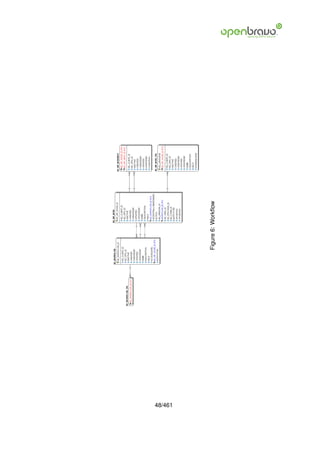
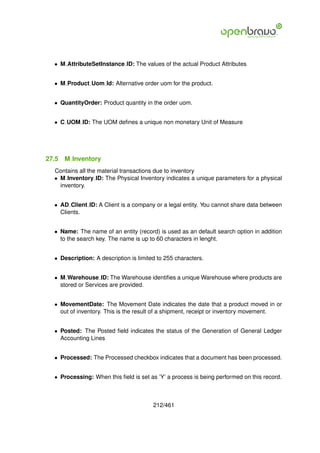
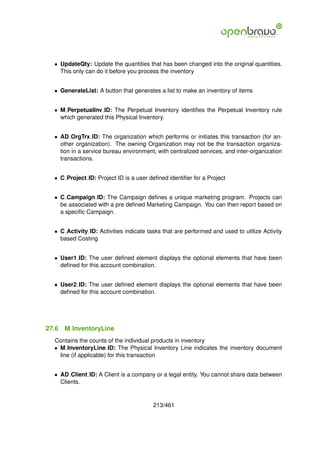
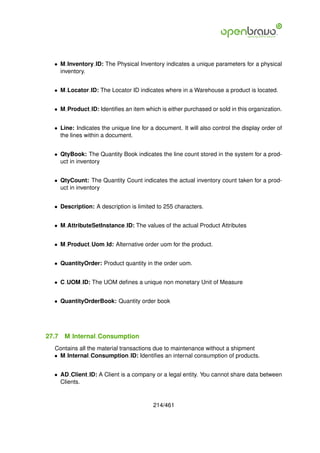
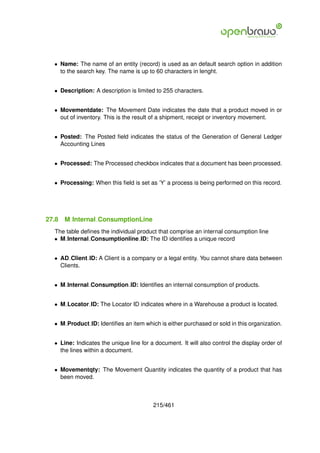
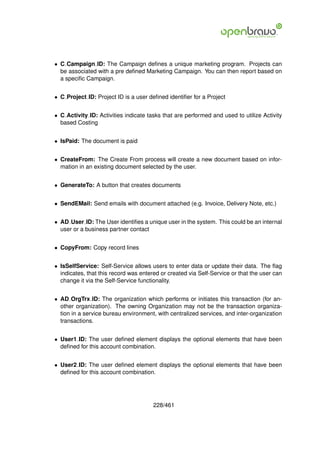
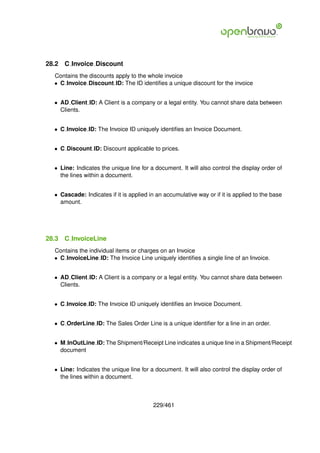
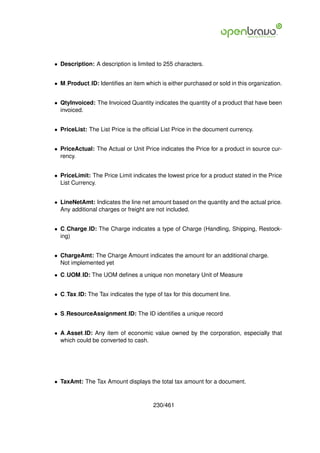
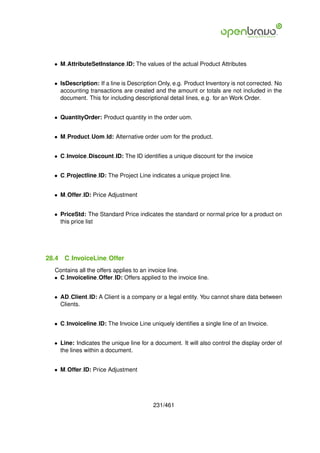
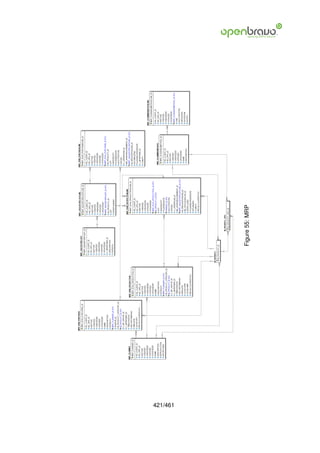
ER model
Openbravo ERP

   Version 1.0


                 Visit us at www.openbravo.com
Preface
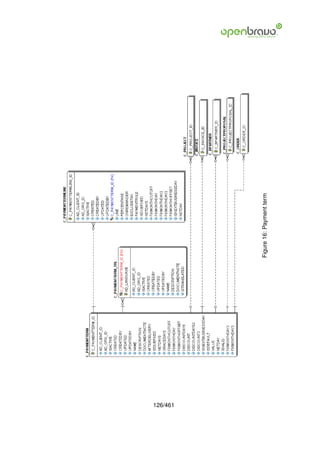
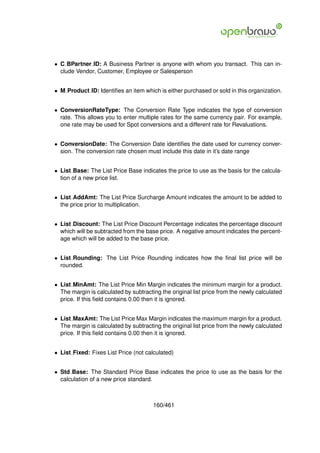
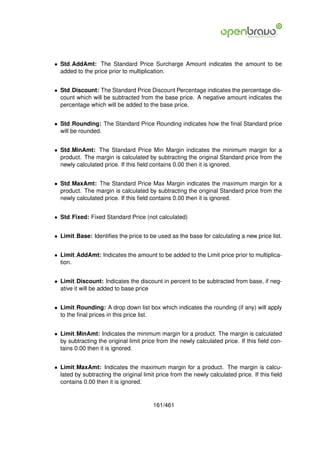
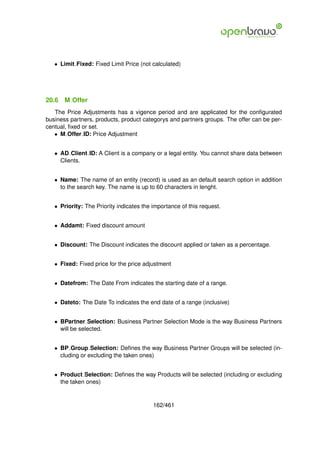
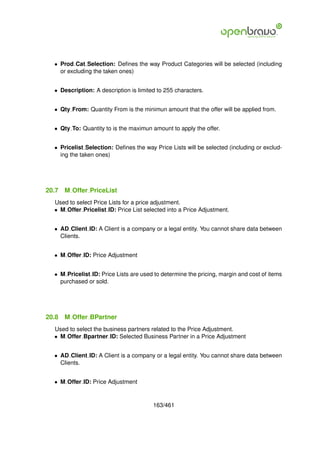
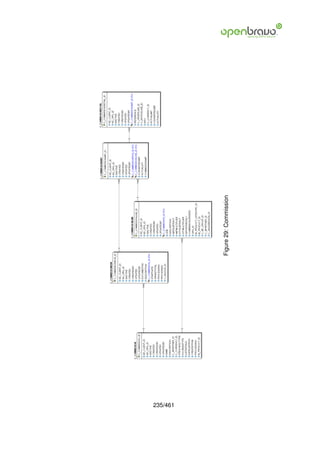
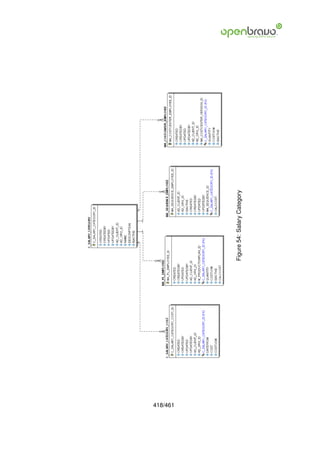
This document represents Openbravo’s Entity Relation Diagram (ERD), created with data
obtained from the Application Dictionary. The aim of the document is not to get a formal
ERD, but to get a complete view of the tables and columns behind the functionalities of
Openbravo ERP.

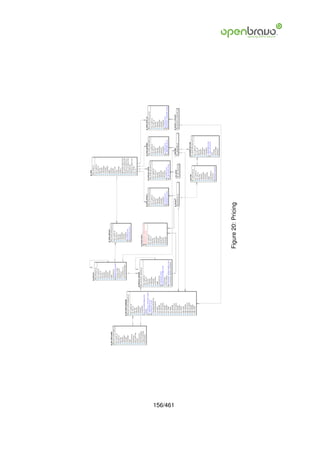
    The diagram has been separated into several chapters according to the main functional
modules of the ERP. The same table might appear in different chapters but only once in
detail. This is done to emphasize the relation among the main tables of the chapter with the
rest of the diagram. All the relations are represented among the examples, but those not
representative in the chapter have been deleted.


   The not implemented columns are those ones that aren’t being used in the ERP. They
can be part of deleted functionalities, hidden or not used functionalities or they are about to
be developed.


   The tables of Openbravo have some common characteristics. All tables must have a
unique primary key with columnname like tablename+ ID. The table name has to follow the
prefix policy:

   • A: asset management

   • AD: application dictionary

   • C: core functionality

   • I: import temporary tables and processes

   • M: material management

   • FACT: Accounting tables.

   • GL: general ledger

   • MA: manufacturing

   • MRP: material resource

   • S: service management

   • CUS, PD, US, ZZ: personal developments.

   Common columns of all tables:

   • Created: date of record creation.


                                            2/461
• CreatedBy: id of the user that has created the record.

• Updated: date of the last update of the record.

• UpdatedBy: id of the user that has commit the last update.

• IsActive: logic delete of the record.

• AD Client ID: id of the client owner of the record. AD Client ID = 0 is System client
  for System Administrator use.

• AD Org ID: id of the organization owner of the record. AD Org ID = = is Asterisk
  organization that shares the record to all the organizations of the client.


                                          3/461
Contents
1 Window, Tab and Field                                                                                                                                              15
  1.1 AD Window . . . .          .   .   .   .   .   .   .   .   .   .   .   .   .   .   .   .   .   .   .   .   .   .   .   .   .   .   .   .   .   .   .   .   .   15
  1.2 AD Tab . . . . . .         .   .   .   .   .   .   .   .   .   .   .   .   .   .   .   .   .   .   .   .   .   .   .   .   .   .   .   .   .   .   .   .   .   17
  1.3 AD Image . . . . .         .   .   .   .   .   .   .   .   .   .   .   .   .   .   .   .   .   .   .   .   .   .   .   .   .   .   .   .   .   .   .   .   .   19
  1.4 AD AuxiliarInput .         .   .   .   .   .   .   .   .   .   .   .   .   .   .   .   .   .   .   .   .   .   .   .   .   .   .   .   .   .   .   .   .   .   19
  1.5 AD FieldGroup . .          .   .   .   .   .   .   .   .   .   .   .   .   .   .   .   .   .   .   .   .   .   .   .   .   .   .   .   .   .   .   .   .   .   20
  1.6 AD Field . . . . . .       .   .   .   .   .   .   .   .   .   .   .   .   .   .   .   .   .   .   .   .   .   .   .   .   .   .   .   .   .   .   .   .   .   20

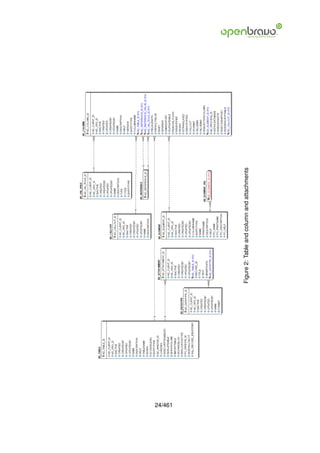
2 Table and column and attachments                                                                                                                                   23
  2.1 AD Table . . . . . . . . . . . . .                         .   .   .   .   .   .   .   .   .   .   .   .   .   .   .   .   .   .   .   .   .   .   .   .   .   23
  2.2 AD Column . . . . . . . . . . . .                          .   .   .   .   .   .   .   .   .   .   .   .   .   .   .   .   .   .   .   .   .   .   .   .   .   25
  2.3 AD Callout . . . . . . . . . . . .                         .   .   .   .   .   .   .   .   .   .   .   .   .   .   .   .   .   .   .   .   .   .   .   .   .   28
  2.4 AD Val Rule . . . . . . . . . . .                          .   .   .   .   .   .   .   .   .   .   .   .   .   .   .   .   .   .   .   .   .   .   .   .   .   29
  2.5 AD Element . . . . . . . . . . . .                         .   .   .   .   .   .   .   .   .   .   .   .   .   .   .   .   .   .   .   .   .   .   .   .   .   29
  2.6 C File . . . . . . . . . . . . . . .                       .   .   .   .   .   .   .   .   .   .   .   .   .   .   .   .   .   .   .   .   .   .   .   .   .   30
  2.7 AD DataType . . . . . . . . . . .                          .   .   .   .   .   .   .   .   .   .   .   .   .   .   .   .   .   .   .   .   .   .   .   .   .   31

3 Reference                                                                                                                                                          32
  3.1 AD Reference       . . . . .           .   .   .   .   .   .   .   .   .   .   .   .   .   .   .   .   .   .   .   .   .   .   .   .   .   .   .   .   .   .   32
  3.2 AD Ref List . .    . . . . .           .   .   .   .   .   .   .   .   .   .   .   .   .   .   .   .   .   .   .   .   .   .   .   .   .   .   .   .   .   .   32
  3.3 AD Ref Table .     . . . . .           .   .   .   .   .   .   .   .   .   .   .   .   .   .   .   .   .   .   .   .   .   .   .   .   .   .   .   .   .   .   34
  3.4 AD Ref Search      . . . . .           .   .   .   .   .   .   .   .   .   .   .   .   .   .   .   .   .   .   .   .   .   .   .   .   .   .   .   .   .   .   35
  3.5 AD Ref Search      Column              .   .   .   .   .   .   .   .   .   .   .   .   .   .   .   .   .   .   .   .   .   .   .   .   .   .   .   .   .   .   35

4 Menu                                                                                                                                                               37
  4.1 AD Menu . . . . . . . . . . . . . . . . . . . . . . . . . . . . . . . . . . . . . .                                                                            37

5 Process, Form and Task                                                                                                                                             40
  5.1 AD Process . . . . .           .   .   .   .   .   .   .   .   .   .   .   .   .   .   .   .   .   .   .   .   .   .   .   .   .   .   .   .   .   .   .   .   40
  5.2 AD Process Para . .            .   .   .   .   .   .   .   .   .   .   .   .   .   .   .   .   .   .   .   .   .   .   .   .   .   .   .   .   .   .   .   .   42
  5.3 AD Form . . . . . .            .   .   .   .   .   .   .   .   .   .   .   .   .   .   .   .   .   .   .   .   .   .   .   .   .   .   .   .   .   .   .   .   44
  5.4 AD Task . . . . . . .          .   .   .   .   .   .   .   .   .   .   .   .   .   .   .   .   .   .   .   .   .   .   .   .   .   .   .   .   .   .   .   .   45

6 Workflow                                                                                                                                                            47
  6.1 AD Workflow . . .           .   .   .   .   .   .   .   .   .   .   .   .   .   .   .   .   .   .   .   .   .   .   .   .   .   .   .   .   .   .   .   .   .   47
  6.2 AD WF Node . . .           .   .   .   .   .   .   .   .   .   .   .   .   .   .   .   .   .   .   .   .   .   .   .   .   .   .   .   .   .   .   .   .   .   47
  6.3 AD WF Node Trl .           .   .   .   .   .   .   .   .   .   .   .   .   .   .   .   .   .   .   .   .   .   .   .   .   .   .   .   .   .   .   .   .   .   50
  6.4 AD WF NodeNext             .   .   .   .   .   .   .   .   .   .   .   .   .   .   .   .   .   .   .   .   .   .   .   .   .   .   .   .   .   .   .   .   .   50

7 Tree                                                                                                                                                               51
  7.1 AD     TreeNodePR      .   .   .   .   .   .   .   .   .   .   .   .   .   .   .   .   .   .   .   .   .   .   .   .   .   .   .   .   .   .   .   .   .   .   51
  7.2 AD     TreeNodeBP      .   .   .   .   .   .   .   .   .   .   .   .   .   .   .   .   .   .   .   .   .   .   .   .   .   .   .   .   .   .   .   .   .   .   51
  7.3 AD     TreeNode . .    .   .   .   .   .   .   .   .   .   .   .   .   .   .   .   .   .   .   .   .   .   .   .   .   .   .   .   .   .   .   .   .   .   .   53
  7.4 AD     TreeBar . . .   .   .   .   .   .   .   .   .   .   .   .   .   .   .   .   .   .   .   .   .   .   .   .   .   .   .   .   .   .   .   .   .   .   .   53


                                                                 4/461
7.5 AD Tree . . . . . . . . . . . . . . . . . . . . . . . . . . . . . . . . . . . . . . .                                                                     54
   7.6 AD TreeNodeMM . . . . . . . . . . . . . . . . . . . . . . . . . . . . . . . . . .                                                                         54

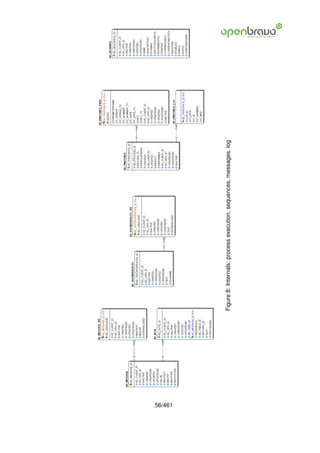
8 Internals: process execution, sequences, messages, log                                                                                                         55
  8.1 AD PInstance . . . . . . . . . . . . . . . . . . . . . . . .                                               .   .   .   .   .   .   .   .   .   .   .   .   55
  8.2 AD PInstance Para . . . . . . . . . . . . . . . . . . . . .                                                .   .   .   .   .   .   .   .   .   .   .   .   57
  8.3 AD PInstance Log . . . . . . . . . . . . . . . . . . . . .                                                 .   .   .   .   .   .   .   .   .   .   .   .   57
  8.4 AD Note . . . . . . . . . . . . . . . . . . . . . . . . . . .                                              .   .   .   .   .   .   .   .   .   .   .   .   58
  8.5 AD Sequence . . . . . . . . . . . . . . . . . . . . . . . .                                                .   .   .   .   .   .   .   .   .   .   .   .   59
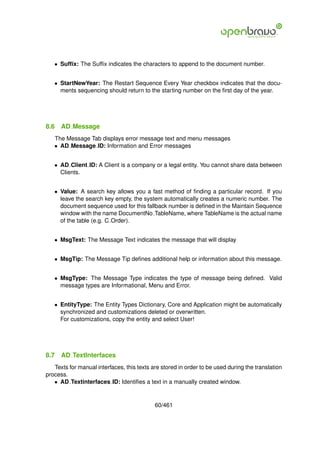
  8.6 AD Message . . . . . . . . . . . . . . . . . . . . . . . .                                                 .   .   .   .   .   .   .   .   .   .   .   .   60
  8.7 AD TextInterfaces . . . . . . . . . . . . . . . . . . . . .                                                .   .   .   .   .   .   .   .   .   .   .   .   60
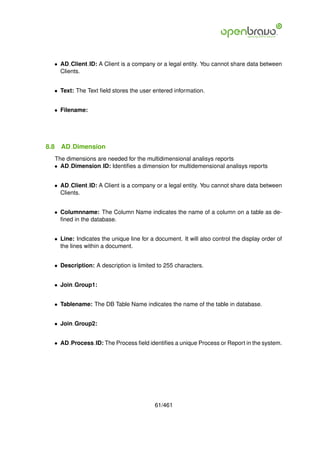
  8.8 AD Dimension . . . . . . . . . . . . . . . . . . . . . . .                                                 .   .   .   .   .   .   .   .   .   .   .   .   61
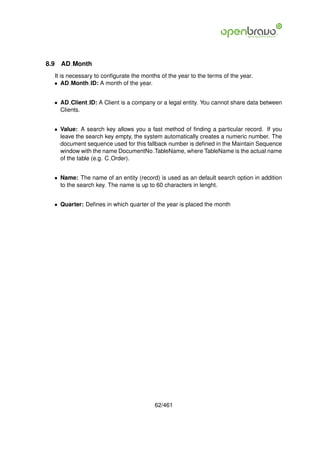
  8.9 AD Month . . . . . . . . . . . . . . . . . . . . . . . . . .                                               .   .   .   .   .   .   .   .   .   .   .   .   62

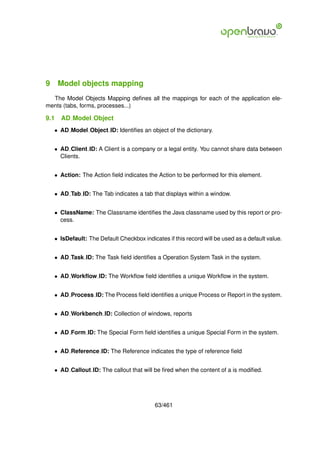
9 Model objects mapping                                                                                                                                          63
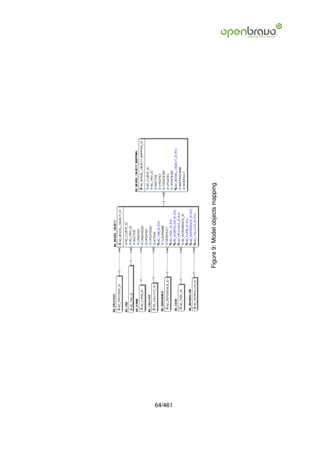
  9.1 AD Model Object . . . . . . . . . . . . . . . . . . . . . . . . . . . . . . . . . .                                                                        63
  9.2 AD Model Object Mapping . . . . . . . . . . . . . . . . . . . . . . . . . . . .                                                                            65

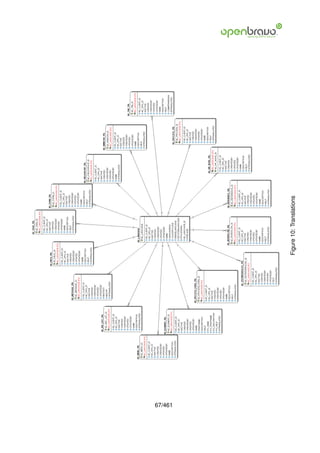
10 Translations                                                                                                                                                  66
   10.1 AD Language . . . .      .   .   .   .   .   .   .   .   .   .   .   .   .   .   .   .   .   .   .   .   .   .   .   .   .   .   .   .   .   .   .   .   66
   10.2 AD Window Trl . . .      .   .   .   .   .   .   .   .   .   .   .   .   .   .   .   .   .   .   .   .   .   .   .   .   .   .   .   .   .   .   .   .   68
   10.3 AD Process Trl . . .     .   .   .   .   .   .   .   .   .   .   .   .   .   .   .   .   .   .   .   .   .   .   .   .   .   .   .   .   .   .   .   .   68
   10.4 AD Tab Trl . . . . .     .   .   .   .   .   .   .   .   .   .   .   .   .   .   .   .   .   .   .   .   .   .   .   .   .   .   .   .   .   .   .   .   69
   10.5 AD Element Trl . . .     .   .   .   .   .   .   .   .   .   .   .   .   .   .   .   .   .   .   .   .   .   .   .   .   .   .   .   .   .   .   .   .   70
   10.6 AD FieldGroup Trl .      .   .   .   .   .   .   .   .   .   .   .   .   .   .   .   .   .   .   .   .   .   .   .   .   .   .   .   .   .   .   .   .   71
   10.7 AD Reference Trl . .     .   .   .   .   .   .   .   .   .   .   .   .   .   .   .   .   .   .   .   .   .   .   .   .   .   .   .   .   .   .   .   .   71
   10.8 AD Process Para Trl      .   .   .   .   .   .   .   .   .   .   .   .   .   .   .   .   .   .   .   .   .   .   .   .   .   .   .   .   .   .   .   .   72
   10.9 AD Menu Trl . . . .      .   .   .   .   .   .   .   .   .   .   .   .   .   .   .   .   .   .   .   .   .   .   .   .   .   .   .   .   .   .   .   .   72
   10.10AD Message Trl . .       .   .   .   .   .   .   .   .   .   .   .   .   .   .   .   .   .   .   .   .   .   .   .   .   .   .   .   .   .   .   .   .   73
   10.11AD Field Trl . . . . .   .   .   .   .   .   .   .   .   .   .   .   .   .   .   .   .   .   .   .   .   .   .   .   .   .   .   .   .   .   .   .   .   73
   10.12AD TextInterfaces Trl    .   .   .   .   .   .   .   .   .   .   .   .   .   .   .   .   .   .   .   .   .   .   .   .   .   .   .   .   .   .   .   .   74
   10.13AD Task Trl . . . . .    .   .   .   .   .   .   .   .   .   .   .   .   .   .   .   .   .   .   .   .   .   .   .   .   .   .   .   .   .   .   .   .   74
   10.14AD Workflow Trl . .       .   .   .   .   .   .   .   .   .   .   .   .   .   .   .   .   .   .   .   .   .   .   .   .   .   .   .   .   .   .   .   .   75
   10.15AD Form Trl . . . . .    .   .   .   .   .   .   .   .   .   .   .   .   .   .   .   .   .   .   .   .   .   .   .   .   .   .   .   .   .   .   .   .   75
   10.16AD Ref List Trl . . .    .   .   .   .   .   .   .   .   .   .   .   .   .   .   .   .   .   .   .   .   .   .   .   .   .   .   .   .   .   .   .   .   76
   10.17AD WF Node Trl . .       .   .   .   .   .   .   .   .   .   .   .   .   .   .   .   .   .   .   .   .   .   .   .   .   .   .   .   .   .   .   .   .   77

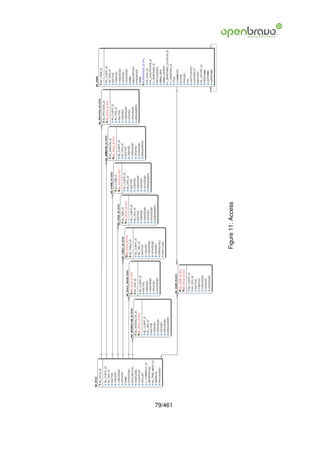
11 Access                                                                                                                                                        78
   11.1 AD   User . . . . . . . .    .   .   .   .   .   .   .   .   .   .   .   .   .   .   .   .   .   .   .   .   .   .   .   .   .   .   .   .   .   .   .   78
   11.2 AD   User Roles . . . .      .   .   .   .   .   .   .   .   .   .   .   .   .   .   .   .   .   .   .   .   .   .   .   .   .   .   .   .   .   .   .   81
   11.3 AD   Role . . . . . . . .    .   .   .   .   .   .   .   .   .   .   .   .   .   .   .   .   .   .   .   .   .   .   .   .   .   .   .   .   .   .   .   82
   11.4 AD   Task Access . . .       .   .   .   .   .   .   .   .   .   .   .   .   .   .   .   .   .   .   .   .   .   .   .   .   .   .   .   .   .   .   .   83
   11.5 AD   Window Access .         .   .   .   .   .   .   .   .   .   .   .   .   .   .   .   .   .   .   .   .   .   .   .   .   .   .   .   .   .   .   .   83
   11.6 AD   Process Access .        .   .   .   .   .   .   .   .   .   .   .   .   .   .   .   .   .   .   .   .   .   .   .   .   .   .   .   .   .   .   .   83
   11.7 AD   Workflow Access .        .   .   .   .   .   .   .   .   .   .   .   .   .   .   .   .   .   .   .   .   .   .   .   .   .   .   .   .   .   .   .   84
   11.8 AD   Form Access . . .       .   .   .   .   .   .   .   .   .   .   .   .   .   .   .   .   .   .   .   .   .   .   .   .   .   .   .   .   .   .   .   84


                                                             5/461
11.9 AD Role OrgAccess . . . . . . . . . . . . . . . . . . . . . . . . . . . . . . . .                                                                       85
   11.10AD Table Access . . . . . . . . . . . . . . . . . . . . . . . . . . . . . . . . . .                                                                     85

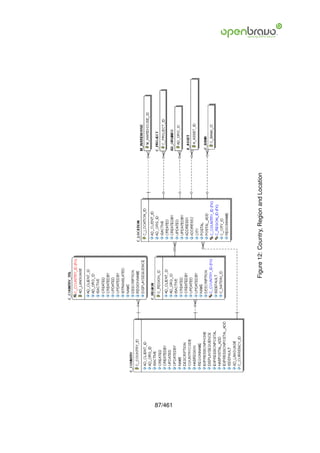
12 Country, Region and Location                                                                                                                                 86
   12.1 C Country . . . . . . . . . .           .   .   .   .   .   .   .   .   .   .   .   .   .   .   .   .   .   .   .   .   .   .   .   .   .   .   .   .   86
   12.2 C Country Trl . . . . . . . .           .   .   .   .   .   .   .   .   .   .   .   .   .   .   .   .   .   .   .   .   .   .   .   .   .   .   .   .   88
   12.3 C Region . . . . . . . . . .            .   .   .   .   .   .   .   .   .   .   .   .   .   .   .   .   .   .   .   .   .   .   .   .   .   .   .   .   89
   12.4 C Location . . . . . . . . .            .   .   .   .   .   .   .   .   .   .   .   .   .   .   .   .   .   .   .   .   .   .   .   .   .   .   .   .   89

13 System, Client, Org and Session info.                        Preferences                                                                                     91
   13.1 AD System . . . . . . . . . . . . .                     . . . . . . . .                 .   .   .   .   .   .   .   .   .   .   .   .   .   .   .   .   91
   13.2 AD Client . . . . . . . . . . . . . .                   . . . . . . . .                 .   .   .   .   .   .   .   .   .   .   .   .   .   .   .   .   93
   13.3 AD ClientInfo . . . . . . . . . . . .                   . . . . . . . .                 .   .   .   .   .   .   .   .   .   .   .   .   .   .   .   .   95
   13.4 AD Org . . . . . . . . . . . . . . .                    . . . . . . . .                 .   .   .   .   .   .   .   .   .   .   .   .   .   .   .   .   97
   13.5 AD OrgInfo . . . . . . . . . . . . .                    . . . . . . . .                 .   .   .   .   .   .   .   .   .   .   .   .   .   .   .   .   98
   13.6 AD Session . . . . . . . . . . . . .                    . . . . . . . .                 .   .   .   .   .   .   .   .   .   .   .   .   .   .   .   .   99
   13.7 AD Preference . . . . . . . . . . .                     . . . . . . . .                 .   .   .   .   .   .   .   .   .   .   .   .   .   .   .   .   99

14 Warehouse, Shipper and Freigth                                                                                                                               100
   14.1 M Warehouse . . . . . . . . .               .   .   .   .   .   .   .   .   .   .   .   .   .   .   .   .   .   .   .   .   .   .   .   .   .   .   .   100
   14.2 M Locator . . . . . . . . . . .             .   .   .   .   .   .   .   .   .   .   .   .   .   .   .   .   .   .   .   .   .   .   .   .   .   .   .   102
   14.3 M Warehouse Shipper . . . .                 .   .   .   .   .   .   .   .   .   .   .   .   .   .   .   .   .   .   .   .   .   .   .   .   .   .   .   103
   14.4 M Freight . . . . . . . . . . .             .   .   .   .   .   .   .   .   .   .   .   .   .   .   .   .   .   .   .   .   .   .   .   .   .   .   .   103
   14.5 M FreightCategory . . . . . .               .   .   .   .   .   .   .   .   .   .   .   .   .   .   .   .   .   .   .   .   .   .   .   .   .   .   .   105
   14.6 M Shipper . . . . . . . . . . .             .   .   .   .   .   .   .   .   .   .   .   .   .   .   .   .   .   .   .   .   .   .   .   .   .   .   .   105

15 Business partner                                                                                                                                             107
   15.1 C Greeting . . . . .    .   .   .   .   .   .   .   .   .   .   .   .   .   .   .   .   .   .   .   .   .   .   .   .   .   .   .   .   .   .   .   .   107
   15.2 C Greeting Trl . . .    .   .   .   .   .   .   .   .   .   .   .   .   .   .   .   .   .   .   .   .   .   .   .   .   .   .   .   .   .   .   .   .   107
   15.3 C BPartner . . . . .    .   .   .   .   .   .   .   .   .   .   .   .   .   .   .   .   .   .   .   .   .   .   .   .   .   .   .   .   .   .   .   .   109
   15.4 C BPartner Location     .   .   .   .   .   .   .   .   .   .   .   .   .   .   .   .   .   .   .   .   .   .   .   .   .   .   .   .   .   .   .   .   116
   15.5 C SalesRegion . . .     .   .   .   .   .   .   .   .   .   .   .   .   .   .   .   .   .   .   .   .   .   .   .   .   .   .   .   .   .   .   .   .   117
   15.6 C BP Group . . . .      .   .   .   .   .   .   .   .   .   .   .   .   .   .   .   .   .   .   .   .   .   .   .   .   .   .   .   .   .   .   .   .   118
   15.7 C BP TaxCategory .      .   .   .   .   .   .   .   .   .   .   .   .   .   .   .   .   .   .   .   .   .   .   .   .   .   .   .   .   .   .   .   .   118
   15.8 C BP BankAccount        .   .   .   .   .   .   .   .   .   .   .   .   .   .   .   .   .   .   .   .   .   .   .   .   .   .   .   .   .   .   .   .   119
   15.9 AD User . . . . . . .   .   .   .   .   .   .   .   .   .   .   .   .   .   .   .   .   .   .   .   .   .   .   .   .   .   .   .   .   .   .   .   .   121
   15.10 InterestArea . . .
        R                       .   .   .   .   .   .   .   .   .   .   .   .   .   .   .   .   .   .   .   .   .   .   .   .   .   .   .   .   .   .   .   .   123
   15.11 ContactInterest . .
        R                       .   .   .   .   .   .   .   .   .   .   .   .   .   .   .   .   .   .   .   .   .   .   .   .   .   .   .   .   .   .   .   .   123

16 Payment term                                                                             125
   16.1 C PaymentTerm . . . . . . . . . . . . . . . . . . . . . . . . . . . . . . . . . . 125
   16.2 C Paymenttermline . . . . . . . . . . . . . . . . . . . . . . . . . . . . . . . . . 128
   16.3 C PaymentTerm Trl . . . . . . . . . . . . . . . . . . . . . . . . . . . . . . . . . 129


                                                            6/461
17 Product                                                                                                                                                       131
   17.1 M Product . . . . . .    .   .   .   .   .   .   .   .   .   .   .   .   .   .   .   .   .   .   .   .   .   .   .   .   .   .   .   .   .   .   .   .   131
   17.2 M Product Category       .   .   .   .   .   .   .   .   .   .   .   .   .   .   .   .   .   .   .   .   .   .   .   .   .   .   .   .   .   .   .   .   136
   17.3 M Substitute . . . .     .   .   .   .   .   .   .   .   .   .   .   .   .   .   .   .   .   .   .   .   .   .   .   .   .   .   .   .   .   .   .   .   137
   17.4 M Product BOM . .        .   .   .   .   .   .   .   .   .   .   .   .   .   .   .   .   .   .   .   .   .   .   .   .   .   .   .   .   .   .   .   .   138
   17.5 M Product Customer       .   .   .   .   .   .   .   .   .   .   .   .   .   .   .   .   .   .   .   .   .   .   .   .   .   .   .   .   .   .   .   .   138
   17.6 M Product Org . . .      .   .   .   .   .   .   .   .   .   .   .   .   .   .   .   .   .   .   .   .   .   .   .   .   .   .   .   .   .   .   .   .   139
   17.7 M Product PO . . .       .   .   .   .   .   .   .   .   .   .   .   .   .   .   .   .   .   .   .   .   .   .   .   .   .   .   .   .   .   .   .   .   140
   17.8 M Replenish . . . .      .   .   .   .   .   .   .   .   .   .   .   .   .   .   .   .   .   .   .   .   .   .   .   .   .   .   .   .   .   .   .   .   142
   17.9 M Product Template       .   .   .   .   .   .   .   .   .   .   .   .   .   .   .   .   .   .   .   .   .   .   .   .   .   .   .   .   .   .   .   .   143
   17.10 Product UOM . .
        M                        .   .   .   .   .   .   .   .   .   .   .   .   .   .   .   .   .   .   .   .   .   .   .   .   .   .   .   .   .   .   .   .   143
   17.11 Costing . . . . . .
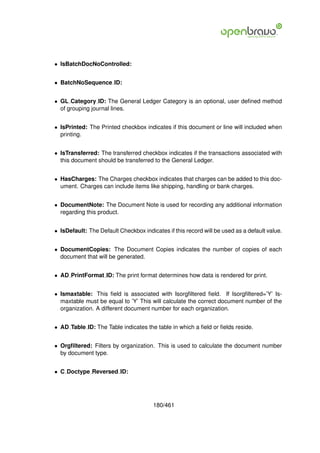
        M                        .   .   .   .   .   .   .   .   .   .   .   .   .   .   .   .   .   .   .   .   .   .   .   .   .   .   .   .   .   .   .   .   144
   17.12 Product Trl . . . .
        M                        .   .   .   .   .   .   .   .   .   .   .   .   .   .   .   .   .   .   .   .   .   .   .   .   .   .   .   .   .   .   .   .   145

18 Unit of Measure                                                                          146
   18.1 C UOM . . . . . . . . . . . . . . . . . . . . . . . . . . . . . . . . . . . . . . . 146
   18.2 C UOM Conversion . . . . . . . . . . . . . . . . . . . . . . . . . . . . . . . . 148
   18.3 C UOM Trl . . . . . . . . . . . . . . . . . . . . . . . . . . . . . . . . . . . . . 148

19 Attribute                                                                                                                                                     150
   19.1 M Attribute . . . . . . .        .   .   .   .   .   .   .   .   .   .   .   .   .   .   .   .   .   .   .   .   .   .   .   .   .   .   .   .   .   .   150
   19.2 M AttributeSet . . . . .         .   .   .   .   .   .   .   .   .   .   .   .   .   .   .   .   .   .   .   .   .   .   .   .   .   .   .   .   .   .   152
   19.3 M AttributeValue . . . .         .   .   .   .   .   .   .   .   .   .   .   .   .   .   .   .   .   .   .   .   .   .   .   .   .   .   .   .   .   .   152
   19.4 M AttributeUse . . . . .         .   .   .   .   .   .   .   .   .   .   .   .   .   .   .   .   .   .   .   .   .   .   .   .   .   .   .   .   .   .   153
   19.5 M AttributeSetInstance .         .   .   .   .   .   .   .   .   .   .   .   .   .   .   .   .   .   .   .   .   .   .   .   .   .   .   .   .   .   .   153
   19.6 M AttributeInstance . .          .   .   .   .   .   .   .   .   .   .   .   .   .   .   .   .   .   .   .   .   .   .   .   .   .   .   .   .   .   .   154

20 Pricing                                                                                                                                                       155
   20.1 M PriceList . . . . . . .        .   .   .   .   .   .   .   .   .   .   .   .   .   .   .   .   .   .   .   .   .   .   .   .   .   .   .   .   .   .   155
   20.2 M PriceList Version . .          .   .   .   .   .   .   .   .   .   .   .   .   .   .   .   .   .   .   .   .   .   .   .   .   .   .   .   .   .   .   157
   20.3 M ProductPrice . . . . .         .   .   .   .   .   .   .   .   .   .   .   .   .   .   .   .   .   .   .   .   .   .   .   .   .   .   .   .   .   .   158
   20.4 M DiscountSchema . .             .   .   .   .   .   .   .   .   .   .   .   .   .   .   .   .   .   .   .   .   .   .   .   .   .   .   .   .   .   .   158
   20.5 M DiscountSchemaLine             .   .   .   .   .   .   .   .   .   .   .   .   .   .   .   .   .   .   .   .   .   .   .   .   .   .   .   .   .   .   159
   20.6 M Offer . . . . . . . . .        .   .   .   .   .   .   .   .   .   .   .   .   .   .   .   .   .   .   .   .   .   .   .   .   .   .   .   .   .   .   162
   20.7 M Offer PriceList . . . .        .   .   .   .   .   .   .   .   .   .   .   .   .   .   .   .   .   .   .   .   .   .   .   .   .   .   .   .   .   .   163
   20.8 M Offer BPartner . . . .         .   .   .   .   .   .   .   .   .   .   .   .   .   .   .   .   .   .   .   .   .   .   .   .   .   .   .   .   .   .   163
   20.9 M Offer BP Group . . .           .   .   .   .   .   .   .   .   .   .   .   .   .   .   .   .   .   .   .   .   .   .   .   .   .   .   .   .   .   .   164
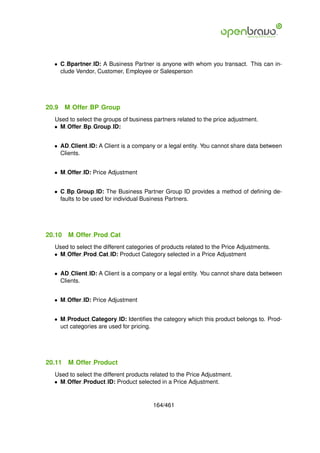
   20.10 Offer Prod Cat . . . .
        M                                .   .   .   .   .   .   .   .   .   .   .   .   .   .   .   .   .   .   .   .   .   .   .   .   .   .   .   .   .   .   164
   20.11 Offer Product . . . .
        M                                .   .   .   .   .   .   .   .   .   .   .   .   .   .   .   .   .   .   .   .   .   .   .   .   .   .   .   .   .   .   164
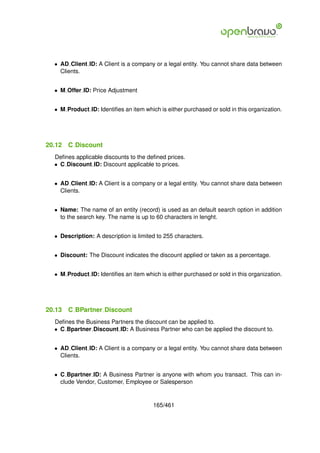
   20.12 Discount . . . . . . .
        C                                .   .   .   .   .   .   .   .   .   .   .   .   .   .   .   .   .   .   .   .   .   .   .   .   .   .   .   .   .   .   165
   20.13 BPartner Discount . .
        C                                .   .   .   .   .   .   .   .   .   .   .   .   .   .   .   .   .   .   .   .   .   .   .   .   .   .   .   .   .   .   165

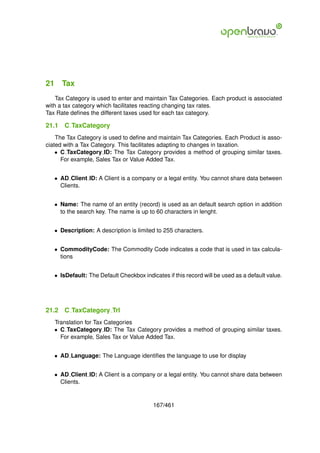
21 Tax                                                                                                                                                           167
   21.1 C TaxCategory . . . . . . . . . . . . . . . . . . . . . . . . . . . . . . . . . . .                                                                      167
   21.2 C TaxCategory Trl . . . . . . . . . . . . . . . . . . . . . . . . . . . . . . . . .                                                                      167
   21.3 C Tax . . . . . . . . . . . . . . . . . . . . . . . . . . . . . . . . . . . . . . . .                                                                    169


                                                             7/461
21.4 C Tax Trl . . . . . . . . . . . . . . . . . . . . . . . . . . . . . . . . . . . . . . 171
   21.5 C Tax Zone . . . . . . . . . . . . . . . . . . . . . . . . . . . . . . . . . . . . . 171

22 Currency                                                                                                                                                         173
   22.1 C Currency . . . . . . . . . . . . . . . . . . . . . . . . . . . . . . . . . . . . .                                                                        173
   22.2 C Currency Trl . . . . . . . . . . . . . . . . . . . . . . . . . . . . . . . . . . .                                                                        175
   22.3 C Conversion Rate . . . . . . . . . . . . . . . . . . . . . . . . . . . . . . . . .                                                                         175

23 Document type                                                                            177
   23.1 C DocType . . . . . . . . . . . . . . . . . . . . . . . . . . . . . . . . . . . . . 177
   23.2 C DocType Trl . . . . . . . . . . . . . . . . . . . . . . . . . . . . . . . . . . . 181

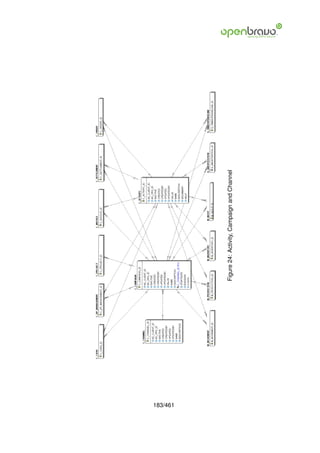
24 Activity, Campaign and Channel                                                                                                                                   182
   24.1 C Activity . . . . . . . . . . . . . . . . . . . . . . . . . . . . . . . . . . . . . .                                                                      182
   24.2 C Campaign . . . . . . . . . . . . . . . . . . . . . . . . . . . . . . . . . . . .                                                                          184
   24.3 C Channel . . . . . . . . . . . . . . . . . . . . . . . . . . . . . . . . . . . . .                                                                         185

25 Order                                                                                                                                                            186
   25.1 C   Incoterms . . . .   .   .   .   .   .   .   .   .   .   .   .   .   .   .   .   .   .   .   .   .   .   .   .   .   .   .   .   .   .   .   .   .   .   186
   25.2 C   Order . . . . . .   .   .   .   .   .   .   .   .   .   .   .   .   .   .   .   .   .   .   .   .   .   .   .   .   .   .   .   .   .   .   .   .   .   188
   25.3 C   OrderLine . . . .   .   .   .   .   .   .   .   .   .   .   .   .   .   .   .   .   .   .   .   .   .   .   .   .   .   .   .   .   .   .   .   .   .   193
   25.4 C   OrderLine Offer     .   .   .   .   .   .   .   .   .   .   .   .   .   .   .   .   .   .   .   .   .   .   .   .   .   .   .   .   .   .   .   .   .   196
   25.5 C   OrderTax . . . .    .   .   .   .   .   .   .   .   .   .   .   .   .   .   .   .   .   .   .   .   .   .   .   .   .   .   .   .   .   .   .   .   .   196

26 Purchase specific                                                                                                                                                 198
   26.1 M Requisition . . .     .   .   .   .   .   .   .   .   .   .   .   .   .   .   .   .   .   .   .   .   .   .   .   .   .   .   .   .   .   .   .   .   .   198
   26.2 M RequisitionLine       .   .   .   .   .   .   .   .   .   .   .   .   .   .   .   .   .   .   .   .   .   .   .   .   .   .   .   .   .   .   .   .   .   200
   26.3 M MatchInv . . . .      .   .   .   .   .   .   .   .   .   .   .   .   .   .   .   .   .   .   .   .   .   .   .   .   .   .   .   .   .   .   .   .   .   200
   26.4 M MatchPO . . . .       .   .   .   .   .   .   .   .   .   .   .   .   .   .   .   .   .   .   .   .   .   .   .   .   .   .   .   .   .   .   .   .   .   201

27 Transaction                                                                                                                                                      203
   27.1 M InOut . . . . . . . . . . . .                 .   .   .   .   .   .   .   .   .   .   .   .   .   .   .   .   .   .   .   .   .   .   .   .   .   .   .   203
   27.2 M InOutLine . . . . . . . . . .                 .   .   .   .   .   .   .   .   .   .   .   .   .   .   .   .   .   .   .   .   .   .   .   .   .   .   .   208
   27.3 M Movement . . . . . . . . .                    .   .   .   .   .   .   .   .   .   .   .   .   .   .   .   .   .   .   .   .   .   .   .   .   .   .   .   209
   27.4 M MovementLine . . . . . . .                    .   .   .   .   .   .   .   .   .   .   .   .   .   .   .   .   .   .   .   .   .   .   .   .   .   .   .   211
   27.5 M Inventory . . . . . . . . . .                 .   .   .   .   .   .   .   .   .   .   .   .   .   .   .   .   .   .   .   .   .   .   .   .   .   .   .   212
   27.6 M InventoryLine . . . . . . .                   .   .   .   .   .   .   .   .   .   .   .   .   .   .   .   .   .   .   .   .   .   .   .   .   .   .   .   213
   27.7 M Internal Consumption . . .                    .   .   .   .   .   .   .   .   .   .   .   .   .   .   .   .   .   .   .   .   .   .   .   .   .   .   .   214
   27.8 M Internal ConsumptionLine                      .   .   .   .   .   .   .   .   .   .   .   .   .   .   .   .   .   .   .   .   .   .   .   .   .   .   .   215
   27.9 M Production . . . . . . . . .                  .   .   .   .   .   .   .   .   .   .   .   .   .   .   .   .   .   .   .   .   .   .   .   .   .   .   .   216
   27.10 ProductionPlan . . . . . .
        M                                               .   .   .   .   .   .   .   .   .   .   .   .   .   .   .   .   .   .   .   .   .   .   .   .   .   .   .   218
   27.11 ProductionLine . . . . . . .
        M                                               .   .   .   .   .   .   .   .   .   .   .   .   .   .   .   .   .   .   .   .   .   .   .   .   .   .   .   219
   27.12 Transaction . . . . . . . . .
        M                                               .   .   .   .   .   .   .   .   .   .   .   .   .   .   .   .   .   .   .   .   .   .   .   .   .   .   .   220
   27.13 Storage Detail . . . . . . .
        M                                               .   .   .   .   .   .   .   .   .   .   .   .   .   .   .   .   .   .   .   .   .   .   .   .   .   .   .   222
   27.14 Storage Pending . . . . .
        M                                               .   .   .   .   .   .   .   .   .   .   .   .   .   .   .   .   .   .   .   .   .   .   .   .   .   .   .   223


                                                                8/461
28 Invoice                                                                                                                                                        224
   28.1 C Invoice . . . . . . . . . . .               .   .   .   .   .   .   .   .   .   .   .   .   .   .   .   .   .   .   .   .   .   .   .   .   .   .   .   224
   28.2 C Invoice Discount . . . . . .                .   .   .   .   .   .   .   .   .   .   .   .   .   .   .   .   .   .   .   .   .   .   .   .   .   .   .   229
   28.3 C InvoiceLine . . . . . . . . .               .   .   .   .   .   .   .   .   .   .   .   .   .   .   .   .   .   .   .   .   .   .   .   .   .   .   .   229
   28.4 C InvoiceLine Offer . . . . .                 .   .   .   .   .   .   .   .   .   .   .   .   .   .   .   .   .   .   .   .   .   .   .   .   .   .   .   231
   28.5 C InvoiceLine AcctDimension                   .   .   .   .   .   .   .   .   .   .   .   .   .   .   .   .   .   .   .   .   .   .   .   .   .   .   .   232
   28.6 C InvoiceTax . . . . . . . . .                .   .   .   .   .   .   .   .   .   .   .   .   .   .   .   .   .   .   .   .   .   .   .   .   .   .   .   232

29 Commission                                                                                                                                                     234
   29.1 C Commission . . .        .   .   .   .   .   .   .   .   .   .   .   .   .   .   .   .   .   .   .   .   .   .   .   .   .   .   .   .   .   .   .   .   234
   29.2 C CommissionLine .        .   .   .   .   .   .   .   .   .   .   .   .   .   .   .   .   .   .   .   .   .   .   .   .   .   .   .   .   .   .   .   .   236
   29.3 C CommissionRun .         .   .   .   .   .   .   .   .   .   .   .   .   .   .   .   .   .   .   .   .   .   .   .   .   .   .   .   .   .   .   .   .   237
   29.4 C CommissionAmt .         .   .   .   .   .   .   .   .   .   .   .   .   .   .   .   .   .   .   .   .   .   .   .   .   .   .   .   .   .   .   .   .   238
   29.5 C CommissionDetail        .   .   .   .   .   .   .   .   .   .   .   .   .   .   .   .   .   .   .   .   .   .   .   .   .   .   .   .   .   .   .   .   239

30 Rappel                                                                                                                                                         241
   30.1 M Rappel      . . . . . . . . . .         .   .   .   .   .   .   .   .   .   .   .   .   .   .   .   .   .   .   .   .   .   .   .   .   .   .   .   .   241
   30.2 M Rappel     Bpartner . . . . .           .   .   .   .   .   .   .   .   .   .   .   .   .   .   .   .   .   .   .   .   .   .   .   .   .   .   .   .   243
   30.3 M Rappel     Product . . . . .            .   .   .   .   .   .   .   .   .   .   .   .   .   .   .   .   .   .   .   .   .   .   .   .   .   .   .   .   243
   30.4 M Rappel     Productcategory              .   .   .   .   .   .   .   .   .   .   .   .   .   .   .   .   .   .   .   .   .   .   .   .   .   .   .   .   244
   30.5 M Rappel     Scale . . . . . .            .   .   .   .   .   .   .   .   .   .   .   .   .   .   .   .   .   .   .   .   .   .   .   .   .   .   .   .   244
   30.6 M Rappel     Invoice . . . . . .          .   .   .   .   .   .   .   .   .   .   .   .   .   .   .   .   .   .   .   .   .   .   .   .   .   .   .   .   245

31 Project                                                                                                                                                        246
   31.1 C ProjectType . . . . . .         .   .   .   .   .   .   .   .   .   .   .   .   .   .   .   .   .   .   .   .   .   .   .   .   .   .   .   .   .   .   246
   31.2 C Phase . . . . . . . . .         .   .   .   .   .   .   .   .   .   .   .   .   .   .   .   .   .   .   .   .   .   .   .   .   .   .   .   .   .   .   246
   31.3 C Task . . . . . . . . . .        .   .   .   .   .   .   .   .   .   .   .   .   .   .   .   .   .   .   .   .   .   .   .   .   .   .   .   .   .   .   248
   31.4 C Project . . . . . . . .         .   .   .   .   .   .   .   .   .   .   .   .   .   .   .   .   .   .   .   .   .   .   .   .   .   .   .   .   .   .   249
   31.5 C ProjectPhase . . . . .          .   .   .   .   .   .   .   .   .   .   .   .   .   .   .   .   .   .   .   .   .   .   .   .   .   .   .   .   .   .   253
   31.6 C ProjectTask . . . . . .         .   .   .   .   .   .   .   .   .   .   .   .   .   .   .   .   .   .   .   .   .   .   .   .   .   .   .   .   .   .   255
   31.7 C ProjectLine . . . . . .         .   .   .   .   .   .   .   .   .   .   .   .   .   .   .   .   .   .   .   .   .   .   .   .   .   .   .   .   .   .   255
   31.8 C Project Vendor . . . .          .   .   .   .   .   .   .   .   .   .   .   .   .   .   .   .   .   .   .   .   .   .   .   .   .   .   .   .   .   .   257
   31.9 C ProjectProposal . . .           .   .   .   .   .   .   .   .   .   .   .   .   .   .   .   .   .   .   .   .   .   .   .   .   .   .   .   .   .   .   258
   31.10 ProjectProposalLine .
        C                                 .   .   .   .   .   .   .   .   .   .   .   .   .   .   .   .   .   .   .   .   .   .   .   .   .   .   .   .   .   .   259
   31.11 ProjectProposalTask .
        C                                 .   .   .   .   .   .   .   .   .   .   .   .   .   .   .   .   .   .   .   .   .   .   .   .   .   .   .   .   .   .   260

32 Services                                                                                                                                                       261
   32.1 S ExpenseType . . .       .   .   .   .   .   .   .   .   .   .   .   .   .   .   .   .   .   .   .   .   .   .   .   .   .   .   .   .   .   .   .   .   261
   32.2 S TimeType . . . . .      .   .   .   .   .   .   .   .   .   .   .   .   .   .   .   .   .   .   .   .   .   .   .   .   .   .   .   .   .   .   .   .   263
   32.3 S TimeExpense . .         .   .   .   .   .   .   .   .   .   .   .   .   .   .   .   .   .   .   .   .   .   .   .   .   .   .   .   .   .   .   .   .   263
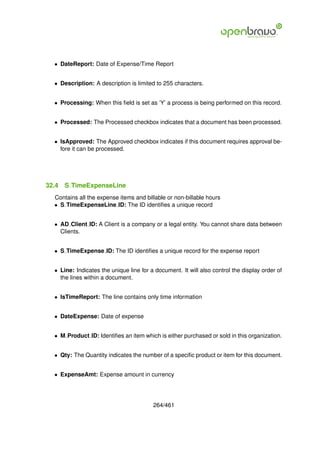
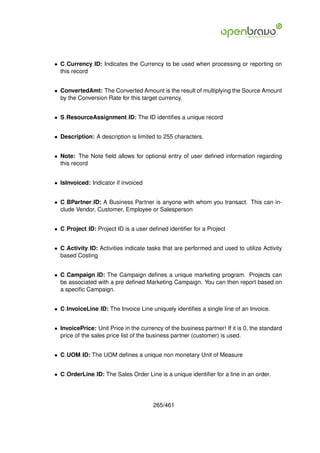
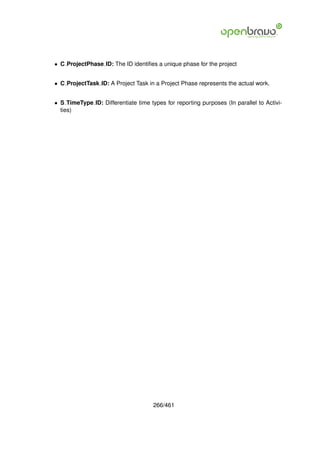
   32.4 S TimeExpenseLine         .   .   .   .   .   .   .   .   .   .   .   .   .   .   .   .   .   .   .   .   .   .   .   .   .   .   .   .   .   .   .   .   264

33 Payment management                                                                                                                                             267
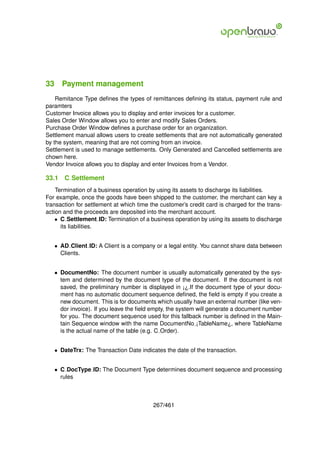
   33.1 C Settlement . . . . . . . . . . . . . . . . . . . . . . . . . . . . . . . . . . . .                                                                      267
   33.2 C Debt Payment . . . . . . . . . . . . . . . . . . . . . . . . . . . . . . . . . .                                                                        270
   33.3 C Glitem . . . . . . . . . . . . . . . . . . . . . . . . . . . . . . . . . . . . . . .                                                                    272


                                                              9/461
33.4 C   Debt Payment Balancing .               .   .   .   .   .   .   .   .   .   .   .   .   .   .   .   .   .   .   .   .   .   .   .   .   .   .   .   273
   33.5 C   Debt Payment Bal Replace               .   .   .   .   .   .   .   .   .   .   .   .   .   .   .   .   .   .   .   .   .   .   .   .   .   .   .   273
   33.6 C   DP Management . . . . .                .   .   .   .   .   .   .   .   .   .   .   .   .   .   .   .   .   .   .   .   .   .   .   .   .   .   .   274
   33.7 C   DP ManagementLine . . .                .   .   .   .   .   .   .   .   .   .   .   .   .   .   .   .   .   .   .   .   .   .   .   .   .   .   .   275
   33.8 C   Remittance Parameter . .               .   .   .   .   .   .   .   .   .   .   .   .   .   .   .   .   .   .   .   .   .   .   .   .   .   .   .   276
   33.9 C   Remittance Type . . . . . .            .   .   .   .   .   .   .   .   .   .   .   .   .   .   .   .   .   .   .   .   .   .   .   .   .   .   .   276
   33.10C   Remittance . . . . . . . . .           .   .   .   .   .   .   .   .   .   .   .   .   .   .   .   .   .   .   .   .   .   .   .   .   .   .   .   277
   33.11C   RemittanceLine . . . . . .             .   .   .   .   .   .   .   .   .   .   .   .   .   .   .   .   .   .   .   .   .   .   .   .   .   .   .   278

34 Bank and Cash management                                                                                                                                    280
   34.1 C Bank . . . . . . . . . .         .   .   .   .   .   .   .   .   .   .   .   .   .   .   .   .   .   .   .   .   .   .   .   .   .   .   .   .   .   280
   34.2 C BankAccount . . . . . .          .   .   .   .   .   .   .   .   .   .   .   .   .   .   .   .   .   .   .   .   .   .   .   .   .   .   .   .   .   282
   34.3 C PromissoryFormat . . .           .   .   .   .   .   .   .   .   .   .   .   .   .   .   .   .   .   .   .   .   .   .   .   .   .   .   .   .   .   283
   34.4 C BankStatement . . . .            .   .   .   .   .   .   .   .   .   .   .   .   .   .   .   .   .   .   .   .   .   .   .   .   .   .   .   .   .   285
   34.5 C BankStatementLine . .            .   .   .   .   .   .   .   .   .   .   .   .   .   .   .   .   .   .   .   .   .   .   .   .   .   .   .   .   .   286
   34.6 C Cash . . . . . . . . . .         .   .   .   .   .   .   .   .   .   .   .   .   .   .   .   .   .   .   .   .   .   .   .   .   .   .   .   .   .   288
   34.7 C CashBook . . . . . . .           .   .   .   .   .   .   .   .   .   .   .   .   .   .   .   .   .   .   .   .   .   .   .   .   .   .   .   .   .   289
   34.8 C CashLine . . . . . . . .         .   .   .   .   .   .   .   .   .   .   .   .   .   .   .   .   .   .   .   .   .   .   .   .   .   .   .   .   .   290
   34.9 C Charge . . . . . . . . .         .   .   .   .   .   .   .   .   .   .   .   .   .   .   .   .   .   .   .   .   .   .   .   .   .   .   .   .   .   291

35 Calendar, Year and Period                                                                                                                                   292
   35.1 C Calendar . . . . . .     .   .   .   .   .   .   .   .   .   .   .   .   .   .   .   .   .   .   .   .   .   .   .   .   .   .   .   .   .   .   .   292
   35.2 C Year . . . . . . . . .   .   .   .   .   .   .   .   .   .   .   .   .   .   .   .   .   .   .   .   .   .   .   .   .   .   .   .   .   .   .   .   292
   35.3 C Period . . . . . . . .   .   .   .   .   .   .   .   .   .   .   .   .   .   .   .   .   .   .   .   .   .   .   .   .   .   .   .   .   .   .   .   294
   35.4 C PeriodControl . . .      .   .   .   .   .   .   .   .   .   .   .   .   .   .   .   .   .   .   .   .   .   .   .   .   .   .   .   .   .   .   .   295
   35.5 C NonBusinessDay .         .   .   .   .   .   .   .   .   .   .   .   .   .   .   .   .   .   .   .   .   .   .   .   .   .   .   .   .   .   .   .   295

36 Accounting Schema                                                                                                                                           297
   36.1 C AcctSchema . . . . . . .             .   .   .   .   .   .   .   .   .   .   .   .   .   .   .   .   .   .   .   .   .   .   .   .   .   .   .   .   297
   36.2 C AcctSchema Element . .               .   .   .   .   .   .   .   .   .   .   .   .   .   .   .   .   .   .   .   .   .   .   .   .   .   .   .   .   299
   36.3 C AcctSchema Table . . . .             .   .   .   .   .   .   .   .   .   .   .   .   .   .   .   .   .   .   .   .   .   .   .   .   .   .   .   .   301
   36.4 C AcctSchema GL . . . . .              .   .   .   .   .   .   .   .   .   .   .   .   .   .   .   .   .   .   .   .   .   .   .   .   .   .   .   .   301
   36.5 C AcctSchema Default . . .             .   .   .   .   .   .   .   .   .   .   .   .   .   .   .   .   .   .   .   .   .   .   .   .   .   .   .   .   302
   36.6 AD AccountingRpt Element               .   .   .   .   .   .   .   .   .   .   .   .   .   .   .   .   .   .   .   .   .   .   .   .   .   .   .   .   308

37 Account Element                                                                                                                                             310
   37.1 C Element . . . . . . . . .        .   .   .   .   .   .   .   .   .   .   .   .   .   .   .   .   .   .   .   .   .   .   .   .   .   .   .   .   .   310
   37.2 C ElementValue . . . . .           .   .   .   .   .   .   .   .   .   .   .   .   .   .   .   .   .   .   .   .   .   .   .   .   .   .   .   .   .   312
   37.3 C ElementValue Operand             .   .   .   .   .   .   .   .   .   .   .   .   .   .   .   .   .   .   .   .   .   .   .   .   .   .   .   .   .   314
   37.4 C ElementValue Trl . . .           .   .   .   .   .   .   .   .   .   .   .   .   .   .   .   .   .   .   .   .   .   .   .   .   .   .   .   .   .   314
   37.5 C ValidCombination . . .           .   .   .   .   .   .   .   .   .   .   .   .   .   .   .   .   .   .   .   .   .   .   .   .   .   .   .   .   .   315

38 Accounting                                                                               317
   38.1 C BP Group Acct . . . . . . . . . . . . . . . . . . . . . . . . . . . . . . . . . . 317
   38.2 C BP Customer Acct . . . . . . . . . . . . . . . . . . . . . . . . . . . . . . . . 320
   38.3 C BP Vendor Acct . . . . . . . . . . . . . . . . . . . . . . . . . . . . . . . . . 321


                                                           10/461
38.4 C BP Employee Acct . .                .   .   .   .   .   .   .   .   .   .   .   .   .   .   .   .   .   .   .   .   .   .   .   .   .   .   .   .   .   322
   38.5 M Product Category Acct               .   .   .   .   .   .   .   .   .   .   .   .   .   .   .   .   .   .   .   .   .   .   .   .   .   .   .   .   .   322
   38.6 M Product Acct . . . . . .            .   .   .   .   .   .   .   .   .   .   .   .   .   .   .   .   .   .   .   .   .   .   .   .   .   .   .   .   .   323
   38.7 C Tax Acct . . . . . . . .            .   .   .   .   .   .   .   .   .   .   .   .   .   .   .   .   .   .   .   .   .   .   .   .   .   .   .   .   .   324
   38.8 C BankAccount Acct . . .              .   .   .   .   .   .   .   .   .   .   .   .   .   .   .   .   .   .   .   .   .   .   .   .   .   .   .   .   .   325
   38.9 C CashBook Acct . . . .               .   .   .   .   .   .   .   .   .   .   .   .   .   .   .   .   .   .   .   .   .   .   .   .   .   .   .   .   .   326
   38.10 Asset Group Acct . . .
        A                                     .   .   .   .   .   .   .   .   .   .   .   .   .   .   .   .   .   .   .   .   .   .   .   .   .   .   .   .   .   327
   38.11 Asset Acct . . . . . . .
        A                                     .   .   .   .   .   .   .   .   .   .   .   .   .   .   .   .   .   .   .   .   .   .   .   .   .   .   .   .   .   328
   38.12 Charge Acct . . . . . .
        C                                     .   .   .   .   .   .   .   .   .   .   .   .   .   .   .   .   .   .   .   .   .   .   .   .   .   .   .   .   .   328
   38.13 Project Acct . . . . . .
        C                                     .   .   .   .   .   .   .   .   .   .   .   .   .   .   .   .   .   .   .   .   .   .   .   .   .   .   .   .   .   329
   38.14 Glitem Acct . . . . . . .
        C                                     .   .   .   .   .   .   .   .   .   .   .   .   .   .   .   .   .   .   .   .   .   .   .   .   .   .   .   .   .   329
   38.15 Warehouse Acct . . . .
        M                                     .   .   .   .   .   .   .   .   .   .   .   .   .   .   .   .   .   .   .   .   .   .   .   .   .   .   .   .   .   330
   38.16 AcctSchema Default . .
        C                                     .   .   .   .   .   .   .   .   .   .   .   .   .   .   .   .   .   .   .   .   .   .   .   .   .   .   .   .   .   331

39 General Ledger and Budget                                                                                                                                      337
   39.1 GL Category . . . . . .           .   .   .   .   .   .   .   .   .   .   .   .   .   .   .   .   .   .   .   .   .   .   .   .   .   .   .   .   .   .   337
   39.2 GL JournalBatch . . . .           .   .   .   .   .   .   .   .   .   .   .   .   .   .   .   .   .   .   .   .   .   .   .   .   .   .   .   .   .   .   337
   39.3 GL Journal . . . . . . .          .   .   .   .   .   .   .   .   .   .   .   .   .   .   .   .   .   .   .   .   .   .   .   .   .   .   .   .   .   .   340
   39.4 GL JournalLine . . . . .          .   .   .   .   .   .   .   .   .   .   .   .   .   .   .   .   .   .   .   .   .   .   .   .   .   .   .   .   .   .   342
   39.5 C Budget . . . . . . . .          .   .   .   .   .   .   .   .   .   .   .   .   .   .   .   .   .   .   .   .   .   .   .   .   .   .   .   .   .   .   344
   39.6 C BudgetLine . . . . . .          .   .   .   .   .   .   .   .   .   .   .   .   .   .   .   .   .   .   .   .   .   .   .   .   .   .   .   .   .   .   344

40 Assets                                                                                                                                                         347
   40.1 A Asset . . . . . .   .   .   .   .   .   .   .   .   .   .   .   .   .   .   .   .   .   .   .   .   .   .   .   .   .   .   .   .   .   .   .   .   .   347
   40.2 A Asset Group . .     .   .   .   .   .   .   .   .   .   .   .   .   .   .   .   .   .   .   .   .   .   .   .   .   .   .   .   .   .   .   .   .   .   352
   40.3 A Amortization . .    .   .   .   .   .   .   .   .   .   .   .   .   .   .   .   .   .   .   .   .   .   .   .   .   .   .   .   .   .   .   .   .   .   352
   40.4 A Amortizationline    .   .   .   .   .   .   .   .   .   .   .   .   .   .   .   .   .   .   .   .   .   .   .   .   .   .   .   .   .   .   .   .   .   354

41 Accounting Facts                                                                           355
   41.1 Fact Acct . . . . . . . . . . . . . . . . . . . . . . . . . . . . . . . . . . . . . . 355

42 Manufacturing: Process Plan                                                                                                                                    359
   42.1 MA ProcessPlan . . . . .              .   .   .   .   .   .   .   .   .   .   .   .   .   .   .   .   .   .   .   .   .   .   .   .   .   .   .   .   .   359
   42.2 MA ProcessPlan Version                .   .   .   .   .   .   .   .   .   .   .   .   .   .   .   .   .   .   .   .   .   .   .   .   .   .   .   .   .   361
   42.3 MA Sequence . . . . . .               .   .   .   .   .   .   .   .   .   .   .   .   .   .   .   .   .   .   .   .   .   .   .   .   .   .   .   .   .   361
   42.4 MA Sequence Employee                  .   .   .   .   .   .   .   .   .   .   .   .   .   .   .   .   .   .   .   .   .   .   .   .   .   .   .   .   .   363
   42.5 MA Sequence IC . . . . .              .   .   .   .   .   .   .   .   .   .   .   .   .   .   .   .   .   .   .   .   .   .   .   .   .   .   .   .   .   363
   42.6 MA Sequence Machine .                 .   .   .   .   .   .   .   .   .   .   .   .   .   .   .   .   .   .   .   .   .   .   .   .   .   .   .   .   .   364
   42.7 MA SequenceProduct . .                .   .   .   .   .   .   .   .   .   .   .   .   .   .   .   .   .   .   .   .   .   .   .   .   .   .   .   .   .   364

43 Manufacturing: Work Requirement                                                       366
   43.1 MA WorkRequirement . . . . . . . . . . . . . . . . . . . . . . . . . . . . . . . 366
   43.2 MA WRPhase . . . . . . . . . . . . . . . . . . . . . . . . . . . . . . . . . . . 368
   43.3 MA WRPhaseProduct . . . . . . . . . . . . . . . . . . . . . . . . . . . . . . . 370


                                                              11/461
44 Manufacturing: Work Effort                                                                                                                                  371
   44.1 MA PL Employee . . . .         .   .   .   .   .   .   .   .   .   .   .   .   .   .   .   .   .   .   .   .   .   .   .   .   .   .   .   .   .   .   371
   44.2 MA PL IC . . . . . . . .       .   .   .   .   .   .   .   .   .   .   .   .   .   .   .   .   .   .   .   .   .   .   .   .   .   .   .   .   .   .   371
   44.3 MA PL InvoiceLine . . .        .   .   .   .   .   .   .   .   .   .   .   .   .   .   .   .   .   .   .   .   .   .   .   .   .   .   .   .   .   .   373
   44.4 MA PL Machine . . . .          .   .   .   .   .   .   .   .   .   .   .   .   .   .   .   .   .   .   .   .   .   .   .   .   .   .   .   .   .   .   373
   44.5 MA WEEmployee . . . .          .   .   .   .   .   .   .   .   .   .   .   .   .   .   .   .   .   .   .   .   .   .   .   .   .   .   .   .   .   .   374
   44.6 MA WEIncidence . . . .         .   .   .   .   .   .   .   .   .   .   .   .   .   .   .   .   .   .   .   .   .   .   .   .   .   .   .   .   .   .   374
   44.7 M Production . . . . . .       .   .   .   .   .   .   .   .   .   .   .   .   .   .   .   .   .   .   .   .   .   .   .   .   .   .   .   .   .   .   375
   44.8 M ProductionLine . . . .       .   .   .   .   .   .   .   .   .   .   .   .   .   .   .   .   .   .   .   .   .   .   .   .   .   .   .   .   .   .   376
   44.9 M ProductionPlan . . .         .   .   .   .   .   .   .   .   .   .   .   .   .   .   .   .   .   .   .   .   .   .   .   .   .   .   .   .   .   .   378
   44.10MA GlobalUse . . . . .         .   .   .   .   .   .   .   .   .   .   .   .   .   .   .   .   .   .   .   .   .   .   .   .   .   .   .   .   .   .   379

45 Manufacturing: Toolset                                                                                                                                      381
   45.1 MA Toolset . . . . .   .   .   .   .   .   .   .   .   .   .   .   .   .   .   .   .   .   .   .   .   .   .   .   .   .   .   .   .   .   .   .   .   381
   45.2 MA ToolsetProcess .    .   .   .   .   .   .   .   .   .   .   .   .   .   .   .   .   .   .   .   .   .   .   .   .   .   .   .   .   .   .   .   .   381
   45.3 MA Toolset Type . .    .   .   .   .   .   .   .   .   .   .   .   .   .   .   .   .   .   .   .   .   .   .   .   .   .   .   .   .   .   .   .   .   383
   45.4 MA ToolsetUsed . .     .   .   .   .   .   .   .   .   .   .   .   .   .   .   .   .   .   .   .   .   .   .   .   .   .   .   .   .   .   .   .   .   383

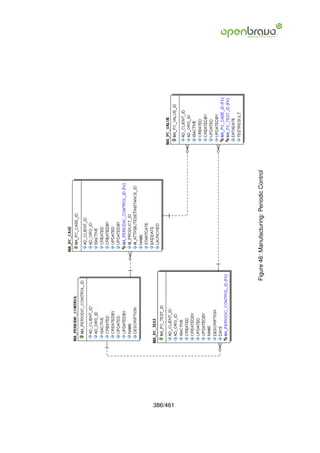
46 Manufacturing: Periodic Control                                                                                                                             385
   46.1 MA Periodic Control . . . . .              .   .   .   .   .   .   .   .   .   .   .   .   .   .   .   .   .   .   .   .   .   .   .   .   .   .   .   385
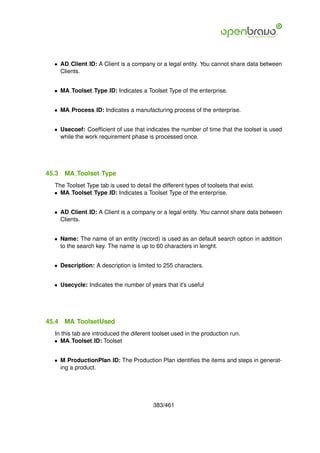
   46.2 MA PC Value . . . . . . . . .              .   .   .   .   .   .   .   .   .   .   .   .   .   .   .   .   .   .   .   .   .   .   .   .   .   .   .   385
   46.3 MA PC Test . . . . . . . . . .             .   .   .   .   .   .   .   .   .   .   .   .   .   .   .   .   .   .   .   .   .   .   .   .   .   .   .   387
   46.4 MA PC Case . . . . . . . . .               .   .   .   .   .   .   .   .   .   .   .   .   .   .   .   .   .   .   .   .   .   .   .   .   .   .   .   387

47 Manufacturing: Critical Control Points                                                                                                                      389
   47.1 MA CCP . . . . . . . . . . . . . . . .                     .   .   .   .   .   .   .   .   .   .   .   .   .   .   .   .   .   .   .   .   .   .   .   389
   47.2 MA CCP Group . . . . . . . . . . .                         .   .   .   .   .   .   .   .   .   .   .   .   .   .   .   .   .   .   .   .   .   .   .   389
   47.3 MA CCP Shift . . . . . . . . . . . .                       .   .   .   .   .   .   .   .   .   .   .   .   .   .   .   .   .   .   .   .   .   .   .   391
   47.4 MA Measure Group . . . . . . . . .                         .   .   .   .   .   .   .   .   .   .   .   .   .   .   .   .   .   .   .   .   .   .   .   392
   47.5 MA Measure Shift . . . . . . . . . .                       .   .   .   .   .   .   .   .   .   .   .   .   .   .   .   .   .   .   .   .   .   .   .   392
   47.6 MA Measure Time . . . . . . . . . .                        .   .   .   .   .   .   .   .   .   .   .   .   .   .   .   .   .   .   .   .   .   .   .   393
   47.7 MA Measure Values . . . . . . . . .                        .   .   .   .   .   .   .   .   .   .   .   .   .   .   .   .   .   .   .   .   .   .   .   393

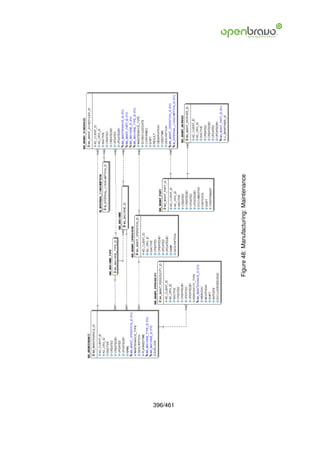
48 Manufacturing: Maintenance                                                                                                                                  395
   48.1 MA Maintenance . . . . .           .   .   .   .   .   .   .   .   .   .   .   .   .   .   .   .   .   .   .   .   .   .   .   .   .   .   .   .   .   395
   48.2 MA Maint Operation . . .           .   .   .   .   .   .   .   .   .   .   .   .   .   .   .   .   .   .   .   .   .   .   .   .   .   .   .   .   .   397
   48.3 MA Maint Part . . . . . .          .   .   .   .   .   .   .   .   .   .   .   .   .   .   .   .   .   .   .   .   .   .   .   .   .   .   .   .   .   397
   48.4 MA Maint Periodicity . . .         .   .   .   .   .   .   .   .   .   .   .   .   .   .   .   .   .   .   .   .   .   .   .   .   .   .   .   .   .   398
   48.5 MA Maint Scheduled . . .           .   .   .   .   .   .   .   .   .   .   .   .   .   .   .   .   .   .   .   .   .   .   .   .   .   .   .   .   .   398
   48.6 MA Maint Worker . . . . .          .   .   .   .   .   .   .   .   .   .   .   .   .   .   .   .   .   .   .   .   .   .   .   .   .   .   .   .   .   399

49 Manufacturing: Machine                                                                                                                                      401
   49.1 MA Machine . . . .     .   .   .   .   .   .   .   .   .   .   .   .   .   .   .   .   .   .   .   .   .   .   .   .   .   .   .   .   .   .   .   .   401
   49.2 MA Machine Cost .      .   .   .   .   .   .   .   .   .   .   .   .   .   .   .   .   .   .   .   .   .   .   .   .   .   .   .   .   .   .   .   .   401
   49.3 MA Machinestation .    .   .   .   .   .   .   .   .   .   .   .   .   .   .   .   .   .   .   .   .   .   .   .   .   .   .   .   .   .   .   .   .   403
   49.4 MA Machine Type .      .   .   .   .   .   .   .   .   .   .   .   .   .   .   .   .   .   .   .   .   .   .   .   .   .   .   .   .   .   .   .   .   404


                                                           12/461
50 Manufacturing: Cost Center                                                                                                                                405
   50.1 MA Costcenter IC . . . .         .   .   .   .   .   .   .   .   .   .   .   .   .   .   .   .   .   .   .   .   .   .   .   .   .   .   .   .   .   405
   50.2 MA CostCenter . . . . . .        .   .   .   .   .   .   .   .   .   .   .   .   .   .   .   .   .   .   .   .   .   .   .   .   .   .   .   .   .   405
   50.3 MA Costcenter Employee           .   .   .   .   .   .   .   .   .   .   .   .   .   .   .   .   .   .   .   .   .   .   .   .   .   .   .   .   .   407
   50.4 MA CostCenter Machine            .   .   .   .   .   .   .   .   .   .   .   .   .   .   .   .   .   .   .   .   .   .   .   .   .   .   .   .   .   407
   50.5 MA Costcenter Version .          .   .   .   .   .   .   .   .   .   .   .   .   .   .   .   .   .   .   .   .   .   .   .   .   .   .   .   .   .   408

51 Manufacturing: Indirect Cost                                                              409
   51.1 MA Indirect Cost . . . . . . . . . . . . . . . . . . . . . . . . . . . . . . . . . . 409
   51.2 MA Indirect Cost Value . . . . . . . . . . . . . . . . . . . . . . . . . . . . . . 409

52 Manufacturing: Incidence                                                                  412
   52.1 MA Incidence . . . . . . . . . . . . . . . . . . . . . . . . . . . . . . . . . . . . 412

53 Manufacturing: Work Station                                                               414
   53.1 MA Process . . . . . . . . . . . . . . . . . . . . . . . . . . . . . . . . . . . . . 414
   53.2 MA Section . . . . . . . . . . . . . . . . . . . . . . . . . . . . . . . . . . . . . 416
   53.3 MA Workstation . . . . . . . . . . . . . . . . . . . . . . . . . . . . . . . . . . 416

54 Salary Category                                                                                                                                           417
   54.1 C Salary Category    . . .   .   .   .   .   .   .   .   .   .   .   .   .   .   .   .   .   .   .   .   .   .   .   .   .   .   .   .   .   .   .   417
   54.2 C Salary Category    Cost    .   .   .   .   .   .   .   .   .   .   .   .   .   .   .   .   .   .   .   .   .   .   .   .   .   .   .   .   .   .   417
   54.3 C Salary Category    . . .   .   .   .   .   .   .   .   .   .   .   .   .   .   .   .   .   .   .   .   .   .   .   .   .   .   .   .   .   .   .   417
   54.4 C Salary Category    Cost    .   .   .   .   .   .   .   .   .   .   .   .   .   .   .   .   .   .   .   .   .   .   .   .   .   .   .   .   .   .   417
   54.5 C Salary Category    . . .   .   .   .   .   .   .   .   .   .   .   .   .   .   .   .   .   .   .   .   .   .   .   .   .   .   .   .   .   .   .   417
   54.6 C Salary Category    Cost    .   .   .   .   .   .   .   .   .   .   .   .   .   .   .   .   .   .   .   .   .   .   .   .   .   .   .   .   .   .   419
   54.7 C Salary Category    . . .   .   .   .   .   .   .   .   .   .   .   .   .   .   .   .   .   .   .   .   .   .   .   .   .   .   .   .   .   .   .   419
   54.8 C Salary Category    Cost    .   .   .   .   .   .   .   .   .   .   .   .   .   .   .   .   .   .   .   .   .   .   .   .   .   .   .   .   .   .   419
   54.9 C Salary Category    . . .   .   .   .   .   .   .   .   .   .   .   .   .   .   .   .   .   .   .   .   .   .   .   .   .   .   .   .   .   .   .   419
   54.10 Salary Category
        C                    Cost    .   .   .   .   .   .   .   .   .   .   .   .   .   .   .   .   .   .   .   .   .   .   .   .   .   .   .   .   .   .   419

55 MRP                                                                                                                                                       420
   55.1 MRP    SalesForecast . . .       .   .   .   .   .   .   .   .   .   .   .   .   .   .   .   .   .   .   .   .   .   .   .   .   .   .   .   .   .   420
   55.2 MRP    SalesForecastLine .       .   .   .   .   .   .   .   .   .   .   .   .   .   .   .   .   .   .   .   .   .   .   .   .   .   .   .   .   .   420
   55.3 MRP    Planner . . . . . . .     .   .   .   .   .   .   .   .   .   .   .   .   .   .   .   .   .   .   .   .   .   .   .   .   .   .   .   .   .   422
   55.4 MRP    PlanningMethod . .        .   .   .   .   .   .   .   .   .   .   .   .   .   .   .   .   .   .   .   .   .   .   .   .   .   .   .   .   .   422
   55.5 MRP    PlanningMethodLine        .   .   .   .   .   .   .   .   .   .   .   .   .   .   .   .   .   .   .   .   .   .   .   .   .   .   .   .   .   423
   55.6 MRP    Run Production . .        .   .   .   .   .   .   .   .   .   .   .   .   .   .   .   .   .   .   .   .   .   .   .   .   .   .   .   .   .   423
   55.7 MRP    Run ProductionLine        .   .   .   .   .   .   .   .   .   .   .   .   .   .   .   .   .   .   .   .   .   .   .   .   .   .   .   .   .   425
   55.8 MRP    Run Purchase . . .        .   .   .   .   .   .   .   .   .   .   .   .   .   .   .   .   .   .   .   .   .   .   .   .   .   .   .   .   .   426
   55.9 MRP    Run PurchaseLine .        .   .   .   .   .   .   .   .   .   .   .   .   .   .   .   .   .   .   .   .   .   .   .   .   .   .   .   .   .   427

56 Warehouse services                                                                        429
   56.1 M Locator Type . . . . . . . . . . . . . . . . . . . . . . . . . . . . . . . . . . . 429
   56.2 M WH Schedule . . . . . . . . . . . . . . . . . . . . . . . . . . . . . . . . . . 429
   56.3 M WH Schedule Product . . . . . . . . . . . . . . . . . . . . . . . . . . . . . 431


                                                         13/461
56.4 M WH Period . . . . . . . . . . . . . . . . . . . . . . . . . . . . . . . . . . . . 431
   56.5 M WH Period Invoiced . . . . . . . . . . . . . . . . . . . . . . . . . . . . . . . 432
   56.6 M InOutLine Type . . . . . . . . . . . . . . . . . . . . . . . . . . . . . . . . . 432

57 External POS                                                                                                                                                   434
   57.1 C ExternalPOS     . . . . . .         .   .   .   .   .   .   .   .   .   .   .   .   .   .   .   .   .   .   .   .   .   .   .   .   .   .   .   .   .   434
   57.2 C ExternalPOS     Category            .   .   .   .   .   .   .   .   .   .   .   .   .   .   .   .   .   .   .   .   .   .   .   .   .   .   .   .   .   436
   57.3 C ExternalPOS     Product .           .   .   .   .   .   .   .   .   .   .   .   .   .   .   .   .   .   .   .   .   .   .   .   .   .   .   .   .   .   437
   57.4 M Product . . .   . . . . . .         .   .   .   .   .   .   .   .   .   .   .   .   .   .   .   .   .   .   .   .   .   .   .   .   .   .   .   .   .   437

58 Import data                                                                                                                                                    442
   58.1 AD ImpFormat . . .        .   .   .   .   .   .   .   .   .   .   .   .   .   .   .   .   .   .   .   .   .   .   .   .   .   .   .   .   .   .   .   .   442
   58.2 AD ImpFormat Row          .   .   .   .   .   .   .   .   .   .   .   .   .   .   .   .   .   .   .   .   .   .   .   .   .   .   .   .   .   .   .   .   444
   58.3 I BPartner . . . . . .    .   .   .   .   .   .   .   .   .   .   .   .   .   .   .   .   .   .   .   .   .   .   .   .   .   .   .   .   .   .   .   .   445
   58.4 I Product . . . . . .     .   .   .   .   .   .   .   .   .   .   .   .   .   .   .   .   .   .   .   .   .   .   .   .   .   .   .   .   .   .   .   .   447
   58.5 I ElementValue . . .      .   .   .   .   .   .   .   .   .   .   .   .   .   .   .   .   .   .   .   .   .   .   .   .   .   .   .   .   .   .   .   .   451
   58.6 I Order . . . . . . . .   .   .   .   .   .   .   .   .   .   .   .   .   .   .   .   .   .   .   .   .   .   .   .   .   .   .   .   .   .   .   .   .   453
   58.7 I Budgetline . . . . .    .   .   .   .   .   .   .   .   .   .   .   .   .   .   .   .   .   .   .   .   .   .   .   .   .   .   .   .   .   .   .   .   458


                                                              14/461
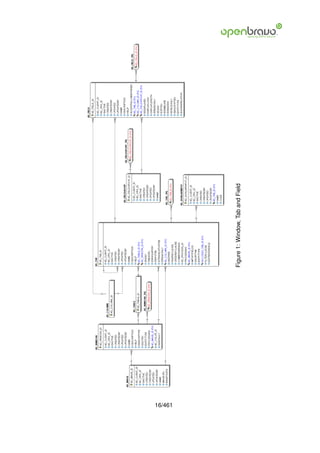
1 Window, Tab and Field
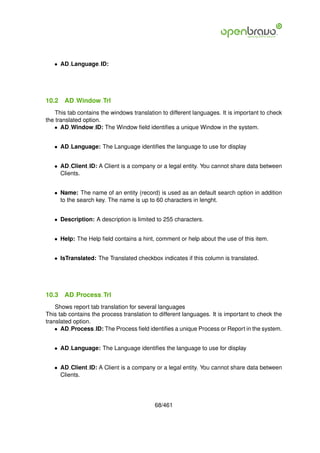
    The Window, Tab & Field defines the presentation of tables and columns within each
window.
The Field Group allows you to define subsections in a tab. For System Admin use only.
The auxiliar inputs fix the values of a selected field, for instance a slection list, depending on
the tab that is edited.

1.1   AD Window
   The Window table defines each window in the system.
   • AD Window ID: The Window field identifies a unique Window in the system.


   • AD Client ID: A Client is a company or a legal entity. You cannot share data between
     Clients.


   • Name: The name of an entity (record) is used as an default search option in addition
     to the search key. The name is up to 60 characters in lenght.


   • Description: A description is limited to 255 characters.


   • Help: The Help field contains a hint, comment or help about the use of this item.


   • WindowType: The Window Type indicates the type of window being defined (Main-
     tain, Transaction or Query)


   • IsSOTrx: The Sales Transaction checkbox indicates if this item is a Sales Transaction.


   • EntityType: The Entity Types Dictionary, Core and Application might be automatically
     synchronized and customizations deleted or overwritten.
     For customizations, copy the entity and select User!


   • Processing: When this field is set as ’Y’ a process is being performed on this record.


   • AD Image ID: Defines a system image


                                            15/461
16/461
         Figure 1: Window, Tab and Field
• AD Color ID: Color for backgrounds or indicators


   • IsDefault: The Default Checkbox indicates if this record will be used as a default value.


1.2   AD Tab
    The Tab Tab defines each Tab within a Window. Each Tab contains a discrete selection
of fields.
    • AD Tab ID: The Tab indicates a tab that displays within a window.


   • AD Client ID: A Client is a company or a legal entity. You cannot share data between
     Clients.


   • Name: The name of an entity (record) is used as an default search option in addition
     to the search key. The name is up to 60 characters in lenght.


   • Description: A description is limited to 255 characters.


   • Help: The Help field contains a hint, comment or help about the use of this item.


   • AD Table ID: The Table indicates the table in which a field or fields reside.


   • AD Window ID: The Window field identifies a unique Window in the system.


   • SeqNo: The Sequence indicates the order of records


   • TabLevel: Hierarchical level of the tab. If the level is 0, it is the top entity. Level 1
     entries are dependent on level 0, etc.


   • IsSingleRow: The Single Row Layout checkbox indicates if the default display type
     for this window is a single row as opposed to multi row.


   • IsInfoTab: The Accounting Tab checkbox indicates if this window contains accounting
     information.


                                           17/461
• IsTranslationTab: The Translation Tab checkbox indicate if a tab contains translation
  information.


• IsReadOnly: The Read Only indicates that this field may only be Read. It may not be
  updated.


• AD Column ID: Link to the database column of the table


• HasTree: The Has Tree checkbox indicates if this window displays a tree metaphor.


• WhereClause: The Where Clause indicates the SQL WHERE clause to use for record
  selection. The WHERE clause is added to the query. Fully qualified means table-
  name.columnname.


• OrderByClause: The ORDER BY Clause indicates the SQL ORDER BY clause to
  use for record selection


• CommitWarning: Warning or information displayed when committing the record
  Not implemented yet

• AD Process ID: The Process field identifies a unique Process or Report in the system.


• Processing: When this field is set as ’Y’ a process is being performed on this record.


• AD Image ID: Defines a system image


• ImportFields: Create Fields from Table Columns, this process will create the fields
  that don’t exists in the tab but which exist in the correspondent table.


• AD ColumnSortOrder ID: Integer Column of the table determining the order (display,
  sort, ..). If defined, the Order By replaces the default Order By clause. It should be
  fully qualified (i.e. tablename.columnname).


• AD ColumnSortYesNo ID: If a Included Column is defined, it decides, if a column is
  active in the ordering - otherwise it is determined that the Order Column has a value
  of one or greater


                                      18/461
• IsSortTab: The Tab determines the Order.


   • EntityType: The Entity Types Dictionary, Core and Application might be automatically
     synchronized and customizations deleted or overwritten.
     For customizations, copy the entity and select User!


   • Included Tab ID: You can include a Tab in a Tab. If displayed in single row record, the
     included tab is displayed as multi-row table.


   • FilterClause: Filter clause


   • EditReference: The form referenced in the edition command


1.3   AD Image
   This table stores images that can be used in different places. An image can be stored as
an URL or as binary data.
   • AD Image ID: Defines a system image


   • AD Client ID: A Client is a company or a legal entity. You cannot share data between
     Clients.


   • Name: The name of an entity (record) is used as an default search option in addition
     to the search key. The name is up to 60 characters in lenght.


   • ImageURL: URL of image; The image is not stored in the database, but retrieved at
     runtime. The image can be a gif, jpeg or png.


   • BinaryData: The Binary field stores binary data.


1.4   AD AuxiliarInput
   To configure an auxiliar input, you need to select the corresponding tab, name the auxiliar
inout and define a validation code. For example, when selecting the payment method, you
can force that all payments are done in cash.

                                          19/461
• Ad Auxiliarinput Id:


   • AD Client ID: A Client is a company or a legal entity. You cannot share data between
     Clients.


   • AD Tab ID: The Tab indicates a tab that displays within a window.


   • Name: The name of an entity (record) is used as an default search option in addition
     to the search key. The name is up to 60 characters in lenght.


   • Code: The Validation Code is the code that will be executed to determine the rule.


1.5   AD FieldGroup
   A field group is defined as a fields agrupation inside a tab.
   • AD FieldGroup ID: The Field Group indicates the logical group that this field belongs
     to (History, Amounts, Quantities)


   • AD Client ID: A Client is a company or a legal entity. You cannot share data between
     Clients.


   • Name: The name of an entity (record) is used as an default search option in addition
     to the search key. The name is up to 60 characters in lenght.


1.6   AD Field
   The Field table defines the Fields displayed within a tab. Changes made to the Field Tab
become visible after restart due to caching
   • AD Field ID: The Field identifies a field on a database table.


   • AD Client ID: A Client is a company or a legal entity. You cannot share data between
     Clients.


   • Name: The name of an entity (record) is used as an default search option in addition
     to the search key. The name is up to 60 characters in lenght.


                                         20/461
• Description: A description is limited to 255 characters.


• Help: The Help field contains a hint, comment or help about the use of this item.


• IsCentrallyMaintained: The Centrally Maintained checkbox indicates if the Name,
  Description and Help maintained in ’System Element’ table or ’Window’ table.


• AD Tab ID: The Tab indicates a tab that displays within a window.


• AD Column ID: Link to the database column of the table


• AD FieldGroup ID: The Field Group indicates the logical group that this field belongs
  to (History, Amounts, Quantities)


• IsDisplayed: If the field is displayed, the field Display Logic will determine at runtime,
  if it is actually displayed


• DisplayLogic:


• DisplayLength: Display length is the size that will be appear for the field, it can be
  different that the actual size of the column (note that if it is bigger than the column the
  data will be truncated to the column size).


• IsReadOnly: The Read Only indicates that this field may only be Read. It may not be
  updated.


• SeqNo: The Sequence indicates the order of records


• SortNo: The Record Sort No indicates the ascending sort sequence of the records


• IsSameLine: The Same Line checkbox indicates that the field will display on the same
  line as the previous field.


• IsHeading: The Heading Only checkbox indicates if just the label will display on the
  screen


                                         21/461
• IsFieldOnly: The Field Only checkbox indicates that the column will display without a
  label.
  Not implemented yet

• IsEncrypted: Display encryption - all characters are displayed as ’*’. Data storage
  encryption (i.e. you will not be able to report the data via report tools) is set in the
  Column definition.


• EntityType: The Entity Types Dictionary, Core and Application might be automatically
  synchronized and customizations deleted or overwritten.
  For customizations, copy the entity and select User!


• ShowInRelation: When this field is set as ’Y’ the field will be shown in the relation
  view (as well as in the edition view), otherwise it only will be displayed in the edition
  view.


                                        22/461
2 Table and column and attachments
   The Table and Column defines all tables with their columns.
The System Element is the Central Repository for Field Names Descriptions and Help/Comments.
The Validation Rules defines all dynamic rules used when entering and maintaining columns
and fields.
The File is used to store attributes of an attachment.

2.1   AD Table
   In Table table are stored all the tables used in the application. This data should be the
same as the defined physically in the DB.
   • AD Table ID: The Table indicates the table in which a field or fields reside.


   • AD Client ID: A Client is a company or a legal entity. You cannot share data between
     Clients.


   • Name: The name of an entity (record) is used as an default search option in addition
     to the search key. The name is up to 60 characters in lenght.


   • Description: A description is limited to 255 characters.


   • Help: The Help field contains a hint, comment or help about the use of this item.


   • TableName: The DB Table Name indicates the name of the table in database.


   • IsView: This is a view rather than a table. A view is always treated as read only in the
     system.


   • AccessLevel: Indicates the access level required for this record or process.


   • EntityType: The Entity Types Dictionary, Core and Application might be automatically
     synchronized and customizations deleted or overwritten.
     For customizations, copy the entity and select User!


   • AD Window ID: The Window field identifies a unique Window in the system.


                                          23/461
24/461
         Figure 2: Table and column and attachments
• AD Val Rule ID: The Validation Rule indicates a unique validation rule. These rules
     define how an entry is determined to valid or invalid.


   • LoadSeq: Sequence of the table


   • IsSecurityEnabled: The Security Enabled checkbox indicates that user access to the
     data in this table can be restricted using Roles.
     Not implemented yet

   • IsDeleteable: The Records Deleteable checkbox indicates if a record can be deleted
     from the database. If records cannot be deleted, you can only deselect the Active flag


   • IsHighVolume: The High Volume Checkbox indicates if a search screen will display
     as opposed to a pick list for selecting records from this table.


   • ImportTable: Import Table Columns from Database, this process will create in the ap-
     plication dictionary those columns defined in the table (in DB) but non-existing in the
     column table (of the application dictionary).


   • IsChangeLog: If selected, a log of all changes is maintained.
     Not implemented yet

   • ReplicationType: The Type of data Replication determines the directon of the data
     replication. ¡BR¿Reference means that the data in this system is read only -¿ ¡BR¿Local
     means that the data in this system is not replicated to other systems - ¡BR¿Merge
     means that the d


   • PO Window ID: Window for Purchase Order (AP) Zooms


   • IsDefaultAcct: Is default account
     Not implemented yet

   • SQL Record Identifier: SQL Record Identifier


2.2   AD Column
   Defines the columns of a table
The Used in Column Tab defines the table and column this element resides in.
   • AD Column ID: Link to the database column of the table


                                         25/461
• AD Client ID: A Client is a company or a legal entity. You cannot share data between
  Clients.


• Name: The name of an entity (record) is used as an default search option in addition
  to the search key. The name is up to 60 characters in lenght.


• Description: A description is limited to 255 characters.


• Help: The Help field contains a hint, comment or help about the use of this item.


• Version: The Version indicates the version of this table definition.


• EntityType: The Entity Types Dictionary, Core and Application might be automatically
  synchronized and customizations deleted or overwritten.
  For customizations, copy the entity and select User!


• ColumnName: The Column Name indicates the name of a column on a table as de-
  fined in the database.


• AD Table ID: The Table indicates the table in which a field or fields reside.


• AD Reference ID: The Reference indicates the type of reference field


• AD Reference Value ID: The Reference Value indicates where the reference values
  are stored. It must be specified if the data type is Table or List.


• AD Val Rule ID: The Validation Rule indicates a unique validation rule. These rules
  define how an entry is determined to valid or invalid.


• FieldLength: The Length indicates the length of a column as defined in the database.


• DefaultValue: The defaults are evaluated in the order of definition, the first not null
  value becomes the default value of the column. The values are separated by comma
  or semicolon. a) Literals:. ’Text’ or 123 b) Variables - in format @Variable@ - Login e.g.
  #Date, #AD Org ID, #AD Client ID - Accounting Schema: e.g. C AcctSchema ID,C Calendar ID
  - Global defaults: e.g. DateFormat - Window values (all Picks, CheckBoxes, RadioBut-
  tons, and DateDoc/DateAcct) c) SQL code with the tag: @SQL=SELECT something
  AS DefaultValue FROM ... The SQL statement can contain variables. There can be

                                       26/461
no other value other than the SQL statement. The default is only evaluated, if no user
  preference is defined. Default definitions are ignored for record columns as Key, Par-
  ent, Client as well as Buttons.


• IsKey: The key column must also be display sequence 0 in the field definition and may
  be hidden.


• IsParent: The Parent checkbox indicates if this column is a link to the parent table.


• IsMandatory: The Mandatory checkbox indicates if the field is required for a record to
  be save to the database.


• IsUpdateable: The Updateable checkbox indicates if a field can be updated by the
  user.


• ReadOnlyLogic: Logic to determine if field is read only (applies only when field is
  read-write)


• IsIdentifier: The Identifier checkbox indicates that this column is part of the identifier
  or key for this table.


• SeqNo: The Sequence indicates the order of records


• IsTranslated: The Translated checkbox indicates if this column is translated.


• IsEncrypted: Display encryption - all characters are displayed as ’*’. Data storage
  encryption (i.e. you will not be able to report the data via report tools) is set in the
  Column definition.


• VFormat: Value Format is the format the value will be displayed with.
  Not implemented yet
• ValueMin: The Minimum Value indicates the lowest allowable value for a field.


• ValueMax: The Maximum Value indicates the highest allowable value for a field


• IsSelectionColumn: If selected, the column is listed in the first find window tab and
  in the selection part of the window


                                       27/461
• AD Element ID: The System Element allows for the central maintenance of help, de-
     scriptions and terminology for a database column.


   • AD Process ID: The Process field identifies a unique Process or Report in the system.


   • IsSyncDatabase: When selected, the database column definition is updated based
     on your entries in the Column definition of the Application Dictionary.


   • IsSessionAttr: Checking this field the data for this column will be stored as session
     attribute so its content will be accessible from other tab.


   • IsSecondaryKey: Is secondary key


   • IsDesencryptable: When Is Desencryptable field is ’Y’ the content of this column will
     be saved in a desencryptable way.


   • AD Callout ID: The callout that will be fired when the content of a is modified.


2.3   AD Callout
   This table defines the callouts, callouts are Java classes that are executed when the
content of a filed is modified.
   • AD Callout ID: The callout that will be fired when the content of a is modified.


   • AD Client ID: A Client is a company or a legal entity. You cannot share data between
     Clients.


   • Name: The name of an entity (record) is used as an default search option in addition
     to the search key. The name is up to 60 characters in lenght.


   • Description: A description is limited to 255 characters.


                                          28/461
2.4   AD Val Rule
   The Validation Rules Tab defines all dynamic rules used when entering and maintaining
columns and fields.
   • AD Val Rule ID: The Validation Rule indicates a unique validation rule. These rules
     define how an entry is determined to valid or invalid.


   • AD Client ID: A Client is a company or a legal entity. You cannot share data between
     Clients.


   • Name: The name of an entity (record) is used as an default search option in addition
     to the search key. The name is up to 60 characters in lenght.


   • Description: A description is limited to 255 characters.


   • Type: The Type indicates the type of validation that will occur. This can be SQL, Java
     Script or Java Language.


   • Code: The Validation Code is the code that will be executed to determine the rule.


   • EntityType: The Entity Types Dictionary, Core and Application might be automatically
     synchronized and customizations deleted or overwritten.
     For customizations, copy the entity and select User!


2.5   AD Element
   The Element Tab defines each system level element.
   • AD Element ID: The System Element allows for the central maintenance of help, de-
     scriptions and terminology for a database column.


   • AD Client ID: A Client is a company or a legal entity. You cannot share data between
     Clients.


   • ColumnName: The Column Name indicates the name of a column on a table as de-
     fined in the database.


                                          29/461
• EntityType: The Entity Types Dictionary, Core and Application might be automatically
    synchronized and customizations deleted or overwritten.
    For customizations, copy the entity and select User!


  • Name: The name of an entity (record) is used as an default search option in addition
    to the search key. The name is up to 60 characters in lenght.


  • PrintName: The Label to be printed indicates the name that will be printed on a doc-
    ument or correspondence. The max length is 2000 characters.


  • Description: A description is limited to 255 characters.


  • Help: The Help field contains a hint, comment or help about the use of this item.


  • PO Name: Name on PO Screens


  • PO PrintName: Print name on PO Screens/Reports


  • PO Description: Description in PO Screens


  • PO Help: Help for PO Screens


2.6   C File
  In this table are stored the files (using the name field) attached to different windows.
  • C File ID: Attached file


  • AD Client ID: A Client is a company or a legal entity. You cannot share data between
    Clients.


  • Name: The name of an entity (record) is used as an default search option in addition
    to the search key. The name is up to 60 characters in lenght.


  • C Datatype ID: Defines what kind of file is (txt, pdf, xls...).


                                          30/461
• Seqno: The Sequence indicates the order of records


   • Text: The Text field stores the user entered information.


   • AD Table ID: The Table indicates the table in which a field or fields reside.


   • AD Record ID: Record contains the key of the record the file is attached to. This key
     may belong to any table that’s why this column is generic and not specific for any table.


2.7   AD DataType
    Data type table contains the different types of files that can be attached to the records of
the application.
   • AD Datatype ID: Type of file


   • AD Client ID: A Client is a company or a legal entity. You cannot share data between
     Clients.


   • Name: The name of an entity (record) is used as an default search option in addition
     to the search key. The name is up to 60 characters in lenght.


   • Format: Format is the description of the data type for the attachable files.


                                           31/461
3 Reference
      The Reference defines each field type and its parameters.

3.1     AD Reference
  The Reference Tab defines the references that are used to validate data
  • AD Reference ID: The Reference indicates the type of reference field


  • AD Client ID: A Client is a company or a legal entity. You cannot share data between
    Clients.


  • Name: The name of an entity (record) is used as an default search option in addition
    to the search key. The name is up to 60 characters in lenght.


  • Description: A description is limited to 255 characters.


  • Help: The Help field contains a hint, comment or help about the use of this item.


  • ValidationType: The Validation Type indicates the validation method to use. These
    include list, table or data type validation.


  • VFormat: Value Format is the format the value will be displayed with.
    Not implemented yet

  • EntityType: The Entity Types Dictionary, Core and Application might be automatically
    synchronized and customizations deleted or overwritten.
    For customizations, copy the entity and select User!


3.2     AD Ref List
  The List Validation Tab defines lists to validate data
  • AD Ref List ID: The Reference List field indicates a list of reference values from a
    database tables. Reference lists populate drop down list boxes in data entry screens


                                          32/461
33/461
         Figure 3: Reference
• AD Client ID: A Client is a company or a legal entity. You cannot share data between
    Clients.


  • Value: A search key allows you a fast method of finding a particular record. If you
    leave the search key empty, the system automatically creates a numeric number. The
    document sequence used for this fallback number is defined in the Maintain Sequence
    window with the name DocumentNo TableName, where TableName is the actual name
    of the table (e.g. C Order).


  • Name: The name of an entity (record) is used as an default search option in addition
    to the search key. The name is up to 60 characters in lenght.


  • Description: A description is limited to 255 characters.


  • AD Reference ID: The Reference indicates the type of reference field


  • ValidFrom: The Valid From date indicates the first day of a date range


  • ValidTo: The Valid To date indicates the last day of a date range


  • EntityType: The Entity Types Dictionary, Core and Application might be automatically
    synchronized and customizations deleted or overwritten.
    For customizations, copy the entity and select User!


3.3   AD Ref Table
  The Table Validation Tab defines tables to validate data
  • AD Reference ID: The Reference indicates the type of reference field


  • AD Client ID: A Client is a company or a legal entity. You cannot share data between
    Clients.


  • AD Table ID: The Table indicates the table in which a field or fields reside.


  • AD Key: The Key Column indicates that this the unique identifier of a record on this
    table.


                                         34/461
• AD Display: The Display Column indicates the column that will display.


  • IsValueDisplayed: The Display Value checkbox indicates if the value column will dis-
    play with the display column.


  • WhereClause: The Where Clause indicates the SQL WHERE clause to use for record
    selection. The WHERE clause is added to the query. Fully qualified means table-
    name.columnname.


  • OrderByClause: The ORDER BY Clause indicates the SQL ORDER BY clause to
    use for record selection


  • EntityType: The Entity Types Dictionary, Core and Application might be automatically
    synchronized and customizations deleted or overwritten.
    For customizations, copy the entity and select User!


3.4   AD Ref Search
  • AD Ref Search ID:


  • AD Client ID: A Client is a company or a legal entity. You cannot share data between
    Clients.


  • AD Reference ID: The Reference indicates the type of reference field


  • AD Table ID: The Table indicates the table in which a field or fields reside.


  • AD Column ID: Link to the database column of the table


3.5   AD Ref Search Column
  • AD Ref Search Column ID:


                                        35/461
• AD Client ID: A Client is a company or a legal entity. You cannot share data between
  Clients.


• AD Ref Search ID:


• Name: The name of an entity (record) is used as an default search option in addition
  to the search key. The name is up to 60 characters in lenght.


• Columnname: The Column Name indicates the name of a column on a table as de-
  fined in the database.


• Columntype:


• Column Suffix:


                                     36/461
4 Menu
   The Menu defines the Menu which will display. The menu items that each user will see
depends upon the security defined.

4.1   AD Menu
   The Menu Tab defines the tree structured menu which will be used for the selected
Organization.
   • AD Menu ID: The Menu identifies a unique Menu. Menus are used to control the dis-
     play of those screens a user has access to.


   • AD Client ID: A Client is a company or a legal entity. You cannot share data between
     Clients.


   • Name: The name of an entity (record) is used as an default search option in addition
     to the search key. The name is up to 60 characters in lenght.


   • Description: A description is limited to 255 characters.


   • IsSummary: A summary entity represents a branch in a tree rather than an end-node.
     Summary entities are used for reporting and do not have own values.


   • IsSOTrx: The Sales Transaction checkbox indicates if this item is a Sales Transaction.


   • IsReadOnly: The Read Only indicates that this field may only be Read. It may not be
     updated.


   • Action: The Action field indicates the Action to be performed for this element.


   • AD Window ID: The Window field identifies a unique Window in the system.


   • AD Workflow ID: The Workflow field identifies a unique Workflow in the system.


   • AD Task ID: The Task field identifies a Operation System Task in the system.


                                          37/461
38/461
         Figure 4: Menu
• AD Process ID: The Process field identifies a unique Process or Report in the system.


• AD Form ID: The Special Form field identifies a unique Special Form in the system.


• AD Workbench ID: Collection of windows, reports


• EntityType: The Entity Types Dictionary, Core and Application might be automatically
  synchronized and customizations deleted or overwritten.
  For customizations, copy the entity and select User!


• Url: The URL defines an online address for this Business Partner.


                                     39/461
5 Process, Form and Task
   The Forms defines any window which is not automatically generated.
The Tasks defines the different tasks used in workflows and the access level for those tasks.
The Report & Process is used to define the parameters and access rules for every Report
and Process within the system.

5.1   AD Process
   The Report and Process Tab defines each report and process run in the system.
   • AD Process ID: The Process field identifies a unique Process or Report in the system.


   • AD Client ID: A Client is a company or a legal entity. You cannot share data between
     Clients.


   • Value: A search key allows you a fast method of finding a particular record. If you
     leave the search key empty, the system automatically creates a numeric number. The
     document sequence used for this fallback number is defined in the Maintain Sequence
     window with the name DocumentNo TableName, where TableName is the actual name
     of the table (e.g. C Order).


   • Name: The name of an entity (record) is used as an default search option in addition
     to the search key. The name is up to 60 characters in lenght.


   • Description: A description is limited to 255 characters.


   • Help: The Help field contains a hint, comment or help about the use of this item.


   • AccessLevel: Indicates the access level required for this record or process.


   • EntityType: The Entity Types Dictionary, Core and Application might be automatically
     synchronized and customizations deleted or overwritten.
     For customizations, copy the entity and select User!


   • IsUserStartable: The User can start Process checkbox indicates that this process
     can be initiated by the user (as opposed to system initiated)
     Not implemented yet


                                          40/461
41/461
         Figure 5: Process, Form and Task
• ProcedureName: The Procedure indicates the name of the database procedure called
     by this report or process.


   • IsReport: The Report checkbox indicates that this record is a report as opposed to a
     process


   • IsDirectPrint: The Direct Print checkbox indicates that this report will print without a
     print dialog box being displayed.


   • AD ReportView ID: The Report View indicates the view used to generate this report.


   • Classname: The Classname identifies the Java classname used by this report or pro-
     cess.


   • Statistic Count: Internal statistics, this field counts how many times the process has
     been executed.


   • Statistic Seconds: Internal statistics how many seconds have been used the process
     while it was being executed.


   • AD PrintFormat ID: The print format determines how data is rendered for print.


   • IsBackground: The background process run with the application in a planned time


5.2   AD Process Para
   The Report Parameter table defines any parameters required to execute a report or
process.
   • AD Process Para ID: Process Parameter identifies the parameters of a process or
     report.


   • AD Client ID: A Client is a company or a legal entity. You cannot share data between
     Clients.


   • Name: The name of an entity (record) is used as an default search option in addition
     to the search key. The name is up to 60 characters in lenght.


                                          42/461
• Description: A description is limited to 255 characters.


• Help: The Help field contains a hint, comment or help about the use of this item.


• AD Process ID: The Process field identifies a unique Process or Report in the system.


• SeqNo: The Sequence indicates the order of records


• AD Reference ID: The Reference indicates the type of reference field


• AD Reference Value ID: The Reference Value indicates where the reference values
  are stored. It must be specified if the data type is Table or List.


• AD Val Rule ID: The Validation Rule indicates a unique validation rule. These rules
  define how an entry is determined to valid or invalid.


• ColumnName: The Column Name indicates the name of a column on a table as de-
  fined in the database.


• IsCentrallyMaintained: The Centrally Maintained checkbox indicates if the Name,
  Description and Help maintained in ’System Element’ table or ’Window’ table.


• FieldLength: The Length indicates the length of a column as defined in the database.


• IsMandatory: The Mandatory checkbox indicates if the field is required for a record to
  be save to the database.


• IsRange: The Range checkbox indicates that this parameter is a range of values.


• DefaultValue: The defaults are evaluated in the order of definition, the first not null
  value becomes the default value of the column. The values are separated by comma
  or semicolon. a) Literals:. ’Text’ or 123 b) Variables - in format @Variable@ - Login e.g.
  #Date, #AD Org ID, #AD Client ID - Accounting Schema: e.g. C AcctSchema ID,C Calendar ID
  - Global defaults: e.g. DateFormat - Window values (all Picks, CheckBoxes, RadioBut-
  tons, and DateDoc/DateAcct) c) SQL code with the tag: @SQL=SELECT something
  AS DefaultValue FROM ... The SQL statement can contain variables. There can be
  no other value other than the SQL statement. The default is only evaluated, if no user


                                       43/461
preference is defined. Default definitions are ignored for record columns as Key, Par-
      ent, Client as well as Buttons.


   • DefaultValue2: The defaults are evaluated in the order of definition, the first not null
     value becomes the default value of the column. The values are separated by comma
     or semicolon. a) Literals:. ’Text’ or 123 b) Variables - in format @Variable@ - Login e.g.
     #Date, #AD Org ID, #AD Client ID - Accounting Schema: e.g. C AcctSchema ID,C Calendar ID
     - Global defaults: e.g. DateFormat - Window values (all Picks, CheckBoxes, RadioBut-
     tons, and DateDoc/DateAcct) c) SQL code with the tag: @SQL=SELECT something
     AS DefaultValue FROM ... The SQL statement can contain variables. There can be
     no other value other than the SQL statement. The default is only evaluated, if no user
     preference is defined. Default definitions are ignored for record columns as Key, Par-
     ent, Client as well as Buttons.


   • VFormat: Value Format is the format the value will be displayed with.
     Not implemented yet

   • ValueMin: The Minimum Value indicates the lowest allowable value for a field.


   • ValueMax: The Maximum Value indicates the highest allowable value for a field


   • AD Element ID: The System Element allows for the central maintenance of help, de-
     scriptions and terminology for a database column.


   • EntityType: The Entity Types Dictionary, Core and Application might be automatically
     synchronized and customizations deleted or overwritten.
     For customizations, copy the entity and select User!


5.3   AD Form
  The Forms Tab defines any window which is not automatically generated. For System
Admin use only.
  • AD Form ID: The Special Form field identifies a unique Special Form in the system.


   • AD Client ID: A Client is a company or a legal entity. You cannot share data between
     Clients.


                                         44/461
• Name: The name of an entity (record) is used as an default search option in addition
    to the search key. The name is up to 60 characters in lenght.


  • Description: A description is limited to 255 characters.


  • Help: The Help field contains a hint, comment or help about the use of this item.


  • AccessLevel: Indicates the access level required for this record or process.


  • Classname: The Classname identifies the Java classname used by this report or pro-
    cess.


  • EntityType: The Entity Types Dictionary, Core and Application might be automatically
    synchronized and customizations deleted or overwritten.
    For customizations, copy the entity and select User!


5.4   AD Task
  The Task Tab defines the unique tasks that will be used.
  • AD Task ID: The Task field identifies a Operation System Task in the system.


  • AD Client ID: A Client is a company or a legal entity. You cannot share data between
    Clients.


  • Name: The name of an entity (record) is used as an default search option in addition
    to the search key. The name is up to 60 characters in lenght.


  • Description: A description is limited to 255 characters.


  • Help: The Help field contains a hint, comment or help about the use of this item.


  • AccessLevel: Indicates the access level required for this record or process.


  • OS Command: The OS Command is for optionally defining a command to that will be
    part of this task. For example it can be used to starting a back up process or perform-
    ing a file transfer.


                                         45/461
• EntityType: The Entity Types Dictionary, Core and Application might be automatically
  synchronized and customizations deleted or overwritten.
  For customizations, copy the entity and select User!


• ClassName: The Classname identifies the Java classname used by this report or pro-
  cess.


                                     46/461
6 Workflow
    The Workflow defines Workflows in the system, the access level for the Workflow and
the Nodes or Steps within the Workflow.

6.1   AD Workflow
   The Workflow Tab defines Workflows in the system.
   • AD Workflow ID: The Workflow field identifies a unique Workflow in the system.


   • AD Client ID: A Client is a company or a legal entity. You cannot share data between
     Clients.


   • Name: The name of an entity (record) is used as an default search option in addition
     to the search key. The name is up to 60 characters in lenght.


   • Description: A description is limited to 255 characters.


   • Help: The Help field contains a hint, comment or help about the use of this item.


   • AccessLevel: Indicates the access level required for this record or process.


   • AD WF Node ID: The Workflow Node indicates a unique step or process in a Work-
     flow.


   • EntityType: The Entity Types Dictionary, Core and Application might be automatically
     synchronized and customizations deleted or overwritten.
     For customizations, copy the entity and select User!


6.2   AD WF Node
   The Node Tab defines each Node or step in this Workflow.
   • AD WF Node ID: The Workflow Node indicates a unique step or process in a Work-
     flow.


                                          47/461
48/461
         Figure 6: Workflow
• AD Client ID: A Client is a company or a legal entity. You cannot share data between
  Clients.


• Name: The name of an entity (record) is used as an default search option in addition
  to the search key. The name is up to 60 characters in lenght.


• Description: A description is limited to 255 characters.


• Help: The Help field contains a hint, comment or help about the use of this item.


• AD Workflow ID: The Workflow field identifies a unique Workflow in the system.


• IsCentrallyMaintained: The Centrally Maintained checkbox indicates if the Name,
  Description and Help maintained in ’System Element’ table or ’Window’ table.


• Action: The Action field indicates the Action to be performed for this element.


• AD Window ID: The Window field identifies a unique Window in the system.


• Workflow ID: The Workflow field identifies a unique workflow. A workflow is a group-
  ing of related tasks, in a specified sequence and optionally including approvals


• AD Task ID: The Task field identifies a Operation System Task in the system.


• AD Process ID: The Process field identifies a unique Process or Report in the system.


• AD Form ID: The Special Form field identifies a unique Special Form in the system.


• EntityType: The Entity Types Dictionary, Core and Application might be automatically
  synchronized and customizations deleted or overwritten.
  For customizations, copy the entity and select User!


• Xposition: Absolute X (horizontal) position in 1/72 of an inch
  Not implemented yet
• Yposition: Absolute Y (vertical) position in 1/72 of an inch
  Not implemented yet


                                       49/461
6.3   AD WF Node Trl
   Allows the translation of any workflow node of the application. After the edition, the
window must be regenerated.
   • AD Language: The Language identifies the language to use for display


   • AD WF Node ID: The Workflow Node indicates a unique step or process in a Work-
     flow.


   • AD Client ID: A Client is a company or a legal entity. You cannot share data between
     Clients.


   • Name: The name of an entity (record) is used as an default search option in addition
     to the search key. The name is up to 60 characters in lenght.


   • Description: A description is limited to 255 characters.


   • Help: The Help field contains a hint, comment or help about the use of this item.


   • IsTranslated: The Translated checkbox indicates if this column is translated.


6.4   AD WF NodeNext
   The Next Nodes Tab defines the order or Nodes or Steps in a Workflow.
   • AD WF Node ID: The Workflow Node indicates a unique step or process in a Work-
     flow.


   • AD WF Next ID: The Next Node indicates the next step or task in this Workflow.


   • AD Client ID: A Client is a company or a legal entity. You cannot share data between
     Clients.


   • Condition: The Condition field identifies the condition that must be met before the
     Workflow can proceed to the next task.
     Not implemented yet


                                          50/461
7 Tree
   The Tree and Node Image defines the descriptors and images that will be used when a
Tree is displayed.

7.1   AD TreeNodePR
   This table defines the relations of nodes for trees of products.
   • AD Tree ID: The Tree field identifies a unique Tree in the system. Trees define roll ups
     or summary levels of information. They are used in reports for defining report points
     and summarization levels.


   • Node ID: Identifies a tree node.


   • AD Client ID: A Client is a company or a legal entity. You cannot share data between
     Clients.


   • Parent ID: The Parent indicates the value used to represent a summary level or report
     to level for a record


   • SeqNo: The Sequence indicates the order of records


7.2   AD TreeNodeBP
   This table defines relations of nodes for trees of Business Partners.
   • AD Tree ID: The Tree field identifies a unique Tree in the system. Trees define roll ups
     or summary levels of information. They are used in reports for defining report points
     and summarization levels.


   • Node ID: Identifies a tree node.


   • AD Client ID: A Client is a company or a legal entity. You cannot share data between
     Clients.


   • Parent ID: The Parent indicates the value used to represent a summary level or report
     to level for a record


                                         51/461
52/461
         Figure 7: Tree
• SeqNo: The Sequence indicates the order of records


7.3   AD TreeNode
  This table defines the relations of nodes for generic trees.
  • AD Tree ID: The Tree field identifies a unique Tree in the system. Trees define roll ups
    or summary levels of information. They are used in reports for defining report points
    and summarization levels.


  • Node ID: Identifies a tree node.


  • AD Client ID: A Client is a company or a legal entity. You cannot share data between
    Clients.


  • Parent ID: The Parent indicates the value used to represent a summary level or report
    to level for a record


  • SeqNo: The Sequence indicates the order of records


7.4   AD TreeBar
  This table defines the relations between nodes for bookmarks trees.
  • AD Tree ID: The Tree field identifies a unique Tree in the system. Trees define roll ups
    or summary levels of information. They are used in reports for defining report points
    and summarization levels.


  • AD User ID: The User identifies a unique user in the system. This could be an internal
    user or a business partner contact


  • Node ID: Identifies a tree node.


  • AD Client ID: A Client is a company or a legal entity. You cannot share data between
    Clients.


                                        53/461
7.5   AD Tree
  The Tree table defines all the trees that will be used in the application.
  • AD Tree ID: The Tree field identifies a unique Tree in the system. Trees define roll ups
    or summary levels of information. They are used in reports for defining report points
    and summarization levels.


  • AD Client ID: A Client is a company or a legal entity. You cannot share data between
    Clients.


  • Name: The name of an entity (record) is used as an default search option in addition
    to the search key. The name is up to 60 characters in lenght.


  • Description: A description is limited to 255 characters.


  • TreeType: The Tree Type / Area field determines the type of tree this is. For example,
    you may define one tree for your Products and another tree for your Business Partners.


  • IsAllNodes: If this field is checked all nodes are included


7.6   AD TreeNodeMM
  This table defines the relations of nodes for menu tree.
  • AD Tree ID: The Tree field identifies a unique Tree in the system. Trees define roll ups
    or summary levels of information. They are used in reports for defining report points
    and summarization levels.


  • Node ID: Identifies a tree node.


  • AD Client ID: A Client is a company or a legal entity. You cannot share data between
    Clients.


  • Parent ID: The Parent indicates the value used to represent a summary level or report
    to level for a record


  • SeqNo: The Sequence indicates the order of records


                                         54/461
8 Internals: process execution, sequences, messages, log
   The Message defines the Message Text and Message Tips for each system generated
message.
The Sequence defines how document numbers will be sequenced.Change the way docu-
ment numbers are generated. You may add a prefix or a suffix or change the current number.
The system creates messages while performing processes.

8.1   AD PInstance
    This table is used internally by the application. Whenever a process is called a new line
is added to this table including the process identifier and the record that called the process.
    • AD PInstance ID: Process Instance identifies the instance of a process. Every time a
      process is executed a new instance of it is created.


   • AD Process ID: The Process field identifies a unique Process or Report in the system.


   • Record ID: The Record ID is the internal unique identifier of a record


   • IsProcessing: When the process is being accomplished this record has ’Y’ value, oth-
     erwise it has ’N’.


   • AD User ID: The User identifies a unique user in the system. This could be an internal
     user or a business partner contact


   • Result: The Result indicates the result of any action taken on this request.


   • ErrorMsg: In this filed is stored the error message in case the process fails.


   • AD Client ID: A Client is a company or a legal entity. You cannot share data between
     Clients.


                                           55/461
56/461
         Figure 8: Internals: process execution, sequences, messages, log
8.2   AD PInstance Para
   Process Instance Parameter contains the values of the parameters that are passed to a
process instance.
   • AD PInstance ID: Process Instance identifies the instance of a process. Every time a
     process is executed a new instance of it is created.


   • SeqNo: The Sequence indicates the order of records


   • ParameterName: Name describing the parameter.


   • P String: String passed as parameter to a process instance.


   • P String To: String passed as maximun string range to a process instance.


   • P Number: Number passed as parameter to a process instance.


   • P Number To: Number passed as maximun range as parameter to a process in-
     stance.


   • P Date: Date passed as parameter to a process instance.


   • P Date To: Date passed as maximun date as parameter to a process instance.


   • Info: The Information displays data from the source document line.


   • Info To: The Information displays data from the source document line.


   • AD Client ID: A Client is a company or a legal entity. You cannot share data between
     Clients.


8.3   AD PInstance Log
   Maintains a log of process instances.
   • AD PInstance ID: Process Instance identifies the instance of a process. Every time a
     process is executed a new instance of it is created.


                                         57/461
• Log ID: Log identifier


   • P Date: Date passed as parameter to a process instance.


   • P ID: Process ID


   • P Number: Number passed as parameter to a process instance.


   • P Msg: Process Message


8.4   AD Note
   The Notice Tab provides a method of viewing messages that are generated by this sys-
tem when performing processes.
   • AD Note ID: Identifies a System Notice


   • AD Client ID: A Client is a company or a legal entity. You cannot share data between
     Clients.


   • AD User ID: The User identifies a unique user in the system. This could be an internal
     user or a business partner contact


   • AD Message ID: Information and Error messages


   • Reference: The Reference displays the source document number.


   • AD Table ID: The Table indicates the table in which a field or fields reside.


   • Record ID: The Record ID is the internal unique identifier of a record


   • Text: The Text field stores the user entered information.


   • Processed: The Processed checkbox indicates that a document has been processed.


                                         58/461
8.5   AD Sequence
   The Sequence Tab defines the numeric sequencing to use for documents. These can
also include a alpha suffix and / or prefix.
   • AD Sequence ID: The Sequence defines the numbering sequence to be used for doc-
      uments.


   • AD Client ID: A Client is a company or a legal entity. You cannot share data between
     Clients.


   • Name: The name of an entity (record) is used as an default search option in addition
     to the search key. The name is up to 60 characters in lenght.


   • Description: A description is limited to 255 characters.


   • VFormat: Value Format is the format the value will be displayed with.
     Not implemented yet

   • IsAutoSequence: The Auto Numbering checkbox indicates if the system will assign
     the next number automatically.


   • IncrementNo: The Increment indicates the number to increment the last document
     number by to arrive at the next sequence number


   • StartNo: The Start Number indicates the starting position in the line or field number in
     the line


   • CurrentNext: The Current Next indicates the next number to use for this document


   • CurrentNextSys: This field is for system use only and should not be modified.


   • IsAudited: The Activate Audit checkbox indicates if an audit trail of numbers gener-
     ated will be kept.


   • IsTableID: The Used for Record ID checkbox indicates if the document id will be used
     as the key to the record


   • Prefix: The Prefix indicates the characters to print in front of the document number.


                                          59/461
• Suffix: The Suffix indicates the characters to append to the document number.


   • StartNewYear: The Restart Sequence Every Year checkbox indicates that the docu-
     ments sequencing should return to the starting number on the first day of the year.


8.6   AD Message
   The Message Tab displays error message text and menu messages
   • AD Message ID: Information and Error messages


   • AD Client ID: A Client is a company or a legal entity. You cannot share data between
     Clients.


   • Value: A search key allows you a fast method of finding a particular record. If you
     leave the search key empty, the system automatically creates a numeric number. The
     document sequence used for this fallback number is defined in the Maintain Sequence
     window with the name DocumentNo TableName, where TableName is the actual name
     of the table (e.g. C Order).


   • MsgText: The Message Text indicates the message that will display


   • MsgTip: The Message Tip defines additional help or information about this message.


   • MsgType: The Message Type indicates the type of message being defined. Valid
     message types are Informational, Menu and Error.


   • EntityType: The Entity Types Dictionary, Core and Application might be automatically
     synchronized and customizations deleted or overwritten.
     For customizations, copy the entity and select User!


8.7   AD TextInterfaces
   Texts for manual interfaces, this texts are stored in order to be used during the translation
process.
   • AD Textinterfaces ID: Identifies a text in a manually created window.


                                            60/461
• AD Client ID: A Client is a company or a legal entity. You cannot share data between
    Clients.


  • Text: The Text field stores the user entered information.


  • Filename:


8.8   AD Dimension
  The dimensions are needed for the multidimensional analisys reports
  • AD Dimension ID: Identifies a dimension for multidemensional analisys reports


  • AD Client ID: A Client is a company or a legal entity. You cannot share data between
    Clients.


  • Columnname: The Column Name indicates the name of a column on a table as de-
    fined in the database.


  • Line: Indicates the unique line for a document. It will also control the display order of
    the lines within a document.


  • Description: A description is limited to 255 characters.


  • Join Group1:


  • Tablename: The DB Table Name indicates the name of the table in database.


  • Join Group2:


  • AD Process ID: The Process field identifies a unique Process or Report in the system.


                                          61/461
8.9   AD Month
  It is necessary to configurate the months of the year to the terms of the year.
  • AD Month ID: A month of the year.


  • AD Client ID: A Client is a company or a legal entity. You cannot share data between
    Clients.


  • Value: A search key allows you a fast method of finding a particular record. If you
    leave the search key empty, the system automatically creates a numeric number. The
    document sequence used for this fallback number is defined in the Maintain Sequence
    window with the name DocumentNo TableName, where TableName is the actual name
    of the table (e.g. C Order).


  • Name: The name of an entity (record) is used as an default search option in addition
    to the search key. The name is up to 60 characters in lenght.


  • Quarter: Defines in which quarter of the year is placed the month


                                         62/461
9 Model objects mapping
  The Model Objects Mapping defines all the mappings for each of the application ele-
ments (tabs, forms, processes...)

9.1   AD Model Object
   • AD Model Object ID: Identifies an object of the dictionary.


   • AD Client ID: A Client is a company or a legal entity. You cannot share data between
     Clients.


   • Action: The Action field indicates the Action to be performed for this element.


   • AD Tab ID: The Tab indicates a tab that displays within a window.


   • ClassName: The Classname identifies the Java classname used by this report or pro-
     cess.


   • IsDefault: The Default Checkbox indicates if this record will be used as a default value.


   • AD Task ID: The Task field identifies a Operation System Task in the system.


   • AD Workflow ID: The Workflow field identifies a unique Workflow in the system.


   • AD Process ID: The Process field identifies a unique Process or Report in the system.


   • AD Workbench ID: Collection of windows, reports


   • AD Form ID: The Special Form field identifies a unique Special Form in the system.


   • AD Reference ID: The Reference indicates the type of reference field


   • AD Callout ID: The callout that will be fired when the content of a is modified.


                                           63/461
64/461
         Figure 9: Model objects mapping
9.2   AD Model Object Mapping
    This table contains the mappings (how the classes are accessed) for the objects of the
dictionary.
    • AD Model Object Mapping ID:


   • AD Client ID: A Client is a company or a legal entity. You cannot share data between
     Clients.


   • AD Model Object ID: Identifies an object of the dictionary.


   • MappingName:


   • Isdefault: The Default Checkbox indicates if this record will be used as a default value.


                                           65/461
10 Translations
    The Translations allows you to define multiple parallel language for users. This allows
users to access the same data but have the application elements appear in different lan-
guages.If a language is a System Language, you can change the User Interface to this
language (after translation). Otherwise the language is only used for printing documents.
For the language code, we suggest using the Java convention of country and language (e.g.
fr CN - Canadian French).

10.1   AD Language
   If you want to add an additional User Interface language, select System Language. Oth-
erwise, the system allows you to just translate elements for printing documents.
The Language needs to be a (verified) System Language
   • AD Language: The Language identifies the language to use for display


   • AD Client ID: A Client is a company or a legal entity. You cannot share data between
     Clients.


   • Name: The name of an entity (record) is used as an default search option in addition
     to the search key. The name is up to 60 characters in lenght.


   • LanguageISO: The ISO Language Code indicates the standard ISO code for a lan-
     guage in lower case. Information can be found at http://www.ics.uci.edu/pub/ietf/http/related/iso639.txt


   • CountryCode: For details - http://www.din.de/gremien/nas/nabd/iso3166ma/codlstp1.html
     or - http://www.unece.org/trade/rec/rec03en.htm


   • IsBaseLanguage:


   • IsSystemLanguage: Select, if you want to have translated screens available in this
     language. Please notify your system administrator to run the language maintenance
     scripts to enable the use of this language. If the language is not supplied, you can
     translate the terms yourself.


   • Processing: When this field is set as ’Y’ a process is being performed on this record.


                                           66/461
67/461
         Figure 10: Translations
• AD Language ID:


10.2   AD Window Trl
    This tab contains the windows translation to different languages. It is important to check
the translated option.
   • AD Window ID: The Window field identifies a unique Window in the system.


   • AD Language: The Language identifies the language to use for display


   • AD Client ID: A Client is a company or a legal entity. You cannot share data between
     Clients.


   • Name: The name of an entity (record) is used as an default search option in addition
     to the search key. The name is up to 60 characters in lenght.


   • Description: A description is limited to 255 characters.


   • Help: The Help field contains a hint, comment or help about the use of this item.


   • IsTranslated: The Translated checkbox indicates if this column is translated.


10.3   AD Process Trl
    Shows report tab translation for several languages
This tab contains the process translation to different languages. It is important to check the
translated option.
    • AD Process ID: The Process field identifies a unique Process or Report in the system.


   • AD Language: The Language identifies the language to use for display


   • AD Client ID: A Client is a company or a legal entity. You cannot share data between
     Clients.


                                           68/461
• Name: The name of an entity (record) is used as an default search option in addition
     to the search key. The name is up to 60 characters in lenght.


   • Description: A description is limited to 255 characters.


   • Help: The Help field contains a hint, comment or help about the use of this item.


   • IsTranslated: The Translated checkbox indicates if this column is translated.


10.4   AD Tab Trl
   Allows the translation of any tab of the application.After the edition, the window must be
regenerated.
   • AD Tab ID: The Tab indicates a tab that displays within a window.


   • AD Language: The Language identifies the language to use for display


   • AD Client ID: A Client is a company or a legal entity. You cannot share data between
     Clients.


   • Name: The name of an entity (record) is used as an default search option in addition
     to the search key. The name is up to 60 characters in lenght.


   • Description: A description is limited to 255 characters.


   • Help: The Help field contains a hint, comment or help about the use of this item.


   • CommitWarning: Warning or information displayed when committing the record


   • IsTranslated: The Translated checkbox indicates if this column is translated.


                                          69/461
10.5   AD Element Trl
    This tab contains the elements translation to different languages. It is important to check
the translated option.
   • AD Element ID: The System Element allows for the central maintenance of help, de-
      scriptions and terminology for a database column.


   • AD Language: The Language identifies the language to use for display


   • AD Client ID: A Client is a company or a legal entity. You cannot share data between
     Clients.


   • Name: The name of an entity (record) is used as an default search option in addition
     to the search key. The name is up to 60 characters in lenght.


   • PrintName: The Label to be printed indicates the name that will be printed on a doc-
     ument or correspondence. The max length is 2000 characters.


   • Description: A description is limited to 255 characters.


   • Help: The Help field contains a hint, comment or help about the use of this item.


   • PO Name: Name on PO Screens


   • PO PrintName: Print name on PO Screens/Reports


   • PO Description: Description in PO Screens


   • PO Help: Help for PO Screens


   • IsTranslated: The Translated checkbox indicates if this column is translated.


                                           70/461
10.6   AD FieldGroup Trl
   This tab contains field group translations to different languages
Run Synchronize Terminology to update menu translation. You need only to translate Fields,
which are not centrally maintained. After the edition, the window must be regenerated.
   • AD FieldGroup ID: The Field Group indicates the logical group that this field belongs
     to (History, Amounts, Quantities)


   • AD Language: The Language identifies the language to use for display


   • AD Client ID: A Client is a company or a legal entity. You cannot share data between
     Clients.


   • Name: The name of an entity (record) is used as an default search option in addition
     to the search key. The name is up to 60 characters in lenght.


   • IsTranslated: The Translated checkbox indicates if this column is translated.


10.7   AD Reference Trl
   • AD Reference ID: The Reference indicates the type of reference field


   • AD Language: The Language identifies the language to use for display


   • AD Client ID: A Client is a company or a legal entity. You cannot share data between
     Clients.


   • Name: The name of an entity (record) is used as an default search option in addition
     to the search key. The name is up to 60 characters in lenght.


   • Description: A description is limited to 255 characters.


   • Help: The Help field contains a hint, comment or help about the use of this item.


   • IsTranslated: The Translated checkbox indicates if this column is translated.


                                          71/461
10.8   AD Process Para Trl
   Shows parameter tab translation for several languages
   • AD Process Para ID: Process Parameter identifies the parameters of a process or
     report.


   • AD Language: The Language identifies the language to use for display


   • AD Client ID: A Client is a company or a legal entity. You cannot share data between
     Clients.


   • Name: The name of an entity (record) is used as an default search option in addition
     to the search key. The name is up to 60 characters in lenght.


   • Description: A description is limited to 255 characters.


   • Help: The Help field contains a hint, comment or help about the use of this item.


   • IsTranslated: The Translated checkbox indicates if this column is translated.


10.9   AD Menu Trl
  Menu translations are derived from Window, Process, etc. You only need to translate
Summary level items.
Run Synchronize Terminology to update menu translation.
  • AD Menu ID: The Menu identifies a unique Menu. Menus are used to control the dis-
     play of those screens a user has access to.


   • AD Language: The Language identifies the language to use for display


   • AD Client ID: A Client is a company or a legal entity. You cannot share data between
     Clients.


   • Name: The name of an entity (record) is used as an default search option in addition
     to the search key. The name is up to 60 characters in lenght.


                                          72/461
• Description: A description is limited to 255 characters.


   • IsTranslated: The Translated checkbox indicates if this column is translated.


10.10    AD Message Trl
    This tab contains the messages translation to different languages. It is important to check
the translated option.
   • AD Message ID: Information and Error messages


   • AD Language: The Language identifies the language to use for display


   • AD Client ID: A Client is a company or a legal entity. You cannot share data between
     Clients.


   • MsgText: The Message Text indicates the message that will display


   • MsgTip: The Message Tip defines additional help or information about this message.


   • IsTranslated: The Translated checkbox indicates if this column is translated.


10.11    AD Field Trl
    Fields are automatically translated, if centrally maintained. You only need to translate not
centrally maintained Fields.
Allows the translation of any field of the application. After the edition, the window must be
regenerated.
    • AD Field ID: The Field identifies a field on a database table.


   • AD Language: The Language identifies the language to use for display


   • AD Client ID: A Client is a company or a legal entity. You cannot share data between
     Clients.


                                            73/461
• Name: The name of an entity (record) is used as an default search option in addition
     to the search key. The name is up to 60 characters in lenght.


   • Description: A description is limited to 255 characters.


   • Help: The Help field contains a hint, comment or help about the use of this item.


   • IsTranslated: The Translated checkbox indicates if this column is translated.


10.12   AD TextInterfaces Trl
   • AD Textinterfaces ID: Identifies a text in a manually created window.


   • AD Language: The Language identifies the language to use for display


   • AD Client ID: A Client is a company or a legal entity. You cannot share data between
     Clients.


   • Text: The Text field stores the user entered information.


   • Istranslated: The Translated checkbox indicates if this column is translated.


10.13   AD Task Trl
   Allows the translation of any task of the application. After the edition, the window must
be regenerated.
   • AD Task ID: The Task field identifies a Operation System Task in the system.


   • AD Language: The Language identifies the language to use for display


   • AD Client ID: A Client is a company or a legal entity. You cannot share data between
     Clients.


                                          74/461
• Name: The name of an entity (record) is used as an default search option in addition
     to the search key. The name is up to 60 characters in lenght.


   • Description: A description is limited to 255 characters.


   • Help: The Help field contains a hint, comment or help about the use of this item.


   • IsTranslated: The Translated checkbox indicates if this column is translated.


10.14   AD Workflow Trl
  Allows the translation of any workflow of the application. After the edition, the window
must be regenerated.
  • AD Workflow ID: The Workflow field identifies a unique Workflow in the system.


   • AD Language: The Language identifies the language to use for display


   • AD Client ID: A Client is a company or a legal entity. You cannot share data between
     Clients.


   • Name: The name of an entity (record) is used as an default search option in addition
     to the search key. The name is up to 60 characters in lenght.


   • Description: A description is limited to 255 characters.


   • Help: The Help field contains a hint, comment or help about the use of this item.


   • IsTranslated: The Translated checkbox indicates if this column is translated.


10.15   AD Form Trl
    This tab contains form tab data translation to different languages
Allows the translation of any form of the application.After the edition, the window must be
regenerated.
    • AD Form ID: The Special Form field identifies a unique Special Form in the system.


                                          75/461
• AD Language: The Language identifies the language to use for display


   • AD Client ID: A Client is a company or a legal entity. You cannot share data between
     Clients.


   • Name: The name of an entity (record) is used as an default search option in addition
     to the search key. The name is up to 60 characters in lenght.


   • Description: A description is limited to 255 characters.


   • Help: The Help field contains a hint, comment or help about the use of this item.


   • IsTranslated: The Translated checkbox indicates if this column is translated.


10.16    AD Ref List Trl
  Allows the translation of any reference list of the application. After the edition, the window
must be regenerated.
  • AD Ref List ID: The Reference List field indicates a list of reference values from a
     database tables. Reference lists populate drop down list boxes in data entry screens


   • AD Language: The Language identifies the language to use for display


   • AD Client ID: A Client is a company or a legal entity. You cannot share data between
     Clients.


   • Name: The name of an entity (record) is used as an default search option in addition
     to the search key. The name is up to 60 characters in lenght.


   • Description: A description is limited to 255 characters.


   • IsTranslated: The Translated checkbox indicates if this column is translated.


                                            76/461
10.17   AD WF Node Trl
   Allows the translation of any workflow node of the application. After the edition, the
window must be regenerated.
   • AD Language: The Language identifies the language to use for display


   • AD WF Node ID: The Workflow Node indicates a unique step or process in a Work-
     flow.


   • AD Client ID: A Client is a company or a legal entity. You cannot share data between
     Clients.


   • Name: The name of an entity (record) is used as an default search option in addition
     to the search key. The name is up to 60 characters in lenght.


   • Description: A description is limited to 255 characters.


   • Help: The Help field contains a hint, comment or help about the use of this item.


   • IsTranslated: The Translated checkbox indicates if this column is translated.


                                          77/461
11 Access
   Maintain Data Access Roles of Roles/Responsibilties
The Business Partner allows you do define any party with whom you transact. This includes
customers, vendors and employees. Prior to entering or importing products, you must define
your vendors. Prior to generating Orders you must define your customers. he Forms Window
defines any window which is not automatically generated. For System Admin use only.
The Maintain Tasks defines the different tasks used in workflows and the access level for
those tasks.
The Report & Process is used to define the parameters and access rules for every Report
and Process within the system.
The Role allows you to define the different roles that users of this system will have. Roles
control access to windows, tasks, reports, etc. For a client an Administrator and User role
are predefined. You may add additional roles to control access for specific functionality or
data.You can add users to the role.
The Table and Column defines all tables with their columns
The User allows you to define each User of the system. Users can log into the system and
have access to functionality via one or more roles.
The Window, Tab & Field defines the presentation of tables and columns within each window.
The Workflow defines Workflows in the system, the access level for the Workflow and the
Nodes or Steps within the Workflow.

11.1   AD User
   The User Tab defines the log in for Users who have access to the system.
The User identifies a unique user in the system. This could be an internal user or a business
partner contact
   • AD User ID: The User identifies a unique user in the system. This could be an internal
     user or a business partner contact


   • AD Client ID: A Client is a company or a legal entity. You cannot share data between
     Clients.


   • Name: The name of an entity (record) is used as an default search option in addition
     to the search key. The name is up to 60 characters in lenght.


   • Description: A description is limited to 255 characters.


   • Password: The Password indicates the Password for this User Id. Passwords are re-
     quired to identify authorized users.


                                          78/461
79/461
         Figure 11: Access
• Email: The Email Address is the Electronic Mail ID for this User and should be fully
  qualified (e.g. joe.smith@company.com).


• Supervisor ID: The Supervisor indicates who will be used for forwarding and escalat-
  ing issues for this user.


• PA Goal ID: The Performance Goal indicates what this users performance will be
  measured against.


• PA GoalPrivate ID: The Personal Goals displays goals that a user will set for them-
  selves.


• C BPartner ID: A Business Partner is anyone with whom you transact. This can in-
  clude Vendor, Customer, Employee or Salesperson


• Processing: When this field is set as ’Y’ a process is being performed on this record.


• EmailUser: The user name in the mail system is usually the string before the @ of your
  email address. Required if the mail server requires authentification to send emails.


• EmailUserPW: Required if the mail server requires authentification to send emails.


• C BPartner Location ID: The Partner address indicates the location of a Business
  Partner


• C Greeting ID: The Greeting identifies the greeting to print on correspondence.


• Title: The Title indicates the name that an entity is referred to as.


• Comments: The Comments field allows for free form entry of additional information.


• Phone: The Phone field identifies a telephone number


• Phone2: The 2nd Phone field identifies an alternate telephone number.


• Fax: The Fax identifies a facsimile number for this Business Partner or Location


                                        80/461
• LastContact: The Last Contact indicates the date that this Business Partner Contact
     was last contacted.


   • LastResult: The Last Result identifies the result of the last contact made.


   • Birthday: Birthday or Anniversary day


   • AD OrgTrx ID: The organization which performs or initiates this transaction (for an-
     other organization). The owning Organization may not be the transaction organiza-
     tion in a service bureau environment, with centralized services, and inter-organization
     transactions.
     Not implemented yet

   • Firstname: First Name of the contact


   • Lastname: Last name of the contact


   • UserName: Name that identifies the user in the System


11.2   AD User Roles
   The User Roles Tab define the Roles each user may have. The Roles will determine
what windows, tasks, processes and workflows that a User has access to.
The User Assignment Tab displays Users who have been defined for this Role.
   • AD User ID: The User identifies a unique user in the system. This could be an internal
     user or a business partner contact


   • AD Role ID: The Role determines security and access a user who has this Role will
     have in the System.


   • AD Client ID: A Client is a company or a legal entity. You cannot share data between
     Clients.


                                          81/461
11.3   AD Role
   Define the role and add the client and organizations the role has access to. You can give
users access to this role and modify the access of this role to windows, forms, processes
and reports as well as tasks. ¡BR¿If the Role User Level is Manual, the as
Select Role for with Data Access Restrictions
   • AD Role ID: The Role determines security and access a user who has this Role will
     have in the System.


   • AD Client ID: A Client is a company or a legal entity. You cannot share data between
     Clients.


   • Name: The name of an entity (record) is used as an default search option in addition
     to the search key. The name is up to 60 characters in lenght.


   • Description: A description is limited to 255 characters.


   • UserLevel: The User Level field determines if users of this Role will have access to
     System level data, Organization level data, Client level data or Client and Organization
     level data.


   • ClientList: Indicates the Clients (by client id) that this Role can access. Multiple
     Clients are delimited by a comma ’,’.


   • OrgList: The Organization List indicates the Organizations (by organization id) that
     this Role can access. Multiple Organizations are delimited by a comma ’,’.


   • C Currency ID: Indicates the Currency to be used when processing or reporting on
     this record


   • AmtApproval: The Approval Amount field indicates the amount limit this Role has for
     approval of documents.


   • AD Tree Menu ID: Tree Menu


   • IsManual: The Manual check box indicates if the process will done manually.


   • Processing: When this field is set as ’Y’ a process is being performed on this record.


                                          82/461
11.4   AD Task Access
   The Task Access Tab defines the Task and type of access that this Role is granted.
The Task Access Tab defines the Roles that will have access to this task and the type of
access each Role is granted.
   • AD Task ID: The Task field identifies a Operation System Task in the system.


   • AD Role ID: The Role determines security and access a user who has this Role will
     have in the System.


   • AD Client ID: A Client is a company or a legal entity. You cannot share data between
     Clients.


   • IsReadWrite: The Read Write indicates that this field may be read and updated.


11.5   AD Window Access
   The Window Access Tab defines the Roles which have access to this Window.
The Window Access Tab defines the Windows and type of access that this Role is granted.
   • AD Window ID: The Window field identifies a unique Window in the system.


   • AD Role ID: The Role determines security and access a user who has this Role will
     have in the System.


   • AD Client ID: A Client is a company or a legal entity. You cannot share data between
     Clients.


   • IsReadWrite: The Read Write indicates that this field may be read and updated.


11.6   AD Process Access
   The Process Access Tab defines the Processes and type of access that this Role is
granted.
The Report Access Tab determines who can access a report or process
   • AD Process ID: The Process field identifies a unique Process or Report in the system.


                                        83/461
• AD Role ID: The Role determines security and access a user who has this Role will
     have in the System.


   • AD Client ID: A Client is a company or a legal entity. You cannot share data between
     Clients.


   • IsReadWrite: The Read Write indicates that this field may be read and updated.


11.7   AD Workflow Access
   The Workflow Access Tab defines the Workflows and type of access that this Role is
granted.
The Workflow Access Tab defines the Roles who have access to this Workflow.
   • AD Workflow ID: The Workflow field identifies a unique Workflow in the system.


   • AD Role ID: The Role determines security and access a user who has this Role will
     have in the System.


   • AD Client ID: A Client is a company or a legal entity. You cannot share data between
     Clients.


   • IsReadWrite: The Read Write indicates that this field may be read and updated.


11.8   AD Form Access
   The Form Access Tab defines the Forms and type of access that this Role is granted.
The Forms Access Tab defines the access rules for this form
   • AD Form ID: The Special Form field identifies a unique Special Form in the system.


   • AD Role ID: The Role determines security and access a user who has this Role will
     have in the System.


   • AD Client ID: A Client is a company or a legal entity. You cannot share data between
     Clients.


                                        84/461
• IsReadWrite: The Read Write indicates that this field may be read and updated.


11.9    AD Role OrgAccess
   Add the client organizations the user has access to.
   • AD Role ID: The Role determines security and access a user who has this Role will
     have in the System.


   • AD Client ID: A Client is a company or a legal entity. You cannot share data between
     Clients.


11.10    AD Table Access
    If listed here, the Role can(not) access all data of this table, even if the role has access
to the functionality
    • AD Role ID: The Role determines security and access a user who has this Role will
       have in the System.


   • AD Table ID: The Table indicates the table in which a field or fields reside.


   • AD Client ID: A Client is a company or a legal entity. You cannot share data between
     Clients.


   • IsReadOnly: The Read Only indicates that this field may only be Read. It may not be
     updated.


   • IsExclude: If selected, the role cannot access the data specified. If not selected, the
     role can ONLY access the data specified


                                            85/461
12 Country, Region and Location
    The Countries, Regions and Cities defines the different entities that can be used in any
address field.
It defines the format of the address as well as associating Regions with Countries and Cities
with Regions or Countries.
The Location defines the address data within the system.

12.1   C Country
    The Country Tab defines any country in which you do business. Values entered here are
referenced in location records for Business Partners.
    • C Country ID: The Country defines a Country. Each Country must be defined before
      it can be used in any document.


   • AD Client ID: A Client is a company or a legal entity. You cannot share data between
     Clients.


   • Name: The name of an entity (record) is used as an default search option in addition
     to the search key. The name is up to 60 characters in lenght.


   • Description: A description is limited to 255 characters.


   • CountryCode: For details - http://www.din.de/gremien/nas/nabd/iso3166ma/codlstp1.html
     or - http://www.unece.org/trade/rec/rec03en.htm


   • HasRegion: The Country has Region checkbox is selected if the Country being de-
     fined is divided into regions. If this checkbox is selected, the Region Tab is accessible.


   • RegionName: The Region Name defines the name that will print when this region is
     used in a document.


   • ExpressionPhone: Phone Format


   • DisplaySequence: The Address Print format defines the format to be used when this
     address prints. The following notations are used: @C@=City @P@=Postal @A@=PostalAdd
     @R@=Region


                                           86/461
87/461
         Figure 12: Country, Region and Location
• ExpressionPostal: Postal code Format


  • HasPostal Add: The Additional Postal Code checkbox indicates if this address uses
    an additional Postal Code. If it is selected an additional field displays for entry of the
    additional Postal Code.


  • ExpressionPostal Add: Additional Postal Format


  • IsDefault: The Default Checkbox indicates if this record will be used as a default value.


  • AD Language: The Language identifies the language to use for display


  • C Currency ID: Indicates the Currency to be used when processing or reporting on
    this record


12.2   C Country Trl
  Translation
  • C Country ID: The Country defines a Country. Each Country must be defined before
    it can be used in any document.


  • AD Language: The Language identifies the language to use for display


  • AD Client ID: A Client is a company or a legal entity. You cannot share data between
    Clients.


  • IsTranslated: The Translated checkbox indicates if this column is translated.


  • Name: The name of an entity (record) is used as an default search option in addition
    to the search key. The name is up to 60 characters in lenght.


  • Description: A description is limited to 255 characters.


  • RegionName: The Region Name defines the name that will print when this region is
    used in a document.


                                          88/461
• DisplaySequence: The Address Print format defines the format to be used when this
     address prints. The following notations are used: @C@=City @P@=Postal @A@=PostalAdd
     @R@=Region


12.3   C Region
  The Region Tab defines a Region within a Country. This tab is enabled only if the Has
Region checkbox is selected for the Country.
  • C Region ID: The Region identifies a unique Region for this Country.


   • AD Client ID: A Client is a company or a legal entity. You cannot share data between
     Clients.


   • Name: The name of an entity (record) is used as an default search option in addition
     to the search key. The name is up to 60 characters in lenght.


   • Description: A description is limited to 255 characters.


   • C Country ID: The Country defines a Country. Each Country must be defined before
     it can be used in any document.


   • IsDefault: The Default Checkbox indicates if this record will be used as a default value.


12.4   C Location
   The Location Tab defines the location of an Organization.
   • C Location ID: The Location / Address field defines the location of an entity.


   • AD Client ID: A Client is a company or a legal entity. You cannot share data between
     Clients.


   • Address1: The Address 1 identifies the address for an entity’s location


   • Address2: The Address 2 provides additional address information for an entity. It can
     be used for building location, apartment number or similar information.


                                           89/461
• City: The City identifies a unique City for this Country or Region.


• Postal: The Postal Code field identifies the postal code for this entity’s address.


• Postal Add: The Additional ZIP or Postal Code identifies, if appropriate, any additional
  Postal Code information.


• C Country ID: The Country defines a Country. Each Country must be defined before
  it can be used in any document.


• C Region ID: The Region identifies a unique Region for this Country.


• C City ID: City in a country


• RegionName: The Region Name defines the name that will print when this region is
  used in a document.


                                       90/461
13 System, Client, Org and Session info. Preferences
   Common System Definition - Only one Record - Please no not add additional records.
History of Online or Web Sessions
The Client is the highest level of an independent business entity. Each Client will have
one or more Organizations reporting to it. Each Client defines the accounting parameters
(Accounting Schema, Tree definition, Non Monetary UOM’s).
The Organization Window allows you to define and maintain Organizational entities. An
Organization is often a legal entity or sub-unit for which documents and transactions are
processed

13.1   AD System
   Common System Definition. Do NOT create additional records!!
   • AD System ID: Common System Definition


   • AD Client ID: A Client is a company or a legal entity. You cannot share data between
     Clients.


   • Name: The name of an entity (record) is used as an default search option in addition
     to the search key. The name is up to 60 characters in lenght.
     Not implemented yet

   • UserName: Name that identifies the user in the System


   • Info: The Information displays data from the source document line.
     Not implemented yet

   • Version: The Version indicates the version of this table definition.


   • ReleaseNo: Internal Release Number


   • SupportUnits: -


   • Password: The Password indicates the Password for this User Id. Passwords are re-
     quired to identify authorized users.


   • ReplicationType: The Type of data Replication determines the directon of the data
     replication. ¡BR¿Reference means that the data in this system is read only -¿ ¡BR¿Local


                                          91/461
92/461
         Figure 13: System, Client, Org and Session info. Preferences
means that the data in this system is not replicated to other systems - ¡BR¿Merge
       means that the d


   • IDRangeStart: The ID Range allows to restrict the range of the internally used IDs.
     The standard rages are 0-899,999 for the Application Dictionary 900,000-999,999 for
     Application Dictionary customizations/extensions and ¿ 1,000,000 for client data. The
     standard system limit is 9,999,999,999 but can easily be extended. The ID range is on
     a per table basis.Please note that the ID range is NOT enforced.


   • IDRangeEnd: The ID Range allows to restrict the range of the internally used IDs.
     Please note that the ID range is NOT enforced.


13.2    AD Client
    The Client Definition Tab defines a unique client.Do not create a new client in this window,
but use Initial Client Setup (System Administrator Role) to set up the required security and
access rules. If you create a new client here, you will not be abl
   • AD Client ID: A Client is a company or a legal entity. You cannot share data between
      Clients.


   • Value: A search key allows you a fast method of finding a particular record. If you
     leave the search key empty, the system automatically creates a numeric number. The
     document sequence used for this fallback number is defined in the Maintain Sequence
     window with the name DocumentNo TableName, where TableName is the actual name
     of the table (e.g. C Order).


   • Name: The name of an entity (record) is used as an default search option in addition
     to the search key. The name is up to 60 characters in lenght.


   • Description: A description is limited to 255 characters.


   • SMTPHost: The host name of the Mail Server for this client with SMTP services to
     send mail, and IMAP to process incoming mail.


   • RequestEMail: EMails for requests, alerts and escalation are sent from this email ad-
     dress as well as delivery information if the sales rep does not have an email account.
     The address must be filly qualified (e.g. joe.smith@company.com) and should be a
     valid address.


                                           93/461
• RequestUser: EMail user name for requests, alerts and escalation are sent from this
  email address as well as delivery information if the sales rep does not have an email
  account. Required, if your mail server requires authentification as well as for process-
  ing incoming mails.


• RequestUserPW: Password of the user name (ID) for mail processing


• RequestFolder: Email folder used to read emails to process as requests, If left empty
  the default mailbox (INBOX) will be used. Requires IMAP services.


• AD Language: The Language identifies the language to use for display


• WebDir: The Web Directory defines the look and feel for the Web interface.


• IsMultiLingualDocument: If selected, you enable multi lingual documents and need
  to maintain translations for entities used in documents (examples: Products, Payment
  Terms, ...).¡BR¿Please note, that the base language is always English.


• IsSmtpAuthorization: Some email servers require authentification before sending
  emails. If yes, users are required to define their email user name and password. If
  authentification is required and no user name and password is required, delivery will
  fail.


• DocumentDir: Directory to store documents by the application server. The path/directory
  is accessed by the application server and may not be accessible to clients.


• WebParam1: The parameter could be used in the JSP page for variables like logos,
  passwords, URLs or entire HTML blocks. The access is via ctx.webParam1


• WebParam2: The parameter could be used in the JSP page for variables like logos,
  passwords, URLs or entire HTML blocks. The access is via ctx.webParam2


• WebParam3: The parameter could be used in the JSP page for variables like logos,
  passwords, URLs or entire HTML blocks. The access is via ctx.webParam3


• WebParam4: The parameter could be used in the JSP page for variables like logos,
  passwords, URLs or entire HTML blocks. The access is via ctx.webParam4


                                       94/461
• WebOrderEMail: When processig a web order, a confirmation is sent to the EMail
     addess of the customer from the request EMail address copying this email address
     when entered.


   • WebInfo: Display HTML Info in the Web Store - by default in the header.


   • WebParam6: The parameter could be used in the JSP page for variables like logos,
     passwords, URLs or entire HTML blocks. The access is via ctx.webParam6


   • WebParam5: The parameter could be used in the JSP page for variables like logos,
     passwords, URLs or entire HTML blocks. The access is via ctx.webParam5


13.3   AD ClientInfo
    The Client Info Tab defines the details for each client. The accounting rules and high
level defaults are defined here. The Calendar is used to determine if a period is open or
closed.
   • AD Client ID: A Client is a company or a legal entity. You cannot share data between
      Clients.


   • IsDiscountLineAmt: If the payment discount is calculated from line amounts only, the
     tax and charge amounts are not included. This is e.g. business practice in the US. If
     not selected the total invoice amount is used to calculate the payment discount.


   • C Calendar ID: The Calendar uniquely identifies an accounting calendar. Multiple cal-
     endars can be used. For example you may need a standard calendar that runs from
     Jan 1 to Dec 31 and a fiscal calendar that runs from July 1 to June 30.


   • C AcctSchema1 ID: An Accounting Schema defines the rules used accounting such
     as costing method, currency and calendar.


   • Acct2 Active: The Second Accounting Schema indicates an alternate set of rules to
     use for generating reports.


   • C AcctSchema2 ID: An Accounting Schema defines the rules used in accounting
     such as costing method, currency and calendar.


                                         95/461
• Acct3 Active: The Third Accounting Schema indicates an alternate set of rules to use
  for generating reports.


• C AcctSchema3 ID: An Accounting Schema defines the rules used in accounting
  such as costing method, currency and calendar


• C UOM Volume ID: The Standard UOM for Volume indicates the UOM to use for prod-
  ucts referenced by volume in a document.


• C UOM Weight ID: The Standard UOM for Weight indicates the UOM to use for prod-
  ucts referenced by weight in a document.


• C UOM Length ID: The Standard UOM for Length indicates the UOM to use for prod-
  ucts referenced by length in a document.


• C UOM Time ID: The Standard UOM for Time indicates the UOM to use for products
  referenced by time in a document.


• AD Tree Menu ID: Tree Menu


• AD Tree Org ID: Organization Tree


• AD Tree BPartner ID: Business Partner Tree


• AD Tree Project ID: Project Tree


• AD Tree SalesRegion ID:


• AD Tree Product ID: Product Tree


• M ProductFreight ID:


• C BPartnerCashTrx ID: When creating a new Business Partner from the Business
  Partner Search Field (right-click: Create), the selected business partner is used as a
  template, e.g. to define price list, payment terms, etc.


                                      96/461
• PA Goal ID: The Performance Goal indicates what this users performance will be
     measured against.


   • M PriceList ID: Price Lists are used to determine the pricing, margin and cost of items
     purchased or sold.


   • AllowNegativeStock: Allow negative stock


   • Checkorderorg: The checkorderorg identifies the order organization and the business
     partner organization and makes sure both are the same.


   • Checkinoutorg: The Checkinoutorg identifies the shipment organization and the busi-
     ness partner organization and makes sure both are the same


   • Groupacctinvlines: Group Accounting Invoice Lines


13.4   AD Org
    The Organization Tab is used to define an Organization. Each Organization has a Key
and Name and optionally a Description. When adding a new organization, you must re-login
to be able to access the new organization.
Please note that you will not be able to create new entities in this window if you have not
default set for all mandatory values!
    • AD Client ID: A Client is a company or a legal entity. You cannot share data between
      Clients.


   • Value: A search key allows you a fast method of finding a particular record. If you
     leave the search key empty, the system automatically creates a numeric number. The
     document sequence used for this fallback number is defined in the Maintain Sequence
     window with the name DocumentNo TableName, where TableName is the actual name
     of the table (e.g. C Order).


   • Name: The name of an entity (record) is used as an default search option in addition
     to the search key. The name is up to 60 characters in lenght.


   • Description: A description is limited to 255 characters.


                                          97/461
• IsSummary: A summary entity represents a branch in a tree rather than an end-node.
     Summary entities are used for reporting and do not have own values.


   • Upc: Use this field to enter the bar code for the product in any of the bar code symbol-
     ogies (Codabar, Code 25, Code 39, Code 93, Code 128, UPC (A), UPC (E), EAN-13,
     EAN-8, ITF, ITF-14, ISBN, ISSN, JAN-13, JAN-8, POSTNET and FIM, MSI/Plessey,
     and Pharmacode)
     Custom code. Deprecated


13.5   AD OrgInfo
   The Organization Info Tab is used to define an Organization’s address, DUNS number
and Tax Identification number
   • AD Client ID: A Client is a company or a legal entity. You cannot share data between
     Clients.


   • C Location ID: The Location / Address field defines the location of an entity.


   • DUNS: Used for EDI - For details see www.dnb.com/dunsno/list.htm


   • TaxID: The Tax ID field identifies the legal Identification number of this Entity.


   • PA Goal ID: The Performance Goal indicates what this users performance will be
     measured against.


   • C Bpartner ID: A Business Partner is anyone with whom you transact. This can in-
     clude Vendor, Customer, Employee or Salesperson


   • Logo:


   • Reference Order: Uses Order document number as inout number


                                          98/461
13.6   AD Session
  History of Online or Web Sessions
  • AD Session ID: Online or Web Session Information


  • AD Client ID: A Client is a company or a legal entity. You cannot share data between
    Clients.


  • WebSession: Web Session identifier


  • Remote Addr: The Remote Address indicates an alternative or external address.


  • Remote Host: Remote Host


  • Processed: The Processed checkbox indicates that a document has been processed.


13.7   AD Preference
  Defines preferences (default values) for a user.
  • AD Preference ID: Personal Preference, a default value that will be used by a user.


  • AD Client ID: A Client is a company or a legal entity. You cannot share data between
    Clients.


  • AD Window ID: The Window field identifies a unique Window in the system.


  • AD User ID: The User identifies a unique user in the system. This could be an internal
    user or a business partner contact


  • Attribute: Attribute name that will take the value.


  • Value: A search key allows you a fast method of finding a particular record. If you
    leave the search key empty, the system automatically creates a numeric number. The
    document sequence used for this fallback number is defined in the Maintain Sequence
    window with the name DocumentNo TableName, where TableName is the actual name
    of the table (e.g. C Order).


                                          99/461
14 Warehouse, Shipper and Freigth
   The Warehouse and Locators define each Warehouse, any Locators for that Warehouse
and the Accounting parameters to be used for inventory in that Warehouse.
The Shipper defines the different shipping providers used by an Organization.
Freight Categories are used to calculate the Freight for the Shipper selected.

14.1   M Warehouse
   Warehouse defines each Warehouse that is used to store products.
   • M Warehouse ID: The Warehouse identifies a unique Warehouse where products are
     stored or Services are provided.


   • AD Client ID: A Client is a company or a legal entity. You cannot share data between
     Clients.


   • Value: A search key allows you a fast method of finding a particular record. If you
     leave the search key empty, the system automatically creates a numeric number. The
     document sequence used for this fallback number is defined in the Maintain Sequence
     window with the name DocumentNo TableName, where TableName is the actual name
     of the table (e.g. C Order).


   • Name: The name of an entity (record) is used as an default search option in addition
     to the search key. The name is up to 60 characters in lenght.


   • Description: A description is limited to 255 characters.


   • C Location ID: The Location / Address field defines the location of an entity.


   • Separator: The Element Separator defines the delimiter printed between elements of
     the structure


   • IsShipper: This check indicates if the warehouse is a van that can receive and serve
     orders.


   • Shippercode: If warehouse is shipper type this code identifies the terminal in the van.


                                         100/461
101/461
          Figure 14: Warehouse, Shipper and Freigth
• FromDocumentNo: If warehouse is shipper type this field is the lowest range for the
    document numbers used by the terminal.


  • ToDocumentNo: If warehouse is shipper type this field is the highest range for the
    document numbers used by the terminal.


  • LocatorUnitsPerPallet:
    Custom code. Deprecated

  • Warehouse Size:
    Custom code. Deprecated


14.2   M Locator
  The Locator defines any Locators for that Warehouse.
  • M Locator ID: The Locator ID indicates where in a Warehouse a product is located.


  • AD Client ID: A Client is a company or a legal entity. You cannot share data between
    Clients.


  • Value: A search key allows you a fast method of finding a particular record. If you
    leave the search key empty, the system automatically creates a numeric number. The
    document sequence used for this fallback number is defined in the Maintain Sequence
    window with the name DocumentNo TableName, where TableName is the actual name
    of the table (e.g. C Order).


  • M Warehouse ID: The Warehouse identifies a unique Warehouse where products are
    stored or Services are provided.


  • PriorityNo: The Relative Priority indicates the location to pick from first if an product
    is stored in more than one location. (0 = highest priority)


  • IsDefault: The Default Checkbox indicates if this record will be used as a default value.


  • X: The X dimension indicates the Aisle a product is located in.


  • Y: The Y dimension indicates the Bin a product is located in


                                         102/461
• Z: The Z dimension indicates the Level a product is located in.


  • SizeMultiplier:
    Custom code. Deprecated

  • Invoicingtype: How to invoice a locator is being renting
    Custom code. Deprecated

  • M Locator Type ID: The ID identifies the unique type for the locator
    Custom code. Deprecated


14.3   M Warehouse Shipper
  This table defines shipper path tracks. Each movil warehouse has a particular track.
  • M Warehouse Shipper ID: Shipper Warehouse


  • AD Client ID: A Client is a company or a legal entity. You cannot share data between
    Clients.


  • M Warehouse ID: The Warehouse identifies a unique Warehouse where products are
    stored or Services are provided.


  • C BPartner ID: A Business Partner is anyone with whom you transact. This can in-
    clude Vendor, Customer, Employee or Salesperson


  • SeqNo: The Sequence indicates the order of records


14.4   M Freight
  Freight Rates for Shipper
  • M Freight ID: Freight Rate for Shipper


  • AD Client ID: A Client is a company or a legal entity. You cannot share data between
    Clients.


  • M Shipper ID: The Shipper is any entity which will provide shipping to or shipping
    from an Organization.


                                        103/461
• M FreightCategory ID: Freight Categories are used to calculate the Freight for the
  Shipper selected


• ValidFrom: The Valid From date indicates the first day of a date range


• C Country ID: The Country defines a Country. Each Country must be defined before
  it can be used in any document.


• To Country ID: The To Country indicates the receiving country on a document


• C Region ID: The Region identifies a unique Region for this Country.


• To Region ID: The To Region indicates the receiving region on a document


• C Currency ID: Indicates the Currency to be used when processing or reporting on
  this record


• FreightAmt: The Freight Amount indicates the amount charged for Freight in the doc-
  ument currency.


• Freight Unit: It is the unit how the quantity is given.


• Isprice: This field indicates if it is a fixed price or it is per unit.


• Line Round: How units are rounded for each of the in-out lines.


• Qtyfrom: Lowest quantity


• Qtyto: Highest quantity


• Total Round: How units are rounded for the whole in-out.


                                          104/461
14.5   M FreightCategory
   Freight Categories are used to calculate the Freight for the Shipper selected
   • M FreightCategory ID: Freight Categories are used to calculate the Freight for the
     Shipper selected


   • AD Client ID: A Client is a company or a legal entity. You cannot share data between
     Clients.


   • Value: A search key allows you a fast method of finding a particular record. If you
     leave the search key empty, the system automatically creates a numeric number. The
     document sequence used for this fallback number is defined in the Maintain Sequence
     window with the name DocumentNo TableName, where TableName is the actual name
     of the table (e.g. C Order).


   • Name: The name of an entity (record) is used as an default search option in addition
     to the search key. The name is up to 60 characters in lenght.


   • Description: A description is limited to 255 characters.


   • Help: The Help field contains a hint, comment or help about the use of this item.


   • Freight Unit: It is the unit how the quantity is given.


   • Line Round: How units are rounded for each of the in-out lines.


   • Total Round: How units are rounded for the whole in-out.


14.6   M Shipper
   The Shippers table defines any entity who will provide shipping to or shipping from an
Organization.
   • M Shipper ID: The Shipper is any entity which will provide shipping to or shipping
     from an Organization.


   • AD Client ID: A Client is a company or a legal entity. You cannot share data between
     Clients.


                                           105/461
• Name: The name of an entity (record) is used as an default search option in addition
  to the search key. The name is up to 60 characters in lenght.


• Description: A description is limited to 255 characters.


• C BPartner ID: A Business Partner is anyone with whom you transact. This can in-
  clude Vendor, Customer, Employee or Salesperson


• TrackingURL: The variable @TrackingNo@ in the URL is replaced by the actual track-
  ing number of the shipment.


                                      106/461
15 Business partner
    Business Partner allows to define any party with whom you transact. This includes cus-
tomers, vendors and employees.
Business Partner Group allows to define the accounting parameters at a group level.
Greeting defines a greeting that is then associated with a Business Partner or Business
Partner Contact.
Sales Region defines the different regions where you do business.
Defines Tax Categories for bussines partners. These categories are used in order to choose
which tax will be applied.
Interest Areas reflect interest in a topic by a contact. Interest areas can be used for market-
ing campaigns.

15.1   C Greeting
  The Greeting table defines the way in which you will address business partners on doc-
uments.
  • C Greeting ID: The Greeting identifies the greeting to print on correspondence.


   • AD Client ID: A Client is a company or a legal entity. You cannot share data between
     Clients.


   • Name: The name of an entity (record) is used as an default search option in addition
     to the search key. The name is up to 60 characters in lenght.


   • Greeting: The Greeting indicates what will print on letters sent to a Business Partner.


   • IsFirstNameOnly: The First Name Only checkbox indicates that only the first name of
     this contact should print in greetings.


   • IsDefault: The Default Checkbox indicates if this record will be used as a default value.


15.2   C Greeting Trl
   This table contains greeting translation to different languages.
   • AD Language: The Language identifies the language to use for display


                                          107/461
108/461
          Figure 15: Business partner
• C Greeting ID: The Greeting identifies the greeting to print on correspondence.


   • AD Client ID: A Client is a company or a legal entity. You cannot share data between
     Clients.


   • Name: The name of an entity (record) is used as an default search option in addition
     to the search key. The name is up to 60 characters in lenght.


   • Greeting: The Greeting indicates what will print on letters sent to a Business Partner.


   • IsTranslated: The Translated checkbox indicates if this column is translated.


15.3   C BPartner
    The Business Partner table defines any entity with whom an organization transacts. The
entity could be a customer or/and a vendor or/and an employee.
Customer defines a Business Partner who is a customer of this organization. If the Cus-
tomer check box is selected then the necessary fields will display.
Vendor defines a Business Partner that is a Vendor for this Organization. If the Vendor check
box is selected the necessary fields will display.
Employee defines a Business Partner who is an Employee of this organization. If the Em-
ployee is also a Sales Representative then the check box should be selected.
   • C BPartner ID: A Business Partner is anyone with whom you transact. This can in-
      clude Vendor, Customer, Employee or Salesperson


   • AD Client ID: A Client is a company or a legal entity. You cannot share data between
     Clients.


   • Value: A search key allows you a fast method of finding a particular record. If you
     leave the search key empty, the system automatically creates a numeric number. The
     document sequence used for this fallback number is defined in the Maintain Sequence
     window with the name DocumentNo TableName, where TableName is the actual name
     of the table (e.g. C Order).


   • Name: The name of an entity (record) is used as an default search option in addition
     to the search key. The name is up to 60 characters in lenght.


                                         109/461
• Name2: Additional Name


• Description: A description is limited to 255 characters.


• IsSummary: A summary entity represents a branch in a tree rather than an end-node.
  Summary entities are used for reporting and do not have own values.


• C BP Group ID: The Business Partner Group ID provides a method of defining de-
  faults to be used for individual Business Partners.


• IsOneTime:


• IsProspect: The Prospect checkbox indicates an entity that is an active prospect or
  customer.


• IsVendor: The Vendor checkbox indicates if this Business Partner is a Vendor. If it is
  selected, additional fields will display which further identify this vendor.


• IsCustomer: The Customer checkbox indicates if this Business Partner is a customer.
  If it is select additional fields will display which further define this customer.


• IsEmployee: The Employee checkbox indicates if this Business Partner is an Em-
  ployee. If it is selected, additional fields will display which further identify this employee.


• IsSalesRep: The Sales Rep checkbox indicates if this employee is also a sales repre-
  sentative.


• ReferenceNo: The reference number can be printed on orders and invoices to allow
  your business partner to faster identify your records.


• DUNS: Used for EDI - For details see www.dnb.com/dunsno/list.htm


• URL: The URL defines an online address for this Business Partner.


• AD Language: The Language identifies the language to use for display


                                         110/461
• TaxID: The Tax ID field identifies the legal Identification number of this Entity.


• IsTaxExempt: If a business partner is exempt from tax, the exempt tax rate is used.
  For this, you need to set up a tax rate with a 0% rate and indicate that this is your
  tax exempt rate. This is required for tax reporting, so that you can track tax exempt
  transactions.


• C InvoiceSchedule ID: The Invoice Schedule identifies the frequency used when
  generating invoices.


• Rating: The Rating is used to differentiate the importance


• SalesVolume: The Sales Volume indicates the total volume of sales for a Business
  Partner.


• NumberEmployees: Indicates the number of employees for this Business Partner.
  This field displays only for Prospects.


• NAICS: The NAICS/SIC identifies either of these codes that may be applicable to this
  Business Partner.


• FirstSale: The First Sale Date identifies the date of the first sale to this Business Part-
  ner


• AcqusitionCost: The Acquisition Cost identifies the cost associated with making this
  prospect a customer.


• PotentialLifeTimeValue: The Potential Life Time Value is the anticipated revenue to
  be generated by this Business Partner.


• ActualLifeTimeValue: The Actual Life Time Value is the recorded revenue to be gen-
  erated by this Business Partner.


• ShareOfCustomer: The Share indicates the percentage of this Business Partner’s
  volume of the products supplied.


• PaymentRule: The Payment Rule indicates the method of invoice payment.


                                       111/461
• SO CreditLimit: The Credit Limit indicates the total amount allowed ’on account’. If
  this is exceeded a warning message will be generated.


• SO CreditUsed: The Credit Used indicates the total amount of open or unpaid in-
  voices for this Business Partner.


• C PaymentTerm ID: Payment Terms identify the method and timing of payment for
  this transaction.


• M PriceList ID: Price Lists are used to determine the pricing, margin and cost of items
  purchased or sold.


• M DiscountSchema ID: After calculation of the (standard) price, the trade discount
  percentage is calculated and applied resulting in the final price.


• C Dunning ID: The Dunning indicates the rules and method of dunning for past due
  payments.


• IsDiscountPrinted: The Discount Printed Checkbox indicates if the discount will be
  printed on the document.


• SO Description: The Order Description identifies the standard description to use on
  orders for this Customer.


• POReference: The business partner order reference is the order reference for this
  specific transaction; Often Purchase Order numbers are given to print on Invoices for
  easier reference. A standard number can be defined in the Business Partner (Cus-
  tomer) window.


• PaymentRulePO: The Payment Rule indicates the method of purchase payment.


• PO PriceList ID: Identifies the price list used by a Vendor for products purchased by
  this organization.


• PO DiscountSchema ID:


                                      112/461
• PO PaymentTerm ID: The PO Payment Term indicates the payment term that will be
  used when this purchase order becomes an invoice.


• DocumentCopies: The Document Copies indicates the number of copies of each
  document that will be generated.


• C Greeting ID: The Greeting identifies the greeting to print on correspondence.


• InvoiceRule: The Invoice Rule defines how a Business Partner is invoiced and the
  frequency of invoicing.


• DeliveryRule: The Delivery Rule indicates when an order should be delivered. For
  example should the order be delivered when the entire order is complete, when a line
  is complete or as the products become available.


• FreightCostRule: The Freight Cost Rule indicates the method used when charging
  for freight.


• DeliveryViaRule: The Delivery Via indicates how the products should be delivered.
  For example, will the order be picked up or shipped.


• SalesRep ID: The Sales Representative indicates the Sales Rep for this Region. Any
  Sales Rep must be a valid internal user.


• SendEMail: Send emails with document attached (e.g. Invoice, Delivery Note, etc.)


• BPartner Parent ID: The parent (organization) of the Business Partner for reporting
  purposes.
  Not implemented yet

• Invoice PrintFormat ID: You need to define a Print Format to print the document.


• SOCreditStatus: For Documentation only
  Not implemented yet

• AD Forced Org ID: An organization is a unit of your client or legal entity - examples
  are store, department. You can share data between organizations.


                                     113/461
• M Wh Schedule ID: The warehouse schedule ID identifies a unique schedule for rent-
  ing locators.
  Custom code. Deprecated

• STORAGEPAYMENTRULE:
  Custom code. Deprecated

• ShowPriceInOrder: When not checked prices are not shown (left blank) in the printed
  order document


• Invoicegrouping: For scheduled invoicing, break into different invoices if the related
  values are different. The value is used as a binary code with 15 digits:
  1.-Order organization (AD Org ID)
  2.-Order (C Order ID)
  3.-Shipment (M InOut ID)
  4.-Invoice location (BillTo ID)
  5.-Ship location (C BPartner Location ID)
  6.-Sales representative (SalesRep ID)
  7.-Payment rule (PaymentRule)
  8.-Payment term (C PaymentTerm ID)
  9.-Currency (C Currency ID)
  10.-Campaign (C Campaign ID)
  11.-Project (C Project ID)
  12.-Activity (C Activity ID)
  13.-Transaction organization (AD OrgTrx ID)
  14.-User defined 1 (User1)
  15.-User defined 2 (User2)

  For example, if you want to create different invoices for each ship location for a cus-
  tomer, use the value By ship location (000010000000000)


• Fixmonthday: The Fix Month Day indicates the day of the month that invoices are
  due. This field is displayed only when the fixed due date checkbox is selected. 3 dif-
  ferent fix month days can be defined.


• FixMonthDay2: The Fix Month Day indicates the day of the month that invoices are
  due. This field is displayed only when the fixed due date checkbox is selected. 3 dif-
  ferent fix month days can be defined.


• Fixmonthday3: The Fix Month Day indicates the day of the month that invoices are
  due. This field is displayed only when the fixed due date checkbox is selected. 3 dif-
  ferent fix month days can be defined.


                                      114/461
• Ismanager:
  Custom code. Deprecated

• Managers:
  Custom code. Deprecated

• Isworker:
  Custom code. Deprecated

• UPC: Use this field to enter the bar code for the product in any of the bar code symbol-
  ogies (Codabar, Code 25, Code 39, Code 93, Code 128, UPC (A), UPC (E), EAN-13,
  EAN-8, ITF, ITF-14, ISBN, ISSN, JAN-13, JAN-8, POSTNET and FIM, MSI/Plessey,
  and Pharmacode)


• Invoice Printformat: You need to define a Print Format to print the document.


• Last Days: This field is used Copy Lines From in Order tab to specify the consump-
  tions made in the last n days.


• PO Bankaccount ID: Default Vendor Bank Account


• PO Fixmonthday: The Fix Month Day for Purchases indicates the day of the month
  that invoices are due. This field only displays if the fixed due date checkbox is selected.
  3 different Fix Month Days can be defined.


• PO Fixmonthday2: The Fix Month Day for Purchases indicates the day of the month
  that invoices are due. This field only displays if the fixed due date checkbox is selected.
  3 different Fix Month Days can be defined.


• PO Fixmonthday3: The Fix Month Day for Purchases indicates the day of the month
  that invoices are due. This field only displays if the fixed due date checkbox is selected.
  3 different Fix Month Days can be defined.


• SO Bankaccount ID: Default Customer Bankaccount


• SO Bp Taxcategory ID: Bussines Partner Tax Category is a category defined for ap-
  ply default taxes for sales transactions.


• PO Bp Taxcategory ID: PO Bussines Partner Tax Category is a category defined for
  apply default taxes for procurement transactions.


                                       115/461
• C Salary Category ID: Indicates a salary category


15.4   C BPartner Location
   The Location defines the physical location of a business partner. A business partner may
have multiple location records.
   • C BPartner Location ID: The Partner address indicates the location of a Business
     Partner


   • AD Client ID: A Client is a company or a legal entity. You cannot share data between
     Clients.


   • Name: The name of an entity (record) is used as an default search option in addition
     to the search key. The name is up to 60 characters in lenght.


   • IsBillTo: The Bill to Address checkbox indicates if this location is the Bill to Address
     for this Business Partner


   • IsShipTo: The Ship to Address checkbox indicates if this location is the address to
     use when shipping orders to this Business Partner.


   • IsPayFrom: The Pay From Address checkbox indicates if this location is the address
     the Business Partner pays from.


   • IsRemitTo: The Remit to Address checkbox indicates if this location is the address to
     which we should send payments to this Business Partner.


   • Phone: The Phone field identifies a telephone number


   • Phone2: The 2nd Phone field identifies an alternate telephone number.


   • Fax: The Fax identifies a facsimile number for this Business Partner or Location


   • ISDN: The ISDN identifies a ISDN or Modem line number.


                                          116/461
• C SalesRegion ID: The Sales Region indicates a specific area of sales coverage.


   • C BPartner ID: A Business Partner is anyone with whom you transact. This can in-
     clude Vendor, Customer, Employee or Salesperson


   • C Location ID: The Location / Address field defines the location of an entity.


   • IsTaxLocation: This fieldindicates that this location is a fiscal address. Fiscal ad-
     dresses are shown in all documents.


   • UPC: Use this field to enter the bar code for the product in any of the bar code symbol-
     ogies (Codabar, Code 25, Code 39, Code 93, Code 128, UPC (A), UPC (E), EAN-13,
     EAN-8, ITF, ITF-14, ISBN, ISSN, JAN-13, JAN-8, POSTNET and FIM, MSI/Plessey,
     and Pharmacode)


15.5   C SalesRegion
   The Sales Region defines the different regions where you do business. Sales Regions
can be used when generating reports or calculating commissions.

   • C SalesRegion ID: The Sales Region indicates a specific area of sales coverage.


   • AD Client ID: A Client is a company or a legal entity. You cannot share data between
     Clients.


   • Value: A search key allows you a fast method of finding a particular record. If you
     leave the search key empty, the system automatically creates a numeric number. The
     document sequence used for this fallback number is defined in the Maintain Sequence
     window with the name DocumentNo TableName, where TableName is the actual name
     of the table (e.g. C Order).


   • Name: The name of an entity (record) is used as an default search option in addition
     to the search key. The name is up to 60 characters in lenght.


   • Description: A description is limited to 255 characters.


                                         117/461
• IsSummary: A summary entity represents a branch in a tree rather than an end-node.
     Summary entities are used for reporting and do not have own values.


   • SalesRep ID: The Sales Representative indicates the Sales Rep for this Region. Any
     Sales Rep must be a valid internal user.


   • IsDefault: The Default Checkbox indicates if this record will be used as a default value.


15.6   C BP Group
   The Business Partner Group allows for the association of business partners for reporting
and accounting defaults.
   • C BP Group ID: The Business Partner Group ID provides a method of defining de-
     faults to be used for individual Business Partners.


   • AD Client ID: A Client is a company or a legal entity. You cannot share data between
     Clients.


   • Value: A search key allows you a fast method of finding a particular record. If you
     leave the search key empty, the system automatically creates a numeric number. The
     document sequence used for this fallback number is defined in the Maintain Sequence
     window with the name DocumentNo TableName, where TableName is the actual name
     of the table (e.g. C Order).


   • Name: The name of an entity (record) is used as an default search option in addition
     to the search key. The name is up to 60 characters in lenght.


   • Description: A description is limited to 255 characters.


   • IsDefault: The Default Checkbox indicates if this record will be used as a default value.


15.7   C BP TaxCategory
   Defines Tax Categories for bussines partners. These categories are used in order to
choose which tax will be applied.


                                          118/461
• C BP TaxCategory ID: Bussines Partner Tax Category is a category defined for apply
     default taxes for procurement transactions.


   • AD Client ID: A Client is a company or a legal entity. You cannot share data between
     Clients.


   • Name: The name of an entity (record) is used as an default search option in addition
     to the search key. The name is up to 60 characters in lenght.


   • Description: A description is limited to 255 characters.


15.8   C BP BankAccount
   The Define Bank Account Tab defines the banking information for this business partner.
This data is used for processing payments and remittances.
   • C BP BankAccount ID: The Partner Bank Account identifies the bank account to be
      used for this Business Partner


   • AD Client ID: A Client is a company or a legal entity. You cannot share data between
     Clients.


   • C BPartner ID: A Business Partner is anyone with whom you transact. This can in-
     clude Vendor, Customer, Employee or Salesperson


   • C Bank ID: The Bank is a unique identifier of a Bank for this Organization or for a
     Business Partner with whom this Organization transacts.


   • IsACH: The ACH checkbox indicates if this Bank Account accepts ACH transactions.


   • BankAccountType: The Bank Account Type field indicates the type of account (sav-
     ings, checking etc) this account is defined as.


   • RoutingNo: The Bank Routing Number (ABA Number) identifies a legal Bank. It is
     used in routing checks and electronic transactions.


   • AccountNo: The Account Number indicates the Number assigned to this account


                                         119/461
• CreditCardType: The Credit Card drop down list box is used for selecting the type of
  Credit Card presented for payment.


• CreditCardNumber: The Credit Card number indicates the number on the credit card,
  without blanks or spaces.


• CreditCardVV: The Credit Card Verification indicates the verification code on the credit
  card (AMEX 4 digits on front; MC,Visa 3 digits back)


• CreditCardExpMM: The Expiry Month indicates the expiry month for this credit card.


• CreditCardExpYY: The Expiry Year indicates the expiry year for this credit card.


• A Name: The Name of the Credit Card or Account holder.


• A Street: The Street Address of the Credit Card or Account holder.


• A City: The Account City indicates the City of the Credit Card or Account holder


• A State: The State of the Credit Card or Account holder


• A Zip: The Zip Code of the Credit Card or Account Holder.


• A Ident DL: The Driver’s License being used as identification.


• A EMail: The EMail Address indicates the EMail address off the Credit Card or Ac-
  count holder.


• A Ident SSN: The Social Security number being used as identification.


• R AvsAddr: The Address Verified indicates if the address has been verified by the
  Credit Card Company.


• R AvsZip: The Zip Verified indicates if the zip code has been verified by the Credit
  Card Company.


                                      120/461
• A Country: Account Country Name


   • AD User ID: The User identifies a unique user in the system. This could be an internal
     user or a business partner contact


   • Bank Name: The name of an entity (record) is used as an default search option in
     addition to the search key. The name is up to 60 characters in lenght.


15.9   AD User
   The User Tab defines the log in for Users who have access to the system.
The User identifies a unique user in the system. This could be an internal user or a business
partner contact
   • AD User ID: The User identifies a unique user in the system. This could be an internal
     user or a business partner contact


   • AD Client ID: A Client is a company or a legal entity. You cannot share data between
     Clients.


   • Name: The name of an entity (record) is used as an default search option in addition
     to the search key. The name is up to 60 characters in lenght.


   • Description: A description is limited to 255 characters.


   • Password: The Password indicates the Password for this User Id. Passwords are re-
     quired to identify authorized users.


   • Email: The Email Address is the Electronic Mail ID for this User and should be fully
     qualified (e.g. joe.smith@company.com).


   • Supervisor ID: The Supervisor indicates who will be used for forwarding and escalat-
     ing issues for this user.


   • PA Goal ID: The Performance Goal indicates what this users performance will be
     measured against.


                                         121/461
• PA GoalPrivate ID: The Personal Goals displays goals that a user will set for them-
  selves.


• C BPartner ID: A Business Partner is anyone with whom you transact. This can in-
  clude Vendor, Customer, Employee or Salesperson


• Processing: When this field is set as ’Y’ a process is being performed on this record.


• EmailUser: The user name in the mail system is usually the string before the @ of your
  email address. Required if the mail server requires authentification to send emails.


• EmailUserPW: Required if the mail server requires authentification to send emails.


• C BPartner Location ID: The Partner address indicates the location of a Business
  Partner


• C Greeting ID: The Greeting identifies the greeting to print on correspondence.


• Title: The Title indicates the name that an entity is referred to as.


• Comments: The Comments field allows for free form entry of additional information.


• Phone: The Phone field identifies a telephone number


• Phone2: The 2nd Phone field identifies an alternate telephone number.


• Fax: The Fax identifies a facsimile number for this Business Partner or Location


• LastContact: The Last Contact indicates the date that this Business Partner Contact
  was last contacted.


• LastResult: The Last Result identifies the result of the last contact made.


• Birthday: Birthday or Anniversary day


                                        122/461
• AD OrgTrx ID: The organization which performs or initiates this transaction (for an-
     other organization). The owning Organization may not be the transaction organiza-
     tion in a service bureau environment, with centralized services, and inter-organization
     transactions.
     Not implemented yet

   • Firstname: First Name of the contact


   • Lastname: Last name of the contact


   • UserName: Name that identifies the user in the System


15.10   R InterestArea
  Interest Areas reflect interest in a topic by a contact. Interest areas can be used for
marketing campaigns.
  • R InterestArea ID: Interest Areas reflect interest in a topic by a contact. Interest ar-
     eas can be used for marketing campaigns.


   • AD Client ID: A Client is a company or a legal entity. You cannot share data between
     Clients.


   • Name: The name of an entity (record) is used as an default search option in addition
     to the search key. The name is up to 60 characters in lenght.


   • Description: A description is limited to 255 characters.


   • IsSelfService: Self-Service allows users to enter data or update their data. The flag
     indicates, that this record was entered or created via Self-Service or that the user can
     change it via the Self-Service functionality.


15.11   R ContactInterest
    Interest Area can be used for Marketing Campaigns
The subscription is used to follow up the contacts which are subscribed to an specific area
of interest and also add new subscribers.


                                          123/461
• R InterestArea ID: Interest Areas reflect interest in a topic by a contact. Interest ar-
  eas can be used for marketing campaigns.


• AD Client ID: A Client is a company or a legal entity. You cannot share data between
  Clients.


• SubscribeDate: Date the contact subscribe the interest area


• OptOutDate: If the field has a date, the customer opted out (unsubscribed) and can-
  not receive mails for the Interest Area


• AD User ID: The User identifies a unique user in the system. This could be an internal
  user or a business partner contact


                                      124/461
16 Payment term
    Payment Terms defines the different payment terms that you offer your customers and
that are offered to you by your vendors.

16.1   C PaymentTerm
   The Payment Term defines the different payments terms that you offer to your Business
Partners when paying invoices and also those terms which your Vendors offer you for pay-
ment of your invoices. On the standard invoice, the Name and the Document Note
   • C PaymentTerm ID: Payment Terms identify the method and timing of payment for
     this transaction.


   • AD Client ID: A Client is a company or a legal entity. You cannot share data between
     Clients.


   • Name: The name of an entity (record) is used as an default search option in addition
     to the search key. The name is up to 60 characters in lenght.


   • Description: A description is limited to 255 characters.


   • DocumentNote: The Document Note is used for recording any additional information
     regarding this product.


   • AfterDelivery: The After Delivery checkbox indicates that payment is due after deliv-
     ery as opposed to after invoicing.


   • IsDueFixed: The Fixed Due Date checkbox indicates if invoices using this payment
     term will be due on a fixed day of the month.


   • NetDays: Indicates the number of days after invoice date that payment is due.


   • GraceDays: The Grace Days indicates the number of days after the due date to send
     the first dunning letter. This field displays only if the send dunning letters checkbox has
     been selected.


                                          125/461
126/461
          Figure 16: Payment term
• FixMonthCutoff: The Fix Month Cutoff indicates the last day invoices can have to
  be included in the current due date. This field only displays when the fixed due date
  checkbox has been selected.


• FixMonthDay: The Fix Month Day indicates the day of the month that invoices are
  due. This field is displayed only when the fixed due date checkbox is selected. 3 dif-
  ferent fix month days can be defined.


• FixMonthOffset: The Fixed Month Offset indicates the number of months from the
  current month to indicate an invoice is due. A 0 indicates the same month, a 1 the
  following month. This field will only display if the fixed due date checkbox is selected.


• DiscountDays: The Discount Days indicates the number of days that payment must
  be received in to be eligible for the stated discount.


• Discount: The Discount indicates the discount applied or taken as a percentage.


• DiscountDays2: The Discount Days indicates the number of days that payment must
  be received in to be eligible for the stated discount.


• Discount2: The Discount indicates the discount applied or taken as a percentage.


• IsNextBusinessDay: The Next Business Day checkbox indicates that payment is due
  on the next business day after invoice or delivery.


• IsDefault: The Default Checkbox indicates if this record will be used as a default value.


• Value: A search key allows you a fast method of finding a particular record. If you
  leave the search key empty, the system automatically creates a numeric number. The
  document sequence used for this fallback number is defined in the Maintain Sequence
  window with the name DocumentNo TableName, where TableName is the actual name
  of the table (e.g. C Order).


• NetDay: When defined, overwrites the number of net days with the relative number of
  days to the the day defined.


• IsValid: The element passed the validation check


                                       127/461
• FixMonthDay2: The Fix Month Day indicates the day of the month that invoices are
    due. This field is displayed only when the fixed due date checkbox is selected. 3 dif-
    ferent fix month days can be defined.


  • Fixmonthday3: The Fix Month Day indicates the day of the month that invoices are
    due. This field is displayed only when the fixed due date checkbox is selected. 3 dif-
    ferent fix month days can be defined.


16.2   C Paymenttermline
  Line in a Pyament Term
  • C Paymenttermline ID:


  • AD Client ID: A Client is a company or a legal entity. You cannot share data between
    Clients.


  • C Paymentterm ID: Payment Terms identify the method and timing of payment for this
    transaction.


  • Line: Indicates the unique line for a document. It will also control the display order of
    the lines within a document.


  • Percentage: Percentage of an amount (up to 100)


  • Onremainder:


  • Excludetax:


  • Paymentrule: The Payment Rule indicates the method of invoice payment.


  • Isduefixed: The Fixed Due Date checkbox indicates if invoices using this payment
    term will be due on a fixed day of the month.


  • Netdays: Indicates the number of days after invoice date that payment is due.


                                         128/461
• Fixmonthcutoff: The Fix Month Cutoff indicates the last day invoices can have to
    be included in the current due date. This field only displays when the fixed due date
    checkbox has been selected.


  • Fixmonthday: The Fix Month Day indicates the day of the month that invoices are
    due. This field is displayed only when the fixed due date checkbox is selected. 3 dif-
    ferent fix month days can be defined.


  • FixMonthDay2: The Fix Month Day indicates the day of the month that invoices are
    due. This field is displayed only when the fixed due date checkbox is selected. 3 dif-
    ferent fix month days can be defined.


  • Fixmonthday3: The Fix Month Day indicates the day of the month that invoices are
    due. This field is displayed only when the fixed due date checkbox is selected. 3 dif-
    ferent fix month days can be defined.


  • Fixmonthoffset: The Fixed Month Offset indicates the number of months from the
    current month to indicate an invoice is due. A 0 indicates the same month, a 1 the
    following month. This field will only display if the fixed due date checkbox is selected.


  • Isnextbusinessday: The Next Business Day checkbox indicates that payment is due
    on the next business day after invoice or delivery.


  • Netday: When defined, overwrites the number of net days with the relative number of
    days to the the day defined.


16.3   C PaymentTerm Trl
  The translation defines the payment terms translations for different languages
  • C PaymentTerm ID: Payment Terms identify the method and timing of payment for
    this transaction.


  • AD Language: The Language identifies the language to use for display


  • AD Client ID: A Client is a company or a legal entity. You cannot share data between
    Clients.


                                        129/461
• Name: The name of an entity (record) is used as an default search option in addition
  to the search key. The name is up to 60 characters in lenght.


• Description: A description is limited to 255 characters.


• DocumentNote: The Document Note is used for recording any additional information
  regarding this product.


• IsTranslated: The Translated checkbox indicates if this column is translated.


                                      130/461
17 Product
   Product Category defines different groups of products.
Product defines all products used by an organization. These products include those sold to
customers, used in the manufacture of products sold to customers and products purchased
by an organization.
Maintain your Resources. The product for the resource is automatically created and syn-
chronized. Update Name, Unit of Measure, etc. in the Resource and don’t change it in the
product.
Vendor Details displays and maintains all products for a selected Vendor.

17.1   M Product
    Defines each product and identifies it for use in price lists and orders. The Location is
the default location when receiving the stored products.
   • M Product ID: Identifies an item which is either purchased or sold in this organization.


   • AD Client ID: A Client is a company or a legal entity. You cannot share data between
     Clients.


   • Value: A search key allows you a fast method of finding a particular record. If you
     leave the search key empty, the system automatically creates a numeric number. The
     document sequence used for this fallback number is defined in the Maintain Sequence
     window with the name DocumentNo TableName, where TableName is the actual name
     of the table (e.g. C Order).


   • Name: The name of an entity (record) is used as an default search option in addition
     to the search key. The name is up to 60 characters in lenght.


   • Description: A description is limited to 255 characters.


   • DocumentNote: The Document Note is used for recording any additional information
     regarding this product.


   • Help: The Help field contains a hint, comment or help about the use of this item.


   • UPC: Use this field to enter the bar code for the product in any of the bar code symbol-
     ogies (Codabar, Code 25, Code 39, Code 93, Code 128, UPC (A), UPC (E), EAN-13,
     EAN-8, ITF, ITF-14, ISBN, ISSN, JAN-13, JAN-8, POSTNET and FIM, MSI/Plessey,

                                         131/461
132/461
          Figure 17: Product
and Pharmacode)


• SKU: The SKU indicates a user defined stock keeping unit. It may be used for an
  additional bar code symbols or your own schema.


• C UOM ID: The UOM defines a unique non monetary Unit of Measure


• SalesRep ID: The Sales Representative indicates the Sales Rep for this Region. Any
  Sales Rep must be a valid internal user.


• IsSummary: A summary entity represents a branch in a tree rather than an end-node.
  Summary entities are used for reporting and do not have own values.


• IsStocked: The Stocked check box indicates if this product is stocked by this Organi-
  zation.


• IsPurchased: The Purchased check box indicates if this product is purchased by this
  organization.


• IsSold: The Sold check box indicates if this product is sold by this organization.


• IsBOM: The Bill of Materials check box indicates if this product consists of a bill of
  materials.


• IsInvoicePrintDetails: The Print Details on Invoice indicates that the BOM element
  products will print on the Invoice as opposed to this product.


• IsPickListPrintDetails: The Print Details on Pick List indicates that the BOM element
  products will print on the Pick List as opposed to this product.


• IsVerified: The Verified check box indicates if the configuration of this product has
  been verified. This is used for products that consist of a bill of materials


• C RevenueRecognition ID: The Revenue Recognition indicates how revenue will be
  recognized for this product


                                       133/461
• M Product Category ID: Identifies the category which this product belongs to. Prod-
  uct categories are used for pricing.


• Classification: The Classification can be used to optionally group products.


• Volume: The Volume indicates the volume of the product in the Volume UOM of the
  Client


• Weight: The Weight indicates the weight of the product in the Weight UOM of the
  Client


• ShelfWidth: The Shelf Width indicates the width dimension required on a shelf for a
  product


• ShelfHeight: The Shelf Height indicates the height dimension required on a shelf for
  a product


• ShelfDepth: The Shelf Depth indicates the depth dimension required on a shelf for a
  product


• UnitsPerPallet: The Units per Pallet indicates the number of units of this product
  which fit on a pallet.


• C TaxCategory ID: The Tax Category provides a method of grouping similar taxes.
  For example, Sales Tax or Value Added Tax.


• S Resource ID: The ID identifies a unique resource
  Not implemented yet

• Discontinued: The Discontinued check box indicates a product that has been discon-
  tinued.


• DiscontinuedBy: The Discontinued By indicates the individual who discontinued this
  product


• Processing: When this field is set as ’Y’ a process is being performed on this record.


                                     134/461
• S ExpenseType ID: Expense report type


• ProductType: The type of product also determines accounting consequences.


• ImageURL: URL of image; The image is not stored in the database, but retrieved at
  runtime. The image can be a gif, jpeg or png.


• DescriptionURL: URL for the description


• GuaranteeDays: If the value is 0, there is no limit to the availability or guarantee, oth-
  erwise the guarantee date is calculated by adding the days to the delivery date.


• R MailText ID: The Mail Template indicates the mail template for return messages.


• VersionNo: Version Number
  Not implemented yet

• M AttributeSet ID: Define Product Attribute Sets to add additional attributes and val-
  ues to the product. You need to define a Attribute Set if you want to enable Serial and
  Lot Number tracking.


• M AttributeSetInstance ID: The values of the actual Product Attributes


• DownloadURL: Semicolon separated list of URLs to be downloaded or distributed


• M FreightCategory ID: Freight Categories are used to calculate the Freight for the
  Shipper selected


• M Locator ID: The Locator ID indicates where in a Warehouse a product is located.


• AD Image ID: Defines a system image


• C Bpartner ID: A Business Partner is anyone with whom you transact. This can in-
  clude Vendor, Customer, Employee or Salesperson


• Ispriceprinted: It allows you to print or not the price of a product in a document so
  you can summary many products in just one.


                                       135/461
• Name2: Additional Name


   • Costtype: Different types of cost


   • Coststd: The value of the standard cost


   • Stock Min: Minimum stock of a product
     Not implemented yet

   • Enforce Attribute: For differing the stock of a product by the attribute
     Not implemented yet

   • Bundle Uom:
     Custom code. Deprecated

   • Greenpoint Uom:
     Custom code. Deprecated

   • Upc2:
     Custom code. Deprecated

   • Calculated: Indicates that the record has been calculated.


   • MA Processplan ID: Indicates a process plan.


   • MA Producttype ID:


   • Production: A product that is used for production plans


17.2   M Product Category
   The Product Category defines unique groupings of products. Product categories can be
used in building price lists.
   • M Product Category ID: Identifies the category which this product belongs to. Prod-
     uct categories are used for pricing.


   • AD Client ID: A Client is a company or a legal entity. You cannot share data between
     Clients.


                                          136/461
• Value: A search key allows you a fast method of finding a particular record. If you
     leave the search key empty, the system automatically creates a numeric number. The
     document sequence used for this fallback number is defined in the Maintain Sequence
     window with the name DocumentNo TableName, where TableName is the actual name
     of the table (e.g. C Order).


   • Name: The name of an entity (record) is used as an default search option in addition
     to the search key. The name is up to 60 characters in lenght.


   • Description: A description is limited to 255 characters.


   • IsDefault: The Default Checkbox indicates if this record will be used as a default value.


   • PlannedMargin: The Planned Margin Percentage indicates the anticipated margin
     percentage for this project or project line


   • A Asset Group ID: The group of assets determines default accounts. If an asset
     group is selected in the product category, assets are created when delivering the as-
     set.


17.3   M Substitute
    The Substitute Tab defines products which may be used as a replacement for the se-
lected product.
    • M Product ID: Identifies an item which is either purchased or sold in this organization.


   • Substitute ID: The Substitute identifies the product to be used as a substitute for this
     product.


   • AD Client ID: A Client is a company or a legal entity. You cannot share data between
     Clients.


   • Name: The name of an entity (record) is used as an default search option in addition
     to the search key. The name is up to 60 characters in lenght.


                                          137/461
17.4   M Product BOM
     The Bill of Materials defines those products that are generated from other products. A
Bill of Material (BOM) is one or more Products or BOMs.


Available Quantity:

- Stored BOMs have to be created via Production

- The available quantity of a no
    • M Product BOM ID: The Bill of Materials defines each product that are generated
      from other products.


   • AD Client ID: A Client is a company or a legal entity. You cannot share data between
     Clients.


   • Line: Indicates the unique line for a document. It will also control the display order of
     the lines within a document.


   • M Product ID: Identifies an item which is either purchased or sold in this organization.


   • M ProductBOM ID: The BOM Product identifies an element that is part of this Bill of
     Materials.


   • BOMQty: The BOM Quantity indicates the quantity of the product in its Unit of Mea-
     sure (multiplication)


   • Description: A description is limited to 255 characters.


   • BOMType: Type of Bill of Materials


17.5   M Product Customer
   Asigns products to customers
   • M Product Customer ID: Product assignation to customer


                                          138/461
• AD Client ID: A Client is a company or a legal entity. You cannot share data between
    Clients.


  • Name: The name of an entity (record) is used as an default search option in addition
    to the search key. The name is up to 60 characters in lenght.


  • Description: A description is limited to 255 characters.


  • UPC: Use this field to enter the bar code for the product in any of the bar code symbol-
    ogies (Codabar, Code 25, Code 39, Code 93, Code 128, UPC (A), UPC (E), EAN-13,
    EAN-8, ITF, ITF-14, ISBN, ISSN, JAN-13, JAN-8, POSTNET and FIM, MSI/Plessey,
    and Pharmacode)


  • M Product ID: Identifies an item which is either purchased or sold in this organization.


  • C Bpartner ID: A Business Partner is anyone with whom you transact. This can in-
    clude Vendor, Customer, Employee or Salesperson


17.6   M Product Org
  Defines details for a product in different organizations.
  • M Product Org ID: Details for a product in different organizations.


  • AD Client ID: A Client is a company or a legal entity. You cannot share data between
    Clients.


  • M Product ID: Identifies an item which is either purchased or sold in this organization.


  • M Locator ID: The Locator ID indicates where in a Warehouse a product is located.


  • MRP Planner ID: Identifies a planner of the MRP.


  • MRP Planningmethod ID: Identifies a method for filtering the input for planning pro-
    cesses.


                                        139/461
• Stockmin: Minimun Stock


   • Qtytype: Quantity Type


   • Qtymin: Minumun Quantity.


   • Qtystd: Quantity Standard


   • Qtymax:


   • Capacity: Capacity per day


   • Delaymin: Minimun number of days to complete the transaction


17.7   M Product PO
     The Purchasing defines the pricing and rules ( pack quantity, UPC, minimum order quan-
tity) for each product.
The Product Details allows you to display and maintain all products for a selected Vendor.
     • M Product ID: Identifies an item which is either purchased or sold in this organization.


   • C BPartner ID: A Business Partner is anyone with whom you transact. This can in-
     clude Vendor, Customer, Employee or Salesperson


   • AD Client ID: A Client is a company or a legal entity. You cannot share data between
     Clients.


   • IsCurrentVendor: The Current Vendor indicates if prices are used and Product is re-
     ordered from this vendor


   • C UOM ID: The UOM defines a unique non monetary Unit of Measure


   • C Currency ID: Indicates the Currency to be used when processing or reporting on
     this record


                                          140/461
• PriceList: The List Price is the official List Price in the document currency.


• PricePO: The PO Price indicates the price for a product per the purchase order.


• PriceEffective: The Price Effective indicates the date this price is for. This allows you
  to enter future prices for products which will become effective when appropriate.


• PriceLastPO: The Last PO Price indicates the last price paid (per the purchase order)
  for this product.


• PriceLastInv: The Last Invoice Price indicates the last price paid (per the invoice) for
  this product.


• VendorProductNo: The Vendor Product Number identifies the number used by the
  vendor for this product.


• UPC: Use this field to enter the bar code for the product in any of the bar code symbol-
  ogies (Codabar, Code 25, Code 39, Code 93, Code 128, UPC (A), UPC (E), EAN-13,
  EAN-8, ITF, ITF-14, ISBN, ISSN, JAN-13, JAN-8, POSTNET and FIM, MSI/Plessey,
  and Pharmacode)


• VendorCategory: The Vendor Category identifies the category used by the vendor for
  this product.


• Discontinued: The Discontinued check box indicates a product that has been discon-
  tinued.


• DiscontinuedBy: The Discontinued By indicates the individual who discontinued this
  product


• Order Min: The Minimum Order Quantity indicates the smallest quantity of this prod-
  uct which can be ordered.


• Order Pack: The Order Pack Quantity indicates the number of units in each pack of
  this product.


                                       141/461
• CostPerOrder: The Cost Per Order indicates the fixed charge levied when an order
     for this product is placed.


   • DeliveryTime Promised: The Promised Delivery Time indicates the number of days
     between the order date and the date that delivery was promised.


   • DeliveryTime Actual: The Actual Delivery Time indicates the number of days elapsed
     between placing an order and the delivery of the order


   • QualityRating: The Quality Rating indicates how a vendor is rated (higher number =
     higher quality)


   • RoyaltyAmt:
     Not implemented yet

   • Manufacturer: Manufacturer


   • Qtystd: Quantity Standard


   • Qtytype: Quantity Type


   • Capacity: Capacity per day


17.8   M Replenish
   The Replenishment defines the type of replenishment quantities. This is used for auto-
mated ordering.
  • M Product ID: Identifies an item which is either purchased or sold in this organization.


   • M Warehouse ID: The Warehouse identifies a unique Warehouse where products are
     stored or Services are provided.


   • AD Client ID: A Client is a company or a legal entity. You cannot share data between
     Clients.


                                         142/461
• ReplenishType: The Replenish Type indicates if this product will be manually re-
     ordered, ordered when the quantity is below the minimum quantity or ordered when it
     is below the maximum quantity.


   • Level Min: Indicates the minimum quantity of this product to be stocked in inventory.


   • Level Max: Indicates the maximum quantity of this product to be stocked in inventory.


17.9    M Product Template
    The product template is used to configure standard orders for a business partner. Can
be define as a template for orders. Using templates is a good way to avoid having to repeat
the entry of each line of the order when there are few changes.
   • M Product Template ID: Product template


   • AD Client ID: A Client is a company or a legal entity. You cannot share data between
     Clients.


   • C BPartner ID: A Business Partner is anyone with whom you transact. This can in-
     clude Vendor, Customer, Employee or Salesperson


   • M Product ID: Identifies an item which is either purchased or sold in this organization.


   • Qty: The Quantity indicates the number of a specific product or item for this document.


   • Type Template: Specifies the template type for the product.


17.10    M Product UOM
   Users can define the unit of the order. This does not necessarily need to be the unit
which is used for the invoice. For instance diskettes are stocked and accounted in units
while are bought in boxes of 10.
   • M Product Uom Id: Alternative order uom for the product.


                                         143/461
• AD Client ID: A Client is a company or a legal entity. You cannot share data between
    Clients.


  • C UOM ID: The UOM defines a unique non monetary Unit of Measure


  • M Product ID: Identifies an item which is either purchased or sold in this organization.


17.11   M Costing
  Stores the average costs for purchases and productions
  • M Costing ID: Average costs for purchases and productions


  • AD Client ID: A Client is a company or a legal entity. You cannot share data between
    Clients.


  • M Product ID: Identifies an item which is either purchased or sold in this organization.


  • Datefrom: The Date From indicates the starting date of a range.


  • Dateto: The Date To indicates the end date of a range (inclusive)


  • Ismanual: The Manual check box indicates if the process will done manually.


  • M Inoutline ID: The Shipment/Receipt Line indicates a unique line in a Shipment/Receipt
    document


  • C Invoiceline ID: The Invoice Line uniquely identifies a single line of an Invoice.


  • Qty: The Quantity indicates the number of a specific product or item for this document.


  • Price: The Price indicates the Price for a product or service.


  • Cumqty: Cumulate quantity.


                                        144/461
• Costtype: Different types of cost


  • Ispermanent:


  • Cost: Cost amount.


  • M Productionline ID: The Production Line indicates the production document line (if
    applicable) for this transaction


  • Isproduction: Sets the record id for production.


17.12   M Product Trl
  The translation defines the product name for different languages
  • M Product ID: Identifies an item which is either purchased or sold in this organization.


  • AD Language: The Language identifies the language to use for display


  • AD Client ID: A Client is a company or a legal entity. You cannot share data between
    Clients.


  • Name: The name of an entity (record) is used as an default search option in addition
    to the search key. The name is up to 60 characters in lenght.


  • DocumentNote: The Document Note is used for recording any additional information
    regarding this product.


  • IsTranslated: The Translated checkbox indicates if this column is translated.


                                        145/461
18 Unit of Measure
   Unit of Measure is used to define non monetary units of measure. It also defines the
conversion between units of measure. The system provides some automatic conversions
between units of measures (e.g. minute, hour, day, working day, etc.) if they are not explicitly
defined here.

18.1   C UOM
   Unit of Measure defines a non monetary Unit of Measure.
   • C UOM ID: The UOM defines a unique non monetary Unit of Measure


   • AD Client ID: A Client is a company or a legal entity. You cannot share data between
     Clients.


   • X12DE355: The Unit of Measure Code indicates the EDI X12 Code Data Element 355
     (Unit or Basis for Measurement)


   • UOMSymbol: The Symbol identifies the Symbol to be displayed and printed for a Unit
     of Measure


   • Name: The name of an entity (record) is used as an default search option in addition
     to the search key. The name is up to 60 characters in lenght.


   • Description: A description is limited to 255 characters.


   • StdPrecision: The Standard Precision defines the number of decimal places that
     amounts will be rounded to for accounting transactions and documents.


   • CostingPrecision: The Costing Precision defines the number of decimal places that
     amounts will be rounded to when performing costing calculations.


   • IsDefault: The Default Checkbox indicates if this record will be used as a default value.


   • Breakdown: Indicates if the line order in that unit of mesaure has to be breaken down
     on the shipment document. E.g. If you order 8 rolls, the shipment document must
     show eight lines of 1 roll


                                           146/461
147/461
          Figure 18: Unit of Measure
18.2   C UOM Conversion
   The Conversion defines the rates for converting a Unit of Measure. The system provides
some automatic conversions between units of measures (e.g. minute, hour, day, working
day, etc.) if they are not explicitly defined here.Conversions need to be dir
   • C UOM Conversion ID: The UOM Conversion identifies a unique to and from Unit of
      Measure, conversion rate and conversion date range.


   • AD Client ID: A Client is a company or a legal entity. You cannot share data between
     Clients.


   • C UOM ID: The UOM defines a unique non monetary Unit of Measure


   • C UOM To ID: The UOM To indicates the destination UOM for a UOM Conversion pair.


   • MultiplyRate: To convert Source number to Target number, the Source is multiplied
     by the multiply rate. If the Multiply Rate is entered, then the Divide Rate will be auto-
     matically calculated.


   • DivideRate: To convert Source number to Target number, the Source is divided by the
     divide rate. If you enter a Divide Rate, the Multiply Rate will be automatically calcu-
     lated.


18.3   C UOM Trl
   Unit of Measure translations to different languages
   • C UOM ID: The UOM defines a unique non monetary Unit of Measure


   • AD Language: The Language identifies the language to use for display


   • AD Client ID: A Client is a company or a legal entity. You cannot share data between
     Clients.


   • UOMSymbol: The Symbol identifies the Symbol to be displayed and printed for a Unit
     of Measure


                                          148/461
• Name: The name of an entity (record) is used as an default search option in addition
  to the search key. The name is up to 60 characters in lenght.


• Description: A description is limited to 255 characters.


• IsTranslated: The Translated checkbox indicates if this column is translated.


                                      149/461
19 Attribute
   Define Product Attribute Sets to add additional attributes and values to the product. You
need to define a Attribute Set if you want to enable Serial and Lot Number tracking.
Product Attribute like Color, Size, etc.

19.1   M Attribute
   Product Attribute like Color, Size, etc. If it is an Instance Attribute, all products have the
same value.
   • M Attribute ID: Product Attribute like Color, Size


   • AD Client ID: A Client is a company or a legal entity. You cannot share data between
     Clients.


   • Name: The name of an entity (record) is used as an default search option in addition
     to the search key. The name is up to 60 characters in lenght.


   • Description: A description is limited to 255 characters.


   • IsMandatory: The Mandatory checkbox indicates if the field is required for a record to
     be save to the database.


   • IsInstanceAttribute: If selected, the individual instance of the product has this at-
     tribute - like the individual Serial or Lot Numbers or Guarantee Date of a product in-
     stance. If not selected, all instances of the product share the attribute (e.g. color=green).


   • M AttributeSearch ID: Attributes are specific to a Product Attribute Set (e.g. Size for
     T-Shirts: S,M,L). If you have multiple attributes and want to search under a common
     sttribute, you define a search sttribute. Example: have one Size search attribute com-
     bining the values of all different sizes (Size for Dress Shirt XL,L,M,S,XS). The Attribute
     Search allows you to have all values available for selection. This eases the mainte-
     nance of the individual product attribute.


   • IsList: If the attribute has a predefined list of values, you can select it by choosing one
     of the valid values. Otherwise you can enter the attribute value manually.


                                            150/461
151/461
          Figure 19: Attribute
19.2   M AttributeSet
   Define Product Attribute Sets to add additional attributes and values to the product. You
need to define a Attribute Set if you want to enable Serial and Lot Number tracking.
   • M AttributeSet ID: Define Product Attribute Sets to add additional attributes and val-
     ues to the product. You need to define a Attribute Set if you want to enable Serial and
     Lot Number tracking.


   • AD Client ID: A Client is a company or a legal entity. You cannot share data between
     Clients.


   • Name: The name of an entity (record) is used as an default search option in addition
     to the search key. The name is up to 60 characters in lenght.


   • Description: A description is limited to 255 characters.


   • IsSerNo: For individual products, you can define Serial Numbers


   • M SerNoCtl ID: Definition to create Serial numbers for Products


   • IsLot: For individual products, you can define Lot Numbers


   • M LotCtl ID: Definition to create Lot numbers for Products


   • IsGuaranteeDate: For individual products, you can define a guarantee or expiry date


   • GuaranteeDays: If the value is 0, there is no limit to the availability or guarantee, oth-
     erwise the guarantee date is calculated by adding the days to the delivery date.


   • IsLockable: This check indicates that the product is locked in the warehouse and it
     cannot be taken out of it.


19.3   M AttributeValue
   Individual value of a product attribute (e.g. green, large, ..)
   • M AttributeValue ID: Individual value of a product attribute (e.g. green, large, ..)


                                          152/461
• AD Client ID: A Client is a company or a legal entity. You cannot share data between
    Clients.


  • M Attribute ID: Product Attribute like Color, Size


  • Value: A search key allows you a fast method of finding a particular record. If you
    leave the search key empty, the system automatically creates a numeric number. The
    document sequence used for this fallback number is defined in the Maintain Sequence
    window with the name DocumentNo TableName, where TableName is the actual name
    of the table (e.g. C Order).


  • Name: The name of an entity (record) is used as an default search option in addition
    to the search key. The name is up to 60 characters in lenght.


  • Description: A description is limited to 255 characters.


19.4   M AttributeUse
  Attributes and Attribute Values used for the product
  • M Attribute ID: Product Attribute like Color, Size


  • M AttributeSet ID: Define Product Attribute Sets to add additional attributes and val-
    ues to the product. You need to define a Attribute Set if you want to enable Serial and
    Lot Number tracking.


  • AD Client ID: A Client is a company or a legal entity. You cannot share data between
    Clients.


  • SeqNo: The Sequence indicates the order of records


19.5   M AttributeSetInstance
  Values for a individual instance of attributes
  • M AttributeSetInstance ID: The values of the actual Product Attributes


                                        153/461
• AD Client ID: A Client is a company or a legal entity. You cannot share data between
    Clients.


  • M AttributeSet ID: Define Product Attribute Sets to add additional attributes and val-
    ues to the product. You need to define a Attribute Set if you want to enable Serial and
    Lot Number tracking.


  • SerNo: The Serial Number identifies a tracked, warranted product. It can only be used
    when the quantity is 1.


  • Lot: The Lot Number indicates the specific lot that a product was part of.


  • GuaranteeDate: Date when the normal guarantee or availability expires


  • Description: A description is limited to 255 characters.


  • M Lot ID: The individual Lot of a Product


19.6   M AttributeInstance
  Each of the values that an attribute has been set to.
  • M AttributeSetInstance ID: The values of the actual Product Attributes


  • M Attribute ID: Product Attribute like Color, Size


  • AD Client ID: A Client is a company or a legal entity. You cannot share data between
    Clients.


  • M AttributeValue ID: Individual value of a product attribute (e.g. green, large, ..)


  • Value: A search key allows you a fast method of finding a particular record. If you
    leave the search key empty, the system automatically creates a numeric number. The
    document sequence used for this fallback number is defined in the Maintain Sequence
    window with the name DocumentNo TableName, where TableName is the actual name
    of the table (e.g. C Order).


                                         154/461
20 Pricing
    Trade discount schema calculates the trade discount percentage
Price List generates product price lists for your Business Partners. Price lists determine cur-
rency and tax treatment. Price list versions allow to maintain parallel lists for different date
ranges.
Different price adjustments can be configured for business partners, products, partners
groups and product categories.

20.1   M PriceList
   Price lists determine currency of the document as well as tax treatment.
   • M PriceList ID: Price Lists are used to determine the pricing, margin and cost of items
     purchased or sold.


   • AD Client ID: A Client is a company or a legal entity. You cannot share data between
     Clients.


   • Name: The name of an entity (record) is used as an default search option in addition
     to the search key. The name is up to 60 characters in lenght.


   • Description: A description is limited to 255 characters.


   • BasePriceList ID: The Base Price List identifies the default price list to be used if a
     product is not found on the selected price list
     Not implemented yet

   • IsTaxIncluded: The Tax Included checkbox indicates if the prices include tax. This is
     also known as the gross price.


   • IsSOPriceList: The Sales Price List check box indicates if this price list is used for
     sales transactions.


   • IsDefault: The Default Checkbox indicates if this record will be used as a default value.


   • C Currency ID: Indicates the Currency to be used when processing or reporting on
     this record


                                           155/461
156/461
          Figure 20: Pricing
• EnforcePriceLimit: The Enforce Price Limit check box indicates that prices cannot be
     below the limit price in Orders. Invoices are not checked.


20.2   M PriceList Version
    Price lists are automatically created based on Product Purchasing Information and the
Vendor Category Discount.The other alternative is to copy them from existing pricelists and
the re-calculate them.You can also re-calculate the pricelist by referencin
   • M PriceList Version ID: Each Price List can have multiple versions. The most com-
      mon use is to indicate the dates that a Price List is valid for.


   • AD Client ID: A Client is a company or a legal entity. You cannot share data between
     Clients.


   • Name: The name of an entity (record) is used as an default search option in addition
     to the search key. The name is up to 60 characters in lenght.


   • Description: A description is limited to 255 characters.


   • M PriceList ID: Price Lists are used to determine the pricing, margin and cost of items
     purchased or sold.


   • M DiscountSchema ID: After calculation of the (standard) price, the trade discount
     percentage is calculated and applied resulting in the final price.


   • ValidFrom: The Valid From date indicates the first day of a date range


   • ProcCreate:


   • M Pricelist Version Base ID: The Base Price List identifies the Base Pricelist used
     for calculating prices (the source)


   • M Pricelist Version Generate:


                                         157/461
20.3   M ProductPrice
   The Pricing displays the List, Standard and Limit prices for each price list a product is
contained in.
The Price List displays the prices for a product based on the selected price list.
The Pricing Tab displays the List, Standard and Limit prices for each price list a product is
contained in.

   • M PriceList Version ID: Each Price List can have multiple versions. The most com-
     mon use is to indicate the dates that a Price List is valid for.


   • M Product ID: Identifies an item which is either purchased or sold in this organization.


   • AD Client ID: A Client is a company or a legal entity. You cannot share data between
     Clients.


   • PriceList: The List Price is the official List Price in the document currency.


   • PriceStd: The Standard Price indicates the standard or normal price for a product on
     this price list


   • PriceLimit: The Price Limit indicates the lowest price for a product stated in the Price
     List Currency.


20.4   M DiscountSchema
   Trade discount schema calculates the trade discount percentage
   • M DiscountSchema ID: After calculation of the (standard) price, the trade discount
     percentage is calculated and applied resulting in the final price.


   • AD Client ID: A Client is a company or a legal entity. You cannot share data between
     Clients.


   • Name: The name of an entity (record) is used as an default search option in addition
     to the search key. The name is up to 60 characters in lenght.


   • Description: A description is limited to 255 characters.


                                          158/461
• ValidFrom: The Valid From date indicates the first day of a date range
     Not implemented yet

   • DiscountType: Type of procedure used to calculate the trade discount percentage
     Not implemented yet

   • Script: Use Java language constructs to define the result of the calculation
     Not implemented yet

   • FlatDiscount:
     Not implemented yet

   • IsQuantityBased: The calculation of the trade discount level is based on the quantity
     of the order and not the value amount of the order
     Not implemented yet

   • CumulativeLevel:
     Not implemented yet

   • Processing: When this field is set as ’Y’ a process is being performed on this record.


20.5   M DiscountSchemaLine
   Pricelists are created based on Product Purchase and Category Discounts.The param-
eters listed here allow to copy and calculate pricelists.¡BR¿The calculation:¡UL¿¡LI¿Copy
and convert price from referenced price list¡LI¿result plus Surcharge Amount¡L
   • M DiscountSchemaLine ID: For the Pricelist Discount Type, you enter how the list,
      standard and limit price is calculated.


   • AD Client ID: A Client is a company or a legal entity. You cannot share data between
     Clients.


   • M DiscountSchema ID: After calculation of the (standard) price, the trade discount
     percentage is calculated and applied resulting in the final price.


   • SeqNo: The Sequence indicates the order of records


   • M Product Category ID: Identifies the category which this product belongs to. Prod-
     uct categories are used for pricing.


                                        159/461
• C BPartner ID: A Business Partner is anyone with whom you transact. This can in-
  clude Vendor, Customer, Employee or Salesperson


• M Product ID: Identifies an item which is either purchased or sold in this organization.


• ConversionRateType: The Conversion Rate Type indicates the type of conversion
  rate. This allows you to enter multiple rates for the same currency pair. For example,
  one rate may be used for Spot conversions and a different rate for Revaluations.


• ConversionDate: The Conversion Date identifies the date used for currency conver-
  sion. The conversion rate chosen must include this date in it’s date range


• List Base: The List Price Base indicates the price to use as the basis for the calcula-
  tion of a new price list.


• List AddAmt: The List Price Surcharge Amount indicates the amount to be added to
  the price prior to multiplication.


• List Discount: The List Price Discount Percentage indicates the percentage discount
  which will be subtracted from the base price. A negative amount indicates the percent-
  age which will be added to the base price.


• List Rounding: The List Price Rounding indicates how the final list price will be
  rounded.


• List MinAmt: The List Price Min Margin indicates the minimum margin for a product.
  The margin is calculated by subtracting the original list price from the newly calculated
  price. If this field contains 0.00 then it is ignored.


• List MaxAmt: The List Price Max Margin indicates the maximum margin for a product.
  The margin is calculated by subtracting the original list price from the newly calculated
  price. If this field contains 0.00 then it is ignored.


• List Fixed: Fixes List Price (not calculated)


• Std Base: The Standard Price Base indicates the price to use as the basis for the
  calculation of a new price standard.


                                       160/461
• Std AddAmt: The Standard Price Surcharge Amount indicates the amount to be
  added to the price prior to multiplication.


• Std Discount: The Standard Price Discount Percentage indicates the percentage dis-
  count which will be subtracted from the base price. A negative amount indicates the
  percentage which will be added to the base price.


• Std Rounding: The Standard Price Rounding indicates how the final Standard price
  will be rounded.


• Std MinAmt: The Standard Price Min Margin indicates the minimum margin for a
  product. The margin is calculated by subtracting the original Standard price from the
  newly calculated price. If this field contains 0.00 then it is ignored.


• Std MaxAmt: The Standard Price Max Margin indicates the maximum margin for a
  product. The margin is calculated by subtracting the original Standard price from the
  newly calculated price. If this field contains 0.00 then it is ignored.


• Std Fixed: Fixed Standard Price (not calculated)


• Limit Base: Identifies the price to be used as the base for calculating a new price list.


• Limit AddAmt: Indicates the amount to be added to the Limit price prior to multiplica-
  tion.


• Limit Discount: Indicates the discount in percent to be subtracted from base, if neg-
  ative it will be added to base price


• Limit Rounding: A drop down list box which indicates the rounding (if any) will apply
  to the final prices in this price list.


• Limit MinAmt: Indicates the minimum margin for a product. The margin is calculated
  by subtracting the original limit price from the newly calculated price. If this field con-
  tains 0.00 then it is ignored.


• Limit MaxAmt: Indicates the maximum margin for a product. The margin is calcu-
  lated by subtracting the original limit price from the newly calculated price. If this field
  contains 0.00 then it is ignored.


                                        161/461
• Limit Fixed: Fixed Limit Price (not calculated)


20.6   M Offer
   The Price Adjustments has a vigence period and are applicated for the configurated
business partners, products, product categorys and partners groups. The offer can be per-
centual, fixed or set.
   • M Offer ID: Price Adjustment


   • AD Client ID: A Client is a company or a legal entity. You cannot share data between
     Clients.


   • Name: The name of an entity (record) is used as an default search option in addition
     to the search key. The name is up to 60 characters in lenght.


   • Priority: The Priority indicates the importance of this request.


   • Addamt: Fixed discount amount


   • Discount: The Discount indicates the discount applied or taken as a percentage.


   • Fixed: Fixed price for the price adjustment


   • Datefrom: The Date From indicates the starting date of a range.


   • Dateto: The Date To indicates the end date of a range (inclusive)


   • BPartner Selection: Business Partner Selection Mode is the way Business Partners
     will be selected.


   • BP Group Selection: Defines the way Business Partner Groups will be selected (in-
     cluding or excluding the taken ones)


   • Product Selection: Defines the way Products will be selected (including or excluding
     the taken ones)


                                          162/461
• Prod Cat Selection: Defines the way Product Categories will be selected (including
    or excluding the taken ones)


  • Description: A description is limited to 255 characters.


  • Qty From: Quantity From is the minimun amount that the offer will be applied from.


  • Qty To: Quantity to is the maximun amount to apply the offer.


  • Pricelist Selection: Defines the way Price Lists will be selected (including or exclud-
    ing the taken ones)


20.7   M Offer PriceList
  Used to select Price Lists for a price adjustment.
  • M Offer Pricelist ID: Price List selected into a Price Adjustment.


  • AD Client ID: A Client is a company or a legal entity. You cannot share data between
    Clients.


  • M Offer ID: Price Adjustment


  • M Pricelist ID: Price Lists are used to determine the pricing, margin and cost of items
    purchased or sold.


20.8   M Offer BPartner
  Used to select the business partners related to the Price Adjustment.
  • M Offer Bpartner ID: Selected Business Partner in a Price Adjustment


  • AD Client ID: A Client is a company or a legal entity. You cannot share data between
    Clients.


  • M Offer ID: Price Adjustment


                                        163/461
• C Bpartner ID: A Business Partner is anyone with whom you transact. This can in-
    clude Vendor, Customer, Employee or Salesperson


20.9    M Offer BP Group
  Used to select the groups of business partners related to the price adjustment.
  • M Offer Bp Group ID:


  • AD Client ID: A Client is a company or a legal entity. You cannot share data between
    Clients.


  • M Offer ID: Price Adjustment


  • C Bp Group ID: The Business Partner Group ID provides a method of defining de-
    faults to be used for individual Business Partners.


20.10    M Offer Prod Cat
  Used to select the different categories of products related to the Price Adjustments.
  • M Offer Prod Cat ID: Product Category selected in a Price Adjustment


  • AD Client ID: A Client is a company or a legal entity. You cannot share data between
    Clients.


  • M Offer ID: Price Adjustment


  • M Product Category ID: Identifies the category which this product belongs to. Prod-
    uct categories are used for pricing.


20.11    M Offer Product
  Used to select the different products related to the Price Adjustment.
  • M Offer Product ID: Product selected in a Price Adjustment.


                                        164/461
• AD Client ID: A Client is a company or a legal entity. You cannot share data between
    Clients.


  • M Offer ID: Price Adjustment


  • M Product ID: Identifies an item which is either purchased or sold in this organization.


20.12   C Discount
  Defines applicable discounts to the defined prices.
  • C Discount ID: Discount applicable to prices.


  • AD Client ID: A Client is a company or a legal entity. You cannot share data between
    Clients.


  • Name: The name of an entity (record) is used as an default search option in addition
    to the search key. The name is up to 60 characters in lenght.


  • Description: A description is limited to 255 characters.


  • Discount: The Discount indicates the discount applied or taken as a percentage.


  • M Product ID: Identifies an item which is either purchased or sold in this organization.


20.13   C BPartner Discount
  Defines the Business Partners the discount can be applied to.
  • C Bpartner Discount ID: A Business Partner who can be applied the discount to.


  • AD Client ID: A Client is a company or a legal entity. You cannot share data between
    Clients.


  • C Bpartner ID: A Business Partner is anyone with whom you transact. This can in-
    clude Vendor, Customer, Employee or Salesperson


                                        165/461
• C Discount ID: Discount applicable to prices.


• Line: Indicates the unique line for a document. It will also control the display order of
  the lines within a document.


• Cascade: Indicates if it is applied in an accumulative way or if it is applied to the base
  amount.


• Iscustomer: The Customer checkbox indicates if this Business Partner is a customer.
  If it is select additional fields will display which further define this customer.


• Isvendor: The Vendor checkbox indicates if this Business Partner is a Vendor. If it is
  selected, additional fields will display which further identify this vendor.


                                       166/461
21 Tax
    Tax Category is used to enter and maintain Tax Categories. Each product is associated
with a tax category which facilitates reacting changing tax rates.
Tax Rate defines the different taxes used for each tax category.

21.1   C TaxCategory
    The Tax Category is used to define and maintain Tax Categories. Each Product is asso-
ciated with a Tax Category. This facilitates adapting to changes in taxation.
    • C TaxCategory ID: The Tax Category provides a method of grouping similar taxes.
      For example, Sales Tax or Value Added Tax.


   • AD Client ID: A Client is a company or a legal entity. You cannot share data between
     Clients.


   • Name: The name of an entity (record) is used as an default search option in addition
     to the search key. The name is up to 60 characters in lenght.


   • Description: A description is limited to 255 characters.


   • CommodityCode: The Commodity Code indicates a code that is used in tax calcula-
     tions


   • IsDefault: The Default Checkbox indicates if this record will be used as a default value.


21.2   C TaxCategory Trl
   Translation for Tax Categories
   • C TaxCategory ID: The Tax Category provides a method of grouping similar taxes.
     For example, Sales Tax or Value Added Tax.


   • AD Language: The Language identifies the language to use for display


   • AD Client ID: A Client is a company or a legal entity. You cannot share data between
     Clients.


                                          167/461
168/461
          Figure 21: Tax
• Name: The name of an entity (record) is used as an default search option in addition
    to the search key. The name is up to 60 characters in lenght.


  • Description: A description is limited to 255 characters.


  • IsTranslated: The Translated checkbox indicates if this column is translated.


21.3   C Tax
  The Tax Rate Window defines the different taxes used for each tax category.
  • C Tax ID: The Tax indicates the type of tax for this document line.


  • AD Client ID: A Client is a company or a legal entity. You cannot share data between
    Clients.


  • Name: The name of an entity (record) is used as an default search option in addition
    to the search key. The name is up to 60 characters in lenght.


  • Description: A description is limited to 255 characters.


  • TaxIndicator: The Tax Indicator identifies the short name that will print on documents
    referencing this tax.


  • IsDocumentLevel: If the tax is calculated on document level, all lines with that tax
    rate are added before calculating the total tax for the document.Otherwise the tax is
    calculated per line and then added.Due to rounding, the tax amount can differ.


  • ValidFrom: The Valid From date indicates the first day of a date range


  • IsSummary: A summary entity represents a branch in a tree rather than an end-node.
    Summary entities are used for reporting and do not have own values.


  • RequiresTaxCertificate: The Requires Tax Certificate indicates that a tax certificate
    is required for a Business Partner to be tax exempt.


                                        169/461
• Rate: The Rate indicates the percentage to be multiplied by the source to arrive at the
  tax or exchange amount.


• Parent Tax ID: The Parent Tax indicates a tax that is a reference for multiple taxes.
  This allows you to charge multiple taxes on a document by entering the Parent Tax


• C Country ID: The Country defines a Country. Each Country must be defined before
  it can be used in any document.


• C Region ID: The Region identifies a unique Region for this Country.


• To Country ID: The To Country indicates the receiving country on a document


• To Region ID: The To Region indicates the receiving region on a document


• C TaxCategory ID: The Tax Category provides a method of grouping similar taxes.
  For example, Sales Tax or Value Added Tax.


• IsDefault: The Default Checkbox indicates if this record will be used as a default value.


• IsTaxExempt: If a business partner is exempt from tax, the exempt tax rate is used.
  For this, you need to set up a tax rate with a 0% rate and indicate that this is your
  tax exempt rate. This is required for tax reporting, so that you can track tax exempt
  transactions.


• SOPOType: Sales Tax: charged when selling - examples: Sales Tax, Output VAT
  (payable)Purchase Tax: tax charged when purchasing - examples: Use Tax, Input VAT
  (receivable)


• Isprinttax:
  Custom code. Deprecated

• C Bp Taxcategory ID: Bussines Partner Tax Category is a category defined for apply
  default taxes for procurement transactions.


• Line: Indicates the unique line for a document. It will also control the display order of
  the lines within a document.


                                       170/461
• Cascade: Indicates if it is applied in an accumulative way or if it is applied to the base
    amount.


21.4   C Tax Trl
  Translations for taxes.
  • C Tax ID: The Tax indicates the type of tax for this document line.


  • AD Language: The Language identifies the language to use for display


  • AD Client ID: A Client is a company or a legal entity. You cannot share data between
    Clients.


  • IsTranslated: The Translated checkbox indicates if this column is translated.


  • Name: The name of an entity (record) is used as an default search option in addition
    to the search key. The name is up to 60 characters in lenght.


  • Description: A description is limited to 255 characters.


  • TaxIndicator: The Tax Indicator identifies the short name that will print on documents
    referencing this tax.


21.5   C Tax Zone
  Defines the zones where the tax is applicable.
  • C Tax Zone ID: The tax zone indicates the zone from and the zone to the tax applies.


  • AD Client ID: A Client is a company or a legal entity. You cannot share data between
    Clients.


  • C Tax ID: The Tax indicates the type of tax for this document line.


                                         171/461
• From Country ID: The Country defines a Country. Each Country must be defined
  before it can be used in any document.


• From Region ID: The Region identifies a unique Region for this Country.


• TO Country ID: The To Country indicates the receiving country on a document


• TO Region ID: The To Region indicates the receiving region on a document


                                    172/461
22 Currency
   Currency defines any currency which will be used in documents or reporting.
Conversion Rates is used to define the conversion rates that will be used when converting
document amounts from one currency to another

22.1   C Currency
   The Currency defines any currency you will transact with or report in.
   • C Currency ID: Indicates the Currency to be used when processing or reporting on
     this record


   • AD Client ID: A Client is a company or a legal entity. You cannot share data between
     Clients.


   • ISO Code: For details - http://www.unece.org/trade/rec/rec09en.htm


   • CurSymbol: The Currency Symbol defines the symbol that will print when this cur-
     rency is used.


   • Description: A description is limited to 255 characters.


   • StdPrecision: The Standard Precision defines the number of decimal places that
     amounts will be rounded to for accounting transactions and documents.


   • CostingPrecision: The Costing Precision defines the number of decimal places that
     amounts will be rounded to when performing costing calculations.


   • IsEuro: The Euro Currency checkbox is used to indicate if this currency is the Euro
     Currency.


   • IsEMUMember: The Emu Member checkbox is used to indicate if this currency is a
     member of the European Economic Union.


   • EMUEntryDate: The EMU Entry Date defines the date that this currency entered, or
     will enter the Economic Monetary Union.


                                         173/461
174/461
          Figure 22: Currency
• EMURate: The EMU Rate defines the official rate to be used when converting from
     this currency to the Euro.


   • PricePrecision: Defines the number of decimal positions that the prices are displayed
     with.


22.2   C Currency Trl
   Translations for currencies
   • C Currency ID: Indicates the Currency to be used when processing or reporting on
     this record


   • AD Language: The Language identifies the language to use for display


   • AD Client ID: A Client is a company or a legal entity. You cannot share data between
     Clients.


   • IsTranslated: The Translated checkbox indicates if this column is translated.


   • CurSymbol: The Currency Symbol defines the symbol that will print when this cur-
     rency is used.


   • Description: A description is limited to 255 characters.


22.3   C Conversion Rate
   The Conversion Rate defines the rates to use when converting a source currency to an
accounting or reporting currency.
The Conversion Rates tab is used to define conversion rates to be used when converting
document amounts from one currency to another. Conversion rates can be defined for
multiple rate types. They can also be effective for a defined range of dates.
   • C Conversion Rate ID: The Conversion Rate defines the rate (multiply or divide) to
      use when converting a source currency to an accounting currency.


                                         175/461
• AD Client ID: A Client is a company or a legal entity. You cannot share data between
  Clients.


• C Currency ID: Indicates the Currency to be used when processing or reporting on
  this record


• C Currency ID To: The Currency To defines the target currency for this conversion
  rate.


• ValidFrom: The Valid From date indicates the first day of a date range


• ValidTo: The Valid To date indicates the last day of a date range


• ConversionRateType: The Conversion Rate Type indicates the type of conversion
  rate. This allows you to enter multiple rates for the same currency pair. For example,
  one rate may be used for Spot conversions and a different rate for Revaluations.


• MultiplyRate: To convert Source number to Target number, the Source is multiplied
  by the multiply rate. If the Multiply Rate is entered, then the Divide Rate will be auto-
  matically calculated.


• DivideRate: To convert Source number to Target number, the Source is divided by the
  divide rate. If you enter a Divide Rate, the Multiply Rate will be automatically calcu-
  lated.


                                       176/461
23 Document type
   Document Type defines any document to be used in the system. Each document type
provides the basis for processing of each document and controls the printed name and
document sequence used.

23.1   C DocType
   The Document Definition Tab defines the processing parameters and controls for the
document.
   • C DocType ID: The Document Type determines document sequence and processing
     rules


   • AD Client ID: A Client is a company or a legal entity. You cannot share data between
     Clients.


   • Name: The name of an entity (record) is used as an default search option in addition
     to the search key. The name is up to 60 characters in lenght.


   • PrintName: The Label to be printed indicates the name that will be printed on a doc-
     ument or correspondence. The max length is 2000 characters.


   • Description: A description is limited to 255 characters.


   • DocBaseType: The Document Base Type identifies the base or starting point for a
     document. Multiple document types may share a single document base type.


   • IsSOTrx: The Sales Transaction checkbox indicates if this item is a Sales Transaction.


   • DocSubTypeSO: The SO Sub Type indicates the type of sales order this document
     refers to. This field only appears when the Document Base Type is Sales Order. The
     selection made here will determine which documents will be generated when an or-
     der is processed and which documents must be generated manually or in batches.
     ¡BR¿The following outlines this process.¡BR¿SO Sub Type of ¡b¿Standard Order¡/b¿
     will generate just the ¡b¿Order¡/b¿ document when the order is processed. ¡BR¿The
     ¡b¿Delivery Note¡/b¿, ¡b¿Invoice¡/b¿ and ¡b¿Receipt¡/b¿ must be generated via other
     processes. ¡BR¿SO Sub Type of ¡b¿Warehouse Order¡/b¿ will generate the ¡b¿Order¡/b¿
     and ¡b¿Delivery Note¡/b¿. ¡BR¿ The ¡b¿Invoice¡/b¿ and ¡b¿Receipt¡/b¿ must be gen-
     erated via other processes.¡BR¿SO Sub Type of ¡b¿Credit Order¡/b¿ will generate

                                         177/461
178/461
          Figure 23: Document type
the ¡b¿Order¡/b¿, ¡b¿Delivery Note¡/b¿ and ¡b¿Invoice¡/b¿. ¡BR¿ The ¡b¿Reciept¡/b¿
  must be generated via other processes.¡BR¿SO Sub Type of ¡b¿POS¡/b¿ (Point of
  Sale) will generate all document


• HasProforma: The Pro Forma Invoice checkbox indicates if pro forma invoices can
  be generated from this sales document. A pro forma invoice indicates the amount that
  will be due should an order be shipped.


• C DocTypeProforma ID: The Document Type for Invoice indicates the document type
  that will be used when an invoice is generated from this sales document. This field will
  display only when the base document type is Sales Order and the Pro Forma Invoice
  checkbox is selected


• C DocTypeShipment ID: The Document Type for Shipments indicates the document
  type that will be used when a shipment is generated from this sales document. This
  field will display only when the base document type is Sales Order.


• C DocTypeInvoice ID: The Document Type for Invoice indicates the document type
  that will be used when an invoice is generated from this sales document. This field will
  display only when the base document type is Sales Order.


• CreatePicklist:


• IsApproved: The Approved checkbox indicates if this document requires approval be-
  fore it can be processed.


• C Approval ID: The Approval indicates the type of approval. This field is displayed
  only if the Approved checkbox has been selected


• IsDocNoControlled: The Document Number Controlled checkbox indicates if this
  document type will have a sequence number.


• DocNoSequence ID: The Document Sequence indicates the sequencing rule to use
  for this document type.


• IsBatched:


• IsBatchControlEnforced:


                                      179/461
• IsBatchDocNoControlled:


• BatchNoSequence ID:


• GL Category ID: The General Ledger Category is an optional, user defined method
  of grouping journal lines.


• IsPrinted: The Printed checkbox indicates if this document or line will included when
  printing.


• IsTransferred: The transferred checkbox indicates if the transactions associated with
  this document should be transferred to the General Ledger.


• HasCharges: The Charges checkbox indicates that charges can be added to this doc-
  ument. Charges can include items like shipping, handling or bank charges.


• DocumentNote: The Document Note is used for recording any additional information
  regarding this product.


• IsDefault: The Default Checkbox indicates if this record will be used as a default value.


• DocumentCopies: The Document Copies indicates the number of copies of each
  document that will be generated.


• AD PrintFormat ID: The print format determines how data is rendered for print.


• Ismaxtable: This field is associated with Isorgfiltered field. If Isorgfiltered=’Y’ Is-
  maxtable must be equal to ’Y’ This will calculate the correct document number of the
  organization. A different document number for each organization.


• AD Table ID: The Table indicates the table in which a field or fields reside.


• Orgfiltered: Filters by organization. This is used to calculate the document number
  by document type.


• C Doctype Reversed ID:


                                       180/461
23.2   C DocType Trl
  The Translation Tab defines a Document Type in an alternate language.
  • C DocType ID: The Document Type determines document sequence and processing
    rules


  • AD Language: The Language identifies the language to use for display


  • AD Client ID: A Client is a company or a legal entity. You cannot share data between
    Clients.


  • Name: The name of an entity (record) is used as an default search option in addition
    to the search key. The name is up to 60 characters in lenght.


  • PrintName: The Label to be printed indicates the name that will be printed on a doc-
    ument or correspondence. The max length is 2000 characters.


  • DocumentNote: The Document Note is used for recording any additional information
    regarding this product.


  • IsTranslated: The Translated checkbox indicates if this column is translated.


                                        181/461
24 Activity, Campaign and Channel
   Activity Based Costing defines the different activities for which you want to capture costs.
Marketing Campaign defines the start and end date for a campaign. It also gives a running
balance of the invoice amounts which referred to this campaign.
Marketing Channel defines the different channels used in Marketing Campaigns

24.1   C Activity
   Defines tasks that are preformed and in Activity Based Costing.

   • C Activity ID: Activities indicate tasks that are performed and used to utilize Activity
     based Costing


   • AD Client ID: A Client is a company or a legal entity. You cannot share data between
     Clients.


   • Value: A search key allows you a fast method of finding a particular record. If you
     leave the search key empty, the system automatically creates a numeric number. The
     document sequence used for this fallback number is defined in the Maintain Sequence
     window with the name DocumentNo TableName, where TableName is the actual name
     of the table (e.g. C Order).


   • Name: The name of an entity (record) is used as an default search option in addition
     to the search key. The name is up to 60 characters in lenght.


   • Description: A description is limited to 255 characters.


   • IsSummary: A summary entity represents a branch in a tree rather than an end-node.
     Summary entities are used for reporting and do not have own values.


   • Help: The Help field contains a hint, comment or help about the use of this item.


                                          182/461
183/461
          Figure 24: Activity, Campaign and Channel
24.2   C Campaign
   The Marketing Campaign defines the parameters for a Campaign. These include a start
and end date as well as the amount of any invoices that have been processed which refer-
ence this campaign.
Please note that you will not be able to create new entities in this window if you have not
default set for all mandatory values!
   • C Campaign ID: The Campaign defines a unique marketing program. Projects can
     be associated with a pre defined Marketing Campaign. You can then report based on
     a specific Campaign.


   • AD Client ID: A Client is a company or a legal entity. You cannot share data between
     Clients.


   • Value: A search key allows you a fast method of finding a particular record. If you
     leave the search key empty, the system automatically creates a numeric number. The
     document sequence used for this fallback number is defined in the Maintain Sequence
     window with the name DocumentNo TableName, where TableName is the actual name
     of the table (e.g. C Order).


   • Name: The name of an entity (record) is used as an default search option in addition
     to the search key. The name is up to 60 characters in lenght.


   • Description: A description is limited to 255 characters.


   • C Channel ID: The Sales Channel identifies a channel (or method) of sales genera-
     tion.


   • StartDate: The Start Date indicates the first or starting date of a range.


   • EndDate: The End Date indicates the last date in this range.


   • Costs: The Costs indicates the cost of a campaign in an Organizations accounting
     currency.


                                         184/461
24.3   C Channel
   The Marketing Channel Tab defines the different methods or processes through which
customers are obtained.
   • C Channel ID: The Sales Channel identifies a channel (or method) of sales genera-
     tion.


   • AD Client ID: A Client is a company or a legal entity. You cannot share data between
     Clients.


   • Name: The name of an entity (record) is used as an default search option in addition
     to the search key. The name is up to 60 characters in lenght.


   • Description: A description is limited to 255 characters.


                                         185/461
25 Order
    Sale Order allows you to enter and modify Sales Orders.
Purchase Order defines a purchase order for an organization. When a Purchase Order has
been entered you can generate a Shipment Document or Invoice from this Purchase Order
Simple Sales Order is used to trigger orders with minimal data. This data is completed with
defauly values in each type of order.
When commercial traders enter into a contract for the purchase and sale of goods they are
free to negotiate specific terms of their contract. These terms include the price, quantity, and
characteristics of the goods. Every international contract will also contain what is referred
to as an Incoterm (international commercial term). The Incoterm selected by the parties to
the transaction will determine which party pays the cost of each segment of transport, who
is responsible for loading & unloading of goods, and who bears the risk of loss at any given
point during a given international shipment. Incoterms also influence Customs valuation
basis of imported merchandise.

25.1   C Incoterms
   EXW Ex-works, ex-factory, ex-warehouse, ex-mill.
FCA Free carrier (Franco Transportista)
FAS (Free alongside ship)
FOB (Free on Board)
CFR (Cost & Freight)
CIF (Cost, Insurance & Freight)
CPT (Carriage paid to)
CIP (Carriage and Insurance Paid to)
   • C Incoterms ID: The ID identifies a unique Incoterm


   • AD Client ID: A Client is a company or a legal entity. You cannot share data between
     Clients.


   • Name: The name of an entity (record) is used as an default search option in addition
     to the search key. The name is up to 60 characters in lenght.


   • Description: A description is limited to 255 characters.


   • Requiresdescription: If description is required


   • Isdelivery: If it has to be delivered


                                             186/461
187/461
          Figure 25: Order
25.2   C Order
  Table where there are all the orders. The purchase orders and the sales orders.
  • C Order ID: The Sales Order ID is a unique identifier of a Sales Order. This is con-
    trolled by the document sequence for this document type.


  • AD Client ID: A Client is a company or a legal entity. You cannot share data between
    Clients.


  • IsSOTrx: The Sales Transaction checkbox indicates if this item is a Sales Transaction.


  • DocumentNo: The document number is usually automatically generated by the sys-
    tem and determined by the document type of the document. If the document is not
    saved, the preliminary number is displayed in ¡¿.If the document type of your docu-
    ment has no automatic document sequence defined, the field is empty if you create a
    new document. This is for documents which usually have an external number (like ven-
    dor invoice). If you leave the field empty, the system will generate a document number
    for you. The document sequence used for this fallback number is defined in the Main-
    tain Sequence window with the name DocumentNo ¡TableName¿, where TableName
    is the actual name of the table (e.g. C Order).


  • DocStatus: The Document Status indicates the status of a document at this time. If
    you want to change the document status, use the Document Action field


  • DocAction: You find the current status in the Document Status field. The options are
    listed in a popup


  • Processing: When this field is set as ’Y’ a process is being performed on this record.


  • Processed: The Processed checkbox indicates that a document has been processed.


  • C DocType ID: The Document Type determines document sequence and processing
    rules


  • C DocTypeTarget ID: You can convert document types (e.g. from Offer to Order or
    Invoice). The conversion is then reflected in the current type. This processing is initi-
    ated by selecting the appropriate Document Action.


                                         188/461
• Description: A description is limited to 255 characters.


• IsApproved: The Approved checkbox indicates if this document requires approval be-
  fore it can be processed.


• IsCreditApproved: Credit Approved indicates if the credit approval was successful for
  Orders


• IsDelivered:


• IsInvoiced: Indicator if invoiced


• IsPrinted: The Printed checkbox indicates if this document or line will included when
  printing.


• IsTransferred: The transferred checkbox indicates if the transactions associated with
  this document should be transferred to the General Ledger.


• IsSelected:


• SalesRep ID: The Sales Representative indicates the Sales Rep for this Region. Any
  Sales Rep must be a valid internal user.


• DateOrdered: Indicates the Date an item was ordered.


• DatePromised: The Date Promised indicates the date, if any, that an Order was
  promised for.


• DatePrinted: Indicates the Date that a document was printed.


• DateAcct: The Accounting Date indicates the date to be used on the General Ledger
  account entries generated from this document


• C BPartner ID: A Business Partner is anyone with whom you transact. This can in-
  clude Vendor, Customer, Employee or Salesperson


                                      189/461
• BillTo ID: The Bill/Invoice To indicates the address to use when remitting bills


• C BPartner Location ID: The Partner address indicates the location of a Business
  Partner


• POReference: The business partner order reference is the order reference for this
  specific transaction; Often Purchase Order numbers are given to print on Invoices for
  easier reference. A standard number can be defined in the Business Partner (Cus-
  tomer) window.


• IsDiscountPrinted: The Discount Printed Checkbox indicates if the discount will be
  printed on the document.


• C Currency ID: Indicates the Currency to be used when processing or reporting on
  this record


• PaymentRule: The Payment Rule indicates the method of invoice payment.


• C PaymentTerm ID: Payment Terms identify the method and timing of payment for
  this transaction.


• InvoiceRule: The Invoice Rule defines how a Business Partner is invoiced and the
  frequency of invoicing.


• DeliveryRule: The Delivery Rule indicates when an order should be delivered. For
  example should the order be delivered when the entire order is complete, when a line
  is complete or as the products become available.


• FreightCostRule: The Freight Cost Rule indicates the method used when charging
  for freight.


• FreightAmt: The Freight Amount indicates the amount charged for Freight in the doc-
  ument currency.


• DeliveryViaRule: The Delivery Via indicates how the products should be delivered.
  For example, will the order be picked up or shipped.


                                       190/461
• M Shipper ID: The Shipper is any entity which will provide shipping to or shipping
  from an Organization.


• C Charge ID: The Charge indicates a type of Charge (Handling, Shipping, Restock-
  ing)


• ChargeAmt: The Charge Amount indicates the amount for an additional charge.


• PriorityRule: The Priority indicates the importance (high, medium, low) of this docu-
  ment


• TotalLines: The Total amount displays the total of all lines in document currency


• GrandTotal: The Grand Total displays the total amount including Tax and Freight in
  document currency


• M Warehouse ID: The Warehouse identifies a unique Warehouse where products are
  stored or Services are provided.


• M PriceList ID: Price Lists are used to determine the pricing, margin and cost of items
  purchased or sold.


• IsTaxIncluded: The Tax Included checkbox indicates if the prices include tax. This is
  also known as the gross price.
  Not implemented yet

• C Campaign ID: The Campaign defines a unique marketing program. Projects can
  be associated with a pre defined Marketing Campaign. You can then report based on
  a specific Campaign.


• C Project ID: Project ID is a user defined identifier for a Project


• C Activity ID: Activities indicate tasks that are performed and used to utilize Activity
  based Costing


• Posted: The Posted field indicates the status of the Generation of General Ledger
  Accounting Lines


                                       191/461
• SendEMail: Send emails with document attached (e.g. Invoice, Delivery Note, etc.)


• AD User ID: The User identifies a unique user in the system. This could be an internal
  user or a business partner contact


• CopyFrom: Copy record lines


• DropShip BPartner ID:


• DropShip Location ID:


• DropShip User ID:


• IsSelfService: Self-Service allows users to enter data or update their data. The flag
  indicates, that this record was entered or created via Self-Service or that the user can
  change it via the Self-Service functionality.


• AD OrgTrx ID: The organization which performs or initiates this transaction (for an-
  other organization). The owning Organization may not be the transaction organiza-
  tion in a service bureau environment, with centralized services, and inter-organization
  transactions.


• User1 ID: The user defined element displays the optional elements that have been
  defined for this account combination.


• User2 ID: The user defined element displays the optional elements that have been
  defined for this account combination.


• Deliverynotes: Notes for the delivery


• C Incoterms ID: The ID identifies a unique Incoterm


• Incotermsdescription: Description of the incoterm


• Generatetemplate: A button that copies the products that are defined as template in
  the business partner window


                                       192/461
• Delivery Location ID: Location where the product will be delivered to


25.3   C OrderLine
  The table defines the individual line items that comprise an Order
  • C OrderLine ID: The Sales Order Line is a unique identifier for a line in an order.


  • AD Client ID: A Client is a company or a legal entity. You cannot share data between
    Clients.


  • C Order ID: The Sales Order ID is a unique identifier of a Sales Order. This is con-
    trolled by the document sequence for this document type.


  • Line: Indicates the unique line for a document. It will also control the display order of
    the lines within a document.


  • C BPartner ID: A Business Partner is anyone with whom you transact. This can in-
    clude Vendor, Customer, Employee or Salesperson


  • C BPartner Location ID: The Partner address indicates the location of a Business
    Partner


  • DateOrdered: Indicates the Date an item was ordered.


  • DatePromised: The Date Promised indicates the date, if any, that an Order was
    promised for.


  • DateDelivered:


  • DateInvoiced: The Date Invoice indicates the date printed on the invoice.


  • Description: A description is limited to 255 characters.


  • M Product ID: Identifies an item which is either purchased or sold in this organization.


                                         193/461
• M Warehouse ID: The Warehouse identifies a unique Warehouse where products are
  stored or Services are provided.


• DirectShip: Direct Shipment indicates if this line will ship direct from the vendor to the
  customer


• C UOM ID: The UOM defines a unique non monetary Unit of Measure


• QtyOrdered: The Ordered Quantity indicates the quantity of a product that was or-
  dered.


• QtyReserved: The Reserved Quantity indicates the quantity of a product that is cur-
  rently reserved for other orders.


• QtyDelivered: The Delivered Quantity indicates the quantity of a product that has
  been delivered.


• QtyInvoiced: The Invoiced Quantity indicates the quantity of a product that have been
  invoiced.


• M Shipper ID: The Shipper is any entity which will provide shipping to or shipping
  from an Organization.


• C Currency ID: Indicates the Currency to be used when processing or reporting on
  this record


• PriceList: The List Price is the official List Price in the document currency.


• PriceActual: The Actual or Unit Price indicates the Price for a product in source cur-
  rency.


• PriceLimit: The Price Limit indicates the lowest price for a product stated in the Price
  List Currency.


• LineNetAmt: Indicates the line net amount based on the quantity and the actual price.
  Any additional charges or freight are not included.


                                       194/461
• Discount: The Discount indicates the discount applied or taken as a percentage.


• FreightAmt: The Freight Amount indicates the amount charged for Freight in the doc-
  ument currency.


• C Charge ID: The Charge indicates a type of Charge (Handling, Shipping, Restock-
  ing)


• ChargeAmt: The Charge Amount indicates the amount for an additional charge.
  Not implemented yet

• C Tax ID: The Tax indicates the type of tax for this document line.


• Lot: The Lot Number indicates the specific lot that a product was part of.


• SerNo: The Serial Number identifies a tracked, warranted product. It can only be used
  when the quantity is 1.


• S ResourceAssignment ID: The ID identifies a unique record


• Ref OrderLine ID: Reference of the Sales Order Line to the corresponding Purchase
  Order Line or vice versa.
  Not implemented yet

• M AttributeSetInstance ID: The values of the actual Product Attributes


• IsDescription: If a line is Description Only, e.g. Product Inventory is not corrected. No
  accounting transactions are created and the amount or totals are not included in the
  document. This for including descriptional detail lines, e.g. for an Work Order.


• QuantityOrder: Product quantity in the order uom.


• M Product Uom Id: Alternative order uom for the product.


• Lastpriceso: The last sales order price of the product with the business partner of the
  sales order
  Custom code. Deprecated

• M Offer ID: Price Adjustment


                                       195/461
• PriceStd: The Standard Price indicates the standard or normal price for a product on
    this price list


25.4   C OrderLine Offer
  • C Orderline Offer ID: The ID identifies a unique offer for an order line


  • AD Client ID: A Client is a company or a legal entity. You cannot share data between
    Clients.


  • C OrderLine ID: The Sales Order Line is a unique identifier for a line in an order.


  • Line: Indicates the unique line for a document. It will also control the display order of
    the lines within a document.


  • M Offer ID: Price Adjustment


  • Priceoffer: Base price before apply the offer.


  • Amtoffer: Amount to be discounted by the offer.


25.5   C OrderTax
  The table constains the tax amount for an Order based on the lines entered.

  • C Order ID: The Sales Order ID is a unique identifier of a Sales Order. This is con-
    trolled by the document sequence for this document type.


  • C Tax ID: The Tax indicates the type of tax for this document line.


  • AD Client ID: A Client is a company or a legal entity. You cannot share data between
    Clients.


                                         196/461
• TaxBaseAmt: The Tax Base Amount indicates the base amount used for calculating
  the tax amount.


• TaxAmt: The Tax Amount displays the total tax amount for a document.


• Line: Indicates the unique line for a document. It will also control the display order of
  the lines within a document.


                                       197/461
26 Purchase specific
   Material requirements are needs of material previous to purchase order

26.1   M Requisition
   Contains the requirements for the materials. This requirements have a date and it’s
possible to assign a vendor
   • M Requisition ID: The ID identifies a unique requisition


   • AD Client ID: A Client is a company or a legal entity. You cannot share data between
     Clients.


   • Description: A description is limited to 255 characters.


   • DocumentNo: The document number is usually automatically generated by the sys-
     tem and determined by the document type of the document. If the document is not
     saved, the preliminary number is displayed in ¡¿.If the document type of your docu-
     ment has no automatic document sequence defined, the field is empty if you create a
     new document. This is for documents which usually have an external number (like ven-
     dor invoice). If you leave the field empty, the system will generate a document number
     for you. The document sequence used for this fallback number is defined in the Main-
     tain Sequence window with the name DocumentNo ¡TableName¿, where TableName
     is the actual name of the table (e.g. C Order).


   • C Bpartner ID: A Business Partner is anyone with whom you transact. This can in-
     clude Vendor, Customer, Employee or Salesperson


   • M Pricelist ID: Price Lists are used to determine the pricing, margin and cost of items
     purchased or sold.


   • C Currency ID: Indicates the Currency to be used when processing or reporting on
     this record


                                         198/461
199/461
          Figure 26: Purchase specific
26.2   M RequisitionLine
   The table defines the individual line that comprise a requisition
   • M Requisitionline ID: Identifies each product required to purchase in a requisition


   • AD Client ID: A Client is a company or a legal entity. You cannot share data between
     Clients.


   • M Requisition ID: The ID identifies a unique requisition


   • Dateplanned: Refers to the due date in which payment must be done.


   • M Product ID: Identifies an item which is either purchased or sold in this organization.


   • Qty: The Quantity indicates the number of a specific product or item for this document.


   • Pricestd: The Standard Price indicates the standard or normal price for a product on
     this price list


   • Pricelimit: The Price Limit indicates the lowest price for a product stated in the Price
     List Currency.


   • Pricelist: The List Price is the official List Price in the document currency.


   • C Order ID: The Sales Order ID is a unique identifier of a Sales Order. This is con-
     trolled by the document sequence for this document type.


   • Linenetamt: Indicates the line net amount based on the quantity and the actual price.
     Any additional charges or freight are not included.


26.3   M MatchInv
    This table contains all the matches between the material receipt lines and the invoice
lines. It uses only for the purchase transactions. For each material receipt line we can have
one or more invoice lines, so the sum of the invoice lines has to match with his material
receipt line own. When everything matches it means the material receipt line is already
invoiced

                                          200/461
• M MatchInv ID: The ID identifies a unique record


   • AD Client ID: A Client is a company or a legal entity. You cannot share data between
     Clients.


   • M InOutLine ID: The Shipment/Receipt Line indicates a unique line in a Shipment/Receipt
     document


   • C InvoiceLine ID: The Invoice Line uniquely identifies a single line of an Invoice.


   • M Product ID: Identifies an item which is either purchased or sold in this organization.


   • DateTrx: The Transaction Date indicates the date of the transaction.


   • Qty: The Quantity indicates the number of a specific product or item for this document.


   • Processing: When this field is set as ’Y’ a process is being performed on this record.


   • Processed: The Processed checkbox indicates that a document has been processed.


   • Posted: The Posted field indicates the status of the Generation of General Ledger
     Accounting Lines


26.4   M MatchPO
   This table contains all the matches between the order lines and:
1. With the material receipt lines. For each order line we can have one or more materials
receipt lines. The result of the sum of all the material receipt lines have to match with their
own order line in order to be able to say that the order line has been already receipt.
2. With the invoice line. For each order line we can have one or more invoices lines. The
result of the sum of all the invoices lines have to much with their own order line in order to
be able to say that the order line has been already invoiced


   • M MatchPO ID: The ID identifies a unique record


                                           201/461
• AD Client ID: A Client is a company or a legal entity. You cannot share data between
  Clients.


• C OrderLine ID: The Sales Order Line is a unique identifier for a line in an order.


• M Product ID: Identifies an item which is either purchased or sold in this organization.


• M InOutLine ID: The Shipment/Receipt Line indicates a unique line in a Shipment/Receipt
  document


• C InvoiceLine ID: The Invoice Line uniquely identifies a single line of an Invoice.


• DateTrx: The Transaction Date indicates the date of the transaction.


• Qty: The Quantity indicates the number of a specific product or item for this document.


• Processing: When this field is set as ’Y’ a process is being performed on this record.


• Processed: The Processed checkbox indicates that a document has been processed.


• Posted: The Posted field indicates the status of the Generation of General Ledger
  Accounting Lines


                                      202/461
27 Transaction
   Inventory Move allows to move inventory from one location or warehouse to another.
Physical Inventory allows you to generate inventory count lists.
Product defines all products used by an organization. These products include those sold to
customers, used in the manufacture of products sold to customers and products purchased
by an organization.
Production defines those plan and inventory movements that occur when a product is cre-
ated from a bill of materials and the work efforts of the manufacturing process.
Shipment defines shipments made or to be made to a customer.
Vendor Shipment defines the receipt of product or material from a Vendor.
Warehouse and Locators Window defines each Warehouse, any Locators for that Ware-
house and the Accounting parameters to be used for inventory in that Warehouse.

27.1   M InOut
   Contains all the material transaction due to business partner shipments
   • M InOut ID: The Shipment / Receipt ID indicates the unique document for this ship-
     ment or receipt.


   • AD Client ID: A Client is a company or a legal entity. You cannot share data between
     Clients.


   • IsSOTrx: The Sales Transaction checkbox indicates if this item is a Sales Transaction.


   • DocumentNo: The document number is usually automatically generated by the sys-
     tem and determined by the document type of the document. If the document is not
     saved, the preliminary number is displayed in ¡¿.If the document type of your docu-
     ment has no automatic document sequence defined, the field is empty if you create a
     new document. This is for documents which usually have an external number (like ven-
     dor invoice). If you leave the field empty, the system will generate a document number
     for you. The document sequence used for this fallback number is defined in the Main-
     tain Sequence window with the name DocumentNo ¡TableName¿, where TableName
     is the actual name of the table (e.g. C Order).


   • DocAction: You find the current status in the Document Status field. The options are
     listed in a popup


   • DocStatus: The Document Status indicates the status of a document at this time. If
     you want to change the document status, use the Document Action field


                                         203/461
204/461
          Figure 27: Transaction
• Posted: The Posted field indicates the status of the Generation of General Ledger
  Accounting Lines


• Processing: When this field is set as ’Y’ a process is being performed on this record.


• Processed: The Processed checkbox indicates that a document has been processed.


• C DocType ID: The Document Type determines document sequence and processing
  rules


• Description: A description is limited to 255 characters.


• C Order ID: The Sales Order ID is a unique identifier of a Sales Order. This is con-
  trolled by the document sequence for this document type.


• DateOrdered: Indicates the Date an item was ordered.


• IsPrinted: The Printed checkbox indicates if this document or line will included when
  printing.


• MovementType: The Movement Type indicates the type of movement (in, out, to pro-
  duction, etc)


• MovementDate: The Movement Date indicates the date that a product moved in or
  out of inventory. This is the result of a shipment, receipt or inventory movement.


• DateAcct: The Accounting Date indicates the date to be used on the General Ledger
  account entries generated from this document


• C BPartner ID: A Business Partner is anyone with whom you transact. This can in-
  clude Vendor, Customer, Employee or Salesperson


• C BPartner Location ID: The Partner address indicates the location of a Business
  Partner


• M Warehouse ID: The Warehouse identifies a unique Warehouse where products are
  stored or Services are provided.


                                      205/461
• POReference: The business partner order reference is the order reference for this
  specific transaction; Often Purchase Order numbers are given to print on Invoices for
  easier reference. A standard number can be defined in the Business Partner (Cus-
  tomer) window.


• DeliveryRule: The Delivery Rule indicates when an order should be delivered. For
  example should the order be delivered when the entire order is complete, when a line
  is complete or as the products become available.


• FreightCostRule: The Freight Cost Rule indicates the method used when charging
  for freight.


• FreightAmt: The Freight Amount indicates the amount charged for Freight in the doc-
  ument currency.


• DeliveryViaRule: The Delivery Via indicates how the products should be delivered.
  For example, will the order be picked up or shipped.


• M Shipper ID: The Shipper is any entity which will provide shipping to or shipping
  from an Organization.


• C Charge ID: The Charge indicates a type of Charge (Handling, Shipping, Restock-
  ing)


• ChargeAmt: The Charge Amount indicates the amount for an additional charge.


• PriorityRule: The Priority indicates the importance (high, medium, low) of this docu-
  ment


• DatePrinted: Indicates the Date that a document was printed.


• C Invoice ID: The Invoice ID uniquely identifies an Invoice Document.


• CreateFrom: The Create From process will create a new document based on infor-
  mation in an existing document selected by the user.


• GenerateTo: A button that creates documents


                                     206/461
• SendEMail: Send emails with document attached (e.g. Invoice, Delivery Note, etc.)


• AD User ID: The User identifies a unique user in the system. This could be an internal
  user or a business partner contact


• SalesRep ID: The Sales Representative indicates the Sales Rep for this Region. Any
  Sales Rep must be a valid internal user.


• NoPackages:


• PickDate:


• ShipDate: Actual Date/Time of Shipment (pick up)


• TrackingNo:


• AD OrgTrx ID: The organization which performs or initiates this transaction (for an-
  other organization). The owning Organization may not be the transaction organiza-
  tion in a service bureau environment, with centralized services, and inter-organization
  transactions.


• C Project ID: Project ID is a user defined identifier for a Project


• C Campaign ID: The Campaign defines a unique marketing program. Projects can
  be associated with a pre defined Marketing Campaign. You can then report based on
  a specific Campaign.


• C Activity ID: Activities indicate tasks that are performed and used to utilize Activity
  based Costing


• User1 ID: The user defined element displays the optional elements that have been
  defined for this account combination.


• User2 ID: The user defined element displays the optional elements that have been
  defined for this account combination.


                                       207/461
• UpdateLines: Update attribute lines from shipment
    Custom code. Deprecated

  • Islogistic: If is logistic it won’t be invoiced. It uses for companies that rent locators or
    incoming materials that we don’t want to invoice


  • GenerateLines: A button that creates in out lines


  • Calculate Freight: Calculate freight cost


  • Delivery Location ID: Location where the product will be delivered to


  • M Freightcategory ID: Freight Categories are used to calculate the Freight for the
    Shipper selected


27.2   M InOutLine
  The table defines the individual line that comprise shipment line
  • M InOutLine ID: The Shipment/Receipt Line indicates a unique line in a Shipment/Receipt
    document


  • AD Client ID: A Client is a company or a legal entity. You cannot share data between
    Clients.


  • Line: Indicates the unique line for a document. It will also control the display order of
    the lines within a document.


  • Description: A description is limited to 255 characters.


  • M InOut ID: The Shipment / Receipt ID indicates the unique document for this ship-
    ment or receipt.


  • C OrderLine ID: The Sales Order Line is a unique identifier for a line in an order.


  • M Locator ID: The Locator ID indicates where in a Warehouse a product is located.


                                          208/461
• M Product ID: Identifies an item which is either purchased or sold in this organization.


  • C UOM ID: The UOM defines a unique non monetary Unit of Measure


  • MovementQty: The Movement Quantity indicates the quantity of a product that has
    been moved.


  • IsInvoiced: Indicator if invoiced


  • Lot: The Lot Number indicates the specific lot that a product was part of.


  • SerNo: The Serial Number identifies a tracked, warranted product. It can only be used
    when the quantity is 1.


  • M AttributeSetInstance ID: The values of the actual Product Attributes


  • IsDescription: If a line is Description Only, e.g. Product Inventory is not corrected. No
    accounting transactions are created and the amount or totals are not included in the
    document. This for including descriptional detail lines, e.g. for an Work Order.


  • QuantityOrder: Product quantity in the order uom.


  • M Product Uom Id: Alternative order uom for the product.


  • M Inoutline Type ID: The ID identifies a unique record
    Custom code. Deprecated


27.3   M Movement
  Contains all the material transactions due to movements between warehouses
  • M Movement ID: The Inventory Movement uniquely identifies a group of movement
    lines.


  • AD Client ID: A Client is a company or a legal entity. You cannot share data between
    Clients.


                                         209/461
• Name: The name of an entity (record) is used as an default search option in addition
  to the search key. The name is up to 60 characters in lenght.


• Description: A description is limited to 255 characters.


• MovementDate: The Movement Date indicates the date that a product moved in or
  out of inventory. This is the result of a shipment, receipt or inventory movement.


• Posted: The Posted field indicates the status of the Generation of General Ledger
  Accounting Lines


• Processed: The Processed checkbox indicates that a document has been processed.


• Processing: When this field is set as ’Y’ a process is being performed on this record.


• AD OrgTrx ID: The organization which performs or initiates this transaction (for an-
  other organization). The owning Organization may not be the transaction organiza-
  tion in a service bureau environment, with centralized services, and inter-organization
  transactions.


• C Project ID: Project ID is a user defined identifier for a Project


• C Campaign ID: The Campaign defines a unique marketing program. Projects can
  be associated with a pre defined Marketing Campaign. You can then report based on
  a specific Campaign.


• C Activity ID: Activities indicate tasks that are performed and used to utilize Activity
  based Costing


• User1 ID: The user defined element displays the optional elements that have been
  defined for this account combination.


• User2 ID: The user defined element displays the optional elements that have been
  defined for this account combination.


• Move FromTo Locator: Move all the products there are in a locator to another


                                       210/461
• DocumentNo: The document number is usually automatically generated by the sys-
    tem and determined by the document type of the document. If the document is not
    saved, the preliminary number is displayed in ¡¿.If the document type of your docu-
    ment has no automatic document sequence defined, the field is empty if you create a
    new document. This is for documents which usually have an external number (like ven-
    dor invoice). If you leave the field empty, the system will generate a document number
    for you. The document sequence used for this fallback number is defined in the Main-
    tain Sequence window with the name DocumentNo ¡TableName¿, where TableName
    is the actual name of the table (e.g. C Order).


27.4   M MovementLine
  Contains the products and the quantities moved and the location it is moving from and to
  • M MovementLine ID: The Movement Line indicates the inventory movement docu-
    ment line (if applicable) for this transaction


  • AD Client ID: A Client is a company or a legal entity. You cannot share data between
    Clients.


  • M Movement ID: The Inventory Movement uniquely identifies a group of movement
    lines.


  • M Locator ID: The Locator ID indicates where in a Warehouse a product is located.


  • M LocatorTo ID: The Locator To indicates the location where the inventory is being
    moved to.


  • M Product ID: Identifies an item which is either purchased or sold in this organization.


  • Line: Indicates the unique line for a document. It will also control the display order of
    the lines within a document.


  • MovementQty: The Movement Quantity indicates the quantity of a product that has
    been moved.


  • Description: A description is limited to 255 characters.


                                         211/461
• M AttributeSetInstance ID: The values of the actual Product Attributes


  • M Product Uom Id: Alternative order uom for the product.


  • QuantityOrder: Product quantity in the order uom.


  • C UOM ID: The UOM defines a unique non monetary Unit of Measure


27.5   M Inventory
  Contains all the material transactions due to inventory
  • M Inventory ID: The Physical Inventory indicates a unique parameters for a physical
    inventory.


  • AD Client ID: A Client is a company or a legal entity. You cannot share data between
    Clients.


  • Name: The name of an entity (record) is used as an default search option in addition
    to the search key. The name is up to 60 characters in lenght.


  • Description: A description is limited to 255 characters.


  • M Warehouse ID: The Warehouse identifies a unique Warehouse where products are
    stored or Services are provided.


  • MovementDate: The Movement Date indicates the date that a product moved in or
    out of inventory. This is the result of a shipment, receipt or inventory movement.


  • Posted: The Posted field indicates the status of the Generation of General Ledger
    Accounting Lines


  • Processed: The Processed checkbox indicates that a document has been processed.


  • Processing: When this field is set as ’Y’ a process is being performed on this record.


                                        212/461
• UpdateQty: Update the quantities that has been changed into the original quantities.
    This only can do it before you process the inventory


  • GenerateList: A button that generates a list to make an inventory of items


  • M PerpetualInv ID: The Perpetual Inventory identifies the Perpetual Inventory rule
    which generated this Physical Inventory.


  • AD OrgTrx ID: The organization which performs or initiates this transaction (for an-
    other organization). The owning Organization may not be the transaction organiza-
    tion in a service bureau environment, with centralized services, and inter-organization
    transactions.


  • C Project ID: Project ID is a user defined identifier for a Project


  • C Campaign ID: The Campaign defines a unique marketing program. Projects can
    be associated with a pre defined Marketing Campaign. You can then report based on
    a specific Campaign.


  • C Activity ID: Activities indicate tasks that are performed and used to utilize Activity
    based Costing


  • User1 ID: The user defined element displays the optional elements that have been
    defined for this account combination.


  • User2 ID: The user defined element displays the optional elements that have been
    defined for this account combination.


27.6   M InventoryLine
  Contains the counts of the individual products in inventory
  • M InventoryLine ID: The Physical Inventory Line indicates the inventory document
    line (if applicable) for this transaction


  • AD Client ID: A Client is a company or a legal entity. You cannot share data between
    Clients.


                                         213/461
• M Inventory ID: The Physical Inventory indicates a unique parameters for a physical
    inventory.


  • M Locator ID: The Locator ID indicates where in a Warehouse a product is located.


  • M Product ID: Identifies an item which is either purchased or sold in this organization.


  • Line: Indicates the unique line for a document. It will also control the display order of
    the lines within a document.


  • QtyBook: The Quantity Book indicates the line count stored in the system for a prod-
    uct in inventory


  • QtyCount: The Quantity Count indicates the actual inventory count taken for a prod-
    uct in inventory


  • Description: A description is limited to 255 characters.


  • M AttributeSetInstance ID: The values of the actual Product Attributes


  • M Product Uom Id: Alternative order uom for the product.


  • QuantityOrder: Product quantity in the order uom.


  • C UOM ID: The UOM defines a unique non monetary Unit of Measure


  • QuantityOrderBook: Quantity order book


27.7   M Internal Consumption
  Contains all the material transactions due to maintenance without a shipment
  • M Internal Consumption ID: Identifies an internal consumption of products.


  • AD Client ID: A Client is a company or a legal entity. You cannot share data between
    Clients.


                                         214/461
• Name: The name of an entity (record) is used as an default search option in addition
    to the search key. The name is up to 60 characters in lenght.


  • Description: A description is limited to 255 characters.


  • Movementdate: The Movement Date indicates the date that a product moved in or
    out of inventory. This is the result of a shipment, receipt or inventory movement.


  • Posted: The Posted field indicates the status of the Generation of General Ledger
    Accounting Lines


  • Processed: The Processed checkbox indicates that a document has been processed.


  • Processing: When this field is set as ’Y’ a process is being performed on this record.


27.8   M Internal ConsumptionLine
  The table defines the individual product that comprise an internal consumption line
  • M Internal Consumptionline ID: The ID identifies a unique record


  • AD Client ID: A Client is a company or a legal entity. You cannot share data between
    Clients.


  • M Internal Consumption ID: Identifies an internal consumption of products.


  • M Locator ID: The Locator ID indicates where in a Warehouse a product is located.


  • M Product ID: Identifies an item which is either purchased or sold in this organization.


  • Line: Indicates the unique line for a document. It will also control the display order of
    the lines within a document.


  • Movementqty: The Movement Quantity indicates the quantity of a product that has
    been moved.


                                         215/461
• Description: A description is limited to 255 characters.


  • M Attributesetinstance ID: The values of the actual Product Attributes


  • M Product Uom ID: Alternative order uom for the product.


  • Quantityorder: Product quantity in the order uom.


  • C Uom ID: The UOM defines a unique non monetary Unit of Measure


27.9   M Production
  Contains the header of the work effort
  • M Production ID: The Production uniquely identifies a Production Plan


  • AD Client ID: A Client is a company or a legal entity. You cannot share data between
    Clients.


  • Name: The name of an entity (record) is used as an default search option in addition
    to the search key. The name is up to 60 characters in lenght.


  • Description: A description is limited to 255 characters.


  • MovementDate: The Movement Date indicates the date that a product moved in or
    out of inventory. This is the result of a shipment, receipt or inventory movement.


  • IsCreated: Check to indicate that the records has been created and the production is
    ready to be processed.


  • Posted: The Posted field indicates the status of the Generation of General Ledger
    Accounting Lines


  • Processed: The Processed checkbox indicates that a document has been processed.


                                        216/461
• Processing: When this field is set as ’Y’ a process is being performed on this record.


• AD OrgTrx ID: The organization which performs or initiates this transaction (for an-
  other organization). The owning Organization may not be the transaction organiza-
  tion in a service bureau environment, with centralized services, and inter-organization
  transactions.


• C Project ID: Project ID is a user defined identifier for a Project


• C Campaign ID: The Campaign defines a unique marketing program. Projects can
  be associated with a pre defined Marketing Campaign. You can then report based on
  a specific Campaign.


• C Activity ID: Activities indicate tasks that are performed and used to utilize Activity
  based Costing


• User1 ID: The user defined element displays the optional elements that have been
  defined for this account combination.


• User2 ID: The user defined element displays the optional elements that have been
  defined for this account combination.


• DocumentNo: The document number is usually automatically generated by the sys-
  tem and determined by the document type of the document. If the document is not
  saved, the preliminary number is displayed in ¡¿.If the document type of your docu-
  ment has no automatic document sequence defined, the field is empty if you create a
  new document. This is for documents which usually have an external number (like ven-
  dor invoice). If you leave the field empty, the system will generate a document number
  for you. The document sequence used for this fallback number is defined in the Main-
  tain Sequence window with the name DocumentNo ¡TableName¿, where TableName
  is the actual name of the table (e.g. C Order).


• Endtime: End time in hours.


• Issotrx: The Sales Transaction checkbox indicates if this item is a Sales Transaction.


• Starttime: Start time in hours.


                                       217/461
• Validating: Process to validate the work effort.


27.10   M ProductionPlan
  Contains the items used and generated in a production
  • M ProductionPlan ID: The Production Plan identifies the items and steps in generat-
    ing a product.


  • AD Client ID: A Client is a company or a legal entity. You cannot share data between
    Clients.


  • M Production ID: The Production uniquely identifies a Production Plan


  • Line: Indicates the unique line for a document. It will also control the display order of
    the lines within a document.


  • M Product ID: Identifies an item which is either purchased or sold in this organization.


  • ProductionQty: The Production Quantity identifies the number of products to produce


  • M Locator ID: The Locator ID indicates where in a Warehouse a product is located.


  • Description: A description is limited to 255 characters.


  • Conversionrate: It is the rate between primary unit and secondary unit.

    Primary quantity = (secondary quantity)/(conversion rate)


  • MA Costcenteruse: Use of the cost center.


  • MA Wrphase ID: Indicates a Work Requirement Phase.


  • Neededquantity: How many times it is necessary to complete a phase before closing
    it.


                                         218/461
• Processed: The Processed checkbox indicates that a document has been processed.


   • Realcost: Real Cost


   • Rejectedquantity: How many products have been rejected.


   • Secondaryqty: Secondary quantity.


   • Secondaryunit: Is an optional unit to define the number of times that is desired to
     perform the process.


   • Usedmaterial: Process to generate standards on production run.


   • Outsourced: Indicates that the correspondent process is being outsourced for the se-
     quence, work requirement phase or production run.


   • MA Costcenter Version ID: Identifies a cost center version valid during a time period.


27.11   M ProductionLine
   Contains all the products that have been used or created in the production run and the
quantities
   • M ProductionLine ID: The Production Line indicates the production document line (if
     applicable) for this transaction


   • AD Client ID: A Client is a company or a legal entity. You cannot share data between
     Clients.


   • M ProductionPlan ID: The Production Plan identifies the items and steps in generat-
     ing a product.


   • Line: Indicates the unique line for a document. It will also control the display order of
     the lines within a document.


   • M Product ID: Identifies an item which is either purchased or sold in this organization.


                                          219/461
• MovementQty: The Movement Quantity indicates the quantity of a product that has
    been moved.


  • M Locator ID: The Locator ID indicates where in a Warehouse a product is located.


  • Description: A description is limited to 255 characters.


  • M AttributeSetInstance ID: The values of the actual Product Attributes


  • M Product Uom Id: Alternative order uom for the product.


  • QuantityOrder: Product quantity in the order uom.


  • C UOM ID: The UOM defines a unique non monetary Unit of Measure


  • PrintLabel: Process to print labels for the product.
    Custom code. Deprecated

  • Calculated: Indicates that the record has been calculated.


  • Productiontype: Indicates if the product is used in the sequence or is generated. A
    positive production means that is an output product. So a negative productions
    refers to an input product.


  • Rejectedquantity: How many products have been rejected.


  • Secquality:
    Custom code. Deprecated


27.12   M Transaction
  Contains all the material transactions for products that are defined as an item and stocked
  • M Transaction ID: The ID identifies a unique record


  • AD Client ID: A Client is a company or a legal entity. You cannot share data between
    Clients.


                                         220/461
• MovementType: The Movement Type indicates the type of movement (in, out, to pro-
  duction, etc)


• M Locator ID: The Locator ID indicates where in a Warehouse a product is located.


• M Product ID: Identifies an item which is either purchased or sold in this organization.


• MovementDate: The Movement Date indicates the date that a product moved in or
  out of inventory. This is the result of a shipment, receipt or inventory movement.


• MovementQty: The Movement Quantity indicates the quantity of a product that has
  been moved.


• M InventoryLine ID: The Physical Inventory Line indicates the inventory document
  line (if applicable) for this transaction


• M MovementLine ID: The Movement Line indicates the inventory movement docu-
  ment line (if applicable) for this transaction


• M InOutLine ID: The Shipment/Receipt Line indicates a unique line in a Shipment/Receipt
  document


• M ProductionLine ID: The Production Line indicates the production document line (if
  applicable) for this transaction


• C ProjectIssue ID: Issues to the project initiated by the Issue to Project process. You
  can issue Receipts, Time and Expenses, or Stock.


• M AttributeSetInstance ID: The values of the actual Product Attributes


• M Product Uom Id: Alternative order uom for the product.


• QuantityOrder: Product quantity in the order uom.


• C UOM ID: The UOM defines a unique non monetary Unit of Measure


                                      221/461
27.13   M Storage Detail
  Containts the current stock for every product
  • M Product ID: Identifies an item which is either purchased or sold in this organization.


  • M Locator ID: The Locator ID indicates where in a Warehouse a product is located.


  • M AttributeSetInstance ID: The values of the actual Product Attributes


  • C Uom ID: The UOM defines a unique non monetary Unit of Measure


  • M Product Uom ID: Alternative order uom for the product.


  • QtyOnHand: The On Hand Quantity indicates the quantity of a product that is on hand
    in a warehouse.


  • QtyOrderOnHand: The On Hand Quantity indicates the quantity of a product that is
    on hand in a warehouse in the second uom


  • DateLastInventory: The Date Last Inventory Count indicates the last time an Inven-
    tory count was done.


  • PreQtyOnHand: The quantity that we have already purchased but are not still in the
    warehouse


  • PreQtyOrderOnHand: The quantity that we have already purchased but are not still
    in the warehouse in the second uom


  • AD Client ID: A Client is a company or a legal entity. You cannot share data between
    Clients.


  • M Storage Detail ID: The ID identifies a unique record


                                        222/461
27.14   M Storage Pending
  Constains the reserved quantity and the ordered quantity
  • M Product ID: Identifies an item which is either purchased or sold in this organization.


  • M Warehouse ID: The Warehouse identifies a unique Warehouse where products are
    stored or Services are provided.


  • M Attributesetinstance ID: The values of the actual Product Attributes


  • C Uom ID: The UOM defines a unique non monetary Unit of Measure


  • M Product Uom ID: Alternative order uom for the product.


  • QtyReserved: The Reserved Quantity indicates the quantity of a product that is cur-
    rently reserved for other orders.


  • QtyOrderReserved: The Reserved Quantity indicates the quantity of a product that is
    currently reserved for other orders in the second uom


  • QtyOrdered: The Ordered Quantity indicates the quantity of a product that was or-
    dered.


  • QtyOrderOrdered: The Ordered Quantity indicates the quantity of a product that was
    ordered in the second uom


  • AD Client ID: A Client is a company or a legal entity. You cannot share data between
    Clients.


  • M Storage Pending ID:


                                        223/461
28 Invoice
   Enter expense invoices from your vendors
Expense invoice
Maintain Payment Schedule of unpaid invoices
Customer Invoice allows you to display and enter invoices for a customer.
Vendor Invoice allows you to display and enter Invoices from a Vendor.

28.1   C Invoice
   Contains all the invoices
   • C Invoice ID: The Invoice ID uniquely identifies an Invoice Document.


   • AD Client ID: A Client is a company or a legal entity. You cannot share data between
     Clients.


   • IsSOTrx: The Sales Transaction checkbox indicates if this item is a Sales Transaction.


   • DocumentNo: The document number is usually automatically generated by the sys-
     tem and determined by the document type of the document. If the document is not
     saved, the preliminary number is displayed in ¡¿.If the document type of your docu-
     ment has no automatic document sequence defined, the field is empty if you create a
     new document. This is for documents which usually have an external number (like ven-
     dor invoice). If you leave the field empty, the system will generate a document number
     for you. The document sequence used for this fallback number is defined in the Main-
     tain Sequence window with the name DocumentNo ¡TableName¿, where TableName
     is the actual name of the table (e.g. C Order).


   • DocStatus: The Document Status indicates the status of a document at this time. If
     you want to change the document status, use the Document Action field


   • DocAction: You find the current status in the Document Status field. The options are
     listed in a popup


   • Processing: When this field is set as ’Y’ a process is being performed on this record.


   • Processed: The Processed checkbox indicates that a document has been processed.


                                         224/461
225/461
          Figure 28: Invoice
• Posted: The Posted field indicates the status of the Generation of General Ledger
  Accounting Lines


• C DocType ID: The Document Type determines document sequence and processing
  rules


• C DocTypeTarget ID: You can convert document types (e.g. from Offer to Order or
  Invoice). The conversion is then reflected in the current type. This processing is initi-
  ated by selecting the appropriate Document Action.


• C Order ID: The Sales Order ID is a unique identifier of a Sales Order. This is con-
  trolled by the document sequence for this document type.


• Description: A description is limited to 255 characters.


• IsApproved: The Approved checkbox indicates if this document requires approval be-
  fore it can be processed.


• IsTransferred: The transferred checkbox indicates if the transactions associated with
  this document should be transferred to the General Ledger.


• IsPrinted: The Printed checkbox indicates if this document or line will included when
  printing.


• SalesRep ID: The Sales Representative indicates the Sales Rep for this Region. Any
  Sales Rep must be a valid internal user.


• DateInvoiced: The Date Invoice indicates the date printed on the invoice.


• DatePrinted: Indicates the Date that a document was printed.


• DateAcct: The Accounting Date indicates the date to be used on the General Ledger
  account entries generated from this document


• C BPartner ID: A Business Partner is anyone with whom you transact. This can in-
  clude Vendor, Customer, Employee or Salesperson


                                       226/461
• C BPartner Location ID: The Partner address indicates the location of a Business
  Partner


• POReference: The business partner order reference is the order reference for this
  specific transaction; Often Purchase Order numbers are given to print on Invoices for
  easier reference. A standard number can be defined in the Business Partner (Cus-
  tomer) window.


• IsDiscountPrinted: The Discount Printed Checkbox indicates if the discount will be
  printed on the document.


• DateOrdered: Indicates the Date an item was ordered.


• C Currency ID: Indicates the Currency to be used when processing or reporting on
  this record


• PaymentRule: The Payment Rule indicates the method of invoice payment.


• C PaymentTerm ID: Payment Terms identify the method and timing of payment for
  this transaction.


• C Charge ID: The Charge indicates a type of Charge (Handling, Shipping, Restock-
  ing)


• ChargeAmt: The Charge Amount indicates the amount for an additional charge.


• TotalLines: The Total amount displays the total of all lines in document currency


• GrandTotal: The Grand Total displays the total amount including Tax and Freight in
  document currency


• M PriceList ID: Price Lists are used to determine the pricing, margin and cost of items
  purchased or sold.


• IsTaxIncluded: The Tax Included checkbox indicates if the prices include tax. This is
  also known as the gross price.
  Not implemented yet


                                      227/461
• C Campaign ID: The Campaign defines a unique marketing program. Projects can
  be associated with a pre defined Marketing Campaign. You can then report based on
  a specific Campaign.


• C Project ID: Project ID is a user defined identifier for a Project


• C Activity ID: Activities indicate tasks that are performed and used to utilize Activity
  based Costing


• IsPaid: The document is paid


• CreateFrom: The Create From process will create a new document based on infor-
  mation in an existing document selected by the user.


• GenerateTo: A button that creates documents


• SendEMail: Send emails with document attached (e.g. Invoice, Delivery Note, etc.)


• AD User ID: The User identifies a unique user in the system. This could be an internal
  user or a business partner contact


• CopyFrom: Copy record lines


• IsSelfService: Self-Service allows users to enter data or update their data. The flag
  indicates, that this record was entered or created via Self-Service or that the user can
  change it via the Self-Service functionality.


• AD OrgTrx ID: The organization which performs or initiates this transaction (for an-
  other organization). The owning Organization may not be the transaction organiza-
  tion in a service bureau environment, with centralized services, and inter-organization
  transactions.


• User1 ID: The user defined element displays the optional elements that have been
  defined for this account combination.


• User2 ID: The user defined element displays the optional elements that have been
  defined for this account combination.


                                       228/461
28.2   C Invoice Discount
  Contains the discounts apply to the whole invoice
  • C Invoice Discount ID: The ID identifies a unique discount for the invoice


  • AD Client ID: A Client is a company or a legal entity. You cannot share data between
    Clients.


  • C Invoice ID: The Invoice ID uniquely identifies an Invoice Document.


  • C Discount ID: Discount applicable to prices.


  • Line: Indicates the unique line for a document. It will also control the display order of
    the lines within a document.


  • Cascade: Indicates if it is applied in an accumulative way or if it is applied to the base
    amount.


28.3   C InvoiceLine
  Contains the individual items or charges on an Invoice
  • C InvoiceLine ID: The Invoice Line uniquely identifies a single line of an Invoice.


  • AD Client ID: A Client is a company or a legal entity. You cannot share data between
    Clients.


  • C Invoice ID: The Invoice ID uniquely identifies an Invoice Document.


  • C OrderLine ID: The Sales Order Line is a unique identifier for a line in an order.


  • M InOutLine ID: The Shipment/Receipt Line indicates a unique line in a Shipment/Receipt
    document


  • Line: Indicates the unique line for a document. It will also control the display order of
    the lines within a document.


                                         229/461
• Description: A description is limited to 255 characters.


• M Product ID: Identifies an item which is either purchased or sold in this organization.


• QtyInvoiced: The Invoiced Quantity indicates the quantity of a product that have been
  invoiced.


• PriceList: The List Price is the official List Price in the document currency.


• PriceActual: The Actual or Unit Price indicates the Price for a product in source cur-
  rency.


• PriceLimit: The Price Limit indicates the lowest price for a product stated in the Price
  List Currency.


• LineNetAmt: Indicates the line net amount based on the quantity and the actual price.
  Any additional charges or freight are not included.


• C Charge ID: The Charge indicates a type of Charge (Handling, Shipping, Restock-
  ing)


• ChargeAmt: The Charge Amount indicates the amount for an additional charge.
  Not implemented yet

• C UOM ID: The UOM defines a unique non monetary Unit of Measure


• C Tax ID: The Tax indicates the type of tax for this document line.


• S ResourceAssignment ID: The ID identifies a unique record


• A Asset ID: Any item of economic value owned by the corporation, especially that
  which could be converted to cash.


• TaxAmt: The Tax Amount displays the total tax amount for a document.


                                       230/461
• M AttributeSetInstance ID: The values of the actual Product Attributes


  • IsDescription: If a line is Description Only, e.g. Product Inventory is not corrected. No
    accounting transactions are created and the amount or totals are not included in the
    document. This for including descriptional detail lines, e.g. for an Work Order.


  • QuantityOrder: Product quantity in the order uom.


  • M Product Uom Id: Alternative order uom for the product.


  • C Invoice Discount ID: The ID identifies a unique discount for the invoice


  • C Projectline ID: The Project Line indicates a unique project line.


  • M Offer ID: Price Adjustment


  • PriceStd: The Standard Price indicates the standard or normal price for a product on
    this price list


28.4   C InvoiceLine Offer
  Contains all the offers applies to an invoice line.
  • C Invoiceline Offer ID: Offers applied to the invoice line.


  • AD Client ID: A Client is a company or a legal entity. You cannot share data between
    Clients.


  • C Invoiceline ID: The Invoice Line uniquely identifies a single line of an Invoice.


  • Line: Indicates the unique line for a document. It will also control the display order of
    the lines within a document.


  • M Offer ID: Price Adjustment


                                         231/461
• Priceoffer: Base price before apply the offer.


  • Amtoffer: Amount to be discounted by the offer.


28.5   C InvoiceLine AcctDimension
  Accounting dimension
  • C Invoiceline Acctdimension ID:


  • AD Client ID: A Client is a company or a legal entity. You cannot share data between
    Clients.


  • C Invoiceline ID: The Invoice Line uniquely identifies a single line of an Invoice.


  • Amt: Amount


  • C Project ID: Project ID is a user defined identifier for a Project


  • C Campaign ID: The Campaign defines a unique marketing program. Projects can
    be associated with a pre defined Marketing Campaign. You can then report based on
    a specific Campaign.


  • User1 ID: The user defined element displays the optional elements that have been
    defined for this account combination.


  • User2 ID: The user defined element displays the optional elements that have been
    defined for this account combination.


28.6   C InvoiceTax
  Contains the total tax due based on the Invoice Lines
  • C Tax ID: The Tax indicates the type of tax for this document line.


  • C Invoice ID: The Invoice ID uniquely identifies an Invoice Document.


                                        232/461
• AD Client ID: A Client is a company or a legal entity. You cannot share data between
  Clients.


• TaxBaseAmt: The Tax Base Amount indicates the base amount used for calculating
  the tax amount.


• TaxAmt: The Tax Amount displays the total tax amount for a document.


• Line: Indicates the unique line for a document. It will also control the display order of
  the lines within a document.


                                       233/461
29 Commission
  Define how and when you want the commissions to be calculated and to whom to pay it.
Commissions defines how commissions and royalties will be paid.
Commission Run displays the results of processing commissions.

29.1   C Commission
    Contains all the commissions and when to pay a commission to whom. For each period,
you start the calculation of the commission after the transaction for that period are completed
or closed.
    • C Commission ID: The Commission ID is a unique identifier of a set of commission
      rules.


   • AD Client ID: A Client is a company or a legal entity. You cannot share data between
     Clients.


   • Name: The name of an entity (record) is used as an default search option in addition
     to the search key. The name is up to 60 characters in lenght.


   • Description: A description is limited to 255 characters.


   • C BPartner ID: A Business Partner is anyone with whom you transact. This can in-
     clude Vendor, Customer, Employee or Salesperson


   • C Currency ID: Indicates the Currency to be used when processing or reporting on
     this record


   • FrequencyType: The frequency type is used for calculating the date of the next event.


   • DocBasisType: The Calculation Basis indicates the basis to be used for the commis-
     sion calculation.


   • ListDetails: The List Details checkbox indicates that the details for each document
     line will be displayed.


   • DateLastRun: The Date Last Run indicates the last time that a process was run.


                                           234/461
235/461
          Figure 29: Commission
• CreateFrom: The Create From process will create a new document based on infor-
     mation in an existing document selected by the user.


   • Processing: When this field is set as ’Y’ a process is being performed on this record.


   • M Product ID: Identifies an item which is either purchased or sold in this organization.


29.2   C CommissionLine
    Define the selection criteria for paying the commission. If you do not enter restricting
parameters (e.g. for specific Business Partner (Groups) or Product (Categories), etc. all
transactions for the period will be used to calculate the commission.


   • C CommissionLine ID: The Commission Line is a unique instance of a Commission
     Run. If the commission run was done in summary mode then there will be a single line
     representing the selected documents totals. If the commission run was done in detail
     mode then each document that was included in the run will have its own commission
     line.


   • AD Client ID: A Client is a company or a legal entity. You cannot share data between
     Clients.


   • C Commission ID: The Commission ID is a unique identifier of a set of commission
     rules.


   • Line: Indicates the unique line for a document. It will also control the display order of
     the lines within a document.


   • Description: A description is limited to 255 characters.


   • AmtSubtract: The Subtract Amount indicates the amount to subtract from the total
     amount prior to multiplication.


   • AmtMultiplier: The Multiplier Amount indicates the amount to multiply the total amount
     generated by this commission run by.


                                          236/461
• QtySubtract: The Quantity Subtract identifies the quantity to be subtracted before
    multiplication


  • QtyMultiplier: The Multiplier Quantity field indicates the amount to multiply the quan-
    tities accumulated for this commission run.


  • IsPositiveOnly: The Positive Only check box indicates that if the result of the subtrac-
    tion is negative, it is ignored. This would mean that negative commissions would not
    be generated.


  • CommissionOrders: Sales Reps are entered in Orders and Invoices. If selected, only
    Orders and Invoices for this Sales Reps are included in the calculation of the commis-
    sion.


  • Org ID: An organization is a unit of your client or legal entity - examples are store,
    department.


  • M Product Category ID: Identifies the category which this product belongs to. Prod-
    uct categories are used for pricing.


  • M Product ID: Identifies an item which is either purchased or sold in this organization.


  • C BP Group ID: The Business Partner Group ID provides a method of defining de-
    faults to be used for individual Business Partners.


  • C BPartner ID: A Business Partner is anyone with whom you transact. This can in-
    clude Vendor, Customer, Employee or Salesperson


  • C SalesRegion ID: The Sales Region indicates a specific area of sales coverage.


29.3   C CommissionRun
  Contains all the commission run for a period
  • C CommissionRun ID: The Commission Run is a unique system defined identifier of
    a specific run of commission. When a Commission is processed on the Commission
    Screen, the Commission Run ID will display.


                                         237/461
• AD Client ID: A Client is a company or a legal entity. You cannot share data between
    Clients.


  • DocumentNo: The document number is usually automatically generated by the sys-
    tem and determined by the document type of the document. If the document is not
    saved, the preliminary number is displayed in ¡¿.If the document type of your docu-
    ment has no automatic document sequence defined, the field is empty if you create a
    new document. This is for documents which usually have an external number (like ven-
    dor invoice). If you leave the field empty, the system will generate a document number
    for you. The document sequence used for this fallback number is defined in the Main-
    tain Sequence window with the name DocumentNo ¡TableName¿, where TableName
    is the actual name of the table (e.g. C Order).


  • Description: A description is limited to 255 characters.


  • C Commission ID: The Commission ID is a unique identifier of a set of commission
    rules.


  • StartDate: The Start Date indicates the first or starting date of a range.


  • GrandTotal: The Grand Total displays the total amount including Tax and Freight in
    document currency


  • Processing: When this field is set as ’Y’ a process is being performed on this record.


  • Processed: The Processed checkbox indicates that a document has been processed.


  • C Invoice ID: The Invoice ID uniquely identifies an Invoice Document.


29.4   C CommissionAmt
  Contains all the commission lines amounts
  • C CommissionAmt ID: The Commission Amount indicates the resulting amount from
    a Commission Run.


  • AD Client ID: A Client is a company or a legal entity. You cannot share data between
    Clients.


                                        238/461
• C CommissionRun ID: The Commission Run is a unique system defined identifier of
     a specific run of commission. When a Commission is processed on the Commission
     Screen, the Commission Run ID will display.


   • C CommissionLine ID: The Commission Line is a unique instance of a Commission
     Run. If the commission run was done in summary mode then there will be a single line
     representing the selected documents totals. If the commission run was done in detail
     mode then each document that was included in the run will have its own commission
     line.


   • ConvertedAmt: The Converted Amount is the result of multiplying the Source Amount
     by the Conversion Rate for this target currency.


   • ActualQty: The Actual Quantity indicates the quantity as referenced on a document.


   • CommissionAmt: The Commission Amount is the total calculated commission. It is
     based on the parameters as defined for this Commission Run.


29.5   C CommissionDetail
    You may alter the amount and quantity of the detail records, but the suggested way is
to add new correcting lines.The amounts are converted from the transaction currency to the
Commission Currency (defined in the Commission window)
    • C CommissionDetail ID: The Commission Detail provides supporting information on
      a Commission Run. Each document line that was part of the Commission Run will be
      reflected here.


   • AD Client ID: A Client is a company or a legal entity. You cannot share data between
     Clients.


   • C CommissionAmt ID: The Commission Amount indicates the resulting amount from
     a Commission Run.


   • Reference: The Reference displays the source document number.


   • C OrderLine ID: The Sales Order Line is a unique identifier for a line in an order.


                                         239/461
• C InvoiceLine ID: The Invoice Line uniquely identifies a single line of an Invoice.


• Info: The Information displays data from the source document line.


• C Currency ID: Indicates the Currency to be used when processing or reporting on
  this record


• ActualAmt: Actual amount indicates the agreed upon amount for a document.


• ConvertedAmt: The Converted Amount is the result of multiplying the Source Amount
  by the Conversion Rate for this target currency.


• ActualQty: The Actual Quantity indicates the quantity as referenced on a document.


                                      240/461
30 Rappel
   Business Partner allows to define any party with whom you transact. This includes cus-
tomers, vendors and employees.
Rappels defined the different rappels when a client reaches a certain sales volume. Each
rappel is managed through different product categories and is applicable to partners that
have been included.

30.1   M Rappel
   Contains all the configuration rappels
   • M Rappel ID: The ID identifies a unique rappel


   • AD Client ID: A Client is a company or a legal entity. You cannot share data between
     Clients.


   • Name: The name of an entity (record) is used as an default search option in addition
     to the search key. The name is up to 60 characters in lenght.


   • Description: A description is limited to 255 characters.


   • C Currency ID: Indicates the Currency to be used when processing or reporting on
     this record


   • Include Product: If it is checked the selected products will be included else they will
     be excluded.


   • Include Product Category: If it is checked the selected categories will be included
     else they will be excluded.


   • Scaled: If rappel is scaled each scale of amount will have a different discount, other-
     wise the maximun applicable discount will be applied to every amount.


                                         241/461
242/461
          Figure 30: Rappel
30.2   M Rappel Bpartner
   Contains all the configuration rappels. This rappel only applies to business partners
recorded on this tab.
   • M Rappel Bpartner ID: The ID identifies a unique rappel for the partner


   • AD Client ID: A Client is a company or a legal entity. You cannot share data between
     Clients.


   • M Rappel ID: The ID identifies a unique rappel


   • C BPartner ID: A Business Partner is anyone with whom you transact. This can in-
     clude Vendor, Customer, Employee or Salesperson


   • IsSOTrx: The Sales Transaction checkbox indicates if this item is a Sales Transaction.


   • ValidFrom: The Valid From date indicates the first day of a date range


   • ValidTo: The Valid To date indicates the last day of a date range


   • SeqNo: The Sequence indicates the order of records


   • GenerateInvoice: A button that generates all the invoices as a result of the activity of
     the business partner during a period of time


30.3   M Rappel Product
   Contains the discount configuration for the product
   • M Rappel Product ID: The ID identifies a unique product for the rappel


   • AD Client ID: A Client is a company or a legal entity. You cannot share data between
     Clients.


   • M Rappel ID: The ID identifies a unique rappel


                                          243/461
• M Product ID: Identifies an item which is either purchased or sold in this organization.


30.4   M Rappel Productcategory
  Contains the discount configuration for the product category
  • M Rappel Productcategory ID: The ID identifies a unique product category for the
    rappel


  • AD Client ID: A Client is a company or a legal entity. You cannot share data between
    Clients.


  • M Rappel ID: The ID identifies a unique rappel


  • M Product Category ID: Identifies the category which this product belongs to. Prod-
    uct categories are used for pricing.


  • Discount: The Discount indicates the discount applied or taken as a percentage.


30.5   M Rappel Scale
  Defines the scales where the discounts will be applied
  • M Rappel Scale ID: The ID identifies a unique scale for the rappel


  • AD Client ID: A Client is a company or a legal entity. You cannot share data between
    Clients.


  • M Rappel ID: The ID identifies a unique rappel


  • Discount: The Discount indicates the discount applied or taken as a percentage.


  • Amnt From: The minumun amount the discount is applied to.


  • Amnt To: The maximun amount the discount is applied to.


                                        244/461
30.6   M Rappel Invoice
  Contains all the invoices generated due to rappels conditions
  • M Rappel Invoice ID: The ID identifies a unique rappel for the invoice


  • AD Client ID: A Client is a company or a legal entity. You cannot share data between
    Clients.


  • M Rappel Bpartner ID: The ID identifies a unique rappel for the partner


  • C Invoice ID: The Invoice ID uniquely identifies an Invoice Document.


  • SeqNo: The Sequence indicates the order of records


                                       245/461
31 Project
   Maintain Project Types and their Phases with standard performance information
Project is used to define the projects which will be tracked via documents.
Budget Project is used to manage civil works engineering projects where request for pro-
posals are made and assigned to winning vendors.

31.1   C ProjectType
   Contains the differents types of a project.
   • C ProjectType ID: Type of the project with optional phases of the project with stan-
     dard performance information


   • AD Client ID: A Client is a company or a legal entity. You cannot share data between
     Clients.


   • Name: The name of an entity (record) is used as an default search option in addition
     to the search key. The name is up to 60 characters in lenght.


   • Description: A description is limited to 255 characters.


   • Help: The Help field contains a hint, comment or help about the use of this item.


   • ProjectCategory: The Project Category determines the behavior of the project:General
     - no special accounting, e.g. for Presales or general trackingService - no special ac-
     counting, e.g. for Service/Charge projectsWork Order - creates Project/Job WIP trans-
     actions - abili


31.2   C Phase
   Standard Phase of the project with performance information
   • AD Client ID: A Client is a company or a legal entity. You cannot share data between
     Clients.


   • SeqNo: The Sequence indicates the order of records


                                         246/461
247/461
          Figure 31: Project
• Name: The name of an entity (record) is used as an default search option in addition
    to the search key. The name is up to 60 characters in lenght.


  • Description: A description is limited to 255 characters.


  • Help: The Help field contains a hint, comment or help about the use of this item.


  • C ProjectType ID: Type of the project with optional phases of the project with stan-
    dard performance information


  • StandardQty:


  • C Phase ID: Phase of the project with standard performance information with stan-
    dard work


  • M Product ID: Identifies an item which is either purchased or sold in this organization.


31.3   C Task
  Standard Project Task
  • C Task ID: Standard Project Task in a Project Phase with standard effort


  • AD Client ID: A Client is a company or a legal entity. You cannot share data between
    Clients.


  • SeqNo: The Sequence indicates the order of records


  • Name: The name of an entity (record) is used as an default search option in addition
    to the search key. The name is up to 60 characters in lenght.


  • Description: A description is limited to 255 characters.


  • Help: The Help field contains a hint, comment or help about the use of this item.


                                        248/461
• C Phase ID: Phase of the project with standard performance information with stan-
     dard work


   • M Product ID: Identifies an item which is either purchased or sold in this organization.


   • StandardQty:


31.4   C Project
    Contains the Value, Name and Description for each project. It also is defines the tracks
the amounts assigned to, committed to and used for this project. This tab is used in order to
introduce information regarding a project: Address, status, . . .
    • C Project ID: Project ID is a user defined identifier for a Project


   • AD Client ID: A Client is a company or a legal entity. You cannot share data between
     Clients.


   • Value: A search key allows you a fast method of finding a particular record. If you
     leave the search key empty, the system automatically creates a numeric number. The
     document sequence used for this fallback number is defined in the Maintain Sequence
     window with the name DocumentNo TableName, where TableName is the actual name
     of the table (e.g. C Order).


   • Name: The name of an entity (record) is used as an default search option in addition
     to the search key. The name is up to 60 characters in lenght.


   • Description: A description is limited to 255 characters.


   • Note: The Note field allows for optional entry of user defined information regarding
     this record


   • IsSummary: A summary entity represents a branch in a tree rather than an end-node.
     Summary entities are used for reporting and do not have own values.


   • AD User ID: The User identifies a unique user in the system. This could be an internal
     user or a business partner contact


                                          249/461
• C BPartner ID: A Business Partner is anyone with whom you transact. This can in-
  clude Vendor, Customer, Employee or Salesperson


• C BPartner Location ID: The Partner address indicates the location of a Business
  Partner


• POReference: The business partner order reference is the order reference for this
  specific transaction; Often Purchase Order numbers are given to print on Invoices for
  easier reference. A standard number can be defined in the Business Partner (Cus-
  tomer) window.


• C PaymentTerm ID: Payment Terms identify the method and timing of payment for
  this transaction.


• C Currency ID: Indicates the Currency to be used when processing or reporting on
  this record


• M PriceList Version ID: Each Price List can have multiple versions. The most com-
  mon use is to indicate the dates that a Price List is valid for.


• C Campaign ID: The Campaign defines a unique marketing program. Projects can
  be associated with a pre defined Marketing Campaign. You can then report based on
  a specific Campaign.


• IsCommitment: Commitment indicates if the document is legally binding.


• PlannedAmt: The Planned Amount indicates the anticipated amount for this project
  or project line.


• PlannedQty: The Planned Quantity indicates the anticipated quantity for this project
  or project line


• PlannedMarginAmt: The Planned Margin Amount indicates the anticipated margin
  amount for this project or project line.


• CommittedAmt: The commitment amount is independent from the planned amount.
  You would use the planned amount for your realistic estimation, which might be higher
  or lower than the commitment amount.


                                     250/461
• DateContract: The contract date is used to determine when the document becomes
  effective. This is usually the contract date. The contract date is used in reports and
  report parameters.


• DateFinish: The finish date is used to indicate when the project is expected to be
  completed or has been completed.


• GenerateTo: A button that creates documents


• Processed: The Processed checkbox indicates that a document has been processed.


• SalesRep ID: The Sales Representative indicates the Sales Rep for this Region. Any
  Sales Rep must be a valid internal user.


• CopyFrom: Copy record lines


• C ProjectType ID: Type of the project with optional phases of the project with stan-
  dard performance information


• CommittedQty: The commitment amount is independent from the planned amount.
  You would use the planned amount for your realistic estimation, which might be higher
  or lower than the commitment amount.


• InvoicedAmt: The amount invoiced


• InvoicedQty: The Quantity Invoiced


• ProjectBalanceAmt: The project balance is the sum of all invoices and payments


• C Phase ID: Phase of the project with standard performance information with stan-
  dard work


• IsCommitCeiling: The commitment amount and quantity is the maximum amount and
  quantity to be charged. Ignored, if the amount or quantity is zero.


• M Warehouse ID: The Warehouse identifies a unique Warehouse where products are
  stored or Services are provided.


                                      251/461
• ProjectCategory: The Project Category determines the behavior of the project:General
  - no special accounting, e.g. for Presales or general trackingService - no special ac-
  counting, e.g. for Service/Charge projectsWork Order - creates Project/Job WIP trans-
  actions - abili


• Processing: When this field is set as ’Y’ a process is being performed on this record.


• Publicprivate: A public o private enterprise. This are the most tipical intiatives


• Projectstatus: ¡P¿Indicates the current status of the project. Usually there can
  be 5 the status of the project:¡BR¿Open: The budget is sent. The project has already
  not been won.¡BR¿Lost: The project has been won by a partner who has not been
  sent the budgetal or our budget has not been selected.¡BR¿No following up: No follow
  up the project¡BR¿Order: The project has been won by a partner we have sent a bud-
  get¡BR¿Order closed: All the products have been delivered


• Projectkind: Indicates the kind of work


• BillTo ID: The Bill/Invoice To indicates the address to use when remitting bills


• Projectphase: Different phases for a project


• GenerateOrder: ¡P¿This process lets you to generate a purchase order to this project.¡/P¿


• ChangeProjectStatus: This process changes the status of this projecto.


• C Location ID: The Location / Address field defines the location of an entity.


• M PriceList ID: Price Lists are used to determine the pricing, margin and cost of items
  purchased or sold.


• PaymentRule: The Payment Rule indicates the method of invoice payment.


• Invoice ToProject: This option indicates if the invoices has been sent to the winner
  are Origen invoices


                                       252/461
• PlannedPOAmt: Planned amount for the purchase order


   • LastPlannedProposalDate: Last day of following up the budget for the project


   • Document Copies: Number of copies


   • Accountno: The Account Number indicates the Number assigned to this account


   • Responsible ID: An employee that is the responsible of the project.


   • Servrevenue: Revenue services


   • Servcost: Service cost


   • Servmargin: Service margin


   • Expreinvoicing: Reinvoicing Expenses


   • Expexpenses: Expected expenses


   • Expmargin: Expected margin


   • Setprojecttype: Set Project Type and for Service Projects copy Phases and Tasks of
     Project Type into Project


31.5   C ProjectPhase
   Actual Phase of the Project with Status information - generated from Phase of Project
Type.
   • C Project ID: Project ID is a user defined identifier for a Project


   • AD Client ID: A Client is a company or a legal entity. You cannot share data between
     Clients.


                                        253/461
• Description: A description is limited to 255 characters.


• StartDate: The Start Date indicates the first or starting date of a range.


• EndDate: The End Date indicates the last date in this range.


• IsComplete: Indication that this is complete


• M Product ID: Identifies an item which is either purchased or sold in this organization.


• PriceActual: The Actual or Unit Price indicates the Price for a product in source cur-
  rency.


• GenerateOrder: ¡P¿This process lets you to generate a purchase order to this project.¡/P¿


• C Order ID: The Sales Order ID is a unique identifier of a Sales Order. This is con-
  trolled by the document sequence for this document type.


• C Phase ID: Phase of the project with standard performance information with stan-
  dard work


• C ProjectPhase ID: The ID identifies a unique phase for the project


• Help: The Help field contains a hint, comment or help about the use of this item.


• Name: The name of an entity (record) is used as an default search option in addition
  to the search key. The name is up to 60 characters in lenght.


• Qty: The Quantity indicates the number of a specific product or item for this document.


• SeqNo: The Sequence indicates the order of records


• CommittedAmt: The commitment amount is independent from the planned amount.
  You would use the planned amount for your realistic estimation, which might be higher
  or lower than the commitment amount.


                                      254/461
• IsCommitCeiling: The commitment amount and quantity is the maximum amount and
    quantity to be charged. Ignored, if the amount or quantity is zero.


31.6   C ProjectTask
  A Project Task in a Project Phase represents the actual work.
  • C ProjectTask ID: A Project Task in a Project Phase represents the actual work.


  • C Task ID: Standard Project Task in a Project Phase with standard effort


  • AD Client ID: A Client is a company or a legal entity. You cannot share data between
    Clients.


  • SeqNo: The Sequence indicates the order of records


  • Name: The name of an entity (record) is used as an default search option in addition
    to the search key. The name is up to 60 characters in lenght.


  • Description: A description is limited to 255 characters.


  • Help: The Help field contains a hint, comment or help about the use of this item.


  • M Product ID: Identifies an item which is either purchased or sold in this organization.


  • C ProjectPhase ID: The ID identifies a unique phase for the project


  • Qty: The Quantity indicates the number of a specific product or item for this document.


31.7   C ProjectLine
  Contians the lines (products and/or services) associated with the Project
  • C ProjectLine ID: The Project Line indicates a unique project line.


                                        255/461
• AD Client ID: A Client is a company or a legal entity. You cannot share data between
  Clients.


• C Project ID: Project ID is a user defined identifier for a Project


• Line: Indicates the unique line for a document. It will also control the display order of
  the lines within a document.


• Description: A description is limited to 255 characters.


• PlannedQty: The Planned Quantity indicates the anticipated quantity for this project
  or project line


• PlannedPrice: The Planned Price indicates the anticipated price for this project line.


• PlannedAmt: The Planned Amount indicates the anticipated amount for this project
  or project line.


• PlannedMarginAmt: The Planned Margin Amount indicates the anticipated margin
  amount for this project or project line.


• CommittedAmt: The commitment amount is independent from the planned amount.
  You would use the planned amount for your realistic estimation, which might be higher
  or lower than the commitment amount.


• M Product ID: Identifies an item which is either purchased or sold in this organization.


• M Product Category ID: Identifies the category which this product belongs to. Prod-
  uct categories are used for pricing.


• InvoicedAmt: The amount invoiced


• InvoicedQty: The Quantity Invoiced


• CommittedQty: The commitment amount is independent from the planned amount.
  You would use the planned amount for your realistic estimation, which might be higher
  or lower than the commitment amount.


                                       256/461
• C ProjectIssue ID: Issues to the project initiated by the Issue to Project process. You
    can issue Receipts, Time and Expenses, or Stock.


  • C Order ID: The Sales Order ID is a unique identifier of a Sales Order. This is con-
    trolled by the document sequence for this document type.


  • C OrderPO ID: Purchase order


  • IsPrinted: The Printed checkbox indicates if this document or line will included when
    printing.


  • Processed: The Processed checkbox indicates that a document has been processed.


  • DoPricing:


  • Plannedpoprice: Indicates the planned price for the purchase order


  • C Tax ID: The Tax indicates the type of tax for this document line.


  • Product Value:


  • Product Name: Name of the product


  • Product Description: Description for the product


31.8   C Project Vendor
  Contians all the vendors which have participated in the budgetting of a certain project
  • C Project Vendor ID: The ID identifies a unique vendor for the project


  • AD Client ID: A Client is a company or a legal entity. You cannot share data between
    Clients.


  • C Project ID: Project ID is a user defined identifier for a Project


                                        257/461
• C BPartner ID: A Business Partner is anyone with whom you transact. This can in-
    clude Vendor, Customer, Employee or Salesperson


  • Note: The Note field allows for optional entry of user defined information regarding
    this record


  • M PriceList Version ID: Each Price List can have multiple versions. The most com-
    mon use is to indicate the dates that a Price List is valid for.


  • C Incoterms ID: The ID identifies a unique Incoterm


  • Incoterms Description:


  • M PriceList ID: Price Lists are used to determine the pricing, margin and cost of items
    purchased or sold.


  • GenerateOrder: ¡P¿This process lets you to generate a purchase order to this project.¡/P¿


31.9   C ProjectProposal
  Contains the budgets assigned to business partners and a project
  • C Projectproposal ID: The ID identifies a unique proposal for the project


  • AD Client ID: A Client is a company or a legal entity. You cannot share data between
    Clients.


  • C Project ID: Project ID is a user defined identifier for a Project


  • C BPartner ID: A Business Partner is anyone with whom you transact. This can in-
    clude Vendor, Customer, Employee or Salesperson


  • Datesend: The date of the proposal was sent


  • C BPartner Location ID: The Partner address indicates the location of a Business
    Partner


                                        258/461
• AD User ID: The User identifies a unique user in the system. This could be an internal
     user or a business partner contact


   • CopyFrom: Copy record lines


   • HeaderNote: Using this field you can write a text that will show on the header of the
     document when you print it


   • FootNote: Using this field you can write a text that will show on the foot of the docu-
     ment when you print it


   • IsSOTrx: The Sales Transaction checkbox indicates if this item is a Sales Transaction.


   • Projectwon: Award contract to project


   • Paymentrule: The Payment Rule indicates the method of invoice payment.


   • C Paymentterm ID: Payment Terms identify the method and timing of payment for this
     transaction.


31.10   C ProjectProposalLine
   Contains all budgetted products to a Business Partner detailing information such as
quantity, price,. . .
   • C Projectproposalline ID: The ID identifies a unique line proposal for the project


   • AD Client ID: A Client is a company or a legal entity. You cannot share data between
     Clients.


   • C Projectproposal ID: The ID identifies a unique proposal for the project


   • Lineno: Number of the line


                                         259/461
• M Product ID: Identifies an item which is either purchased or sold in this organization.


  • Qty: The Quantity indicates the number of a specific product or item for this document.


  • Price: The Price indicates the Price for a product or service.


  • Description: A description is limited to 255 characters.


  • Product Value:


  • Product Name: Name of the product


  • Product Description: Description for the product


31.11   C ProjectProposalTask
  Contains all the tasks that comprise a proposal
  • C Projectproposaltask ID: The ID identifies a unique task for the proposal of the
    project


  • AD Client ID: A Client is a company or a legal entity. You cannot share data between
    Clients.


  • C Projectproposal ID: The ID identifies a unique proposal for the project


  • AD User ID: The User identifies a unique user in the system. This could be an internal
    user or a business partner contact


  • Note: The Note field allows for optional entry of user defined information regarding
    this record


                                        260/461
32 Services
    Time type maintains different types of time for reporting.
The time and expense report allows you to capture time spent on a project, billable time and
to claim expenses.

32.1   S ExpenseType
   Contains all the expsenses types for reporting purpose
   • S ExpenseType ID: Expense report type


   • AD Client ID: A Client is a company or a legal entity. You cannot share data between
     Clients.


   • Value: A search key allows you a fast method of finding a particular record. If you
     leave the search key empty, the system automatically creates a numeric number. The
     document sequence used for this fallback number is defined in the Maintain Sequence
     window with the name DocumentNo TableName, where TableName is the actual name
     of the table (e.g. C Order).


   • Name: The name of an entity (record) is used as an default search option in addition
     to the search key. The name is up to 60 characters in lenght.


   • Description: A description is limited to 255 characters.


   • IsInvoiced: Indicator if invoiced


   • C UOM ID: The UOM defines a unique non monetary Unit of Measure


   • M Product Category ID: Identifies the category which this product belongs to. Prod-
     uct categories are used for pricing.


   • C TaxCategory ID: The Tax Category provides a method of grouping similar taxes.
     For example, Sales Tax or Value Added Tax.


                                         261/461
262/461
          Figure 32: Services
32.2   S TimeType
  Contains all the time types for reporting purposes (In parallel to Activities)
  • S TimeType ID: Differentiate time types for reporting purposes (In parallel to Activi-
    ties)


  • AD Client ID: A Client is a company or a legal entity. You cannot share data between
    Clients.


  • Name: The name of an entity (record) is used as an default search option in addition
    to the search key. The name is up to 60 characters in lenght.


  • Description: A description is limited to 255 characters.


  • Help: The Help field contains a hint, comment or help about the use of this item.


32.3   S TimeExpense
  Contains the time and expenses for the Employee or Contractor (Business Partner)
  • S TimeExpense ID: The ID identifies a unique record for the expense report


  • AD Client ID: A Client is a company or a legal entity. You cannot share data between
    Clients.


  • DocumentNo: The document number is usually automatically generated by the sys-
    tem and determined by the document type of the document. If the document is not
    saved, the preliminary number is displayed in ¡¿.If the document type of your docu-
    ment has no automatic document sequence defined, the field is empty if you create a
    new document. This is for documents which usually have an external number (like ven-
    dor invoice). If you leave the field empty, the system will generate a document number
    for you. The document sequence used for this fallback number is defined in the Main-
    tain Sequence window with the name DocumentNo ¡TableName¿, where TableName
    is the actual name of the table (e.g. C Order).


  • C BPartner ID: A Business Partner is anyone with whom you transact. This can in-
    clude Vendor, Customer, Employee or Salesperson


                                        263/461
• DateReport: Date of Expense/Time Report


  • Description: A description is limited to 255 characters.


  • Processing: When this field is set as ’Y’ a process is being performed on this record.


  • Processed: The Processed checkbox indicates that a document has been processed.


  • IsApproved: The Approved checkbox indicates if this document requires approval be-
    fore it can be processed.


32.4   S TimeExpenseLine
  Contains all the expense items and billable or non-billable hours
  • S TimeExpenseLine ID: The ID identifies a unique record


  • AD Client ID: A Client is a company or a legal entity. You cannot share data between
    Clients.


  • S TimeExpense ID: The ID identifies a unique record for the expense report


  • Line: Indicates the unique line for a document. It will also control the display order of
    the lines within a document.


  • IsTimeReport: The line contains only time information


  • DateExpense: Date of expense


  • M Product ID: Identifies an item which is either purchased or sold in this organization.


  • Qty: The Quantity indicates the number of a specific product or item for this document.


  • ExpenseAmt: Expense amount in currency


                                         264/461
• C Currency ID: Indicates the Currency to be used when processing or reporting on
  this record


• ConvertedAmt: The Converted Amount is the result of multiplying the Source Amount
  by the Conversion Rate for this target currency.


• S ResourceAssignment ID: The ID identifies a unique record


• Description: A description is limited to 255 characters.


• Note: The Note field allows for optional entry of user defined information regarding
  this record


• IsInvoiced: Indicator if invoiced


• C BPartner ID: A Business Partner is anyone with whom you transact. This can in-
  clude Vendor, Customer, Employee or Salesperson


• C Project ID: Project ID is a user defined identifier for a Project


• C Activity ID: Activities indicate tasks that are performed and used to utilize Activity
  based Costing


• C Campaign ID: The Campaign defines a unique marketing program. Projects can
  be associated with a pre defined Marketing Campaign. You can then report based on
  a specific Campaign.


• C InvoiceLine ID: The Invoice Line uniquely identifies a single line of an Invoice.


• InvoicePrice: Unit Price in the currency of the business partner! If it is 0, the standard
  price of the sales price list of the business partner (customer) is used.


• C UOM ID: The UOM defines a unique non monetary Unit of Measure


• C OrderLine ID: The Sales Order Line is a unique identifier for a line in an order.


                                       265/461
• C ProjectPhase ID: The ID identifies a unique phase for the project


• C ProjectTask ID: A Project Task in a Project Phase represents the actual work.


• S TimeType ID: Differentiate time types for reporting purposes (In parallel to Activi-
  ties)


                                      266/461
33 Payment management
    Remitance Type defines the types of remittances defining its status, payment rule and
paramters
Customer Invoice allows you to display and enter invoices for a customer.
Sales Order Window allows you to enter and modify Sales Orders.
Purchase Order Window defines a purchase order for an organization.
Settlement manual allows users to create settlements that are not automatically generated
by the system, meaning that are not coming from an invoice.
Settlement is used to manage settlements. Only Generated and Cancelled settlements are
chown here.
Vendor Invoice allows you to display and enter Invoices from a Vendor.

33.1   C Settlement
    Termination of a business operation by using its assets to discharge its liabilities.
For example, once the goods have been shipped to the customer, the merchant can key a
transaction for settlement at which time the customer’s credit card is charged for the trans-
action and the proceeds are deposited into the merchant account.
    • C Settlement ID: Termination of a business operation by using its assets to discharge
      its liabilities.


   • AD Client ID: A Client is a company or a legal entity. You cannot share data between
     Clients.


   • DocumentNo: The document number is usually automatically generated by the sys-
     tem and determined by the document type of the document. If the document is not
     saved, the preliminary number is displayed in ¡¿.If the document type of your docu-
     ment has no automatic document sequence defined, the field is empty if you create a
     new document. This is for documents which usually have an external number (like ven-
     dor invoice). If you leave the field empty, the system will generate a document number
     for you. The document sequence used for this fallback number is defined in the Main-
     tain Sequence window with the name DocumentNo ¡TableName¿, where TableName
     is the actual name of the table (e.g. C Order).


   • DateTrx: The Transaction Date indicates the date of the transaction.


   • C DocType ID: The Document Type determines document sequence and processing
     rules


                                          267/461
268/461
          Figure 33: Payment management
• Processing: When this field is set as ’Y’ a process is being performed on this record.


• Processed: The Processed checkbox indicates that a document has been processed.


• Posted: The Posted field indicates the status of the Generation of General Ledger
  Accounting Lines


• C Project ID: Project ID is a user defined identifier for a Project


• C Campaign ID: The Campaign defines a unique marketing program. Projects can
  be associated with a pre defined Marketing Campaign. You can then report based on
  a specific Campaign.


• C Activity ID: Activities indicate tasks that are performed and used to utilize Activity
  based Costing


• User1 ID: The user defined element displays the optional elements that have been
  defined for this account combination.


• User2 ID: The user defined element displays the optional elements that have been
  defined for this account combination.


• CreateFrom: The Create From process will create a new document based on infor-
  mation in an existing document selected by the user.


• C Currency ID: Indicates the Currency to be used when processing or reporting on
  this record


• Cancelednotchargeamt: Indicates the amount that has been canceled but has gen-
  erated no charges in the bank account or cash.


• Generatedamt: Indicates the total amount of the payments that have been generated
  in this settlement.


• Chargedamt: Indicates the total amount of the payments that have been canceled
  and charged.


                                       269/461
• Description: A description is limited to 255 characters.


  • CreateFile: Create file


  • Dateacct: The Accounting Date indicates the date to be used on the General Ledger
    account entries generated from this document


  • Settlementtype: Indicates the type of settlement (settlement or manual settlement)


  • SettlementOpen:
    Not implemented yet

  • Copyfrom: Copy record lines


  • IsTemplate: Template is checked when the element is used as a template.


33.2   C Debt Payment
  Refers to the amount of money to be paid or collected.
  • C Debt Payment ID: Refers to the amount of money to be paid or collected.


  • AD Client ID: A Client is a company or a legal entity. You cannot share data between
    Clients.


  • IsReceipt: This is a sales transaction (receipt)


  • C Settlement Cancel ID: Refers to the settlement in which this Debt/Payment has
    been cancelled.


  • C Settlement Generate ID: Refers to the settlement in which this Debt/Payment has
    been generated.


  • Description: A description is limited to 255 characters.


  • C Invoice ID: The Invoice ID uniquely identifies an Invoice Document.


                                         270/461
• C BPartner ID: A Business Partner is anyone with whom you transact. This can in-
  clude Vendor, Customer, Employee or Salesperson


• C Currency ID: Indicates the Currency to be used when processing or reporting on
  this record


• C CashLine ID: The Cash Journal Line indicates a unique line in a cash journal.


• C BankAccount ID: The Bank Account identifies an account at this Bank.


• C CashBook ID: The Cash Book identifies a unique cash book. The cash book is
  used to record cash transactions.


• PaymentRule: The Payment Rule indicates the method of invoice payment.


• IsPaid: The document is paid


• Amount: The Amount indicates the amount for this document line.


• WriteOffAmt: The Write Off Amount indicates the amount to be written off as uncol-
  lectible.


• Dateplanned: Refers to the due date in which payment must be done.


• IsManual: The Manual check box indicates if the process will done manually.


• IsValid: The element passed the validation check


• C BankStatementLine ID: The Bank Statement Line identifies a unique transaction
  (Payment, Withdrawal, Charge) for the defined time period at this Bank.


• Changesettlementcancel:


• Cancel Processed: The settlement cancel is processed.


                                     271/461
• Generate Processed: The settlement generate is processed.


  • GLItemAmt:


  • Isdirectposting: Direct Posting


  • C Glitem ID: General ledger item.


  • C Order ID: The Sales Order ID is a unique identifier of a Sales Order. This is con-
    trolled by the document sequence for this document type.


  • C Project ID: Project ID is a user defined identifier for a Project


  • IsAutomaticGenerated: It is automatically generated.


  • Status: Current status of a debt/payment.


  • Status Initial: Status of a debt/payment when it is created.


33.3   C Glitem
  • C Glitem ID: General ledger item.


  • AD Client ID: A Client is a company or a legal entity. You cannot share data between
    Clients.


  • Name: The name of an entity (record) is used as an default search option in addition
    to the search key. The name is up to 60 characters in lenght.


  • Description: A description is limited to 255 characters.


                                        272/461
33.4   C Debt Payment Balancing
   GL items used to configure the accounting entry related to this debt/payment creation.
   • C Debt Payment Balancing ID: GL items used to configure the accounting entry re-
     lated to this debt/payment creation.


   • AD Client ID: A Client is a company or a legal entity. You cannot share data between
     Clients.


   • C Debt Payment ID: Refers to the amount of money to be paid or collected.


   • Amountdebit: Debit amount


   • Amountcredit: Credit amount


   • C Glitem ID: General ledger item.


33.5   C Debt Payment Bal Replace
   GL items used to replace existing ones when the settlement is already processed but not
posted.
   • C Debt Payment Bal Replace ID:


   • AD Client ID: A Client is a company or a legal entity. You cannot share data between
     Clients.


   • C Debt Payment ID: Refers to the amount of money to be paid or collected.


   • Amountdebit: Debit amount


   • Amountcredit: Credit amount


   • C Glitem ID: General ledger item.


   • Replacing: Replacing process.


                                         273/461
33.6   C DP Management
  Document in which status of a debt/payment can be modified.
  • C Dp Management ID: Debt Payment Management allows to manage the changes of
    status of a debt/payment.


  • AD Client ID: A Client is a company or a legal entity. You cannot share data between
    Clients.


  • DocumentNo: The document number is usually automatically generated by the sys-
    tem and determined by the document type of the document. If the document is not
    saved, the preliminary number is displayed in ¡¿.If the document type of your docu-
    ment has no automatic document sequence defined, the field is empty if you create a
    new document. This is for documents which usually have an external number (like ven-
    dor invoice). If you leave the field empty, the system will generate a document number
    for you. The document sequence used for this fallback number is defined in the Main-
    tain Sequence window with the name DocumentNo ¡TableName¿, where TableName
    is the actual name of the table (e.g. C Order).


  • Datetrx: The Transaction Date indicates the date of the transaction.


  • C Doctype ID: The Document Type determines document sequence and processing
    rules


  • Processing: When this field is set as ’Y’ a process is being performed on this record.


  • Processed: The Processed checkbox indicates that a document has been processed.


  • Posted: The Posted field indicates the status of the Generation of General Ledger
    Accounting Lines


  • C Project ID: Project ID is a user defined identifier for a Project


  • C Campaign ID: The Campaign defines a unique marketing program. Projects can
    be associated with a pre defined Marketing Campaign. You can then report based on
    a specific Campaign.


  • C Activity ID: Activities indicate tasks that are performed and used to utilize Activity
    based Costing


                                         274/461
• User1 ID: The user defined element displays the optional elements that have been
    defined for this account combination.


  • User2 ID: The user defined element displays the optional elements that have been
    defined for this account combination.


  • CreateFrom: The Create From process will create a new document based on infor-
    mation in an existing document selected by the user.


  • Description: A description is limited to 255 characters.


  • Dateacct: The Accounting Date indicates the date to be used on the General Ledger
    account entries generated from this document


  • C Currency ID: Indicates the Currency to be used when processing or reporting on
    this record


33.7   C DP ManagementLine
  Indicates the status change of a Debt Payment.
  • C Dp Managementline ID: Indicates the status change of a Debt Payment.


  • AD Client ID: A Client is a company or a legal entity. You cannot share data between
    Clients.


  • C Dp Management ID: Debt Payment Management allows to manage the changes of
    status of a debt/payment.


  • Status From: Initial status of the debt payment.


  • Status To: Is the status that debt payment has taken.


  • C Debt Payment ID: Refers to the amount of money to be paid or collected.


                                        275/461
• Line: Indicates the unique line for a document. It will also control the display order of
    the lines within a document.


33.8   C Remittance Parameter
  Refers to the parameters needed to make a remittance.
  • C Remittance Parameter ID: Refers to the parameters needed to make a remittance.


  • AD Client ID: A Client is a company or a legal entity. You cannot share data between
    Clients.


  • Name: The name of an entity (record) is used as an default search option in addition
    to the search key. The name is up to 60 characters in lenght.


  • Content: Content


  • C Remittance Type ID: The remittance type defines the properties the remittance
    has.


33.9   C Remittance Type
  Definition of types of remittances.
  • C Remittance Type ID: The remittance type defines the properties the remittance
    has.


  • AD Client ID: A Client is a company or a legal entity. You cannot share data between
    Clients.


  • Name: The name of an entity (record) is used as an default search option in addition
    to the search key. The name is up to 60 characters in lenght.


  • Consolidate: When a remittance type is consolidated it will be created a cancel set-
    tlement from the debt/payments in the remittance and another one with the amount
    being the sum of all debt/payments.


                                         276/461
• Status To: Is the status that debt payment has taken.


  • Paymentruleconsolidated: Is the payment rule that will be applied for the consoli-
    dated debt/payments.


  • Status Returned: The returned status is the status that will be taken by the debt/payment
    when it is returned.


33.10   C Remittance
  Refers to a group of payments sent to the bank.
  • C Remittance ID: Refers to a group of payments sent to the bank.


  • AD Client ID: A Client is a company or a legal entity. You cannot share data between
    Clients.


  • Name: The name of an entity (record) is used as an default search option in addition
    to the search key. The name is up to 60 characters in lenght.


  • CreateFrom: The Create From process will create a new document based on infor-
    mation in an existing document selected by the user.


  • C Bankaccount ID: The Bank Account identifies an account at this Bank.


  • C Dp Management ID: Debt Payment Management allows to manage the changes of
    status of a debt/payment.


  • C Remittance Type ID: The remittance type defines the properties the remittance
    has.


  • C Settlement ID: Termination of a business operation by using its assets to discharge
    its liabilities.


  • Datetrx: The Transaction Date indicates the date of the transaction.


                                        277/461
• DocumentNo: The document number is usually automatically generated by the sys-
    tem and determined by the document type of the document. If the document is not
    saved, the preliminary number is displayed in ¡¿.If the document type of your docu-
    ment has no automatic document sequence defined, the field is empty if you create a
    new document. This is for documents which usually have an external number (like ven-
    dor invoice). If you leave the field empty, the system will generate a document number
    for you. The document sequence used for this fallback number is defined in the Main-
    tain Sequence window with the name DocumentNo ¡TableName¿, where TableName
    is the actual name of the table (e.g. C Order).


  • Duedate: Date when the payment is due without deductions or discount


  • Getfile: Creates a File for the ebank. It takes the different parameters (including the
    docuemnt type) from the remittance type.


  • Processed: The Processed checkbox indicates that a document has been processed.


  • Processing: When this field is set as ’Y’ a process is being performed on this record.


33.11   C RemittanceLine
  Refers to a payment sent to the bank.
  • C Remittanceline ID: Refers to a group of payments sent to the bank.


  • AD Client ID: A Client is a company or a legal entity. You cannot share data between
    Clients.


  • C Remittance ID: Refers to a group of payments sent to the bank.


  • Line: Indicates the unique line for a document. It will also control the display order of
    the lines within a document.


  • C Debt Payment ID: Refers to the amount of money to be paid or collected.


  • C Debt Payment Cancelled: Generated debt payment that will cancel remittance line
    payment.


                                         278/461
• Returned: If it is checked means that the debt/payment has been returned by the
  bank.


                                   279/461
34 Bank and Cash management
   It is necessary a Promissory format to print any Promissory Note with each Bank.
Bank is used to define the banks and accounts associated with an organization or business
partner
Cash Journal is used to record disbursements from and receipts to Petty Cash
Cashbook defines the bank and account against which cash transactions will be processed.
Charges defines the different charges that may be incurred. These can include Bank Charges,
Vendor Charges and Handling Charges.
Process Bank Statements allows you to reconcile your Bank Statements.

34.1   C Bank
    Defines a bank that is used by an organization or business partner. Each Bank is given
an identifying Name, Address, Routing No and Swift Code
   • C Bank ID: The Bank is a unique identifier of a Bank for this Organization or for a
      Business Partner with whom this Organization transacts.


   • AD Client ID: A Client is a company or a legal entity. You cannot share data between
     Clients.


   • Name: The name of an entity (record) is used as an default search option in addition
     to the search key. The name is up to 60 characters in lenght.


   • RoutingNo: The Bank Routing Number (ABA Number) identifies a legal Bank. It is
     used in routing checks and electronic transactions.
     Not implemented yet

   • C Location ID: The Location / Address field defines the location of an entity.


   • SwiftCode: The SWIFT code is an identifier of a Bank
     Not implemented yet

   • IsOwnBank: The Own Bank field indicates if this bank is for this Organization as
     opposed to a Bank for a Business Partner.
     Not implemented yet

   • Codebank: First four numbers of the bank account number which identifies the bank
     uniquely.


                                        280/461
281/461
          Figure 34: Bank and Cash management
• Codebranch: Second group of four numbers of the bank account which identifies the
     branch uniquely.


   • Digitcontrol: Tenth number of the bank account.


   • INE Number: Number provided by the bank to configurate remittances.


   • C Bpartner ID: A Business Partner is anyone with whom you transact. This can in-
     clude Vendor, Customer, Employee or Salesperson


34.2   C BankAccount
   Used to define one or more accounts for a Bank. Each account has a unique Account
No and Currency.
   • C BankAccount ID: The Bank Account identifies an account at this Bank.


   • AD Client ID: A Client is a company or a legal entity. You cannot share data between
     Clients.


   • C Bank ID: The Bank is a unique identifier of a Bank for this Organization or for a
     Business Partner with whom this Organization transacts.


   • C Currency ID: Indicates the Currency to be used when processing or reporting on
     this record


   • BankAccountType: The Bank Account Type field indicates the type of account (sav-
     ings, checking etc) this account is defined as.


   • AccountNo: The Account Number indicates the Number assigned to this account


   • CurrentBalance: The Current Balance field indicates the current balance in this ac-
     count.


   • CreditLimit: The Credit Limit field indicates the credit limit for this account.


                                          282/461
• IsDefault: The Default Checkbox indicates if this record will be used as a default value.


   • StmtProcessorClass: The Statement Processor Class indicates the Java Class to
     process bank statements


   • Codeaccount: Last ten numbers of the bank account.


   • Digitcontrol: Tenth number of the bank account.


34.3   C PromissoryFormat
   It is necessary a Promissory format to print any Promissory Note with each Bank. Cur-
rently this format is prepared for the Spanish model.
   • C Promissoryformat ID:


   • AD Client ID: A Client is a company or a legal entity. You cannot share data between
     Clients.


   • Name: The name of an entity (record) is used as an default search option in addition
     to the search key. The name is up to 60 characters in lenght.


   • Description: A description is limited to 255 characters.


   • C BankAccount ID: The Bank is a unique identifier of a Bank for this Organization or
     for a Business Partner with whom this Organization transacts.


   • Line1top: Distance to the top for the 1st line.


   • Line1left: Distance from the left side for the 1st line.


   • Line2top: Distance to the top for the 2nd line.


   • Line2left: Distance from the left side for the 2nd line.


                                           283/461
• Line3top: Distance to the top for the 3rd line.


• Line3left: Distance from the left side for the 3rd line.


• Line4top: Distance to the top for the 4th line.


• Line4left: Distance from the left side for the 4th line.


• Param11: Position for 1st parameter of 1st line.


• Param12: Position for 2nd parameter of 1st line.


• Param13: Position for 3rd parameter of 1st line.


• Param31: Position for 1st parameter of 3rd line.


• Param32: Position for 2nd parameter of 3rd line.


• Param41: Position for 1st parameter of 4th line.


• Param42: Position for 2nd parameter of 4th line.


• Param43: Position for 3rd parameter of 4th line.


• Printbankloc: Specifies whether bank location is going to be printed.


• Fontdayplanned: Font size for planned day field.


• Fontmonthplanned: Font size for planned month field.


• Fontyearplanned: Font size for planned year field.


• Fontamount: Font size for amount field.


                                        284/461
• Fontpartnername: Font size for partner name field.


  • Fontamounttext: Font size for amount text field.


  • Fontdaytoday: Font size for day to day field.


  • Fontmonthtoday: Font size for month to day field.


  • Fontyeartoday: Font size for year to day field.


34.4   C BankStatement
  The Bank Statement Tab defines the Bank Statement to be reconciled.
  • C BankStatement ID: The Bank Statement identifies a unique Bank Statement for a
    defined time period. The statement defines all transactions that occurred


  • AD Client ID: A Client is a company or a legal entity. You cannot share data between
    Clients.


  • C BankAccount ID: The Bank Account identifies an account at this Bank.


  • Name: The name of an entity (record) is used as an default search option in addition
    to the search key. The name is up to 60 characters in lenght.


  • Description: A description is limited to 255 characters.


  • IsManual: The Manual check box indicates if the process will done manually.


  • StatementDate: The Statement Date field defines the date of the statement being
    processed.


  • BeginningBalance: The Beginning Balance is the balance prior to making any ad-
    justments for payments or disbursements.


                                        285/461
• EndingBalance: The Ending Balance is the result of adjusting the Beginning Balance
     by any payments or disbursements.


   • StatementDifference: The Statement Difference reflects the difference between the
     Statement Ending Balance and the Actual Ending Balance.


   • CreateFrom: The Create From process will create a new document based on infor-
     mation in an existing document selected by the user.


   • Processing: When this field is set as ’Y’ a process is being performed on this record.


   • Processed: The Processed checkbox indicates that a document has been processed.


   • Posted: The Posted field indicates the status of the Generation of General Ledger
     Accounting Lines


34.5   C BankStatementLine
   The Statement Line Tab defines the individual line items on the Bank Statement. They
can be entered manually or generated from payments entered.
   • C BankStatementLine ID: The Bank Statement Line identifies a unique transaction
     (Payment, Withdrawal, Charge) for the defined time period at this Bank.


   • AD Client ID: A Client is a company or a legal entity. You cannot share data between
     Clients.


   • C BankStatement ID: The Bank Statement identifies a unique Bank Statement for a
     defined time period. The statement defines all transactions that occurred


   • Line: Indicates the unique line for a document. It will also control the display order of
     the lines within a document.


   • Description: A description is limited to 255 characters.


   • IsReversal: The Reversal check box indicates if this is a reversal of a prior transaction.


                                          286/461
• ValutaDate: The Effective Date indicates the date that money is available from the
  bank.


• DateAcct: The Accounting Date indicates the date to be used on the General Ledger
  account entries generated from this document


• C Currency ID: Indicates the Currency to be used when processing or reporting on
  this record


• TrxAmt: The Transaction Amount indicates the amount for a single transaction.


• StmtAmt: The Statement Amount indicates the amount of a single statement line.


• C Charge ID: The Charge indicates a type of Charge (Handling, Shipping, Restock-
  ing)


• ChargeAmt: The Charge Amount indicates the amount for an additional charge.


• Memo: Memo Text


• ReferenceNo: The reference number can be printed on orders and invoices to allow
  your business partner to faster identify your records.


• C Debt Payment ID: Refers to the amount of money to be paid or collected.


• C Debt Payment Create: Process to create a debt/payment.


• C Dp Management ID: Debt Payment Management allows to manage the changes of
  status of a debt/payment.


• ConvertChargeAmt: The Convert Charge Amount indicates the amount for an addi-
  tional charge due to currency conversions.


                                    287/461
34.6   C Cash
  The Cash Journal Tab defines the parameters for this journal.
  • C Cash ID: The Cash Journal uniquely identifies a Cash Journal. The Cash Journal
    will record transactions for the cash bank account


  • AD Client ID: A Client is a company or a legal entity. You cannot share data between
    Clients.


  • C CashBook ID: The Cash Book identifies a unique cash book. The cash book is
    used to record cash transactions.


  • Name: The name of an entity (record) is used as an default search option in addition
    to the search key. The name is up to 60 characters in lenght.


  • Description: A description is limited to 255 characters.


  • StatementDate: The Statement Date field defines the date of the statement being
    processed.


  • DateAcct: The Accounting Date indicates the date to be used on the General Ledger
    account entries generated from this document


  • BeginningBalance: The Beginning Balance is the balance prior to making any ad-
    justments for payments or disbursements.


  • EndingBalance: The Ending Balance is the result of adjusting the Beginning Balance
    by any payments or disbursements.


  • StatementDifference: The Statement Difference reflects the difference between the
    Statement Ending Balance and the Actual Ending Balance.


  • Processing: When this field is set as ’Y’ a process is being performed on this record.


  • Processed: The Processed checkbox indicates that a document has been processed.


  • Posted: The Posted field indicates the status of the Generation of General Ledger
    Accounting Lines


                                        288/461
• AD OrgTrx ID: The organization which performs or initiates this transaction (for an-
    other organization). The owning Organization may not be the transaction organiza-
    tion in a service bureau environment, with centralized services, and inter-organization
    transactions.
    Not implemented yet

  • C Project ID: Project ID is a user defined identifier for a Project


  • C Campaign ID: The Campaign defines a unique marketing program. Projects can
    be associated with a pre defined Marketing Campaign. You can then report based on
    a specific Campaign.


  • C Activity ID: Activities indicate tasks that are performed and used to utilize Activity
    based Costing


  • User1 ID: The user defined element displays the optional elements that have been
    defined for this account combination.


  • User2 ID: The user defined element displays the optional elements that have been
    defined for this account combination.


34.7   C CashBook
  The Cashbook Tab defines a unique cashbook for an organization.
  • C CashBook ID: The Cash Book identifies a unique cash book. The cash book is
    used to record cash transactions.


  • AD Client ID: A Client is a company or a legal entity. You cannot share data between
    Clients.


  • Name: The name of an entity (record) is used as an default search option in addition
    to the search key. The name is up to 60 characters in lenght.


  • Description: A description is limited to 255 characters.


  • IsDefault: The Default Checkbox indicates if this record will be used as a default value.


                                         289/461
• C Currency ID: Indicates the Currency to be used when processing or reporting on
    this record


34.8   C CashLine
  The Cash Line Tab defines the individual lines for this journal.
  • C CashLine ID: The Cash Journal Line indicates a unique line in a cash journal.


  • AD Client ID: A Client is a company or a legal entity. You cannot share data between
    Clients.


  • C Cash ID: The Cash Journal uniquely identifies a Cash Journal. The Cash Journal
    will record transactions for the cash bank account


  • Line: Indicates the unique line for a document. It will also control the display order of
    the lines within a document.


  • Description: A description is limited to 255 characters.


  • CashType: The Cash Type indicates the source for this Cash Journal Line.


  • C Charge ID: The Charge indicates a type of Charge (Handling, Shipping, Restock-
    ing)


  • C Currency ID: Indicates the Currency to be used when processing or reporting on
    this record


  • Amount: The Amount indicates the amount for this document line.


  • DiscountAmt: The Discount Amount indicates the discount amount for a document
    or line.


  • WriteOffAmt: The Write Off Amount indicates the amount to be written off as uncol-
    lectible.


                                         290/461
• IsGenerated: The Generated checkbox identifies a journal line that was generated
    from a source document. Lines could also be entered manually or imported.


  • C Order ID: The Sales Order ID is a unique identifier of a Sales Order. This is con-
    trolled by the document sequence for this document type.


  • C Debt Payment ID: Refers to the amount of money to be paid or collected.


34.9   C Charge
  The Charge Tab defines the unique charges that may be associated with a document.
  • C Charge ID: The Charge indicates a type of Charge (Handling, Shipping, Restock-
    ing)


  • AD Client ID: A Client is a company or a legal entity. You cannot share data between
    Clients.
    Not implemented yet

  • Name: The name of an entity (record) is used as an default search option in addition
    to the search key. The name is up to 60 characters in lenght.
    Not implemented yet

  • Description: A description is limited to 255 characters.
    Not implemented yet

  • ChargeAmt: The Charge Amount indicates the amount for an additional charge.
    Not implemented yet

  • IsSameTax: The Same Tax checkbox indicates that this charge should use the same
    tax as the main transaction.
    Not implemented yet

  • IsSameCurrency:
    Not implemented yet

  • C TaxCategory ID: The Tax Category provides a method of grouping similar taxes.
    For example, Sales Tax or Value Added Tax.
    Not implemented yet

  • IsTaxIncluded: The Tax Included checkbox indicates if the prices include tax. This is
    also known as the gross price.
    Not implemented yet


                                        291/461
35 Calendar, Year and Period
   The Calendar Year and Periods defines the calendars that will be used for period control
and reporting. You can also define non-standard calendars (e.g. business year from July to
June).

35.1   C Calendar
   The Calendar Tab defines each calendar that will be used by an Organization.
   • C Calendar ID: The Calendar uniquely identifies an accounting calendar. Multiple cal-
     endars can be used. For example you may need a standard calendar that runs from
     Jan 1 to Dec 31 and a fiscal calendar that runs from July 1 to June 30.


   • AD Client ID: A Client is a company or a legal entity. You cannot share data between
     Clients.


   • Name: The name of an entity (record) is used as an default search option in addition
     to the search key. The name is up to 60 characters in lenght.


   • Description: A description is limited to 255 characters.


35.2   C Year
   The Year Window is used to define each year for the specified calendar.
   • C Year ID: The Year uniquely identifies an accounting year for a calendar.


   • AD Client ID: A Client is a company or a legal entity. You cannot share data between
     Clients.


   • Year: The Year identifies the accounting year for a calendar.


   • Description: A description is limited to 255 characters.


   • C Calendar ID: The Calendar uniquely identifies an accounting calendar. Multiple cal-
     endars can be used. For example you may need a standard calendar that runs from
     Jan 1 to Dec 31 and a fiscal calendar that runs from July 1 to June 30.


                                         292/461
293/461
          Figure 35: Calendar, Year and Period
• Processing: When this field is set as ’Y’ a process is being performed on this record.


   • Create Reg Fact Acct: Process to create regularization accounting entry.


   • Drop Reg Fact Acct: Process to drop regularization accounting entry.


35.3   C Period
   The Period Tab defines a Period No, Name and Start Date for each Calendar Year. Each
period begins on the defined Start Date and ends one day prior to the next period’s Start
Date.
   • C Period ID: The Period indicates an exclusive range of dates for a calendar.


   • AD Client ID: A Client is a company or a legal entity. You cannot share data between
     Clients.


   • Name: The name of an entity (record) is used as an default search option in addition
     to the search key. The name is up to 60 characters in lenght.


   • PeriodNo: The Period No identifies a specific period for this year. Each period is de-
     fined by a start and end date. Date ranges for a calendar and year cannot overlap.


   • C Year ID: The Year uniquely identifies an accounting year for a calendar.


   • StartDate: The Start Date indicates the first or starting date of a range.


   • EndDate: The End Date indicates the last date in this range.


   • PeriodType: The Period Type indicates the type (Standard or Adjustment) of period.


   • Processing: When this field is set as ’Y’ a process is being performed on this record.


                                         294/461
35.4   C PeriodControl
   The Period Control records the status of a Period (Never Opened, Opened, Closed) for
each of the DocBaseTypes.
   • C PeriodControl ID: The Period Control shows the status of a Period (Never Opened,
     Opened, Closed) for each of the DocBaseTypes.


   • AD Client ID: A Client is a company or a legal entity. You cannot share data between
     Clients.


   • C Period ID: The Period indicates an exclusive range of dates for a calendar.


   • DocBaseType: The Document Base Type identifies the base or starting point for a
     document. Multiple document types may share a single document base type.


   • PeriodStatus: The Period Status indicates the current status for this period. For ex-
     ample ’Closed’, ’Open’, ’Never Opened’.


   • PeriodAction: The Period Action indicates the action to be taken for this period. For
     example ’Close Period’ or ’Open Period’.


   • Processing: When this field is set as ’Y’ a process is being performed on this record.


35.5   C NonBusinessDay
   The Non Business Days Tab defines those days to exclude when calculating the due
date for given payment terms. For example, if an invoice terms was Net 10 days and the
Invoice Date was 2/17/2000 the due date would be 2/27/2000. If 2/27/2000 was defined
   • C NonBusinessDay ID: The Non Business Day identifies a day that should not be
      considered a day when business is transacted


   • AD Client ID: A Client is a company or a legal entity. You cannot share data between
     Clients.


   • Name: The name of an entity (record) is used as an default search option in addition
     to the search key. The name is up to 60 characters in lenght.


                                        295/461
• Date1: The Date field identifies a calendar date on which business will not be con-
  ducted.


• C Calendar ID: The Calendar uniquely identifies an accounting calendar. Multiple cal-
  endars can be used. For example you may need a standard calendar that runs from
  Jan 1 to Dec 31 and a fiscal calendar that runs from July 1 to June 30.


                                     296/461
36 Accounting Schema
   Accounting Schema defines an accounting method and the elements that will comprise
an account structure.

36.1   C AcctSchema
    The Accounting Schema Tab defines the controls used for accounting. Each Organiza-
tion will select an Accounting Schema to use.
    • C AcctSchema ID: An Accounting Schema defines the rules used in accounting such
      as costing method, currency and calendar


   • AD Client ID: A Client is a company or a legal entity. You cannot share data between
     Clients.


   • Name: The name of an entity (record) is used as an default search option in addition
     to the search key. The name is up to 60 characters in lenght.


   • Description: A description is limited to 255 characters.


   • GAAP: The GAAP identifies the account principles that this accounting schema will
     adhere to.


   • IsAccrual: The Accrual checkbox indicates if this accounting schema will use accrual
     based account or cash based accounting. The Accrual method recognizes revenue
     when the product or service is delivered. Cash based method recognizes income
     when then payment is received.
     Not implemented yet

   • CostingMethod: The Costing Method indicates how costs will be calculated (Stan-
     dard, Average)
     Not implemented yet

   • C Currency ID: Indicates the Currency to be used when processing or reporting on
     this record


   • AutoPeriodControl: In the Automatic Period Control, periods are opened and closed
     based on the current date. If the Manual alternative is activated, you have to open and
     close periods explicitly.
     Not implemented yet

                                         297/461
298/461
          Figure 36: Accounting Schema
• C Period ID: The Period indicates an exclusive range of dates for a calendar.


   • Period OpenHistory: If Automatic Period Control is enabled, the current period is
     calculated based on the system date and you can always post to all days in the current
     period. History Days enable to post to previous periods. E.g. today is May 15th and
     History Days is set to 30, you can post back to April 15th
     Not implemented yet
   • Period OpenFuture: If Automatic Period Control is enabled, the current period is cal-
     culated based on the system date and you can always post to all days in the current
     period. Future Days enable to post to future periods. E.g. today is Apr 15th and Future
     Days is set to 30, you can post up to May 15th
     Not implemented yet
   • Separator: The Element Separator defines the delimiter printed between elements of
     the structure


   • HasAlias: The Alias checkbox indicates that account combination can be selected
     using a user defined alias or short key.
     Not implemented yet
   • HasCombination: The Combination Control checkbox indicates if the combination of
     account elements will be verified against the defined acceptable combination.
     Not implemented yet
   • IsTradeDiscountPosted: If the invoice is based on an item with a list price, the amount
     based on the list price and the discount is posted instead of the net amount.Example:
     Quantity 10 - List Price: 20 - Actual Price: 17If selected for a sales invoice 200 is
     posted to Produc
     Not implemented yet
   • IsDiscountCorrectsTax: Payment discounts may require to correct the tax. This pri-
     marily applicable in VAT systems. If the original invoice had tax records, the payment
     discount, write-off, etc. is corrected by the tax. The calculation of the tax is prorated
     based on the invoice.
     Not implemented yet


36.2   C AcctSchema Element
   The Account Schema Element defines the elements that comprise the account key. A
name is defined which will display in documents. Also the order of the elements and if they
are balanced and mandatory are indicated.
   • C AcctSchema Element ID: The Account Schema Element defines each element
     that comprise the account key.


                                          299/461
• C AcctSchema ID: An Accounting Schema defines the rules used in accounting such
  as costing method, currency and calendar


• ElementType: The Element Type indicates if this element is the Account element or
  is a User Defined element.


• Name: The name of an entity (record) is used as an default search option in addition
  to the search key. The name is up to 60 characters in lenght.


• SeqNo: The Sequence indicates the order of records


• C Element ID: The Account Element uniquely identifies an Account Type. These are
  commonly known as a Chart of Accounts.


• AD Client ID: A Client is a company or a legal entity. You cannot share data between
  Clients.


• IsMandatory: The Mandatory checkbox indicates if the field is required for a record to
  be save to the database.


• IsBalanced: Needs to be balanced.


• Org ID: An organization is a unit of your client or legal entity - examples are store,
  department.


• C ElementValue ID: Account Elements can be natural accounts or user defined val-
  ues.


• M Product ID: Identifies an item which is either purchased or sold in this organization.


• C BPartner ID: A Business Partner is anyone with whom you transact. This can in-
  clude Vendor, Customer, Employee or Salesperson


• C Location ID: The Location / Address field defines the location of an entity.


• C SalesRegion ID: The Sales Region indicates a specific area of sales coverage.


                                      300/461
• C Project ID: Project ID is a user defined identifier for a Project


   • C Campaign ID: The Campaign defines a unique marketing program. Projects can
     be associated with a pre defined Marketing Campaign. You can then report based on
     a specific Campaign.


   • C Activity ID: Activities indicate tasks that are performed and used to utilize Activity
     based Costing


36.3   C AcctSchema Table
   Group of tables that can be posted.
   • C Acctschema Table ID: Group of tables that can be posted.


   • C Acctschema ID: An Accounting Schema defines the rules used in accounting such
     as costing method, currency and calendar


   • AD Table ID: The Table indicates the table in which a field or fields reside.


   • AD Client ID: A Client is a company or a legal entity. You cannot share data between
     Clients.


   • Acctdescription: SQL that will compose the description of the entries for this table
     when documents are posted.


36.4   C AcctSchema GL
   The General Ledger defines error and balance handling to use as well as the necessary
accounts for posting to General Ledger.
   • C AcctSchema ID: An Accounting Schema defines the rules used in accounting such
     as costing method, currency and calendar


   • AD Client ID: A Client is a company or a legal entity. You cannot share data between
     Clients.


                                          301/461
• UseSuspenseBalancing: Use Suspense Balancing


   • SuspenseBalancing Acct: Account used for suspense balancing


   • UseSuspenseError: Use Suspense Error


   • SuspenseError Acct: Accout used for suspense error


   • UseCurrencyBalancing: Use Currency Balancing


   • CurrencyBalancing Acct: The Currency Balancing Account indicates the account to
     used when a currency is out of balance (generally due to rounding)


   • RetainedEarning Acct: Account used for retained earning


   • IncomeSummary Acct: Account used for income summary


   • IntercompanyDueTo Acct: The Intercompany Due To Account indicates the account
     that represents money owed to other organizations.
     Not implemented yet

   • IntercompanyDueFrom Acct: The Intercompany Due From account indicates the ac-
     count that represents money owed to this organization from other organizations.


   • PPVOffset Acct: Offset account for standard costing purchase price variances. The
     counter account is Product PPV.


36.5   C AcctSchema Default
   Defines default accounts for an Accounting Schema. These values will display when a
new document is opened. The user can override these defaults within the document.
   • C AcctSchema ID: An Accounting Schema defines the rules used in accounting such
     as costing method, currency and calendar


   • AD Client ID: A Client is a company or a legal entity. You cannot share data between
     Clients.


                                        302/461
• W Inventory Acct: The Warehouse Inventory Asset Account identifies the account
  used for recording the value of your inventory.


• W InvActualAdjust Acct: In actual costing systems, this account is used to post In-
  ventory value adjustments. You could set it to the standard Inventory Asset account.
  Not implemented yet

• W Differences Acct: The Warehouse Differences Account indicates the account used
  recording differences identified during inventory counts.


• W Revaluation Acct: The Inventory Revaluation Account identifies the account used
  to records changes in inventory value due to currency revaluation.


• P Revenue Acct: The Product Revenue Account indicates the account used for record-
  ing sales revenue for this product.


• P Expense Acct: The Product Expense Account indicates the account used to record
  expenses associated with this product.


• P Asset Acct: The Product Asset Account indicates the account used for valuing this
  a product in inventory.


• P PurchasePriceVariance Acct: The Purchase Price Variance is used in Standard
  Costing. It reflects the difference between the Standard Cost and the Purchase Order
  Price.
  Not implemented yet

• P InvoicePriceVariance Acct: The Invoice Price Variance is used reflects the differ-
  ence between the current Costs and the Invoice Price.
  Not implemented yet

• P TradeDiscountRec Acct: The Trade Discount Receivables Account indicates the
  account for received trade discounts in vendor invoices
  Not implemented yet

• P TradeDiscountGrant Acct: The Trade Discount Granted Account indicates the ac-
  count for granted trade discount in sales invoices
  Not implemented yet

• P Cogs Acct: The Product COGS Account indicates the account used when record-
  ing costs associated with this product.


                                     303/461
• C Receivable Acct: The Customer Receivables Accounts indicates the account to be
  used for recording transaction for customers receivables.


• C Prepayment Acct: The Customer Prepayment account indicates the account to be
  used for recording prepayments from a customer.
  Not implemented yet

• V Liability Acct: The Vendor Liability account indicates the account used for record-
  ing transactions for vendor liabilities


• V Liability Services Acct: The Vendor Service Liability account indicates the ac-
  count to use for recording service liabilities. It is used if you need to distinguish be-
  tween Liability for products and services
  Not implemented yet

• V Prepayment Acct: The Vendor Prepayment Account indicates the account used to
  record prepayments from a vendor.
  Not implemented yet

• PayDiscount Exp Acct: Indicates the account to be charged for payment discount
  expenses.
  Not implemented yet

• WriteOff Acct: The Write Off Account identifies the account to book write off transac-
  tions to.


• PayDiscount Rev Acct: Indicates the account to be charged for payment discount
  revenues.
  Not implemented yet

• UnrealizedGain Acct: The Unrealized Gain Account indicates the account to be used
  when recording gains achieved from currency revaluation that have yet to be realized.
  Not implemented yet

• UnrealizedLoss Acct: The Unrealized Loss Account indicates the account to be used
  when recording losses incurred from currency revaluation that have yet to be realized.
  Not implemented yet

• RealizedGain Acct: The Realized Gain Account indicates the account to be used
  when recording gains achieved from currency revaluation that have been realized.
  Not implemented yet

• RealizedLoss Acct: The Realized Loss Account indicates the account to be used
  when recording losses incurred from currency revaluation that have yet to be realized.
  Not implemented yet


                                       304/461
• Withholding Acct: The Withholding Account indicates the account used to record
  withholdings.


• E Prepayment Acct: The Employee Prepayment Account identifies the account to
  use for recording expense advances made to this employee.
  Not implemented yet

• E Expense Acct: The Employee Expense Account identifies the account to use for
  recording expenses for this employee.
  Not implemented yet

• PJ Asset Acct: The Project Asset account is the account used as the final asset
  account in capital projects
  Not implemented yet

• PJ WIP Acct: The Work in Process account is the account used in capital projects
  until the project is completed


• T Expense Acct: The Tax Expense Account indicates the account used to record the
  taxes that have been paid that cannot be reclaimed.
  Not implemented yet

• T Liability Acct: The Tax Liability Account indicates the account used to record your
  tax liability declaration.
  Not implemented yet

• T Receivables Acct: The Tax Receivables Account indicates the account used to
  record the tax credit amount after your tax declaration.
  Not implemented yet

• T Due Acct: The Tax Due Account indicates the account used to record taxes that
  you are liable to pay.


• T Credit Acct: The Tax Credit Account indicates the account used to record taxes
  that can be reclaimed


• B InTransit Acct: The Bank in Transit Account identifies the account to be used for
  funds which are in transit.


• B Asset Acct: The Bank Asset Account identifies the account to be used for booking
  changes to the balance in this bank account


                                     305/461
• B Expense Acct: The Bank Expense Account identifies the account to be used for
  recording charges or fees incurred from this Bank.


• B InterestRev Acct: The Bank Interest Revenue Account identifies the account to be
  used for recording interest revenue from this Bank.
  Not implemented yet

• B InterestExp Acct: The Bank Interest Expense Account identifies the account to be
  used for recording interest expenses.
  Not implemented yet

• B Unidentified Acct: The Bank Unidentified Receipts Account identifies the account
  to be used when recording receipts that can not be reconciled at the present time.
  Not implemented yet

• B UnallocatedCash Acct: Receipts not allocated to Invoices
  Not implemented yet

• B PaymentSelect Acct: AP Payment Selection Clearing Account


• B SettlementGain Acct: The Bank Settlement Gain account identifies the account to
  be used when recording a currency gain when the settlement and receipt currency are
  not the same.
  Not implemented yet

• B SettlementLoss Acct: The Bank Settlement loss account identifies the account to
  be used when recording a currency loss when the settlement and receipt currency are
  not the same.
  Not implemented yet

• B RevaluationGain Acct: The Bank Revaluation Gain Account identifies the account
  to be used for recording gains that are recognized when converting currencies.


• B RevaluationLoss Acct: The Bank Revaluation Loss Account identifies the account
  to be used for recording losses that are recognized when converting currencies.


• Ch Expense Acct: The Charge Expense Account identifies the account to use when
  recording charges paid to vendors.


• Ch Revenue Acct: The Charge Revenue Account identifies the account to use when
  recording charges paid by customers.
  Not implemented yet


                                    306/461
• UnEarnedRevenue Acct: The Unearned Revenue indicates the account used for
  recording invoices sent for products or services not yet delivered. It is used in rev-
  enue recognition
  Not implemented yet

• NotInvoicedReceivables Acct: The Not Invoiced Receivables account indicates the
  account used for recording receivables that have not yet been invoiced.
  Not implemented yet

• NotInvoicedRevenue Acct: The Not Invoiced Revenue account indicates the account
  used for recording revenue that has not yet been invoiced.
  Not implemented yet

• NotInvoicedReceipts Acct: The Not Invoiced Receipts account indicates the account
  used for recording receipts for materials that have not yet been invoiced.
  Not implemented yet

• CB Asset Acct: The Cash Book Asset Account identifies the account to be used for
  recording payments into and disbursements from this cash book.


• CB CashTransfer Acct: Account for Invoices paid by cash
  Not implemented yet

• CB Differences Acct: The Cash Book Differences Account identifies the account to
  be used for recording any differences that affect this cash book


• CB Expense Acct: The Cash Book Expense Account identifies the account to be
  used for general, non itemized expenses.


• CB Receipt Acct: The Cash Book Receipt Account identifies the account to be used
  for general, non itemized cash book receipts.


• Processing: When this field is set as ’Y’ a process is being performed on this record.


• C Acctschema Default ID: Default accounts for an Accounting Schema.


• Status: Status for the debt payment


• A Accumdepreciation Acct: Accumulated Depreciation Account
  Not implemented yet

• A Depreciation Acct: Depreciation account
  Not implemented yet

                                      307/461
• A Disposal Gain: Disposal Gain account
     Not implemented yet

   • A Disposal Loss: Disposal Loss account
     Not implemented yet


36.6   AD AccountingRpt Element
   Elements that will compose an accounting report. Allows user to configure his own
accounting report.
   • AD Accountingrpt Element ID: Element that will be part of an accounting report.


   • AD Client ID: A Client is a company or a legal entity. You cannot share data between
     Clients.


   • Name: The name of an entity (record) is used as an default search option in addition
     to the search key. The name is up to 60 characters in lenght.


   • Description: A description is limited to 255 characters.


   • Issummary: A summary entity represents a branch in a tree rather than an end-node.
     Summary entities are used for reporting and do not have own values.


   • Isshown: Element will be displayed.


   • Filteredbyorganization:


   • Temporaryfiltertype:


   • Account ID: The (natural) account used


   • C Acctschema ID: An Accounting Schema defines the rules used in accounting such
     as costing method, currency and calendar


   • Isreport: The Report checkbox indicates that this record is a report as opposed to a
     process


                                         308/461
• Report Type: Refers to the way that this report is gong to calculate the amount for
  this entry.


                                    309/461
37 Account Element
   Account Combination defines and displays valid account combinations.
Account Element is used to define and maintain the Accounting Element and User Defined
Elements.

37.1   C Element
   The Element defines the Name, Description and Format for an Element. Additionally, a
Type of Account or User Defined is selected. Each Account Schema must have an Account
Element type. The User Defined Elements are optional.
   • C Element ID: The Account Element uniquely identifies an Account Type. These are
     commonly known as a Chart of Accounts.


   • AD Client ID: A Client is a company or a legal entity. You cannot share data between
     Clients.


   • Name: The name of an entity (record) is used as an default search option in addition
     to the search key. The name is up to 60 characters in lenght.


   • Description: A description is limited to 255 characters.


   • VFormat: Value Format is the format the value will be displayed with.


   • ElementType: The Element Type indicates if this element is the Account element or
     is a User Defined element.


   • IsBalancing: The Balancing checkbox indicates the this element must balance in each
     journal transaction. For example, if cost centers have been defined as an element
     which is balance then the debits and credits for each unique cost center must net to
     0.00. This is commonly used to define parts of an organization which report as their
     own entity. Balancing is not an option for the Account element.
     Not implemented yet

   • IsNaturalAccount: The natural account is often based on (industry specific) chart of
     accounts
     Not implemented yet

   • AD Tree ID: The Tree field identifies a unique Tree in the system. Trees define roll ups
     or summary levels of information. They are used in reports for defining report points

                                         310/461
311/461
          Figure 37: Account Element
and summarization levels.


   • Add2Tree ID: The Additional Tree is used to define alternate roll ups which can be
     used in reporting. For example, you may have a Business Partner Tree which rolls up
     based on geographic location and an additional tree which rolls up based on industry.
     Not implemented yet

   • Add1Tree ID: The Additional Tree is used to define alternate roll ups which can be
     used in reporting. For example, you may have a Business Partner Tree which rolls up
     based on geographic location and an additional tree which rolls up based on industry.
     Not implemented yet


37.2    C ElementValue
    The individual valid values for the Element. The values must conform to the format
defined. If the Element is an Account Type then the Account Classification (Asset, Liability
etc) and posting controls are also defined
   • C ElementValue ID: Account Elements can be natural accounts or user defined val-
      ues.


   • AD Client ID: A Client is a company or a legal entity. You cannot share data between
     Clients.


   • Value: A search key allows you a fast method of finding a particular record. If you
     leave the search key empty, the system automatically creates a numeric number. The
     document sequence used for this fallback number is defined in the Maintain Sequence
     window with the name DocumentNo TableName, where TableName is the actual name
     of the table (e.g. C Order).


   • Name: The name of an entity (record) is used as an default search option in addition
     to the search key. The name is up to 60 characters in lenght.


   • Description: A description is limited to 255 characters.


   • AccountType: Valid account types are A - Asset, E - Expense, L - Liability, O- Owner
     Equity, R -Revenue and M- Memo. The account type is used to determine what taxes,
     if any are applicable, validating payables and receivables for business partners. Note:
     Memo account amounts are ignored when checking for balancing


                                         312/461
• AccountSign: Indicates if the expected balance for this account should be a Debit or
  a Credit.


• IsDocControlled:
  Not implemented yet

• C Element ID: The Account Element uniquely identifies an Account Type. These are
  commonly known as a Chart of Accounts.


• IsSummary: A summary entity represents a branch in a tree rather than an end-node.
  Summary entities are used for reporting and do not have own values.


• ValidFrom: The Valid From date indicates the first day of a date range
  Not implemented yet

• ValidTo: The Valid To date indicates the last day of a date range
  Not implemented yet

• PostActual: The Post Actual indicates if actual values can be posted to this element
  value.
  Not implemented yet

• PostBudget: The Post Budget indicates if budget values can be posted to this element
  value.
  Not implemented yet

• PostEncumbrance:
  Not implemented yet

• PostStatistical:
  Not implemented yet

• IsBankAccount: The Bank Account checkbox indicates if this is account is the bank
  account.


• C BankAccount ID: The Bank Account identifies an account at this Bank.


• IsForeignCurrency: Balances in foreign currency accounts are held in the nominated
  currency and translated to functional currency


• C Currency ID: Indicates the Currency to be used when processing or reporting on
  this record


                                      313/461
• ShowElement: Displays this element.


  • ShowValueCond: Condition to show value. when algebraic it is always dilplayed,
    when positive it is shown only if the amount is positive and when negative it is shown
    only if the amount is negative.


  • ElementLevel: Indicates the level of the account (heading, account, breakdown or
    subaccount).


37.3   C ElementValue Operand
  Indicates the operands used to calculate the amount of this element value.
  • C Elementvalue Operand ID: Operand used to calculate the amount of this element
    value.


  • Sign: Sign applied to the operand to calculate the amount of the element value.


  • C ElementValue ID: Account Elements can be natural accounts or user defined val-
    ues.


  • Account ID: The (natural) account used


  • SeqNo: The Sequence indicates the order of records


  • AD Client ID: A Client is a company or a legal entity. You cannot share data between
    Clients.


37.4   C ElementValue Trl
  Defines the translation of the element value to an alternate language
  • C ElementValue ID: Account Elements can be natural accounts or user defined val-
    ues.


  • AD Language: The Language identifies the language to use for display


                                        314/461
• AD Client ID: A Client is a company or a legal entity. You cannot share data between
     Clients.


   • Name: The name of an entity (record) is used as an default search option in addition
     to the search key. The name is up to 60 characters in lenght.


   • Description: A description is limited to 255 characters.


   • IsTranslated: The Translated checkbox indicates if this column is translated.


37.5   C ValidCombination
   The Account Combination Tab defines and displays valid account combination. An Alias
can be defined to facilitate document entry.
   • C ValidCombination ID: The Combination identifies a valid combination of element
     which represent a GL account.


   • AD Client ID: A Client is a company or a legal entity. You cannot share data between
     Clients.


   • Alias: The Alias field allows you to define a alternate method for referring to a full ac-
     count combination. For example, the Account Receivable Account for Garden World
     may be aliased as GW AR.


   • Combination: The Combination field defines the unique combination of element val-
     ues which comprise this account.


   • Description: A description is limited to 255 characters.


   • IsFullyQualified: The Fully Qualified check box indicates that all required elements
     for an account combination are present.


   • C AcctSchema ID: An Accounting Schema defines the rules used in accounting such
     as costing method, currency and calendar


   • Account ID: The (natural) account used


                                          315/461
• M Product ID: Identifies an item which is either purchased or sold in this organization.


• C BPartner ID: A Business Partner is anyone with whom you transact. This can in-
  clude Vendor, Customer, Employee or Salesperson


• AD OrgTrx ID: The organization which performs or initiates this transaction (for an-
  other organization). The owning Organization may not be the transaction organiza-
  tion in a service bureau environment, with centralized services, and inter-organization
  transactions.
  Not implemented yet

• C LocFrom ID: The Location From indicates the location that a product was moved
  from.


• C LocTo ID: The Location To indicates the location that a product was moved to.


• C SalesRegion ID: The Sales Region indicates a specific area of sales coverage.


• C Project ID: Project ID is a user defined identifier for a Project


• C Campaign ID: The Campaign defines a unique marketing program. Projects can
  be associated with a pre defined Marketing Campaign. You can then report based on
  a specific Campaign.


• C Activity ID: Activities indicate tasks that are performed and used to utilize Activity
  based Costing


• User1 ID: The user defined element displays the optional elements that have been
  defined for this account combination.


• User2 ID: The user defined element displays the optional elements that have been
  defined for this account combination.


                                       316/461
38 Accounting
    Maintain your Resources. The product for the resource is automatically created and syn-
chronized. Update Name, Unit of Measure, etc. in the Resource and don’t change it in the
product.
Accounting Schema defines an accounting method and the elements that will comprise an
account structure.
Bank is used to define the banks and accounts associated with an organization or business
partner
Business Partner Group allows you to define the accounting parameters at a group level.
Business Partner allows you to define any party with whom you transact. This includes cus-
tomers, vendors and employees.
Cashbook defines the bank and account against which cash transactions will be processed.
Charges defines the different charges that may be incurred. These can include Bank Charges,
Vendor Charges and Handling Charges.
Product Category you to define different groups of products. These groups can be used in
generating Price Lists, defining margins and for easily assigning different accounting param-
eters for products.
Product defines all products used by an organization. These products include those sold to
customers, used in the manufacture of products sold to customers and products purchased
by an organization.
Project is used to define the projects which will be tracked via documents.
Tax Rate defines the different taxes used for each tax category.
Warehouse and Locators defines each Warehouse, any Locators for that Warehouse and
the Accounting parameters to be used for inventory in that Warehouse.
The group of assets determines default accounts.

38.1   C BP Group Acct
   Defines the default accounts for any business partner that references this group. These
default values can be modified for each business partner if required.
   • C AcctSchema ID: An Accounting Schema defines the rules used in accounting such
     as costing method, currency and calendar


   • C BP Group ID: The Business Partner Group ID provides a method of defining de-
     faults to be used for individual Business Partners.


   • AD Client ID: A Client is a company or a legal entity. You cannot share data between
     Clients.


                                         317/461
318/461
          Figure 38: Accounting
• C Receivable Acct: The Customer Receivables Accounts indicates the account to be
  used for recording transaction for customers receivables.
  Not implemented yet

• C Prepayment Acct: The Customer Prepayment account indicates the account to be
  used for recording prepayments from a customer.
  Not implemented yet

• V Liability Acct: The Vendor Liability account indicates the account used for record-
  ing transactions for vendor liabilities


• V Liability Services Acct: The Vendor Service Liability account indicates the ac-
  count to use for recording service liabilities. It is used if you need to distinguish be-
  tween Liability for products and services
  Not implemented yet

• V Prepayment Acct: The Vendor Prepayment Account indicates the account used to
  record prepayments from a vendor.
  Not implemented yet

• PayDiscount Exp Acct: Indicates the account to be charged for payment discount
  expenses.
  Not implemented yet

• PayDiscount Rev Acct: Indicates the account to be charged for payment discount
  revenues.
  Not implemented yet

• WriteOff Acct: The Write Off Account identifies the account to book write off transac-
  tions to.


• UnrealizedGain Acct: The Unrealized Gain Account indicates the account to be used
  when recording gains achieved from currency revaluation that have yet to be realized.
  Not implemented yet

• UnrealizedLoss Acct: The Unrealized Loss Account indicates the account to be used
  when recording losses incurred from currency revaluation that have yet to be realized.
  Not implemented yet

• RealizedGain Acct: The Realized Gain Account indicates the account to be used
  when recording gains achieved from currency revaluation that have been realized.
  Not implemented yet

• RealizedLoss Acct: The Realized Loss Account indicates the account to be used
  when recording losses incurred from currency revaluation that have yet to be realized.
  Not implemented yet


                                       319/461
• NotInvoicedReceipts Acct: The Not Invoiced Receipts account indicates the account
     used for recording receipts for materials that have not yet been invoiced.
     Not implemented yet

   • UnEarnedRevenue Acct: The Unearned Revenue indicates the account used for
     recording invoices sent for products or services not yet delivered. It is used in rev-
     enue recognition
     Not implemented yet

   • NotInvoicedRevenue Acct: The Not Invoiced Revenue account indicates the account
     used for recording revenue that has not yet been invoiced.
     Not implemented yet

   • NotInvoicedReceivables Acct: The Not Invoiced Receivables account indicates the
     account used for recording receivables that have not yet been invoiced.
     Not implemented yet

   • Processing: When this field is set as ’Y’ a process is being performed on this record.


   • C Bp Group Acct ID: Defines the default accounts for any business partner that ref-
     erences this group.


   • Status: Status for the debt payment


38.2   C BP Customer Acct
   Defines the default accounts to use when this business partner is referenced on an
accounts receivable transaction.
   • C BPartner ID: A Business Partner is anyone with whom you transact. This can in-
     clude Vendor, Customer, Employee or Salesperson


   • C AcctSchema ID: An Accounting Schema defines the rules used in accounting such
     as costing method, currency and calendar


   • AD Client ID: A Client is a company or a legal entity. You cannot share data between
     Clients.


   • C Receivable Acct: The Customer Receivables Accounts indicates the account to be
     used for recording transaction for customers receivables.


                                         320/461
• C Prepayment Acct: The Customer Prepayment account indicates the account to be
     used for recording prepayments from a customer.
     Not implemented yet

   • C Bp Customer Acct ID: Default accounts to use when this business partner is ref-
     erenced on an accounts receivable transaction.


   • Status: Status for the debt payment


38.3   C BP Vendor Acct
   Defines the default accounts to use when this business partner is referenced in an ac-
counts payable transaction.
   • C AcctSchema ID: An Accounting Schema defines the rules used in accounting such
     as costing method, currency and calendar


   • C BPartner ID: A Business Partner is anyone with whom you transact. This can in-
     clude Vendor, Customer, Employee or Salesperson


   • AD Client ID: A Client is a company or a legal entity. You cannot share data between
     Clients.


   • V Liability Acct: The Vendor Liability account indicates the account used for record-
     ing transactions for vendor liabilities


   • V Liability Services Acct: The Vendor Service Liability account indicates the ac-
     count to use for recording service liabilities. It is used if you need to distinguish be-
     tween Liability for products and services
     Not implemented yet

   • V Prepayment Acct: The Vendor Prepayment Account indicates the account used to
     record prepayments from a vendor.
     Not implemented yet

   • C Bp Vendor Acct ID: Defines the default accounts to use when this business part-
     ner is referenced in an accounts payable transaction.


   • Status: Status for the debt payment


                                          321/461
38.4   C BP Employee Acct
   Defines the default accounts to use when this business partner is referenced on a ex-
pense reimbursement.
   • C BPartner ID: A Business Partner is anyone with whom you transact. This can in-
     clude Vendor, Customer, Employee or Salesperson


   • C AcctSchema ID: An Accounting Schema defines the rules used in accounting such
     as costing method, currency and calendar


   • AD Client ID: A Client is a company or a legal entity. You cannot share data between
     Clients.


   • E Expense Acct: The Employee Expense Account identifies the account to use for
     recording expenses for this employee.
     Not implemented yet

   • E Prepayment Acct: The Employee Prepayment Account identifies the account to
     use for recording expense advances made to this employee.
     Not implemented yet


38.5   M Product Category Acct
   Defines default accounting parameters. Any product that uses a product category can
inherit its default accounting parameters.
   • M Product Category ID: Identifies the category which this product belongs to. Prod-
      uct categories are used for pricing.


   • C AcctSchema ID: An Accounting Schema defines the rules used in accounting such
     as costing method, currency and calendar


   • AD Client ID: A Client is a company or a legal entity. You cannot share data between
     Clients.


   • P Revenue Acct: The Product Revenue Account indicates the account used for record-
     ing sales revenue for this product.


   • P Expense Acct: The Product Expense Account indicates the account used to record
     expenses associated with this product.


                                        322/461
• P Asset Acct: The Product Asset Account indicates the account used for valuing this
     a product in inventory.
     Not implemented yet

   • P Cogs Acct: The Product COGS Account indicates the account used when record-
     ing costs associated with this product.


   • P PurchasePriceVariance Acct: The Purchase Price Variance is used in Standard
     Costing. It reflects the difference between the Standard Cost and the Purchase Order
     Price.
     Not implemented yet

   • P InvoicePriceVariance Acct: The Invoice Price Variance is used reflects the differ-
     ence between the current Costs and the Invoice Price.
     Not implemented yet

   • P TradeDiscountRec Acct: The Trade Discount Receivables Account indicates the
     account for received trade discounts in vendor invoices
     Not implemented yet

   • P TradeDiscountGrant Acct: The Trade Discount Granted Account indicates the ac-
     count for granted trade discount in sales invoices
     Not implemented yet

   • Processing: When this field is set as ’Y’ a process is being performed on this record.


38.6   M Product Acct
   Defines the defaults to use when generating accounting transactions for documents
which contain this product.
   • M Product ID: Identifies an item which is either purchased or sold in this organization.


   • C AcctSchema ID: An Accounting Schema defines the rules used in accounting such
     as costing method, currency and calendar


   • AD Client ID: A Client is a company or a legal entity. You cannot share data between
     Clients.


   • P Revenue Acct: The Product Revenue Account indicates the account used for record-
     ing sales revenue for this product.


                                         323/461
• P Expense Acct: The Product Expense Account indicates the account used to record
    expenses associated with this product.


  • P Asset Acct: The Product Asset Account indicates the account used for valuing this
    a product in inventory.
    Not implemented yet

  • P PurchasePriceVariance Acct: The Purchase Price Variance is used in Standard
    Costing. It reflects the difference between the Standard Cost and the Purchase Order
    Price.
    Not implemented yet

  • P InvoicePriceVariance Acct: The Invoice Price Variance is used reflects the differ-
    ence between the current Costs and the Invoice Price.
    Not implemented yet

  • P Cogs Acct: The Product COGS Account indicates the account used when record-
    ing costs associated with this product.
    Not implemented yet

  • P TradeDiscountRec Acct: The Trade Discount Receivables Account indicates the
    account for received trade discounts in vendor invoices
    Not implemented yet

  • P TradeDiscountGrant Acct: The Trade Discount Granted Account indicates the ac-
    count for granted trade discount in sales invoices
    Not implemented yet


38.7   C Tax Acct
  Defines the accounting parameters to be used for transactions referencing this Tax Rate.
  • C Tax ID: The Tax indicates the type of tax for this document line.


  • C AcctSchema ID: An Accounting Schema defines the rules used in accounting such
    as costing method, currency and calendar


  • AD Client ID: A Client is a company or a legal entity. You cannot share data between
    Clients.


  • T Due Acct: The Tax Due Account indicates the account used to record taxes that
    you are liable to pay.


                                       324/461
• T Liability Acct: The Tax Liability Account indicates the account used to record your
    tax liability declaration.
    Not implemented yet

  • T Credit Acct: The Tax Credit Account indicates the account used to record taxes
    that can be reclaimed


  • T Receivables Acct: The Tax Receivables Account indicates the account used to
    record the tax credit amount after your tax declaration.
    Not implemented yet

  • T Expense Acct: The Tax Expense Account indicates the account used to record the
    taxes that have been paid that cannot be reclaimed.
    Not implemented yet


38.8   C BankAccount Acct
  Defines the accounts used for transactions with this Bank.
  • C BankAccount ID: The Bank Account identifies an account at this Bank.


  • C AcctSchema ID: An Accounting Schema defines the rules used in accounting such
    as costing method, currency and calendar


  • AD Client ID: A Client is a company or a legal entity. You cannot share data between
    Clients.


  • B InTransit Acct: The Bank in Transit Account identifies the account to be used for
    funds which are in transit.


  • B Asset Acct: The Bank Asset Account identifies the account to be used for booking
    changes to the balance in this bank account


  • B Expense Acct: The Bank Expense Account identifies the account to be used for
    recording charges or fees incurred from this Bank.


  • B InterestRev Acct: The Bank Interest Revenue Account identifies the account to be
    used for recording interest revenue from this Bank.
    Not implemented yet


                                       325/461
• B InterestExp Acct: The Bank Interest Expense Account identifies the account to be
    used for recording interest expenses.
    Not implemented yet

  • B Unidentified Acct: The Bank Unidentified Receipts Account identifies the account
    to be used when recording receipts that can not be reconciled at the present time.
    Not implemented yet

  • B UnallocatedCash Acct: Receipts not allocated to Invoices
    Not implemented yet

  • B PaymentSelect Acct: AP Payment Selection Clearing Account
    Not implemented yet

  • B SettlementGain Acct: The Bank Settlement Gain account identifies the account to
    be used when recording a currency gain when the settlement and receipt currency are
    not the same.
    Not implemented yet

  • B SettlementLoss Acct: The Bank Settlement loss account identifies the account to
    be used when recording a currency loss when the settlement and receipt currency are
    not the same.
    Not implemented yet

  • B RevaluationGain Acct: The Bank Revaluation Gain Account identifies the account
    to be used for recording gains that are recognized when converting currencies.


  • B RevaluationLoss Acct: The Bank Revaluation Loss Account identifies the account
    to be used for recording losses that are recognized when converting currencies.


38.9   C CashBook Acct
  Defines the accounting parameters for transaction involving a cashbook.
  • C CashBook ID: The Cash Book identifies a unique cash book. The cash book is
    used to record cash transactions.


  • C AcctSchema ID: An Accounting Schema defines the rules used in accounting such
    as costing method, currency and calendar


  • AD Client ID: A Client is a company or a legal entity. You cannot share data between
    Clients.


                                       326/461
• CB Asset Acct: The Cash Book Asset Account identifies the account to be used for
    recording payments into and disbursements from this cash book.


  • CB CashTransfer Acct: Account for Invoices paid by cash


  • CB Differences Acct: The Cash Book Differences Account identifies the account to
    be used for recording any differences that affect this cash book


  • CB Expense Acct: The Cash Book Expense Account identifies the account to be
    used for general, non itemized expenses.


  • CB Receipt Acct: The Cash Book Receipt Account identifies the account to be used
    for general, non itemized cash book receipts.


38.10   A Asset Group Acct
  Defines the default accounts for any asset that references this group.
  • A Asset Group ID: The group of assets determines default accounts. If an asset
    group is selected in the product category, assets are created when delivering the as-
    set.


  • C Acctschema ID: An Accounting Schema defines the rules used in accounting such
    as costing method, currency and calendar


  • AD Client ID: A Client is a company or a legal entity. You cannot share data between
    Clients.


  • A Depreciation Acct: Depreciation account


  • A Accumdepreciation Acct: Accumulated Depreciation Account


  • A Disposal Loss: Disposal Loss account
    Not implemented yet

  • A Disposal Gain: Disposal Gain account
    Not implemented yet


                                       327/461
• Processing: When this field is set as ’Y’ a process is being performed on this record.


38.11   A Asset Acct
  Defines the default accounts for this asset.
  • A Asset ID: Any item of economic value owned by the corporation, especially that
    which could be converted to cash.


  • C Acctschema ID: An Accounting Schema defines the rules used in accounting such
    as costing method, currency and calendar


  • AD Client ID: A Client is a company or a legal entity. You cannot share data between
    Clients.


  • A Depreciation Acct: Depreciation account


  • A Accumdepreciation Acct: Accumulated Depreciation Account


  • A Disposal Loss: Disposal Loss account
    Not implemented yet

  • A Disposal Gain: Disposal Gain account
    Not implemented yet


38.12   C Charge Acct
  Defines the accounting parameters used for transactions including a charge or charges.
  • C Charge ID: The Charge indicates a type of Charge (Handling, Shipping, Restock-
    ing)


  • C AcctSchema ID: An Accounting Schema defines the rules used in accounting such
    as costing method, currency and calendar


                                       328/461
• AD Client ID: A Client is a company or a legal entity. You cannot share data between
     Clients.


   • Ch Expense Acct: The Charge Expense Account identifies the account to use when
     recording charges paid to vendors.


   • Ch Revenue Acct: The Charge Revenue Account identifies the account to use when
     recording charges paid by customers.


38.13   C Project Acct
    The Accounting Tab is used to define the Asset Account to use when a project is com-
pleted and the associated asset realized.
The Accounting Tab is used to define the Asset Account to use when a project is completed
and the associated asset realized.
    • C Project ID: Project ID is a user defined identifier for a Project


   • C AcctSchema ID: An Accounting Schema defines the rules used in accounting such
     as costing method, currency and calendar


   • AD Client ID: A Client is a company or a legal entity. You cannot share data between
     Clients.


   • PJ Asset Acct: The Project Asset account is the account used as the final asset
     account in capital projects
     Not implemented yet

   • PJ WIP Acct: The Work in Process account is the account used in capital projects
     until the project is completed
     Not implemented yet


38.14   C Glitem Acct
   Defines the default accounts for this general ledger item.
   • C Glitem ID: General ledger item.


                                         329/461
• C Acctschema ID: An Accounting Schema defines the rules used in accounting such
    as costing method, currency and calendar


  • AD Client ID: A Client is a company or a legal entity. You cannot share data between
    Clients.


  • Glitem Debit Acct: Debit account for the general ledger item.


  • Glitem Credit Acct: Credit account for the general ledger item.


38.15   M Warehouse Acct
  Defines the Accounting parameters to be used for inventory in that Warehouse.
  • M Warehouse ID: The Warehouse identifies a unique Warehouse where products are
    stored or Services are provided.


  • C AcctSchema ID: An Accounting Schema defines the rules used in accounting such
    as costing method, currency and calendar


  • AD Client ID: A Client is a company or a legal entity. You cannot share data between
    Clients.


  • W Inventory Acct: The Warehouse Inventory Asset Account identifies the account
    used for recording the value of your inventory.
    Not implemented yet

  • W InvActualAdjust Acct: In actual costing systems, this account is used to post In-
    ventory value adjustments. You could set it to the standard Inventory Asset account.
    Not implemented yet

  • W Differences Acct: The Warehouse Differences Account indicates the account used
    recording differences identified during inventory counts.


  • W Revaluation Acct: The Inventory Revaluation Account identifies the account used
    to records changes in inventory value due to currency revaluation.
    Not implemented yet


                                       330/461
38.16   C AcctSchema Default
   Defines default accounts for an Accounting Schema. These values will display when a
new document is opened. The user can override these defaults within the document.
   • C AcctSchema ID: An Accounting Schema defines the rules used in accounting such
     as costing method, currency and calendar


   • AD Client ID: A Client is a company or a legal entity. You cannot share data between
     Clients.


   • W Inventory Acct: The Warehouse Inventory Asset Account identifies the account
     used for recording the value of your inventory.


   • W InvActualAdjust Acct: In actual costing systems, this account is used to post In-
     ventory value adjustments. You could set it to the standard Inventory Asset account.
     Not implemented yet

   • W Differences Acct: The Warehouse Differences Account indicates the account used
     recording differences identified during inventory counts.


   • W Revaluation Acct: The Inventory Revaluation Account identifies the account used
     to records changes in inventory value due to currency revaluation.


   • P Revenue Acct: The Product Revenue Account indicates the account used for record-
     ing sales revenue for this product.


   • P Expense Acct: The Product Expense Account indicates the account used to record
     expenses associated with this product.


   • P Asset Acct: The Product Asset Account indicates the account used for valuing this
     a product in inventory.


   • P PurchasePriceVariance Acct: The Purchase Price Variance is used in Standard
     Costing. It reflects the difference between the Standard Cost and the Purchase Order
     Price.
     Not implemented yet

   • P InvoicePriceVariance Acct: The Invoice Price Variance is used reflects the differ-
     ence between the current Costs and the Invoice Price.
     Not implemented yet


                                        331/461
• P TradeDiscountRec Acct: The Trade Discount Receivables Account indicates the
  account for received trade discounts in vendor invoices
  Not implemented yet

• P TradeDiscountGrant Acct: The Trade Discount Granted Account indicates the ac-
  count for granted trade discount in sales invoices
  Not implemented yet

• P Cogs Acct: The Product COGS Account indicates the account used when record-
  ing costs associated with this product.


• C Receivable Acct: The Customer Receivables Accounts indicates the account to be
  used for recording transaction for customers receivables.


• C Prepayment Acct: The Customer Prepayment account indicates the account to be
  used for recording prepayments from a customer.
  Not implemented yet

• V Liability Acct: The Vendor Liability account indicates the account used for record-
  ing transactions for vendor liabilities


• V Liability Services Acct: The Vendor Service Liability account indicates the ac-
  count to use for recording service liabilities. It is used if you need to distinguish be-
  tween Liability for products and services
  Not implemented yet

• V Prepayment Acct: The Vendor Prepayment Account indicates the account used to
  record prepayments from a vendor.
  Not implemented yet

• PayDiscount Exp Acct: Indicates the account to be charged for payment discount
  expenses.
  Not implemented yet

• WriteOff Acct: The Write Off Account identifies the account to book write off transac-
  tions to.


• PayDiscount Rev Acct: Indicates the account to be charged for payment discount
  revenues.
  Not implemented yet

• UnrealizedGain Acct: The Unrealized Gain Account indicates the account to be used
  when recording gains achieved from currency revaluation that have yet to be realized.
  Not implemented yet


                                       332/461
• UnrealizedLoss Acct: The Unrealized Loss Account indicates the account to be used
  when recording losses incurred from currency revaluation that have yet to be realized.
  Not implemented yet

• RealizedGain Acct: The Realized Gain Account indicates the account to be used
  when recording gains achieved from currency revaluation that have been realized.
  Not implemented yet

• RealizedLoss Acct: The Realized Loss Account indicates the account to be used
  when recording losses incurred from currency revaluation that have yet to be realized.
  Not implemented yet

• Withholding Acct: The Withholding Account indicates the account used to record
  withholdings.


• E Prepayment Acct: The Employee Prepayment Account identifies the account to
  use for recording expense advances made to this employee.
  Not implemented yet

• E Expense Acct: The Employee Expense Account identifies the account to use for
  recording expenses for this employee.
  Not implemented yet

• PJ Asset Acct: The Project Asset account is the account used as the final asset
  account in capital projects
  Not implemented yet

• PJ WIP Acct: The Work in Process account is the account used in capital projects
  until the project is completed


• T Expense Acct: The Tax Expense Account indicates the account used to record the
  taxes that have been paid that cannot be reclaimed.
  Not implemented yet

• T Liability Acct: The Tax Liability Account indicates the account used to record your
  tax liability declaration.
  Not implemented yet

• T Receivables Acct: The Tax Receivables Account indicates the account used to
  record the tax credit amount after your tax declaration.
  Not implemented yet

• T Due Acct: The Tax Due Account indicates the account used to record taxes that
  you are liable to pay.


                                      333/461
• T Credit Acct: The Tax Credit Account indicates the account used to record taxes
  that can be reclaimed


• B InTransit Acct: The Bank in Transit Account identifies the account to be used for
  funds which are in transit.


• B Asset Acct: The Bank Asset Account identifies the account to be used for booking
  changes to the balance in this bank account


• B Expense Acct: The Bank Expense Account identifies the account to be used for
  recording charges or fees incurred from this Bank.


• B InterestRev Acct: The Bank Interest Revenue Account identifies the account to be
  used for recording interest revenue from this Bank.
  Not implemented yet

• B InterestExp Acct: The Bank Interest Expense Account identifies the account to be
  used for recording interest expenses.
  Not implemented yet

• B Unidentified Acct: The Bank Unidentified Receipts Account identifies the account
  to be used when recording receipts that can not be reconciled at the present time.
  Not implemented yet

• B UnallocatedCash Acct: Receipts not allocated to Invoices
  Not implemented yet

• B PaymentSelect Acct: AP Payment Selection Clearing Account


• B SettlementGain Acct: The Bank Settlement Gain account identifies the account to
  be used when recording a currency gain when the settlement and receipt currency are
  not the same.
  Not implemented yet

• B SettlementLoss Acct: The Bank Settlement loss account identifies the account to
  be used when recording a currency loss when the settlement and receipt currency are
  not the same.
  Not implemented yet

• B RevaluationGain Acct: The Bank Revaluation Gain Account identifies the account
  to be used for recording gains that are recognized when converting currencies.


                                    334/461
• B RevaluationLoss Acct: The Bank Revaluation Loss Account identifies the account
  to be used for recording losses that are recognized when converting currencies.


• Ch Expense Acct: The Charge Expense Account identifies the account to use when
  recording charges paid to vendors.


• Ch Revenue Acct: The Charge Revenue Account identifies the account to use when
  recording charges paid by customers.
  Not implemented yet

• UnEarnedRevenue Acct: The Unearned Revenue indicates the account used for
  recording invoices sent for products or services not yet delivered. It is used in rev-
  enue recognition
  Not implemented yet

• NotInvoicedReceivables Acct: The Not Invoiced Receivables account indicates the
  account used for recording receivables that have not yet been invoiced.
  Not implemented yet

• NotInvoicedRevenue Acct: The Not Invoiced Revenue account indicates the account
  used for recording revenue that has not yet been invoiced.
  Not implemented yet

• NotInvoicedReceipts Acct: The Not Invoiced Receipts account indicates the account
  used for recording receipts for materials that have not yet been invoiced.
  Not implemented yet

• CB Asset Acct: The Cash Book Asset Account identifies the account to be used for
  recording payments into and disbursements from this cash book.


• CB CashTransfer Acct: Account for Invoices paid by cash
  Not implemented yet

• CB Differences Acct: The Cash Book Differences Account identifies the account to
  be used for recording any differences that affect this cash book


• CB Expense Acct: The Cash Book Expense Account identifies the account to be
  used for general, non itemized expenses.


• CB Receipt Acct: The Cash Book Receipt Account identifies the account to be used
  for general, non itemized cash book receipts.


• Processing: When this field is set as ’Y’ a process is being performed on this record.


                                      335/461
• C Acctschema Default ID: Default accounts for an Accounting Schema.


• Status: Status for the debt payment


• A Accumdepreciation Acct: Accumulated Depreciation Account
  Not implemented yet

• A Depreciation Acct: Depreciation account
  Not implemented yet

• A Disposal Gain: Disposal Gain account
  Not implemented yet

• A Disposal Loss: Disposal Loss account
  Not implemented yet


                                    336/461
39 General Ledger and Budget
   GL Category allows you to define categories to be used in journals. These categories
provide a method of optionally grouping and reporting on journals.
GL Journal allows you to enter and modify manual journal entries

39.1   GL Category
   The GL Category Tab defines optional identifiers for a document or journal. Each Cate-
gory may be used on a document, manual journal or import
   • GL Category ID: The General Ledger Category is an optional, user defined method
     of grouping journal lines.


   • AD Client ID: A Client is a company or a legal entity. You cannot share data between
     Clients.


   • Name: The name of an entity (record) is used as an default search option in addition
     to the search key. The name is up to 60 characters in lenght.


   • Description: A description is limited to 255 characters.


   • CategoryType: The Category Type indicates the source of the journal for this cate-
     gory. Journals can be generated from a document, entered manually or imported.


   • IsDefault: The Default Checkbox indicates if this record will be used as a default value.


   • DocBaseType: The Document Base Type identifies the base or starting point for a
     document. Multiple document types may share a single document base type.


39.2   GL JournalBatch
   The GL Journal Batch Tab defines the control parameters for a Journal Batch. A Batch
can consist of multiple Journals.
   • GL JournalBatch ID: The General Ledger Journal Batch identifies a group of journals
     to be processed as a group.


                                          337/461
338/461
          Figure 39: General Ledger and Budget
• AD Client ID: A Client is a company or a legal entity. You cannot share data between
  Clients.


• DocumentNo: The document number is usually automatically generated by the sys-
  tem and determined by the document type of the document. If the document is not
  saved, the preliminary number is displayed in ¡¿.If the document type of your docu-
  ment has no automatic document sequence defined, the field is empty if you create a
  new document. This is for documents which usually have an external number (like ven-
  dor invoice). If you leave the field empty, the system will generate a document number
  for you. The document sequence used for this fallback number is defined in the Main-
  tain Sequence window with the name DocumentNo ¡TableName¿, where TableName
  is the actual name of the table (e.g. C Order).


• Description: A description is limited to 255 characters.


• PostingType: The Posting Type indicates the type of amount (Actual, Encumbrance,
  Budget) this journal updated.


• GL Category ID: The General Ledger Category is an optional, user defined method
  of grouping journal lines.


• DateDoc: The Document Date indicates the date the document was generated. It may
  or may not be the same as the accounting date.


• DateAcct: The Accounting Date indicates the date to be used on the General Ledger
  account entries generated from this document


• C Period ID: The Period indicates an exclusive range of dates for a calendar.


• C Currency ID: Indicates the Currency to be used when processing or reporting on
  this record


• TotalDr: The Total Debit indicates the total debit amount for a journal or journal batch
  in the source currency


• TotalCr: The Total Credit indicates the total credit amount for a journal or journal batch
  in the source currency


                                       339/461
• ControlAmt: If the control amount is zero, no check is performed.Otherwise the total
    Debit amount must be equal to the control amount, before the document is processed.


  • Processing: When this field is set as ’Y’ a process is being performed on this record.


  • Processed: The Processed checkbox indicates that a document has been processed.


  • CopyFrom: Copy record lines


  • IsTemplate: Template is checked when the element is used as a template.


39.3   GL Journal
  The GL Journal Tab defines the control parameters for a single GL Journal.
  • GL Journal ID: The General Ledger Journal identifies a group of journal lines which
    represent a logical business transaction


  • AD Client ID: A Client is a company or a legal entity. You cannot share data between
    Clients.


  • C AcctSchema ID: An Accounting Schema defines the rules used in accounting such
    as costing method, currency and calendar


  • C DocType ID: The Document Type determines document sequence and processing
    rules


  • DocumentNo: The document number is usually automatically generated by the sys-
    tem and determined by the document type of the document. If the document is not
    saved, the preliminary number is displayed in ¡¿.If the document type of your docu-
    ment has no automatic document sequence defined, the field is empty if you create a
    new document. This is for documents which usually have an external number (like ven-
    dor invoice). If you leave the field empty, the system will generate a document number
    for you. The document sequence used for this fallback number is defined in the Main-
    tain Sequence window with the name DocumentNo ¡TableName¿, where TableName
    is the actual name of the table (e.g. C Order).


                                       340/461
• DocStatus: The Document Status indicates the status of a document at this time. If
  you want to change the document status, use the Document Action field


• DocAction: You find the current status in the Document Status field. The options are
  listed in a popup


• IsApproved: The Approved checkbox indicates if this document requires approval be-
  fore it can be processed.


• IsPrinted: The Printed checkbox indicates if this document or line will included when
  printing.
  Not implemented yet
• Description: A description is limited to 255 characters.


• PostingType: The Posting Type indicates the type of amount (Actual, Encumbrance,
  Budget) this journal updated.


• GL Budget ID: The General Ledger Budget identifies a user defined budget. These
  can be used in reporting as a comparison against your actual amounts.


• GL Category ID: The General Ledger Category is an optional, user defined method
  of grouping journal lines.


• DateDoc: The Document Date indicates the date the document was generated. It may
  or may not be the same as the accounting date.


• DateAcct: The Accounting Date indicates the date to be used on the General Ledger
  account entries generated from this document


• C Period ID: The Period indicates an exclusive range of dates for a calendar.


• C Currency ID: Indicates the Currency to be used when processing or reporting on
  this record


• CurrencyRateType: The Conversion Rate Type indicates the type of rate to use when
  retrieving the conversion rate. It allows you to define multiple rates for the same to and
  from currency. For example you may have a set of rates used for daily transactions
  with a rate type of SPOT and rates for currency revaluation defined as REVAL.


                                       341/461
• CurrencyRate: The Currency Conversion Rate indicates the rate to use when con-
     verting the source currency to the accounting currency


   • GL JournalBatch ID: The General Ledger Journal Batch identifies a group of journals
     to be processed as a group.


   • TotalDr: The Total Debit indicates the total debit amount for a journal or journal batch
     in the source currency


   • TotalCr: The Total Credit indicates the total credit amount for a journal or journal batch
     in the source currency


   • ControlAmt: If the control amount is zero, no check is performed.Otherwise the total
     Debit amount must be equal to the control amount, before the document is processed.


   • Processing: When this field is set as ’Y’ a process is being performed on this record.


   • Processed: The Processed checkbox indicates that a document has been processed.


   • Posted: The Posted field indicates the status of the Generation of General Ledger
     Accounting Lines


39.4   GL JournalLine
    The GL Journal Line Tab defines the individual debit and credit transactions that com-
prise a journal.
    • GL JournalLine ID: The General Ledger Journal Line identifies a single transaction
      in a journal.


   • AD Client ID: A Client is a company or a legal entity. You cannot share data between
     Clients.


   • GL Journal ID: The General Ledger Journal identifies a group of journal lines which
     represent a logical business transaction


                                          342/461
• Line: Indicates the unique line for a document. It will also control the display order of
  the lines within a document.


• IsGenerated: The Generated checkbox identifies a journal line that was generated
  from a source document. Lines could also be entered manually or imported.


• Description: A description is limited to 255 characters.


• AmtSourceDr: The Source Debit Amount indicates the credit amount for this line in
  the source currency.


• AmtSourceCr: The Source Credit Amount indicates the credit amount for this line in
  the source currency.


• C Currency ID: Indicates the Currency to be used when processing or reporting on
  this record


• CurrencyRateType: The Conversion Rate Type indicates the type of rate to use when
  retrieving the conversion rate. It allows you to define multiple rates for the same to and
  from currency. For example you may have a set of rates used for daily transactions
  with a rate type of SPOT and rates for currency revaluation defined as REVAL.


• CurrencyRate: The Currency Conversion Rate indicates the rate to use when con-
  verting the source currency to the accounting currency


• DateAcct: The Accounting Date indicates the date to be used on the General Ledger
  account entries generated from this document


• AmtAcctDr: The Account Debit Amount indicates the transaction amount converted
  to this organization’s accounting currency


• AmtAcctCr: The Account Credit Amount indicates the transaction amount converted
  to this organization’s accounting currency


• C UOM ID: The UOM defines a unique non monetary Unit of Measure


• Qty: The Quantity indicates the number of a specific product or item for this document.


                                       343/461
• C ValidCombination ID: The Combination identifies a valid combination of element
     which represent a GL account.


39.5   C Budget
    The Budgets are used to define the anticipated costs of doing business. They are used
in reporting as a comparison to actual amounts.
    • C Budget ID: Used to define the anticipated costs of doing business


   • AD Client ID: A Client is a company or a legal entity. You cannot share data between
     Clients.


   • Name: The name of an entity (record) is used as an default search option in addition
     to the search key. The name is up to 60 characters in lenght.


   • Description: A description is limited to 255 characters.


   • C Year ID: The Year uniquely identifies an accounting year for a calendar.


   • Copybudget: Process to copy a budget.


   • Budget Type: Clasifies budgets. They can be financial, sales or purchase budgets.


   • Exportexcel: Process to export budget to excel file.


39.6   C BudgetLine
   Refers to the lines associated to a budget.
   • C Budgetline ID: The ID identifies a unique record


   • AD Client ID: A Client is a company or a legal entity. You cannot share data between
     Clients.


                                         344/461
• C ValidCombination ID: The Combination identifies a valid combination of element
  which represent a GL account.


• C Period ID: The Period indicates an exclusive range of dates for a calendar.


• C Currency ID: Indicates the Currency to be used when processing or reporting on
  this record


• C Uom ID: The UOM defines a unique non monetary Unit of Measure


• Qty: The Quantity indicates the number of a specific product or item for this document.


• M Product ID: Identifies an item which is either purchased or sold in this organization.


• C Bpartner ID: A Business Partner is anyone with whom you transact. This can in-
  clude Vendor, Customer, Employee or Salesperson


• AD Orgtrx ID: The organization which performs or initiates this transaction (for an-
  other organization). The owning Organization may not be the transaction organiza-
  tion in a service bureau environment, with centralized services, and inter-organization
  transactions.
  Not implemented yet

• C Salesregion ID: The Sales Region indicates a specific area of sales coverage.


• C Project ID: Project ID is a user defined identifier for a Project


• C Campaign ID: The Campaign defines a unique marketing program. Projects can
  be associated with a pre defined Marketing Campaign. You can then report based on
  a specific Campaign.


• C Activity ID: Activities indicate tasks that are performed and used to utilize Activity
  based Costing


• User1 ID: The user defined element displays the optional elements that have been
  defined for this account combination.


                                       345/461
• User2 ID: The user defined element displays the optional elements that have been
  defined for this account combination.


• Description: A description is limited to 255 characters.


• Seqno: The Sequence indicates the order of records


• C Bp Group ID: The Business Partner Group ID provides a method of defining de-
  faults to be used for individual Business Partners.


• M Product Category ID: Identifies the category which this product belongs to. Prod-
  uct categories are used for pricing.


• C Budget ID: Used to define the anticipated costs of doing business


• Amount: The Amount indicates the amount for this document line.


• Price: The Price indicates the Price for a product or service.


                                      346/461
40 Assets
   An asset is created by delivering a product. An asset can be used internally or be a
customer asset.
The group of assets determines default accounts. If a asset group is selected in the product
category, assets are created when delivering the asset.

40.1   A Asset
   Any item of economic value owned by the corporation, especially that which could be
converted to cash.
   • A Asset ID: Any item of economic value owned by the corporation, especially that
     which could be converted to cash.


   • AD Client ID: A Client is a company or a legal entity. You cannot share data between
     Clients.


   • Value: A search key allows you a fast method of finding a particular record. If you
     leave the search key empty, the system automatically creates a numeric number. The
     document sequence used for this fallback number is defined in the Maintain Sequence
     window with the name DocumentNo TableName, where TableName is the actual name
     of the table (e.g. C Order).


   • Name: The name of an entity (record) is used as an default search option in addition
     to the search key. The name is up to 60 characters in lenght.


   • Description: A description is limited to 255 characters.


   • Help: The Help field contains a hint, comment or help about the use of this item.


   • A Asset Group ID: The group of assets determines default accounts. If an asset
     group is selected in the product category, assets are created when delivering the as-
     set.


   • M Product ID: Identifies an item which is either purchased or sold in this organization.


                                         347/461
348/461
          Figure 40: Assets
• GuaranteeDate: Date when the normal guarantee or availability expires


• AssetServiceDate: The date when the asset was put into service - usually used as
  start date for depreciation.


• IsOwned: The asset may not be in possession, but the asset is legally owned by the
  organization


• AssetDepreciationDate: Date of the last deprecation, if the asset is used internally
  and depreciated.


• UseLifeYears: Years of the usable life of the asset


• UseLifeMonths: Months of the usable life of the asset


• LifeUseUnits: Life use and the actual use may be used to calculate the depreciation


• UseUnits: Currently used units of the assets


• IsDisposed: The asset is no longer used and disposed


• AssetDisposalDate: Date when the asset is/was disposed


• IsInPosession: Assets which are not in possession are e.g. at Customer site and may
  or may not be owned by the company.


• LocationComment:


• M Locator ID: The Locator ID indicates where in a Warehouse a product is located.


• C BPartner ID: A Business Partner is anyone with whom you transact. This can in-
  clude Vendor, Customer, Employee or Salesperson


• C BPartner Location ID: The Partner address indicates the location of a Business
  Partner


                                      349/461
• C Location ID: The Location / Address field defines the location of an entity.


• Processing: When this field is set as ’Y’ a process is being performed on this record.


• IsDepreciated: The asset is used internally and will be depreciated


• IsFullyDepreciated: The asset costs are fully amortized.


• AD User ID: The User identifies a unique user in the system. This could be an internal
  user or a business partner contact


• Datepurchased: Date when this good was bougth.


• Datecancelled: Cancellation date


• Amortizationstartdate: Date in which this asset starts depreciating


• Amortizationenddate: Date in which this asset ends depreciating


• Annualamortizationporcentage: Anual percentage used to depreciate this asset.


• C Currency ID: Indicates the Currency to be used when processing or reporting on
  this record


• Assetvalueamt: Book Value of the asset


• Residualassetvalueamt: Value of the asset once it has been totally depreciated.


• M AttributesetInstance ID: The values of the actual Product Attributes


• SerNo: The Serial Number identifies a tracked, warranted product. It can only be used
  when the quantity is 1.


• Lot: The Lot Number indicates the specific lot that a product was part of.


                                      350/461
• VersionNo: Version Number


• Acctvalueamt: Accounting value amount


• Amortizationtype: Indicates the method used to depreciate this asset.


• Amortizationvalueamt: Accumulate depreciation amount


• Assetschedule: Refers to the periods chosen between depreciation entries (monthly,
  yearly...).


• Cause:


• DocumentNo: The document number is usually automatically generated by the sys-
  tem and determined by the document type of the document. If the document is not
  saved, the preliminary number is displayed in ¡¿.If the document type of your docu-
  ment has no automatic document sequence defined, the field is empty if you create a
  new document. This is for documents which usually have an external number (like ven-
  dor invoice). If you leave the field empty, the system will generate a document number
  for you. The document sequence used for this fallback number is defined in the Main-
  tain Sequence window with the name DocumentNo ¡TableName¿, where TableName
  is the actual name of the table (e.g. C Order).


• Processed: The Processed checkbox indicates that a document has been processed.


• Profit:


• Qty: The Quantity indicates the number of a specific product or item for this document.


• Amortizationcalctype: This field indicates how depreciation will be calculated: choos-
  ing the time or the percentage.


• Depreciatedplan: Value that is planned to be depreciated.
  Not implemented yet

• Depreciatedpreviousamt:


                                      351/461
• Depreciatedvalue: Is the value depreciated from processed amortizations.


40.2   A Asset Group
   The group of assets determines default accounts. If a asset group is selected in the
product category, assets are created when delivering the asset.
   • A Asset Group ID: The group of assets determines default accounts. If an asset
     group is selected in the product category, assets are created when delivering the as-
     set.


   • AD Client ID: A Client is a company or a legal entity. You cannot share data between
     Clients.


   • Name: The name of an entity (record) is used as an default search option in addition
     to the search key. The name is up to 60 characters in lenght.


   • Description: A description is limited to 255 characters.


   • Help: The Help field contains a hint, comment or help about the use of this item.


   • IsOwned: The asset may not be in possession, but the asset is legally owned by the
     organization


   • IsDepreciated: The asset is used internally and will be depreciated


40.3   A Amortization
   Refers to all the depreciations ocurred btween two dates
   • A Amortization ID: Refers to all the depreciations ocurred btween two dates


   • AD Client ID: A Client is a company or a legal entity. You cannot share data between
     Clients.


   • Name: The name of an entity (record) is used as an default search option in addition
     to the search key. The name is up to 60 characters in lenght.


                                         352/461
• Description: A description is limited to 255 characters.


• DateAcct: The Accounting Date indicates the date to be used on the General Ledger
  account entries generated from this document


• Startdate: The Start Date indicates the first or starting date of a range.


• Enddate: The End Date indicates the last date in this range.


• Processing: When this field is set as ’Y’ a process is being performed on this record.


• Processed: The Processed checkbox indicates that a document has been processed.


• Posted: The Posted field indicates the status of the Generation of General Ledger
  Accounting Lines


• C Project ID: Project ID is a user defined identifier for a Project


• C Campaign ID: The Campaign defines a unique marketing program. Projects can
  be associated with a pre defined Marketing Campaign. You can then report based on
  a specific Campaign.


• C Activity ID: Activities indicate tasks that are performed and used to utilize Activity
  based Costing


• User1 ID: The user defined element displays the optional elements that have been
  defined for this account combination.


• User2 ID: The user defined element displays the optional elements that have been
  defined for this account combination.


• C Currency ID: Indicates the Currency to be used when processing or reporting on
  this record


• Totalamortization: Total Amortization amount


                                       353/461
40.4   A Amortizationline
  Depreciation of an asset between two dates
  • A Amortizationline ID: Depreciation of an asset between two dates


  • AD Client ID: A Client is a company or a legal entity. You cannot share data between
    Clients.


  • A Amortization ID: Refers to all the depreciations ocurred btween two dates


  • Line: Indicates the unique line for a document. It will also control the display order of
    the lines within a document.


  • A Asset ID: Any item of economic value owned by the corporation, especially that
    which could be converted to cash.


  • Amortization Porcentage: Amortization Percentage


  • Amortizationamt: Amortization Amount


  • C Currency ID: Indicates the Currency to be used when processing or reporting on
    this record


                                         354/461
41 Accounting Facts
  Query the detail accounting transactions

41.1   Fact Acct
  Recods accounting entries of all accounting schemas.
  • Fact Acct ID:


  • AD Client ID: A Client is a company or a legal entity. You cannot share data between
    Clients.


  • C AcctSchema ID: An Accounting Schema defines the rules used in accounting such
    as costing method, currency and calendar


  • Account ID: The (natural) account used


  • DateTrx: The Transaction Date indicates the date of the transaction.


  • DateAcct: The Accounting Date indicates the date to be used on the General Ledger
    account entries generated from this document


  • C Period ID: The Period indicates an exclusive range of dates for a calendar.


  • AD Table ID: The Table indicates the table in which a field or fields reside.


  • Record ID: The Record ID is the internal unique identifier of a record


  • Line ID: Internal link


  • GL Category ID: The General Ledger Category is an optional, user defined method
    of grouping journal lines.


  • GL Budget ID: The General Ledger Budget identifies a user defined budget. These
    can be used in reporting as a comparison against your actual amounts.
    Deprecated

                                        355/461
356/461
          Figure 41: Accounting Facts
• C Tax ID: The Tax indicates the type of tax for this document line.


• M Locator ID: The Locator ID indicates where in a Warehouse a product is located.


• PostingType: The Posting Type indicates the type of amount (Actual, Encumbrance,
  Budget) this journal updated.


• C Currency ID: Indicates the Currency to be used when processing or reporting on
  this record


• AmtSourceDr: The Source Debit Amount indicates the credit amount for this line in
  the source currency.


• AmtSourceCr: The Source Credit Amount indicates the credit amount for this line in
  the source currency.


• AmtAcctDr: The Account Debit Amount indicates the transaction amount converted
  to this organization’s accounting currency


• AmtAcctCr: The Account Credit Amount indicates the transaction amount converted
  to this organization’s accounting currency


• C UOM ID: The UOM defines a unique non monetary Unit of Measure


• Qty: The Quantity indicates the number of a specific product or item for this document.


• M Product ID: Identifies an item which is either purchased or sold in this organization.


• C BPartner ID: A Business Partner is anyone with whom you transact. This can in-
  clude Vendor, Customer, Employee or Salesperson


• AD OrgTrx ID: The organization which performs or initiates this transaction (for an-
  other organization). The owning Organization may not be the transaction organiza-
  tion in a service bureau environment, with centralized services, and inter-organization
  transactions.
  Not implemented yet


                                      357/461
• C LocFrom ID: The Location From indicates the location that a product was moved
  from.


• C LocTo ID: The Location To indicates the location that a product was moved to.


• C SalesRegion ID: The Sales Region indicates a specific area of sales coverage.


• C Project ID: Project ID is a user defined identifier for a Project


• C Campaign ID: The Campaign defines a unique marketing program. Projects can
  be associated with a pre defined Marketing Campaign. You can then report based on
  a specific Campaign.


• C Activity ID: Activities indicate tasks that are performed and used to utilize Activity
  based Costing


• User1 ID: The user defined element displays the optional elements that have been
  defined for this account combination.


• User2 ID: The user defined element displays the optional elements that have been
  defined for this account combination.


• Description: A description is limited to 255 characters.


• A Asset ID: Any item of economic value owned by the corporation, especially that
  which could be converted to cash.


  Not implemented yet


                                       358/461
42 Manufacturing: Process Plan
   A process plan is a set of sequences or processes that elaborates one or more diferent
products.

42.1    MA ProcessPlan
   In this table is defined the header of the process plan.
   • MA Processplan ID: Indicates a process plan.


   • AD Client ID: A Client is a company or a legal entity. You cannot share data between
     Clients.


   • Value: A search key allows you a fast method of finding a particular record. If you
     leave the search key empty, the system automatically creates a numeric number. The
     document sequence used for this fallback number is defined in the Maintain Sequence
     window with the name DocumentNo TableName, where TableName is the actual name
     of the table (e.g. C Order).


   • Name: The name of an entity (record) is used as an default search option in addition
     to the search key. The name is up to 60 characters in lenght.


   • Description: A description is limited to 255 characters.


   • Explodephases: Indicates if the work requirement phases will be generated automat-
     ically.


   • Secondaryunit: Is an optional unit to define the number of times that is desired to
     perform the process.


   • Conversionrate: It is the rate between primary unit and secondary unit.

       Primary quantity = (secondary quantity)/(conversion rate)


   • Copyversion: Process which from a selected reference version copies it into a new
     one changing the correspondent time periods.


                                          359/461
360/461
          Figure 42: Manufacturing: Process Plan
42.2   MA ProcessPlan Version
   This table allows different production plan versions
   • MA Processplan Version ID: Indicates a process plan version.


   • AD Client ID: A Client is a company or a legal entity. You cannot share data between
     Clients.


   • MA Processplan ID: Indicates a process plan.


   • DocumentNo: The document number is usually automatically generated by the sys-
     tem and determined by the document type of the document. If the document is not
     saved, the preliminary number is displayed in ¡¿.If the document type of your docu-
     ment has no automatic document sequence defined, the field is empty if you create a
     new document. This is for documents which usually have an external number (like ven-
     dor invoice). If you leave the field empty, the system will generate a document number
     for you. The document sequence used for this fallback number is defined in the Main-
     tain Sequence window with the name DocumentNo ¡TableName¿, where TableName
     is the actual name of the table (e.g. C Order).


   • Datefrom: The Date From indicates the starting date of a range.


   • Dateto: The Date To indicates the end date of a range (inclusive)


42.3   MA Sequence
   In the Sequence table there are defined all the processes that belongs to the selected
process plan.
   • MA Sequence ID: The sequence relates the operations with the process plan.


   • AD Client ID: A Client is a company or a legal entity. You cannot share data between
     Clients.


   • MA Processplan Version ID: Indicates a process plan version.


   • MA Process ID: Indicates a manufacturing process of the enterprise.


                                        361/461
• Value: A search key allows you a fast method of finding a particular record. If you
  leave the search key empty, the system automatically creates a numeric number. The
  document sequence used for this fallback number is defined in the Maintain Sequence
  window with the name DocumentNo TableName, where TableName is the actual name
  of the table (e.g. C Order).


• Name: The name of an entity (record) is used as an default search option in addition
  to the search key. The name is up to 60 characters in lenght.


• Description: A description is limited to 255 characters.


• CostCenterUse:
  ¡p¿The duration of this sequence in hours.¡/p¿


• Preptime: Preparation time needed in hours.


• Multiplier:
  ¡p¿Number of times needed to run this sequence in order to satisfy the com-
  plete process plan.¡/p¿


• Seqno: The Sequence indicates the order of records


• Noqty: ¡p¿When creating a production run, by running the "generating
  standards" process required input and output product quantities are auto-
  matically filled in as specified in the work requirement phases.¡/p¿
  ¡p¿If this is checked, the quantities will not be filled in and will be set to zero.¡/p¿


• Groupuse: Each work effort can have several production runs. You can use (con-
  sume) the same product in several ones. If you prefer having the total usage
  products (grouoped by product) for all production runs in Global Use tab, check
  this box.


• Calculated: Indicates that the record has been calculated.
  Not implemented yet

• Outsourced: Indicates that the correspondent process is being outsourced for the se-
  quence, work requirement phase or production run.


                                      362/461
• Outsourcingcost:
    ¡p¿If the sequence of a Process Plan is outsourced, you need to input the standard
    outsourcing cost here.¡/p¿


42.4   MA Sequence Employee
  Table where is stored information about the salary costs of the standard cost calculation.
  • MA Sequence Employee ID: Indicates each salary category standard cost amount
    for a sequence.


  • AD Client ID: A Client is a company or a legal entity. You cannot share data between
    Clients.


  • MA Sequence ID: The sequence relates the operations with the process plan.


  • C Salary Category ID: Indicates a salary category


  • Calccost: Is the calculated cost amount.


42.5   MA Sequence IC
  Table where is stored each indirect standard cost amount for a sequence.
  • MA Sequence Ic ID: Indicates an indirect standard cost amount for a sequence.


  • AD Client ID: A Client is a company or a legal entity. You cannot share data between
    Clients.


  • MA Sequence ID: The sequence relates the operations with the process plan.


  • MA Indirect Cost ID: Indicates an indirect cost.


  • Calccost: Is the calculated cost amount.


                                         363/461
42.6   MA Sequence Machine
   Table where is stored each machine standard cost amount for a sequence.
   • MA Sequence Machine ID: Indicates each machine standard cost amount for a se-
     quence.


   • AD Client ID: A Client is a company or a legal entity. You cannot share data between
     Clients.


   • MA Sequence ID: The sequence relates the operations with the process plan.


   • MA Machine ID: Indicates a machine of the enterprise.


   • Calccost: Is the calculated cost amount.


42.7   MA SequenceProduct
   In this table there are defined all the products involved in the sequence. There must be
defined both the raw materials and the generated products.
   • MA Sequenceproduct ID: Indicates each product involved on a sequence.


   • AD Client ID: A Client is a company or a legal entity. You cannot share data between
     Clients.


   • MA Sequence ID: The sequence relates the operations with the process plan.


   • M Product ID: Identifies an item which is either purchased or sold in this organization.


   • Quantity: Indicates the quantity of product needed to process one time the sequence.


   • Productiontype: Indicates if the product is used in the sequence or is generated. A
     positive production means that is an output product. So a negative productions
     refers to an input product.


   • C Uom ID: The UOM defines a unique non monetary Unit of Measure


                                         364/461
• Quantityorder: Product quantity in the order uom.


• M Product Uom ID: Alternative order uom for the product.


• Componentcost: Cost per component


• Rminput:
  Custom code. Deprecated

• Decrease: Percentage of decrease.


• Rejected: Percentage of parts rejected


• Consumerm:
  Custom code. Deprecated

• Decreaseind:
  Custom code. Deprecated

• Cost: Cost amount.


                                    365/461
43 Manufacturing: Work Requirement
   Work requirement defines all the manufacturing needs of the process plans.

43.1   MA WorkRequirement
   In this table it’s defined the header of the requirement. here it’s indicated for example the
process plan.
   • MA Workrequirement ID: Indicates a work requirement.


   • AD Client ID: A Client is a company or a legal entity. You cannot share data between
     Clients.


   • Name: The name of an entity (record) is used as an default search option in addition
     to the search key. The name is up to 60 characters in lenght.
     Not implemented yet

   • MA Processplan ID: Indicates a process plan.


   • Quantity: Indicates the quantity of product needed to process one time the sequence.


   • Launchdate: The Launch Date indicates the date that the work requiremente was
     made.


   • Startdate: The Start Date indicates the first or starting date of a range.


   • Enddate: The End Date indicates the last date in this range.


   • Closed: Indicates if the work requirement phase has been completely done.


   • Explote: Process to explode the phases and/or insert the correspondent products to
     them.


   • Processed: The Processed checkbox indicates that a document has been processed.


                                           366/461
367/461
          Figure 43: Manufacturing: Work Requirement
• DocumentNo: The document number is usually automatically generated by the sys-
     tem and determined by the document type of the document. If the document is not
     saved, the preliminary number is displayed in ¡¿.If the document type of your docu-
     ment has no automatic document sequence defined, the field is empty if you create a
     new document. This is for documents which usually have an external number (like ven-
     dor invoice). If you leave the field empty, the system will generate a document number
     for you. The document sequence used for this fallback number is defined in the Main-
     tain Sequence window with the name DocumentNo ¡TableName¿, where TableName
     is the actual name of the table (e.g. C Order).


   • Explodephases: Indicates if the work requirement phases will be generated automat-
     ically.


   • Secondaryqty: Secondary quantity.


   • Secondaryunit: Is an optional unit to define the number of times that is desired to
     perform the process.


   • Conversionrate: It is the rate between primary unit and secondary unit.

       Primary quantity = (secondary quantity)/(conversion rate)


   • WrType:
     Custom code. Deprecated


43.2    MA WRPhase
   In this table there are defined the diferent phases of the work requirement. Each phase
corresponds to a sequence of the selected process plan.
   • MA Wrphase ID: Indicates a Work Requirement Phase.


   • AD Client ID: A Client is a company or a legal entity. You cannot share data between
     Clients.


   • MA Workrequirement ID: Indicates a work requirement.


   • MA Process ID: Indicates a manufacturing process of the enterprise.


                                          368/461
• Quantity: Indicates the quantity of product needed to process one time the sequence.


• Donequantity: Indicates the number of times that the work requirement phase has
  been allready processed.


• CostCenterUse:
  ¡p¿The duration of this sequence in hours.¡/p¿


• Preptime: Preparation time needed in hours.
  Not implemented yet

• Closed: Indicates if the work requirement phase has been completely done.


• Seqno: The Sequence indicates the order of records


• Noqty: ¡p¿When creating a production run, by running the "generating
  standards" process required input and output product quantities are auto-
  matically filled in as specified in the work requirement phases.¡/p¿
  ¡p¿If this is checked, the quantities will not be filled in and will be set to zero.¡/p¿


• Groupuse: Each work effort can have several production runs. You can use (con-
  sume) the same product in several ones. If you prefer having the total usage
  products (grouoped by product) for all production runs in Global Use tab, check
  this box.


• MA Sequence ID: The sequence relates the operations with the process plan.


• Name: The name of an entity (record) is used as an default search option in addition
  to the search key. The name is up to 60 characters in lenght.
  Not implemented yet

• Description: A description is limited to 255 characters.


• Outsourced: Indicates that the correspondent process is being outsourced for the se-
  quence, work requirement phase or production run.


                                      369/461
43.3   MA WRPhaseProduct
   In this tab there are defined all the products involved in the work requirement phase.
There must be defined both the raw materials and the generated products.
   • MA Wrphaseproduct ID: Indicates each product involved in the work requirement
     phase.


   • AD Client ID: A Client is a company or a legal entity. You cannot share data between
     Clients.


   • Name: The name of an entity (record) is used as an default search option in addition
     to the search key. The name is up to 60 characters in lenght.
     Not implemented yet

   • MA Wrphase ID: Indicates a Work Requirement Phase.


   • M Product ID: Identifies an item which is either purchased or sold in this organization.


   • Movementqty: The Movement Quantity indicates the quantity of a product that has
     been moved.


   • Productiontype: Indicates if the product is used in the sequence or is generated. A
     positive production means that is an output product. So a negative productions
     refers to an input product.


   • C Uom ID: The UOM defines a unique non monetary Unit of Measure


   • Quantityorder: Product quantity in the order uom.


   • M Product Uom ID: Alternative order uom for the product.


   • Consumerm:
     Custom code. Deprecated

   • Decreaseind:
     Custom code. Deprecated


                                         370/461
44 Manufacturing: Work Effort
   In work effort is stored the work efforts that the employees have done during their work
day. Among produced and used products is stored all related data for the costs calculation.


44.1   MA PL Employee
   In this table are the employees of each salary category involved on each production run.
   • MA Pl Employee ID: Indicates the employees of each salary category involved on
     each production run.


   • AD Client ID: A Client is a company or a legal entity. You cannot share data between
     Clients.


   • M Productionplan ID: The Production Plan identifies the items and steps in generat-
     ing a product.


   • C Salary Category ID: Indicates a salary category


   • Quantity: Indicates the quantity of product needed to process one time the sequence.


   • Costuom: Unit of Measure for cost


44.2   MA PL IC
   In this table are stored the indirect costs involved on each production run.
   • MA Pl Ic ID: Indicates the indirect costs involved on each production run.


   • AD Client ID: A Client is a company or a legal entity. You cannot share data between
     Clients.


   • M Productionplan ID: The Production Plan identifies the items and steps in generat-
     ing a product.


                                         371/461
372/461
          Figure 44: Manufacturing: Work Effort
• MA Indirect Cost ID: Indicates an indirect cost.


44.3   MA PL InvoiceLine
  In this table are stored the invoice lines involved on each production run.
  • MA Pl Invoiceline ID: Indicates the invoice lines involved on each production run.


  • AD Client ID: A Client is a company or a legal entity. You cannot share data between
    Clients.


  • M Productionplan ID: The Production Plan identifies the items and steps in generat-
    ing a product.


  • C Invoiceline ID: The Invoice Line uniquely identifies a single line of an Invoice.


  • Cost: Cost amount.


44.4   MA PL Machine
  In this table are stored the machine costs involved on each production run.
  • MA Pl Machine ID: Indicates the machine costs involved on each production run.


  • AD Client ID: A Client is a company or a legal entity. You cannot share data between
    Clients.


  • M Productionplan ID: The Production Plan identifies the items and steps in generat-
    ing a product.


  • MA Machine ID: Indicates a machine of the enterprise.


  • Use: Indicates the use coefficient.


                                         373/461
44.5   MA WEEmployee
  In this table are introduced all the employees that have participate on the work effort.
  • MA Weemployee ID:


  • AD Client ID: A Client is a company or a legal entity. You cannot share data between
    Clients.


  • M Production ID: The Production uniquely identifies a Production Plan


  • C Bpartner ID: A Business Partner is anyone with whom you transact. This can in-
    clude Vendor, Customer, Employee or Salesperson


44.6   MA WEIncidence
  In this table are all the incidences that may have happened.
  • MA Weincidence ID: Indicates each incidence of a work effort.


  • AD Client ID: A Client is a company or a legal entity. You cannot share data between
    Clients.


  • M Production ID: The Production uniquely identifies a Production Plan


  • MA Incidence ID: Unique identifier for incidence


  • Starttime: Start time in hours.


  • Endtime: End time in hours.


  • Description: A description is limited to 255 characters.


                                         374/461
44.7   M Production
  Contains the header of the work effort
  • M Production ID: The Production uniquely identifies a Production Plan


  • AD Client ID: A Client is a company or a legal entity. You cannot share data between
    Clients.


  • Name: The name of an entity (record) is used as an default search option in addition
    to the search key. The name is up to 60 characters in lenght.


  • Description: A description is limited to 255 characters.


  • MovementDate: The Movement Date indicates the date that a product moved in or
    out of inventory. This is the result of a shipment, receipt or inventory movement.


  • IsCreated: Check to indicate that the records has been created and the production is
    ready to be processed.


  • Posted: The Posted field indicates the status of the Generation of General Ledger
    Accounting Lines


  • Processed: The Processed checkbox indicates that a document has been processed.


  • Processing: When this field is set as ’Y’ a process is being performed on this record.


  • AD OrgTrx ID: The organization which performs or initiates this transaction (for an-
    other organization). The owning Organization may not be the transaction organiza-
    tion in a service bureau environment, with centralized services, and inter-organization
    transactions.


  • C Project ID: Project ID is a user defined identifier for a Project


  • C Campaign ID: The Campaign defines a unique marketing program. Projects can
    be associated with a pre defined Marketing Campaign. You can then report based on
    a specific Campaign.


                                        375/461
• C Activity ID: Activities indicate tasks that are performed and used to utilize Activity
     based Costing


   • User1 ID: The user defined element displays the optional elements that have been
     defined for this account combination.


   • User2 ID: The user defined element displays the optional elements that have been
     defined for this account combination.


   • DocumentNo: The document number is usually automatically generated by the sys-
     tem and determined by the document type of the document. If the document is not
     saved, the preliminary number is displayed in ¡¿.If the document type of your docu-
     ment has no automatic document sequence defined, the field is empty if you create a
     new document. This is for documents which usually have an external number (like ven-
     dor invoice). If you leave the field empty, the system will generate a document number
     for you. The document sequence used for this fallback number is defined in the Main-
     tain Sequence window with the name DocumentNo ¡TableName¿, where TableName
     is the actual name of the table (e.g. C Order).


   • Endtime: End time in hours.


   • Issotrx: The Sales Transaction checkbox indicates if this item is a Sales Transaction.


   • Starttime: Start time in hours.


   • Validating: Process to validate the work effort.


44.8   M ProductionLine
   Contains all the products that have been used or created in the production run and the
quantities
   • M ProductionLine ID: The Production Line indicates the production document line (if
     applicable) for this transaction


   • AD Client ID: A Client is a company or a legal entity. You cannot share data between
     Clients.


                                          376/461
• M ProductionPlan ID: The Production Plan identifies the items and steps in generat-
  ing a product.


• Line: Indicates the unique line for a document. It will also control the display order of
  the lines within a document.


• M Product ID: Identifies an item which is either purchased or sold in this organization.


• MovementQty: The Movement Quantity indicates the quantity of a product that has
  been moved.


• M Locator ID: The Locator ID indicates where in a Warehouse a product is located.


• Description: A description is limited to 255 characters.


• M AttributeSetInstance ID: The values of the actual Product Attributes


• M Product Uom Id: Alternative order uom for the product.


• QuantityOrder: Product quantity in the order uom.


• C UOM ID: The UOM defines a unique non monetary Unit of Measure


• PrintLabel: Process to print labels for the product.
  Custom code. Deprecated

• Calculated: Indicates that the record has been calculated.


• Productiontype: Indicates if the product is used in the sequence or is generated. A
  positive production means that is an output product. So a negative productions
  refers to an input product.


• Rejectedquantity: How many products have been rejected.


• Secquality:
  Custom code. Deprecated


                                       377/461
44.9    M ProductionPlan
  Contains the items used and generated in a production
  • M ProductionPlan ID: The Production Plan identifies the items and steps in generat-
    ing a product.


  • AD Client ID: A Client is a company or a legal entity. You cannot share data between
    Clients.


  • M Production ID: The Production uniquely identifies a Production Plan


  • Line: Indicates the unique line for a document. It will also control the display order of
    the lines within a document.


  • M Product ID: Identifies an item which is either purchased or sold in this organization.


  • ProductionQty: The Production Quantity identifies the number of products to produce


  • M Locator ID: The Locator ID indicates where in a Warehouse a product is located.


  • Description: A description is limited to 255 characters.


  • Conversionrate: It is the rate between primary unit and secondary unit.

       Primary quantity = (secondary quantity)/(conversion rate)


  • MA Costcenteruse: Use of the cost center.


  • MA Wrphase ID: Indicates a Work Requirement Phase.


  • Neededquantity: How many times it is necessary to complete a phase before closing
    it.


  • Processed: The Processed checkbox indicates that a document has been processed.


  • Realcost: Real Cost


                                          378/461
• Rejectedquantity: How many products have been rejected.


   • Secondaryqty: Secondary quantity.


   • Secondaryunit: Is an optional unit to define the number of times that is desired to
     perform the process.


   • Usedmaterial: Process to generate standards on production run.


   • Outsourced: Indicates that the correspondent process is being outsourced for the se-
     quence, work requirement phase or production run.


   • MA Costcenter Version ID: Identifies a cost center version valid during a time period.


44.10   MA GlobalUse
   This tabs contains global consume products. When the work effort is processed the
global use products are distributed proportionaly.
   • MA Globaluse ID: Identifies a globally used product in the work effort.


   • AD Client ID: A Client is a company or a legal entity. You cannot share data between
     Clients.


   • M Production ID: The Production uniquely identifies a Production Plan


   • M Product ID: Identifies an item which is either purchased or sold in this organization.


   • C Uom ID: The UOM defines a unique non monetary Unit of Measure


   • Movementqty: The Movement Quantity indicates the quantity of a product that has
     been moved.


   • M Product Uom ID: Alternative order uom for the product.


                                         379/461
• Quantityorder: Product quantity in the order uom.


• M Locator ID: The Locator ID indicates where in a Warehouse a product is located.


• M Attributesetinstance ID: The values of the actual Product Attributes


                                     380/461
45 Manufacturing: Toolset
    Work Station defines the diferent work stations of the enterprise. With the stations there
are indicated the diferent machines that compose it, the processes that are done in the
station and the toolsets used in each process.
Toolset defines different toolset registration for further use on the production.

45.1   MA Toolset
   The Toolset tab is used to detail the different types of toolsets that each company has.
   • MA Toolset ID: Toolset


   • AD Client ID: A Client is a company or a legal entity. You cannot share data between
     Clients.


   • Value: A search key allows you a fast method of finding a particular record. If you
     leave the search key empty, the system automatically creates a numeric number. The
     document sequence used for this fallback number is defined in the Maintain Sequence
     window with the name DocumentNo TableName, where TableName is the actual name
     of the table (e.g. C Order).


   • MA Toolset Type ID: Indicates a Toolset Type of the enterprise.


   • M Locator ID: The Locator ID indicates where in a Warehouse a product is located.


   • Numberuses: Number of uses of the toolset


   • Discarded: Indicates that it’s no longer used.


45.2   MA ToolsetProcess
    In case that are needed in this tab are introduced the diferent toolset used in the selected
process.
In case that are needed in this tab are introduced the diferent toolset used in the selected
process.
    • MA Toolsetprocess ID: Toolset Process


                                           381/461
382/461
          Figure 45: Manufacturing: Toolset
• AD Client ID: A Client is a company or a legal entity. You cannot share data between
    Clients.


  • MA Toolset Type ID: Indicates a Toolset Type of the enterprise.


  • MA Process ID: Indicates a manufacturing process of the enterprise.


  • Usecoef: Coefficient of use that indicates the number of time that the toolset is used
    while the work requirement phase is processed once.


45.3   MA Toolset Type
  The Toolset Type tab is used to detail the different types of toolsets that exist.
  • MA Toolset Type ID: Indicates a Toolset Type of the enterprise.


  • AD Client ID: A Client is a company or a legal entity. You cannot share data between
    Clients.


  • Name: The name of an entity (record) is used as an default search option in addition
    to the search key. The name is up to 60 characters in lenght.


  • Description: A description is limited to 255 characters.


  • Usecycle: Indicates the number of years that it’s useful


45.4   MA ToolsetUsed
  In this tab are introduced the diferent toolset used in the production run.
  • MA Toolset ID: Toolset


  • M ProductionPlan ID: The Production Plan identifies the items and steps in generat-
    ing a product.


                                          383/461
• AD Client ID: A Client is a company or a legal entity. You cannot share data between
  Clients.


• Used: Number of uses of the toolset in the production run.


• MA Toolsetused ID: Indicates the toolsets used in the production run.


                                     384/461
46 Manufacturing: Periodic Control
    Periodic Control defines the diferent set of tests that can be defined to perform periodi-
cally.
There are also stored the results of the tests for the different sets.

46.1   MA Periodic Control
   This tab is used for periodic control definition.
   • MA Periodic Control ID: Identifies a periodic control.


   • AD Client ID: A Client is a company or a legal entity. You cannot share data between
     Clients.


   • Name: The name of an entity (record) is used as an default search option in addition
     to the search key. The name is up to 60 characters in lenght.


   • Description: A description is limited to 255 characters.


46.2   MA PC Value
   This tab registrates the planned periodic control values
   • MA Pc Value ID: Identifies each result of a test in a periodic control case.


   • AD Client ID: A Client is a company or a legal entity. You cannot share data between
     Clients.


   • MA Pc Case ID: Identifies each instance of a periodic control.


   • MA Pc Test ID: Identifies each test done in a periodic control.


   • Datadate: Date when the data was taken.


   • TestResult: Description of the test results.


                                         385/461
386/461
          Figure 46: Manufacturing: Periodic Control
46.3   MA PC Test
  This tab contains each of the test that conforms the periodic control
  • MA Pc Test ID: Identifies each test done in a periodic control.


  • AD Client ID: A Client is a company or a legal entity. You cannot share data between
    Clients.


  • Name: The name of an entity (record) is used as an default search option in addition
    to the search key. The name is up to 60 characters in lenght.


  • Description: A description is limited to 255 characters.


  • Days: Delay in days from the beginning of the case to perform the test.


  • MA Periodic Control ID: Identifies a periodic control.


46.4   MA PC Case
  This tab contains each periodic control realized.
  • MA Pc Case ID: Identifies each instance of a periodic control.


  • AD Client ID: A Client is a company or a legal entity. You cannot share data between
    Clients.


  • MA Periodic Control ID: Identifies a periodic control.


  • M Product ID: Identifies an item which is either purchased or sold in this organization.


  • M Attributesetinstance ID: The values of the actual Product Attributes


  • Name: The name of an entity (record) is used as an default search option in addition
    to the search key. The name is up to 60 characters in lenght.


  • Startdate: The Start Date indicates the first or starting date of a range.


                                        387/461
• Enddate: The End Date indicates the last date in this range.


• Launched: Indicates that the case has been launched.


                                     388/461
47 Manufacturing: Critical Control Points
  Critical Control Points are points that are measured during productions.

47.1   MA CCP
  This tab contains each of the measures that will be controled.
  • MA Ccp ID: Identifies each measured critical control point.


  • AD Client ID: A Client is a company or a legal entity. You cannot share data between
    Clients.


  • Name: The name of an entity (record) is used as an default search option in addition
    to the search key. The name is up to 60 characters in lenght.


  • Description: A description is limited to 255 characters.


  • Critical: Indicates that the point is critical and/or mandatory


  • Valuetype: Set the value type expected for the point. Possible options are: Yes/No,
    String or Number.


  • Valuenumber: Set the number of times that the point is measured each gathering.


  • MA CCP Group ID: Identifies a group of critical control points.


  • Seqno: The Sequence indicates the order of records


47.2   MA CCP Group
  Allows the CCP grouping
  • MA CCP Group ID: Identifies a group of critical control points.


                                         389/461
390/461
          Figure 47: Manufacturing: Critical Control Points
• AD Client ID: A Client is a company or a legal entity. You cannot share data between
    Clients.


  • Name: The name of an entity (record) is used as an default search option in addition
    to the search key. The name is up to 60 characters in lenght.


  • Description: A description is limited to 255 characters.


  • Frecuency: Time period between measure gathering.


  • Seqno: The Sequence indicates the order of records


  • Hassecproduct: Indicates that the group has a secondary product.
    Custom code. Deprecated


47.3   MA CCP Shift
  Defines the intervals where the control points are measured for each shift.
  • MA Ccp Shift ID: Identifies a time schedule in a shift of a critical control point group.


  • AD Client ID: A Client is a company or a legal entity. You cannot share data between
    Clients.


  • MA Ccp Group ID: Identifies a group of critical control points.


  • Starttime: Start time in hours.


  • Endtime: End time in hours.


  • Shift: Indicates the shift when the group is going to be measured. Available options
    are morning and swing shift


                                         391/461
47.4   MA Measure Group
  This tab contains the CCP data registered on this group
  • MA Measure Group ID: Indicates the groups that are measured in the measure shift.


  • AD Client ID: A Client is a company or a legal entity. You cannot share data between
    Clients.


  • MA CCP Group ID: Identifies a group of critical control points.


  • MA Measure Shift ID: Indicates a measure shift of critical control points.


  • Product: Is the product that is being measured.
    Custom code. Deprecated

  • Seqno: The Sequence indicates the order of records


  • Hassecproduct: Indicates that the group has a secondary product.
    Custom code. Deprecated


47.5   MA Measure Shift
  This tab defines the shift and date in which the gathering is done
  • MA Measure Shift ID: Indicates a measure shift of critical control points.


  • AD Client ID: A Client is a company or a legal entity. You cannot share data between
    Clients.


  • Shift: Indicates the shift when the group is going to be measured. Available options
    are morning and swing shift


  • Measuredate: Date when the measures are taken.


  • Lot: The Lot Number indicates the specific lot that a product was part of.
    Custom code. Deprecated

  • Product: Is the product that is being measured.
    Custom code. Deprecated


                                        392/461
• Sellbydate:
    Custom code. Deprecated

  • Observation: Observations occurred during the process or operation.


  • AD User ID: The User identifies a unique user in the system. This could be an internal
    user or a business partner contact


  • Edit: Edit measures of CCP


  • Processed: The Processed checkbox indicates that a document has been processed.


47.6   MA Measure Time
  This tab defines the time of the gathering.
  • MA Measure Time ID: Identifies the time of the data gathering.


  • AD Client ID: A Client is a company or a legal entity. You cannot share data between
    Clients.


  • MA Measure Group ID: Indicates the groups that are measured in the measure shift.


  • Measurehour: Time when the gathering was made.


  • Explode: Process to insert all the necessary measure values of the measured group.


  • Processed: The Processed checkbox indicates that a document has been processed.


47.7   MA Measure Values
  In this table gathering values are registered.
  • MA Measure Values ID: Identifies each value measured in a measure time.


                                       393/461
• AD Client ID: A Client is a company or a legal entity. You cannot share data between
  Clients.


• MA Measure Time ID: Identifies the time of the data gathering.


• MA Ccp ID: Identifies each measured critical control point.


• Valuetype: Set the value type expected for the point. Possible options are: Yes/No,
  String or Number.


• V String: Result of the measure in text format.


• V Number: Result of the measure in numeric format.


• V Char: Yes/No result of the measure.


• Seqno: The Sequence indicates the order of records


                                      394/461
48 Manufacturing: Maintenance
   Maintenances can be set for machines and machine types.
They are escheduled and in the maintenance part are stored the results of the mainte-
nances.

48.1   MA Maintenance
   Stores maintenances that are done to the machines.
   • MA Maintenance ID: Identifies a maintenance of a machine or machine type.


   • AD Client ID: A Client is a company or a legal entity. You cannot share data between
     Clients.


   • Name: The name of an entity (record) is used as an default search option in addition
     to the search key. The name is up to 60 characters in lenght.


   • MA Maint Operation ID: Identifies a maintenance operation.


   • Maintenance Type: Sets the maintenance type, available options are corrective, cor-
     rective (urgent) and preventive.


   • Description: A description is limited to 255 characters.


   • Plannedtime: Estimated time for the operation.


   • MA Machine Type ID: Identifies a machine type.


   • MA Machine ID: Indicates a machine of the enterprise.


   • Explode: Indicates that the maintenance defined for a machine group is exploded to
     all its machines when is scheduled.


                                         395/461
396/461
          Figure 48: Manufacturing: Maintenance
48.2   MA Maint Operation
  Stores the maintenance operations that can be done.
  • MA Maint Operation ID: Identifies a maintenance operation.


  • AD Client ID: A Client is a company or a legal entity. You cannot share data between
    Clients.


  • Name: The name of an entity (record) is used as an default search option in addition
    to the search key. The name is up to 60 characters in lenght.


  • Description: A description is limited to 255 characters.


48.3   MA Maint Part
  In this table are stored all the maintenance parts.
  • MA Maint Part ID: Identifies a maintenance part.


  • AD Client ID: A Client is a company or a legal entity. You cannot share data between
    Clients.


  • DocumentNo: The document number is usually automatically generated by the sys-
    tem and determined by the document type of the document. If the document is not
    saved, the preliminary number is displayed in ¡¿.If the document type of your docu-
    ment has no automatic document sequence defined, the field is empty if you create a
    new document. This is for documents which usually have an external number (like ven-
    dor invoice). If you leave the field empty, the system will generate a document number
    for you. The document sequence used for this fallback number is defined in the Main-
    tain Sequence window with the name DocumentNo ¡TableName¿, where TableName
    is the actual name of the table (e.g. C Order).


  • Partdate: Date of the part.


  • Shift: Indicates the shift when the group is going to be measured. Available options
    are morning and swing shift


  • CreateMaint: Process to insert in the part the scheduled maintenances.


                                        397/461
48.4   MA Maint Periodicity
   Periodicities of the maintenances defined for machines and machine types.
   • MA Maint Periodicity ID: Identifies a periodicity defined for a maintenance.


   • AD Client ID: A Client is a company or a legal entity. You cannot share data between
     Clients.


   • Periodicity Type: Sets the correspondent periodicity type.


   • MA Maintenance ID: Identifies a maintenance of a machine or machine type.


   • Weekday: Day of the week


   • Monthday: Day of the month


   • Shift: Indicates the shift when the group is going to be measured. Available options
     are morning and swing shift


   • Initdate: Initial date.


   • Excludeweekend: Exclude weekends from the calculation results.


48.5   MA Maint Scheduled
   Scheduled maintenances. Here there are all the maintenances done in the application,
those generated by the maintenance periodicity or manually inserted.
   • MA Maint Scheduled ID: Identifies a scheduled maintenance.


   • AD Client ID: A Client is a company or a legal entity. You cannot share data between
     Clients.


   • MA Maintenance ID: Identifies a maintenance of a machine or machine type.


   • MA Maint Part ID: Identifies a maintenance part.


                                        398/461
• MA Machine ID: Indicates a machine of the enterprise.


  • MA Machine Type ID: Identifies a machine type.


  • Maintenance Type: Sets the maintenance type, available options are corrective, cor-
    rective (urgent) and preventive.


  • Scheduleddate: Scheduled date.


  • Confirmed: Indicates that the maintenance schedule has been confirmed.


  • Shift: Indicates the shift when the group is going to be measured. Available options
    are morning and swing shift


  • Result: The Result indicates the result of any action taken on this request.


  • Observation: Observations occurred during the process or operation.


  • Usedtime: Used time in hours.


  • Description: A description is limited to 255 characters.


  • MA Maint Operation ID: Identifies a maintenance operation.


  • M Internal Consumption ID: Identifies an internal consumption of products.


48.6   MA Maint Worker
  Workers that take part in the scheduled maintenances.
  • MA Maint Worker ID: Identifies a worker that takes part on a maintenance part.


  • AD Client ID: A Client is a company or a legal entity. You cannot share data between
    Clients.


                                        399/461
• MA Maint Part ID: Identifies a maintenance part.


• C Bpartner ID: A Business Partner is anyone with whom you transact. This can in-
  clude Vendor, Customer, Employee or Salesperson


                                   400/461
49 Manufacturing: Machine
   In machine and machine type all machines of the application are defined with the corre-
spondent costs and maintenance schedules.
Work Station defines the work stations and the processes, machines and toolset types that
forms part of it.

49.1   MA Machine
   In this tab is defined each machine of the enterprise.
   • MA Machine ID: Indicates a machine of the enterprise.


   • AD Client ID: A Client is a company or a legal entity. You cannot share data between
     Clients.


   • Name: The name of an entity (record) is used as an default search option in addition
     to the search key. The name is up to 60 characters in lenght.


   • Purchaseyear: Indicates the purchase year.


   • Usecycle: Indicates the number of years that it’s useful


   • Value: A search key allows you a fast method of finding a particular record. If you
     leave the search key empty, the system automatically creates a numeric number. The
     document sequence used for this fallback number is defined in the Maintain Sequence
     window with the name DocumentNo TableName, where TableName is the actual name
     of the table (e.g. C Order).


   • MA Costcenter ID: Identifies a cost center.
     Not implemented yet
   • MA Machine Type ID: Identifies a machine type.


49.2   MA Machine Cost
   Machine costing information during time periods.
   • MA Machine Cost ID:


                                         401/461
402/461
          Figure 49: Manufacturing: Machine
• AD Client ID: A Client is a company or a legal entity. You cannot share data between
    Clients.


  • MA Machine ID: Indicates a machine of the enterprise.


  • Cost: Cost amount.


  • Validfrom: The Valid From date indicates the first day of a date range


  • Costuom: Unit of Measure for cost


  • Purchaseamt: Purchase amount.


  • Toolsetamt: Total amount of the toolsets.


  • Amortization: Amortization amount.


  • Yearvalue:


  • Daysyear: Working days per year.


  • Dayhours: Working hours per day


  • Improductivehoursyear: Total no productive hours per year.


  • Consume:
    Not implemented yet

  • Costuomyear:


49.3   MA Machinestation
  In this table are assigned to each station the correspondent machines.
  • MA Machinestation ID: Machine Station


                                        403/461
• AD Client ID: A Client is a company or a legal entity. You cannot share data between
    Clients.


  • MA Machine ID: Indicates a machine of the enterprise.


  • MA Workstation ID: Indicates a Work Station of the enterprise.


49.4   MA Machine Type
  In this table are stored the used machine types to group similar machines.
  • MA Machine Type ID: Identifies a machine type.


  • AD Client ID: A Client is a company or a legal entity. You cannot share data between
    Clients.


  • Name: The name of an entity (record) is used as an default search option in addition
    to the search key. The name is up to 60 characters in lenght.


  • Description: A description is limited to 255 characters.


                                        404/461
50 Manufacturing: Cost Center
   In cost center is defined the cost centers of the enterprise with the machines, salary
categories and indirect costs.

50.1   MA Costcenter IC
   Indirect costs associated to each cost center.
   • MA Costcenter Ic ID:


   • AD Client ID: A Client is a company or a legal entity. You cannot share data between
     Clients.


   • MA Costcenter Version ID: Identifies a cost center version valid during a time period.


   • MA Indirect Cost ID: Indicates an indirect cost.


50.2   MA CostCenter
   In this table is configured each cost center.
   • MA Costcenter ID: Identifies a cost center.


   • AD Client ID: A Client is a company or a legal entity. You cannot share data between
     Clients.


   • Name: The name of an entity (record) is used as an default search option in addition
     to the search key. The name is up to 60 characters in lenght.


   • Cost: Cost amount.
     Not implemented yet

   • Value: A search key allows you a fast method of finding a particular record. If you
     leave the search key empty, the system automatically creates a numeric number. The
     document sequence used for this fallback number is defined in the Maintain Sequence
     window with the name DocumentNo TableName, where TableName is the actual name
     of the table (e.g. C Order).


                                         405/461
406/461
          Figure 50: Manufacturing: Cost Center
• Bydefault: When calculated is checked determines how is calculated the cost center
    use. When is by default the data is taken from the work requirement phase, when not
    from the work effort header.


  • Calculated: Indicates that the record has been calculated.


  • Costuom: Unit of Measure for cost
    Not implemented yet


50.3   MA Costcenter Employee
  Salary categories and employee number of each category of the cost center.
  • MA Costcenter Employee ID: Identifies a salary category of a cost center.


  • AD Client ID: A Client is a company or a legal entity. You cannot share data between
    Clients.


  • MA Costcenter Version ID: Identifies a cost center version valid during a time period.


  • C Salary Category ID: Indicates a salary category


  • Quantity: Indicates the quantity of product needed to process one time the sequence.


  • Costuom: Unit of Measure for cost


50.4   MA CostCenter Machine
  Machines associated to a cost center.
  • MA Costcenter Machine ID: Identifies a machine associated to a cost center.


  • AD Client ID: A Client is a company or a legal entity. You cannot share data between
    Clients.


  • MA Costcenter Version ID: Identifies a cost center version valid during a time period.


                                        407/461
• MA Machine ID: Indicates a machine of the enterprise.


  • Use: Indicates the use coefficient.


50.5   MA Costcenter Version
  Cost center version valid during a time period.
  • MA Costcenter Version ID: Identifies a cost center version valid during a time period.


  • AD Client ID: A Client is a company or a legal entity. You cannot share data between
    Clients.


  • DocumentNo: The document number is usually automatically generated by the sys-
    tem and determined by the document type of the document. If the document is not
    saved, the preliminary number is displayed in ¡¿.If the document type of your docu-
    ment has no automatic document sequence defined, the field is empty if you create a
    new document. This is for documents which usually have an external number (like ven-
    dor invoice). If you leave the field empty, the system will generate a document number
    for you. The document sequence used for this fallback number is defined in the Main-
    tain Sequence window with the name DocumentNo ¡TableName¿, where TableName
    is the actual name of the table (e.g. C Order).


  • Cost: Cost amount.


  • MA Costcenter ID: Identifies a cost center.


  • Costuom: Unit of Measure for cost


  • Validfrom: The Valid From date indicates the first day of a date range


                                         408/461
51 Manufacturing: Indirect Cost
  Indirect costs are costs added to the manufacturing costs.

51.1   MA Indirect Cost
  Indirect costs of a product.
  • MA Indirect Cost ID: Indicates an indirect cost.


  • AD Client ID: A Client is a company or a legal entity. You cannot share data between
    Clients.


  • Name: The name of an entity (record) is used as an default search option in addition
    to the search key. The name is up to 60 characters in lenght.


  • Description: A description is limited to 255 characters.


  • Cost Type: The cost type defines when the cost is added to the product, production
    in each product and structure only to final product that is sold.


51.2   MA Indirect Cost Value
  Cost values of the indirect cost during a time period
  • MA Indirect Cost Value ID:


  • AD Client ID: A Client is a company or a legal entity. You cannot share data between
    Clients.


  • MA Indirect Cost ID: Indicates an indirect cost.


  • Datefrom: The Date From indicates the starting date of a range.


  • Dateto: The Date To indicates the end date of a range (inclusive)


                                         409/461
410/461
          Figure 51: Manufacturing: Indirect Cost
• Total: Total amount


• Cost: Cost amount.


• Calculate: Process to calculate the cost when the total amount is given.


• Cost Uom: Unit of Measure for cost


• Calculated: Indicates that the record has been calculated.


                                     411/461
52 Manufacturing: Incidence
  The incidences are used in the work effort to store the work incidences.

52.1   MA Incidence
  The Work incidence table is used to describe incidences,
  • MA Incidence ID: Unique identifier for incidence


  • AD Client ID: A Client is a company or a legal entity. You cannot share data between
    Clients.


  • Name: The name of an entity (record) is used as an default search option in addition
    to the search key. The name is up to 60 characters in lenght.


  • Description: A description is limited to 255 characters.


  • Strtime: Start time in hours.


                                        412/461
413/461
          Figure 52: Manufacturing: Incidence
53 Manufacturing: Work Station
    In Section are introduced the diferent sections of manufacturing that exists in the enter-
prise.
In Work stations are introduced the diferent work stations. With the stations there are indi-
cated the diferent machines that compose it, the processes that are done in the station and
the toolsets used in each process.

53.1   MA Process
   In this table are described the diferent process that are done in the work station.
   • MA Process ID: Indicates a manufacturing process of the enterprise.


   • AD Client ID: A Client is a company or a legal entity. You cannot share data between
     Clients.


   • Name: The name of an entity (record) is used as an default search option in addition
     to the search key. The name is up to 60 characters in lenght.


   • Value: A search key allows you a fast method of finding a particular record. If you
     leave the search key empty, the system automatically creates a numeric number. The
     document sequence used for this fallback number is defined in the Maintain Sequence
     window with the name DocumentNo TableName, where TableName is the actual name
     of the table (e.g. C Order).


   • MA Workstation ID: Indicates a Work Station of the enterprise.


   • Description: A description is limited to 255 characters.


   • MA Cc Idprep:
     Not implemented yet

   • MA Cc Idwork:
     Not implemented yet

   • MA Costcenter ID: Identifies a cost center.


                                          414/461
415/461
          Figure 53: Manufacturing: Work Station
53.2   MA Section
   In section table it’s defined each section.
   • MA Section ID: Indicates a section of the enterprise.


   • AD Client ID: A Client is a company or a legal entity. You cannot share data between
     Clients.


   • Name: The name of an entity (record) is used as an default search option in addition
     to the search key. The name is up to 60 characters in lenght.


   • Description: A description is limited to 255 characters.


53.3   MA Workstation
  In this table it’s defined the work station. It’s indicated to which section belongs and the
GFHs of preparations and work.
  • MA Workstation ID: Indicates a Work Station of the enterprise.


   • AD Client ID: A Client is a company or a legal entity. You cannot share data between
     Clients.


   • Name: The name of an entity (record) is used as an default search option in addition
     to the search key. The name is up to 60 characters in lenght.


   • MA Section ID: Indicates a section of the enterprise.


   • Value: A search key allows you a fast method of finding a particular record. If you
     leave the search key empty, the system automatically creates a numeric number. The
     document sequence used for this fallback number is defined in the Maintain Sequence
     window with the name DocumentNo TableName, where TableName is the actual name
     of the table (e.g. C Order).


                                          416/461
54 Salary Category
  Salary categories are the different cost ranges of the employees.

54.1   C Salary Category
  Salary categories for employees.
  • C Salary Category ID: Indicates a salary category


54.2   C Salary Category Cost
  Costs of a salary categories.
  • C Salary Category Cost ID: Identifies a cost of a salary category during a time pe-
    riod.


54.3   C Salary Category
  Salary categories for employees.
  • AD Client ID: A Client is a company or a legal entity. You cannot share data between
    Clients.


54.4   C Salary Category Cost
  Costs of a salary categories.
  • AD Client ID: A Client is a company or a legal entity. You cannot share data between
    Clients.


54.5   C Salary Category
  Salary categories for employees.
  • Name: The name of an entity (record) is used as an default search option in addition
    to the search key. The name is up to 60 characters in lenght.


                                        417/461
418/461
          Figure 54: Salary Category
54.6    C Salary Category Cost
  Costs of a salary categories.
  • C Salary Category ID: Indicates a salary category


54.7    C Salary Category
  Salary categories for employees.
  • Description: A description is limited to 255 characters.


54.8    C Salary Category Cost
  Costs of a salary categories.
  • Datefrom: The Date From indicates the starting date of a range.


54.9    C Salary Category
  Salary categories for employees.
54.10    C Salary Category Cost
  Costs of a salary categories.
  • Cost: Cost amount.


  • Costuom: Unit of Measure for cost


                                        419/461
55 MRP
   Manufacturing planification plans the work requirements necessaries for the expected
material requirements.
Purchase planifications plans the necessaries purchase orders.
Planning method defines the different data that is taking into account in the planifications.
Sales forecast are the expected sales for a time period.

55.1   MRP SalesForecast
   In this table are stored the expected sales.
   • MRP Salesforecast ID: Identifier of an expected sales header.


   • AD Client ID: A Client is a company or a legal entity. You cannot share data between
     Clients.


   • C Bpartner ID: A Business Partner is anyone with whom you transact. This can in-
     clude Vendor, Customer, Employee or Salesperson


   • Description: A description is limited to 255 characters.


   • Datedoc: The Document Date indicates the date the document was generated. It may
     or may not be the same as the accounting date.


55.2   MRP SalesForecastLine
   In this table are stored the expected sale lines.
   • MRP Salesforecastline ID: Identifies an expected sale line.


   • AD Client ID: A Client is a company or a legal entity. You cannot share data between
     Clients.


   • MRP Salesforecast ID: Identifier of an expected sales header.


   • M Product ID: Identifies an item which is either purchased or sold in this organization.


                                         420/461
421/461
          Figure 55: MRP
• Qty: The Quantity indicates the number of a specific product or item for this document.


   • Dateplanned: Expected date of the transaction.


55.3   MRP Planner
   Planner of the MRP
   • MRP Planner ID: Identifies a planner of the MRP.


   • AD Client ID: A Client is a company or a legal entity. You cannot share data between
     Clients.


   • Name: The name of an entity (record) is used as an default search option in addition
     to the search key. The name is up to 60 characters in lenght.


   • Description: A description is limited to 255 characters.


   • Isproduction: Sets the record id for production.


   • Ispurchase: Sets the record id for purchase.


55.4   MRP PlanningMethod
   The planning method sets the inputs that are taken into account for the planning pro-
cesses.
   • MRP Planningmethod ID: Identifies a method for filtering the input for planning pro-
     cesses.


   • AD Client ID: A Client is a company or a legal entity. You cannot share data between
     Clients.


   • Name: The name of an entity (record) is used as an default search option in addition
     to the search key. The name is up to 60 characters in lenght.


                                         422/461
• Description: A description is limited to 255 characters.


55.5   MRP PlanningMethodLine
   The planning method line sets the filter options for the input types of the planning meth-
ods.
   • MRP Planningmethodline ID: Identifies a filter option for the input types of the plan-
     ning methods.


   • AD Client ID: A Client is a company or a legal entity. You cannot share data between
     Clients.


   • MRP Planningmethod ID: Identifies a method for filtering the input for planning pro-
     cesses.


   • Line: Indicates the unique line for a document. It will also control the display order of
     the lines within a document.


   • Inouttrxtype: Transaction types available for the MRP.


   • Weighting: Percentage of the transaction that is used. in so much per one.


   • Daysfrom: Number of days from the main date to the begining of the period.


   • Daysto: Number of days from the main date to the end of the period.


55.6   MRP Run Production
   Headers of the production planning processes.
   • MRP Run Production ID: Headers of the production planning processes.


   • AD Client ID: A Client is a company or a legal entity. You cannot share data between
     Clients.


                                          423/461
• Name: The name of an entity (record) is used as an default search option in addition
  to the search key. The name is up to 60 characters in lenght.


• Description: A description is limited to 255 characters.


• Datedoc: The Document Date indicates the date the document was generated. It may
  or may not be the same as the accounting date.


• MRP Planner ID: Identifies a planner of the MRP.


• M Product Category ID: Identifies the category which this product belongs to. Prod-
  uct categories are used for pricing.


• M Product ID: Identifies an item which is either purchased or sold in this organization.


• C Bp Group ID: The Business Partner Group ID provides a method of defining de-
  faults to be used for individual Business Partners.


• C Bpartner ID: A Business Partner is anyone with whom you transact. This can in-
  clude Vendor, Customer, Employee or Salesperson


• Timehorizon: Time horizon in number of days for the planning process.


• Securitymargin: Margin in days between the different transactions.


• Simulate: Process to run the production planning process.


• Launchwr: Process to generate work requirements.


• Launchmr: Process to generate material requirements.


• Recalculatestock: Process to recalculate the product quantities of the lines.


                                      424/461
55.7   MRP Run ProductionLine
  Lines of the production planning processes.
  • MRP Run Productionline ID: Identifies a line of the production planning processes.


  • AD Client ID: A Client is a company or a legal entity. You cannot share data between
    Clients.


  • MRP Run Production ID: Headers of the production planning processes.


  • M Product ID: Identifies an item which is either purchased or sold in this organization.


  • Qty: The Quantity indicates the number of a specific product or item for this document.


  • Neededqty: Quantity needed


  • Planneddate: Planned date of the transaction.


  • Parent ID: The Parent indicates the value used to represent a summary level or report
    to level for a record


  • Inouttrxtype: Transaction types available for the MRP.


  • Isfixed: Is fixed


  • C Orderline ID: The Sales Order Line is a unique identifier for a line in an order.


  • MA Workrequirement ID: Indicates a work requirement.


  • MRP Salesforecastline ID: Identifies an expected sale line.


  • M Requisitionline ID: Identifies each product required to purchase in a requisition


  • MA Processplan ID: Indicates a process plan.


                                        425/461
• Isexploded: The line has been exploded.


  • Plannedorderdate: Planned date to order the transaction.


  • Isplanned: Is planned.


  • Cumqty: Cumulate quantity.


  • Recalculatestock: Process to recalculate the product quantities of the lines.


55.8   MRP Run Purchase
  Headers of the purchase planning processes.
  • MRP Run Purchase ID: Identifies a header of the purchase planning processes.


  • AD Client ID: A Client is a company or a legal entity. You cannot share data between
    Clients.


  • Name: The name of an entity (record) is used as an default search option in addition
    to the search key. The name is up to 60 characters in lenght.


  • Description: A description is limited to 255 characters.


  • Datedoc: The Document Date indicates the date the document was generated. It may
    or may not be the same as the accounting date.


  • MRP Planner ID: Identifies a planner of the MRP.


  • Vendor ID: Identifies a business partner that is a vendor.


  • M Product Category ID: Identifies the category which this product belongs to. Prod-
    uct categories are used for pricing.


  • M Product ID: Identifies an item which is either purchased or sold in this organization.


                                        426/461
• C Bp Group ID: The Business Partner Group ID provides a method of defining de-
    faults to be used for individual Business Partners.


  • C Bpartner ID: A Business Partner is anyone with whom you transact. This can in-
    clude Vendor, Customer, Employee or Salesperson


  • Timehorizon: Time horizon in number of days for the planning process.


  • Securitymargin: Margin in days between the different transactions.


  • Simulate: Process to run the production planning process.


  • Launchpo: Process to generate purchase orders.


  • Recalculatestock: Process to recalculate the product quantities of the lines.


55.9   MRP Run PurchaseLine
  Lines of the purchase planning processes.
  • MRP Run Purchaseline ID: Identifies a line of the purchase planning processes.


  • AD Client ID: A Client is a company or a legal entity. You cannot share data between
    Clients.


  • MRP Run Purchase ID: Identifies a header of the purchase planning processes.


  • M Product ID: Identifies an item which is either purchased or sold in this organization.


  • Qty: The Quantity indicates the number of a specific product or item for this document.


  • Neededqty: Quantity needed


  • Planneddate: Planned date of the transaction.


                                        427/461
• Inouttrxtype: Transaction types available for the MRP.


• Isfixed: Is fixed


• C Orderline ID: The Sales Order Line is a unique identifier for a line in an order.


• MA Workrequirement ID: Indicates a work requirement.


• MRP Salesforecastline ID: Identifies an expected sale line.


• M Requisitionline ID: Identifies each product required to purchase in a requisition


• Iscompleted: Line completed


• Plannedorderdate: Planned date to order the transaction.


• C Bpartner ID: A Business Partner is anyone with whom you transact. This can in-
  clude Vendor, Customer, Employee or Salesperson


• Cumqty: Cumulate quantity.


                                      428/461
56 Warehouse services
    Business Partner allows you do define any party with whom you transact. This includes
customers, vendors and employees.
Warehouse and Locators defines each Warehouse, any Locators for that Warehouse and
the Accounting parameters to be used for inventory in that Warehouse.

56.1   M Locator Type
   Contains all the differents types for a locator
   • M Locator Type ID: The ID identifies the unique type for the locator


   • AD Client ID: A Client is a company or a legal entity. You cannot share data between
     Clients.


   • Name: The name of an entity (record) is used as an default search option in addition
     to the search key. The name is up to 60 characters in lenght.


   • Description: A description is limited to 255 characters.


   • Sizemultiplier:


56.2   M WH Schedule
    Contains all the differents schedules for a warehouse. These schedules are used to
invoice rented locators
   • M WH Schedule ID: The warehouse schedule ID identifies a unique schedule for rent-
      ing locators.


   • AD Client ID: A Client is a company or a legal entity. You cannot share data between
     Clients.


   • Name: The name of an entity (record) is used as an default search option in addition
     to the search key. The name is up to 60 characters in lenght.


                                         429/461
430/461
          Figure 56: Warehouse services
• Periodicity: Regular intervals. (E.g: every two weeks, monthly)


  • Generateperiods: A button that generates periods depending on two dates


  • Activateperiods:


56.3   M WH Schedule Product
  Contains all the differents product that will be used in the invoices
  • M WH Schedule Product ID: The ID idenitfies a unique product for the warehouse
    shedule


  • AD Client ID: A Client is a company or a legal entity. You cannot share data between
    Clients.


  • M WH Schedule ID: The warehouse schedule ID identifies a unique schedule for rent-
    ing locators.


  • M Product ID: Identifies an item which is either purchased or sold in this organization.


  • Invoicingtype: How to invoice a locator is being renting


56.4   M WH Period
  Contains all the periods for the schedule
  • M WH Period ID: The ID identifies a unique period for the warehouse schedule


  • AD Client ID: A Client is a company or a legal entity. You cannot share data between
    Clients.


  • M WH Schedule ID: The warehouse schedule ID identifies a unique schedule for rent-
    ing locators.


  • StartDate: The Start Date indicates the first or starting date of a range.


                                        431/461
• EndDate: The End Date indicates the last date in this range.


56.5   M WH Period Invoiced
  Contains all the invoices generated due based on the rented locators for that period
  • M WH Period Invoiced ID: The ID identifies a unique period invoiced for the the pe-
    riod


  • AD Client ID: A Client is a company or a legal entity. You cannot share data between
    Clients.


  • M WH Period ID: The ID identifies a unique period for the warehouse schedule


  • C Bpartner ID: A Business Partner is anyone with whom you transact. This can in-
    clude Vendor, Customer, Employee or Salesperson


  • C Order ID: The Sales Order ID is a unique identifier of a Sales Order. This is con-
    trolled by the document sequence for this document type.


56.6   M InOutLine Type
  Contains all the periods for a warehouse
  • M Inoutline Type ID: The ID identifies a unique record


  • AD Client ID: A Client is a company or a legal entity. You cannot share data between
    Clients.


  • Name: The name of an entity (record) is used as an default search option in addition
    to the search key. The name is up to 60 characters in lenght.


  • Description: A description is limited to 255 characters.


  • Invoicingmode: Invoicing Mode


                                        432/461
• IN Product ID: Identifies a service due to material receipts


• OUT Product ID: Identifies a service due to shipments out


                                     433/461
57 External POS
   External Point of Sales defines the different used POS and the products that can sale.
Maintain your Resources. The product for the resource is automatically created and syn-
chronized. Update Name, Unit of Measure, etc. in the Resource and don’t change it in the
product.
The Product Category allows you to define different groups of products. These groups can
be used in generating Price Lists, defining margins and for easily assigning different ac-
counting parameters for products.
Product defines all products used by an organization. These products include those sold to
customers, used in the manufacture of products sold to customers and products purchased
by an organization.

57.1   C ExternalPOS
   External Point of Sales
   • C Externalpos ID: External Point of Sales


   • AD Client ID: A Client is a company or a legal entity. You cannot share data between
     Clients.


   • Value: A search key allows you a fast method of finding a particular record. If you
     leave the search key empty, the system automatically creates a numeric number. The
     document sequence used for this fallback number is defined in the Maintain Sequence
     window with the name DocumentNo TableName, where TableName is the actual name
     of the table (e.g. C Order).


   • Name: The name of an entity (record) is used as an default search option in addition
     to the search key. The name is up to 60 characters in lenght.


   • Description: A description is limited to 255 characters.


   • M Warehouse ID: The Warehouse identifies a unique Warehouse where products are
     stored or Services are provided.


   • C Doctype ID: The Document Type determines document sequence and processing
     rules


                                         434/461
435/461
          Figure 57: External POS
• C Bpartner ID: A Business Partner is anyone with whom you transact. This can in-
    clude Vendor, Customer, Employee or Salesperson


  • M Pricelist ID: Price Lists are used to determine the pricing, margin and cost of items
    purchased or sold.


  • Salesrep ID: The Sales Representative indicates the Sales Rep for this Region. Any
    Sales Rep must be a valid internal user.


  • M Shipper ID: The Shipper is any entity which will provide shipping to or shipping
    from an Organization.


  • Include Product: If it is checked the selected products will be included else they will
    be excluded.


  • Include Product Category: If it is checked the selected categories will be included
    else they will be excluded.


57.2   C ExternalPOS Category
  Product Categories
  • C Externalpos Category ID: The ID identifies a unique record


  • AD Client ID: A Client is a company or a legal entity. You cannot share data between
    Clients.


  • C Externalpos ID: External Point of Sales


  • M Product Category ID: Identifies the category which this product belongs to. Prod-
    uct categories are used for pricing.


                                        436/461
57.3   C ExternalPOS Product
   Products
   • C Externalpos Product ID: The ID identifies a unique record


   • AD Client ID: A Client is a company or a legal entity. You cannot share data between
     Clients.


   • C Externalpos ID: External Point of Sales


   • M Product ID: Identifies an item which is either purchased or sold in this organization.


57.4   M Product
    Defines each product and identifies it for use in price lists and orders. The Location is
the default location when receiving the stored products.
   • M Product ID: Identifies an item which is either purchased or sold in this organization.


   • AD Client ID: A Client is a company or a legal entity. You cannot share data between
     Clients.


   • Value: A search key allows you a fast method of finding a particular record. If you
     leave the search key empty, the system automatically creates a numeric number. The
     document sequence used for this fallback number is defined in the Maintain Sequence
     window with the name DocumentNo TableName, where TableName is the actual name
     of the table (e.g. C Order).


   • Name: The name of an entity (record) is used as an default search option in addition
     to the search key. The name is up to 60 characters in lenght.


   • Description: A description is limited to 255 characters.


   • DocumentNote: The Document Note is used for recording any additional information
     regarding this product.


   • Help: The Help field contains a hint, comment or help about the use of this item.


                                         437/461
• UPC: Use this field to enter the bar code for the product in any of the bar code symbol-
  ogies (Codabar, Code 25, Code 39, Code 93, Code 128, UPC (A), UPC (E), EAN-13,
  EAN-8, ITF, ITF-14, ISBN, ISSN, JAN-13, JAN-8, POSTNET and FIM, MSI/Plessey,
  and Pharmacode)


• SKU: The SKU indicates a user defined stock keeping unit. It may be used for an
  additional bar code symbols or your own schema.


• C UOM ID: The UOM defines a unique non monetary Unit of Measure


• SalesRep ID: The Sales Representative indicates the Sales Rep for this Region. Any
  Sales Rep must be a valid internal user.


• IsSummary: A summary entity represents a branch in a tree rather than an end-node.
  Summary entities are used for reporting and do not have own values.


• IsStocked: The Stocked check box indicates if this product is stocked by this Organi-
  zation.


• IsPurchased: The Purchased check box indicates if this product is purchased by this
  organization.


• IsSold: The Sold check box indicates if this product is sold by this organization.


• IsBOM: The Bill of Materials check box indicates if this product consists of a bill of
  materials.


• IsInvoicePrintDetails: The Print Details on Invoice indicates that the BOM element
  products will print on the Invoice as opposed to this product.


• IsPickListPrintDetails: The Print Details on Pick List indicates that the BOM element
  products will print on the Pick List as opposed to this product.


• IsVerified: The Verified check box indicates if the configuration of this product has
  been verified. This is used for products that consist of a bill of materials


                                       438/461
• C RevenueRecognition ID: The Revenue Recognition indicates how revenue will be
  recognized for this product


• M Product Category ID: Identifies the category which this product belongs to. Prod-
  uct categories are used for pricing.


• Classification: The Classification can be used to optionally group products.


• Volume: The Volume indicates the volume of the product in the Volume UOM of the
  Client


• Weight: The Weight indicates the weight of the product in the Weight UOM of the
  Client


• ShelfWidth: The Shelf Width indicates the width dimension required on a shelf for a
  product


• ShelfHeight: The Shelf Height indicates the height dimension required on a shelf for
  a product


• ShelfDepth: The Shelf Depth indicates the depth dimension required on a shelf for a
  product


• UnitsPerPallet: The Units per Pallet indicates the number of units of this product
  which fit on a pallet.


• C TaxCategory ID: The Tax Category provides a method of grouping similar taxes.
  For example, Sales Tax or Value Added Tax.


• S Resource ID: The ID identifies a unique resource
  Not implemented yet

• Discontinued: The Discontinued check box indicates a product that has been discon-
  tinued.


• DiscontinuedBy: The Discontinued By indicates the individual who discontinued this
  product


                                     439/461
• Processing: When this field is set as ’Y’ a process is being performed on this record.


• S ExpenseType ID: Expense report type


• ProductType: The type of product also determines accounting consequences.


• ImageURL: URL of image; The image is not stored in the database, but retrieved at
  runtime. The image can be a gif, jpeg or png.


• DescriptionURL: URL for the description


• GuaranteeDays: If the value is 0, there is no limit to the availability or guarantee, oth-
  erwise the guarantee date is calculated by adding the days to the delivery date.


• R MailText ID: The Mail Template indicates the mail template for return messages.


• VersionNo: Version Number
  Not implemented yet

• M AttributeSet ID: Define Product Attribute Sets to add additional attributes and val-
  ues to the product. You need to define a Attribute Set if you want to enable Serial and
  Lot Number tracking.


• M AttributeSetInstance ID: The values of the actual Product Attributes


• DownloadURL: Semicolon separated list of URLs to be downloaded or distributed


• M FreightCategory ID: Freight Categories are used to calculate the Freight for the
  Shipper selected


• M Locator ID: The Locator ID indicates where in a Warehouse a product is located.


• AD Image ID: Defines a system image


• C Bpartner ID: A Business Partner is anyone with whom you transact. This can in-
  clude Vendor, Customer, Employee or Salesperson


                                       440/461
• Ispriceprinted: It allows you to print or not the price of a product in a document so
  you can summary many products in just one.


• Name2: Additional Name


• Costtype: Different types of cost


• Coststd: The value of the standard cost


• Stock Min: Minimum stock of a product
  Not implemented yet

• Enforce Attribute: For differing the stock of a product by the attribute
  Not implemented yet

• Bundle Uom:
  Custom code. Deprecated

• Greenpoint Uom:
  Custom code. Deprecated

• Upc2:
  Custom code. Deprecated

• Calculated: Indicates that the record has been calculated.


• MA Processplan ID: Indicates a process plan.


• MA Producttype ID:


• Production: A product that is used for production plans


                                       441/461
58 Import data
     Allows the bank statement import configuration and its execution
The Import Business Partner is an interim table which is used when importing external data
into the system. Selecting the ’Process’ button will either add or modify the appropriate
records.
The Import Loader Format is used for defining the file layout for product information which
will be imported.
The Import Natural Account is an interim table which is used when importing external data
into the system. Selecting the ’Process’ button will either add or modify the appropriate
records.
The Import Products is an interim table which is used when importing external data into the
system. Selecting the ’Process’ button will either add or modify the appropriate records.

58.1   AD ImpFormat
   The Import Format tab contains each record parameter configuration for each data im-
port type.
   • AD ImpFormat ID: The ID identifies a unique import format


   • AD Client ID: A Client is a company or a legal entity. You cannot share data between
     Clients.


   • Name: The name of an entity (record) is used as an default search option in addition
     to the search key. The name is up to 60 characters in lenght.


   • Description: A description is limited to 255 characters.


   • AD Table ID: The Table indicates the table in which a field or fields reside.


   • FormatType: The Format is a drop down list box for selecting the format type (text,
     tab delimited, XML, etc) of the file to be imported


   • Processing: When this field is set as ’Y’ a process is being performed on this record.


                                         442/461
443/461
          Figure 58: Import data
58.2   AD ImpFormat Row
   Define the individual field based on the table definition. Please note that you have to
make sure that a Constant has the correct SQL data type (i.e. if it is a ’string’, you need to
enclose it like ’this’)
   • AD ImpFormat Row ID: The ID identifies a unique format field


   • AD Client ID: A Client is a company or a legal entity. You cannot share data between
     Clients.


   • AD ImpFormat ID: The ID identifies a unique import format


   • SeqNo: The Sequence indicates the order of records


   • Name: The name of an entity (record) is used as an default search option in addition
     to the search key. The name is up to 60 characters in lenght.


   • AD Column ID: Link to the database column of the table


   • StartNo: The Start Number indicates the starting position in the line or field number in
     the line


   • EndNo:


   • DataType:


   • DataFormat: The Date Format indicates how dates are defined on the record to be
     imported. It must be in Java Notation


   • DecimalPoint: Decimal Point in the data file


   • DivideBy100: Divide number by 100 to get correct amount


   • ConstantValue: Constant value


   • Callout: Function Calls separated by semicolons; SE /SL /UE /UL - 1st: System/User;
     2nd: Enter/Leave; 3rd: Underscore, - then Function Name


                                          444/461
• Script: Use Java language constructs to define the result of the calculation


58.3   I BPartner
   The import business partner is an interin table which is used when importing external
data into the system
   • I BPartner ID: The ID identifies a unique business partner to import


   • AD Client ID: A Client is a company or a legal entity. You cannot share data between
     Clients.


   • C BPartner ID: A Business Partner is anyone with whom you transact. This can in-
     clude Vendor, Customer, Employee or Salesperson


   • Value: A search key allows you a fast method of finding a particular record. If you
     leave the search key empty, the system automatically creates a numeric number. The
     document sequence used for this fallback number is defined in the Maintain Sequence
     window with the name DocumentNo TableName, where TableName is the actual name
     of the table (e.g. C Order).


   • Name: The name of an entity (record) is used as an default search option in addition
     to the search key. The name is up to 60 characters in lenght.


   • Name2: Additional Name


   • Description: A description is limited to 255 characters.


   • DUNS: Used for EDI - For details see www.dnb.com/dunsno/list.htm


   • TaxID: The Tax ID field identifies the legal Identification number of this Entity.


   • NAICS: The NAICS/SIC identifies either of these codes that may be applicable to this
     Business Partner.


   • GroupValue: The value of the business partner group. This value is the short name
     for the group. If before inserting it doesn’t exists in the table C BP Group, it won’t work


                                           445/461
• C BP Group ID: The Business Partner Group ID provides a method of defining de-
  faults to be used for individual Business Partners.


• C BPartner Location ID: The Partner address indicates the location of a Business
  Partner


• Address1: The Address 1 identifies the address for an entity’s location


• Address2: The Address 2 provides additional address information for an entity. It can
  be used for building location, apartment number or similar information.


• Postal: The Postal Code field identifies the postal code for this entity’s address.


• Postal Add: The Additional ZIP or Postal Code identifies, if appropriate, any additional
  Postal Code information.


• City: The City identifies a unique City for this Country or Region.


• C Region ID: The Region identifies a unique Region for this Country.


• RegionName: The Region Name defines the name that will print when this region is
  used in a document.


• C Country ID: The Country defines a Country. Each Country must be defined before
  it can be used in any document.


• CountryCode: For details - http://www.din.de/gremien/nas/nabd/iso3166ma/codlstp1.html
  or - http://www.unece.org/trade/rec/rec03en.htm


• Title: The Title indicates the name that an entity is referred to as.


• ContactName: Business Partner Contact Name


• ContactDescription: Description of Contact


• Comments: The Comments field allows for free form entry of additional information.


                                        446/461
• Phone: The Phone field identifies a telephone number


   • Phone2: The 2nd Phone field identifies an alternate telephone number.


   • Fax: The Fax identifies a facsimile number for this Business Partner or Location


   • Email: The Email Address is the Electronic Mail ID for this User and should be fully
     qualified (e.g. joe.smith@company.com).


   • Password: The Password indicates the Password for this User Id. Passwords are re-
     quired to identify authorized users.


   • Birthday: Birthday or Anniversary day


   • C Greeting ID: The Greeting identifies the greeting to print on correspondence.


   • BPContactGreeting: Greeting for Business Partner Contact


   • Processing: When this field is set as ’Y’ a process is being performed on this record.


   • Processed: The Processed checkbox indicates that a document has been processed.


   • AD User ID: The User identifies a unique user in the system. This could be an internal
     user or a business partner contact


   • I ErrorMsg: The Import Error Message displays any error messages generated dur-
     ing the import process.


   • I IsImported: The Imported check box indicates if this import has been processed.


58.4   I Product
   Before importing, Openbravo checks the Unit of Measure (default if not set), the Product
Category (default if not set), the Business Partner, the Currency (defaults to accounting
currency if not set), the Product Type (only Items and Services), the uniquen

                                         447/461
• I Product ID: The ID identifies a unique product


• AD Client ID: A Client is a company or a legal entity. You cannot share data between
  Clients.


• M Product ID: Identifies an item which is either purchased or sold in this organization.


• Value: A search key allows you a fast method of finding a particular record. If you
  leave the search key empty, the system automatically creates a numeric number. The
  document sequence used for this fallback number is defined in the Maintain Sequence
  window with the name DocumentNo TableName, where TableName is the actual name
  of the table (e.g. C Order).


• Name: The name of an entity (record) is used as an default search option in addition
  to the search key. The name is up to 60 characters in lenght.


• Description: A description is limited to 255 characters.


• DocumentNote: The Document Note is used for recording any additional information
  regarding this product.


• Help: The Help field contains a hint, comment or help about the use of this item.


• UPC: Use this field to enter the bar code for the product in any of the bar code symbol-
  ogies (Codabar, Code 25, Code 39, Code 93, Code 128, UPC (A), UPC (E), EAN-13,
  EAN-8, ITF, ITF-14, ISBN, ISSN, JAN-13, JAN-8, POSTNET and FIM, MSI/Plessey,
  and Pharmacode)


• SKU: The SKU indicates a user defined stock keeping unit. It may be used for an
  additional bar code symbols or your own schema.


• X12DE355: The Unit of Measure Code indicates the EDI X12 Code Data Element 355
  (Unit or Basis for Measurement)


• C UOM ID: The UOM defines a unique non monetary Unit of Measure


                                      448/461
• ProductCategory Value: The value of the product category. This value is the short
  name for the group. If before inserting it doesn’t exists in the table M Product Category Id,
  it won’t work


• M Product Category ID: Identifies the category which this product belongs to. Prod-
  uct categories are used for pricing.


• ProductType: The type of product also determines accounting consequences.


• Classification: The Classification can be used to optionally group products.


• Volume: The Volume indicates the volume of the product in the Volume UOM of the
  Client


• Weight: The Weight indicates the weight of the product in the Weight UOM of the
  Client


• ShelfWidth: The Shelf Width indicates the width dimension required on a shelf for a
  product


• ShelfHeight: The Shelf Height indicates the height dimension required on a shelf for
  a product


• ShelfDepth: The Shelf Depth indicates the depth dimension required on a shelf for a
  product


• UnitsPerPallet: The Units per Pallet indicates the number of units of this product
  which fit on a pallet.


• Discontinued: The Discontinued check box indicates a product that has been discon-
  tinued.


• DiscontinuedBy: The Discontinued By indicates the individual who discontinued this
  product


• ImageURL: URL of image; The image is not stored in the database, but retrieved at
  runtime. The image can be a gif, jpeg or png.


                                       449/461
• DescriptionURL: URL for the description


• BPartner Value: The value or short name for the business partner. This value goes
  rigth to the field Search key on the window Business partner


• C BPartner ID: A Business Partner is anyone with whom you transact. This can in-
  clude Vendor, Customer, Employee or Salesperson


• ISO Code: For details - http://www.unece.org/trade/rec/rec09en.htm


• C Currency ID: Indicates the Currency to be used when processing or reporting on
  this record


• PriceList: The List Price is the official List Price in the document currency.


• PricePO: The PO Price indicates the price for a product per the purchase order.


• RoyaltyAmt:


• PriceEffective: The Price Effective indicates the date this price is for. This allows you
  to enter future prices for products which will become effective when appropriate.


• VendorProductNo: The Vendor Product Number identifies the number used by the
  vendor for this product.


• VendorCategory: The Vendor Category identifies the category used by the vendor for
  this product.


• Manufacturer: Manufacturer


• Order Min: The Minimum Order Quantity indicates the smallest quantity of this prod-
  uct which can be ordered.


• Order Pack: The Order Pack Quantity indicates the number of units in each pack of
  this product.


                                       450/461
• CostPerOrder: The Cost Per Order indicates the fixed charge levied when an order
    for this product is placed.


  • DeliveryTime Promised: The Promised Delivery Time indicates the number of days
    between the order date and the date that delivery was promised.


  • Processing: When this field is set as ’Y’ a process is being performed on this record.


  • Processed: The Processed checkbox indicates that a document has been processed.


  • I ErrorMsg: The Import Error Message displays any error messages generated dur-
    ing the import process.


  • I IsImported: The Imported check box indicates if this import has been processed.


58.5   I ElementValue
  This process imports the accounting accounts tree into the organization
  • I ElementValue ID:


  • AD Client ID: A Client is a company or a legal entity. You cannot share data between
    Clients.


  • C Element ID: The Account Element uniquely identifies an Account Type. These are
    commonly known as a Chart of Accounts.


  • ElementName:


  • C ElementValue ID: Account Elements can be natural accounts or user defined val-
    ues.


  • Value: A search key allows you a fast method of finding a particular record. If you
    leave the search key empty, the system automatically creates a numeric number. The
    document sequence used for this fallback number is defined in the Maintain Sequence
    window with the name DocumentNo TableName, where TableName is the actual name
    of the table (e.g. C Order).


                                       451/461
• Name: The name of an entity (record) is used as an default search option in addition
  to the search key. The name is up to 60 characters in lenght.


• Description: A description is limited to 255 characters.


• AccountType: Valid account types are A - Asset, E - Expense, L - Liability, O- Owner
  Equity, R -Revenue and M- Memo. The account type is used to determine what taxes,
  if any are applicable, validating payables and receivables for business partners. Note:
  Memo account amounts are ignored when checking for balancing


• AccountSign: Indicates if the expected balance for this account should be a Debit or
  a Credit.


• IsDocControlled:


• IsSummary: A summary entity represents a branch in a tree rather than an end-node.
  Summary entities are used for reporting and do not have own values.


• ParentValue:


• ParentElementValue ID:


• PostActual: The Post Actual indicates if actual values can be posted to this element
  value.


• PostBudget: The Post Budget indicates if budget values can be posted to this ele-
  ment value.


• PostStatistical:


• PostEncumbrance:


• Default Account:


• AD Column ID: Link to the database column of the table


                                      452/461
• Processing: When this field is set as ’Y’ a process is being performed on this record.


   • Processed: The Processed checkbox indicates that a document has been processed.


   • I ErrorMsg: The Import Error Message displays any error messages generated dur-
     ing the import process.


   • I IsImported: The Imported check box indicates if this import has been processed.


58.6   I Order
   You should supply the Document Type Name (or ID). The Document Type is on purpose
not fully derived as it has too many consequences if it’s wrong. The best way is to set the
Document Type Name as a Constant in your Import File Format or as an imported fi
   • I Order ID:


   • AD Client ID: A Client is a company or a legal entity. You cannot share data between
     Clients.


   • AD OrgTrx ID: The organization which performs or initiates this transaction (for an-
     other organization). The owning Organization may not be the transaction organiza-
     tion in a service bureau environment, with centralized services, and inter-organization
     transactions.


   • I IsImported: The Imported check box indicates if this import has been processed.


   • I ErrorMsg: The Import Error Message displays any error messages generated dur-
     ing the import process.


   • Processing: When this field is set as ’Y’ a process is being performed on this record.


   • Processed: The Processed checkbox indicates that a document has been processed.


   • SalesRep ID: The Sales Representative indicates the Sales Rep for this Region. Any
     Sales Rep must be a valid internal user.


                                         453/461
• M Warehouse ID: The Warehouse identifies a unique Warehouse where products are
  stored or Services are provided.


• M PriceList ID: Price Lists are used to determine the pricing, margin and cost of items
  purchased or sold.


• C Currency ID: Indicates the Currency to be used when processing or reporting on
  this record


• M Shipper ID: The Shipper is any entity which will provide shipping to or shipping
  from an Organization.


• IsSOTrx: The Sales Transaction checkbox indicates if this item is a Sales Transaction.


• C BPartner ID: A Business Partner is anyone with whom you transact. This can in-
  clude Vendor, Customer, Employee or Salesperson


• BPartnerValue:


• Name: The name of an entity (record) is used as an default search option in addition
  to the search key. The name is up to 60 characters in lenght.


• C BPartner Location ID: The Partner address indicates the location of a Business
  Partner


• BillTo ID: The Bill/Invoice To indicates the address to use when remitting bills


• C Location ID: The Location / Address field defines the location of an entity.


• Address1: The Address 1 identifies the address for an entity’s location


• Address2: The Address 2 provides additional address information for an entity. It can
  be used for building location, apartment number or similar information.


• Postal: The Postal Code field identifies the postal code for this entity’s address.


                                       454/461
• City: The City identifies a unique City for this Country or Region.


• C Region ID: The Region identifies a unique Region for this Country.


• RegionName: The Region Name defines the name that will print when this region is
  used in a document.


• C Country ID: The Country defines a Country. Each Country must be defined before
  it can be used in any document.


• CountryCode: For details - http://www.din.de/gremien/nas/nabd/iso3166ma/codlstp1.html
  or - http://www.unece.org/trade/rec/rec03en.htm


• AD User ID: The User identifies a unique user in the system. This could be an internal
  user or a business partner contact


• ContactName: Business Partner Contact Name


• Email: The Email Address is the Electronic Mail ID for this User and should be fully
  qualified (e.g. joe.smith@company.com).


• Phone: The Phone field identifies a telephone number


• C Project ID: Project ID is a user defined identifier for a Project


• C Activity ID: Activities indicate tasks that are performed and used to utilize Activity
  based Costing


• C DocType ID: The Document Type determines document sequence and processing
  rules


• DocTypeName:


• C PaymentTerm ID: Payment Terms identify the method and timing of payment for
  this transaction.


                                       455/461
• PaymentTermValue: Key of the Payment Term


• C Order ID: The Sales Order ID is a unique identifier of a Sales Order. This is con-
  trolled by the document sequence for this document type.


• DocumentNo: The document number is usually automatically generated by the sys-
  tem and determined by the document type of the document. If the document is not
  saved, the preliminary number is displayed in ¡¿.If the document type of your docu-
  ment has no automatic document sequence defined, the field is empty if you create a
  new document. This is for documents which usually have an external number (like ven-
  dor invoice). If you leave the field empty, the system will generate a document number
  for you. The document sequence used for this fallback number is defined in the Main-
  tain Sequence window with the name DocumentNo ¡TableName¿, where TableName
  is the actual name of the table (e.g. C Order).


• Description: A description is limited to 255 characters.


• M Product ID: Identifies an item which is either purchased or sold in this organization.


• ProductValue:


• UPC: Use this field to enter the bar code for the product in any of the bar code symbol-
  ogies (Codabar, Code 25, Code 39, Code 93, Code 128, UPC (A), UPC (E), EAN-13,
  EAN-8, ITF, ITF-14, ISBN, ISSN, JAN-13, JAN-8, POSTNET and FIM, MSI/Plessey,
  and Pharmacode)


• SKU: The SKU indicates a user defined stock keeping unit. It may be used for an
  additional bar code symbols or your own schema.


• C Tax ID: The Tax indicates the type of tax for this document line.


• TaxIndicator: The Tax Indicator identifies the short name that will print on documents
  referencing this tax.


• TaxAmt: The Tax Amount displays the total tax amount for a document.


• C OrderLine ID: The Sales Order Line is a unique identifier for a line in an order.


                                      456/461
• LineDescription:


• C UOM ID: The UOM defines a unique non monetary Unit of Measure


• QtyOrdered: The Ordered Quantity indicates the quantity of a product that was or-
  dered.


• PriceActual: The Actual or Unit Price indicates the Price for a product in source cur-
  rency.


• FreightAmt: The Freight Amount indicates the amount charged for Freight in the doc-
  ument currency.


• C Campaign ID: The Campaign defines a unique marketing program. Projects can
  be associated with a pre defined Marketing Campaign. You can then report based on
  a specific Campaign.


• Billto Upc:


• Bpartnerupc:


• C Bpartner Location Upc:


• Dateordered: Indicates the Date an item was ordered.


• Datepromised: The Date Promised indicates the date, if any, that an Order was
  promised for.


• Order Referenceno:


• Vendor Upc:


                                      457/461
58.7   I Budgetline
  Is an interin table which is used when external data into the system
  • I Budgetline ID: The ID identifies a unique record


  • AD Client ID: A Client is a company or a legal entity. You cannot share data between
    Clients.


  • C Budgetline ID: The ID identifies a unique record


  • C Validcombination ID: The Combination identifies a valid combination of element
    which represent a GL account.


  • Validcombinationident: The identifier for the account combination. This identifier is
    the result of all the columns that are marked as isidentifier


  • C Period ID: The Period indicates an exclusive range of dates for a calendar.


  • Periodident: The identifier for the Period. This identifier is the result of all the columns
    that are marked as isidentifier


  • C Currency ID: Indicates the Currency to be used when processing or reporting on
    this record


  • C Uom ID: The UOM defines a unique non monetary Unit of Measure


  • M Product ID: Identifies an item which is either purchased or sold in this organization.


  • Productident: The identifier for the Product. This identifier is the result of all the
    columns that are marked as isidentifier


  • C Bpartner ID: A Business Partner is anyone with whom you transact. This can in-
    clude Vendor, Customer, Employee or Salesperson


  • Partnerident: The identifier for the Partner. This identifier is the result of all the
    columns that are marked as isidentifier


                                         458/461
• AD Orgtrx ID: The organization which performs or initiates this transaction (for an-
  other organization). The owning Organization may not be the transaction organiza-
  tion in a service bureau environment, with centralized services, and inter-organization
  transactions.


• Orgtrxident: The identifier for the Organization. This identifier is the result of all the
  columns that are marked as isidentifier


• C Salesregion ID: The Sales Region indicates a specific area of sales coverage.


• Salesregionident: The identifier for the Sales region. This identifier is the result of all
  the columns that are marked as isidentifier


• C Project ID: Project ID is a user defined identifier for a Project


• Projectident: The identifier for the Project. This identifier is the result of all the
  columns that are marked as isidentifier


• C Campaign ID: The Campaign defines a unique marketing program. Projects can
  be associated with a pre defined Marketing Campaign. You can then report based on
  a specific Campaign.


• Campaignident: The identifier for the Campaign. This identifier is the result of all the
  columns that are marked as isidentifier


• C Activity ID: Activities indicate tasks that are performed and used to utilize Activity
  based Costing


• Activityident:


• Description: A description is limited to 255 characters.


• Seqno: The Sequence indicates the order of records


• C Bp Group ID: The Business Partner Group ID provides a method of defining de-
  faults to be used for individual Business Partners.


                                       459/461
• Bpgroupident: The identifier for the business partner group. This identifier is the re-
  sult of all the columns that are marked as isidentifier


• M Product Category ID: Identifies the category which this product belongs to. Prod-
  uct categories are used for pricing.


• Prodcategoryident: The identifier for the product category. This identifier is the result
  of all the columns that are marked as isidentifier


• C Budget ID: Used to define the anticipated costs of doing business


• Qty: The Quantity indicates the number of a specific product or item for this document.


• Price: The Price indicates the Price for a product or service.


• Amount: The Amount indicates the amount for this document line.


• Processing: When this field is set as ’Y’ a process is being performed on this record.


• Processed: The Processed checkbox indicates that a document has been processed.


• I Errormsg: The Import Error Message displays any error messages generated dur-
  ing the import process.


• I Isimported: The Imported check box indicates if this import has been processed.


• Currencyident: The identifier for the Currency. This identifier is the result of all the
  columns that are marked as isidentifier


                                      460/461
c Openbravo S.L. 2007

This work is licensed under the Creative Commons Attribution-ShareAlike 2.5 Spain License.
To view a copy of this license, visit http://creativecommons.org/licenses/by-sa/2.5/
es/ or send a letter to Creative Commons, 559 Nathan Abbott Way, Stanford, California
94305, USA.

As attribution to the original author, any redistribution of this work or any derivative work
must maintain this copyright notice and, visibly on all its pages, the Openbravo logo.

The most updated copy of this work may be obtained at http://www.openbravo.com/docs/


                                          461/461

Openbravo er diagram_1_0

  • 1.
    ER model Openbravo ERP Version 1.0 Visit us at www.openbravo.com
  • 2.
    Preface This document representsOpenbravo’s Entity Relation Diagram (ERD), created with data obtained from the Application Dictionary. The aim of the document is not to get a formal ERD, but to get a complete view of the tables and columns behind the functionalities of Openbravo ERP. The diagram has been separated into several chapters according to the main functional modules of the ERP. The same table might appear in different chapters but only once in detail. This is done to emphasize the relation among the main tables of the chapter with the rest of the diagram. All the relations are represented among the examples, but those not representative in the chapter have been deleted. The not implemented columns are those ones that aren’t being used in the ERP. They can be part of deleted functionalities, hidden or not used functionalities or they are about to be developed. The tables of Openbravo have some common characteristics. All tables must have a unique primary key with columnname like tablename+ ID. The table name has to follow the prefix policy: • A: asset management • AD: application dictionary • C: core functionality • I: import temporary tables and processes • M: material management • FACT: Accounting tables. • GL: general ledger • MA: manufacturing • MRP: material resource • S: service management • CUS, PD, US, ZZ: personal developments. Common columns of all tables: • Created: date of record creation. 2/461
  • 3.
    • CreatedBy: idof the user that has created the record. • Updated: date of the last update of the record. • UpdatedBy: id of the user that has commit the last update. • IsActive: logic delete of the record. • AD Client ID: id of the client owner of the record. AD Client ID = 0 is System client for System Administrator use. • AD Org ID: id of the organization owner of the record. AD Org ID = = is Asterisk organization that shares the record to all the organizations of the client. 3/461
  • 4.
    Contents 1 Window, Taband Field 15 1.1 AD Window . . . . . . . . . . . . . . . . . . . . . . . . . . . . . . . . . . . . . 15 1.2 AD Tab . . . . . . . . . . . . . . . . . . . . . . . . . . . . . . . . . . . . . . . 17 1.3 AD Image . . . . . . . . . . . . . . . . . . . . . . . . . . . . . . . . . . . . . . 19 1.4 AD AuxiliarInput . . . . . . . . . . . . . . . . . . . . . . . . . . . . . . . . . . 19 1.5 AD FieldGroup . . . . . . . . . . . . . . . . . . . . . . . . . . . . . . . . . . . 20 1.6 AD Field . . . . . . . . . . . . . . . . . . . . . . . . . . . . . . . . . . . . . . . 20 2 Table and column and attachments 23 2.1 AD Table . . . . . . . . . . . . . . . . . . . . . . . . . . . . . . . . . . . . . . 23 2.2 AD Column . . . . . . . . . . . . . . . . . . . . . . . . . . . . . . . . . . . . . 25 2.3 AD Callout . . . . . . . . . . . . . . . . . . . . . . . . . . . . . . . . . . . . . 28 2.4 AD Val Rule . . . . . . . . . . . . . . . . . . . . . . . . . . . . . . . . . . . . 29 2.5 AD Element . . . . . . . . . . . . . . . . . . . . . . . . . . . . . . . . . . . . . 29 2.6 C File . . . . . . . . . . . . . . . . . . . . . . . . . . . . . . . . . . . . . . . . 30 2.7 AD DataType . . . . . . . . . . . . . . . . . . . . . . . . . . . . . . . . . . . . 31 3 Reference 32 3.1 AD Reference . . . . . . . . . . . . . . . . . . . . . . . . . . . . . . . . . . . 32 3.2 AD Ref List . . . . . . . . . . . . . . . . . . . . . . . . . . . . . . . . . . . . . 32 3.3 AD Ref Table . . . . . . . . . . . . . . . . . . . . . . . . . . . . . . . . . . . . 34 3.4 AD Ref Search . . . . . . . . . . . . . . . . . . . . . . . . . . . . . . . . . . . 35 3.5 AD Ref Search Column . . . . . . . . . . . . . . . . . . . . . . . . . . . . . . 35 4 Menu 37 4.1 AD Menu . . . . . . . . . . . . . . . . . . . . . . . . . . . . . . . . . . . . . . 37 5 Process, Form and Task 40 5.1 AD Process . . . . . . . . . . . . . . . . . . . . . . . . . . . . . . . . . . . . . 40 5.2 AD Process Para . . . . . . . . . . . . . . . . . . . . . . . . . . . . . . . . . . 42 5.3 AD Form . . . . . . . . . . . . . . . . . . . . . . . . . . . . . . . . . . . . . . 44 5.4 AD Task . . . . . . . . . . . . . . . . . . . . . . . . . . . . . . . . . . . . . . . 45 6 Workflow 47 6.1 AD Workflow . . . . . . . . . . . . . . . . . . . . . . . . . . . . . . . . . . . . 47 6.2 AD WF Node . . . . . . . . . . . . . . . . . . . . . . . . . . . . . . . . . . . . 47 6.3 AD WF Node Trl . . . . . . . . . . . . . . . . . . . . . . . . . . . . . . . . . . 50 6.4 AD WF NodeNext . . . . . . . . . . . . . . . . . . . . . . . . . . . . . . . . . 50 7 Tree 51 7.1 AD TreeNodePR . . . . . . . . . . . . . . . . . . . . . . . . . . . . . . . . . . 51 7.2 AD TreeNodeBP . . . . . . . . . . . . . . . . . . . . . . . . . . . . . . . . . . 51 7.3 AD TreeNode . . . . . . . . . . . . . . . . . . . . . . . . . . . . . . . . . . . . 53 7.4 AD TreeBar . . . . . . . . . . . . . . . . . . . . . . . . . . . . . . . . . . . . . 53 4/461
  • 5.
    7.5 AD Tree. . . . . . . . . . . . . . . . . . . . . . . . . . . . . . . . . . . . . . . 54 7.6 AD TreeNodeMM . . . . . . . . . . . . . . . . . . . . . . . . . . . . . . . . . . 54 8 Internals: process execution, sequences, messages, log 55 8.1 AD PInstance . . . . . . . . . . . . . . . . . . . . . . . . . . . . . . . . . . . . 55 8.2 AD PInstance Para . . . . . . . . . . . . . . . . . . . . . . . . . . . . . . . . . 57 8.3 AD PInstance Log . . . . . . . . . . . . . . . . . . . . . . . . . . . . . . . . . 57 8.4 AD Note . . . . . . . . . . . . . . . . . . . . . . . . . . . . . . . . . . . . . . . 58 8.5 AD Sequence . . . . . . . . . . . . . . . . . . . . . . . . . . . . . . . . . . . . 59 8.6 AD Message . . . . . . . . . . . . . . . . . . . . . . . . . . . . . . . . . . . . 60 8.7 AD TextInterfaces . . . . . . . . . . . . . . . . . . . . . . . . . . . . . . . . . 60 8.8 AD Dimension . . . . . . . . . . . . . . . . . . . . . . . . . . . . . . . . . . . 61 8.9 AD Month . . . . . . . . . . . . . . . . . . . . . . . . . . . . . . . . . . . . . . 62 9 Model objects mapping 63 9.1 AD Model Object . . . . . . . . . . . . . . . . . . . . . . . . . . . . . . . . . . 63 9.2 AD Model Object Mapping . . . . . . . . . . . . . . . . . . . . . . . . . . . . 65 10 Translations 66 10.1 AD Language . . . . . . . . . . . . . . . . . . . . . . . . . . . . . . . . . . . . 66 10.2 AD Window Trl . . . . . . . . . . . . . . . . . . . . . . . . . . . . . . . . . . . 68 10.3 AD Process Trl . . . . . . . . . . . . . . . . . . . . . . . . . . . . . . . . . . . 68 10.4 AD Tab Trl . . . . . . . . . . . . . . . . . . . . . . . . . . . . . . . . . . . . . 69 10.5 AD Element Trl . . . . . . . . . . . . . . . . . . . . . . . . . . . . . . . . . . . 70 10.6 AD FieldGroup Trl . . . . . . . . . . . . . . . . . . . . . . . . . . . . . . . . . 71 10.7 AD Reference Trl . . . . . . . . . . . . . . . . . . . . . . . . . . . . . . . . . . 71 10.8 AD Process Para Trl . . . . . . . . . . . . . . . . . . . . . . . . . . . . . . . . 72 10.9 AD Menu Trl . . . . . . . . . . . . . . . . . . . . . . . . . . . . . . . . . . . . 72 10.10AD Message Trl . . . . . . . . . . . . . . . . . . . . . . . . . . . . . . . . . . 73 10.11AD Field Trl . . . . . . . . . . . . . . . . . . . . . . . . . . . . . . . . . . . . . 73 10.12AD TextInterfaces Trl . . . . . . . . . . . . . . . . . . . . . . . . . . . . . . . . 74 10.13AD Task Trl . . . . . . . . . . . . . . . . . . . . . . . . . . . . . . . . . . . . . 74 10.14AD Workflow Trl . . . . . . . . . . . . . . . . . . . . . . . . . . . . . . . . . . 75 10.15AD Form Trl . . . . . . . . . . . . . . . . . . . . . . . . . . . . . . . . . . . . . 75 10.16AD Ref List Trl . . . . . . . . . . . . . . . . . . . . . . . . . . . . . . . . . . . 76 10.17AD WF Node Trl . . . . . . . . . . . . . . . . . . . . . . . . . . . . . . . . . . 77 11 Access 78 11.1 AD User . . . . . . . . . . . . . . . . . . . . . . . . . . . . . . . . . . . . . . . 78 11.2 AD User Roles . . . . . . . . . . . . . . . . . . . . . . . . . . . . . . . . . . . 81 11.3 AD Role . . . . . . . . . . . . . . . . . . . . . . . . . . . . . . . . . . . . . . . 82 11.4 AD Task Access . . . . . . . . . . . . . . . . . . . . . . . . . . . . . . . . . . 83 11.5 AD Window Access . . . . . . . . . . . . . . . . . . . . . . . . . . . . . . . . 83 11.6 AD Process Access . . . . . . . . . . . . . . . . . . . . . . . . . . . . . . . . 83 11.7 AD Workflow Access . . . . . . . . . . . . . . . . . . . . . . . . . . . . . . . . 84 11.8 AD Form Access . . . . . . . . . . . . . . . . . . . . . . . . . . . . . . . . . . 84 5/461
  • 6.
    11.9 AD RoleOrgAccess . . . . . . . . . . . . . . . . . . . . . . . . . . . . . . . . 85 11.10AD Table Access . . . . . . . . . . . . . . . . . . . . . . . . . . . . . . . . . . 85 12 Country, Region and Location 86 12.1 C Country . . . . . . . . . . . . . . . . . . . . . . . . . . . . . . . . . . . . . . 86 12.2 C Country Trl . . . . . . . . . . . . . . . . . . . . . . . . . . . . . . . . . . . . 88 12.3 C Region . . . . . . . . . . . . . . . . . . . . . . . . . . . . . . . . . . . . . . 89 12.4 C Location . . . . . . . . . . . . . . . . . . . . . . . . . . . . . . . . . . . . . 89 13 System, Client, Org and Session info. Preferences 91 13.1 AD System . . . . . . . . . . . . . . . . . . . . . . . . . . . . . . . . . . . . . 91 13.2 AD Client . . . . . . . . . . . . . . . . . . . . . . . . . . . . . . . . . . . . . . 93 13.3 AD ClientInfo . . . . . . . . . . . . . . . . . . . . . . . . . . . . . . . . . . . . 95 13.4 AD Org . . . . . . . . . . . . . . . . . . . . . . . . . . . . . . . . . . . . . . . 97 13.5 AD OrgInfo . . . . . . . . . . . . . . . . . . . . . . . . . . . . . . . . . . . . . 98 13.6 AD Session . . . . . . . . . . . . . . . . . . . . . . . . . . . . . . . . . . . . . 99 13.7 AD Preference . . . . . . . . . . . . . . . . . . . . . . . . . . . . . . . . . . . 99 14 Warehouse, Shipper and Freigth 100 14.1 M Warehouse . . . . . . . . . . . . . . . . . . . . . . . . . . . . . . . . . . . . 100 14.2 M Locator . . . . . . . . . . . . . . . . . . . . . . . . . . . . . . . . . . . . . . 102 14.3 M Warehouse Shipper . . . . . . . . . . . . . . . . . . . . . . . . . . . . . . . 103 14.4 M Freight . . . . . . . . . . . . . . . . . . . . . . . . . . . . . . . . . . . . . . 103 14.5 M FreightCategory . . . . . . . . . . . . . . . . . . . . . . . . . . . . . . . . . 105 14.6 M Shipper . . . . . . . . . . . . . . . . . . . . . . . . . . . . . . . . . . . . . . 105 15 Business partner 107 15.1 C Greeting . . . . . . . . . . . . . . . . . . . . . . . . . . . . . . . . . . . . . 107 15.2 C Greeting Trl . . . . . . . . . . . . . . . . . . . . . . . . . . . . . . . . . . . 107 15.3 C BPartner . . . . . . . . . . . . . . . . . . . . . . . . . . . . . . . . . . . . . 109 15.4 C BPartner Location . . . . . . . . . . . . . . . . . . . . . . . . . . . . . . . . 116 15.5 C SalesRegion . . . . . . . . . . . . . . . . . . . . . . . . . . . . . . . . . . . 117 15.6 C BP Group . . . . . . . . . . . . . . . . . . . . . . . . . . . . . . . . . . . . 118 15.7 C BP TaxCategory . . . . . . . . . . . . . . . . . . . . . . . . . . . . . . . . . 118 15.8 C BP BankAccount . . . . . . . . . . . . . . . . . . . . . . . . . . . . . . . . 119 15.9 AD User . . . . . . . . . . . . . . . . . . . . . . . . . . . . . . . . . . . . . . . 121 15.10 InterestArea . . . R . . . . . . . . . . . . . . . . . . . . . . . . . . . . . . . . 123 15.11 ContactInterest . . R . . . . . . . . . . . . . . . . . . . . . . . . . . . . . . . . 123 16 Payment term 125 16.1 C PaymentTerm . . . . . . . . . . . . . . . . . . . . . . . . . . . . . . . . . . 125 16.2 C Paymenttermline . . . . . . . . . . . . . . . . . . . . . . . . . . . . . . . . . 128 16.3 C PaymentTerm Trl . . . . . . . . . . . . . . . . . . . . . . . . . . . . . . . . . 129 6/461
  • 7.
    17 Product 131 17.1 M Product . . . . . . . . . . . . . . . . . . . . . . . . . . . . . . . . . . . . . . 131 17.2 M Product Category . . . . . . . . . . . . . . . . . . . . . . . . . . . . . . . . 136 17.3 M Substitute . . . . . . . . . . . . . . . . . . . . . . . . . . . . . . . . . . . . 137 17.4 M Product BOM . . . . . . . . . . . . . . . . . . . . . . . . . . . . . . . . . . 138 17.5 M Product Customer . . . . . . . . . . . . . . . . . . . . . . . . . . . . . . . . 138 17.6 M Product Org . . . . . . . . . . . . . . . . . . . . . . . . . . . . . . . . . . . 139 17.7 M Product PO . . . . . . . . . . . . . . . . . . . . . . . . . . . . . . . . . . . 140 17.8 M Replenish . . . . . . . . . . . . . . . . . . . . . . . . . . . . . . . . . . . . 142 17.9 M Product Template . . . . . . . . . . . . . . . . . . . . . . . . . . . . . . . . 143 17.10 Product UOM . . M . . . . . . . . . . . . . . . . . . . . . . . . . . . . . . . . 143 17.11 Costing . . . . . . M . . . . . . . . . . . . . . . . . . . . . . . . . . . . . . . . 144 17.12 Product Trl . . . . M . . . . . . . . . . . . . . . . . . . . . . . . . . . . . . . . 145 18 Unit of Measure 146 18.1 C UOM . . . . . . . . . . . . . . . . . . . . . . . . . . . . . . . . . . . . . . . 146 18.2 C UOM Conversion . . . . . . . . . . . . . . . . . . . . . . . . . . . . . . . . 148 18.3 C UOM Trl . . . . . . . . . . . . . . . . . . . . . . . . . . . . . . . . . . . . . 148 19 Attribute 150 19.1 M Attribute . . . . . . . . . . . . . . . . . . . . . . . . . . . . . . . . . . . . . 150 19.2 M AttributeSet . . . . . . . . . . . . . . . . . . . . . . . . . . . . . . . . . . . 152 19.3 M AttributeValue . . . . . . . . . . . . . . . . . . . . . . . . . . . . . . . . . . 152 19.4 M AttributeUse . . . . . . . . . . . . . . . . . . . . . . . . . . . . . . . . . . . 153 19.5 M AttributeSetInstance . . . . . . . . . . . . . . . . . . . . . . . . . . . . . . . 153 19.6 M AttributeInstance . . . . . . . . . . . . . . . . . . . . . . . . . . . . . . . . 154 20 Pricing 155 20.1 M PriceList . . . . . . . . . . . . . . . . . . . . . . . . . . . . . . . . . . . . . 155 20.2 M PriceList Version . . . . . . . . . . . . . . . . . . . . . . . . . . . . . . . . 157 20.3 M ProductPrice . . . . . . . . . . . . . . . . . . . . . . . . . . . . . . . . . . . 158 20.4 M DiscountSchema . . . . . . . . . . . . . . . . . . . . . . . . . . . . . . . . 158 20.5 M DiscountSchemaLine . . . . . . . . . . . . . . . . . . . . . . . . . . . . . . 159 20.6 M Offer . . . . . . . . . . . . . . . . . . . . . . . . . . . . . . . . . . . . . . . 162 20.7 M Offer PriceList . . . . . . . . . . . . . . . . . . . . . . . . . . . . . . . . . . 163 20.8 M Offer BPartner . . . . . . . . . . . . . . . . . . . . . . . . . . . . . . . . . . 163 20.9 M Offer BP Group . . . . . . . . . . . . . . . . . . . . . . . . . . . . . . . . . 164 20.10 Offer Prod Cat . . . . M . . . . . . . . . . . . . . . . . . . . . . . . . . . . . . 164 20.11 Offer Product . . . . M . . . . . . . . . . . . . . . . . . . . . . . . . . . . . . 164 20.12 Discount . . . . . . . C . . . . . . . . . . . . . . . . . . . . . . . . . . . . . . 165 20.13 BPartner Discount . . C . . . . . . . . . . . . . . . . . . . . . . . . . . . . . . 165 21 Tax 167 21.1 C TaxCategory . . . . . . . . . . . . . . . . . . . . . . . . . . . . . . . . . . . 167 21.2 C TaxCategory Trl . . . . . . . . . . . . . . . . . . . . . . . . . . . . . . . . . 167 21.3 C Tax . . . . . . . . . . . . . . . . . . . . . . . . . . . . . . . . . . . . . . . . 169 7/461
  • 8.
    21.4 C TaxTrl . . . . . . . . . . . . . . . . . . . . . . . . . . . . . . . . . . . . . . 171 21.5 C Tax Zone . . . . . . . . . . . . . . . . . . . . . . . . . . . . . . . . . . . . . 171 22 Currency 173 22.1 C Currency . . . . . . . . . . . . . . . . . . . . . . . . . . . . . . . . . . . . . 173 22.2 C Currency Trl . . . . . . . . . . . . . . . . . . . . . . . . . . . . . . . . . . . 175 22.3 C Conversion Rate . . . . . . . . . . . . . . . . . . . . . . . . . . . . . . . . . 175 23 Document type 177 23.1 C DocType . . . . . . . . . . . . . . . . . . . . . . . . . . . . . . . . . . . . . 177 23.2 C DocType Trl . . . . . . . . . . . . . . . . . . . . . . . . . . . . . . . . . . . 181 24 Activity, Campaign and Channel 182 24.1 C Activity . . . . . . . . . . . . . . . . . . . . . . . . . . . . . . . . . . . . . . 182 24.2 C Campaign . . . . . . . . . . . . . . . . . . . . . . . . . . . . . . . . . . . . 184 24.3 C Channel . . . . . . . . . . . . . . . . . . . . . . . . . . . . . . . . . . . . . 185 25 Order 186 25.1 C Incoterms . . . . . . . . . . . . . . . . . . . . . . . . . . . . . . . . . . . . . 186 25.2 C Order . . . . . . . . . . . . . . . . . . . . . . . . . . . . . . . . . . . . . . . 188 25.3 C OrderLine . . . . . . . . . . . . . . . . . . . . . . . . . . . . . . . . . . . . . 193 25.4 C OrderLine Offer . . . . . . . . . . . . . . . . . . . . . . . . . . . . . . . . . 196 25.5 C OrderTax . . . . . . . . . . . . . . . . . . . . . . . . . . . . . . . . . . . . . 196 26 Purchase specific 198 26.1 M Requisition . . . . . . . . . . . . . . . . . . . . . . . . . . . . . . . . . . . . 198 26.2 M RequisitionLine . . . . . . . . . . . . . . . . . . . . . . . . . . . . . . . . . 200 26.3 M MatchInv . . . . . . . . . . . . . . . . . . . . . . . . . . . . . . . . . . . . . 200 26.4 M MatchPO . . . . . . . . . . . . . . . . . . . . . . . . . . . . . . . . . . . . . 201 27 Transaction 203 27.1 M InOut . . . . . . . . . . . . . . . . . . . . . . . . . . . . . . . . . . . . . . . 203 27.2 M InOutLine . . . . . . . . . . . . . . . . . . . . . . . . . . . . . . . . . . . . . 208 27.3 M Movement . . . . . . . . . . . . . . . . . . . . . . . . . . . . . . . . . . . . 209 27.4 M MovementLine . . . . . . . . . . . . . . . . . . . . . . . . . . . . . . . . . . 211 27.5 M Inventory . . . . . . . . . . . . . . . . . . . . . . . . . . . . . . . . . . . . . 212 27.6 M InventoryLine . . . . . . . . . . . . . . . . . . . . . . . . . . . . . . . . . . 213 27.7 M Internal Consumption . . . . . . . . . . . . . . . . . . . . . . . . . . . . . . 214 27.8 M Internal ConsumptionLine . . . . . . . . . . . . . . . . . . . . . . . . . . . 215 27.9 M Production . . . . . . . . . . . . . . . . . . . . . . . . . . . . . . . . . . . . 216 27.10 ProductionPlan . . . . . . M . . . . . . . . . . . . . . . . . . . . . . . . . . . 218 27.11 ProductionLine . . . . . . . M . . . . . . . . . . . . . . . . . . . . . . . . . . . 219 27.12 Transaction . . . . . . . . . M . . . . . . . . . . . . . . . . . . . . . . . . . . . 220 27.13 Storage Detail . . . . . . . M . . . . . . . . . . . . . . . . . . . . . . . . . . . 222 27.14 Storage Pending . . . . . M . . . . . . . . . . . . . . . . . . . . . . . . . . . 223 8/461
  • 9.
    28 Invoice 224 28.1 C Invoice . . . . . . . . . . . . . . . . . . . . . . . . . . . . . . . . . . . . . . 224 28.2 C Invoice Discount . . . . . . . . . . . . . . . . . . . . . . . . . . . . . . . . . 229 28.3 C InvoiceLine . . . . . . . . . . . . . . . . . . . . . . . . . . . . . . . . . . . . 229 28.4 C InvoiceLine Offer . . . . . . . . . . . . . . . . . . . . . . . . . . . . . . . . 231 28.5 C InvoiceLine AcctDimension . . . . . . . . . . . . . . . . . . . . . . . . . . . 232 28.6 C InvoiceTax . . . . . . . . . . . . . . . . . . . . . . . . . . . . . . . . . . . . 232 29 Commission 234 29.1 C Commission . . . . . . . . . . . . . . . . . . . . . . . . . . . . . . . . . . . 234 29.2 C CommissionLine . . . . . . . . . . . . . . . . . . . . . . . . . . . . . . . . . 236 29.3 C CommissionRun . . . . . . . . . . . . . . . . . . . . . . . . . . . . . . . . . 237 29.4 C CommissionAmt . . . . . . . . . . . . . . . . . . . . . . . . . . . . . . . . . 238 29.5 C CommissionDetail . . . . . . . . . . . . . . . . . . . . . . . . . . . . . . . . 239 30 Rappel 241 30.1 M Rappel . . . . . . . . . . . . . . . . . . . . . . . . . . . . . . . . . . . . . . 241 30.2 M Rappel Bpartner . . . . . . . . . . . . . . . . . . . . . . . . . . . . . . . . . 243 30.3 M Rappel Product . . . . . . . . . . . . . . . . . . . . . . . . . . . . . . . . . 243 30.4 M Rappel Productcategory . . . . . . . . . . . . . . . . . . . . . . . . . . . . 244 30.5 M Rappel Scale . . . . . . . . . . . . . . . . . . . . . . . . . . . . . . . . . . 244 30.6 M Rappel Invoice . . . . . . . . . . . . . . . . . . . . . . . . . . . . . . . . . . 245 31 Project 246 31.1 C ProjectType . . . . . . . . . . . . . . . . . . . . . . . . . . . . . . . . . . . . 246 31.2 C Phase . . . . . . . . . . . . . . . . . . . . . . . . . . . . . . . . . . . . . . . 246 31.3 C Task . . . . . . . . . . . . . . . . . . . . . . . . . . . . . . . . . . . . . . . . 248 31.4 C Project . . . . . . . . . . . . . . . . . . . . . . . . . . . . . . . . . . . . . . 249 31.5 C ProjectPhase . . . . . . . . . . . . . . . . . . . . . . . . . . . . . . . . . . . 253 31.6 C ProjectTask . . . . . . . . . . . . . . . . . . . . . . . . . . . . . . . . . . . . 255 31.7 C ProjectLine . . . . . . . . . . . . . . . . . . . . . . . . . . . . . . . . . . . . 255 31.8 C Project Vendor . . . . . . . . . . . . . . . . . . . . . . . . . . . . . . . . . . 257 31.9 C ProjectProposal . . . . . . . . . . . . . . . . . . . . . . . . . . . . . . . . . 258 31.10 ProjectProposalLine . C . . . . . . . . . . . . . . . . . . . . . . . . . . . . . . 259 31.11 ProjectProposalTask . C . . . . . . . . . . . . . . . . . . . . . . . . . . . . . . 260 32 Services 261 32.1 S ExpenseType . . . . . . . . . . . . . . . . . . . . . . . . . . . . . . . . . . . 261 32.2 S TimeType . . . . . . . . . . . . . . . . . . . . . . . . . . . . . . . . . . . . . 263 32.3 S TimeExpense . . . . . . . . . . . . . . . . . . . . . . . . . . . . . . . . . . 263 32.4 S TimeExpenseLine . . . . . . . . . . . . . . . . . . . . . . . . . . . . . . . . 264 33 Payment management 267 33.1 C Settlement . . . . . . . . . . . . . . . . . . . . . . . . . . . . . . . . . . . . 267 33.2 C Debt Payment . . . . . . . . . . . . . . . . . . . . . . . . . . . . . . . . . . 270 33.3 C Glitem . . . . . . . . . . . . . . . . . . . . . . . . . . . . . . . . . . . . . . . 272 9/461
  • 10.
    33.4 C Debt Payment Balancing . . . . . . . . . . . . . . . . . . . . . . . . . . . . 273 33.5 C Debt Payment Bal Replace . . . . . . . . . . . . . . . . . . . . . . . . . . . 273 33.6 C DP Management . . . . . . . . . . . . . . . . . . . . . . . . . . . . . . . . 274 33.7 C DP ManagementLine . . . . . . . . . . . . . . . . . . . . . . . . . . . . . . 275 33.8 C Remittance Parameter . . . . . . . . . . . . . . . . . . . . . . . . . . . . . 276 33.9 C Remittance Type . . . . . . . . . . . . . . . . . . . . . . . . . . . . . . . . . 276 33.10C Remittance . . . . . . . . . . . . . . . . . . . . . . . . . . . . . . . . . . . . 277 33.11C RemittanceLine . . . . . . . . . . . . . . . . . . . . . . . . . . . . . . . . . 278 34 Bank and Cash management 280 34.1 C Bank . . . . . . . . . . . . . . . . . . . . . . . . . . . . . . . . . . . . . . . 280 34.2 C BankAccount . . . . . . . . . . . . . . . . . . . . . . . . . . . . . . . . . . . 282 34.3 C PromissoryFormat . . . . . . . . . . . . . . . . . . . . . . . . . . . . . . . . 283 34.4 C BankStatement . . . . . . . . . . . . . . . . . . . . . . . . . . . . . . . . . 285 34.5 C BankStatementLine . . . . . . . . . . . . . . . . . . . . . . . . . . . . . . . 286 34.6 C Cash . . . . . . . . . . . . . . . . . . . . . . . . . . . . . . . . . . . . . . . 288 34.7 C CashBook . . . . . . . . . . . . . . . . . . . . . . . . . . . . . . . . . . . . 289 34.8 C CashLine . . . . . . . . . . . . . . . . . . . . . . . . . . . . . . . . . . . . . 290 34.9 C Charge . . . . . . . . . . . . . . . . . . . . . . . . . . . . . . . . . . . . . . 291 35 Calendar, Year and Period 292 35.1 C Calendar . . . . . . . . . . . . . . . . . . . . . . . . . . . . . . . . . . . . . 292 35.2 C Year . . . . . . . . . . . . . . . . . . . . . . . . . . . . . . . . . . . . . . . . 292 35.3 C Period . . . . . . . . . . . . . . . . . . . . . . . . . . . . . . . . . . . . . . . 294 35.4 C PeriodControl . . . . . . . . . . . . . . . . . . . . . . . . . . . . . . . . . . 295 35.5 C NonBusinessDay . . . . . . . . . . . . . . . . . . . . . . . . . . . . . . . . 295 36 Accounting Schema 297 36.1 C AcctSchema . . . . . . . . . . . . . . . . . . . . . . . . . . . . . . . . . . . 297 36.2 C AcctSchema Element . . . . . . . . . . . . . . . . . . . . . . . . . . . . . . 299 36.3 C AcctSchema Table . . . . . . . . . . . . . . . . . . . . . . . . . . . . . . . . 301 36.4 C AcctSchema GL . . . . . . . . . . . . . . . . . . . . . . . . . . . . . . . . . 301 36.5 C AcctSchema Default . . . . . . . . . . . . . . . . . . . . . . . . . . . . . . . 302 36.6 AD AccountingRpt Element . . . . . . . . . . . . . . . . . . . . . . . . . . . . 308 37 Account Element 310 37.1 C Element . . . . . . . . . . . . . . . . . . . . . . . . . . . . . . . . . . . . . . 310 37.2 C ElementValue . . . . . . . . . . . . . . . . . . . . . . . . . . . . . . . . . . 312 37.3 C ElementValue Operand . . . . . . . . . . . . . . . . . . . . . . . . . . . . . 314 37.4 C ElementValue Trl . . . . . . . . . . . . . . . . . . . . . . . . . . . . . . . . 314 37.5 C ValidCombination . . . . . . . . . . . . . . . . . . . . . . . . . . . . . . . . 315 38 Accounting 317 38.1 C BP Group Acct . . . . . . . . . . . . . . . . . . . . . . . . . . . . . . . . . . 317 38.2 C BP Customer Acct . . . . . . . . . . . . . . . . . . . . . . . . . . . . . . . . 320 38.3 C BP Vendor Acct . . . . . . . . . . . . . . . . . . . . . . . . . . . . . . . . . 321 10/461
  • 11.
    38.4 C BPEmployee Acct . . . . . . . . . . . . . . . . . . . . . . . . . . . . . . . 322 38.5 M Product Category Acct . . . . . . . . . . . . . . . . . . . . . . . . . . . . . 322 38.6 M Product Acct . . . . . . . . . . . . . . . . . . . . . . . . . . . . . . . . . . . 323 38.7 C Tax Acct . . . . . . . . . . . . . . . . . . . . . . . . . . . . . . . . . . . . . 324 38.8 C BankAccount Acct . . . . . . . . . . . . . . . . . . . . . . . . . . . . . . . . 325 38.9 C CashBook Acct . . . . . . . . . . . . . . . . . . . . . . . . . . . . . . . . . 326 38.10 Asset Group Acct . . . A . . . . . . . . . . . . . . . . . . . . . . . . . . . . . 327 38.11 Asset Acct . . . . . . . A . . . . . . . . . . . . . . . . . . . . . . . . . . . . . 328 38.12 Charge Acct . . . . . . C . . . . . . . . . . . . . . . . . . . . . . . . . . . . . 328 38.13 Project Acct . . . . . . C . . . . . . . . . . . . . . . . . . . . . . . . . . . . . 329 38.14 Glitem Acct . . . . . . . C . . . . . . . . . . . . . . . . . . . . . . . . . . . . . 329 38.15 Warehouse Acct . . . . M . . . . . . . . . . . . . . . . . . . . . . . . . . . . . 330 38.16 AcctSchema Default . . C . . . . . . . . . . . . . . . . . . . . . . . . . . . . . 331 39 General Ledger and Budget 337 39.1 GL Category . . . . . . . . . . . . . . . . . . . . . . . . . . . . . . . . . . . . 337 39.2 GL JournalBatch . . . . . . . . . . . . . . . . . . . . . . . . . . . . . . . . . . 337 39.3 GL Journal . . . . . . . . . . . . . . . . . . . . . . . . . . . . . . . . . . . . . 340 39.4 GL JournalLine . . . . . . . . . . . . . . . . . . . . . . . . . . . . . . . . . . . 342 39.5 C Budget . . . . . . . . . . . . . . . . . . . . . . . . . . . . . . . . . . . . . . 344 39.6 C BudgetLine . . . . . . . . . . . . . . . . . . . . . . . . . . . . . . . . . . . . 344 40 Assets 347 40.1 A Asset . . . . . . . . . . . . . . . . . . . . . . . . . . . . . . . . . . . . . . . 347 40.2 A Asset Group . . . . . . . . . . . . . . . . . . . . . . . . . . . . . . . . . . . 352 40.3 A Amortization . . . . . . . . . . . . . . . . . . . . . . . . . . . . . . . . . . . 352 40.4 A Amortizationline . . . . . . . . . . . . . . . . . . . . . . . . . . . . . . . . . 354 41 Accounting Facts 355 41.1 Fact Acct . . . . . . . . . . . . . . . . . . . . . . . . . . . . . . . . . . . . . . 355 42 Manufacturing: Process Plan 359 42.1 MA ProcessPlan . . . . . . . . . . . . . . . . . . . . . . . . . . . . . . . . . . 359 42.2 MA ProcessPlan Version . . . . . . . . . . . . . . . . . . . . . . . . . . . . . 361 42.3 MA Sequence . . . . . . . . . . . . . . . . . . . . . . . . . . . . . . . . . . . 361 42.4 MA Sequence Employee . . . . . . . . . . . . . . . . . . . . . . . . . . . . . 363 42.5 MA Sequence IC . . . . . . . . . . . . . . . . . . . . . . . . . . . . . . . . . . 363 42.6 MA Sequence Machine . . . . . . . . . . . . . . . . . . . . . . . . . . . . . . 364 42.7 MA SequenceProduct . . . . . . . . . . . . . . . . . . . . . . . . . . . . . . . 364 43 Manufacturing: Work Requirement 366 43.1 MA WorkRequirement . . . . . . . . . . . . . . . . . . . . . . . . . . . . . . . 366 43.2 MA WRPhase . . . . . . . . . . . . . . . . . . . . . . . . . . . . . . . . . . . 368 43.3 MA WRPhaseProduct . . . . . . . . . . . . . . . . . . . . . . . . . . . . . . . 370 11/461
  • 12.
    44 Manufacturing: WorkEffort 371 44.1 MA PL Employee . . . . . . . . . . . . . . . . . . . . . . . . . . . . . . . . . . 371 44.2 MA PL IC . . . . . . . . . . . . . . . . . . . . . . . . . . . . . . . . . . . . . . 371 44.3 MA PL InvoiceLine . . . . . . . . . . . . . . . . . . . . . . . . . . . . . . . . . 373 44.4 MA PL Machine . . . . . . . . . . . . . . . . . . . . . . . . . . . . . . . . . . 373 44.5 MA WEEmployee . . . . . . . . . . . . . . . . . . . . . . . . . . . . . . . . . . 374 44.6 MA WEIncidence . . . . . . . . . . . . . . . . . . . . . . . . . . . . . . . . . . 374 44.7 M Production . . . . . . . . . . . . . . . . . . . . . . . . . . . . . . . . . . . . 375 44.8 M ProductionLine . . . . . . . . . . . . . . . . . . . . . . . . . . . . . . . . . . 376 44.9 M ProductionPlan . . . . . . . . . . . . . . . . . . . . . . . . . . . . . . . . . 378 44.10MA GlobalUse . . . . . . . . . . . . . . . . . . . . . . . . . . . . . . . . . . . 379 45 Manufacturing: Toolset 381 45.1 MA Toolset . . . . . . . . . . . . . . . . . . . . . . . . . . . . . . . . . . . . . 381 45.2 MA ToolsetProcess . . . . . . . . . . . . . . . . . . . . . . . . . . . . . . . . . 381 45.3 MA Toolset Type . . . . . . . . . . . . . . . . . . . . . . . . . . . . . . . . . . 383 45.4 MA ToolsetUsed . . . . . . . . . . . . . . . . . . . . . . . . . . . . . . . . . . 383 46 Manufacturing: Periodic Control 385 46.1 MA Periodic Control . . . . . . . . . . . . . . . . . . . . . . . . . . . . . . . . 385 46.2 MA PC Value . . . . . . . . . . . . . . . . . . . . . . . . . . . . . . . . . . . . 385 46.3 MA PC Test . . . . . . . . . . . . . . . . . . . . . . . . . . . . . . . . . . . . . 387 46.4 MA PC Case . . . . . . . . . . . . . . . . . . . . . . . . . . . . . . . . . . . . 387 47 Manufacturing: Critical Control Points 389 47.1 MA CCP . . . . . . . . . . . . . . . . . . . . . . . . . . . . . . . . . . . . . . . 389 47.2 MA CCP Group . . . . . . . . . . . . . . . . . . . . . . . . . . . . . . . . . . 389 47.3 MA CCP Shift . . . . . . . . . . . . . . . . . . . . . . . . . . . . . . . . . . . 391 47.4 MA Measure Group . . . . . . . . . . . . . . . . . . . . . . . . . . . . . . . . 392 47.5 MA Measure Shift . . . . . . . . . . . . . . . . . . . . . . . . . . . . . . . . . 392 47.6 MA Measure Time . . . . . . . . . . . . . . . . . . . . . . . . . . . . . . . . . 393 47.7 MA Measure Values . . . . . . . . . . . . . . . . . . . . . . . . . . . . . . . . 393 48 Manufacturing: Maintenance 395 48.1 MA Maintenance . . . . . . . . . . . . . . . . . . . . . . . . . . . . . . . . . . 395 48.2 MA Maint Operation . . . . . . . . . . . . . . . . . . . . . . . . . . . . . . . . 397 48.3 MA Maint Part . . . . . . . . . . . . . . . . . . . . . . . . . . . . . . . . . . . 397 48.4 MA Maint Periodicity . . . . . . . . . . . . . . . . . . . . . . . . . . . . . . . . 398 48.5 MA Maint Scheduled . . . . . . . . . . . . . . . . . . . . . . . . . . . . . . . . 398 48.6 MA Maint Worker . . . . . . . . . . . . . . . . . . . . . . . . . . . . . . . . . . 399 49 Manufacturing: Machine 401 49.1 MA Machine . . . . . . . . . . . . . . . . . . . . . . . . . . . . . . . . . . . . 401 49.2 MA Machine Cost . . . . . . . . . . . . . . . . . . . . . . . . . . . . . . . . . 401 49.3 MA Machinestation . . . . . . . . . . . . . . . . . . . . . . . . . . . . . . . . . 403 49.4 MA Machine Type . . . . . . . . . . . . . . . . . . . . . . . . . . . . . . . . . 404 12/461
  • 13.
    50 Manufacturing: CostCenter 405 50.1 MA Costcenter IC . . . . . . . . . . . . . . . . . . . . . . . . . . . . . . . . . 405 50.2 MA CostCenter . . . . . . . . . . . . . . . . . . . . . . . . . . . . . . . . . . . 405 50.3 MA Costcenter Employee . . . . . . . . . . . . . . . . . . . . . . . . . . . . . 407 50.4 MA CostCenter Machine . . . . . . . . . . . . . . . . . . . . . . . . . . . . . 407 50.5 MA Costcenter Version . . . . . . . . . . . . . . . . . . . . . . . . . . . . . . 408 51 Manufacturing: Indirect Cost 409 51.1 MA Indirect Cost . . . . . . . . . . . . . . . . . . . . . . . . . . . . . . . . . . 409 51.2 MA Indirect Cost Value . . . . . . . . . . . . . . . . . . . . . . . . . . . . . . 409 52 Manufacturing: Incidence 412 52.1 MA Incidence . . . . . . . . . . . . . . . . . . . . . . . . . . . . . . . . . . . . 412 53 Manufacturing: Work Station 414 53.1 MA Process . . . . . . . . . . . . . . . . . . . . . . . . . . . . . . . . . . . . . 414 53.2 MA Section . . . . . . . . . . . . . . . . . . . . . . . . . . . . . . . . . . . . . 416 53.3 MA Workstation . . . . . . . . . . . . . . . . . . . . . . . . . . . . . . . . . . 416 54 Salary Category 417 54.1 C Salary Category . . . . . . . . . . . . . . . . . . . . . . . . . . . . . . . . . 417 54.2 C Salary Category Cost . . . . . . . . . . . . . . . . . . . . . . . . . . . . . . 417 54.3 C Salary Category . . . . . . . . . . . . . . . . . . . . . . . . . . . . . . . . . 417 54.4 C Salary Category Cost . . . . . . . . . . . . . . . . . . . . . . . . . . . . . . 417 54.5 C Salary Category . . . . . . . . . . . . . . . . . . . . . . . . . . . . . . . . . 417 54.6 C Salary Category Cost . . . . . . . . . . . . . . . . . . . . . . . . . . . . . . 419 54.7 C Salary Category . . . . . . . . . . . . . . . . . . . . . . . . . . . . . . . . . 419 54.8 C Salary Category Cost . . . . . . . . . . . . . . . . . . . . . . . . . . . . . . 419 54.9 C Salary Category . . . . . . . . . . . . . . . . . . . . . . . . . . . . . . . . . 419 54.10 Salary Category C Cost . . . . . . . . . . . . . . . . . . . . . . . . . . . . . . 419 55 MRP 420 55.1 MRP SalesForecast . . . . . . . . . . . . . . . . . . . . . . . . . . . . . . . . 420 55.2 MRP SalesForecastLine . . . . . . . . . . . . . . . . . . . . . . . . . . . . . . 420 55.3 MRP Planner . . . . . . . . . . . . . . . . . . . . . . . . . . . . . . . . . . . . 422 55.4 MRP PlanningMethod . . . . . . . . . . . . . . . . . . . . . . . . . . . . . . . 422 55.5 MRP PlanningMethodLine . . . . . . . . . . . . . . . . . . . . . . . . . . . . . 423 55.6 MRP Run Production . . . . . . . . . . . . . . . . . . . . . . . . . . . . . . . 423 55.7 MRP Run ProductionLine . . . . . . . . . . . . . . . . . . . . . . . . . . . . . 425 55.8 MRP Run Purchase . . . . . . . . . . . . . . . . . . . . . . . . . . . . . . . . 426 55.9 MRP Run PurchaseLine . . . . . . . . . . . . . . . . . . . . . . . . . . . . . . 427 56 Warehouse services 429 56.1 M Locator Type . . . . . . . . . . . . . . . . . . . . . . . . . . . . . . . . . . . 429 56.2 M WH Schedule . . . . . . . . . . . . . . . . . . . . . . . . . . . . . . . . . . 429 56.3 M WH Schedule Product . . . . . . . . . . . . . . . . . . . . . . . . . . . . . 431 13/461
  • 14.
    56.4 M WHPeriod . . . . . . . . . . . . . . . . . . . . . . . . . . . . . . . . . . . . 431 56.5 M WH Period Invoiced . . . . . . . . . . . . . . . . . . . . . . . . . . . . . . . 432 56.6 M InOutLine Type . . . . . . . . . . . . . . . . . . . . . . . . . . . . . . . . . 432 57 External POS 434 57.1 C ExternalPOS . . . . . . . . . . . . . . . . . . . . . . . . . . . . . . . . . . . 434 57.2 C ExternalPOS Category . . . . . . . . . . . . . . . . . . . . . . . . . . . . . 436 57.3 C ExternalPOS Product . . . . . . . . . . . . . . . . . . . . . . . . . . . . . . 437 57.4 M Product . . . . . . . . . . . . . . . . . . . . . . . . . . . . . . . . . . . . . . 437 58 Import data 442 58.1 AD ImpFormat . . . . . . . . . . . . . . . . . . . . . . . . . . . . . . . . . . . 442 58.2 AD ImpFormat Row . . . . . . . . . . . . . . . . . . . . . . . . . . . . . . . . 444 58.3 I BPartner . . . . . . . . . . . . . . . . . . . . . . . . . . . . . . . . . . . . . . 445 58.4 I Product . . . . . . . . . . . . . . . . . . . . . . . . . . . . . . . . . . . . . . 447 58.5 I ElementValue . . . . . . . . . . . . . . . . . . . . . . . . . . . . . . . . . . . 451 58.6 I Order . . . . . . . . . . . . . . . . . . . . . . . . . . . . . . . . . . . . . . . . 453 58.7 I Budgetline . . . . . . . . . . . . . . . . . . . . . . . . . . . . . . . . . . . . . 458 14/461
  • 15.
    1 Window, Taband Field The Window, Tab & Field defines the presentation of tables and columns within each window. The Field Group allows you to define subsections in a tab. For System Admin use only. The auxiliar inputs fix the values of a selected field, for instance a slection list, depending on the tab that is edited. 1.1 AD Window The Window table defines each window in the system. • AD Window ID: The Window field identifies a unique Window in the system. • AD Client ID: A Client is a company or a legal entity. You cannot share data between Clients. • Name: The name of an entity (record) is used as an default search option in addition to the search key. The name is up to 60 characters in lenght. • Description: A description is limited to 255 characters. • Help: The Help field contains a hint, comment or help about the use of this item. • WindowType: The Window Type indicates the type of window being defined (Main- tain, Transaction or Query) • IsSOTrx: The Sales Transaction checkbox indicates if this item is a Sales Transaction. • EntityType: The Entity Types Dictionary, Core and Application might be automatically synchronized and customizations deleted or overwritten. For customizations, copy the entity and select User! • Processing: When this field is set as ’Y’ a process is being performed on this record. • AD Image ID: Defines a system image 15/461
  • 16.
    16/461 Figure 1: Window, Tab and Field
  • 17.
    • AD ColorID: Color for backgrounds or indicators • IsDefault: The Default Checkbox indicates if this record will be used as a default value. 1.2 AD Tab The Tab Tab defines each Tab within a Window. Each Tab contains a discrete selection of fields. • AD Tab ID: The Tab indicates a tab that displays within a window. • AD Client ID: A Client is a company or a legal entity. You cannot share data between Clients. • Name: The name of an entity (record) is used as an default search option in addition to the search key. The name is up to 60 characters in lenght. • Description: A description is limited to 255 characters. • Help: The Help field contains a hint, comment or help about the use of this item. • AD Table ID: The Table indicates the table in which a field or fields reside. • AD Window ID: The Window field identifies a unique Window in the system. • SeqNo: The Sequence indicates the order of records • TabLevel: Hierarchical level of the tab. If the level is 0, it is the top entity. Level 1 entries are dependent on level 0, etc. • IsSingleRow: The Single Row Layout checkbox indicates if the default display type for this window is a single row as opposed to multi row. • IsInfoTab: The Accounting Tab checkbox indicates if this window contains accounting information. 17/461
  • 18.
    • IsTranslationTab: TheTranslation Tab checkbox indicate if a tab contains translation information. • IsReadOnly: The Read Only indicates that this field may only be Read. It may not be updated. • AD Column ID: Link to the database column of the table • HasTree: The Has Tree checkbox indicates if this window displays a tree metaphor. • WhereClause: The Where Clause indicates the SQL WHERE clause to use for record selection. The WHERE clause is added to the query. Fully qualified means table- name.columnname. • OrderByClause: The ORDER BY Clause indicates the SQL ORDER BY clause to use for record selection • CommitWarning: Warning or information displayed when committing the record Not implemented yet • AD Process ID: The Process field identifies a unique Process or Report in the system. • Processing: When this field is set as ’Y’ a process is being performed on this record. • AD Image ID: Defines a system image • ImportFields: Create Fields from Table Columns, this process will create the fields that don’t exists in the tab but which exist in the correspondent table. • AD ColumnSortOrder ID: Integer Column of the table determining the order (display, sort, ..). If defined, the Order By replaces the default Order By clause. It should be fully qualified (i.e. tablename.columnname). • AD ColumnSortYesNo ID: If a Included Column is defined, it decides, if a column is active in the ordering - otherwise it is determined that the Order Column has a value of one or greater 18/461
  • 19.
    • IsSortTab: TheTab determines the Order. • EntityType: The Entity Types Dictionary, Core and Application might be automatically synchronized and customizations deleted or overwritten. For customizations, copy the entity and select User! • Included Tab ID: You can include a Tab in a Tab. If displayed in single row record, the included tab is displayed as multi-row table. • FilterClause: Filter clause • EditReference: The form referenced in the edition command 1.3 AD Image This table stores images that can be used in different places. An image can be stored as an URL or as binary data. • AD Image ID: Defines a system image • AD Client ID: A Client is a company or a legal entity. You cannot share data between Clients. • Name: The name of an entity (record) is used as an default search option in addition to the search key. The name is up to 60 characters in lenght. • ImageURL: URL of image; The image is not stored in the database, but retrieved at runtime. The image can be a gif, jpeg or png. • BinaryData: The Binary field stores binary data. 1.4 AD AuxiliarInput To configure an auxiliar input, you need to select the corresponding tab, name the auxiliar inout and define a validation code. For example, when selecting the payment method, you can force that all payments are done in cash. 19/461
  • 20.
    • Ad AuxiliarinputId: • AD Client ID: A Client is a company or a legal entity. You cannot share data between Clients. • AD Tab ID: The Tab indicates a tab that displays within a window. • Name: The name of an entity (record) is used as an default search option in addition to the search key. The name is up to 60 characters in lenght. • Code: The Validation Code is the code that will be executed to determine the rule. 1.5 AD FieldGroup A field group is defined as a fields agrupation inside a tab. • AD FieldGroup ID: The Field Group indicates the logical group that this field belongs to (History, Amounts, Quantities) • AD Client ID: A Client is a company or a legal entity. You cannot share data between Clients. • Name: The name of an entity (record) is used as an default search option in addition to the search key. The name is up to 60 characters in lenght. 1.6 AD Field The Field table defines the Fields displayed within a tab. Changes made to the Field Tab become visible after restart due to caching • AD Field ID: The Field identifies a field on a database table. • AD Client ID: A Client is a company or a legal entity. You cannot share data between Clients. • Name: The name of an entity (record) is used as an default search option in addition to the search key. The name is up to 60 characters in lenght. 20/461
  • 21.
    • Description: Adescription is limited to 255 characters. • Help: The Help field contains a hint, comment or help about the use of this item. • IsCentrallyMaintained: The Centrally Maintained checkbox indicates if the Name, Description and Help maintained in ’System Element’ table or ’Window’ table. • AD Tab ID: The Tab indicates a tab that displays within a window. • AD Column ID: Link to the database column of the table • AD FieldGroup ID: The Field Group indicates the logical group that this field belongs to (History, Amounts, Quantities) • IsDisplayed: If the field is displayed, the field Display Logic will determine at runtime, if it is actually displayed • DisplayLogic: • DisplayLength: Display length is the size that will be appear for the field, it can be different that the actual size of the column (note that if it is bigger than the column the data will be truncated to the column size). • IsReadOnly: The Read Only indicates that this field may only be Read. It may not be updated. • SeqNo: The Sequence indicates the order of records • SortNo: The Record Sort No indicates the ascending sort sequence of the records • IsSameLine: The Same Line checkbox indicates that the field will display on the same line as the previous field. • IsHeading: The Heading Only checkbox indicates if just the label will display on the screen 21/461
  • 22.
    • IsFieldOnly: TheField Only checkbox indicates that the column will display without a label. Not implemented yet • IsEncrypted: Display encryption - all characters are displayed as ’*’. Data storage encryption (i.e. you will not be able to report the data via report tools) is set in the Column definition. • EntityType: The Entity Types Dictionary, Core and Application might be automatically synchronized and customizations deleted or overwritten. For customizations, copy the entity and select User! • ShowInRelation: When this field is set as ’Y’ the field will be shown in the relation view (as well as in the edition view), otherwise it only will be displayed in the edition view. 22/461
  • 23.
    2 Table andcolumn and attachments The Table and Column defines all tables with their columns. The System Element is the Central Repository for Field Names Descriptions and Help/Comments. The Validation Rules defines all dynamic rules used when entering and maintaining columns and fields. The File is used to store attributes of an attachment. 2.1 AD Table In Table table are stored all the tables used in the application. This data should be the same as the defined physically in the DB. • AD Table ID: The Table indicates the table in which a field or fields reside. • AD Client ID: A Client is a company or a legal entity. You cannot share data between Clients. • Name: The name of an entity (record) is used as an default search option in addition to the search key. The name is up to 60 characters in lenght. • Description: A description is limited to 255 characters. • Help: The Help field contains a hint, comment or help about the use of this item. • TableName: The DB Table Name indicates the name of the table in database. • IsView: This is a view rather than a table. A view is always treated as read only in the system. • AccessLevel: Indicates the access level required for this record or process. • EntityType: The Entity Types Dictionary, Core and Application might be automatically synchronized and customizations deleted or overwritten. For customizations, copy the entity and select User! • AD Window ID: The Window field identifies a unique Window in the system. 23/461
  • 24.
    24/461 Figure 2: Table and column and attachments
  • 25.
    • AD ValRule ID: The Validation Rule indicates a unique validation rule. These rules define how an entry is determined to valid or invalid. • LoadSeq: Sequence of the table • IsSecurityEnabled: The Security Enabled checkbox indicates that user access to the data in this table can be restricted using Roles. Not implemented yet • IsDeleteable: The Records Deleteable checkbox indicates if a record can be deleted from the database. If records cannot be deleted, you can only deselect the Active flag • IsHighVolume: The High Volume Checkbox indicates if a search screen will display as opposed to a pick list for selecting records from this table. • ImportTable: Import Table Columns from Database, this process will create in the ap- plication dictionary those columns defined in the table (in DB) but non-existing in the column table (of the application dictionary). • IsChangeLog: If selected, a log of all changes is maintained. Not implemented yet • ReplicationType: The Type of data Replication determines the directon of the data replication. ¡BR¿Reference means that the data in this system is read only -¿ ¡BR¿Local means that the data in this system is not replicated to other systems - ¡BR¿Merge means that the d • PO Window ID: Window for Purchase Order (AP) Zooms • IsDefaultAcct: Is default account Not implemented yet • SQL Record Identifier: SQL Record Identifier 2.2 AD Column Defines the columns of a table The Used in Column Tab defines the table and column this element resides in. • AD Column ID: Link to the database column of the table 25/461
  • 26.
    • AD ClientID: A Client is a company or a legal entity. You cannot share data between Clients. • Name: The name of an entity (record) is used as an default search option in addition to the search key. The name is up to 60 characters in lenght. • Description: A description is limited to 255 characters. • Help: The Help field contains a hint, comment or help about the use of this item. • Version: The Version indicates the version of this table definition. • EntityType: The Entity Types Dictionary, Core and Application might be automatically synchronized and customizations deleted or overwritten. For customizations, copy the entity and select User! • ColumnName: The Column Name indicates the name of a column on a table as de- fined in the database. • AD Table ID: The Table indicates the table in which a field or fields reside. • AD Reference ID: The Reference indicates the type of reference field • AD Reference Value ID: The Reference Value indicates where the reference values are stored. It must be specified if the data type is Table or List. • AD Val Rule ID: The Validation Rule indicates a unique validation rule. These rules define how an entry is determined to valid or invalid. • FieldLength: The Length indicates the length of a column as defined in the database. • DefaultValue: The defaults are evaluated in the order of definition, the first not null value becomes the default value of the column. The values are separated by comma or semicolon. a) Literals:. ’Text’ or 123 b) Variables - in format @Variable@ - Login e.g. #Date, #AD Org ID, #AD Client ID - Accounting Schema: e.g. C AcctSchema ID,C Calendar ID - Global defaults: e.g. DateFormat - Window values (all Picks, CheckBoxes, RadioBut- tons, and DateDoc/DateAcct) c) SQL code with the tag: @SQL=SELECT something AS DefaultValue FROM ... The SQL statement can contain variables. There can be 26/461
  • 27.
    no other valueother than the SQL statement. The default is only evaluated, if no user preference is defined. Default definitions are ignored for record columns as Key, Par- ent, Client as well as Buttons. • IsKey: The key column must also be display sequence 0 in the field definition and may be hidden. • IsParent: The Parent checkbox indicates if this column is a link to the parent table. • IsMandatory: The Mandatory checkbox indicates if the field is required for a record to be save to the database. • IsUpdateable: The Updateable checkbox indicates if a field can be updated by the user. • ReadOnlyLogic: Logic to determine if field is read only (applies only when field is read-write) • IsIdentifier: The Identifier checkbox indicates that this column is part of the identifier or key for this table. • SeqNo: The Sequence indicates the order of records • IsTranslated: The Translated checkbox indicates if this column is translated. • IsEncrypted: Display encryption - all characters are displayed as ’*’. Data storage encryption (i.e. you will not be able to report the data via report tools) is set in the Column definition. • VFormat: Value Format is the format the value will be displayed with. Not implemented yet • ValueMin: The Minimum Value indicates the lowest allowable value for a field. • ValueMax: The Maximum Value indicates the highest allowable value for a field • IsSelectionColumn: If selected, the column is listed in the first find window tab and in the selection part of the window 27/461
  • 28.
    • AD ElementID: The System Element allows for the central maintenance of help, de- scriptions and terminology for a database column. • AD Process ID: The Process field identifies a unique Process or Report in the system. • IsSyncDatabase: When selected, the database column definition is updated based on your entries in the Column definition of the Application Dictionary. • IsSessionAttr: Checking this field the data for this column will be stored as session attribute so its content will be accessible from other tab. • IsSecondaryKey: Is secondary key • IsDesencryptable: When Is Desencryptable field is ’Y’ the content of this column will be saved in a desencryptable way. • AD Callout ID: The callout that will be fired when the content of a is modified. 2.3 AD Callout This table defines the callouts, callouts are Java classes that are executed when the content of a filed is modified. • AD Callout ID: The callout that will be fired when the content of a is modified. • AD Client ID: A Client is a company or a legal entity. You cannot share data between Clients. • Name: The name of an entity (record) is used as an default search option in addition to the search key. The name is up to 60 characters in lenght. • Description: A description is limited to 255 characters. 28/461
  • 29.
    2.4 AD Val Rule The Validation Rules Tab defines all dynamic rules used when entering and maintaining columns and fields. • AD Val Rule ID: The Validation Rule indicates a unique validation rule. These rules define how an entry is determined to valid or invalid. • AD Client ID: A Client is a company or a legal entity. You cannot share data between Clients. • Name: The name of an entity (record) is used as an default search option in addition to the search key. The name is up to 60 characters in lenght. • Description: A description is limited to 255 characters. • Type: The Type indicates the type of validation that will occur. This can be SQL, Java Script or Java Language. • Code: The Validation Code is the code that will be executed to determine the rule. • EntityType: The Entity Types Dictionary, Core and Application might be automatically synchronized and customizations deleted or overwritten. For customizations, copy the entity and select User! 2.5 AD Element The Element Tab defines each system level element. • AD Element ID: The System Element allows for the central maintenance of help, de- scriptions and terminology for a database column. • AD Client ID: A Client is a company or a legal entity. You cannot share data between Clients. • ColumnName: The Column Name indicates the name of a column on a table as de- fined in the database. 29/461
  • 30.
    • EntityType: TheEntity Types Dictionary, Core and Application might be automatically synchronized and customizations deleted or overwritten. For customizations, copy the entity and select User! • Name: The name of an entity (record) is used as an default search option in addition to the search key. The name is up to 60 characters in lenght. • PrintName: The Label to be printed indicates the name that will be printed on a doc- ument or correspondence. The max length is 2000 characters. • Description: A description is limited to 255 characters. • Help: The Help field contains a hint, comment or help about the use of this item. • PO Name: Name on PO Screens • PO PrintName: Print name on PO Screens/Reports • PO Description: Description in PO Screens • PO Help: Help for PO Screens 2.6 C File In this table are stored the files (using the name field) attached to different windows. • C File ID: Attached file • AD Client ID: A Client is a company or a legal entity. You cannot share data between Clients. • Name: The name of an entity (record) is used as an default search option in addition to the search key. The name is up to 60 characters in lenght. • C Datatype ID: Defines what kind of file is (txt, pdf, xls...). 30/461
  • 31.
    • Seqno: TheSequence indicates the order of records • Text: The Text field stores the user entered information. • AD Table ID: The Table indicates the table in which a field or fields reside. • AD Record ID: Record contains the key of the record the file is attached to. This key may belong to any table that’s why this column is generic and not specific for any table. 2.7 AD DataType Data type table contains the different types of files that can be attached to the records of the application. • AD Datatype ID: Type of file • AD Client ID: A Client is a company or a legal entity. You cannot share data between Clients. • Name: The name of an entity (record) is used as an default search option in addition to the search key. The name is up to 60 characters in lenght. • Format: Format is the description of the data type for the attachable files. 31/461
  • 32.
    3 Reference The Reference defines each field type and its parameters. 3.1 AD Reference The Reference Tab defines the references that are used to validate data • AD Reference ID: The Reference indicates the type of reference field • AD Client ID: A Client is a company or a legal entity. You cannot share data between Clients. • Name: The name of an entity (record) is used as an default search option in addition to the search key. The name is up to 60 characters in lenght. • Description: A description is limited to 255 characters. • Help: The Help field contains a hint, comment or help about the use of this item. • ValidationType: The Validation Type indicates the validation method to use. These include list, table or data type validation. • VFormat: Value Format is the format the value will be displayed with. Not implemented yet • EntityType: The Entity Types Dictionary, Core and Application might be automatically synchronized and customizations deleted or overwritten. For customizations, copy the entity and select User! 3.2 AD Ref List The List Validation Tab defines lists to validate data • AD Ref List ID: The Reference List field indicates a list of reference values from a database tables. Reference lists populate drop down list boxes in data entry screens 32/461
  • 33.
    33/461 Figure 3: Reference
  • 34.
    • AD ClientID: A Client is a company or a legal entity. You cannot share data between Clients. • Value: A search key allows you a fast method of finding a particular record. If you leave the search key empty, the system automatically creates a numeric number. The document sequence used for this fallback number is defined in the Maintain Sequence window with the name DocumentNo TableName, where TableName is the actual name of the table (e.g. C Order). • Name: The name of an entity (record) is used as an default search option in addition to the search key. The name is up to 60 characters in lenght. • Description: A description is limited to 255 characters. • AD Reference ID: The Reference indicates the type of reference field • ValidFrom: The Valid From date indicates the first day of a date range • ValidTo: The Valid To date indicates the last day of a date range • EntityType: The Entity Types Dictionary, Core and Application might be automatically synchronized and customizations deleted or overwritten. For customizations, copy the entity and select User! 3.3 AD Ref Table The Table Validation Tab defines tables to validate data • AD Reference ID: The Reference indicates the type of reference field • AD Client ID: A Client is a company or a legal entity. You cannot share data between Clients. • AD Table ID: The Table indicates the table in which a field or fields reside. • AD Key: The Key Column indicates that this the unique identifier of a record on this table. 34/461
  • 35.
    • AD Display:The Display Column indicates the column that will display. • IsValueDisplayed: The Display Value checkbox indicates if the value column will dis- play with the display column. • WhereClause: The Where Clause indicates the SQL WHERE clause to use for record selection. The WHERE clause is added to the query. Fully qualified means table- name.columnname. • OrderByClause: The ORDER BY Clause indicates the SQL ORDER BY clause to use for record selection • EntityType: The Entity Types Dictionary, Core and Application might be automatically synchronized and customizations deleted or overwritten. For customizations, copy the entity and select User! 3.4 AD Ref Search • AD Ref Search ID: • AD Client ID: A Client is a company or a legal entity. You cannot share data between Clients. • AD Reference ID: The Reference indicates the type of reference field • AD Table ID: The Table indicates the table in which a field or fields reside. • AD Column ID: Link to the database column of the table 3.5 AD Ref Search Column • AD Ref Search Column ID: 35/461
  • 36.
    • AD ClientID: A Client is a company or a legal entity. You cannot share data between Clients. • AD Ref Search ID: • Name: The name of an entity (record) is used as an default search option in addition to the search key. The name is up to 60 characters in lenght. • Columnname: The Column Name indicates the name of a column on a table as de- fined in the database. • Columntype: • Column Suffix: 36/461
  • 37.
    4 Menu The Menu defines the Menu which will display. The menu items that each user will see depends upon the security defined. 4.1 AD Menu The Menu Tab defines the tree structured menu which will be used for the selected Organization. • AD Menu ID: The Menu identifies a unique Menu. Menus are used to control the dis- play of those screens a user has access to. • AD Client ID: A Client is a company or a legal entity. You cannot share data between Clients. • Name: The name of an entity (record) is used as an default search option in addition to the search key. The name is up to 60 characters in lenght. • Description: A description is limited to 255 characters. • IsSummary: A summary entity represents a branch in a tree rather than an end-node. Summary entities are used for reporting and do not have own values. • IsSOTrx: The Sales Transaction checkbox indicates if this item is a Sales Transaction. • IsReadOnly: The Read Only indicates that this field may only be Read. It may not be updated. • Action: The Action field indicates the Action to be performed for this element. • AD Window ID: The Window field identifies a unique Window in the system. • AD Workflow ID: The Workflow field identifies a unique Workflow in the system. • AD Task ID: The Task field identifies a Operation System Task in the system. 37/461
  • 38.
    38/461 Figure 4: Menu
  • 39.
    • AD ProcessID: The Process field identifies a unique Process or Report in the system. • AD Form ID: The Special Form field identifies a unique Special Form in the system. • AD Workbench ID: Collection of windows, reports • EntityType: The Entity Types Dictionary, Core and Application might be automatically synchronized and customizations deleted or overwritten. For customizations, copy the entity and select User! • Url: The URL defines an online address for this Business Partner. 39/461
  • 40.
    5 Process, Formand Task The Forms defines any window which is not automatically generated. The Tasks defines the different tasks used in workflows and the access level for those tasks. The Report & Process is used to define the parameters and access rules for every Report and Process within the system. 5.1 AD Process The Report and Process Tab defines each report and process run in the system. • AD Process ID: The Process field identifies a unique Process or Report in the system. • AD Client ID: A Client is a company or a legal entity. You cannot share data between Clients. • Value: A search key allows you a fast method of finding a particular record. If you leave the search key empty, the system automatically creates a numeric number. The document sequence used for this fallback number is defined in the Maintain Sequence window with the name DocumentNo TableName, where TableName is the actual name of the table (e.g. C Order). • Name: The name of an entity (record) is used as an default search option in addition to the search key. The name is up to 60 characters in lenght. • Description: A description is limited to 255 characters. • Help: The Help field contains a hint, comment or help about the use of this item. • AccessLevel: Indicates the access level required for this record or process. • EntityType: The Entity Types Dictionary, Core and Application might be automatically synchronized and customizations deleted or overwritten. For customizations, copy the entity and select User! • IsUserStartable: The User can start Process checkbox indicates that this process can be initiated by the user (as opposed to system initiated) Not implemented yet 40/461
  • 41.
    41/461 Figure 5: Process, Form and Task
  • 42.
    • ProcedureName: TheProcedure indicates the name of the database procedure called by this report or process. • IsReport: The Report checkbox indicates that this record is a report as opposed to a process • IsDirectPrint: The Direct Print checkbox indicates that this report will print without a print dialog box being displayed. • AD ReportView ID: The Report View indicates the view used to generate this report. • Classname: The Classname identifies the Java classname used by this report or pro- cess. • Statistic Count: Internal statistics, this field counts how many times the process has been executed. • Statistic Seconds: Internal statistics how many seconds have been used the process while it was being executed. • AD PrintFormat ID: The print format determines how data is rendered for print. • IsBackground: The background process run with the application in a planned time 5.2 AD Process Para The Report Parameter table defines any parameters required to execute a report or process. • AD Process Para ID: Process Parameter identifies the parameters of a process or report. • AD Client ID: A Client is a company or a legal entity. You cannot share data between Clients. • Name: The name of an entity (record) is used as an default search option in addition to the search key. The name is up to 60 characters in lenght. 42/461
  • 43.
    • Description: Adescription is limited to 255 characters. • Help: The Help field contains a hint, comment or help about the use of this item. • AD Process ID: The Process field identifies a unique Process or Report in the system. • SeqNo: The Sequence indicates the order of records • AD Reference ID: The Reference indicates the type of reference field • AD Reference Value ID: The Reference Value indicates where the reference values are stored. It must be specified if the data type is Table or List. • AD Val Rule ID: The Validation Rule indicates a unique validation rule. These rules define how an entry is determined to valid or invalid. • ColumnName: The Column Name indicates the name of a column on a table as de- fined in the database. • IsCentrallyMaintained: The Centrally Maintained checkbox indicates if the Name, Description and Help maintained in ’System Element’ table or ’Window’ table. • FieldLength: The Length indicates the length of a column as defined in the database. • IsMandatory: The Mandatory checkbox indicates if the field is required for a record to be save to the database. • IsRange: The Range checkbox indicates that this parameter is a range of values. • DefaultValue: The defaults are evaluated in the order of definition, the first not null value becomes the default value of the column. The values are separated by comma or semicolon. a) Literals:. ’Text’ or 123 b) Variables - in format @Variable@ - Login e.g. #Date, #AD Org ID, #AD Client ID - Accounting Schema: e.g. C AcctSchema ID,C Calendar ID - Global defaults: e.g. DateFormat - Window values (all Picks, CheckBoxes, RadioBut- tons, and DateDoc/DateAcct) c) SQL code with the tag: @SQL=SELECT something AS DefaultValue FROM ... The SQL statement can contain variables. There can be no other value other than the SQL statement. The default is only evaluated, if no user 43/461
  • 44.
    preference is defined.Default definitions are ignored for record columns as Key, Par- ent, Client as well as Buttons. • DefaultValue2: The defaults are evaluated in the order of definition, the first not null value becomes the default value of the column. The values are separated by comma or semicolon. a) Literals:. ’Text’ or 123 b) Variables - in format @Variable@ - Login e.g. #Date, #AD Org ID, #AD Client ID - Accounting Schema: e.g. C AcctSchema ID,C Calendar ID - Global defaults: e.g. DateFormat - Window values (all Picks, CheckBoxes, RadioBut- tons, and DateDoc/DateAcct) c) SQL code with the tag: @SQL=SELECT something AS DefaultValue FROM ... The SQL statement can contain variables. There can be no other value other than the SQL statement. The default is only evaluated, if no user preference is defined. Default definitions are ignored for record columns as Key, Par- ent, Client as well as Buttons. • VFormat: Value Format is the format the value will be displayed with. Not implemented yet • ValueMin: The Minimum Value indicates the lowest allowable value for a field. • ValueMax: The Maximum Value indicates the highest allowable value for a field • AD Element ID: The System Element allows for the central maintenance of help, de- scriptions and terminology for a database column. • EntityType: The Entity Types Dictionary, Core and Application might be automatically synchronized and customizations deleted or overwritten. For customizations, copy the entity and select User! 5.3 AD Form The Forms Tab defines any window which is not automatically generated. For System Admin use only. • AD Form ID: The Special Form field identifies a unique Special Form in the system. • AD Client ID: A Client is a company or a legal entity. You cannot share data between Clients. 44/461
  • 45.
    • Name: Thename of an entity (record) is used as an default search option in addition to the search key. The name is up to 60 characters in lenght. • Description: A description is limited to 255 characters. • Help: The Help field contains a hint, comment or help about the use of this item. • AccessLevel: Indicates the access level required for this record or process. • Classname: The Classname identifies the Java classname used by this report or pro- cess. • EntityType: The Entity Types Dictionary, Core and Application might be automatically synchronized and customizations deleted or overwritten. For customizations, copy the entity and select User! 5.4 AD Task The Task Tab defines the unique tasks that will be used. • AD Task ID: The Task field identifies a Operation System Task in the system. • AD Client ID: A Client is a company or a legal entity. You cannot share data between Clients. • Name: The name of an entity (record) is used as an default search option in addition to the search key. The name is up to 60 characters in lenght. • Description: A description is limited to 255 characters. • Help: The Help field contains a hint, comment or help about the use of this item. • AccessLevel: Indicates the access level required for this record or process. • OS Command: The OS Command is for optionally defining a command to that will be part of this task. For example it can be used to starting a back up process or perform- ing a file transfer. 45/461
  • 46.
    • EntityType: TheEntity Types Dictionary, Core and Application might be automatically synchronized and customizations deleted or overwritten. For customizations, copy the entity and select User! • ClassName: The Classname identifies the Java classname used by this report or pro- cess. 46/461
  • 47.
    6 Workflow The Workflow defines Workflows in the system, the access level for the Workflow and the Nodes or Steps within the Workflow. 6.1 AD Workflow The Workflow Tab defines Workflows in the system. • AD Workflow ID: The Workflow field identifies a unique Workflow in the system. • AD Client ID: A Client is a company or a legal entity. You cannot share data between Clients. • Name: The name of an entity (record) is used as an default search option in addition to the search key. The name is up to 60 characters in lenght. • Description: A description is limited to 255 characters. • Help: The Help field contains a hint, comment or help about the use of this item. • AccessLevel: Indicates the access level required for this record or process. • AD WF Node ID: The Workflow Node indicates a unique step or process in a Work- flow. • EntityType: The Entity Types Dictionary, Core and Application might be automatically synchronized and customizations deleted or overwritten. For customizations, copy the entity and select User! 6.2 AD WF Node The Node Tab defines each Node or step in this Workflow. • AD WF Node ID: The Workflow Node indicates a unique step or process in a Work- flow. 47/461
  • 48.
    48/461 Figure 6: Workflow
  • 49.
    • AD ClientID: A Client is a company or a legal entity. You cannot share data between Clients. • Name: The name of an entity (record) is used as an default search option in addition to the search key. The name is up to 60 characters in lenght. • Description: A description is limited to 255 characters. • Help: The Help field contains a hint, comment or help about the use of this item. • AD Workflow ID: The Workflow field identifies a unique Workflow in the system. • IsCentrallyMaintained: The Centrally Maintained checkbox indicates if the Name, Description and Help maintained in ’System Element’ table or ’Window’ table. • Action: The Action field indicates the Action to be performed for this element. • AD Window ID: The Window field identifies a unique Window in the system. • Workflow ID: The Workflow field identifies a unique workflow. A workflow is a group- ing of related tasks, in a specified sequence and optionally including approvals • AD Task ID: The Task field identifies a Operation System Task in the system. • AD Process ID: The Process field identifies a unique Process or Report in the system. • AD Form ID: The Special Form field identifies a unique Special Form in the system. • EntityType: The Entity Types Dictionary, Core and Application might be automatically synchronized and customizations deleted or overwritten. For customizations, copy the entity and select User! • Xposition: Absolute X (horizontal) position in 1/72 of an inch Not implemented yet • Yposition: Absolute Y (vertical) position in 1/72 of an inch Not implemented yet 49/461
  • 50.
    6.3 AD WF Node Trl Allows the translation of any workflow node of the application. After the edition, the window must be regenerated. • AD Language: The Language identifies the language to use for display • AD WF Node ID: The Workflow Node indicates a unique step or process in a Work- flow. • AD Client ID: A Client is a company or a legal entity. You cannot share data between Clients. • Name: The name of an entity (record) is used as an default search option in addition to the search key. The name is up to 60 characters in lenght. • Description: A description is limited to 255 characters. • Help: The Help field contains a hint, comment or help about the use of this item. • IsTranslated: The Translated checkbox indicates if this column is translated. 6.4 AD WF NodeNext The Next Nodes Tab defines the order or Nodes or Steps in a Workflow. • AD WF Node ID: The Workflow Node indicates a unique step or process in a Work- flow. • AD WF Next ID: The Next Node indicates the next step or task in this Workflow. • AD Client ID: A Client is a company or a legal entity. You cannot share data between Clients. • Condition: The Condition field identifies the condition that must be met before the Workflow can proceed to the next task. Not implemented yet 50/461
  • 51.
    7 Tree The Tree and Node Image defines the descriptors and images that will be used when a Tree is displayed. 7.1 AD TreeNodePR This table defines the relations of nodes for trees of products. • AD Tree ID: The Tree field identifies a unique Tree in the system. Trees define roll ups or summary levels of information. They are used in reports for defining report points and summarization levels. • Node ID: Identifies a tree node. • AD Client ID: A Client is a company or a legal entity. You cannot share data between Clients. • Parent ID: The Parent indicates the value used to represent a summary level or report to level for a record • SeqNo: The Sequence indicates the order of records 7.2 AD TreeNodeBP This table defines relations of nodes for trees of Business Partners. • AD Tree ID: The Tree field identifies a unique Tree in the system. Trees define roll ups or summary levels of information. They are used in reports for defining report points and summarization levels. • Node ID: Identifies a tree node. • AD Client ID: A Client is a company or a legal entity. You cannot share data between Clients. • Parent ID: The Parent indicates the value used to represent a summary level or report to level for a record 51/461
  • 52.
    52/461 Figure 7: Tree
  • 53.
    • SeqNo: TheSequence indicates the order of records 7.3 AD TreeNode This table defines the relations of nodes for generic trees. • AD Tree ID: The Tree field identifies a unique Tree in the system. Trees define roll ups or summary levels of information. They are used in reports for defining report points and summarization levels. • Node ID: Identifies a tree node. • AD Client ID: A Client is a company or a legal entity. You cannot share data between Clients. • Parent ID: The Parent indicates the value used to represent a summary level or report to level for a record • SeqNo: The Sequence indicates the order of records 7.4 AD TreeBar This table defines the relations between nodes for bookmarks trees. • AD Tree ID: The Tree field identifies a unique Tree in the system. Trees define roll ups or summary levels of information. They are used in reports for defining report points and summarization levels. • AD User ID: The User identifies a unique user in the system. This could be an internal user or a business partner contact • Node ID: Identifies a tree node. • AD Client ID: A Client is a company or a legal entity. You cannot share data between Clients. 53/461
  • 54.
    7.5 AD Tree The Tree table defines all the trees that will be used in the application. • AD Tree ID: The Tree field identifies a unique Tree in the system. Trees define roll ups or summary levels of information. They are used in reports for defining report points and summarization levels. • AD Client ID: A Client is a company or a legal entity. You cannot share data between Clients. • Name: The name of an entity (record) is used as an default search option in addition to the search key. The name is up to 60 characters in lenght. • Description: A description is limited to 255 characters. • TreeType: The Tree Type / Area field determines the type of tree this is. For example, you may define one tree for your Products and another tree for your Business Partners. • IsAllNodes: If this field is checked all nodes are included 7.6 AD TreeNodeMM This table defines the relations of nodes for menu tree. • AD Tree ID: The Tree field identifies a unique Tree in the system. Trees define roll ups or summary levels of information. They are used in reports for defining report points and summarization levels. • Node ID: Identifies a tree node. • AD Client ID: A Client is a company or a legal entity. You cannot share data between Clients. • Parent ID: The Parent indicates the value used to represent a summary level or report to level for a record • SeqNo: The Sequence indicates the order of records 54/461
  • 55.
    8 Internals: processexecution, sequences, messages, log The Message defines the Message Text and Message Tips for each system generated message. The Sequence defines how document numbers will be sequenced.Change the way docu- ment numbers are generated. You may add a prefix or a suffix or change the current number. The system creates messages while performing processes. 8.1 AD PInstance This table is used internally by the application. Whenever a process is called a new line is added to this table including the process identifier and the record that called the process. • AD PInstance ID: Process Instance identifies the instance of a process. Every time a process is executed a new instance of it is created. • AD Process ID: The Process field identifies a unique Process or Report in the system. • Record ID: The Record ID is the internal unique identifier of a record • IsProcessing: When the process is being accomplished this record has ’Y’ value, oth- erwise it has ’N’. • AD User ID: The User identifies a unique user in the system. This could be an internal user or a business partner contact • Result: The Result indicates the result of any action taken on this request. • ErrorMsg: In this filed is stored the error message in case the process fails. • AD Client ID: A Client is a company or a legal entity. You cannot share data between Clients. 55/461
  • 56.
    56/461 Figure 8: Internals: process execution, sequences, messages, log
  • 57.
    8.2 AD PInstance Para Process Instance Parameter contains the values of the parameters that are passed to a process instance. • AD PInstance ID: Process Instance identifies the instance of a process. Every time a process is executed a new instance of it is created. • SeqNo: The Sequence indicates the order of records • ParameterName: Name describing the parameter. • P String: String passed as parameter to a process instance. • P String To: String passed as maximun string range to a process instance. • P Number: Number passed as parameter to a process instance. • P Number To: Number passed as maximun range as parameter to a process in- stance. • P Date: Date passed as parameter to a process instance. • P Date To: Date passed as maximun date as parameter to a process instance. • Info: The Information displays data from the source document line. • Info To: The Information displays data from the source document line. • AD Client ID: A Client is a company or a legal entity. You cannot share data between Clients. 8.3 AD PInstance Log Maintains a log of process instances. • AD PInstance ID: Process Instance identifies the instance of a process. Every time a process is executed a new instance of it is created. 57/461
  • 58.
    • Log ID:Log identifier • P Date: Date passed as parameter to a process instance. • P ID: Process ID • P Number: Number passed as parameter to a process instance. • P Msg: Process Message 8.4 AD Note The Notice Tab provides a method of viewing messages that are generated by this sys- tem when performing processes. • AD Note ID: Identifies a System Notice • AD Client ID: A Client is a company or a legal entity. You cannot share data between Clients. • AD User ID: The User identifies a unique user in the system. This could be an internal user or a business partner contact • AD Message ID: Information and Error messages • Reference: The Reference displays the source document number. • AD Table ID: The Table indicates the table in which a field or fields reside. • Record ID: The Record ID is the internal unique identifier of a record • Text: The Text field stores the user entered information. • Processed: The Processed checkbox indicates that a document has been processed. 58/461
  • 59.
    8.5 AD Sequence The Sequence Tab defines the numeric sequencing to use for documents. These can also include a alpha suffix and / or prefix. • AD Sequence ID: The Sequence defines the numbering sequence to be used for doc- uments. • AD Client ID: A Client is a company or a legal entity. You cannot share data between Clients. • Name: The name of an entity (record) is used as an default search option in addition to the search key. The name is up to 60 characters in lenght. • Description: A description is limited to 255 characters. • VFormat: Value Format is the format the value will be displayed with. Not implemented yet • IsAutoSequence: The Auto Numbering checkbox indicates if the system will assign the next number automatically. • IncrementNo: The Increment indicates the number to increment the last document number by to arrive at the next sequence number • StartNo: The Start Number indicates the starting position in the line or field number in the line • CurrentNext: The Current Next indicates the next number to use for this document • CurrentNextSys: This field is for system use only and should not be modified. • IsAudited: The Activate Audit checkbox indicates if an audit trail of numbers gener- ated will be kept. • IsTableID: The Used for Record ID checkbox indicates if the document id will be used as the key to the record • Prefix: The Prefix indicates the characters to print in front of the document number. 59/461
  • 60.
    • Suffix: TheSuffix indicates the characters to append to the document number. • StartNewYear: The Restart Sequence Every Year checkbox indicates that the docu- ments sequencing should return to the starting number on the first day of the year. 8.6 AD Message The Message Tab displays error message text and menu messages • AD Message ID: Information and Error messages • AD Client ID: A Client is a company or a legal entity. You cannot share data between Clients. • Value: A search key allows you a fast method of finding a particular record. If you leave the search key empty, the system automatically creates a numeric number. The document sequence used for this fallback number is defined in the Maintain Sequence window with the name DocumentNo TableName, where TableName is the actual name of the table (e.g. C Order). • MsgText: The Message Text indicates the message that will display • MsgTip: The Message Tip defines additional help or information about this message. • MsgType: The Message Type indicates the type of message being defined. Valid message types are Informational, Menu and Error. • EntityType: The Entity Types Dictionary, Core and Application might be automatically synchronized and customizations deleted or overwritten. For customizations, copy the entity and select User! 8.7 AD TextInterfaces Texts for manual interfaces, this texts are stored in order to be used during the translation process. • AD Textinterfaces ID: Identifies a text in a manually created window. 60/461
  • 61.
    • AD ClientID: A Client is a company or a legal entity. You cannot share data between Clients. • Text: The Text field stores the user entered information. • Filename: 8.8 AD Dimension The dimensions are needed for the multidimensional analisys reports • AD Dimension ID: Identifies a dimension for multidemensional analisys reports • AD Client ID: A Client is a company or a legal entity. You cannot share data between Clients. • Columnname: The Column Name indicates the name of a column on a table as de- fined in the database. • Line: Indicates the unique line for a document. It will also control the display order of the lines within a document. • Description: A description is limited to 255 characters. • Join Group1: • Tablename: The DB Table Name indicates the name of the table in database. • Join Group2: • AD Process ID: The Process field identifies a unique Process or Report in the system. 61/461
  • 62.
    8.9 AD Month It is necessary to configurate the months of the year to the terms of the year. • AD Month ID: A month of the year. • AD Client ID: A Client is a company or a legal entity. You cannot share data between Clients. • Value: A search key allows you a fast method of finding a particular record. If you leave the search key empty, the system automatically creates a numeric number. The document sequence used for this fallback number is defined in the Maintain Sequence window with the name DocumentNo TableName, where TableName is the actual name of the table (e.g. C Order). • Name: The name of an entity (record) is used as an default search option in addition to the search key. The name is up to 60 characters in lenght. • Quarter: Defines in which quarter of the year is placed the month 62/461
  • 63.
    9 Model objectsmapping The Model Objects Mapping defines all the mappings for each of the application ele- ments (tabs, forms, processes...) 9.1 AD Model Object • AD Model Object ID: Identifies an object of the dictionary. • AD Client ID: A Client is a company or a legal entity. You cannot share data between Clients. • Action: The Action field indicates the Action to be performed for this element. • AD Tab ID: The Tab indicates a tab that displays within a window. • ClassName: The Classname identifies the Java classname used by this report or pro- cess. • IsDefault: The Default Checkbox indicates if this record will be used as a default value. • AD Task ID: The Task field identifies a Operation System Task in the system. • AD Workflow ID: The Workflow field identifies a unique Workflow in the system. • AD Process ID: The Process field identifies a unique Process or Report in the system. • AD Workbench ID: Collection of windows, reports • AD Form ID: The Special Form field identifies a unique Special Form in the system. • AD Reference ID: The Reference indicates the type of reference field • AD Callout ID: The callout that will be fired when the content of a is modified. 63/461
  • 64.
    64/461 Figure 9: Model objects mapping
  • 65.
    9.2 AD Model Object Mapping This table contains the mappings (how the classes are accessed) for the objects of the dictionary. • AD Model Object Mapping ID: • AD Client ID: A Client is a company or a legal entity. You cannot share data between Clients. • AD Model Object ID: Identifies an object of the dictionary. • MappingName: • Isdefault: The Default Checkbox indicates if this record will be used as a default value. 65/461
  • 66.
    10 Translations The Translations allows you to define multiple parallel language for users. This allows users to access the same data but have the application elements appear in different lan- guages.If a language is a System Language, you can change the User Interface to this language (after translation). Otherwise the language is only used for printing documents. For the language code, we suggest using the Java convention of country and language (e.g. fr CN - Canadian French). 10.1 AD Language If you want to add an additional User Interface language, select System Language. Oth- erwise, the system allows you to just translate elements for printing documents. The Language needs to be a (verified) System Language • AD Language: The Language identifies the language to use for display • AD Client ID: A Client is a company or a legal entity. You cannot share data between Clients. • Name: The name of an entity (record) is used as an default search option in addition to the search key. The name is up to 60 characters in lenght. • LanguageISO: The ISO Language Code indicates the standard ISO code for a lan- guage in lower case. Information can be found at http://www.ics.uci.edu/pub/ietf/http/related/iso639.txt • CountryCode: For details - http://www.din.de/gremien/nas/nabd/iso3166ma/codlstp1.html or - http://www.unece.org/trade/rec/rec03en.htm • IsBaseLanguage: • IsSystemLanguage: Select, if you want to have translated screens available in this language. Please notify your system administrator to run the language maintenance scripts to enable the use of this language. If the language is not supplied, you can translate the terms yourself. • Processing: When this field is set as ’Y’ a process is being performed on this record. 66/461
  • 67.
    67/461 Figure 10: Translations
  • 68.
    • AD LanguageID: 10.2 AD Window Trl This tab contains the windows translation to different languages. It is important to check the translated option. • AD Window ID: The Window field identifies a unique Window in the system. • AD Language: The Language identifies the language to use for display • AD Client ID: A Client is a company or a legal entity. You cannot share data between Clients. • Name: The name of an entity (record) is used as an default search option in addition to the search key. The name is up to 60 characters in lenght. • Description: A description is limited to 255 characters. • Help: The Help field contains a hint, comment or help about the use of this item. • IsTranslated: The Translated checkbox indicates if this column is translated. 10.3 AD Process Trl Shows report tab translation for several languages This tab contains the process translation to different languages. It is important to check the translated option. • AD Process ID: The Process field identifies a unique Process or Report in the system. • AD Language: The Language identifies the language to use for display • AD Client ID: A Client is a company or a legal entity. You cannot share data between Clients. 68/461
  • 69.
    • Name: Thename of an entity (record) is used as an default search option in addition to the search key. The name is up to 60 characters in lenght. • Description: A description is limited to 255 characters. • Help: The Help field contains a hint, comment or help about the use of this item. • IsTranslated: The Translated checkbox indicates if this column is translated. 10.4 AD Tab Trl Allows the translation of any tab of the application.After the edition, the window must be regenerated. • AD Tab ID: The Tab indicates a tab that displays within a window. • AD Language: The Language identifies the language to use for display • AD Client ID: A Client is a company or a legal entity. You cannot share data between Clients. • Name: The name of an entity (record) is used as an default search option in addition to the search key. The name is up to 60 characters in lenght. • Description: A description is limited to 255 characters. • Help: The Help field contains a hint, comment or help about the use of this item. • CommitWarning: Warning or information displayed when committing the record • IsTranslated: The Translated checkbox indicates if this column is translated. 69/461
  • 70.
    10.5 AD Element Trl This tab contains the elements translation to different languages. It is important to check the translated option. • AD Element ID: The System Element allows for the central maintenance of help, de- scriptions and terminology for a database column. • AD Language: The Language identifies the language to use for display • AD Client ID: A Client is a company or a legal entity. You cannot share data between Clients. • Name: The name of an entity (record) is used as an default search option in addition to the search key. The name is up to 60 characters in lenght. • PrintName: The Label to be printed indicates the name that will be printed on a doc- ument or correspondence. The max length is 2000 characters. • Description: A description is limited to 255 characters. • Help: The Help field contains a hint, comment or help about the use of this item. • PO Name: Name on PO Screens • PO PrintName: Print name on PO Screens/Reports • PO Description: Description in PO Screens • PO Help: Help for PO Screens • IsTranslated: The Translated checkbox indicates if this column is translated. 70/461
  • 71.
    10.6 AD FieldGroup Trl This tab contains field group translations to different languages Run Synchronize Terminology to update menu translation. You need only to translate Fields, which are not centrally maintained. After the edition, the window must be regenerated. • AD FieldGroup ID: The Field Group indicates the logical group that this field belongs to (History, Amounts, Quantities) • AD Language: The Language identifies the language to use for display • AD Client ID: A Client is a company or a legal entity. You cannot share data between Clients. • Name: The name of an entity (record) is used as an default search option in addition to the search key. The name is up to 60 characters in lenght. • IsTranslated: The Translated checkbox indicates if this column is translated. 10.7 AD Reference Trl • AD Reference ID: The Reference indicates the type of reference field • AD Language: The Language identifies the language to use for display • AD Client ID: A Client is a company or a legal entity. You cannot share data between Clients. • Name: The name of an entity (record) is used as an default search option in addition to the search key. The name is up to 60 characters in lenght. • Description: A description is limited to 255 characters. • Help: The Help field contains a hint, comment or help about the use of this item. • IsTranslated: The Translated checkbox indicates if this column is translated. 71/461
  • 72.
    10.8 AD Process Para Trl Shows parameter tab translation for several languages • AD Process Para ID: Process Parameter identifies the parameters of a process or report. • AD Language: The Language identifies the language to use for display • AD Client ID: A Client is a company or a legal entity. You cannot share data between Clients. • Name: The name of an entity (record) is used as an default search option in addition to the search key. The name is up to 60 characters in lenght. • Description: A description is limited to 255 characters. • Help: The Help field contains a hint, comment or help about the use of this item. • IsTranslated: The Translated checkbox indicates if this column is translated. 10.9 AD Menu Trl Menu translations are derived from Window, Process, etc. You only need to translate Summary level items. Run Synchronize Terminology to update menu translation. • AD Menu ID: The Menu identifies a unique Menu. Menus are used to control the dis- play of those screens a user has access to. • AD Language: The Language identifies the language to use for display • AD Client ID: A Client is a company or a legal entity. You cannot share data between Clients. • Name: The name of an entity (record) is used as an default search option in addition to the search key. The name is up to 60 characters in lenght. 72/461
  • 73.
    • Description: Adescription is limited to 255 characters. • IsTranslated: The Translated checkbox indicates if this column is translated. 10.10 AD Message Trl This tab contains the messages translation to different languages. It is important to check the translated option. • AD Message ID: Information and Error messages • AD Language: The Language identifies the language to use for display • AD Client ID: A Client is a company or a legal entity. You cannot share data between Clients. • MsgText: The Message Text indicates the message that will display • MsgTip: The Message Tip defines additional help or information about this message. • IsTranslated: The Translated checkbox indicates if this column is translated. 10.11 AD Field Trl Fields are automatically translated, if centrally maintained. You only need to translate not centrally maintained Fields. Allows the translation of any field of the application. After the edition, the window must be regenerated. • AD Field ID: The Field identifies a field on a database table. • AD Language: The Language identifies the language to use for display • AD Client ID: A Client is a company or a legal entity. You cannot share data between Clients. 73/461
  • 74.
    • Name: Thename of an entity (record) is used as an default search option in addition to the search key. The name is up to 60 characters in lenght. • Description: A description is limited to 255 characters. • Help: The Help field contains a hint, comment or help about the use of this item. • IsTranslated: The Translated checkbox indicates if this column is translated. 10.12 AD TextInterfaces Trl • AD Textinterfaces ID: Identifies a text in a manually created window. • AD Language: The Language identifies the language to use for display • AD Client ID: A Client is a company or a legal entity. You cannot share data between Clients. • Text: The Text field stores the user entered information. • Istranslated: The Translated checkbox indicates if this column is translated. 10.13 AD Task Trl Allows the translation of any task of the application. After the edition, the window must be regenerated. • AD Task ID: The Task field identifies a Operation System Task in the system. • AD Language: The Language identifies the language to use for display • AD Client ID: A Client is a company or a legal entity. You cannot share data between Clients. 74/461
  • 75.
    • Name: Thename of an entity (record) is used as an default search option in addition to the search key. The name is up to 60 characters in lenght. • Description: A description is limited to 255 characters. • Help: The Help field contains a hint, comment or help about the use of this item. • IsTranslated: The Translated checkbox indicates if this column is translated. 10.14 AD Workflow Trl Allows the translation of any workflow of the application. After the edition, the window must be regenerated. • AD Workflow ID: The Workflow field identifies a unique Workflow in the system. • AD Language: The Language identifies the language to use for display • AD Client ID: A Client is a company or a legal entity. You cannot share data between Clients. • Name: The name of an entity (record) is used as an default search option in addition to the search key. The name is up to 60 characters in lenght. • Description: A description is limited to 255 characters. • Help: The Help field contains a hint, comment or help about the use of this item. • IsTranslated: The Translated checkbox indicates if this column is translated. 10.15 AD Form Trl This tab contains form tab data translation to different languages Allows the translation of any form of the application.After the edition, the window must be regenerated. • AD Form ID: The Special Form field identifies a unique Special Form in the system. 75/461
  • 76.
    • AD Language:The Language identifies the language to use for display • AD Client ID: A Client is a company or a legal entity. You cannot share data between Clients. • Name: The name of an entity (record) is used as an default search option in addition to the search key. The name is up to 60 characters in lenght. • Description: A description is limited to 255 characters. • Help: The Help field contains a hint, comment or help about the use of this item. • IsTranslated: The Translated checkbox indicates if this column is translated. 10.16 AD Ref List Trl Allows the translation of any reference list of the application. After the edition, the window must be regenerated. • AD Ref List ID: The Reference List field indicates a list of reference values from a database tables. Reference lists populate drop down list boxes in data entry screens • AD Language: The Language identifies the language to use for display • AD Client ID: A Client is a company or a legal entity. You cannot share data between Clients. • Name: The name of an entity (record) is used as an default search option in addition to the search key. The name is up to 60 characters in lenght. • Description: A description is limited to 255 characters. • IsTranslated: The Translated checkbox indicates if this column is translated. 76/461
  • 77.
    10.17 AD WF Node Trl Allows the translation of any workflow node of the application. After the edition, the window must be regenerated. • AD Language: The Language identifies the language to use for display • AD WF Node ID: The Workflow Node indicates a unique step or process in a Work- flow. • AD Client ID: A Client is a company or a legal entity. You cannot share data between Clients. • Name: The name of an entity (record) is used as an default search option in addition to the search key. The name is up to 60 characters in lenght. • Description: A description is limited to 255 characters. • Help: The Help field contains a hint, comment or help about the use of this item. • IsTranslated: The Translated checkbox indicates if this column is translated. 77/461
  • 78.
    11 Access Maintain Data Access Roles of Roles/Responsibilties The Business Partner allows you do define any party with whom you transact. This includes customers, vendors and employees. Prior to entering or importing products, you must define your vendors. Prior to generating Orders you must define your customers. he Forms Window defines any window which is not automatically generated. For System Admin use only. The Maintain Tasks defines the different tasks used in workflows and the access level for those tasks. The Report & Process is used to define the parameters and access rules for every Report and Process within the system. The Role allows you to define the different roles that users of this system will have. Roles control access to windows, tasks, reports, etc. For a client an Administrator and User role are predefined. You may add additional roles to control access for specific functionality or data.You can add users to the role. The Table and Column defines all tables with their columns The User allows you to define each User of the system. Users can log into the system and have access to functionality via one or more roles. The Window, Tab & Field defines the presentation of tables and columns within each window. The Workflow defines Workflows in the system, the access level for the Workflow and the Nodes or Steps within the Workflow. 11.1 AD User The User Tab defines the log in for Users who have access to the system. The User identifies a unique user in the system. This could be an internal user or a business partner contact • AD User ID: The User identifies a unique user in the system. This could be an internal user or a business partner contact • AD Client ID: A Client is a company or a legal entity. You cannot share data between Clients. • Name: The name of an entity (record) is used as an default search option in addition to the search key. The name is up to 60 characters in lenght. • Description: A description is limited to 255 characters. • Password: The Password indicates the Password for this User Id. Passwords are re- quired to identify authorized users. 78/461
  • 79.
    79/461 Figure 11: Access
  • 80.
    • Email: TheEmail Address is the Electronic Mail ID for this User and should be fully qualified (e.g. joe.smith@company.com). • Supervisor ID: The Supervisor indicates who will be used for forwarding and escalat- ing issues for this user. • PA Goal ID: The Performance Goal indicates what this users performance will be measured against. • PA GoalPrivate ID: The Personal Goals displays goals that a user will set for them- selves. • C BPartner ID: A Business Partner is anyone with whom you transact. This can in- clude Vendor, Customer, Employee or Salesperson • Processing: When this field is set as ’Y’ a process is being performed on this record. • EmailUser: The user name in the mail system is usually the string before the @ of your email address. Required if the mail server requires authentification to send emails. • EmailUserPW: Required if the mail server requires authentification to send emails. • C BPartner Location ID: The Partner address indicates the location of a Business Partner • C Greeting ID: The Greeting identifies the greeting to print on correspondence. • Title: The Title indicates the name that an entity is referred to as. • Comments: The Comments field allows for free form entry of additional information. • Phone: The Phone field identifies a telephone number • Phone2: The 2nd Phone field identifies an alternate telephone number. • Fax: The Fax identifies a facsimile number for this Business Partner or Location 80/461
  • 81.
    • LastContact: TheLast Contact indicates the date that this Business Partner Contact was last contacted. • LastResult: The Last Result identifies the result of the last contact made. • Birthday: Birthday or Anniversary day • AD OrgTrx ID: The organization which performs or initiates this transaction (for an- other organization). The owning Organization may not be the transaction organiza- tion in a service bureau environment, with centralized services, and inter-organization transactions. Not implemented yet • Firstname: First Name of the contact • Lastname: Last name of the contact • UserName: Name that identifies the user in the System 11.2 AD User Roles The User Roles Tab define the Roles each user may have. The Roles will determine what windows, tasks, processes and workflows that a User has access to. The User Assignment Tab displays Users who have been defined for this Role. • AD User ID: The User identifies a unique user in the system. This could be an internal user or a business partner contact • AD Role ID: The Role determines security and access a user who has this Role will have in the System. • AD Client ID: A Client is a company or a legal entity. You cannot share data between Clients. 81/461
  • 82.
    11.3 AD Role Define the role and add the client and organizations the role has access to. You can give users access to this role and modify the access of this role to windows, forms, processes and reports as well as tasks. ¡BR¿If the Role User Level is Manual, the as Select Role for with Data Access Restrictions • AD Role ID: The Role determines security and access a user who has this Role will have in the System. • AD Client ID: A Client is a company or a legal entity. You cannot share data between Clients. • Name: The name of an entity (record) is used as an default search option in addition to the search key. The name is up to 60 characters in lenght. • Description: A description is limited to 255 characters. • UserLevel: The User Level field determines if users of this Role will have access to System level data, Organization level data, Client level data or Client and Organization level data. • ClientList: Indicates the Clients (by client id) that this Role can access. Multiple Clients are delimited by a comma ’,’. • OrgList: The Organization List indicates the Organizations (by organization id) that this Role can access. Multiple Organizations are delimited by a comma ’,’. • C Currency ID: Indicates the Currency to be used when processing or reporting on this record • AmtApproval: The Approval Amount field indicates the amount limit this Role has for approval of documents. • AD Tree Menu ID: Tree Menu • IsManual: The Manual check box indicates if the process will done manually. • Processing: When this field is set as ’Y’ a process is being performed on this record. 82/461
  • 83.
    11.4 AD Task Access The Task Access Tab defines the Task and type of access that this Role is granted. The Task Access Tab defines the Roles that will have access to this task and the type of access each Role is granted. • AD Task ID: The Task field identifies a Operation System Task in the system. • AD Role ID: The Role determines security and access a user who has this Role will have in the System. • AD Client ID: A Client is a company or a legal entity. You cannot share data between Clients. • IsReadWrite: The Read Write indicates that this field may be read and updated. 11.5 AD Window Access The Window Access Tab defines the Roles which have access to this Window. The Window Access Tab defines the Windows and type of access that this Role is granted. • AD Window ID: The Window field identifies a unique Window in the system. • AD Role ID: The Role determines security and access a user who has this Role will have in the System. • AD Client ID: A Client is a company or a legal entity. You cannot share data between Clients. • IsReadWrite: The Read Write indicates that this field may be read and updated. 11.6 AD Process Access The Process Access Tab defines the Processes and type of access that this Role is granted. The Report Access Tab determines who can access a report or process • AD Process ID: The Process field identifies a unique Process or Report in the system. 83/461
  • 84.
    • AD RoleID: The Role determines security and access a user who has this Role will have in the System. • AD Client ID: A Client is a company or a legal entity. You cannot share data between Clients. • IsReadWrite: The Read Write indicates that this field may be read and updated. 11.7 AD Workflow Access The Workflow Access Tab defines the Workflows and type of access that this Role is granted. The Workflow Access Tab defines the Roles who have access to this Workflow. • AD Workflow ID: The Workflow field identifies a unique Workflow in the system. • AD Role ID: The Role determines security and access a user who has this Role will have in the System. • AD Client ID: A Client is a company or a legal entity. You cannot share data between Clients. • IsReadWrite: The Read Write indicates that this field may be read and updated. 11.8 AD Form Access The Form Access Tab defines the Forms and type of access that this Role is granted. The Forms Access Tab defines the access rules for this form • AD Form ID: The Special Form field identifies a unique Special Form in the system. • AD Role ID: The Role determines security and access a user who has this Role will have in the System. • AD Client ID: A Client is a company or a legal entity. You cannot share data between Clients. 84/461
  • 85.
    • IsReadWrite: TheRead Write indicates that this field may be read and updated. 11.9 AD Role OrgAccess Add the client organizations the user has access to. • AD Role ID: The Role determines security and access a user who has this Role will have in the System. • AD Client ID: A Client is a company or a legal entity. You cannot share data between Clients. 11.10 AD Table Access If listed here, the Role can(not) access all data of this table, even if the role has access to the functionality • AD Role ID: The Role determines security and access a user who has this Role will have in the System. • AD Table ID: The Table indicates the table in which a field or fields reside. • AD Client ID: A Client is a company or a legal entity. You cannot share data between Clients. • IsReadOnly: The Read Only indicates that this field may only be Read. It may not be updated. • IsExclude: If selected, the role cannot access the data specified. If not selected, the role can ONLY access the data specified 85/461
  • 86.
    12 Country, Regionand Location The Countries, Regions and Cities defines the different entities that can be used in any address field. It defines the format of the address as well as associating Regions with Countries and Cities with Regions or Countries. The Location defines the address data within the system. 12.1 C Country The Country Tab defines any country in which you do business. Values entered here are referenced in location records for Business Partners. • C Country ID: The Country defines a Country. Each Country must be defined before it can be used in any document. • AD Client ID: A Client is a company or a legal entity. You cannot share data between Clients. • Name: The name of an entity (record) is used as an default search option in addition to the search key. The name is up to 60 characters in lenght. • Description: A description is limited to 255 characters. • CountryCode: For details - http://www.din.de/gremien/nas/nabd/iso3166ma/codlstp1.html or - http://www.unece.org/trade/rec/rec03en.htm • HasRegion: The Country has Region checkbox is selected if the Country being de- fined is divided into regions. If this checkbox is selected, the Region Tab is accessible. • RegionName: The Region Name defines the name that will print when this region is used in a document. • ExpressionPhone: Phone Format • DisplaySequence: The Address Print format defines the format to be used when this address prints. The following notations are used: @C@=City @P@=Postal @A@=PostalAdd @R@=Region 86/461
  • 87.
    87/461 Figure 12: Country, Region and Location
  • 88.
    • ExpressionPostal: Postalcode Format • HasPostal Add: The Additional Postal Code checkbox indicates if this address uses an additional Postal Code. If it is selected an additional field displays for entry of the additional Postal Code. • ExpressionPostal Add: Additional Postal Format • IsDefault: The Default Checkbox indicates if this record will be used as a default value. • AD Language: The Language identifies the language to use for display • C Currency ID: Indicates the Currency to be used when processing or reporting on this record 12.2 C Country Trl Translation • C Country ID: The Country defines a Country. Each Country must be defined before it can be used in any document. • AD Language: The Language identifies the language to use for display • AD Client ID: A Client is a company or a legal entity. You cannot share data between Clients. • IsTranslated: The Translated checkbox indicates if this column is translated. • Name: The name of an entity (record) is used as an default search option in addition to the search key. The name is up to 60 characters in lenght. • Description: A description is limited to 255 characters. • RegionName: The Region Name defines the name that will print when this region is used in a document. 88/461
  • 89.
    • DisplaySequence: TheAddress Print format defines the format to be used when this address prints. The following notations are used: @C@=City @P@=Postal @A@=PostalAdd @R@=Region 12.3 C Region The Region Tab defines a Region within a Country. This tab is enabled only if the Has Region checkbox is selected for the Country. • C Region ID: The Region identifies a unique Region for this Country. • AD Client ID: A Client is a company or a legal entity. You cannot share data between Clients. • Name: The name of an entity (record) is used as an default search option in addition to the search key. The name is up to 60 characters in lenght. • Description: A description is limited to 255 characters. • C Country ID: The Country defines a Country. Each Country must be defined before it can be used in any document. • IsDefault: The Default Checkbox indicates if this record will be used as a default value. 12.4 C Location The Location Tab defines the location of an Organization. • C Location ID: The Location / Address field defines the location of an entity. • AD Client ID: A Client is a company or a legal entity. You cannot share data between Clients. • Address1: The Address 1 identifies the address for an entity’s location • Address2: The Address 2 provides additional address information for an entity. It can be used for building location, apartment number or similar information. 89/461
  • 90.
    • City: TheCity identifies a unique City for this Country or Region. • Postal: The Postal Code field identifies the postal code for this entity’s address. • Postal Add: The Additional ZIP or Postal Code identifies, if appropriate, any additional Postal Code information. • C Country ID: The Country defines a Country. Each Country must be defined before it can be used in any document. • C Region ID: The Region identifies a unique Region for this Country. • C City ID: City in a country • RegionName: The Region Name defines the name that will print when this region is used in a document. 90/461
  • 91.
    13 System, Client,Org and Session info. Preferences Common System Definition - Only one Record - Please no not add additional records. History of Online or Web Sessions The Client is the highest level of an independent business entity. Each Client will have one or more Organizations reporting to it. Each Client defines the accounting parameters (Accounting Schema, Tree definition, Non Monetary UOM’s). The Organization Window allows you to define and maintain Organizational entities. An Organization is often a legal entity or sub-unit for which documents and transactions are processed 13.1 AD System Common System Definition. Do NOT create additional records!! • AD System ID: Common System Definition • AD Client ID: A Client is a company or a legal entity. You cannot share data between Clients. • Name: The name of an entity (record) is used as an default search option in addition to the search key. The name is up to 60 characters in lenght. Not implemented yet • UserName: Name that identifies the user in the System • Info: The Information displays data from the source document line. Not implemented yet • Version: The Version indicates the version of this table definition. • ReleaseNo: Internal Release Number • SupportUnits: - • Password: The Password indicates the Password for this User Id. Passwords are re- quired to identify authorized users. • ReplicationType: The Type of data Replication determines the directon of the data replication. ¡BR¿Reference means that the data in this system is read only -¿ ¡BR¿Local 91/461
  • 92.
    92/461 Figure 13: System, Client, Org and Session info. Preferences
  • 93.
    means that thedata in this system is not replicated to other systems - ¡BR¿Merge means that the d • IDRangeStart: The ID Range allows to restrict the range of the internally used IDs. The standard rages are 0-899,999 for the Application Dictionary 900,000-999,999 for Application Dictionary customizations/extensions and ¿ 1,000,000 for client data. The standard system limit is 9,999,999,999 but can easily be extended. The ID range is on a per table basis.Please note that the ID range is NOT enforced. • IDRangeEnd: The ID Range allows to restrict the range of the internally used IDs. Please note that the ID range is NOT enforced. 13.2 AD Client The Client Definition Tab defines a unique client.Do not create a new client in this window, but use Initial Client Setup (System Administrator Role) to set up the required security and access rules. If you create a new client here, you will not be abl • AD Client ID: A Client is a company or a legal entity. You cannot share data between Clients. • Value: A search key allows you a fast method of finding a particular record. If you leave the search key empty, the system automatically creates a numeric number. The document sequence used for this fallback number is defined in the Maintain Sequence window with the name DocumentNo TableName, where TableName is the actual name of the table (e.g. C Order). • Name: The name of an entity (record) is used as an default search option in addition to the search key. The name is up to 60 characters in lenght. • Description: A description is limited to 255 characters. • SMTPHost: The host name of the Mail Server for this client with SMTP services to send mail, and IMAP to process incoming mail. • RequestEMail: EMails for requests, alerts and escalation are sent from this email ad- dress as well as delivery information if the sales rep does not have an email account. The address must be filly qualified (e.g. joe.smith@company.com) and should be a valid address. 93/461
  • 94.
    • RequestUser: EMailuser name for requests, alerts and escalation are sent from this email address as well as delivery information if the sales rep does not have an email account. Required, if your mail server requires authentification as well as for process- ing incoming mails. • RequestUserPW: Password of the user name (ID) for mail processing • RequestFolder: Email folder used to read emails to process as requests, If left empty the default mailbox (INBOX) will be used. Requires IMAP services. • AD Language: The Language identifies the language to use for display • WebDir: The Web Directory defines the look and feel for the Web interface. • IsMultiLingualDocument: If selected, you enable multi lingual documents and need to maintain translations for entities used in documents (examples: Products, Payment Terms, ...).¡BR¿Please note, that the base language is always English. • IsSmtpAuthorization: Some email servers require authentification before sending emails. If yes, users are required to define their email user name and password. If authentification is required and no user name and password is required, delivery will fail. • DocumentDir: Directory to store documents by the application server. The path/directory is accessed by the application server and may not be accessible to clients. • WebParam1: The parameter could be used in the JSP page for variables like logos, passwords, URLs or entire HTML blocks. The access is via ctx.webParam1 • WebParam2: The parameter could be used in the JSP page for variables like logos, passwords, URLs or entire HTML blocks. The access is via ctx.webParam2 • WebParam3: The parameter could be used in the JSP page for variables like logos, passwords, URLs or entire HTML blocks. The access is via ctx.webParam3 • WebParam4: The parameter could be used in the JSP page for variables like logos, passwords, URLs or entire HTML blocks. The access is via ctx.webParam4 94/461
  • 95.
    • WebOrderEMail: Whenprocessig a web order, a confirmation is sent to the EMail addess of the customer from the request EMail address copying this email address when entered. • WebInfo: Display HTML Info in the Web Store - by default in the header. • WebParam6: The parameter could be used in the JSP page for variables like logos, passwords, URLs or entire HTML blocks. The access is via ctx.webParam6 • WebParam5: The parameter could be used in the JSP page for variables like logos, passwords, URLs or entire HTML blocks. The access is via ctx.webParam5 13.3 AD ClientInfo The Client Info Tab defines the details for each client. The accounting rules and high level defaults are defined here. The Calendar is used to determine if a period is open or closed. • AD Client ID: A Client is a company or a legal entity. You cannot share data between Clients. • IsDiscountLineAmt: If the payment discount is calculated from line amounts only, the tax and charge amounts are not included. This is e.g. business practice in the US. If not selected the total invoice amount is used to calculate the payment discount. • C Calendar ID: The Calendar uniquely identifies an accounting calendar. Multiple cal- endars can be used. For example you may need a standard calendar that runs from Jan 1 to Dec 31 and a fiscal calendar that runs from July 1 to June 30. • C AcctSchema1 ID: An Accounting Schema defines the rules used accounting such as costing method, currency and calendar. • Acct2 Active: The Second Accounting Schema indicates an alternate set of rules to use for generating reports. • C AcctSchema2 ID: An Accounting Schema defines the rules used in accounting such as costing method, currency and calendar. 95/461
  • 96.
    • Acct3 Active:The Third Accounting Schema indicates an alternate set of rules to use for generating reports. • C AcctSchema3 ID: An Accounting Schema defines the rules used in accounting such as costing method, currency and calendar • C UOM Volume ID: The Standard UOM for Volume indicates the UOM to use for prod- ucts referenced by volume in a document. • C UOM Weight ID: The Standard UOM for Weight indicates the UOM to use for prod- ucts referenced by weight in a document. • C UOM Length ID: The Standard UOM for Length indicates the UOM to use for prod- ucts referenced by length in a document. • C UOM Time ID: The Standard UOM for Time indicates the UOM to use for products referenced by time in a document. • AD Tree Menu ID: Tree Menu • AD Tree Org ID: Organization Tree • AD Tree BPartner ID: Business Partner Tree • AD Tree Project ID: Project Tree • AD Tree SalesRegion ID: • AD Tree Product ID: Product Tree • M ProductFreight ID: • C BPartnerCashTrx ID: When creating a new Business Partner from the Business Partner Search Field (right-click: Create), the selected business partner is used as a template, e.g. to define price list, payment terms, etc. 96/461
  • 97.
    • PA GoalID: The Performance Goal indicates what this users performance will be measured against. • M PriceList ID: Price Lists are used to determine the pricing, margin and cost of items purchased or sold. • AllowNegativeStock: Allow negative stock • Checkorderorg: The checkorderorg identifies the order organization and the business partner organization and makes sure both are the same. • Checkinoutorg: The Checkinoutorg identifies the shipment organization and the busi- ness partner organization and makes sure both are the same • Groupacctinvlines: Group Accounting Invoice Lines 13.4 AD Org The Organization Tab is used to define an Organization. Each Organization has a Key and Name and optionally a Description. When adding a new organization, you must re-login to be able to access the new organization. Please note that you will not be able to create new entities in this window if you have not default set for all mandatory values! • AD Client ID: A Client is a company or a legal entity. You cannot share data between Clients. • Value: A search key allows you a fast method of finding a particular record. If you leave the search key empty, the system automatically creates a numeric number. The document sequence used for this fallback number is defined in the Maintain Sequence window with the name DocumentNo TableName, where TableName is the actual name of the table (e.g. C Order). • Name: The name of an entity (record) is used as an default search option in addition to the search key. The name is up to 60 characters in lenght. • Description: A description is limited to 255 characters. 97/461
  • 98.
    • IsSummary: Asummary entity represents a branch in a tree rather than an end-node. Summary entities are used for reporting and do not have own values. • Upc: Use this field to enter the bar code for the product in any of the bar code symbol- ogies (Codabar, Code 25, Code 39, Code 93, Code 128, UPC (A), UPC (E), EAN-13, EAN-8, ITF, ITF-14, ISBN, ISSN, JAN-13, JAN-8, POSTNET and FIM, MSI/Plessey, and Pharmacode) Custom code. Deprecated 13.5 AD OrgInfo The Organization Info Tab is used to define an Organization’s address, DUNS number and Tax Identification number • AD Client ID: A Client is a company or a legal entity. You cannot share data between Clients. • C Location ID: The Location / Address field defines the location of an entity. • DUNS: Used for EDI - For details see www.dnb.com/dunsno/list.htm • TaxID: The Tax ID field identifies the legal Identification number of this Entity. • PA Goal ID: The Performance Goal indicates what this users performance will be measured against. • C Bpartner ID: A Business Partner is anyone with whom you transact. This can in- clude Vendor, Customer, Employee or Salesperson • Logo: • Reference Order: Uses Order document number as inout number 98/461
  • 99.
    13.6 AD Session History of Online or Web Sessions • AD Session ID: Online or Web Session Information • AD Client ID: A Client is a company or a legal entity. You cannot share data between Clients. • WebSession: Web Session identifier • Remote Addr: The Remote Address indicates an alternative or external address. • Remote Host: Remote Host • Processed: The Processed checkbox indicates that a document has been processed. 13.7 AD Preference Defines preferences (default values) for a user. • AD Preference ID: Personal Preference, a default value that will be used by a user. • AD Client ID: A Client is a company or a legal entity. You cannot share data between Clients. • AD Window ID: The Window field identifies a unique Window in the system. • AD User ID: The User identifies a unique user in the system. This could be an internal user or a business partner contact • Attribute: Attribute name that will take the value. • Value: A search key allows you a fast method of finding a particular record. If you leave the search key empty, the system automatically creates a numeric number. The document sequence used for this fallback number is defined in the Maintain Sequence window with the name DocumentNo TableName, where TableName is the actual name of the table (e.g. C Order). 99/461
  • 100.
    14 Warehouse, Shipperand Freigth The Warehouse and Locators define each Warehouse, any Locators for that Warehouse and the Accounting parameters to be used for inventory in that Warehouse. The Shipper defines the different shipping providers used by an Organization. Freight Categories are used to calculate the Freight for the Shipper selected. 14.1 M Warehouse Warehouse defines each Warehouse that is used to store products. • M Warehouse ID: The Warehouse identifies a unique Warehouse where products are stored or Services are provided. • AD Client ID: A Client is a company or a legal entity. You cannot share data between Clients. • Value: A search key allows you a fast method of finding a particular record. If you leave the search key empty, the system automatically creates a numeric number. The document sequence used for this fallback number is defined in the Maintain Sequence window with the name DocumentNo TableName, where TableName is the actual name of the table (e.g. C Order). • Name: The name of an entity (record) is used as an default search option in addition to the search key. The name is up to 60 characters in lenght. • Description: A description is limited to 255 characters. • C Location ID: The Location / Address field defines the location of an entity. • Separator: The Element Separator defines the delimiter printed between elements of the structure • IsShipper: This check indicates if the warehouse is a van that can receive and serve orders. • Shippercode: If warehouse is shipper type this code identifies the terminal in the van. 100/461
  • 101.
    101/461 Figure 14: Warehouse, Shipper and Freigth
  • 102.
    • FromDocumentNo: Ifwarehouse is shipper type this field is the lowest range for the document numbers used by the terminal. • ToDocumentNo: If warehouse is shipper type this field is the highest range for the document numbers used by the terminal. • LocatorUnitsPerPallet: Custom code. Deprecated • Warehouse Size: Custom code. Deprecated 14.2 M Locator The Locator defines any Locators for that Warehouse. • M Locator ID: The Locator ID indicates where in a Warehouse a product is located. • AD Client ID: A Client is a company or a legal entity. You cannot share data between Clients. • Value: A search key allows you a fast method of finding a particular record. If you leave the search key empty, the system automatically creates a numeric number. The document sequence used for this fallback number is defined in the Maintain Sequence window with the name DocumentNo TableName, where TableName is the actual name of the table (e.g. C Order). • M Warehouse ID: The Warehouse identifies a unique Warehouse where products are stored or Services are provided. • PriorityNo: The Relative Priority indicates the location to pick from first if an product is stored in more than one location. (0 = highest priority) • IsDefault: The Default Checkbox indicates if this record will be used as a default value. • X: The X dimension indicates the Aisle a product is located in. • Y: The Y dimension indicates the Bin a product is located in 102/461
  • 103.
    • Z: TheZ dimension indicates the Level a product is located in. • SizeMultiplier: Custom code. Deprecated • Invoicingtype: How to invoice a locator is being renting Custom code. Deprecated • M Locator Type ID: The ID identifies the unique type for the locator Custom code. Deprecated 14.3 M Warehouse Shipper This table defines shipper path tracks. Each movil warehouse has a particular track. • M Warehouse Shipper ID: Shipper Warehouse • AD Client ID: A Client is a company or a legal entity. You cannot share data between Clients. • M Warehouse ID: The Warehouse identifies a unique Warehouse where products are stored or Services are provided. • C BPartner ID: A Business Partner is anyone with whom you transact. This can in- clude Vendor, Customer, Employee or Salesperson • SeqNo: The Sequence indicates the order of records 14.4 M Freight Freight Rates for Shipper • M Freight ID: Freight Rate for Shipper • AD Client ID: A Client is a company or a legal entity. You cannot share data between Clients. • M Shipper ID: The Shipper is any entity which will provide shipping to or shipping from an Organization. 103/461
  • 104.
    • M FreightCategoryID: Freight Categories are used to calculate the Freight for the Shipper selected • ValidFrom: The Valid From date indicates the first day of a date range • C Country ID: The Country defines a Country. Each Country must be defined before it can be used in any document. • To Country ID: The To Country indicates the receiving country on a document • C Region ID: The Region identifies a unique Region for this Country. • To Region ID: The To Region indicates the receiving region on a document • C Currency ID: Indicates the Currency to be used when processing or reporting on this record • FreightAmt: The Freight Amount indicates the amount charged for Freight in the doc- ument currency. • Freight Unit: It is the unit how the quantity is given. • Isprice: This field indicates if it is a fixed price or it is per unit. • Line Round: How units are rounded for each of the in-out lines. • Qtyfrom: Lowest quantity • Qtyto: Highest quantity • Total Round: How units are rounded for the whole in-out. 104/461
  • 105.
    14.5 M FreightCategory Freight Categories are used to calculate the Freight for the Shipper selected • M FreightCategory ID: Freight Categories are used to calculate the Freight for the Shipper selected • AD Client ID: A Client is a company or a legal entity. You cannot share data between Clients. • Value: A search key allows you a fast method of finding a particular record. If you leave the search key empty, the system automatically creates a numeric number. The document sequence used for this fallback number is defined in the Maintain Sequence window with the name DocumentNo TableName, where TableName is the actual name of the table (e.g. C Order). • Name: The name of an entity (record) is used as an default search option in addition to the search key. The name is up to 60 characters in lenght. • Description: A description is limited to 255 characters. • Help: The Help field contains a hint, comment or help about the use of this item. • Freight Unit: It is the unit how the quantity is given. • Line Round: How units are rounded for each of the in-out lines. • Total Round: How units are rounded for the whole in-out. 14.6 M Shipper The Shippers table defines any entity who will provide shipping to or shipping from an Organization. • M Shipper ID: The Shipper is any entity which will provide shipping to or shipping from an Organization. • AD Client ID: A Client is a company or a legal entity. You cannot share data between Clients. 105/461
  • 106.
    • Name: Thename of an entity (record) is used as an default search option in addition to the search key. The name is up to 60 characters in lenght. • Description: A description is limited to 255 characters. • C BPartner ID: A Business Partner is anyone with whom you transact. This can in- clude Vendor, Customer, Employee or Salesperson • TrackingURL: The variable @TrackingNo@ in the URL is replaced by the actual track- ing number of the shipment. 106/461
  • 107.
    15 Business partner Business Partner allows to define any party with whom you transact. This includes cus- tomers, vendors and employees. Business Partner Group allows to define the accounting parameters at a group level. Greeting defines a greeting that is then associated with a Business Partner or Business Partner Contact. Sales Region defines the different regions where you do business. Defines Tax Categories for bussines partners. These categories are used in order to choose which tax will be applied. Interest Areas reflect interest in a topic by a contact. Interest areas can be used for market- ing campaigns. 15.1 C Greeting The Greeting table defines the way in which you will address business partners on doc- uments. • C Greeting ID: The Greeting identifies the greeting to print on correspondence. • AD Client ID: A Client is a company or a legal entity. You cannot share data between Clients. • Name: The name of an entity (record) is used as an default search option in addition to the search key. The name is up to 60 characters in lenght. • Greeting: The Greeting indicates what will print on letters sent to a Business Partner. • IsFirstNameOnly: The First Name Only checkbox indicates that only the first name of this contact should print in greetings. • IsDefault: The Default Checkbox indicates if this record will be used as a default value. 15.2 C Greeting Trl This table contains greeting translation to different languages. • AD Language: The Language identifies the language to use for display 107/461
  • 108.
    108/461 Figure 15: Business partner
  • 109.
    • C GreetingID: The Greeting identifies the greeting to print on correspondence. • AD Client ID: A Client is a company or a legal entity. You cannot share data between Clients. • Name: The name of an entity (record) is used as an default search option in addition to the search key. The name is up to 60 characters in lenght. • Greeting: The Greeting indicates what will print on letters sent to a Business Partner. • IsTranslated: The Translated checkbox indicates if this column is translated. 15.3 C BPartner The Business Partner table defines any entity with whom an organization transacts. The entity could be a customer or/and a vendor or/and an employee. Customer defines a Business Partner who is a customer of this organization. If the Cus- tomer check box is selected then the necessary fields will display. Vendor defines a Business Partner that is a Vendor for this Organization. If the Vendor check box is selected the necessary fields will display. Employee defines a Business Partner who is an Employee of this organization. If the Em- ployee is also a Sales Representative then the check box should be selected. • C BPartner ID: A Business Partner is anyone with whom you transact. This can in- clude Vendor, Customer, Employee or Salesperson • AD Client ID: A Client is a company or a legal entity. You cannot share data between Clients. • Value: A search key allows you a fast method of finding a particular record. If you leave the search key empty, the system automatically creates a numeric number. The document sequence used for this fallback number is defined in the Maintain Sequence window with the name DocumentNo TableName, where TableName is the actual name of the table (e.g. C Order). • Name: The name of an entity (record) is used as an default search option in addition to the search key. The name is up to 60 characters in lenght. 109/461
  • 110.
    • Name2: AdditionalName • Description: A description is limited to 255 characters. • IsSummary: A summary entity represents a branch in a tree rather than an end-node. Summary entities are used for reporting and do not have own values. • C BP Group ID: The Business Partner Group ID provides a method of defining de- faults to be used for individual Business Partners. • IsOneTime: • IsProspect: The Prospect checkbox indicates an entity that is an active prospect or customer. • IsVendor: The Vendor checkbox indicates if this Business Partner is a Vendor. If it is selected, additional fields will display which further identify this vendor. • IsCustomer: The Customer checkbox indicates if this Business Partner is a customer. If it is select additional fields will display which further define this customer. • IsEmployee: The Employee checkbox indicates if this Business Partner is an Em- ployee. If it is selected, additional fields will display which further identify this employee. • IsSalesRep: The Sales Rep checkbox indicates if this employee is also a sales repre- sentative. • ReferenceNo: The reference number can be printed on orders and invoices to allow your business partner to faster identify your records. • DUNS: Used for EDI - For details see www.dnb.com/dunsno/list.htm • URL: The URL defines an online address for this Business Partner. • AD Language: The Language identifies the language to use for display 110/461
  • 111.
    • TaxID: TheTax ID field identifies the legal Identification number of this Entity. • IsTaxExempt: If a business partner is exempt from tax, the exempt tax rate is used. For this, you need to set up a tax rate with a 0% rate and indicate that this is your tax exempt rate. This is required for tax reporting, so that you can track tax exempt transactions. • C InvoiceSchedule ID: The Invoice Schedule identifies the frequency used when generating invoices. • Rating: The Rating is used to differentiate the importance • SalesVolume: The Sales Volume indicates the total volume of sales for a Business Partner. • NumberEmployees: Indicates the number of employees for this Business Partner. This field displays only for Prospects. • NAICS: The NAICS/SIC identifies either of these codes that may be applicable to this Business Partner. • FirstSale: The First Sale Date identifies the date of the first sale to this Business Part- ner • AcqusitionCost: The Acquisition Cost identifies the cost associated with making this prospect a customer. • PotentialLifeTimeValue: The Potential Life Time Value is the anticipated revenue to be generated by this Business Partner. • ActualLifeTimeValue: The Actual Life Time Value is the recorded revenue to be gen- erated by this Business Partner. • ShareOfCustomer: The Share indicates the percentage of this Business Partner’s volume of the products supplied. • PaymentRule: The Payment Rule indicates the method of invoice payment. 111/461
  • 112.
    • SO CreditLimit:The Credit Limit indicates the total amount allowed ’on account’. If this is exceeded a warning message will be generated. • SO CreditUsed: The Credit Used indicates the total amount of open or unpaid in- voices for this Business Partner. • C PaymentTerm ID: Payment Terms identify the method and timing of payment for this transaction. • M PriceList ID: Price Lists are used to determine the pricing, margin and cost of items purchased or sold. • M DiscountSchema ID: After calculation of the (standard) price, the trade discount percentage is calculated and applied resulting in the final price. • C Dunning ID: The Dunning indicates the rules and method of dunning for past due payments. • IsDiscountPrinted: The Discount Printed Checkbox indicates if the discount will be printed on the document. • SO Description: The Order Description identifies the standard description to use on orders for this Customer. • POReference: The business partner order reference is the order reference for this specific transaction; Often Purchase Order numbers are given to print on Invoices for easier reference. A standard number can be defined in the Business Partner (Cus- tomer) window. • PaymentRulePO: The Payment Rule indicates the method of purchase payment. • PO PriceList ID: Identifies the price list used by a Vendor for products purchased by this organization. • PO DiscountSchema ID: 112/461
  • 113.
    • PO PaymentTermID: The PO Payment Term indicates the payment term that will be used when this purchase order becomes an invoice. • DocumentCopies: The Document Copies indicates the number of copies of each document that will be generated. • C Greeting ID: The Greeting identifies the greeting to print on correspondence. • InvoiceRule: The Invoice Rule defines how a Business Partner is invoiced and the frequency of invoicing. • DeliveryRule: The Delivery Rule indicates when an order should be delivered. For example should the order be delivered when the entire order is complete, when a line is complete or as the products become available. • FreightCostRule: The Freight Cost Rule indicates the method used when charging for freight. • DeliveryViaRule: The Delivery Via indicates how the products should be delivered. For example, will the order be picked up or shipped. • SalesRep ID: The Sales Representative indicates the Sales Rep for this Region. Any Sales Rep must be a valid internal user. • SendEMail: Send emails with document attached (e.g. Invoice, Delivery Note, etc.) • BPartner Parent ID: The parent (organization) of the Business Partner for reporting purposes. Not implemented yet • Invoice PrintFormat ID: You need to define a Print Format to print the document. • SOCreditStatus: For Documentation only Not implemented yet • AD Forced Org ID: An organization is a unit of your client or legal entity - examples are store, department. You can share data between organizations. 113/461
  • 114.
    • M WhSchedule ID: The warehouse schedule ID identifies a unique schedule for rent- ing locators. Custom code. Deprecated • STORAGEPAYMENTRULE: Custom code. Deprecated • ShowPriceInOrder: When not checked prices are not shown (left blank) in the printed order document • Invoicegrouping: For scheduled invoicing, break into different invoices if the related values are different. The value is used as a binary code with 15 digits: 1.-Order organization (AD Org ID) 2.-Order (C Order ID) 3.-Shipment (M InOut ID) 4.-Invoice location (BillTo ID) 5.-Ship location (C BPartner Location ID) 6.-Sales representative (SalesRep ID) 7.-Payment rule (PaymentRule) 8.-Payment term (C PaymentTerm ID) 9.-Currency (C Currency ID) 10.-Campaign (C Campaign ID) 11.-Project (C Project ID) 12.-Activity (C Activity ID) 13.-Transaction organization (AD OrgTrx ID) 14.-User defined 1 (User1) 15.-User defined 2 (User2) For example, if you want to create different invoices for each ship location for a cus- tomer, use the value By ship location (000010000000000) • Fixmonthday: The Fix Month Day indicates the day of the month that invoices are due. This field is displayed only when the fixed due date checkbox is selected. 3 dif- ferent fix month days can be defined. • FixMonthDay2: The Fix Month Day indicates the day of the month that invoices are due. This field is displayed only when the fixed due date checkbox is selected. 3 dif- ferent fix month days can be defined. • Fixmonthday3: The Fix Month Day indicates the day of the month that invoices are due. This field is displayed only when the fixed due date checkbox is selected. 3 dif- ferent fix month days can be defined. 114/461
  • 115.
    • Ismanager: Custom code. Deprecated • Managers: Custom code. Deprecated • Isworker: Custom code. Deprecated • UPC: Use this field to enter the bar code for the product in any of the bar code symbol- ogies (Codabar, Code 25, Code 39, Code 93, Code 128, UPC (A), UPC (E), EAN-13, EAN-8, ITF, ITF-14, ISBN, ISSN, JAN-13, JAN-8, POSTNET and FIM, MSI/Plessey, and Pharmacode) • Invoice Printformat: You need to define a Print Format to print the document. • Last Days: This field is used Copy Lines From in Order tab to specify the consump- tions made in the last n days. • PO Bankaccount ID: Default Vendor Bank Account • PO Fixmonthday: The Fix Month Day for Purchases indicates the day of the month that invoices are due. This field only displays if the fixed due date checkbox is selected. 3 different Fix Month Days can be defined. • PO Fixmonthday2: The Fix Month Day for Purchases indicates the day of the month that invoices are due. This field only displays if the fixed due date checkbox is selected. 3 different Fix Month Days can be defined. • PO Fixmonthday3: The Fix Month Day for Purchases indicates the day of the month that invoices are due. This field only displays if the fixed due date checkbox is selected. 3 different Fix Month Days can be defined. • SO Bankaccount ID: Default Customer Bankaccount • SO Bp Taxcategory ID: Bussines Partner Tax Category is a category defined for ap- ply default taxes for sales transactions. • PO Bp Taxcategory ID: PO Bussines Partner Tax Category is a category defined for apply default taxes for procurement transactions. 115/461
  • 116.
    • C SalaryCategory ID: Indicates a salary category 15.4 C BPartner Location The Location defines the physical location of a business partner. A business partner may have multiple location records. • C BPartner Location ID: The Partner address indicates the location of a Business Partner • AD Client ID: A Client is a company or a legal entity. You cannot share data between Clients. • Name: The name of an entity (record) is used as an default search option in addition to the search key. The name is up to 60 characters in lenght. • IsBillTo: The Bill to Address checkbox indicates if this location is the Bill to Address for this Business Partner • IsShipTo: The Ship to Address checkbox indicates if this location is the address to use when shipping orders to this Business Partner. • IsPayFrom: The Pay From Address checkbox indicates if this location is the address the Business Partner pays from. • IsRemitTo: The Remit to Address checkbox indicates if this location is the address to which we should send payments to this Business Partner. • Phone: The Phone field identifies a telephone number • Phone2: The 2nd Phone field identifies an alternate telephone number. • Fax: The Fax identifies a facsimile number for this Business Partner or Location • ISDN: The ISDN identifies a ISDN or Modem line number. 116/461
  • 117.
    • C SalesRegionID: The Sales Region indicates a specific area of sales coverage. • C BPartner ID: A Business Partner is anyone with whom you transact. This can in- clude Vendor, Customer, Employee or Salesperson • C Location ID: The Location / Address field defines the location of an entity. • IsTaxLocation: This fieldindicates that this location is a fiscal address. Fiscal ad- dresses are shown in all documents. • UPC: Use this field to enter the bar code for the product in any of the bar code symbol- ogies (Codabar, Code 25, Code 39, Code 93, Code 128, UPC (A), UPC (E), EAN-13, EAN-8, ITF, ITF-14, ISBN, ISSN, JAN-13, JAN-8, POSTNET and FIM, MSI/Plessey, and Pharmacode) 15.5 C SalesRegion The Sales Region defines the different regions where you do business. Sales Regions can be used when generating reports or calculating commissions. • C SalesRegion ID: The Sales Region indicates a specific area of sales coverage. • AD Client ID: A Client is a company or a legal entity. You cannot share data between Clients. • Value: A search key allows you a fast method of finding a particular record. If you leave the search key empty, the system automatically creates a numeric number. The document sequence used for this fallback number is defined in the Maintain Sequence window with the name DocumentNo TableName, where TableName is the actual name of the table (e.g. C Order). • Name: The name of an entity (record) is used as an default search option in addition to the search key. The name is up to 60 characters in lenght. • Description: A description is limited to 255 characters. 117/461
  • 118.
    • IsSummary: Asummary entity represents a branch in a tree rather than an end-node. Summary entities are used for reporting and do not have own values. • SalesRep ID: The Sales Representative indicates the Sales Rep for this Region. Any Sales Rep must be a valid internal user. • IsDefault: The Default Checkbox indicates if this record will be used as a default value. 15.6 C BP Group The Business Partner Group allows for the association of business partners for reporting and accounting defaults. • C BP Group ID: The Business Partner Group ID provides a method of defining de- faults to be used for individual Business Partners. • AD Client ID: A Client is a company or a legal entity. You cannot share data between Clients. • Value: A search key allows you a fast method of finding a particular record. If you leave the search key empty, the system automatically creates a numeric number. The document sequence used for this fallback number is defined in the Maintain Sequence window with the name DocumentNo TableName, where TableName is the actual name of the table (e.g. C Order). • Name: The name of an entity (record) is used as an default search option in addition to the search key. The name is up to 60 characters in lenght. • Description: A description is limited to 255 characters. • IsDefault: The Default Checkbox indicates if this record will be used as a default value. 15.7 C BP TaxCategory Defines Tax Categories for bussines partners. These categories are used in order to choose which tax will be applied. 118/461
  • 119.
    • C BPTaxCategory ID: Bussines Partner Tax Category is a category defined for apply default taxes for procurement transactions. • AD Client ID: A Client is a company or a legal entity. You cannot share data between Clients. • Name: The name of an entity (record) is used as an default search option in addition to the search key. The name is up to 60 characters in lenght. • Description: A description is limited to 255 characters. 15.8 C BP BankAccount The Define Bank Account Tab defines the banking information for this business partner. This data is used for processing payments and remittances. • C BP BankAccount ID: The Partner Bank Account identifies the bank account to be used for this Business Partner • AD Client ID: A Client is a company or a legal entity. You cannot share data between Clients. • C BPartner ID: A Business Partner is anyone with whom you transact. This can in- clude Vendor, Customer, Employee or Salesperson • C Bank ID: The Bank is a unique identifier of a Bank for this Organization or for a Business Partner with whom this Organization transacts. • IsACH: The ACH checkbox indicates if this Bank Account accepts ACH transactions. • BankAccountType: The Bank Account Type field indicates the type of account (sav- ings, checking etc) this account is defined as. • RoutingNo: The Bank Routing Number (ABA Number) identifies a legal Bank. It is used in routing checks and electronic transactions. • AccountNo: The Account Number indicates the Number assigned to this account 119/461
  • 120.
    • CreditCardType: TheCredit Card drop down list box is used for selecting the type of Credit Card presented for payment. • CreditCardNumber: The Credit Card number indicates the number on the credit card, without blanks or spaces. • CreditCardVV: The Credit Card Verification indicates the verification code on the credit card (AMEX 4 digits on front; MC,Visa 3 digits back) • CreditCardExpMM: The Expiry Month indicates the expiry month for this credit card. • CreditCardExpYY: The Expiry Year indicates the expiry year for this credit card. • A Name: The Name of the Credit Card or Account holder. • A Street: The Street Address of the Credit Card or Account holder. • A City: The Account City indicates the City of the Credit Card or Account holder • A State: The State of the Credit Card or Account holder • A Zip: The Zip Code of the Credit Card or Account Holder. • A Ident DL: The Driver’s License being used as identification. • A EMail: The EMail Address indicates the EMail address off the Credit Card or Ac- count holder. • A Ident SSN: The Social Security number being used as identification. • R AvsAddr: The Address Verified indicates if the address has been verified by the Credit Card Company. • R AvsZip: The Zip Verified indicates if the zip code has been verified by the Credit Card Company. 120/461
  • 121.
    • A Country:Account Country Name • AD User ID: The User identifies a unique user in the system. This could be an internal user or a business partner contact • Bank Name: The name of an entity (record) is used as an default search option in addition to the search key. The name is up to 60 characters in lenght. 15.9 AD User The User Tab defines the log in for Users who have access to the system. The User identifies a unique user in the system. This could be an internal user or a business partner contact • AD User ID: The User identifies a unique user in the system. This could be an internal user or a business partner contact • AD Client ID: A Client is a company or a legal entity. You cannot share data between Clients. • Name: The name of an entity (record) is used as an default search option in addition to the search key. The name is up to 60 characters in lenght. • Description: A description is limited to 255 characters. • Password: The Password indicates the Password for this User Id. Passwords are re- quired to identify authorized users. • Email: The Email Address is the Electronic Mail ID for this User and should be fully qualified (e.g. joe.smith@company.com). • Supervisor ID: The Supervisor indicates who will be used for forwarding and escalat- ing issues for this user. • PA Goal ID: The Performance Goal indicates what this users performance will be measured against. 121/461
  • 122.
    • PA GoalPrivateID: The Personal Goals displays goals that a user will set for them- selves. • C BPartner ID: A Business Partner is anyone with whom you transact. This can in- clude Vendor, Customer, Employee or Salesperson • Processing: When this field is set as ’Y’ a process is being performed on this record. • EmailUser: The user name in the mail system is usually the string before the @ of your email address. Required if the mail server requires authentification to send emails. • EmailUserPW: Required if the mail server requires authentification to send emails. • C BPartner Location ID: The Partner address indicates the location of a Business Partner • C Greeting ID: The Greeting identifies the greeting to print on correspondence. • Title: The Title indicates the name that an entity is referred to as. • Comments: The Comments field allows for free form entry of additional information. • Phone: The Phone field identifies a telephone number • Phone2: The 2nd Phone field identifies an alternate telephone number. • Fax: The Fax identifies a facsimile number for this Business Partner or Location • LastContact: The Last Contact indicates the date that this Business Partner Contact was last contacted. • LastResult: The Last Result identifies the result of the last contact made. • Birthday: Birthday or Anniversary day 122/461
  • 123.
    • AD OrgTrxID: The organization which performs or initiates this transaction (for an- other organization). The owning Organization may not be the transaction organiza- tion in a service bureau environment, with centralized services, and inter-organization transactions. Not implemented yet • Firstname: First Name of the contact • Lastname: Last name of the contact • UserName: Name that identifies the user in the System 15.10 R InterestArea Interest Areas reflect interest in a topic by a contact. Interest areas can be used for marketing campaigns. • R InterestArea ID: Interest Areas reflect interest in a topic by a contact. Interest ar- eas can be used for marketing campaigns. • AD Client ID: A Client is a company or a legal entity. You cannot share data between Clients. • Name: The name of an entity (record) is used as an default search option in addition to the search key. The name is up to 60 characters in lenght. • Description: A description is limited to 255 characters. • IsSelfService: Self-Service allows users to enter data or update their data. The flag indicates, that this record was entered or created via Self-Service or that the user can change it via the Self-Service functionality. 15.11 R ContactInterest Interest Area can be used for Marketing Campaigns The subscription is used to follow up the contacts which are subscribed to an specific area of interest and also add new subscribers. 123/461
  • 124.
    • R InterestAreaID: Interest Areas reflect interest in a topic by a contact. Interest ar- eas can be used for marketing campaigns. • AD Client ID: A Client is a company or a legal entity. You cannot share data between Clients. • SubscribeDate: Date the contact subscribe the interest area • OptOutDate: If the field has a date, the customer opted out (unsubscribed) and can- not receive mails for the Interest Area • AD User ID: The User identifies a unique user in the system. This could be an internal user or a business partner contact 124/461
  • 125.
    16 Payment term Payment Terms defines the different payment terms that you offer your customers and that are offered to you by your vendors. 16.1 C PaymentTerm The Payment Term defines the different payments terms that you offer to your Business Partners when paying invoices and also those terms which your Vendors offer you for pay- ment of your invoices. On the standard invoice, the Name and the Document Note • C PaymentTerm ID: Payment Terms identify the method and timing of payment for this transaction. • AD Client ID: A Client is a company or a legal entity. You cannot share data between Clients. • Name: The name of an entity (record) is used as an default search option in addition to the search key. The name is up to 60 characters in lenght. • Description: A description is limited to 255 characters. • DocumentNote: The Document Note is used for recording any additional information regarding this product. • AfterDelivery: The After Delivery checkbox indicates that payment is due after deliv- ery as opposed to after invoicing. • IsDueFixed: The Fixed Due Date checkbox indicates if invoices using this payment term will be due on a fixed day of the month. • NetDays: Indicates the number of days after invoice date that payment is due. • GraceDays: The Grace Days indicates the number of days after the due date to send the first dunning letter. This field displays only if the send dunning letters checkbox has been selected. 125/461
  • 126.
    126/461 Figure 16: Payment term
  • 127.
    • FixMonthCutoff: TheFix Month Cutoff indicates the last day invoices can have to be included in the current due date. This field only displays when the fixed due date checkbox has been selected. • FixMonthDay: The Fix Month Day indicates the day of the month that invoices are due. This field is displayed only when the fixed due date checkbox is selected. 3 dif- ferent fix month days can be defined. • FixMonthOffset: The Fixed Month Offset indicates the number of months from the current month to indicate an invoice is due. A 0 indicates the same month, a 1 the following month. This field will only display if the fixed due date checkbox is selected. • DiscountDays: The Discount Days indicates the number of days that payment must be received in to be eligible for the stated discount. • Discount: The Discount indicates the discount applied or taken as a percentage. • DiscountDays2: The Discount Days indicates the number of days that payment must be received in to be eligible for the stated discount. • Discount2: The Discount indicates the discount applied or taken as a percentage. • IsNextBusinessDay: The Next Business Day checkbox indicates that payment is due on the next business day after invoice or delivery. • IsDefault: The Default Checkbox indicates if this record will be used as a default value. • Value: A search key allows you a fast method of finding a particular record. If you leave the search key empty, the system automatically creates a numeric number. The document sequence used for this fallback number is defined in the Maintain Sequence window with the name DocumentNo TableName, where TableName is the actual name of the table (e.g. C Order). • NetDay: When defined, overwrites the number of net days with the relative number of days to the the day defined. • IsValid: The element passed the validation check 127/461
  • 128.
    • FixMonthDay2: TheFix Month Day indicates the day of the month that invoices are due. This field is displayed only when the fixed due date checkbox is selected. 3 dif- ferent fix month days can be defined. • Fixmonthday3: The Fix Month Day indicates the day of the month that invoices are due. This field is displayed only when the fixed due date checkbox is selected. 3 dif- ferent fix month days can be defined. 16.2 C Paymenttermline Line in a Pyament Term • C Paymenttermline ID: • AD Client ID: A Client is a company or a legal entity. You cannot share data between Clients. • C Paymentterm ID: Payment Terms identify the method and timing of payment for this transaction. • Line: Indicates the unique line for a document. It will also control the display order of the lines within a document. • Percentage: Percentage of an amount (up to 100) • Onremainder: • Excludetax: • Paymentrule: The Payment Rule indicates the method of invoice payment. • Isduefixed: The Fixed Due Date checkbox indicates if invoices using this payment term will be due on a fixed day of the month. • Netdays: Indicates the number of days after invoice date that payment is due. 128/461
  • 129.
    • Fixmonthcutoff: TheFix Month Cutoff indicates the last day invoices can have to be included in the current due date. This field only displays when the fixed due date checkbox has been selected. • Fixmonthday: The Fix Month Day indicates the day of the month that invoices are due. This field is displayed only when the fixed due date checkbox is selected. 3 dif- ferent fix month days can be defined. • FixMonthDay2: The Fix Month Day indicates the day of the month that invoices are due. This field is displayed only when the fixed due date checkbox is selected. 3 dif- ferent fix month days can be defined. • Fixmonthday3: The Fix Month Day indicates the day of the month that invoices are due. This field is displayed only when the fixed due date checkbox is selected. 3 dif- ferent fix month days can be defined. • Fixmonthoffset: The Fixed Month Offset indicates the number of months from the current month to indicate an invoice is due. A 0 indicates the same month, a 1 the following month. This field will only display if the fixed due date checkbox is selected. • Isnextbusinessday: The Next Business Day checkbox indicates that payment is due on the next business day after invoice or delivery. • Netday: When defined, overwrites the number of net days with the relative number of days to the the day defined. 16.3 C PaymentTerm Trl The translation defines the payment terms translations for different languages • C PaymentTerm ID: Payment Terms identify the method and timing of payment for this transaction. • AD Language: The Language identifies the language to use for display • AD Client ID: A Client is a company or a legal entity. You cannot share data between Clients. 129/461
  • 130.
    • Name: Thename of an entity (record) is used as an default search option in addition to the search key. The name is up to 60 characters in lenght. • Description: A description is limited to 255 characters. • DocumentNote: The Document Note is used for recording any additional information regarding this product. • IsTranslated: The Translated checkbox indicates if this column is translated. 130/461
  • 131.
    17 Product Product Category defines different groups of products. Product defines all products used by an organization. These products include those sold to customers, used in the manufacture of products sold to customers and products purchased by an organization. Maintain your Resources. The product for the resource is automatically created and syn- chronized. Update Name, Unit of Measure, etc. in the Resource and don’t change it in the product. Vendor Details displays and maintains all products for a selected Vendor. 17.1 M Product Defines each product and identifies it for use in price lists and orders. The Location is the default location when receiving the stored products. • M Product ID: Identifies an item which is either purchased or sold in this organization. • AD Client ID: A Client is a company or a legal entity. You cannot share data between Clients. • Value: A search key allows you a fast method of finding a particular record. If you leave the search key empty, the system automatically creates a numeric number. The document sequence used for this fallback number is defined in the Maintain Sequence window with the name DocumentNo TableName, where TableName is the actual name of the table (e.g. C Order). • Name: The name of an entity (record) is used as an default search option in addition to the search key. The name is up to 60 characters in lenght. • Description: A description is limited to 255 characters. • DocumentNote: The Document Note is used for recording any additional information regarding this product. • Help: The Help field contains a hint, comment or help about the use of this item. • UPC: Use this field to enter the bar code for the product in any of the bar code symbol- ogies (Codabar, Code 25, Code 39, Code 93, Code 128, UPC (A), UPC (E), EAN-13, EAN-8, ITF, ITF-14, ISBN, ISSN, JAN-13, JAN-8, POSTNET and FIM, MSI/Plessey, 131/461
  • 132.
    132/461 Figure 17: Product
  • 133.
    and Pharmacode) • SKU:The SKU indicates a user defined stock keeping unit. It may be used for an additional bar code symbols or your own schema. • C UOM ID: The UOM defines a unique non monetary Unit of Measure • SalesRep ID: The Sales Representative indicates the Sales Rep for this Region. Any Sales Rep must be a valid internal user. • IsSummary: A summary entity represents a branch in a tree rather than an end-node. Summary entities are used for reporting and do not have own values. • IsStocked: The Stocked check box indicates if this product is stocked by this Organi- zation. • IsPurchased: The Purchased check box indicates if this product is purchased by this organization. • IsSold: The Sold check box indicates if this product is sold by this organization. • IsBOM: The Bill of Materials check box indicates if this product consists of a bill of materials. • IsInvoicePrintDetails: The Print Details on Invoice indicates that the BOM element products will print on the Invoice as opposed to this product. • IsPickListPrintDetails: The Print Details on Pick List indicates that the BOM element products will print on the Pick List as opposed to this product. • IsVerified: The Verified check box indicates if the configuration of this product has been verified. This is used for products that consist of a bill of materials • C RevenueRecognition ID: The Revenue Recognition indicates how revenue will be recognized for this product 133/461
  • 134.
    • M ProductCategory ID: Identifies the category which this product belongs to. Prod- uct categories are used for pricing. • Classification: The Classification can be used to optionally group products. • Volume: The Volume indicates the volume of the product in the Volume UOM of the Client • Weight: The Weight indicates the weight of the product in the Weight UOM of the Client • ShelfWidth: The Shelf Width indicates the width dimension required on a shelf for a product • ShelfHeight: The Shelf Height indicates the height dimension required on a shelf for a product • ShelfDepth: The Shelf Depth indicates the depth dimension required on a shelf for a product • UnitsPerPallet: The Units per Pallet indicates the number of units of this product which fit on a pallet. • C TaxCategory ID: The Tax Category provides a method of grouping similar taxes. For example, Sales Tax or Value Added Tax. • S Resource ID: The ID identifies a unique resource Not implemented yet • Discontinued: The Discontinued check box indicates a product that has been discon- tinued. • DiscontinuedBy: The Discontinued By indicates the individual who discontinued this product • Processing: When this field is set as ’Y’ a process is being performed on this record. 134/461
  • 135.
    • S ExpenseTypeID: Expense report type • ProductType: The type of product also determines accounting consequences. • ImageURL: URL of image; The image is not stored in the database, but retrieved at runtime. The image can be a gif, jpeg or png. • DescriptionURL: URL for the description • GuaranteeDays: If the value is 0, there is no limit to the availability or guarantee, oth- erwise the guarantee date is calculated by adding the days to the delivery date. • R MailText ID: The Mail Template indicates the mail template for return messages. • VersionNo: Version Number Not implemented yet • M AttributeSet ID: Define Product Attribute Sets to add additional attributes and val- ues to the product. You need to define a Attribute Set if you want to enable Serial and Lot Number tracking. • M AttributeSetInstance ID: The values of the actual Product Attributes • DownloadURL: Semicolon separated list of URLs to be downloaded or distributed • M FreightCategory ID: Freight Categories are used to calculate the Freight for the Shipper selected • M Locator ID: The Locator ID indicates where in a Warehouse a product is located. • AD Image ID: Defines a system image • C Bpartner ID: A Business Partner is anyone with whom you transact. This can in- clude Vendor, Customer, Employee or Salesperson • Ispriceprinted: It allows you to print or not the price of a product in a document so you can summary many products in just one. 135/461
  • 136.
    • Name2: AdditionalName • Costtype: Different types of cost • Coststd: The value of the standard cost • Stock Min: Minimum stock of a product Not implemented yet • Enforce Attribute: For differing the stock of a product by the attribute Not implemented yet • Bundle Uom: Custom code. Deprecated • Greenpoint Uom: Custom code. Deprecated • Upc2: Custom code. Deprecated • Calculated: Indicates that the record has been calculated. • MA Processplan ID: Indicates a process plan. • MA Producttype ID: • Production: A product that is used for production plans 17.2 M Product Category The Product Category defines unique groupings of products. Product categories can be used in building price lists. • M Product Category ID: Identifies the category which this product belongs to. Prod- uct categories are used for pricing. • AD Client ID: A Client is a company or a legal entity. You cannot share data between Clients. 136/461
  • 137.
    • Value: Asearch key allows you a fast method of finding a particular record. If you leave the search key empty, the system automatically creates a numeric number. The document sequence used for this fallback number is defined in the Maintain Sequence window with the name DocumentNo TableName, where TableName is the actual name of the table (e.g. C Order). • Name: The name of an entity (record) is used as an default search option in addition to the search key. The name is up to 60 characters in lenght. • Description: A description is limited to 255 characters. • IsDefault: The Default Checkbox indicates if this record will be used as a default value. • PlannedMargin: The Planned Margin Percentage indicates the anticipated margin percentage for this project or project line • A Asset Group ID: The group of assets determines default accounts. If an asset group is selected in the product category, assets are created when delivering the as- set. 17.3 M Substitute The Substitute Tab defines products which may be used as a replacement for the se- lected product. • M Product ID: Identifies an item which is either purchased or sold in this organization. • Substitute ID: The Substitute identifies the product to be used as a substitute for this product. • AD Client ID: A Client is a company or a legal entity. You cannot share data between Clients. • Name: The name of an entity (record) is used as an default search option in addition to the search key. The name is up to 60 characters in lenght. 137/461
  • 138.
    17.4 M Product BOM The Bill of Materials defines those products that are generated from other products. A Bill of Material (BOM) is one or more Products or BOMs. Available Quantity: - Stored BOMs have to be created via Production - The available quantity of a no • M Product BOM ID: The Bill of Materials defines each product that are generated from other products. • AD Client ID: A Client is a company or a legal entity. You cannot share data between Clients. • Line: Indicates the unique line for a document. It will also control the display order of the lines within a document. • M Product ID: Identifies an item which is either purchased or sold in this organization. • M ProductBOM ID: The BOM Product identifies an element that is part of this Bill of Materials. • BOMQty: The BOM Quantity indicates the quantity of the product in its Unit of Mea- sure (multiplication) • Description: A description is limited to 255 characters. • BOMType: Type of Bill of Materials 17.5 M Product Customer Asigns products to customers • M Product Customer ID: Product assignation to customer 138/461
  • 139.
    • AD ClientID: A Client is a company or a legal entity. You cannot share data between Clients. • Name: The name of an entity (record) is used as an default search option in addition to the search key. The name is up to 60 characters in lenght. • Description: A description is limited to 255 characters. • UPC: Use this field to enter the bar code for the product in any of the bar code symbol- ogies (Codabar, Code 25, Code 39, Code 93, Code 128, UPC (A), UPC (E), EAN-13, EAN-8, ITF, ITF-14, ISBN, ISSN, JAN-13, JAN-8, POSTNET and FIM, MSI/Plessey, and Pharmacode) • M Product ID: Identifies an item which is either purchased or sold in this organization. • C Bpartner ID: A Business Partner is anyone with whom you transact. This can in- clude Vendor, Customer, Employee or Salesperson 17.6 M Product Org Defines details for a product in different organizations. • M Product Org ID: Details for a product in different organizations. • AD Client ID: A Client is a company or a legal entity. You cannot share data between Clients. • M Product ID: Identifies an item which is either purchased or sold in this organization. • M Locator ID: The Locator ID indicates where in a Warehouse a product is located. • MRP Planner ID: Identifies a planner of the MRP. • MRP Planningmethod ID: Identifies a method for filtering the input for planning pro- cesses. 139/461
  • 140.
    • Stockmin: MinimunStock • Qtytype: Quantity Type • Qtymin: Minumun Quantity. • Qtystd: Quantity Standard • Qtymax: • Capacity: Capacity per day • Delaymin: Minimun number of days to complete the transaction 17.7 M Product PO The Purchasing defines the pricing and rules ( pack quantity, UPC, minimum order quan- tity) for each product. The Product Details allows you to display and maintain all products for a selected Vendor. • M Product ID: Identifies an item which is either purchased or sold in this organization. • C BPartner ID: A Business Partner is anyone with whom you transact. This can in- clude Vendor, Customer, Employee or Salesperson • AD Client ID: A Client is a company or a legal entity. You cannot share data between Clients. • IsCurrentVendor: The Current Vendor indicates if prices are used and Product is re- ordered from this vendor • C UOM ID: The UOM defines a unique non monetary Unit of Measure • C Currency ID: Indicates the Currency to be used when processing or reporting on this record 140/461
  • 141.
    • PriceList: TheList Price is the official List Price in the document currency. • PricePO: The PO Price indicates the price for a product per the purchase order. • PriceEffective: The Price Effective indicates the date this price is for. This allows you to enter future prices for products which will become effective when appropriate. • PriceLastPO: The Last PO Price indicates the last price paid (per the purchase order) for this product. • PriceLastInv: The Last Invoice Price indicates the last price paid (per the invoice) for this product. • VendorProductNo: The Vendor Product Number identifies the number used by the vendor for this product. • UPC: Use this field to enter the bar code for the product in any of the bar code symbol- ogies (Codabar, Code 25, Code 39, Code 93, Code 128, UPC (A), UPC (E), EAN-13, EAN-8, ITF, ITF-14, ISBN, ISSN, JAN-13, JAN-8, POSTNET and FIM, MSI/Plessey, and Pharmacode) • VendorCategory: The Vendor Category identifies the category used by the vendor for this product. • Discontinued: The Discontinued check box indicates a product that has been discon- tinued. • DiscontinuedBy: The Discontinued By indicates the individual who discontinued this product • Order Min: The Minimum Order Quantity indicates the smallest quantity of this prod- uct which can be ordered. • Order Pack: The Order Pack Quantity indicates the number of units in each pack of this product. 141/461
  • 142.
    • CostPerOrder: TheCost Per Order indicates the fixed charge levied when an order for this product is placed. • DeliveryTime Promised: The Promised Delivery Time indicates the number of days between the order date and the date that delivery was promised. • DeliveryTime Actual: The Actual Delivery Time indicates the number of days elapsed between placing an order and the delivery of the order • QualityRating: The Quality Rating indicates how a vendor is rated (higher number = higher quality) • RoyaltyAmt: Not implemented yet • Manufacturer: Manufacturer • Qtystd: Quantity Standard • Qtytype: Quantity Type • Capacity: Capacity per day 17.8 M Replenish The Replenishment defines the type of replenishment quantities. This is used for auto- mated ordering. • M Product ID: Identifies an item which is either purchased or sold in this organization. • M Warehouse ID: The Warehouse identifies a unique Warehouse where products are stored or Services are provided. • AD Client ID: A Client is a company or a legal entity. You cannot share data between Clients. 142/461
  • 143.
    • ReplenishType: TheReplenish Type indicates if this product will be manually re- ordered, ordered when the quantity is below the minimum quantity or ordered when it is below the maximum quantity. • Level Min: Indicates the minimum quantity of this product to be stocked in inventory. • Level Max: Indicates the maximum quantity of this product to be stocked in inventory. 17.9 M Product Template The product template is used to configure standard orders for a business partner. Can be define as a template for orders. Using templates is a good way to avoid having to repeat the entry of each line of the order when there are few changes. • M Product Template ID: Product template • AD Client ID: A Client is a company or a legal entity. You cannot share data between Clients. • C BPartner ID: A Business Partner is anyone with whom you transact. This can in- clude Vendor, Customer, Employee or Salesperson • M Product ID: Identifies an item which is either purchased or sold in this organization. • Qty: The Quantity indicates the number of a specific product or item for this document. • Type Template: Specifies the template type for the product. 17.10 M Product UOM Users can define the unit of the order. This does not necessarily need to be the unit which is used for the invoice. For instance diskettes are stocked and accounted in units while are bought in boxes of 10. • M Product Uom Id: Alternative order uom for the product. 143/461
  • 144.
    • AD ClientID: A Client is a company or a legal entity. You cannot share data between Clients. • C UOM ID: The UOM defines a unique non monetary Unit of Measure • M Product ID: Identifies an item which is either purchased or sold in this organization. 17.11 M Costing Stores the average costs for purchases and productions • M Costing ID: Average costs for purchases and productions • AD Client ID: A Client is a company or a legal entity. You cannot share data between Clients. • M Product ID: Identifies an item which is either purchased or sold in this organization. • Datefrom: The Date From indicates the starting date of a range. • Dateto: The Date To indicates the end date of a range (inclusive) • Ismanual: The Manual check box indicates if the process will done manually. • M Inoutline ID: The Shipment/Receipt Line indicates a unique line in a Shipment/Receipt document • C Invoiceline ID: The Invoice Line uniquely identifies a single line of an Invoice. • Qty: The Quantity indicates the number of a specific product or item for this document. • Price: The Price indicates the Price for a product or service. • Cumqty: Cumulate quantity. 144/461
  • 145.
    • Costtype: Differenttypes of cost • Ispermanent: • Cost: Cost amount. • M Productionline ID: The Production Line indicates the production document line (if applicable) for this transaction • Isproduction: Sets the record id for production. 17.12 M Product Trl The translation defines the product name for different languages • M Product ID: Identifies an item which is either purchased or sold in this organization. • AD Language: The Language identifies the language to use for display • AD Client ID: A Client is a company or a legal entity. You cannot share data between Clients. • Name: The name of an entity (record) is used as an default search option in addition to the search key. The name is up to 60 characters in lenght. • DocumentNote: The Document Note is used for recording any additional information regarding this product. • IsTranslated: The Translated checkbox indicates if this column is translated. 145/461
  • 146.
    18 Unit ofMeasure Unit of Measure is used to define non monetary units of measure. It also defines the conversion between units of measure. The system provides some automatic conversions between units of measures (e.g. minute, hour, day, working day, etc.) if they are not explicitly defined here. 18.1 C UOM Unit of Measure defines a non monetary Unit of Measure. • C UOM ID: The UOM defines a unique non monetary Unit of Measure • AD Client ID: A Client is a company or a legal entity. You cannot share data between Clients. • X12DE355: The Unit of Measure Code indicates the EDI X12 Code Data Element 355 (Unit or Basis for Measurement) • UOMSymbol: The Symbol identifies the Symbol to be displayed and printed for a Unit of Measure • Name: The name of an entity (record) is used as an default search option in addition to the search key. The name is up to 60 characters in lenght. • Description: A description is limited to 255 characters. • StdPrecision: The Standard Precision defines the number of decimal places that amounts will be rounded to for accounting transactions and documents. • CostingPrecision: The Costing Precision defines the number of decimal places that amounts will be rounded to when performing costing calculations. • IsDefault: The Default Checkbox indicates if this record will be used as a default value. • Breakdown: Indicates if the line order in that unit of mesaure has to be breaken down on the shipment document. E.g. If you order 8 rolls, the shipment document must show eight lines of 1 roll 146/461
  • 147.
    147/461 Figure 18: Unit of Measure
  • 148.
    18.2 C UOM Conversion The Conversion defines the rates for converting a Unit of Measure. The system provides some automatic conversions between units of measures (e.g. minute, hour, day, working day, etc.) if they are not explicitly defined here.Conversions need to be dir • C UOM Conversion ID: The UOM Conversion identifies a unique to and from Unit of Measure, conversion rate and conversion date range. • AD Client ID: A Client is a company or a legal entity. You cannot share data between Clients. • C UOM ID: The UOM defines a unique non monetary Unit of Measure • C UOM To ID: The UOM To indicates the destination UOM for a UOM Conversion pair. • MultiplyRate: To convert Source number to Target number, the Source is multiplied by the multiply rate. If the Multiply Rate is entered, then the Divide Rate will be auto- matically calculated. • DivideRate: To convert Source number to Target number, the Source is divided by the divide rate. If you enter a Divide Rate, the Multiply Rate will be automatically calcu- lated. 18.3 C UOM Trl Unit of Measure translations to different languages • C UOM ID: The UOM defines a unique non monetary Unit of Measure • AD Language: The Language identifies the language to use for display • AD Client ID: A Client is a company or a legal entity. You cannot share data between Clients. • UOMSymbol: The Symbol identifies the Symbol to be displayed and printed for a Unit of Measure 148/461
  • 149.
    • Name: Thename of an entity (record) is used as an default search option in addition to the search key. The name is up to 60 characters in lenght. • Description: A description is limited to 255 characters. • IsTranslated: The Translated checkbox indicates if this column is translated. 149/461
  • 150.
    19 Attribute Define Product Attribute Sets to add additional attributes and values to the product. You need to define a Attribute Set if you want to enable Serial and Lot Number tracking. Product Attribute like Color, Size, etc. 19.1 M Attribute Product Attribute like Color, Size, etc. If it is an Instance Attribute, all products have the same value. • M Attribute ID: Product Attribute like Color, Size • AD Client ID: A Client is a company or a legal entity. You cannot share data between Clients. • Name: The name of an entity (record) is used as an default search option in addition to the search key. The name is up to 60 characters in lenght. • Description: A description is limited to 255 characters. • IsMandatory: The Mandatory checkbox indicates if the field is required for a record to be save to the database. • IsInstanceAttribute: If selected, the individual instance of the product has this at- tribute - like the individual Serial or Lot Numbers or Guarantee Date of a product in- stance. If not selected, all instances of the product share the attribute (e.g. color=green). • M AttributeSearch ID: Attributes are specific to a Product Attribute Set (e.g. Size for T-Shirts: S,M,L). If you have multiple attributes and want to search under a common sttribute, you define a search sttribute. Example: have one Size search attribute com- bining the values of all different sizes (Size for Dress Shirt XL,L,M,S,XS). The Attribute Search allows you to have all values available for selection. This eases the mainte- nance of the individual product attribute. • IsList: If the attribute has a predefined list of values, you can select it by choosing one of the valid values. Otherwise you can enter the attribute value manually. 150/461
  • 151.
    151/461 Figure 19: Attribute
  • 152.
    19.2 M AttributeSet Define Product Attribute Sets to add additional attributes and values to the product. You need to define a Attribute Set if you want to enable Serial and Lot Number tracking. • M AttributeSet ID: Define Product Attribute Sets to add additional attributes and val- ues to the product. You need to define a Attribute Set if you want to enable Serial and Lot Number tracking. • AD Client ID: A Client is a company or a legal entity. You cannot share data between Clients. • Name: The name of an entity (record) is used as an default search option in addition to the search key. The name is up to 60 characters in lenght. • Description: A description is limited to 255 characters. • IsSerNo: For individual products, you can define Serial Numbers • M SerNoCtl ID: Definition to create Serial numbers for Products • IsLot: For individual products, you can define Lot Numbers • M LotCtl ID: Definition to create Lot numbers for Products • IsGuaranteeDate: For individual products, you can define a guarantee or expiry date • GuaranteeDays: If the value is 0, there is no limit to the availability or guarantee, oth- erwise the guarantee date is calculated by adding the days to the delivery date. • IsLockable: This check indicates that the product is locked in the warehouse and it cannot be taken out of it. 19.3 M AttributeValue Individual value of a product attribute (e.g. green, large, ..) • M AttributeValue ID: Individual value of a product attribute (e.g. green, large, ..) 152/461
  • 153.
    • AD ClientID: A Client is a company or a legal entity. You cannot share data between Clients. • M Attribute ID: Product Attribute like Color, Size • Value: A search key allows you a fast method of finding a particular record. If you leave the search key empty, the system automatically creates a numeric number. The document sequence used for this fallback number is defined in the Maintain Sequence window with the name DocumentNo TableName, where TableName is the actual name of the table (e.g. C Order). • Name: The name of an entity (record) is used as an default search option in addition to the search key. The name is up to 60 characters in lenght. • Description: A description is limited to 255 characters. 19.4 M AttributeUse Attributes and Attribute Values used for the product • M Attribute ID: Product Attribute like Color, Size • M AttributeSet ID: Define Product Attribute Sets to add additional attributes and val- ues to the product. You need to define a Attribute Set if you want to enable Serial and Lot Number tracking. • AD Client ID: A Client is a company or a legal entity. You cannot share data between Clients. • SeqNo: The Sequence indicates the order of records 19.5 M AttributeSetInstance Values for a individual instance of attributes • M AttributeSetInstance ID: The values of the actual Product Attributes 153/461
  • 154.
    • AD ClientID: A Client is a company or a legal entity. You cannot share data between Clients. • M AttributeSet ID: Define Product Attribute Sets to add additional attributes and val- ues to the product. You need to define a Attribute Set if you want to enable Serial and Lot Number tracking. • SerNo: The Serial Number identifies a tracked, warranted product. It can only be used when the quantity is 1. • Lot: The Lot Number indicates the specific lot that a product was part of. • GuaranteeDate: Date when the normal guarantee or availability expires • Description: A description is limited to 255 characters. • M Lot ID: The individual Lot of a Product 19.6 M AttributeInstance Each of the values that an attribute has been set to. • M AttributeSetInstance ID: The values of the actual Product Attributes • M Attribute ID: Product Attribute like Color, Size • AD Client ID: A Client is a company or a legal entity. You cannot share data between Clients. • M AttributeValue ID: Individual value of a product attribute (e.g. green, large, ..) • Value: A search key allows you a fast method of finding a particular record. If you leave the search key empty, the system automatically creates a numeric number. The document sequence used for this fallback number is defined in the Maintain Sequence window with the name DocumentNo TableName, where TableName is the actual name of the table (e.g. C Order). 154/461
  • 155.
    20 Pricing Trade discount schema calculates the trade discount percentage Price List generates product price lists for your Business Partners. Price lists determine cur- rency and tax treatment. Price list versions allow to maintain parallel lists for different date ranges. Different price adjustments can be configured for business partners, products, partners groups and product categories. 20.1 M PriceList Price lists determine currency of the document as well as tax treatment. • M PriceList ID: Price Lists are used to determine the pricing, margin and cost of items purchased or sold. • AD Client ID: A Client is a company or a legal entity. You cannot share data between Clients. • Name: The name of an entity (record) is used as an default search option in addition to the search key. The name is up to 60 characters in lenght. • Description: A description is limited to 255 characters. • BasePriceList ID: The Base Price List identifies the default price list to be used if a product is not found on the selected price list Not implemented yet • IsTaxIncluded: The Tax Included checkbox indicates if the prices include tax. This is also known as the gross price. • IsSOPriceList: The Sales Price List check box indicates if this price list is used for sales transactions. • IsDefault: The Default Checkbox indicates if this record will be used as a default value. • C Currency ID: Indicates the Currency to be used when processing or reporting on this record 155/461
  • 156.
    156/461 Figure 20: Pricing
  • 157.
    • EnforcePriceLimit: TheEnforce Price Limit check box indicates that prices cannot be below the limit price in Orders. Invoices are not checked. 20.2 M PriceList Version Price lists are automatically created based on Product Purchasing Information and the Vendor Category Discount.The other alternative is to copy them from existing pricelists and the re-calculate them.You can also re-calculate the pricelist by referencin • M PriceList Version ID: Each Price List can have multiple versions. The most com- mon use is to indicate the dates that a Price List is valid for. • AD Client ID: A Client is a company or a legal entity. You cannot share data between Clients. • Name: The name of an entity (record) is used as an default search option in addition to the search key. The name is up to 60 characters in lenght. • Description: A description is limited to 255 characters. • M PriceList ID: Price Lists are used to determine the pricing, margin and cost of items purchased or sold. • M DiscountSchema ID: After calculation of the (standard) price, the trade discount percentage is calculated and applied resulting in the final price. • ValidFrom: The Valid From date indicates the first day of a date range • ProcCreate: • M Pricelist Version Base ID: The Base Price List identifies the Base Pricelist used for calculating prices (the source) • M Pricelist Version Generate: 157/461
  • 158.
    20.3 M ProductPrice The Pricing displays the List, Standard and Limit prices for each price list a product is contained in. The Price List displays the prices for a product based on the selected price list. The Pricing Tab displays the List, Standard and Limit prices for each price list a product is contained in. • M PriceList Version ID: Each Price List can have multiple versions. The most com- mon use is to indicate the dates that a Price List is valid for. • M Product ID: Identifies an item which is either purchased or sold in this organization. • AD Client ID: A Client is a company or a legal entity. You cannot share data between Clients. • PriceList: The List Price is the official List Price in the document currency. • PriceStd: The Standard Price indicates the standard or normal price for a product on this price list • PriceLimit: The Price Limit indicates the lowest price for a product stated in the Price List Currency. 20.4 M DiscountSchema Trade discount schema calculates the trade discount percentage • M DiscountSchema ID: After calculation of the (standard) price, the trade discount percentage is calculated and applied resulting in the final price. • AD Client ID: A Client is a company or a legal entity. You cannot share data between Clients. • Name: The name of an entity (record) is used as an default search option in addition to the search key. The name is up to 60 characters in lenght. • Description: A description is limited to 255 characters. 158/461
  • 159.
    • ValidFrom: TheValid From date indicates the first day of a date range Not implemented yet • DiscountType: Type of procedure used to calculate the trade discount percentage Not implemented yet • Script: Use Java language constructs to define the result of the calculation Not implemented yet • FlatDiscount: Not implemented yet • IsQuantityBased: The calculation of the trade discount level is based on the quantity of the order and not the value amount of the order Not implemented yet • CumulativeLevel: Not implemented yet • Processing: When this field is set as ’Y’ a process is being performed on this record. 20.5 M DiscountSchemaLine Pricelists are created based on Product Purchase and Category Discounts.The param- eters listed here allow to copy and calculate pricelists.¡BR¿The calculation:¡UL¿¡LI¿Copy and convert price from referenced price list¡LI¿result plus Surcharge Amount¡L • M DiscountSchemaLine ID: For the Pricelist Discount Type, you enter how the list, standard and limit price is calculated. • AD Client ID: A Client is a company or a legal entity. You cannot share data between Clients. • M DiscountSchema ID: After calculation of the (standard) price, the trade discount percentage is calculated and applied resulting in the final price. • SeqNo: The Sequence indicates the order of records • M Product Category ID: Identifies the category which this product belongs to. Prod- uct categories are used for pricing. 159/461
  • 160.
    • C BPartnerID: A Business Partner is anyone with whom you transact. This can in- clude Vendor, Customer, Employee or Salesperson • M Product ID: Identifies an item which is either purchased or sold in this organization. • ConversionRateType: The Conversion Rate Type indicates the type of conversion rate. This allows you to enter multiple rates for the same currency pair. For example, one rate may be used for Spot conversions and a different rate for Revaluations. • ConversionDate: The Conversion Date identifies the date used for currency conver- sion. The conversion rate chosen must include this date in it’s date range • List Base: The List Price Base indicates the price to use as the basis for the calcula- tion of a new price list. • List AddAmt: The List Price Surcharge Amount indicates the amount to be added to the price prior to multiplication. • List Discount: The List Price Discount Percentage indicates the percentage discount which will be subtracted from the base price. A negative amount indicates the percent- age which will be added to the base price. • List Rounding: The List Price Rounding indicates how the final list price will be rounded. • List MinAmt: The List Price Min Margin indicates the minimum margin for a product. The margin is calculated by subtracting the original list price from the newly calculated price. If this field contains 0.00 then it is ignored. • List MaxAmt: The List Price Max Margin indicates the maximum margin for a product. The margin is calculated by subtracting the original list price from the newly calculated price. If this field contains 0.00 then it is ignored. • List Fixed: Fixes List Price (not calculated) • Std Base: The Standard Price Base indicates the price to use as the basis for the calculation of a new price standard. 160/461
  • 161.
    • Std AddAmt:The Standard Price Surcharge Amount indicates the amount to be added to the price prior to multiplication. • Std Discount: The Standard Price Discount Percentage indicates the percentage dis- count which will be subtracted from the base price. A negative amount indicates the percentage which will be added to the base price. • Std Rounding: The Standard Price Rounding indicates how the final Standard price will be rounded. • Std MinAmt: The Standard Price Min Margin indicates the minimum margin for a product. The margin is calculated by subtracting the original Standard price from the newly calculated price. If this field contains 0.00 then it is ignored. • Std MaxAmt: The Standard Price Max Margin indicates the maximum margin for a product. The margin is calculated by subtracting the original Standard price from the newly calculated price. If this field contains 0.00 then it is ignored. • Std Fixed: Fixed Standard Price (not calculated) • Limit Base: Identifies the price to be used as the base for calculating a new price list. • Limit AddAmt: Indicates the amount to be added to the Limit price prior to multiplica- tion. • Limit Discount: Indicates the discount in percent to be subtracted from base, if neg- ative it will be added to base price • Limit Rounding: A drop down list box which indicates the rounding (if any) will apply to the final prices in this price list. • Limit MinAmt: Indicates the minimum margin for a product. The margin is calculated by subtracting the original limit price from the newly calculated price. If this field con- tains 0.00 then it is ignored. • Limit MaxAmt: Indicates the maximum margin for a product. The margin is calcu- lated by subtracting the original limit price from the newly calculated price. If this field contains 0.00 then it is ignored. 161/461
  • 162.
    • Limit Fixed:Fixed Limit Price (not calculated) 20.6 M Offer The Price Adjustments has a vigence period and are applicated for the configurated business partners, products, product categorys and partners groups. The offer can be per- centual, fixed or set. • M Offer ID: Price Adjustment • AD Client ID: A Client is a company or a legal entity. You cannot share data between Clients. • Name: The name of an entity (record) is used as an default search option in addition to the search key. The name is up to 60 characters in lenght. • Priority: The Priority indicates the importance of this request. • Addamt: Fixed discount amount • Discount: The Discount indicates the discount applied or taken as a percentage. • Fixed: Fixed price for the price adjustment • Datefrom: The Date From indicates the starting date of a range. • Dateto: The Date To indicates the end date of a range (inclusive) • BPartner Selection: Business Partner Selection Mode is the way Business Partners will be selected. • BP Group Selection: Defines the way Business Partner Groups will be selected (in- cluding or excluding the taken ones) • Product Selection: Defines the way Products will be selected (including or excluding the taken ones) 162/461
  • 163.
    • Prod CatSelection: Defines the way Product Categories will be selected (including or excluding the taken ones) • Description: A description is limited to 255 characters. • Qty From: Quantity From is the minimun amount that the offer will be applied from. • Qty To: Quantity to is the maximun amount to apply the offer. • Pricelist Selection: Defines the way Price Lists will be selected (including or exclud- ing the taken ones) 20.7 M Offer PriceList Used to select Price Lists for a price adjustment. • M Offer Pricelist ID: Price List selected into a Price Adjustment. • AD Client ID: A Client is a company or a legal entity. You cannot share data between Clients. • M Offer ID: Price Adjustment • M Pricelist ID: Price Lists are used to determine the pricing, margin and cost of items purchased or sold. 20.8 M Offer BPartner Used to select the business partners related to the Price Adjustment. • M Offer Bpartner ID: Selected Business Partner in a Price Adjustment • AD Client ID: A Client is a company or a legal entity. You cannot share data between Clients. • M Offer ID: Price Adjustment 163/461
  • 164.
    • C BpartnerID: A Business Partner is anyone with whom you transact. This can in- clude Vendor, Customer, Employee or Salesperson 20.9 M Offer BP Group Used to select the groups of business partners related to the price adjustment. • M Offer Bp Group ID: • AD Client ID: A Client is a company or a legal entity. You cannot share data between Clients. • M Offer ID: Price Adjustment • C Bp Group ID: The Business Partner Group ID provides a method of defining de- faults to be used for individual Business Partners. 20.10 M Offer Prod Cat Used to select the different categories of products related to the Price Adjustments. • M Offer Prod Cat ID: Product Category selected in a Price Adjustment • AD Client ID: A Client is a company or a legal entity. You cannot share data between Clients. • M Offer ID: Price Adjustment • M Product Category ID: Identifies the category which this product belongs to. Prod- uct categories are used for pricing. 20.11 M Offer Product Used to select the different products related to the Price Adjustment. • M Offer Product ID: Product selected in a Price Adjustment. 164/461
  • 165.
    • AD ClientID: A Client is a company or a legal entity. You cannot share data between Clients. • M Offer ID: Price Adjustment • M Product ID: Identifies an item which is either purchased or sold in this organization. 20.12 C Discount Defines applicable discounts to the defined prices. • C Discount ID: Discount applicable to prices. • AD Client ID: A Client is a company or a legal entity. You cannot share data between Clients. • Name: The name of an entity (record) is used as an default search option in addition to the search key. The name is up to 60 characters in lenght. • Description: A description is limited to 255 characters. • Discount: The Discount indicates the discount applied or taken as a percentage. • M Product ID: Identifies an item which is either purchased or sold in this organization. 20.13 C BPartner Discount Defines the Business Partners the discount can be applied to. • C Bpartner Discount ID: A Business Partner who can be applied the discount to. • AD Client ID: A Client is a company or a legal entity. You cannot share data between Clients. • C Bpartner ID: A Business Partner is anyone with whom you transact. This can in- clude Vendor, Customer, Employee or Salesperson 165/461
  • 166.
    • C DiscountID: Discount applicable to prices. • Line: Indicates the unique line for a document. It will also control the display order of the lines within a document. • Cascade: Indicates if it is applied in an accumulative way or if it is applied to the base amount. • Iscustomer: The Customer checkbox indicates if this Business Partner is a customer. If it is select additional fields will display which further define this customer. • Isvendor: The Vendor checkbox indicates if this Business Partner is a Vendor. If it is selected, additional fields will display which further identify this vendor. 166/461
  • 167.
    21 Tax Tax Category is used to enter and maintain Tax Categories. Each product is associated with a tax category which facilitates reacting changing tax rates. Tax Rate defines the different taxes used for each tax category. 21.1 C TaxCategory The Tax Category is used to define and maintain Tax Categories. Each Product is asso- ciated with a Tax Category. This facilitates adapting to changes in taxation. • C TaxCategory ID: The Tax Category provides a method of grouping similar taxes. For example, Sales Tax or Value Added Tax. • AD Client ID: A Client is a company or a legal entity. You cannot share data between Clients. • Name: The name of an entity (record) is used as an default search option in addition to the search key. The name is up to 60 characters in lenght. • Description: A description is limited to 255 characters. • CommodityCode: The Commodity Code indicates a code that is used in tax calcula- tions • IsDefault: The Default Checkbox indicates if this record will be used as a default value. 21.2 C TaxCategory Trl Translation for Tax Categories • C TaxCategory ID: The Tax Category provides a method of grouping similar taxes. For example, Sales Tax or Value Added Tax. • AD Language: The Language identifies the language to use for display • AD Client ID: A Client is a company or a legal entity. You cannot share data between Clients. 167/461
  • 168.
    168/461 Figure 21: Tax
  • 169.
    • Name: Thename of an entity (record) is used as an default search option in addition to the search key. The name is up to 60 characters in lenght. • Description: A description is limited to 255 characters. • IsTranslated: The Translated checkbox indicates if this column is translated. 21.3 C Tax The Tax Rate Window defines the different taxes used for each tax category. • C Tax ID: The Tax indicates the type of tax for this document line. • AD Client ID: A Client is a company or a legal entity. You cannot share data between Clients. • Name: The name of an entity (record) is used as an default search option in addition to the search key. The name is up to 60 characters in lenght. • Description: A description is limited to 255 characters. • TaxIndicator: The Tax Indicator identifies the short name that will print on documents referencing this tax. • IsDocumentLevel: If the tax is calculated on document level, all lines with that tax rate are added before calculating the total tax for the document.Otherwise the tax is calculated per line and then added.Due to rounding, the tax amount can differ. • ValidFrom: The Valid From date indicates the first day of a date range • IsSummary: A summary entity represents a branch in a tree rather than an end-node. Summary entities are used for reporting and do not have own values. • RequiresTaxCertificate: The Requires Tax Certificate indicates that a tax certificate is required for a Business Partner to be tax exempt. 169/461
  • 170.
    • Rate: TheRate indicates the percentage to be multiplied by the source to arrive at the tax or exchange amount. • Parent Tax ID: The Parent Tax indicates a tax that is a reference for multiple taxes. This allows you to charge multiple taxes on a document by entering the Parent Tax • C Country ID: The Country defines a Country. Each Country must be defined before it can be used in any document. • C Region ID: The Region identifies a unique Region for this Country. • To Country ID: The To Country indicates the receiving country on a document • To Region ID: The To Region indicates the receiving region on a document • C TaxCategory ID: The Tax Category provides a method of grouping similar taxes. For example, Sales Tax or Value Added Tax. • IsDefault: The Default Checkbox indicates if this record will be used as a default value. • IsTaxExempt: If a business partner is exempt from tax, the exempt tax rate is used. For this, you need to set up a tax rate with a 0% rate and indicate that this is your tax exempt rate. This is required for tax reporting, so that you can track tax exempt transactions. • SOPOType: Sales Tax: charged when selling - examples: Sales Tax, Output VAT (payable)Purchase Tax: tax charged when purchasing - examples: Use Tax, Input VAT (receivable) • Isprinttax: Custom code. Deprecated • C Bp Taxcategory ID: Bussines Partner Tax Category is a category defined for apply default taxes for procurement transactions. • Line: Indicates the unique line for a document. It will also control the display order of the lines within a document. 170/461
  • 171.
    • Cascade: Indicatesif it is applied in an accumulative way or if it is applied to the base amount. 21.4 C Tax Trl Translations for taxes. • C Tax ID: The Tax indicates the type of tax for this document line. • AD Language: The Language identifies the language to use for display • AD Client ID: A Client is a company or a legal entity. You cannot share data between Clients. • IsTranslated: The Translated checkbox indicates if this column is translated. • Name: The name of an entity (record) is used as an default search option in addition to the search key. The name is up to 60 characters in lenght. • Description: A description is limited to 255 characters. • TaxIndicator: The Tax Indicator identifies the short name that will print on documents referencing this tax. 21.5 C Tax Zone Defines the zones where the tax is applicable. • C Tax Zone ID: The tax zone indicates the zone from and the zone to the tax applies. • AD Client ID: A Client is a company or a legal entity. You cannot share data between Clients. • C Tax ID: The Tax indicates the type of tax for this document line. 171/461
  • 172.
    • From CountryID: The Country defines a Country. Each Country must be defined before it can be used in any document. • From Region ID: The Region identifies a unique Region for this Country. • TO Country ID: The To Country indicates the receiving country on a document • TO Region ID: The To Region indicates the receiving region on a document 172/461
  • 173.
    22 Currency Currency defines any currency which will be used in documents or reporting. Conversion Rates is used to define the conversion rates that will be used when converting document amounts from one currency to another 22.1 C Currency The Currency defines any currency you will transact with or report in. • C Currency ID: Indicates the Currency to be used when processing or reporting on this record • AD Client ID: A Client is a company or a legal entity. You cannot share data between Clients. • ISO Code: For details - http://www.unece.org/trade/rec/rec09en.htm • CurSymbol: The Currency Symbol defines the symbol that will print when this cur- rency is used. • Description: A description is limited to 255 characters. • StdPrecision: The Standard Precision defines the number of decimal places that amounts will be rounded to for accounting transactions and documents. • CostingPrecision: The Costing Precision defines the number of decimal places that amounts will be rounded to when performing costing calculations. • IsEuro: The Euro Currency checkbox is used to indicate if this currency is the Euro Currency. • IsEMUMember: The Emu Member checkbox is used to indicate if this currency is a member of the European Economic Union. • EMUEntryDate: The EMU Entry Date defines the date that this currency entered, or will enter the Economic Monetary Union. 173/461
  • 174.
    174/461 Figure 22: Currency
  • 175.
    • EMURate: TheEMU Rate defines the official rate to be used when converting from this currency to the Euro. • PricePrecision: Defines the number of decimal positions that the prices are displayed with. 22.2 C Currency Trl Translations for currencies • C Currency ID: Indicates the Currency to be used when processing or reporting on this record • AD Language: The Language identifies the language to use for display • AD Client ID: A Client is a company or a legal entity. You cannot share data between Clients. • IsTranslated: The Translated checkbox indicates if this column is translated. • CurSymbol: The Currency Symbol defines the symbol that will print when this cur- rency is used. • Description: A description is limited to 255 characters. 22.3 C Conversion Rate The Conversion Rate defines the rates to use when converting a source currency to an accounting or reporting currency. The Conversion Rates tab is used to define conversion rates to be used when converting document amounts from one currency to another. Conversion rates can be defined for multiple rate types. They can also be effective for a defined range of dates. • C Conversion Rate ID: The Conversion Rate defines the rate (multiply or divide) to use when converting a source currency to an accounting currency. 175/461
  • 176.
    • AD ClientID: A Client is a company or a legal entity. You cannot share data between Clients. • C Currency ID: Indicates the Currency to be used when processing or reporting on this record • C Currency ID To: The Currency To defines the target currency for this conversion rate. • ValidFrom: The Valid From date indicates the first day of a date range • ValidTo: The Valid To date indicates the last day of a date range • ConversionRateType: The Conversion Rate Type indicates the type of conversion rate. This allows you to enter multiple rates for the same currency pair. For example, one rate may be used for Spot conversions and a different rate for Revaluations. • MultiplyRate: To convert Source number to Target number, the Source is multiplied by the multiply rate. If the Multiply Rate is entered, then the Divide Rate will be auto- matically calculated. • DivideRate: To convert Source number to Target number, the Source is divided by the divide rate. If you enter a Divide Rate, the Multiply Rate will be automatically calcu- lated. 176/461
  • 177.
    23 Document type Document Type defines any document to be used in the system. Each document type provides the basis for processing of each document and controls the printed name and document sequence used. 23.1 C DocType The Document Definition Tab defines the processing parameters and controls for the document. • C DocType ID: The Document Type determines document sequence and processing rules • AD Client ID: A Client is a company or a legal entity. You cannot share data between Clients. • Name: The name of an entity (record) is used as an default search option in addition to the search key. The name is up to 60 characters in lenght. • PrintName: The Label to be printed indicates the name that will be printed on a doc- ument or correspondence. The max length is 2000 characters. • Description: A description is limited to 255 characters. • DocBaseType: The Document Base Type identifies the base or starting point for a document. Multiple document types may share a single document base type. • IsSOTrx: The Sales Transaction checkbox indicates if this item is a Sales Transaction. • DocSubTypeSO: The SO Sub Type indicates the type of sales order this document refers to. This field only appears when the Document Base Type is Sales Order. The selection made here will determine which documents will be generated when an or- der is processed and which documents must be generated manually or in batches. ¡BR¿The following outlines this process.¡BR¿SO Sub Type of ¡b¿Standard Order¡/b¿ will generate just the ¡b¿Order¡/b¿ document when the order is processed. ¡BR¿The ¡b¿Delivery Note¡/b¿, ¡b¿Invoice¡/b¿ and ¡b¿Receipt¡/b¿ must be generated via other processes. ¡BR¿SO Sub Type of ¡b¿Warehouse Order¡/b¿ will generate the ¡b¿Order¡/b¿ and ¡b¿Delivery Note¡/b¿. ¡BR¿ The ¡b¿Invoice¡/b¿ and ¡b¿Receipt¡/b¿ must be gen- erated via other processes.¡BR¿SO Sub Type of ¡b¿Credit Order¡/b¿ will generate 177/461
  • 178.
    178/461 Figure 23: Document type
  • 179.
    the ¡b¿Order¡/b¿, ¡b¿DeliveryNote¡/b¿ and ¡b¿Invoice¡/b¿. ¡BR¿ The ¡b¿Reciept¡/b¿ must be generated via other processes.¡BR¿SO Sub Type of ¡b¿POS¡/b¿ (Point of Sale) will generate all document • HasProforma: The Pro Forma Invoice checkbox indicates if pro forma invoices can be generated from this sales document. A pro forma invoice indicates the amount that will be due should an order be shipped. • C DocTypeProforma ID: The Document Type for Invoice indicates the document type that will be used when an invoice is generated from this sales document. This field will display only when the base document type is Sales Order and the Pro Forma Invoice checkbox is selected • C DocTypeShipment ID: The Document Type for Shipments indicates the document type that will be used when a shipment is generated from this sales document. This field will display only when the base document type is Sales Order. • C DocTypeInvoice ID: The Document Type for Invoice indicates the document type that will be used when an invoice is generated from this sales document. This field will display only when the base document type is Sales Order. • CreatePicklist: • IsApproved: The Approved checkbox indicates if this document requires approval be- fore it can be processed. • C Approval ID: The Approval indicates the type of approval. This field is displayed only if the Approved checkbox has been selected • IsDocNoControlled: The Document Number Controlled checkbox indicates if this document type will have a sequence number. • DocNoSequence ID: The Document Sequence indicates the sequencing rule to use for this document type. • IsBatched: • IsBatchControlEnforced: 179/461
  • 180.
    • IsBatchDocNoControlled: • BatchNoSequenceID: • GL Category ID: The General Ledger Category is an optional, user defined method of grouping journal lines. • IsPrinted: The Printed checkbox indicates if this document or line will included when printing. • IsTransferred: The transferred checkbox indicates if the transactions associated with this document should be transferred to the General Ledger. • HasCharges: The Charges checkbox indicates that charges can be added to this doc- ument. Charges can include items like shipping, handling or bank charges. • DocumentNote: The Document Note is used for recording any additional information regarding this product. • IsDefault: The Default Checkbox indicates if this record will be used as a default value. • DocumentCopies: The Document Copies indicates the number of copies of each document that will be generated. • AD PrintFormat ID: The print format determines how data is rendered for print. • Ismaxtable: This field is associated with Isorgfiltered field. If Isorgfiltered=’Y’ Is- maxtable must be equal to ’Y’ This will calculate the correct document number of the organization. A different document number for each organization. • AD Table ID: The Table indicates the table in which a field or fields reside. • Orgfiltered: Filters by organization. This is used to calculate the document number by document type. • C Doctype Reversed ID: 180/461
  • 181.
    23.2 C DocType Trl The Translation Tab defines a Document Type in an alternate language. • C DocType ID: The Document Type determines document sequence and processing rules • AD Language: The Language identifies the language to use for display • AD Client ID: A Client is a company or a legal entity. You cannot share data between Clients. • Name: The name of an entity (record) is used as an default search option in addition to the search key. The name is up to 60 characters in lenght. • PrintName: The Label to be printed indicates the name that will be printed on a doc- ument or correspondence. The max length is 2000 characters. • DocumentNote: The Document Note is used for recording any additional information regarding this product. • IsTranslated: The Translated checkbox indicates if this column is translated. 181/461
  • 182.
    24 Activity, Campaignand Channel Activity Based Costing defines the different activities for which you want to capture costs. Marketing Campaign defines the start and end date for a campaign. It also gives a running balance of the invoice amounts which referred to this campaign. Marketing Channel defines the different channels used in Marketing Campaigns 24.1 C Activity Defines tasks that are preformed and in Activity Based Costing. • C Activity ID: Activities indicate tasks that are performed and used to utilize Activity based Costing • AD Client ID: A Client is a company or a legal entity. You cannot share data between Clients. • Value: A search key allows you a fast method of finding a particular record. If you leave the search key empty, the system automatically creates a numeric number. The document sequence used for this fallback number is defined in the Maintain Sequence window with the name DocumentNo TableName, where TableName is the actual name of the table (e.g. C Order). • Name: The name of an entity (record) is used as an default search option in addition to the search key. The name is up to 60 characters in lenght. • Description: A description is limited to 255 characters. • IsSummary: A summary entity represents a branch in a tree rather than an end-node. Summary entities are used for reporting and do not have own values. • Help: The Help field contains a hint, comment or help about the use of this item. 182/461
  • 183.
    183/461 Figure 24: Activity, Campaign and Channel
  • 184.
    24.2 C Campaign The Marketing Campaign defines the parameters for a Campaign. These include a start and end date as well as the amount of any invoices that have been processed which refer- ence this campaign. Please note that you will not be able to create new entities in this window if you have not default set for all mandatory values! • C Campaign ID: The Campaign defines a unique marketing program. Projects can be associated with a pre defined Marketing Campaign. You can then report based on a specific Campaign. • AD Client ID: A Client is a company or a legal entity. You cannot share data between Clients. • Value: A search key allows you a fast method of finding a particular record. If you leave the search key empty, the system automatically creates a numeric number. The document sequence used for this fallback number is defined in the Maintain Sequence window with the name DocumentNo TableName, where TableName is the actual name of the table (e.g. C Order). • Name: The name of an entity (record) is used as an default search option in addition to the search key. The name is up to 60 characters in lenght. • Description: A description is limited to 255 characters. • C Channel ID: The Sales Channel identifies a channel (or method) of sales genera- tion. • StartDate: The Start Date indicates the first or starting date of a range. • EndDate: The End Date indicates the last date in this range. • Costs: The Costs indicates the cost of a campaign in an Organizations accounting currency. 184/461
  • 185.
    24.3 C Channel The Marketing Channel Tab defines the different methods or processes through which customers are obtained. • C Channel ID: The Sales Channel identifies a channel (or method) of sales genera- tion. • AD Client ID: A Client is a company or a legal entity. You cannot share data between Clients. • Name: The name of an entity (record) is used as an default search option in addition to the search key. The name is up to 60 characters in lenght. • Description: A description is limited to 255 characters. 185/461
  • 186.
    25 Order Sale Order allows you to enter and modify Sales Orders. Purchase Order defines a purchase order for an organization. When a Purchase Order has been entered you can generate a Shipment Document or Invoice from this Purchase Order Simple Sales Order is used to trigger orders with minimal data. This data is completed with defauly values in each type of order. When commercial traders enter into a contract for the purchase and sale of goods they are free to negotiate specific terms of their contract. These terms include the price, quantity, and characteristics of the goods. Every international contract will also contain what is referred to as an Incoterm (international commercial term). The Incoterm selected by the parties to the transaction will determine which party pays the cost of each segment of transport, who is responsible for loading & unloading of goods, and who bears the risk of loss at any given point during a given international shipment. Incoterms also influence Customs valuation basis of imported merchandise. 25.1 C Incoterms EXW Ex-works, ex-factory, ex-warehouse, ex-mill. FCA Free carrier (Franco Transportista) FAS (Free alongside ship) FOB (Free on Board) CFR (Cost & Freight) CIF (Cost, Insurance & Freight) CPT (Carriage paid to) CIP (Carriage and Insurance Paid to) • C Incoterms ID: The ID identifies a unique Incoterm • AD Client ID: A Client is a company or a legal entity. You cannot share data between Clients. • Name: The name of an entity (record) is used as an default search option in addition to the search key. The name is up to 60 characters in lenght. • Description: A description is limited to 255 characters. • Requiresdescription: If description is required • Isdelivery: If it has to be delivered 186/461
  • 187.
    187/461 Figure 25: Order
  • 188.
    25.2 C Order Table where there are all the orders. The purchase orders and the sales orders. • C Order ID: The Sales Order ID is a unique identifier of a Sales Order. This is con- trolled by the document sequence for this document type. • AD Client ID: A Client is a company or a legal entity. You cannot share data between Clients. • IsSOTrx: The Sales Transaction checkbox indicates if this item is a Sales Transaction. • DocumentNo: The document number is usually automatically generated by the sys- tem and determined by the document type of the document. If the document is not saved, the preliminary number is displayed in ¡¿.If the document type of your docu- ment has no automatic document sequence defined, the field is empty if you create a new document. This is for documents which usually have an external number (like ven- dor invoice). If you leave the field empty, the system will generate a document number for you. The document sequence used for this fallback number is defined in the Main- tain Sequence window with the name DocumentNo ¡TableName¿, where TableName is the actual name of the table (e.g. C Order). • DocStatus: The Document Status indicates the status of a document at this time. If you want to change the document status, use the Document Action field • DocAction: You find the current status in the Document Status field. The options are listed in a popup • Processing: When this field is set as ’Y’ a process is being performed on this record. • Processed: The Processed checkbox indicates that a document has been processed. • C DocType ID: The Document Type determines document sequence and processing rules • C DocTypeTarget ID: You can convert document types (e.g. from Offer to Order or Invoice). The conversion is then reflected in the current type. This processing is initi- ated by selecting the appropriate Document Action. 188/461
  • 189.
    • Description: Adescription is limited to 255 characters. • IsApproved: The Approved checkbox indicates if this document requires approval be- fore it can be processed. • IsCreditApproved: Credit Approved indicates if the credit approval was successful for Orders • IsDelivered: • IsInvoiced: Indicator if invoiced • IsPrinted: The Printed checkbox indicates if this document or line will included when printing. • IsTransferred: The transferred checkbox indicates if the transactions associated with this document should be transferred to the General Ledger. • IsSelected: • SalesRep ID: The Sales Representative indicates the Sales Rep for this Region. Any Sales Rep must be a valid internal user. • DateOrdered: Indicates the Date an item was ordered. • DatePromised: The Date Promised indicates the date, if any, that an Order was promised for. • DatePrinted: Indicates the Date that a document was printed. • DateAcct: The Accounting Date indicates the date to be used on the General Ledger account entries generated from this document • C BPartner ID: A Business Partner is anyone with whom you transact. This can in- clude Vendor, Customer, Employee or Salesperson 189/461
  • 190.
    • BillTo ID:The Bill/Invoice To indicates the address to use when remitting bills • C BPartner Location ID: The Partner address indicates the location of a Business Partner • POReference: The business partner order reference is the order reference for this specific transaction; Often Purchase Order numbers are given to print on Invoices for easier reference. A standard number can be defined in the Business Partner (Cus- tomer) window. • IsDiscountPrinted: The Discount Printed Checkbox indicates if the discount will be printed on the document. • C Currency ID: Indicates the Currency to be used when processing or reporting on this record • PaymentRule: The Payment Rule indicates the method of invoice payment. • C PaymentTerm ID: Payment Terms identify the method and timing of payment for this transaction. • InvoiceRule: The Invoice Rule defines how a Business Partner is invoiced and the frequency of invoicing. • DeliveryRule: The Delivery Rule indicates when an order should be delivered. For example should the order be delivered when the entire order is complete, when a line is complete or as the products become available. • FreightCostRule: The Freight Cost Rule indicates the method used when charging for freight. • FreightAmt: The Freight Amount indicates the amount charged for Freight in the doc- ument currency. • DeliveryViaRule: The Delivery Via indicates how the products should be delivered. For example, will the order be picked up or shipped. 190/461
  • 191.
    • M ShipperID: The Shipper is any entity which will provide shipping to or shipping from an Organization. • C Charge ID: The Charge indicates a type of Charge (Handling, Shipping, Restock- ing) • ChargeAmt: The Charge Amount indicates the amount for an additional charge. • PriorityRule: The Priority indicates the importance (high, medium, low) of this docu- ment • TotalLines: The Total amount displays the total of all lines in document currency • GrandTotal: The Grand Total displays the total amount including Tax and Freight in document currency • M Warehouse ID: The Warehouse identifies a unique Warehouse where products are stored or Services are provided. • M PriceList ID: Price Lists are used to determine the pricing, margin and cost of items purchased or sold. • IsTaxIncluded: The Tax Included checkbox indicates if the prices include tax. This is also known as the gross price. Not implemented yet • C Campaign ID: The Campaign defines a unique marketing program. Projects can be associated with a pre defined Marketing Campaign. You can then report based on a specific Campaign. • C Project ID: Project ID is a user defined identifier for a Project • C Activity ID: Activities indicate tasks that are performed and used to utilize Activity based Costing • Posted: The Posted field indicates the status of the Generation of General Ledger Accounting Lines 191/461
  • 192.
    • SendEMail: Sendemails with document attached (e.g. Invoice, Delivery Note, etc.) • AD User ID: The User identifies a unique user in the system. This could be an internal user or a business partner contact • CopyFrom: Copy record lines • DropShip BPartner ID: • DropShip Location ID: • DropShip User ID: • IsSelfService: Self-Service allows users to enter data or update their data. The flag indicates, that this record was entered or created via Self-Service or that the user can change it via the Self-Service functionality. • AD OrgTrx ID: The organization which performs or initiates this transaction (for an- other organization). The owning Organization may not be the transaction organiza- tion in a service bureau environment, with centralized services, and inter-organization transactions. • User1 ID: The user defined element displays the optional elements that have been defined for this account combination. • User2 ID: The user defined element displays the optional elements that have been defined for this account combination. • Deliverynotes: Notes for the delivery • C Incoterms ID: The ID identifies a unique Incoterm • Incotermsdescription: Description of the incoterm • Generatetemplate: A button that copies the products that are defined as template in the business partner window 192/461
  • 193.
    • Delivery LocationID: Location where the product will be delivered to 25.3 C OrderLine The table defines the individual line items that comprise an Order • C OrderLine ID: The Sales Order Line is a unique identifier for a line in an order. • AD Client ID: A Client is a company or a legal entity. You cannot share data between Clients. • C Order ID: The Sales Order ID is a unique identifier of a Sales Order. This is con- trolled by the document sequence for this document type. • Line: Indicates the unique line for a document. It will also control the display order of the lines within a document. • C BPartner ID: A Business Partner is anyone with whom you transact. This can in- clude Vendor, Customer, Employee or Salesperson • C BPartner Location ID: The Partner address indicates the location of a Business Partner • DateOrdered: Indicates the Date an item was ordered. • DatePromised: The Date Promised indicates the date, if any, that an Order was promised for. • DateDelivered: • DateInvoiced: The Date Invoice indicates the date printed on the invoice. • Description: A description is limited to 255 characters. • M Product ID: Identifies an item which is either purchased or sold in this organization. 193/461
  • 194.
    • M WarehouseID: The Warehouse identifies a unique Warehouse where products are stored or Services are provided. • DirectShip: Direct Shipment indicates if this line will ship direct from the vendor to the customer • C UOM ID: The UOM defines a unique non monetary Unit of Measure • QtyOrdered: The Ordered Quantity indicates the quantity of a product that was or- dered. • QtyReserved: The Reserved Quantity indicates the quantity of a product that is cur- rently reserved for other orders. • QtyDelivered: The Delivered Quantity indicates the quantity of a product that has been delivered. • QtyInvoiced: The Invoiced Quantity indicates the quantity of a product that have been invoiced. • M Shipper ID: The Shipper is any entity which will provide shipping to or shipping from an Organization. • C Currency ID: Indicates the Currency to be used when processing or reporting on this record • PriceList: The List Price is the official List Price in the document currency. • PriceActual: The Actual or Unit Price indicates the Price for a product in source cur- rency. • PriceLimit: The Price Limit indicates the lowest price for a product stated in the Price List Currency. • LineNetAmt: Indicates the line net amount based on the quantity and the actual price. Any additional charges or freight are not included. 194/461
  • 195.
    • Discount: TheDiscount indicates the discount applied or taken as a percentage. • FreightAmt: The Freight Amount indicates the amount charged for Freight in the doc- ument currency. • C Charge ID: The Charge indicates a type of Charge (Handling, Shipping, Restock- ing) • ChargeAmt: The Charge Amount indicates the amount for an additional charge. Not implemented yet • C Tax ID: The Tax indicates the type of tax for this document line. • Lot: The Lot Number indicates the specific lot that a product was part of. • SerNo: The Serial Number identifies a tracked, warranted product. It can only be used when the quantity is 1. • S ResourceAssignment ID: The ID identifies a unique record • Ref OrderLine ID: Reference of the Sales Order Line to the corresponding Purchase Order Line or vice versa. Not implemented yet • M AttributeSetInstance ID: The values of the actual Product Attributes • IsDescription: If a line is Description Only, e.g. Product Inventory is not corrected. No accounting transactions are created and the amount or totals are not included in the document. This for including descriptional detail lines, e.g. for an Work Order. • QuantityOrder: Product quantity in the order uom. • M Product Uom Id: Alternative order uom for the product. • Lastpriceso: The last sales order price of the product with the business partner of the sales order Custom code. Deprecated • M Offer ID: Price Adjustment 195/461
  • 196.
    • PriceStd: TheStandard Price indicates the standard or normal price for a product on this price list 25.4 C OrderLine Offer • C Orderline Offer ID: The ID identifies a unique offer for an order line • AD Client ID: A Client is a company or a legal entity. You cannot share data between Clients. • C OrderLine ID: The Sales Order Line is a unique identifier for a line in an order. • Line: Indicates the unique line for a document. It will also control the display order of the lines within a document. • M Offer ID: Price Adjustment • Priceoffer: Base price before apply the offer. • Amtoffer: Amount to be discounted by the offer. 25.5 C OrderTax The table constains the tax amount for an Order based on the lines entered. • C Order ID: The Sales Order ID is a unique identifier of a Sales Order. This is con- trolled by the document sequence for this document type. • C Tax ID: The Tax indicates the type of tax for this document line. • AD Client ID: A Client is a company or a legal entity. You cannot share data between Clients. 196/461
  • 197.
    • TaxBaseAmt: TheTax Base Amount indicates the base amount used for calculating the tax amount. • TaxAmt: The Tax Amount displays the total tax amount for a document. • Line: Indicates the unique line for a document. It will also control the display order of the lines within a document. 197/461
  • 198.
    26 Purchase specific Material requirements are needs of material previous to purchase order 26.1 M Requisition Contains the requirements for the materials. This requirements have a date and it’s possible to assign a vendor • M Requisition ID: The ID identifies a unique requisition • AD Client ID: A Client is a company or a legal entity. You cannot share data between Clients. • Description: A description is limited to 255 characters. • DocumentNo: The document number is usually automatically generated by the sys- tem and determined by the document type of the document. If the document is not saved, the preliminary number is displayed in ¡¿.If the document type of your docu- ment has no automatic document sequence defined, the field is empty if you create a new document. This is for documents which usually have an external number (like ven- dor invoice). If you leave the field empty, the system will generate a document number for you. The document sequence used for this fallback number is defined in the Main- tain Sequence window with the name DocumentNo ¡TableName¿, where TableName is the actual name of the table (e.g. C Order). • C Bpartner ID: A Business Partner is anyone with whom you transact. This can in- clude Vendor, Customer, Employee or Salesperson • M Pricelist ID: Price Lists are used to determine the pricing, margin and cost of items purchased or sold. • C Currency ID: Indicates the Currency to be used when processing or reporting on this record 198/461
  • 199.
    199/461 Figure 26: Purchase specific
  • 200.
    26.2 M RequisitionLine The table defines the individual line that comprise a requisition • M Requisitionline ID: Identifies each product required to purchase in a requisition • AD Client ID: A Client is a company or a legal entity. You cannot share data between Clients. • M Requisition ID: The ID identifies a unique requisition • Dateplanned: Refers to the due date in which payment must be done. • M Product ID: Identifies an item which is either purchased or sold in this organization. • Qty: The Quantity indicates the number of a specific product or item for this document. • Pricestd: The Standard Price indicates the standard or normal price for a product on this price list • Pricelimit: The Price Limit indicates the lowest price for a product stated in the Price List Currency. • Pricelist: The List Price is the official List Price in the document currency. • C Order ID: The Sales Order ID is a unique identifier of a Sales Order. This is con- trolled by the document sequence for this document type. • Linenetamt: Indicates the line net amount based on the quantity and the actual price. Any additional charges or freight are not included. 26.3 M MatchInv This table contains all the matches between the material receipt lines and the invoice lines. It uses only for the purchase transactions. For each material receipt line we can have one or more invoice lines, so the sum of the invoice lines has to match with his material receipt line own. When everything matches it means the material receipt line is already invoiced 200/461
  • 201.
    • M MatchInvID: The ID identifies a unique record • AD Client ID: A Client is a company or a legal entity. You cannot share data between Clients. • M InOutLine ID: The Shipment/Receipt Line indicates a unique line in a Shipment/Receipt document • C InvoiceLine ID: The Invoice Line uniquely identifies a single line of an Invoice. • M Product ID: Identifies an item which is either purchased or sold in this organization. • DateTrx: The Transaction Date indicates the date of the transaction. • Qty: The Quantity indicates the number of a specific product or item for this document. • Processing: When this field is set as ’Y’ a process is being performed on this record. • Processed: The Processed checkbox indicates that a document has been processed. • Posted: The Posted field indicates the status of the Generation of General Ledger Accounting Lines 26.4 M MatchPO This table contains all the matches between the order lines and: 1. With the material receipt lines. For each order line we can have one or more materials receipt lines. The result of the sum of all the material receipt lines have to match with their own order line in order to be able to say that the order line has been already receipt. 2. With the invoice line. For each order line we can have one or more invoices lines. The result of the sum of all the invoices lines have to much with their own order line in order to be able to say that the order line has been already invoiced • M MatchPO ID: The ID identifies a unique record 201/461
  • 202.
    • AD ClientID: A Client is a company or a legal entity. You cannot share data between Clients. • C OrderLine ID: The Sales Order Line is a unique identifier for a line in an order. • M Product ID: Identifies an item which is either purchased or sold in this organization. • M InOutLine ID: The Shipment/Receipt Line indicates a unique line in a Shipment/Receipt document • C InvoiceLine ID: The Invoice Line uniquely identifies a single line of an Invoice. • DateTrx: The Transaction Date indicates the date of the transaction. • Qty: The Quantity indicates the number of a specific product or item for this document. • Processing: When this field is set as ’Y’ a process is being performed on this record. • Processed: The Processed checkbox indicates that a document has been processed. • Posted: The Posted field indicates the status of the Generation of General Ledger Accounting Lines 202/461
  • 203.
    27 Transaction Inventory Move allows to move inventory from one location or warehouse to another. Physical Inventory allows you to generate inventory count lists. Product defines all products used by an organization. These products include those sold to customers, used in the manufacture of products sold to customers and products purchased by an organization. Production defines those plan and inventory movements that occur when a product is cre- ated from a bill of materials and the work efforts of the manufacturing process. Shipment defines shipments made or to be made to a customer. Vendor Shipment defines the receipt of product or material from a Vendor. Warehouse and Locators Window defines each Warehouse, any Locators for that Ware- house and the Accounting parameters to be used for inventory in that Warehouse. 27.1 M InOut Contains all the material transaction due to business partner shipments • M InOut ID: The Shipment / Receipt ID indicates the unique document for this ship- ment or receipt. • AD Client ID: A Client is a company or a legal entity. You cannot share data between Clients. • IsSOTrx: The Sales Transaction checkbox indicates if this item is a Sales Transaction. • DocumentNo: The document number is usually automatically generated by the sys- tem and determined by the document type of the document. If the document is not saved, the preliminary number is displayed in ¡¿.If the document type of your docu- ment has no automatic document sequence defined, the field is empty if you create a new document. This is for documents which usually have an external number (like ven- dor invoice). If you leave the field empty, the system will generate a document number for you. The document sequence used for this fallback number is defined in the Main- tain Sequence window with the name DocumentNo ¡TableName¿, where TableName is the actual name of the table (e.g. C Order). • DocAction: You find the current status in the Document Status field. The options are listed in a popup • DocStatus: The Document Status indicates the status of a document at this time. If you want to change the document status, use the Document Action field 203/461
  • 204.
    204/461 Figure 27: Transaction
  • 205.
    • Posted: ThePosted field indicates the status of the Generation of General Ledger Accounting Lines • Processing: When this field is set as ’Y’ a process is being performed on this record. • Processed: The Processed checkbox indicates that a document has been processed. • C DocType ID: The Document Type determines document sequence and processing rules • Description: A description is limited to 255 characters. • C Order ID: The Sales Order ID is a unique identifier of a Sales Order. This is con- trolled by the document sequence for this document type. • DateOrdered: Indicates the Date an item was ordered. • IsPrinted: The Printed checkbox indicates if this document or line will included when printing. • MovementType: The Movement Type indicates the type of movement (in, out, to pro- duction, etc) • MovementDate: The Movement Date indicates the date that a product moved in or out of inventory. This is the result of a shipment, receipt or inventory movement. • DateAcct: The Accounting Date indicates the date to be used on the General Ledger account entries generated from this document • C BPartner ID: A Business Partner is anyone with whom you transact. This can in- clude Vendor, Customer, Employee or Salesperson • C BPartner Location ID: The Partner address indicates the location of a Business Partner • M Warehouse ID: The Warehouse identifies a unique Warehouse where products are stored or Services are provided. 205/461
  • 206.
    • POReference: Thebusiness partner order reference is the order reference for this specific transaction; Often Purchase Order numbers are given to print on Invoices for easier reference. A standard number can be defined in the Business Partner (Cus- tomer) window. • DeliveryRule: The Delivery Rule indicates when an order should be delivered. For example should the order be delivered when the entire order is complete, when a line is complete or as the products become available. • FreightCostRule: The Freight Cost Rule indicates the method used when charging for freight. • FreightAmt: The Freight Amount indicates the amount charged for Freight in the doc- ument currency. • DeliveryViaRule: The Delivery Via indicates how the products should be delivered. For example, will the order be picked up or shipped. • M Shipper ID: The Shipper is any entity which will provide shipping to or shipping from an Organization. • C Charge ID: The Charge indicates a type of Charge (Handling, Shipping, Restock- ing) • ChargeAmt: The Charge Amount indicates the amount for an additional charge. • PriorityRule: The Priority indicates the importance (high, medium, low) of this docu- ment • DatePrinted: Indicates the Date that a document was printed. • C Invoice ID: The Invoice ID uniquely identifies an Invoice Document. • CreateFrom: The Create From process will create a new document based on infor- mation in an existing document selected by the user. • GenerateTo: A button that creates documents 206/461
  • 207.
    • SendEMail: Sendemails with document attached (e.g. Invoice, Delivery Note, etc.) • AD User ID: The User identifies a unique user in the system. This could be an internal user or a business partner contact • SalesRep ID: The Sales Representative indicates the Sales Rep for this Region. Any Sales Rep must be a valid internal user. • NoPackages: • PickDate: • ShipDate: Actual Date/Time of Shipment (pick up) • TrackingNo: • AD OrgTrx ID: The organization which performs or initiates this transaction (for an- other organization). The owning Organization may not be the transaction organiza- tion in a service bureau environment, with centralized services, and inter-organization transactions. • C Project ID: Project ID is a user defined identifier for a Project • C Campaign ID: The Campaign defines a unique marketing program. Projects can be associated with a pre defined Marketing Campaign. You can then report based on a specific Campaign. • C Activity ID: Activities indicate tasks that are performed and used to utilize Activity based Costing • User1 ID: The user defined element displays the optional elements that have been defined for this account combination. • User2 ID: The user defined element displays the optional elements that have been defined for this account combination. 207/461
  • 208.
    • UpdateLines: Updateattribute lines from shipment Custom code. Deprecated • Islogistic: If is logistic it won’t be invoiced. It uses for companies that rent locators or incoming materials that we don’t want to invoice • GenerateLines: A button that creates in out lines • Calculate Freight: Calculate freight cost • Delivery Location ID: Location where the product will be delivered to • M Freightcategory ID: Freight Categories are used to calculate the Freight for the Shipper selected 27.2 M InOutLine The table defines the individual line that comprise shipment line • M InOutLine ID: The Shipment/Receipt Line indicates a unique line in a Shipment/Receipt document • AD Client ID: A Client is a company or a legal entity. You cannot share data between Clients. • Line: Indicates the unique line for a document. It will also control the display order of the lines within a document. • Description: A description is limited to 255 characters. • M InOut ID: The Shipment / Receipt ID indicates the unique document for this ship- ment or receipt. • C OrderLine ID: The Sales Order Line is a unique identifier for a line in an order. • M Locator ID: The Locator ID indicates where in a Warehouse a product is located. 208/461
  • 209.
    • M ProductID: Identifies an item which is either purchased or sold in this organization. • C UOM ID: The UOM defines a unique non monetary Unit of Measure • MovementQty: The Movement Quantity indicates the quantity of a product that has been moved. • IsInvoiced: Indicator if invoiced • Lot: The Lot Number indicates the specific lot that a product was part of. • SerNo: The Serial Number identifies a tracked, warranted product. It can only be used when the quantity is 1. • M AttributeSetInstance ID: The values of the actual Product Attributes • IsDescription: If a line is Description Only, e.g. Product Inventory is not corrected. No accounting transactions are created and the amount or totals are not included in the document. This for including descriptional detail lines, e.g. for an Work Order. • QuantityOrder: Product quantity in the order uom. • M Product Uom Id: Alternative order uom for the product. • M Inoutline Type ID: The ID identifies a unique record Custom code. Deprecated 27.3 M Movement Contains all the material transactions due to movements between warehouses • M Movement ID: The Inventory Movement uniquely identifies a group of movement lines. • AD Client ID: A Client is a company or a legal entity. You cannot share data between Clients. 209/461
  • 210.
    • Name: Thename of an entity (record) is used as an default search option in addition to the search key. The name is up to 60 characters in lenght. • Description: A description is limited to 255 characters. • MovementDate: The Movement Date indicates the date that a product moved in or out of inventory. This is the result of a shipment, receipt or inventory movement. • Posted: The Posted field indicates the status of the Generation of General Ledger Accounting Lines • Processed: The Processed checkbox indicates that a document has been processed. • Processing: When this field is set as ’Y’ a process is being performed on this record. • AD OrgTrx ID: The organization which performs or initiates this transaction (for an- other organization). The owning Organization may not be the transaction organiza- tion in a service bureau environment, with centralized services, and inter-organization transactions. • C Project ID: Project ID is a user defined identifier for a Project • C Campaign ID: The Campaign defines a unique marketing program. Projects can be associated with a pre defined Marketing Campaign. You can then report based on a specific Campaign. • C Activity ID: Activities indicate tasks that are performed and used to utilize Activity based Costing • User1 ID: The user defined element displays the optional elements that have been defined for this account combination. • User2 ID: The user defined element displays the optional elements that have been defined for this account combination. • Move FromTo Locator: Move all the products there are in a locator to another 210/461
  • 211.
    • DocumentNo: Thedocument number is usually automatically generated by the sys- tem and determined by the document type of the document. If the document is not saved, the preliminary number is displayed in ¡¿.If the document type of your docu- ment has no automatic document sequence defined, the field is empty if you create a new document. This is for documents which usually have an external number (like ven- dor invoice). If you leave the field empty, the system will generate a document number for you. The document sequence used for this fallback number is defined in the Main- tain Sequence window with the name DocumentNo ¡TableName¿, where TableName is the actual name of the table (e.g. C Order). 27.4 M MovementLine Contains the products and the quantities moved and the location it is moving from and to • M MovementLine ID: The Movement Line indicates the inventory movement docu- ment line (if applicable) for this transaction • AD Client ID: A Client is a company or a legal entity. You cannot share data between Clients. • M Movement ID: The Inventory Movement uniquely identifies a group of movement lines. • M Locator ID: The Locator ID indicates where in a Warehouse a product is located. • M LocatorTo ID: The Locator To indicates the location where the inventory is being moved to. • M Product ID: Identifies an item which is either purchased or sold in this organization. • Line: Indicates the unique line for a document. It will also control the display order of the lines within a document. • MovementQty: The Movement Quantity indicates the quantity of a product that has been moved. • Description: A description is limited to 255 characters. 211/461
  • 212.
    • M AttributeSetInstanceID: The values of the actual Product Attributes • M Product Uom Id: Alternative order uom for the product. • QuantityOrder: Product quantity in the order uom. • C UOM ID: The UOM defines a unique non monetary Unit of Measure 27.5 M Inventory Contains all the material transactions due to inventory • M Inventory ID: The Physical Inventory indicates a unique parameters for a physical inventory. • AD Client ID: A Client is a company or a legal entity. You cannot share data between Clients. • Name: The name of an entity (record) is used as an default search option in addition to the search key. The name is up to 60 characters in lenght. • Description: A description is limited to 255 characters. • M Warehouse ID: The Warehouse identifies a unique Warehouse where products are stored or Services are provided. • MovementDate: The Movement Date indicates the date that a product moved in or out of inventory. This is the result of a shipment, receipt or inventory movement. • Posted: The Posted field indicates the status of the Generation of General Ledger Accounting Lines • Processed: The Processed checkbox indicates that a document has been processed. • Processing: When this field is set as ’Y’ a process is being performed on this record. 212/461
  • 213.
    • UpdateQty: Updatethe quantities that has been changed into the original quantities. This only can do it before you process the inventory • GenerateList: A button that generates a list to make an inventory of items • M PerpetualInv ID: The Perpetual Inventory identifies the Perpetual Inventory rule which generated this Physical Inventory. • AD OrgTrx ID: The organization which performs or initiates this transaction (for an- other organization). The owning Organization may not be the transaction organiza- tion in a service bureau environment, with centralized services, and inter-organization transactions. • C Project ID: Project ID is a user defined identifier for a Project • C Campaign ID: The Campaign defines a unique marketing program. Projects can be associated with a pre defined Marketing Campaign. You can then report based on a specific Campaign. • C Activity ID: Activities indicate tasks that are performed and used to utilize Activity based Costing • User1 ID: The user defined element displays the optional elements that have been defined for this account combination. • User2 ID: The user defined element displays the optional elements that have been defined for this account combination. 27.6 M InventoryLine Contains the counts of the individual products in inventory • M InventoryLine ID: The Physical Inventory Line indicates the inventory document line (if applicable) for this transaction • AD Client ID: A Client is a company or a legal entity. You cannot share data between Clients. 213/461
  • 214.
    • M InventoryID: The Physical Inventory indicates a unique parameters for a physical inventory. • M Locator ID: The Locator ID indicates where in a Warehouse a product is located. • M Product ID: Identifies an item which is either purchased or sold in this organization. • Line: Indicates the unique line for a document. It will also control the display order of the lines within a document. • QtyBook: The Quantity Book indicates the line count stored in the system for a prod- uct in inventory • QtyCount: The Quantity Count indicates the actual inventory count taken for a prod- uct in inventory • Description: A description is limited to 255 characters. • M AttributeSetInstance ID: The values of the actual Product Attributes • M Product Uom Id: Alternative order uom for the product. • QuantityOrder: Product quantity in the order uom. • C UOM ID: The UOM defines a unique non monetary Unit of Measure • QuantityOrderBook: Quantity order book 27.7 M Internal Consumption Contains all the material transactions due to maintenance without a shipment • M Internal Consumption ID: Identifies an internal consumption of products. • AD Client ID: A Client is a company or a legal entity. You cannot share data between Clients. 214/461
  • 215.
    • Name: Thename of an entity (record) is used as an default search option in addition to the search key. The name is up to 60 characters in lenght. • Description: A description is limited to 255 characters. • Movementdate: The Movement Date indicates the date that a product moved in or out of inventory. This is the result of a shipment, receipt or inventory movement. • Posted: The Posted field indicates the status of the Generation of General Ledger Accounting Lines • Processed: The Processed checkbox indicates that a document has been processed. • Processing: When this field is set as ’Y’ a process is being performed on this record. 27.8 M Internal ConsumptionLine The table defines the individual product that comprise an internal consumption line • M Internal Consumptionline ID: The ID identifies a unique record • AD Client ID: A Client is a company or a legal entity. You cannot share data between Clients. • M Internal Consumption ID: Identifies an internal consumption of products. • M Locator ID: The Locator ID indicates where in a Warehouse a product is located. • M Product ID: Identifies an item which is either purchased or sold in this organization. • Line: Indicates the unique line for a document. It will also control the display order of the lines within a document. • Movementqty: The Movement Quantity indicates the quantity of a product that has been moved. 215/461
  • 216.
    • Description: Adescription is limited to 255 characters. • M Attributesetinstance ID: The values of the actual Product Attributes • M Product Uom ID: Alternative order uom for the product. • Quantityorder: Product quantity in the order uom. • C Uom ID: The UOM defines a unique non monetary Unit of Measure 27.9 M Production Contains the header of the work effort • M Production ID: The Production uniquely identifies a Production Plan • AD Client ID: A Client is a company or a legal entity. You cannot share data between Clients. • Name: The name of an entity (record) is used as an default search option in addition to the search key. The name is up to 60 characters in lenght. • Description: A description is limited to 255 characters. • MovementDate: The Movement Date indicates the date that a product moved in or out of inventory. This is the result of a shipment, receipt or inventory movement. • IsCreated: Check to indicate that the records has been created and the production is ready to be processed. • Posted: The Posted field indicates the status of the Generation of General Ledger Accounting Lines • Processed: The Processed checkbox indicates that a document has been processed. 216/461
  • 217.
    • Processing: Whenthis field is set as ’Y’ a process is being performed on this record. • AD OrgTrx ID: The organization which performs or initiates this transaction (for an- other organization). The owning Organization may not be the transaction organiza- tion in a service bureau environment, with centralized services, and inter-organization transactions. • C Project ID: Project ID is a user defined identifier for a Project • C Campaign ID: The Campaign defines a unique marketing program. Projects can be associated with a pre defined Marketing Campaign. You can then report based on a specific Campaign. • C Activity ID: Activities indicate tasks that are performed and used to utilize Activity based Costing • User1 ID: The user defined element displays the optional elements that have been defined for this account combination. • User2 ID: The user defined element displays the optional elements that have been defined for this account combination. • DocumentNo: The document number is usually automatically generated by the sys- tem and determined by the document type of the document. If the document is not saved, the preliminary number is displayed in ¡¿.If the document type of your docu- ment has no automatic document sequence defined, the field is empty if you create a new document. This is for documents which usually have an external number (like ven- dor invoice). If you leave the field empty, the system will generate a document number for you. The document sequence used for this fallback number is defined in the Main- tain Sequence window with the name DocumentNo ¡TableName¿, where TableName is the actual name of the table (e.g. C Order). • Endtime: End time in hours. • Issotrx: The Sales Transaction checkbox indicates if this item is a Sales Transaction. • Starttime: Start time in hours. 217/461
  • 218.
    • Validating: Processto validate the work effort. 27.10 M ProductionPlan Contains the items used and generated in a production • M ProductionPlan ID: The Production Plan identifies the items and steps in generat- ing a product. • AD Client ID: A Client is a company or a legal entity. You cannot share data between Clients. • M Production ID: The Production uniquely identifies a Production Plan • Line: Indicates the unique line for a document. It will also control the display order of the lines within a document. • M Product ID: Identifies an item which is either purchased or sold in this organization. • ProductionQty: The Production Quantity identifies the number of products to produce • M Locator ID: The Locator ID indicates where in a Warehouse a product is located. • Description: A description is limited to 255 characters. • Conversionrate: It is the rate between primary unit and secondary unit. Primary quantity = (secondary quantity)/(conversion rate) • MA Costcenteruse: Use of the cost center. • MA Wrphase ID: Indicates a Work Requirement Phase. • Neededquantity: How many times it is necessary to complete a phase before closing it. 218/461
  • 219.
    • Processed: TheProcessed checkbox indicates that a document has been processed. • Realcost: Real Cost • Rejectedquantity: How many products have been rejected. • Secondaryqty: Secondary quantity. • Secondaryunit: Is an optional unit to define the number of times that is desired to perform the process. • Usedmaterial: Process to generate standards on production run. • Outsourced: Indicates that the correspondent process is being outsourced for the se- quence, work requirement phase or production run. • MA Costcenter Version ID: Identifies a cost center version valid during a time period. 27.11 M ProductionLine Contains all the products that have been used or created in the production run and the quantities • M ProductionLine ID: The Production Line indicates the production document line (if applicable) for this transaction • AD Client ID: A Client is a company or a legal entity. You cannot share data between Clients. • M ProductionPlan ID: The Production Plan identifies the items and steps in generat- ing a product. • Line: Indicates the unique line for a document. It will also control the display order of the lines within a document. • M Product ID: Identifies an item which is either purchased or sold in this organization. 219/461
  • 220.
    • MovementQty: TheMovement Quantity indicates the quantity of a product that has been moved. • M Locator ID: The Locator ID indicates where in a Warehouse a product is located. • Description: A description is limited to 255 characters. • M AttributeSetInstance ID: The values of the actual Product Attributes • M Product Uom Id: Alternative order uom for the product. • QuantityOrder: Product quantity in the order uom. • C UOM ID: The UOM defines a unique non monetary Unit of Measure • PrintLabel: Process to print labels for the product. Custom code. Deprecated • Calculated: Indicates that the record has been calculated. • Productiontype: Indicates if the product is used in the sequence or is generated. A positive production means that is an output product. So a negative productions refers to an input product. • Rejectedquantity: How many products have been rejected. • Secquality: Custom code. Deprecated 27.12 M Transaction Contains all the material transactions for products that are defined as an item and stocked • M Transaction ID: The ID identifies a unique record • AD Client ID: A Client is a company or a legal entity. You cannot share data between Clients. 220/461
  • 221.
    • MovementType: TheMovement Type indicates the type of movement (in, out, to pro- duction, etc) • M Locator ID: The Locator ID indicates where in a Warehouse a product is located. • M Product ID: Identifies an item which is either purchased or sold in this organization. • MovementDate: The Movement Date indicates the date that a product moved in or out of inventory. This is the result of a shipment, receipt or inventory movement. • MovementQty: The Movement Quantity indicates the quantity of a product that has been moved. • M InventoryLine ID: The Physical Inventory Line indicates the inventory document line (if applicable) for this transaction • M MovementLine ID: The Movement Line indicates the inventory movement docu- ment line (if applicable) for this transaction • M InOutLine ID: The Shipment/Receipt Line indicates a unique line in a Shipment/Receipt document • M ProductionLine ID: The Production Line indicates the production document line (if applicable) for this transaction • C ProjectIssue ID: Issues to the project initiated by the Issue to Project process. You can issue Receipts, Time and Expenses, or Stock. • M AttributeSetInstance ID: The values of the actual Product Attributes • M Product Uom Id: Alternative order uom for the product. • QuantityOrder: Product quantity in the order uom. • C UOM ID: The UOM defines a unique non monetary Unit of Measure 221/461
  • 222.
    27.13 M Storage Detail Containts the current stock for every product • M Product ID: Identifies an item which is either purchased or sold in this organization. • M Locator ID: The Locator ID indicates where in a Warehouse a product is located. • M AttributeSetInstance ID: The values of the actual Product Attributes • C Uom ID: The UOM defines a unique non monetary Unit of Measure • M Product Uom ID: Alternative order uom for the product. • QtyOnHand: The On Hand Quantity indicates the quantity of a product that is on hand in a warehouse. • QtyOrderOnHand: The On Hand Quantity indicates the quantity of a product that is on hand in a warehouse in the second uom • DateLastInventory: The Date Last Inventory Count indicates the last time an Inven- tory count was done. • PreQtyOnHand: The quantity that we have already purchased but are not still in the warehouse • PreQtyOrderOnHand: The quantity that we have already purchased but are not still in the warehouse in the second uom • AD Client ID: A Client is a company or a legal entity. You cannot share data between Clients. • M Storage Detail ID: The ID identifies a unique record 222/461
  • 223.
    27.14 M Storage Pending Constains the reserved quantity and the ordered quantity • M Product ID: Identifies an item which is either purchased or sold in this organization. • M Warehouse ID: The Warehouse identifies a unique Warehouse where products are stored or Services are provided. • M Attributesetinstance ID: The values of the actual Product Attributes • C Uom ID: The UOM defines a unique non monetary Unit of Measure • M Product Uom ID: Alternative order uom for the product. • QtyReserved: The Reserved Quantity indicates the quantity of a product that is cur- rently reserved for other orders. • QtyOrderReserved: The Reserved Quantity indicates the quantity of a product that is currently reserved for other orders in the second uom • QtyOrdered: The Ordered Quantity indicates the quantity of a product that was or- dered. • QtyOrderOrdered: The Ordered Quantity indicates the quantity of a product that was ordered in the second uom • AD Client ID: A Client is a company or a legal entity. You cannot share data between Clients. • M Storage Pending ID: 223/461
  • 224.
    28 Invoice Enter expense invoices from your vendors Expense invoice Maintain Payment Schedule of unpaid invoices Customer Invoice allows you to display and enter invoices for a customer. Vendor Invoice allows you to display and enter Invoices from a Vendor. 28.1 C Invoice Contains all the invoices • C Invoice ID: The Invoice ID uniquely identifies an Invoice Document. • AD Client ID: A Client is a company or a legal entity. You cannot share data between Clients. • IsSOTrx: The Sales Transaction checkbox indicates if this item is a Sales Transaction. • DocumentNo: The document number is usually automatically generated by the sys- tem and determined by the document type of the document. If the document is not saved, the preliminary number is displayed in ¡¿.If the document type of your docu- ment has no automatic document sequence defined, the field is empty if you create a new document. This is for documents which usually have an external number (like ven- dor invoice). If you leave the field empty, the system will generate a document number for you. The document sequence used for this fallback number is defined in the Main- tain Sequence window with the name DocumentNo ¡TableName¿, where TableName is the actual name of the table (e.g. C Order). • DocStatus: The Document Status indicates the status of a document at this time. If you want to change the document status, use the Document Action field • DocAction: You find the current status in the Document Status field. The options are listed in a popup • Processing: When this field is set as ’Y’ a process is being performed on this record. • Processed: The Processed checkbox indicates that a document has been processed. 224/461
  • 225.
    225/461 Figure 28: Invoice
  • 226.
    • Posted: ThePosted field indicates the status of the Generation of General Ledger Accounting Lines • C DocType ID: The Document Type determines document sequence and processing rules • C DocTypeTarget ID: You can convert document types (e.g. from Offer to Order or Invoice). The conversion is then reflected in the current type. This processing is initi- ated by selecting the appropriate Document Action. • C Order ID: The Sales Order ID is a unique identifier of a Sales Order. This is con- trolled by the document sequence for this document type. • Description: A description is limited to 255 characters. • IsApproved: The Approved checkbox indicates if this document requires approval be- fore it can be processed. • IsTransferred: The transferred checkbox indicates if the transactions associated with this document should be transferred to the General Ledger. • IsPrinted: The Printed checkbox indicates if this document or line will included when printing. • SalesRep ID: The Sales Representative indicates the Sales Rep for this Region. Any Sales Rep must be a valid internal user. • DateInvoiced: The Date Invoice indicates the date printed on the invoice. • DatePrinted: Indicates the Date that a document was printed. • DateAcct: The Accounting Date indicates the date to be used on the General Ledger account entries generated from this document • C BPartner ID: A Business Partner is anyone with whom you transact. This can in- clude Vendor, Customer, Employee or Salesperson 226/461
  • 227.
    • C BPartnerLocation ID: The Partner address indicates the location of a Business Partner • POReference: The business partner order reference is the order reference for this specific transaction; Often Purchase Order numbers are given to print on Invoices for easier reference. A standard number can be defined in the Business Partner (Cus- tomer) window. • IsDiscountPrinted: The Discount Printed Checkbox indicates if the discount will be printed on the document. • DateOrdered: Indicates the Date an item was ordered. • C Currency ID: Indicates the Currency to be used when processing or reporting on this record • PaymentRule: The Payment Rule indicates the method of invoice payment. • C PaymentTerm ID: Payment Terms identify the method and timing of payment for this transaction. • C Charge ID: The Charge indicates a type of Charge (Handling, Shipping, Restock- ing) • ChargeAmt: The Charge Amount indicates the amount for an additional charge. • TotalLines: The Total amount displays the total of all lines in document currency • GrandTotal: The Grand Total displays the total amount including Tax and Freight in document currency • M PriceList ID: Price Lists are used to determine the pricing, margin and cost of items purchased or sold. • IsTaxIncluded: The Tax Included checkbox indicates if the prices include tax. This is also known as the gross price. Not implemented yet 227/461
  • 228.
    • C CampaignID: The Campaign defines a unique marketing program. Projects can be associated with a pre defined Marketing Campaign. You can then report based on a specific Campaign. • C Project ID: Project ID is a user defined identifier for a Project • C Activity ID: Activities indicate tasks that are performed and used to utilize Activity based Costing • IsPaid: The document is paid • CreateFrom: The Create From process will create a new document based on infor- mation in an existing document selected by the user. • GenerateTo: A button that creates documents • SendEMail: Send emails with document attached (e.g. Invoice, Delivery Note, etc.) • AD User ID: The User identifies a unique user in the system. This could be an internal user or a business partner contact • CopyFrom: Copy record lines • IsSelfService: Self-Service allows users to enter data or update their data. The flag indicates, that this record was entered or created via Self-Service or that the user can change it via the Self-Service functionality. • AD OrgTrx ID: The organization which performs or initiates this transaction (for an- other organization). The owning Organization may not be the transaction organiza- tion in a service bureau environment, with centralized services, and inter-organization transactions. • User1 ID: The user defined element displays the optional elements that have been defined for this account combination. • User2 ID: The user defined element displays the optional elements that have been defined for this account combination. 228/461
  • 229.
    28.2 C Invoice Discount Contains the discounts apply to the whole invoice • C Invoice Discount ID: The ID identifies a unique discount for the invoice • AD Client ID: A Client is a company or a legal entity. You cannot share data between Clients. • C Invoice ID: The Invoice ID uniquely identifies an Invoice Document. • C Discount ID: Discount applicable to prices. • Line: Indicates the unique line for a document. It will also control the display order of the lines within a document. • Cascade: Indicates if it is applied in an accumulative way or if it is applied to the base amount. 28.3 C InvoiceLine Contains the individual items or charges on an Invoice • C InvoiceLine ID: The Invoice Line uniquely identifies a single line of an Invoice. • AD Client ID: A Client is a company or a legal entity. You cannot share data between Clients. • C Invoice ID: The Invoice ID uniquely identifies an Invoice Document. • C OrderLine ID: The Sales Order Line is a unique identifier for a line in an order. • M InOutLine ID: The Shipment/Receipt Line indicates a unique line in a Shipment/Receipt document • Line: Indicates the unique line for a document. It will also control the display order of the lines within a document. 229/461
  • 230.
    • Description: Adescription is limited to 255 characters. • M Product ID: Identifies an item which is either purchased or sold in this organization. • QtyInvoiced: The Invoiced Quantity indicates the quantity of a product that have been invoiced. • PriceList: The List Price is the official List Price in the document currency. • PriceActual: The Actual or Unit Price indicates the Price for a product in source cur- rency. • PriceLimit: The Price Limit indicates the lowest price for a product stated in the Price List Currency. • LineNetAmt: Indicates the line net amount based on the quantity and the actual price. Any additional charges or freight are not included. • C Charge ID: The Charge indicates a type of Charge (Handling, Shipping, Restock- ing) • ChargeAmt: The Charge Amount indicates the amount for an additional charge. Not implemented yet • C UOM ID: The UOM defines a unique non monetary Unit of Measure • C Tax ID: The Tax indicates the type of tax for this document line. • S ResourceAssignment ID: The ID identifies a unique record • A Asset ID: Any item of economic value owned by the corporation, especially that which could be converted to cash. • TaxAmt: The Tax Amount displays the total tax amount for a document. 230/461
  • 231.
    • M AttributeSetInstanceID: The values of the actual Product Attributes • IsDescription: If a line is Description Only, e.g. Product Inventory is not corrected. No accounting transactions are created and the amount or totals are not included in the document. This for including descriptional detail lines, e.g. for an Work Order. • QuantityOrder: Product quantity in the order uom. • M Product Uom Id: Alternative order uom for the product. • C Invoice Discount ID: The ID identifies a unique discount for the invoice • C Projectline ID: The Project Line indicates a unique project line. • M Offer ID: Price Adjustment • PriceStd: The Standard Price indicates the standard or normal price for a product on this price list 28.4 C InvoiceLine Offer Contains all the offers applies to an invoice line. • C Invoiceline Offer ID: Offers applied to the invoice line. • AD Client ID: A Client is a company or a legal entity. You cannot share data between Clients. • C Invoiceline ID: The Invoice Line uniquely identifies a single line of an Invoice. • Line: Indicates the unique line for a document. It will also control the display order of the lines within a document. • M Offer ID: Price Adjustment 231/461
  • 232.
    • Priceoffer: Baseprice before apply the offer. • Amtoffer: Amount to be discounted by the offer. 28.5 C InvoiceLine AcctDimension Accounting dimension • C Invoiceline Acctdimension ID: • AD Client ID: A Client is a company or a legal entity. You cannot share data between Clients. • C Invoiceline ID: The Invoice Line uniquely identifies a single line of an Invoice. • Amt: Amount • C Project ID: Project ID is a user defined identifier for a Project • C Campaign ID: The Campaign defines a unique marketing program. Projects can be associated with a pre defined Marketing Campaign. You can then report based on a specific Campaign. • User1 ID: The user defined element displays the optional elements that have been defined for this account combination. • User2 ID: The user defined element displays the optional elements that have been defined for this account combination. 28.6 C InvoiceTax Contains the total tax due based on the Invoice Lines • C Tax ID: The Tax indicates the type of tax for this document line. • C Invoice ID: The Invoice ID uniquely identifies an Invoice Document. 232/461
  • 233.
    • AD ClientID: A Client is a company or a legal entity. You cannot share data between Clients. • TaxBaseAmt: The Tax Base Amount indicates the base amount used for calculating the tax amount. • TaxAmt: The Tax Amount displays the total tax amount for a document. • Line: Indicates the unique line for a document. It will also control the display order of the lines within a document. 233/461
  • 234.
    29 Commission Define how and when you want the commissions to be calculated and to whom to pay it. Commissions defines how commissions and royalties will be paid. Commission Run displays the results of processing commissions. 29.1 C Commission Contains all the commissions and when to pay a commission to whom. For each period, you start the calculation of the commission after the transaction for that period are completed or closed. • C Commission ID: The Commission ID is a unique identifier of a set of commission rules. • AD Client ID: A Client is a company or a legal entity. You cannot share data between Clients. • Name: The name of an entity (record) is used as an default search option in addition to the search key. The name is up to 60 characters in lenght. • Description: A description is limited to 255 characters. • C BPartner ID: A Business Partner is anyone with whom you transact. This can in- clude Vendor, Customer, Employee or Salesperson • C Currency ID: Indicates the Currency to be used when processing or reporting on this record • FrequencyType: The frequency type is used for calculating the date of the next event. • DocBasisType: The Calculation Basis indicates the basis to be used for the commis- sion calculation. • ListDetails: The List Details checkbox indicates that the details for each document line will be displayed. • DateLastRun: The Date Last Run indicates the last time that a process was run. 234/461
  • 235.
    235/461 Figure 29: Commission
  • 236.
    • CreateFrom: TheCreate From process will create a new document based on infor- mation in an existing document selected by the user. • Processing: When this field is set as ’Y’ a process is being performed on this record. • M Product ID: Identifies an item which is either purchased or sold in this organization. 29.2 C CommissionLine Define the selection criteria for paying the commission. If you do not enter restricting parameters (e.g. for specific Business Partner (Groups) or Product (Categories), etc. all transactions for the period will be used to calculate the commission. • C CommissionLine ID: The Commission Line is a unique instance of a Commission Run. If the commission run was done in summary mode then there will be a single line representing the selected documents totals. If the commission run was done in detail mode then each document that was included in the run will have its own commission line. • AD Client ID: A Client is a company or a legal entity. You cannot share data between Clients. • C Commission ID: The Commission ID is a unique identifier of a set of commission rules. • Line: Indicates the unique line for a document. It will also control the display order of the lines within a document. • Description: A description is limited to 255 characters. • AmtSubtract: The Subtract Amount indicates the amount to subtract from the total amount prior to multiplication. • AmtMultiplier: The Multiplier Amount indicates the amount to multiply the total amount generated by this commission run by. 236/461
  • 237.
    • QtySubtract: TheQuantity Subtract identifies the quantity to be subtracted before multiplication • QtyMultiplier: The Multiplier Quantity field indicates the amount to multiply the quan- tities accumulated for this commission run. • IsPositiveOnly: The Positive Only check box indicates that if the result of the subtrac- tion is negative, it is ignored. This would mean that negative commissions would not be generated. • CommissionOrders: Sales Reps are entered in Orders and Invoices. If selected, only Orders and Invoices for this Sales Reps are included in the calculation of the commis- sion. • Org ID: An organization is a unit of your client or legal entity - examples are store, department. • M Product Category ID: Identifies the category which this product belongs to. Prod- uct categories are used for pricing. • M Product ID: Identifies an item which is either purchased or sold in this organization. • C BP Group ID: The Business Partner Group ID provides a method of defining de- faults to be used for individual Business Partners. • C BPartner ID: A Business Partner is anyone with whom you transact. This can in- clude Vendor, Customer, Employee or Salesperson • C SalesRegion ID: The Sales Region indicates a specific area of sales coverage. 29.3 C CommissionRun Contains all the commission run for a period • C CommissionRun ID: The Commission Run is a unique system defined identifier of a specific run of commission. When a Commission is processed on the Commission Screen, the Commission Run ID will display. 237/461
  • 238.
    • AD ClientID: A Client is a company or a legal entity. You cannot share data between Clients. • DocumentNo: The document number is usually automatically generated by the sys- tem and determined by the document type of the document. If the document is not saved, the preliminary number is displayed in ¡¿.If the document type of your docu- ment has no automatic document sequence defined, the field is empty if you create a new document. This is for documents which usually have an external number (like ven- dor invoice). If you leave the field empty, the system will generate a document number for you. The document sequence used for this fallback number is defined in the Main- tain Sequence window with the name DocumentNo ¡TableName¿, where TableName is the actual name of the table (e.g. C Order). • Description: A description is limited to 255 characters. • C Commission ID: The Commission ID is a unique identifier of a set of commission rules. • StartDate: The Start Date indicates the first or starting date of a range. • GrandTotal: The Grand Total displays the total amount including Tax and Freight in document currency • Processing: When this field is set as ’Y’ a process is being performed on this record. • Processed: The Processed checkbox indicates that a document has been processed. • C Invoice ID: The Invoice ID uniquely identifies an Invoice Document. 29.4 C CommissionAmt Contains all the commission lines amounts • C CommissionAmt ID: The Commission Amount indicates the resulting amount from a Commission Run. • AD Client ID: A Client is a company or a legal entity. You cannot share data between Clients. 238/461
  • 239.
    • C CommissionRunID: The Commission Run is a unique system defined identifier of a specific run of commission. When a Commission is processed on the Commission Screen, the Commission Run ID will display. • C CommissionLine ID: The Commission Line is a unique instance of a Commission Run. If the commission run was done in summary mode then there will be a single line representing the selected documents totals. If the commission run was done in detail mode then each document that was included in the run will have its own commission line. • ConvertedAmt: The Converted Amount is the result of multiplying the Source Amount by the Conversion Rate for this target currency. • ActualQty: The Actual Quantity indicates the quantity as referenced on a document. • CommissionAmt: The Commission Amount is the total calculated commission. It is based on the parameters as defined for this Commission Run. 29.5 C CommissionDetail You may alter the amount and quantity of the detail records, but the suggested way is to add new correcting lines.The amounts are converted from the transaction currency to the Commission Currency (defined in the Commission window) • C CommissionDetail ID: The Commission Detail provides supporting information on a Commission Run. Each document line that was part of the Commission Run will be reflected here. • AD Client ID: A Client is a company or a legal entity. You cannot share data between Clients. • C CommissionAmt ID: The Commission Amount indicates the resulting amount from a Commission Run. • Reference: The Reference displays the source document number. • C OrderLine ID: The Sales Order Line is a unique identifier for a line in an order. 239/461
  • 240.
    • C InvoiceLineID: The Invoice Line uniquely identifies a single line of an Invoice. • Info: The Information displays data from the source document line. • C Currency ID: Indicates the Currency to be used when processing or reporting on this record • ActualAmt: Actual amount indicates the agreed upon amount for a document. • ConvertedAmt: The Converted Amount is the result of multiplying the Source Amount by the Conversion Rate for this target currency. • ActualQty: The Actual Quantity indicates the quantity as referenced on a document. 240/461
  • 241.
    30 Rappel Business Partner allows to define any party with whom you transact. This includes cus- tomers, vendors and employees. Rappels defined the different rappels when a client reaches a certain sales volume. Each rappel is managed through different product categories and is applicable to partners that have been included. 30.1 M Rappel Contains all the configuration rappels • M Rappel ID: The ID identifies a unique rappel • AD Client ID: A Client is a company or a legal entity. You cannot share data between Clients. • Name: The name of an entity (record) is used as an default search option in addition to the search key. The name is up to 60 characters in lenght. • Description: A description is limited to 255 characters. • C Currency ID: Indicates the Currency to be used when processing or reporting on this record • Include Product: If it is checked the selected products will be included else they will be excluded. • Include Product Category: If it is checked the selected categories will be included else they will be excluded. • Scaled: If rappel is scaled each scale of amount will have a different discount, other- wise the maximun applicable discount will be applied to every amount. 241/461
  • 242.
    242/461 Figure 30: Rappel
  • 243.
    30.2 M Rappel Bpartner Contains all the configuration rappels. This rappel only applies to business partners recorded on this tab. • M Rappel Bpartner ID: The ID identifies a unique rappel for the partner • AD Client ID: A Client is a company or a legal entity. You cannot share data between Clients. • M Rappel ID: The ID identifies a unique rappel • C BPartner ID: A Business Partner is anyone with whom you transact. This can in- clude Vendor, Customer, Employee or Salesperson • IsSOTrx: The Sales Transaction checkbox indicates if this item is a Sales Transaction. • ValidFrom: The Valid From date indicates the first day of a date range • ValidTo: The Valid To date indicates the last day of a date range • SeqNo: The Sequence indicates the order of records • GenerateInvoice: A button that generates all the invoices as a result of the activity of the business partner during a period of time 30.3 M Rappel Product Contains the discount configuration for the product • M Rappel Product ID: The ID identifies a unique product for the rappel • AD Client ID: A Client is a company or a legal entity. You cannot share data between Clients. • M Rappel ID: The ID identifies a unique rappel 243/461
  • 244.
    • M ProductID: Identifies an item which is either purchased or sold in this organization. 30.4 M Rappel Productcategory Contains the discount configuration for the product category • M Rappel Productcategory ID: The ID identifies a unique product category for the rappel • AD Client ID: A Client is a company or a legal entity. You cannot share data between Clients. • M Rappel ID: The ID identifies a unique rappel • M Product Category ID: Identifies the category which this product belongs to. Prod- uct categories are used for pricing. • Discount: The Discount indicates the discount applied or taken as a percentage. 30.5 M Rappel Scale Defines the scales where the discounts will be applied • M Rappel Scale ID: The ID identifies a unique scale for the rappel • AD Client ID: A Client is a company or a legal entity. You cannot share data between Clients. • M Rappel ID: The ID identifies a unique rappel • Discount: The Discount indicates the discount applied or taken as a percentage. • Amnt From: The minumun amount the discount is applied to. • Amnt To: The maximun amount the discount is applied to. 244/461
  • 245.
    30.6 M Rappel Invoice Contains all the invoices generated due to rappels conditions • M Rappel Invoice ID: The ID identifies a unique rappel for the invoice • AD Client ID: A Client is a company or a legal entity. You cannot share data between Clients. • M Rappel Bpartner ID: The ID identifies a unique rappel for the partner • C Invoice ID: The Invoice ID uniquely identifies an Invoice Document. • SeqNo: The Sequence indicates the order of records 245/461
  • 246.
    31 Project Maintain Project Types and their Phases with standard performance information Project is used to define the projects which will be tracked via documents. Budget Project is used to manage civil works engineering projects where request for pro- posals are made and assigned to winning vendors. 31.1 C ProjectType Contains the differents types of a project. • C ProjectType ID: Type of the project with optional phases of the project with stan- dard performance information • AD Client ID: A Client is a company or a legal entity. You cannot share data between Clients. • Name: The name of an entity (record) is used as an default search option in addition to the search key. The name is up to 60 characters in lenght. • Description: A description is limited to 255 characters. • Help: The Help field contains a hint, comment or help about the use of this item. • ProjectCategory: The Project Category determines the behavior of the project:General - no special accounting, e.g. for Presales or general trackingService - no special ac- counting, e.g. for Service/Charge projectsWork Order - creates Project/Job WIP trans- actions - abili 31.2 C Phase Standard Phase of the project with performance information • AD Client ID: A Client is a company or a legal entity. You cannot share data between Clients. • SeqNo: The Sequence indicates the order of records 246/461
  • 247.
    247/461 Figure 31: Project
  • 248.
    • Name: Thename of an entity (record) is used as an default search option in addition to the search key. The name is up to 60 characters in lenght. • Description: A description is limited to 255 characters. • Help: The Help field contains a hint, comment or help about the use of this item. • C ProjectType ID: Type of the project with optional phases of the project with stan- dard performance information • StandardQty: • C Phase ID: Phase of the project with standard performance information with stan- dard work • M Product ID: Identifies an item which is either purchased or sold in this organization. 31.3 C Task Standard Project Task • C Task ID: Standard Project Task in a Project Phase with standard effort • AD Client ID: A Client is a company or a legal entity. You cannot share data between Clients. • SeqNo: The Sequence indicates the order of records • Name: The name of an entity (record) is used as an default search option in addition to the search key. The name is up to 60 characters in lenght. • Description: A description is limited to 255 characters. • Help: The Help field contains a hint, comment or help about the use of this item. 248/461
  • 249.
    • C PhaseID: Phase of the project with standard performance information with stan- dard work • M Product ID: Identifies an item which is either purchased or sold in this organization. • StandardQty: 31.4 C Project Contains the Value, Name and Description for each project. It also is defines the tracks the amounts assigned to, committed to and used for this project. This tab is used in order to introduce information regarding a project: Address, status, . . . • C Project ID: Project ID is a user defined identifier for a Project • AD Client ID: A Client is a company or a legal entity. You cannot share data between Clients. • Value: A search key allows you a fast method of finding a particular record. If you leave the search key empty, the system automatically creates a numeric number. The document sequence used for this fallback number is defined in the Maintain Sequence window with the name DocumentNo TableName, where TableName is the actual name of the table (e.g. C Order). • Name: The name of an entity (record) is used as an default search option in addition to the search key. The name is up to 60 characters in lenght. • Description: A description is limited to 255 characters. • Note: The Note field allows for optional entry of user defined information regarding this record • IsSummary: A summary entity represents a branch in a tree rather than an end-node. Summary entities are used for reporting and do not have own values. • AD User ID: The User identifies a unique user in the system. This could be an internal user or a business partner contact 249/461
  • 250.
    • C BPartnerID: A Business Partner is anyone with whom you transact. This can in- clude Vendor, Customer, Employee or Salesperson • C BPartner Location ID: The Partner address indicates the location of a Business Partner • POReference: The business partner order reference is the order reference for this specific transaction; Often Purchase Order numbers are given to print on Invoices for easier reference. A standard number can be defined in the Business Partner (Cus- tomer) window. • C PaymentTerm ID: Payment Terms identify the method and timing of payment for this transaction. • C Currency ID: Indicates the Currency to be used when processing or reporting on this record • M PriceList Version ID: Each Price List can have multiple versions. The most com- mon use is to indicate the dates that a Price List is valid for. • C Campaign ID: The Campaign defines a unique marketing program. Projects can be associated with a pre defined Marketing Campaign. You can then report based on a specific Campaign. • IsCommitment: Commitment indicates if the document is legally binding. • PlannedAmt: The Planned Amount indicates the anticipated amount for this project or project line. • PlannedQty: The Planned Quantity indicates the anticipated quantity for this project or project line • PlannedMarginAmt: The Planned Margin Amount indicates the anticipated margin amount for this project or project line. • CommittedAmt: The commitment amount is independent from the planned amount. You would use the planned amount for your realistic estimation, which might be higher or lower than the commitment amount. 250/461
  • 251.
    • DateContract: Thecontract date is used to determine when the document becomes effective. This is usually the contract date. The contract date is used in reports and report parameters. • DateFinish: The finish date is used to indicate when the project is expected to be completed or has been completed. • GenerateTo: A button that creates documents • Processed: The Processed checkbox indicates that a document has been processed. • SalesRep ID: The Sales Representative indicates the Sales Rep for this Region. Any Sales Rep must be a valid internal user. • CopyFrom: Copy record lines • C ProjectType ID: Type of the project with optional phases of the project with stan- dard performance information • CommittedQty: The commitment amount is independent from the planned amount. You would use the planned amount for your realistic estimation, which might be higher or lower than the commitment amount. • InvoicedAmt: The amount invoiced • InvoicedQty: The Quantity Invoiced • ProjectBalanceAmt: The project balance is the sum of all invoices and payments • C Phase ID: Phase of the project with standard performance information with stan- dard work • IsCommitCeiling: The commitment amount and quantity is the maximum amount and quantity to be charged. Ignored, if the amount or quantity is zero. • M Warehouse ID: The Warehouse identifies a unique Warehouse where products are stored or Services are provided. 251/461
  • 252.
    • ProjectCategory: TheProject Category determines the behavior of the project:General - no special accounting, e.g. for Presales or general trackingService - no special ac- counting, e.g. for Service/Charge projectsWork Order - creates Project/Job WIP trans- actions - abili • Processing: When this field is set as ’Y’ a process is being performed on this record. • Publicprivate: A public o private enterprise. This are the most tipical intiatives • Projectstatus: ¡P¿Indicates the current status of the project. Usually there can be 5 the status of the project:¡BR¿Open: The budget is sent. The project has already not been won.¡BR¿Lost: The project has been won by a partner who has not been sent the budgetal or our budget has not been selected.¡BR¿No following up: No follow up the project¡BR¿Order: The project has been won by a partner we have sent a bud- get¡BR¿Order closed: All the products have been delivered • Projectkind: Indicates the kind of work • BillTo ID: The Bill/Invoice To indicates the address to use when remitting bills • Projectphase: Different phases for a project • GenerateOrder: ¡P¿This process lets you to generate a purchase order to this project.¡/P¿ • ChangeProjectStatus: This process changes the status of this projecto. • C Location ID: The Location / Address field defines the location of an entity. • M PriceList ID: Price Lists are used to determine the pricing, margin and cost of items purchased or sold. • PaymentRule: The Payment Rule indicates the method of invoice payment. • Invoice ToProject: This option indicates if the invoices has been sent to the winner are Origen invoices 252/461
  • 253.
    • PlannedPOAmt: Plannedamount for the purchase order • LastPlannedProposalDate: Last day of following up the budget for the project • Document Copies: Number of copies • Accountno: The Account Number indicates the Number assigned to this account • Responsible ID: An employee that is the responsible of the project. • Servrevenue: Revenue services • Servcost: Service cost • Servmargin: Service margin • Expreinvoicing: Reinvoicing Expenses • Expexpenses: Expected expenses • Expmargin: Expected margin • Setprojecttype: Set Project Type and for Service Projects copy Phases and Tasks of Project Type into Project 31.5 C ProjectPhase Actual Phase of the Project with Status information - generated from Phase of Project Type. • C Project ID: Project ID is a user defined identifier for a Project • AD Client ID: A Client is a company or a legal entity. You cannot share data between Clients. 253/461
  • 254.
    • Description: Adescription is limited to 255 characters. • StartDate: The Start Date indicates the first or starting date of a range. • EndDate: The End Date indicates the last date in this range. • IsComplete: Indication that this is complete • M Product ID: Identifies an item which is either purchased or sold in this organization. • PriceActual: The Actual or Unit Price indicates the Price for a product in source cur- rency. • GenerateOrder: ¡P¿This process lets you to generate a purchase order to this project.¡/P¿ • C Order ID: The Sales Order ID is a unique identifier of a Sales Order. This is con- trolled by the document sequence for this document type. • C Phase ID: Phase of the project with standard performance information with stan- dard work • C ProjectPhase ID: The ID identifies a unique phase for the project • Help: The Help field contains a hint, comment or help about the use of this item. • Name: The name of an entity (record) is used as an default search option in addition to the search key. The name is up to 60 characters in lenght. • Qty: The Quantity indicates the number of a specific product or item for this document. • SeqNo: The Sequence indicates the order of records • CommittedAmt: The commitment amount is independent from the planned amount. You would use the planned amount for your realistic estimation, which might be higher or lower than the commitment amount. 254/461
  • 255.
    • IsCommitCeiling: Thecommitment amount and quantity is the maximum amount and quantity to be charged. Ignored, if the amount or quantity is zero. 31.6 C ProjectTask A Project Task in a Project Phase represents the actual work. • C ProjectTask ID: A Project Task in a Project Phase represents the actual work. • C Task ID: Standard Project Task in a Project Phase with standard effort • AD Client ID: A Client is a company or a legal entity. You cannot share data between Clients. • SeqNo: The Sequence indicates the order of records • Name: The name of an entity (record) is used as an default search option in addition to the search key. The name is up to 60 characters in lenght. • Description: A description is limited to 255 characters. • Help: The Help field contains a hint, comment or help about the use of this item. • M Product ID: Identifies an item which is either purchased or sold in this organization. • C ProjectPhase ID: The ID identifies a unique phase for the project • Qty: The Quantity indicates the number of a specific product or item for this document. 31.7 C ProjectLine Contians the lines (products and/or services) associated with the Project • C ProjectLine ID: The Project Line indicates a unique project line. 255/461
  • 256.
    • AD ClientID: A Client is a company or a legal entity. You cannot share data between Clients. • C Project ID: Project ID is a user defined identifier for a Project • Line: Indicates the unique line for a document. It will also control the display order of the lines within a document. • Description: A description is limited to 255 characters. • PlannedQty: The Planned Quantity indicates the anticipated quantity for this project or project line • PlannedPrice: The Planned Price indicates the anticipated price for this project line. • PlannedAmt: The Planned Amount indicates the anticipated amount for this project or project line. • PlannedMarginAmt: The Planned Margin Amount indicates the anticipated margin amount for this project or project line. • CommittedAmt: The commitment amount is independent from the planned amount. You would use the planned amount for your realistic estimation, which might be higher or lower than the commitment amount. • M Product ID: Identifies an item which is either purchased or sold in this organization. • M Product Category ID: Identifies the category which this product belongs to. Prod- uct categories are used for pricing. • InvoicedAmt: The amount invoiced • InvoicedQty: The Quantity Invoiced • CommittedQty: The commitment amount is independent from the planned amount. You would use the planned amount for your realistic estimation, which might be higher or lower than the commitment amount. 256/461
  • 257.
    • C ProjectIssueID: Issues to the project initiated by the Issue to Project process. You can issue Receipts, Time and Expenses, or Stock. • C Order ID: The Sales Order ID is a unique identifier of a Sales Order. This is con- trolled by the document sequence for this document type. • C OrderPO ID: Purchase order • IsPrinted: The Printed checkbox indicates if this document or line will included when printing. • Processed: The Processed checkbox indicates that a document has been processed. • DoPricing: • Plannedpoprice: Indicates the planned price for the purchase order • C Tax ID: The Tax indicates the type of tax for this document line. • Product Value: • Product Name: Name of the product • Product Description: Description for the product 31.8 C Project Vendor Contians all the vendors which have participated in the budgetting of a certain project • C Project Vendor ID: The ID identifies a unique vendor for the project • AD Client ID: A Client is a company or a legal entity. You cannot share data between Clients. • C Project ID: Project ID is a user defined identifier for a Project 257/461
  • 258.
    • C BPartnerID: A Business Partner is anyone with whom you transact. This can in- clude Vendor, Customer, Employee or Salesperson • Note: The Note field allows for optional entry of user defined information regarding this record • M PriceList Version ID: Each Price List can have multiple versions. The most com- mon use is to indicate the dates that a Price List is valid for. • C Incoterms ID: The ID identifies a unique Incoterm • Incoterms Description: • M PriceList ID: Price Lists are used to determine the pricing, margin and cost of items purchased or sold. • GenerateOrder: ¡P¿This process lets you to generate a purchase order to this project.¡/P¿ 31.9 C ProjectProposal Contains the budgets assigned to business partners and a project • C Projectproposal ID: The ID identifies a unique proposal for the project • AD Client ID: A Client is a company or a legal entity. You cannot share data between Clients. • C Project ID: Project ID is a user defined identifier for a Project • C BPartner ID: A Business Partner is anyone with whom you transact. This can in- clude Vendor, Customer, Employee or Salesperson • Datesend: The date of the proposal was sent • C BPartner Location ID: The Partner address indicates the location of a Business Partner 258/461
  • 259.
    • AD UserID: The User identifies a unique user in the system. This could be an internal user or a business partner contact • CopyFrom: Copy record lines • HeaderNote: Using this field you can write a text that will show on the header of the document when you print it • FootNote: Using this field you can write a text that will show on the foot of the docu- ment when you print it • IsSOTrx: The Sales Transaction checkbox indicates if this item is a Sales Transaction. • Projectwon: Award contract to project • Paymentrule: The Payment Rule indicates the method of invoice payment. • C Paymentterm ID: Payment Terms identify the method and timing of payment for this transaction. 31.10 C ProjectProposalLine Contains all budgetted products to a Business Partner detailing information such as quantity, price,. . . • C Projectproposalline ID: The ID identifies a unique line proposal for the project • AD Client ID: A Client is a company or a legal entity. You cannot share data between Clients. • C Projectproposal ID: The ID identifies a unique proposal for the project • Lineno: Number of the line 259/461
  • 260.
    • M ProductID: Identifies an item which is either purchased or sold in this organization. • Qty: The Quantity indicates the number of a specific product or item for this document. • Price: The Price indicates the Price for a product or service. • Description: A description is limited to 255 characters. • Product Value: • Product Name: Name of the product • Product Description: Description for the product 31.11 C ProjectProposalTask Contains all the tasks that comprise a proposal • C Projectproposaltask ID: The ID identifies a unique task for the proposal of the project • AD Client ID: A Client is a company or a legal entity. You cannot share data between Clients. • C Projectproposal ID: The ID identifies a unique proposal for the project • AD User ID: The User identifies a unique user in the system. This could be an internal user or a business partner contact • Note: The Note field allows for optional entry of user defined information regarding this record 260/461
  • 261.
    32 Services Time type maintains different types of time for reporting. The time and expense report allows you to capture time spent on a project, billable time and to claim expenses. 32.1 S ExpenseType Contains all the expsenses types for reporting purpose • S ExpenseType ID: Expense report type • AD Client ID: A Client is a company or a legal entity. You cannot share data between Clients. • Value: A search key allows you a fast method of finding a particular record. If you leave the search key empty, the system automatically creates a numeric number. The document sequence used for this fallback number is defined in the Maintain Sequence window with the name DocumentNo TableName, where TableName is the actual name of the table (e.g. C Order). • Name: The name of an entity (record) is used as an default search option in addition to the search key. The name is up to 60 characters in lenght. • Description: A description is limited to 255 characters. • IsInvoiced: Indicator if invoiced • C UOM ID: The UOM defines a unique non monetary Unit of Measure • M Product Category ID: Identifies the category which this product belongs to. Prod- uct categories are used for pricing. • C TaxCategory ID: The Tax Category provides a method of grouping similar taxes. For example, Sales Tax or Value Added Tax. 261/461
  • 262.
    262/461 Figure 32: Services
  • 263.
    32.2 S TimeType Contains all the time types for reporting purposes (In parallel to Activities) • S TimeType ID: Differentiate time types for reporting purposes (In parallel to Activi- ties) • AD Client ID: A Client is a company or a legal entity. You cannot share data between Clients. • Name: The name of an entity (record) is used as an default search option in addition to the search key. The name is up to 60 characters in lenght. • Description: A description is limited to 255 characters. • Help: The Help field contains a hint, comment or help about the use of this item. 32.3 S TimeExpense Contains the time and expenses for the Employee or Contractor (Business Partner) • S TimeExpense ID: The ID identifies a unique record for the expense report • AD Client ID: A Client is a company or a legal entity. You cannot share data between Clients. • DocumentNo: The document number is usually automatically generated by the sys- tem and determined by the document type of the document. If the document is not saved, the preliminary number is displayed in ¡¿.If the document type of your docu- ment has no automatic document sequence defined, the field is empty if you create a new document. This is for documents which usually have an external number (like ven- dor invoice). If you leave the field empty, the system will generate a document number for you. The document sequence used for this fallback number is defined in the Main- tain Sequence window with the name DocumentNo ¡TableName¿, where TableName is the actual name of the table (e.g. C Order). • C BPartner ID: A Business Partner is anyone with whom you transact. This can in- clude Vendor, Customer, Employee or Salesperson 263/461
  • 264.
    • DateReport: Dateof Expense/Time Report • Description: A description is limited to 255 characters. • Processing: When this field is set as ’Y’ a process is being performed on this record. • Processed: The Processed checkbox indicates that a document has been processed. • IsApproved: The Approved checkbox indicates if this document requires approval be- fore it can be processed. 32.4 S TimeExpenseLine Contains all the expense items and billable or non-billable hours • S TimeExpenseLine ID: The ID identifies a unique record • AD Client ID: A Client is a company or a legal entity. You cannot share data between Clients. • S TimeExpense ID: The ID identifies a unique record for the expense report • Line: Indicates the unique line for a document. It will also control the display order of the lines within a document. • IsTimeReport: The line contains only time information • DateExpense: Date of expense • M Product ID: Identifies an item which is either purchased or sold in this organization. • Qty: The Quantity indicates the number of a specific product or item for this document. • ExpenseAmt: Expense amount in currency 264/461
  • 265.
    • C CurrencyID: Indicates the Currency to be used when processing or reporting on this record • ConvertedAmt: The Converted Amount is the result of multiplying the Source Amount by the Conversion Rate for this target currency. • S ResourceAssignment ID: The ID identifies a unique record • Description: A description is limited to 255 characters. • Note: The Note field allows for optional entry of user defined information regarding this record • IsInvoiced: Indicator if invoiced • C BPartner ID: A Business Partner is anyone with whom you transact. This can in- clude Vendor, Customer, Employee or Salesperson • C Project ID: Project ID is a user defined identifier for a Project • C Activity ID: Activities indicate tasks that are performed and used to utilize Activity based Costing • C Campaign ID: The Campaign defines a unique marketing program. Projects can be associated with a pre defined Marketing Campaign. You can then report based on a specific Campaign. • C InvoiceLine ID: The Invoice Line uniquely identifies a single line of an Invoice. • InvoicePrice: Unit Price in the currency of the business partner! If it is 0, the standard price of the sales price list of the business partner (customer) is used. • C UOM ID: The UOM defines a unique non monetary Unit of Measure • C OrderLine ID: The Sales Order Line is a unique identifier for a line in an order. 265/461
  • 266.
    • C ProjectPhaseID: The ID identifies a unique phase for the project • C ProjectTask ID: A Project Task in a Project Phase represents the actual work. • S TimeType ID: Differentiate time types for reporting purposes (In parallel to Activi- ties) 266/461
  • 267.
    33 Payment management Remitance Type defines the types of remittances defining its status, payment rule and paramters Customer Invoice allows you to display and enter invoices for a customer. Sales Order Window allows you to enter and modify Sales Orders. Purchase Order Window defines a purchase order for an organization. Settlement manual allows users to create settlements that are not automatically generated by the system, meaning that are not coming from an invoice. Settlement is used to manage settlements. Only Generated and Cancelled settlements are chown here. Vendor Invoice allows you to display and enter Invoices from a Vendor. 33.1 C Settlement Termination of a business operation by using its assets to discharge its liabilities. For example, once the goods have been shipped to the customer, the merchant can key a transaction for settlement at which time the customer’s credit card is charged for the trans- action and the proceeds are deposited into the merchant account. • C Settlement ID: Termination of a business operation by using its assets to discharge its liabilities. • AD Client ID: A Client is a company or a legal entity. You cannot share data between Clients. • DocumentNo: The document number is usually automatically generated by the sys- tem and determined by the document type of the document. If the document is not saved, the preliminary number is displayed in ¡¿.If the document type of your docu- ment has no automatic document sequence defined, the field is empty if you create a new document. This is for documents which usually have an external number (like ven- dor invoice). If you leave the field empty, the system will generate a document number for you. The document sequence used for this fallback number is defined in the Main- tain Sequence window with the name DocumentNo ¡TableName¿, where TableName is the actual name of the table (e.g. C Order). • DateTrx: The Transaction Date indicates the date of the transaction. • C DocType ID: The Document Type determines document sequence and processing rules 267/461
  • 268.
    268/461 Figure 33: Payment management
  • 269.
    • Processing: Whenthis field is set as ’Y’ a process is being performed on this record. • Processed: The Processed checkbox indicates that a document has been processed. • Posted: The Posted field indicates the status of the Generation of General Ledger Accounting Lines • C Project ID: Project ID is a user defined identifier for a Project • C Campaign ID: The Campaign defines a unique marketing program. Projects can be associated with a pre defined Marketing Campaign. You can then report based on a specific Campaign. • C Activity ID: Activities indicate tasks that are performed and used to utilize Activity based Costing • User1 ID: The user defined element displays the optional elements that have been defined for this account combination. • User2 ID: The user defined element displays the optional elements that have been defined for this account combination. • CreateFrom: The Create From process will create a new document based on infor- mation in an existing document selected by the user. • C Currency ID: Indicates the Currency to be used when processing or reporting on this record • Cancelednotchargeamt: Indicates the amount that has been canceled but has gen- erated no charges in the bank account or cash. • Generatedamt: Indicates the total amount of the payments that have been generated in this settlement. • Chargedamt: Indicates the total amount of the payments that have been canceled and charged. 269/461
  • 270.
    • Description: Adescription is limited to 255 characters. • CreateFile: Create file • Dateacct: The Accounting Date indicates the date to be used on the General Ledger account entries generated from this document • Settlementtype: Indicates the type of settlement (settlement or manual settlement) • SettlementOpen: Not implemented yet • Copyfrom: Copy record lines • IsTemplate: Template is checked when the element is used as a template. 33.2 C Debt Payment Refers to the amount of money to be paid or collected. • C Debt Payment ID: Refers to the amount of money to be paid or collected. • AD Client ID: A Client is a company or a legal entity. You cannot share data between Clients. • IsReceipt: This is a sales transaction (receipt) • C Settlement Cancel ID: Refers to the settlement in which this Debt/Payment has been cancelled. • C Settlement Generate ID: Refers to the settlement in which this Debt/Payment has been generated. • Description: A description is limited to 255 characters. • C Invoice ID: The Invoice ID uniquely identifies an Invoice Document. 270/461
  • 271.
    • C BPartnerID: A Business Partner is anyone with whom you transact. This can in- clude Vendor, Customer, Employee or Salesperson • C Currency ID: Indicates the Currency to be used when processing or reporting on this record • C CashLine ID: The Cash Journal Line indicates a unique line in a cash journal. • C BankAccount ID: The Bank Account identifies an account at this Bank. • C CashBook ID: The Cash Book identifies a unique cash book. The cash book is used to record cash transactions. • PaymentRule: The Payment Rule indicates the method of invoice payment. • IsPaid: The document is paid • Amount: The Amount indicates the amount for this document line. • WriteOffAmt: The Write Off Amount indicates the amount to be written off as uncol- lectible. • Dateplanned: Refers to the due date in which payment must be done. • IsManual: The Manual check box indicates if the process will done manually. • IsValid: The element passed the validation check • C BankStatementLine ID: The Bank Statement Line identifies a unique transaction (Payment, Withdrawal, Charge) for the defined time period at this Bank. • Changesettlementcancel: • Cancel Processed: The settlement cancel is processed. 271/461
  • 272.
    • Generate Processed:The settlement generate is processed. • GLItemAmt: • Isdirectposting: Direct Posting • C Glitem ID: General ledger item. • C Order ID: The Sales Order ID is a unique identifier of a Sales Order. This is con- trolled by the document sequence for this document type. • C Project ID: Project ID is a user defined identifier for a Project • IsAutomaticGenerated: It is automatically generated. • Status: Current status of a debt/payment. • Status Initial: Status of a debt/payment when it is created. 33.3 C Glitem • C Glitem ID: General ledger item. • AD Client ID: A Client is a company or a legal entity. You cannot share data between Clients. • Name: The name of an entity (record) is used as an default search option in addition to the search key. The name is up to 60 characters in lenght. • Description: A description is limited to 255 characters. 272/461
  • 273.
    33.4 C Debt Payment Balancing GL items used to configure the accounting entry related to this debt/payment creation. • C Debt Payment Balancing ID: GL items used to configure the accounting entry re- lated to this debt/payment creation. • AD Client ID: A Client is a company or a legal entity. You cannot share data between Clients. • C Debt Payment ID: Refers to the amount of money to be paid or collected. • Amountdebit: Debit amount • Amountcredit: Credit amount • C Glitem ID: General ledger item. 33.5 C Debt Payment Bal Replace GL items used to replace existing ones when the settlement is already processed but not posted. • C Debt Payment Bal Replace ID: • AD Client ID: A Client is a company or a legal entity. You cannot share data between Clients. • C Debt Payment ID: Refers to the amount of money to be paid or collected. • Amountdebit: Debit amount • Amountcredit: Credit amount • C Glitem ID: General ledger item. • Replacing: Replacing process. 273/461
  • 274.
    33.6 C DP Management Document in which status of a debt/payment can be modified. • C Dp Management ID: Debt Payment Management allows to manage the changes of status of a debt/payment. • AD Client ID: A Client is a company or a legal entity. You cannot share data between Clients. • DocumentNo: The document number is usually automatically generated by the sys- tem and determined by the document type of the document. If the document is not saved, the preliminary number is displayed in ¡¿.If the document type of your docu- ment has no automatic document sequence defined, the field is empty if you create a new document. This is for documents which usually have an external number (like ven- dor invoice). If you leave the field empty, the system will generate a document number for you. The document sequence used for this fallback number is defined in the Main- tain Sequence window with the name DocumentNo ¡TableName¿, where TableName is the actual name of the table (e.g. C Order). • Datetrx: The Transaction Date indicates the date of the transaction. • C Doctype ID: The Document Type determines document sequence and processing rules • Processing: When this field is set as ’Y’ a process is being performed on this record. • Processed: The Processed checkbox indicates that a document has been processed. • Posted: The Posted field indicates the status of the Generation of General Ledger Accounting Lines • C Project ID: Project ID is a user defined identifier for a Project • C Campaign ID: The Campaign defines a unique marketing program. Projects can be associated with a pre defined Marketing Campaign. You can then report based on a specific Campaign. • C Activity ID: Activities indicate tasks that are performed and used to utilize Activity based Costing 274/461
  • 275.
    • User1 ID:The user defined element displays the optional elements that have been defined for this account combination. • User2 ID: The user defined element displays the optional elements that have been defined for this account combination. • CreateFrom: The Create From process will create a new document based on infor- mation in an existing document selected by the user. • Description: A description is limited to 255 characters. • Dateacct: The Accounting Date indicates the date to be used on the General Ledger account entries generated from this document • C Currency ID: Indicates the Currency to be used when processing or reporting on this record 33.7 C DP ManagementLine Indicates the status change of a Debt Payment. • C Dp Managementline ID: Indicates the status change of a Debt Payment. • AD Client ID: A Client is a company or a legal entity. You cannot share data between Clients. • C Dp Management ID: Debt Payment Management allows to manage the changes of status of a debt/payment. • Status From: Initial status of the debt payment. • Status To: Is the status that debt payment has taken. • C Debt Payment ID: Refers to the amount of money to be paid or collected. 275/461
  • 276.
    • Line: Indicatesthe unique line for a document. It will also control the display order of the lines within a document. 33.8 C Remittance Parameter Refers to the parameters needed to make a remittance. • C Remittance Parameter ID: Refers to the parameters needed to make a remittance. • AD Client ID: A Client is a company or a legal entity. You cannot share data between Clients. • Name: The name of an entity (record) is used as an default search option in addition to the search key. The name is up to 60 characters in lenght. • Content: Content • C Remittance Type ID: The remittance type defines the properties the remittance has. 33.9 C Remittance Type Definition of types of remittances. • C Remittance Type ID: The remittance type defines the properties the remittance has. • AD Client ID: A Client is a company or a legal entity. You cannot share data between Clients. • Name: The name of an entity (record) is used as an default search option in addition to the search key. The name is up to 60 characters in lenght. • Consolidate: When a remittance type is consolidated it will be created a cancel set- tlement from the debt/payments in the remittance and another one with the amount being the sum of all debt/payments. 276/461
  • 277.
    • Status To:Is the status that debt payment has taken. • Paymentruleconsolidated: Is the payment rule that will be applied for the consoli- dated debt/payments. • Status Returned: The returned status is the status that will be taken by the debt/payment when it is returned. 33.10 C Remittance Refers to a group of payments sent to the bank. • C Remittance ID: Refers to a group of payments sent to the bank. • AD Client ID: A Client is a company or a legal entity. You cannot share data between Clients. • Name: The name of an entity (record) is used as an default search option in addition to the search key. The name is up to 60 characters in lenght. • CreateFrom: The Create From process will create a new document based on infor- mation in an existing document selected by the user. • C Bankaccount ID: The Bank Account identifies an account at this Bank. • C Dp Management ID: Debt Payment Management allows to manage the changes of status of a debt/payment. • C Remittance Type ID: The remittance type defines the properties the remittance has. • C Settlement ID: Termination of a business operation by using its assets to discharge its liabilities. • Datetrx: The Transaction Date indicates the date of the transaction. 277/461
  • 278.
    • DocumentNo: Thedocument number is usually automatically generated by the sys- tem and determined by the document type of the document. If the document is not saved, the preliminary number is displayed in ¡¿.If the document type of your docu- ment has no automatic document sequence defined, the field is empty if you create a new document. This is for documents which usually have an external number (like ven- dor invoice). If you leave the field empty, the system will generate a document number for you. The document sequence used for this fallback number is defined in the Main- tain Sequence window with the name DocumentNo ¡TableName¿, where TableName is the actual name of the table (e.g. C Order). • Duedate: Date when the payment is due without deductions or discount • Getfile: Creates a File for the ebank. It takes the different parameters (including the docuemnt type) from the remittance type. • Processed: The Processed checkbox indicates that a document has been processed. • Processing: When this field is set as ’Y’ a process is being performed on this record. 33.11 C RemittanceLine Refers to a payment sent to the bank. • C Remittanceline ID: Refers to a group of payments sent to the bank. • AD Client ID: A Client is a company or a legal entity. You cannot share data between Clients. • C Remittance ID: Refers to a group of payments sent to the bank. • Line: Indicates the unique line for a document. It will also control the display order of the lines within a document. • C Debt Payment ID: Refers to the amount of money to be paid or collected. • C Debt Payment Cancelled: Generated debt payment that will cancel remittance line payment. 278/461
  • 279.
    • Returned: Ifit is checked means that the debt/payment has been returned by the bank. 279/461
  • 280.
    34 Bank andCash management It is necessary a Promissory format to print any Promissory Note with each Bank. Bank is used to define the banks and accounts associated with an organization or business partner Cash Journal is used to record disbursements from and receipts to Petty Cash Cashbook defines the bank and account against which cash transactions will be processed. Charges defines the different charges that may be incurred. These can include Bank Charges, Vendor Charges and Handling Charges. Process Bank Statements allows you to reconcile your Bank Statements. 34.1 C Bank Defines a bank that is used by an organization or business partner. Each Bank is given an identifying Name, Address, Routing No and Swift Code • C Bank ID: The Bank is a unique identifier of a Bank for this Organization or for a Business Partner with whom this Organization transacts. • AD Client ID: A Client is a company or a legal entity. You cannot share data between Clients. • Name: The name of an entity (record) is used as an default search option in addition to the search key. The name is up to 60 characters in lenght. • RoutingNo: The Bank Routing Number (ABA Number) identifies a legal Bank. It is used in routing checks and electronic transactions. Not implemented yet • C Location ID: The Location / Address field defines the location of an entity. • SwiftCode: The SWIFT code is an identifier of a Bank Not implemented yet • IsOwnBank: The Own Bank field indicates if this bank is for this Organization as opposed to a Bank for a Business Partner. Not implemented yet • Codebank: First four numbers of the bank account number which identifies the bank uniquely. 280/461
  • 281.
    281/461 Figure 34: Bank and Cash management
  • 282.
    • Codebranch: Secondgroup of four numbers of the bank account which identifies the branch uniquely. • Digitcontrol: Tenth number of the bank account. • INE Number: Number provided by the bank to configurate remittances. • C Bpartner ID: A Business Partner is anyone with whom you transact. This can in- clude Vendor, Customer, Employee or Salesperson 34.2 C BankAccount Used to define one or more accounts for a Bank. Each account has a unique Account No and Currency. • C BankAccount ID: The Bank Account identifies an account at this Bank. • AD Client ID: A Client is a company or a legal entity. You cannot share data between Clients. • C Bank ID: The Bank is a unique identifier of a Bank for this Organization or for a Business Partner with whom this Organization transacts. • C Currency ID: Indicates the Currency to be used when processing or reporting on this record • BankAccountType: The Bank Account Type field indicates the type of account (sav- ings, checking etc) this account is defined as. • AccountNo: The Account Number indicates the Number assigned to this account • CurrentBalance: The Current Balance field indicates the current balance in this ac- count. • CreditLimit: The Credit Limit field indicates the credit limit for this account. 282/461
  • 283.
    • IsDefault: TheDefault Checkbox indicates if this record will be used as a default value. • StmtProcessorClass: The Statement Processor Class indicates the Java Class to process bank statements • Codeaccount: Last ten numbers of the bank account. • Digitcontrol: Tenth number of the bank account. 34.3 C PromissoryFormat It is necessary a Promissory format to print any Promissory Note with each Bank. Cur- rently this format is prepared for the Spanish model. • C Promissoryformat ID: • AD Client ID: A Client is a company or a legal entity. You cannot share data between Clients. • Name: The name of an entity (record) is used as an default search option in addition to the search key. The name is up to 60 characters in lenght. • Description: A description is limited to 255 characters. • C BankAccount ID: The Bank is a unique identifier of a Bank for this Organization or for a Business Partner with whom this Organization transacts. • Line1top: Distance to the top for the 1st line. • Line1left: Distance from the left side for the 1st line. • Line2top: Distance to the top for the 2nd line. • Line2left: Distance from the left side for the 2nd line. 283/461
  • 284.
    • Line3top: Distanceto the top for the 3rd line. • Line3left: Distance from the left side for the 3rd line. • Line4top: Distance to the top for the 4th line. • Line4left: Distance from the left side for the 4th line. • Param11: Position for 1st parameter of 1st line. • Param12: Position for 2nd parameter of 1st line. • Param13: Position for 3rd parameter of 1st line. • Param31: Position for 1st parameter of 3rd line. • Param32: Position for 2nd parameter of 3rd line. • Param41: Position for 1st parameter of 4th line. • Param42: Position for 2nd parameter of 4th line. • Param43: Position for 3rd parameter of 4th line. • Printbankloc: Specifies whether bank location is going to be printed. • Fontdayplanned: Font size for planned day field. • Fontmonthplanned: Font size for planned month field. • Fontyearplanned: Font size for planned year field. • Fontamount: Font size for amount field. 284/461
  • 285.
    • Fontpartnername: Fontsize for partner name field. • Fontamounttext: Font size for amount text field. • Fontdaytoday: Font size for day to day field. • Fontmonthtoday: Font size for month to day field. • Fontyeartoday: Font size for year to day field. 34.4 C BankStatement The Bank Statement Tab defines the Bank Statement to be reconciled. • C BankStatement ID: The Bank Statement identifies a unique Bank Statement for a defined time period. The statement defines all transactions that occurred • AD Client ID: A Client is a company or a legal entity. You cannot share data between Clients. • C BankAccount ID: The Bank Account identifies an account at this Bank. • Name: The name of an entity (record) is used as an default search option in addition to the search key. The name is up to 60 characters in lenght. • Description: A description is limited to 255 characters. • IsManual: The Manual check box indicates if the process will done manually. • StatementDate: The Statement Date field defines the date of the statement being processed. • BeginningBalance: The Beginning Balance is the balance prior to making any ad- justments for payments or disbursements. 285/461
  • 286.
    • EndingBalance: TheEnding Balance is the result of adjusting the Beginning Balance by any payments or disbursements. • StatementDifference: The Statement Difference reflects the difference between the Statement Ending Balance and the Actual Ending Balance. • CreateFrom: The Create From process will create a new document based on infor- mation in an existing document selected by the user. • Processing: When this field is set as ’Y’ a process is being performed on this record. • Processed: The Processed checkbox indicates that a document has been processed. • Posted: The Posted field indicates the status of the Generation of General Ledger Accounting Lines 34.5 C BankStatementLine The Statement Line Tab defines the individual line items on the Bank Statement. They can be entered manually or generated from payments entered. • C BankStatementLine ID: The Bank Statement Line identifies a unique transaction (Payment, Withdrawal, Charge) for the defined time period at this Bank. • AD Client ID: A Client is a company or a legal entity. You cannot share data between Clients. • C BankStatement ID: The Bank Statement identifies a unique Bank Statement for a defined time period. The statement defines all transactions that occurred • Line: Indicates the unique line for a document. It will also control the display order of the lines within a document. • Description: A description is limited to 255 characters. • IsReversal: The Reversal check box indicates if this is a reversal of a prior transaction. 286/461
  • 287.
    • ValutaDate: TheEffective Date indicates the date that money is available from the bank. • DateAcct: The Accounting Date indicates the date to be used on the General Ledger account entries generated from this document • C Currency ID: Indicates the Currency to be used when processing or reporting on this record • TrxAmt: The Transaction Amount indicates the amount for a single transaction. • StmtAmt: The Statement Amount indicates the amount of a single statement line. • C Charge ID: The Charge indicates a type of Charge (Handling, Shipping, Restock- ing) • ChargeAmt: The Charge Amount indicates the amount for an additional charge. • Memo: Memo Text • ReferenceNo: The reference number can be printed on orders and invoices to allow your business partner to faster identify your records. • C Debt Payment ID: Refers to the amount of money to be paid or collected. • C Debt Payment Create: Process to create a debt/payment. • C Dp Management ID: Debt Payment Management allows to manage the changes of status of a debt/payment. • ConvertChargeAmt: The Convert Charge Amount indicates the amount for an addi- tional charge due to currency conversions. 287/461
  • 288.
    34.6 C Cash The Cash Journal Tab defines the parameters for this journal. • C Cash ID: The Cash Journal uniquely identifies a Cash Journal. The Cash Journal will record transactions for the cash bank account • AD Client ID: A Client is a company or a legal entity. You cannot share data between Clients. • C CashBook ID: The Cash Book identifies a unique cash book. The cash book is used to record cash transactions. • Name: The name of an entity (record) is used as an default search option in addition to the search key. The name is up to 60 characters in lenght. • Description: A description is limited to 255 characters. • StatementDate: The Statement Date field defines the date of the statement being processed. • DateAcct: The Accounting Date indicates the date to be used on the General Ledger account entries generated from this document • BeginningBalance: The Beginning Balance is the balance prior to making any ad- justments for payments or disbursements. • EndingBalance: The Ending Balance is the result of adjusting the Beginning Balance by any payments or disbursements. • StatementDifference: The Statement Difference reflects the difference between the Statement Ending Balance and the Actual Ending Balance. • Processing: When this field is set as ’Y’ a process is being performed on this record. • Processed: The Processed checkbox indicates that a document has been processed. • Posted: The Posted field indicates the status of the Generation of General Ledger Accounting Lines 288/461
  • 289.
    • AD OrgTrxID: The organization which performs or initiates this transaction (for an- other organization). The owning Organization may not be the transaction organiza- tion in a service bureau environment, with centralized services, and inter-organization transactions. Not implemented yet • C Project ID: Project ID is a user defined identifier for a Project • C Campaign ID: The Campaign defines a unique marketing program. Projects can be associated with a pre defined Marketing Campaign. You can then report based on a specific Campaign. • C Activity ID: Activities indicate tasks that are performed and used to utilize Activity based Costing • User1 ID: The user defined element displays the optional elements that have been defined for this account combination. • User2 ID: The user defined element displays the optional elements that have been defined for this account combination. 34.7 C CashBook The Cashbook Tab defines a unique cashbook for an organization. • C CashBook ID: The Cash Book identifies a unique cash book. The cash book is used to record cash transactions. • AD Client ID: A Client is a company or a legal entity. You cannot share data between Clients. • Name: The name of an entity (record) is used as an default search option in addition to the search key. The name is up to 60 characters in lenght. • Description: A description is limited to 255 characters. • IsDefault: The Default Checkbox indicates if this record will be used as a default value. 289/461
  • 290.
    • C CurrencyID: Indicates the Currency to be used when processing or reporting on this record 34.8 C CashLine The Cash Line Tab defines the individual lines for this journal. • C CashLine ID: The Cash Journal Line indicates a unique line in a cash journal. • AD Client ID: A Client is a company or a legal entity. You cannot share data between Clients. • C Cash ID: The Cash Journal uniquely identifies a Cash Journal. The Cash Journal will record transactions for the cash bank account • Line: Indicates the unique line for a document. It will also control the display order of the lines within a document. • Description: A description is limited to 255 characters. • CashType: The Cash Type indicates the source for this Cash Journal Line. • C Charge ID: The Charge indicates a type of Charge (Handling, Shipping, Restock- ing) • C Currency ID: Indicates the Currency to be used when processing or reporting on this record • Amount: The Amount indicates the amount for this document line. • DiscountAmt: The Discount Amount indicates the discount amount for a document or line. • WriteOffAmt: The Write Off Amount indicates the amount to be written off as uncol- lectible. 290/461
  • 291.
    • IsGenerated: TheGenerated checkbox identifies a journal line that was generated from a source document. Lines could also be entered manually or imported. • C Order ID: The Sales Order ID is a unique identifier of a Sales Order. This is con- trolled by the document sequence for this document type. • C Debt Payment ID: Refers to the amount of money to be paid or collected. 34.9 C Charge The Charge Tab defines the unique charges that may be associated with a document. • C Charge ID: The Charge indicates a type of Charge (Handling, Shipping, Restock- ing) • AD Client ID: A Client is a company or a legal entity. You cannot share data between Clients. Not implemented yet • Name: The name of an entity (record) is used as an default search option in addition to the search key. The name is up to 60 characters in lenght. Not implemented yet • Description: A description is limited to 255 characters. Not implemented yet • ChargeAmt: The Charge Amount indicates the amount for an additional charge. Not implemented yet • IsSameTax: The Same Tax checkbox indicates that this charge should use the same tax as the main transaction. Not implemented yet • IsSameCurrency: Not implemented yet • C TaxCategory ID: The Tax Category provides a method of grouping similar taxes. For example, Sales Tax or Value Added Tax. Not implemented yet • IsTaxIncluded: The Tax Included checkbox indicates if the prices include tax. This is also known as the gross price. Not implemented yet 291/461
  • 292.
    35 Calendar, Yearand Period The Calendar Year and Periods defines the calendars that will be used for period control and reporting. You can also define non-standard calendars (e.g. business year from July to June). 35.1 C Calendar The Calendar Tab defines each calendar that will be used by an Organization. • C Calendar ID: The Calendar uniquely identifies an accounting calendar. Multiple cal- endars can be used. For example you may need a standard calendar that runs from Jan 1 to Dec 31 and a fiscal calendar that runs from July 1 to June 30. • AD Client ID: A Client is a company or a legal entity. You cannot share data between Clients. • Name: The name of an entity (record) is used as an default search option in addition to the search key. The name is up to 60 characters in lenght. • Description: A description is limited to 255 characters. 35.2 C Year The Year Window is used to define each year for the specified calendar. • C Year ID: The Year uniquely identifies an accounting year for a calendar. • AD Client ID: A Client is a company or a legal entity. You cannot share data between Clients. • Year: The Year identifies the accounting year for a calendar. • Description: A description is limited to 255 characters. • C Calendar ID: The Calendar uniquely identifies an accounting calendar. Multiple cal- endars can be used. For example you may need a standard calendar that runs from Jan 1 to Dec 31 and a fiscal calendar that runs from July 1 to June 30. 292/461
  • 293.
    293/461 Figure 35: Calendar, Year and Period
  • 294.
    • Processing: Whenthis field is set as ’Y’ a process is being performed on this record. • Create Reg Fact Acct: Process to create regularization accounting entry. • Drop Reg Fact Acct: Process to drop regularization accounting entry. 35.3 C Period The Period Tab defines a Period No, Name and Start Date for each Calendar Year. Each period begins on the defined Start Date and ends one day prior to the next period’s Start Date. • C Period ID: The Period indicates an exclusive range of dates for a calendar. • AD Client ID: A Client is a company or a legal entity. You cannot share data between Clients. • Name: The name of an entity (record) is used as an default search option in addition to the search key. The name is up to 60 characters in lenght. • PeriodNo: The Period No identifies a specific period for this year. Each period is de- fined by a start and end date. Date ranges for a calendar and year cannot overlap. • C Year ID: The Year uniquely identifies an accounting year for a calendar. • StartDate: The Start Date indicates the first or starting date of a range. • EndDate: The End Date indicates the last date in this range. • PeriodType: The Period Type indicates the type (Standard or Adjustment) of period. • Processing: When this field is set as ’Y’ a process is being performed on this record. 294/461
  • 295.
    35.4 C PeriodControl The Period Control records the status of a Period (Never Opened, Opened, Closed) for each of the DocBaseTypes. • C PeriodControl ID: The Period Control shows the status of a Period (Never Opened, Opened, Closed) for each of the DocBaseTypes. • AD Client ID: A Client is a company or a legal entity. You cannot share data between Clients. • C Period ID: The Period indicates an exclusive range of dates for a calendar. • DocBaseType: The Document Base Type identifies the base or starting point for a document. Multiple document types may share a single document base type. • PeriodStatus: The Period Status indicates the current status for this period. For ex- ample ’Closed’, ’Open’, ’Never Opened’. • PeriodAction: The Period Action indicates the action to be taken for this period. For example ’Close Period’ or ’Open Period’. • Processing: When this field is set as ’Y’ a process is being performed on this record. 35.5 C NonBusinessDay The Non Business Days Tab defines those days to exclude when calculating the due date for given payment terms. For example, if an invoice terms was Net 10 days and the Invoice Date was 2/17/2000 the due date would be 2/27/2000. If 2/27/2000 was defined • C NonBusinessDay ID: The Non Business Day identifies a day that should not be considered a day when business is transacted • AD Client ID: A Client is a company or a legal entity. You cannot share data between Clients. • Name: The name of an entity (record) is used as an default search option in addition to the search key. The name is up to 60 characters in lenght. 295/461
  • 296.
    • Date1: TheDate field identifies a calendar date on which business will not be con- ducted. • C Calendar ID: The Calendar uniquely identifies an accounting calendar. Multiple cal- endars can be used. For example you may need a standard calendar that runs from Jan 1 to Dec 31 and a fiscal calendar that runs from July 1 to June 30. 296/461
  • 297.
    36 Accounting Schema Accounting Schema defines an accounting method and the elements that will comprise an account structure. 36.1 C AcctSchema The Accounting Schema Tab defines the controls used for accounting. Each Organiza- tion will select an Accounting Schema to use. • C AcctSchema ID: An Accounting Schema defines the rules used in accounting such as costing method, currency and calendar • AD Client ID: A Client is a company or a legal entity. You cannot share data between Clients. • Name: The name of an entity (record) is used as an default search option in addition to the search key. The name is up to 60 characters in lenght. • Description: A description is limited to 255 characters. • GAAP: The GAAP identifies the account principles that this accounting schema will adhere to. • IsAccrual: The Accrual checkbox indicates if this accounting schema will use accrual based account or cash based accounting. The Accrual method recognizes revenue when the product or service is delivered. Cash based method recognizes income when then payment is received. Not implemented yet • CostingMethod: The Costing Method indicates how costs will be calculated (Stan- dard, Average) Not implemented yet • C Currency ID: Indicates the Currency to be used when processing or reporting on this record • AutoPeriodControl: In the Automatic Period Control, periods are opened and closed based on the current date. If the Manual alternative is activated, you have to open and close periods explicitly. Not implemented yet 297/461
  • 298.
    298/461 Figure 36: Accounting Schema
  • 299.
    • C PeriodID: The Period indicates an exclusive range of dates for a calendar. • Period OpenHistory: If Automatic Period Control is enabled, the current period is calculated based on the system date and you can always post to all days in the current period. History Days enable to post to previous periods. E.g. today is May 15th and History Days is set to 30, you can post back to April 15th Not implemented yet • Period OpenFuture: If Automatic Period Control is enabled, the current period is cal- culated based on the system date and you can always post to all days in the current period. Future Days enable to post to future periods. E.g. today is Apr 15th and Future Days is set to 30, you can post up to May 15th Not implemented yet • Separator: The Element Separator defines the delimiter printed between elements of the structure • HasAlias: The Alias checkbox indicates that account combination can be selected using a user defined alias or short key. Not implemented yet • HasCombination: The Combination Control checkbox indicates if the combination of account elements will be verified against the defined acceptable combination. Not implemented yet • IsTradeDiscountPosted: If the invoice is based on an item with a list price, the amount based on the list price and the discount is posted instead of the net amount.Example: Quantity 10 - List Price: 20 - Actual Price: 17If selected for a sales invoice 200 is posted to Produc Not implemented yet • IsDiscountCorrectsTax: Payment discounts may require to correct the tax. This pri- marily applicable in VAT systems. If the original invoice had tax records, the payment discount, write-off, etc. is corrected by the tax. The calculation of the tax is prorated based on the invoice. Not implemented yet 36.2 C AcctSchema Element The Account Schema Element defines the elements that comprise the account key. A name is defined which will display in documents. Also the order of the elements and if they are balanced and mandatory are indicated. • C AcctSchema Element ID: The Account Schema Element defines each element that comprise the account key. 299/461
  • 300.
    • C AcctSchemaID: An Accounting Schema defines the rules used in accounting such as costing method, currency and calendar • ElementType: The Element Type indicates if this element is the Account element or is a User Defined element. • Name: The name of an entity (record) is used as an default search option in addition to the search key. The name is up to 60 characters in lenght. • SeqNo: The Sequence indicates the order of records • C Element ID: The Account Element uniquely identifies an Account Type. These are commonly known as a Chart of Accounts. • AD Client ID: A Client is a company or a legal entity. You cannot share data between Clients. • IsMandatory: The Mandatory checkbox indicates if the field is required for a record to be save to the database. • IsBalanced: Needs to be balanced. • Org ID: An organization is a unit of your client or legal entity - examples are store, department. • C ElementValue ID: Account Elements can be natural accounts or user defined val- ues. • M Product ID: Identifies an item which is either purchased or sold in this organization. • C BPartner ID: A Business Partner is anyone with whom you transact. This can in- clude Vendor, Customer, Employee or Salesperson • C Location ID: The Location / Address field defines the location of an entity. • C SalesRegion ID: The Sales Region indicates a specific area of sales coverage. 300/461
  • 301.
    • C ProjectID: Project ID is a user defined identifier for a Project • C Campaign ID: The Campaign defines a unique marketing program. Projects can be associated with a pre defined Marketing Campaign. You can then report based on a specific Campaign. • C Activity ID: Activities indicate tasks that are performed and used to utilize Activity based Costing 36.3 C AcctSchema Table Group of tables that can be posted. • C Acctschema Table ID: Group of tables that can be posted. • C Acctschema ID: An Accounting Schema defines the rules used in accounting such as costing method, currency and calendar • AD Table ID: The Table indicates the table in which a field or fields reside. • AD Client ID: A Client is a company or a legal entity. You cannot share data between Clients. • Acctdescription: SQL that will compose the description of the entries for this table when documents are posted. 36.4 C AcctSchema GL The General Ledger defines error and balance handling to use as well as the necessary accounts for posting to General Ledger. • C AcctSchema ID: An Accounting Schema defines the rules used in accounting such as costing method, currency and calendar • AD Client ID: A Client is a company or a legal entity. You cannot share data between Clients. 301/461
  • 302.
    • UseSuspenseBalancing: UseSuspense Balancing • SuspenseBalancing Acct: Account used for suspense balancing • UseSuspenseError: Use Suspense Error • SuspenseError Acct: Accout used for suspense error • UseCurrencyBalancing: Use Currency Balancing • CurrencyBalancing Acct: The Currency Balancing Account indicates the account to used when a currency is out of balance (generally due to rounding) • RetainedEarning Acct: Account used for retained earning • IncomeSummary Acct: Account used for income summary • IntercompanyDueTo Acct: The Intercompany Due To Account indicates the account that represents money owed to other organizations. Not implemented yet • IntercompanyDueFrom Acct: The Intercompany Due From account indicates the ac- count that represents money owed to this organization from other organizations. • PPVOffset Acct: Offset account for standard costing purchase price variances. The counter account is Product PPV. 36.5 C AcctSchema Default Defines default accounts for an Accounting Schema. These values will display when a new document is opened. The user can override these defaults within the document. • C AcctSchema ID: An Accounting Schema defines the rules used in accounting such as costing method, currency and calendar • AD Client ID: A Client is a company or a legal entity. You cannot share data between Clients. 302/461
  • 303.
    • W InventoryAcct: The Warehouse Inventory Asset Account identifies the account used for recording the value of your inventory. • W InvActualAdjust Acct: In actual costing systems, this account is used to post In- ventory value adjustments. You could set it to the standard Inventory Asset account. Not implemented yet • W Differences Acct: The Warehouse Differences Account indicates the account used recording differences identified during inventory counts. • W Revaluation Acct: The Inventory Revaluation Account identifies the account used to records changes in inventory value due to currency revaluation. • P Revenue Acct: The Product Revenue Account indicates the account used for record- ing sales revenue for this product. • P Expense Acct: The Product Expense Account indicates the account used to record expenses associated with this product. • P Asset Acct: The Product Asset Account indicates the account used for valuing this a product in inventory. • P PurchasePriceVariance Acct: The Purchase Price Variance is used in Standard Costing. It reflects the difference between the Standard Cost and the Purchase Order Price. Not implemented yet • P InvoicePriceVariance Acct: The Invoice Price Variance is used reflects the differ- ence between the current Costs and the Invoice Price. Not implemented yet • P TradeDiscountRec Acct: The Trade Discount Receivables Account indicates the account for received trade discounts in vendor invoices Not implemented yet • P TradeDiscountGrant Acct: The Trade Discount Granted Account indicates the ac- count for granted trade discount in sales invoices Not implemented yet • P Cogs Acct: The Product COGS Account indicates the account used when record- ing costs associated with this product. 303/461
  • 304.
    • C ReceivableAcct: The Customer Receivables Accounts indicates the account to be used for recording transaction for customers receivables. • C Prepayment Acct: The Customer Prepayment account indicates the account to be used for recording prepayments from a customer. Not implemented yet • V Liability Acct: The Vendor Liability account indicates the account used for record- ing transactions for vendor liabilities • V Liability Services Acct: The Vendor Service Liability account indicates the ac- count to use for recording service liabilities. It is used if you need to distinguish be- tween Liability for products and services Not implemented yet • V Prepayment Acct: The Vendor Prepayment Account indicates the account used to record prepayments from a vendor. Not implemented yet • PayDiscount Exp Acct: Indicates the account to be charged for payment discount expenses. Not implemented yet • WriteOff Acct: The Write Off Account identifies the account to book write off transac- tions to. • PayDiscount Rev Acct: Indicates the account to be charged for payment discount revenues. Not implemented yet • UnrealizedGain Acct: The Unrealized Gain Account indicates the account to be used when recording gains achieved from currency revaluation that have yet to be realized. Not implemented yet • UnrealizedLoss Acct: The Unrealized Loss Account indicates the account to be used when recording losses incurred from currency revaluation that have yet to be realized. Not implemented yet • RealizedGain Acct: The Realized Gain Account indicates the account to be used when recording gains achieved from currency revaluation that have been realized. Not implemented yet • RealizedLoss Acct: The Realized Loss Account indicates the account to be used when recording losses incurred from currency revaluation that have yet to be realized. Not implemented yet 304/461
  • 305.
    • Withholding Acct:The Withholding Account indicates the account used to record withholdings. • E Prepayment Acct: The Employee Prepayment Account identifies the account to use for recording expense advances made to this employee. Not implemented yet • E Expense Acct: The Employee Expense Account identifies the account to use for recording expenses for this employee. Not implemented yet • PJ Asset Acct: The Project Asset account is the account used as the final asset account in capital projects Not implemented yet • PJ WIP Acct: The Work in Process account is the account used in capital projects until the project is completed • T Expense Acct: The Tax Expense Account indicates the account used to record the taxes that have been paid that cannot be reclaimed. Not implemented yet • T Liability Acct: The Tax Liability Account indicates the account used to record your tax liability declaration. Not implemented yet • T Receivables Acct: The Tax Receivables Account indicates the account used to record the tax credit amount after your tax declaration. Not implemented yet • T Due Acct: The Tax Due Account indicates the account used to record taxes that you are liable to pay. • T Credit Acct: The Tax Credit Account indicates the account used to record taxes that can be reclaimed • B InTransit Acct: The Bank in Transit Account identifies the account to be used for funds which are in transit. • B Asset Acct: The Bank Asset Account identifies the account to be used for booking changes to the balance in this bank account 305/461
  • 306.
    • B ExpenseAcct: The Bank Expense Account identifies the account to be used for recording charges or fees incurred from this Bank. • B InterestRev Acct: The Bank Interest Revenue Account identifies the account to be used for recording interest revenue from this Bank. Not implemented yet • B InterestExp Acct: The Bank Interest Expense Account identifies the account to be used for recording interest expenses. Not implemented yet • B Unidentified Acct: The Bank Unidentified Receipts Account identifies the account to be used when recording receipts that can not be reconciled at the present time. Not implemented yet • B UnallocatedCash Acct: Receipts not allocated to Invoices Not implemented yet • B PaymentSelect Acct: AP Payment Selection Clearing Account • B SettlementGain Acct: The Bank Settlement Gain account identifies the account to be used when recording a currency gain when the settlement and receipt currency are not the same. Not implemented yet • B SettlementLoss Acct: The Bank Settlement loss account identifies the account to be used when recording a currency loss when the settlement and receipt currency are not the same. Not implemented yet • B RevaluationGain Acct: The Bank Revaluation Gain Account identifies the account to be used for recording gains that are recognized when converting currencies. • B RevaluationLoss Acct: The Bank Revaluation Loss Account identifies the account to be used for recording losses that are recognized when converting currencies. • Ch Expense Acct: The Charge Expense Account identifies the account to use when recording charges paid to vendors. • Ch Revenue Acct: The Charge Revenue Account identifies the account to use when recording charges paid by customers. Not implemented yet 306/461
  • 307.
    • UnEarnedRevenue Acct:The Unearned Revenue indicates the account used for recording invoices sent for products or services not yet delivered. It is used in rev- enue recognition Not implemented yet • NotInvoicedReceivables Acct: The Not Invoiced Receivables account indicates the account used for recording receivables that have not yet been invoiced. Not implemented yet • NotInvoicedRevenue Acct: The Not Invoiced Revenue account indicates the account used for recording revenue that has not yet been invoiced. Not implemented yet • NotInvoicedReceipts Acct: The Not Invoiced Receipts account indicates the account used for recording receipts for materials that have not yet been invoiced. Not implemented yet • CB Asset Acct: The Cash Book Asset Account identifies the account to be used for recording payments into and disbursements from this cash book. • CB CashTransfer Acct: Account for Invoices paid by cash Not implemented yet • CB Differences Acct: The Cash Book Differences Account identifies the account to be used for recording any differences that affect this cash book • CB Expense Acct: The Cash Book Expense Account identifies the account to be used for general, non itemized expenses. • CB Receipt Acct: The Cash Book Receipt Account identifies the account to be used for general, non itemized cash book receipts. • Processing: When this field is set as ’Y’ a process is being performed on this record. • C Acctschema Default ID: Default accounts for an Accounting Schema. • Status: Status for the debt payment • A Accumdepreciation Acct: Accumulated Depreciation Account Not implemented yet • A Depreciation Acct: Depreciation account Not implemented yet 307/461
  • 308.
    • A DisposalGain: Disposal Gain account Not implemented yet • A Disposal Loss: Disposal Loss account Not implemented yet 36.6 AD AccountingRpt Element Elements that will compose an accounting report. Allows user to configure his own accounting report. • AD Accountingrpt Element ID: Element that will be part of an accounting report. • AD Client ID: A Client is a company or a legal entity. You cannot share data between Clients. • Name: The name of an entity (record) is used as an default search option in addition to the search key. The name is up to 60 characters in lenght. • Description: A description is limited to 255 characters. • Issummary: A summary entity represents a branch in a tree rather than an end-node. Summary entities are used for reporting and do not have own values. • Isshown: Element will be displayed. • Filteredbyorganization: • Temporaryfiltertype: • Account ID: The (natural) account used • C Acctschema ID: An Accounting Schema defines the rules used in accounting such as costing method, currency and calendar • Isreport: The Report checkbox indicates that this record is a report as opposed to a process 308/461
  • 309.
    • Report Type:Refers to the way that this report is gong to calculate the amount for this entry. 309/461
  • 310.
    37 Account Element Account Combination defines and displays valid account combinations. Account Element is used to define and maintain the Accounting Element and User Defined Elements. 37.1 C Element The Element defines the Name, Description and Format for an Element. Additionally, a Type of Account or User Defined is selected. Each Account Schema must have an Account Element type. The User Defined Elements are optional. • C Element ID: The Account Element uniquely identifies an Account Type. These are commonly known as a Chart of Accounts. • AD Client ID: A Client is a company or a legal entity. You cannot share data between Clients. • Name: The name of an entity (record) is used as an default search option in addition to the search key. The name is up to 60 characters in lenght. • Description: A description is limited to 255 characters. • VFormat: Value Format is the format the value will be displayed with. • ElementType: The Element Type indicates if this element is the Account element or is a User Defined element. • IsBalancing: The Balancing checkbox indicates the this element must balance in each journal transaction. For example, if cost centers have been defined as an element which is balance then the debits and credits for each unique cost center must net to 0.00. This is commonly used to define parts of an organization which report as their own entity. Balancing is not an option for the Account element. Not implemented yet • IsNaturalAccount: The natural account is often based on (industry specific) chart of accounts Not implemented yet • AD Tree ID: The Tree field identifies a unique Tree in the system. Trees define roll ups or summary levels of information. They are used in reports for defining report points 310/461
  • 311.
    311/461 Figure 37: Account Element
  • 312.
    and summarization levels. • Add2Tree ID: The Additional Tree is used to define alternate roll ups which can be used in reporting. For example, you may have a Business Partner Tree which rolls up based on geographic location and an additional tree which rolls up based on industry. Not implemented yet • Add1Tree ID: The Additional Tree is used to define alternate roll ups which can be used in reporting. For example, you may have a Business Partner Tree which rolls up based on geographic location and an additional tree which rolls up based on industry. Not implemented yet 37.2 C ElementValue The individual valid values for the Element. The values must conform to the format defined. If the Element is an Account Type then the Account Classification (Asset, Liability etc) and posting controls are also defined • C ElementValue ID: Account Elements can be natural accounts or user defined val- ues. • AD Client ID: A Client is a company or a legal entity. You cannot share data between Clients. • Value: A search key allows you a fast method of finding a particular record. If you leave the search key empty, the system automatically creates a numeric number. The document sequence used for this fallback number is defined in the Maintain Sequence window with the name DocumentNo TableName, where TableName is the actual name of the table (e.g. C Order). • Name: The name of an entity (record) is used as an default search option in addition to the search key. The name is up to 60 characters in lenght. • Description: A description is limited to 255 characters. • AccountType: Valid account types are A - Asset, E - Expense, L - Liability, O- Owner Equity, R -Revenue and M- Memo. The account type is used to determine what taxes, if any are applicable, validating payables and receivables for business partners. Note: Memo account amounts are ignored when checking for balancing 312/461
  • 313.
    • AccountSign: Indicatesif the expected balance for this account should be a Debit or a Credit. • IsDocControlled: Not implemented yet • C Element ID: The Account Element uniquely identifies an Account Type. These are commonly known as a Chart of Accounts. • IsSummary: A summary entity represents a branch in a tree rather than an end-node. Summary entities are used for reporting and do not have own values. • ValidFrom: The Valid From date indicates the first day of a date range Not implemented yet • ValidTo: The Valid To date indicates the last day of a date range Not implemented yet • PostActual: The Post Actual indicates if actual values can be posted to this element value. Not implemented yet • PostBudget: The Post Budget indicates if budget values can be posted to this element value. Not implemented yet • PostEncumbrance: Not implemented yet • PostStatistical: Not implemented yet • IsBankAccount: The Bank Account checkbox indicates if this is account is the bank account. • C BankAccount ID: The Bank Account identifies an account at this Bank. • IsForeignCurrency: Balances in foreign currency accounts are held in the nominated currency and translated to functional currency • C Currency ID: Indicates the Currency to be used when processing or reporting on this record 313/461
  • 314.
    • ShowElement: Displaysthis element. • ShowValueCond: Condition to show value. when algebraic it is always dilplayed, when positive it is shown only if the amount is positive and when negative it is shown only if the amount is negative. • ElementLevel: Indicates the level of the account (heading, account, breakdown or subaccount). 37.3 C ElementValue Operand Indicates the operands used to calculate the amount of this element value. • C Elementvalue Operand ID: Operand used to calculate the amount of this element value. • Sign: Sign applied to the operand to calculate the amount of the element value. • C ElementValue ID: Account Elements can be natural accounts or user defined val- ues. • Account ID: The (natural) account used • SeqNo: The Sequence indicates the order of records • AD Client ID: A Client is a company or a legal entity. You cannot share data between Clients. 37.4 C ElementValue Trl Defines the translation of the element value to an alternate language • C ElementValue ID: Account Elements can be natural accounts or user defined val- ues. • AD Language: The Language identifies the language to use for display 314/461
  • 315.
    • AD ClientID: A Client is a company or a legal entity. You cannot share data between Clients. • Name: The name of an entity (record) is used as an default search option in addition to the search key. The name is up to 60 characters in lenght. • Description: A description is limited to 255 characters. • IsTranslated: The Translated checkbox indicates if this column is translated. 37.5 C ValidCombination The Account Combination Tab defines and displays valid account combination. An Alias can be defined to facilitate document entry. • C ValidCombination ID: The Combination identifies a valid combination of element which represent a GL account. • AD Client ID: A Client is a company or a legal entity. You cannot share data between Clients. • Alias: The Alias field allows you to define a alternate method for referring to a full ac- count combination. For example, the Account Receivable Account for Garden World may be aliased as GW AR. • Combination: The Combination field defines the unique combination of element val- ues which comprise this account. • Description: A description is limited to 255 characters. • IsFullyQualified: The Fully Qualified check box indicates that all required elements for an account combination are present. • C AcctSchema ID: An Accounting Schema defines the rules used in accounting such as costing method, currency and calendar • Account ID: The (natural) account used 315/461
  • 316.
    • M ProductID: Identifies an item which is either purchased or sold in this organization. • C BPartner ID: A Business Partner is anyone with whom you transact. This can in- clude Vendor, Customer, Employee or Salesperson • AD OrgTrx ID: The organization which performs or initiates this transaction (for an- other organization). The owning Organization may not be the transaction organiza- tion in a service bureau environment, with centralized services, and inter-organization transactions. Not implemented yet • C LocFrom ID: The Location From indicates the location that a product was moved from. • C LocTo ID: The Location To indicates the location that a product was moved to. • C SalesRegion ID: The Sales Region indicates a specific area of sales coverage. • C Project ID: Project ID is a user defined identifier for a Project • C Campaign ID: The Campaign defines a unique marketing program. Projects can be associated with a pre defined Marketing Campaign. You can then report based on a specific Campaign. • C Activity ID: Activities indicate tasks that are performed and used to utilize Activity based Costing • User1 ID: The user defined element displays the optional elements that have been defined for this account combination. • User2 ID: The user defined element displays the optional elements that have been defined for this account combination. 316/461
  • 317.
    38 Accounting Maintain your Resources. The product for the resource is automatically created and syn- chronized. Update Name, Unit of Measure, etc. in the Resource and don’t change it in the product. Accounting Schema defines an accounting method and the elements that will comprise an account structure. Bank is used to define the banks and accounts associated with an organization or business partner Business Partner Group allows you to define the accounting parameters at a group level. Business Partner allows you to define any party with whom you transact. This includes cus- tomers, vendors and employees. Cashbook defines the bank and account against which cash transactions will be processed. Charges defines the different charges that may be incurred. These can include Bank Charges, Vendor Charges and Handling Charges. Product Category you to define different groups of products. These groups can be used in generating Price Lists, defining margins and for easily assigning different accounting param- eters for products. Product defines all products used by an organization. These products include those sold to customers, used in the manufacture of products sold to customers and products purchased by an organization. Project is used to define the projects which will be tracked via documents. Tax Rate defines the different taxes used for each tax category. Warehouse and Locators defines each Warehouse, any Locators for that Warehouse and the Accounting parameters to be used for inventory in that Warehouse. The group of assets determines default accounts. 38.1 C BP Group Acct Defines the default accounts for any business partner that references this group. These default values can be modified for each business partner if required. • C AcctSchema ID: An Accounting Schema defines the rules used in accounting such as costing method, currency and calendar • C BP Group ID: The Business Partner Group ID provides a method of defining de- faults to be used for individual Business Partners. • AD Client ID: A Client is a company or a legal entity. You cannot share data between Clients. 317/461
  • 318.
    318/461 Figure 38: Accounting
  • 319.
    • C ReceivableAcct: The Customer Receivables Accounts indicates the account to be used for recording transaction for customers receivables. Not implemented yet • C Prepayment Acct: The Customer Prepayment account indicates the account to be used for recording prepayments from a customer. Not implemented yet • V Liability Acct: The Vendor Liability account indicates the account used for record- ing transactions for vendor liabilities • V Liability Services Acct: The Vendor Service Liability account indicates the ac- count to use for recording service liabilities. It is used if you need to distinguish be- tween Liability for products and services Not implemented yet • V Prepayment Acct: The Vendor Prepayment Account indicates the account used to record prepayments from a vendor. Not implemented yet • PayDiscount Exp Acct: Indicates the account to be charged for payment discount expenses. Not implemented yet • PayDiscount Rev Acct: Indicates the account to be charged for payment discount revenues. Not implemented yet • WriteOff Acct: The Write Off Account identifies the account to book write off transac- tions to. • UnrealizedGain Acct: The Unrealized Gain Account indicates the account to be used when recording gains achieved from currency revaluation that have yet to be realized. Not implemented yet • UnrealizedLoss Acct: The Unrealized Loss Account indicates the account to be used when recording losses incurred from currency revaluation that have yet to be realized. Not implemented yet • RealizedGain Acct: The Realized Gain Account indicates the account to be used when recording gains achieved from currency revaluation that have been realized. Not implemented yet • RealizedLoss Acct: The Realized Loss Account indicates the account to be used when recording losses incurred from currency revaluation that have yet to be realized. Not implemented yet 319/461
  • 320.
    • NotInvoicedReceipts Acct:The Not Invoiced Receipts account indicates the account used for recording receipts for materials that have not yet been invoiced. Not implemented yet • UnEarnedRevenue Acct: The Unearned Revenue indicates the account used for recording invoices sent for products or services not yet delivered. It is used in rev- enue recognition Not implemented yet • NotInvoicedRevenue Acct: The Not Invoiced Revenue account indicates the account used for recording revenue that has not yet been invoiced. Not implemented yet • NotInvoicedReceivables Acct: The Not Invoiced Receivables account indicates the account used for recording receivables that have not yet been invoiced. Not implemented yet • Processing: When this field is set as ’Y’ a process is being performed on this record. • C Bp Group Acct ID: Defines the default accounts for any business partner that ref- erences this group. • Status: Status for the debt payment 38.2 C BP Customer Acct Defines the default accounts to use when this business partner is referenced on an accounts receivable transaction. • C BPartner ID: A Business Partner is anyone with whom you transact. This can in- clude Vendor, Customer, Employee or Salesperson • C AcctSchema ID: An Accounting Schema defines the rules used in accounting such as costing method, currency and calendar • AD Client ID: A Client is a company or a legal entity. You cannot share data between Clients. • C Receivable Acct: The Customer Receivables Accounts indicates the account to be used for recording transaction for customers receivables. 320/461
  • 321.
    • C PrepaymentAcct: The Customer Prepayment account indicates the account to be used for recording prepayments from a customer. Not implemented yet • C Bp Customer Acct ID: Default accounts to use when this business partner is ref- erenced on an accounts receivable transaction. • Status: Status for the debt payment 38.3 C BP Vendor Acct Defines the default accounts to use when this business partner is referenced in an ac- counts payable transaction. • C AcctSchema ID: An Accounting Schema defines the rules used in accounting such as costing method, currency and calendar • C BPartner ID: A Business Partner is anyone with whom you transact. This can in- clude Vendor, Customer, Employee or Salesperson • AD Client ID: A Client is a company or a legal entity. You cannot share data between Clients. • V Liability Acct: The Vendor Liability account indicates the account used for record- ing transactions for vendor liabilities • V Liability Services Acct: The Vendor Service Liability account indicates the ac- count to use for recording service liabilities. It is used if you need to distinguish be- tween Liability for products and services Not implemented yet • V Prepayment Acct: The Vendor Prepayment Account indicates the account used to record prepayments from a vendor. Not implemented yet • C Bp Vendor Acct ID: Defines the default accounts to use when this business part- ner is referenced in an accounts payable transaction. • Status: Status for the debt payment 321/461
  • 322.
    38.4 C BP Employee Acct Defines the default accounts to use when this business partner is referenced on a ex- pense reimbursement. • C BPartner ID: A Business Partner is anyone with whom you transact. This can in- clude Vendor, Customer, Employee or Salesperson • C AcctSchema ID: An Accounting Schema defines the rules used in accounting such as costing method, currency and calendar • AD Client ID: A Client is a company or a legal entity. You cannot share data between Clients. • E Expense Acct: The Employee Expense Account identifies the account to use for recording expenses for this employee. Not implemented yet • E Prepayment Acct: The Employee Prepayment Account identifies the account to use for recording expense advances made to this employee. Not implemented yet 38.5 M Product Category Acct Defines default accounting parameters. Any product that uses a product category can inherit its default accounting parameters. • M Product Category ID: Identifies the category which this product belongs to. Prod- uct categories are used for pricing. • C AcctSchema ID: An Accounting Schema defines the rules used in accounting such as costing method, currency and calendar • AD Client ID: A Client is a company or a legal entity. You cannot share data between Clients. • P Revenue Acct: The Product Revenue Account indicates the account used for record- ing sales revenue for this product. • P Expense Acct: The Product Expense Account indicates the account used to record expenses associated with this product. 322/461
  • 323.
    • P AssetAcct: The Product Asset Account indicates the account used for valuing this a product in inventory. Not implemented yet • P Cogs Acct: The Product COGS Account indicates the account used when record- ing costs associated with this product. • P PurchasePriceVariance Acct: The Purchase Price Variance is used in Standard Costing. It reflects the difference between the Standard Cost and the Purchase Order Price. Not implemented yet • P InvoicePriceVariance Acct: The Invoice Price Variance is used reflects the differ- ence between the current Costs and the Invoice Price. Not implemented yet • P TradeDiscountRec Acct: The Trade Discount Receivables Account indicates the account for received trade discounts in vendor invoices Not implemented yet • P TradeDiscountGrant Acct: The Trade Discount Granted Account indicates the ac- count for granted trade discount in sales invoices Not implemented yet • Processing: When this field is set as ’Y’ a process is being performed on this record. 38.6 M Product Acct Defines the defaults to use when generating accounting transactions for documents which contain this product. • M Product ID: Identifies an item which is either purchased or sold in this organization. • C AcctSchema ID: An Accounting Schema defines the rules used in accounting such as costing method, currency and calendar • AD Client ID: A Client is a company or a legal entity. You cannot share data between Clients. • P Revenue Acct: The Product Revenue Account indicates the account used for record- ing sales revenue for this product. 323/461
  • 324.
    • P ExpenseAcct: The Product Expense Account indicates the account used to record expenses associated with this product. • P Asset Acct: The Product Asset Account indicates the account used for valuing this a product in inventory. Not implemented yet • P PurchasePriceVariance Acct: The Purchase Price Variance is used in Standard Costing. It reflects the difference between the Standard Cost and the Purchase Order Price. Not implemented yet • P InvoicePriceVariance Acct: The Invoice Price Variance is used reflects the differ- ence between the current Costs and the Invoice Price. Not implemented yet • P Cogs Acct: The Product COGS Account indicates the account used when record- ing costs associated with this product. Not implemented yet • P TradeDiscountRec Acct: The Trade Discount Receivables Account indicates the account for received trade discounts in vendor invoices Not implemented yet • P TradeDiscountGrant Acct: The Trade Discount Granted Account indicates the ac- count for granted trade discount in sales invoices Not implemented yet 38.7 C Tax Acct Defines the accounting parameters to be used for transactions referencing this Tax Rate. • C Tax ID: The Tax indicates the type of tax for this document line. • C AcctSchema ID: An Accounting Schema defines the rules used in accounting such as costing method, currency and calendar • AD Client ID: A Client is a company or a legal entity. You cannot share data between Clients. • T Due Acct: The Tax Due Account indicates the account used to record taxes that you are liable to pay. 324/461
  • 325.
    • T LiabilityAcct: The Tax Liability Account indicates the account used to record your tax liability declaration. Not implemented yet • T Credit Acct: The Tax Credit Account indicates the account used to record taxes that can be reclaimed • T Receivables Acct: The Tax Receivables Account indicates the account used to record the tax credit amount after your tax declaration. Not implemented yet • T Expense Acct: The Tax Expense Account indicates the account used to record the taxes that have been paid that cannot be reclaimed. Not implemented yet 38.8 C BankAccount Acct Defines the accounts used for transactions with this Bank. • C BankAccount ID: The Bank Account identifies an account at this Bank. • C AcctSchema ID: An Accounting Schema defines the rules used in accounting such as costing method, currency and calendar • AD Client ID: A Client is a company or a legal entity. You cannot share data between Clients. • B InTransit Acct: The Bank in Transit Account identifies the account to be used for funds which are in transit. • B Asset Acct: The Bank Asset Account identifies the account to be used for booking changes to the balance in this bank account • B Expense Acct: The Bank Expense Account identifies the account to be used for recording charges or fees incurred from this Bank. • B InterestRev Acct: The Bank Interest Revenue Account identifies the account to be used for recording interest revenue from this Bank. Not implemented yet 325/461
  • 326.
    • B InterestExpAcct: The Bank Interest Expense Account identifies the account to be used for recording interest expenses. Not implemented yet • B Unidentified Acct: The Bank Unidentified Receipts Account identifies the account to be used when recording receipts that can not be reconciled at the present time. Not implemented yet • B UnallocatedCash Acct: Receipts not allocated to Invoices Not implemented yet • B PaymentSelect Acct: AP Payment Selection Clearing Account Not implemented yet • B SettlementGain Acct: The Bank Settlement Gain account identifies the account to be used when recording a currency gain when the settlement and receipt currency are not the same. Not implemented yet • B SettlementLoss Acct: The Bank Settlement loss account identifies the account to be used when recording a currency loss when the settlement and receipt currency are not the same. Not implemented yet • B RevaluationGain Acct: The Bank Revaluation Gain Account identifies the account to be used for recording gains that are recognized when converting currencies. • B RevaluationLoss Acct: The Bank Revaluation Loss Account identifies the account to be used for recording losses that are recognized when converting currencies. 38.9 C CashBook Acct Defines the accounting parameters for transaction involving a cashbook. • C CashBook ID: The Cash Book identifies a unique cash book. The cash book is used to record cash transactions. • C AcctSchema ID: An Accounting Schema defines the rules used in accounting such as costing method, currency and calendar • AD Client ID: A Client is a company or a legal entity. You cannot share data between Clients. 326/461
  • 327.
    • CB AssetAcct: The Cash Book Asset Account identifies the account to be used for recording payments into and disbursements from this cash book. • CB CashTransfer Acct: Account for Invoices paid by cash • CB Differences Acct: The Cash Book Differences Account identifies the account to be used for recording any differences that affect this cash book • CB Expense Acct: The Cash Book Expense Account identifies the account to be used for general, non itemized expenses. • CB Receipt Acct: The Cash Book Receipt Account identifies the account to be used for general, non itemized cash book receipts. 38.10 A Asset Group Acct Defines the default accounts for any asset that references this group. • A Asset Group ID: The group of assets determines default accounts. If an asset group is selected in the product category, assets are created when delivering the as- set. • C Acctschema ID: An Accounting Schema defines the rules used in accounting such as costing method, currency and calendar • AD Client ID: A Client is a company or a legal entity. You cannot share data between Clients. • A Depreciation Acct: Depreciation account • A Accumdepreciation Acct: Accumulated Depreciation Account • A Disposal Loss: Disposal Loss account Not implemented yet • A Disposal Gain: Disposal Gain account Not implemented yet 327/461
  • 328.
    • Processing: Whenthis field is set as ’Y’ a process is being performed on this record. 38.11 A Asset Acct Defines the default accounts for this asset. • A Asset ID: Any item of economic value owned by the corporation, especially that which could be converted to cash. • C Acctschema ID: An Accounting Schema defines the rules used in accounting such as costing method, currency and calendar • AD Client ID: A Client is a company or a legal entity. You cannot share data between Clients. • A Depreciation Acct: Depreciation account • A Accumdepreciation Acct: Accumulated Depreciation Account • A Disposal Loss: Disposal Loss account Not implemented yet • A Disposal Gain: Disposal Gain account Not implemented yet 38.12 C Charge Acct Defines the accounting parameters used for transactions including a charge or charges. • C Charge ID: The Charge indicates a type of Charge (Handling, Shipping, Restock- ing) • C AcctSchema ID: An Accounting Schema defines the rules used in accounting such as costing method, currency and calendar 328/461
  • 329.
    • AD ClientID: A Client is a company or a legal entity. You cannot share data between Clients. • Ch Expense Acct: The Charge Expense Account identifies the account to use when recording charges paid to vendors. • Ch Revenue Acct: The Charge Revenue Account identifies the account to use when recording charges paid by customers. 38.13 C Project Acct The Accounting Tab is used to define the Asset Account to use when a project is com- pleted and the associated asset realized. The Accounting Tab is used to define the Asset Account to use when a project is completed and the associated asset realized. • C Project ID: Project ID is a user defined identifier for a Project • C AcctSchema ID: An Accounting Schema defines the rules used in accounting such as costing method, currency and calendar • AD Client ID: A Client is a company or a legal entity. You cannot share data between Clients. • PJ Asset Acct: The Project Asset account is the account used as the final asset account in capital projects Not implemented yet • PJ WIP Acct: The Work in Process account is the account used in capital projects until the project is completed Not implemented yet 38.14 C Glitem Acct Defines the default accounts for this general ledger item. • C Glitem ID: General ledger item. 329/461
  • 330.
    • C AcctschemaID: An Accounting Schema defines the rules used in accounting such as costing method, currency and calendar • AD Client ID: A Client is a company or a legal entity. You cannot share data between Clients. • Glitem Debit Acct: Debit account for the general ledger item. • Glitem Credit Acct: Credit account for the general ledger item. 38.15 M Warehouse Acct Defines the Accounting parameters to be used for inventory in that Warehouse. • M Warehouse ID: The Warehouse identifies a unique Warehouse where products are stored or Services are provided. • C AcctSchema ID: An Accounting Schema defines the rules used in accounting such as costing method, currency and calendar • AD Client ID: A Client is a company or a legal entity. You cannot share data between Clients. • W Inventory Acct: The Warehouse Inventory Asset Account identifies the account used for recording the value of your inventory. Not implemented yet • W InvActualAdjust Acct: In actual costing systems, this account is used to post In- ventory value adjustments. You could set it to the standard Inventory Asset account. Not implemented yet • W Differences Acct: The Warehouse Differences Account indicates the account used recording differences identified during inventory counts. • W Revaluation Acct: The Inventory Revaluation Account identifies the account used to records changes in inventory value due to currency revaluation. Not implemented yet 330/461
  • 331.
    38.16 C AcctSchema Default Defines default accounts for an Accounting Schema. These values will display when a new document is opened. The user can override these defaults within the document. • C AcctSchema ID: An Accounting Schema defines the rules used in accounting such as costing method, currency and calendar • AD Client ID: A Client is a company or a legal entity. You cannot share data between Clients. • W Inventory Acct: The Warehouse Inventory Asset Account identifies the account used for recording the value of your inventory. • W InvActualAdjust Acct: In actual costing systems, this account is used to post In- ventory value adjustments. You could set it to the standard Inventory Asset account. Not implemented yet • W Differences Acct: The Warehouse Differences Account indicates the account used recording differences identified during inventory counts. • W Revaluation Acct: The Inventory Revaluation Account identifies the account used to records changes in inventory value due to currency revaluation. • P Revenue Acct: The Product Revenue Account indicates the account used for record- ing sales revenue for this product. • P Expense Acct: The Product Expense Account indicates the account used to record expenses associated with this product. • P Asset Acct: The Product Asset Account indicates the account used for valuing this a product in inventory. • P PurchasePriceVariance Acct: The Purchase Price Variance is used in Standard Costing. It reflects the difference between the Standard Cost and the Purchase Order Price. Not implemented yet • P InvoicePriceVariance Acct: The Invoice Price Variance is used reflects the differ- ence between the current Costs and the Invoice Price. Not implemented yet 331/461
  • 332.
    • P TradeDiscountRecAcct: The Trade Discount Receivables Account indicates the account for received trade discounts in vendor invoices Not implemented yet • P TradeDiscountGrant Acct: The Trade Discount Granted Account indicates the ac- count for granted trade discount in sales invoices Not implemented yet • P Cogs Acct: The Product COGS Account indicates the account used when record- ing costs associated with this product. • C Receivable Acct: The Customer Receivables Accounts indicates the account to be used for recording transaction for customers receivables. • C Prepayment Acct: The Customer Prepayment account indicates the account to be used for recording prepayments from a customer. Not implemented yet • V Liability Acct: The Vendor Liability account indicates the account used for record- ing transactions for vendor liabilities • V Liability Services Acct: The Vendor Service Liability account indicates the ac- count to use for recording service liabilities. It is used if you need to distinguish be- tween Liability for products and services Not implemented yet • V Prepayment Acct: The Vendor Prepayment Account indicates the account used to record prepayments from a vendor. Not implemented yet • PayDiscount Exp Acct: Indicates the account to be charged for payment discount expenses. Not implemented yet • WriteOff Acct: The Write Off Account identifies the account to book write off transac- tions to. • PayDiscount Rev Acct: Indicates the account to be charged for payment discount revenues. Not implemented yet • UnrealizedGain Acct: The Unrealized Gain Account indicates the account to be used when recording gains achieved from currency revaluation that have yet to be realized. Not implemented yet 332/461
  • 333.
    • UnrealizedLoss Acct:The Unrealized Loss Account indicates the account to be used when recording losses incurred from currency revaluation that have yet to be realized. Not implemented yet • RealizedGain Acct: The Realized Gain Account indicates the account to be used when recording gains achieved from currency revaluation that have been realized. Not implemented yet • RealizedLoss Acct: The Realized Loss Account indicates the account to be used when recording losses incurred from currency revaluation that have yet to be realized. Not implemented yet • Withholding Acct: The Withholding Account indicates the account used to record withholdings. • E Prepayment Acct: The Employee Prepayment Account identifies the account to use for recording expense advances made to this employee. Not implemented yet • E Expense Acct: The Employee Expense Account identifies the account to use for recording expenses for this employee. Not implemented yet • PJ Asset Acct: The Project Asset account is the account used as the final asset account in capital projects Not implemented yet • PJ WIP Acct: The Work in Process account is the account used in capital projects until the project is completed • T Expense Acct: The Tax Expense Account indicates the account used to record the taxes that have been paid that cannot be reclaimed. Not implemented yet • T Liability Acct: The Tax Liability Account indicates the account used to record your tax liability declaration. Not implemented yet • T Receivables Acct: The Tax Receivables Account indicates the account used to record the tax credit amount after your tax declaration. Not implemented yet • T Due Acct: The Tax Due Account indicates the account used to record taxes that you are liable to pay. 333/461
  • 334.
    • T CreditAcct: The Tax Credit Account indicates the account used to record taxes that can be reclaimed • B InTransit Acct: The Bank in Transit Account identifies the account to be used for funds which are in transit. • B Asset Acct: The Bank Asset Account identifies the account to be used for booking changes to the balance in this bank account • B Expense Acct: The Bank Expense Account identifies the account to be used for recording charges or fees incurred from this Bank. • B InterestRev Acct: The Bank Interest Revenue Account identifies the account to be used for recording interest revenue from this Bank. Not implemented yet • B InterestExp Acct: The Bank Interest Expense Account identifies the account to be used for recording interest expenses. Not implemented yet • B Unidentified Acct: The Bank Unidentified Receipts Account identifies the account to be used when recording receipts that can not be reconciled at the present time. Not implemented yet • B UnallocatedCash Acct: Receipts not allocated to Invoices Not implemented yet • B PaymentSelect Acct: AP Payment Selection Clearing Account • B SettlementGain Acct: The Bank Settlement Gain account identifies the account to be used when recording a currency gain when the settlement and receipt currency are not the same. Not implemented yet • B SettlementLoss Acct: The Bank Settlement loss account identifies the account to be used when recording a currency loss when the settlement and receipt currency are not the same. Not implemented yet • B RevaluationGain Acct: The Bank Revaluation Gain Account identifies the account to be used for recording gains that are recognized when converting currencies. 334/461
  • 335.
    • B RevaluationLossAcct: The Bank Revaluation Loss Account identifies the account to be used for recording losses that are recognized when converting currencies. • Ch Expense Acct: The Charge Expense Account identifies the account to use when recording charges paid to vendors. • Ch Revenue Acct: The Charge Revenue Account identifies the account to use when recording charges paid by customers. Not implemented yet • UnEarnedRevenue Acct: The Unearned Revenue indicates the account used for recording invoices sent for products or services not yet delivered. It is used in rev- enue recognition Not implemented yet • NotInvoicedReceivables Acct: The Not Invoiced Receivables account indicates the account used for recording receivables that have not yet been invoiced. Not implemented yet • NotInvoicedRevenue Acct: The Not Invoiced Revenue account indicates the account used for recording revenue that has not yet been invoiced. Not implemented yet • NotInvoicedReceipts Acct: The Not Invoiced Receipts account indicates the account used for recording receipts for materials that have not yet been invoiced. Not implemented yet • CB Asset Acct: The Cash Book Asset Account identifies the account to be used for recording payments into and disbursements from this cash book. • CB CashTransfer Acct: Account for Invoices paid by cash Not implemented yet • CB Differences Acct: The Cash Book Differences Account identifies the account to be used for recording any differences that affect this cash book • CB Expense Acct: The Cash Book Expense Account identifies the account to be used for general, non itemized expenses. • CB Receipt Acct: The Cash Book Receipt Account identifies the account to be used for general, non itemized cash book receipts. • Processing: When this field is set as ’Y’ a process is being performed on this record. 335/461
  • 336.
    • C AcctschemaDefault ID: Default accounts for an Accounting Schema. • Status: Status for the debt payment • A Accumdepreciation Acct: Accumulated Depreciation Account Not implemented yet • A Depreciation Acct: Depreciation account Not implemented yet • A Disposal Gain: Disposal Gain account Not implemented yet • A Disposal Loss: Disposal Loss account Not implemented yet 336/461
  • 337.
    39 General Ledgerand Budget GL Category allows you to define categories to be used in journals. These categories provide a method of optionally grouping and reporting on journals. GL Journal allows you to enter and modify manual journal entries 39.1 GL Category The GL Category Tab defines optional identifiers for a document or journal. Each Cate- gory may be used on a document, manual journal or import • GL Category ID: The General Ledger Category is an optional, user defined method of grouping journal lines. • AD Client ID: A Client is a company or a legal entity. You cannot share data between Clients. • Name: The name of an entity (record) is used as an default search option in addition to the search key. The name is up to 60 characters in lenght. • Description: A description is limited to 255 characters. • CategoryType: The Category Type indicates the source of the journal for this cate- gory. Journals can be generated from a document, entered manually or imported. • IsDefault: The Default Checkbox indicates if this record will be used as a default value. • DocBaseType: The Document Base Type identifies the base or starting point for a document. Multiple document types may share a single document base type. 39.2 GL JournalBatch The GL Journal Batch Tab defines the control parameters for a Journal Batch. A Batch can consist of multiple Journals. • GL JournalBatch ID: The General Ledger Journal Batch identifies a group of journals to be processed as a group. 337/461
  • 338.
    338/461 Figure 39: General Ledger and Budget
  • 339.
    • AD ClientID: A Client is a company or a legal entity. You cannot share data between Clients. • DocumentNo: The document number is usually automatically generated by the sys- tem and determined by the document type of the document. If the document is not saved, the preliminary number is displayed in ¡¿.If the document type of your docu- ment has no automatic document sequence defined, the field is empty if you create a new document. This is for documents which usually have an external number (like ven- dor invoice). If you leave the field empty, the system will generate a document number for you. The document sequence used for this fallback number is defined in the Main- tain Sequence window with the name DocumentNo ¡TableName¿, where TableName is the actual name of the table (e.g. C Order). • Description: A description is limited to 255 characters. • PostingType: The Posting Type indicates the type of amount (Actual, Encumbrance, Budget) this journal updated. • GL Category ID: The General Ledger Category is an optional, user defined method of grouping journal lines. • DateDoc: The Document Date indicates the date the document was generated. It may or may not be the same as the accounting date. • DateAcct: The Accounting Date indicates the date to be used on the General Ledger account entries generated from this document • C Period ID: The Period indicates an exclusive range of dates for a calendar. • C Currency ID: Indicates the Currency to be used when processing or reporting on this record • TotalDr: The Total Debit indicates the total debit amount for a journal or journal batch in the source currency • TotalCr: The Total Credit indicates the total credit amount for a journal or journal batch in the source currency 339/461
  • 340.
    • ControlAmt: Ifthe control amount is zero, no check is performed.Otherwise the total Debit amount must be equal to the control amount, before the document is processed. • Processing: When this field is set as ’Y’ a process is being performed on this record. • Processed: The Processed checkbox indicates that a document has been processed. • CopyFrom: Copy record lines • IsTemplate: Template is checked when the element is used as a template. 39.3 GL Journal The GL Journal Tab defines the control parameters for a single GL Journal. • GL Journal ID: The General Ledger Journal identifies a group of journal lines which represent a logical business transaction • AD Client ID: A Client is a company or a legal entity. You cannot share data between Clients. • C AcctSchema ID: An Accounting Schema defines the rules used in accounting such as costing method, currency and calendar • C DocType ID: The Document Type determines document sequence and processing rules • DocumentNo: The document number is usually automatically generated by the sys- tem and determined by the document type of the document. If the document is not saved, the preliminary number is displayed in ¡¿.If the document type of your docu- ment has no automatic document sequence defined, the field is empty if you create a new document. This is for documents which usually have an external number (like ven- dor invoice). If you leave the field empty, the system will generate a document number for you. The document sequence used for this fallback number is defined in the Main- tain Sequence window with the name DocumentNo ¡TableName¿, where TableName is the actual name of the table (e.g. C Order). 340/461
  • 341.
    • DocStatus: TheDocument Status indicates the status of a document at this time. If you want to change the document status, use the Document Action field • DocAction: You find the current status in the Document Status field. The options are listed in a popup • IsApproved: The Approved checkbox indicates if this document requires approval be- fore it can be processed. • IsPrinted: The Printed checkbox indicates if this document or line will included when printing. Not implemented yet • Description: A description is limited to 255 characters. • PostingType: The Posting Type indicates the type of amount (Actual, Encumbrance, Budget) this journal updated. • GL Budget ID: The General Ledger Budget identifies a user defined budget. These can be used in reporting as a comparison against your actual amounts. • GL Category ID: The General Ledger Category is an optional, user defined method of grouping journal lines. • DateDoc: The Document Date indicates the date the document was generated. It may or may not be the same as the accounting date. • DateAcct: The Accounting Date indicates the date to be used on the General Ledger account entries generated from this document • C Period ID: The Period indicates an exclusive range of dates for a calendar. • C Currency ID: Indicates the Currency to be used when processing or reporting on this record • CurrencyRateType: The Conversion Rate Type indicates the type of rate to use when retrieving the conversion rate. It allows you to define multiple rates for the same to and from currency. For example you may have a set of rates used for daily transactions with a rate type of SPOT and rates for currency revaluation defined as REVAL. 341/461
  • 342.
    • CurrencyRate: TheCurrency Conversion Rate indicates the rate to use when con- verting the source currency to the accounting currency • GL JournalBatch ID: The General Ledger Journal Batch identifies a group of journals to be processed as a group. • TotalDr: The Total Debit indicates the total debit amount for a journal or journal batch in the source currency • TotalCr: The Total Credit indicates the total credit amount for a journal or journal batch in the source currency • ControlAmt: If the control amount is zero, no check is performed.Otherwise the total Debit amount must be equal to the control amount, before the document is processed. • Processing: When this field is set as ’Y’ a process is being performed on this record. • Processed: The Processed checkbox indicates that a document has been processed. • Posted: The Posted field indicates the status of the Generation of General Ledger Accounting Lines 39.4 GL JournalLine The GL Journal Line Tab defines the individual debit and credit transactions that com- prise a journal. • GL JournalLine ID: The General Ledger Journal Line identifies a single transaction in a journal. • AD Client ID: A Client is a company or a legal entity. You cannot share data between Clients. • GL Journal ID: The General Ledger Journal identifies a group of journal lines which represent a logical business transaction 342/461
  • 343.
    • Line: Indicatesthe unique line for a document. It will also control the display order of the lines within a document. • IsGenerated: The Generated checkbox identifies a journal line that was generated from a source document. Lines could also be entered manually or imported. • Description: A description is limited to 255 characters. • AmtSourceDr: The Source Debit Amount indicates the credit amount for this line in the source currency. • AmtSourceCr: The Source Credit Amount indicates the credit amount for this line in the source currency. • C Currency ID: Indicates the Currency to be used when processing or reporting on this record • CurrencyRateType: The Conversion Rate Type indicates the type of rate to use when retrieving the conversion rate. It allows you to define multiple rates for the same to and from currency. For example you may have a set of rates used for daily transactions with a rate type of SPOT and rates for currency revaluation defined as REVAL. • CurrencyRate: The Currency Conversion Rate indicates the rate to use when con- verting the source currency to the accounting currency • DateAcct: The Accounting Date indicates the date to be used on the General Ledger account entries generated from this document • AmtAcctDr: The Account Debit Amount indicates the transaction amount converted to this organization’s accounting currency • AmtAcctCr: The Account Credit Amount indicates the transaction amount converted to this organization’s accounting currency • C UOM ID: The UOM defines a unique non monetary Unit of Measure • Qty: The Quantity indicates the number of a specific product or item for this document. 343/461
  • 344.
    • C ValidCombinationID: The Combination identifies a valid combination of element which represent a GL account. 39.5 C Budget The Budgets are used to define the anticipated costs of doing business. They are used in reporting as a comparison to actual amounts. • C Budget ID: Used to define the anticipated costs of doing business • AD Client ID: A Client is a company or a legal entity. You cannot share data between Clients. • Name: The name of an entity (record) is used as an default search option in addition to the search key. The name is up to 60 characters in lenght. • Description: A description is limited to 255 characters. • C Year ID: The Year uniquely identifies an accounting year for a calendar. • Copybudget: Process to copy a budget. • Budget Type: Clasifies budgets. They can be financial, sales or purchase budgets. • Exportexcel: Process to export budget to excel file. 39.6 C BudgetLine Refers to the lines associated to a budget. • C Budgetline ID: The ID identifies a unique record • AD Client ID: A Client is a company or a legal entity. You cannot share data between Clients. 344/461
  • 345.
    • C ValidCombinationID: The Combination identifies a valid combination of element which represent a GL account. • C Period ID: The Period indicates an exclusive range of dates for a calendar. • C Currency ID: Indicates the Currency to be used when processing or reporting on this record • C Uom ID: The UOM defines a unique non monetary Unit of Measure • Qty: The Quantity indicates the number of a specific product or item for this document. • M Product ID: Identifies an item which is either purchased or sold in this organization. • C Bpartner ID: A Business Partner is anyone with whom you transact. This can in- clude Vendor, Customer, Employee or Salesperson • AD Orgtrx ID: The organization which performs or initiates this transaction (for an- other organization). The owning Organization may not be the transaction organiza- tion in a service bureau environment, with centralized services, and inter-organization transactions. Not implemented yet • C Salesregion ID: The Sales Region indicates a specific area of sales coverage. • C Project ID: Project ID is a user defined identifier for a Project • C Campaign ID: The Campaign defines a unique marketing program. Projects can be associated with a pre defined Marketing Campaign. You can then report based on a specific Campaign. • C Activity ID: Activities indicate tasks that are performed and used to utilize Activity based Costing • User1 ID: The user defined element displays the optional elements that have been defined for this account combination. 345/461
  • 346.
    • User2 ID:The user defined element displays the optional elements that have been defined for this account combination. • Description: A description is limited to 255 characters. • Seqno: The Sequence indicates the order of records • C Bp Group ID: The Business Partner Group ID provides a method of defining de- faults to be used for individual Business Partners. • M Product Category ID: Identifies the category which this product belongs to. Prod- uct categories are used for pricing. • C Budget ID: Used to define the anticipated costs of doing business • Amount: The Amount indicates the amount for this document line. • Price: The Price indicates the Price for a product or service. 346/461
  • 347.
    40 Assets An asset is created by delivering a product. An asset can be used internally or be a customer asset. The group of assets determines default accounts. If a asset group is selected in the product category, assets are created when delivering the asset. 40.1 A Asset Any item of economic value owned by the corporation, especially that which could be converted to cash. • A Asset ID: Any item of economic value owned by the corporation, especially that which could be converted to cash. • AD Client ID: A Client is a company or a legal entity. You cannot share data between Clients. • Value: A search key allows you a fast method of finding a particular record. If you leave the search key empty, the system automatically creates a numeric number. The document sequence used for this fallback number is defined in the Maintain Sequence window with the name DocumentNo TableName, where TableName is the actual name of the table (e.g. C Order). • Name: The name of an entity (record) is used as an default search option in addition to the search key. The name is up to 60 characters in lenght. • Description: A description is limited to 255 characters. • Help: The Help field contains a hint, comment or help about the use of this item. • A Asset Group ID: The group of assets determines default accounts. If an asset group is selected in the product category, assets are created when delivering the as- set. • M Product ID: Identifies an item which is either purchased or sold in this organization. 347/461
  • 348.
    348/461 Figure 40: Assets
  • 349.
    • GuaranteeDate: Datewhen the normal guarantee or availability expires • AssetServiceDate: The date when the asset was put into service - usually used as start date for depreciation. • IsOwned: The asset may not be in possession, but the asset is legally owned by the organization • AssetDepreciationDate: Date of the last deprecation, if the asset is used internally and depreciated. • UseLifeYears: Years of the usable life of the asset • UseLifeMonths: Months of the usable life of the asset • LifeUseUnits: Life use and the actual use may be used to calculate the depreciation • UseUnits: Currently used units of the assets • IsDisposed: The asset is no longer used and disposed • AssetDisposalDate: Date when the asset is/was disposed • IsInPosession: Assets which are not in possession are e.g. at Customer site and may or may not be owned by the company. • LocationComment: • M Locator ID: The Locator ID indicates where in a Warehouse a product is located. • C BPartner ID: A Business Partner is anyone with whom you transact. This can in- clude Vendor, Customer, Employee or Salesperson • C BPartner Location ID: The Partner address indicates the location of a Business Partner 349/461
  • 350.
    • C LocationID: The Location / Address field defines the location of an entity. • Processing: When this field is set as ’Y’ a process is being performed on this record. • IsDepreciated: The asset is used internally and will be depreciated • IsFullyDepreciated: The asset costs are fully amortized. • AD User ID: The User identifies a unique user in the system. This could be an internal user or a business partner contact • Datepurchased: Date when this good was bougth. • Datecancelled: Cancellation date • Amortizationstartdate: Date in which this asset starts depreciating • Amortizationenddate: Date in which this asset ends depreciating • Annualamortizationporcentage: Anual percentage used to depreciate this asset. • C Currency ID: Indicates the Currency to be used when processing or reporting on this record • Assetvalueamt: Book Value of the asset • Residualassetvalueamt: Value of the asset once it has been totally depreciated. • M AttributesetInstance ID: The values of the actual Product Attributes • SerNo: The Serial Number identifies a tracked, warranted product. It can only be used when the quantity is 1. • Lot: The Lot Number indicates the specific lot that a product was part of. 350/461
  • 351.
    • VersionNo: VersionNumber • Acctvalueamt: Accounting value amount • Amortizationtype: Indicates the method used to depreciate this asset. • Amortizationvalueamt: Accumulate depreciation amount • Assetschedule: Refers to the periods chosen between depreciation entries (monthly, yearly...). • Cause: • DocumentNo: The document number is usually automatically generated by the sys- tem and determined by the document type of the document. If the document is not saved, the preliminary number is displayed in ¡¿.If the document type of your docu- ment has no automatic document sequence defined, the field is empty if you create a new document. This is for documents which usually have an external number (like ven- dor invoice). If you leave the field empty, the system will generate a document number for you. The document sequence used for this fallback number is defined in the Main- tain Sequence window with the name DocumentNo ¡TableName¿, where TableName is the actual name of the table (e.g. C Order). • Processed: The Processed checkbox indicates that a document has been processed. • Profit: • Qty: The Quantity indicates the number of a specific product or item for this document. • Amortizationcalctype: This field indicates how depreciation will be calculated: choos- ing the time or the percentage. • Depreciatedplan: Value that is planned to be depreciated. Not implemented yet • Depreciatedpreviousamt: 351/461
  • 352.
    • Depreciatedvalue: Isthe value depreciated from processed amortizations. 40.2 A Asset Group The group of assets determines default accounts. If a asset group is selected in the product category, assets are created when delivering the asset. • A Asset Group ID: The group of assets determines default accounts. If an asset group is selected in the product category, assets are created when delivering the as- set. • AD Client ID: A Client is a company or a legal entity. You cannot share data between Clients. • Name: The name of an entity (record) is used as an default search option in addition to the search key. The name is up to 60 characters in lenght. • Description: A description is limited to 255 characters. • Help: The Help field contains a hint, comment or help about the use of this item. • IsOwned: The asset may not be in possession, but the asset is legally owned by the organization • IsDepreciated: The asset is used internally and will be depreciated 40.3 A Amortization Refers to all the depreciations ocurred btween two dates • A Amortization ID: Refers to all the depreciations ocurred btween two dates • AD Client ID: A Client is a company or a legal entity. You cannot share data between Clients. • Name: The name of an entity (record) is used as an default search option in addition to the search key. The name is up to 60 characters in lenght. 352/461
  • 353.
    • Description: Adescription is limited to 255 characters. • DateAcct: The Accounting Date indicates the date to be used on the General Ledger account entries generated from this document • Startdate: The Start Date indicates the first or starting date of a range. • Enddate: The End Date indicates the last date in this range. • Processing: When this field is set as ’Y’ a process is being performed on this record. • Processed: The Processed checkbox indicates that a document has been processed. • Posted: The Posted field indicates the status of the Generation of General Ledger Accounting Lines • C Project ID: Project ID is a user defined identifier for a Project • C Campaign ID: The Campaign defines a unique marketing program. Projects can be associated with a pre defined Marketing Campaign. You can then report based on a specific Campaign. • C Activity ID: Activities indicate tasks that are performed and used to utilize Activity based Costing • User1 ID: The user defined element displays the optional elements that have been defined for this account combination. • User2 ID: The user defined element displays the optional elements that have been defined for this account combination. • C Currency ID: Indicates the Currency to be used when processing or reporting on this record • Totalamortization: Total Amortization amount 353/461
  • 354.
    40.4 A Amortizationline Depreciation of an asset between two dates • A Amortizationline ID: Depreciation of an asset between two dates • AD Client ID: A Client is a company or a legal entity. You cannot share data between Clients. • A Amortization ID: Refers to all the depreciations ocurred btween two dates • Line: Indicates the unique line for a document. It will also control the display order of the lines within a document. • A Asset ID: Any item of economic value owned by the corporation, especially that which could be converted to cash. • Amortization Porcentage: Amortization Percentage • Amortizationamt: Amortization Amount • C Currency ID: Indicates the Currency to be used when processing or reporting on this record 354/461
  • 355.
    41 Accounting Facts Query the detail accounting transactions 41.1 Fact Acct Recods accounting entries of all accounting schemas. • Fact Acct ID: • AD Client ID: A Client is a company or a legal entity. You cannot share data between Clients. • C AcctSchema ID: An Accounting Schema defines the rules used in accounting such as costing method, currency and calendar • Account ID: The (natural) account used • DateTrx: The Transaction Date indicates the date of the transaction. • DateAcct: The Accounting Date indicates the date to be used on the General Ledger account entries generated from this document • C Period ID: The Period indicates an exclusive range of dates for a calendar. • AD Table ID: The Table indicates the table in which a field or fields reside. • Record ID: The Record ID is the internal unique identifier of a record • Line ID: Internal link • GL Category ID: The General Ledger Category is an optional, user defined method of grouping journal lines. • GL Budget ID: The General Ledger Budget identifies a user defined budget. These can be used in reporting as a comparison against your actual amounts. Deprecated 355/461
  • 356.
    356/461 Figure 41: Accounting Facts
  • 357.
    • C TaxID: The Tax indicates the type of tax for this document line. • M Locator ID: The Locator ID indicates where in a Warehouse a product is located. • PostingType: The Posting Type indicates the type of amount (Actual, Encumbrance, Budget) this journal updated. • C Currency ID: Indicates the Currency to be used when processing or reporting on this record • AmtSourceDr: The Source Debit Amount indicates the credit amount for this line in the source currency. • AmtSourceCr: The Source Credit Amount indicates the credit amount for this line in the source currency. • AmtAcctDr: The Account Debit Amount indicates the transaction amount converted to this organization’s accounting currency • AmtAcctCr: The Account Credit Amount indicates the transaction amount converted to this organization’s accounting currency • C UOM ID: The UOM defines a unique non monetary Unit of Measure • Qty: The Quantity indicates the number of a specific product or item for this document. • M Product ID: Identifies an item which is either purchased or sold in this organization. • C BPartner ID: A Business Partner is anyone with whom you transact. This can in- clude Vendor, Customer, Employee or Salesperson • AD OrgTrx ID: The organization which performs or initiates this transaction (for an- other organization). The owning Organization may not be the transaction organiza- tion in a service bureau environment, with centralized services, and inter-organization transactions. Not implemented yet 357/461
  • 358.
    • C LocFromID: The Location From indicates the location that a product was moved from. • C LocTo ID: The Location To indicates the location that a product was moved to. • C SalesRegion ID: The Sales Region indicates a specific area of sales coverage. • C Project ID: Project ID is a user defined identifier for a Project • C Campaign ID: The Campaign defines a unique marketing program. Projects can be associated with a pre defined Marketing Campaign. You can then report based on a specific Campaign. • C Activity ID: Activities indicate tasks that are performed and used to utilize Activity based Costing • User1 ID: The user defined element displays the optional elements that have been defined for this account combination. • User2 ID: The user defined element displays the optional elements that have been defined for this account combination. • Description: A description is limited to 255 characters. • A Asset ID: Any item of economic value owned by the corporation, especially that which could be converted to cash. Not implemented yet 358/461
  • 359.
    42 Manufacturing: ProcessPlan A process plan is a set of sequences or processes that elaborates one or more diferent products. 42.1 MA ProcessPlan In this table is defined the header of the process plan. • MA Processplan ID: Indicates a process plan. • AD Client ID: A Client is a company or a legal entity. You cannot share data between Clients. • Value: A search key allows you a fast method of finding a particular record. If you leave the search key empty, the system automatically creates a numeric number. The document sequence used for this fallback number is defined in the Maintain Sequence window with the name DocumentNo TableName, where TableName is the actual name of the table (e.g. C Order). • Name: The name of an entity (record) is used as an default search option in addition to the search key. The name is up to 60 characters in lenght. • Description: A description is limited to 255 characters. • Explodephases: Indicates if the work requirement phases will be generated automat- ically. • Secondaryunit: Is an optional unit to define the number of times that is desired to perform the process. • Conversionrate: It is the rate between primary unit and secondary unit. Primary quantity = (secondary quantity)/(conversion rate) • Copyversion: Process which from a selected reference version copies it into a new one changing the correspondent time periods. 359/461
  • 360.
    360/461 Figure 42: Manufacturing: Process Plan
  • 361.
    42.2 MA ProcessPlan Version This table allows different production plan versions • MA Processplan Version ID: Indicates a process plan version. • AD Client ID: A Client is a company or a legal entity. You cannot share data between Clients. • MA Processplan ID: Indicates a process plan. • DocumentNo: The document number is usually automatically generated by the sys- tem and determined by the document type of the document. If the document is not saved, the preliminary number is displayed in ¡¿.If the document type of your docu- ment has no automatic document sequence defined, the field is empty if you create a new document. This is for documents which usually have an external number (like ven- dor invoice). If you leave the field empty, the system will generate a document number for you. The document sequence used for this fallback number is defined in the Main- tain Sequence window with the name DocumentNo ¡TableName¿, where TableName is the actual name of the table (e.g. C Order). • Datefrom: The Date From indicates the starting date of a range. • Dateto: The Date To indicates the end date of a range (inclusive) 42.3 MA Sequence In the Sequence table there are defined all the processes that belongs to the selected process plan. • MA Sequence ID: The sequence relates the operations with the process plan. • AD Client ID: A Client is a company or a legal entity. You cannot share data between Clients. • MA Processplan Version ID: Indicates a process plan version. • MA Process ID: Indicates a manufacturing process of the enterprise. 361/461
  • 362.
    • Value: Asearch key allows you a fast method of finding a particular record. If you leave the search key empty, the system automatically creates a numeric number. The document sequence used for this fallback number is defined in the Maintain Sequence window with the name DocumentNo TableName, where TableName is the actual name of the table (e.g. C Order). • Name: The name of an entity (record) is used as an default search option in addition to the search key. The name is up to 60 characters in lenght. • Description: A description is limited to 255 characters. • CostCenterUse: ¡p¿The duration of this sequence in hours.¡/p¿ • Preptime: Preparation time needed in hours. • Multiplier: ¡p¿Number of times needed to run this sequence in order to satisfy the com- plete process plan.¡/p¿ • Seqno: The Sequence indicates the order of records • Noqty: ¡p¿When creating a production run, by running the "generating standards" process required input and output product quantities are auto- matically filled in as specified in the work requirement phases.¡/p¿ ¡p¿If this is checked, the quantities will not be filled in and will be set to zero.¡/p¿ • Groupuse: Each work effort can have several production runs. You can use (con- sume) the same product in several ones. If you prefer having the total usage products (grouoped by product) for all production runs in Global Use tab, check this box. • Calculated: Indicates that the record has been calculated. Not implemented yet • Outsourced: Indicates that the correspondent process is being outsourced for the se- quence, work requirement phase or production run. 362/461
  • 363.
    • Outsourcingcost: ¡p¿If the sequence of a Process Plan is outsourced, you need to input the standard outsourcing cost here.¡/p¿ 42.4 MA Sequence Employee Table where is stored information about the salary costs of the standard cost calculation. • MA Sequence Employee ID: Indicates each salary category standard cost amount for a sequence. • AD Client ID: A Client is a company or a legal entity. You cannot share data between Clients. • MA Sequence ID: The sequence relates the operations with the process plan. • C Salary Category ID: Indicates a salary category • Calccost: Is the calculated cost amount. 42.5 MA Sequence IC Table where is stored each indirect standard cost amount for a sequence. • MA Sequence Ic ID: Indicates an indirect standard cost amount for a sequence. • AD Client ID: A Client is a company or a legal entity. You cannot share data between Clients. • MA Sequence ID: The sequence relates the operations with the process plan. • MA Indirect Cost ID: Indicates an indirect cost. • Calccost: Is the calculated cost amount. 363/461
  • 364.
    42.6 MA Sequence Machine Table where is stored each machine standard cost amount for a sequence. • MA Sequence Machine ID: Indicates each machine standard cost amount for a se- quence. • AD Client ID: A Client is a company or a legal entity. You cannot share data between Clients. • MA Sequence ID: The sequence relates the operations with the process plan. • MA Machine ID: Indicates a machine of the enterprise. • Calccost: Is the calculated cost amount. 42.7 MA SequenceProduct In this table there are defined all the products involved in the sequence. There must be defined both the raw materials and the generated products. • MA Sequenceproduct ID: Indicates each product involved on a sequence. • AD Client ID: A Client is a company or a legal entity. You cannot share data between Clients. • MA Sequence ID: The sequence relates the operations with the process plan. • M Product ID: Identifies an item which is either purchased or sold in this organization. • Quantity: Indicates the quantity of product needed to process one time the sequence. • Productiontype: Indicates if the product is used in the sequence or is generated. A positive production means that is an output product. So a negative productions refers to an input product. • C Uom ID: The UOM defines a unique non monetary Unit of Measure 364/461
  • 365.
    • Quantityorder: Productquantity in the order uom. • M Product Uom ID: Alternative order uom for the product. • Componentcost: Cost per component • Rminput: Custom code. Deprecated • Decrease: Percentage of decrease. • Rejected: Percentage of parts rejected • Consumerm: Custom code. Deprecated • Decreaseind: Custom code. Deprecated • Cost: Cost amount. 365/461
  • 366.
    43 Manufacturing: WorkRequirement Work requirement defines all the manufacturing needs of the process plans. 43.1 MA WorkRequirement In this table it’s defined the header of the requirement. here it’s indicated for example the process plan. • MA Workrequirement ID: Indicates a work requirement. • AD Client ID: A Client is a company or a legal entity. You cannot share data between Clients. • Name: The name of an entity (record) is used as an default search option in addition to the search key. The name is up to 60 characters in lenght. Not implemented yet • MA Processplan ID: Indicates a process plan. • Quantity: Indicates the quantity of product needed to process one time the sequence. • Launchdate: The Launch Date indicates the date that the work requiremente was made. • Startdate: The Start Date indicates the first or starting date of a range. • Enddate: The End Date indicates the last date in this range. • Closed: Indicates if the work requirement phase has been completely done. • Explote: Process to explode the phases and/or insert the correspondent products to them. • Processed: The Processed checkbox indicates that a document has been processed. 366/461
  • 367.
    367/461 Figure 43: Manufacturing: Work Requirement
  • 368.
    • DocumentNo: Thedocument number is usually automatically generated by the sys- tem and determined by the document type of the document. If the document is not saved, the preliminary number is displayed in ¡¿.If the document type of your docu- ment has no automatic document sequence defined, the field is empty if you create a new document. This is for documents which usually have an external number (like ven- dor invoice). If you leave the field empty, the system will generate a document number for you. The document sequence used for this fallback number is defined in the Main- tain Sequence window with the name DocumentNo ¡TableName¿, where TableName is the actual name of the table (e.g. C Order). • Explodephases: Indicates if the work requirement phases will be generated automat- ically. • Secondaryqty: Secondary quantity. • Secondaryunit: Is an optional unit to define the number of times that is desired to perform the process. • Conversionrate: It is the rate between primary unit and secondary unit. Primary quantity = (secondary quantity)/(conversion rate) • WrType: Custom code. Deprecated 43.2 MA WRPhase In this table there are defined the diferent phases of the work requirement. Each phase corresponds to a sequence of the selected process plan. • MA Wrphase ID: Indicates a Work Requirement Phase. • AD Client ID: A Client is a company or a legal entity. You cannot share data between Clients. • MA Workrequirement ID: Indicates a work requirement. • MA Process ID: Indicates a manufacturing process of the enterprise. 368/461
  • 369.
    • Quantity: Indicatesthe quantity of product needed to process one time the sequence. • Donequantity: Indicates the number of times that the work requirement phase has been allready processed. • CostCenterUse: ¡p¿The duration of this sequence in hours.¡/p¿ • Preptime: Preparation time needed in hours. Not implemented yet • Closed: Indicates if the work requirement phase has been completely done. • Seqno: The Sequence indicates the order of records • Noqty: ¡p¿When creating a production run, by running the "generating standards" process required input and output product quantities are auto- matically filled in as specified in the work requirement phases.¡/p¿ ¡p¿If this is checked, the quantities will not be filled in and will be set to zero.¡/p¿ • Groupuse: Each work effort can have several production runs. You can use (con- sume) the same product in several ones. If you prefer having the total usage products (grouoped by product) for all production runs in Global Use tab, check this box. • MA Sequence ID: The sequence relates the operations with the process plan. • Name: The name of an entity (record) is used as an default search option in addition to the search key. The name is up to 60 characters in lenght. Not implemented yet • Description: A description is limited to 255 characters. • Outsourced: Indicates that the correspondent process is being outsourced for the se- quence, work requirement phase or production run. 369/461
  • 370.
    43.3 MA WRPhaseProduct In this tab there are defined all the products involved in the work requirement phase. There must be defined both the raw materials and the generated products. • MA Wrphaseproduct ID: Indicates each product involved in the work requirement phase. • AD Client ID: A Client is a company or a legal entity. You cannot share data between Clients. • Name: The name of an entity (record) is used as an default search option in addition to the search key. The name is up to 60 characters in lenght. Not implemented yet • MA Wrphase ID: Indicates a Work Requirement Phase. • M Product ID: Identifies an item which is either purchased or sold in this organization. • Movementqty: The Movement Quantity indicates the quantity of a product that has been moved. • Productiontype: Indicates if the product is used in the sequence or is generated. A positive production means that is an output product. So a negative productions refers to an input product. • C Uom ID: The UOM defines a unique non monetary Unit of Measure • Quantityorder: Product quantity in the order uom. • M Product Uom ID: Alternative order uom for the product. • Consumerm: Custom code. Deprecated • Decreaseind: Custom code. Deprecated 370/461
  • 371.
    44 Manufacturing: WorkEffort In work effort is stored the work efforts that the employees have done during their work day. Among produced and used products is stored all related data for the costs calculation. 44.1 MA PL Employee In this table are the employees of each salary category involved on each production run. • MA Pl Employee ID: Indicates the employees of each salary category involved on each production run. • AD Client ID: A Client is a company or a legal entity. You cannot share data between Clients. • M Productionplan ID: The Production Plan identifies the items and steps in generat- ing a product. • C Salary Category ID: Indicates a salary category • Quantity: Indicates the quantity of product needed to process one time the sequence. • Costuom: Unit of Measure for cost 44.2 MA PL IC In this table are stored the indirect costs involved on each production run. • MA Pl Ic ID: Indicates the indirect costs involved on each production run. • AD Client ID: A Client is a company or a legal entity. You cannot share data between Clients. • M Productionplan ID: The Production Plan identifies the items and steps in generat- ing a product. 371/461
  • 372.
    372/461 Figure 44: Manufacturing: Work Effort
  • 373.
    • MA IndirectCost ID: Indicates an indirect cost. 44.3 MA PL InvoiceLine In this table are stored the invoice lines involved on each production run. • MA Pl Invoiceline ID: Indicates the invoice lines involved on each production run. • AD Client ID: A Client is a company or a legal entity. You cannot share data between Clients. • M Productionplan ID: The Production Plan identifies the items and steps in generat- ing a product. • C Invoiceline ID: The Invoice Line uniquely identifies a single line of an Invoice. • Cost: Cost amount. 44.4 MA PL Machine In this table are stored the machine costs involved on each production run. • MA Pl Machine ID: Indicates the machine costs involved on each production run. • AD Client ID: A Client is a company or a legal entity. You cannot share data between Clients. • M Productionplan ID: The Production Plan identifies the items and steps in generat- ing a product. • MA Machine ID: Indicates a machine of the enterprise. • Use: Indicates the use coefficient. 373/461
  • 374.
    44.5 MA WEEmployee In this table are introduced all the employees that have participate on the work effort. • MA Weemployee ID: • AD Client ID: A Client is a company or a legal entity. You cannot share data between Clients. • M Production ID: The Production uniquely identifies a Production Plan • C Bpartner ID: A Business Partner is anyone with whom you transact. This can in- clude Vendor, Customer, Employee or Salesperson 44.6 MA WEIncidence In this table are all the incidences that may have happened. • MA Weincidence ID: Indicates each incidence of a work effort. • AD Client ID: A Client is a company or a legal entity. You cannot share data between Clients. • M Production ID: The Production uniquely identifies a Production Plan • MA Incidence ID: Unique identifier for incidence • Starttime: Start time in hours. • Endtime: End time in hours. • Description: A description is limited to 255 characters. 374/461
  • 375.
    44.7 M Production Contains the header of the work effort • M Production ID: The Production uniquely identifies a Production Plan • AD Client ID: A Client is a company or a legal entity. You cannot share data between Clients. • Name: The name of an entity (record) is used as an default search option in addition to the search key. The name is up to 60 characters in lenght. • Description: A description is limited to 255 characters. • MovementDate: The Movement Date indicates the date that a product moved in or out of inventory. This is the result of a shipment, receipt or inventory movement. • IsCreated: Check to indicate that the records has been created and the production is ready to be processed. • Posted: The Posted field indicates the status of the Generation of General Ledger Accounting Lines • Processed: The Processed checkbox indicates that a document has been processed. • Processing: When this field is set as ’Y’ a process is being performed on this record. • AD OrgTrx ID: The organization which performs or initiates this transaction (for an- other organization). The owning Organization may not be the transaction organiza- tion in a service bureau environment, with centralized services, and inter-organization transactions. • C Project ID: Project ID is a user defined identifier for a Project • C Campaign ID: The Campaign defines a unique marketing program. Projects can be associated with a pre defined Marketing Campaign. You can then report based on a specific Campaign. 375/461
  • 376.
    • C ActivityID: Activities indicate tasks that are performed and used to utilize Activity based Costing • User1 ID: The user defined element displays the optional elements that have been defined for this account combination. • User2 ID: The user defined element displays the optional elements that have been defined for this account combination. • DocumentNo: The document number is usually automatically generated by the sys- tem and determined by the document type of the document. If the document is not saved, the preliminary number is displayed in ¡¿.If the document type of your docu- ment has no automatic document sequence defined, the field is empty if you create a new document. This is for documents which usually have an external number (like ven- dor invoice). If you leave the field empty, the system will generate a document number for you. The document sequence used for this fallback number is defined in the Main- tain Sequence window with the name DocumentNo ¡TableName¿, where TableName is the actual name of the table (e.g. C Order). • Endtime: End time in hours. • Issotrx: The Sales Transaction checkbox indicates if this item is a Sales Transaction. • Starttime: Start time in hours. • Validating: Process to validate the work effort. 44.8 M ProductionLine Contains all the products that have been used or created in the production run and the quantities • M ProductionLine ID: The Production Line indicates the production document line (if applicable) for this transaction • AD Client ID: A Client is a company or a legal entity. You cannot share data between Clients. 376/461
  • 377.
    • M ProductionPlanID: The Production Plan identifies the items and steps in generat- ing a product. • Line: Indicates the unique line for a document. It will also control the display order of the lines within a document. • M Product ID: Identifies an item which is either purchased or sold in this organization. • MovementQty: The Movement Quantity indicates the quantity of a product that has been moved. • M Locator ID: The Locator ID indicates where in a Warehouse a product is located. • Description: A description is limited to 255 characters. • M AttributeSetInstance ID: The values of the actual Product Attributes • M Product Uom Id: Alternative order uom for the product. • QuantityOrder: Product quantity in the order uom. • C UOM ID: The UOM defines a unique non monetary Unit of Measure • PrintLabel: Process to print labels for the product. Custom code. Deprecated • Calculated: Indicates that the record has been calculated. • Productiontype: Indicates if the product is used in the sequence or is generated. A positive production means that is an output product. So a negative productions refers to an input product. • Rejectedquantity: How many products have been rejected. • Secquality: Custom code. Deprecated 377/461
  • 378.
    44.9 M ProductionPlan Contains the items used and generated in a production • M ProductionPlan ID: The Production Plan identifies the items and steps in generat- ing a product. • AD Client ID: A Client is a company or a legal entity. You cannot share data between Clients. • M Production ID: The Production uniquely identifies a Production Plan • Line: Indicates the unique line for a document. It will also control the display order of the lines within a document. • M Product ID: Identifies an item which is either purchased or sold in this organization. • ProductionQty: The Production Quantity identifies the number of products to produce • M Locator ID: The Locator ID indicates where in a Warehouse a product is located. • Description: A description is limited to 255 characters. • Conversionrate: It is the rate between primary unit and secondary unit. Primary quantity = (secondary quantity)/(conversion rate) • MA Costcenteruse: Use of the cost center. • MA Wrphase ID: Indicates a Work Requirement Phase. • Neededquantity: How many times it is necessary to complete a phase before closing it. • Processed: The Processed checkbox indicates that a document has been processed. • Realcost: Real Cost 378/461
  • 379.
    • Rejectedquantity: Howmany products have been rejected. • Secondaryqty: Secondary quantity. • Secondaryunit: Is an optional unit to define the number of times that is desired to perform the process. • Usedmaterial: Process to generate standards on production run. • Outsourced: Indicates that the correspondent process is being outsourced for the se- quence, work requirement phase or production run. • MA Costcenter Version ID: Identifies a cost center version valid during a time period. 44.10 MA GlobalUse This tabs contains global consume products. When the work effort is processed the global use products are distributed proportionaly. • MA Globaluse ID: Identifies a globally used product in the work effort. • AD Client ID: A Client is a company or a legal entity. You cannot share data between Clients. • M Production ID: The Production uniquely identifies a Production Plan • M Product ID: Identifies an item which is either purchased or sold in this organization. • C Uom ID: The UOM defines a unique non monetary Unit of Measure • Movementqty: The Movement Quantity indicates the quantity of a product that has been moved. • M Product Uom ID: Alternative order uom for the product. 379/461
  • 380.
    • Quantityorder: Productquantity in the order uom. • M Locator ID: The Locator ID indicates where in a Warehouse a product is located. • M Attributesetinstance ID: The values of the actual Product Attributes 380/461
  • 381.
    45 Manufacturing: Toolset Work Station defines the diferent work stations of the enterprise. With the stations there are indicated the diferent machines that compose it, the processes that are done in the station and the toolsets used in each process. Toolset defines different toolset registration for further use on the production. 45.1 MA Toolset The Toolset tab is used to detail the different types of toolsets that each company has. • MA Toolset ID: Toolset • AD Client ID: A Client is a company or a legal entity. You cannot share data between Clients. • Value: A search key allows you a fast method of finding a particular record. If you leave the search key empty, the system automatically creates a numeric number. The document sequence used for this fallback number is defined in the Maintain Sequence window with the name DocumentNo TableName, where TableName is the actual name of the table (e.g. C Order). • MA Toolset Type ID: Indicates a Toolset Type of the enterprise. • M Locator ID: The Locator ID indicates where in a Warehouse a product is located. • Numberuses: Number of uses of the toolset • Discarded: Indicates that it’s no longer used. 45.2 MA ToolsetProcess In case that are needed in this tab are introduced the diferent toolset used in the selected process. In case that are needed in this tab are introduced the diferent toolset used in the selected process. • MA Toolsetprocess ID: Toolset Process 381/461
  • 382.
    382/461 Figure 45: Manufacturing: Toolset
  • 383.
    • AD ClientID: A Client is a company or a legal entity. You cannot share data between Clients. • MA Toolset Type ID: Indicates a Toolset Type of the enterprise. • MA Process ID: Indicates a manufacturing process of the enterprise. • Usecoef: Coefficient of use that indicates the number of time that the toolset is used while the work requirement phase is processed once. 45.3 MA Toolset Type The Toolset Type tab is used to detail the different types of toolsets that exist. • MA Toolset Type ID: Indicates a Toolset Type of the enterprise. • AD Client ID: A Client is a company or a legal entity. You cannot share data between Clients. • Name: The name of an entity (record) is used as an default search option in addition to the search key. The name is up to 60 characters in lenght. • Description: A description is limited to 255 characters. • Usecycle: Indicates the number of years that it’s useful 45.4 MA ToolsetUsed In this tab are introduced the diferent toolset used in the production run. • MA Toolset ID: Toolset • M ProductionPlan ID: The Production Plan identifies the items and steps in generat- ing a product. 383/461
  • 384.
    • AD ClientID: A Client is a company or a legal entity. You cannot share data between Clients. • Used: Number of uses of the toolset in the production run. • MA Toolsetused ID: Indicates the toolsets used in the production run. 384/461
  • 385.
    46 Manufacturing: PeriodicControl Periodic Control defines the diferent set of tests that can be defined to perform periodi- cally. There are also stored the results of the tests for the different sets. 46.1 MA Periodic Control This tab is used for periodic control definition. • MA Periodic Control ID: Identifies a periodic control. • AD Client ID: A Client is a company or a legal entity. You cannot share data between Clients. • Name: The name of an entity (record) is used as an default search option in addition to the search key. The name is up to 60 characters in lenght. • Description: A description is limited to 255 characters. 46.2 MA PC Value This tab registrates the planned periodic control values • MA Pc Value ID: Identifies each result of a test in a periodic control case. • AD Client ID: A Client is a company or a legal entity. You cannot share data between Clients. • MA Pc Case ID: Identifies each instance of a periodic control. • MA Pc Test ID: Identifies each test done in a periodic control. • Datadate: Date when the data was taken. • TestResult: Description of the test results. 385/461
  • 386.
    386/461 Figure 46: Manufacturing: Periodic Control
  • 387.
    46.3 MA PC Test This tab contains each of the test that conforms the periodic control • MA Pc Test ID: Identifies each test done in a periodic control. • AD Client ID: A Client is a company or a legal entity. You cannot share data between Clients. • Name: The name of an entity (record) is used as an default search option in addition to the search key. The name is up to 60 characters in lenght. • Description: A description is limited to 255 characters. • Days: Delay in days from the beginning of the case to perform the test. • MA Periodic Control ID: Identifies a periodic control. 46.4 MA PC Case This tab contains each periodic control realized. • MA Pc Case ID: Identifies each instance of a periodic control. • AD Client ID: A Client is a company or a legal entity. You cannot share data between Clients. • MA Periodic Control ID: Identifies a periodic control. • M Product ID: Identifies an item which is either purchased or sold in this organization. • M Attributesetinstance ID: The values of the actual Product Attributes • Name: The name of an entity (record) is used as an default search option in addition to the search key. The name is up to 60 characters in lenght. • Startdate: The Start Date indicates the first or starting date of a range. 387/461
  • 388.
    • Enddate: TheEnd Date indicates the last date in this range. • Launched: Indicates that the case has been launched. 388/461
  • 389.
    47 Manufacturing: CriticalControl Points Critical Control Points are points that are measured during productions. 47.1 MA CCP This tab contains each of the measures that will be controled. • MA Ccp ID: Identifies each measured critical control point. • AD Client ID: A Client is a company or a legal entity. You cannot share data between Clients. • Name: The name of an entity (record) is used as an default search option in addition to the search key. The name is up to 60 characters in lenght. • Description: A description is limited to 255 characters. • Critical: Indicates that the point is critical and/or mandatory • Valuetype: Set the value type expected for the point. Possible options are: Yes/No, String or Number. • Valuenumber: Set the number of times that the point is measured each gathering. • MA CCP Group ID: Identifies a group of critical control points. • Seqno: The Sequence indicates the order of records 47.2 MA CCP Group Allows the CCP grouping • MA CCP Group ID: Identifies a group of critical control points. 389/461
  • 390.
    390/461 Figure 47: Manufacturing: Critical Control Points
  • 391.
    • AD ClientID: A Client is a company or a legal entity. You cannot share data between Clients. • Name: The name of an entity (record) is used as an default search option in addition to the search key. The name is up to 60 characters in lenght. • Description: A description is limited to 255 characters. • Frecuency: Time period between measure gathering. • Seqno: The Sequence indicates the order of records • Hassecproduct: Indicates that the group has a secondary product. Custom code. Deprecated 47.3 MA CCP Shift Defines the intervals where the control points are measured for each shift. • MA Ccp Shift ID: Identifies a time schedule in a shift of a critical control point group. • AD Client ID: A Client is a company or a legal entity. You cannot share data between Clients. • MA Ccp Group ID: Identifies a group of critical control points. • Starttime: Start time in hours. • Endtime: End time in hours. • Shift: Indicates the shift when the group is going to be measured. Available options are morning and swing shift 391/461
  • 392.
    47.4 MA Measure Group This tab contains the CCP data registered on this group • MA Measure Group ID: Indicates the groups that are measured in the measure shift. • AD Client ID: A Client is a company or a legal entity. You cannot share data between Clients. • MA CCP Group ID: Identifies a group of critical control points. • MA Measure Shift ID: Indicates a measure shift of critical control points. • Product: Is the product that is being measured. Custom code. Deprecated • Seqno: The Sequence indicates the order of records • Hassecproduct: Indicates that the group has a secondary product. Custom code. Deprecated 47.5 MA Measure Shift This tab defines the shift and date in which the gathering is done • MA Measure Shift ID: Indicates a measure shift of critical control points. • AD Client ID: A Client is a company or a legal entity. You cannot share data between Clients. • Shift: Indicates the shift when the group is going to be measured. Available options are morning and swing shift • Measuredate: Date when the measures are taken. • Lot: The Lot Number indicates the specific lot that a product was part of. Custom code. Deprecated • Product: Is the product that is being measured. Custom code. Deprecated 392/461
  • 393.
    • Sellbydate: Custom code. Deprecated • Observation: Observations occurred during the process or operation. • AD User ID: The User identifies a unique user in the system. This could be an internal user or a business partner contact • Edit: Edit measures of CCP • Processed: The Processed checkbox indicates that a document has been processed. 47.6 MA Measure Time This tab defines the time of the gathering. • MA Measure Time ID: Identifies the time of the data gathering. • AD Client ID: A Client is a company or a legal entity. You cannot share data between Clients. • MA Measure Group ID: Indicates the groups that are measured in the measure shift. • Measurehour: Time when the gathering was made. • Explode: Process to insert all the necessary measure values of the measured group. • Processed: The Processed checkbox indicates that a document has been processed. 47.7 MA Measure Values In this table gathering values are registered. • MA Measure Values ID: Identifies each value measured in a measure time. 393/461
  • 394.
    • AD ClientID: A Client is a company or a legal entity. You cannot share data between Clients. • MA Measure Time ID: Identifies the time of the data gathering. • MA Ccp ID: Identifies each measured critical control point. • Valuetype: Set the value type expected for the point. Possible options are: Yes/No, String or Number. • V String: Result of the measure in text format. • V Number: Result of the measure in numeric format. • V Char: Yes/No result of the measure. • Seqno: The Sequence indicates the order of records 394/461
  • 395.
    48 Manufacturing: Maintenance Maintenances can be set for machines and machine types. They are escheduled and in the maintenance part are stored the results of the mainte- nances. 48.1 MA Maintenance Stores maintenances that are done to the machines. • MA Maintenance ID: Identifies a maintenance of a machine or machine type. • AD Client ID: A Client is a company or a legal entity. You cannot share data between Clients. • Name: The name of an entity (record) is used as an default search option in addition to the search key. The name is up to 60 characters in lenght. • MA Maint Operation ID: Identifies a maintenance operation. • Maintenance Type: Sets the maintenance type, available options are corrective, cor- rective (urgent) and preventive. • Description: A description is limited to 255 characters. • Plannedtime: Estimated time for the operation. • MA Machine Type ID: Identifies a machine type. • MA Machine ID: Indicates a machine of the enterprise. • Explode: Indicates that the maintenance defined for a machine group is exploded to all its machines when is scheduled. 395/461
  • 396.
    396/461 Figure 48: Manufacturing: Maintenance
  • 397.
    48.2 MA Maint Operation Stores the maintenance operations that can be done. • MA Maint Operation ID: Identifies a maintenance operation. • AD Client ID: A Client is a company or a legal entity. You cannot share data between Clients. • Name: The name of an entity (record) is used as an default search option in addition to the search key. The name is up to 60 characters in lenght. • Description: A description is limited to 255 characters. 48.3 MA Maint Part In this table are stored all the maintenance parts. • MA Maint Part ID: Identifies a maintenance part. • AD Client ID: A Client is a company or a legal entity. You cannot share data between Clients. • DocumentNo: The document number is usually automatically generated by the sys- tem and determined by the document type of the document. If the document is not saved, the preliminary number is displayed in ¡¿.If the document type of your docu- ment has no automatic document sequence defined, the field is empty if you create a new document. This is for documents which usually have an external number (like ven- dor invoice). If you leave the field empty, the system will generate a document number for you. The document sequence used for this fallback number is defined in the Main- tain Sequence window with the name DocumentNo ¡TableName¿, where TableName is the actual name of the table (e.g. C Order). • Partdate: Date of the part. • Shift: Indicates the shift when the group is going to be measured. Available options are morning and swing shift • CreateMaint: Process to insert in the part the scheduled maintenances. 397/461
  • 398.
    48.4 MA Maint Periodicity Periodicities of the maintenances defined for machines and machine types. • MA Maint Periodicity ID: Identifies a periodicity defined for a maintenance. • AD Client ID: A Client is a company or a legal entity. You cannot share data between Clients. • Periodicity Type: Sets the correspondent periodicity type. • MA Maintenance ID: Identifies a maintenance of a machine or machine type. • Weekday: Day of the week • Monthday: Day of the month • Shift: Indicates the shift when the group is going to be measured. Available options are morning and swing shift • Initdate: Initial date. • Excludeweekend: Exclude weekends from the calculation results. 48.5 MA Maint Scheduled Scheduled maintenances. Here there are all the maintenances done in the application, those generated by the maintenance periodicity or manually inserted. • MA Maint Scheduled ID: Identifies a scheduled maintenance. • AD Client ID: A Client is a company or a legal entity. You cannot share data between Clients. • MA Maintenance ID: Identifies a maintenance of a machine or machine type. • MA Maint Part ID: Identifies a maintenance part. 398/461
  • 399.
    • MA MachineID: Indicates a machine of the enterprise. • MA Machine Type ID: Identifies a machine type. • Maintenance Type: Sets the maintenance type, available options are corrective, cor- rective (urgent) and preventive. • Scheduleddate: Scheduled date. • Confirmed: Indicates that the maintenance schedule has been confirmed. • Shift: Indicates the shift when the group is going to be measured. Available options are morning and swing shift • Result: The Result indicates the result of any action taken on this request. • Observation: Observations occurred during the process or operation. • Usedtime: Used time in hours. • Description: A description is limited to 255 characters. • MA Maint Operation ID: Identifies a maintenance operation. • M Internal Consumption ID: Identifies an internal consumption of products. 48.6 MA Maint Worker Workers that take part in the scheduled maintenances. • MA Maint Worker ID: Identifies a worker that takes part on a maintenance part. • AD Client ID: A Client is a company or a legal entity. You cannot share data between Clients. 399/461
  • 400.
    • MA MaintPart ID: Identifies a maintenance part. • C Bpartner ID: A Business Partner is anyone with whom you transact. This can in- clude Vendor, Customer, Employee or Salesperson 400/461
  • 401.
    49 Manufacturing: Machine In machine and machine type all machines of the application are defined with the corre- spondent costs and maintenance schedules. Work Station defines the work stations and the processes, machines and toolset types that forms part of it. 49.1 MA Machine In this tab is defined each machine of the enterprise. • MA Machine ID: Indicates a machine of the enterprise. • AD Client ID: A Client is a company or a legal entity. You cannot share data between Clients. • Name: The name of an entity (record) is used as an default search option in addition to the search key. The name is up to 60 characters in lenght. • Purchaseyear: Indicates the purchase year. • Usecycle: Indicates the number of years that it’s useful • Value: A search key allows you a fast method of finding a particular record. If you leave the search key empty, the system automatically creates a numeric number. The document sequence used for this fallback number is defined in the Maintain Sequence window with the name DocumentNo TableName, where TableName is the actual name of the table (e.g. C Order). • MA Costcenter ID: Identifies a cost center. Not implemented yet • MA Machine Type ID: Identifies a machine type. 49.2 MA Machine Cost Machine costing information during time periods. • MA Machine Cost ID: 401/461
  • 402.
    402/461 Figure 49: Manufacturing: Machine
  • 403.
    • AD ClientID: A Client is a company or a legal entity. You cannot share data between Clients. • MA Machine ID: Indicates a machine of the enterprise. • Cost: Cost amount. • Validfrom: The Valid From date indicates the first day of a date range • Costuom: Unit of Measure for cost • Purchaseamt: Purchase amount. • Toolsetamt: Total amount of the toolsets. • Amortization: Amortization amount. • Yearvalue: • Daysyear: Working days per year. • Dayhours: Working hours per day • Improductivehoursyear: Total no productive hours per year. • Consume: Not implemented yet • Costuomyear: 49.3 MA Machinestation In this table are assigned to each station the correspondent machines. • MA Machinestation ID: Machine Station 403/461
  • 404.
    • AD ClientID: A Client is a company or a legal entity. You cannot share data between Clients. • MA Machine ID: Indicates a machine of the enterprise. • MA Workstation ID: Indicates a Work Station of the enterprise. 49.4 MA Machine Type In this table are stored the used machine types to group similar machines. • MA Machine Type ID: Identifies a machine type. • AD Client ID: A Client is a company or a legal entity. You cannot share data between Clients. • Name: The name of an entity (record) is used as an default search option in addition to the search key. The name is up to 60 characters in lenght. • Description: A description is limited to 255 characters. 404/461
  • 405.
    50 Manufacturing: CostCenter In cost center is defined the cost centers of the enterprise with the machines, salary categories and indirect costs. 50.1 MA Costcenter IC Indirect costs associated to each cost center. • MA Costcenter Ic ID: • AD Client ID: A Client is a company or a legal entity. You cannot share data between Clients. • MA Costcenter Version ID: Identifies a cost center version valid during a time period. • MA Indirect Cost ID: Indicates an indirect cost. 50.2 MA CostCenter In this table is configured each cost center. • MA Costcenter ID: Identifies a cost center. • AD Client ID: A Client is a company or a legal entity. You cannot share data between Clients. • Name: The name of an entity (record) is used as an default search option in addition to the search key. The name is up to 60 characters in lenght. • Cost: Cost amount. Not implemented yet • Value: A search key allows you a fast method of finding a particular record. If you leave the search key empty, the system automatically creates a numeric number. The document sequence used for this fallback number is defined in the Maintain Sequence window with the name DocumentNo TableName, where TableName is the actual name of the table (e.g. C Order). 405/461
  • 406.
    406/461 Figure 50: Manufacturing: Cost Center
  • 407.
    • Bydefault: Whencalculated is checked determines how is calculated the cost center use. When is by default the data is taken from the work requirement phase, when not from the work effort header. • Calculated: Indicates that the record has been calculated. • Costuom: Unit of Measure for cost Not implemented yet 50.3 MA Costcenter Employee Salary categories and employee number of each category of the cost center. • MA Costcenter Employee ID: Identifies a salary category of a cost center. • AD Client ID: A Client is a company or a legal entity. You cannot share data between Clients. • MA Costcenter Version ID: Identifies a cost center version valid during a time period. • C Salary Category ID: Indicates a salary category • Quantity: Indicates the quantity of product needed to process one time the sequence. • Costuom: Unit of Measure for cost 50.4 MA CostCenter Machine Machines associated to a cost center. • MA Costcenter Machine ID: Identifies a machine associated to a cost center. • AD Client ID: A Client is a company or a legal entity. You cannot share data between Clients. • MA Costcenter Version ID: Identifies a cost center version valid during a time period. 407/461
  • 408.
    • MA MachineID: Indicates a machine of the enterprise. • Use: Indicates the use coefficient. 50.5 MA Costcenter Version Cost center version valid during a time period. • MA Costcenter Version ID: Identifies a cost center version valid during a time period. • AD Client ID: A Client is a company or a legal entity. You cannot share data between Clients. • DocumentNo: The document number is usually automatically generated by the sys- tem and determined by the document type of the document. If the document is not saved, the preliminary number is displayed in ¡¿.If the document type of your docu- ment has no automatic document sequence defined, the field is empty if you create a new document. This is for documents which usually have an external number (like ven- dor invoice). If you leave the field empty, the system will generate a document number for you. The document sequence used for this fallback number is defined in the Main- tain Sequence window with the name DocumentNo ¡TableName¿, where TableName is the actual name of the table (e.g. C Order). • Cost: Cost amount. • MA Costcenter ID: Identifies a cost center. • Costuom: Unit of Measure for cost • Validfrom: The Valid From date indicates the first day of a date range 408/461
  • 409.
    51 Manufacturing: IndirectCost Indirect costs are costs added to the manufacturing costs. 51.1 MA Indirect Cost Indirect costs of a product. • MA Indirect Cost ID: Indicates an indirect cost. • AD Client ID: A Client is a company or a legal entity. You cannot share data between Clients. • Name: The name of an entity (record) is used as an default search option in addition to the search key. The name is up to 60 characters in lenght. • Description: A description is limited to 255 characters. • Cost Type: The cost type defines when the cost is added to the product, production in each product and structure only to final product that is sold. 51.2 MA Indirect Cost Value Cost values of the indirect cost during a time period • MA Indirect Cost Value ID: • AD Client ID: A Client is a company or a legal entity. You cannot share data between Clients. • MA Indirect Cost ID: Indicates an indirect cost. • Datefrom: The Date From indicates the starting date of a range. • Dateto: The Date To indicates the end date of a range (inclusive) 409/461
  • 410.
    410/461 Figure 51: Manufacturing: Indirect Cost
  • 411.
    • Total: Totalamount • Cost: Cost amount. • Calculate: Process to calculate the cost when the total amount is given. • Cost Uom: Unit of Measure for cost • Calculated: Indicates that the record has been calculated. 411/461
  • 412.
    52 Manufacturing: Incidence The incidences are used in the work effort to store the work incidences. 52.1 MA Incidence The Work incidence table is used to describe incidences, • MA Incidence ID: Unique identifier for incidence • AD Client ID: A Client is a company or a legal entity. You cannot share data between Clients. • Name: The name of an entity (record) is used as an default search option in addition to the search key. The name is up to 60 characters in lenght. • Description: A description is limited to 255 characters. • Strtime: Start time in hours. 412/461
  • 413.
    413/461 Figure 52: Manufacturing: Incidence
  • 414.
    53 Manufacturing: WorkStation In Section are introduced the diferent sections of manufacturing that exists in the enter- prise. In Work stations are introduced the diferent work stations. With the stations there are indi- cated the diferent machines that compose it, the processes that are done in the station and the toolsets used in each process. 53.1 MA Process In this table are described the diferent process that are done in the work station. • MA Process ID: Indicates a manufacturing process of the enterprise. • AD Client ID: A Client is a company or a legal entity. You cannot share data between Clients. • Name: The name of an entity (record) is used as an default search option in addition to the search key. The name is up to 60 characters in lenght. • Value: A search key allows you a fast method of finding a particular record. If you leave the search key empty, the system automatically creates a numeric number. The document sequence used for this fallback number is defined in the Maintain Sequence window with the name DocumentNo TableName, where TableName is the actual name of the table (e.g. C Order). • MA Workstation ID: Indicates a Work Station of the enterprise. • Description: A description is limited to 255 characters. • MA Cc Idprep: Not implemented yet • MA Cc Idwork: Not implemented yet • MA Costcenter ID: Identifies a cost center. 414/461
  • 415.
    415/461 Figure 53: Manufacturing: Work Station
  • 416.
    53.2 MA Section In section table it’s defined each section. • MA Section ID: Indicates a section of the enterprise. • AD Client ID: A Client is a company or a legal entity. You cannot share data between Clients. • Name: The name of an entity (record) is used as an default search option in addition to the search key. The name is up to 60 characters in lenght. • Description: A description is limited to 255 characters. 53.3 MA Workstation In this table it’s defined the work station. It’s indicated to which section belongs and the GFHs of preparations and work. • MA Workstation ID: Indicates a Work Station of the enterprise. • AD Client ID: A Client is a company or a legal entity. You cannot share data between Clients. • Name: The name of an entity (record) is used as an default search option in addition to the search key. The name is up to 60 characters in lenght. • MA Section ID: Indicates a section of the enterprise. • Value: A search key allows you a fast method of finding a particular record. If you leave the search key empty, the system automatically creates a numeric number. The document sequence used for this fallback number is defined in the Maintain Sequence window with the name DocumentNo TableName, where TableName is the actual name of the table (e.g. C Order). 416/461
  • 417.
    54 Salary Category Salary categories are the different cost ranges of the employees. 54.1 C Salary Category Salary categories for employees. • C Salary Category ID: Indicates a salary category 54.2 C Salary Category Cost Costs of a salary categories. • C Salary Category Cost ID: Identifies a cost of a salary category during a time pe- riod. 54.3 C Salary Category Salary categories for employees. • AD Client ID: A Client is a company or a legal entity. You cannot share data between Clients. 54.4 C Salary Category Cost Costs of a salary categories. • AD Client ID: A Client is a company or a legal entity. You cannot share data between Clients. 54.5 C Salary Category Salary categories for employees. • Name: The name of an entity (record) is used as an default search option in addition to the search key. The name is up to 60 characters in lenght. 417/461
  • 418.
    418/461 Figure 54: Salary Category
  • 419.
    54.6 C Salary Category Cost Costs of a salary categories. • C Salary Category ID: Indicates a salary category 54.7 C Salary Category Salary categories for employees. • Description: A description is limited to 255 characters. 54.8 C Salary Category Cost Costs of a salary categories. • Datefrom: The Date From indicates the starting date of a range. 54.9 C Salary Category Salary categories for employees. 54.10 C Salary Category Cost Costs of a salary categories. • Cost: Cost amount. • Costuom: Unit of Measure for cost 419/461
  • 420.
    55 MRP Manufacturing planification plans the work requirements necessaries for the expected material requirements. Purchase planifications plans the necessaries purchase orders. Planning method defines the different data that is taking into account in the planifications. Sales forecast are the expected sales for a time period. 55.1 MRP SalesForecast In this table are stored the expected sales. • MRP Salesforecast ID: Identifier of an expected sales header. • AD Client ID: A Client is a company or a legal entity. You cannot share data between Clients. • C Bpartner ID: A Business Partner is anyone with whom you transact. This can in- clude Vendor, Customer, Employee or Salesperson • Description: A description is limited to 255 characters. • Datedoc: The Document Date indicates the date the document was generated. It may or may not be the same as the accounting date. 55.2 MRP SalesForecastLine In this table are stored the expected sale lines. • MRP Salesforecastline ID: Identifies an expected sale line. • AD Client ID: A Client is a company or a legal entity. You cannot share data between Clients. • MRP Salesforecast ID: Identifier of an expected sales header. • M Product ID: Identifies an item which is either purchased or sold in this organization. 420/461
  • 421.
    421/461 Figure 55: MRP
  • 422.
    • Qty: TheQuantity indicates the number of a specific product or item for this document. • Dateplanned: Expected date of the transaction. 55.3 MRP Planner Planner of the MRP • MRP Planner ID: Identifies a planner of the MRP. • AD Client ID: A Client is a company or a legal entity. You cannot share data between Clients. • Name: The name of an entity (record) is used as an default search option in addition to the search key. The name is up to 60 characters in lenght. • Description: A description is limited to 255 characters. • Isproduction: Sets the record id for production. • Ispurchase: Sets the record id for purchase. 55.4 MRP PlanningMethod The planning method sets the inputs that are taken into account for the planning pro- cesses. • MRP Planningmethod ID: Identifies a method for filtering the input for planning pro- cesses. • AD Client ID: A Client is a company or a legal entity. You cannot share data between Clients. • Name: The name of an entity (record) is used as an default search option in addition to the search key. The name is up to 60 characters in lenght. 422/461
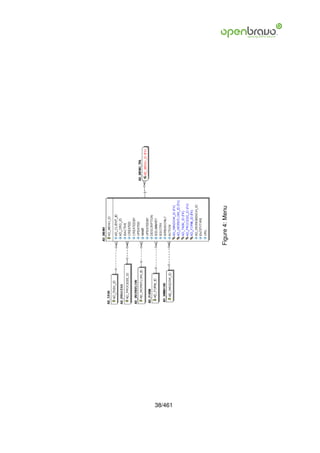
  • 423.
    • Description: Adescription is limited to 255 characters. 55.5 MRP PlanningMethodLine The planning method line sets the filter options for the input types of the planning meth- ods. • MRP Planningmethodline ID: Identifies a filter option for the input types of the plan- ning methods. • AD Client ID: A Client is a company or a legal entity. You cannot share data between Clients. • MRP Planningmethod ID: Identifies a method for filtering the input for planning pro- cesses. • Line: Indicates the unique line for a document. It will also control the display order of the lines within a document. • Inouttrxtype: Transaction types available for the MRP. • Weighting: Percentage of the transaction that is used. in so much per one. • Daysfrom: Number of days from the main date to the begining of the period. • Daysto: Number of days from the main date to the end of the period. 55.6 MRP Run Production Headers of the production planning processes. • MRP Run Production ID: Headers of the production planning processes. • AD Client ID: A Client is a company or a legal entity. You cannot share data between Clients. 423/461
  • 424.
    • Name: Thename of an entity (record) is used as an default search option in addition to the search key. The name is up to 60 characters in lenght. • Description: A description is limited to 255 characters. • Datedoc: The Document Date indicates the date the document was generated. It may or may not be the same as the accounting date. • MRP Planner ID: Identifies a planner of the MRP. • M Product Category ID: Identifies the category which this product belongs to. Prod- uct categories are used for pricing. • M Product ID: Identifies an item which is either purchased or sold in this organization. • C Bp Group ID: The Business Partner Group ID provides a method of defining de- faults to be used for individual Business Partners. • C Bpartner ID: A Business Partner is anyone with whom you transact. This can in- clude Vendor, Customer, Employee or Salesperson • Timehorizon: Time horizon in number of days for the planning process. • Securitymargin: Margin in days between the different transactions. • Simulate: Process to run the production planning process. • Launchwr: Process to generate work requirements. • Launchmr: Process to generate material requirements. • Recalculatestock: Process to recalculate the product quantities of the lines. 424/461
  • 425.
    55.7 MRP Run ProductionLine Lines of the production planning processes. • MRP Run Productionline ID: Identifies a line of the production planning processes. • AD Client ID: A Client is a company or a legal entity. You cannot share data between Clients. • MRP Run Production ID: Headers of the production planning processes. • M Product ID: Identifies an item which is either purchased or sold in this organization. • Qty: The Quantity indicates the number of a specific product or item for this document. • Neededqty: Quantity needed • Planneddate: Planned date of the transaction. • Parent ID: The Parent indicates the value used to represent a summary level or report to level for a record • Inouttrxtype: Transaction types available for the MRP. • Isfixed: Is fixed • C Orderline ID: The Sales Order Line is a unique identifier for a line in an order. • MA Workrequirement ID: Indicates a work requirement. • MRP Salesforecastline ID: Identifies an expected sale line. • M Requisitionline ID: Identifies each product required to purchase in a requisition • MA Processplan ID: Indicates a process plan. 425/461
  • 426.
    • Isexploded: Theline has been exploded. • Plannedorderdate: Planned date to order the transaction. • Isplanned: Is planned. • Cumqty: Cumulate quantity. • Recalculatestock: Process to recalculate the product quantities of the lines. 55.8 MRP Run Purchase Headers of the purchase planning processes. • MRP Run Purchase ID: Identifies a header of the purchase planning processes. • AD Client ID: A Client is a company or a legal entity. You cannot share data between Clients. • Name: The name of an entity (record) is used as an default search option in addition to the search key. The name is up to 60 characters in lenght. • Description: A description is limited to 255 characters. • Datedoc: The Document Date indicates the date the document was generated. It may or may not be the same as the accounting date. • MRP Planner ID: Identifies a planner of the MRP. • Vendor ID: Identifies a business partner that is a vendor. • M Product Category ID: Identifies the category which this product belongs to. Prod- uct categories are used for pricing. • M Product ID: Identifies an item which is either purchased or sold in this organization. 426/461
  • 427.
    • C BpGroup ID: The Business Partner Group ID provides a method of defining de- faults to be used for individual Business Partners. • C Bpartner ID: A Business Partner is anyone with whom you transact. This can in- clude Vendor, Customer, Employee or Salesperson • Timehorizon: Time horizon in number of days for the planning process. • Securitymargin: Margin in days between the different transactions. • Simulate: Process to run the production planning process. • Launchpo: Process to generate purchase orders. • Recalculatestock: Process to recalculate the product quantities of the lines. 55.9 MRP Run PurchaseLine Lines of the purchase planning processes. • MRP Run Purchaseline ID: Identifies a line of the purchase planning processes. • AD Client ID: A Client is a company or a legal entity. You cannot share data between Clients. • MRP Run Purchase ID: Identifies a header of the purchase planning processes. • M Product ID: Identifies an item which is either purchased or sold in this organization. • Qty: The Quantity indicates the number of a specific product or item for this document. • Neededqty: Quantity needed • Planneddate: Planned date of the transaction. 427/461
  • 428.
    • Inouttrxtype: Transactiontypes available for the MRP. • Isfixed: Is fixed • C Orderline ID: The Sales Order Line is a unique identifier for a line in an order. • MA Workrequirement ID: Indicates a work requirement. • MRP Salesforecastline ID: Identifies an expected sale line. • M Requisitionline ID: Identifies each product required to purchase in a requisition • Iscompleted: Line completed • Plannedorderdate: Planned date to order the transaction. • C Bpartner ID: A Business Partner is anyone with whom you transact. This can in- clude Vendor, Customer, Employee or Salesperson • Cumqty: Cumulate quantity. 428/461
  • 429.
    56 Warehouse services Business Partner allows you do define any party with whom you transact. This includes customers, vendors and employees. Warehouse and Locators defines each Warehouse, any Locators for that Warehouse and the Accounting parameters to be used for inventory in that Warehouse. 56.1 M Locator Type Contains all the differents types for a locator • M Locator Type ID: The ID identifies the unique type for the locator • AD Client ID: A Client is a company or a legal entity. You cannot share data between Clients. • Name: The name of an entity (record) is used as an default search option in addition to the search key. The name is up to 60 characters in lenght. • Description: A description is limited to 255 characters. • Sizemultiplier: 56.2 M WH Schedule Contains all the differents schedules for a warehouse. These schedules are used to invoice rented locators • M WH Schedule ID: The warehouse schedule ID identifies a unique schedule for rent- ing locators. • AD Client ID: A Client is a company or a legal entity. You cannot share data between Clients. • Name: The name of an entity (record) is used as an default search option in addition to the search key. The name is up to 60 characters in lenght. 429/461
  • 430.
    430/461 Figure 56: Warehouse services
  • 431.
    • Periodicity: Regularintervals. (E.g: every two weeks, monthly) • Generateperiods: A button that generates periods depending on two dates • Activateperiods: 56.3 M WH Schedule Product Contains all the differents product that will be used in the invoices • M WH Schedule Product ID: The ID idenitfies a unique product for the warehouse shedule • AD Client ID: A Client is a company or a legal entity. You cannot share data between Clients. • M WH Schedule ID: The warehouse schedule ID identifies a unique schedule for rent- ing locators. • M Product ID: Identifies an item which is either purchased or sold in this organization. • Invoicingtype: How to invoice a locator is being renting 56.4 M WH Period Contains all the periods for the schedule • M WH Period ID: The ID identifies a unique period for the warehouse schedule • AD Client ID: A Client is a company or a legal entity. You cannot share data between Clients. • M WH Schedule ID: The warehouse schedule ID identifies a unique schedule for rent- ing locators. • StartDate: The Start Date indicates the first or starting date of a range. 431/461
  • 432.
    • EndDate: TheEnd Date indicates the last date in this range. 56.5 M WH Period Invoiced Contains all the invoices generated due based on the rented locators for that period • M WH Period Invoiced ID: The ID identifies a unique period invoiced for the the pe- riod • AD Client ID: A Client is a company or a legal entity. You cannot share data between Clients. • M WH Period ID: The ID identifies a unique period for the warehouse schedule • C Bpartner ID: A Business Partner is anyone with whom you transact. This can in- clude Vendor, Customer, Employee or Salesperson • C Order ID: The Sales Order ID is a unique identifier of a Sales Order. This is con- trolled by the document sequence for this document type. 56.6 M InOutLine Type Contains all the periods for a warehouse • M Inoutline Type ID: The ID identifies a unique record • AD Client ID: A Client is a company or a legal entity. You cannot share data between Clients. • Name: The name of an entity (record) is used as an default search option in addition to the search key. The name is up to 60 characters in lenght. • Description: A description is limited to 255 characters. • Invoicingmode: Invoicing Mode 432/461
  • 433.
    • IN ProductID: Identifies a service due to material receipts • OUT Product ID: Identifies a service due to shipments out 433/461
  • 434.
    57 External POS External Point of Sales defines the different used POS and the products that can sale. Maintain your Resources. The product for the resource is automatically created and syn- chronized. Update Name, Unit of Measure, etc. in the Resource and don’t change it in the product. The Product Category allows you to define different groups of products. These groups can be used in generating Price Lists, defining margins and for easily assigning different ac- counting parameters for products. Product defines all products used by an organization. These products include those sold to customers, used in the manufacture of products sold to customers and products purchased by an organization. 57.1 C ExternalPOS External Point of Sales • C Externalpos ID: External Point of Sales • AD Client ID: A Client is a company or a legal entity. You cannot share data between Clients. • Value: A search key allows you a fast method of finding a particular record. If you leave the search key empty, the system automatically creates a numeric number. The document sequence used for this fallback number is defined in the Maintain Sequence window with the name DocumentNo TableName, where TableName is the actual name of the table (e.g. C Order). • Name: The name of an entity (record) is used as an default search option in addition to the search key. The name is up to 60 characters in lenght. • Description: A description is limited to 255 characters. • M Warehouse ID: The Warehouse identifies a unique Warehouse where products are stored or Services are provided. • C Doctype ID: The Document Type determines document sequence and processing rules 434/461
  • 435.
    435/461 Figure 57: External POS
  • 436.
    • C BpartnerID: A Business Partner is anyone with whom you transact. This can in- clude Vendor, Customer, Employee or Salesperson • M Pricelist ID: Price Lists are used to determine the pricing, margin and cost of items purchased or sold. • Salesrep ID: The Sales Representative indicates the Sales Rep for this Region. Any Sales Rep must be a valid internal user. • M Shipper ID: The Shipper is any entity which will provide shipping to or shipping from an Organization. • Include Product: If it is checked the selected products will be included else they will be excluded. • Include Product Category: If it is checked the selected categories will be included else they will be excluded. 57.2 C ExternalPOS Category Product Categories • C Externalpos Category ID: The ID identifies a unique record • AD Client ID: A Client is a company or a legal entity. You cannot share data between Clients. • C Externalpos ID: External Point of Sales • M Product Category ID: Identifies the category which this product belongs to. Prod- uct categories are used for pricing. 436/461
  • 437.
    57.3 C ExternalPOS Product Products • C Externalpos Product ID: The ID identifies a unique record • AD Client ID: A Client is a company or a legal entity. You cannot share data between Clients. • C Externalpos ID: External Point of Sales • M Product ID: Identifies an item which is either purchased or sold in this organization. 57.4 M Product Defines each product and identifies it for use in price lists and orders. The Location is the default location when receiving the stored products. • M Product ID: Identifies an item which is either purchased or sold in this organization. • AD Client ID: A Client is a company or a legal entity. You cannot share data between Clients. • Value: A search key allows you a fast method of finding a particular record. If you leave the search key empty, the system automatically creates a numeric number. The document sequence used for this fallback number is defined in the Maintain Sequence window with the name DocumentNo TableName, where TableName is the actual name of the table (e.g. C Order). • Name: The name of an entity (record) is used as an default search option in addition to the search key. The name is up to 60 characters in lenght. • Description: A description is limited to 255 characters. • DocumentNote: The Document Note is used for recording any additional information regarding this product. • Help: The Help field contains a hint, comment or help about the use of this item. 437/461
  • 438.
    • UPC: Usethis field to enter the bar code for the product in any of the bar code symbol- ogies (Codabar, Code 25, Code 39, Code 93, Code 128, UPC (A), UPC (E), EAN-13, EAN-8, ITF, ITF-14, ISBN, ISSN, JAN-13, JAN-8, POSTNET and FIM, MSI/Plessey, and Pharmacode) • SKU: The SKU indicates a user defined stock keeping unit. It may be used for an additional bar code symbols or your own schema. • C UOM ID: The UOM defines a unique non monetary Unit of Measure • SalesRep ID: The Sales Representative indicates the Sales Rep for this Region. Any Sales Rep must be a valid internal user. • IsSummary: A summary entity represents a branch in a tree rather than an end-node. Summary entities are used for reporting and do not have own values. • IsStocked: The Stocked check box indicates if this product is stocked by this Organi- zation. • IsPurchased: The Purchased check box indicates if this product is purchased by this organization. • IsSold: The Sold check box indicates if this product is sold by this organization. • IsBOM: The Bill of Materials check box indicates if this product consists of a bill of materials. • IsInvoicePrintDetails: The Print Details on Invoice indicates that the BOM element products will print on the Invoice as opposed to this product. • IsPickListPrintDetails: The Print Details on Pick List indicates that the BOM element products will print on the Pick List as opposed to this product. • IsVerified: The Verified check box indicates if the configuration of this product has been verified. This is used for products that consist of a bill of materials 438/461
  • 439.
    • C RevenueRecognitionID: The Revenue Recognition indicates how revenue will be recognized for this product • M Product Category ID: Identifies the category which this product belongs to. Prod- uct categories are used for pricing. • Classification: The Classification can be used to optionally group products. • Volume: The Volume indicates the volume of the product in the Volume UOM of the Client • Weight: The Weight indicates the weight of the product in the Weight UOM of the Client • ShelfWidth: The Shelf Width indicates the width dimension required on a shelf for a product • ShelfHeight: The Shelf Height indicates the height dimension required on a shelf for a product • ShelfDepth: The Shelf Depth indicates the depth dimension required on a shelf for a product • UnitsPerPallet: The Units per Pallet indicates the number of units of this product which fit on a pallet. • C TaxCategory ID: The Tax Category provides a method of grouping similar taxes. For example, Sales Tax or Value Added Tax. • S Resource ID: The ID identifies a unique resource Not implemented yet • Discontinued: The Discontinued check box indicates a product that has been discon- tinued. • DiscontinuedBy: The Discontinued By indicates the individual who discontinued this product 439/461
  • 440.
    • Processing: Whenthis field is set as ’Y’ a process is being performed on this record. • S ExpenseType ID: Expense report type • ProductType: The type of product also determines accounting consequences. • ImageURL: URL of image; The image is not stored in the database, but retrieved at runtime. The image can be a gif, jpeg or png. • DescriptionURL: URL for the description • GuaranteeDays: If the value is 0, there is no limit to the availability or guarantee, oth- erwise the guarantee date is calculated by adding the days to the delivery date. • R MailText ID: The Mail Template indicates the mail template for return messages. • VersionNo: Version Number Not implemented yet • M AttributeSet ID: Define Product Attribute Sets to add additional attributes and val- ues to the product. You need to define a Attribute Set if you want to enable Serial and Lot Number tracking. • M AttributeSetInstance ID: The values of the actual Product Attributes • DownloadURL: Semicolon separated list of URLs to be downloaded or distributed • M FreightCategory ID: Freight Categories are used to calculate the Freight for the Shipper selected • M Locator ID: The Locator ID indicates where in a Warehouse a product is located. • AD Image ID: Defines a system image • C Bpartner ID: A Business Partner is anyone with whom you transact. This can in- clude Vendor, Customer, Employee or Salesperson 440/461
  • 441.
    • Ispriceprinted: Itallows you to print or not the price of a product in a document so you can summary many products in just one. • Name2: Additional Name • Costtype: Different types of cost • Coststd: The value of the standard cost • Stock Min: Minimum stock of a product Not implemented yet • Enforce Attribute: For differing the stock of a product by the attribute Not implemented yet • Bundle Uom: Custom code. Deprecated • Greenpoint Uom: Custom code. Deprecated • Upc2: Custom code. Deprecated • Calculated: Indicates that the record has been calculated. • MA Processplan ID: Indicates a process plan. • MA Producttype ID: • Production: A product that is used for production plans 441/461
  • 442.
    58 Import data Allows the bank statement import configuration and its execution The Import Business Partner is an interim table which is used when importing external data into the system. Selecting the ’Process’ button will either add or modify the appropriate records. The Import Loader Format is used for defining the file layout for product information which will be imported. The Import Natural Account is an interim table which is used when importing external data into the system. Selecting the ’Process’ button will either add or modify the appropriate records. The Import Products is an interim table which is used when importing external data into the system. Selecting the ’Process’ button will either add or modify the appropriate records. 58.1 AD ImpFormat The Import Format tab contains each record parameter configuration for each data im- port type. • AD ImpFormat ID: The ID identifies a unique import format • AD Client ID: A Client is a company or a legal entity. You cannot share data between Clients. • Name: The name of an entity (record) is used as an default search option in addition to the search key. The name is up to 60 characters in lenght. • Description: A description is limited to 255 characters. • AD Table ID: The Table indicates the table in which a field or fields reside. • FormatType: The Format is a drop down list box for selecting the format type (text, tab delimited, XML, etc) of the file to be imported • Processing: When this field is set as ’Y’ a process is being performed on this record. 442/461
  • 443.
    443/461 Figure 58: Import data
  • 444.
    58.2 AD ImpFormat Row Define the individual field based on the table definition. Please note that you have to make sure that a Constant has the correct SQL data type (i.e. if it is a ’string’, you need to enclose it like ’this’) • AD ImpFormat Row ID: The ID identifies a unique format field • AD Client ID: A Client is a company or a legal entity. You cannot share data between Clients. • AD ImpFormat ID: The ID identifies a unique import format • SeqNo: The Sequence indicates the order of records • Name: The name of an entity (record) is used as an default search option in addition to the search key. The name is up to 60 characters in lenght. • AD Column ID: Link to the database column of the table • StartNo: The Start Number indicates the starting position in the line or field number in the line • EndNo: • DataType: • DataFormat: The Date Format indicates how dates are defined on the record to be imported. It must be in Java Notation • DecimalPoint: Decimal Point in the data file • DivideBy100: Divide number by 100 to get correct amount • ConstantValue: Constant value • Callout: Function Calls separated by semicolons; SE /SL /UE /UL - 1st: System/User; 2nd: Enter/Leave; 3rd: Underscore, - then Function Name 444/461
  • 445.
    • Script: UseJava language constructs to define the result of the calculation 58.3 I BPartner The import business partner is an interin table which is used when importing external data into the system • I BPartner ID: The ID identifies a unique business partner to import • AD Client ID: A Client is a company or a legal entity. You cannot share data between Clients. • C BPartner ID: A Business Partner is anyone with whom you transact. This can in- clude Vendor, Customer, Employee or Salesperson • Value: A search key allows you a fast method of finding a particular record. If you leave the search key empty, the system automatically creates a numeric number. The document sequence used for this fallback number is defined in the Maintain Sequence window with the name DocumentNo TableName, where TableName is the actual name of the table (e.g. C Order). • Name: The name of an entity (record) is used as an default search option in addition to the search key. The name is up to 60 characters in lenght. • Name2: Additional Name • Description: A description is limited to 255 characters. • DUNS: Used for EDI - For details see www.dnb.com/dunsno/list.htm • TaxID: The Tax ID field identifies the legal Identification number of this Entity. • NAICS: The NAICS/SIC identifies either of these codes that may be applicable to this Business Partner. • GroupValue: The value of the business partner group. This value is the short name for the group. If before inserting it doesn’t exists in the table C BP Group, it won’t work 445/461
  • 446.
    • C BPGroup ID: The Business Partner Group ID provides a method of defining de- faults to be used for individual Business Partners. • C BPartner Location ID: The Partner address indicates the location of a Business Partner • Address1: The Address 1 identifies the address for an entity’s location • Address2: The Address 2 provides additional address information for an entity. It can be used for building location, apartment number or similar information. • Postal: The Postal Code field identifies the postal code for this entity’s address. • Postal Add: The Additional ZIP or Postal Code identifies, if appropriate, any additional Postal Code information. • City: The City identifies a unique City for this Country or Region. • C Region ID: The Region identifies a unique Region for this Country. • RegionName: The Region Name defines the name that will print when this region is used in a document. • C Country ID: The Country defines a Country. Each Country must be defined before it can be used in any document. • CountryCode: For details - http://www.din.de/gremien/nas/nabd/iso3166ma/codlstp1.html or - http://www.unece.org/trade/rec/rec03en.htm • Title: The Title indicates the name that an entity is referred to as. • ContactName: Business Partner Contact Name • ContactDescription: Description of Contact • Comments: The Comments field allows for free form entry of additional information. 446/461
  • 447.
    • Phone: ThePhone field identifies a telephone number • Phone2: The 2nd Phone field identifies an alternate telephone number. • Fax: The Fax identifies a facsimile number for this Business Partner or Location • Email: The Email Address is the Electronic Mail ID for this User and should be fully qualified (e.g. joe.smith@company.com). • Password: The Password indicates the Password for this User Id. Passwords are re- quired to identify authorized users. • Birthday: Birthday or Anniversary day • C Greeting ID: The Greeting identifies the greeting to print on correspondence. • BPContactGreeting: Greeting for Business Partner Contact • Processing: When this field is set as ’Y’ a process is being performed on this record. • Processed: The Processed checkbox indicates that a document has been processed. • AD User ID: The User identifies a unique user in the system. This could be an internal user or a business partner contact • I ErrorMsg: The Import Error Message displays any error messages generated dur- ing the import process. • I IsImported: The Imported check box indicates if this import has been processed. 58.4 I Product Before importing, Openbravo checks the Unit of Measure (default if not set), the Product Category (default if not set), the Business Partner, the Currency (defaults to accounting currency if not set), the Product Type (only Items and Services), the uniquen 447/461
  • 448.
    • I ProductID: The ID identifies a unique product • AD Client ID: A Client is a company or a legal entity. You cannot share data between Clients. • M Product ID: Identifies an item which is either purchased or sold in this organization. • Value: A search key allows you a fast method of finding a particular record. If you leave the search key empty, the system automatically creates a numeric number. The document sequence used for this fallback number is defined in the Maintain Sequence window with the name DocumentNo TableName, where TableName is the actual name of the table (e.g. C Order). • Name: The name of an entity (record) is used as an default search option in addition to the search key. The name is up to 60 characters in lenght. • Description: A description is limited to 255 characters. • DocumentNote: The Document Note is used for recording any additional information regarding this product. • Help: The Help field contains a hint, comment or help about the use of this item. • UPC: Use this field to enter the bar code for the product in any of the bar code symbol- ogies (Codabar, Code 25, Code 39, Code 93, Code 128, UPC (A), UPC (E), EAN-13, EAN-8, ITF, ITF-14, ISBN, ISSN, JAN-13, JAN-8, POSTNET and FIM, MSI/Plessey, and Pharmacode) • SKU: The SKU indicates a user defined stock keeping unit. It may be used for an additional bar code symbols or your own schema. • X12DE355: The Unit of Measure Code indicates the EDI X12 Code Data Element 355 (Unit or Basis for Measurement) • C UOM ID: The UOM defines a unique non monetary Unit of Measure 448/461
  • 449.
    • ProductCategory Value:The value of the product category. This value is the short name for the group. If before inserting it doesn’t exists in the table M Product Category Id, it won’t work • M Product Category ID: Identifies the category which this product belongs to. Prod- uct categories are used for pricing. • ProductType: The type of product also determines accounting consequences. • Classification: The Classification can be used to optionally group products. • Volume: The Volume indicates the volume of the product in the Volume UOM of the Client • Weight: The Weight indicates the weight of the product in the Weight UOM of the Client • ShelfWidth: The Shelf Width indicates the width dimension required on a shelf for a product • ShelfHeight: The Shelf Height indicates the height dimension required on a shelf for a product • ShelfDepth: The Shelf Depth indicates the depth dimension required on a shelf for a product • UnitsPerPallet: The Units per Pallet indicates the number of units of this product which fit on a pallet. • Discontinued: The Discontinued check box indicates a product that has been discon- tinued. • DiscontinuedBy: The Discontinued By indicates the individual who discontinued this product • ImageURL: URL of image; The image is not stored in the database, but retrieved at runtime. The image can be a gif, jpeg or png. 449/461
  • 450.
    • DescriptionURL: URLfor the description • BPartner Value: The value or short name for the business partner. This value goes rigth to the field Search key on the window Business partner • C BPartner ID: A Business Partner is anyone with whom you transact. This can in- clude Vendor, Customer, Employee or Salesperson • ISO Code: For details - http://www.unece.org/trade/rec/rec09en.htm • C Currency ID: Indicates the Currency to be used when processing or reporting on this record • PriceList: The List Price is the official List Price in the document currency. • PricePO: The PO Price indicates the price for a product per the purchase order. • RoyaltyAmt: • PriceEffective: The Price Effective indicates the date this price is for. This allows you to enter future prices for products which will become effective when appropriate. • VendorProductNo: The Vendor Product Number identifies the number used by the vendor for this product. • VendorCategory: The Vendor Category identifies the category used by the vendor for this product. • Manufacturer: Manufacturer • Order Min: The Minimum Order Quantity indicates the smallest quantity of this prod- uct which can be ordered. • Order Pack: The Order Pack Quantity indicates the number of units in each pack of this product. 450/461
  • 451.
    • CostPerOrder: TheCost Per Order indicates the fixed charge levied when an order for this product is placed. • DeliveryTime Promised: The Promised Delivery Time indicates the number of days between the order date and the date that delivery was promised. • Processing: When this field is set as ’Y’ a process is being performed on this record. • Processed: The Processed checkbox indicates that a document has been processed. • I ErrorMsg: The Import Error Message displays any error messages generated dur- ing the import process. • I IsImported: The Imported check box indicates if this import has been processed. 58.5 I ElementValue This process imports the accounting accounts tree into the organization • I ElementValue ID: • AD Client ID: A Client is a company or a legal entity. You cannot share data between Clients. • C Element ID: The Account Element uniquely identifies an Account Type. These are commonly known as a Chart of Accounts. • ElementName: • C ElementValue ID: Account Elements can be natural accounts or user defined val- ues. • Value: A search key allows you a fast method of finding a particular record. If you leave the search key empty, the system automatically creates a numeric number. The document sequence used for this fallback number is defined in the Maintain Sequence window with the name DocumentNo TableName, where TableName is the actual name of the table (e.g. C Order). 451/461
  • 452.
    • Name: Thename of an entity (record) is used as an default search option in addition to the search key. The name is up to 60 characters in lenght. • Description: A description is limited to 255 characters. • AccountType: Valid account types are A - Asset, E - Expense, L - Liability, O- Owner Equity, R -Revenue and M- Memo. The account type is used to determine what taxes, if any are applicable, validating payables and receivables for business partners. Note: Memo account amounts are ignored when checking for balancing • AccountSign: Indicates if the expected balance for this account should be a Debit or a Credit. • IsDocControlled: • IsSummary: A summary entity represents a branch in a tree rather than an end-node. Summary entities are used for reporting and do not have own values. • ParentValue: • ParentElementValue ID: • PostActual: The Post Actual indicates if actual values can be posted to this element value. • PostBudget: The Post Budget indicates if budget values can be posted to this ele- ment value. • PostStatistical: • PostEncumbrance: • Default Account: • AD Column ID: Link to the database column of the table 452/461
  • 453.
    • Processing: Whenthis field is set as ’Y’ a process is being performed on this record. • Processed: The Processed checkbox indicates that a document has been processed. • I ErrorMsg: The Import Error Message displays any error messages generated dur- ing the import process. • I IsImported: The Imported check box indicates if this import has been processed. 58.6 I Order You should supply the Document Type Name (or ID). The Document Type is on purpose not fully derived as it has too many consequences if it’s wrong. The best way is to set the Document Type Name as a Constant in your Import File Format or as an imported fi • I Order ID: • AD Client ID: A Client is a company or a legal entity. You cannot share data between Clients. • AD OrgTrx ID: The organization which performs or initiates this transaction (for an- other organization). The owning Organization may not be the transaction organiza- tion in a service bureau environment, with centralized services, and inter-organization transactions. • I IsImported: The Imported check box indicates if this import has been processed. • I ErrorMsg: The Import Error Message displays any error messages generated dur- ing the import process. • Processing: When this field is set as ’Y’ a process is being performed on this record. • Processed: The Processed checkbox indicates that a document has been processed. • SalesRep ID: The Sales Representative indicates the Sales Rep for this Region. Any Sales Rep must be a valid internal user. 453/461
  • 454.
    • M WarehouseID: The Warehouse identifies a unique Warehouse where products are stored or Services are provided. • M PriceList ID: Price Lists are used to determine the pricing, margin and cost of items purchased or sold. • C Currency ID: Indicates the Currency to be used when processing or reporting on this record • M Shipper ID: The Shipper is any entity which will provide shipping to or shipping from an Organization. • IsSOTrx: The Sales Transaction checkbox indicates if this item is a Sales Transaction. • C BPartner ID: A Business Partner is anyone with whom you transact. This can in- clude Vendor, Customer, Employee or Salesperson • BPartnerValue: • Name: The name of an entity (record) is used as an default search option in addition to the search key. The name is up to 60 characters in lenght. • C BPartner Location ID: The Partner address indicates the location of a Business Partner • BillTo ID: The Bill/Invoice To indicates the address to use when remitting bills • C Location ID: The Location / Address field defines the location of an entity. • Address1: The Address 1 identifies the address for an entity’s location • Address2: The Address 2 provides additional address information for an entity. It can be used for building location, apartment number or similar information. • Postal: The Postal Code field identifies the postal code for this entity’s address. 454/461
  • 455.
    • City: TheCity identifies a unique City for this Country or Region. • C Region ID: The Region identifies a unique Region for this Country. • RegionName: The Region Name defines the name that will print when this region is used in a document. • C Country ID: The Country defines a Country. Each Country must be defined before it can be used in any document. • CountryCode: For details - http://www.din.de/gremien/nas/nabd/iso3166ma/codlstp1.html or - http://www.unece.org/trade/rec/rec03en.htm • AD User ID: The User identifies a unique user in the system. This could be an internal user or a business partner contact • ContactName: Business Partner Contact Name • Email: The Email Address is the Electronic Mail ID for this User and should be fully qualified (e.g. joe.smith@company.com). • Phone: The Phone field identifies a telephone number • C Project ID: Project ID is a user defined identifier for a Project • C Activity ID: Activities indicate tasks that are performed and used to utilize Activity based Costing • C DocType ID: The Document Type determines document sequence and processing rules • DocTypeName: • C PaymentTerm ID: Payment Terms identify the method and timing of payment for this transaction. 455/461
  • 456.
    • PaymentTermValue: Keyof the Payment Term • C Order ID: The Sales Order ID is a unique identifier of a Sales Order. This is con- trolled by the document sequence for this document type. • DocumentNo: The document number is usually automatically generated by the sys- tem and determined by the document type of the document. If the document is not saved, the preliminary number is displayed in ¡¿.If the document type of your docu- ment has no automatic document sequence defined, the field is empty if you create a new document. This is for documents which usually have an external number (like ven- dor invoice). If you leave the field empty, the system will generate a document number for you. The document sequence used for this fallback number is defined in the Main- tain Sequence window with the name DocumentNo ¡TableName¿, where TableName is the actual name of the table (e.g. C Order). • Description: A description is limited to 255 characters. • M Product ID: Identifies an item which is either purchased or sold in this organization. • ProductValue: • UPC: Use this field to enter the bar code for the product in any of the bar code symbol- ogies (Codabar, Code 25, Code 39, Code 93, Code 128, UPC (A), UPC (E), EAN-13, EAN-8, ITF, ITF-14, ISBN, ISSN, JAN-13, JAN-8, POSTNET and FIM, MSI/Plessey, and Pharmacode) • SKU: The SKU indicates a user defined stock keeping unit. It may be used for an additional bar code symbols or your own schema. • C Tax ID: The Tax indicates the type of tax for this document line. • TaxIndicator: The Tax Indicator identifies the short name that will print on documents referencing this tax. • TaxAmt: The Tax Amount displays the total tax amount for a document. • C OrderLine ID: The Sales Order Line is a unique identifier for a line in an order. 456/461
  • 457.
    • LineDescription: • CUOM ID: The UOM defines a unique non monetary Unit of Measure • QtyOrdered: The Ordered Quantity indicates the quantity of a product that was or- dered. • PriceActual: The Actual or Unit Price indicates the Price for a product in source cur- rency. • FreightAmt: The Freight Amount indicates the amount charged for Freight in the doc- ument currency. • C Campaign ID: The Campaign defines a unique marketing program. Projects can be associated with a pre defined Marketing Campaign. You can then report based on a specific Campaign. • Billto Upc: • Bpartnerupc: • C Bpartner Location Upc: • Dateordered: Indicates the Date an item was ordered. • Datepromised: The Date Promised indicates the date, if any, that an Order was promised for. • Order Referenceno: • Vendor Upc: 457/461
  • 458.
    58.7 I Budgetline Is an interin table which is used when external data into the system • I Budgetline ID: The ID identifies a unique record • AD Client ID: A Client is a company or a legal entity. You cannot share data between Clients. • C Budgetline ID: The ID identifies a unique record • C Validcombination ID: The Combination identifies a valid combination of element which represent a GL account. • Validcombinationident: The identifier for the account combination. This identifier is the result of all the columns that are marked as isidentifier • C Period ID: The Period indicates an exclusive range of dates for a calendar. • Periodident: The identifier for the Period. This identifier is the result of all the columns that are marked as isidentifier • C Currency ID: Indicates the Currency to be used when processing or reporting on this record • C Uom ID: The UOM defines a unique non monetary Unit of Measure • M Product ID: Identifies an item which is either purchased or sold in this organization. • Productident: The identifier for the Product. This identifier is the result of all the columns that are marked as isidentifier • C Bpartner ID: A Business Partner is anyone with whom you transact. This can in- clude Vendor, Customer, Employee or Salesperson • Partnerident: The identifier for the Partner. This identifier is the result of all the columns that are marked as isidentifier 458/461
  • 459.
    • AD OrgtrxID: The organization which performs or initiates this transaction (for an- other organization). The owning Organization may not be the transaction organiza- tion in a service bureau environment, with centralized services, and inter-organization transactions. • Orgtrxident: The identifier for the Organization. This identifier is the result of all the columns that are marked as isidentifier • C Salesregion ID: The Sales Region indicates a specific area of sales coverage. • Salesregionident: The identifier for the Sales region. This identifier is the result of all the columns that are marked as isidentifier • C Project ID: Project ID is a user defined identifier for a Project • Projectident: The identifier for the Project. This identifier is the result of all the columns that are marked as isidentifier • C Campaign ID: The Campaign defines a unique marketing program. Projects can be associated with a pre defined Marketing Campaign. You can then report based on a specific Campaign. • Campaignident: The identifier for the Campaign. This identifier is the result of all the columns that are marked as isidentifier • C Activity ID: Activities indicate tasks that are performed and used to utilize Activity based Costing • Activityident: • Description: A description is limited to 255 characters. • Seqno: The Sequence indicates the order of records • C Bp Group ID: The Business Partner Group ID provides a method of defining de- faults to be used for individual Business Partners. 459/461
  • 460.
    • Bpgroupident: Theidentifier for the business partner group. This identifier is the re- sult of all the columns that are marked as isidentifier • M Product Category ID: Identifies the category which this product belongs to. Prod- uct categories are used for pricing. • Prodcategoryident: The identifier for the product category. This identifier is the result of all the columns that are marked as isidentifier • C Budget ID: Used to define the anticipated costs of doing business • Qty: The Quantity indicates the number of a specific product or item for this document. • Price: The Price indicates the Price for a product or service. • Amount: The Amount indicates the amount for this document line. • Processing: When this field is set as ’Y’ a process is being performed on this record. • Processed: The Processed checkbox indicates that a document has been processed. • I Errormsg: The Import Error Message displays any error messages generated dur- ing the import process. • I Isimported: The Imported check box indicates if this import has been processed. • Currencyident: The identifier for the Currency. This identifier is the result of all the columns that are marked as isidentifier 460/461
  • 461.
    c Openbravo S.L.2007 This work is licensed under the Creative Commons Attribution-ShareAlike 2.5 Spain License. To view a copy of this license, visit http://creativecommons.org/licenses/by-sa/2.5/ es/ or send a letter to Creative Commons, 559 Nathan Abbott Way, Stanford, California 94305, USA. As attribution to the original author, any redistribution of this work or any derivative work must maintain this copyright notice and, visibly on all its pages, the Openbravo logo. The most updated copy of this work may be obtained at http://www.openbravo.com/docs/ 461/461