EMPOWERMENT
TECHNOLOGIES
Quarter 1 - Module 1:
Information and Communication
Technologies
Lessons Objectives
• Compare and contrast the nuances of varied
online platforms, sites, and content to best
achieve specific class objectives or address
situational challenges;
• Apply online safety, security, ethics, and etiquette
standards and practice in the use of ICTs as it
would relate to their specific professional tracks;
• Use the Internet as a tool for credible research
and information gathering to best achieve specific
class objectives or address situational challenges.
THE CURRENT STATE OF ICT
TECHNOLOGIES
Information and Communication
Technology It refers to the use of
communication technology such
as laptop, smart phones, tablet,
telephone, internet and etc. to
send, save, and edit information.
ICT in the Philippines
The use of communication technology
spread in the entire country now a day
even in rural areas. According to Rappler
blog site there are 119 million mobile
phone subscriptions from a total
population of 101 million and 47 million
active Facebook accounts.
The Philippines is the fastest growing
app market in Southeast Asia and the
highest digital population in the world. The
top online activities are social media,
videos, online mobile games, location-
based search and online shopping. Staying
connected with loved ones, friends, and
relatives is a fundamental need for
Filipinos.
Activity 1: Visiting Websites
Directions: List down three (3) websites that you
have browsed.
1. ___________________
2. ___________________
3. ___________________
World Wide Web
It is also known as WWW or W3
introduce by Tim Berners-Lee. It consists of
different pages that are formatted in a
markup language called HTML (Hypertext
Markup Language) and linked to each
other that contain text, graphics,
multimedia files, hyperlinks and etc.
Web 1.0
The first development of World Wide
Web where web pages are static. It also
known as flat or stationary page and it
cannot be manipulated by users.
Web 2.0
It is a dynamic web page where user
can interact with page like creating a user
account, posting comments, uploading files
and images, and others. Example: Blog
sites, Facebook, Twitter, Instagram, and
YouTube.
Features of Web 2.0
1. Folksonomy – users can classify and arrange
information by adding tag or label. Pound
sign (#) is used in Facebook, Twitter,
Instagram and other social networking sites.
Example in tagging on Facebook:
#TeamKawayan, #Single
2. Rich User Experience – user can have high
interaction with the content of the page and
can achieve level of expertise.
3. User Participation – user can put content on
their own in web page like comment, evaluation,
and etc.
4. Long Tail – A site that offers services and brings
individual and businesses into selling different
goods and commodities such as shopping site
like OLX, Lazada, Shopee, Zalora and others.
5. Software as a service – users can subscribe to a
software when they need it instead of
purchasing them.
6. Mass Participation – sharing of diverse
information through universal web access.
Web 3.0 The Semantic Web
A new paradigm in web interaction
extension of led by World Wide Web
Consortium (W3C) where it provides
framework that allows data to be shared
and reuse.
Activity 2: Social Media
Directions: List down five (5) social media that
you have been used.
1. _____________
2. _____________
3. _____________
4. _____________
5. _____________
Technology keeps rising and
improving every time. The use of
technology connects us to the people
around the globe and gives us current
information on the trends in information
and communication.
Trends in ICT
1. Convergence – it refers to fusing of
technological advancement to work on a
similar task. Example. Using smartphone as
camera in taking pictures instead of DSLR
camera.
2. Social Media – an application and website
where user can communicate, create and
share content, and participate in online
communities.
Type of Social Media
A. Social Network – A website where people
with the same come together to share
information. Examples: Twitter, Instagram,
Facebook.
B. Social News – A website where user can post
stories and are ranked based on the
popularity through voting. Examples: Digg,
Reddit, Propeller, Slashdot, Fark
C. Bookmarking Sites – A website that allows
you to share and store internet bookmarks,
articles, posts, blogs, images and others.
Examples: Pinterest, Stumble Upon, and
Dribble.
D. Media Sharing – A website that allows you to
share and store multimedia files such as
video, photos and music. Examples:
Instagram, YouTube, Flickr
E. Micro blogging – a website that allows you to
broadcast short message. Examples: Twitter,
Tumblr, and Meetme.
F. Blogs and Forums – a discussion website that
allows user to ask questions and comments
on a journal posted by an individual or group.
Examples: Word press, and Blogger.
3. Mobile Technologies – a technology
used in cellular and other devices such
netbook, laptop, tablet, smartphones
and etc.
4. Assistive Media - A platform that assist
people with disability. It will guide the
individual like a blind person by using an
audio recording.
Activity 3: Generalization
In what way is ICT very useful in your studies?
___________________________________
_______________________________________
_______________________________________
_______________________________________
_______________________________________
______________________________________.
Online Safety, Security,
Ethics and Etiquette
Online Safety
The importance of internet plays a
crucial part in human development. Life
becomes easy and comfortable because
of this technology. Most of us are
connected to the internet via laptop,
mobile phone, tablet, personal
computer and other electronic gadgets.
Behind this technology there is a
risk that everyone should be aware of.
You could be at risk on scam, bullying,
and illegal activities if you will not take
precautions in using internet. We need
to keep ourselves safe and secure
whenever we use the internet.
Activity 1: Self-Check on Online Habits
Directions: Reflect and assess yourself on your
online habits. Check “Yes” or “No” on the table
below.
Tips on how to be safe online
Do not share your password with anyone.
Add friends you know in real life.
Do not visit untrusted websites.
Add password to your WIFI at home to make it
private.
Install and update antivirus in your computer.
Do not give your personal information to anyone
Think before you click.
Never post about your future vacation.
Internet Risk
a. Cyber bullying It happens when
someone intentionally abused, harass,
and mistreated by other person using
electronic communication.
b. Identity Theft It is a crime of stealing
personal information for the purpose of
assuming that person’s name or identity
to make any form of transactions.
c. Cyber Stalking A criminal practice
where electronic communication is
used to stalk or harass individual or
group.
d. Sexting The act of sending sexually
explicit text messages, images, and
videos.
Internet Threats
Malware – also known as Malicious Software.
Types of Malware
1. Virus – a malicious program that replicate itself by
copying itself to another program.
2. Trojan Horse – a malicious program that disguised
as legitimate program that user will accept and use
but take control of your computer.
3. Worm – malicious program that copy’s itself and
spreads to other computers.
4. Spyware – A malicious program that gathers
information from victim’s computer and send it
back to the hacker.
5. Adware – An unwanted advertisement that will
pop-up several times on victim’s computer then
behave abnormally and tedious to close them.
6. Key logger – A program that runs in the
background and steals user credentials and
confidential information and send back to hack
by recording every keystroke that a user makes
on their computer or device.
7. Botnet – A collection of infected internet–
connected devices such as PC and mobile phone
that are controlled by a common type of
malware.
8. Rootkit – A software tools used by hackers to
gain control over a computer on a network
without being exposed.
9. Ransom ware – A ransom virus that block the
user from accessing the programs or files and
demands to pay the ransom through online
method for the removal of the virus.
e. Spam Also known as junk email or
unwanted email send by advertiser or
bot. It can be used to send malware.
f. Phishing A cyberattack method using
deceptive emails and websites to
acquiring sensitive personal information
g. Cybercrime A crime in which computer
is used as object and tool in committing
a crime such hacking, phishing,
spamming, child pornography, libel,
hate crimes, identity thief and others.
h. Cybercrime Law A law that deals with
all forms of cybercrime
Activity 2: #Wall
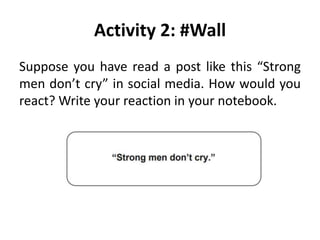
Suppose you have read a post like this “Strong
men don’t cry” in social media. How would you
react? Write your reaction in your notebook.
Netiquette
It is a word that came from the two
words “net” and “etiquette”. It is an etiquette
applied online that shows proper manner and
behavior. If you are a member of an online
society through social media you are called
netizen. And in interacting with other netizen
online, we need to maintain good behavior
which is acceptable to others in online
community.
The Core Rules of Netiquette
by Seth T. Ross
1. Remember the human.
2. Adhere to the same standards of behavior
online that you follow in real life.
3. Know where you are in cyberspace.
4. Respect other people's time and
bandwidth.
5. Make yourself look good online.
6. Share expert knowledge.
7. Help keep flame wars under control.
8. Respect other people's privacy.
9. Don't abuse your power.
10. Be forgiving of other people's
mistakes.
Activity 3: Generalization
Directions: Answer the following questions
below.

EMPOWERMENT TECHNOLOGIES.pptx

  • 1.
    EMPOWERMENT TECHNOLOGIES Quarter 1 -Module 1: Information and Communication Technologies
  • 2.
    Lessons Objectives • Compareand contrast the nuances of varied online platforms, sites, and content to best achieve specific class objectives or address situational challenges; • Apply online safety, security, ethics, and etiquette standards and practice in the use of ICTs as it would relate to their specific professional tracks; • Use the Internet as a tool for credible research and information gathering to best achieve specific class objectives or address situational challenges.
  • 3.
    THE CURRENT STATEOF ICT TECHNOLOGIES
  • 4.
    Information and Communication TechnologyIt refers to the use of communication technology such as laptop, smart phones, tablet, telephone, internet and etc. to send, save, and edit information.
  • 5.
    ICT in thePhilippines The use of communication technology spread in the entire country now a day even in rural areas. According to Rappler blog site there are 119 million mobile phone subscriptions from a total population of 101 million and 47 million active Facebook accounts.
  • 6.
    The Philippines isthe fastest growing app market in Southeast Asia and the highest digital population in the world. The top online activities are social media, videos, online mobile games, location- based search and online shopping. Staying connected with loved ones, friends, and relatives is a fundamental need for Filipinos.
  • 7.
    Activity 1: VisitingWebsites Directions: List down three (3) websites that you have browsed. 1. ___________________ 2. ___________________ 3. ___________________
  • 8.
    World Wide Web Itis also known as WWW or W3 introduce by Tim Berners-Lee. It consists of different pages that are formatted in a markup language called HTML (Hypertext Markup Language) and linked to each other that contain text, graphics, multimedia files, hyperlinks and etc.
  • 9.
    Web 1.0 The firstdevelopment of World Wide Web where web pages are static. It also known as flat or stationary page and it cannot be manipulated by users.
  • 10.
    Web 2.0 It isa dynamic web page where user can interact with page like creating a user account, posting comments, uploading files and images, and others. Example: Blog sites, Facebook, Twitter, Instagram, and YouTube.
  • 11.
    Features of Web2.0 1. Folksonomy – users can classify and arrange information by adding tag or label. Pound sign (#) is used in Facebook, Twitter, Instagram and other social networking sites. Example in tagging on Facebook: #TeamKawayan, #Single 2. Rich User Experience – user can have high interaction with the content of the page and can achieve level of expertise.
  • 12.
    3. User Participation– user can put content on their own in web page like comment, evaluation, and etc. 4. Long Tail – A site that offers services and brings individual and businesses into selling different goods and commodities such as shopping site like OLX, Lazada, Shopee, Zalora and others. 5. Software as a service – users can subscribe to a software when they need it instead of purchasing them. 6. Mass Participation – sharing of diverse information through universal web access.
  • 13.
    Web 3.0 TheSemantic Web A new paradigm in web interaction extension of led by World Wide Web Consortium (W3C) where it provides framework that allows data to be shared and reuse.
  • 14.
    Activity 2: SocialMedia Directions: List down five (5) social media that you have been used. 1. _____________ 2. _____________ 3. _____________ 4. _____________ 5. _____________
  • 15.
    Technology keeps risingand improving every time. The use of technology connects us to the people around the globe and gives us current information on the trends in information and communication.
  • 16.
    Trends in ICT 1.Convergence – it refers to fusing of technological advancement to work on a similar task. Example. Using smartphone as camera in taking pictures instead of DSLR camera. 2. Social Media – an application and website where user can communicate, create and share content, and participate in online communities.
  • 17.
    Type of SocialMedia A. Social Network – A website where people with the same come together to share information. Examples: Twitter, Instagram, Facebook.
  • 18.
    B. Social News– A website where user can post stories and are ranked based on the popularity through voting. Examples: Digg, Reddit, Propeller, Slashdot, Fark
  • 19.
    C. Bookmarking Sites– A website that allows you to share and store internet bookmarks, articles, posts, blogs, images and others. Examples: Pinterest, Stumble Upon, and Dribble.
  • 20.
    D. Media Sharing– A website that allows you to share and store multimedia files such as video, photos and music. Examples: Instagram, YouTube, Flickr
  • 21.
    E. Micro blogging– a website that allows you to broadcast short message. Examples: Twitter, Tumblr, and Meetme.
  • 22.
    F. Blogs andForums – a discussion website that allows user to ask questions and comments on a journal posted by an individual or group. Examples: Word press, and Blogger.
  • 23.
    3. Mobile Technologies– a technology used in cellular and other devices such netbook, laptop, tablet, smartphones and etc. 4. Assistive Media - A platform that assist people with disability. It will guide the individual like a blind person by using an audio recording.
  • 24.
    Activity 3: Generalization Inwhat way is ICT very useful in your studies? ___________________________________ _______________________________________ _______________________________________ _______________________________________ _______________________________________ ______________________________________.
  • 25.
  • 26.
    Online Safety The importanceof internet plays a crucial part in human development. Life becomes easy and comfortable because of this technology. Most of us are connected to the internet via laptop, mobile phone, tablet, personal computer and other electronic gadgets.
  • 27.
    Behind this technologythere is a risk that everyone should be aware of. You could be at risk on scam, bullying, and illegal activities if you will not take precautions in using internet. We need to keep ourselves safe and secure whenever we use the internet.
  • 28.
    Activity 1: Self-Checkon Online Habits Directions: Reflect and assess yourself on your online habits. Check “Yes” or “No” on the table below.
  • 29.
    Tips on howto be safe online Do not share your password with anyone. Add friends you know in real life. Do not visit untrusted websites. Add password to your WIFI at home to make it private. Install and update antivirus in your computer. Do not give your personal information to anyone Think before you click. Never post about your future vacation.
  • 30.
    Internet Risk a. Cyberbullying It happens when someone intentionally abused, harass, and mistreated by other person using electronic communication. b. Identity Theft It is a crime of stealing personal information for the purpose of assuming that person’s name or identity to make any form of transactions.
  • 31.
    c. Cyber StalkingA criminal practice where electronic communication is used to stalk or harass individual or group. d. Sexting The act of sending sexually explicit text messages, images, and videos.
  • 32.
    Internet Threats Malware –also known as Malicious Software.
  • 33.
    Types of Malware 1.Virus – a malicious program that replicate itself by copying itself to another program. 2. Trojan Horse – a malicious program that disguised as legitimate program that user will accept and use but take control of your computer. 3. Worm – malicious program that copy’s itself and spreads to other computers. 4. Spyware – A malicious program that gathers information from victim’s computer and send it back to the hacker.
  • 34.
    5. Adware –An unwanted advertisement that will pop-up several times on victim’s computer then behave abnormally and tedious to close them. 6. Key logger – A program that runs in the background and steals user credentials and confidential information and send back to hack by recording every keystroke that a user makes on their computer or device. 7. Botnet – A collection of infected internet– connected devices such as PC and mobile phone that are controlled by a common type of malware.
  • 35.
    8. Rootkit –A software tools used by hackers to gain control over a computer on a network without being exposed. 9. Ransom ware – A ransom virus that block the user from accessing the programs or files and demands to pay the ransom through online method for the removal of the virus.
  • 36.
    e. Spam Alsoknown as junk email or unwanted email send by advertiser or bot. It can be used to send malware. f. Phishing A cyberattack method using deceptive emails and websites to acquiring sensitive personal information
  • 37.
    g. Cybercrime Acrime in which computer is used as object and tool in committing a crime such hacking, phishing, spamming, child pornography, libel, hate crimes, identity thief and others. h. Cybercrime Law A law that deals with all forms of cybercrime
  • 38.
    Activity 2: #Wall Supposeyou have read a post like this “Strong men don’t cry” in social media. How would you react? Write your reaction in your notebook.
  • 39.
    Netiquette It is aword that came from the two words “net” and “etiquette”. It is an etiquette applied online that shows proper manner and behavior. If you are a member of an online society through social media you are called netizen. And in interacting with other netizen online, we need to maintain good behavior which is acceptable to others in online community.
  • 40.
    The Core Rulesof Netiquette by Seth T. Ross 1. Remember the human. 2. Adhere to the same standards of behavior online that you follow in real life. 3. Know where you are in cyberspace. 4. Respect other people's time and bandwidth. 5. Make yourself look good online.
  • 41.
    6. Share expertknowledge. 7. Help keep flame wars under control. 8. Respect other people's privacy. 9. Don't abuse your power. 10. Be forgiving of other people's mistakes.
  • 42.
    Activity 3: Generalization Directions:Answer the following questions below.