Teaching and LearningwithTechnologyChapter 9Audiovisual TechnologiesBy: Jennifer Knoll
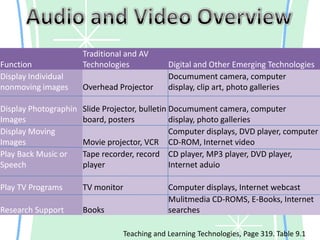
Audio and Video OverviewTeaching and Learning Technologies, Page 319. Table 9.1
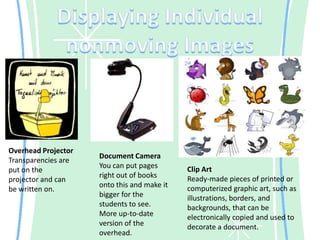
Displaying Individual nonmoving ImagesOverhead ProjectorTransparencies are put on the projector and can be written on. Document CameraYou can put pages right out of books onto this and make it bigger for the students to see. More up-to-date version of the overhead.Clip ArtReady-made pieces of printed or computerized graphic art, such as illustrations, borders, and backgrounds, that can be electronically copied and used to decorate a document.
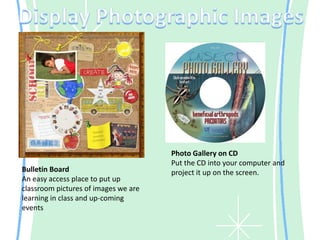
Display Photographic ImagesPhoto Gallery on CDPut the CD into your computer and project it up on the screen.Bulletin BoardAn easy access place to put up classroom pictures of images we are learning in class and up-coming events
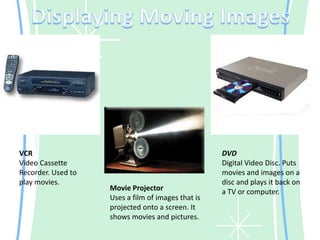
Displaying Moving ImagesVCRVideo Cassette Recorder. Used to play movies.DVDDigital Video Disc. Puts movies and images on a disc and plays it back on a TV or computer.Movie ProjectorUses a film of images that is projected onto a screen. It shows movies and pictures.
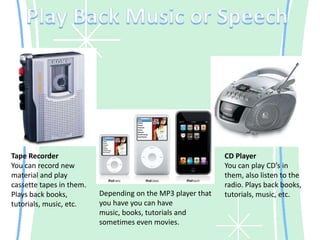
Play Back Music or SpeechTape RecorderYou can record new material and play cassette tapes in them. Plays back books, tutorials, music, etc.CD PlayerYou can play CD’s in them, also listen to the radio. Plays back books, tutorials, music, etc.Depending on the MP3 player that you have you can have music, books, tutorials and sometimes even movies.
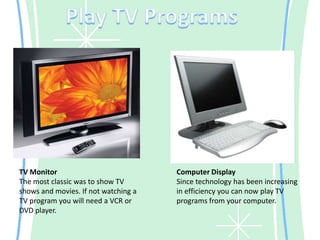
Play TV ProgramsTV MonitorThe most classic was to show TV shows and movies. If not watching a TV program you will need a VCR or DVD player.Computer DisplaySince technology has been increasing in efficiency you can now play TV programs from your computer.
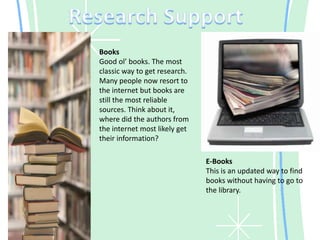
Research SupportBooksGood ol’ books. The most classic way to get research. Many people now resort to the internet but books are still the most reliable sources. Think about it, where did the authors from the internet most likely get their information?E-BooksThis is an updated way to find books without having to go to the library.
In the ClassroomTraditional or digital, it does not matter which, all these technologies will be incorporated into my future classrooms. Due to the advancement of technology certain things like overhead projectors and books, have been used less, but they are still very reliable. I will make sure that I use all of these aspects in my classroom to further the education of my students.

Emeweek12

  • 1.
    Teaching and LearningwithTechnologyChapter9Audiovisual TechnologiesBy: Jennifer Knoll
  • 2.
    Audio and VideoOverviewTeaching and Learning Technologies, Page 319. Table 9.1
  • 3.
    Displaying Individual nonmovingImagesOverhead ProjectorTransparencies are put on the projector and can be written on. Document CameraYou can put pages right out of books onto this and make it bigger for the students to see. More up-to-date version of the overhead.Clip ArtReady-made pieces of printed or computerized graphic art, such as illustrations, borders, and backgrounds, that can be electronically copied and used to decorate a document.
  • 4.
    Display Photographic ImagesPhotoGallery on CDPut the CD into your computer and project it up on the screen.Bulletin BoardAn easy access place to put up classroom pictures of images we are learning in class and up-coming events
  • 5.
    Displaying Moving ImagesVCRVideoCassette Recorder. Used to play movies.DVDDigital Video Disc. Puts movies and images on a disc and plays it back on a TV or computer.Movie ProjectorUses a film of images that is projected onto a screen. It shows movies and pictures.
  • 6.
    Play Back Musicor SpeechTape RecorderYou can record new material and play cassette tapes in them. Plays back books, tutorials, music, etc.CD PlayerYou can play CD’s in them, also listen to the radio. Plays back books, tutorials, music, etc.Depending on the MP3 player that you have you can have music, books, tutorials and sometimes even movies.
  • 7.
    Play TV ProgramsTVMonitorThe most classic was to show TV shows and movies. If not watching a TV program you will need a VCR or DVD player.Computer DisplaySince technology has been increasing in efficiency you can now play TV programs from your computer.
  • 8.
    Research SupportBooksGood ol’books. The most classic way to get research. Many people now resort to the internet but books are still the most reliable sources. Think about it, where did the authors from the internet most likely get their information?E-BooksThis is an updated way to find books without having to go to the library.
  • 9.
    In the ClassroomTraditionalor digital, it does not matter which, all these technologies will be incorporated into my future classrooms. Due to the advancement of technology certain things like overhead projectors and books, have been used less, but they are still very reliable. I will make sure that I use all of these aspects in my classroom to further the education of my students.