









UNI Ed Tech Master’s
Cohort Begins Again
this Summer!

       Earn your Degree in 2 years
                  through
 UNI’s nationally-recognized Educational
           Technology program
 2 year hands-on program
 Delivered over the ICN
 Develop your expertise in using
  educational technology
 Create your own professional
  electronic portfolio
 Aligned with Iowa Teaching
  Standards
 Design and implement action
  research
 Join the Ed Tech Leaders of Iowa
Courses Include:
   Media Planning and Production
   Instructional Development
   Technology in Education
   Coordinating Technology
   Selection & Integration of
    Materials
   Using Databases in Education*
   Distance Education*
   Educational Digital Imaging*
   Principles of Publication Design*
   Instructional Computing Design*
For More Information:

    Contact the UNI
  Continuing Education
         Office


    800-772-1746
http://ci.coe.uni.edu/edtech
Keyboarding Cornucopia:
   Successful Strategies for
    Teaching Keyboarding

           Leigh Zeitz


http://www.keyboardingresearch.org
Keyboarding is . . .

 a set of cumulative
 psychomotor skills involving
 the touch method of input to a
 keyboard.
It’s More than that . . .
Keyboarding is a
gateway to using
a computer
efficiently and
effectively.
Plan for Today
 Review Keyboarding Issues
 When keyboarding should be taught
 How keyboarding should be taught
 Playground Keyboarding Program
  – In the Computer Lab
  – In Physical Education
  – In the Classroom
Facts
85% of elementary classrooms have
                               computers.

77% elementary schools have computer labs

24% of 6 - 11 year olds have home
                                computers.
Facts
ISTE NETS
  Grades 3 - 5
  Use keyboards . . . Efficiently and effectively
At least 4 states require keyboarding at the
 5th grade (TX, NY, VA, MN)
Side Benefits
Builds Enthusiasm for Writing
                Texas Guidelines
Improve Spelling (3rd/4th grade)
                Hoot, 1986
Improved reading and vocabulary
                Hoot, 1986, Wronkovich, 1998
Grade Level?
 3rd grade
   – Bartholme, 1996; Instructional Resource of Curr/Instr
     Div of Saskatchewan Education, 1991; Pisha, 1993;
     Starr, 2001
 4th grade
   – Erthal (1998); Hopkins (1998)
 5th grade
   – MacIntyre, 1990; Wronkovich, 1998
 Not in Elementary
   – Waner, Behymer, & McCrary, 1992
Issues
 Manual Dexterity
 Cognitive Development
 Attention Span
 Reading Ability
 Curriculum Placement
Manual Dexterity
 Size
   – Need to be able to reach the keys
                     (Waner, Behymer, & McCrary, 1992)
   – Younger students spend more time on spelling than
     correct finger placement. (Kahn and Freyd, 1990)
   – Typical keyboard is 11” x 5”.

Don’t wait until your students get bigger,
                          Get smaller keyboards.
Little Fingers Keyboards

 10.5” x 4”                  9” x 3”
                             20% smaller


 DataDesk Technologies
 http://www.data-desk.com
 $50 - 70
Manual Dexterity
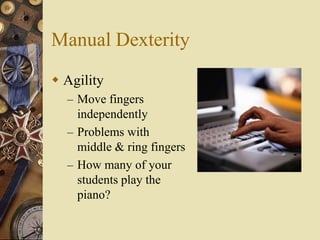
 Agility
  – Move fingers
    independently
  – Problems with
    middle & ring fingers
  – How many of your
    students play the
    piano?
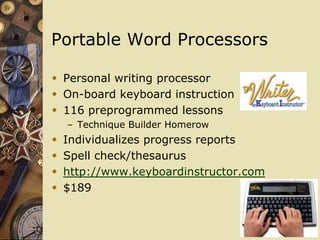
Portable Word Processors

 Personal writing processor
 On-board keyboard instruction
 116 preprogrammed lessons
    – Technique Builder Homerow
   Individualizes progress reports
   Spell check/thesaurus
   http://www.keyboardinstructor.com
   $189
Portable Word Processors

   Personal writing processor
   KeyWords applets
   Prints reports
   Enrolls up to 8 students
   http://www.alphasmart.com
   $199
Attention Span
 Not a factor in developing small movement
  skills (Wronkovich, 1998)
 Attention span increases as students
  become more proficient. (Kaake, 1983)
Reading Ability
 Typing is more than pressing buttons.
 Grouping letters into words.
 Reading creates a reason to type.
Curriculum
 Keyboarding needs to support curriculum
 Teach keyboarding 1 year before . . .
  – use keyboarding
  – computer applications (Texas Guidelines)
 Where in the curriculum?
  – Teach independently (Bartholome, 1996)
  – Integrate as communication (Waner, Behymer,
    & McCrary, 1992)
How Fast is Enough?

 Upper elementary students write at
  – 11 wpm
 Should be able to type faster than write
 Enter information into a dynamic writing
  environment
 Allow for editing and revising
How long is the lesson?

 Students typically receive < 10 hours
   – Sormunen, 1991
 50 hours over 3 elementary years
   – Boone (ND)
 35 minutes/day for 4 weeks
   – Robinson (1991)
 Review periodically
   – 15 hours/year
   – Robinson (1992)
 Once taught
   – Use, reinforce, and refine
   – Texas Guidelines, 1987; Adams, 1984; Wronkovich,
     1998)
Hunt-Peck vs. Touch Typing
 Familiarity important at young ages
 Build familiarity through
  – 5-minute practice sessions
                        (Kahn & Freyd, 1990)
  – Use typing for writing
                        (Kahn & Freyd, 1990)
  – Playground Keyboarding
                        (Zeitz, 2003)
BUT Familiarity CAN
     Spawn Hunt-&-Peck
 Relies too much on visual feedback
 Too much attention to fingers
 Builds bad habits


  Can you teach
    familiarity w/o
    a keyboard?
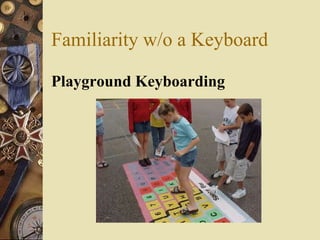
Familiarity w/o a Keyboard

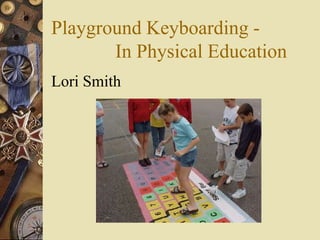
Playground Keyboarding
Playground Keyboarding -
    In the Computer Lab
 Experiment Layout
  – Two third grade classes
     • One with playground keyboarding
       (experimental)
     • One without playground keyboarding
       (control)
     • Identical computer lab instruction
     • Connection between kinesthetic learning
       and keyboarding achievement
Playground Keyboarding -
    In the Computer Lab
 Build familiarity with keyboarding
  – Develop habits of:
     • Good posture
     • Keyboarding technique
     • Make keyboarding a reflexive response
     • Speed and accuracy will follow
Playground Keyboarding -
    In the Computer Lab
 Crucial first week
  – Lay foundation for safe and proper
    keyboarding
     • Learn correct posture
     • Hand shape
     • Homerow orientation
     • Finger technique
Playground Keyboarding -
    In the Computer Lab
 Posture
   – Connected good keyboarding posture to
     good batting stance
   – PowerPoint (link)
 Ready, set, go!
   – Made it fun
Playground Keyboarding -
    In the Computer Lab
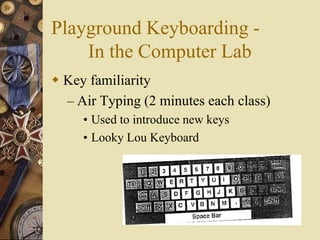
 Key familiarity
  – Air Typing (2 minutes each class)
     • Used to introduce new keys
     • Looky Lou Keyboard
Playground Keyboarding -
    In the Computer Lab
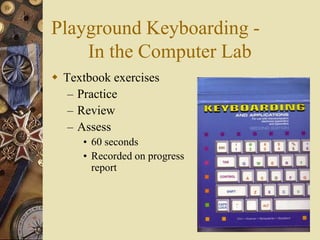
 Textbook exercises
   – Practice
   – Review
   – Assess
     • 60 seconds
     • Recorded on progress
       report
Playground Keyboarding - In
the Computer Lab
 Reinforcement
  – 10% instruction, 90%
    reinforcement (Keyboard
    Instructor manual)
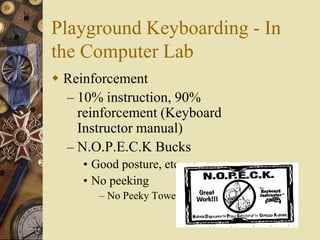
  – N.O.P.E.C.K Bucks
     • Good posture, etc.
     • No peeking
        – No Peeky Towel
Playground Keyboarding -
    In the Computer Lab
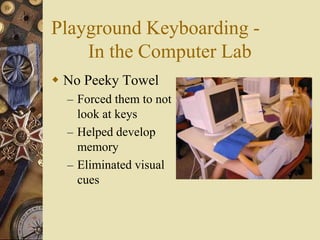
 No Peeky Towel
  – Forced them to not
    look at keys
  – Helped develop
    memory
  – Eliminated visual
    cues
Playground Keyboarding -
    In the Computer Lab
 Scheduling
  – Shoot for four or five days a week
                 (Keyboard Instructor manual)
  – We were able to do 2 days a week
     • 20 minutes each day
     • Not enough time
Playground Keyboarding -
    In the Computer Lab
 Results!
   – Mixed
 Control Group
   – Increased 1.5 wpm from beginning
 Experimental Group
   – Increased 1.8 wpm from beginning
Playground Keyboarding -
       In Physical Education
Lori Smith
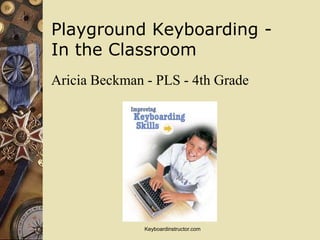
Playground Keyboarding -
In the Classroom
Aricia Beckman - PLS - 4th Grade


               Keyboardinstructor.com
Happy Keyboarding

Keyboarding Research
   and Resources
  http://www.keyboardingreseach.org

Elem keyboarding

  • 1.
    UNI Ed TechMaster’s Cohort Begins Again this Summer! Earn your Degree in 2 years through UNI’s nationally-recognized Educational Technology program
  • 2.
     2 yearhands-on program  Delivered over the ICN  Develop your expertise in using educational technology  Create your own professional electronic portfolio  Aligned with Iowa Teaching Standards  Design and implement action research  Join the Ed Tech Leaders of Iowa
  • 3.
    Courses Include:  Media Planning and Production  Instructional Development  Technology in Education  Coordinating Technology  Selection & Integration of Materials  Using Databases in Education*  Distance Education*  Educational Digital Imaging*  Principles of Publication Design*  Instructional Computing Design*
  • 4.
    For More Information: Contact the UNI Continuing Education Office 800-772-1746 http://ci.coe.uni.edu/edtech
  • 5.
    Keyboarding Cornucopia: Successful Strategies for Teaching Keyboarding Leigh Zeitz http://www.keyboardingresearch.org
  • 6.
    Keyboarding is .. . a set of cumulative psychomotor skills involving the touch method of input to a keyboard.
  • 7.
    It’s More thanthat . . . Keyboarding is a gateway to using a computer efficiently and effectively.
  • 8.
    Plan for Today Review Keyboarding Issues  When keyboarding should be taught  How keyboarding should be taught  Playground Keyboarding Program – In the Computer Lab – In Physical Education – In the Classroom
  • 9.
    Facts 85% of elementaryclassrooms have computers. 77% elementary schools have computer labs 24% of 6 - 11 year olds have home computers.
  • 10.
    Facts ISTE NETS Grades 3 - 5 Use keyboards . . . Efficiently and effectively At least 4 states require keyboarding at the 5th grade (TX, NY, VA, MN)
  • 11.
    Side Benefits Builds Enthusiasmfor Writing Texas Guidelines Improve Spelling (3rd/4th grade) Hoot, 1986 Improved reading and vocabulary Hoot, 1986, Wronkovich, 1998
  • 12.
    Grade Level?  3rdgrade – Bartholme, 1996; Instructional Resource of Curr/Instr Div of Saskatchewan Education, 1991; Pisha, 1993; Starr, 2001  4th grade – Erthal (1998); Hopkins (1998)  5th grade – MacIntyre, 1990; Wronkovich, 1998  Not in Elementary – Waner, Behymer, & McCrary, 1992
  • 13.
    Issues  Manual Dexterity Cognitive Development  Attention Span  Reading Ability  Curriculum Placement
  • 14.
    Manual Dexterity  Size – Need to be able to reach the keys (Waner, Behymer, & McCrary, 1992) – Younger students spend more time on spelling than correct finger placement. (Kahn and Freyd, 1990) – Typical keyboard is 11” x 5”. Don’t wait until your students get bigger, Get smaller keyboards.
  • 15.
    Little Fingers Keyboards 10.5” x 4” 9” x 3” 20% smaller  DataDesk Technologies  http://www.data-desk.com  $50 - 70
  • 16.
    Manual Dexterity  Agility – Move fingers independently – Problems with middle & ring fingers – How many of your students play the piano?
  • 17.
    Portable Word Processors Personal writing processor  On-board keyboard instruction  116 preprogrammed lessons – Technique Builder Homerow  Individualizes progress reports  Spell check/thesaurus  http://www.keyboardinstructor.com  $189
  • 18.
    Portable Word Processors  Personal writing processor  KeyWords applets  Prints reports  Enrolls up to 8 students  http://www.alphasmart.com  $199
  • 19.
    Attention Span  Nota factor in developing small movement skills (Wronkovich, 1998)  Attention span increases as students become more proficient. (Kaake, 1983)
  • 20.
    Reading Ability  Typingis more than pressing buttons.  Grouping letters into words.  Reading creates a reason to type.
  • 21.
    Curriculum  Keyboarding needsto support curriculum  Teach keyboarding 1 year before . . . – use keyboarding – computer applications (Texas Guidelines)  Where in the curriculum? – Teach independently (Bartholome, 1996) – Integrate as communication (Waner, Behymer, & McCrary, 1992)
  • 22.
    How Fast isEnough?  Upper elementary students write at – 11 wpm  Should be able to type faster than write  Enter information into a dynamic writing environment  Allow for editing and revising
  • 23.
    How long isthe lesson?  Students typically receive < 10 hours – Sormunen, 1991  50 hours over 3 elementary years – Boone (ND)  35 minutes/day for 4 weeks – Robinson (1991)  Review periodically – 15 hours/year – Robinson (1992)  Once taught – Use, reinforce, and refine – Texas Guidelines, 1987; Adams, 1984; Wronkovich, 1998)
  • 24.
    Hunt-Peck vs. TouchTyping  Familiarity important at young ages  Build familiarity through – 5-minute practice sessions (Kahn & Freyd, 1990) – Use typing for writing (Kahn & Freyd, 1990) – Playground Keyboarding (Zeitz, 2003)
  • 25.
    BUT Familiarity CAN Spawn Hunt-&-Peck  Relies too much on visual feedback  Too much attention to fingers  Builds bad habits Can you teach familiarity w/o a keyboard?
  • 26.
    Familiarity w/o aKeyboard Playground Keyboarding
  • 27.
    Playground Keyboarding - In the Computer Lab  Experiment Layout – Two third grade classes • One with playground keyboarding (experimental) • One without playground keyboarding (control) • Identical computer lab instruction • Connection between kinesthetic learning and keyboarding achievement
  • 28.
    Playground Keyboarding - In the Computer Lab  Build familiarity with keyboarding – Develop habits of: • Good posture • Keyboarding technique • Make keyboarding a reflexive response • Speed and accuracy will follow
  • 29.
    Playground Keyboarding - In the Computer Lab  Crucial first week – Lay foundation for safe and proper keyboarding • Learn correct posture • Hand shape • Homerow orientation • Finger technique
  • 30.
    Playground Keyboarding - In the Computer Lab  Posture – Connected good keyboarding posture to good batting stance – PowerPoint (link)  Ready, set, go! – Made it fun
  • 31.
    Playground Keyboarding - In the Computer Lab  Key familiarity – Air Typing (2 minutes each class) • Used to introduce new keys • Looky Lou Keyboard
  • 32.
    Playground Keyboarding - In the Computer Lab  Textbook exercises – Practice – Review – Assess • 60 seconds • Recorded on progress report
  • 33.
    Playground Keyboarding -In the Computer Lab  Reinforcement – 10% instruction, 90% reinforcement (Keyboard Instructor manual) – N.O.P.E.C.K Bucks • Good posture, etc. • No peeking – No Peeky Towel
  • 34.
    Playground Keyboarding - In the Computer Lab  No Peeky Towel – Forced them to not look at keys – Helped develop memory – Eliminated visual cues
  • 35.
    Playground Keyboarding - In the Computer Lab  Scheduling – Shoot for four or five days a week (Keyboard Instructor manual) – We were able to do 2 days a week • 20 minutes each day • Not enough time
  • 36.
    Playground Keyboarding - In the Computer Lab  Results! – Mixed  Control Group – Increased 1.5 wpm from beginning  Experimental Group – Increased 1.8 wpm from beginning
  • 37.
    Playground Keyboarding - In Physical Education Lori Smith
  • 38.
    Playground Keyboarding - Inthe Classroom Aricia Beckman - PLS - 4th Grade Keyboardinstructor.com
  • 39.
    Happy Keyboarding Keyboarding Research and Resources http://www.keyboardingreseach.org