THE GATEWAY GROUP
Electronic Document Management Tutorial
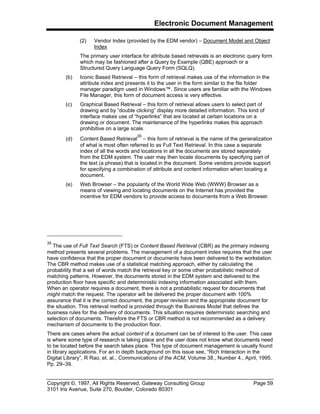
The Functional Architecture of an EDM System
In the Process and Manufacturing Industries
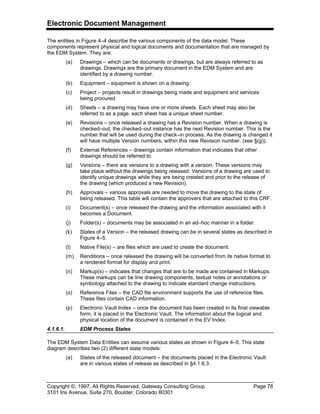
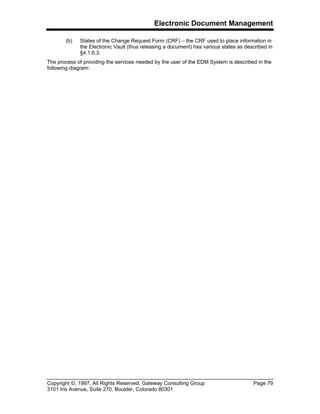
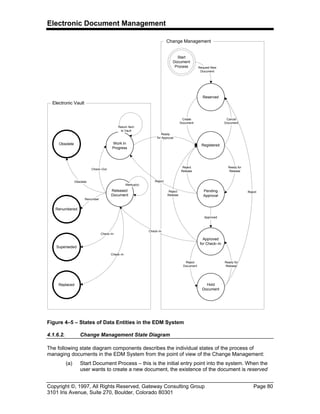
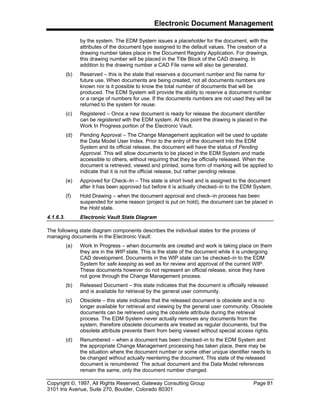
Document 1182001 Revision : A Pages: 111 in Total
Prepared by: Glen B. Alleman Date: 8 Apr 97 Reviewed by:
Signature: Signature:
Authors, Approvals, and Reviews
Copyright ©, 1997, All Rights Reserved, Gateway Consulting Group Page 3
3101 Iris Avenue, Suite 270, Boulder, Colorado 80301
Copyright Notice
This document contains materials that are proprietary to Gateway Consulting Group, Inc. This
work is protected as an unpublished work under the copyright law of all countries that are
signatories to the Berne Convention and the Universal Copyright Convention.
Copyright © 1997 by Gateway Consulting Group, Inc., All Rights Reserved
Electronic Document Management
Copyright ©, 1997, All Rights Reserved, Gateway Consulting Group Page 4
3101 Iris Avenue, Suite 270, Boulder, Colorado 80301
Table of Contents
1. Business Strategy Approach to EDM...............................................................................7
1.1. Why an EDM System? ........................................................................................................7
1.2. Why an EDM Strategy?.......................................................................................................8
1.3. Scope of the EDM Strategy .................................................................................................8
1.4. Purpose of the EDM Strategy ..............................................................................................9
1.5. Defining the EDM Strategy ..................................................................................................9
1.6. Fitting the EDM Strategy with Corporate Goals..................................................................10
1.7. EDM Concepts and the I/S Strategy ..................................................................................10
1.8. Critical Success Factors for the EDM System....................................................................11
1.8.1. Critical Success Factors for Manufacturing and Process Industries.........................12
1.8.2. Strategic Benefits of Electronic Document Management ........................................13
1.8.3. Common Business Activities ..................................................................................14
1.8.4. Common I/S Functions...........................................................................................14
1.8.5. Existing I/S Strategic Investments..........................................................................15
1.9. End User EDM Vision........................................................................................................15
1.9.1. Engineering EDM Vision.........................................................................................17
1.9.2. Quality Assurance EDM Vision...............................................................................18
1.9.3. Maintenance EDM Vision .......................................................................................20
1.9.4. Records Management EDM Vision.........................................................................20
1.9.5. Office Technology EDM Vision...............................................................................21
1.10. Company I/S EDM Vision...........................................................................................21
1.10.1. Vision for I/S ..........................................................................................................22
1.10.2. Vision of I/S Customers..........................................................................................22
1.11. EDM Deployment Strategy.........................................................................................22
2. EDM Background and Terminology ...............................................................................23
2.1. Philosophical Goal of an EDM System ..............................................................................23
2.2. Motivations for EDM at a Process or Manufacturing Facility ..............................................23
2.3. Target Business Applications.............................................................................................24
2.4. Common Attributes of an EDM System .............................................................................25
2.4.1. Management of Controlled Documents...................................................................25
2.4.2. Management of Uncontrolled Documents...............................................................25
2.5. Technical Attributes of the EDM System............................................................................26
2.5.1. Functions of an EDM System .................................................................................27
2.5.2. New Technology Attributes.....................................................................................30
2.6. What is a Document..........................................................................................................31
2.6.1. What is a Document in the Electronic World? Case 1: Drawings ............................32
2.6.2. What is a Document in the Electronic World? Case 2: Procedures.........................33
2.7. Document Life Cycles........................................................................................................34
2.8. Document Relationships....................................................................................................37
2.8.1. Definition of Document Object Relationships..........................................................38
2.8.2. Definition of a Document Object.............................................................................39
2.8.3. Business Model......................................................................................................41
2.9. Foldering: Ad Hoc Document Organization........................................................................42
2.10. What is a Record .......................................................................................................43
2.11. Document Hierarchy ..................................................................................................44
3. Information Model ...........................................................................................................47
3.1. EDM Conceptual Framework.............................................................................................48
3.1.1. Elements of the Conceptual Framework.................................................................50
3.2. Business Model .................................................................................................................51
3.3. Document Model ...............................................................................................................53
3.3.1. Promotion Model....................................................................................................54
Electronic Document Management
Copyright ©, 1997, All Rights Reserved, Gateway Consulting Group Page 5
3101 Iris Avenue, Suite 270, Boulder, Colorado 80301
3.3.2. Index Model ...........................................................................................................58
3.4. Object Storage / Location Model........................................................................................60
3.5. Authoring Model ................................................................................................................61
3.6. Change Management Model..............................................................................................61
3.6.1. Change Management Process State Diagram ........................................................63
4. EDM System High–Level Requirements.........................................................................65
4.1. EDM System Attributes......................................................................................................65
4.1.1. Simple EDM Architecture .......................................................................................65
4.1.2. EDM High–Level System Components...................................................................67
4.1.3. EDM Authoring Functionality..................................................................................70
4.1.4. EDM Post Authoring Functionality ..........................................................................70
4.1.5. EDM System Behavior ...........................................................................................75
4.1.6. Description of the Three (3) Data Model Layers......................................................76
4.1.7. Document Formats.................................................................................................82
4.1.8. Change Management Functionality ........................................................................83
4.1.9. Change Request Processing ..................................................................................87
4.1.10. MOC Data Model ...................................................................................................90
4.1.11. MOC Process Flow.................................................................................................90
4.1.12. MOC Application User Interface .............................................................................91
4.1.13. MOC Reporting ......................................................................................................93
4.1.14. New Technology Attributes.....................................................................................93
5. EDM System Vendor Requirements ...............................................................................97
5.1. Instructions to the EDM Vendor .........................................................................................97
5.1.1. Vendor Requirements Matrix Contents ...................................................................97
5.2. EDM System Requirements Matrix....................................................................................98
6. Glossary of Terms.........................................................................................................109
Electronic Document Management
Copyright ©, 1997, All Rights Reserved, Gateway Consulting Group Page 6
3101 Iris Avenue, Suite 270, Boulder, Colorado 80301
Table of Figures
Figure 1.1 – Functions of the EDM System................................................................................26
Figure 1.2 – Management of Change Process...........................................................................29
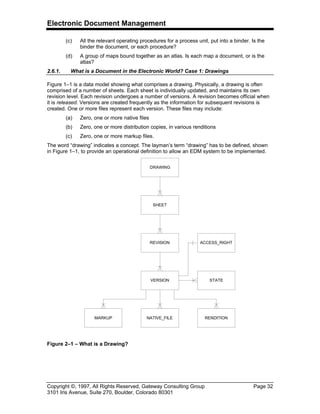
Figure 1–1 – What is a Drawing?...............................................................................................32
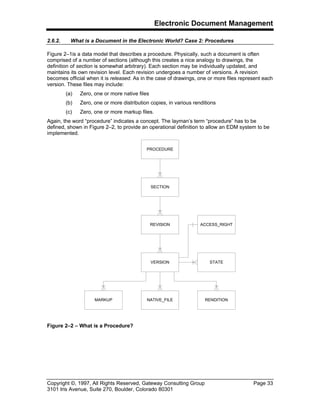
Figure 1–2 – What is a Procedure? ...........................................................................................33
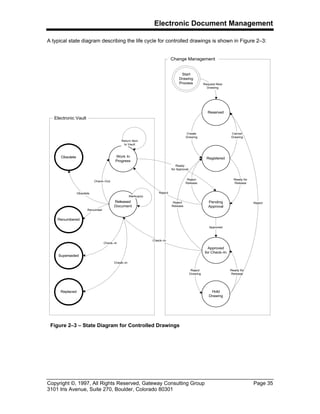
Figure 1–3 – State Diagram for Controlled Drawings .................................................................35
Figure 1–4 – Example Document Relationships ........................................................................37
Figure 1–5 – Table of Document Relationships .........................................................................38
Figure 1–6 – Document Relationship Categories .......................................................................39
Figure 1–7 – Document Object Model .......................................................................................40
Figure 1–8 – Document Addressing Modes ...............................................................................40
Figure 1–9 – Business Model Excerpt........................................................................................41
Figure 1–10 – Folders Containing Folders and other Documents...............................................42
Figure 1–11 – Hierarchy of Folders............................................................................................43
Figure 1–12 – Document Hierarchy ...........................................................................................45
Figure 2–1 – EDM Information Models ......................................................................................48
Figure 2–2 – Conceptual Framework for the EDM System.........................................................50
Figure 2–3 – Business Model (Strawman)..................................................................................52
Figure 2–4 – Document Model...................................................................................................53
Figure 2–5 – Promotion Model – Email/Form Based..................................................................55
Figure 2–6 – Promotion Model – Workflow Based .....................................................................56
Figure 2–7 – Promotion Model – Collaboration Based ...............................................................57
Figure 2–8 – Index Model..........................................................................................................58
Figure 2–9 – Object Storage Model ...........................................................................................60
Figure 2–10 – Change Management Model ...............................................................................62
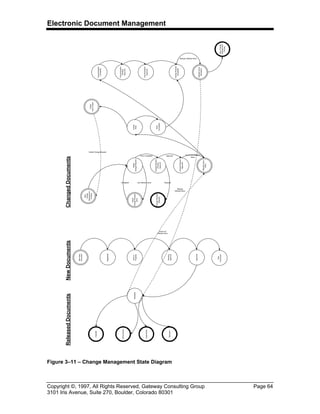
Figure 2–11 – Change Management State Diagram ..................................................................64
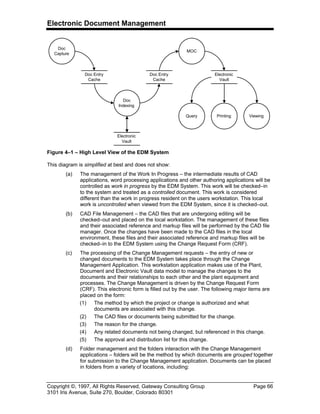
Figure 3–1 – High Level View of the EDM System.....................................................................66
Figure 3–2 – Components of the EDM System..........................................................................67
Figure 3–3 – Post Authoring Interactions of the EDM System. ..................................................71
Figure 3–4 – Data Entities in the EDM System ..........................................................................77
Figure 3–5 – States of Data Entities in the EDM System ...........................................................80
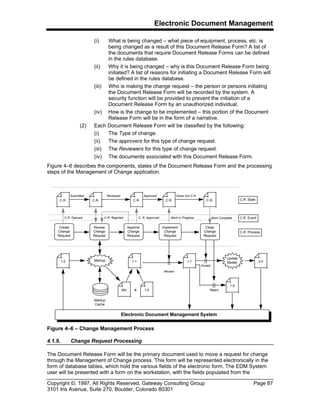
Figure 3–6 – Change Management Process ..............................................................................87
Electronic Document Management
Copyright ©, 1997, All Rights Reserved, Gateway Consulting Group Page 7
3101 Iris Avenue, Suite 270, Boulder, Colorado 80301
1. A STRATEGIC APPROACH TO EDM
This tutorial describes the foundations of an Electronic Document Management System (EDMS)
which is deployed in the process or manufacturing industries. The target application for a typical
system is not specified in any detail, nor is the underlying software and hardware. This tutorial is
aimed at the concepts of an EDM System, rather than at any specific solution for a particular
environment. It is also assumed that the high intrinsic value of engineering, quality, operations
and maintenance documents alone justifies the deployment of the EDM System in the process
and manufacturing industries.
At time the focus of the Tutorial will become detailed, with the emphasis on the business
processes being performed by the EDM System. There are specific examples for regulatory
compliance activities, engineering design review, ISO 9000 document control and the
management of change for any class of controlled documents. These details are provided to
given the reader as sense of the scope of effort necessary for a successful deployment.
Not all readers will relate when the later material becomes technical. However, this first section
is focused on the strategic approach to understanding the EDM System. This subject material is
vital to the understanding of the later technical components and the reader should become
familiar with these concepts before proceeding with the more technical aspects of the tutorial.
1.1. WHY AN EDM SYSTEM?
Most manufacturing, process plants and production facilities create and use from tens of
thousands to several million pages of documentation during the course of their business every
year. The majority of these documents exist in the form of paper, although they may be have
been created using a computer authoring tool. Many of these documents can be classified as
technical documents, since they are used in the engineering, testing, maintenance and operation
of the business process.
The generation of technical documents has usually been the performed using CAD and word
processing and has increased the individual productivity of the author. However, this
documentation has not significantly reduced the effort necessary to produce products or to
design, install and maintain the equipment and processes used to produce products.
The deployment of an Electronic Document Management system will address the underlying
sources of this lack of productivity:
(a) The information in these documents is created and managed through the efforts of
individuals, without an overall corporate strategy for the creation and management
of these documents.
(b) Documents are created using a variety of authoring tools. This approach prevents
many of the documents from being shared outside the organization that created
them.
(c) Documents are indexed and filed by the organization and sometimes the individual
that created them. In some cases there are public repositories for documents, but
in general access to corporate information is only provided to those individuals
who know where the documents reside.
In order to identify the solutions to these document management issues, a strategy for deploying
a system will be introduced.
Electronic Document Management
Copyright ©, 1997, All Rights Reserved, Gateway Consulting Group Page 8
3101 Iris Avenue, Suite 270, Boulder, Colorado 80301
1.2. WHY AN EDM STRATEGY?
Strategies are intellectually simple; their execution is not.
[1]
The Electronic Document Management (EDM) Strategy is an implementation independent
system design framework, intended to provide the flexibility to assemble EDM software products
in a manner which best suits the business needs of the company, while providing access to
corporate documents and related data by all authorized users. These corporate documents
should be seen as data that is shared across the business processes. These documents are
valuable corporate resources and are not owned by one business unit or individual.
The EDM strategy promotes the interoperability
[2]
and operability
[3]
of software products that
consist of programs, transactions and databases. This strategy is not an architecture for these
programs, transitions and databases, but is a road map for providing the underlying solution.
[4]
1.3. SCOPE OF THE EDM STRATEGY
The scope of the EDM Strategy is usually defined during the initial engagement between the
technology providers and the technology users. The business units, which will be targets of the
EDM System, can be determined through a Business Case Analysis, which identifies the
financial benefits to the organization of each document automation activity.
Within these business organizations, controlled documents are usually generated, used, and
stored by the following departments:
(a) Engineering – product design documentation, facilities to manufacture products
and the infrastructure to support the manufacturing facilities.
(b) Research and Development (Technical Documents) – documents that describe the
prototypes of products, the procedures for constructing thee prototypes and the
design basis calculations used to develop the prototype.
(c) Maintenance – equipment and process support instructions.
(d) Environmental Controls and/or Regulatory Compliance – materials used in the
process are accounted for and described according to the guidelines of the
regulatory agencies.
(e) Records Management – maintenance, production, parametric data, material
quantities all have record information associated with individual documents.
(f) Office Technology – process correspondence, management information, corporate
policies, customer correspondence.
1
“The CEO as Coach: An interview with AlliedSignal’s Lawrence A. Bossidy”, N. M. Tichy and R.
Charan, Harvard Business Review, March–April, 1994, pp. 68–78.
2
Interoperability is the ability to connect document aware software products irrespective of their
suppliers or vintage, to provide access to corporate documentation.
3
Operability is the ability to efficiently and cost effectively manage and control the deployment,
administration, execution and use access to a loosely coupled set of software products,
irrespective of the suppliers to meet the performance, availability, reliability and security
objectives of business organization.
4
“The BellCore OSCA Architecture,” Technical Advisory, TA–STS–000915, Issue 3, March 1992.
Electronic Document Management
Copyright ©, 1997, All Rights Reserved, Gateway Consulting Group Page 9
3101 Iris Avenue, Suite 270, Boulder, Colorado 80301
The following departments, business units, and activities are usually not addressed by the EDM
Strategy:
(g) Documents and activities involved in the business data processing.
(h) Documents not considered controlled information.
1.4. PURPOSE OF THE EDM STRATEGY
This document defines the vision of an Electronic Document Management system to be
employed throughout the business organization. The EDM System will provide for the electronic
management of corporate documents in conjunction with existing business data processing
systems.
This document is not meant to be an all inclusive description of an EDM system, rather it is the
road map for defining an actual EDM system and deploying it within the business organization.
This document is written as a high level description of the EDM system, its initial benefits, and
costs. Beyond this EDM Strategy are several other documents that are usually produced during
an EDM project including: System Requirements Analysis (SRA), Functional Requirements
Analysis (FRA) and Technical System Design (TSD), Implementation Plan (IP), Procurement
and Installation Plan (PIP).
This document contains several sections, including:
(a) Core Business Strategy – which describes the motivations for the EDM system,
the architectural vision of deployed system.
(b) Attributes of an EDM System – which describes the hardware and software
components of an EDM system and its application to the various business
organizations.
(c) Core Information Technology Strategy – which describes the technology, required
to deploy an EDM system in the business environment.
(d) Identified Strategic Applications – which describes the target business
organizations to receive EDM.
1.5. DEFINING THE EDM STRATEGY
In order to formulate a strategy for the deployment of an EDM system, two dimensions must be
considered:
[5]
(a) Breadth – the scope of applications, processes, or systems that will be addressed
by the EDM strategy must be defined. A process can be defined as narrow as a
single activity or single function or as broad as the entire business. The EDM
strategy addresses specific processes within specific business units.
The management of controlled documents is most often the breadth of the EDM
system.
(b) Depth – the success of the EDM strategy, on a broad scale, requires the
restructuring of the key business components. The measure of the depth of the
strategy can be characterized by the amount of:
(1) roles and responsibilities of the management in the effected organizations;
(2) the affect on the information technology infrastructure;
5
“How to Make Reengineering Really Work,” G. Hall, J. Rosenthal and J. Wade, Harvard
Business Review, November–December, 1993, pp. 119–131.
Electronic Document Management
Copyright ©, 1997, All Rights Reserved, Gateway Consulting Group Page 10
3101 Iris Avenue, Suite 270, Boulder, Colorado 80301
(3) the measurement and incentives that will affect the outcome of the
deployment;
(4) the extent of shared value in the affected organizations; and
(5) the skill sets in the affected organizations and their ability to manage both
the technical and non–technical aspects of the deployment.
1.6. FITTING THE EDM STRATEGY WITH CORPORATE GOALS
The Electronic Document Management System will support the business organization’s strategic
objectives in the following manner:
(a) People – consistent and reliable delivery of documents will provide enhanced
communication between the personnel tasked with producing products and the
authors of the documentation.
(b) Safety – by controlling the creation and distribution of safety–related
documentation the business organization will continue to assure the highest levels
of workplace safety.
(c) Quality – by improving the clarity and availability of documentation and work
instructions, appropriate work processes will be performed as planned and with
fewer errors. In business organizations that are participates in ISO 9000
certifications, this component of the EDM Strategy is a critical success factor.
(d) Service – by providing on–line documentation to the point of use, service to both
internal and external customers will be improved.
(e) Productivity – by reducing the time and effort required to search for the correct
documentation, productivity improvements can be made without expending
additional resources.
1.7. EDM CONCEPTS AND THE I/S STRATEGY
Documents perform a vital role in the production and sale of a business’s products. The
management of these documents usually takes place through the efforts of the employees and
the procedures defined by the corporate and departmental level management.
As the creation and distribution of documents becomes increasingly dependent on computer
technology, the Electronic Document Management system becomes a vital link in the operation
of each business unit.
Documents are essential to the operation of the business for three (3) reasons:
(a) Documents are the means through which information is captured, managed, and
controlled. They are the means by which essential information is developed and
conveyed throughout the business organization.
(b) Documents form the core of every business process. They are the method by which
interfaces between business functions are formed and managed. They are the
means by which people interact to accomplish the goals of the organization.
(c) Documents for the basis of the business knowledge needed to produce products.
Documents create the means by which an organization conducts its business.
What is Document Management? There are several applicable definitions, which can be applied
to the manufacturing and process industries:
(a) Document Management is ... a highly integrated set of middleware services that
integrate library services, document creation and document interchange with critical
Electronic Document Management
Copyright ©, 1997, All Rights Reserved, Gateway Consulting Group Page 11
3101 Iris Avenue, Suite 270, Boulder, Colorado 80301
business process applications built around a client/server topology using open
application interfaces.
[6]
(b) Document Management is ... a software system that is capable of organizing
document production, managing accessibility and distribution of documents and
overseeing the flow of these documents.
[7]
The I/S EDM strategy is to:
(a) Provide the underlying infrastructure of the networking and platform facilities
required for the EDM system.
(b) Provide the architectural guidance for the selection and installation of the software
applications required for the EDM system.
(c) Provide the necessary resources to support the infrastructure and related computing
resources needed to deliver the EDM system requirements to the end user
community. This includes:
(1) Data modeling of the business process.
(2) Process modeling of the business process.
(3) Definition and support of document management standards for those
components of the EDM system that are shared throughout the business
organization.
(4) Support and maintenance of the client/server components shared by all
users of the EDM system.
1.8. CRITICAL SUCCESS FACTORS FOR THE EDM SYSTEM
The concept of Critical Success Factors (CSF) Analysis was first formulated by John Rockart at
MIT in the 1982.
[8]
The main steps of the CSF are:
(a) Identify the most critical components, facilities and processes of the enterprise,
which will make the enterprise successful.
(b) Define the application systems, business data and business rules for each business
process, which will support the critical success factors.
(c) Analyze, evaluate, and justify the proposed application systems.
An Electronic Document Management System can provide for the creation, control, and
distribution of almost any form or type of document. The question is what types of documents
should be managed inside business organization?
6
Office Information Systems Strategic Analysis Report, The Gartner Group, September 3, 1993.
7
“Workgroup Application Systems,” Document Management Software market Review and
Forecast, International Data Corporation, May, 1993.
8
“The Changing Role of the Information Systems Executive: A Critical Success Factors
Perspective,” J. Rockart, Sloan Management Review, Volume 24, Number 1, 1982, pp. 3–13.
Electronic Document Management
Copyright ©, 1997, All Rights Reserved, Gateway Consulting Group Page 12
3101 Iris Avenue, Suite 270, Boulder, Colorado 80301
This focus is best stated as...
A business can be made more valuable by making low intellectual content
activities effortless and high intellectual content activities more functional and
available to knowledge workers at every level... if an organization has not
eliminated clerical office activities almost entirely from job descriptions, it will
suffer from poor customer service, poor use of its information assets, longer
times to market and higher operating costs.
[9]
1.8.1. Critical Success Factors for Manufacturing and Process Industries
The Critical Success Factors for the EDM system deployed in manufacturing and process
industries include:
(a) Reduction of cycle time for work activities involving the production, handling,
distribution, and use of paper–based documents and drawings.
[10]
(b) Simplification of the paper–based work processes associated with the production of
products, the design of the manufacturing process and the support of the installed
process or manufacturing equipment.
(c) Reduction of plant downtime by making the necessary engineering, operations and
maintenance documentation available on–line and readily available to the
appropriate maintenance and operations personnel.
(d) Reduction or elimination of the cost associated with paper–based processes,
including copying and filming of documents for distribution and reference. This
reduction will be applied across the board for all controlled paper–based processes.
(e) Improved document security since the document images are never removed from
storage.
(f) Establishment of stable procedures associated with the manufacturing process,
including standard operating procedures, work instructions and any associated
operational documentation.
(g) Improved quality for all documents resulting from the audit, change control and work
flow automation capabilities of the system. These facilities will provide a reduction in
the content, reproduction, and distribution processes. The use of outdated
information is reduced when all users are ensured access to the same revision of the
document.
(h) Decreased cost for modifying documents, since all documentation is available on–
line there is no need to re–create the document when it can not be found.
(i) Integration with maintenance and production management system. By delivering
images of maintenance manuals and supporting documents, the existing paper–
based system for the distribution and maintenance of equipment documentation can
be replaced.
(j) Establishment of a networking system capable of supporting the EDM system. This
includes providing document management cache servers connected to segments of
the network without impacting other portions or the enterprise. On demand printing
provides a point if use for the correct documentation. Work procedures, maintenance
9
Office Information Systems Strategic Analysis Report, The Gartner Group, September 3, 1993.
10
Throughout this specification, the term document shall be taken to mean documents and
drawings.
Electronic Document Management
Copyright ©, 1997, All Rights Reserved, Gateway Consulting Group Page 13
3101 Iris Avenue, Suite 270, Boulder, Colorado 80301
documents, engineering drawings and product manufacturing information can be
delivered on demand rather than through the normal distribution channels.
1.8.2. Strategic Benefits of Electronic Document Management
There are three (3) types of information in use in most manufacturing and process facilities.
(a) Records–based information kept in databases, either electronic or manual. This
information represents the way in which the business organization deals with
customers, suppliers, product personnel and processes. This information is usually
structured and created through a documented process.
(b) Automation–based information, is usually created with computer based tools. This
information is created and shared between members of various business
departments. This information is usually unstructured and represents the content of
the manufacturing process. In some cases, structure is available in the form of
design and construction information, but the method of producing this information is
usually ad hoc and driven by the business needs of organization.
(c) Knowledge–based information, usually created through the same process as (a) and
(b), but has significantly different attributes.
This information:
(1) Is key to business organization’s ability to acquire and maintain its
competitive advantage, from its document based processes, including: R&D,
Engineering and Maintenance.
(2) Posses exceptional value to business organization, since this information
represents the design basis and as–built configuration of the manufacturing
or process facilities.
(3) Exists for the life of the manufacturing process or facility.
(4) Are reused many times during the life of the process or facility and forms the
basis for new knowledge–based information for future processes and
facilities.
This knowledge–based information increases in value with time, since it is the
information that contains the knowledge of how the business produces its products.
This information is constructed during the design process and therefore contains
the essence of the design.
With the third type (c) of information placed in the EDM system the following business
advantages are made available to business organization:
(a) Shorter time to market – by increasing the productivity of the users of the
information, business decisions can be made quicker, design decisions can be
reviewed and approved faster, products can be deployed quicker. Several barriers
currently exist which lengthen the time to market for document–based products:
(1) Lack of control over the life cycle of a document. For every change to a
document, whether through a change in the design of a product component
or a change in the equipment used to produce the product, a manual
process is most often used to review and approve this change.
(2) The inability to integrate various types of information on a single desktop
workstation restricts the organization’s ability to create and distribute
information related to the design and production of products. There is usually
no corporate–wide mechanism for sharing and reusing information
generated by departments and subcontractors.
Electronic Document Management
Copyright ©, 1997, All Rights Reserved, Gateway Consulting Group Page 14
3101 Iris Avenue, Suite 270, Boulder, Colorado 80301
(3) Islands of document automation usually exist, making it difficult to assemble
information. The isolation of the information generating activity creates the
opportunity to release documents with inaccurate or incomplete information.
(4) The ability to find accurate and timely information is restricted by the
computing infrastructure in place today.
(b) Improved Quality – by managing the production, review, and distribution of all
controlled documents, the quality of documentation process can be improved.
(c) Lower Costs – by removing unnecessary activities from the daily business process,
the cost of production can be lowered. By improving the accuracy and velocity of
information available to the organization’s employees, the amount of productive
work per hour invested will improve.
(d) Establishing a Design Basis – by capturing and indexing engineering, production and
maintenance information, the foundation of the design and operation of the product
production processes can be communicated to both internal and external
organizations, in a concise, reliable and controlled manner.
1.8.3. Common Business Activities
The success of an EDM deployment at the business depends on several factors, including:
(a) A common desktop environment and architecture.
(b) On–line access to applications and information needed to perform work without the
knowledge of the information location.
(c) A standardized and easy to operate User Interface.
11
(d) The availability of personnel productivity tools.
(e) The automation and reduction of paperwork associated with each business activity.
(f) Integrated analysis and design applications in Engineering (or Technical Functions).
(g) A common set of work management tools which form the basis of information
sharing, including E–Mail, document viewing, printing, work flow, and authoring
tools.
1.8.4. Common I/S Functions
The EDM strategy is based on the use of open platforms for all hardware and software
components of the system. For the purposes of a strategic plan the following definition will be
used:
An open system is one in which the components (of the system) and their
composition are specified in a non–proprietary environment, enabling competing
vendors (of the system components) to use those standard components to build
cooperative systems.
[12]
Using this definition, the functionality provided by I/S in support of the EDM system must include:
11
The specification of attributes of the system using terms such as easy to operate, User
friendly, high performance, reliable, should be avoided at all times. The attributes of the system
should be specified in quantitative terms, which have specific measures, which can be used to
compare the various alternatives. Although this advice is given for writers of requirements
specifications, there will be many instances in this tutorial where the advice is not followed.
12
Open Systems, G. Nutt, Prentice–Hall, 1992.
Electronic Document Management
Copyright ©, 1997, All Rights Reserved, Gateway Consulting Group Page 15
3101 Iris Avenue, Suite 270, Boulder, Colorado 80301
(a) Hardware platform independence for applications and databases – the flexibility to
use the most cost–effective platform for the job will allow the business organization
to take advantage of an ever changing hardware market place, without a negative
impact on the current investment in software, training and data.
(b) Application independence from databases – by making use of SQL access to
information the underlying database technology can change over time with a
minimum impact on both the application and data environment.
(c) Distribution of information and applications as close as possible to the users – by
making information locally available to the end user, query and retrieval time
required is reduced to a minimum.
(d) Consolidating and normalizing information to eliminate redundancy and improve
data integrity. By constructing normalized data models with embedded business
rules, the intellectual value of the document relationships and the transactions that
created them can be maintained over the live of the project.
1.8.5. Existing I/S Strategic Investments
Several existing I/S strategic investments are associated with the success of the EDM system,
including:
(a) Financial Systems – the Business Reporting System, forms the basis of the benefit
measurement for EDM.
(b) Telecommunications Infrastructure – the existing network infrastructure must
adapt to the requirements of the EDM System. The architecture of the
telecommunications system hardware and software forms ground work for the
EDM system client/server architecture.
(c) Document Authoring Infrastructure – the existing CAD, Word processing and
Email environment provides direct support for the EDM project.
1.9. END USER EDM VISION
A Vision is a picture in ones mind of an idea or organization. A vision is an essential element in
the success of an organization. This section describes the vision of the EDM system, distinct
from the Mission of the EDM system.
[13]
These differences can be illustrated as:
Mission Statement Vision Statement
Today Tomorrow
Identifies the customer(s) Inspirational
Identifies the Critical Processes Provides clear decision–making criteria
Level of performance Timeless
Although they are often used interchangeably, mission and vision are distinctly different, each
with its own purpose, style, criteria and components. A vision is a state that is never achieved,
13
“Visioning: The Concept, Trilogy and Process,” J. R. Latham, Quality Progress, American
Society for Quality Control, April, 1995, pp. 65–70.
Electronic Document Management
Copyright ©, 1997, All Rights Reserved, Gateway Consulting Group Page 16
3101 Iris Avenue, Suite 270, Boulder, Colorado 80301
but will form the basis of all activities within the organization. Successful visions have three (3)
criteria:
[14]
(a) Timeless – visions are far reaching, they describe the corporation or system, as it
should be, not necessarily as it is going to be. It is unlikely that the vision of the EDM
system will ever be achieved, but articulating the vision will set the highest possible
goal for the system. All decisions regarding architecture, behavior and performance
of the system should be compared with the vision of the system. Progressive
realization of the vision is critical to the success of the overall process.
(b) Inspirational – it is inspiration that is behind the motivation to act. It is action toward
the vision that ultimately makes the vision a reality.
(c) Provides Clear Guidelines – a clear, concise and shared picture of the end result
provides the criteria for the decision making process. When the vision of the EDM
system is shared among all members of the business organization, the tactical
details of the implementation of the system become secondary to the overriding
goals of the organization. Everything is created twice: first in the mind, then in the
physical world.
[15]
The Vision for the EDM system in the manufacturing and process industries is that it will provide
the foundation for re–engineering the business processes in the following departments:
(a) Engineering – by significantly reducing the generation, handling, and consumption of
paper documents during the design, review, and construction process. By deploying
the EDM System, Engineering will be able to eliminate the storage and distribution
costs currently associated with the document release cycle.
(b) Research & Development – by consolidating the authoring, review and publication of
Specifications, Standards and Work Instructions, R&D can eliminate all redundant
operations in deploying these documents to the users.
(c) Maintenance – by providing electronic access to all equipment documentation,
Maintenance can eliminate all wasted effort currently expended in the search for
maintenance information and work instructions.
(d) Records Management – by consolidating the management of corporate records with
the control of the source documents referenced by these records, the EDM system
will consolidate two functions into one. The management of the controlled
information is usually provided separately from the physical storage and use of the
controlled documents. These functions could be consolidated inside the EDM
system, with the indexing and management controlled by a database application and
the physical capture, use and distribution provided by the facilities of the EDM
system.
(e) Office Technology – by providing electronic images of business records document
storage and distribution activities can be significantly reduced with an equivalent
reduction in this recurring expense. The capture, indexing, storage, and distribution
of business documents are a traditional application for an EDM system. A scanning
and indexing operation can replace the current microfilming and indexing (to the
mainframe) operation. Once scanned the documents can be delivered to the end
user through a workstation application, completely eliminating the need for microfilm
production, storage and distribution.
14
Teaching the Elephant to Dance, J. A Belasco, Crown Publishers, 1990.
15
The 7 Habits of Highly Effective People, S. R. Covey, Simon & Shuster, 1989.
Electronic Document Management
Copyright ©, 1997, All Rights Reserved, Gateway Consulting Group Page 17
3101 Iris Avenue, Suite 270, Boulder, Colorado 80301
1.9.1. Engineering EDM Vision
The Engineering activities of a process or manufacturing facility usually include:
(a) Generation of engineering drawings, calculations, specifications, standards, and
supporting documents.
(b) Review and approval of those documents.
(c) Publication and use of the documents and drawings by Production, Research and
Development, Maintenance and Operations.
During these processes, documents and drawings are generated in a variety of ways, including
CAD, Word processing, and manual drafting. Once the information has been generated, it is
placed in the Drawing Control System through a manual process. CAD drawings are maintained
in a centralized file system accessible from all CAD workstations. Paper drawings are maintained
in drawing tubs, stick files, or flat files in various locations through the business facility. Microfilm
copies of all drawings are sometimes produced and distributed to various locations.
The EDM System will provide the following functions for the Engineering Department:
(a) Centralization of all drawing capture and distribution activities. By providing both
electronic and paper capture of documentation and drawings, the EDM system will
provide a single electronic vault for all engineering information. This Electronic Vault
will enable Engineering to:
(1) Avoid duplication of drawings and documentation assuring only released
documents are made available to the user community.
(2) Provide a single approved for design information database for all equipment
and processes in use by the business.
(3) Provide a traceable clearing–house for all design changes.
(4) Provide a central repository for information required by outside consulting
firms.
(b) An electronic check–in and check–out process for all engineering documentation.
This facility will provide a controlled and secure process by which documents and
drawings are entered into the electronic vault. The EDM user can:
(1) Submit documents and drawings to the Electronic Vault using a standard
user interface. The Electronic Vault will manage both Work in Process (WIP)
and released drawings.
(2) Route WIP for review and approval, using E–Mail and work flow software.
(c) Document retrievals using an Engineering Department data model. This data model
will provide:
(1) A consistent organizational method for indexing and retrieving all documents
and drawings.
(2) The business rules for releasing documents created by the Engineering
department or the outside contractors.
(3) The business rules for making any changes to a released drawing or
document.
(d) A collection of Engineering Standards and Specifications that will be used for all
design, fabrication and operation processes within the business organization. These
standards and specifications will describe:
(1) The equipment, processes, standards and components that can be used in
the design process.
(2) The discipline specific standards to be used in the design and manufacturing
process.
Electronic Document Management
Copyright ©, 1997, All Rights Reserved, Gateway Consulting Group Page 18
3101 Iris Avenue, Suite 270, Boulder, Colorado 80301
(3) The local alterations or additions to the discipline–specific standards.
(e) A collection of design basis calculations, notes, and supporting documentation
created during the design and construction process. This information will be
maintained by the EDM system for reference during future design activities as well
as form the basis of the intellectual contribution of the Engineering department to the
operation of business organization.
(f) Software created and used by the various production test or process control
systems. This software will be stored as an object in the EDM – as if it were an
electronic document. The indexing, submittal, retrieval, and use of this software will
take place in the same manner as normal user–readable documentation.
(g) Information used by the Engineering modeling applications can originate as well as
be stored by the EDM system. This information includes:
(1) Design calculations.
(2) Data and programs for modeling the plant processes.
(3) Parametric information gathered from various sampling and control system
can be placed in the EDM system as electronic representations of data. This
information can then be forwarded to the modeling software for processing.
1.9.2. Quality Assurance EDM Vision
The management of documents in the Quality Assurance department is a critical business
function.
These document classes include,
(a) Specifications for recipes, formulas, processes, work instructions, test programs, etc.
(b) Test methods for each process.
(c) Organizational policies and procedures.
(d) QA reports, including:
(1) Test reports
(2) Quality reports
(3) Test plans
(e) Other documentation including:
(1) Defect manuals.
(2) Hand books.
Each of these document classes forms the basis of the Quality Assurance process. Most
document management activities currently taking place in the QA department follow industry
guidelines
[16]
developed and implemented in a variety of production environments:
(a) Management Responsibility: ... define, document and communicate its policy and
objectives for, and commitment to, quality; appoint management representatives for
periodic review to ensure continuing suitability of the quality system. The supplier
shall ensure the policy is understood, implemented, and maintained at all levels in
the organization.
16
“Vision 2000: The Strategy for the ISO 9000 Series Standards in the 90’s,” D. Marquardt, et
al., ASQC Quality Progress, Vol. 24, No. 5, May 1991, pp. 25–31.; “Management Practices: U. S.
Companies Improve Performance Through Quality Efforts,” General Accounting Office,
GAO/NSIAD–91–190, May, 1991.; “Fix the Process not the Problem,” H. Sirkin and G. Stalk,
Harvard Business Review, July/August 1990, pp. 26–33.
Electronic Document Management
Copyright ©, 1997, All Rights Reserved, Gateway Consulting Group Page 19
3101 Iris Avenue, Suite 270, Boulder, Colorado 80301
(b) Quality System: ... establish a documented quality system as a means of ensuring
that it conforms to the criteria of the applicable...standards.
(c) Design Control: ... establish and maintain procedures to control and verify the
product design in order to ensure that the specified requirements are met and assure
procedures for design planning and design changes are in place.
(d) Document Control: ... establish and maintain procedures for controlling all
documents and data thorough approval, distribution, and modification that relate to
the requirements of the Standard... The documents shall be reviewed and approved
for adequacy by authorized personnel prior to use.
(e) Product Identification: ... establish and maintain procedures for identifying the
product from applicable drawings, specifications, or other documents, during all
stages of production, delivery and installation...
(f) Process Control: ... shall identify and plan production and ... ensure that these
processes are carried out under controlled conditions ... Documented process control
instructions defining the manner of production ... where the absence of such
instructions would adversely affect quality.
The EDM system will provide the following functions for the Technical Document activities in the
QA Department:
[17]
(a) Authoring – the EDM system will provide a controlled process for creating and
altering documents. The generation and editing of text and graphical documents is
performed using standard workstation tools. Today these tools include word
processors and graphical design applications. The results of the authoring processes
will be maintained by the EDM system in the Electronic Vault.
The creation of a document will start with the creation of an entry in the Electronic
Vault’s index. This index entry will be used to reference the document through out its
life.
If an existing document is to be used as the basis of a new document or simply a
revision, then the original document is checked–out of the Electronic Vault for
revision. Changes are then made to the document and it, like the previous example
is checked–in to the Electronic Vault for review and promotion.
(b) Review and Promotion – the EDM system will provide the ability to mark up the
review copy to indicate any changes or suggestions. Once the changes (or creation)
have been made to the document, it will be reviewed for promotion to the next
release level. This activity will take place using the tools of the EDM system. Using
electronic mail or a vendor–provided workflow system notification that changes exist
and require review will be forwarded to the appropriate distribution list.
(c) Publication – the EDM system will provide for consistent publication and distribution
of the controlled documents. The approved documents will be placed in the
Electronic Vault as an official release. The release of the document will replace the
previous release and notify those on the distribution list of the existence of the new
document.
(d) Retrieval, Viewing and Printing– the EDM system will provide a consistent process
for retrieving and viewing controlled documents. The retrieval and viewing of the
document will take place through the facilities of the Electronic Vault. The data
model that defines the business rules for managing the documents will form the
17
In general, these steps of Authoring, Review and Promotion, Publication, Retrieve, Viewing
and Printing can be applied to all document management functions.
Electronic Document Management
Copyright ©, 1997, All Rights Reserved, Gateway Consulting Group Page 20
3101 Iris Avenue, Suite 270, Boulder, Colorado 80301
basis of the retrieval process. This data model defines the relationships and
attributes of the documents and the processes by which changes are made to the
documents.
The viewing of the document will take place by rendering the image of the
document in a form identical to the creation of the document, without the burden of
placing the authoring tools on each workstation. The viewed document will contain
text and graphics as well as images. Comments and notes can be made on the
viewed document and returned to the author for action.
Those users not involved in the authoring and review processes will be provided
with the ability to view the documents, but not the ability to make changes to the
controlled document, other than as suggestions to the author.
1.9.3. Maintenance EDM Vision
It could be argued that operations and maintenance is a secondary function in the US, when
compared to the dominant technical disciplines of development and manufacturing.
[18]
Although this may not always be the case at all businesses, there are usually several underlying
difficulties with the current maintenance and operation of process or manufacturing facilities
directly related to the management of documents:
(a) Proactive maintenance – the largest expenditure for maintenance today occurs in
the area of corrective maintenance. The major contributor to the unit operating cost
of the plant equipment is the cost to restore this equipment to operation coupled with
the cost of lost production.
(b) Maintenance work – by decreasing the number of human mistakes that occur during
the normal course of maintenance the overall cost of operating the process or
manufacturing facility can be reduced.
(c) Standard documentation and information not available – by increasing the
availability and accuracy of the information used during the maintenance process,
the overall maintenance cost can be reduced.
By addressing these issues through the deployment of an EDM system, the maintenance of the
production facilities can be improved. Documentation enters into this improvement in the
following manner:
(d) Task Specifications – by defining what actions need to be taken and when they need
to be performed, the maintenance of the equipment can be improved. The OEM of
production equipment usually provides the documentation containing this
information. Access to these documents takes place through a manual process.
(e) Procedure Specifications – this is a document which guides the execution of the
maintenance task. In simple situations, the procedures may be as simple as a one–
page instruction. In more complex tasks, a maintenance manual must be referenced
in order to proceed with the procedure.
(f) Logistics – this activity entails a variety of activities ranging from purchasing, stores
management, tooling, vendor support, training and regulatory requirements. Each of
these activities involves the use, creation and distribution of documents.
1.9.4. Records Management EDM Vision
The management of official records usually takes place through several databases. The actual
documents recorded in these databases are physically held by different organizations.
18
Reliability–Centered Maintenance, A. M. Smith, McGraw–Hill, 1993.
Electronic Document Management
Copyright ©, 1997, All Rights Reserved, Gateway Consulting Group Page 21
3101 Iris Avenue, Suite 270, Boulder, Colorado 80301
The use of an EDM system address the following issues:
(a) Consolidation of the management of the records for the documents and the physical
documents themselves.
(b) Providing a uniform document management application across all business
document systems, including those documents that are managed in a controlled
manner.
(c) Centralizing the storage and retrieval of all controlled documentation in the
organization.
1.9.5. Office Technology EDM Vision
The use of paper or microfilm as a record keeping medium is used throughout industry today.
With the installation of an Electronic Document Management system, the need for these
technologies is greatly reduced. Although in most cases the information stored on the microfilm
is still required by state and regulatory agencies, the delivery of the image can take a new form.
There are two types of documents placed on microfilm today:
(a) Scanned information in the form of paper documents.
(b) Computer Output to Microfilm (COM) documents in the form of computer
generated reports.
Both of these document types can be placed in the EDM system. The paper document currently
being filmed can be scanned to an optical image and indexed to the EDM system.
The COM reports can be sent to a Computer Output to Laser Disk (COLD) in the same manner
as COM. By removing the COM film–processing step, expense can be reduced.
1.10. COMPANY I/S EDM VISION
Although the majority of this tutorial addresses an EDM System and its deployment in the
manufacturing facility, the EDM System’s impact on the I/S organization also needs to be
addressed.
The I/S strategy must address two (2) issues:
(a) How to manage and support the distributed computing technologies currently being
installed as well as those required for the deployment of an EDM system.
(1) Local area networks
ü Topology
ü Security
ü Routing
ü Bandwidth
ü Response time
ü Reliability / Availability
(2) Wide are networks
ü Connectivity
ü Security
ü Performance
ü Reliability / Availability
ü Cost
(3) Peripherals
Electronic Document Management
Copyright ©, 1997, All Rights Reserved, Gateway Consulting Group Page 22
3101 Iris Avenue, Suite 270, Boulder, Colorado 80301
ü Storage
ü HSM
ü Caching
ü Scanning / Printing
ü Workstations
(4) Core software components
ü Database engines
ü Email
ü Voice Mail
(b) How to employ these technologies to improve the business processes within each
group making use of EDM.
1.10.1. Vision for I/S
The deployment of an EDM system should be seen the image enabling of existing applications
with the documents that pertains to the existing business process. The EDM system augments
the existing business processing system, rather than replaces it.
In the case where no existing business processing system exists, providing an image enabled
application should be the minimum requirement to the current manual process.
1.10.2. Vision of I/S Customers
The users of the EDM system will make use of the documents delivered to their workstation in
the same manner that they make use of the documents today. However, the documents will be
controlled in a manner different than they are today. Following the standards of Total Quality
Management:
(a) the right document will be delivered,
(b) at the right time,
(c) for the right purpose.
1.11. EDM DEPLOYMENT STRATEGY SUMMARY
The EDM system must:
(a) Support the business goals and critical success factors of the organization.
(b) Focus on the strategic investments.
(c) Make the correct information available where it is needed and when it is needed.
(d) Make use of open off–the–shelf hardware and software products.
The I/S department must:
(a) Reassess the I/S investments on a periodic basis to determine whether they still
support the Critical Success Factors.
(b) Continually retrain the I/S staff in support of the Critical Success Factors.
Electronic Document Management
Copyright ©, 1997, All Rights Reserved, Gateway Consulting Group Page 23
3101 Iris Avenue, Suite 270, Boulder, Colorado 80301
2. EDM BACKGROUND, TERMINOLOGY AND TECHNICAL ARCHITECTURE
This section provides a background overview of the use of Electronic Document Management in
the industrial setting. By restricting the target application environment to process plants,
manufacturing facilities or electric utilities, a class of technical issues found in the traditional
business office environment can be avoided. The technical document environment creates a
unique set of requirements:
(a) Large document sizes with accompanying impacts on system performance.
(b) The use of formal management of change processes.
(c) Tight integration of the EDM System with CAD, MRP, ERP, production and
process control systems.
(d) Regulatory compliance (ISO, OSHA, EPA, FDA)
(e) Subcontractor management of supplied components, services or facilities.
2.1. PHILOSOPHICAL GOAL OF AN INDUSTRIAL EDM SYSTEM
In order to create a clear and concise picture of the requirements for the EDM System, a
philosophical goal is needed.
[19]
This goal is:
Gather the information needed to design, construct, operate, and maintain the
business’s facilities in a single coherent, secure and accessible Electronic
Document Management System.
The operational definition
[20]
of the terms in the goal are:
(f) Design – is the process of creating a solution to a problem using engineering,
technical writing or related skills?
(g) Construct – is the process of providing the solution in its physical form?
(h) Operate – is the process of placing the physical equipment or material into
operation?
(i) Maintain – is the process of keeping the physical equipment in operation?
(j) Coherent – is a logically correct and understandable set of rules for using the
system?
(k) Secure – is the ability to provide information within the proper context?
(l) Accessible – is an easily approachable and understandable interface for document
retrieval?
2.2. MOTIVATIONS FOR EDM AT A PROCESS OR MANUFACTURING FACILITY
A process or manufacturing facility creates and uses from hundreds of thousands to several
million pages of documentation during the course of its business every year. The majority of
19
The World of Edwards Deming, 2nd Edition, C. S. Kilian, SPC Press, 1992.
20
An operational definition assigns a communicable meaning to a concept and specifies the
conditions and procedures for ascertaining whether it applies in a given condition. Without an
operational definition the terms are meaningless concepts that hamper communication. “How to
Distinguish Masters from Hacks,” K. T. Delavigne, Quality Progress, May, 1995, pp. 97–102.
Electronic Document Management
Copyright ©, 1997, All Rights Reserved, Gateway Consulting Group Page 24
3101 Iris Avenue, Suite 270, Boulder, Colorado 80301
these documents exist in the form of paper, although they may have been created using a
computer authoring tool. Many of these documents are classified as technical documents, since
they are used in the engineering, testing, maintenance and operation of the manufacturing
process, while a large number are business documents.
These technical documents are produced using CAD and word processing software, which has
increased the productivity of the document author. However the creation and use of this
documentation has not significantly reduced the effort necessary to produce products or to
design, install and maintain the equipment and processes used to produce products.
The deployment of an Electronic Document Management system will address several of the
underlying sources of this reduction in productivity:
(a) The information in these documents is created and managed through the efforts of
individuals, without an overall corporate strategy for the creation, use and
management of these documents.
(b) Documents are created using a variety of authoring tools. This approach prevents
many of the documents from being shared outside the organization that created
them.
(c) Documents are indexed and filed by the organization and sometimes the individual
that created them. In some cases there are public repositories for documents, but
in general, access to corporate information is only provided to those individuals
who know where the documents reside.
2.3. TARGET BUSINESS APPLICATIONS
Although an enterprise–wide solution to the management of documents is a popular notion in the
industry, the reality of this approach usually does not lead to success. The initial deployment of
an EDM System should target applications with high payback opportunities. These applications
are document–centric, with the documents being the focus of the EDM System rather the current
manual business process.
These document–centric activities include:
(a) Engineering – by reducing, and at times eliminating, the generation, handling and
consumption of paper documents during the design, review and construction, the
cycle and process times for these processes will be reduced. These documents
include: drawings, specifications, design calculations, etc. By deploying the EDM
System, an Engineering Department will be able to eliminate the microfilming,
copying, posting of changes and the distribution costs currently associated with the
drawing release cycle.
(b) Research & Development – by consolidating the authoring, review and publication
of Specifications, Standards and Work Instructions, and related documents, R&D
can eliminate all duplicate and overlapping operations in deploying these
documents to the Level III users.
(c) Maintenance – by providing electronic access to all equipment documentation,
Maintenance can reduce the time currently expended in the search for
maintenance information and work instructions.
(d) Document Control – by consolidating the management of corporate and
engineering records with the control of the source documents referenced by these
records, the EDM System will combine two functions into one. Currently the
management of the controlled information is provided separately from the physical
storage and use of the controlled documents. These functions will be combined in
the EDM System, with the indexing and management controlled by a database
Electronic Document Management
Copyright ©, 1997, All Rights Reserved, Gateway Consulting Group Page 25
3101 Iris Avenue, Suite 270, Boulder, Colorado 80301
application and the physical capture, use and distribution provided by the facilities
of the EDM System.
There are several departments, which usually provide independent Document
Control functions. The EDM System will provide the control of the documents
generated by each of these functional areas. These include:
(1) Engineering – documents representing the design and as–built status of the
manufacturing facilities.
(2) Technical Documents – standards, specifications, and work instructions.
(3) Environmental – portions of the EPA, OSHA, and other regulatory
documentation as currently managed by the Document Control group.
(4) Safety – regulatory documents related to industrial safety and hygiene.
(e) Office Technology – by capturing electronic images of non–controlled business
records (e.g. purchase orders, invoices, etc.), microfilming activities can be
significantly reduced with an equivalent reduction in this recurring expense. The
capture, indexing, storage, and distribution of business documents is a traditional
application for an EDM System. The current microfilming and indexing (to the
mainframe) will be replaced by an electronic scanning and indexing operation.
Once scanned, the documents will be delivered to the end user through a
workstation application, completely eliminating the need for microfilm production,
storage and distribution.
2.4. COMMON ATTRIBUTES OF AN EDM SYSTEM
The use of EDM within a facility implies several changes in the behavior of the current
computing infrastructure and supporting systems. By articulating the attributes of an EDM
System, the impacts of its deployment can be better understood.
2.4.1. Management of Controlled Documents
The motivation for the deployment of an EDM System is based in part on the management of
controlled documents. These are documents that posses one or more of the following attributes
during their life cycle:
(a) Some form of authorization is required for publication, distribution and/or use.
(b) Regulatory requirements define the creation, management, distribution and/or
retention.
(c) The document provides maintenance, operation, safety and/or environmental
information that impacts the productivity or safety of the process.
(d) The document contains information, which is considered the intellectual property
of the business.
(e) The document is distributed outside the facility in a manner consistent with (a), (b),
(c) and/or (d).
2.4.2. Management of Uncontrolled Documents
Uncontrolled documents do not usually posses one or more of the attributes described in §1.4.1.
Therefore, they do not usually warrant the effort and expense of placing them inside the EDM
System. It may be though, that some uncontrolled documents become associated with controlled
documents. This association between uncontrolled and controlled documents will be defined in
the EDM System data model.
Uncontrolled documents are not excluded from the EDM System. Several examples of
uncontrolled documents include:
Electronic Document Management
Copyright ©, 1997, All Rights Reserved, Gateway Consulting Group Page 26
3101 Iris Avenue, Suite 270, Boulder, Colorado 80301
(a) Work in Progress – documents that are undergoing changes and in the initial
stages of creation.
(b) Calculations made during the design process – electronic and paper based
calculations will be placed in the EDM System Project Folders.
(c) Notes and meeting minutes taken during the design process – paper and
electronic information will be captured in a folder.
(d) Commentary on the documents and drawings produced as controlled
documentation – any other supporting information will be placed in a folder
associated with the project, the author or other indexing methods.
2.5. TECHNICAL ATTRIBUTES OF THE EDM SYSTEM
The following sections describe the attributes of an EDM System in terms of their architecture
and behavior.
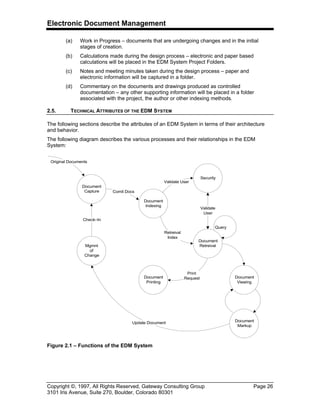
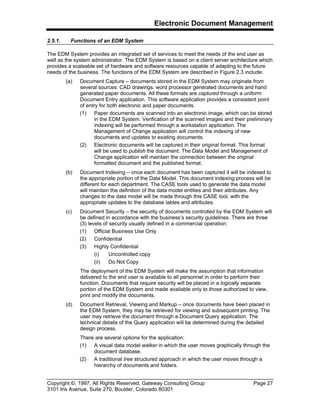
The following diagram describes the various processes and their relationships in the EDM
System:
Document
Capture
Document
Indexing
Security
Document
Retreival
Document
Printing
Mgmnt
of
Change
Document
Viewing
Document
Markup
Original Documents
Comit Docs
Validate User
Validate
User
Retreival
Index
Print
Request
Update Document
Check–In
Query
Figure 2.1 – Functions of the EDM System
Electronic Document Management
Copyright ©, 1997, All Rights Reserved, Gateway Consulting Group Page 27
3101 Iris Avenue, Suite 270, Boulder, Colorado 80301
2.5.1. Functions of an EDM System
The EDM System provides an integrated set of services to meet the needs of the end user as
well as the system administrator. The EDM System is based on a client server architecture which
provides a scaleable set of hardware and software resources capable of adapting to the future
needs of the business. The functions of the EDM System are described in Figure 2.3 include:
(a) Document Capture – documents stored in the EDM System may originate from
several sources: CAD drawings, word processor generated documents and hand
generated paper documents. All these formats are captured through a uniform
Document Entry application. This software application provides a consistent point
of entry for both electronic and paper documents.
(1) Paper documents are scanned into an electronic image, which can be stored
in the EDM System. Verification of the scanned images and their preliminary
indexing will be performed through a workstation application. The
Management of Change application will control the indexing of new
documents and updates to existing documents.
(2) Electronic documents will be captured in their original format. This format
will be used to publish the document. The Data Model and Management of
Change application will maintain the connection between the original
formatted document and the published format.
(b) Document Indexing – once each document has been captured it will be indexed to
the appropriate portion of the Data Model. This document indexing process will be
different for each department. The CASE tools used to generate the data model
will maintain the definition of the data model entities and their attributes. Any
changes to the data model will be made through this CASE tool, with the
appropriate updates to the database tables and attributes.
(c) Document Security – the security of documents controlled by the EDM System will
be defined in accordance with the business’s security guidelines. There are three
(3) levels of security usually defined in a commercial operation:
(1) Official Business Use Only
(2) Confidential
(3) Highly Confidential
(i) Uncontrolled copy
(ii) Do Not Copy
The deployment of the EDM System will make the assumption that information
delivered to the end user is available to all personnel in order to perform their
function. Documents that require security will be placed in a logically separate
portion of the EDM System and made available only to those authorized to view,
print and modify the documents.
(d) Document Retrieval, Viewing and Markup – once documents have been placed in
the EDM System, they may be retrieved for viewing and subsequent printing. The
user may retrieve the document through a Document Query application. The
technical details of the Query application will be determined during the detailed
design process.
There are several options for the application:
(1) A visual data model walker in which the user moves graphically through the
document database.
(2) A traditional tree structured approach in which the user moves through a
hierarchy of documents and folders.
Electronic Document Management
Copyright ©, 1997, All Rights Reserved, Gateway Consulting Group Page 28
3101 Iris Avenue, Suite 270, Boulder, Colorado 80301
(3) A direct query approach in which the user posses a query for a document or
set of documents and is presented with the match list of documents that
correspond to the requested query.
In all cases the retrieval of documents is performed through the appropriate data
model. The use of arbitrary keywords and phrases attached to the documents
should be avoided.
[21]
Once the document has been retrieved to the users
workstation, markups can be applied to the document and returned to the
originator. These markups can be as simple as a sticky note or as complex as
raster drafting suggestions to the drawings. In all cases the markups do not alter
the original documents and are controlled through the Management of Change
application residing in the EDM System.
(e) Document Printing – documents placed in the EDM System can be printed using
any of the printing devices attached to the network. In addition production printing
can take place using high volume printing devices. Documents can be selected for
printing in several ways:
(1) Once a document has been delivered to the user workstation, all or portions
of the document can be sent to a printer.
(2) A list of documents can be selected for printing, without retrieving them to
the workstation, but can be printed by the EDM System’s print server.
The printed documents can be marked with a variety of overlays to indicate
additional information, including:
(3) Date and time of printing.
(4) Gray scale bands placed over the document page to indicate usage and
security information.
(f) Management of Change – There are both regulatory as well as good business
practice requirements for managing the change to the documents captured by the
EDM System. The Management of Change application will:
21
The use of Full Text Search (FTS) or Content Based Retrieval (CBR) as the primary indexing
method presents several problems. The management of a document index requires that the user
have confidence that the proper document or documents have been delivered to the workstation.
The CBR method makes use of a statistical matching approach, either by calculating the
probability that a set of words match the retrieval key or some other probabilistic method of
matching patterns. However, the documents stored in the EDM system and delivered to the
production floor have specific and deterministic indexing information associated with them.
When an operator requires a document, there is not a probabilistic request for documents that
might match the request. The operator will be delivered the proper document with 100%
assurance that it is the correct document, the proper revision and the appropriate document for
the situation. This retrieval method is provided through a data model that defines the business
rules for the delivery of documents. This situation requires deterministic searching and selection
of documents. Therefore the FTS or CBT method will not be provided for R&D documents
delivered to the production floor.
There are cases where the actual content of a document can be of interest to the user. This case
is where some type of research is taking place and the user does not know what documents need
to be located before the search takes place. This type of document management is usually found
in library applications. There are many complexities involved in deploying a FTS system that are
beyond the requirements of the normal business activity and management of Technical
Documents. For an in depth background on this issue see, “Rich Interaction in the Digital
Library”, R. Rao, et. al., Communications of the ACM, Volume 38., Number 4., April, 1995. Pp.
29–39.
Electronic Document Management
Copyright ©, 1997, All Rights Reserved, Gateway Consulting Group Page 29
3101 Iris Avenue, Suite 270, Boulder, Colorado 80301
(1) Maintain the revision state of all documents in the EDM System. This will be
done by:
(i) Controlling all changes to the EDM System database tables that
describe the current and past revision of the document.
(ii) Providing an audit trail for all changes to the EDM System revision
tables.
(iii) Providing a common User Interface for making changes to an existing
document, which is maintained in the EDM System.
(3) Allow the End User to tailor the author, review and publish cycle for a
document. This tailoring process allows each business unit to describe
information about the Change Request and the steps necessary to process
the Change Request.
(4) The Management of Change application will provide a consistent method for
processing changes to the controlled documents, this includes:
(i) Create a Change Request
(ii) Review the Change Request
(iii) Approve a Change Request
(iv) Implement the Change Request
(v) Close the Change Request
(3) Documents generated from the EDM System will be marked in accordance
with the business’s guidelines for the management of Confidential and
Highly Confidential documentation, according to the description in §2.2.1.
The following diagram describes the various steps performed on the documentation while it
undergoes changes.
Close Out C.R.
Create
Change
Request
Close
Change
Request
Review
Change
Request
Implement
Change
Request
Approve
Change
Request
2.01.11.0 Markup
Electronic Document Management System
Update
Master
Markup
Cache
1.0MU +
1.1
1.0
Review
Reject
Accept
C.R. C.R.C.R. C.R.C.R.
ReviewedSubmitted Approved
C.R. Rejected C. R. Approved Work in Progress Work CompleteC.R. Opened
C.R. State
C.R. Event
C.R. Process
Figure 2.2 – Management of Change Process
Electronic Document Management
Copyright ©, 1997, All Rights Reserved, Gateway Consulting Group Page 30
3101 Iris Avenue, Suite 270, Boulder, Colorado 80301
2.5.2. New Technology Attributes
The EDM System will introduce several new technologies to the computing environment,
including:
(a) Compressed images moving across the network – these images will range in size
from 50K Bytes to many megabytes. The demand on the network will be for both
response time and through–put.
(b) Heterogeneous data types delivered to a single workstation – several mixed data
types will be combined on a single workstation. The collection and management of
these data types will be performed using the application software specific to EDM.
(c) High performance workstations deployed throughout the facility – the loads placed
on the network and the workstation for the transmission and manipulation of
images and associated information will require the use of high performance
platforms.
(d) Distributed databases and data deployed for specific user groups – using a layered
architecture, the deployment of a distributed environment will place new
requirements on all aspects of I/S management.
2.5.2.1. Network Attributes
The most crucial infrastructure element of the EDM System is the network. The only purpose for
the network is to provide connectivity for the existing and planned I/S applications. This
approach places the network in a secondary position when compared to the application
architecture, since the network becomes a delivery mechanism, whose requirements are driven
by the EDM System.
The primary attributes of the network include:
(a) A Top Down approach for deploying applications within each business unit – the
assignment of applications to business units should not depend on the underlying
network architecture, rather the network and its topology should adapt to the
business needs of the organization.
(b) Managing the network as a finite resource – rather than as an unlimited resource.
Simply providing more bandwidth will not always remove performance limitations
from the system. By providing data locality management within the infrastructure,
the EDM System’s performance can be tuned to the needs of each business unit.
2.5.2.2. Data Types
In the existing I/S applications environment (not the current Engineering network) the information
sent to and received from workstations most often consists of record data, stored in a SQL
database. The EDM System creates several new data types:
(a) Compressed Raster – this data type contains an image of a document. The
document may have been scanned or converted from another form. Word
processing, CAD and graphics documents can be converted to raster form. There
are several restrictions on these document types, including the rendering of color.
(b) Rendering Format Files – this data type renders the document for the user in a
form nearly identical to the original form. Color, graphics, images and video can
be placed in this format.
(c) CAD – this data type will not be rendered directly to the user of the EDM System.
The creation of CAD data will be restricted to the workstations used in Engineering
and related disciplines.
Electronic Document Management
Copyright ©, 1997, All Rights Reserved, Gateway Consulting Group Page 31
3101 Iris Avenue, Suite 270, Boulder, Colorado 80301
(d) Native Word Processor – this data type will not be rendered directly to the user of
the EDM System. The creation of word processing data will be restricted to the
workstations equipped for authoring documents.
These new data types will impose a significant load on the existing infrastructure, when
compared to today’s record information. Because of this impact, the network becomes the key
component of the EDM System.
Using the data types described above, the network will support the following activities:
(a) Large files are moved between the cache server or optical disk subsystem and the
workstation. These files can be as large as several megabytes. The performance
load placed on all components of the system is many times that found in the
existing systems deployed in support of business data processing. These loads are
several orders of magnitude greater than those found in traditional forms based
database applications.
(b) The information associated with documents may be complex. Red–lining overlays,
attached reference files, attached images, etc. These images will be delivered to
the workstation at the same time as the requested document. The collection and
management of these reference files will require the use of several databases,
simultaneously.
(3) The database that defines the business model for the documents.
(4) The database that defines the connections between the base level
documents and the reference files.
(5) The database that defines the business rules that manages the changes to
the documents and the reference files.
These databases could be combined into one database server, however in many
cases the existence of the database and its internal operation are not the under the
control of the EDM System, but rather are provided by the vendor of the CAD or
external document management system.
(a) The routing of documents between workstations during the review and approval
process places an additional load on the network. The associated information
described above will travel with the routed document and then be returned to the
EDM System for final check–in and release.
2.6. WHAT IS A DOCUMENT
People who have become involved with electronic document management, often ponder the
fundamental question, “What is a document?” In the hardcopy world, the notion of document is
somewhat easier to define than in the electronic world. Here are some easy to understand
examples of hardcopy documents:
(a) A book, with chapters, page numbers, illustrations, indices and tables of contents
(b) A drawing, with objects, equipment numbers, title blocks, external references.
(c) A type written operating procedure, with sections, cross references.
(d) A map, with legends, symbology
Here are some examples that blur the lines of these clear examples:
(a) A conference proceeding published as a book. Each paper is a contribution from a
different author. Is the book the document, or is each paper the document?
(b) A drawing made up of several sheets. Which is the document, the drawing or the
sheet?
Electronic Document Management
Copyright ©, 1997, All Rights Reserved, Gateway Consulting Group Page 32
3101 Iris Avenue, Suite 270, Boulder, Colorado 80301
(c) All the relevant operating procedures for a process unit, put into a binder. Is the
binder the document, or each procedure?
(d) A group of maps bound together as an atlas. Is each map a document, or is the
atlas?
2.6.1. What is a Document in the Electronic World? Case 1: Drawings
Figure 1–1 is a data model showing what comprises a drawing. Physically, a drawing is often
comprised of a number of sheets. Each sheet is individually updated, and maintains its own
revision level. Each revision undergoes a number of versions. A revision becomes official when
it is released. Versions are created frequently as the information for subsequent revisions is
created. One or more files represent each version. These files may include:
(a) Zero, one or more native files
(b) Zero, one or more distribution copies, in various renditions
(c) Zero, one or more markup files.
The word “drawing” indicates a concept. The layman’s term “drawing” has to be defined, shown
in Figure 1–1, to provide an operational definition to allow an EDM system to be implemented.
Figure 2–1 – What is a Drawing?
DRAWING
SHEET
REVISION
VERSION
MARKUP NATIVE_FILE RENDITION
ACCESS_RIGHT
STATE
Electronic Document Management
Copyright ©, 1997, All Rights Reserved, Gateway Consulting Group Page 33
3101 Iris Avenue, Suite 270, Boulder, Colorado 80301
2.6.2. What is a Document in the Electronic World? Case 2: Procedures
Figure 2–1is a data model that describes a procedure. Physically, such a document is often
comprised of a number of sections (although this creates a nice analogy to drawings, the
definition of section is somewhat arbitrary). Each section may be individually updated, and
maintains its own revision level. Each revision undergoes a number of versions. A revision
becomes official when it is released. As in the case of drawings, one or more files represent each
version. These files may include:
(a) Zero, one or more native files
(b) Zero, one or more distribution copies, in various renditions
(c) Zero, one or more markup files.
Again, the word “procedure” indicates a concept. The layman’s term “procedure” has to be
defined, shown in Figure 2–2, to provide an operational definition to allow an EDM system to be
implemented.
Figure 2–2 – What is a Procedure?
PROCEDURE
SECTION
REVISION
VERSION
MARKUP NATIVE_FILE RENDITION
ACCESS_RIGHT
STATE
Electronic Document Management
Copyright ©, 1997, All Rights Reserved, Gateway Consulting Group Page 34
3101 Iris Avenue, Suite 270, Boulder, Colorado 80301
2.7. DOCUMENT LIFE CYCLES
Documents usually follow a cycle in which they are created, accessed, updated, and deleted.
The process by which documents are created and used may be simple or complex. Documents
usually go through a process where they are created or modified before they are released.
When documents are being changed, functions appropriate for this step can be performed.
These functions include: editing, viewing, printing, creation of markups or annotations, and
document promotion. When the documents are released a smaller set of functions are usually
permitted which include: viewing, printing and creation of markups or annotations.
Although there are as many “pictures” of a document life cycle as there are business procedures
that make use of documents. The examples developed below illustrate and engineering bias to
the document management environment. In this case a document can be a drawing or a textual
document. In either case the document is considered a controlled entity managed by the EDM
System.
Electronic Document Management
Copyright ©, 1997, All Rights Reserved, Gateway Consulting Group Page 35
3101 Iris Avenue, Suite 270, Boulder, Colorado 80301
A typical state diagram describing the life cycle for controlled drawings is shown in Figure 2–3:
Work In
Progress
Released
Document
Renumber
Obsolete
Check–In
Replaced
Check–In
Markup(s)
Return Item
to Vault
Check–Out
Reserved
Registered
Pending
Approval
Approved
for Check–In
Check–In
Approved
Reject
Release
Ready for
Release
Create
Drawing
Cancel
Drawing
Reject
Release
Ready
for Approval
Reject
Hold
Drawing
Ready for
Release
Reject
Drawing
Request New
Drawing
Reject
Start
Drawing
Process
Renumbered
Obsolete
Superseded
Electronic Vault
Change Management
Figure 2–3 – State Diagram for Controlled Drawings
Electronic Document Management
Copyright ©, 1997, All Rights Reserved, Gateway Consulting Group Page 36
3101 Iris Avenue, Suite 270, Boulder, Colorado 80301
The following section describes the individual states of the process of managing documents
[22]
as shown in the previous figure:
(a) Start Drawing Process – this is the initial entry point into the system. When the
user wants to create a new drawing, the existence of the drawing is Reserved by
the system. The EDM System issues a place holder for the drawing, with the
attributes of the drawing type assigned to the default values. The creation of the
drawing usually takes place within the CAD system using the drawing number
assigned by the Drawing Registry. This drawing number is often placed in the CAD
file’s title block using the programmatic tools of the CAD environment
(b) Reserved – this is the state that reserved a drawing identifier for future use. When
drawings are being created, not all drawing numbers are known nor is it possible to
know the total number of drawings that will be produced. The EDM System usually
provides the ability to Reserve a drawing number or a range of numbers for use. If
the drawing numbers are not used they will be returned to the system for reuse.
(c) Registered – Once a new document is ready for release the document identifier
can be Registered with the EDM system. The document is registered through the
Document Entry and Change Management applications. At these points the new
document is presented to the EDM System and the indexing information provided.
(d) Pending Approval – A Change Management application is typically used to
update the Business Model Index. Prior to the entry of the document into the EDM
System and its official release, the document will have the status of Pending
Approval. This will allow documents to be placed in the EDM System and made
accessible to others, without requiring that they be officially released. When the
document is retrieved, viewed and printed, some form of marking is applied to
indicate that it is not the official release, but rather Pending Release.
(e) Approved for Check–In – This state is short lived and is assigned to the document
after it has been approved but before it is actually checked–in to the EDM System.
(f) Hold Drawing – when the document approval and check–in process has been
suspended for some reason (project is put on hold), the document can be placed in
the Hold state.
(g) Renumbered – when a drawing has been given a new number. The state of the
previous number changes to Renumbered.
(h) Superseded – when new revisions of a drawing are released the state of the
previous revision changes to Superseded.
(i) Replaced – when a drawing is replaced with another drawing with a different
drawing number (i.e. not a new revision), the state of the previous drawing is
changed to Replaced.
22
As usual the distinction between a drawing and a document is not clearly stated here.
Documents include drawings and other 8½ by 11 sized documents. For the purposes of this
specification the words drawing and document are interchangeable, except where the difference
is important.
Electronic Document Management
Copyright ©, 1997, All Rights Reserved, Gateway Consulting Group Page 37
3101 Iris Avenue, Suite 270, Boulder, Colorado 80301
The rules by which documents move from one state in their life cycle to the next state may be
ad–hoc or may follow rigidly controlled steps. Each kind of document (document type) will
usually have its own life cycle. These rules will either be programmed into the EDM system or
they can be forced manually by users.
2.8. DOCUMENT RELATIONSHIPS
How documents relate to each other is extremely important to an organization and to an EDM
system. Regulations such as OSHA 1910 PSM, ISO 9000 and other guidelines, or simply good
engineering or manufacturing practices, require that all related documents be updated when a
change is made to the process. Therefore, it is necessary to maintain a list of related documents
for each process and in some cases down to the equipment level.
Document relationships are in general complex due to many factors. These include:
(a) Relationships change in time.
23
(b) Relationships are somewhat arbitrary (i.e. how do define what a relationship is)
Most EDM vendors implement document relationships using a relational database which
assumes that the relationships described are valid for all time
24
. How are relationships modeled
if they are dynamically changing as in the case of documents within an engineering,
maintenance or operations organization? Can this be done using current technologies?
23
Document Relationships – while it is often desirable to have the EDM system manage the
relationships between documents, it is often not done or is limited because of the cost involved
in maintaining the links during the initial EDM System installation.
24
Integrity Rule 2 (Referential Integrity) – see pp. 89–90 of An Introduction to Database Systems
Third Edition, Volume 1, C. J. Date, Addison–Wesley Systems Programming Series, 1981.
Document 1
Rev 0
Document 1
Rev 1
Document 1
Rev 2
Document 2
Rev 0
Document 2
Rev 1
Document 3
Rev 0
Document 3
Rev 1
Figure 2–4 – Example Document Relationships
Electronic Document Management
Copyright ©, 1997, All Rights Reserved, Gateway Consulting Group Page 38
3101 Iris Avenue, Suite 270, Boulder, Colorado 80301
To further explore document relationships Figure 2–4 represents three documents: Document 1,
Document 2 and Document 3 which are related to each other during changes in revisions. This
example could describe the relationships between Standard Operating Procedure, Training
Procedures, and Maintenance Procedures.
2.8.1. Definition of Document Object Relationships
From Figure 2–4 it is possible to complete a table describing the various relationships which are
shown in Figure 1–5.
This table may be summarized as follows:
(a) Document 1 Rev 0 and Document 1 Rev 1 are associated with Document 3 Rev 0
and Document 2 Rev 0
(b) Document 1 Rev 3 is associated with Document 3 Rev 1 and Document 2 Rev 1
These relationships may be used to indicate whether or not a change in one document causes
changes in other documents to occur. Since EDM systems do not know how to interpret the
contents of a document it cannot know if when a change is made to one document that it is
absolutely necessary to change the related documents. It may only suggest based on the
relationships table that the related documents should be looked at.
The previous example demonstrates the case where specific revisions of a document are related
to specific revisions of other documents. It is possible to imagine that other kinds of relationships
exist. In practice there are four kinds as shown in the next figure.
A list of each of these categories follows:
(a) Latest Revision of Object A is related to the Latest Revision of Object B
(b) Specific Revision(s) of Object A is related to Specific Revision(s) of Object B –
this kind of relationship is most typical and is the minimum level required to
support a plant environment.
(c) Latest Revision of Object A is related to Specific Revision(s) of Object B – this
relationship may be implemented by using Relationship (b) and adding custom
code to provide the latest revisions.
Document 1
Document 1
Document 1
Document 1
Document 1
Document 1
Rev 0
Rev 1
Rev 0
Rev 1
Rev 2
Rev 2
Document 2
Document 2
Document 3
Document 3
Document 2
Document 3
Rev 0
Rev 0
Rev 0
Rev 0
Rev 1
Rev 1
Object A Rev A Object B Rev B
Figure 2–5 – Table of Document Relationships
Electronic Document Management
Copyright ©, 1997, All Rights Reserved, Gateway Consulting Group Page 39
3101 Iris Avenue, Suite 270, Boulder, Colorado 80301
(d) Specific Revision(s) of Object A is related to the Latest Revision of Object B – this
would be the case of an equipment entity that is related to the latest drawing that
describes the equipment. The equipment entity is revisionless which is a special
case of Specific Revision.
2.8.2. Definition of a Document Object
In practice, it is possible to define a generic document as an object that has revisions which in
turn have versions as shown in Figure 2–7:
Latest Revision Latest Revision
Specific Revision Specific Revision
Latest Revision Specific Revision
Specific Revision Latest Revision
Object A Object B
Figure 2–6 – Document Relationship Categories
Electronic Document Management
Copyright ©, 1997, All Rights Reserved, Gateway Consulting Group Page 40
3101 Iris Avenue, Suite 270, Boulder, Colorado 80301
Associated with each version of a document object would be the structured association of native
original files,
25
distribution rendition files, and any markups or annotations. What a document
contains would be dependent on the application, which would be defined higher up in the data
model.
Document objects would be selected by specifying a document address using any of the
addressing modes in the following table:
Figure 2–8 – Document Addressing Modes
The EDM application would also specify which associated file needed to be returned based on
what the user wanted to do with the document. For example:
25
files – while it is convenient to talk about documents being stored in files, since this is the most
common storage unit used today, the trend in the industry is to represent all content and
information about the document (object) using a different paradigm which more closely models
the Object Oriented Paradigm. This representation would allow for the modeling of the document
content to a finer degree of granularity. This approach introduces new concepts such as
document component and intra–document relationships which are beyond the scope of this
document.
Document
Object
Revison
Version
Figure 2–7 – Document Object Model
Document
Object ID
1234 1234 1234 1234
Revision ID * B B B
Version ID * * 2 2
State * * * WIP
Returned Object Latest Approved
Revision of
Document 1234
Latest Version of
Revision B of
Document 1234
Latest State of
Version 2 of
Revision B of
Document 1234
State WIP of
Version 2 of
Revision B of
Document 1234
Electronic Document Management
Copyright ©, 1997, All Rights Reserved, Gateway Consulting Group Page 41
3101 Iris Avenue, Suite 270, Boulder, Colorado 80301
(a) To edit a document the EDM system would specify that the native file would be
returned
(b) To view a document the EDM system would specify a rendition file.
2.8.3. Business Model
Using the definitions described previously it is now possible to describe the document
relationships within a typical plant situation. Figure 2–9 contains an excerpt from a typical data
model where the following document relationships and entities exist:
Entities:
(a) Equipment – a piece of equipment
(b) Operating Manual – describes how to operate the piece of equipment
(c) Training Procedure – a derivative of the Operating Manual used for employee
training.
(d) Employee Training Record
26
– records what training the employee has taken
(e) Employee – table of employees
Relationships:
(a) A piece of Equipment may be associated with the Latest Revision
27
of an
Operating Manual.
(b) Specific Revisions of an Operating Manual may be associated with Specific
Revisions of a Training Procedure.
26
Record – the concept of a record is discussed later in this document. In this example, it refers
to a row within a database table that keeps track of the date and time and the associated
documents related to the event of a person receiving training.
27
Latest Revision – this terminology and its associated symbology in the accompanying data
model are extensions to Martins Entity Relationship Diagrams developed by the Gateway Group
to better describe Document Relationships.
Employee
Employee
Training
Record
Equipment
Operating
Manual
Training
Procedure
0/LR
SRS/SRS
SR/0
0/0
Is
Documented
by
Is Associated
with
Is Associated
with
Has Received
Training
Legend:
0 - No revision
SR - Specific Revision
SRS - Specific Revisions
LR - Latest Revision
Shadow Box - Document Object
containing revisions and versions
Figure 2–9 – Business Model Excerpt
Electronic Document Management
Copyright ©, 1997, All Rights Reserved, Gateway Consulting Group Page 42
3101 Iris Avenue, Suite 270, Boulder, Colorado 80301
(c) An Employee Training Record is associated with a Specific Revision of a
Training Procedure.
(d) Employees may be associated with zero or more Training Records.
The entities and relationships described in the above data model would need to be represented
in the EDM system. The document object types would be logical links into a particular EDM
Vendor’s system.
2.9. FOLDERING: AD HOC DOCUMENT ORGANIZATION
In the hardcopy world, information is often organized into file folders and stored in filing cabinets.
The contents of a physical file folder are mostly documents. Attributes of a physical filing system
are:
(a) File folders contain documents,
(b) File folders rarely, if ever, contain other file folders,
(c) File folders are organized mostly by subject,
(d) File folders are organized hierarchically into file drawers, filing cabinets and file
rooms,
(e) In order to put a document into multiple file folders, copies must be made of the
document. This causes an immediate revision control problem, since when a
document is updated, the updates usually don’t appear in all of the relevant
folders.
Since this is the way people are accustomed to thinking, vendors have implemented electronic
folders along these lines as well. In taking advantage of the features of electronic media,
foldering in EDM systems normally follows these lines:
(a) File folders contain documents, or portions of documents where document is
described at the appropriate level in Figure 2–1and Figure 2–2. Of course, folder is
simply a containment object in an EDM system, and does not actually contain
copies of the documents. Foldering is implemented by reference: i.e. the folder
object has pointers or references to where the documents are in the system.
(b) Folders can contain other folders. This is only meaningful in the case shown in
Figure 2–10, where the folders can contain both documents and other folders.
Figure 2–10 – Folders Containing Folders and other Documents
The case shown in Figure 2–12 where the folders contain only other folders, is
simply a hierarchy of folders, discussed in (d).
Electronic Document Management
Copyright ©, 1997, All Rights Reserved, Gateway Consulting Group Page 43
3101 Iris Avenue, Suite 270, Boulder, Colorado 80301
Figure 2–11 – Hierarchy of Folders
(c) Folders are mostly organized by subject,
(d) File folders are organized hierarchically. The notions of file drawers, cabinets, etc.
might be nice, but they are not necessary in the electronic world. Most Windows
users are familiar with the File Manager hierarchy, and understand that at the end
of the hierarchy are the documents. It is not necessary to give the levels of the
hierarchy names (like drawer, cabinet, etc.),
(e) The same document can appear in multiple folders without making copies of the
documents. A very important issue is at what level the document is connected to
the folder. If the DRAWING, SHEET, PROCEDURE or SECTION entities, in
Figure 2–1and Figure 2–2, are contained in the folder, then each time any sheet or
section is updated, then the new updated version automatically appears in any
folders. If the REVISION entity is contained in the folder, then as new revisions are
created, the existing folders are not updated, because they point to specific
revisions. Which is the better approach?
(i) Connecting at the DRAWING, SHEET, PROCEDURE, SECTION level?
(ii) Connecting at the REVISION level?
(iii) It may be application–dependent
(iv) There may be regulatory implications: e.g. for a HAZOP document, the
connection must be at the REVISION level.
Then there is the issue of how can the user tell which is being done at any given
time.
2.10. WHAT IS A RECORD
Records and Forms Management play an important role in regulatory compliance and supporting
good business practices. Records are used throughout organizations to record information about
a particular event. Forms are used to enter information pertaining to a record. Examples of
records include:
(a) Management of Change Records
(b) Environmental Records
(c) Personnel Records
(d) Training Records
(e) Security Records
(f) Financial Records
Electronic Document Management
Copyright ©, 1997, All Rights Reserved, Gateway Consulting Group Page 44
3101 Iris Avenue, Suite 270, Boulder, Colorado 80301
Like a document, it is important to define what a record means. The questions that need to be
considered include:
(a) What is a record?
(b) How are records related to documents?
(c) What attributes are associated with records?
(d) How do we store records?
(e) Where do we store records (EDM system, Maintenance System, Financial
System)?
The following dictionary definition elaborates further on what is meant by a record:
to register permanently; to set down in writing; furnish written evidence; to state
for or as if for the record
28
.
Records often have associated with them some form of documentation. This documentation
provides evidence of the event that is being recorded. This suggests that the documentation
represent a snapshot of the information as of the time the record is created. Another way of
saying this is that the document is a frozen version (i.e. doesn’t change) of the referenced
documentation.
Keeping appropriate records is critical to complying with OSHA regulations and ISO elements
Using computer technology assists organizations in meeting the requirements of government
regulations in a cost effective manner.
Today, records are kept using relational databases and are often linked to document
management systems to store the associated documentation.
2.11. DOCUMENT HIERARCHY
The ISO 9000 Quality Standard provides a good framework for the management and control of
documents and quality records. This can be represented as a hierarchy as shown in Figure 2–12:
28
definition taken from Merriam Webster’s Collegiate Dictionary 10th Edition, ©1995
Electronic Document Management
Copyright ©, 1997, All Rights Reserved, Gateway Consulting Group Page 45
3101 Iris Avenue, Suite 270, Boulder, Colorado 80301
Figure 2–12 represents the distinction between records and documents based on the distinction
of the business rules of the organization and the documented work activities. The documents in
each of the tiers are typically managed differently and thus will have different functional
requirements.
The following table outlines various document classifications and where they might be placed in
the document hierarchy.
Documents
Records
Quality
Manuals
(1)
Departmental
Procedures
(2)
Work Instructions
(3)
Records
(4)
Figure 2–12 – Document Hierarchy
Electronic Document Management
Copyright ©, 1997, All Rights Reserved, Gateway Consulting Group Page 46
3101 Iris Avenue, Suite 270, Boulder, Colorado 80301
There is significant effort involved in manually routing these documents and forms which is a key
motivator for pursuing an EDM System.
Document Classification Document Tier
Policies
Process Safety Manual 1
Quality Assurance Manual 1
Regulatory 2
Regulatory or legal requirements for records 2
Standards 2
Engineering Standards 2
Drawings and Specifications 3
P&IDs 3
Records 4
Training 4
Contracts 4
Minutes 4
Forms MOC Form 4
Correspondence Customer Files 4
Electronic Document Management
Copyright ©, 1997, All Rights Reserved, Gateway Consulting Group Page 47
3101 Iris Avenue, Suite 270, Boulder, Colorado 80301
3. INFORMATION MODEL
Models are used to describe the nature and behavior of objects that we wish to better
understand. An appropriate definition for model is:
a description or analogy used to help visualize something (as an atom) that
cannot be directly observed; a system of postulates, data, and inferences
presented as a mathematical description of an entity or state of affairs.
29
Subsequently, Information models are used to help describe the nature and behavior of
information that we desire to manage more effectively.
From an EDM Systems perspective, Information Models are used to describe the rules by which
documents are created, modified, reviewed, approved and distributed. In addition, the
Information Model describes the relationships between the plant and other documents.
In order to develop an information model it is important to:
(a) Define what is meant by the various kinds of information and objects that are to be
modeled.
(b) Understand how the business has defined these various information objects.
To begin introducing the concepts surrounding an Information Model the following definitions
30
have been chosen:
(a) Entity – something that has a separate and distinct existence and objective or
conceptual reality; the existence of a thing as contrasted with its attributes.
(b) Record – to register permanently; to set down in writing; furnish written evidence;
to state for or as if for the record.
(c) Document – an original or official paper relied on as the basis, proof, or support of
something; a material substance having on it a representation of thoughts by
means of some convention mark or symbol.
(d) Documentation – the act or an instance of furnishing or authenticating with
documents; the provision of documents in substantiation.
Using these definitions the following sub–sections introduce the following concepts which are
also diagrammed in Figure 3–1:
(a) EDM Conceptual Framework – describes how various information systems can
share information using a common data model (Business Model).
(b) Business Model – describes the plant structure and the required information
entities to satisfy OSHA and ISO 9000 compliance. This model also defines the
relationships between objects in the plant, records and associated documents.
(c) Document Model – describes the information entities required to manage
documents independent of the specific application. Document entities include:
files, markups, folders, and cabinets.
(d) Object Storage/Location Model – defines the key entities and components
necessary to describe how documents are stored on different media in a
distributed environment.
29
Merriam Webster’s Collegiate Dictionary 10th Edition, 1995
30
Merriam Webster’s Collegiate Dictionary 10th Edition, 1995
Electronic Document Management
Copyright ©, 1997, All Rights Reserved, Gateway Consulting Group Page 48
3101 Iris Avenue, Suite 270, Boulder, Colorado 80301
(e) Authoring Model – describes how the various document authoring systems
(example: AutoCad) manage and store the contents of a document or drawing.
The EDM System’s functional requirements will only be based on how the
Authoring Model interacts with the EDM System and will not consider the authoring
tool’s internal database structure.
(f) Change Management Model – describes the components necessary to change
information in any of the previous models in a controlled fashion. The concepts
presented are suitable for satisfying both OSHA 1910 PSM and ISO 9000
requirements.
3.1. EDM CONCEPTUAL FRAMEWORK
The EDM conceptual framework connects process and data information together so that
regardless of what desktop system is being used, access to relevant information is provided
through a uniform user interface. This is contrary to the situation at many business’s today,
where data is located in separate databases, accessible only through separate user interfaces
and systems such as: Marcam, Technical Library Software, and hardcopy files to name a few.
The primary goal of the EDM System will be to integrate these various views of the document
based business information in the target application areas, into a single coherent system while
providing a foundation for future document–centric applications.
The framework by which information will be structured in the EDM System is centered around
the Process. A process is a collection of activities that takes one kind of input and creates an
output that is of value to the user of the process. The description of work as a set of processes is
distinctly different from the description of work as a series of tasks. The criteria for starting and
BUSINESS
MODEL
DOCUMENT OBJECT
MODEL
OBJECT STORAGE /
LOCATION
MODEL
DOCUMENT
iNTERFACE
DOCUMENT -
STORAGE
INTERFACE
AUTHORING
MODEL
CHANGE MANAGEMENT - MODEL INTERFACE
CHANGE MANAGEMENT
MODEL
Figure 3–1 – EDM Information Models
Electronic Document Management
Copyright ©, 1997, All Rights Reserved, Gateway Consulting Group Page 49
3101 Iris Avenue, Suite 270, Boulder, Colorado 80301
stopping a process can be described by the state of the supporting documentation.
[31]
These
processes are the activities which are performed during the manufacturing of products or
maintenance of the manufacturing facilities. These processes make use of documents as their
fuel. Documents start a process, documents are referenced during the execution of a process
and documents are generated at the conclusion of the process.
It is desirable that all information pertaining to a given process be available to those who design,
construct, operate and maintain the process. This information may include: documents,
drawings, process specifications, measurement data, and process models. To ensure that
information can be shared within various applications it is necessary that these applications use
a common data model. Figure 3–2 describes how a common data model may be used by
separate applications.
The notation used in this diagram is known as Gane & Sarson and has the following meanings:
EDMS
OSHA
Document
Control
P1
– describes a process, which contains a Process Number, a description of the
process, stated as an imperative sentence and the physical location where the process is
performed.
Project(s)
– describes a data set used by the process.
31
Reengineering the Corporation: A Manifesto for Business Revolution, H. Hammer and J.
Champy, Harper Business, 1993.
OSHA
Compliance Info
Process
Engineering &
Corporate
Procedures
Drawings
OSHA / ISO
Documents
Engineering &
Corporate
Specifications
New OSHA / ISO Documents
Maintenance
Documents
MarCam
Maintenance
Work Orders
P3
EDMS /
AutoManager
Drawing
Registry
P6
Equipment
EDMS
OSHA / ISO
Document
Control
P1
AutoCAD
CAD
Authoring
P7
Project
Management
Information
P2
Project(s)
Drawing
Creation
Project
Regulatory
Information
Engineering
MSDS
Maintenance
Training
Training Records
Health & Safety /
Environmental
QIS
Statistical
Process
Control
P5
FilesEmployee
Plant
Quality Information
System
QIS
Data Collection
P4
Parametric Data
Site
Electronic Document Management
Copyright ©, 1997, All Rights Reserved, Gateway Consulting Group Page 50
3101 Iris Avenue, Suite 270, Boulder, Colorado 80301
Figure 3–2 – Conceptual Framework for the EDM System.
Within the conceptual framework, there are seven (7) primary systems that are tied to processes
(Boldface systems denote suggested initial EDM applications):
(a) Project – this portion of the EDM System manages the creation and distribution of
project management documentation. This documentation will include project
specifications, manufacturing specifications, project information related to quality,
etc.
(b) Engineering  this portion of the EDM System will manage drawings and related
technical documentation such as standard operation procedures, process
specifications, and PHA’s
(c) Regulatory Information  this portion of the EDM System will serve as a
repository for regulatory information (ISO and OSHA) related to processes at a
facility.
(d) Training – this system will manage the training records associated with each
employee. This system will not be part of the EDM System but will interface with it
to gain access to training documentation and operating procedures.
(e) Maintenance – used to manage work orders associated with maintaining plant
equipment. The EDM System would provide the maintenance users with access to
drawings and related technical information.
(f) Health and Safety / Environmental – manages environmental and safety related
files.
(g) Quality Information System (Data Collection) – this system does not exist today.
Within the context of the Quality Information System, the EDM System could
control and manage: process specifications, standards, and other process
documentation.
3.1.1. Elements of the Conceptual Framework
The conceptual framework, shown in Figure 3–2, consists of Data Entities and Process Entities.
They are arranged using the Gane & Sarson
[32]
methodology, which constructs a logical model
of the system, containing both process and data elements.
3.1.1.1. Data Entities
The key data entities in the conceptual framework include:
(a) Site – this entity describes the various geographic locations that contain plants or
facilities.
(b) Process – this entity describes the various manufacturing processes.
(c) Equipment – this entity describes the equipment associated with a given process.
(d) OSHA/ISO Documents – this entity describes the various regulatory and quality
assurance documents.
(e) OSHA/ISO Compliance Information – this entity describes the various OSHA and
ISO documents that define the compliance activities.
32
Structured Systems Analysis: Tools and Techniques, C Gane and T. Sarson, Prentice–Hall,
1979
Electronic Document Management
Copyright ©, 1997, All Rights Reserved, Gateway Consulting Group Page 51
3101 Iris Avenue, Suite 270, Boulder, Colorado 80301
(f) Maintenance Documents – this entity stores the work orders related to a given
process and associated equipment.
(g) Engineering and Corporate Procedures – this entity describes the standard
operating procedures for a given process.
(h) Drawings – this entity describes the drawings associated with a given process.
(i) Engineering and Corporate Specifications – this entity describes the specifications,
control limits and test limits for a given process.
(j) Training Records – this entity describes the training records that need to be
maintained as part of the OSHA 1910 regulation.
(k) Files – this entity represents the various files that the Health and Safety /
Environmental departments maintain within the facility.
(l) Parametric Data – this entity represents the measurement data that is collected for
a given process.
3.1.1.2. Process Entities
The key process entities in the conceptual framework include:
(a) OSHA / ISO Document Control (P1) – this process describes the activities
performed in the generation and management of OSHA and ISO documentation.
(b) Project Management (P2) – this process describes the activities related to the
creation and management of capital and maintenance projects.
(c) Maintenance Work Orders (P3) – this process describes the interface of
maintenance work orders managed by the existing maintenance system with the
EDM System.
(d) Quality Assurance (P4 Data Collection) – this process describes the activities of
gathering and analyzing quality information and comparing this information to the
quality standards maintained in the EDM System.
(e) Quality Assurance (P5 Statistical Process Control) – this process describes the
activities surrounding the creation and analysis of process control charts.
(f) Drawing Registry (P6) – this process describes the activities surrounding the
creation and management of drawings.
(g) CAD Authoring (P7) – this process describes the process of authoring documents
and drawings in the engineering department.
3.2. BUSINESS MODEL
Figure 3–3 contains a high–level view of the data and document entities of an OSHA and ISO
compliant data model for the business. This data model describes the various objects within the
plant and possible associations with documents.
Electronic Document Management
Copyright ©, 1997, All Rights Reserved, Gateway Consulting Group Page 52
3101 Iris Avenue, Suite 270, Boulder, Colorado 80301
PLANT
LOCATION
EQUIPMENT PROCESS
TRAINING
RECORD
INSPECTION
RECORD
COMPLIANCE
AUDIT
RECORD
PHA
RECORD
HOT WORK
PERMIT
RECORD
PRE-STARTUP
SAFETY REVIEW
RECORD
EMPLOYEE
EMPLOYER
GENERAL
PROCEDURE
MAINTENANCE
PROCEDURE
STANDARD
OPERATING
PROCEDURE
OSHA
SAFETY
MANUAL
MATERIAL MSDS
TRAINING
PROCEDURE
PROCESS FLOW
DIAGRAM
P&ID/EFD
ONE-LINE
DIAGRAM
BLOCK FLOW
DIAGRAM
OPERATIONS
TECHNOLOGY
MANUAL (OTM)
Procedure
Drawing
TITLE
Drawing
TITLE
Drawing
TITLE
Drawing
TITLE
Folder
Procedure
Report
Report
Report
Image
Procedure
Manual
Procedure
Report
Version
Version
Version
Latest
Version
Version
Version
Version
Version
Latest
Version
Latest
Version
Latest
Version
Latest
Version
Version
Latest
Version
Latest
Version
Latest
Version
PROJECT FILE
RECORD
Folder
Version
VENDOR FILE
RECORD
LatestandPast
Versions
Repeating
DRAWING
RECORD
Drawing
TITLE
LatestandPast
Versions
Repeating
EQUIPMENT
FOLDER
Latest
Version
Folder
Repeating
PHA SCHEDULE
RECORD
MOC
PROCEDUREProcedure
Latest
Version
CONFINED
SPACE WORK
PERMIT
RECORD
Version
Version Image
Image
Image
MAINTENANCE
WORK ORDER
STANDARD TASK
Procedure
Version
CHEMICAL
INVENTORY
RECORD
Version
Report
Folder
ISO 9000 MANUAL
QSP
Manual
Latest
Version
SITE
Figure 3–3 – Business Model (Strawman)
Electronic Document Management
Copyright ©, 1997, All Rights Reserved, Gateway Consulting Group Page 53
3101 Iris Avenue, Suite 270, Boulder, Colorado 80301
The key purpose of this model is to provide both a suitable indexing scheme for the retrieval and
storage of documentation and to ensure the referential integrity of the documents. The
assumption is that users are familiar with the organization of the plant and can best find things by
referencing the plant structure.
This model is typically implemented in a relational database that is linked to a document
management system. It should be noted that the relationships represented in this model cannot
be implemented directly using standard relational technology since the references are not
necessarily static. These references are dynamic and may represent one or more of the cases
described in Figure 3–6.
3.3. DOCUMENT MODEL
The Document Model represents the various kinds of documentation used within an organization.
This model must consider both physical and virtual documentation such as electronic folders.
The application of the Object Oriented Paradigm is often used to describe documents since
these concepts are helpful to describe the nature and behavior of documents.
The Document Model would be implemented using the EDM components from the selected EDM
Vendor. The degree by which they support the various nature and behavior of documents
separates each of the vendors from one another.
Figure 3–4 shows the typical kinds of objects found in a document model. Descriptions of the key
items follow:
DOCUMENT MODEL
DOCUMENT CLASSES
CABINENT
FOLDER
FOLDER
FOLDER
DOCUMENT
DOCUMENT
Drawing
Title
Drawing
Drawing
Title
Report
Report
Manual
Spread
Sheet
Procedure
Distribution
List
Image
Form
Change
Mangement
Form
DOCUMENT CONTAINERS
Figure 3–4 – Document Model
Electronic Document Management
Copyright ©, 1997, All Rights Reserved, Gateway Consulting Group Page 54
3101 Iris Avenue, Suite 270, Boulder, Colorado 80301
(a) Cabinet – an analogy to a filing cabinet useful to group folders. Unlike physical
folders, electronic folders may be placed in more than one cabinet.
(b) Containers – represent objects that may “hold” other container or document
objects. Example of containers include: Cabinets, Folders, and Manuals
(c) Folders – folders are analogies to physical folders. They may contain other folders
and document objects. Folders are usually considered ad–hoc and contain static
references to document objects. Extensions to the typical foldering would include:
dynamic references to document objects, structured folders (i.e. support for
referential integrity and other relationship rules for example: only permits are
allowed in this folder.)
(d) Document Objects – are entities that represent the nature and behavior of
documents. Documents may represent: procedures, drawings, permits, diagrams,
manuals or may be special objects such as container objects mentioned
previously. A useful concept of objects is one of subclassing whereby documents
may be extended to support additional attributes and behaviors that may have
been left out of the original document object.
(e) Document Types/Classes – refer to the concept of extending a document object
(superclass) to support new and additional attributes and behaviors (subclass).
This functionality is very important to allow for the support of various document
types such as drawings that may require special viewing
33
and printing support.
3.3.1. Promotion Model
The Promotion Model is part of the Document Model and represents how a document moves
from one state to another in the documents life cycle. There are three kinds of promotion models
that may be considered:
(a) E–mail / Form Based (Figure 3–5) – This approach uses electronic mail to inform
users in parallel that they need to look at one or more documents. They may
annotate or markup the document and fill in part of an electronic form. This form
may be a Management of Change (MOC) Form that supports OSHA 1910 PSM .
Approvals may also be indicated on the form if required. Since this method does
not force a behavior on the users it may be used for all types of promotion cycles.
This approach also requires the minimum amount of on–going system
maintenance.
(b) Workflow Based (Figure 3–6) – This approach requires that the document flow be
known in advance and programmed into the system. While support for ad–hoc
flows is available from some vendors, it is often cumbersome for the user to use.
This approach requires the most effort to implement and assumes that the
organization does not change frequently.
(c) Collaboration Based (Figure 3–7) – This approach recognizes that in some
environments the way in which people work on documents is through interactive
collaboration. Products such as Lotus Notes ™ provide support for this kind of a
process. In this case the EDM system would place documents into an appropriate
collaborative application, launch a collaborative session and then save the
33
viewing – in order to view drawings that have been scanned in ( rasterized ) it is necessary to
ensure that single width lines do not disappear when the drawing is zoomed out. Many viewers
use a decimation algorithm, which eliminates dots to perform quick zooms. This results in lines
disappearing when the drawing is zoomed out. This could be hazardous in the use of emergency
procedures and diagrams. Therefore, it may be necessary to provide different viewers to handle
different document classes.
Electronic Document Management
Copyright ©, 1997, All Rights Reserved, Gateway Consulting Group Page 55
3101 Iris Avenue, Suite 270, Boulder, Colorado 80301
changed documents and instance of the collaboration back into the EDM system.
This approach would require a significant amount of integration with the EDM
system and the collaboration application.
Start Promotion
Process
Promotion
Process
Close-out
EDMS
Users Notified
E-mail Users
Save Markups and Annotations
CHANGE
REQUEST
RECORD
CHANGE
REQUEST
ITEMS
FormChange
Mangement
Form
FOLDER
FOLDER
DOCUMENT
Version
Version
Distribution
List
DISTRIBUTION
LIST
Version
Open Change Request Form
Users Notified
E-mail Status to Users
Figure 3–5 – Promotion Model – Email/Form Based
Electronic Document Management
Copyright ©, 1997, All Rights Reserved, Gateway Consulting Group Page 56
3101 Iris Avenue, Suite 270, Boulder, Colorado 80301
FOLDER
FOLDER
DOCUMENT
TAS
K
ROUTER
TAS
K
TAS
K
TAS
K
ROUTER
TAS
K
TAS
K
WORKFLOW WORK
PACKAGE
Start Promotion
Process
Promotion
Process
Close-out
Initiate Workflow
EDMS
Save Markups and Annotations
Figure 3–6 – Promotion Model – Workflow Based
Electronic Document Management
Copyright ©, 1997, All Rights Reserved, Gateway Consulting Group Page 57
3101 Iris Avenue, Suite 270, Boulder, Colorado 80301
Start Promotion
Process
Collaboration Process
Promotion
Process
Close-out
Initiate Collaboration
Process
EDMS
Save Collaboration Instance
Save Markups and Annotations
Figure 3–7 – Promotion Model – Collaboration Based
Electronic Document Management
Copyright ©, 1997, All Rights Reserved, Gateway Consulting Group Page 58
3101 Iris Avenue, Suite 270, Boulder, Colorado 80301
3.3.2. Index Model
The Index Model is part of the document model but may include elements from the Business
Model. The way in which users locate information in an EDM system is primarily based on the
indexing method that has been implemented. While a typical EDM implementation starts with at
least one method which is typically based on the plant structure represented in the Business
Model, the system should allow alternate indexing schemes to be attached to the EDM system at
a later date.
Figure 2–8 shows how various indexing methods may be incorporated into an EDM systems
object index (otherwise known as the Vendor Index).
A description of the different indexing methods
34
and indexes follows:
(a) Attribute Based Retrieval – uses the attributes associated with the document to
locate the document. These attributes may be located entirely in the Object Index
or may also be partially located in the Business Model. The typical partitioning of
the attribute index is:
(1) User Index – Business Model
34
Only Attribute and Iconic Based retrieval mechanisms will be implemented initially in a typical
business environment. The other kinds of retrieval mechanisms are presented as examples for
future consideration.
Attribute Based
Retrieval
Iconic Based
Retrieval
Object Storage
Attribute
Index
Full Text
Index
Graphical
Based
Retrieval
Content Based
Retrieval
Graphical Coordinate
Index
Web Browser
HTML
Index
Object
Index
User Interface / Windows
Login/Logout
Check-in/Check-out
View/Print
Markup/Annotate
Figure 3–8 – Index Model
Electronic Document Management
Copyright ©, 1997, All Rights Reserved, Gateway Consulting Group Page 59
3101 Iris Avenue, Suite 270, Boulder, Colorado 80301
(2) Vendor Index (provided by the EDM vendor) – Document Model and Object
Index
The primary user interface for attribute based retrievals is an electronic query form
which may be fashioned after a Query by Example (QBE) approach or a
Structured Query Language Query Form (SQLQ).
(b) Iconic Based Retrieval – this form of retrieval makes use of the information in the
attribute index and presents it to the user in the form similar to the file folder
manager paradigm used in Windows™. Since users are familiar with the Windows
File Manager, this form of document access is very effective.
(c) Graphical Based Retrieval – this form of retrieval allows users to select part of
drawing and by “double clicking” display more detailed information. This kind of
interface makes use of “hyperlinks” that are located at certain locations on a
drawing or document. The maintenance of the hyperlinks makes this approach
prohibitive on a large scale.
(d) Content Based Retrieval
35
– this form of retrieval is the name of the generalization
of what is most often referred to as Full Text Retrieval. In this case a separate
index of all the words and locations in all the documents are stored separately
from the EDM system. The user may then locate documents by specifying part of
the text (a phrase) that is located in the document. Some vendors provide support
for specifying a combination of attribute and content information when locating a
document.
(e) Web Browser – the popularity of the World Wide Web (WWW) Browser as a
means of viewing and locating documents on the Internet has provided the
incentive for EDM vendors to provide access to documents from a Web Browser.
35
The use of Full Text Search (FTS) or Content Based Retrieval (CBR) as the primary indexing
method presents several problems. The management of a document index requires that the user
have confidence that the proper document or documents have been delivered to the workstation.
The CBR method makes use of a statistical matching approach, either by calculating the
probability that a set of words match the retrieval key or some other probabilistic method of
matching patterns. However, the documents stored in the EDM system and delivered to the
production floor have specific and deterministic indexing information associated with them.
When an operator requires a document, there is not a probabilistic request for documents that
might match the request. The operator will be delivered the proper document with 100%
assurance that it is the correct document, the proper revision and the appropriate document for
the situation. This retrieval method is provided through the Business Model that defines the
business rules for the delivery of documents. This situation requires deterministic searching and
selection of documents. Therefore the FTS or CBR method is not recommended as a delivery
mechanism of documents to the production floor.
There are cases where the actual content of a document can be of interest to the user. This case
is where some type of research is taking place and the user does not know what documents need
to be located before the search takes place. This type of document management is usually found
in library applications. For an in depth background on this issue see, “Rich Interaction in the
Digital Library”, R Rao, et. al., Communications of the ACM, Volume 38., Number 4., April, 1995.
Pp. 29–39.
Electronic Document Management
Copyright ©, 1997, All Rights Reserved, Gateway Consulting Group Page 60
3101 Iris Avenue, Suite 270, Boulder, Colorado 80301
3.4. OBJECT STORAGE / LOCATION MODEL
The Object Storage / Location Model interacts with the Document Model and represents how
documents are actually stored. The following figure shows the key elements that require
consideration. The primary function
36
for this model is to:
(a) Provide performance enhancements beyond what is provided by the raw storage
devices such as optical disk.
(b) Provide a mechanism to migrate objects from one media to another
(c) Provide the storage of objects onto various media (persistent and non–persistent
storage)
(d) Provide support for various forms of distribution mechanisms to improve
performance and minimize network traffic:
(1) Replication
(2) Partitioning
(3) Reorganization
(3) Caching
36
Some of the functions described by the Object Storage / Location Model may be provided by a
distributed Hierarchical Storage Management (HSM) system.
Tape storage Disk Storage Optical StorageServer Cache Storage
Ethernet
IBM Compatible
Ethernet
Router
Workstation Cache
Server LAN Cache
Server
Figure 3–9 – Object Storage Model
Electronic Document Management
Copyright ©, 1997, All Rights Reserved, Gateway Consulting Group Page 61
3101 Iris Avenue, Suite 270, Boulder, Colorado 80301
A description of the Object Storage Model components follows:
(a) Workstation Cache – temporary storage on the workstation that can be controlled
programmatically by the EDM system without the intervention by the workstation
user. This cache is often used to store documents that are most often used by the
user during a particular session. This cache may also be used to store documents,
which need to be available in case the document management system is not
available.
(b) LAN Cache – temporary storage of documents that are most frequently used by a
group of users on a particular LAN.
(c) Server Cache – temporary storage of documents on magnetic media on the EDM
server. Documents are typically retrieved from secondary storage (i.e. optical) and
then stored on magnetic media to improve retrieval performance.
(d) Disk Storage – in some cases documents are stored only in magnetic disk storage.
(e) Optical Storage – when large volumes of documents are involved it may be cost
effective to store them on optical media.
(f) Tape Storage – to support backup and recovery requirements it is important that
the EDM system provide tape backup capabilities. This in general is not a trivial
requirement since the backup utility must synchronize all caches, indexes, and
primary and secondary storage media.
(g) Two–Phase Commit to Optical – to ensure integrity it is required for documents
that are committed to optical storage that a second copy be written to a secondary
platter (journal). To ensure vault integrity the EDM system must provide a
mechanism similar to the two–phase commit used by most Relational Database
Management systems.
3.5. AUTHORING MODEL
Since the EDM System will not contain its own authoring tools, it is not necessary to describe the
authoring model. However, it is necessary to describe how the various external authoring
systems will interact and integrate with the EDM System.
There are two kinds of mechanisms that may be considered:
(a) Loosely coupled – the authoring tools are unaware of the EDM System.
Documents are stored as files and then entered into the EDM System.
(b) Tightly coupled – the authoring tool and the EDM System are aware of each other.
Documents may be “saved” directly into the EDM System without the user first
creating a disk file. Other levels of communications are also possible.
3.6. CHANGE MANAGEMENT MODEL
The Change Management Model interacts with all the previously mentioned models and provides
a mechanism to allow changes to occur in a controlled manner. The primary applications for this
kind of facility include:
(a) OSHA 1910 PSM Management of Change (MOC)
(b) ISO 9000 Review/Approval and Non–Conformance/Action Plan Reporting
The following figure shows the key elements of this kind of application:
Electronic Document Management
Copyright ©, 1997, All Rights Reserved, Gateway Consulting Group Page 62
3101 Iris Avenue, Suite 270, Boulder, Colorado 80301
A description of various components include:
(a) Change Request Form/Record – this records a description of the requested
change and all the required information and approvals.
(b) Change Request Items – a list of the items being changed and the affected items
and documents.
(c) Distribution List – a list of users who need to approve the request or require
notification when the affected documents have been changed and released.
(d) Promotion Model – this represents the mechanism
37
by which the Change Request
Form is routed to the various users on the distribution list.
37
See §2.3.1 for a discussion on various promotion mechanisms.
CHANGE
REQUEST
RECORD
CHANGE
REQUEST ITEMS
Form
Change Request
Form
FOLDER
FOLDER
DOCUMENT
Version
Version
Distribution
List
DISTRIBUTION
LIST
Version
PROMOTION MODEL
Version
Figure 3–10 – Change Management Model
Electronic Document Management
Copyright ©, 1997, All Rights Reserved, Gateway Consulting Group Page 63
3101 Iris Avenue, Suite 270, Boulder, Colorado 80301
3.6.1. Change Management Process State Diagram
The life cycle states for documents including the Change Management Form can be described
as in Figure 2–11. The various states are organized as follows:
(a) Released Documents – are normally in the Released state and are considered the
official approved revision of the document. Documents in this state may move to
the following states:
(1) Obsolete
(2) Renumbered
(3) Superseded
(4) Replaced
(5) WIP
(b) New Documents – follow their own life cycle and terminate in the Released state.
(c) Changed Documents – are documents that have been previously Released and
now require changing as a result of the Change Management Process. These
documents are checked–out to the WIP state and then move along with the
Change Request Form until they are approved. The Change Request Form has its
own life cycle which models the change process within the Plant environment. The
approved documents move to the Released state.
Electronic Document Management
Copyright ©, 1997, All Rights Reserved, Gateway Consulting Group Page 64
3101 Iris Avenue, Suite 270, Boulder, Colorado 80301
Figure 3–11 – Change Management State Diagram
Start
Change
Management
Process
Initiate
ChangeRequest
ChangeRequest
Pending
Approval
ChangeRequest
Approved
Initiate
Work
Work
Completed
Documentation
Completed
Documentation
Pending
Approval
Documentation
Approved
StopChange
Management
Process
ChangeRequest
Completed
Form Completed Approved
Attach
ChangeRequest
Items
Get Affected ItemsCompleted
ChangeRequest
Rejected
Rejected
Check-Out Affected
Items
AffectedItems
(WIP)
AffectedItems
(Released)
Release Affected Items
Initiate
WorkOrders
Initiate Change Request
Released
Obsolete
Renumbered
StartNew
Document
Registered
WorkIn
Progress
Pending
Approval
Approved
ReleasedDocumentsNewDocumentsChangedDocuments
Superceded
Replaced
Hold
Document
Check-out
Affected Items
Release
Affected Items
Electronic Document Management
Copyright ©, 1997, All Rights Reserved, Gateway Consulting Group Page 65
3101 Iris Avenue, Suite 270, Boulder, Colorado 80301
4. EDM SYSTEM HIGH–LEVEL REQUIREMENTS
This section describes the high–level functional requirements of the EDM System that will be
implemented at.
4.1. EDM SYSTEM ATTRIBUTES
The EDM System provides an integrated set of services to both the end user and the System's
Administrator in support of the business’s documentation requirements. The EDM System is
implemented using a client–server architecture, where the computing resources are placed at the
location where they are needed, rather than concentrated in a central processing unit. This
architecture will provide a scaleable set of hardware and software resources capable of adapting
to the future needs of the business.
4.1.1. Simple EDM Architecture
The high level view of these applications is provided in Figure 4–1. This picture presents a very
simplified view of the EDM System, but lays some important ground rules for its use:
(a) All documents enter the system through a formal Document Entry and Change
Management Application
38
.
(1) Documents can be placed in the EDM System, but not officially released.
These documents are considered Work In Progress or are the contents of
individual user folders.
(2) Documents entered into the system from external sources or from the
contents of Folders can be made official through the Change Management
application. This application:
(i) Defines the indexing information for the document.
(ii) Captures the reason for the change or the creation of a new
document.
(iii) Verifies that associated documents are updated according to the
business rules defined in the Data Model.
(b) Documents are retrieved from the EDM System through a single standard User
Interface. This interface provides a uniform method of displaying the indexing
information and presenting the user with index information.
38
Change Management – this incorporates both OSHA 1910 Management of Change and ISO
9000 Document Control requirements
Electronic Document Management
Copyright ©, 1997, All Rights Reserved, Gateway Consulting Group Page 66
3101 Iris Avenue, Suite 270, Boulder, Colorado 80301
Doc
Capture
Doc Entry
Cache
Doc
Indexing
Doc Entry
Cache
MOC
Electronic
Vault
ViewingQuery Printing
Electronic
Vault
Figure 4–1 – High Level View of the EDM System
This diagram is simplified at best and does not show:
(a) The management of the Work In Progress – the intermediate results of CAD
applications, word processing applications and other authoring applications will be
controlled as work in progress by the EDM System. This work will be checked–in
to the system and treated as a controlled document. This work is considered
different than the work in progress resident on the users workstation. This local
work is uncontrolled when viewed from the EDM System, since it is checked–out.
(b) CAD File Management – the CAD files that are undergoing editing will be
checked–out and placed on the local workstation. The management of these files
and their associated reference and markup files will be performed by the CAD file
manager. Once the changes have been made to the CAD files in the local
environment, these files and their associated reference and markup files will be
checked–in to the EDM System using the Change Request Form (CRF).
(c) The processing of the Change Management requests – the entry of new or
changed documents to the EDM System takes place through the Change
Management Application. This workstation application makes use of the Plant,
Document and Electronic Vault data model to manage the changes to the
documents and their relationships to each other and the plant equipment and
processes. The Change Management is driven by the Change Request Form
(CRF). This electronic form is filled out by the user. The following major items are
placed on the form:
(1) The method by which the project or change is authorized and what
documents are associated with this change.
(2) The CAD files or documents being submitted for the change.
(3) The reason for the change.
(4) Any related documents not being changed, but referenced in this change.
(5) The approval and distribution list for this change.
(d) Folder management and the folders interaction with the Change Management
applications – folders will be the method by which documents are grouped together
for submission to the Change Management application. Documents can be placed
in folders from a variety of locations, including:
Electronic Document Management
Copyright ©, 1997, All Rights Reserved, Gateway Consulting Group Page 67
3101 Iris Avenue, Suite 270, Boulder, Colorado 80301
(1) Local disk files.
(2) Documents retrieved directly from the EDM System.
(3) Other folders.
(e) The notification process using E–Mail – the EDM System will not provide workflow
facilities in Stage 1. Notification that documents have been released, changes
have been made or that approval is needed, will be done through Electronic Mail.
4.1.2. EDM High–Level System Components
The components of the EDM System are shown in Figure 4–2. These components are placed in
a layered architecture and supplied by various vendors and organizations.
Author Publish
Modify
ApproveReview Distribute
Check–In / Check–Out
Create / Modify
Scanning
Create Document
Create Markups
View / Print Document
Locate / View / Markup /
Print Document
Create Distribution
Format of Document
View / Print Document
Promote Document
Up–Rev Document
Processes
Functions
Server COTS
Integration
COTS
User Interface Microsoft Windows User Interface
Scanning
View
Markup
CAD
Check–In
Check–Out
Eletronic
Vault
Check–In
Check–Out
Print Q
Management
Change
Request
Document
Query
Document
Registry
Markup
Management
Electronic Vault
Document Revision
Management
Juke Box
Management
Change
Management
Print Services
Figure 4–2 – Components of the EDM System
The relationship between the components depends on the Level of the diagram.
(a) Processes
(1) Author – create or modify a document using the desktop tool set.
(2) Review – review and possibly apply markups to documents using redline,
markup or annotation facilities of the desktop tools.
(3) Approve – approve the original or changed document using the Document
Release Form forwarded to the user through E–Mail.
(4) Publish – convert the document to a form that can be published to the EDM
System using Adobe Acrobat or TIFF printing capabilities of the desktop
application.
(5) Distribute – send the document or notification of the document to a list
furnished by the EDM System.
(b) Functions
Electronic Document Management
Copyright ©, 1997, All Rights Reserved, Gateway Consulting Group Page 68
3101 Iris Avenue, Suite 270, Boulder, Colorado 80301
(1) Check–In / Check–Out – remove a document from the Electronic Vault or
return a document to the Electronic Vault
(2) Create / Modify – create a new document or make changes to an existing
document.
(3) Scanning – capture a document through the paper or film scanning process.
(4) Create Markup
(5) View / Print Document
(6) View / Print / Markup Document
(7) Create Distribution Format
(8) Promote Document
(9) Up–Rev Document.
(c) User Interface – a standard set of user interfaces will be provided for all
workstations. In some cases the user interface will be provided by the EDM
System Vendor, in other cases the user interface will be provided by a purpose
built software application
39
.
(d) Client Commercial Off The Shelf (COTS) – when ever possible COTS software
will be used.
(1) Scanning – a PC based application, which will operate the scanner(s). This
package usually directly connects the PC workstation to the scanning device
and produces a TIFF or CALS image in memory or on disk.
(2) View / Markup – a PC based application which allows for the viewing of TIFF
or Acrobat documents as well as the application of markups and
annotations. The desktop application rather than the EDM System will
provide the management of these markups and annotations. These markups
and annotations will be attached to the document and travel with the
document.
(3) CAD and CAD File Management – a PC and server based application for
managing the CAD files once they are checked–out of the EDM System.
This software will be specific to the AutoCAD environment.
(4) Check–In / Check–Out – a server based application for controlling the
revision and version numbering of documents in the EDM System. This
software will be built into the EDM System and use some form of data model
for defining the rules for check–in, check–out and revision numbering.
(5) Electronic Vault – a server application for managing the physical and logical
storage of documents.
(6) Change Management – a server based application for controlling the check–
in and check–out of documents. This server function interacts with the
Electronic Vault to control the storage and retrieval of the various revisions
and versions of a document.
(e) Integration Components – although the EDM System will be based on standard
product components there may be the need to integrate some vendor components
with 3rd
party applications. In addition, the specific document entry, approval and
distribution applications will be tailored to meet the needs of the business.
(1) Check–In / Check–Out – the check–in and check–out functions will need to
be integrated with the Change Management process flow and the updating
of the Plant and Document Data Model. This integration may be as simple
39
The expectation regarding purpose built user interface screens is that they can be created
using the tools of the EDM Vendor without the need for programming.
Electronic Document Management
Copyright ©, 1997, All Rights Reserved, Gateway Consulting Group Page 69
3101 Iris Avenue, Suite 270, Boulder, Colorado 80301
as a formal set of processing steps performed by the Document Control
operator, or as complex as a Visual Basic or C++ application that connects
the various APIs of the different workstation applications together.
(2) Document Registry – this application will be a purpose built program that
generates and manages drawing numbers. These numbers will be provided
using some form of official numbering system based on the current drawing
numbering system. All creators of drawings will use this application. The
numbers assigned by the Drawing Registry application will be verified during
the Document Release Form processing.
(3) Document Query – it is likely that a purpose built workstation application will
be required for document retrieval and the launching of the display
application. The EDM Vendor software that performs this function is usually
general purpose, complete with all features for demonstrating the
capabilities of the vendor’s product. The Document Query application will be
designed for the lowest common denominator user, with a big button
approach for the most likely look and feel. This interface design will provide
the user with a simple set of commands for selecting documents, limiting the
search for documents, and viewing and printing the documents.
A more sophisticated user interface will be provided for the Document
Control personnel. This application will allow the document control staff to
locate documents using the full power of the Plant and Document data
models as well as the relationship tables held on the EDM System’s
database. It is likely that this application will be the commercial software
provided by the EDM System Vendor with the appropriate controls for
verifying the data entry process.
(4) Change Request Form (CRF) – this application will process the CRF using
the facilities of the EDM System. This electronic form will have the
documents attached that are being submitted for release to the EDM
System. Documents will be added to the CRF using the drag–and–drop
capabilities of the workstation user interface. The document numbers of
these documents will be verified against those provided by the Document
Registry or those previously checked–out from the EDM System. The CRF
can be routed for approval using the E–Mail system. Messages will be sent
to users notifying them that a specific CRF is available for review. This
application will be constructed using a forms package and the standard E–
Mail MAPI.
(5) Print Queue Management – the management of the various print servers
and the printers attached to them will be provided through a purpose built
application. The motivation for this application is to prevent the user from
printing documents in an uncontrolled manner. This software will be
integrated into the document query, viewing and markup applications. The
user will be able to select an appropriate printer from a list of printers and
send documents to this printer.
(6) Markup Management – this application will integrate the generation of
markups generated by the markup application with the local storage
management of the EDM System. In most markup applications the markups
are stored on the local disk as named files associated with the markups and
annotations. These files will be stored as work–in–progress in the EDM
System using this interface. The markups will be retrieved from the EDM
System when the document is viewed using the markup application.
(f) Server Commercial Off The Shelf (COTS) Software
(1) Electronic Vault – provides for the logical and physical storage of documents
on magnetic and optical storage devices. This software operates on a
Electronic Document Management
Copyright ©, 1997, All Rights Reserved, Gateway Consulting Group Page 70
3101 Iris Avenue, Suite 270, Boulder, Colorado 80301
dedicated server and provides a predefined set of facilities for managing
documents stored in the vault.
(2) Document Revision Control – provides for the check–in and check–out of
documents and the control of the revisions and versions of the documents.
(3) Caching – provides for the management of the Hierarchical Storage
Management (HSM) subsystem.
(4) Print Services– provides for the formatting, scaling and rotation of
documents for printing.
(5) Juke Box Management – provides for the management of the juke box and
its attached magnetic disk cache.
4.1.3. EDM Authoring Functionality
The creation of documents and drawings is provided by native applications operating on user
workstations outside the control of the EDM System. The results of these authoring tools will be
checked–in to the EDM System.
Existing work in progress or released documents and drawings can be checked–out of the EDM
System and used by the authoring tools to create new versions of the documents and drawings.
The current system will support the following authoring tools:
(a) Word for Windows
(b) Word Perfect
(c) Display Write
(d) AutoCAD
(e) Excel
4.1.4. EDM Post Authoring Functionality
Once documents have been authored, reviewed, approved and published they are entered into
the EDM System for storage and later retrieval. Figure 4–3, describes the components of the
EDM System as elements of a requirements relationship, that is how do the requirements for the
various system components relate to each other.
Electronic Document Management
Copyright ©, 1997, All Rights Reserved, Gateway Consulting Group Page 71
3101 Iris Avenue, Suite 270, Boulder, Colorado 80301
Provide
Document
Entry
Documents
Provide
Indexing and
Committal
Compresed
Images
RDBMS
EV
Cache
Storage
Optical
Disk
DBMS
Document
Class
Rules
Data
Model
Rules
Indexing
Commands
Provide
Document
Retreival
Indexing
Rules
Provide
Document
Printing
Provide
Document
Viewing
Compress
Image
Selected
Doc IDs
Print
Server
Viewing
Software
Provide
Document
Markup
Markup
Software
Overlays
Marked Up
Documents
Marked Up
Documents
Printed
Output
Figure 4–3 – Post Authoring Interactions of the EDM System.
[40]
The Document Management Application components that provide this post–authoring
functionality include:
(a) Provide Document Entry – which captures paper and electronic documents of all
sizes. Once entered, these documents will be placed in an indexing committal
queue for further indexing to the EDM System.
Documents stored in the EDM System may originate from several sources: CAD
drawings, word processor files and paper documents . All these documents are
captured through the Document Entry client application. This Document Entry
application provides a consistent point of entry for both electronic and paper
documents.
(1) Paper documents are scanned to an electronic image, which can be stored
and retrieved by the EDM System. Verification of the scanned image and its
40
The diagram show in Figure 4–3 uses the Structured Analysis Design Technique, described in
“Structured Analysis (SA): A Language for Communicating Ideas,” D. Ross, IEEE Transactions
on Software Engineering, Volume SE–3, Number 1, 1977. This methodology is used to show the
functions of the system, but not the order in which they are performed. It only shows that
information is passed between each of the required functions, the constraints placed on the
functions and the mechanisms use to provide the functions.
Electronic Document Management
Copyright ©, 1997, All Rights Reserved, Gateway Consulting Group Page 72
3101 Iris Avenue, Suite 270, Boulder, Colorado 80301
preliminary indexing can be performed on a single workstation, under
programmatic control.
(2) Each page of the word processing file may be stored in one or more of three
(3) forms:
(i) A raster representation of the original word processing file,
(ii) The native word processing file.
(iii) Some form of rendered file format such as Adobe Acrobat or TIFF.
(3) CAD drawings are converted from their vector format to an industry standard
raster form with no loss of resolution or scale.
The Document Entry Application operates in conjunction with the Change
Management Application. These two applications share the following capabilities
as well as provide the following individual capabilities.
(4) Shared capabilities include:
(i) Capture and indexing of the documents.
(ii) Committal of documents to the Electronic Vault.
(5) Individual Capabilities:
(i) The Document Entry Application provides for management of the
scanning operations.
(ii) The Document Entry Application provides for the Back File
Conversion processing.
(iii) The Change Management Application provides for the logical indexing
and committal of all documents.
There are several activities, which will not be addressed by the Document Entry
application:
(6) The application of the Professional Engineers Stamp or physical signatures
applied electronically to the documents will not be handled by the
application. All official stamps and signatures must be applied prior to the
scanning and committal of documents.
(7) The capture of electronic documents will only support the conversion of CAD
drawing generated from AutoCAD .DWG files. The supplier of these files
must provide the indexing information in a hardcopy format, since the EDM
System will not provide the extraction of the title block information.
(b) Provide Indexing and Committal – using the documents placed in the committal
queue, the EDM System Document Entry operator will keyboard the detailed
indexing information for each document. Multiple–page documents will be indexed
as a complete document, with the individual pages addressable once the
document has been retrieved from the EDM System.
[41]
Individual page
documents or drawings will be indexed without page numbers. In all cases the
minimum information to be captured will be the drawing number, sheet number
and revision number.
41
The current system design assumes a sheet based document storage system. An alternative
to the sheet based system is a document based system. In the sheet based system, each sheet
or page of a document can be addressed individually. In the document based system, only the
document in its entirety can be addressed. For engineering drawings, individual sheets have
revision and version numbers assigned, thus requiring a sheet based system.
In a sheet based system, the replacement of a single page of a document or a single sheet of a
drawing can be made, without re–committing the entire document.
Electronic Document Management
Copyright ©, 1997, All Rights Reserved, Gateway Consulting Group Page 73
3101 Iris Avenue, Suite 270, Boulder, Colorado 80301
The indexing fields will be derived from the Document Class information
maintained in the EDM System Data Model. This information will be used to define
the fields on the indexing form, as well as provide attribute validation for these
fields.
Entry of new documents, which replace existing documents, will be recorded as
revisions. The indexing information for the existing database entry will be
maintained, with the revision number increased to reflect the new version.
(c) Provide Document Retrieval – provides the primary document access method for
the EDM System. The user enters a query using a graphical or forms based entry
screen. The EDM System returns a list of documents that match the query. This
list can then be used to:
(1) Print the document(s) using the EDM System Print Services facilities. This
function will be accessed using the appropriate development tools
recommended by the EDM System Vendor.
(2) View the document(s) using client viewing application. The workstations of
the EDM System will be equipped with a RedLine / Markup package. The
underlying document format will be shared between the RedLine / Markup
and Viewing applications.
(3) The EDM System database will provide an indication that Markups have
been applied to a document.
(d) Provide Document Markup – using a markup and redline application, existing
raster images can be marked up or annotated to indicate changes or suggestions.
The EDM System Vendor in the form of a native or third party product will provide
the markup software. The EDM System will perform the management of these
markups. In the current implementation, the markups will be kept in a private
folder assigned to the user. This folder will be created when the user indicates that
markups will be applied to the raster image. If the user wants to place the markups
(and the associated raster image) in another folder, then the system will allow the
selection of another folder, but the connections to the raster image will need to be
addressed, depending on the limitations of the EDM System Vendor’s software.
The management of the markups and annotations will depend on the specific
functionality of the application software. There are two (2) general methods for
managing these markups:
(1) The markup application places the markups inside the file of the document
that is being edited. The markups and annotations then become an integral
part of the document, making it a new document in the sense of change
control. The viewing of the markups is available to users running the markup
application, since the markups are physically attached to the checked–in
document. No external management of the markups are required by the
EDM System.
Although this approach is simple and very useful, the primary problem is that
multiple users cannot apply markups at the same time. In the current
business environment this may be a serious limitation.
[42]
42
It should be noted that this limitation might be artificial in many applications. In the OSHA
§1910.119 environment the number of times concurrent markups are being applied is limited. In
a concurrent engineering environment, where changes are constantly being made to drawings
and document, multiple accesses to the same base document may be required. This internal
storage method eliminated the need to manage markups externally, and eliminates much of the
complexity of the Change Management application and the storage issues described in §4.6
Electronic Document Management
Copyright ©, 1997, All Rights Reserved, Gateway Consulting Group Page 74
3101 Iris Avenue, Suite 270, Boulder, Colorado 80301
(2) The markups are placed in a separate storage area and managed either by
the markup application or a separate database.
(i) When the markups are managed by the markup application, using the
facilities of the Electronic Vault the physical storage may be provided
by the Electronic Vault. Access to the storage must be made available
to the markup application and the markup application must be present
to view and edit the markups. The organization of the markups is
provided by the markup application in conjunction with the internal
structure of the Electronic Vault. Knowledge of this data structure or
even the format of the markups may be hidden from the user.
(ii) When the management of the markups is provided by an external
application, such as a database script or integration software the
markup application gains access to the markups, through this external
application. The organization of the markups and their internal data
structure will be known, since the integration of the Electronic vault
and the markup application requires this knowledge.
There are several advantages and disadvantages to these approaches:
(iii) If the Electronic Vault provides the management and storage of the
markups, independent of the markup application, then the physical
connection between the markups and the underlying raster image
cannot be easily broken in the future. This approach creates a legacy
system, in which the markup application is tightly connected to the
Electronic Vault. In order to replace the markup application, the
markups must be exported to another format AND the markups must
be transferred to another Electronic Vault application.
(iv) If the management of the markups takes place independent of the
Electronic Vault, through an integration application, then the markup
application can be ported to another Electronic vault if the same
capabilities are present. This allows either the markup application or
the Electronic vault to be changed with minimal impact on the other
application.
(e) Provide Document Viewing – Once documents have been retrieved to the
workstation they may be viewed using one of several applications:
(1) Rendered format viewing – using a rendering format allows documents to be
displayed in a format independent of the creation format, while maintaining
many of the original textual and graphic editing features available from the
authoring tool. One rendering format is Adobe Acrobat. This format would be
used to render word processing files for display.
(2) Native format viewing – The display of native format documents presents
the problem of installing the actual application on each workstation. An
alternative is the display of the native format document using a specialized
application such as Inside Out, which takes the native document and renders
it on the workstation. The Windows 95 environment will provide some of
these capabilities. The display of native engineering documentation can also
be performed with specialized applications.
(3) Raster Image Viewing – the lowest common denominator is raster. Both tiled
and non–tiled raster display engines are capable of business and
engineering document display processing. In all cases the raster image will
be rendered in TIFF format, either tiled or non–tiled, depending on the size
of the original document.
Electronic Document Management
Copyright ©, 1997, All Rights Reserved, Gateway Consulting Group Page 75
3101 Iris Avenue, Suite 270, Boulder, Colorado 80301
(f) Provide Document Printing – In order to communicate information outside the
workstation environment, some form of printing must be provided. The printing of
documents must address several issues:
(1) Scaling and rotation to fit the original document to the printer.
(2) Application of markups and other markups to the printed image.
(3) Printing of document control time stamps and watermarks.
(4) Maintenance of printer performance requirements.
(g) Change Management – controlled document management policies require that
changes to the plant process and procedures be performed in a controlled manner.
(h) Systems Administration – various system administration functions are needed to
control the operation of the EDM System. These include:
(1) The management of user identification and passwords is based on standard
Oracle database and EDM System administration utilities.
(2) Security for the EDM System is provided through a Logon process based on
the specifications of the business policies describing security and access to
documentation. This structure allows the workstation to be logged on as an
individual user or as a group of individuals.
(3) Database backup and restore operations for the Oracle, stored images and
their source, and UNIX file systems.
4.1.5. EDM System Behavior
The EDM System will provide the ability to store, index, retrieve, and manage the change to
controlled documents. Figure 4–4 describes the various data entities managed by the EDM
System. This description is generic in that a specific EDM System has not been selected for
installation. Rather these capabilities will be required from any EDM System Vendor in order to
meet the requirements of the business.
4.1.5.1. EDM System Data Entities
The information managed by the EDM System will be kept in a relational database. The
description of this information and the relationships between the various documents is described
in a data model. The relationships between the various entities use the syntax of relational data
modeling. The rules for these data models are:
(a) zero to one – there are zero or one entities in this table that are
related to another table
(b) one to one – the entities in this table are related one to one with the
entities in another table.
(c) zero to many – there are zero to many entities in this table that are
related to another table.
(d) one to many – there are one to many entities in this table that are
related to another table.
Electronic Document Management
Copyright ©, 1997, All Rights Reserved, Gateway Consulting Group Page 76
3101 Iris Avenue, Suite 270, Boulder, Colorado 80301
(e) many – there are many entities in this table that are related to
another table.
When these rules are combined with the named entities and the attributes that make up the
entities, a data model results. This data model defines:
(a) The rules by which the data elements of the database are related to each other.
(b) The primary and secondary keys available between tables.
(c) The overall data architecture of the system.
4.1.6. Description of the Three (3) Data Model Layers
The data model
43
shown in Figure 4–4 consists of three (3) layers:
(a) Business (Plant) Model – describes the relationship between the various physical
equipment(s), locations and other attributes of the plant or business entity. These
relationships are primarily record based. A document is attached to a physical
entity in this layer. This is a logical instance of document and may represent the
latest release or a specific release, depending on the business rules.
(b) Document Model – describes the relationships between the various versions of the
document. It is assumed that the EDM System is sheet based with individual
pages of a document controlled by the underlying system. In actual use 8½ by 11
drawing sets will be revisioned at the document level, while drawings sets will be
revisioned at the sheet level. The document model will be used to control the
behavior of the Change Management application.
(c) Object / Location Model – describes the physical and logical storage of a specific
instance of a document.
43
data model – this is only a high–level view of the data model. The data model for an actual
EDM System would contain several dozen tables for managing the revisions to the documents.
This would include security, access control lists, version definition rules, business rules for
changing the version of a document, etc.
Electronic Document Management
Copyright ©, 1997, All Rights Reserved, Gateway Consulting Group Page 77
3101 Iris Avenue, Suite 270, Boulder, Colorado 80301
Document
Equipment Project
Sheets
Revisions
External
References
VersionsApprovals
Document
States of a
Version
Native File(s) Renditions Markup(s)
Electronic Vault
Data Index
Reference Files
Relationship(s)
Business (Plant) Data Model
Document Data Model
Object/Location Data Model
Folders
Figure 4–4 – Data Entities in the EDM System
Electronic Document Management
Copyright ©, 1997, All Rights Reserved, Gateway Consulting Group Page 78
3101 Iris Avenue, Suite 270, Boulder, Colorado 80301
The entities in Figure 4–4 describe the various components of the data model. These
components represent physical and logical documents and documentation that are managed by
the EDM System. They are:
(a) Drawings – which can be documents or drawings, but are always referred to as
drawings. Drawings are the primary document in the EDM System and are
identified by a drawing number.
(b) Equipment – equipment is shown on a drawing.
(c) Project – projects result in drawings being made and equipment and services
being procured.
(d) Sheets – a drawing may have one or more sheets. Each sheet may also be
referred to as a page. each sheet has a unique sheet number.
(e) Revisions – once released a drawing has a Revision number. When a drawing is
checked–out, the checked–out instance has the next Revision number. This is the
number that will be used during the check–in process. As the drawing is changed it
will have multiple Version numbers, within this new Revision number. (see §(g)).
(f) External References – drawings contain information that indicates that other
drawings should be referred to.
(g) Versions – there are versions to a drawing with a version. These versions may
take place without the drawings being released. Versions of a drawing are used to
identify unique drawings while they are being created and prior to the release of
the drawing (which produced a new Revision).
(h) Approvals – various approvals are needed to move the drawing to the state of
being released. This table will contain the approvers that are attached to this CRF.
(i) Document(s) – once released the drawing and the information associated with it
becomes a Document.
(j) Folder(s) – documents may be associated in an ad–hoc manner in a folder.
(k) States of a Version – the released drawing can be in several states as described in
Figure 4–5.
(l) Native File(s) – are files which are used to create the document.
(m) Renditions – once released the drawing will be converted from its native format to
a rendered format for display and print.
(n) Markup(s) – indicates that changes that are to be made are contained in Markups.
These markups can be line drawing components, textual notes or annotations or
symbology attached to the drawing to indicate standard change instructions.
(o) Reference Files – the CAD file environment supports the use of reference files.
These files contain CAD information.
(p) Electronic Vault Index – once the document has been created in its final viewable
form, it is placed in the Electronic Vault. The information about the logical and
physical location of the document is contained in the EV Index.
4.1.6.1. EDM Process States
The EDM System Data Entities can assume various states as shown in Figure 4–5. This state
diagram describes two (2) different state models:
(a) States of the released document – the documents placed in the Electronic Vault
are in various states of release as described in §4.1.6.3.
Electronic Document Management
Copyright ©, 1997, All Rights Reserved, Gateway Consulting Group Page 79
3101 Iris Avenue, Suite 270, Boulder, Colorado 80301
(b) States of the Change Request Form (CRF) – the CRF used to place information in
the Electronic Vault (thus releasing a document) has various states as described in
§4.1.6.3.
The process of providing the services needed by the user of the EDM System is described in the
following diagram:
Electronic Document Management
Copyright ©, 1997, All Rights Reserved, Gateway Consulting Group Page 80
3101 Iris Avenue, Suite 270, Boulder, Colorado 80301
Work In
Progress
Released
Document
Renumber
Obsolete
Check–In
Replaced
Check–In
Markup(s)
Return Item
to Vault
Check–Out
Reserved
Registered
Pending
Approval
Approved
for Check–In
Check–In
Approved
Reject
Release
Ready for
Release
Create
Document
Cancel
Document
Reject
Release
Ready
for Approval
Reject
Hold
Document
Ready for
Release
Reject
Document
Request New
Document
Reject
Start
Document
Process
Renumbered
Obsolete
Superseded
Electronic Vault
Change Management
Figure 4–5 – States of Data Entities in the EDM System
4.1.6.2. Change Management State Diagram
The following state diagram components describes the individual states of the process of
managing documents in the EDM System from the point of view of the Change Management:
(a) Start Document Process – this is the initial entry point into the system. When the
user wants to create a new document, the existence of the document is reserved
Electronic Document Management
Copyright ©, 1997, All Rights Reserved, Gateway Consulting Group Page 81
3101 Iris Avenue, Suite 270, Boulder, Colorado 80301
by the system. The EDM System issues a placeholder for the document, with the
attributes of the document type assigned to the default values. The creation of a
drawing number takes place in the Document Registry Application. For drawings,
this drawing number will be placed in the Title Block of the CAD drawing. In
addition to the drawing number a CAD File name will also be generated.
(b) Reserved – this is the state that reserves a document number and file name for
future use. When documents are being created, not all documents numbers are
known nor is it possible to know the total number of documents that will be
produced. The EDM System will provide the ability to reserve a document number
or a range of numbers for use. If the documents numbers are not used they will be
returned to the system for reuse.
(c) Registered – Once a new document is ready for release the document identifier
can be registered with the EDM system. At this point the drawing is placed in the
Work In Progress portion of the Electronic Vault.
(d) Pending Approval – The Change Management application will be used to update
the Data Model User Index. Prior to the entry of the document into the EDM
System and its official release, the document will have the status of Pending
Approval. This will allow documents to be placed in the EDM System and made
accessible to others, without requiring that they be officially released. When the
document is retrieved, viewed and printed, some form of marking will be applied to
indicate that it is not the official release, but rather pending release.
(e) Approved for Check–In – This state is short lived and is assigned to the document
after it has been approved but before it is actually checked–in to the EDM System.
(f) Hold Drawing – when the document approval and check–in process has been
suspended for some reason (project is put on hold), the document can be placed in
the Hold state.
4.1.6.3. Electronic Vault State Diagram
The following state diagram components describes the individual states for the process of
managing documents in the Electronic Vault:
(a) Work In Progress – when documents are created and work is taking place on them
they are in the WIP state. This is the state of the document while it is undergoing
CAD development. Documents in the WIP state can be checked–in to the EDM
System for safe keeping as well as for review and approval of the current WIP.
These documents however do not represent an official release, since they have
not gone through the Change Management process.
(b) Released Document – this state indicates that the document is officially released
and is available for retrieval by the general user community.
(c) Obsolete – this state indicates that the released document is obsolete and is no
longer available for retrieval and viewing by the general user community. Obsolete
documents can be retrieved using the obsolete attribute during the retrieval
process. The EDM System never actually removes any documents from the
system, therefore obsolete documents are treated as regular documents, but the
obsolete attribute prevents them from being viewed without special access rights.
(d) Renumbered – when a document has been checked–in to the EDM System and
the appropriate Change Management processing has taken place, there may be
the situation where the document number or some other unique identifier needs to
be changed without actually reentering the document. This state of the released
document is renumbered. The actual document and the Data Model references
remain the same, only the document number changed.
Electronic Document Management
Copyright ©, 1997, All Rights Reserved, Gateway Consulting Group Page 82
3101 Iris Avenue, Suite 270, Boulder, Colorado 80301
(e) Superseded – when a document replaces an existing document, the state of the
old document is superseded. The original document is still in the Electronic Vault,
and the new released document is the official release that will be received by the
user. The previous release of the document will be made available if the proper
attributes are used during the retrieval.
(f) Replaced – when a document needs to be corrected without changing any of the
indexing attributes, including the version and revision numbers, the document is
marked as replaced. This would be the case when a document was indexed
incorrectly, with attributes not associated with the version or revision numbers, or
the content of the document is being updated without changing the version or
revision numbers. Although these cases represent incorrect release of the original
document, they actually occur in practice.
4.1.7. Document Formats
An important issue when discussing document formats is the difference between raster and
vector formats.
Documents that are stored in raster format are “images” of the original document. The document
may be an engineering drawing or an ISO procedure. Scanning the original hardcopy document,
which may also be performed electronically if the document is stored in an electronic format,
usually creates raster formats.
Documents that are stored in vector formats are part of family of formats called “native” formats.
Documents that are stored in this manner are stored in the same format as the electronic tool
that created it. For example, AutoCAD drawings in .DWG format. While the document is in this
format it may be edited or modified at any time.
It is often suggested that documents be distributed in their native format using a native universal
viewer. The search for a universal viewer (i.e. one that supports all known native formats) is an
ongoing activity. While it appears to be desirable to support all known formats it is plagued with
difficulties which include:
(a) Document formats are continuously changing
(b) Support for more and more formats makes the viewing software larger
(c) It is difficult to accurately support 100% of any given format’s command language.
(d) Software must be continuously upgraded and distributed to support new formats
In light of this, it is recommended that a rendition format be used to distribute documents. This
may be a raster format or other kind of view–only format such as Adobe PDF.
A few guidelines regarding rendition formats include:
(a) Choose a format that will be supported over a long period of time (5 to 10 years). It
is not desirable to re–convert and store documents since this takes time and costs
money.
(b) Choose a minimum number of formats. If at all possible choose one rendition
format so that a low cost viewer may be used that is fast and accurate for that
particular format. A pragmatic approach would be to choose one format for
drawings and one format for other documents where markups will be done on the
textual content.
(c) If at all possible do not distribute documents in their native format because:
ü Native file viewers are typically slower
ü Native file viewers are incomplete (i.e. they do not implement 100% of any
particular format)
Electronic Document Management
Copyright ©, 1997, All Rights Reserved, Gateway Consulting Group Page 83
3101 Iris Avenue, Suite 270, Boulder, Colorado 80301
ü Native files may contains viruses (i.e. Word Macro Virus)
(d) Choose a viewer with a small software foot print that is also fast and accurate
since it will be called upon often by the EDM system.
4.1.8. Change Management Functionality
The Change Management application will provide a consistent method for processing changes to
the controlled documents, this includes:
(a) Create a Change Request
(b) Review the Change Request
(c) Approve a Change Request
(d) Implement the Change Request
(e) Close the Change Request
Figure 3–6 describes the various steps performed on the documentation while it undergoes
changes in the OSHA §1910.119, ISO and Plant Engineering environments.
4.1.8.1. Management of Change Components
(a) Document Release Form (DRF) – When a change is initiated it is captured by
means of a Document Release Form. This form is routed throughout the plant by
means of a promotion model described below.
The Change Management subsystem will provide the following capabilities for the
Document Release Form:
(2) Identification of change initiator, approvers, reviewers.
(3) A description of the changes being made to this document.
(4) A list of affected documents resulting from changes being made to this
document.
(b) Promotion Models – When a change is requested documents associated with the
request begin a change process. A document moves from one state to the next by
means of a promotion model (This may be called an “approval” process. However,
this would suggest that documents have reached their final state when they are
approved. In fact documents never reach a final state). The promotion model
reflects the internal change procedure within the business.
The key elements of the model are:
(1) Who should change, approve and review the document.
(2) The sequence that the documents will follow to obtain these approvals. An
instance of a promotion model is called a Change Process.
(c) Classification of Users – To facilitate the promotion of documents throughout the
business, users need to be identified by the person’s name, group, and role.
(1) Users – Each person will be given a unique identification. The system should
also handle the identification of external people who are included in the
change process.
(2) Groups – Documents may be routed to a department or some other logical
grouping of employees. In such a case, all people in the group will need to
be notified when a change action is required. Requirements of groups
include:
(i) People may be members of more then one group.
Electronic Document Management
Copyright ©, 1997, All Rights Reserved, Gateway Consulting Group Page 84
3101 Iris Avenue, Suite 270, Boulder, Colorado 80301
(ii) All group members are notified when a change action is requested.
(iii) All other group members are notified after the first person begins the
change action.
(d) Roles – Documents may be sent to people identified by means of their role (job
function) they have in the organization. For example, a document may be sent to
the Project Manager. Roles will include the following capabilities:
(1) People may be assigned to one or more roles.
(2) The person assigned to a given role may change in which case the
document is sent to the current assignment for that role.
(e) Agents – Agents are alternate users who may perform the function of the specified
person during their absence.
(1) The Change Management subsystem will allow for agents to be substituted
for people
(2) Users may have one or more agents
(f) Functions of Users – The Change Management application will allow for the
following function of users:
(1) Reviewers – Reviewers represent people identified by: the person’s name,
group, or role, who review documents associated with the change object and
sign off after they have done so.
(2) Approvers – Approvers represent people identified by: person’s name,
group, or role, who accept or reject documents associated with the change
object.
(3) Serial Promotion – Documents will usually go through a serial sequence of
change states. They are promoted from one state to another after the
current state has been accepted or rejected. In a serial change process the
system will allow for the change object to be:
(i) Accepted – when a document is accepted it moves to the next state
defined in the change process.
(ii) Rejected – when a document is rejected the change process specifies
whether or not it is sent back to the previous state or to the initial
state.
(1) Parallel Promotion – Documents may be sent along more than one path at
the same time. This is accomplished by means of launching parallel change
processes. In this case a mechanism will exist to handle the rendezvous
point (defined as being the point where all the parallel paths meet). The
following capability will exist:
(i) Launch parallel change process.
(ii) Allow for promotion to occur at rendezvous points when:
a) Unanimous approval of change objects has occurred.
b) Majority approval of change objects occurred.
(1) Status of Work in Progress – When change objects go through a change
process they usually move from one state to the next by people completing
change actions. However, it may be necessary to:
(i) Cancel the change process and remove work in progress from the
workflow queues of the people involved in the process.
(ii) Place the change process on hold.
(iii) Provide administrative controls to override workflows that appear to be
stuck at a particular step.
Electronic Document Management
Copyright ©, 1997, All Rights Reserved, Gateway Consulting Group Page 85
3101 Iris Avenue, Suite 270, Boulder, Colorado 80301
(g) Routings – As change objects move from one state to the next, through their
change process, they travel along routings. Routings may be known in advance
(Static) or they may be ad hoc (Dynamic)
(1) Static – routings are identified in advance of the change process. People are
not permitted to change the document path except if overridden by the
Change Coordinator.
(2) Dynamic – routings occur when the change process path is not known in
advance. The routing is defined while it moves through the change process
by means of people specifying where the change will go after they have
completed the promotion activity. The Change Management subsystem will
provide:
(i) Routings to be defined at any step during the change process
(ii) People to be identified by person's name, group or role as defined in
§4.1.8.1(c).
(h) Version Control – The EDM System will be able to manage the various versions of
change objects that take place during the change process. The Change
Management of Change application will identify work in progress revisions by
version number
(i) Status Tracking – The Management of Change application will keep track of the
status of all documents during the change process. Access to document status
information will be available by means of:
(1) Off–the–shelf report capabilities.
(2) Database SQL queries.
(j) Change Action Notification– users are notified of change actions by E–Mail or
using the internal messaging capabilities on the EDM System. The following steps
will be taken as a result of this notification.:
(1) Connection to the EDM System through the standard user interface.
(2) Launching of the Management of Change application. The MOC application
will then request the identity of the user.
(3) The user will then be notified of all Change Objects that need to be acted
upon.
(4) The user will then accept or reject specified Change Object.
(5) An appropriate application will be launched to review or markup the
specified object. This may be another change process.
(6) If the change process is canceled, the Change Object will be removed from
the Management of Change application.
4.1.8.2. Management of Change Processing Cycle
The Management of Change (MOC) is a critical component of the EDM System. The
descriptions of the behavior of the MOC are provided here in order to define the capabilities and
control the expectations of the EDM System users.
4.1.8.3. MOC System Components
The components of the MOC system are:
Electronic Document Management
Copyright ©, 1997, All Rights Reserved, Gateway Consulting Group Page 86
3101 Iris Avenue, Suite 270, Boulder, Colorado 80301
(a) EDM System database tables– this database contains the tables which create the
data model of the documents being managed by the EDM System.
(b) MOC database tables – this component will maintain the state and all the
information associated with a Document Release Form. Using a set of tables, the
MOC database will act as if it were an object.
(c) MOC State Processing tables – this component will accept commands from the
user and make the appropriate changes to the state of the Document Release
Form. These state changes will include:
(1) Opened Õ Reviewed State – after the Document Release Form has been
created and the distribution list has been filled out, it will be routed for
review.
(2) Reviewed Õ Approved State – after the proper reviews have taken made
and the Document Release Form meets the proper approval status – which
is controlled through the rules database – the Document Release Form will
be approved.
(3) Approved Õ Work in Progress State – after the change coordinator has the
proper approvals, the Document Release Form will be marked as being in
progress. The Work In Progress State can be maintained for an indefinite
period of time.
Each state of the Document Release Form is provided with a time–out
attribute. This time–out attribute, defined in the rules database, will control
the disposition of the Document Release Form.
(4) Work in Progress Õ Closed State – after the work has been completed and
the change coordinator either makes the change permanent or removes the
change, the Document Release Form will be marked as closed. The
Document Release Form can then be retained, deleted or archived.
(d) MOC Document Release Form Processing – this component will interact with the
user to alter the state of the Document Release Form. The sequence of this
interaction will be maintained in the rules database. In this way the object oriented
approach, referred to in the beginning of this specification, can be maintained. By
having the information contained in the Document Release Form itself, making
changes to the behavior of the MOC application is easier.
4.1.8.4. Overall Management of Change Requirements
In order for the MOC Application to function properly it must perform the following:
(a) Make maximum use of the Commercial Off The Shelf (COTS) software
investment. The existing COTS EDM applications, both client and server, will be
used to retrieve and view documents used during the change process.
(b) Maintain the Revision State of all documents being managed by the EDM System.
This will be done by:
(1) Controlling all changes to the EDM System User Index database tables
which describe the current and previous revision state of the document.
(2) Providing an audit trail for all changes to the EDM System User Index
database revision tables.
(c) Allow tailoring of the creation, review and approval procedures of the Document
Release Form to the needs of individual business departments. This tailoring
process will allow business personnel to describe information about the Document
Release Form and the steps needed to process the Document Release Form.
(1) For any given Document Release Form type, the user will be able to control:
Electronic Document Management
Copyright ©, 1997, All Rights Reserved, Gateway Consulting Group Page 87
3101 Iris Avenue, Suite 270, Boulder, Colorado 80301
(i) What is being changed – what piece of equipment, process, etc. is
being changed as a result of this Document Release Form? A list of
the documents that require Document Release Forms can be defined
in the rules database.
(ii) Why it is being changed – why is this Document Release Form being
initiated? A list of reasons for initiating a Document Release Form will
be defined in the rules database.
(iii) Who is making the change request – the person or persons initiating
the Document Release Form will be recorded by the system. A
security function will be provided to prevent the initiation of a
Document Release Form by an unauthorized individual.
(iv) How is the change to be implemented – this portion of the Document
Release Form will be in the form of a narrative.
(2) Each Document Release Form will be classified by the following:
(i) The Type of change.
(ii) The approvers for this type of change request.
(iii) The Reviewers for this type of change request.
(iv) The documents associated with this Document Release Form.
Figure 4–6 describes the components, states of the Document Release Form and the processing
steps of the Management of Change application.
Close Out C.R.
Create
Change
Request
Close
Change
Request
Review
Change
Request
Implement
Change
Request
Approve
Change
Request
2.01.11.0 Markup
Electronic Document Management System
Update
Master
Markup
Cache
1.0MU +
1.1
1.0
Review
Reject
Accept
C.R. C.R.C.R. C.R.C.R.
ReviewedSubmitted Approved
C.R. Rejected C. R. Approved Work in Progress Work CompleteC.R. Opened
C.R. State
C.R. Event
C.R. Process
Figure 4–6 – Change Management Process
4.1.9. Change Request Processing
The Document Release Form will be the primary document used to move a request for change
through the Management of Change process. This form will be represented electronically in the
form of database tables, which hold the various fields of the electronic form. The EDM System
user will be presented with a form on the workstation, with the fields populated from the
Electronic Document Management
Copyright ©, 1997, All Rights Reserved, Gateway Consulting Group Page 88
3101 Iris Avenue, Suite 270, Boulder, Colorado 80301
database. The rules for the processing and routing of the form will also be defined in database
tables.
4.1.9.1. Change Request Capture
A Document Release Form will be captured using a form presented to the User in an interactive
manner. The form will contain the Rules for filling out the various sections of the Document
Release Form. The form will provide the following:
(a) Starting with the Document Release Form type, the contents of each field in the
form will be contained in a database. The user will select the proper entry for the
field from a pull down list box.
(b) The contents of the pull down list box will change, depending on the contents of
the previous fields and the rules for processing the form.
(c) A Forms Checking function will be performed – by pushing a Check button on the
screen. This function will validate the contents of the Document Release Form
using the MOC Application rules database.
(d) After the Document Release Form has been filled out, it will be submitted for
routing and review.
(e) An E–Mail message will be generated to each reviewer and approver on the
distribution list, notifying them that a new or altered Document Release Form is
available for their review and processing.
4.1.9.2. Review Change Request
After the Document Release Form has been entered in the system, it will be routed to the
reviewers contained in the Review distribution list. Each member of this list will be notified using
an E–Mail message. The review process consists of the following steps:
(a) The reviewer indicating that a Document Release Form is pending review receives
an E–Mail message.
(b) The Document Release Form is retrieved from the Change Management
database, using the Open command in the MOC Application user interface.
(c) Once opened, the fields of the Document Release Form will be filled in or modified
according to the processing rules for the form. The rules will include:
(1) The normal state transition of the Document Release.
(2) The allowable changes to specific fields for the given state of the Document
Release.
(3) The required fields that must be filled out during this state of the Document
Release.
(d) After the Document Release Form field has been opened or modified, the user
may promote the Document Release to the next state, or return the Document
Release to the database for later processing.
The user can promote a Document Release by:
(1) Checking each field in the form for completeness using the rules database.
(2) Pressing the Promote button on the screen, which moves the Document
Release Form to the next state. This process will use the E–Mail system to
inform the users on the distribution list that the Document Release Form is
now ready for further processing.
Electronic Document Management
Copyright ©, 1997, All Rights Reserved, Gateway Consulting Group Page 89
3101 Iris Avenue, Suite 270, Boulder, Colorado 80301
4.1.9.3. Implement the Change Request
The implementation of the Document Release Form takes place when the controlled
document(s) or physical plant is altered.
During the implementation phase some key steps will be:
(a) A pre–startup safety review could be performed for equipment or processes
subject to OSHA §1910.119 or other regulatory requirements
(b) Monitoring the change for compliance to regulatory or other guidelines.
(c) Recording the change activities by capturing any as built modifications, alterations
to the calculations and supporting notes gathered during the implementation of the
change.
(d) Verifying that the change meets the design parameters as well as regulatory
requirements.
The recording of the change of state from approved to work in progress then to the final state of
closed is performed manually through the MOC Application interface. Altering the contents of a
field in the form will perform these changes in the state of the Document Release Form. The
rules for changing the state of the form will be contained in database tables.
4.1.9.4. Close the Change Request
At the conclusion of the Document Release Form implementation, the request will be disposed
of in a manner appropriate to the Document Release Form Type. The process of closing a
Document Release Form involves:
(a) Rejecting the Document Release Form and returning the document management
system to its original state. Restoring the Version 1.0 documents to the EDM
System database does this.
(b) Accepting the Document Release Form as a permanent change and replacing the
Version 1.0 documents with Version 2.0 documents in the EDM System database.
This updating process includes:
(1) The markups to Version 1.0 of the document(s), which were routed through
the review and approval cycle form the basis of Version 1.1. This revised
document is stored in the EDM System.
(2) The new distribution version of the changed original is placed in EDM
System using Document Distribution Application.
The native version of Version 2.0 is then returned to the EDM System.
4.1.9.5. Storage of Work in Progress Documents
All change objects and their associated work in progress documents will be stored in the EDM
System during the creation process. The Change Management application will provide the
facilities to store work in progress. This work can be in the following formats:
(a) CAD files and their associated reference files and markups.
(b) Microsoft Office source files, including any embedded images or OLE’ed
documents.
(c) ASCII text files.
(d) Binary files.
Electronic Document Management
Copyright ©, 1997, All Rights Reserved, Gateway Consulting Group Page 90
3101 Iris Avenue, Suite 270, Boulder, Colorado 80301
4.1.9.6. Backup and Recovery of the Change Management Application
The Change Management subsystem will provide full recovery of all work in progress
documents, change process, and all document status information in case of a system crash.
4.1.10. MOC Data Model
The following data entities will be defined and used by the MOC Application. These data entities
will be defined in the User Index database and be used for the following functions:
(a) Document Release Form – Storage of the DRF information. The parametric
information associated with the DRF will be kept in the database. A unique
identifier for each DRF will be kept in the database. It is this identifier that will be
used to recall the DRF for processing.
The DRF will be updated using a forms editing package. The fields in the form will
contain validation parameters to assure that proper data is entered. This portion of
the forms processing will make use of a Commercial Off The Shelf software
application.
(b) Distribution – The distribution and notification of the existence of the DRF will be
made through the standard E–Mail system. Once the form has been prepared and
the notifications are to take place, the distribution list contained in the Distribution
Table is be used to build E–Mail messages.
(c) Approvers – A list of approvers will be held in the database. Using the Logon In
identifier, the system will determine if the current user has approval authority. If so,
then the user will be allowed to approve or disapprove the DRF. When either
approval or disapproval take place, commentary can be added to the DRF.
(d) DRF Item – the actual documents that are available for change are indicated in
this table. Notes, overlays and markups can be added to the document. The
management of these associated files will be performed by the software packages
performing the tasks. A unique document identifier will be used to reference the
base level document. Storage and management of the associated overlays and
notes will depend on the specific capabilities of the EDM Vendor’s software.
Approver(s)
Change
Request
Distribution
CR Item
Figure 4.7 – MOC Data Entities
4.1.11. MOC Process Flow
The MOC Application will consist of the following components:
(a) Forms Processing – the Document Release Form (DRF) will be generated
electronically and submitted to the MOC Application. The specific processing of
the form and the fields in the form will be determined during the Technical
Electronic Document Management
Copyright ©, 1997, All Rights Reserved, Gateway Consulting Group Page 91
3101 Iris Avenue, Suite 270, Boulder, Colorado 80301
Systems Design. The details of the forms processing User Interface are given in
§4.1.12.
(b) Document Collection – the documents associated with the DRF will be attached
electronically. The overlays and markups associated with these documents will be
placed in a virtual folder, since their version and revision numbers will be frozen at
the time they are attached. Copies of the documents and associated overlays will
be made to lock the state. This information will be transferred to the Electronic
Vault when the document is checked–in. The contents of the virtual folder will be
deleted once the check–in takes place.
(c) Document Check–In – the DRF and the associated documents will be checked–in
to the Electronic Vault.
4.1.12. MOC Application User Interface
This section describes the functional requirements for the User Interface of the MOC application.
There will be a single interface for the EDM System for all user interaction, which will provide the
following menus:
(a) File
(1) New – create a New DRF in the EDM System database. This DRF is given a
unique number and the default Rules database is associated with the DRF.
The information captured for the DRF will be defined in the data model and
provided to the user through a series of forms.
(2) Open – open an existing DRF. A list of existing DRFs is presented to the
user. The contents of this list can vary depending on the user preferences –
similar to the EDM System view selections. Once the DRF is selected, a
form is presented to the user. Depending on the state of the DRF various
actions can take place against this form.
(3) Save – save an existing or new DRF.
(4) Print – print an open DRF. The DRF and other associated information is
printed in a formatted manner. This format could consist of the DRF
Package being printed, including all the associated documents, and an audit
trail of the DRF.
(5) Print Setup – setup the printer for the DRF.
(6) Print Preview – provides the ability to preview the printed output of the
documents, prior to sending them to the printer.
(b) Modify
(1) Approvers – the list of approvers comes in two parts. The first– above the
line approvers – is built into the system and only the system administrator
can edit the list. The second – below the line approvers – may be added to,
deleted from or modified by the user.
(2) Reviewers – the list of reviewers comes in two parts. The first part – above
the line reviewers – is built into the system and only the system administrator
can edit the list. The second – below the line reviewers – may be added to,
deleted from or modified by the user.
Both above the line and below the line reviewers may have the reason for
the review attached to the name. These reasons can include: FYI,
Mandatory, or any other reason assigned by the creator of the DRF.
(3) Other – other lists may be needed for a DRF and would be manipulated
through this interface.
(c) Action
Electronic Document Management
Copyright ©, 1997, All Rights Reserved, Gateway Consulting Group Page 92
3101 Iris Avenue, Suite 270, Boulder, Colorado 80301
(1) Remove – remove a DRF from the database. This action would be taken if a
DRF were rejected or canceled during its processing. A record of the
Remove action will be recorded for an audit trail.
In order to remove a DRF from the system the user must have the proper
authority. The determination of this authority will take place through a dialog
box.
(2) Promote – this action moves the DRF from one state to another. The rules
for moving between states are stored in the rules database and may be
different for transitions between states. The user will interact through a
dialog box to promote a DRF. Any actions taken to promote a DRF will be
recorded in an audit trail for later processing and reporting. During the DRF
promotion process several actions can take place:
(i) The DRF can be promoted to the next logical state, with no
intervention. This promotion will take place after all the rules checking
has taken place and the DRF meets the criteria for promotion.
(ii) The DRF can be forced to any state by overriding the conditions
necessary for its normal promotion. This will occur through a dialog
box if the user has the proper authority to override.
(iii) The DRF can be forced into any other state if the proper authority is
provided.
(3) Find/Add/Delete Document – this action makes changes to the DRF’s list of
associated documents. New documents can be added to the DRF by using
the EDM System. The document(s) may then be viewed and added to the
DRF. Some form of drag and drop feature will be needed in the EDM
System application to allow the connection between the list of documents
and the add document function provided here.
Only the documents marked as optional, or documents added by other
reviewers as optional can be deleted from the DRF. Mandatory review
documents, as defined in the administration of the system, can not be
deleted from the DRF.
(4) Markup – this action will launch the Revise–Markup application. The user will
select a document from the list of associated documents to be marked up.
The markup’s will be stored in a cache which is reserved for the EDM
System’s use.
(5) Approve – this action marks the DRF as approved but does not forward it to
the next processing step. Once the DRF has been approved it can only be
promoted to the Work in Progress state or to the Canceled state.
(6) Reports – this action will produce one of several reports:
(i) A report of the current DRF, how it got to the current state with all
associated routing and changes.
(ii) A report of all DRF’s that are in a specific state.
(iii) A report of all DRFs that have met a specific condition described in
the rules database.
(7) Close – this action closes the DRF. The DRF can be closed as rejected or
closed as accepted. If the DRF is closed as rejected the document version
prior to the request for change will be restored in the EDM System. If the
DRF is accepted, the original document(s) plus the approved changes will be
combined in their native format and entered into the EDM System using the
facilities of the Electronic Vault.
Electronic Document Management
Copyright ©, 1997, All Rights Reserved, Gateway Consulting Group Page 93
3101 Iris Avenue, Suite 270, Boulder, Colorado 80301
4.1.13. MOC Reporting
The changes made to documents held in the Electronic Vault will b recorded in the database.
The users of the EDM System through a reporting system can track these changes. The report
will indicate:
(a) All affected documents defined on a specific DRF.
(b) All associated documents related to a specific DRF.
(c) The members of the notification or distribution list associated with a specific DRF.
4.1.14. New Technology Attributes
The EDM System will introduce several new technologies to the computing environment,
including:
(a) Compressed images and large binary objects moving across the network – these
images will range in size from 50K Bytes to 10’s of megabytes. The demand on
the network will be for both response time and through–put.
(b) Heterogeneous data types delivered to a single workstation – several mixed data
types will be combined on a single workstation. The collection and management of
these data types will be performed using the application software specific to EDM.
(c) High performance workstations deployed throughout the facility – the loads placed
on the network and the workstation for the transmission and manipulation of
images and associated information will require the use of high performance
platforms.
4.1.14.1. Network Attributes
The most crucial infrastructure element of the EDM System is the network. The only purpose for
the network is to provide connectivity for the existing and planned I/S applications. This
approach places the network in a secondary position when compared to the application
architecture, since the network becomes a delivery mechanism, whose requirements are driven
by the EDM System.
The primary attributes of the network include:
(a) A Top Down approach for deploying applications within each site – the assignment
of applications to sites should not depend on the underlying network architecture,
rather the network and its topology should adapt to the business needs of the
organization.
(b) Managing the network as a finite resource – rather than as an unlimited bandwidth
resource. Simply providing more bandwidth will not always remove performance
limitations from the system. By providing data locality management within the
infrastructure, the EDM System’s performance can be tuned to the needs of each
site.
4.1.14.2. Data Types
In the existing business data processing applications the information sent to and received from
workstations most often consists of record data, stored in a database or AS/400 application.
The EDM System creates several new data types:
(a) Compressed Raster – this data type contains an image of a document. The
document may have been scanned or converted from another form. Word
Electronic Document Management
Copyright ©, 1997, All Rights Reserved, Gateway Consulting Group Page 94
3101 Iris Avenue, Suite 270, Boulder, Colorado 80301
processing, CAD and graphics documents can be converted to raster form. There
are several restrictions on these document types, including the rendering of color.
(b) Rendering Format Files – this data type renders the document for the user in a
form nearly identical to the original form. Color, graphics, images and video can
be placed in this format.
(c) CAD – this data type will not be displayed directly by the user of the EDM System.
The creation of CAD data will be restricted to the workstations used in Engineering
and related disciplines.
(d) Native Word Processor – this data type will not be directly available to the user of
the EDM System. The creation of word processing data will be restricted to the
workstations equipped for authoring documents.
These new data types impose an additional load on the existing infrastructure, when compared
to today’s record information. Because of this impact, the network becomes the key component
of the EDM System.
Using the data types described above, the network will support the following activities:
(a) Large files moved between the cache server or Electronic Vault subsystem and
the workstation. These files can be 10’s megabytes in size. The performance load
placed on all components of the system will be many times that found in the
existing systems deployed in the business environment. These loads are several
orders of magnitude greater than those found in traditional forms based database
applications.
(b) The information associated with documents may be complex. Red–lining markups,
attached reference files, attached images, etc. These images will be delivered to
the workstation at the same time as the requested document. The collection and
management of these reference files will require the use of several databases,
simultaneously.
(1) The database that defines the business model for the documents.
(2) The database that defines the connections between the base level
documents and the reference files.
(3) The database that defines the business rules that manage the changes to
the documents and the reference files.
These databases will be combined into one database server, however in many
cases the existence of the database and its internal operation are not the under the
control of the EDM System, but rather are provided by the vendor of the CAD or
external document management system.
(g) The routing of documents between workstations during the review and approval
process places an additional load on the network. The associated information
described above will travel with the routed document and then be returned to the
EDM System for final check–in and release.
The impact on the networking infrastructure will be further described in §§ 6 and 7 of this
document.
4.1.14.3. Workstation Attributes
The EDM System will support PC workstations. The PC workstations will be provided with the full
capabilities of the EDM System, including:
(a) Query
(b) Viewing
Electronic Document Management
Copyright ©, 1997, All Rights Reserved, Gateway Consulting Group Page 95
3101 Iris Avenue, Suite 270, Boulder, Colorado 80301
(c) Markup
(d) E–Mail
(e) Printing
(f) Document Check–In and Check–Out
(g) System Administration
4.1.14.4. Database Attributes
The EDM System integrity will be based on a data model. The details of this data model will be
developed in the Technical System Design (TSD).
[44]
The database engine used to support this
data model will be capable of the following:
(a) SQL*Net attachment from the workstation.
(b) Support for triggers used during the table update process.
(c) Support for stored procedures.
4.1.14.5. Client/Server Attributes
The term client / server can be used to describe a variety of hardware and software
configurations.
[45]
The EDM System will make use of several application servers. Each server
will perform a specific function in the system, usually requiring dedicated computing resources in
order to maintain performance or reliability requirements.
These servers include:
(a) Shared File or Cache Servers – in which one or more computers with large disk
capacities are shared among a group of workstations using some form of file
mapping software. These servers will be used to store work in progress and
documents that are accessed temporarily by a user. Documents will be cached in
these servers for rapid retrieval to the user’s workstation. The placement of
documents in the cache will be determined by their usage, importance and
performance requirements.
(b) Database Servers – use a data request architecture, which provides clients with
requested information contained in the database. Stored procedures can be used
to improve the performance and extend the capabilities of the database server.
The indexing information contained in the database server will be used to locate
documents, define the business rules for managing the documents and managing
the physical and logical organization of the Electronic Vault.
(c) Cooperating Servers – in a typical EDM System architecture these services are
accessed by name. When the service has completed the requested work, the
information will be returned to the client. Neither the client nor the server requires
any addressing information about each other. The server application programs
may reside on any platform in the system and may be moved administratively for
improved performance.
44
These documents will follow the SRA. The Functional Specifications Document defines the
detailed behavior of the user interface and various software and hardware components if a
Systems Integrator is required. The Technical System Design will define the details of the
system implementation and deployment.
45
Since the current computing environment is centered on a mainframe and a set of terminals,
some background in the client / server architecture seems appropriate.
Electronic Document Management
Copyright ©, 1997, All Rights Reserved, Gateway Consulting Group Page 96
3101 Iris Avenue, Suite 270, Boulder, Colorado 80301
This Page Left Intentionally Blank
Electronic Document Management
Copyright ©, 1997, All Rights Reserved, Gateway Consulting Group Page 97
3101 Iris Avenue, Suite 270, Boulder, Colorado 80301
5. EDM SYSTEM VENDOR REQUIREMENTS
The following table describes the requirements for the EDM System and the sections in a
Functional Requirements Definition that describes the details of these requirements. The EDM
System Vendor will provide a detail description of how the proposed hardware and software
products will meet these requirements.
5.1. INSTRUCTIONS TO THE EDM VENDOR
The EDM System Vendor will use this section to construct a Proposal to Business for an EDM
System that meets the requirements stated in this document. The contents of following table will
guide the EDM System Vendor in describing the technical capabilities of the proposed system.
It is the intention of Figure to add information, specific to a proposal, to the functional
requirements. If the EDM System Vendor provides a description of the hardware and software as
well as answering the question, then a complete picture of the product offering will emerge.
5.1.1. Vendor Requirements Matrix Contents
The contents of the EDM System Requirements matrix include:
(a) The section number where the details of the requirements are provided. This
section should be read and understood before the answers to the questions are
formulated.
(b) A brief description of the requirements. Specific questions regarding the proposed
solution are also given here. Answers to the these questions are required by the
EDM System Vendor. The answer should explain how the proposed system will
address the issue, what restrictions are p laced on the system by the proposed
system and any alternatives to the stated requirements.
(c) Mandatory requirement. This section is the mandatory portion of the EDM System.
The EDM System Vendor must propose a solution to this requirement. This
solution may be the EDM System Vendor’s product or a third party product which
will be integrated to form the complete solution.
(d) Optional requirement. This section is an optional portion of the EDM System. The
EDM System Vendor may propose a solution but it is not required. If no solution is
proposed, then the EDM System Vendor must indicate so.
The description of the software and hardware components supplied by the EDM System Vendor
will include:
(a) Product Identification – part numbers, product names, etc.
(b) Overall Behavior– a high level description of the product, its behavior in the
presence of other products.
(c) Product Configuration – what components are needed to make the proposed
product function.
(d) Functional Description – a detailed description of how the proposed product will
meet the stated requirements. This description should include the behavior of the
product as seen by the user as well as the internal software. This description
should not be targeted at a sale audience. The readers of this description will be
systems development engineers familiar with the internal workings of EDM
Systems.
Electronic Document Management
Copyright ©, 1997, All Rights Reserved, Gateway Consulting Group Page 98
3101 Iris Avenue, Suite 270, Boulder, Colorado 80301
5.2. EDM SYSTEM REQUIREMENTS MATRIX
Section Description Mandatory Optional
Document Formats – describe the formats that are
supported by the EDM System.
3 The Vendor must describe which formats are
supported for document storage and retrieval.
3 Which formats are not supported as native file
contents?
3 How are formats converted from one to the other
during the printing process?
3
Document Capture – describe the overall capability of
the document entry application.
3 What hardware components are supported?
3 What scanning server platforms are supported?
3 The software used to scan documents, if it is a
third party application.
3
Paper Scanning – the capability to scan various sized
paper documents.
3 How will paper images be scanned into the
system?
3 In what format can this scanning take place?
3 Where will the scanned images be stored prior to
their committal to the Electronic Vault?
3
CAD Drawing – describe the capability of capturing
AutoCAD and microStation CAD files.
3 How will the reference files from microStation be
associated with the based vector file?
3 How will the .DGN and .DWG files be converted to
raster?
3 Where will this raster conversion take place?
3
Word Processing Documents – describe the capability
of managing both the original word processing file and
the released TIFF image or Adobe Acrobat copy of the
file.
3 How will the original of the file be connected with
the published rendition of the file?
3 How will markups attached to the published
version be stored and communicated to the
author?
3
Document Entry – describe the capability of capturing
documents from various sources and submitting them
to the MOC and Electronic Vault.
3 What document entry features are available in the
Vendor’s product offering?
3 How will these features be used to meet the
requirements of Business?
3 Can batches of documents be scanned and
submitted to the EDM System programmatically?
3
Electronic Document Management
Copyright ©, 1997, All Rights Reserved, Gateway Consulting Group Page 99
3101 Iris Avenue, Suite 270, Boulder, Colorado 80301
Section Description Mandatory Optional
Scanning – describe the proposed physical scanning
subsystem.
3 How will the adjustments to the scanner be made
from the workstation User Interface?
3 Can these adjustments be saved for later use?
3 What software is being used to control the various
scanning devices?
3
Quality Control & Review – describe the capabilities
for repairing or enhancing the scanned image.
3 What tools are available for despeckling and
deskewing the scanned image?
3 What is the relative performance of these tools on
a Pentium processor?
3 What memory is required on the workstation to run
these tools?
3 What restrictions are placed on the workstation for
installing these tools? Specific hardware to control
the scanner?
3
Pre Indexing – describe the capability of pre–indexing
captured documents without entering them in the
Electronic Vault.
3 Where are scanned documents stored before they
are indexed by the Management of Change
Application?
3 How is this storage subsystem managed regarding
space allocation, backup and restoration.
3 How are these document retrieved to the
Management of Change application?
3 Can these documents be retrieved by a user
before they are indexed in the Electronic Vault?
3
Batch Assembly – describe the capabilities of
assembling and submitting batches of scanned
documents.
3 How are batches named?
3 What limitations are placed on the mix of
document sizes in a batch?
3 Where are the scanned batches stored?
3 How are the batch contents altered? Can
documents be added, changed or delete form a
batch?
3 Can a batch be partially submitted to the MOC
application?
3
Batch Submittal – describe how batches are submitted
to the Electronic Vault.
3 Can batches be submitted in off hours?
3 How is the bath submittal process confirmed?
3 What happens to the batch if it fails to be
committed properly?
3
Folder Management – describe the proposed Foldering 3
Electronic Document Management
Copyright ©, 1997, All Rights Reserved, Gateway Consulting Group Page 100
3101 Iris Avenue, Suite 270, Boulder, Colorado 80301
Section Description Mandatory Optional
Subsystem.
3 What are the contents of folders? Can document
types be mixed in a folder?
3 What is the paradigm presented to the user? Are
icons used to define the folders and the folder
contents?
3 Are the drag and drop features of Windows used to
manipulate the folder?
Defining a Folder – describe how folders are defined.
3 Can names of folders be restricted according to
the business rules of Business?
3 How is allowed to define a folder?
3 Can folders be deleted by anyone?
3
Creating a Folder – describe how folders are actually
created.
3 Where is the foldering information held?
3 Can information about these folders be discovered
outside of the foldering application? That is can a
database or program determine that a folder exists
or has been created or deleted, without actually
running the foldering software?
3
Manipulating a Folder – describe how folders are
manipulated by the user.
3 Can folders be sent to other users using the E–
Mail system?
3 Can the contents of a folder be copied or move to
other folders?
3
Prompting the Contents of a Folder – describe how a
folder is moved to various states by the MOC
application.
3 Can metadata be attached to a folder, for example
its current state?
3 If so, how is this metadata placed on the folder?
3
Drawing Registry – describe how this drawing registry
application would be provided.
3 Does a drawing registration application already
exist from the vendor?
3 Could this application be constructed using the
development tools provided by the vendor?
3 Could an external database be used along with a
forms package to construct this application, if the
vendor allows access to the database of the
Electronic Vault?
3
Distribution Services – describe the distribution
services provided.
3 Does the printing subsystem provide for
distribution lists of printed documents?
3 If so, how are these list managed?
3 If not, does the EDM System Vendor have the
capability of providing a third party application to
3
Electronic Document Management
Copyright ©, 1997, All Rights Reserved, Gateway Consulting Group Page 101
3101 Iris Avenue, Suite 270, Boulder, Colorado 80301
Section Description Mandatory Optional
manage the printing and distribution of
documents?
3 How are distribution lists constructed for printing
jobs?
Management of Change – describe the Management
of Change capabilities of the proposed system.
3
Change Request Processing – describe the capabilities
of the Change Request processing.
3 How is the Change Request form defined and the
table entries connected to the database?
3 How is the Change Request stored inside the EDM
System?
3
MOC Data Model – describe how the model of
document relationship and the business rules for
controlling these relationships will be provided by the
EDM System.
3 Is this datamodel stored in an Oracle database?
3 Can the user make changes to the datamodel?
3 Can the datamodel be normalized using the tools
of the database engine provider?
3
MOC Process Flow – describe how the management
of change work flow can be controlled using the
proposed software.
3 Is the flow of control provided in a formal Work
Flow product?
3 Can a third party workflow product be used to
manage these activities?
3
MOC Application User Interface – describe how the
user will interact with the MOC application.
3 Can this interface be tailored to meet the needs of
Business?
3 If so, how is this tailoring performed?
3 Can the user interface be integrated with the E–
Mail system?
3 What is a typical set of forms and functions
provided by the user interface?
3
MOC Reporting – described the reporting facilities of
the MOC subsystem.
3 Can these reports be tailored to meet the needs of
Business?
3 What are the default contents of the reporting
subsystem?
3 How are these reports generated? Using what
tools? Can alternative tools be employed to
generated a similar report?
3
Electronic Vault – describe the physical and logical
components of the Electronic Vault.
3 Provide a detailed diagram of the software and
hardware components of the Electronic Vault.
3
Electronic Document Management
Copyright ©, 1997, All Rights Reserved, Gateway Consulting Group Page 102
3101 Iris Avenue, Suite 270, Boulder, Colorado 80301
Section Description Mandatory Optional
3 Describe the details of the backup and recovery
aspects of the Electronic Vault.
Check–In – describe the document check–in
capabilities of the EDM System.
3 What steps are required to check–in a document
located on a users workstation?
3 What steps are required to check–in a document
located on a Document Entry server?
3 What overhead is placed on the workstation and
server during the check–in process for network
traffic, memory utilization, disk space?
3 How is the user informed that the check–in process
proceeded properly or failed?
3 How is this notification made programmatically?
3
Check–Out – describe the document check–out
capabilities of the EDM System.
3 What steps are required to check–out a
document?
3 Where is the document placed once it is checked–
out?
3 Can the location of the checked–out document be
specified during the check–out process?
3
Database Integrity – describe how the integrity of the
Vendor Index database is maintained.
3 What assurances are there that updates to the
database complete properly?
3 What methods are used to rollback a database
transaction in the presence of a failure?
3
Revision Tracking – describe the revision and version
tracking capabilities of the EDM System.
3 Can the revision and version numbering schemes
be defined by the System Administrator?
3 Can a version or revision of a document exist if the
document does not physically reside in the EDM
System?
3
Peripheral Devices – describe the various peripheral
devices that are supported by the EDM System.
3 How will these devices be integrated with the
standard product offering?
3 How will support for the integration be provided?
3 What limitations on the behavior of the devices will
occur as a result of their integration? Diagnostics,
format conversation, performance, reliability,
throughput, etc.?
3
Electronic Vault – describe the overview of the
Electronic Vault.
3 What are the software and hardware components
of the vault?
3 How are these components arranged to provide
the Electronic Vault?
3
Electronic Document Management
Copyright ©, 1997, All Rights Reserved, Gateway Consulting Group Page 103
3101 Iris Avenue, Suite 270, Boulder, Colorado 80301
Section Description Mandatory Optional
3 How are these components configured to allow the
Electronic Vault to be scaled up to meet the
increased demands of the EDM System?
3 How is performance enhanced through software
and hardware Adonis.
Mass Storage Subsystem – describe the components
of the mass storage subsystem.
3 Does this system provide a hierarchy of storage
devices? Magnetic, optical, tape.
3 What software is used to manage this device?
3 What type of objects can be placed in the storage
subsystem? Files, document objects?
3 Can the storage subsystem be used a file system
for client applications?
3
Vault Control Software – describe the detailed
operation of the Vault Control Software.
3 How are revisions and versions maintained inside
the vault?
3 How are backups and restorations performed?
3 What is the underlying document indexing method
and what software is utilized to manage these
indices?
3
Caching Operations – describe the caching operations
of the EDM System if they are required.
3 Do the cache servers make use of a standard file
system for the storage of images and documents?
3 Can the file system on the cache server be used
by other applications?
3 Can the cache server be taken out of service
without directly impacting the operation of the
EDM System? If so, how is this accomplished. If
not, what is the impact on the operation of the
system should be cache server fail?
3
Printing Server – describe the capabilities of the
propose print server.
3 Is this device supplied from the EDM System
Vendor or is it purchased from the third party?
3 What NOS is running on the print server?
3
Printer Types – describe the EDM System Vendor’s
capability to support each of the listed printing devices.
3
Printer Capabilities – describe the support for the
printing devices listed in this section.
3 What devices are not supported?
3 For the large document devices, how will the
images be scaled and rotated to fit the output
dimensions of the printer?
3 Will the diagnostic interface of the printing devices
be available to the system administrator?
3 What special formatting commands are need to
3
Electronic Document Management
Copyright ©, 1997, All Rights Reserved, Gateway Consulting Group Page 104
3101 Iris Avenue, Suite 270, Boulder, Colorado 80301
Section Description Mandatory Optional
control the printing device?
Printer Addressibility – describe the addressing
scheme for the network attached printers.
3 Can the printers be attached to a Novell print
queue?
3 Can the printers be attached to a Unix print
queue?
3 How will the printers naming be managed inside
the EDM System?
3 Does this print name management conflict with
Novell or Unix print device management?
3
Network Printing Requirements – describe the details
of the network printing solution.
3 Can TCP/IP addressable pr inters be attached
without any changes to the printing device?
3 Can these printing devices be scanned between
the EDM System and the existing printer users?
3 If scaling and rotation take place for a specific
document, where does this manipulation take
place?
3 Does the EDM System Vendor provide the
hardware and software for connecting the printers
to the network?
3 Is a third party product used for the printing
subsystem? If so, what is this product and how will
it be maintained across the various releases of the
vendor’s software?
3
Local Printing Requirements – describe the capabilities
of printing retrieved documents using Windows
Printing.
3 Is this resolution of the image maintained, that is of
a 200dpi image is retrieved to the workstation, the
printed image is 200dpi on the locally attached
printer.
3 Can a portion of the image be printed, while
maintaining the original image’s resolution?
3
Fax Server – describe the capabilities of the FAX
server product.
3 Can the FAX server operate as an independent
server and provide FAX services for users outside
the EDM System?
3 Can a user send a FAX from within the document
viewing application?
3 Cam an image of a document be sent in its
entirety?
3 Can portions of the document be sent?
3 Can inbound FAXes be routed to specific input
locations? Can these locations be integrated with
the E–Mail system?
3
System Performance – describe the methods by which
Electronic Document Management
Copyright ©, 1997, All Rights Reserved, Gateway Consulting Group Page 105
3101 Iris Avenue, Suite 270, Boulder, Colorado 80301
Section Description Mandatory Optional
the system performance requirements an be validated.
3 What metrics are being used to verify performance
currently?
3 What analytical models are available for
comparing the empirical measurements of
performance with the predictions of performance?
3 What is the underlying assumption regarding the
performance measurement an empirical model?
Throughput, response time, resource utilization,
queuing models, Markov models, etc.
Document Entry – describe the capabilities of the
Document Entry subsystem.
3 How are documents entry into the system?
3 What steps are needed to move a document from
a local disk file into the EDM System?
3 How is the indexing information for the document
captured? How is this information placed in the
Plant and Document data model?
3 What software components are required on the
workstation in order to enter documents into he
EDM System?
3
Document Retrieval – describe the capabilities of
retrieving a document using the END System Vendor’s
standard User Interface software.
3 How will this software interact with the Plant and
Document data models if they are defined outside
the bounds of the Electronic Vault?
3 Can external database tables be joined for the
search criteria through the standard User
Interface?
3 Can alternative viewing applications be used?
3
Document RedLine and Markup – describe the product
offerings for redline and markup.
3 Are these products provided directly from the EDM
System Vendor or are they third party products
that have been integrated?
3 Can alternative products be used?
3 Describe in detail how markup and overlay files
are managed by the EDM System. Where are they
stored? Can they be stored in the optical disk juke
box? Can they be associated with more than one
raster image? Are the markups and overlays in
some industry standard format? Are there
alternative formats?
3
E–Mail Integration – describe the capabilities of the
EDM System to interact with an external E–Mail
system.
3 Is MAPI supported
3 Are there reference sites where MAPI has been
used?
3
Electronic Document Management
Copyright ©, 1997, All Rights Reserved, Gateway Consulting Group Page 106
3101 Iris Avenue, Suite 270, Boulder, Colorado 80301
Section Description Mandatory Optional
CAD File Management – describe the capabilities of
the EDM System to directly manage microStation CAD
files, include the seed file and its reference files.
3 Are there reference sites where microStation files
have been managed directly?
3 If so, how are the reference files managed during
the change management process?
3
Help Files and Help – describe the facilities for adding
or editing HELP files in the standard user interface
products.
3
Desktop Integration – describe how the desktop
applications will be integrated with the Electronic
Vault?
3
Scanning Integration – describe integration
components for the scanning subsystem.
3 What scanner will be supported?
3 What formats will these scanners and the
supporting software produce?
3 How will the scanned document be entered into the
EDM System?
3 Where will the intermediate results of the scanning
be stored?
3 How will this intermediate form of the document be
remove from the scanning subsystem?
3
User Index Integration – describe how the external
index for the Plant Datamodel will be integrated with
the EDM System.
3 Can Oracle tables be joined with the indexing
tables of the EDM System.
3 Can these tables be normalized across both the
EDM System vendor’s tables and the external
Plant data model tables?
3 If not, how will the referential integrity of the two
sets of tables be maintained during the
Management of Change update process?
3
Printing Integration – describe the capabilities to
integrate the various printing devices.
3 Will the integrated devices be available to
workstation users through the TCP/IP addressing
scheme?
3 Through a Novell print server?
3
Electronic Vault Integration – describe how the
Electronic Vault will be integrated with the EDM
System Vendor’s software and hardware.
3 Can the existing HP juke box be used as a starting
point in the integration? Or must the documents
currently held in this device be removed and
placed in the new juke box?
3 What options are there for a hierarchical storage
3
Electronic Document Management
Copyright ©, 1997, All Rights Reserved, Gateway Consulting Group Page 107
3101 Iris Avenue, Suite 270, Boulder, Colorado 80301
Section Description Mandatory Optional
management subsystem, with optical, magnetic
and distributed storage management?
Backfile Conversion – describe how the document
loading and indexing process will take place.
3 If the legacy documents are made available on a
magnetic tape, with the primary indexing
information in an Oracle format, how will the EDM
System Vendor load this information to the
Electronic Vault?
3 Once loaded, can both the images and the
indexing information be removed and re–run?
3 Can specific images and indexing information from
the backfile conversion tape be re–run, or must the
entire backfile conversion be re–run?
3 Can this loading process be performed off line?
3
Hardware & Software Inventory – describe the
proposed hardware and software proposed to meet the
requirements of the FRA.
3 List the specific software components of the
proposed system.
3 List the specific hardware components of the
proposed system.
3
Live Test Demonstration – describe how the EDM
System Vendor will conduct the LTD.
3 Are there any technical sections in the LTD that
cannot be met by the EDM System Vendor?
3 Are there any business issues with the LTD that
cannot be met by the EDM System Vendor?
3
Intentions of the LTD – the EDM System Vendor
should state that the intention of the LTD is understood
and that the Vendor concurs with the guidelines of the
LTD.
3
Performance Models – will performance models be
available during the LTD?
3 Can the internal mathematics of these models be
examined during the LTD?
Documentation and Support – can the system
documentation be provided to the Business prior to the
start of the LTD?
SEI – describe the Vendor’s compliance with the SEI
guidelines.
3 What is the EDM System Vendor’s SEI level?
3 What are the plans for moving to the next SEI
Level?
3 Has an audit by the SEI or a designated SEI
auditor been performed on the EDM Vendor’s
software organization?
3 Has any other SQA system been put in place,
which would be equivalent to the SEI CMM?
3
Electronic Document Management
Copyright ©, 1997, All Rights Reserved, Gateway Consulting Group Page 108
3101 Iris Avenue, Suite 270, Boulder, Colorado 80301
Electronic Document Management
Copyright ©, 1997, All Rights Reserved, Gateway Consulting Group Page 109
3101 Iris Avenue, Suite 270, Boulder, Colorado 80301
6. GLOSSARY OF TERMS
TERM DEFINITION
Annotation comments that are associated with a document or drawing that
describe the suggestions of the reviewer of the document.
These comments may be textual or graphical.
Data Model a diagram which contains entities and relationships that
represent objects within and organization.
Distribution Copy an electronic copy of an original document which as been
converted to another format to improve performance for
storage, viewing, and printing functions.
Document an original or official paper relied on as the basis, proof, or
support of something; a material substance having on it a
representation of thoughts by means of some convention mark
or symbol.
Document Management The Gartner Group defines document management as "a
highly integrated set of middleware services that integrate
library services, document manufacturing, and document
interchange with critical business process applications around
a client/server topology using open application interfaces."
International Data Corporation defines document management
as a software system that is capable of organizing document
production, managing accessibility and distribution of volumes
of textual documents, and overseeing document flow.
Documentation the act or an instance of furnishing or authenticating with
documents; the provision of documents in substantiation.
Documentation Model a collection of data and process models that describe the
attributes and behaviors of documents.
Drawing a diagram
EDM Electronic Document/Drawing Management
EDMS Electronic Document/Drawing Management System
Entity something that has separate and distinct existence and
objective or conceptual reality; the existence of a thing as
contrasted with its attributes.
Information Model a collection of data and process models that describe the
attributes and behaviors of information in an organization.
Inheritance the mechanism by which new classes are defined from
existing classes.
Electronic Document Management
Copyright ©, 1997, All Rights Reserved, Gateway Consulting Group Page 110
3101 Iris Avenue, Suite 270, Boulder, Colorado 80301
TERM DEFINITION
Life Cycle a sequence of states which a document follows during its life
time.
Management of Change
Model
a collection of data and process models that describe the
Management of Change process within and organization.
Markup see Annotation
Native File an electronic file containing the contents of the document in
the same format used to create the document.
Object a combination of data and the collection of operations that are
implemented on that data; The representation of a real–world
entity.
Object Class a template used to define objects.
Object Storage Model describes the mechanism for storing objects.
Original refers to the initial document or object from which copies are
made.
Plant/Record/Document
Model
a collection of entities, operators, and consistency rules that
define real–world objects in the plant and the associated
records and documentation..
Process Model a collection of entities, operators, and consistency rules that
define the processes that interact with data entities.
Promotion Model a collection of data and process models that describe how
documents move from one state to the next within a document
life cycle..
Record to register permanently; to set down in writing; furnish written
evidence; to state for or as if for the record
may refer to a row within a database table.
Rendition the act or result of rendering; translation; interpretation.
may refer to a representation of the original document which
has been translated (converted) to another format to facilitate
viewing or printing.
Revision different instances of a document all having unique revision
numbers.
State a particular point in the life of an object.
Version different instances of a given revision of a document
Electronic Document Management
Copyright ©, 1997, All Rights Reserved, Gateway Consulting Group Page 111
3101 Iris Avenue, Suite 270, Boulder, Colorado 80301
This Page Left Intentionally Blank

Electronic document management tutorial

  • 1.
    THE GATEWAY GROUP ElectronicDocument Management Tutorial The Functional Architecture of an EDM System In the Process and Manufacturing Industries
  • 2.
    Document 1182001 Revision: A Pages: 111 in Total Prepared by: Glen B. Alleman Date: 8 Apr 97 Reviewed by: Signature: Signature: Authors, Approvals, and Reviews
  • 3.
    Copyright ©, 1997,All Rights Reserved, Gateway Consulting Group Page 3 3101 Iris Avenue, Suite 270, Boulder, Colorado 80301 Copyright Notice This document contains materials that are proprietary to Gateway Consulting Group, Inc. This work is protected as an unpublished work under the copyright law of all countries that are signatories to the Berne Convention and the Universal Copyright Convention. Copyright © 1997 by Gateway Consulting Group, Inc., All Rights Reserved
  • 4.
    Electronic Document Management Copyright©, 1997, All Rights Reserved, Gateway Consulting Group Page 4 3101 Iris Avenue, Suite 270, Boulder, Colorado 80301 Table of Contents 1. Business Strategy Approach to EDM...............................................................................7 1.1. Why an EDM System? ........................................................................................................7 1.2. Why an EDM Strategy?.......................................................................................................8 1.3. Scope of the EDM Strategy .................................................................................................8 1.4. Purpose of the EDM Strategy ..............................................................................................9 1.5. Defining the EDM Strategy ..................................................................................................9 1.6. Fitting the EDM Strategy with Corporate Goals..................................................................10 1.7. EDM Concepts and the I/S Strategy ..................................................................................10 1.8. Critical Success Factors for the EDM System....................................................................11 1.8.1. Critical Success Factors for Manufacturing and Process Industries.........................12 1.8.2. Strategic Benefits of Electronic Document Management ........................................13 1.8.3. Common Business Activities ..................................................................................14 1.8.4. Common I/S Functions...........................................................................................14 1.8.5. Existing I/S Strategic Investments..........................................................................15 1.9. End User EDM Vision........................................................................................................15 1.9.1. Engineering EDM Vision.........................................................................................17 1.9.2. Quality Assurance EDM Vision...............................................................................18 1.9.3. Maintenance EDM Vision .......................................................................................20 1.9.4. Records Management EDM Vision.........................................................................20 1.9.5. Office Technology EDM Vision...............................................................................21 1.10. Company I/S EDM Vision...........................................................................................21 1.10.1. Vision for I/S ..........................................................................................................22 1.10.2. Vision of I/S Customers..........................................................................................22 1.11. EDM Deployment Strategy.........................................................................................22 2. EDM Background and Terminology ...............................................................................23 2.1. Philosophical Goal of an EDM System ..............................................................................23 2.2. Motivations for EDM at a Process or Manufacturing Facility ..............................................23 2.3. Target Business Applications.............................................................................................24 2.4. Common Attributes of an EDM System .............................................................................25 2.4.1. Management of Controlled Documents...................................................................25 2.4.2. Management of Uncontrolled Documents...............................................................25 2.5. Technical Attributes of the EDM System............................................................................26 2.5.1. Functions of an EDM System .................................................................................27 2.5.2. New Technology Attributes.....................................................................................30 2.6. What is a Document..........................................................................................................31 2.6.1. What is a Document in the Electronic World? Case 1: Drawings ............................32 2.6.2. What is a Document in the Electronic World? Case 2: Procedures.........................33 2.7. Document Life Cycles........................................................................................................34 2.8. Document Relationships....................................................................................................37 2.8.1. Definition of Document Object Relationships..........................................................38 2.8.2. Definition of a Document Object.............................................................................39 2.8.3. Business Model......................................................................................................41 2.9. Foldering: Ad Hoc Document Organization........................................................................42 2.10. What is a Record .......................................................................................................43 2.11. Document Hierarchy ..................................................................................................44 3. Information Model ...........................................................................................................47 3.1. EDM Conceptual Framework.............................................................................................48 3.1.1. Elements of the Conceptual Framework.................................................................50 3.2. Business Model .................................................................................................................51 3.3. Document Model ...............................................................................................................53 3.3.1. Promotion Model....................................................................................................54
  • 5.
    Electronic Document Management Copyright©, 1997, All Rights Reserved, Gateway Consulting Group Page 5 3101 Iris Avenue, Suite 270, Boulder, Colorado 80301 3.3.2. Index Model ...........................................................................................................58 3.4. Object Storage / Location Model........................................................................................60 3.5. Authoring Model ................................................................................................................61 3.6. Change Management Model..............................................................................................61 3.6.1. Change Management Process State Diagram ........................................................63 4. EDM System High–Level Requirements.........................................................................65 4.1. EDM System Attributes......................................................................................................65 4.1.1. Simple EDM Architecture .......................................................................................65 4.1.2. EDM High–Level System Components...................................................................67 4.1.3. EDM Authoring Functionality..................................................................................70 4.1.4. EDM Post Authoring Functionality ..........................................................................70 4.1.5. EDM System Behavior ...........................................................................................75 4.1.6. Description of the Three (3) Data Model Layers......................................................76 4.1.7. Document Formats.................................................................................................82 4.1.8. Change Management Functionality ........................................................................83 4.1.9. Change Request Processing ..................................................................................87 4.1.10. MOC Data Model ...................................................................................................90 4.1.11. MOC Process Flow.................................................................................................90 4.1.12. MOC Application User Interface .............................................................................91 4.1.13. MOC Reporting ......................................................................................................93 4.1.14. New Technology Attributes.....................................................................................93 5. EDM System Vendor Requirements ...............................................................................97 5.1. Instructions to the EDM Vendor .........................................................................................97 5.1.1. Vendor Requirements Matrix Contents ...................................................................97 5.2. EDM System Requirements Matrix....................................................................................98 6. Glossary of Terms.........................................................................................................109
  • 6.
    Electronic Document Management Copyright©, 1997, All Rights Reserved, Gateway Consulting Group Page 6 3101 Iris Avenue, Suite 270, Boulder, Colorado 80301 Table of Figures Figure 1.1 – Functions of the EDM System................................................................................26 Figure 1.2 – Management of Change Process...........................................................................29 Figure 1–1 – What is a Drawing?...............................................................................................32 Figure 1–2 – What is a Procedure? ...........................................................................................33 Figure 1–3 – State Diagram for Controlled Drawings .................................................................35 Figure 1–4 – Example Document Relationships ........................................................................37 Figure 1–5 – Table of Document Relationships .........................................................................38 Figure 1–6 – Document Relationship Categories .......................................................................39 Figure 1–7 – Document Object Model .......................................................................................40 Figure 1–8 – Document Addressing Modes ...............................................................................40 Figure 1–9 – Business Model Excerpt........................................................................................41 Figure 1–10 – Folders Containing Folders and other Documents...............................................42 Figure 1–11 – Hierarchy of Folders............................................................................................43 Figure 1–12 – Document Hierarchy ...........................................................................................45 Figure 2–1 – EDM Information Models ......................................................................................48 Figure 2–2 – Conceptual Framework for the EDM System.........................................................50 Figure 2–3 – Business Model (Strawman)..................................................................................52 Figure 2–4 – Document Model...................................................................................................53 Figure 2–5 – Promotion Model – Email/Form Based..................................................................55 Figure 2–6 – Promotion Model – Workflow Based .....................................................................56 Figure 2–7 – Promotion Model – Collaboration Based ...............................................................57 Figure 2–8 – Index Model..........................................................................................................58 Figure 2–9 – Object Storage Model ...........................................................................................60 Figure 2–10 – Change Management Model ...............................................................................62 Figure 2–11 – Change Management State Diagram ..................................................................64 Figure 3–1 – High Level View of the EDM System.....................................................................66 Figure 3–2 – Components of the EDM System..........................................................................67 Figure 3–3 – Post Authoring Interactions of the EDM System. ..................................................71 Figure 3–4 – Data Entities in the EDM System ..........................................................................77 Figure 3–5 – States of Data Entities in the EDM System ...........................................................80 Figure 3–6 – Change Management Process ..............................................................................87
  • 7.
    Electronic Document Management Copyright©, 1997, All Rights Reserved, Gateway Consulting Group Page 7 3101 Iris Avenue, Suite 270, Boulder, Colorado 80301 1. A STRATEGIC APPROACH TO EDM This tutorial describes the foundations of an Electronic Document Management System (EDMS) which is deployed in the process or manufacturing industries. The target application for a typical system is not specified in any detail, nor is the underlying software and hardware. This tutorial is aimed at the concepts of an EDM System, rather than at any specific solution for a particular environment. It is also assumed that the high intrinsic value of engineering, quality, operations and maintenance documents alone justifies the deployment of the EDM System in the process and manufacturing industries. At time the focus of the Tutorial will become detailed, with the emphasis on the business processes being performed by the EDM System. There are specific examples for regulatory compliance activities, engineering design review, ISO 9000 document control and the management of change for any class of controlled documents. These details are provided to given the reader as sense of the scope of effort necessary for a successful deployment. Not all readers will relate when the later material becomes technical. However, this first section is focused on the strategic approach to understanding the EDM System. This subject material is vital to the understanding of the later technical components and the reader should become familiar with these concepts before proceeding with the more technical aspects of the tutorial. 1.1. WHY AN EDM SYSTEM? Most manufacturing, process plants and production facilities create and use from tens of thousands to several million pages of documentation during the course of their business every year. The majority of these documents exist in the form of paper, although they may be have been created using a computer authoring tool. Many of these documents can be classified as technical documents, since they are used in the engineering, testing, maintenance and operation of the business process. The generation of technical documents has usually been the performed using CAD and word processing and has increased the individual productivity of the author. However, this documentation has not significantly reduced the effort necessary to produce products or to design, install and maintain the equipment and processes used to produce products. The deployment of an Electronic Document Management system will address the underlying sources of this lack of productivity: (a) The information in these documents is created and managed through the efforts of individuals, without an overall corporate strategy for the creation and management of these documents. (b) Documents are created using a variety of authoring tools. This approach prevents many of the documents from being shared outside the organization that created them. (c) Documents are indexed and filed by the organization and sometimes the individual that created them. In some cases there are public repositories for documents, but in general access to corporate information is only provided to those individuals who know where the documents reside. In order to identify the solutions to these document management issues, a strategy for deploying a system will be introduced.
  • 8.
    Electronic Document Management Copyright©, 1997, All Rights Reserved, Gateway Consulting Group Page 8 3101 Iris Avenue, Suite 270, Boulder, Colorado 80301 1.2. WHY AN EDM STRATEGY? Strategies are intellectually simple; their execution is not. [1] The Electronic Document Management (EDM) Strategy is an implementation independent system design framework, intended to provide the flexibility to assemble EDM software products in a manner which best suits the business needs of the company, while providing access to corporate documents and related data by all authorized users. These corporate documents should be seen as data that is shared across the business processes. These documents are valuable corporate resources and are not owned by one business unit or individual. The EDM strategy promotes the interoperability [2] and operability [3] of software products that consist of programs, transactions and databases. This strategy is not an architecture for these programs, transitions and databases, but is a road map for providing the underlying solution. [4] 1.3. SCOPE OF THE EDM STRATEGY The scope of the EDM Strategy is usually defined during the initial engagement between the technology providers and the technology users. The business units, which will be targets of the EDM System, can be determined through a Business Case Analysis, which identifies the financial benefits to the organization of each document automation activity. Within these business organizations, controlled documents are usually generated, used, and stored by the following departments: (a) Engineering – product design documentation, facilities to manufacture products and the infrastructure to support the manufacturing facilities. (b) Research and Development (Technical Documents) – documents that describe the prototypes of products, the procedures for constructing thee prototypes and the design basis calculations used to develop the prototype. (c) Maintenance – equipment and process support instructions. (d) Environmental Controls and/or Regulatory Compliance – materials used in the process are accounted for and described according to the guidelines of the regulatory agencies. (e) Records Management – maintenance, production, parametric data, material quantities all have record information associated with individual documents. (f) Office Technology – process correspondence, management information, corporate policies, customer correspondence. 1 “The CEO as Coach: An interview with AlliedSignal’s Lawrence A. Bossidy”, N. M. Tichy and R. Charan, Harvard Business Review, March–April, 1994, pp. 68–78. 2 Interoperability is the ability to connect document aware software products irrespective of their suppliers or vintage, to provide access to corporate documentation. 3 Operability is the ability to efficiently and cost effectively manage and control the deployment, administration, execution and use access to a loosely coupled set of software products, irrespective of the suppliers to meet the performance, availability, reliability and security objectives of business organization. 4 “The BellCore OSCA Architecture,” Technical Advisory, TA–STS–000915, Issue 3, March 1992.
  • 9.
    Electronic Document Management Copyright©, 1997, All Rights Reserved, Gateway Consulting Group Page 9 3101 Iris Avenue, Suite 270, Boulder, Colorado 80301 The following departments, business units, and activities are usually not addressed by the EDM Strategy: (g) Documents and activities involved in the business data processing. (h) Documents not considered controlled information. 1.4. PURPOSE OF THE EDM STRATEGY This document defines the vision of an Electronic Document Management system to be employed throughout the business organization. The EDM System will provide for the electronic management of corporate documents in conjunction with existing business data processing systems. This document is not meant to be an all inclusive description of an EDM system, rather it is the road map for defining an actual EDM system and deploying it within the business organization. This document is written as a high level description of the EDM system, its initial benefits, and costs. Beyond this EDM Strategy are several other documents that are usually produced during an EDM project including: System Requirements Analysis (SRA), Functional Requirements Analysis (FRA) and Technical System Design (TSD), Implementation Plan (IP), Procurement and Installation Plan (PIP). This document contains several sections, including: (a) Core Business Strategy – which describes the motivations for the EDM system, the architectural vision of deployed system. (b) Attributes of an EDM System – which describes the hardware and software components of an EDM system and its application to the various business organizations. (c) Core Information Technology Strategy – which describes the technology, required to deploy an EDM system in the business environment. (d) Identified Strategic Applications – which describes the target business organizations to receive EDM. 1.5. DEFINING THE EDM STRATEGY In order to formulate a strategy for the deployment of an EDM system, two dimensions must be considered: [5] (a) Breadth – the scope of applications, processes, or systems that will be addressed by the EDM strategy must be defined. A process can be defined as narrow as a single activity or single function or as broad as the entire business. The EDM strategy addresses specific processes within specific business units. The management of controlled documents is most often the breadth of the EDM system. (b) Depth – the success of the EDM strategy, on a broad scale, requires the restructuring of the key business components. The measure of the depth of the strategy can be characterized by the amount of: (1) roles and responsibilities of the management in the effected organizations; (2) the affect on the information technology infrastructure; 5 “How to Make Reengineering Really Work,” G. Hall, J. Rosenthal and J. Wade, Harvard Business Review, November–December, 1993, pp. 119–131.
  • 10.
    Electronic Document Management Copyright©, 1997, All Rights Reserved, Gateway Consulting Group Page 10 3101 Iris Avenue, Suite 270, Boulder, Colorado 80301 (3) the measurement and incentives that will affect the outcome of the deployment; (4) the extent of shared value in the affected organizations; and (5) the skill sets in the affected organizations and their ability to manage both the technical and non–technical aspects of the deployment. 1.6. FITTING THE EDM STRATEGY WITH CORPORATE GOALS The Electronic Document Management System will support the business organization’s strategic objectives in the following manner: (a) People – consistent and reliable delivery of documents will provide enhanced communication between the personnel tasked with producing products and the authors of the documentation. (b) Safety – by controlling the creation and distribution of safety–related documentation the business organization will continue to assure the highest levels of workplace safety. (c) Quality – by improving the clarity and availability of documentation and work instructions, appropriate work processes will be performed as planned and with fewer errors. In business organizations that are participates in ISO 9000 certifications, this component of the EDM Strategy is a critical success factor. (d) Service – by providing on–line documentation to the point of use, service to both internal and external customers will be improved. (e) Productivity – by reducing the time and effort required to search for the correct documentation, productivity improvements can be made without expending additional resources. 1.7. EDM CONCEPTS AND THE I/S STRATEGY Documents perform a vital role in the production and sale of a business’s products. The management of these documents usually takes place through the efforts of the employees and the procedures defined by the corporate and departmental level management. As the creation and distribution of documents becomes increasingly dependent on computer technology, the Electronic Document Management system becomes a vital link in the operation of each business unit. Documents are essential to the operation of the business for three (3) reasons: (a) Documents are the means through which information is captured, managed, and controlled. They are the means by which essential information is developed and conveyed throughout the business organization. (b) Documents form the core of every business process. They are the method by which interfaces between business functions are formed and managed. They are the means by which people interact to accomplish the goals of the organization. (c) Documents for the basis of the business knowledge needed to produce products. Documents create the means by which an organization conducts its business. What is Document Management? There are several applicable definitions, which can be applied to the manufacturing and process industries: (a) Document Management is ... a highly integrated set of middleware services that integrate library services, document creation and document interchange with critical
  • 11.
    Electronic Document Management Copyright©, 1997, All Rights Reserved, Gateway Consulting Group Page 11 3101 Iris Avenue, Suite 270, Boulder, Colorado 80301 business process applications built around a client/server topology using open application interfaces. [6] (b) Document Management is ... a software system that is capable of organizing document production, managing accessibility and distribution of documents and overseeing the flow of these documents. [7] The I/S EDM strategy is to: (a) Provide the underlying infrastructure of the networking and platform facilities required for the EDM system. (b) Provide the architectural guidance for the selection and installation of the software applications required for the EDM system. (c) Provide the necessary resources to support the infrastructure and related computing resources needed to deliver the EDM system requirements to the end user community. This includes: (1) Data modeling of the business process. (2) Process modeling of the business process. (3) Definition and support of document management standards for those components of the EDM system that are shared throughout the business organization. (4) Support and maintenance of the client/server components shared by all users of the EDM system. 1.8. CRITICAL SUCCESS FACTORS FOR THE EDM SYSTEM The concept of Critical Success Factors (CSF) Analysis was first formulated by John Rockart at MIT in the 1982. [8] The main steps of the CSF are: (a) Identify the most critical components, facilities and processes of the enterprise, which will make the enterprise successful. (b) Define the application systems, business data and business rules for each business process, which will support the critical success factors. (c) Analyze, evaluate, and justify the proposed application systems. An Electronic Document Management System can provide for the creation, control, and distribution of almost any form or type of document. The question is what types of documents should be managed inside business organization? 6 Office Information Systems Strategic Analysis Report, The Gartner Group, September 3, 1993. 7 “Workgroup Application Systems,” Document Management Software market Review and Forecast, International Data Corporation, May, 1993. 8 “The Changing Role of the Information Systems Executive: A Critical Success Factors Perspective,” J. Rockart, Sloan Management Review, Volume 24, Number 1, 1982, pp. 3–13.
  • 12.
    Electronic Document Management Copyright©, 1997, All Rights Reserved, Gateway Consulting Group Page 12 3101 Iris Avenue, Suite 270, Boulder, Colorado 80301 This focus is best stated as... A business can be made more valuable by making low intellectual content activities effortless and high intellectual content activities more functional and available to knowledge workers at every level... if an organization has not eliminated clerical office activities almost entirely from job descriptions, it will suffer from poor customer service, poor use of its information assets, longer times to market and higher operating costs. [9] 1.8.1. Critical Success Factors for Manufacturing and Process Industries The Critical Success Factors for the EDM system deployed in manufacturing and process industries include: (a) Reduction of cycle time for work activities involving the production, handling, distribution, and use of paper–based documents and drawings. [10] (b) Simplification of the paper–based work processes associated with the production of products, the design of the manufacturing process and the support of the installed process or manufacturing equipment. (c) Reduction of plant downtime by making the necessary engineering, operations and maintenance documentation available on–line and readily available to the appropriate maintenance and operations personnel. (d) Reduction or elimination of the cost associated with paper–based processes, including copying and filming of documents for distribution and reference. This reduction will be applied across the board for all controlled paper–based processes. (e) Improved document security since the document images are never removed from storage. (f) Establishment of stable procedures associated with the manufacturing process, including standard operating procedures, work instructions and any associated operational documentation. (g) Improved quality for all documents resulting from the audit, change control and work flow automation capabilities of the system. These facilities will provide a reduction in the content, reproduction, and distribution processes. The use of outdated information is reduced when all users are ensured access to the same revision of the document. (h) Decreased cost for modifying documents, since all documentation is available on– line there is no need to re–create the document when it can not be found. (i) Integration with maintenance and production management system. By delivering images of maintenance manuals and supporting documents, the existing paper– based system for the distribution and maintenance of equipment documentation can be replaced. (j) Establishment of a networking system capable of supporting the EDM system. This includes providing document management cache servers connected to segments of the network without impacting other portions or the enterprise. On demand printing provides a point if use for the correct documentation. Work procedures, maintenance 9 Office Information Systems Strategic Analysis Report, The Gartner Group, September 3, 1993. 10 Throughout this specification, the term document shall be taken to mean documents and drawings.
  • 13.
    Electronic Document Management Copyright©, 1997, All Rights Reserved, Gateway Consulting Group Page 13 3101 Iris Avenue, Suite 270, Boulder, Colorado 80301 documents, engineering drawings and product manufacturing information can be delivered on demand rather than through the normal distribution channels. 1.8.2. Strategic Benefits of Electronic Document Management There are three (3) types of information in use in most manufacturing and process facilities. (a) Records–based information kept in databases, either electronic or manual. This information represents the way in which the business organization deals with customers, suppliers, product personnel and processes. This information is usually structured and created through a documented process. (b) Automation–based information, is usually created with computer based tools. This information is created and shared between members of various business departments. This information is usually unstructured and represents the content of the manufacturing process. In some cases, structure is available in the form of design and construction information, but the method of producing this information is usually ad hoc and driven by the business needs of organization. (c) Knowledge–based information, usually created through the same process as (a) and (b), but has significantly different attributes. This information: (1) Is key to business organization’s ability to acquire and maintain its competitive advantage, from its document based processes, including: R&D, Engineering and Maintenance. (2) Posses exceptional value to business organization, since this information represents the design basis and as–built configuration of the manufacturing or process facilities. (3) Exists for the life of the manufacturing process or facility. (4) Are reused many times during the life of the process or facility and forms the basis for new knowledge–based information for future processes and facilities. This knowledge–based information increases in value with time, since it is the information that contains the knowledge of how the business produces its products. This information is constructed during the design process and therefore contains the essence of the design. With the third type (c) of information placed in the EDM system the following business advantages are made available to business organization: (a) Shorter time to market – by increasing the productivity of the users of the information, business decisions can be made quicker, design decisions can be reviewed and approved faster, products can be deployed quicker. Several barriers currently exist which lengthen the time to market for document–based products: (1) Lack of control over the life cycle of a document. For every change to a document, whether through a change in the design of a product component or a change in the equipment used to produce the product, a manual process is most often used to review and approve this change. (2) The inability to integrate various types of information on a single desktop workstation restricts the organization’s ability to create and distribute information related to the design and production of products. There is usually no corporate–wide mechanism for sharing and reusing information generated by departments and subcontractors.
  • 14.
    Electronic Document Management Copyright©, 1997, All Rights Reserved, Gateway Consulting Group Page 14 3101 Iris Avenue, Suite 270, Boulder, Colorado 80301 (3) Islands of document automation usually exist, making it difficult to assemble information. The isolation of the information generating activity creates the opportunity to release documents with inaccurate or incomplete information. (4) The ability to find accurate and timely information is restricted by the computing infrastructure in place today. (b) Improved Quality – by managing the production, review, and distribution of all controlled documents, the quality of documentation process can be improved. (c) Lower Costs – by removing unnecessary activities from the daily business process, the cost of production can be lowered. By improving the accuracy and velocity of information available to the organization’s employees, the amount of productive work per hour invested will improve. (d) Establishing a Design Basis – by capturing and indexing engineering, production and maintenance information, the foundation of the design and operation of the product production processes can be communicated to both internal and external organizations, in a concise, reliable and controlled manner. 1.8.3. Common Business Activities The success of an EDM deployment at the business depends on several factors, including: (a) A common desktop environment and architecture. (b) On–line access to applications and information needed to perform work without the knowledge of the information location. (c) A standardized and easy to operate User Interface. 11 (d) The availability of personnel productivity tools. (e) The automation and reduction of paperwork associated with each business activity. (f) Integrated analysis and design applications in Engineering (or Technical Functions). (g) A common set of work management tools which form the basis of information sharing, including E–Mail, document viewing, printing, work flow, and authoring tools. 1.8.4. Common I/S Functions The EDM strategy is based on the use of open platforms for all hardware and software components of the system. For the purposes of a strategic plan the following definition will be used: An open system is one in which the components (of the system) and their composition are specified in a non–proprietary environment, enabling competing vendors (of the system components) to use those standard components to build cooperative systems. [12] Using this definition, the functionality provided by I/S in support of the EDM system must include: 11 The specification of attributes of the system using terms such as easy to operate, User friendly, high performance, reliable, should be avoided at all times. The attributes of the system should be specified in quantitative terms, which have specific measures, which can be used to compare the various alternatives. Although this advice is given for writers of requirements specifications, there will be many instances in this tutorial where the advice is not followed. 12 Open Systems, G. Nutt, Prentice–Hall, 1992.
  • 15.
    Electronic Document Management Copyright©, 1997, All Rights Reserved, Gateway Consulting Group Page 15 3101 Iris Avenue, Suite 270, Boulder, Colorado 80301 (a) Hardware platform independence for applications and databases – the flexibility to use the most cost–effective platform for the job will allow the business organization to take advantage of an ever changing hardware market place, without a negative impact on the current investment in software, training and data. (b) Application independence from databases – by making use of SQL access to information the underlying database technology can change over time with a minimum impact on both the application and data environment. (c) Distribution of information and applications as close as possible to the users – by making information locally available to the end user, query and retrieval time required is reduced to a minimum. (d) Consolidating and normalizing information to eliminate redundancy and improve data integrity. By constructing normalized data models with embedded business rules, the intellectual value of the document relationships and the transactions that created them can be maintained over the live of the project. 1.8.5. Existing I/S Strategic Investments Several existing I/S strategic investments are associated with the success of the EDM system, including: (a) Financial Systems – the Business Reporting System, forms the basis of the benefit measurement for EDM. (b) Telecommunications Infrastructure – the existing network infrastructure must adapt to the requirements of the EDM System. The architecture of the telecommunications system hardware and software forms ground work for the EDM system client/server architecture. (c) Document Authoring Infrastructure – the existing CAD, Word processing and Email environment provides direct support for the EDM project. 1.9. END USER EDM VISION A Vision is a picture in ones mind of an idea or organization. A vision is an essential element in the success of an organization. This section describes the vision of the EDM system, distinct from the Mission of the EDM system. [13] These differences can be illustrated as: Mission Statement Vision Statement Today Tomorrow Identifies the customer(s) Inspirational Identifies the Critical Processes Provides clear decision–making criteria Level of performance Timeless Although they are often used interchangeably, mission and vision are distinctly different, each with its own purpose, style, criteria and components. A vision is a state that is never achieved, 13 “Visioning: The Concept, Trilogy and Process,” J. R. Latham, Quality Progress, American Society for Quality Control, April, 1995, pp. 65–70.
  • 16.
    Electronic Document Management Copyright©, 1997, All Rights Reserved, Gateway Consulting Group Page 16 3101 Iris Avenue, Suite 270, Boulder, Colorado 80301 but will form the basis of all activities within the organization. Successful visions have three (3) criteria: [14] (a) Timeless – visions are far reaching, they describe the corporation or system, as it should be, not necessarily as it is going to be. It is unlikely that the vision of the EDM system will ever be achieved, but articulating the vision will set the highest possible goal for the system. All decisions regarding architecture, behavior and performance of the system should be compared with the vision of the system. Progressive realization of the vision is critical to the success of the overall process. (b) Inspirational – it is inspiration that is behind the motivation to act. It is action toward the vision that ultimately makes the vision a reality. (c) Provides Clear Guidelines – a clear, concise and shared picture of the end result provides the criteria for the decision making process. When the vision of the EDM system is shared among all members of the business organization, the tactical details of the implementation of the system become secondary to the overriding goals of the organization. Everything is created twice: first in the mind, then in the physical world. [15] The Vision for the EDM system in the manufacturing and process industries is that it will provide the foundation for re–engineering the business processes in the following departments: (a) Engineering – by significantly reducing the generation, handling, and consumption of paper documents during the design, review, and construction process. By deploying the EDM System, Engineering will be able to eliminate the storage and distribution costs currently associated with the document release cycle. (b) Research & Development – by consolidating the authoring, review and publication of Specifications, Standards and Work Instructions, R&D can eliminate all redundant operations in deploying these documents to the users. (c) Maintenance – by providing electronic access to all equipment documentation, Maintenance can eliminate all wasted effort currently expended in the search for maintenance information and work instructions. (d) Records Management – by consolidating the management of corporate records with the control of the source documents referenced by these records, the EDM system will consolidate two functions into one. The management of the controlled information is usually provided separately from the physical storage and use of the controlled documents. These functions could be consolidated inside the EDM system, with the indexing and management controlled by a database application and the physical capture, use and distribution provided by the facilities of the EDM system. (e) Office Technology – by providing electronic images of business records document storage and distribution activities can be significantly reduced with an equivalent reduction in this recurring expense. The capture, indexing, storage, and distribution of business documents are a traditional application for an EDM system. A scanning and indexing operation can replace the current microfilming and indexing (to the mainframe) operation. Once scanned the documents can be delivered to the end user through a workstation application, completely eliminating the need for microfilm production, storage and distribution. 14 Teaching the Elephant to Dance, J. A Belasco, Crown Publishers, 1990. 15 The 7 Habits of Highly Effective People, S. R. Covey, Simon & Shuster, 1989.
  • 17.
    Electronic Document Management Copyright©, 1997, All Rights Reserved, Gateway Consulting Group Page 17 3101 Iris Avenue, Suite 270, Boulder, Colorado 80301 1.9.1. Engineering EDM Vision The Engineering activities of a process or manufacturing facility usually include: (a) Generation of engineering drawings, calculations, specifications, standards, and supporting documents. (b) Review and approval of those documents. (c) Publication and use of the documents and drawings by Production, Research and Development, Maintenance and Operations. During these processes, documents and drawings are generated in a variety of ways, including CAD, Word processing, and manual drafting. Once the information has been generated, it is placed in the Drawing Control System through a manual process. CAD drawings are maintained in a centralized file system accessible from all CAD workstations. Paper drawings are maintained in drawing tubs, stick files, or flat files in various locations through the business facility. Microfilm copies of all drawings are sometimes produced and distributed to various locations. The EDM System will provide the following functions for the Engineering Department: (a) Centralization of all drawing capture and distribution activities. By providing both electronic and paper capture of documentation and drawings, the EDM system will provide a single electronic vault for all engineering information. This Electronic Vault will enable Engineering to: (1) Avoid duplication of drawings and documentation assuring only released documents are made available to the user community. (2) Provide a single approved for design information database for all equipment and processes in use by the business. (3) Provide a traceable clearing–house for all design changes. (4) Provide a central repository for information required by outside consulting firms. (b) An electronic check–in and check–out process for all engineering documentation. This facility will provide a controlled and secure process by which documents and drawings are entered into the electronic vault. The EDM user can: (1) Submit documents and drawings to the Electronic Vault using a standard user interface. The Electronic Vault will manage both Work in Process (WIP) and released drawings. (2) Route WIP for review and approval, using E–Mail and work flow software. (c) Document retrievals using an Engineering Department data model. This data model will provide: (1) A consistent organizational method for indexing and retrieving all documents and drawings. (2) The business rules for releasing documents created by the Engineering department or the outside contractors. (3) The business rules for making any changes to a released drawing or document. (d) A collection of Engineering Standards and Specifications that will be used for all design, fabrication and operation processes within the business organization. These standards and specifications will describe: (1) The equipment, processes, standards and components that can be used in the design process. (2) The discipline specific standards to be used in the design and manufacturing process.
  • 18.
    Electronic Document Management Copyright©, 1997, All Rights Reserved, Gateway Consulting Group Page 18 3101 Iris Avenue, Suite 270, Boulder, Colorado 80301 (3) The local alterations or additions to the discipline–specific standards. (e) A collection of design basis calculations, notes, and supporting documentation created during the design and construction process. This information will be maintained by the EDM system for reference during future design activities as well as form the basis of the intellectual contribution of the Engineering department to the operation of business organization. (f) Software created and used by the various production test or process control systems. This software will be stored as an object in the EDM – as if it were an electronic document. The indexing, submittal, retrieval, and use of this software will take place in the same manner as normal user–readable documentation. (g) Information used by the Engineering modeling applications can originate as well as be stored by the EDM system. This information includes: (1) Design calculations. (2) Data and programs for modeling the plant processes. (3) Parametric information gathered from various sampling and control system can be placed in the EDM system as electronic representations of data. This information can then be forwarded to the modeling software for processing. 1.9.2. Quality Assurance EDM Vision The management of documents in the Quality Assurance department is a critical business function. These document classes include, (a) Specifications for recipes, formulas, processes, work instructions, test programs, etc. (b) Test methods for each process. (c) Organizational policies and procedures. (d) QA reports, including: (1) Test reports (2) Quality reports (3) Test plans (e) Other documentation including: (1) Defect manuals. (2) Hand books. Each of these document classes forms the basis of the Quality Assurance process. Most document management activities currently taking place in the QA department follow industry guidelines [16] developed and implemented in a variety of production environments: (a) Management Responsibility: ... define, document and communicate its policy and objectives for, and commitment to, quality; appoint management representatives for periodic review to ensure continuing suitability of the quality system. The supplier shall ensure the policy is understood, implemented, and maintained at all levels in the organization. 16 “Vision 2000: The Strategy for the ISO 9000 Series Standards in the 90’s,” D. Marquardt, et al., ASQC Quality Progress, Vol. 24, No. 5, May 1991, pp. 25–31.; “Management Practices: U. S. Companies Improve Performance Through Quality Efforts,” General Accounting Office, GAO/NSIAD–91–190, May, 1991.; “Fix the Process not the Problem,” H. Sirkin and G. Stalk, Harvard Business Review, July/August 1990, pp. 26–33.
  • 19.
    Electronic Document Management Copyright©, 1997, All Rights Reserved, Gateway Consulting Group Page 19 3101 Iris Avenue, Suite 270, Boulder, Colorado 80301 (b) Quality System: ... establish a documented quality system as a means of ensuring that it conforms to the criteria of the applicable...standards. (c) Design Control: ... establish and maintain procedures to control and verify the product design in order to ensure that the specified requirements are met and assure procedures for design planning and design changes are in place. (d) Document Control: ... establish and maintain procedures for controlling all documents and data thorough approval, distribution, and modification that relate to the requirements of the Standard... The documents shall be reviewed and approved for adequacy by authorized personnel prior to use. (e) Product Identification: ... establish and maintain procedures for identifying the product from applicable drawings, specifications, or other documents, during all stages of production, delivery and installation... (f) Process Control: ... shall identify and plan production and ... ensure that these processes are carried out under controlled conditions ... Documented process control instructions defining the manner of production ... where the absence of such instructions would adversely affect quality. The EDM system will provide the following functions for the Technical Document activities in the QA Department: [17] (a) Authoring – the EDM system will provide a controlled process for creating and altering documents. The generation and editing of text and graphical documents is performed using standard workstation tools. Today these tools include word processors and graphical design applications. The results of the authoring processes will be maintained by the EDM system in the Electronic Vault. The creation of a document will start with the creation of an entry in the Electronic Vault’s index. This index entry will be used to reference the document through out its life. If an existing document is to be used as the basis of a new document or simply a revision, then the original document is checked–out of the Electronic Vault for revision. Changes are then made to the document and it, like the previous example is checked–in to the Electronic Vault for review and promotion. (b) Review and Promotion – the EDM system will provide the ability to mark up the review copy to indicate any changes or suggestions. Once the changes (or creation) have been made to the document, it will be reviewed for promotion to the next release level. This activity will take place using the tools of the EDM system. Using electronic mail or a vendor–provided workflow system notification that changes exist and require review will be forwarded to the appropriate distribution list. (c) Publication – the EDM system will provide for consistent publication and distribution of the controlled documents. The approved documents will be placed in the Electronic Vault as an official release. The release of the document will replace the previous release and notify those on the distribution list of the existence of the new document. (d) Retrieval, Viewing and Printing– the EDM system will provide a consistent process for retrieving and viewing controlled documents. The retrieval and viewing of the document will take place through the facilities of the Electronic Vault. The data model that defines the business rules for managing the documents will form the 17 In general, these steps of Authoring, Review and Promotion, Publication, Retrieve, Viewing and Printing can be applied to all document management functions.
  • 20.
    Electronic Document Management Copyright©, 1997, All Rights Reserved, Gateway Consulting Group Page 20 3101 Iris Avenue, Suite 270, Boulder, Colorado 80301 basis of the retrieval process. This data model defines the relationships and attributes of the documents and the processes by which changes are made to the documents. The viewing of the document will take place by rendering the image of the document in a form identical to the creation of the document, without the burden of placing the authoring tools on each workstation. The viewed document will contain text and graphics as well as images. Comments and notes can be made on the viewed document and returned to the author for action. Those users not involved in the authoring and review processes will be provided with the ability to view the documents, but not the ability to make changes to the controlled document, other than as suggestions to the author. 1.9.3. Maintenance EDM Vision It could be argued that operations and maintenance is a secondary function in the US, when compared to the dominant technical disciplines of development and manufacturing. [18] Although this may not always be the case at all businesses, there are usually several underlying difficulties with the current maintenance and operation of process or manufacturing facilities directly related to the management of documents: (a) Proactive maintenance – the largest expenditure for maintenance today occurs in the area of corrective maintenance. The major contributor to the unit operating cost of the plant equipment is the cost to restore this equipment to operation coupled with the cost of lost production. (b) Maintenance work – by decreasing the number of human mistakes that occur during the normal course of maintenance the overall cost of operating the process or manufacturing facility can be reduced. (c) Standard documentation and information not available – by increasing the availability and accuracy of the information used during the maintenance process, the overall maintenance cost can be reduced. By addressing these issues through the deployment of an EDM system, the maintenance of the production facilities can be improved. Documentation enters into this improvement in the following manner: (d) Task Specifications – by defining what actions need to be taken and when they need to be performed, the maintenance of the equipment can be improved. The OEM of production equipment usually provides the documentation containing this information. Access to these documents takes place through a manual process. (e) Procedure Specifications – this is a document which guides the execution of the maintenance task. In simple situations, the procedures may be as simple as a one– page instruction. In more complex tasks, a maintenance manual must be referenced in order to proceed with the procedure. (f) Logistics – this activity entails a variety of activities ranging from purchasing, stores management, tooling, vendor support, training and regulatory requirements. Each of these activities involves the use, creation and distribution of documents. 1.9.4. Records Management EDM Vision The management of official records usually takes place through several databases. The actual documents recorded in these databases are physically held by different organizations. 18 Reliability–Centered Maintenance, A. M. Smith, McGraw–Hill, 1993.
  • 21.
    Electronic Document Management Copyright©, 1997, All Rights Reserved, Gateway Consulting Group Page 21 3101 Iris Avenue, Suite 270, Boulder, Colorado 80301 The use of an EDM system address the following issues: (a) Consolidation of the management of the records for the documents and the physical documents themselves. (b) Providing a uniform document management application across all business document systems, including those documents that are managed in a controlled manner. (c) Centralizing the storage and retrieval of all controlled documentation in the organization. 1.9.5. Office Technology EDM Vision The use of paper or microfilm as a record keeping medium is used throughout industry today. With the installation of an Electronic Document Management system, the need for these technologies is greatly reduced. Although in most cases the information stored on the microfilm is still required by state and regulatory agencies, the delivery of the image can take a new form. There are two types of documents placed on microfilm today: (a) Scanned information in the form of paper documents. (b) Computer Output to Microfilm (COM) documents in the form of computer generated reports. Both of these document types can be placed in the EDM system. The paper document currently being filmed can be scanned to an optical image and indexed to the EDM system. The COM reports can be sent to a Computer Output to Laser Disk (COLD) in the same manner as COM. By removing the COM film–processing step, expense can be reduced. 1.10. COMPANY I/S EDM VISION Although the majority of this tutorial addresses an EDM System and its deployment in the manufacturing facility, the EDM System’s impact on the I/S organization also needs to be addressed. The I/S strategy must address two (2) issues: (a) How to manage and support the distributed computing technologies currently being installed as well as those required for the deployment of an EDM system. (1) Local area networks ü Topology ü Security ü Routing ü Bandwidth ü Response time ü Reliability / Availability (2) Wide are networks ü Connectivity ü Security ü Performance ü Reliability / Availability ü Cost (3) Peripherals
  • 22.
    Electronic Document Management Copyright©, 1997, All Rights Reserved, Gateway Consulting Group Page 22 3101 Iris Avenue, Suite 270, Boulder, Colorado 80301 ü Storage ü HSM ü Caching ü Scanning / Printing ü Workstations (4) Core software components ü Database engines ü Email ü Voice Mail (b) How to employ these technologies to improve the business processes within each group making use of EDM. 1.10.1. Vision for I/S The deployment of an EDM system should be seen the image enabling of existing applications with the documents that pertains to the existing business process. The EDM system augments the existing business processing system, rather than replaces it. In the case where no existing business processing system exists, providing an image enabled application should be the minimum requirement to the current manual process. 1.10.2. Vision of I/S Customers The users of the EDM system will make use of the documents delivered to their workstation in the same manner that they make use of the documents today. However, the documents will be controlled in a manner different than they are today. Following the standards of Total Quality Management: (a) the right document will be delivered, (b) at the right time, (c) for the right purpose. 1.11. EDM DEPLOYMENT STRATEGY SUMMARY The EDM system must: (a) Support the business goals and critical success factors of the organization. (b) Focus on the strategic investments. (c) Make the correct information available where it is needed and when it is needed. (d) Make use of open off–the–shelf hardware and software products. The I/S department must: (a) Reassess the I/S investments on a periodic basis to determine whether they still support the Critical Success Factors. (b) Continually retrain the I/S staff in support of the Critical Success Factors.
  • 23.
    Electronic Document Management Copyright©, 1997, All Rights Reserved, Gateway Consulting Group Page 23 3101 Iris Avenue, Suite 270, Boulder, Colorado 80301 2. EDM BACKGROUND, TERMINOLOGY AND TECHNICAL ARCHITECTURE This section provides a background overview of the use of Electronic Document Management in the industrial setting. By restricting the target application environment to process plants, manufacturing facilities or electric utilities, a class of technical issues found in the traditional business office environment can be avoided. The technical document environment creates a unique set of requirements: (a) Large document sizes with accompanying impacts on system performance. (b) The use of formal management of change processes. (c) Tight integration of the EDM System with CAD, MRP, ERP, production and process control systems. (d) Regulatory compliance (ISO, OSHA, EPA, FDA) (e) Subcontractor management of supplied components, services or facilities. 2.1. PHILOSOPHICAL GOAL OF AN INDUSTRIAL EDM SYSTEM In order to create a clear and concise picture of the requirements for the EDM System, a philosophical goal is needed. [19] This goal is: Gather the information needed to design, construct, operate, and maintain the business’s facilities in a single coherent, secure and accessible Electronic Document Management System. The operational definition [20] of the terms in the goal are: (f) Design – is the process of creating a solution to a problem using engineering, technical writing or related skills? (g) Construct – is the process of providing the solution in its physical form? (h) Operate – is the process of placing the physical equipment or material into operation? (i) Maintain – is the process of keeping the physical equipment in operation? (j) Coherent – is a logically correct and understandable set of rules for using the system? (k) Secure – is the ability to provide information within the proper context? (l) Accessible – is an easily approachable and understandable interface for document retrieval? 2.2. MOTIVATIONS FOR EDM AT A PROCESS OR MANUFACTURING FACILITY A process or manufacturing facility creates and uses from hundreds of thousands to several million pages of documentation during the course of its business every year. The majority of 19 The World of Edwards Deming, 2nd Edition, C. S. Kilian, SPC Press, 1992. 20 An operational definition assigns a communicable meaning to a concept and specifies the conditions and procedures for ascertaining whether it applies in a given condition. Without an operational definition the terms are meaningless concepts that hamper communication. “How to Distinguish Masters from Hacks,” K. T. Delavigne, Quality Progress, May, 1995, pp. 97–102.
  • 24.
    Electronic Document Management Copyright©, 1997, All Rights Reserved, Gateway Consulting Group Page 24 3101 Iris Avenue, Suite 270, Boulder, Colorado 80301 these documents exist in the form of paper, although they may have been created using a computer authoring tool. Many of these documents are classified as technical documents, since they are used in the engineering, testing, maintenance and operation of the manufacturing process, while a large number are business documents. These technical documents are produced using CAD and word processing software, which has increased the productivity of the document author. However the creation and use of this documentation has not significantly reduced the effort necessary to produce products or to design, install and maintain the equipment and processes used to produce products. The deployment of an Electronic Document Management system will address several of the underlying sources of this reduction in productivity: (a) The information in these documents is created and managed through the efforts of individuals, without an overall corporate strategy for the creation, use and management of these documents. (b) Documents are created using a variety of authoring tools. This approach prevents many of the documents from being shared outside the organization that created them. (c) Documents are indexed and filed by the organization and sometimes the individual that created them. In some cases there are public repositories for documents, but in general, access to corporate information is only provided to those individuals who know where the documents reside. 2.3. TARGET BUSINESS APPLICATIONS Although an enterprise–wide solution to the management of documents is a popular notion in the industry, the reality of this approach usually does not lead to success. The initial deployment of an EDM System should target applications with high payback opportunities. These applications are document–centric, with the documents being the focus of the EDM System rather the current manual business process. These document–centric activities include: (a) Engineering – by reducing, and at times eliminating, the generation, handling and consumption of paper documents during the design, review and construction, the cycle and process times for these processes will be reduced. These documents include: drawings, specifications, design calculations, etc. By deploying the EDM System, an Engineering Department will be able to eliminate the microfilming, copying, posting of changes and the distribution costs currently associated with the drawing release cycle. (b) Research & Development – by consolidating the authoring, review and publication of Specifications, Standards and Work Instructions, and related documents, R&D can eliminate all duplicate and overlapping operations in deploying these documents to the Level III users. (c) Maintenance – by providing electronic access to all equipment documentation, Maintenance can reduce the time currently expended in the search for maintenance information and work instructions. (d) Document Control – by consolidating the management of corporate and engineering records with the control of the source documents referenced by these records, the EDM System will combine two functions into one. Currently the management of the controlled information is provided separately from the physical storage and use of the controlled documents. These functions will be combined in the EDM System, with the indexing and management controlled by a database
  • 25.
    Electronic Document Management Copyright©, 1997, All Rights Reserved, Gateway Consulting Group Page 25 3101 Iris Avenue, Suite 270, Boulder, Colorado 80301 application and the physical capture, use and distribution provided by the facilities of the EDM System. There are several departments, which usually provide independent Document Control functions. The EDM System will provide the control of the documents generated by each of these functional areas. These include: (1) Engineering – documents representing the design and as–built status of the manufacturing facilities. (2) Technical Documents – standards, specifications, and work instructions. (3) Environmental – portions of the EPA, OSHA, and other regulatory documentation as currently managed by the Document Control group. (4) Safety – regulatory documents related to industrial safety and hygiene. (e) Office Technology – by capturing electronic images of non–controlled business records (e.g. purchase orders, invoices, etc.), microfilming activities can be significantly reduced with an equivalent reduction in this recurring expense. The capture, indexing, storage, and distribution of business documents is a traditional application for an EDM System. The current microfilming and indexing (to the mainframe) will be replaced by an electronic scanning and indexing operation. Once scanned, the documents will be delivered to the end user through a workstation application, completely eliminating the need for microfilm production, storage and distribution. 2.4. COMMON ATTRIBUTES OF AN EDM SYSTEM The use of EDM within a facility implies several changes in the behavior of the current computing infrastructure and supporting systems. By articulating the attributes of an EDM System, the impacts of its deployment can be better understood. 2.4.1. Management of Controlled Documents The motivation for the deployment of an EDM System is based in part on the management of controlled documents. These are documents that posses one or more of the following attributes during their life cycle: (a) Some form of authorization is required for publication, distribution and/or use. (b) Regulatory requirements define the creation, management, distribution and/or retention. (c) The document provides maintenance, operation, safety and/or environmental information that impacts the productivity or safety of the process. (d) The document contains information, which is considered the intellectual property of the business. (e) The document is distributed outside the facility in a manner consistent with (a), (b), (c) and/or (d). 2.4.2. Management of Uncontrolled Documents Uncontrolled documents do not usually posses one or more of the attributes described in §1.4.1. Therefore, they do not usually warrant the effort and expense of placing them inside the EDM System. It may be though, that some uncontrolled documents become associated with controlled documents. This association between uncontrolled and controlled documents will be defined in the EDM System data model. Uncontrolled documents are not excluded from the EDM System. Several examples of uncontrolled documents include:
  • 26.
    Electronic Document Management Copyright©, 1997, All Rights Reserved, Gateway Consulting Group Page 26 3101 Iris Avenue, Suite 270, Boulder, Colorado 80301 (a) Work in Progress – documents that are undergoing changes and in the initial stages of creation. (b) Calculations made during the design process – electronic and paper based calculations will be placed in the EDM System Project Folders. (c) Notes and meeting minutes taken during the design process – paper and electronic information will be captured in a folder. (d) Commentary on the documents and drawings produced as controlled documentation – any other supporting information will be placed in a folder associated with the project, the author or other indexing methods. 2.5. TECHNICAL ATTRIBUTES OF THE EDM SYSTEM The following sections describe the attributes of an EDM System in terms of their architecture and behavior. The following diagram describes the various processes and their relationships in the EDM System: Document Capture Document Indexing Security Document Retreival Document Printing Mgmnt of Change Document Viewing Document Markup Original Documents Comit Docs Validate User Validate User Retreival Index Print Request Update Document Check–In Query Figure 2.1 – Functions of the EDM System
  • 27.
    Electronic Document Management Copyright©, 1997, All Rights Reserved, Gateway Consulting Group Page 27 3101 Iris Avenue, Suite 270, Boulder, Colorado 80301 2.5.1. Functions of an EDM System The EDM System provides an integrated set of services to meet the needs of the end user as well as the system administrator. The EDM System is based on a client server architecture which provides a scaleable set of hardware and software resources capable of adapting to the future needs of the business. The functions of the EDM System are described in Figure 2.3 include: (a) Document Capture – documents stored in the EDM System may originate from several sources: CAD drawings, word processor generated documents and hand generated paper documents. All these formats are captured through a uniform Document Entry application. This software application provides a consistent point of entry for both electronic and paper documents. (1) Paper documents are scanned into an electronic image, which can be stored in the EDM System. Verification of the scanned images and their preliminary indexing will be performed through a workstation application. The Management of Change application will control the indexing of new documents and updates to existing documents. (2) Electronic documents will be captured in their original format. This format will be used to publish the document. The Data Model and Management of Change application will maintain the connection between the original formatted document and the published format. (b) Document Indexing – once each document has been captured it will be indexed to the appropriate portion of the Data Model. This document indexing process will be different for each department. The CASE tools used to generate the data model will maintain the definition of the data model entities and their attributes. Any changes to the data model will be made through this CASE tool, with the appropriate updates to the database tables and attributes. (c) Document Security – the security of documents controlled by the EDM System will be defined in accordance with the business’s security guidelines. There are three (3) levels of security usually defined in a commercial operation: (1) Official Business Use Only (2) Confidential (3) Highly Confidential (i) Uncontrolled copy (ii) Do Not Copy The deployment of the EDM System will make the assumption that information delivered to the end user is available to all personnel in order to perform their function. Documents that require security will be placed in a logically separate portion of the EDM System and made available only to those authorized to view, print and modify the documents. (d) Document Retrieval, Viewing and Markup – once documents have been placed in the EDM System, they may be retrieved for viewing and subsequent printing. The user may retrieve the document through a Document Query application. The technical details of the Query application will be determined during the detailed design process. There are several options for the application: (1) A visual data model walker in which the user moves graphically through the document database. (2) A traditional tree structured approach in which the user moves through a hierarchy of documents and folders.
  • 28.
    Electronic Document Management Copyright©, 1997, All Rights Reserved, Gateway Consulting Group Page 28 3101 Iris Avenue, Suite 270, Boulder, Colorado 80301 (3) A direct query approach in which the user posses a query for a document or set of documents and is presented with the match list of documents that correspond to the requested query. In all cases the retrieval of documents is performed through the appropriate data model. The use of arbitrary keywords and phrases attached to the documents should be avoided. [21] Once the document has been retrieved to the users workstation, markups can be applied to the document and returned to the originator. These markups can be as simple as a sticky note or as complex as raster drafting suggestions to the drawings. In all cases the markups do not alter the original documents and are controlled through the Management of Change application residing in the EDM System. (e) Document Printing – documents placed in the EDM System can be printed using any of the printing devices attached to the network. In addition production printing can take place using high volume printing devices. Documents can be selected for printing in several ways: (1) Once a document has been delivered to the user workstation, all or portions of the document can be sent to a printer. (2) A list of documents can be selected for printing, without retrieving them to the workstation, but can be printed by the EDM System’s print server. The printed documents can be marked with a variety of overlays to indicate additional information, including: (3) Date and time of printing. (4) Gray scale bands placed over the document page to indicate usage and security information. (f) Management of Change – There are both regulatory as well as good business practice requirements for managing the change to the documents captured by the EDM System. The Management of Change application will: 21 The use of Full Text Search (FTS) or Content Based Retrieval (CBR) as the primary indexing method presents several problems. The management of a document index requires that the user have confidence that the proper document or documents have been delivered to the workstation. The CBR method makes use of a statistical matching approach, either by calculating the probability that a set of words match the retrieval key or some other probabilistic method of matching patterns. However, the documents stored in the EDM system and delivered to the production floor have specific and deterministic indexing information associated with them. When an operator requires a document, there is not a probabilistic request for documents that might match the request. The operator will be delivered the proper document with 100% assurance that it is the correct document, the proper revision and the appropriate document for the situation. This retrieval method is provided through a data model that defines the business rules for the delivery of documents. This situation requires deterministic searching and selection of documents. Therefore the FTS or CBT method will not be provided for R&D documents delivered to the production floor. There are cases where the actual content of a document can be of interest to the user. This case is where some type of research is taking place and the user does not know what documents need to be located before the search takes place. This type of document management is usually found in library applications. There are many complexities involved in deploying a FTS system that are beyond the requirements of the normal business activity and management of Technical Documents. For an in depth background on this issue see, “Rich Interaction in the Digital Library”, R. Rao, et. al., Communications of the ACM, Volume 38., Number 4., April, 1995. Pp. 29–39.
  • 29.
    Electronic Document Management Copyright©, 1997, All Rights Reserved, Gateway Consulting Group Page 29 3101 Iris Avenue, Suite 270, Boulder, Colorado 80301 (1) Maintain the revision state of all documents in the EDM System. This will be done by: (i) Controlling all changes to the EDM System database tables that describe the current and past revision of the document. (ii) Providing an audit trail for all changes to the EDM System revision tables. (iii) Providing a common User Interface for making changes to an existing document, which is maintained in the EDM System. (3) Allow the End User to tailor the author, review and publish cycle for a document. This tailoring process allows each business unit to describe information about the Change Request and the steps necessary to process the Change Request. (4) The Management of Change application will provide a consistent method for processing changes to the controlled documents, this includes: (i) Create a Change Request (ii) Review the Change Request (iii) Approve a Change Request (iv) Implement the Change Request (v) Close the Change Request (3) Documents generated from the EDM System will be marked in accordance with the business’s guidelines for the management of Confidential and Highly Confidential documentation, according to the description in §2.2.1. The following diagram describes the various steps performed on the documentation while it undergoes changes. Close Out C.R. Create Change Request Close Change Request Review Change Request Implement Change Request Approve Change Request 2.01.11.0 Markup Electronic Document Management System Update Master Markup Cache 1.0MU + 1.1 1.0 Review Reject Accept C.R. C.R.C.R. C.R.C.R. ReviewedSubmitted Approved C.R. Rejected C. R. Approved Work in Progress Work CompleteC.R. Opened C.R. State C.R. Event C.R. Process Figure 2.2 – Management of Change Process
  • 30.
    Electronic Document Management Copyright©, 1997, All Rights Reserved, Gateway Consulting Group Page 30 3101 Iris Avenue, Suite 270, Boulder, Colorado 80301 2.5.2. New Technology Attributes The EDM System will introduce several new technologies to the computing environment, including: (a) Compressed images moving across the network – these images will range in size from 50K Bytes to many megabytes. The demand on the network will be for both response time and through–put. (b) Heterogeneous data types delivered to a single workstation – several mixed data types will be combined on a single workstation. The collection and management of these data types will be performed using the application software specific to EDM. (c) High performance workstations deployed throughout the facility – the loads placed on the network and the workstation for the transmission and manipulation of images and associated information will require the use of high performance platforms. (d) Distributed databases and data deployed for specific user groups – using a layered architecture, the deployment of a distributed environment will place new requirements on all aspects of I/S management. 2.5.2.1. Network Attributes The most crucial infrastructure element of the EDM System is the network. The only purpose for the network is to provide connectivity for the existing and planned I/S applications. This approach places the network in a secondary position when compared to the application architecture, since the network becomes a delivery mechanism, whose requirements are driven by the EDM System. The primary attributes of the network include: (a) A Top Down approach for deploying applications within each business unit – the assignment of applications to business units should not depend on the underlying network architecture, rather the network and its topology should adapt to the business needs of the organization. (b) Managing the network as a finite resource – rather than as an unlimited resource. Simply providing more bandwidth will not always remove performance limitations from the system. By providing data locality management within the infrastructure, the EDM System’s performance can be tuned to the needs of each business unit. 2.5.2.2. Data Types In the existing I/S applications environment (not the current Engineering network) the information sent to and received from workstations most often consists of record data, stored in a SQL database. The EDM System creates several new data types: (a) Compressed Raster – this data type contains an image of a document. The document may have been scanned or converted from another form. Word processing, CAD and graphics documents can be converted to raster form. There are several restrictions on these document types, including the rendering of color. (b) Rendering Format Files – this data type renders the document for the user in a form nearly identical to the original form. Color, graphics, images and video can be placed in this format. (c) CAD – this data type will not be rendered directly to the user of the EDM System. The creation of CAD data will be restricted to the workstations used in Engineering and related disciplines.
  • 31.
    Electronic Document Management Copyright©, 1997, All Rights Reserved, Gateway Consulting Group Page 31 3101 Iris Avenue, Suite 270, Boulder, Colorado 80301 (d) Native Word Processor – this data type will not be rendered directly to the user of the EDM System. The creation of word processing data will be restricted to the workstations equipped for authoring documents. These new data types will impose a significant load on the existing infrastructure, when compared to today’s record information. Because of this impact, the network becomes the key component of the EDM System. Using the data types described above, the network will support the following activities: (a) Large files are moved between the cache server or optical disk subsystem and the workstation. These files can be as large as several megabytes. The performance load placed on all components of the system is many times that found in the existing systems deployed in support of business data processing. These loads are several orders of magnitude greater than those found in traditional forms based database applications. (b) The information associated with documents may be complex. Red–lining overlays, attached reference files, attached images, etc. These images will be delivered to the workstation at the same time as the requested document. The collection and management of these reference files will require the use of several databases, simultaneously. (3) The database that defines the business model for the documents. (4) The database that defines the connections between the base level documents and the reference files. (5) The database that defines the business rules that manages the changes to the documents and the reference files. These databases could be combined into one database server, however in many cases the existence of the database and its internal operation are not the under the control of the EDM System, but rather are provided by the vendor of the CAD or external document management system. (a) The routing of documents between workstations during the review and approval process places an additional load on the network. The associated information described above will travel with the routed document and then be returned to the EDM System for final check–in and release. 2.6. WHAT IS A DOCUMENT People who have become involved with electronic document management, often ponder the fundamental question, “What is a document?” In the hardcopy world, the notion of document is somewhat easier to define than in the electronic world. Here are some easy to understand examples of hardcopy documents: (a) A book, with chapters, page numbers, illustrations, indices and tables of contents (b) A drawing, with objects, equipment numbers, title blocks, external references. (c) A type written operating procedure, with sections, cross references. (d) A map, with legends, symbology Here are some examples that blur the lines of these clear examples: (a) A conference proceeding published as a book. Each paper is a contribution from a different author. Is the book the document, or is each paper the document? (b) A drawing made up of several sheets. Which is the document, the drawing or the sheet?
  • 32.
    Electronic Document Management Copyright©, 1997, All Rights Reserved, Gateway Consulting Group Page 32 3101 Iris Avenue, Suite 270, Boulder, Colorado 80301 (c) All the relevant operating procedures for a process unit, put into a binder. Is the binder the document, or each procedure? (d) A group of maps bound together as an atlas. Is each map a document, or is the atlas? 2.6.1. What is a Document in the Electronic World? Case 1: Drawings Figure 1–1 is a data model showing what comprises a drawing. Physically, a drawing is often comprised of a number of sheets. Each sheet is individually updated, and maintains its own revision level. Each revision undergoes a number of versions. A revision becomes official when it is released. Versions are created frequently as the information for subsequent revisions is created. One or more files represent each version. These files may include: (a) Zero, one or more native files (b) Zero, one or more distribution copies, in various renditions (c) Zero, one or more markup files. The word “drawing” indicates a concept. The layman’s term “drawing” has to be defined, shown in Figure 1–1, to provide an operational definition to allow an EDM system to be implemented. Figure 2–1 – What is a Drawing? DRAWING SHEET REVISION VERSION MARKUP NATIVE_FILE RENDITION ACCESS_RIGHT STATE
  • 33.
    Electronic Document Management Copyright©, 1997, All Rights Reserved, Gateway Consulting Group Page 33 3101 Iris Avenue, Suite 270, Boulder, Colorado 80301 2.6.2. What is a Document in the Electronic World? Case 2: Procedures Figure 2–1is a data model that describes a procedure. Physically, such a document is often comprised of a number of sections (although this creates a nice analogy to drawings, the definition of section is somewhat arbitrary). Each section may be individually updated, and maintains its own revision level. Each revision undergoes a number of versions. A revision becomes official when it is released. As in the case of drawings, one or more files represent each version. These files may include: (a) Zero, one or more native files (b) Zero, one or more distribution copies, in various renditions (c) Zero, one or more markup files. Again, the word “procedure” indicates a concept. The layman’s term “procedure” has to be defined, shown in Figure 2–2, to provide an operational definition to allow an EDM system to be implemented. Figure 2–2 – What is a Procedure? PROCEDURE SECTION REVISION VERSION MARKUP NATIVE_FILE RENDITION ACCESS_RIGHT STATE
  • 34.
    Electronic Document Management Copyright©, 1997, All Rights Reserved, Gateway Consulting Group Page 34 3101 Iris Avenue, Suite 270, Boulder, Colorado 80301 2.7. DOCUMENT LIFE CYCLES Documents usually follow a cycle in which they are created, accessed, updated, and deleted. The process by which documents are created and used may be simple or complex. Documents usually go through a process where they are created or modified before they are released. When documents are being changed, functions appropriate for this step can be performed. These functions include: editing, viewing, printing, creation of markups or annotations, and document promotion. When the documents are released a smaller set of functions are usually permitted which include: viewing, printing and creation of markups or annotations. Although there are as many “pictures” of a document life cycle as there are business procedures that make use of documents. The examples developed below illustrate and engineering bias to the document management environment. In this case a document can be a drawing or a textual document. In either case the document is considered a controlled entity managed by the EDM System.
  • 35.
    Electronic Document Management Copyright©, 1997, All Rights Reserved, Gateway Consulting Group Page 35 3101 Iris Avenue, Suite 270, Boulder, Colorado 80301 A typical state diagram describing the life cycle for controlled drawings is shown in Figure 2–3: Work In Progress Released Document Renumber Obsolete Check–In Replaced Check–In Markup(s) Return Item to Vault Check–Out Reserved Registered Pending Approval Approved for Check–In Check–In Approved Reject Release Ready for Release Create Drawing Cancel Drawing Reject Release Ready for Approval Reject Hold Drawing Ready for Release Reject Drawing Request New Drawing Reject Start Drawing Process Renumbered Obsolete Superseded Electronic Vault Change Management Figure 2–3 – State Diagram for Controlled Drawings
  • 36.
    Electronic Document Management Copyright©, 1997, All Rights Reserved, Gateway Consulting Group Page 36 3101 Iris Avenue, Suite 270, Boulder, Colorado 80301 The following section describes the individual states of the process of managing documents [22] as shown in the previous figure: (a) Start Drawing Process – this is the initial entry point into the system. When the user wants to create a new drawing, the existence of the drawing is Reserved by the system. The EDM System issues a place holder for the drawing, with the attributes of the drawing type assigned to the default values. The creation of the drawing usually takes place within the CAD system using the drawing number assigned by the Drawing Registry. This drawing number is often placed in the CAD file’s title block using the programmatic tools of the CAD environment (b) Reserved – this is the state that reserved a drawing identifier for future use. When drawings are being created, not all drawing numbers are known nor is it possible to know the total number of drawings that will be produced. The EDM System usually provides the ability to Reserve a drawing number or a range of numbers for use. If the drawing numbers are not used they will be returned to the system for reuse. (c) Registered – Once a new document is ready for release the document identifier can be Registered with the EDM system. The document is registered through the Document Entry and Change Management applications. At these points the new document is presented to the EDM System and the indexing information provided. (d) Pending Approval – A Change Management application is typically used to update the Business Model Index. Prior to the entry of the document into the EDM System and its official release, the document will have the status of Pending Approval. This will allow documents to be placed in the EDM System and made accessible to others, without requiring that they be officially released. When the document is retrieved, viewed and printed, some form of marking is applied to indicate that it is not the official release, but rather Pending Release. (e) Approved for Check–In – This state is short lived and is assigned to the document after it has been approved but before it is actually checked–in to the EDM System. (f) Hold Drawing – when the document approval and check–in process has been suspended for some reason (project is put on hold), the document can be placed in the Hold state. (g) Renumbered – when a drawing has been given a new number. The state of the previous number changes to Renumbered. (h) Superseded – when new revisions of a drawing are released the state of the previous revision changes to Superseded. (i) Replaced – when a drawing is replaced with another drawing with a different drawing number (i.e. not a new revision), the state of the previous drawing is changed to Replaced. 22 As usual the distinction between a drawing and a document is not clearly stated here. Documents include drawings and other 8½ by 11 sized documents. For the purposes of this specification the words drawing and document are interchangeable, except where the difference is important.
  • 37.
    Electronic Document Management Copyright©, 1997, All Rights Reserved, Gateway Consulting Group Page 37 3101 Iris Avenue, Suite 270, Boulder, Colorado 80301 The rules by which documents move from one state in their life cycle to the next state may be ad–hoc or may follow rigidly controlled steps. Each kind of document (document type) will usually have its own life cycle. These rules will either be programmed into the EDM system or they can be forced manually by users. 2.8. DOCUMENT RELATIONSHIPS How documents relate to each other is extremely important to an organization and to an EDM system. Regulations such as OSHA 1910 PSM, ISO 9000 and other guidelines, or simply good engineering or manufacturing practices, require that all related documents be updated when a change is made to the process. Therefore, it is necessary to maintain a list of related documents for each process and in some cases down to the equipment level. Document relationships are in general complex due to many factors. These include: (a) Relationships change in time. 23 (b) Relationships are somewhat arbitrary (i.e. how do define what a relationship is) Most EDM vendors implement document relationships using a relational database which assumes that the relationships described are valid for all time 24 . How are relationships modeled if they are dynamically changing as in the case of documents within an engineering, maintenance or operations organization? Can this be done using current technologies? 23 Document Relationships – while it is often desirable to have the EDM system manage the relationships between documents, it is often not done or is limited because of the cost involved in maintaining the links during the initial EDM System installation. 24 Integrity Rule 2 (Referential Integrity) – see pp. 89–90 of An Introduction to Database Systems Third Edition, Volume 1, C. J. Date, Addison–Wesley Systems Programming Series, 1981. Document 1 Rev 0 Document 1 Rev 1 Document 1 Rev 2 Document 2 Rev 0 Document 2 Rev 1 Document 3 Rev 0 Document 3 Rev 1 Figure 2–4 – Example Document Relationships
  • 38.
    Electronic Document Management Copyright©, 1997, All Rights Reserved, Gateway Consulting Group Page 38 3101 Iris Avenue, Suite 270, Boulder, Colorado 80301 To further explore document relationships Figure 2–4 represents three documents: Document 1, Document 2 and Document 3 which are related to each other during changes in revisions. This example could describe the relationships between Standard Operating Procedure, Training Procedures, and Maintenance Procedures. 2.8.1. Definition of Document Object Relationships From Figure 2–4 it is possible to complete a table describing the various relationships which are shown in Figure 1–5. This table may be summarized as follows: (a) Document 1 Rev 0 and Document 1 Rev 1 are associated with Document 3 Rev 0 and Document 2 Rev 0 (b) Document 1 Rev 3 is associated with Document 3 Rev 1 and Document 2 Rev 1 These relationships may be used to indicate whether or not a change in one document causes changes in other documents to occur. Since EDM systems do not know how to interpret the contents of a document it cannot know if when a change is made to one document that it is absolutely necessary to change the related documents. It may only suggest based on the relationships table that the related documents should be looked at. The previous example demonstrates the case where specific revisions of a document are related to specific revisions of other documents. It is possible to imagine that other kinds of relationships exist. In practice there are four kinds as shown in the next figure. A list of each of these categories follows: (a) Latest Revision of Object A is related to the Latest Revision of Object B (b) Specific Revision(s) of Object A is related to Specific Revision(s) of Object B – this kind of relationship is most typical and is the minimum level required to support a plant environment. (c) Latest Revision of Object A is related to Specific Revision(s) of Object B – this relationship may be implemented by using Relationship (b) and adding custom code to provide the latest revisions. Document 1 Document 1 Document 1 Document 1 Document 1 Document 1 Rev 0 Rev 1 Rev 0 Rev 1 Rev 2 Rev 2 Document 2 Document 2 Document 3 Document 3 Document 2 Document 3 Rev 0 Rev 0 Rev 0 Rev 0 Rev 1 Rev 1 Object A Rev A Object B Rev B Figure 2–5 – Table of Document Relationships
  • 39.
    Electronic Document Management Copyright©, 1997, All Rights Reserved, Gateway Consulting Group Page 39 3101 Iris Avenue, Suite 270, Boulder, Colorado 80301 (d) Specific Revision(s) of Object A is related to the Latest Revision of Object B – this would be the case of an equipment entity that is related to the latest drawing that describes the equipment. The equipment entity is revisionless which is a special case of Specific Revision. 2.8.2. Definition of a Document Object In practice, it is possible to define a generic document as an object that has revisions which in turn have versions as shown in Figure 2–7: Latest Revision Latest Revision Specific Revision Specific Revision Latest Revision Specific Revision Specific Revision Latest Revision Object A Object B Figure 2–6 – Document Relationship Categories
  • 40.
    Electronic Document Management Copyright©, 1997, All Rights Reserved, Gateway Consulting Group Page 40 3101 Iris Avenue, Suite 270, Boulder, Colorado 80301 Associated with each version of a document object would be the structured association of native original files, 25 distribution rendition files, and any markups or annotations. What a document contains would be dependent on the application, which would be defined higher up in the data model. Document objects would be selected by specifying a document address using any of the addressing modes in the following table: Figure 2–8 – Document Addressing Modes The EDM application would also specify which associated file needed to be returned based on what the user wanted to do with the document. For example: 25 files – while it is convenient to talk about documents being stored in files, since this is the most common storage unit used today, the trend in the industry is to represent all content and information about the document (object) using a different paradigm which more closely models the Object Oriented Paradigm. This representation would allow for the modeling of the document content to a finer degree of granularity. This approach introduces new concepts such as document component and intra–document relationships which are beyond the scope of this document. Document Object Revison Version Figure 2–7 – Document Object Model Document Object ID 1234 1234 1234 1234 Revision ID * B B B Version ID * * 2 2 State * * * WIP Returned Object Latest Approved Revision of Document 1234 Latest Version of Revision B of Document 1234 Latest State of Version 2 of Revision B of Document 1234 State WIP of Version 2 of Revision B of Document 1234
  • 41.
    Electronic Document Management Copyright©, 1997, All Rights Reserved, Gateway Consulting Group Page 41 3101 Iris Avenue, Suite 270, Boulder, Colorado 80301 (a) To edit a document the EDM system would specify that the native file would be returned (b) To view a document the EDM system would specify a rendition file. 2.8.3. Business Model Using the definitions described previously it is now possible to describe the document relationships within a typical plant situation. Figure 2–9 contains an excerpt from a typical data model where the following document relationships and entities exist: Entities: (a) Equipment – a piece of equipment (b) Operating Manual – describes how to operate the piece of equipment (c) Training Procedure – a derivative of the Operating Manual used for employee training. (d) Employee Training Record 26 – records what training the employee has taken (e) Employee – table of employees Relationships: (a) A piece of Equipment may be associated with the Latest Revision 27 of an Operating Manual. (b) Specific Revisions of an Operating Manual may be associated with Specific Revisions of a Training Procedure. 26 Record – the concept of a record is discussed later in this document. In this example, it refers to a row within a database table that keeps track of the date and time and the associated documents related to the event of a person receiving training. 27 Latest Revision – this terminology and its associated symbology in the accompanying data model are extensions to Martins Entity Relationship Diagrams developed by the Gateway Group to better describe Document Relationships. Employee Employee Training Record Equipment Operating Manual Training Procedure 0/LR SRS/SRS SR/0 0/0 Is Documented by Is Associated with Is Associated with Has Received Training Legend: 0 - No revision SR - Specific Revision SRS - Specific Revisions LR - Latest Revision Shadow Box - Document Object containing revisions and versions Figure 2–9 – Business Model Excerpt
  • 42.
    Electronic Document Management Copyright©, 1997, All Rights Reserved, Gateway Consulting Group Page 42 3101 Iris Avenue, Suite 270, Boulder, Colorado 80301 (c) An Employee Training Record is associated with a Specific Revision of a Training Procedure. (d) Employees may be associated with zero or more Training Records. The entities and relationships described in the above data model would need to be represented in the EDM system. The document object types would be logical links into a particular EDM Vendor’s system. 2.9. FOLDERING: AD HOC DOCUMENT ORGANIZATION In the hardcopy world, information is often organized into file folders and stored in filing cabinets. The contents of a physical file folder are mostly documents. Attributes of a physical filing system are: (a) File folders contain documents, (b) File folders rarely, if ever, contain other file folders, (c) File folders are organized mostly by subject, (d) File folders are organized hierarchically into file drawers, filing cabinets and file rooms, (e) In order to put a document into multiple file folders, copies must be made of the document. This causes an immediate revision control problem, since when a document is updated, the updates usually don’t appear in all of the relevant folders. Since this is the way people are accustomed to thinking, vendors have implemented electronic folders along these lines as well. In taking advantage of the features of electronic media, foldering in EDM systems normally follows these lines: (a) File folders contain documents, or portions of documents where document is described at the appropriate level in Figure 2–1and Figure 2–2. Of course, folder is simply a containment object in an EDM system, and does not actually contain copies of the documents. Foldering is implemented by reference: i.e. the folder object has pointers or references to where the documents are in the system. (b) Folders can contain other folders. This is only meaningful in the case shown in Figure 2–10, where the folders can contain both documents and other folders. Figure 2–10 – Folders Containing Folders and other Documents The case shown in Figure 2–12 where the folders contain only other folders, is simply a hierarchy of folders, discussed in (d).
  • 43.
    Electronic Document Management Copyright©, 1997, All Rights Reserved, Gateway Consulting Group Page 43 3101 Iris Avenue, Suite 270, Boulder, Colorado 80301 Figure 2–11 – Hierarchy of Folders (c) Folders are mostly organized by subject, (d) File folders are organized hierarchically. The notions of file drawers, cabinets, etc. might be nice, but they are not necessary in the electronic world. Most Windows users are familiar with the File Manager hierarchy, and understand that at the end of the hierarchy are the documents. It is not necessary to give the levels of the hierarchy names (like drawer, cabinet, etc.), (e) The same document can appear in multiple folders without making copies of the documents. A very important issue is at what level the document is connected to the folder. If the DRAWING, SHEET, PROCEDURE or SECTION entities, in Figure 2–1and Figure 2–2, are contained in the folder, then each time any sheet or section is updated, then the new updated version automatically appears in any folders. If the REVISION entity is contained in the folder, then as new revisions are created, the existing folders are not updated, because they point to specific revisions. Which is the better approach? (i) Connecting at the DRAWING, SHEET, PROCEDURE, SECTION level? (ii) Connecting at the REVISION level? (iii) It may be application–dependent (iv) There may be regulatory implications: e.g. for a HAZOP document, the connection must be at the REVISION level. Then there is the issue of how can the user tell which is being done at any given time. 2.10. WHAT IS A RECORD Records and Forms Management play an important role in regulatory compliance and supporting good business practices. Records are used throughout organizations to record information about a particular event. Forms are used to enter information pertaining to a record. Examples of records include: (a) Management of Change Records (b) Environmental Records (c) Personnel Records (d) Training Records (e) Security Records (f) Financial Records
  • 44.
    Electronic Document Management Copyright©, 1997, All Rights Reserved, Gateway Consulting Group Page 44 3101 Iris Avenue, Suite 270, Boulder, Colorado 80301 Like a document, it is important to define what a record means. The questions that need to be considered include: (a) What is a record? (b) How are records related to documents? (c) What attributes are associated with records? (d) How do we store records? (e) Where do we store records (EDM system, Maintenance System, Financial System)? The following dictionary definition elaborates further on what is meant by a record: to register permanently; to set down in writing; furnish written evidence; to state for or as if for the record 28 . Records often have associated with them some form of documentation. This documentation provides evidence of the event that is being recorded. This suggests that the documentation represent a snapshot of the information as of the time the record is created. Another way of saying this is that the document is a frozen version (i.e. doesn’t change) of the referenced documentation. Keeping appropriate records is critical to complying with OSHA regulations and ISO elements Using computer technology assists organizations in meeting the requirements of government regulations in a cost effective manner. Today, records are kept using relational databases and are often linked to document management systems to store the associated documentation. 2.11. DOCUMENT HIERARCHY The ISO 9000 Quality Standard provides a good framework for the management and control of documents and quality records. This can be represented as a hierarchy as shown in Figure 2–12: 28 definition taken from Merriam Webster’s Collegiate Dictionary 10th Edition, ©1995
  • 45.
    Electronic Document Management Copyright©, 1997, All Rights Reserved, Gateway Consulting Group Page 45 3101 Iris Avenue, Suite 270, Boulder, Colorado 80301 Figure 2–12 represents the distinction between records and documents based on the distinction of the business rules of the organization and the documented work activities. The documents in each of the tiers are typically managed differently and thus will have different functional requirements. The following table outlines various document classifications and where they might be placed in the document hierarchy. Documents Records Quality Manuals (1) Departmental Procedures (2) Work Instructions (3) Records (4) Figure 2–12 – Document Hierarchy
  • 46.
    Electronic Document Management Copyright©, 1997, All Rights Reserved, Gateway Consulting Group Page 46 3101 Iris Avenue, Suite 270, Boulder, Colorado 80301 There is significant effort involved in manually routing these documents and forms which is a key motivator for pursuing an EDM System. Document Classification Document Tier Policies Process Safety Manual 1 Quality Assurance Manual 1 Regulatory 2 Regulatory or legal requirements for records 2 Standards 2 Engineering Standards 2 Drawings and Specifications 3 P&IDs 3 Records 4 Training 4 Contracts 4 Minutes 4 Forms MOC Form 4 Correspondence Customer Files 4
  • 47.
    Electronic Document Management Copyright©, 1997, All Rights Reserved, Gateway Consulting Group Page 47 3101 Iris Avenue, Suite 270, Boulder, Colorado 80301 3. INFORMATION MODEL Models are used to describe the nature and behavior of objects that we wish to better understand. An appropriate definition for model is: a description or analogy used to help visualize something (as an atom) that cannot be directly observed; a system of postulates, data, and inferences presented as a mathematical description of an entity or state of affairs. 29 Subsequently, Information models are used to help describe the nature and behavior of information that we desire to manage more effectively. From an EDM Systems perspective, Information Models are used to describe the rules by which documents are created, modified, reviewed, approved and distributed. In addition, the Information Model describes the relationships between the plant and other documents. In order to develop an information model it is important to: (a) Define what is meant by the various kinds of information and objects that are to be modeled. (b) Understand how the business has defined these various information objects. To begin introducing the concepts surrounding an Information Model the following definitions 30 have been chosen: (a) Entity – something that has a separate and distinct existence and objective or conceptual reality; the existence of a thing as contrasted with its attributes. (b) Record – to register permanently; to set down in writing; furnish written evidence; to state for or as if for the record. (c) Document – an original or official paper relied on as the basis, proof, or support of something; a material substance having on it a representation of thoughts by means of some convention mark or symbol. (d) Documentation – the act or an instance of furnishing or authenticating with documents; the provision of documents in substantiation. Using these definitions the following sub–sections introduce the following concepts which are also diagrammed in Figure 3–1: (a) EDM Conceptual Framework – describes how various information systems can share information using a common data model (Business Model). (b) Business Model – describes the plant structure and the required information entities to satisfy OSHA and ISO 9000 compliance. This model also defines the relationships between objects in the plant, records and associated documents. (c) Document Model – describes the information entities required to manage documents independent of the specific application. Document entities include: files, markups, folders, and cabinets. (d) Object Storage/Location Model – defines the key entities and components necessary to describe how documents are stored on different media in a distributed environment. 29 Merriam Webster’s Collegiate Dictionary 10th Edition, 1995 30 Merriam Webster’s Collegiate Dictionary 10th Edition, 1995
  • 48.
    Electronic Document Management Copyright©, 1997, All Rights Reserved, Gateway Consulting Group Page 48 3101 Iris Avenue, Suite 270, Boulder, Colorado 80301 (e) Authoring Model – describes how the various document authoring systems (example: AutoCad) manage and store the contents of a document or drawing. The EDM System’s functional requirements will only be based on how the Authoring Model interacts with the EDM System and will not consider the authoring tool’s internal database structure. (f) Change Management Model – describes the components necessary to change information in any of the previous models in a controlled fashion. The concepts presented are suitable for satisfying both OSHA 1910 PSM and ISO 9000 requirements. 3.1. EDM CONCEPTUAL FRAMEWORK The EDM conceptual framework connects process and data information together so that regardless of what desktop system is being used, access to relevant information is provided through a uniform user interface. This is contrary to the situation at many business’s today, where data is located in separate databases, accessible only through separate user interfaces and systems such as: Marcam, Technical Library Software, and hardcopy files to name a few. The primary goal of the EDM System will be to integrate these various views of the document based business information in the target application areas, into a single coherent system while providing a foundation for future document–centric applications. The framework by which information will be structured in the EDM System is centered around the Process. A process is a collection of activities that takes one kind of input and creates an output that is of value to the user of the process. The description of work as a set of processes is distinctly different from the description of work as a series of tasks. The criteria for starting and BUSINESS MODEL DOCUMENT OBJECT MODEL OBJECT STORAGE / LOCATION MODEL DOCUMENT iNTERFACE DOCUMENT - STORAGE INTERFACE AUTHORING MODEL CHANGE MANAGEMENT - MODEL INTERFACE CHANGE MANAGEMENT MODEL Figure 3–1 – EDM Information Models
  • 49.
    Electronic Document Management Copyright©, 1997, All Rights Reserved, Gateway Consulting Group Page 49 3101 Iris Avenue, Suite 270, Boulder, Colorado 80301 stopping a process can be described by the state of the supporting documentation. [31] These processes are the activities which are performed during the manufacturing of products or maintenance of the manufacturing facilities. These processes make use of documents as their fuel. Documents start a process, documents are referenced during the execution of a process and documents are generated at the conclusion of the process. It is desirable that all information pertaining to a given process be available to those who design, construct, operate and maintain the process. This information may include: documents, drawings, process specifications, measurement data, and process models. To ensure that information can be shared within various applications it is necessary that these applications use a common data model. Figure 3–2 describes how a common data model may be used by separate applications. The notation used in this diagram is known as Gane & Sarson and has the following meanings: EDMS OSHA Document Control P1 – describes a process, which contains a Process Number, a description of the process, stated as an imperative sentence and the physical location where the process is performed. Project(s) – describes a data set used by the process. 31 Reengineering the Corporation: A Manifesto for Business Revolution, H. Hammer and J. Champy, Harper Business, 1993. OSHA Compliance Info Process Engineering & Corporate Procedures Drawings OSHA / ISO Documents Engineering & Corporate Specifications New OSHA / ISO Documents Maintenance Documents MarCam Maintenance Work Orders P3 EDMS / AutoManager Drawing Registry P6 Equipment EDMS OSHA / ISO Document Control P1 AutoCAD CAD Authoring P7 Project Management Information P2 Project(s) Drawing Creation Project Regulatory Information Engineering MSDS Maintenance Training Training Records Health & Safety / Environmental QIS Statistical Process Control P5 FilesEmployee Plant Quality Information System QIS Data Collection P4 Parametric Data Site
  • 50.
    Electronic Document Management Copyright©, 1997, All Rights Reserved, Gateway Consulting Group Page 50 3101 Iris Avenue, Suite 270, Boulder, Colorado 80301 Figure 3–2 – Conceptual Framework for the EDM System. Within the conceptual framework, there are seven (7) primary systems that are tied to processes (Boldface systems denote suggested initial EDM applications): (a) Project – this portion of the EDM System manages the creation and distribution of project management documentation. This documentation will include project specifications, manufacturing specifications, project information related to quality, etc. (b) Engineering  this portion of the EDM System will manage drawings and related technical documentation such as standard operation procedures, process specifications, and PHA’s (c) Regulatory Information  this portion of the EDM System will serve as a repository for regulatory information (ISO and OSHA) related to processes at a facility. (d) Training – this system will manage the training records associated with each employee. This system will not be part of the EDM System but will interface with it to gain access to training documentation and operating procedures. (e) Maintenance – used to manage work orders associated with maintaining plant equipment. The EDM System would provide the maintenance users with access to drawings and related technical information. (f) Health and Safety / Environmental – manages environmental and safety related files. (g) Quality Information System (Data Collection) – this system does not exist today. Within the context of the Quality Information System, the EDM System could control and manage: process specifications, standards, and other process documentation. 3.1.1. Elements of the Conceptual Framework The conceptual framework, shown in Figure 3–2, consists of Data Entities and Process Entities. They are arranged using the Gane & Sarson [32] methodology, which constructs a logical model of the system, containing both process and data elements. 3.1.1.1. Data Entities The key data entities in the conceptual framework include: (a) Site – this entity describes the various geographic locations that contain plants or facilities. (b) Process – this entity describes the various manufacturing processes. (c) Equipment – this entity describes the equipment associated with a given process. (d) OSHA/ISO Documents – this entity describes the various regulatory and quality assurance documents. (e) OSHA/ISO Compliance Information – this entity describes the various OSHA and ISO documents that define the compliance activities. 32 Structured Systems Analysis: Tools and Techniques, C Gane and T. Sarson, Prentice–Hall, 1979
  • 51.
    Electronic Document Management Copyright©, 1997, All Rights Reserved, Gateway Consulting Group Page 51 3101 Iris Avenue, Suite 270, Boulder, Colorado 80301 (f) Maintenance Documents – this entity stores the work orders related to a given process and associated equipment. (g) Engineering and Corporate Procedures – this entity describes the standard operating procedures for a given process. (h) Drawings – this entity describes the drawings associated with a given process. (i) Engineering and Corporate Specifications – this entity describes the specifications, control limits and test limits for a given process. (j) Training Records – this entity describes the training records that need to be maintained as part of the OSHA 1910 regulation. (k) Files – this entity represents the various files that the Health and Safety / Environmental departments maintain within the facility. (l) Parametric Data – this entity represents the measurement data that is collected for a given process. 3.1.1.2. Process Entities The key process entities in the conceptual framework include: (a) OSHA / ISO Document Control (P1) – this process describes the activities performed in the generation and management of OSHA and ISO documentation. (b) Project Management (P2) – this process describes the activities related to the creation and management of capital and maintenance projects. (c) Maintenance Work Orders (P3) – this process describes the interface of maintenance work orders managed by the existing maintenance system with the EDM System. (d) Quality Assurance (P4 Data Collection) – this process describes the activities of gathering and analyzing quality information and comparing this information to the quality standards maintained in the EDM System. (e) Quality Assurance (P5 Statistical Process Control) – this process describes the activities surrounding the creation and analysis of process control charts. (f) Drawing Registry (P6) – this process describes the activities surrounding the creation and management of drawings. (g) CAD Authoring (P7) – this process describes the process of authoring documents and drawings in the engineering department. 3.2. BUSINESS MODEL Figure 3–3 contains a high–level view of the data and document entities of an OSHA and ISO compliant data model for the business. This data model describes the various objects within the plant and possible associations with documents.
  • 52.
    Electronic Document Management Copyright©, 1997, All Rights Reserved, Gateway Consulting Group Page 52 3101 Iris Avenue, Suite 270, Boulder, Colorado 80301 PLANT LOCATION EQUIPMENT PROCESS TRAINING RECORD INSPECTION RECORD COMPLIANCE AUDIT RECORD PHA RECORD HOT WORK PERMIT RECORD PRE-STARTUP SAFETY REVIEW RECORD EMPLOYEE EMPLOYER GENERAL PROCEDURE MAINTENANCE PROCEDURE STANDARD OPERATING PROCEDURE OSHA SAFETY MANUAL MATERIAL MSDS TRAINING PROCEDURE PROCESS FLOW DIAGRAM P&ID/EFD ONE-LINE DIAGRAM BLOCK FLOW DIAGRAM OPERATIONS TECHNOLOGY MANUAL (OTM) Procedure Drawing TITLE Drawing TITLE Drawing TITLE Drawing TITLE Folder Procedure Report Report Report Image Procedure Manual Procedure Report Version Version Version Latest Version Version Version Version Version Latest Version Latest Version Latest Version Latest Version Version Latest Version Latest Version Latest Version PROJECT FILE RECORD Folder Version VENDOR FILE RECORD LatestandPast Versions Repeating DRAWING RECORD Drawing TITLE LatestandPast Versions Repeating EQUIPMENT FOLDER Latest Version Folder Repeating PHA SCHEDULE RECORD MOC PROCEDUREProcedure Latest Version CONFINED SPACE WORK PERMIT RECORD Version Version Image Image Image MAINTENANCE WORK ORDER STANDARD TASK Procedure Version CHEMICAL INVENTORY RECORD Version Report Folder ISO 9000 MANUAL QSP Manual Latest Version SITE Figure 3–3 – Business Model (Strawman)
  • 53.
    Electronic Document Management Copyright©, 1997, All Rights Reserved, Gateway Consulting Group Page 53 3101 Iris Avenue, Suite 270, Boulder, Colorado 80301 The key purpose of this model is to provide both a suitable indexing scheme for the retrieval and storage of documentation and to ensure the referential integrity of the documents. The assumption is that users are familiar with the organization of the plant and can best find things by referencing the plant structure. This model is typically implemented in a relational database that is linked to a document management system. It should be noted that the relationships represented in this model cannot be implemented directly using standard relational technology since the references are not necessarily static. These references are dynamic and may represent one or more of the cases described in Figure 3–6. 3.3. DOCUMENT MODEL The Document Model represents the various kinds of documentation used within an organization. This model must consider both physical and virtual documentation such as electronic folders. The application of the Object Oriented Paradigm is often used to describe documents since these concepts are helpful to describe the nature and behavior of documents. The Document Model would be implemented using the EDM components from the selected EDM Vendor. The degree by which they support the various nature and behavior of documents separates each of the vendors from one another. Figure 3–4 shows the typical kinds of objects found in a document model. Descriptions of the key items follow: DOCUMENT MODEL DOCUMENT CLASSES CABINENT FOLDER FOLDER FOLDER DOCUMENT DOCUMENT Drawing Title Drawing Drawing Title Report Report Manual Spread Sheet Procedure Distribution List Image Form Change Mangement Form DOCUMENT CONTAINERS Figure 3–4 – Document Model
  • 54.
    Electronic Document Management Copyright©, 1997, All Rights Reserved, Gateway Consulting Group Page 54 3101 Iris Avenue, Suite 270, Boulder, Colorado 80301 (a) Cabinet – an analogy to a filing cabinet useful to group folders. Unlike physical folders, electronic folders may be placed in more than one cabinet. (b) Containers – represent objects that may “hold” other container or document objects. Example of containers include: Cabinets, Folders, and Manuals (c) Folders – folders are analogies to physical folders. They may contain other folders and document objects. Folders are usually considered ad–hoc and contain static references to document objects. Extensions to the typical foldering would include: dynamic references to document objects, structured folders (i.e. support for referential integrity and other relationship rules for example: only permits are allowed in this folder.) (d) Document Objects – are entities that represent the nature and behavior of documents. Documents may represent: procedures, drawings, permits, diagrams, manuals or may be special objects such as container objects mentioned previously. A useful concept of objects is one of subclassing whereby documents may be extended to support additional attributes and behaviors that may have been left out of the original document object. (e) Document Types/Classes – refer to the concept of extending a document object (superclass) to support new and additional attributes and behaviors (subclass). This functionality is very important to allow for the support of various document types such as drawings that may require special viewing 33 and printing support. 3.3.1. Promotion Model The Promotion Model is part of the Document Model and represents how a document moves from one state to another in the documents life cycle. There are three kinds of promotion models that may be considered: (a) E–mail / Form Based (Figure 3–5) – This approach uses electronic mail to inform users in parallel that they need to look at one or more documents. They may annotate or markup the document and fill in part of an electronic form. This form may be a Management of Change (MOC) Form that supports OSHA 1910 PSM . Approvals may also be indicated on the form if required. Since this method does not force a behavior on the users it may be used for all types of promotion cycles. This approach also requires the minimum amount of on–going system maintenance. (b) Workflow Based (Figure 3–6) – This approach requires that the document flow be known in advance and programmed into the system. While support for ad–hoc flows is available from some vendors, it is often cumbersome for the user to use. This approach requires the most effort to implement and assumes that the organization does not change frequently. (c) Collaboration Based (Figure 3–7) – This approach recognizes that in some environments the way in which people work on documents is through interactive collaboration. Products such as Lotus Notes ™ provide support for this kind of a process. In this case the EDM system would place documents into an appropriate collaborative application, launch a collaborative session and then save the 33 viewing – in order to view drawings that have been scanned in ( rasterized ) it is necessary to ensure that single width lines do not disappear when the drawing is zoomed out. Many viewers use a decimation algorithm, which eliminates dots to perform quick zooms. This results in lines disappearing when the drawing is zoomed out. This could be hazardous in the use of emergency procedures and diagrams. Therefore, it may be necessary to provide different viewers to handle different document classes.
  • 55.
    Electronic Document Management Copyright©, 1997, All Rights Reserved, Gateway Consulting Group Page 55 3101 Iris Avenue, Suite 270, Boulder, Colorado 80301 changed documents and instance of the collaboration back into the EDM system. This approach would require a significant amount of integration with the EDM system and the collaboration application. Start Promotion Process Promotion Process Close-out EDMS Users Notified E-mail Users Save Markups and Annotations CHANGE REQUEST RECORD CHANGE REQUEST ITEMS FormChange Mangement Form FOLDER FOLDER DOCUMENT Version Version Distribution List DISTRIBUTION LIST Version Open Change Request Form Users Notified E-mail Status to Users Figure 3–5 – Promotion Model – Email/Form Based
  • 56.
    Electronic Document Management Copyright©, 1997, All Rights Reserved, Gateway Consulting Group Page 56 3101 Iris Avenue, Suite 270, Boulder, Colorado 80301 FOLDER FOLDER DOCUMENT TAS K ROUTER TAS K TAS K TAS K ROUTER TAS K TAS K WORKFLOW WORK PACKAGE Start Promotion Process Promotion Process Close-out Initiate Workflow EDMS Save Markups and Annotations Figure 3–6 – Promotion Model – Workflow Based
  • 57.
    Electronic Document Management Copyright©, 1997, All Rights Reserved, Gateway Consulting Group Page 57 3101 Iris Avenue, Suite 270, Boulder, Colorado 80301 Start Promotion Process Collaboration Process Promotion Process Close-out Initiate Collaboration Process EDMS Save Collaboration Instance Save Markups and Annotations Figure 3–7 – Promotion Model – Collaboration Based
  • 58.
    Electronic Document Management Copyright©, 1997, All Rights Reserved, Gateway Consulting Group Page 58 3101 Iris Avenue, Suite 270, Boulder, Colorado 80301 3.3.2. Index Model The Index Model is part of the document model but may include elements from the Business Model. The way in which users locate information in an EDM system is primarily based on the indexing method that has been implemented. While a typical EDM implementation starts with at least one method which is typically based on the plant structure represented in the Business Model, the system should allow alternate indexing schemes to be attached to the EDM system at a later date. Figure 2–8 shows how various indexing methods may be incorporated into an EDM systems object index (otherwise known as the Vendor Index). A description of the different indexing methods 34 and indexes follows: (a) Attribute Based Retrieval – uses the attributes associated with the document to locate the document. These attributes may be located entirely in the Object Index or may also be partially located in the Business Model. The typical partitioning of the attribute index is: (1) User Index – Business Model 34 Only Attribute and Iconic Based retrieval mechanisms will be implemented initially in a typical business environment. The other kinds of retrieval mechanisms are presented as examples for future consideration. Attribute Based Retrieval Iconic Based Retrieval Object Storage Attribute Index Full Text Index Graphical Based Retrieval Content Based Retrieval Graphical Coordinate Index Web Browser HTML Index Object Index User Interface / Windows Login/Logout Check-in/Check-out View/Print Markup/Annotate Figure 3–8 – Index Model
  • 59.
    Electronic Document Management Copyright©, 1997, All Rights Reserved, Gateway Consulting Group Page 59 3101 Iris Avenue, Suite 270, Boulder, Colorado 80301 (2) Vendor Index (provided by the EDM vendor) – Document Model and Object Index The primary user interface for attribute based retrievals is an electronic query form which may be fashioned after a Query by Example (QBE) approach or a Structured Query Language Query Form (SQLQ). (b) Iconic Based Retrieval – this form of retrieval makes use of the information in the attribute index and presents it to the user in the form similar to the file folder manager paradigm used in Windows™. Since users are familiar with the Windows File Manager, this form of document access is very effective. (c) Graphical Based Retrieval – this form of retrieval allows users to select part of drawing and by “double clicking” display more detailed information. This kind of interface makes use of “hyperlinks” that are located at certain locations on a drawing or document. The maintenance of the hyperlinks makes this approach prohibitive on a large scale. (d) Content Based Retrieval 35 – this form of retrieval is the name of the generalization of what is most often referred to as Full Text Retrieval. In this case a separate index of all the words and locations in all the documents are stored separately from the EDM system. The user may then locate documents by specifying part of the text (a phrase) that is located in the document. Some vendors provide support for specifying a combination of attribute and content information when locating a document. (e) Web Browser – the popularity of the World Wide Web (WWW) Browser as a means of viewing and locating documents on the Internet has provided the incentive for EDM vendors to provide access to documents from a Web Browser. 35 The use of Full Text Search (FTS) or Content Based Retrieval (CBR) as the primary indexing method presents several problems. The management of a document index requires that the user have confidence that the proper document or documents have been delivered to the workstation. The CBR method makes use of a statistical matching approach, either by calculating the probability that a set of words match the retrieval key or some other probabilistic method of matching patterns. However, the documents stored in the EDM system and delivered to the production floor have specific and deterministic indexing information associated with them. When an operator requires a document, there is not a probabilistic request for documents that might match the request. The operator will be delivered the proper document with 100% assurance that it is the correct document, the proper revision and the appropriate document for the situation. This retrieval method is provided through the Business Model that defines the business rules for the delivery of documents. This situation requires deterministic searching and selection of documents. Therefore the FTS or CBR method is not recommended as a delivery mechanism of documents to the production floor. There are cases where the actual content of a document can be of interest to the user. This case is where some type of research is taking place and the user does not know what documents need to be located before the search takes place. This type of document management is usually found in library applications. For an in depth background on this issue see, “Rich Interaction in the Digital Library”, R Rao, et. al., Communications of the ACM, Volume 38., Number 4., April, 1995. Pp. 29–39.
  • 60.
    Electronic Document Management Copyright©, 1997, All Rights Reserved, Gateway Consulting Group Page 60 3101 Iris Avenue, Suite 270, Boulder, Colorado 80301 3.4. OBJECT STORAGE / LOCATION MODEL The Object Storage / Location Model interacts with the Document Model and represents how documents are actually stored. The following figure shows the key elements that require consideration. The primary function 36 for this model is to: (a) Provide performance enhancements beyond what is provided by the raw storage devices such as optical disk. (b) Provide a mechanism to migrate objects from one media to another (c) Provide the storage of objects onto various media (persistent and non–persistent storage) (d) Provide support for various forms of distribution mechanisms to improve performance and minimize network traffic: (1) Replication (2) Partitioning (3) Reorganization (3) Caching 36 Some of the functions described by the Object Storage / Location Model may be provided by a distributed Hierarchical Storage Management (HSM) system. Tape storage Disk Storage Optical StorageServer Cache Storage Ethernet IBM Compatible Ethernet Router Workstation Cache Server LAN Cache Server Figure 3–9 – Object Storage Model
  • 61.
    Electronic Document Management Copyright©, 1997, All Rights Reserved, Gateway Consulting Group Page 61 3101 Iris Avenue, Suite 270, Boulder, Colorado 80301 A description of the Object Storage Model components follows: (a) Workstation Cache – temporary storage on the workstation that can be controlled programmatically by the EDM system without the intervention by the workstation user. This cache is often used to store documents that are most often used by the user during a particular session. This cache may also be used to store documents, which need to be available in case the document management system is not available. (b) LAN Cache – temporary storage of documents that are most frequently used by a group of users on a particular LAN. (c) Server Cache – temporary storage of documents on magnetic media on the EDM server. Documents are typically retrieved from secondary storage (i.e. optical) and then stored on magnetic media to improve retrieval performance. (d) Disk Storage – in some cases documents are stored only in magnetic disk storage. (e) Optical Storage – when large volumes of documents are involved it may be cost effective to store them on optical media. (f) Tape Storage – to support backup and recovery requirements it is important that the EDM system provide tape backup capabilities. This in general is not a trivial requirement since the backup utility must synchronize all caches, indexes, and primary and secondary storage media. (g) Two–Phase Commit to Optical – to ensure integrity it is required for documents that are committed to optical storage that a second copy be written to a secondary platter (journal). To ensure vault integrity the EDM system must provide a mechanism similar to the two–phase commit used by most Relational Database Management systems. 3.5. AUTHORING MODEL Since the EDM System will not contain its own authoring tools, it is not necessary to describe the authoring model. However, it is necessary to describe how the various external authoring systems will interact and integrate with the EDM System. There are two kinds of mechanisms that may be considered: (a) Loosely coupled – the authoring tools are unaware of the EDM System. Documents are stored as files and then entered into the EDM System. (b) Tightly coupled – the authoring tool and the EDM System are aware of each other. Documents may be “saved” directly into the EDM System without the user first creating a disk file. Other levels of communications are also possible. 3.6. CHANGE MANAGEMENT MODEL The Change Management Model interacts with all the previously mentioned models and provides a mechanism to allow changes to occur in a controlled manner. The primary applications for this kind of facility include: (a) OSHA 1910 PSM Management of Change (MOC) (b) ISO 9000 Review/Approval and Non–Conformance/Action Plan Reporting The following figure shows the key elements of this kind of application:
  • 62.
    Electronic Document Management Copyright©, 1997, All Rights Reserved, Gateway Consulting Group Page 62 3101 Iris Avenue, Suite 270, Boulder, Colorado 80301 A description of various components include: (a) Change Request Form/Record – this records a description of the requested change and all the required information and approvals. (b) Change Request Items – a list of the items being changed and the affected items and documents. (c) Distribution List – a list of users who need to approve the request or require notification when the affected documents have been changed and released. (d) Promotion Model – this represents the mechanism 37 by which the Change Request Form is routed to the various users on the distribution list. 37 See §2.3.1 for a discussion on various promotion mechanisms. CHANGE REQUEST RECORD CHANGE REQUEST ITEMS Form Change Request Form FOLDER FOLDER DOCUMENT Version Version Distribution List DISTRIBUTION LIST Version PROMOTION MODEL Version Figure 3–10 – Change Management Model
  • 63.
    Electronic Document Management Copyright©, 1997, All Rights Reserved, Gateway Consulting Group Page 63 3101 Iris Avenue, Suite 270, Boulder, Colorado 80301 3.6.1. Change Management Process State Diagram The life cycle states for documents including the Change Management Form can be described as in Figure 2–11. The various states are organized as follows: (a) Released Documents – are normally in the Released state and are considered the official approved revision of the document. Documents in this state may move to the following states: (1) Obsolete (2) Renumbered (3) Superseded (4) Replaced (5) WIP (b) New Documents – follow their own life cycle and terminate in the Released state. (c) Changed Documents – are documents that have been previously Released and now require changing as a result of the Change Management Process. These documents are checked–out to the WIP state and then move along with the Change Request Form until they are approved. The Change Request Form has its own life cycle which models the change process within the Plant environment. The approved documents move to the Released state.
  • 64.
    Electronic Document Management Copyright©, 1997, All Rights Reserved, Gateway Consulting Group Page 64 3101 Iris Avenue, Suite 270, Boulder, Colorado 80301 Figure 3–11 – Change Management State Diagram Start Change Management Process Initiate ChangeRequest ChangeRequest Pending Approval ChangeRequest Approved Initiate Work Work Completed Documentation Completed Documentation Pending Approval Documentation Approved StopChange Management Process ChangeRequest Completed Form Completed Approved Attach ChangeRequest Items Get Affected ItemsCompleted ChangeRequest Rejected Rejected Check-Out Affected Items AffectedItems (WIP) AffectedItems (Released) Release Affected Items Initiate WorkOrders Initiate Change Request Released Obsolete Renumbered StartNew Document Registered WorkIn Progress Pending Approval Approved ReleasedDocumentsNewDocumentsChangedDocuments Superceded Replaced Hold Document Check-out Affected Items Release Affected Items
  • 65.
    Electronic Document Management Copyright©, 1997, All Rights Reserved, Gateway Consulting Group Page 65 3101 Iris Avenue, Suite 270, Boulder, Colorado 80301 4. EDM SYSTEM HIGH–LEVEL REQUIREMENTS This section describes the high–level functional requirements of the EDM System that will be implemented at. 4.1. EDM SYSTEM ATTRIBUTES The EDM System provides an integrated set of services to both the end user and the System's Administrator in support of the business’s documentation requirements. The EDM System is implemented using a client–server architecture, where the computing resources are placed at the location where they are needed, rather than concentrated in a central processing unit. This architecture will provide a scaleable set of hardware and software resources capable of adapting to the future needs of the business. 4.1.1. Simple EDM Architecture The high level view of these applications is provided in Figure 4–1. This picture presents a very simplified view of the EDM System, but lays some important ground rules for its use: (a) All documents enter the system through a formal Document Entry and Change Management Application 38 . (1) Documents can be placed in the EDM System, but not officially released. These documents are considered Work In Progress or are the contents of individual user folders. (2) Documents entered into the system from external sources or from the contents of Folders can be made official through the Change Management application. This application: (i) Defines the indexing information for the document. (ii) Captures the reason for the change or the creation of a new document. (iii) Verifies that associated documents are updated according to the business rules defined in the Data Model. (b) Documents are retrieved from the EDM System through a single standard User Interface. This interface provides a uniform method of displaying the indexing information and presenting the user with index information. 38 Change Management – this incorporates both OSHA 1910 Management of Change and ISO 9000 Document Control requirements
  • 66.
    Electronic Document Management Copyright©, 1997, All Rights Reserved, Gateway Consulting Group Page 66 3101 Iris Avenue, Suite 270, Boulder, Colorado 80301 Doc Capture Doc Entry Cache Doc Indexing Doc Entry Cache MOC Electronic Vault ViewingQuery Printing Electronic Vault Figure 4–1 – High Level View of the EDM System This diagram is simplified at best and does not show: (a) The management of the Work In Progress – the intermediate results of CAD applications, word processing applications and other authoring applications will be controlled as work in progress by the EDM System. This work will be checked–in to the system and treated as a controlled document. This work is considered different than the work in progress resident on the users workstation. This local work is uncontrolled when viewed from the EDM System, since it is checked–out. (b) CAD File Management – the CAD files that are undergoing editing will be checked–out and placed on the local workstation. The management of these files and their associated reference and markup files will be performed by the CAD file manager. Once the changes have been made to the CAD files in the local environment, these files and their associated reference and markup files will be checked–in to the EDM System using the Change Request Form (CRF). (c) The processing of the Change Management requests – the entry of new or changed documents to the EDM System takes place through the Change Management Application. This workstation application makes use of the Plant, Document and Electronic Vault data model to manage the changes to the documents and their relationships to each other and the plant equipment and processes. The Change Management is driven by the Change Request Form (CRF). This electronic form is filled out by the user. The following major items are placed on the form: (1) The method by which the project or change is authorized and what documents are associated with this change. (2) The CAD files or documents being submitted for the change. (3) The reason for the change. (4) Any related documents not being changed, but referenced in this change. (5) The approval and distribution list for this change. (d) Folder management and the folders interaction with the Change Management applications – folders will be the method by which documents are grouped together for submission to the Change Management application. Documents can be placed in folders from a variety of locations, including:
  • 67.
    Electronic Document Management Copyright©, 1997, All Rights Reserved, Gateway Consulting Group Page 67 3101 Iris Avenue, Suite 270, Boulder, Colorado 80301 (1) Local disk files. (2) Documents retrieved directly from the EDM System. (3) Other folders. (e) The notification process using E–Mail – the EDM System will not provide workflow facilities in Stage 1. Notification that documents have been released, changes have been made or that approval is needed, will be done through Electronic Mail. 4.1.2. EDM High–Level System Components The components of the EDM System are shown in Figure 4–2. These components are placed in a layered architecture and supplied by various vendors and organizations. Author Publish Modify ApproveReview Distribute Check–In / Check–Out Create / Modify Scanning Create Document Create Markups View / Print Document Locate / View / Markup / Print Document Create Distribution Format of Document View / Print Document Promote Document Up–Rev Document Processes Functions Server COTS Integration COTS User Interface Microsoft Windows User Interface Scanning View Markup CAD Check–In Check–Out Eletronic Vault Check–In Check–Out Print Q Management Change Request Document Query Document Registry Markup Management Electronic Vault Document Revision Management Juke Box Management Change Management Print Services Figure 4–2 – Components of the EDM System The relationship between the components depends on the Level of the diagram. (a) Processes (1) Author – create or modify a document using the desktop tool set. (2) Review – review and possibly apply markups to documents using redline, markup or annotation facilities of the desktop tools. (3) Approve – approve the original or changed document using the Document Release Form forwarded to the user through E–Mail. (4) Publish – convert the document to a form that can be published to the EDM System using Adobe Acrobat or TIFF printing capabilities of the desktop application. (5) Distribute – send the document or notification of the document to a list furnished by the EDM System. (b) Functions
  • 68.
    Electronic Document Management Copyright©, 1997, All Rights Reserved, Gateway Consulting Group Page 68 3101 Iris Avenue, Suite 270, Boulder, Colorado 80301 (1) Check–In / Check–Out – remove a document from the Electronic Vault or return a document to the Electronic Vault (2) Create / Modify – create a new document or make changes to an existing document. (3) Scanning – capture a document through the paper or film scanning process. (4) Create Markup (5) View / Print Document (6) View / Print / Markup Document (7) Create Distribution Format (8) Promote Document (9) Up–Rev Document. (c) User Interface – a standard set of user interfaces will be provided for all workstations. In some cases the user interface will be provided by the EDM System Vendor, in other cases the user interface will be provided by a purpose built software application 39 . (d) Client Commercial Off The Shelf (COTS) – when ever possible COTS software will be used. (1) Scanning – a PC based application, which will operate the scanner(s). This package usually directly connects the PC workstation to the scanning device and produces a TIFF or CALS image in memory or on disk. (2) View / Markup – a PC based application which allows for the viewing of TIFF or Acrobat documents as well as the application of markups and annotations. The desktop application rather than the EDM System will provide the management of these markups and annotations. These markups and annotations will be attached to the document and travel with the document. (3) CAD and CAD File Management – a PC and server based application for managing the CAD files once they are checked–out of the EDM System. This software will be specific to the AutoCAD environment. (4) Check–In / Check–Out – a server based application for controlling the revision and version numbering of documents in the EDM System. This software will be built into the EDM System and use some form of data model for defining the rules for check–in, check–out and revision numbering. (5) Electronic Vault – a server application for managing the physical and logical storage of documents. (6) Change Management – a server based application for controlling the check– in and check–out of documents. This server function interacts with the Electronic Vault to control the storage and retrieval of the various revisions and versions of a document. (e) Integration Components – although the EDM System will be based on standard product components there may be the need to integrate some vendor components with 3rd party applications. In addition, the specific document entry, approval and distribution applications will be tailored to meet the needs of the business. (1) Check–In / Check–Out – the check–in and check–out functions will need to be integrated with the Change Management process flow and the updating of the Plant and Document Data Model. This integration may be as simple 39 The expectation regarding purpose built user interface screens is that they can be created using the tools of the EDM Vendor without the need for programming.
  • 69.
    Electronic Document Management Copyright©, 1997, All Rights Reserved, Gateway Consulting Group Page 69 3101 Iris Avenue, Suite 270, Boulder, Colorado 80301 as a formal set of processing steps performed by the Document Control operator, or as complex as a Visual Basic or C++ application that connects the various APIs of the different workstation applications together. (2) Document Registry – this application will be a purpose built program that generates and manages drawing numbers. These numbers will be provided using some form of official numbering system based on the current drawing numbering system. All creators of drawings will use this application. The numbers assigned by the Drawing Registry application will be verified during the Document Release Form processing. (3) Document Query – it is likely that a purpose built workstation application will be required for document retrieval and the launching of the display application. The EDM Vendor software that performs this function is usually general purpose, complete with all features for demonstrating the capabilities of the vendor’s product. The Document Query application will be designed for the lowest common denominator user, with a big button approach for the most likely look and feel. This interface design will provide the user with a simple set of commands for selecting documents, limiting the search for documents, and viewing and printing the documents. A more sophisticated user interface will be provided for the Document Control personnel. This application will allow the document control staff to locate documents using the full power of the Plant and Document data models as well as the relationship tables held on the EDM System’s database. It is likely that this application will be the commercial software provided by the EDM System Vendor with the appropriate controls for verifying the data entry process. (4) Change Request Form (CRF) – this application will process the CRF using the facilities of the EDM System. This electronic form will have the documents attached that are being submitted for release to the EDM System. Documents will be added to the CRF using the drag–and–drop capabilities of the workstation user interface. The document numbers of these documents will be verified against those provided by the Document Registry or those previously checked–out from the EDM System. The CRF can be routed for approval using the E–Mail system. Messages will be sent to users notifying them that a specific CRF is available for review. This application will be constructed using a forms package and the standard E– Mail MAPI. (5) Print Queue Management – the management of the various print servers and the printers attached to them will be provided through a purpose built application. The motivation for this application is to prevent the user from printing documents in an uncontrolled manner. This software will be integrated into the document query, viewing and markup applications. The user will be able to select an appropriate printer from a list of printers and send documents to this printer. (6) Markup Management – this application will integrate the generation of markups generated by the markup application with the local storage management of the EDM System. In most markup applications the markups are stored on the local disk as named files associated with the markups and annotations. These files will be stored as work–in–progress in the EDM System using this interface. The markups will be retrieved from the EDM System when the document is viewed using the markup application. (f) Server Commercial Off The Shelf (COTS) Software (1) Electronic Vault – provides for the logical and physical storage of documents on magnetic and optical storage devices. This software operates on a
  • 70.
    Electronic Document Management Copyright©, 1997, All Rights Reserved, Gateway Consulting Group Page 70 3101 Iris Avenue, Suite 270, Boulder, Colorado 80301 dedicated server and provides a predefined set of facilities for managing documents stored in the vault. (2) Document Revision Control – provides for the check–in and check–out of documents and the control of the revisions and versions of the documents. (3) Caching – provides for the management of the Hierarchical Storage Management (HSM) subsystem. (4) Print Services– provides for the formatting, scaling and rotation of documents for printing. (5) Juke Box Management – provides for the management of the juke box and its attached magnetic disk cache. 4.1.3. EDM Authoring Functionality The creation of documents and drawings is provided by native applications operating on user workstations outside the control of the EDM System. The results of these authoring tools will be checked–in to the EDM System. Existing work in progress or released documents and drawings can be checked–out of the EDM System and used by the authoring tools to create new versions of the documents and drawings. The current system will support the following authoring tools: (a) Word for Windows (b) Word Perfect (c) Display Write (d) AutoCAD (e) Excel 4.1.4. EDM Post Authoring Functionality Once documents have been authored, reviewed, approved and published they are entered into the EDM System for storage and later retrieval. Figure 4–3, describes the components of the EDM System as elements of a requirements relationship, that is how do the requirements for the various system components relate to each other.
  • 71.
    Electronic Document Management Copyright©, 1997, All Rights Reserved, Gateway Consulting Group Page 71 3101 Iris Avenue, Suite 270, Boulder, Colorado 80301 Provide Document Entry Documents Provide Indexing and Committal Compresed Images RDBMS EV Cache Storage Optical Disk DBMS Document Class Rules Data Model Rules Indexing Commands Provide Document Retreival Indexing Rules Provide Document Printing Provide Document Viewing Compress Image Selected Doc IDs Print Server Viewing Software Provide Document Markup Markup Software Overlays Marked Up Documents Marked Up Documents Printed Output Figure 4–3 – Post Authoring Interactions of the EDM System. [40] The Document Management Application components that provide this post–authoring functionality include: (a) Provide Document Entry – which captures paper and electronic documents of all sizes. Once entered, these documents will be placed in an indexing committal queue for further indexing to the EDM System. Documents stored in the EDM System may originate from several sources: CAD drawings, word processor files and paper documents . All these documents are captured through the Document Entry client application. This Document Entry application provides a consistent point of entry for both electronic and paper documents. (1) Paper documents are scanned to an electronic image, which can be stored and retrieved by the EDM System. Verification of the scanned image and its 40 The diagram show in Figure 4–3 uses the Structured Analysis Design Technique, described in “Structured Analysis (SA): A Language for Communicating Ideas,” D. Ross, IEEE Transactions on Software Engineering, Volume SE–3, Number 1, 1977. This methodology is used to show the functions of the system, but not the order in which they are performed. It only shows that information is passed between each of the required functions, the constraints placed on the functions and the mechanisms use to provide the functions.
  • 72.
    Electronic Document Management Copyright©, 1997, All Rights Reserved, Gateway Consulting Group Page 72 3101 Iris Avenue, Suite 270, Boulder, Colorado 80301 preliminary indexing can be performed on a single workstation, under programmatic control. (2) Each page of the word processing file may be stored in one or more of three (3) forms: (i) A raster representation of the original word processing file, (ii) The native word processing file. (iii) Some form of rendered file format such as Adobe Acrobat or TIFF. (3) CAD drawings are converted from their vector format to an industry standard raster form with no loss of resolution or scale. The Document Entry Application operates in conjunction with the Change Management Application. These two applications share the following capabilities as well as provide the following individual capabilities. (4) Shared capabilities include: (i) Capture and indexing of the documents. (ii) Committal of documents to the Electronic Vault. (5) Individual Capabilities: (i) The Document Entry Application provides for management of the scanning operations. (ii) The Document Entry Application provides for the Back File Conversion processing. (iii) The Change Management Application provides for the logical indexing and committal of all documents. There are several activities, which will not be addressed by the Document Entry application: (6) The application of the Professional Engineers Stamp or physical signatures applied electronically to the documents will not be handled by the application. All official stamps and signatures must be applied prior to the scanning and committal of documents. (7) The capture of electronic documents will only support the conversion of CAD drawing generated from AutoCAD .DWG files. The supplier of these files must provide the indexing information in a hardcopy format, since the EDM System will not provide the extraction of the title block information. (b) Provide Indexing and Committal – using the documents placed in the committal queue, the EDM System Document Entry operator will keyboard the detailed indexing information for each document. Multiple–page documents will be indexed as a complete document, with the individual pages addressable once the document has been retrieved from the EDM System. [41] Individual page documents or drawings will be indexed without page numbers. In all cases the minimum information to be captured will be the drawing number, sheet number and revision number. 41 The current system design assumes a sheet based document storage system. An alternative to the sheet based system is a document based system. In the sheet based system, each sheet or page of a document can be addressed individually. In the document based system, only the document in its entirety can be addressed. For engineering drawings, individual sheets have revision and version numbers assigned, thus requiring a sheet based system. In a sheet based system, the replacement of a single page of a document or a single sheet of a drawing can be made, without re–committing the entire document.
  • 73.
    Electronic Document Management Copyright©, 1997, All Rights Reserved, Gateway Consulting Group Page 73 3101 Iris Avenue, Suite 270, Boulder, Colorado 80301 The indexing fields will be derived from the Document Class information maintained in the EDM System Data Model. This information will be used to define the fields on the indexing form, as well as provide attribute validation for these fields. Entry of new documents, which replace existing documents, will be recorded as revisions. The indexing information for the existing database entry will be maintained, with the revision number increased to reflect the new version. (c) Provide Document Retrieval – provides the primary document access method for the EDM System. The user enters a query using a graphical or forms based entry screen. The EDM System returns a list of documents that match the query. This list can then be used to: (1) Print the document(s) using the EDM System Print Services facilities. This function will be accessed using the appropriate development tools recommended by the EDM System Vendor. (2) View the document(s) using client viewing application. The workstations of the EDM System will be equipped with a RedLine / Markup package. The underlying document format will be shared between the RedLine / Markup and Viewing applications. (3) The EDM System database will provide an indication that Markups have been applied to a document. (d) Provide Document Markup – using a markup and redline application, existing raster images can be marked up or annotated to indicate changes or suggestions. The EDM System Vendor in the form of a native or third party product will provide the markup software. The EDM System will perform the management of these markups. In the current implementation, the markups will be kept in a private folder assigned to the user. This folder will be created when the user indicates that markups will be applied to the raster image. If the user wants to place the markups (and the associated raster image) in another folder, then the system will allow the selection of another folder, but the connections to the raster image will need to be addressed, depending on the limitations of the EDM System Vendor’s software. The management of the markups and annotations will depend on the specific functionality of the application software. There are two (2) general methods for managing these markups: (1) The markup application places the markups inside the file of the document that is being edited. The markups and annotations then become an integral part of the document, making it a new document in the sense of change control. The viewing of the markups is available to users running the markup application, since the markups are physically attached to the checked–in document. No external management of the markups are required by the EDM System. Although this approach is simple and very useful, the primary problem is that multiple users cannot apply markups at the same time. In the current business environment this may be a serious limitation. [42] 42 It should be noted that this limitation might be artificial in many applications. In the OSHA §1910.119 environment the number of times concurrent markups are being applied is limited. In a concurrent engineering environment, where changes are constantly being made to drawings and document, multiple accesses to the same base document may be required. This internal storage method eliminated the need to manage markups externally, and eliminates much of the complexity of the Change Management application and the storage issues described in §4.6
  • 74.
    Electronic Document Management Copyright©, 1997, All Rights Reserved, Gateway Consulting Group Page 74 3101 Iris Avenue, Suite 270, Boulder, Colorado 80301 (2) The markups are placed in a separate storage area and managed either by the markup application or a separate database. (i) When the markups are managed by the markup application, using the facilities of the Electronic Vault the physical storage may be provided by the Electronic Vault. Access to the storage must be made available to the markup application and the markup application must be present to view and edit the markups. The organization of the markups is provided by the markup application in conjunction with the internal structure of the Electronic Vault. Knowledge of this data structure or even the format of the markups may be hidden from the user. (ii) When the management of the markups is provided by an external application, such as a database script or integration software the markup application gains access to the markups, through this external application. The organization of the markups and their internal data structure will be known, since the integration of the Electronic vault and the markup application requires this knowledge. There are several advantages and disadvantages to these approaches: (iii) If the Electronic Vault provides the management and storage of the markups, independent of the markup application, then the physical connection between the markups and the underlying raster image cannot be easily broken in the future. This approach creates a legacy system, in which the markup application is tightly connected to the Electronic Vault. In order to replace the markup application, the markups must be exported to another format AND the markups must be transferred to another Electronic Vault application. (iv) If the management of the markups takes place independent of the Electronic Vault, through an integration application, then the markup application can be ported to another Electronic vault if the same capabilities are present. This allows either the markup application or the Electronic vault to be changed with minimal impact on the other application. (e) Provide Document Viewing – Once documents have been retrieved to the workstation they may be viewed using one of several applications: (1) Rendered format viewing – using a rendering format allows documents to be displayed in a format independent of the creation format, while maintaining many of the original textual and graphic editing features available from the authoring tool. One rendering format is Adobe Acrobat. This format would be used to render word processing files for display. (2) Native format viewing – The display of native format documents presents the problem of installing the actual application on each workstation. An alternative is the display of the native format document using a specialized application such as Inside Out, which takes the native document and renders it on the workstation. The Windows 95 environment will provide some of these capabilities. The display of native engineering documentation can also be performed with specialized applications. (3) Raster Image Viewing – the lowest common denominator is raster. Both tiled and non–tiled raster display engines are capable of business and engineering document display processing. In all cases the raster image will be rendered in TIFF format, either tiled or non–tiled, depending on the size of the original document.
  • 75.
    Electronic Document Management Copyright©, 1997, All Rights Reserved, Gateway Consulting Group Page 75 3101 Iris Avenue, Suite 270, Boulder, Colorado 80301 (f) Provide Document Printing – In order to communicate information outside the workstation environment, some form of printing must be provided. The printing of documents must address several issues: (1) Scaling and rotation to fit the original document to the printer. (2) Application of markups and other markups to the printed image. (3) Printing of document control time stamps and watermarks. (4) Maintenance of printer performance requirements. (g) Change Management – controlled document management policies require that changes to the plant process and procedures be performed in a controlled manner. (h) Systems Administration – various system administration functions are needed to control the operation of the EDM System. These include: (1) The management of user identification and passwords is based on standard Oracle database and EDM System administration utilities. (2) Security for the EDM System is provided through a Logon process based on the specifications of the business policies describing security and access to documentation. This structure allows the workstation to be logged on as an individual user or as a group of individuals. (3) Database backup and restore operations for the Oracle, stored images and their source, and UNIX file systems. 4.1.5. EDM System Behavior The EDM System will provide the ability to store, index, retrieve, and manage the change to controlled documents. Figure 4–4 describes the various data entities managed by the EDM System. This description is generic in that a specific EDM System has not been selected for installation. Rather these capabilities will be required from any EDM System Vendor in order to meet the requirements of the business. 4.1.5.1. EDM System Data Entities The information managed by the EDM System will be kept in a relational database. The description of this information and the relationships between the various documents is described in a data model. The relationships between the various entities use the syntax of relational data modeling. The rules for these data models are: (a) zero to one – there are zero or one entities in this table that are related to another table (b) one to one – the entities in this table are related one to one with the entities in another table. (c) zero to many – there are zero to many entities in this table that are related to another table. (d) one to many – there are one to many entities in this table that are related to another table.
  • 76.
    Electronic Document Management Copyright©, 1997, All Rights Reserved, Gateway Consulting Group Page 76 3101 Iris Avenue, Suite 270, Boulder, Colorado 80301 (e) many – there are many entities in this table that are related to another table. When these rules are combined with the named entities and the attributes that make up the entities, a data model results. This data model defines: (a) The rules by which the data elements of the database are related to each other. (b) The primary and secondary keys available between tables. (c) The overall data architecture of the system. 4.1.6. Description of the Three (3) Data Model Layers The data model 43 shown in Figure 4–4 consists of three (3) layers: (a) Business (Plant) Model – describes the relationship between the various physical equipment(s), locations and other attributes of the plant or business entity. These relationships are primarily record based. A document is attached to a physical entity in this layer. This is a logical instance of document and may represent the latest release or a specific release, depending on the business rules. (b) Document Model – describes the relationships between the various versions of the document. It is assumed that the EDM System is sheet based with individual pages of a document controlled by the underlying system. In actual use 8½ by 11 drawing sets will be revisioned at the document level, while drawings sets will be revisioned at the sheet level. The document model will be used to control the behavior of the Change Management application. (c) Object / Location Model – describes the physical and logical storage of a specific instance of a document. 43 data model – this is only a high–level view of the data model. The data model for an actual EDM System would contain several dozen tables for managing the revisions to the documents. This would include security, access control lists, version definition rules, business rules for changing the version of a document, etc.
  • 77.
    Electronic Document Management Copyright©, 1997, All Rights Reserved, Gateway Consulting Group Page 77 3101 Iris Avenue, Suite 270, Boulder, Colorado 80301 Document Equipment Project Sheets Revisions External References VersionsApprovals Document States of a Version Native File(s) Renditions Markup(s) Electronic Vault Data Index Reference Files Relationship(s) Business (Plant) Data Model Document Data Model Object/Location Data Model Folders Figure 4–4 – Data Entities in the EDM System
  • 78.
    Electronic Document Management Copyright©, 1997, All Rights Reserved, Gateway Consulting Group Page 78 3101 Iris Avenue, Suite 270, Boulder, Colorado 80301 The entities in Figure 4–4 describe the various components of the data model. These components represent physical and logical documents and documentation that are managed by the EDM System. They are: (a) Drawings – which can be documents or drawings, but are always referred to as drawings. Drawings are the primary document in the EDM System and are identified by a drawing number. (b) Equipment – equipment is shown on a drawing. (c) Project – projects result in drawings being made and equipment and services being procured. (d) Sheets – a drawing may have one or more sheets. Each sheet may also be referred to as a page. each sheet has a unique sheet number. (e) Revisions – once released a drawing has a Revision number. When a drawing is checked–out, the checked–out instance has the next Revision number. This is the number that will be used during the check–in process. As the drawing is changed it will have multiple Version numbers, within this new Revision number. (see §(g)). (f) External References – drawings contain information that indicates that other drawings should be referred to. (g) Versions – there are versions to a drawing with a version. These versions may take place without the drawings being released. Versions of a drawing are used to identify unique drawings while they are being created and prior to the release of the drawing (which produced a new Revision). (h) Approvals – various approvals are needed to move the drawing to the state of being released. This table will contain the approvers that are attached to this CRF. (i) Document(s) – once released the drawing and the information associated with it becomes a Document. (j) Folder(s) – documents may be associated in an ad–hoc manner in a folder. (k) States of a Version – the released drawing can be in several states as described in Figure 4–5. (l) Native File(s) – are files which are used to create the document. (m) Renditions – once released the drawing will be converted from its native format to a rendered format for display and print. (n) Markup(s) – indicates that changes that are to be made are contained in Markups. These markups can be line drawing components, textual notes or annotations or symbology attached to the drawing to indicate standard change instructions. (o) Reference Files – the CAD file environment supports the use of reference files. These files contain CAD information. (p) Electronic Vault Index – once the document has been created in its final viewable form, it is placed in the Electronic Vault. The information about the logical and physical location of the document is contained in the EV Index. 4.1.6.1. EDM Process States The EDM System Data Entities can assume various states as shown in Figure 4–5. This state diagram describes two (2) different state models: (a) States of the released document – the documents placed in the Electronic Vault are in various states of release as described in §4.1.6.3.
  • 79.
    Electronic Document Management Copyright©, 1997, All Rights Reserved, Gateway Consulting Group Page 79 3101 Iris Avenue, Suite 270, Boulder, Colorado 80301 (b) States of the Change Request Form (CRF) – the CRF used to place information in the Electronic Vault (thus releasing a document) has various states as described in §4.1.6.3. The process of providing the services needed by the user of the EDM System is described in the following diagram:
  • 80.
    Electronic Document Management Copyright©, 1997, All Rights Reserved, Gateway Consulting Group Page 80 3101 Iris Avenue, Suite 270, Boulder, Colorado 80301 Work In Progress Released Document Renumber Obsolete Check–In Replaced Check–In Markup(s) Return Item to Vault Check–Out Reserved Registered Pending Approval Approved for Check–In Check–In Approved Reject Release Ready for Release Create Document Cancel Document Reject Release Ready for Approval Reject Hold Document Ready for Release Reject Document Request New Document Reject Start Document Process Renumbered Obsolete Superseded Electronic Vault Change Management Figure 4–5 – States of Data Entities in the EDM System 4.1.6.2. Change Management State Diagram The following state diagram components describes the individual states of the process of managing documents in the EDM System from the point of view of the Change Management: (a) Start Document Process – this is the initial entry point into the system. When the user wants to create a new document, the existence of the document is reserved
  • 81.
    Electronic Document Management Copyright©, 1997, All Rights Reserved, Gateway Consulting Group Page 81 3101 Iris Avenue, Suite 270, Boulder, Colorado 80301 by the system. The EDM System issues a placeholder for the document, with the attributes of the document type assigned to the default values. The creation of a drawing number takes place in the Document Registry Application. For drawings, this drawing number will be placed in the Title Block of the CAD drawing. In addition to the drawing number a CAD File name will also be generated. (b) Reserved – this is the state that reserves a document number and file name for future use. When documents are being created, not all documents numbers are known nor is it possible to know the total number of documents that will be produced. The EDM System will provide the ability to reserve a document number or a range of numbers for use. If the documents numbers are not used they will be returned to the system for reuse. (c) Registered – Once a new document is ready for release the document identifier can be registered with the EDM system. At this point the drawing is placed in the Work In Progress portion of the Electronic Vault. (d) Pending Approval – The Change Management application will be used to update the Data Model User Index. Prior to the entry of the document into the EDM System and its official release, the document will have the status of Pending Approval. This will allow documents to be placed in the EDM System and made accessible to others, without requiring that they be officially released. When the document is retrieved, viewed and printed, some form of marking will be applied to indicate that it is not the official release, but rather pending release. (e) Approved for Check–In – This state is short lived and is assigned to the document after it has been approved but before it is actually checked–in to the EDM System. (f) Hold Drawing – when the document approval and check–in process has been suspended for some reason (project is put on hold), the document can be placed in the Hold state. 4.1.6.3. Electronic Vault State Diagram The following state diagram components describes the individual states for the process of managing documents in the Electronic Vault: (a) Work In Progress – when documents are created and work is taking place on them they are in the WIP state. This is the state of the document while it is undergoing CAD development. Documents in the WIP state can be checked–in to the EDM System for safe keeping as well as for review and approval of the current WIP. These documents however do not represent an official release, since they have not gone through the Change Management process. (b) Released Document – this state indicates that the document is officially released and is available for retrieval by the general user community. (c) Obsolete – this state indicates that the released document is obsolete and is no longer available for retrieval and viewing by the general user community. Obsolete documents can be retrieved using the obsolete attribute during the retrieval process. The EDM System never actually removes any documents from the system, therefore obsolete documents are treated as regular documents, but the obsolete attribute prevents them from being viewed without special access rights. (d) Renumbered – when a document has been checked–in to the EDM System and the appropriate Change Management processing has taken place, there may be the situation where the document number or some other unique identifier needs to be changed without actually reentering the document. This state of the released document is renumbered. The actual document and the Data Model references remain the same, only the document number changed.
  • 82.
    Electronic Document Management Copyright©, 1997, All Rights Reserved, Gateway Consulting Group Page 82 3101 Iris Avenue, Suite 270, Boulder, Colorado 80301 (e) Superseded – when a document replaces an existing document, the state of the old document is superseded. The original document is still in the Electronic Vault, and the new released document is the official release that will be received by the user. The previous release of the document will be made available if the proper attributes are used during the retrieval. (f) Replaced – when a document needs to be corrected without changing any of the indexing attributes, including the version and revision numbers, the document is marked as replaced. This would be the case when a document was indexed incorrectly, with attributes not associated with the version or revision numbers, or the content of the document is being updated without changing the version or revision numbers. Although these cases represent incorrect release of the original document, they actually occur in practice. 4.1.7. Document Formats An important issue when discussing document formats is the difference between raster and vector formats. Documents that are stored in raster format are “images” of the original document. The document may be an engineering drawing or an ISO procedure. Scanning the original hardcopy document, which may also be performed electronically if the document is stored in an electronic format, usually creates raster formats. Documents that are stored in vector formats are part of family of formats called “native” formats. Documents that are stored in this manner are stored in the same format as the electronic tool that created it. For example, AutoCAD drawings in .DWG format. While the document is in this format it may be edited or modified at any time. It is often suggested that documents be distributed in their native format using a native universal viewer. The search for a universal viewer (i.e. one that supports all known native formats) is an ongoing activity. While it appears to be desirable to support all known formats it is plagued with difficulties which include: (a) Document formats are continuously changing (b) Support for more and more formats makes the viewing software larger (c) It is difficult to accurately support 100% of any given format’s command language. (d) Software must be continuously upgraded and distributed to support new formats In light of this, it is recommended that a rendition format be used to distribute documents. This may be a raster format or other kind of view–only format such as Adobe PDF. A few guidelines regarding rendition formats include: (a) Choose a format that will be supported over a long period of time (5 to 10 years). It is not desirable to re–convert and store documents since this takes time and costs money. (b) Choose a minimum number of formats. If at all possible choose one rendition format so that a low cost viewer may be used that is fast and accurate for that particular format. A pragmatic approach would be to choose one format for drawings and one format for other documents where markups will be done on the textual content. (c) If at all possible do not distribute documents in their native format because: ü Native file viewers are typically slower ü Native file viewers are incomplete (i.e. they do not implement 100% of any particular format)
  • 83.
    Electronic Document Management Copyright©, 1997, All Rights Reserved, Gateway Consulting Group Page 83 3101 Iris Avenue, Suite 270, Boulder, Colorado 80301 ü Native files may contains viruses (i.e. Word Macro Virus) (d) Choose a viewer with a small software foot print that is also fast and accurate since it will be called upon often by the EDM system. 4.1.8. Change Management Functionality The Change Management application will provide a consistent method for processing changes to the controlled documents, this includes: (a) Create a Change Request (b) Review the Change Request (c) Approve a Change Request (d) Implement the Change Request (e) Close the Change Request Figure 3–6 describes the various steps performed on the documentation while it undergoes changes in the OSHA §1910.119, ISO and Plant Engineering environments. 4.1.8.1. Management of Change Components (a) Document Release Form (DRF) – When a change is initiated it is captured by means of a Document Release Form. This form is routed throughout the plant by means of a promotion model described below. The Change Management subsystem will provide the following capabilities for the Document Release Form: (2) Identification of change initiator, approvers, reviewers. (3) A description of the changes being made to this document. (4) A list of affected documents resulting from changes being made to this document. (b) Promotion Models – When a change is requested documents associated with the request begin a change process. A document moves from one state to the next by means of a promotion model (This may be called an “approval” process. However, this would suggest that documents have reached their final state when they are approved. In fact documents never reach a final state). The promotion model reflects the internal change procedure within the business. The key elements of the model are: (1) Who should change, approve and review the document. (2) The sequence that the documents will follow to obtain these approvals. An instance of a promotion model is called a Change Process. (c) Classification of Users – To facilitate the promotion of documents throughout the business, users need to be identified by the person’s name, group, and role. (1) Users – Each person will be given a unique identification. The system should also handle the identification of external people who are included in the change process. (2) Groups – Documents may be routed to a department or some other logical grouping of employees. In such a case, all people in the group will need to be notified when a change action is required. Requirements of groups include: (i) People may be members of more then one group.
  • 84.
    Electronic Document Management Copyright©, 1997, All Rights Reserved, Gateway Consulting Group Page 84 3101 Iris Avenue, Suite 270, Boulder, Colorado 80301 (ii) All group members are notified when a change action is requested. (iii) All other group members are notified after the first person begins the change action. (d) Roles – Documents may be sent to people identified by means of their role (job function) they have in the organization. For example, a document may be sent to the Project Manager. Roles will include the following capabilities: (1) People may be assigned to one or more roles. (2) The person assigned to a given role may change in which case the document is sent to the current assignment for that role. (e) Agents – Agents are alternate users who may perform the function of the specified person during their absence. (1) The Change Management subsystem will allow for agents to be substituted for people (2) Users may have one or more agents (f) Functions of Users – The Change Management application will allow for the following function of users: (1) Reviewers – Reviewers represent people identified by: the person’s name, group, or role, who review documents associated with the change object and sign off after they have done so. (2) Approvers – Approvers represent people identified by: person’s name, group, or role, who accept or reject documents associated with the change object. (3) Serial Promotion – Documents will usually go through a serial sequence of change states. They are promoted from one state to another after the current state has been accepted or rejected. In a serial change process the system will allow for the change object to be: (i) Accepted – when a document is accepted it moves to the next state defined in the change process. (ii) Rejected – when a document is rejected the change process specifies whether or not it is sent back to the previous state or to the initial state. (1) Parallel Promotion – Documents may be sent along more than one path at the same time. This is accomplished by means of launching parallel change processes. In this case a mechanism will exist to handle the rendezvous point (defined as being the point where all the parallel paths meet). The following capability will exist: (i) Launch parallel change process. (ii) Allow for promotion to occur at rendezvous points when: a) Unanimous approval of change objects has occurred. b) Majority approval of change objects occurred. (1) Status of Work in Progress – When change objects go through a change process they usually move from one state to the next by people completing change actions. However, it may be necessary to: (i) Cancel the change process and remove work in progress from the workflow queues of the people involved in the process. (ii) Place the change process on hold. (iii) Provide administrative controls to override workflows that appear to be stuck at a particular step.
  • 85.
    Electronic Document Management Copyright©, 1997, All Rights Reserved, Gateway Consulting Group Page 85 3101 Iris Avenue, Suite 270, Boulder, Colorado 80301 (g) Routings – As change objects move from one state to the next, through their change process, they travel along routings. Routings may be known in advance (Static) or they may be ad hoc (Dynamic) (1) Static – routings are identified in advance of the change process. People are not permitted to change the document path except if overridden by the Change Coordinator. (2) Dynamic – routings occur when the change process path is not known in advance. The routing is defined while it moves through the change process by means of people specifying where the change will go after they have completed the promotion activity. The Change Management subsystem will provide: (i) Routings to be defined at any step during the change process (ii) People to be identified by person's name, group or role as defined in §4.1.8.1(c). (h) Version Control – The EDM System will be able to manage the various versions of change objects that take place during the change process. The Change Management of Change application will identify work in progress revisions by version number (i) Status Tracking – The Management of Change application will keep track of the status of all documents during the change process. Access to document status information will be available by means of: (1) Off–the–shelf report capabilities. (2) Database SQL queries. (j) Change Action Notification– users are notified of change actions by E–Mail or using the internal messaging capabilities on the EDM System. The following steps will be taken as a result of this notification.: (1) Connection to the EDM System through the standard user interface. (2) Launching of the Management of Change application. The MOC application will then request the identity of the user. (3) The user will then be notified of all Change Objects that need to be acted upon. (4) The user will then accept or reject specified Change Object. (5) An appropriate application will be launched to review or markup the specified object. This may be another change process. (6) If the change process is canceled, the Change Object will be removed from the Management of Change application. 4.1.8.2. Management of Change Processing Cycle The Management of Change (MOC) is a critical component of the EDM System. The descriptions of the behavior of the MOC are provided here in order to define the capabilities and control the expectations of the EDM System users. 4.1.8.3. MOC System Components The components of the MOC system are:
  • 86.
    Electronic Document Management Copyright©, 1997, All Rights Reserved, Gateway Consulting Group Page 86 3101 Iris Avenue, Suite 270, Boulder, Colorado 80301 (a) EDM System database tables– this database contains the tables which create the data model of the documents being managed by the EDM System. (b) MOC database tables – this component will maintain the state and all the information associated with a Document Release Form. Using a set of tables, the MOC database will act as if it were an object. (c) MOC State Processing tables – this component will accept commands from the user and make the appropriate changes to the state of the Document Release Form. These state changes will include: (1) Opened Õ Reviewed State – after the Document Release Form has been created and the distribution list has been filled out, it will be routed for review. (2) Reviewed Õ Approved State – after the proper reviews have taken made and the Document Release Form meets the proper approval status – which is controlled through the rules database – the Document Release Form will be approved. (3) Approved Õ Work in Progress State – after the change coordinator has the proper approvals, the Document Release Form will be marked as being in progress. The Work In Progress State can be maintained for an indefinite period of time. Each state of the Document Release Form is provided with a time–out attribute. This time–out attribute, defined in the rules database, will control the disposition of the Document Release Form. (4) Work in Progress Õ Closed State – after the work has been completed and the change coordinator either makes the change permanent or removes the change, the Document Release Form will be marked as closed. The Document Release Form can then be retained, deleted or archived. (d) MOC Document Release Form Processing – this component will interact with the user to alter the state of the Document Release Form. The sequence of this interaction will be maintained in the rules database. In this way the object oriented approach, referred to in the beginning of this specification, can be maintained. By having the information contained in the Document Release Form itself, making changes to the behavior of the MOC application is easier. 4.1.8.4. Overall Management of Change Requirements In order for the MOC Application to function properly it must perform the following: (a) Make maximum use of the Commercial Off The Shelf (COTS) software investment. The existing COTS EDM applications, both client and server, will be used to retrieve and view documents used during the change process. (b) Maintain the Revision State of all documents being managed by the EDM System. This will be done by: (1) Controlling all changes to the EDM System User Index database tables which describe the current and previous revision state of the document. (2) Providing an audit trail for all changes to the EDM System User Index database revision tables. (c) Allow tailoring of the creation, review and approval procedures of the Document Release Form to the needs of individual business departments. This tailoring process will allow business personnel to describe information about the Document Release Form and the steps needed to process the Document Release Form. (1) For any given Document Release Form type, the user will be able to control:
  • 87.
    Electronic Document Management Copyright©, 1997, All Rights Reserved, Gateway Consulting Group Page 87 3101 Iris Avenue, Suite 270, Boulder, Colorado 80301 (i) What is being changed – what piece of equipment, process, etc. is being changed as a result of this Document Release Form? A list of the documents that require Document Release Forms can be defined in the rules database. (ii) Why it is being changed – why is this Document Release Form being initiated? A list of reasons for initiating a Document Release Form will be defined in the rules database. (iii) Who is making the change request – the person or persons initiating the Document Release Form will be recorded by the system. A security function will be provided to prevent the initiation of a Document Release Form by an unauthorized individual. (iv) How is the change to be implemented – this portion of the Document Release Form will be in the form of a narrative. (2) Each Document Release Form will be classified by the following: (i) The Type of change. (ii) The approvers for this type of change request. (iii) The Reviewers for this type of change request. (iv) The documents associated with this Document Release Form. Figure 4–6 describes the components, states of the Document Release Form and the processing steps of the Management of Change application. Close Out C.R. Create Change Request Close Change Request Review Change Request Implement Change Request Approve Change Request 2.01.11.0 Markup Electronic Document Management System Update Master Markup Cache 1.0MU + 1.1 1.0 Review Reject Accept C.R. C.R.C.R. C.R.C.R. ReviewedSubmitted Approved C.R. Rejected C. R. Approved Work in Progress Work CompleteC.R. Opened C.R. State C.R. Event C.R. Process Figure 4–6 – Change Management Process 4.1.9. Change Request Processing The Document Release Form will be the primary document used to move a request for change through the Management of Change process. This form will be represented electronically in the form of database tables, which hold the various fields of the electronic form. The EDM System user will be presented with a form on the workstation, with the fields populated from the
  • 88.
    Electronic Document Management Copyright©, 1997, All Rights Reserved, Gateway Consulting Group Page 88 3101 Iris Avenue, Suite 270, Boulder, Colorado 80301 database. The rules for the processing and routing of the form will also be defined in database tables. 4.1.9.1. Change Request Capture A Document Release Form will be captured using a form presented to the User in an interactive manner. The form will contain the Rules for filling out the various sections of the Document Release Form. The form will provide the following: (a) Starting with the Document Release Form type, the contents of each field in the form will be contained in a database. The user will select the proper entry for the field from a pull down list box. (b) The contents of the pull down list box will change, depending on the contents of the previous fields and the rules for processing the form. (c) A Forms Checking function will be performed – by pushing a Check button on the screen. This function will validate the contents of the Document Release Form using the MOC Application rules database. (d) After the Document Release Form has been filled out, it will be submitted for routing and review. (e) An E–Mail message will be generated to each reviewer and approver on the distribution list, notifying them that a new or altered Document Release Form is available for their review and processing. 4.1.9.2. Review Change Request After the Document Release Form has been entered in the system, it will be routed to the reviewers contained in the Review distribution list. Each member of this list will be notified using an E–Mail message. The review process consists of the following steps: (a) The reviewer indicating that a Document Release Form is pending review receives an E–Mail message. (b) The Document Release Form is retrieved from the Change Management database, using the Open command in the MOC Application user interface. (c) Once opened, the fields of the Document Release Form will be filled in or modified according to the processing rules for the form. The rules will include: (1) The normal state transition of the Document Release. (2) The allowable changes to specific fields for the given state of the Document Release. (3) The required fields that must be filled out during this state of the Document Release. (d) After the Document Release Form field has been opened or modified, the user may promote the Document Release to the next state, or return the Document Release to the database for later processing. The user can promote a Document Release by: (1) Checking each field in the form for completeness using the rules database. (2) Pressing the Promote button on the screen, which moves the Document Release Form to the next state. This process will use the E–Mail system to inform the users on the distribution list that the Document Release Form is now ready for further processing.
  • 89.
    Electronic Document Management Copyright©, 1997, All Rights Reserved, Gateway Consulting Group Page 89 3101 Iris Avenue, Suite 270, Boulder, Colorado 80301 4.1.9.3. Implement the Change Request The implementation of the Document Release Form takes place when the controlled document(s) or physical plant is altered. During the implementation phase some key steps will be: (a) A pre–startup safety review could be performed for equipment or processes subject to OSHA §1910.119 or other regulatory requirements (b) Monitoring the change for compliance to regulatory or other guidelines. (c) Recording the change activities by capturing any as built modifications, alterations to the calculations and supporting notes gathered during the implementation of the change. (d) Verifying that the change meets the design parameters as well as regulatory requirements. The recording of the change of state from approved to work in progress then to the final state of closed is performed manually through the MOC Application interface. Altering the contents of a field in the form will perform these changes in the state of the Document Release Form. The rules for changing the state of the form will be contained in database tables. 4.1.9.4. Close the Change Request At the conclusion of the Document Release Form implementation, the request will be disposed of in a manner appropriate to the Document Release Form Type. The process of closing a Document Release Form involves: (a) Rejecting the Document Release Form and returning the document management system to its original state. Restoring the Version 1.0 documents to the EDM System database does this. (b) Accepting the Document Release Form as a permanent change and replacing the Version 1.0 documents with Version 2.0 documents in the EDM System database. This updating process includes: (1) The markups to Version 1.0 of the document(s), which were routed through the review and approval cycle form the basis of Version 1.1. This revised document is stored in the EDM System. (2) The new distribution version of the changed original is placed in EDM System using Document Distribution Application. The native version of Version 2.0 is then returned to the EDM System. 4.1.9.5. Storage of Work in Progress Documents All change objects and their associated work in progress documents will be stored in the EDM System during the creation process. The Change Management application will provide the facilities to store work in progress. This work can be in the following formats: (a) CAD files and their associated reference files and markups. (b) Microsoft Office source files, including any embedded images or OLE’ed documents. (c) ASCII text files. (d) Binary files.
  • 90.
    Electronic Document Management Copyright©, 1997, All Rights Reserved, Gateway Consulting Group Page 90 3101 Iris Avenue, Suite 270, Boulder, Colorado 80301 4.1.9.6. Backup and Recovery of the Change Management Application The Change Management subsystem will provide full recovery of all work in progress documents, change process, and all document status information in case of a system crash. 4.1.10. MOC Data Model The following data entities will be defined and used by the MOC Application. These data entities will be defined in the User Index database and be used for the following functions: (a) Document Release Form – Storage of the DRF information. The parametric information associated with the DRF will be kept in the database. A unique identifier for each DRF will be kept in the database. It is this identifier that will be used to recall the DRF for processing. The DRF will be updated using a forms editing package. The fields in the form will contain validation parameters to assure that proper data is entered. This portion of the forms processing will make use of a Commercial Off The Shelf software application. (b) Distribution – The distribution and notification of the existence of the DRF will be made through the standard E–Mail system. Once the form has been prepared and the notifications are to take place, the distribution list contained in the Distribution Table is be used to build E–Mail messages. (c) Approvers – A list of approvers will be held in the database. Using the Logon In identifier, the system will determine if the current user has approval authority. If so, then the user will be allowed to approve or disapprove the DRF. When either approval or disapproval take place, commentary can be added to the DRF. (d) DRF Item – the actual documents that are available for change are indicated in this table. Notes, overlays and markups can be added to the document. The management of these associated files will be performed by the software packages performing the tasks. A unique document identifier will be used to reference the base level document. Storage and management of the associated overlays and notes will depend on the specific capabilities of the EDM Vendor’s software. Approver(s) Change Request Distribution CR Item Figure 4.7 – MOC Data Entities 4.1.11. MOC Process Flow The MOC Application will consist of the following components: (a) Forms Processing – the Document Release Form (DRF) will be generated electronically and submitted to the MOC Application. The specific processing of the form and the fields in the form will be determined during the Technical
  • 91.
    Electronic Document Management Copyright©, 1997, All Rights Reserved, Gateway Consulting Group Page 91 3101 Iris Avenue, Suite 270, Boulder, Colorado 80301 Systems Design. The details of the forms processing User Interface are given in §4.1.12. (b) Document Collection – the documents associated with the DRF will be attached electronically. The overlays and markups associated with these documents will be placed in a virtual folder, since their version and revision numbers will be frozen at the time they are attached. Copies of the documents and associated overlays will be made to lock the state. This information will be transferred to the Electronic Vault when the document is checked–in. The contents of the virtual folder will be deleted once the check–in takes place. (c) Document Check–In – the DRF and the associated documents will be checked–in to the Electronic Vault. 4.1.12. MOC Application User Interface This section describes the functional requirements for the User Interface of the MOC application. There will be a single interface for the EDM System for all user interaction, which will provide the following menus: (a) File (1) New – create a New DRF in the EDM System database. This DRF is given a unique number and the default Rules database is associated with the DRF. The information captured for the DRF will be defined in the data model and provided to the user through a series of forms. (2) Open – open an existing DRF. A list of existing DRFs is presented to the user. The contents of this list can vary depending on the user preferences – similar to the EDM System view selections. Once the DRF is selected, a form is presented to the user. Depending on the state of the DRF various actions can take place against this form. (3) Save – save an existing or new DRF. (4) Print – print an open DRF. The DRF and other associated information is printed in a formatted manner. This format could consist of the DRF Package being printed, including all the associated documents, and an audit trail of the DRF. (5) Print Setup – setup the printer for the DRF. (6) Print Preview – provides the ability to preview the printed output of the documents, prior to sending them to the printer. (b) Modify (1) Approvers – the list of approvers comes in two parts. The first– above the line approvers – is built into the system and only the system administrator can edit the list. The second – below the line approvers – may be added to, deleted from or modified by the user. (2) Reviewers – the list of reviewers comes in two parts. The first part – above the line reviewers – is built into the system and only the system administrator can edit the list. The second – below the line reviewers – may be added to, deleted from or modified by the user. Both above the line and below the line reviewers may have the reason for the review attached to the name. These reasons can include: FYI, Mandatory, or any other reason assigned by the creator of the DRF. (3) Other – other lists may be needed for a DRF and would be manipulated through this interface. (c) Action
  • 92.
    Electronic Document Management Copyright©, 1997, All Rights Reserved, Gateway Consulting Group Page 92 3101 Iris Avenue, Suite 270, Boulder, Colorado 80301 (1) Remove – remove a DRF from the database. This action would be taken if a DRF were rejected or canceled during its processing. A record of the Remove action will be recorded for an audit trail. In order to remove a DRF from the system the user must have the proper authority. The determination of this authority will take place through a dialog box. (2) Promote – this action moves the DRF from one state to another. The rules for moving between states are stored in the rules database and may be different for transitions between states. The user will interact through a dialog box to promote a DRF. Any actions taken to promote a DRF will be recorded in an audit trail for later processing and reporting. During the DRF promotion process several actions can take place: (i) The DRF can be promoted to the next logical state, with no intervention. This promotion will take place after all the rules checking has taken place and the DRF meets the criteria for promotion. (ii) The DRF can be forced to any state by overriding the conditions necessary for its normal promotion. This will occur through a dialog box if the user has the proper authority to override. (iii) The DRF can be forced into any other state if the proper authority is provided. (3) Find/Add/Delete Document – this action makes changes to the DRF’s list of associated documents. New documents can be added to the DRF by using the EDM System. The document(s) may then be viewed and added to the DRF. Some form of drag and drop feature will be needed in the EDM System application to allow the connection between the list of documents and the add document function provided here. Only the documents marked as optional, or documents added by other reviewers as optional can be deleted from the DRF. Mandatory review documents, as defined in the administration of the system, can not be deleted from the DRF. (4) Markup – this action will launch the Revise–Markup application. The user will select a document from the list of associated documents to be marked up. The markup’s will be stored in a cache which is reserved for the EDM System’s use. (5) Approve – this action marks the DRF as approved but does not forward it to the next processing step. Once the DRF has been approved it can only be promoted to the Work in Progress state or to the Canceled state. (6) Reports – this action will produce one of several reports: (i) A report of the current DRF, how it got to the current state with all associated routing and changes. (ii) A report of all DRF’s that are in a specific state. (iii) A report of all DRFs that have met a specific condition described in the rules database. (7) Close – this action closes the DRF. The DRF can be closed as rejected or closed as accepted. If the DRF is closed as rejected the document version prior to the request for change will be restored in the EDM System. If the DRF is accepted, the original document(s) plus the approved changes will be combined in their native format and entered into the EDM System using the facilities of the Electronic Vault.
  • 93.
    Electronic Document Management Copyright©, 1997, All Rights Reserved, Gateway Consulting Group Page 93 3101 Iris Avenue, Suite 270, Boulder, Colorado 80301 4.1.13. MOC Reporting The changes made to documents held in the Electronic Vault will b recorded in the database. The users of the EDM System through a reporting system can track these changes. The report will indicate: (a) All affected documents defined on a specific DRF. (b) All associated documents related to a specific DRF. (c) The members of the notification or distribution list associated with a specific DRF. 4.1.14. New Technology Attributes The EDM System will introduce several new technologies to the computing environment, including: (a) Compressed images and large binary objects moving across the network – these images will range in size from 50K Bytes to 10’s of megabytes. The demand on the network will be for both response time and through–put. (b) Heterogeneous data types delivered to a single workstation – several mixed data types will be combined on a single workstation. The collection and management of these data types will be performed using the application software specific to EDM. (c) High performance workstations deployed throughout the facility – the loads placed on the network and the workstation for the transmission and manipulation of images and associated information will require the use of high performance platforms. 4.1.14.1. Network Attributes The most crucial infrastructure element of the EDM System is the network. The only purpose for the network is to provide connectivity for the existing and planned I/S applications. This approach places the network in a secondary position when compared to the application architecture, since the network becomes a delivery mechanism, whose requirements are driven by the EDM System. The primary attributes of the network include: (a) A Top Down approach for deploying applications within each site – the assignment of applications to sites should not depend on the underlying network architecture, rather the network and its topology should adapt to the business needs of the organization. (b) Managing the network as a finite resource – rather than as an unlimited bandwidth resource. Simply providing more bandwidth will not always remove performance limitations from the system. By providing data locality management within the infrastructure, the EDM System’s performance can be tuned to the needs of each site. 4.1.14.2. Data Types In the existing business data processing applications the information sent to and received from workstations most often consists of record data, stored in a database or AS/400 application. The EDM System creates several new data types: (a) Compressed Raster – this data type contains an image of a document. The document may have been scanned or converted from another form. Word
  • 94.
    Electronic Document Management Copyright©, 1997, All Rights Reserved, Gateway Consulting Group Page 94 3101 Iris Avenue, Suite 270, Boulder, Colorado 80301 processing, CAD and graphics documents can be converted to raster form. There are several restrictions on these document types, including the rendering of color. (b) Rendering Format Files – this data type renders the document for the user in a form nearly identical to the original form. Color, graphics, images and video can be placed in this format. (c) CAD – this data type will not be displayed directly by the user of the EDM System. The creation of CAD data will be restricted to the workstations used in Engineering and related disciplines. (d) Native Word Processor – this data type will not be directly available to the user of the EDM System. The creation of word processing data will be restricted to the workstations equipped for authoring documents. These new data types impose an additional load on the existing infrastructure, when compared to today’s record information. Because of this impact, the network becomes the key component of the EDM System. Using the data types described above, the network will support the following activities: (a) Large files moved between the cache server or Electronic Vault subsystem and the workstation. These files can be 10’s megabytes in size. The performance load placed on all components of the system will be many times that found in the existing systems deployed in the business environment. These loads are several orders of magnitude greater than those found in traditional forms based database applications. (b) The information associated with documents may be complex. Red–lining markups, attached reference files, attached images, etc. These images will be delivered to the workstation at the same time as the requested document. The collection and management of these reference files will require the use of several databases, simultaneously. (1) The database that defines the business model for the documents. (2) The database that defines the connections between the base level documents and the reference files. (3) The database that defines the business rules that manage the changes to the documents and the reference files. These databases will be combined into one database server, however in many cases the existence of the database and its internal operation are not the under the control of the EDM System, but rather are provided by the vendor of the CAD or external document management system. (g) The routing of documents between workstations during the review and approval process places an additional load on the network. The associated information described above will travel with the routed document and then be returned to the EDM System for final check–in and release. The impact on the networking infrastructure will be further described in §§ 6 and 7 of this document. 4.1.14.3. Workstation Attributes The EDM System will support PC workstations. The PC workstations will be provided with the full capabilities of the EDM System, including: (a) Query (b) Viewing
  • 95.
    Electronic Document Management Copyright©, 1997, All Rights Reserved, Gateway Consulting Group Page 95 3101 Iris Avenue, Suite 270, Boulder, Colorado 80301 (c) Markup (d) E–Mail (e) Printing (f) Document Check–In and Check–Out (g) System Administration 4.1.14.4. Database Attributes The EDM System integrity will be based on a data model. The details of this data model will be developed in the Technical System Design (TSD). [44] The database engine used to support this data model will be capable of the following: (a) SQL*Net attachment from the workstation. (b) Support for triggers used during the table update process. (c) Support for stored procedures. 4.1.14.5. Client/Server Attributes The term client / server can be used to describe a variety of hardware and software configurations. [45] The EDM System will make use of several application servers. Each server will perform a specific function in the system, usually requiring dedicated computing resources in order to maintain performance or reliability requirements. These servers include: (a) Shared File or Cache Servers – in which one or more computers with large disk capacities are shared among a group of workstations using some form of file mapping software. These servers will be used to store work in progress and documents that are accessed temporarily by a user. Documents will be cached in these servers for rapid retrieval to the user’s workstation. The placement of documents in the cache will be determined by their usage, importance and performance requirements. (b) Database Servers – use a data request architecture, which provides clients with requested information contained in the database. Stored procedures can be used to improve the performance and extend the capabilities of the database server. The indexing information contained in the database server will be used to locate documents, define the business rules for managing the documents and managing the physical and logical organization of the Electronic Vault. (c) Cooperating Servers – in a typical EDM System architecture these services are accessed by name. When the service has completed the requested work, the information will be returned to the client. Neither the client nor the server requires any addressing information about each other. The server application programs may reside on any platform in the system and may be moved administratively for improved performance. 44 These documents will follow the SRA. The Functional Specifications Document defines the detailed behavior of the user interface and various software and hardware components if a Systems Integrator is required. The Technical System Design will define the details of the system implementation and deployment. 45 Since the current computing environment is centered on a mainframe and a set of terminals, some background in the client / server architecture seems appropriate.
  • 96.
    Electronic Document Management Copyright©, 1997, All Rights Reserved, Gateway Consulting Group Page 96 3101 Iris Avenue, Suite 270, Boulder, Colorado 80301 This Page Left Intentionally Blank
  • 97.
    Electronic Document Management Copyright©, 1997, All Rights Reserved, Gateway Consulting Group Page 97 3101 Iris Avenue, Suite 270, Boulder, Colorado 80301 5. EDM SYSTEM VENDOR REQUIREMENTS The following table describes the requirements for the EDM System and the sections in a Functional Requirements Definition that describes the details of these requirements. The EDM System Vendor will provide a detail description of how the proposed hardware and software products will meet these requirements. 5.1. INSTRUCTIONS TO THE EDM VENDOR The EDM System Vendor will use this section to construct a Proposal to Business for an EDM System that meets the requirements stated in this document. The contents of following table will guide the EDM System Vendor in describing the technical capabilities of the proposed system. It is the intention of Figure to add information, specific to a proposal, to the functional requirements. If the EDM System Vendor provides a description of the hardware and software as well as answering the question, then a complete picture of the product offering will emerge. 5.1.1. Vendor Requirements Matrix Contents The contents of the EDM System Requirements matrix include: (a) The section number where the details of the requirements are provided. This section should be read and understood before the answers to the questions are formulated. (b) A brief description of the requirements. Specific questions regarding the proposed solution are also given here. Answers to the these questions are required by the EDM System Vendor. The answer should explain how the proposed system will address the issue, what restrictions are p laced on the system by the proposed system and any alternatives to the stated requirements. (c) Mandatory requirement. This section is the mandatory portion of the EDM System. The EDM System Vendor must propose a solution to this requirement. This solution may be the EDM System Vendor’s product or a third party product which will be integrated to form the complete solution. (d) Optional requirement. This section is an optional portion of the EDM System. The EDM System Vendor may propose a solution but it is not required. If no solution is proposed, then the EDM System Vendor must indicate so. The description of the software and hardware components supplied by the EDM System Vendor will include: (a) Product Identification – part numbers, product names, etc. (b) Overall Behavior– a high level description of the product, its behavior in the presence of other products. (c) Product Configuration – what components are needed to make the proposed product function. (d) Functional Description – a detailed description of how the proposed product will meet the stated requirements. This description should include the behavior of the product as seen by the user as well as the internal software. This description should not be targeted at a sale audience. The readers of this description will be systems development engineers familiar with the internal workings of EDM Systems.
  • 98.
    Electronic Document Management Copyright©, 1997, All Rights Reserved, Gateway Consulting Group Page 98 3101 Iris Avenue, Suite 270, Boulder, Colorado 80301 5.2. EDM SYSTEM REQUIREMENTS MATRIX Section Description Mandatory Optional Document Formats – describe the formats that are supported by the EDM System. 3 The Vendor must describe which formats are supported for document storage and retrieval. 3 Which formats are not supported as native file contents? 3 How are formats converted from one to the other during the printing process? 3 Document Capture – describe the overall capability of the document entry application. 3 What hardware components are supported? 3 What scanning server platforms are supported? 3 The software used to scan documents, if it is a third party application. 3 Paper Scanning – the capability to scan various sized paper documents. 3 How will paper images be scanned into the system? 3 In what format can this scanning take place? 3 Where will the scanned images be stored prior to their committal to the Electronic Vault? 3 CAD Drawing – describe the capability of capturing AutoCAD and microStation CAD files. 3 How will the reference files from microStation be associated with the based vector file? 3 How will the .DGN and .DWG files be converted to raster? 3 Where will this raster conversion take place? 3 Word Processing Documents – describe the capability of managing both the original word processing file and the released TIFF image or Adobe Acrobat copy of the file. 3 How will the original of the file be connected with the published rendition of the file? 3 How will markups attached to the published version be stored and communicated to the author? 3 Document Entry – describe the capability of capturing documents from various sources and submitting them to the MOC and Electronic Vault. 3 What document entry features are available in the Vendor’s product offering? 3 How will these features be used to meet the requirements of Business? 3 Can batches of documents be scanned and submitted to the EDM System programmatically? 3
  • 99.
    Electronic Document Management Copyright©, 1997, All Rights Reserved, Gateway Consulting Group Page 99 3101 Iris Avenue, Suite 270, Boulder, Colorado 80301 Section Description Mandatory Optional Scanning – describe the proposed physical scanning subsystem. 3 How will the adjustments to the scanner be made from the workstation User Interface? 3 Can these adjustments be saved for later use? 3 What software is being used to control the various scanning devices? 3 Quality Control & Review – describe the capabilities for repairing or enhancing the scanned image. 3 What tools are available for despeckling and deskewing the scanned image? 3 What is the relative performance of these tools on a Pentium processor? 3 What memory is required on the workstation to run these tools? 3 What restrictions are placed on the workstation for installing these tools? Specific hardware to control the scanner? 3 Pre Indexing – describe the capability of pre–indexing captured documents without entering them in the Electronic Vault. 3 Where are scanned documents stored before they are indexed by the Management of Change Application? 3 How is this storage subsystem managed regarding space allocation, backup and restoration. 3 How are these document retrieved to the Management of Change application? 3 Can these documents be retrieved by a user before they are indexed in the Electronic Vault? 3 Batch Assembly – describe the capabilities of assembling and submitting batches of scanned documents. 3 How are batches named? 3 What limitations are placed on the mix of document sizes in a batch? 3 Where are the scanned batches stored? 3 How are the batch contents altered? Can documents be added, changed or delete form a batch? 3 Can a batch be partially submitted to the MOC application? 3 Batch Submittal – describe how batches are submitted to the Electronic Vault. 3 Can batches be submitted in off hours? 3 How is the bath submittal process confirmed? 3 What happens to the batch if it fails to be committed properly? 3 Folder Management – describe the proposed Foldering 3
  • 100.
    Electronic Document Management Copyright©, 1997, All Rights Reserved, Gateway Consulting Group Page 100 3101 Iris Avenue, Suite 270, Boulder, Colorado 80301 Section Description Mandatory Optional Subsystem. 3 What are the contents of folders? Can document types be mixed in a folder? 3 What is the paradigm presented to the user? Are icons used to define the folders and the folder contents? 3 Are the drag and drop features of Windows used to manipulate the folder? Defining a Folder – describe how folders are defined. 3 Can names of folders be restricted according to the business rules of Business? 3 How is allowed to define a folder? 3 Can folders be deleted by anyone? 3 Creating a Folder – describe how folders are actually created. 3 Where is the foldering information held? 3 Can information about these folders be discovered outside of the foldering application? That is can a database or program determine that a folder exists or has been created or deleted, without actually running the foldering software? 3 Manipulating a Folder – describe how folders are manipulated by the user. 3 Can folders be sent to other users using the E– Mail system? 3 Can the contents of a folder be copied or move to other folders? 3 Prompting the Contents of a Folder – describe how a folder is moved to various states by the MOC application. 3 Can metadata be attached to a folder, for example its current state? 3 If so, how is this metadata placed on the folder? 3 Drawing Registry – describe how this drawing registry application would be provided. 3 Does a drawing registration application already exist from the vendor? 3 Could this application be constructed using the development tools provided by the vendor? 3 Could an external database be used along with a forms package to construct this application, if the vendor allows access to the database of the Electronic Vault? 3 Distribution Services – describe the distribution services provided. 3 Does the printing subsystem provide for distribution lists of printed documents? 3 If so, how are these list managed? 3 If not, does the EDM System Vendor have the capability of providing a third party application to 3
  • 101.
    Electronic Document Management Copyright©, 1997, All Rights Reserved, Gateway Consulting Group Page 101 3101 Iris Avenue, Suite 270, Boulder, Colorado 80301 Section Description Mandatory Optional manage the printing and distribution of documents? 3 How are distribution lists constructed for printing jobs? Management of Change – describe the Management of Change capabilities of the proposed system. 3 Change Request Processing – describe the capabilities of the Change Request processing. 3 How is the Change Request form defined and the table entries connected to the database? 3 How is the Change Request stored inside the EDM System? 3 MOC Data Model – describe how the model of document relationship and the business rules for controlling these relationships will be provided by the EDM System. 3 Is this datamodel stored in an Oracle database? 3 Can the user make changes to the datamodel? 3 Can the datamodel be normalized using the tools of the database engine provider? 3 MOC Process Flow – describe how the management of change work flow can be controlled using the proposed software. 3 Is the flow of control provided in a formal Work Flow product? 3 Can a third party workflow product be used to manage these activities? 3 MOC Application User Interface – describe how the user will interact with the MOC application. 3 Can this interface be tailored to meet the needs of Business? 3 If so, how is this tailoring performed? 3 Can the user interface be integrated with the E– Mail system? 3 What is a typical set of forms and functions provided by the user interface? 3 MOC Reporting – described the reporting facilities of the MOC subsystem. 3 Can these reports be tailored to meet the needs of Business? 3 What are the default contents of the reporting subsystem? 3 How are these reports generated? Using what tools? Can alternative tools be employed to generated a similar report? 3 Electronic Vault – describe the physical and logical components of the Electronic Vault. 3 Provide a detailed diagram of the software and hardware components of the Electronic Vault. 3
  • 102.
    Electronic Document Management Copyright©, 1997, All Rights Reserved, Gateway Consulting Group Page 102 3101 Iris Avenue, Suite 270, Boulder, Colorado 80301 Section Description Mandatory Optional 3 Describe the details of the backup and recovery aspects of the Electronic Vault. Check–In – describe the document check–in capabilities of the EDM System. 3 What steps are required to check–in a document located on a users workstation? 3 What steps are required to check–in a document located on a Document Entry server? 3 What overhead is placed on the workstation and server during the check–in process for network traffic, memory utilization, disk space? 3 How is the user informed that the check–in process proceeded properly or failed? 3 How is this notification made programmatically? 3 Check–Out – describe the document check–out capabilities of the EDM System. 3 What steps are required to check–out a document? 3 Where is the document placed once it is checked– out? 3 Can the location of the checked–out document be specified during the check–out process? 3 Database Integrity – describe how the integrity of the Vendor Index database is maintained. 3 What assurances are there that updates to the database complete properly? 3 What methods are used to rollback a database transaction in the presence of a failure? 3 Revision Tracking – describe the revision and version tracking capabilities of the EDM System. 3 Can the revision and version numbering schemes be defined by the System Administrator? 3 Can a version or revision of a document exist if the document does not physically reside in the EDM System? 3 Peripheral Devices – describe the various peripheral devices that are supported by the EDM System. 3 How will these devices be integrated with the standard product offering? 3 How will support for the integration be provided? 3 What limitations on the behavior of the devices will occur as a result of their integration? Diagnostics, format conversation, performance, reliability, throughput, etc.? 3 Electronic Vault – describe the overview of the Electronic Vault. 3 What are the software and hardware components of the vault? 3 How are these components arranged to provide the Electronic Vault? 3
  • 103.
    Electronic Document Management Copyright©, 1997, All Rights Reserved, Gateway Consulting Group Page 103 3101 Iris Avenue, Suite 270, Boulder, Colorado 80301 Section Description Mandatory Optional 3 How are these components configured to allow the Electronic Vault to be scaled up to meet the increased demands of the EDM System? 3 How is performance enhanced through software and hardware Adonis. Mass Storage Subsystem – describe the components of the mass storage subsystem. 3 Does this system provide a hierarchy of storage devices? Magnetic, optical, tape. 3 What software is used to manage this device? 3 What type of objects can be placed in the storage subsystem? Files, document objects? 3 Can the storage subsystem be used a file system for client applications? 3 Vault Control Software – describe the detailed operation of the Vault Control Software. 3 How are revisions and versions maintained inside the vault? 3 How are backups and restorations performed? 3 What is the underlying document indexing method and what software is utilized to manage these indices? 3 Caching Operations – describe the caching operations of the EDM System if they are required. 3 Do the cache servers make use of a standard file system for the storage of images and documents? 3 Can the file system on the cache server be used by other applications? 3 Can the cache server be taken out of service without directly impacting the operation of the EDM System? If so, how is this accomplished. If not, what is the impact on the operation of the system should be cache server fail? 3 Printing Server – describe the capabilities of the propose print server. 3 Is this device supplied from the EDM System Vendor or is it purchased from the third party? 3 What NOS is running on the print server? 3 Printer Types – describe the EDM System Vendor’s capability to support each of the listed printing devices. 3 Printer Capabilities – describe the support for the printing devices listed in this section. 3 What devices are not supported? 3 For the large document devices, how will the images be scaled and rotated to fit the output dimensions of the printer? 3 Will the diagnostic interface of the printing devices be available to the system administrator? 3 What special formatting commands are need to 3
  • 104.
    Electronic Document Management Copyright©, 1997, All Rights Reserved, Gateway Consulting Group Page 104 3101 Iris Avenue, Suite 270, Boulder, Colorado 80301 Section Description Mandatory Optional control the printing device? Printer Addressibility – describe the addressing scheme for the network attached printers. 3 Can the printers be attached to a Novell print queue? 3 Can the printers be attached to a Unix print queue? 3 How will the printers naming be managed inside the EDM System? 3 Does this print name management conflict with Novell or Unix print device management? 3 Network Printing Requirements – describe the details of the network printing solution. 3 Can TCP/IP addressable pr inters be attached without any changes to the printing device? 3 Can these printing devices be scanned between the EDM System and the existing printer users? 3 If scaling and rotation take place for a specific document, where does this manipulation take place? 3 Does the EDM System Vendor provide the hardware and software for connecting the printers to the network? 3 Is a third party product used for the printing subsystem? If so, what is this product and how will it be maintained across the various releases of the vendor’s software? 3 Local Printing Requirements – describe the capabilities of printing retrieved documents using Windows Printing. 3 Is this resolution of the image maintained, that is of a 200dpi image is retrieved to the workstation, the printed image is 200dpi on the locally attached printer. 3 Can a portion of the image be printed, while maintaining the original image’s resolution? 3 Fax Server – describe the capabilities of the FAX server product. 3 Can the FAX server operate as an independent server and provide FAX services for users outside the EDM System? 3 Can a user send a FAX from within the document viewing application? 3 Cam an image of a document be sent in its entirety? 3 Can portions of the document be sent? 3 Can inbound FAXes be routed to specific input locations? Can these locations be integrated with the E–Mail system? 3 System Performance – describe the methods by which
  • 105.
    Electronic Document Management Copyright©, 1997, All Rights Reserved, Gateway Consulting Group Page 105 3101 Iris Avenue, Suite 270, Boulder, Colorado 80301 Section Description Mandatory Optional the system performance requirements an be validated. 3 What metrics are being used to verify performance currently? 3 What analytical models are available for comparing the empirical measurements of performance with the predictions of performance? 3 What is the underlying assumption regarding the performance measurement an empirical model? Throughput, response time, resource utilization, queuing models, Markov models, etc. Document Entry – describe the capabilities of the Document Entry subsystem. 3 How are documents entry into the system? 3 What steps are needed to move a document from a local disk file into the EDM System? 3 How is the indexing information for the document captured? How is this information placed in the Plant and Document data model? 3 What software components are required on the workstation in order to enter documents into he EDM System? 3 Document Retrieval – describe the capabilities of retrieving a document using the END System Vendor’s standard User Interface software. 3 How will this software interact with the Plant and Document data models if they are defined outside the bounds of the Electronic Vault? 3 Can external database tables be joined for the search criteria through the standard User Interface? 3 Can alternative viewing applications be used? 3 Document RedLine and Markup – describe the product offerings for redline and markup. 3 Are these products provided directly from the EDM System Vendor or are they third party products that have been integrated? 3 Can alternative products be used? 3 Describe in detail how markup and overlay files are managed by the EDM System. Where are they stored? Can they be stored in the optical disk juke box? Can they be associated with more than one raster image? Are the markups and overlays in some industry standard format? Are there alternative formats? 3 E–Mail Integration – describe the capabilities of the EDM System to interact with an external E–Mail system. 3 Is MAPI supported 3 Are there reference sites where MAPI has been used? 3
  • 106.
    Electronic Document Management Copyright©, 1997, All Rights Reserved, Gateway Consulting Group Page 106 3101 Iris Avenue, Suite 270, Boulder, Colorado 80301 Section Description Mandatory Optional CAD File Management – describe the capabilities of the EDM System to directly manage microStation CAD files, include the seed file and its reference files. 3 Are there reference sites where microStation files have been managed directly? 3 If so, how are the reference files managed during the change management process? 3 Help Files and Help – describe the facilities for adding or editing HELP files in the standard user interface products. 3 Desktop Integration – describe how the desktop applications will be integrated with the Electronic Vault? 3 Scanning Integration – describe integration components for the scanning subsystem. 3 What scanner will be supported? 3 What formats will these scanners and the supporting software produce? 3 How will the scanned document be entered into the EDM System? 3 Where will the intermediate results of the scanning be stored? 3 How will this intermediate form of the document be remove from the scanning subsystem? 3 User Index Integration – describe how the external index for the Plant Datamodel will be integrated with the EDM System. 3 Can Oracle tables be joined with the indexing tables of the EDM System. 3 Can these tables be normalized across both the EDM System vendor’s tables and the external Plant data model tables? 3 If not, how will the referential integrity of the two sets of tables be maintained during the Management of Change update process? 3 Printing Integration – describe the capabilities to integrate the various printing devices. 3 Will the integrated devices be available to workstation users through the TCP/IP addressing scheme? 3 Through a Novell print server? 3 Electronic Vault Integration – describe how the Electronic Vault will be integrated with the EDM System Vendor’s software and hardware. 3 Can the existing HP juke box be used as a starting point in the integration? Or must the documents currently held in this device be removed and placed in the new juke box? 3 What options are there for a hierarchical storage 3
  • 107.
    Electronic Document Management Copyright©, 1997, All Rights Reserved, Gateway Consulting Group Page 107 3101 Iris Avenue, Suite 270, Boulder, Colorado 80301 Section Description Mandatory Optional management subsystem, with optical, magnetic and distributed storage management? Backfile Conversion – describe how the document loading and indexing process will take place. 3 If the legacy documents are made available on a magnetic tape, with the primary indexing information in an Oracle format, how will the EDM System Vendor load this information to the Electronic Vault? 3 Once loaded, can both the images and the indexing information be removed and re–run? 3 Can specific images and indexing information from the backfile conversion tape be re–run, or must the entire backfile conversion be re–run? 3 Can this loading process be performed off line? 3 Hardware & Software Inventory – describe the proposed hardware and software proposed to meet the requirements of the FRA. 3 List the specific software components of the proposed system. 3 List the specific hardware components of the proposed system. 3 Live Test Demonstration – describe how the EDM System Vendor will conduct the LTD. 3 Are there any technical sections in the LTD that cannot be met by the EDM System Vendor? 3 Are there any business issues with the LTD that cannot be met by the EDM System Vendor? 3 Intentions of the LTD – the EDM System Vendor should state that the intention of the LTD is understood and that the Vendor concurs with the guidelines of the LTD. 3 Performance Models – will performance models be available during the LTD? 3 Can the internal mathematics of these models be examined during the LTD? Documentation and Support – can the system documentation be provided to the Business prior to the start of the LTD? SEI – describe the Vendor’s compliance with the SEI guidelines. 3 What is the EDM System Vendor’s SEI level? 3 What are the plans for moving to the next SEI Level? 3 Has an audit by the SEI or a designated SEI auditor been performed on the EDM Vendor’s software organization? 3 Has any other SQA system been put in place, which would be equivalent to the SEI CMM? 3
  • 108.
    Electronic Document Management Copyright©, 1997, All Rights Reserved, Gateway Consulting Group Page 108 3101 Iris Avenue, Suite 270, Boulder, Colorado 80301
  • 109.
    Electronic Document Management Copyright©, 1997, All Rights Reserved, Gateway Consulting Group Page 109 3101 Iris Avenue, Suite 270, Boulder, Colorado 80301 6. GLOSSARY OF TERMS TERM DEFINITION Annotation comments that are associated with a document or drawing that describe the suggestions of the reviewer of the document. These comments may be textual or graphical. Data Model a diagram which contains entities and relationships that represent objects within and organization. Distribution Copy an electronic copy of an original document which as been converted to another format to improve performance for storage, viewing, and printing functions. Document an original or official paper relied on as the basis, proof, or support of something; a material substance having on it a representation of thoughts by means of some convention mark or symbol. Document Management The Gartner Group defines document management as "a highly integrated set of middleware services that integrate library services, document manufacturing, and document interchange with critical business process applications around a client/server topology using open application interfaces." International Data Corporation defines document management as a software system that is capable of organizing document production, managing accessibility and distribution of volumes of textual documents, and overseeing document flow. Documentation the act or an instance of furnishing or authenticating with documents; the provision of documents in substantiation. Documentation Model a collection of data and process models that describe the attributes and behaviors of documents. Drawing a diagram EDM Electronic Document/Drawing Management EDMS Electronic Document/Drawing Management System Entity something that has separate and distinct existence and objective or conceptual reality; the existence of a thing as contrasted with its attributes. Information Model a collection of data and process models that describe the attributes and behaviors of information in an organization. Inheritance the mechanism by which new classes are defined from existing classes.
  • 110.
    Electronic Document Management Copyright©, 1997, All Rights Reserved, Gateway Consulting Group Page 110 3101 Iris Avenue, Suite 270, Boulder, Colorado 80301 TERM DEFINITION Life Cycle a sequence of states which a document follows during its life time. Management of Change Model a collection of data and process models that describe the Management of Change process within and organization. Markup see Annotation Native File an electronic file containing the contents of the document in the same format used to create the document. Object a combination of data and the collection of operations that are implemented on that data; The representation of a real–world entity. Object Class a template used to define objects. Object Storage Model describes the mechanism for storing objects. Original refers to the initial document or object from which copies are made. Plant/Record/Document Model a collection of entities, operators, and consistency rules that define real–world objects in the plant and the associated records and documentation.. Process Model a collection of entities, operators, and consistency rules that define the processes that interact with data entities. Promotion Model a collection of data and process models that describe how documents move from one state to the next within a document life cycle.. Record to register permanently; to set down in writing; furnish written evidence; to state for or as if for the record may refer to a row within a database table. Rendition the act or result of rendering; translation; interpretation. may refer to a representation of the original document which has been translated (converted) to another format to facilitate viewing or printing. Revision different instances of a document all having unique revision numbers. State a particular point in the life of an object. Version different instances of a given revision of a document
  • 111.
    Electronic Document Management Copyright©, 1997, All Rights Reserved, Gateway Consulting Group Page 111 3101 Iris Avenue, Suite 270, Boulder, Colorado 80301 This Page Left Intentionally Blank