Electric Propeller Driven RC Aircraft
Constraint Analysis/Weight Estimation/Flight Simulation/Optimization
Purdue University
AIAA Design Build Fly Team
2007-2008
Battery Motor
Propeller
m

p

p
m
elec
elec
m
shaf t
p
available
required
opeller
Pr
Tv
P
P
Tv
P
Tv
Power
Power
Efficiency










batt
batt
W
E
K 
prop
motor
overall 

 
Electric Propulsion Model
Measures of efficiency:
batt
K
Battery Energy Density:
CONSTRAINT ANALYSIS
Quantifying the target design space
Definition
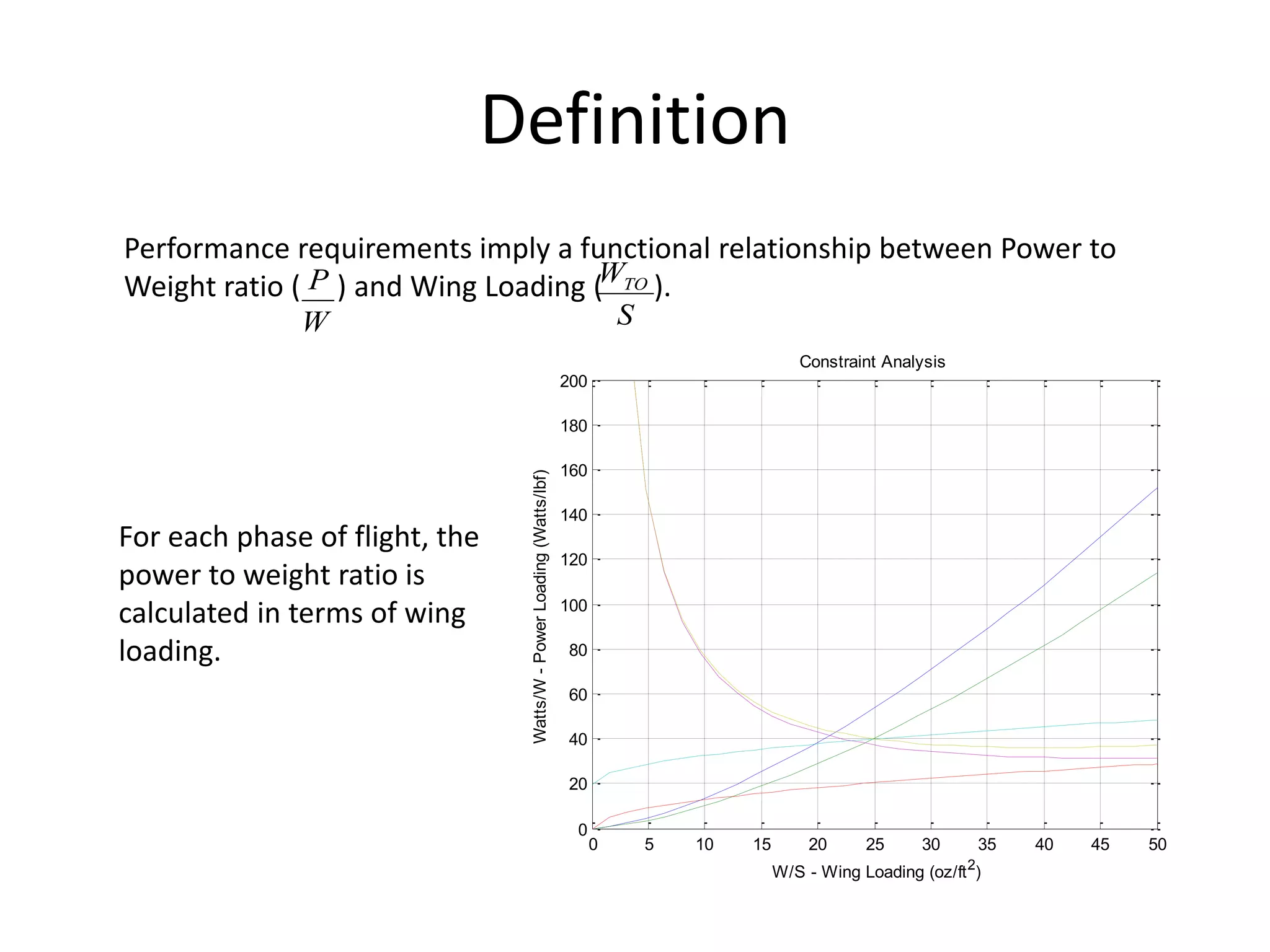
Performance requirements imply a functional relationship between Power to
Weight ratio ( ) and Wing Loading ( ).
W
P
S
WTO
0 5 10 15 20 25 30 35 40 45 50
0
20
40
60
80
100
120
140
160
180
200
Constraint Analysis
W/S - Wing Loading (oz/ft2
)
Watts/W
-
Power
Loading
(Watts/lbf)
For each phase of flight, the
power to weight ratio is
calculated in terms of wing
loading.
Code Structure
input.dat
(can rename as required)
constraint.m
(Run this file to run code)
Turns
Turns
Max
Speed
Rate of
Climb
Ceiling
Landing
Takeoff
Calculate
C_D, K, L/D
Aircraft Input Parameters
The following parameters must be estimated based on the type of aircraft and
past experience.
Aspect Ratio
Span Efficiency Factor
Zero Lift Drag
The drag for any condition is:
2
L
D
D KC
C
C o


)
/(
1 e
AR
K 

 
The maximum lift/drag ratio is
o
D
MAX
MAX
KC
2
1
E
)
D
/
L
( 

A sample input is provided below. This is representative of a typical conventional
aircraft.
Computer Program Input
aircraft (This must be the first line)
5.0 Aspect ratio (AR)
0.8 Span Efficiency (e)
Takeoff
From Brandt et. al. Equation 5.52, the takeoff velocity is found by:
Stall
TO
L
SL
TO
Stall
V
V
C
S
W
V
MAX



2
.
1
2

The Power/Weight (Watts/lbf) ratio is given by:
 
gd
V
W
P
m
p
TO


*
550
*
2
7
.
0
/
3


Computer Program Input
Takeoff
500. Altitude (ft)
1.5 Cl_max
75. Take off distance (ft)
Note: Velocity taken to be mean velocity till
take-off (=70% of take-off velocity)
(Brandt Eqs 5.52 and 5.77)
Landing
The take off velocity is again calculated:
MAX
L
SL
TO
TO
C
S
W
V

2
2
.
1

The Power/Weight (Watts/lbf) ratio is given by:
gd
V
W
P
m
p
TO


550
/
3

Computer Input
Landing
500. altitude (ft)
1.5 MAX
L
C
100 landing distance
(Brandt Eqs 5.52 and 5.77)
Ceiling
The Coefficient of lift (at minimum drag/velocity) is given as:
k
C
C do
l
3

l
To
y
C
S
W
V

2

The Power/Weight ratio is given by:


 g
V
W
P
m
p
y
*
550
*
866
.
/ 
Computer Input
Ceiling
500. Altitude (ft)
Rate of Climb
The Coefficient of lift (at minimum drag/velocity) is given as:
k
C
C do
l
3

l
To
power
C
S
W
V

2
min 
The Power/Weight ratio is given by:
  




















max
min
866
.
*
550
1
/
D
L
V
RofC
W
P
power
m
p
Computer Input
Ceiling
500. Altitude (ft)
Maximum Speed
By definition, the dynamic pressure is:
2
2
1
V
q 

The thrust to weight ratio is calculated by the equation:
)
)(
1
(
q
S
W
k
S
W
qC
W
T
TO
TO
do



The power to weight ratio is:
m
p
W
T
V
W
P


*
550
)
(
/ 
Computer Input
max speed
500. Altitude (ft)
100 Airspeed (ft/s)
Turn
The Power/Weight ratio for turns is determined the same way as that of the
Maximum Speed function but with a load factor (dependent on bank angle) in
the thrust-to-weight ratio equation.
2
2
1
V
q 

)
)(
1
( 2
q
S
W
k
n
S
W
qC
W
T
To
To
do



m
p
W
T
V
W
P


*
550
/ 
Computer Input
turn
35000. Altitude (ft)
660. airspeed (ft/sec)
1.15 load factor – n
Running the Constraint Program
• Download and unzip the constraint analysis code(s) from Team Center.
• In the folder, you will see a program called constraint.m. This is the
master program, and it calls all of the other .m files as functions.
– There is no need to edit the master program, but feel free to take a look at the
program and its functions to understand how it works.
– Run constraint.m in MATLAB, it will prompt you for an input file
(contraint_input.dat).
– Desired constraints can be analyzed by updating the aircraft parameters and
flight segments in the input file (contraint_input.dat).
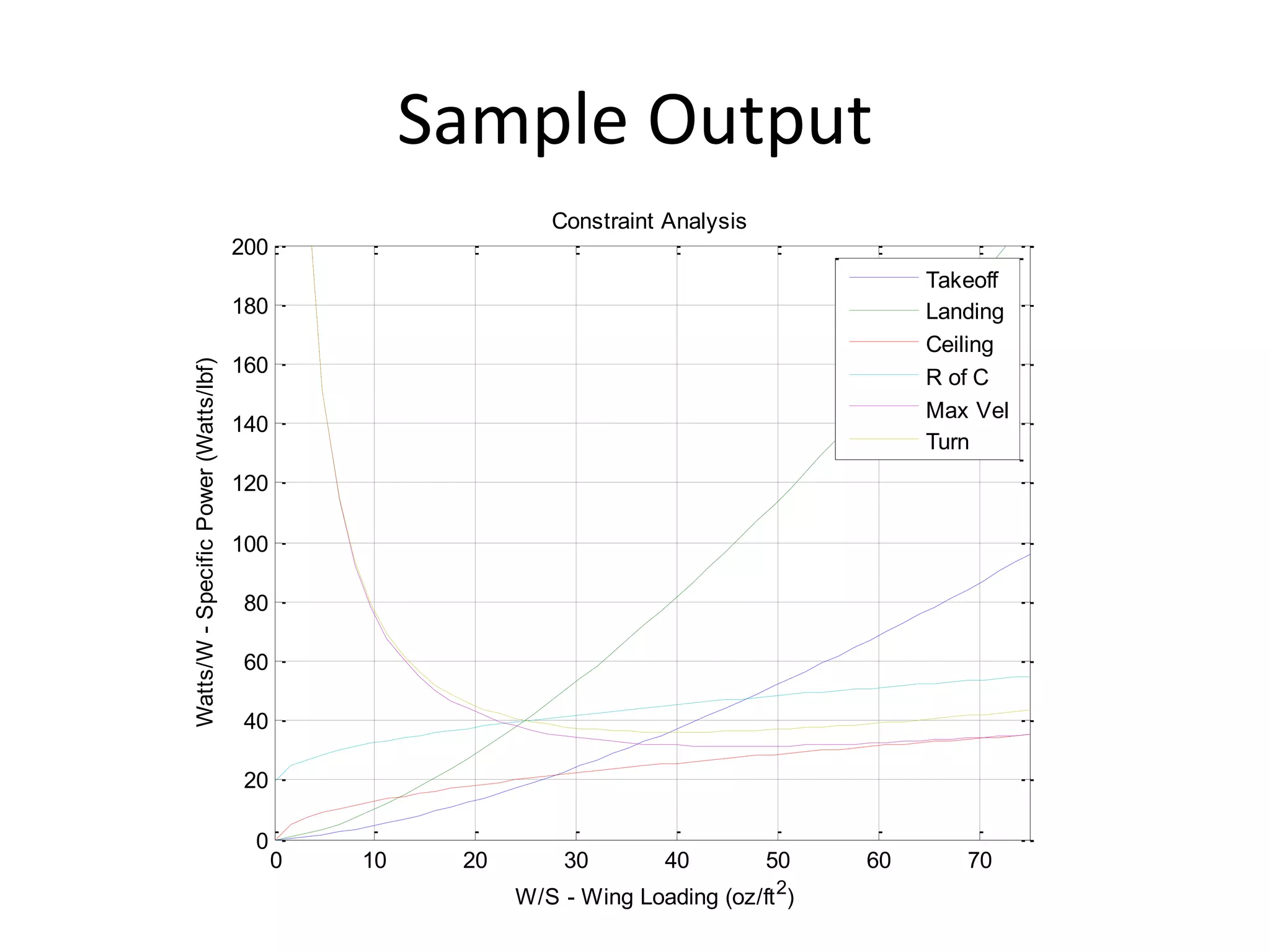
• The program will output (to the MATLAB command screen) some various
values (mostly the data you have input). If you wish to see additional
numerical data, feel free to change the program to print out the data.
• A graph of Wing Loading (oz/ft2) vs. Power to Weight Ratio (Watts/lbf) will
be created, showing the energy required for each of the legs of the
mission. An example of the output follows.
The input file is called contraint_input.dat (You can rename it to whatever you
want). Here is an example set of inputs:
airplane
5.00 aspect ratio
0.08 Cdo
0.60 propellor efficiency
0.60 motor efficiency
0.80 oswald efficiciency
take off
1300. altitude (ft)
1.2 Clmax
75. takeoff distance (ft)
landing
1300. altitude (ft)
1.2 Clmax
100. landing distance (ft)
0. reverse force fraction
ceiling
1400. altitude (ft)
rate-of-climb
1400. altitude (ft)
5. R/C (ft/sec)
max speed
1400. altitude (ft)
42. airspeed (ft/sec)
turn
1400. altitude (ft)
50. airspeed (ft/sec)
1.15 load factor
•Each of the numbers in the input
file must have a decimal in it. For
example, 1.2, or 75. (not 75).
•Do not change the order of the
different variables. Don’t change
anything but the numbers!
•The altitude is MSL (Altitude
above Mean Sea Level).
•You can repeat certain legs, for
example, you can have multiple
turn segments, ceilings, etc. To do
so, simply add the new flight
profiles to the input file. Sequence
of flight segments is not important.
Mission
Legs
Edit as
required
Edit as required
Sample Output
0 10 20 30 40 50 60 70
0
20
40
60
80
100
120
140
160
180
200
Constraint Analysis
W/S - Wing Loading (oz/ft2
)
Watts/W
-
Specific
Power
(Watts/lbf)
Takeoff
Landing
Ceiling
R of C
Max Vel
Turn
WEIGHT ANALYSIS
Estimating aircraft weight/size
Rearrange terms












TO
B
TO
E
PL
TO
W
W
W
W
W
W
1
Take-off
Weight
Empty
Weight
Payload
Weight
Battery Weight
for each flight leg



 B
PL
E
TO W
W
W
W
Mission Input
Empirically
Derived
Mission
Output
Computed for
each flight leg
Take-Off Weight Computation
SLUF Battery Weight Fraction
)
D
/
L
(
K
x
W
W
P
W
K
W
)
D
/
L
(
P
vt
x
dt
dx
v
P
W
K
t
W
t
P
K
W
)
D
/
L
(
P
v
W
L
D
D
...
but
...
D
P
v
P
Dv
P
Tv
Power
Power
D
T
_
_&
W
L
SLUF
batt
p
m
TO
B
elec
B
batt
TO
p
m
elec
elec
B
batt
B
elec
batt
TO
p
m
elec
TO
p
m
elec
elec
m
Shaft
Actual
quired
Re
p
TO





























Brandt p42
Flight Segments
 c
batt
m
p
C
TO
B
D
/
L
k
x
W
W



 
max
L
TO
stall
LO
C
S
/
W
2
2
.
1
v
2
.
1
v




 
)
W
/
P
(
g
v
7
.
0
x
TO
m
p
3
LO
TO




 
o
D
TO
BR
C
k
S
/
W
2
v


Take-off:
Cruise (Type 1 – Best Range; Type 2 – Velocity Specified)
Sustained Turn:
2
L
D
D kC
C
C o

  
o
D
max
C
AR
e
2
1
D
/
L




Aerodynamic Model:
 L
batt
m
p
L
TO
B
D
/
L
k
x
W
W



 
o
D
TO
L
C
3
k
S
/
W
2
v


Loiter (Max. Endurance)
 max
L D
/
L
866
.
0
)
D
/
L
( 
   






 




S
/
W
C
q
v
)
W
/
P
(
S
/
W
k
q
n
TO
D
m
p
TO
TO
o
AR
e
1
k




1
n
g
k
v
)
W
/
P
(
2
W
W
2
batt
T
TO
TO
B



Reference: Aircraft Design: A Conceptual Approach, Daniel P. Raymer
q
)
S
/
W
(
k
q
C
)
S
/
W
(
)
D
/
L
( 2
TO
Do
TO
c


Assumptions
• The weight fraction is known and achievable
– 0.23 for most competitive AIAA D/B/F aircraft
– 0.40 for AIAA D/B/F competition average
• The motor and propeller efficiencies are constant (not true!)
• Known 2 term aircraft aerodynamic drag model is applicable
– Estimate and update based on wind-tunnel testing
• Wind speeds/directions not considered
– Increased power requirement for upwind flight segments with a headwind are
not offset by reduced power requirements on the downwind flight segment.
• Human-in-the-loop – Pilot cannot always operate aircraft at optimal
design point!
– Safety factor required to achieve design performance specification
Running the Weight Program
• Download and unzip the constraint analysis code(s) from Team Center.
• In the folder, you will see a program called weight.m. This is the master
program, and it calls all of the other .m files as functions.
– There is no need to edit the master program, but feel free to take a look at the
program and its functions to understand how it works.
– Update to input file (weight_input.txt) to include desired aircraft parameters
and define different flight segments.
– Run weight.m in MATLAB, it will prompt you for an input file
(weight_input.txt).
• Aircraft weight break-up and performance summary for each flight leg will
be output to the Matlab screen. An example of the output follows.
The input file is called weight_input.dat (You can rename it to whatever you want).
Here is an example set of inputs:
airplane
5. aspect ratio
0.08 Cdo
0.65 span efficiency
0.60 propeller efficiency
0.60 motor efficiency
22. wing loading (oz weight/ft2)
45. power to weight (Watt/lbf)
70000. energy (Joules) / Battery Weight (lbf)
0.40 empty weight fraction (emperical)
7.2 payload weight (lbf)
take-off
1300. altitude (ft)
1.2 Clmax
climb
100 alitude above ground to climb to (ft)
1. delta (% of max power)
c1
1400. altitude (ft)
7000. cruise distance (ft)
c2
1400. altitude (ft)
7000. cruise distance (ft)
40. cruise velocity (ft/s)
lo
1400. altitude (ft)
7000. cruise distance (ft)
t1
1400. altitude (ft)
720. turn angle (degrees)
1.8 clmax
t2
1400. altitude (ft)
31.05 turn velocity (ft/s)
720. turn angle (degrees)
•Each of the numbers in the input
file must have a decimal in it. For
example, 1.2, or 75. (not 75).
•Do not change the order of the
different variables. Don’t change
anything but the numbers!
•The altitude is MSL (Altitude
above Mean Sea Level).
•You can repeat certain legs, for
example, you can have multiple
turn segments, ceilings, etc. To do
so, simply add the new flight
profiles to the input file. Sequence
of flight segments is not important.
Mission
Legs
Edit as
required
Edit as required
Note: Climb module available, but current version
requires improvement and is not recommended for use.
Sample Output
FLIGHT ANALYSIS
Estimating aircraft performance
Running the Flight Program
• Download and unzip the constraint analysis code(s) from Team Center.
• In the folder, you will see a program called flight.m. This is the master
program, and it calls all of the other .m files as functions.
– There is no need to edit the master program, but feel free to take a look at the
program and its functions to understand how it works.
– Update to input file (flight_input.txt) to include desired aircraft parameters
and define different flight segments.
– Run flight.m in MATLAB, it will prompt you for an input file (flight_input.txt).
• Aircraft performance summary for each flight leg will be output to the
Matlab screen, including energy requirements and surplus. An example of
the output follows.
The input file is called flight_input.dat (You can rename it to whatever you want).
Here is an example set of inputs:
airplane
5. aspect ratio
0.08 Cdo
0.65 span efficiency
0.60 propeller efficiency
0.60 motor efficiency
70000. Energy (Joules) / Battery Weight (lbf)
7.2 payload weight (lbf)
7.96 empty weight (lbf)
4.75 battery weight
14.48 wing planform area (ft^2)
895.95 motor power (watts)
take-off
1300. altitude (ft)
1.2 Clmax
climb
100 alitude above ground to climb to (ft)
1. delta (% of max power)
c1
1400. altitude (ft)
7000. cruise distance (ft)
c2
1400. altitude (ft)
7000. cruise distance (ft)
40. cruise velocity (ft/s)
lo
1400. altitude (ft)
7000. cruise distance (ft)
t1
1400. altitude (ft)
720. turn angle (degrees)
1.8 clmax
t2
1400. altitude (ft)
31.05 turn velocity (ft/s)
720. turn angle (degrees)
•Each of the numbers in the input
file must have a decimal in it. For
example, 1.2, or 75. (not 75).
•Do not change the order of the
different variables. Don’t change
anything but the numbers!
•The altitude is MSL (Altitude
above Mean Sea Level).
•You can repeat certain legs, for
example, you can have multiple
turn segments, ceilings, etc. To do
so, simply add the new flight
profiles to the input file. Sequence
of flight segments is not important.
Mission
Legs
Edit as
required
Edit as required
Note: Climb module available, but current version
requires improvement and is not recommended for use.
Sample Output
PERFORMACE OPTIMIZER
Iterating through the feasible design space
Program Format
• Software Platform: Matlab
• Flight Profiles: mission1.m, mission2.m
– Specify flight segment types, distances, etc. for
each flight mission
• Main program: optimize.m
– Define design space, aircraft constants and scoring
parameters
• Program Output: Matlab screen
– No output file
Mission Profiles (missionx.m)
• Place blue text in mission files in any sequence and any number of times. Required
inputs are placed in <> and outputs include flight segment name (leg(i,:)), battery
weight fraction (wb_wto(i,:)), velocity (v(i,:)) in ft/s, time (t(i,:)) in seconds and
distance (x(i,:)) in feet. Input units are feet and degrees.
• Take-off:
[leg(i,:) wb_wto(i,:) v(i,:) t(i,:) x(i,:)]=takeoffp((<altitude>, <Clmax>)
• Straight & Level Flight
– Cruise Type 1 (Min. Power Consumption)
[leg(i,:) wb_wto(i,:) v(i,:) t(i,:) x(i,:)]=cruise1p(<altitude>, <distance>);
– Cruise Type 2 (Specified Velocity)
[leg(i,:) wb_wto(i,:) v(i,:) t(i,:) x(i,:)]=cruise2p(<altitude>, <distance>, <velocity>);
– Loiter (Max. Endurance)
[leg(i,:) wb_wto(i,:) v(i,:) t(i,:) x(i,:)]=loiterp(<altitude>, <distance>);
• Turns
– Turn Type 1 (Min. Power Consumption)
[leg(i,:) wb_wto(i,:) v(i,:) t(i,:) x(i,:)]=turn1p(<altitude>, <angle>);
– Turn Type 2 (Velocity Specified)
[leg(i,:) wb_wto(i,:) v(i,:) t(i,:) x(i,:)]=turn1p(<altitude>, <velocity>, <angle>);
Note: Climb module available, but current version requires improvement and is not recommended for use.
Main Program (optimize.m)
• Input aircraft parameters
• Establish mission constraint to obtain required specific power
requirements
– Usually take-off distance requirement
• Size aircraft for heaviest payload mission
• Evaluate aircraft performance for other missions
• Iterate through wing loadings and aspect ratios to optimize
parameters of interest!
• File provided is based on 2007-2008 competition and will
require to be tailored for each year’s requirements.
Example: 2007-2008 Flowchart
INPUT:
Wing Loading (WTO/S) &
Aspect Ratio (AR)
MAIN PROGRAM LOOP
Drag
Coefficient:
Take-off
Weight:
TAKE-OFF
Take-off
Velocity:
Take-off
Distance:
PAYLOAD MISSION T/O WEIGHT












2
TO
2
B
TO
E
2
PL
2
TO
W
W
W
W
1
W
W



 B
PL
E
TO W
W
W
W
)
AR
(
e
C
C
C
2
L
D
D o



 
max
L
TO
LO
C
S
/
W
2
2
.
1
v


 
)
W
/
P
(
g
v
7
.
0
x
TO
m
p
3
LO
TO




CRUISE
Min. Power
Cruise Point:
Battery Weight
Fraction:
TURN
Iterate load factor (n) and turn velocity.
Minimize Battery Weight Fraction:
 max
batt
p
p
cruise
TO
B
D
/
L
k
x
W
W



 
 











)
AR
(
e
q
S
/
W
n
S
/
W
q
C
k
x
W
W TO
2
TO
D
batt
p
p
turn
TO
B o
 
o
D
max
C
)
AR
(
e
1
2
1
D
/
L


EMPTY MISSION T/O WEIGHT











1
TO
1
B
E
1
TO
W
W
1
W
W
MISSION 2 SCORE
MISSION 1 SCORE
2
B
E
loading
2
W
W
t
1
Score



1
B
laps
1
W
n
Score 
2007-2008 Sample Output
Contacts
Pritesh Mody (pcmody@purdue.edu)
Kyle Noth (knoth@purdue.edu)

Electric_Propeller_Aircraft_Sizing.pptx

  • 1.
    Electric Propeller DrivenRC Aircraft Constraint Analysis/Weight Estimation/Flight Simulation/Optimization Purdue University AIAA Design Build Fly Team 2007-2008
  • 2.
  • 3.
  • 4.
    Definition Performance requirements implya functional relationship between Power to Weight ratio ( ) and Wing Loading ( ). W P S WTO 0 5 10 15 20 25 30 35 40 45 50 0 20 40 60 80 100 120 140 160 180 200 Constraint Analysis W/S - Wing Loading (oz/ft2 ) Watts/W - Power Loading (Watts/lbf) For each phase of flight, the power to weight ratio is calculated in terms of wing loading.
  • 5.
    Code Structure input.dat (can renameas required) constraint.m (Run this file to run code) Turns Turns Max Speed Rate of Climb Ceiling Landing Takeoff Calculate C_D, K, L/D
  • 6.
    Aircraft Input Parameters Thefollowing parameters must be estimated based on the type of aircraft and past experience. Aspect Ratio Span Efficiency Factor Zero Lift Drag The drag for any condition is: 2 L D D KC C C o   ) /( 1 e AR K     The maximum lift/drag ratio is o D MAX MAX KC 2 1 E ) D / L (   A sample input is provided below. This is representative of a typical conventional aircraft. Computer Program Input aircraft (This must be the first line) 5.0 Aspect ratio (AR) 0.8 Span Efficiency (e)
  • 7.
    Takeoff From Brandt et.al. Equation 5.52, the takeoff velocity is found by: Stall TO L SL TO Stall V V C S W V MAX    2 . 1 2  The Power/Weight (Watts/lbf) ratio is given by:   gd V W P m p TO   * 550 * 2 7 . 0 / 3   Computer Program Input Takeoff 500. Altitude (ft) 1.5 Cl_max 75. Take off distance (ft) Note: Velocity taken to be mean velocity till take-off (=70% of take-off velocity) (Brandt Eqs 5.52 and 5.77)
  • 8.
    Landing The take offvelocity is again calculated: MAX L SL TO TO C S W V  2 2 . 1  The Power/Weight (Watts/lbf) ratio is given by: gd V W P m p TO   550 / 3  Computer Input Landing 500. altitude (ft) 1.5 MAX L C 100 landing distance (Brandt Eqs 5.52 and 5.77)
  • 9.
    Ceiling The Coefficient oflift (at minimum drag/velocity) is given as: k C C do l 3  l To y C S W V  2  The Power/Weight ratio is given by:    g V W P m p y * 550 * 866 . /  Computer Input Ceiling 500. Altitude (ft)
  • 10.
    Rate of Climb TheCoefficient of lift (at minimum drag/velocity) is given as: k C C do l 3  l To power C S W V  2 min  The Power/Weight ratio is given by:                        max min 866 . * 550 1 / D L V RofC W P power m p Computer Input Ceiling 500. Altitude (ft)
  • 11.
    Maximum Speed By definition,the dynamic pressure is: 2 2 1 V q   The thrust to weight ratio is calculated by the equation: ) )( 1 ( q S W k S W qC W T TO TO do    The power to weight ratio is: m p W T V W P   * 550 ) ( /  Computer Input max speed 500. Altitude (ft) 100 Airspeed (ft/s)
  • 12.
    Turn The Power/Weight ratiofor turns is determined the same way as that of the Maximum Speed function but with a load factor (dependent on bank angle) in the thrust-to-weight ratio equation. 2 2 1 V q   ) )( 1 ( 2 q S W k n S W qC W T To To do    m p W T V W P   * 550 /  Computer Input turn 35000. Altitude (ft) 660. airspeed (ft/sec) 1.15 load factor – n
  • 13.
    Running the ConstraintProgram • Download and unzip the constraint analysis code(s) from Team Center. • In the folder, you will see a program called constraint.m. This is the master program, and it calls all of the other .m files as functions. – There is no need to edit the master program, but feel free to take a look at the program and its functions to understand how it works. – Run constraint.m in MATLAB, it will prompt you for an input file (contraint_input.dat). – Desired constraints can be analyzed by updating the aircraft parameters and flight segments in the input file (contraint_input.dat). • The program will output (to the MATLAB command screen) some various values (mostly the data you have input). If you wish to see additional numerical data, feel free to change the program to print out the data. • A graph of Wing Loading (oz/ft2) vs. Power to Weight Ratio (Watts/lbf) will be created, showing the energy required for each of the legs of the mission. An example of the output follows.
  • 14.
    The input fileis called contraint_input.dat (You can rename it to whatever you want). Here is an example set of inputs: airplane 5.00 aspect ratio 0.08 Cdo 0.60 propellor efficiency 0.60 motor efficiency 0.80 oswald efficiciency take off 1300. altitude (ft) 1.2 Clmax 75. takeoff distance (ft) landing 1300. altitude (ft) 1.2 Clmax 100. landing distance (ft) 0. reverse force fraction ceiling 1400. altitude (ft) rate-of-climb 1400. altitude (ft) 5. R/C (ft/sec) max speed 1400. altitude (ft) 42. airspeed (ft/sec) turn 1400. altitude (ft) 50. airspeed (ft/sec) 1.15 load factor •Each of the numbers in the input file must have a decimal in it. For example, 1.2, or 75. (not 75). •Do not change the order of the different variables. Don’t change anything but the numbers! •The altitude is MSL (Altitude above Mean Sea Level). •You can repeat certain legs, for example, you can have multiple turn segments, ceilings, etc. To do so, simply add the new flight profiles to the input file. Sequence of flight segments is not important. Mission Legs Edit as required Edit as required
  • 15.
    Sample Output 0 1020 30 40 50 60 70 0 20 40 60 80 100 120 140 160 180 200 Constraint Analysis W/S - Wing Loading (oz/ft2 ) Watts/W - Specific Power (Watts/lbf) Takeoff Landing Ceiling R of C Max Vel Turn
  • 16.
  • 17.
    Rearrange terms             TO B TO E PL TO W W W W W W 1 Take-off Weight Empty Weight Payload Weight Battery Weight foreach flight leg     B PL E TO W W W W Mission Input Empirically Derived Mission Output Computed for each flight leg Take-Off Weight Computation
  • 18.
    SLUF Battery WeightFraction ) D / L ( K x W W P W K W ) D / L ( P vt x dt dx v P W K t W t P K W ) D / L ( P v W L D D ... but ... D P v P Dv P Tv Power Power D T _ _& W L SLUF batt p m TO B elec B batt TO p m elec elec B batt B elec batt TO p m elec TO p m elec elec m Shaft Actual quired Re p TO                              Brandt p42
  • 19.
    Flight Segments  c batt m p C TO B D / L k x W W     max L TO stall LO C S / W 2 2 . 1 v 2 . 1 v       ) W / P ( g v 7 . 0 x TO m p 3 LO TO       o D TO BR C k S / W 2 v   Take-off: Cruise (Type 1 – Best Range; Type 2 – Velocity Specified) Sustained Turn: 2 L D D kC C C o     o D max C AR e 2 1 D / L     Aerodynamic Model:  L batt m p L TO B D / L k x W W      o D TO L C 3 k S / W 2 v   Loiter (Max. Endurance)  max L D / L 866 . 0 ) D / L (                  S / W C q v ) W / P ( S / W k q n TO D m p TO TO o AR e 1 k     1 n g k v ) W / P ( 2 W W 2 batt T TO TO B    Reference: Aircraft Design: A Conceptual Approach, Daniel P. Raymer q ) S / W ( k q C ) S / W ( ) D / L ( 2 TO Do TO c  
  • 20.
    Assumptions • The weightfraction is known and achievable – 0.23 for most competitive AIAA D/B/F aircraft – 0.40 for AIAA D/B/F competition average • The motor and propeller efficiencies are constant (not true!) • Known 2 term aircraft aerodynamic drag model is applicable – Estimate and update based on wind-tunnel testing • Wind speeds/directions not considered – Increased power requirement for upwind flight segments with a headwind are not offset by reduced power requirements on the downwind flight segment. • Human-in-the-loop – Pilot cannot always operate aircraft at optimal design point! – Safety factor required to achieve design performance specification
  • 21.
    Running the WeightProgram • Download and unzip the constraint analysis code(s) from Team Center. • In the folder, you will see a program called weight.m. This is the master program, and it calls all of the other .m files as functions. – There is no need to edit the master program, but feel free to take a look at the program and its functions to understand how it works. – Update to input file (weight_input.txt) to include desired aircraft parameters and define different flight segments. – Run weight.m in MATLAB, it will prompt you for an input file (weight_input.txt). • Aircraft weight break-up and performance summary for each flight leg will be output to the Matlab screen. An example of the output follows.
  • 22.
    The input fileis called weight_input.dat (You can rename it to whatever you want). Here is an example set of inputs: airplane 5. aspect ratio 0.08 Cdo 0.65 span efficiency 0.60 propeller efficiency 0.60 motor efficiency 22. wing loading (oz weight/ft2) 45. power to weight (Watt/lbf) 70000. energy (Joules) / Battery Weight (lbf) 0.40 empty weight fraction (emperical) 7.2 payload weight (lbf) take-off 1300. altitude (ft) 1.2 Clmax climb 100 alitude above ground to climb to (ft) 1. delta (% of max power) c1 1400. altitude (ft) 7000. cruise distance (ft) c2 1400. altitude (ft) 7000. cruise distance (ft) 40. cruise velocity (ft/s) lo 1400. altitude (ft) 7000. cruise distance (ft) t1 1400. altitude (ft) 720. turn angle (degrees) 1.8 clmax t2 1400. altitude (ft) 31.05 turn velocity (ft/s) 720. turn angle (degrees) •Each of the numbers in the input file must have a decimal in it. For example, 1.2, or 75. (not 75). •Do not change the order of the different variables. Don’t change anything but the numbers! •The altitude is MSL (Altitude above Mean Sea Level). •You can repeat certain legs, for example, you can have multiple turn segments, ceilings, etc. To do so, simply add the new flight profiles to the input file. Sequence of flight segments is not important. Mission Legs Edit as required Edit as required Note: Climb module available, but current version requires improvement and is not recommended for use.
  • 23.
  • 24.
  • 25.
    Running the FlightProgram • Download and unzip the constraint analysis code(s) from Team Center. • In the folder, you will see a program called flight.m. This is the master program, and it calls all of the other .m files as functions. – There is no need to edit the master program, but feel free to take a look at the program and its functions to understand how it works. – Update to input file (flight_input.txt) to include desired aircraft parameters and define different flight segments. – Run flight.m in MATLAB, it will prompt you for an input file (flight_input.txt). • Aircraft performance summary for each flight leg will be output to the Matlab screen, including energy requirements and surplus. An example of the output follows.
  • 26.
    The input fileis called flight_input.dat (You can rename it to whatever you want). Here is an example set of inputs: airplane 5. aspect ratio 0.08 Cdo 0.65 span efficiency 0.60 propeller efficiency 0.60 motor efficiency 70000. Energy (Joules) / Battery Weight (lbf) 7.2 payload weight (lbf) 7.96 empty weight (lbf) 4.75 battery weight 14.48 wing planform area (ft^2) 895.95 motor power (watts) take-off 1300. altitude (ft) 1.2 Clmax climb 100 alitude above ground to climb to (ft) 1. delta (% of max power) c1 1400. altitude (ft) 7000. cruise distance (ft) c2 1400. altitude (ft) 7000. cruise distance (ft) 40. cruise velocity (ft/s) lo 1400. altitude (ft) 7000. cruise distance (ft) t1 1400. altitude (ft) 720. turn angle (degrees) 1.8 clmax t2 1400. altitude (ft) 31.05 turn velocity (ft/s) 720. turn angle (degrees) •Each of the numbers in the input file must have a decimal in it. For example, 1.2, or 75. (not 75). •Do not change the order of the different variables. Don’t change anything but the numbers! •The altitude is MSL (Altitude above Mean Sea Level). •You can repeat certain legs, for example, you can have multiple turn segments, ceilings, etc. To do so, simply add the new flight profiles to the input file. Sequence of flight segments is not important. Mission Legs Edit as required Edit as required Note: Climb module available, but current version requires improvement and is not recommended for use.
  • 27.
  • 28.
    PERFORMACE OPTIMIZER Iterating throughthe feasible design space
  • 29.
    Program Format • SoftwarePlatform: Matlab • Flight Profiles: mission1.m, mission2.m – Specify flight segment types, distances, etc. for each flight mission • Main program: optimize.m – Define design space, aircraft constants and scoring parameters • Program Output: Matlab screen – No output file
  • 30.
    Mission Profiles (missionx.m) •Place blue text in mission files in any sequence and any number of times. Required inputs are placed in <> and outputs include flight segment name (leg(i,:)), battery weight fraction (wb_wto(i,:)), velocity (v(i,:)) in ft/s, time (t(i,:)) in seconds and distance (x(i,:)) in feet. Input units are feet and degrees. • Take-off: [leg(i,:) wb_wto(i,:) v(i,:) t(i,:) x(i,:)]=takeoffp((<altitude>, <Clmax>) • Straight & Level Flight – Cruise Type 1 (Min. Power Consumption) [leg(i,:) wb_wto(i,:) v(i,:) t(i,:) x(i,:)]=cruise1p(<altitude>, <distance>); – Cruise Type 2 (Specified Velocity) [leg(i,:) wb_wto(i,:) v(i,:) t(i,:) x(i,:)]=cruise2p(<altitude>, <distance>, <velocity>); – Loiter (Max. Endurance) [leg(i,:) wb_wto(i,:) v(i,:) t(i,:) x(i,:)]=loiterp(<altitude>, <distance>); • Turns – Turn Type 1 (Min. Power Consumption) [leg(i,:) wb_wto(i,:) v(i,:) t(i,:) x(i,:)]=turn1p(<altitude>, <angle>); – Turn Type 2 (Velocity Specified) [leg(i,:) wb_wto(i,:) v(i,:) t(i,:) x(i,:)]=turn1p(<altitude>, <velocity>, <angle>); Note: Climb module available, but current version requires improvement and is not recommended for use.
  • 31.
    Main Program (optimize.m) •Input aircraft parameters • Establish mission constraint to obtain required specific power requirements – Usually take-off distance requirement • Size aircraft for heaviest payload mission • Evaluate aircraft performance for other missions • Iterate through wing loadings and aspect ratios to optimize parameters of interest! • File provided is based on 2007-2008 competition and will require to be tailored for each year’s requirements.
  • 32.
    Example: 2007-2008 Flowchart INPUT: WingLoading (WTO/S) & Aspect Ratio (AR) MAIN PROGRAM LOOP Drag Coefficient: Take-off Weight: TAKE-OFF Take-off Velocity: Take-off Distance: PAYLOAD MISSION T/O WEIGHT             2 TO 2 B TO E 2 PL 2 TO W W W W 1 W W     B PL E TO W W W W ) AR ( e C C C 2 L D D o      max L TO LO C S / W 2 2 . 1 v     ) W / P ( g v 7 . 0 x TO m p 3 LO TO     CRUISE Min. Power Cruise Point: Battery Weight Fraction: TURN Iterate load factor (n) and turn velocity. Minimize Battery Weight Fraction:  max batt p p cruise TO B D / L k x W W                   ) AR ( e q S / W n S / W q C k x W W TO 2 TO D batt p p turn TO B o   o D max C ) AR ( e 1 2 1 D / L   EMPTY MISSION T/O WEIGHT            1 TO 1 B E 1 TO W W 1 W W MISSION 2 SCORE MISSION 1 SCORE 2 B E loading 2 W W t 1 Score    1 B laps 1 W n Score 
  • 33.
  • 34.
  • 35.