Joy Avery
Universal Design for Learners
Module 3 e-Portfolio Walden University
Diverse Learners Winter Term
Joy.avery@waldenu.edu
EDUC7109
Introduction
“The goal of education in the 21st century is not simply
the mastery of content knowledge or use of new
technologies. It is the mastery of the learning process.
Education should help turn novice learners into expert
learners—individuals who want to learn, who know how
to learn strategically, and who, in their own highly
individual and flexible ways, are well prepared for a
lifetime of learning (CAST, 2011) .” UDL assists
educators to create and evaluate curriculum to meet the
needs of all learners.
Goals
Understand the concepts of Universal Design Learning
Apply the concepts of Universal Design for Learning to
a Middle School Technology Based Classroom
Inspiration for UDL
When engineers were designing and developing
buildings, the buildings originally were not
accessible by all. However as architects and
building designs advanced, it was soon realized
that one entry point was not feasible for
everyone. Buildings changed adding several
entry points, automatic doors, ramps, elevators
and even escalators.
As time passed, the changes in accessibility for
all spread through other businesses such as
entertainment, bringing us to closed circuit
television for example.
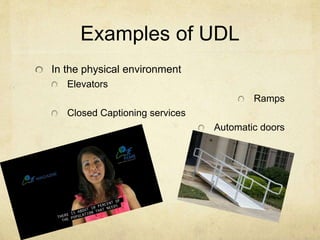
Examples of UDL
In the physical environment
Elevators
Ramps
Closed Captioning services
Automatic doors
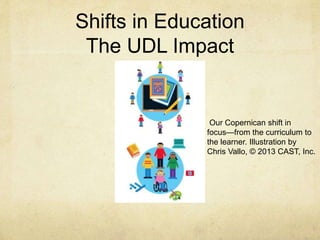
Shifts in Education
The UDL Impact
Our Copernican shift in
focus—from the curriculum to
the learner. Illustration by
Chris Vallo, © 2013 CAST, Inc.
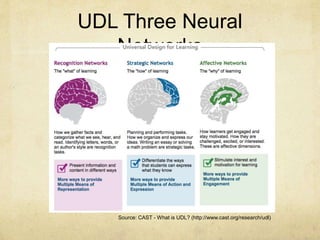
UDL Three Neural
Networks
Source: CAST - What is UDL? (http://www.cast.org/research/udl)
Brain Research tell us
about learning differences.
The brain research upholds the idea that everyone learns in
different ways.
The three networks that student rely on influence their abilities
to learn, comprehend and demonstrate knowledge.
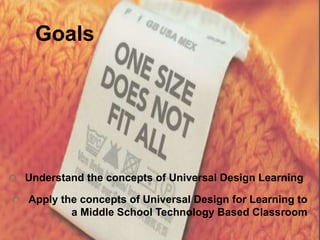
A curriculum needs to be as diverse as our learners. One size
does not fit all, but with planning goals, various materials,
multiple deliveries, and assessments, we can teach to all.
When planning learning…
Present information and content in various ways
Stimulate the interest of the learners and
motivate
Differentiate the ways that students can express
what they know
Three Principles in
Education
Multiple means of
Representation
Action and Expression
Engagement
Graphic Organizer
Principle 1 of UDL
Multiple Means of Representation
and Instructional Methods
Provide options for
Perception
Present information in forms such as visual, auditory, and
kinesthetic
Make sure that information can be adjusted (by size or sound)
Language, mathematical, expressions and symbols
Pre-Teaching connecting to learners’ experience and prior
knowledge
Provide choices for language, math and other symbols
Use visual aides to help explain text
Provide vocabulary in other languages
(CAST, 2011)
Principle 1 of UDL
Multiple Means of Representation and
Instructional Methods
Comprehension
Anchor instruction by linking to prior knowledge
(visual imagery, concept mastery)
Highlight key elements in diagrams, text,
graphics…
Use outlines, graphic organizers, concept
organizers
Guide, explicit prompts, chunk delivery into
smaller elements
Explore with dramatic works such as plays,
media, literature, film, or the arts.
Checklists, review often, embed new ideas into
familiar context
REVISIT
Principle 2 of UDL
Provide Multiple Means of Action and
Expression
Options for physical action
Various response methods (stand agree/sit, thumbs up or
thumbs down)
Options for expression and communication
Compose multiple medias such as text, illustration, comics
Solve problems with variety of strategies
Concrete and virtual materials or manipulatives
Scaffolding for latter release
Mentors
Differentiated feedback
Options for executive functions
Goal setting
Embed coaching, stop and think prompts, planning templates,
reachable short term objectives leading towards long term goals.
(CAST, 2011)
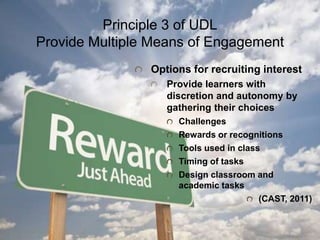
Principle 3 of UDL
Provide Multiple Means of Engagement
Options for recruiting interest
Provide learners with
discretion and autonomy by
gathering their choices
Challenges
Rewards or recognitions
Tools used in class
Timing of tasks
Design classroom and
academic tasks
(CAST, 2011)
Principle 3 of UDL
ContinuedSustaining effort and persistence
Prompt or require learners to explicitly formulate or restate goal
Display goals in multiple ways
Prompts or scaffolding
Differentiate the degree of difficulty or complexity within core activities can
be completed
Varied degrees of freedom for acceptable performance
Cooperative learning groups with roles
Positive behavior
Self-regulation
Provide prompts, reminders, guides, rubrics, checklists..that focus on
Elevating frequency of self-reflection and identification of personal goals
Increasing the length of on-task orientation in the face of distractions
Differentiated models, scaffold and feedback to managing frustration,
seeking external emotional support, simulations to demonstrate coping
skills
Self-Assessment and reflection (CAST.
2011)
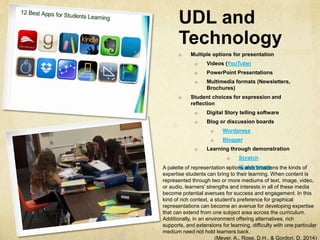
UDL and
Technology
o Multiple options for presentation
o Videos (YouTube)
o PowerPoint Presentations
o Multimedia formats (Newsletters,
Brochures)
o Student choices for expression and
reflection
o Digital Story telling software
o Blog or discussion boards
o Wordpress
o Blogger
o Learning through demonstration
o Scratch
o iCanAnimateA palette of representation options also broadens the kinds of
expertise students can bring to their learning. When content is
represented through two or more mediums of text, image, video,
or audio, learners' strengths and interests in all of these media
become potential avenues for success and engagement. In this
kind of rich context, a student's preference for graphical
representations can become an avenue for developing expertise
that can extend from one subject area across the curriculum.
Additionally, in an environment offering alternatives, rich
supports, and extensions for learning, difficulty with one particular
medium need not hold learners back.
(Meyer, A., Rose, D.H., & Gordon, D. 2014)
Potential impact of UDL on Student
learning in workplace
Teachers establish clear learning goals
Challenge learners
Involve learners
Assess to gather information
Formative and summative
Teachers can reflect on decisions, approaches, procedures, and routines that
can enhance or accelerate learning.
(Meyer, A., Rose, D.H., & Gordon, D. 2014)
Jensen (2008) discusses stages of optimal learning as “First, preparation
provides a framework for the new learning and primes the learners’ brain with
possible connections. The more background learners have in the subject, the
faster they will absorb and process the new information.”
According to Bray, Brown, and Green (2004), “the teachers begins with an
instructional plan, then modifies the plan based on the student’s progress.”
How does UDL support
Cultural, Ethnic, Linguistic, and Academic
Diversity
Providing multiple means of representation
through different modalities
Senses (volume can be adjusted, font size can be
enlarged if needed) In order to assist a student with
a farsighted visual impairment, his screen display
can be enlarged to his comfort level.
Provide cross-linguistic understanding with primary
or dominant language first and then offer heritage
languages with electronic translation, multilingual
glossaries on the web
Embed visual and non-linguistic supports
CAST Online Tools
UDL Curriculum Self-Check
UDL Lesson Builder or CAST UDL Exchange
UDL Book Builder
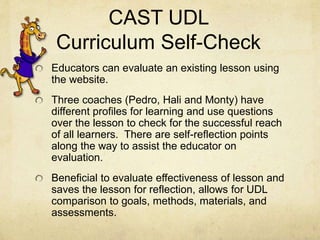
CAST UDL
Curriculum Self-Check
Educators can evaluate an existing lesson using
the website.
Three coaches (Pedro, Hali and Monty) have
different profiles for learning and use questions
over the lesson to check for the successful reach
of all learners. There are self-reflection points
along the way to assist the educator on
evaluation.
Beneficial to evaluate effectiveness of lesson and
saves the lesson for reflection, allows for UDL
comparison to goals, methods, materials, and
assessments.
CAST UDL
Lesson Builder
Allows educators to explore model UDL Lesson Plans
PreK-5th Grade
On each model lesson plan there is a UDL Connection
which explains the applications of UDL
When you visit Builder, you are given an outline to fill in
over the lesson including formative and summative
assessments, opening, during and closing instructional
methods.
Beneficial (the most is the builder) Several key
components can be overlooked when creating a lesson,
although the educator begins with the end of the mind-
often key components are overlooked…
You are redirected to this site for more CAST UDL
Exchange
CAST UDL
Book Builder
Website allows educators to read books, offer tips,
three reading coaches and extension activities.
Also educators can author, save and edit books.
Terry, the tip giraffe, offers tips on text, choose
images, audio clips, glossary terms and other
supports for coaches.
Benefits are the fact that the books are 24-hour
accessible to learners, downloadable, and printable.
They are also created with UDL in mind, bilingual books,
accessible to public library books (often students don’t
have access to a public library), and you can share with
others and they can share with you.
References
Bray, M., Brown, A. & Green, T.D. (2004).
Technology and the diverse learner: a guide to
classroom practice. Thousand Oaks, CA: Corwin
Press.
CAST (2011). Universal design for learning guidelines
version 2.0.Wakefield, MA. Author.
Jensen, E. (2008). Brain-based learning: the new
paradigm of teaching. Thousand Oaks, CA: Corwin
Press.
Meyer, A., Rose, D.H., & Gordon, D. (2014).
Universal design for learning: theory and practice.
Wakefield, MA: CAST Professional Publishing.

EDUC 7109

  • 1.
    Joy Avery Universal Designfor Learners Module 3 e-Portfolio Walden University Diverse Learners Winter Term Joy.avery@waldenu.edu EDUC7109
  • 2.
    Introduction “The goal ofeducation in the 21st century is not simply the mastery of content knowledge or use of new technologies. It is the mastery of the learning process. Education should help turn novice learners into expert learners—individuals who want to learn, who know how to learn strategically, and who, in their own highly individual and flexible ways, are well prepared for a lifetime of learning (CAST, 2011) .” UDL assists educators to create and evaluate curriculum to meet the needs of all learners.
  • 3.
    Goals Understand the conceptsof Universal Design Learning Apply the concepts of Universal Design for Learning to a Middle School Technology Based Classroom
  • 4.
    Inspiration for UDL Whenengineers were designing and developing buildings, the buildings originally were not accessible by all. However as architects and building designs advanced, it was soon realized that one entry point was not feasible for everyone. Buildings changed adding several entry points, automatic doors, ramps, elevators and even escalators. As time passed, the changes in accessibility for all spread through other businesses such as entertainment, bringing us to closed circuit television for example.
  • 5.
    Examples of UDL Inthe physical environment Elevators Ramps Closed Captioning services Automatic doors
  • 6.
    Shifts in Education TheUDL Impact Our Copernican shift in focus—from the curriculum to the learner. Illustration by Chris Vallo, © 2013 CAST, Inc.
  • 7.
    UDL Three Neural Networks Source:CAST - What is UDL? (http://www.cast.org/research/udl)
  • 8.
    Brain Research tellus about learning differences. The brain research upholds the idea that everyone learns in different ways. The three networks that student rely on influence their abilities to learn, comprehend and demonstrate knowledge. A curriculum needs to be as diverse as our learners. One size does not fit all, but with planning goals, various materials, multiple deliveries, and assessments, we can teach to all.
  • 9.
    When planning learning… Presentinformation and content in various ways Stimulate the interest of the learners and motivate Differentiate the ways that students can express what they know
  • 10.
    Three Principles in Education Multiplemeans of Representation Action and Expression Engagement Graphic Organizer
  • 11.
    Principle 1 ofUDL Multiple Means of Representation and Instructional Methods Provide options for Perception Present information in forms such as visual, auditory, and kinesthetic Make sure that information can be adjusted (by size or sound) Language, mathematical, expressions and symbols Pre-Teaching connecting to learners’ experience and prior knowledge Provide choices for language, math and other symbols Use visual aides to help explain text Provide vocabulary in other languages (CAST, 2011)
  • 12.
    Principle 1 ofUDL Multiple Means of Representation and Instructional Methods Comprehension Anchor instruction by linking to prior knowledge (visual imagery, concept mastery) Highlight key elements in diagrams, text, graphics… Use outlines, graphic organizers, concept organizers Guide, explicit prompts, chunk delivery into smaller elements Explore with dramatic works such as plays, media, literature, film, or the arts. Checklists, review often, embed new ideas into familiar context REVISIT
  • 13.
    Principle 2 ofUDL Provide Multiple Means of Action and Expression Options for physical action Various response methods (stand agree/sit, thumbs up or thumbs down) Options for expression and communication Compose multiple medias such as text, illustration, comics Solve problems with variety of strategies Concrete and virtual materials or manipulatives Scaffolding for latter release Mentors Differentiated feedback Options for executive functions Goal setting Embed coaching, stop and think prompts, planning templates, reachable short term objectives leading towards long term goals. (CAST, 2011)
  • 14.
    Principle 3 ofUDL Provide Multiple Means of Engagement Options for recruiting interest Provide learners with discretion and autonomy by gathering their choices Challenges Rewards or recognitions Tools used in class Timing of tasks Design classroom and academic tasks (CAST, 2011)
  • 15.
    Principle 3 ofUDL ContinuedSustaining effort and persistence Prompt or require learners to explicitly formulate or restate goal Display goals in multiple ways Prompts or scaffolding Differentiate the degree of difficulty or complexity within core activities can be completed Varied degrees of freedom for acceptable performance Cooperative learning groups with roles Positive behavior Self-regulation Provide prompts, reminders, guides, rubrics, checklists..that focus on Elevating frequency of self-reflection and identification of personal goals Increasing the length of on-task orientation in the face of distractions Differentiated models, scaffold and feedback to managing frustration, seeking external emotional support, simulations to demonstrate coping skills Self-Assessment and reflection (CAST. 2011)
  • 16.
    UDL and Technology o Multipleoptions for presentation o Videos (YouTube) o PowerPoint Presentations o Multimedia formats (Newsletters, Brochures) o Student choices for expression and reflection o Digital Story telling software o Blog or discussion boards o Wordpress o Blogger o Learning through demonstration o Scratch o iCanAnimateA palette of representation options also broadens the kinds of expertise students can bring to their learning. When content is represented through two or more mediums of text, image, video, or audio, learners' strengths and interests in all of these media become potential avenues for success and engagement. In this kind of rich context, a student's preference for graphical representations can become an avenue for developing expertise that can extend from one subject area across the curriculum. Additionally, in an environment offering alternatives, rich supports, and extensions for learning, difficulty with one particular medium need not hold learners back. (Meyer, A., Rose, D.H., & Gordon, D. 2014)
  • 17.
    Potential impact ofUDL on Student learning in workplace Teachers establish clear learning goals Challenge learners Involve learners Assess to gather information Formative and summative Teachers can reflect on decisions, approaches, procedures, and routines that can enhance or accelerate learning. (Meyer, A., Rose, D.H., & Gordon, D. 2014) Jensen (2008) discusses stages of optimal learning as “First, preparation provides a framework for the new learning and primes the learners’ brain with possible connections. The more background learners have in the subject, the faster they will absorb and process the new information.” According to Bray, Brown, and Green (2004), “the teachers begins with an instructional plan, then modifies the plan based on the student’s progress.”
  • 18.
    How does UDLsupport Cultural, Ethnic, Linguistic, and Academic Diversity Providing multiple means of representation through different modalities Senses (volume can be adjusted, font size can be enlarged if needed) In order to assist a student with a farsighted visual impairment, his screen display can be enlarged to his comfort level. Provide cross-linguistic understanding with primary or dominant language first and then offer heritage languages with electronic translation, multilingual glossaries on the web Embed visual and non-linguistic supports
  • 19.
    CAST Online Tools UDLCurriculum Self-Check UDL Lesson Builder or CAST UDL Exchange UDL Book Builder
  • 20.
    CAST UDL Curriculum Self-Check Educatorscan evaluate an existing lesson using the website. Three coaches (Pedro, Hali and Monty) have different profiles for learning and use questions over the lesson to check for the successful reach of all learners. There are self-reflection points along the way to assist the educator on evaluation. Beneficial to evaluate effectiveness of lesson and saves the lesson for reflection, allows for UDL comparison to goals, methods, materials, and assessments.
  • 21.
    CAST UDL Lesson Builder Allowseducators to explore model UDL Lesson Plans PreK-5th Grade On each model lesson plan there is a UDL Connection which explains the applications of UDL When you visit Builder, you are given an outline to fill in over the lesson including formative and summative assessments, opening, during and closing instructional methods. Beneficial (the most is the builder) Several key components can be overlooked when creating a lesson, although the educator begins with the end of the mind- often key components are overlooked… You are redirected to this site for more CAST UDL Exchange
  • 22.
    CAST UDL Book Builder Websiteallows educators to read books, offer tips, three reading coaches and extension activities. Also educators can author, save and edit books. Terry, the tip giraffe, offers tips on text, choose images, audio clips, glossary terms and other supports for coaches. Benefits are the fact that the books are 24-hour accessible to learners, downloadable, and printable. They are also created with UDL in mind, bilingual books, accessible to public library books (often students don’t have access to a public library), and you can share with others and they can share with you.
  • 23.
    References Bray, M., Brown,A. & Green, T.D. (2004). Technology and the diverse learner: a guide to classroom practice. Thousand Oaks, CA: Corwin Press. CAST (2011). Universal design for learning guidelines version 2.0.Wakefield, MA. Author. Jensen, E. (2008). Brain-based learning: the new paradigm of teaching. Thousand Oaks, CA: Corwin Press. Meyer, A., Rose, D.H., & Gordon, D. (2014). Universal design for learning: theory and practice. Wakefield, MA: CAST Professional Publishing.

Editor's Notes

  • #3 “The goal of education in the 21st century is not simply the mastery of content knowledge or use of new technologies. It is the mastery of the learning process. Education should help turn novice learners into expert learners—individuals who want to learn, who know how to learn strategically, and who, in their own highly individual and flexible ways, are well prepared for a lifetime of learning (Author, 2011) .” UDL assists educators to create and evaluate curriculum to meet the needs of all learners.
  • #4 The Goals of this presentation are to understand the concepts of Universal Design Learning And apply the concepts of Universal Design for Learning to a Middle School Technology Based Classroom
  • #5 When engineers were designing and developing buildings, the buildings originally were not accessible by all. However as architects and building designs advanced, it was soon realized that one entry point was not feasible for everyone. Buildings changed adding several entry points, automatic doors, ramps, elevators and even escalators. As time passed, the changes in accessibility for all spread through other businesses such as entertainment, bringing us to closed circuit television for example.
  • #6 Some examples of UDL In the physical environment are Elevators Ramps Closed Captioning services Automatic doors
  • #9 The brain research upholds the idea that everyone learns in different ways. The three networks that student rely on influence their abilities to learn, comprehend and demonstrate knowledge. A curriculum needs to be as diverse as our learners. One size does not fit all, but with planning goals, various materials, multiple deliveries, and assessments, we can teach to all.
  • #10 When planning learning, the educator should keep in mind the following; Present information and content in various ways Stimulate the interest of the learners and motivate Differentiate the ways that students can express what they know
  • #11 Three Principles in Education Multiple means of Representation Action and Expression Engagement Graphic Organizer
  • #12 Principle 1 of UDL is Multiple means of repsresentation. Provide options for Perception Language, mathematical, expressions and symbols Comprehension Instructional methods can include Pre-Teaching connecting to learners’ experience and prior knowledge Present information in forms such as visual, auditory, and kinesthetic Make sure that information can be adjusted (by size or sound) Provide choices for language, math and other symbols Use visual aides to help explain text Provide vocabulary in other languages (CAST, 2011)
  • #13 Principle 1 of UDL Multiple Means of Representation and Instructional methods In order to better Comprehension. You can use the following instructional strategies; Anchor instruction by linking to prior knowledge (visual imagery, concept mastery) Highlight key elements in diagrams, text, graphics… Use outlines, graphic organizers, concept organizers Guide, explicit prompts, chunk delivery into smaller elements Explore with dramatic works such as plays, media, literature, film, or the arts. Checklists, review often, embed new ideas into familiar context REVISIT
  • #14 The second principle of UDL is provide multiple means of action and expression. Options for physical action Various response methods (stand agree/sit, thumbs up or thumbs down) Options for expression and communication Compose multiple medias such as text, illustration, comics Solve problems with variety of strategies Concrete and virtual materials or manipulatives Scaffolding for latter release Mentors Differentiated feedback Options for executive functions Goal setting Embed coaching, stop and think prompts, planning templates, reachable short term objectives leading towards long term goals. (CAST, 2011)
  • #15 The third principle for UDL is provide multiple means of engagements. Options for recruiting interest Provide learners with discretion and autonomy by gathering their choices Challenges Rewards or recognitions Tools used in class Timing of tasks Design classroom and academic tasks (CAST, 2011)
  • #16 Principle 3 of UDL continued, Sustaining effort and persistence Prompt or require learners to explicitly formulate or restate goal Display goals in multiple ways Prompts or scaffolding Differentiate the degree of difficulty or complexity within core activities can be completed Varied degrees of freedom for acceptable performance Cooperative learning groups with roles Positive behavior Self-regulation Provide prompts, reminders, guides, rubrics, checklists..that focus on Elevating frequency of self-reflection and identification of personal goals Increasing the length of on-task orientation in the face of distractions Differentiated models, scaffold and feedback to managing frustration, seeking external emotional support, simulations to demonstrate coping skills Self-Assessment and reflection
  • #17 UDL and Technology Can provide several options for both the learner and educator Multiple options for presentation Videos (YouTube) PowerPoint Presentations Multimedia formats (Newsletters, Brochures) Student choices for expression and reflection Digital Story telling software Blog or discussion boards Wordpress Blogger Learning through demonstration Scratch iCanAnimate
  • #18 Teachers establish clear learning goals Challenge learners Involve learners Assess to gather information Formative and summative Teachers can reflect on decisions, approaches, procedures, and routines that can enhance or accelerate learning. (Meyer, A., Rose, D.H., & Gordon, D. 2014) Jensen (2008) discusses stages of optimal learning as “First, preparation provides a framework for the new learning and primes the learners’ brain with possible connections. The more background learners have in the subject, the faster they will absorb and process the new information.” According to Bray, Brown, and Green (2004), “the teachers begins with an instructional plan, then modifies the plan based on the student’s progress.”
  • #19 How does UDL support Cultural, Ethnic, Linguistic, and Academic Diversity Providing multiple means of representation through different modalities Senses (volume can be adjusted, font size can be enlarged if needed) In order to assist a student with a farsighted visual impairment, his screen display can be enlarged to his comfort level. Provide cross-linguistic understanding with primary or dominant language first and then offer heritage languages with electronic translation, multilingual glossaries on the web Embed visual and non-linguistic supports
  • #20 Three Cast online tools available to educators are UDL Curriculum Self-Check UDL Lesson Builder or CAST UDL Exchange UDL Book Builder
  • #21 The first CAST took for Educators is the CAST UDL curriculum Self-Check. Here educators can evaluate an existing lesson using the website. Three coaches (Pedro, Hali and Monty) have different profiles for learning and use questions over the lesson to check for the successful reach of all learners. There are self-reflection points along the way to assist the educator on evaluation. Beneficial to evaluate effectiveness of lesson and saves the lesson for reflection, allows for UDL comparison to goals, methods, materials, and assessments.
  • #22 CAST UDL LESSON BUILDER is a great tool for educators. Allows educators to explore model UDL Lesson Plans PreK-5th Grade On each model lesson plan there is a UDL Connection which explains the applications of UDL When you visit Builder, you are given an outline to fill in over the lesson including formative and summative assessments, opening, during and closing instructional methods. Beneficial (the most is the builder) Several key components can be overlooked when creating a lesson, although the educator begins with the end of the mind-often key components are overlooked… You are redirected to this site for more CAST UDL Exchange
  • #23 CAST UDL Book Builder is another great CAST Tool for educators. Website allows educators to read books, offer tips, three reading coaches and extension activities. Also educators can author, save and edit books. Terry, the tip giraffe, offers tips on text, choose images, audio clips, glossary terms and other supports for coaches. Benefits are the fact that the books are 24-hour accessible to learners, downloadable, and printable. They are also created with UDL in mind, bilingual books, accessible to public library books (often students don’t have access to a public library), and you can share with others and they can share with you.