Editing my Song
Sarah Page
What program did I use?
• When cutting down my song, I decided to use premier. This was the
most suitable choice for myself as I knew how to use the program
through previous projects. This also provided relevant software and
effects which allowed me to smoothly cut and fit the song together.
Remodelling the song as a whole, and cutting out sections and fitting
together successfully was difficult however with the transitioning
effects it was made easier.
How did I do this?
1. First step, was
transferring the song
from YouTube to
MP3. This was
simple, and was
completed by
copying the link
onto a youtube-MP3
converter.
2. Once this was completed, I
listened through the song and
selected what parts of the
instrumental and singing were
repeated. From here, I then began
eliminating the repetitive beats
which would go unnoticed if cut out.
3. Completing this by ear, it was
trial and error to cut at the exact
time which would allow it to run
smoothly if cut out. I used the
cutting tool to cut, and then the I
fitted the sections together.
4. To smooth together the clips to make the
notes fit perfectly, I used the ‘constant
power’ transition effect. This made minor
differences in pitch adjust and smooth
together.
5. I applied this to the whole of the song,
clipping out what I could with still keeping key
lyrics. Overall, I feel that this was a successful
method however difficult when fitting sections
together, and then making this sound smooth.
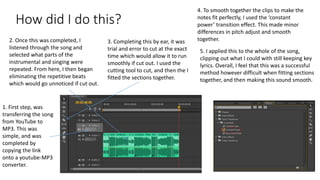
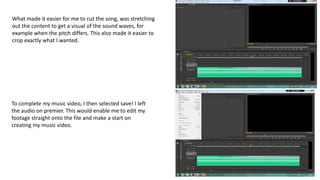
What made it easier for me to cut the song, was stretching
out the content to get a visual of the sound waves, for
example when the pitch differs. This also made it easier to
crop exactly what I wanted.
To complete my music video, I then selected save! I left
the audio on premier. This would enable me to edit my
footage straight onto the file and make a start on
creating my music video.

Editingmysong

  • 1.
  • 2.
    What program didI use? • When cutting down my song, I decided to use premier. This was the most suitable choice for myself as I knew how to use the program through previous projects. This also provided relevant software and effects which allowed me to smoothly cut and fit the song together. Remodelling the song as a whole, and cutting out sections and fitting together successfully was difficult however with the transitioning effects it was made easier.
  • 3.
    How did Ido this? 1. First step, was transferring the song from YouTube to MP3. This was simple, and was completed by copying the link onto a youtube-MP3 converter. 2. Once this was completed, I listened through the song and selected what parts of the instrumental and singing were repeated. From here, I then began eliminating the repetitive beats which would go unnoticed if cut out. 3. Completing this by ear, it was trial and error to cut at the exact time which would allow it to run smoothly if cut out. I used the cutting tool to cut, and then the I fitted the sections together. 4. To smooth together the clips to make the notes fit perfectly, I used the ‘constant power’ transition effect. This made minor differences in pitch adjust and smooth together. 5. I applied this to the whole of the song, clipping out what I could with still keeping key lyrics. Overall, I feel that this was a successful method however difficult when fitting sections together, and then making this sound smooth.
  • 4.
    What made iteasier for me to cut the song, was stretching out the content to get a visual of the sound waves, for example when the pitch differs. This also made it easier to crop exactly what I wanted. To complete my music video, I then selected save! I left the audio on premier. This would enable me to edit my footage straight onto the file and make a start on creating my music video.