Editing Process
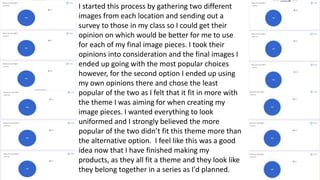
I started this process by gathering two different
images from each location and sending out a
survey to those in my class so I could get their
opinion on which would be better for me to use
for each of my final image pieces. I took their
opinions into consideration and the final images I
ended up going with the most popular choices
however, for the second option I ended up using
my own opinions there and chose the least
popular of the two as I felt that it fit in more with
the theme I was aiming for when creating my
image pieces. I wanted everything to look
uniformed and I strongly believed the more
popular of the two didn’t fit this theme more than
the alternative option. I feel like this was a good
idea now that I have finished making my
products, as they all fit a theme and they look like
they belong together in a series as I'd planned.
Editing Process:
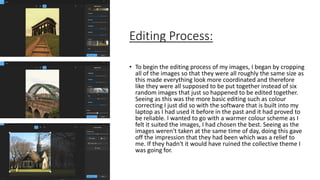
• To begin the editing process of my images, I began by cropping
all of the images so that they were all roughly the same size as
this made everything look more coordinated and therefore
like they were all supposed to be put together instead of six
random images that just so happened to be edited together.
Seeing as this was the more basic editing such as colour
correcting I just did so with the software that is built into my
laptop as I had used it before in the past and it had proved to
be reliable. I wanted to go with a warmer colour scheme as I
felt it suited the images, I had chosen the best. Seeing as the
images weren't taken at the same time of day, doing this gave
off the impression that they had been which was a relief to
me. If they hadn't it would have ruined the collective theme I
was going for.
Editing Process:
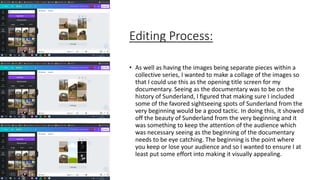
• As well as having the images being separate pieces within a
collective series, I wanted to make a collage of the images so
that I could use this as the opening title screen for my
documentary. Seeing as the documentary was to be on the
history of Sunderland, I figured that making sure I included
some of the favored sightseeing spots of Sunderland from the
very beginning would be a good tactic. In doing this, it showed
off the beauty of Sunderland from the very beginning and it
was something to keep the attention of the audience which
was necessary seeing as the beginning of the documentary
needs to be eye catching. The beginning is the point where
you keep or lose your audience and so I wanted to ensure I at
least put some effort into making it visually appealing.
Editing Process:
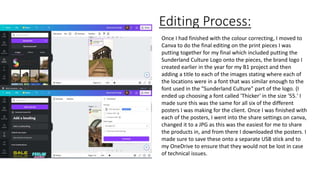
Once I had finished with the colour correcting, I moved to
Canva to do the final editing on the print pieces I was
putting together for my final which included putting the
Sunderland Culture Logo onto the pieces, the brand logo I
created earlier in the year for my B1 project and then
adding a title to each of the images stating where each of
the locations were in a font that was similar enough to the
font used in the "Sunderland Culture" part of the logo. (I
ended up choosing a font called 'Thicker' in the size '55.' I
made sure this was the same for all six of the different
posters I was making for the client. Once I was finished with
each of the posters, I went into the share settings on canva,
changed it to a JPG as this was the easiest for me to share
the products in, and from there I downloaded the posters. I
made sure to save these onto a separate USB stick and to
my OneDrive to ensure that they would not be lost in case
of technical issues.
Experimentation:
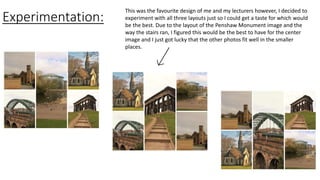
This was the favourite design of me and my lecturers however, I decided to
experiment with all three layouts just so I could get a taste for which would
be the best. Due to the layout of the Penshaw Monument image and the
way the stairs ran, I figured this would be the best to have for the center
image and I just got lucky that the other photos fit well in the smaller
places.
Editing Process:
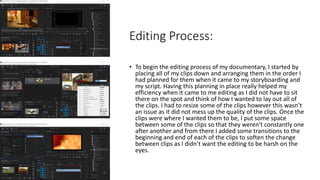
• To begin the editing process of my documentary, I started by
placing all of my clips down and arranging them in the order I
had planned for them when it came to my storyboarding and
my script. Having this planning in place really helped my
efficiency when it came to me editing as I did not have to sit
there on the spot and think of how I wanted to lay out all of
the clips. I had to resize some of the clips however this wasn’t
an issue as it did not mess up the quality of the clips. Once the
clips were where I wanted them to be, I put some space
between some of the clips so that they weren't constantly one
after another and from there I added some transitions to the
beginning and end of each of the clips to soften the change
between clips as I didn’t want the editing to be harsh on the
eyes.
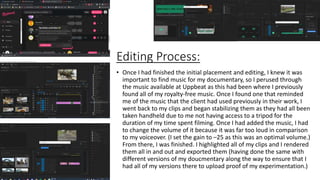
Editing Process:
• Once I had finished the initial placement and editing, I knew it was
important to find music for my documentary, so I perused through
the music available at Uppbeat as this had been where I previously
found all of my royalty-free music. Once I found one that reminded
me of the music that the client had used previously in their work, I
went back to my clips and began stabilizing them as they had all been
taken handheld due to me not having access to a tripod for the
duration of my time spent filming. Once I had added the music, I had
to change the volume of it because it was far too loud in comparison
to my voiceover. (I set the gain to –25 as this was an optimal volume.)
From there, I was finished. I highlighted all of my clips and I rendered
them all in and out and exported them (having done the same with
different versions of my doucmentary along the way to ensure that I
had all of my versions there to upload proof of my experimentation.)

Editing Process.pptx

  • 1.
  • 2.
    I started thisprocess by gathering two different images from each location and sending out a survey to those in my class so I could get their opinion on which would be better for me to use for each of my final image pieces. I took their opinions into consideration and the final images I ended up going with the most popular choices however, for the second option I ended up using my own opinions there and chose the least popular of the two as I felt that it fit in more with the theme I was aiming for when creating my image pieces. I wanted everything to look uniformed and I strongly believed the more popular of the two didn’t fit this theme more than the alternative option. I feel like this was a good idea now that I have finished making my products, as they all fit a theme and they look like they belong together in a series as I'd planned.
  • 3.
    Editing Process: • Tobegin the editing process of my images, I began by cropping all of the images so that they were all roughly the same size as this made everything look more coordinated and therefore like they were all supposed to be put together instead of six random images that just so happened to be edited together. Seeing as this was the more basic editing such as colour correcting I just did so with the software that is built into my laptop as I had used it before in the past and it had proved to be reliable. I wanted to go with a warmer colour scheme as I felt it suited the images, I had chosen the best. Seeing as the images weren't taken at the same time of day, doing this gave off the impression that they had been which was a relief to me. If they hadn't it would have ruined the collective theme I was going for.
  • 4.
    Editing Process: • Aswell as having the images being separate pieces within a collective series, I wanted to make a collage of the images so that I could use this as the opening title screen for my documentary. Seeing as the documentary was to be on the history of Sunderland, I figured that making sure I included some of the favored sightseeing spots of Sunderland from the very beginning would be a good tactic. In doing this, it showed off the beauty of Sunderland from the very beginning and it was something to keep the attention of the audience which was necessary seeing as the beginning of the documentary needs to be eye catching. The beginning is the point where you keep or lose your audience and so I wanted to ensure I at least put some effort into making it visually appealing.
  • 5.
    Editing Process: Once Ihad finished with the colour correcting, I moved to Canva to do the final editing on the print pieces I was putting together for my final which included putting the Sunderland Culture Logo onto the pieces, the brand logo I created earlier in the year for my B1 project and then adding a title to each of the images stating where each of the locations were in a font that was similar enough to the font used in the "Sunderland Culture" part of the logo. (I ended up choosing a font called 'Thicker' in the size '55.' I made sure this was the same for all six of the different posters I was making for the client. Once I was finished with each of the posters, I went into the share settings on canva, changed it to a JPG as this was the easiest for me to share the products in, and from there I downloaded the posters. I made sure to save these onto a separate USB stick and to my OneDrive to ensure that they would not be lost in case of technical issues.
  • 6.
    Experimentation: This was thefavourite design of me and my lecturers however, I decided to experiment with all three layouts just so I could get a taste for which would be the best. Due to the layout of the Penshaw Monument image and the way the stairs ran, I figured this would be the best to have for the center image and I just got lucky that the other photos fit well in the smaller places.
  • 7.
    Editing Process: • Tobegin the editing process of my documentary, I started by placing all of my clips down and arranging them in the order I had planned for them when it came to my storyboarding and my script. Having this planning in place really helped my efficiency when it came to me editing as I did not have to sit there on the spot and think of how I wanted to lay out all of the clips. I had to resize some of the clips however this wasn’t an issue as it did not mess up the quality of the clips. Once the clips were where I wanted them to be, I put some space between some of the clips so that they weren't constantly one after another and from there I added some transitions to the beginning and end of each of the clips to soften the change between clips as I didn’t want the editing to be harsh on the eyes.
  • 8.
    Editing Process: • OnceI had finished the initial placement and editing, I knew it was important to find music for my documentary, so I perused through the music available at Uppbeat as this had been where I previously found all of my royalty-free music. Once I found one that reminded me of the music that the client had used previously in their work, I went back to my clips and began stabilizing them as they had all been taken handheld due to me not having access to a tripod for the duration of my time spent filming. Once I had added the music, I had to change the volume of it because it was far too loud in comparison to my voiceover. (I set the gain to –25 as this was an optimal volume.) From there, I was finished. I highlighted all of my clips and I rendered them all in and out and exported them (having done the same with different versions of my doucmentary along the way to ensure that I had all of my versions there to upload proof of my experimentation.)