Use Case
Category
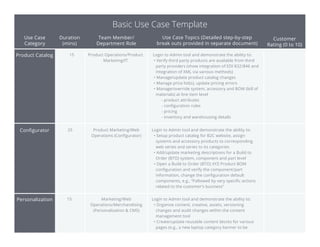
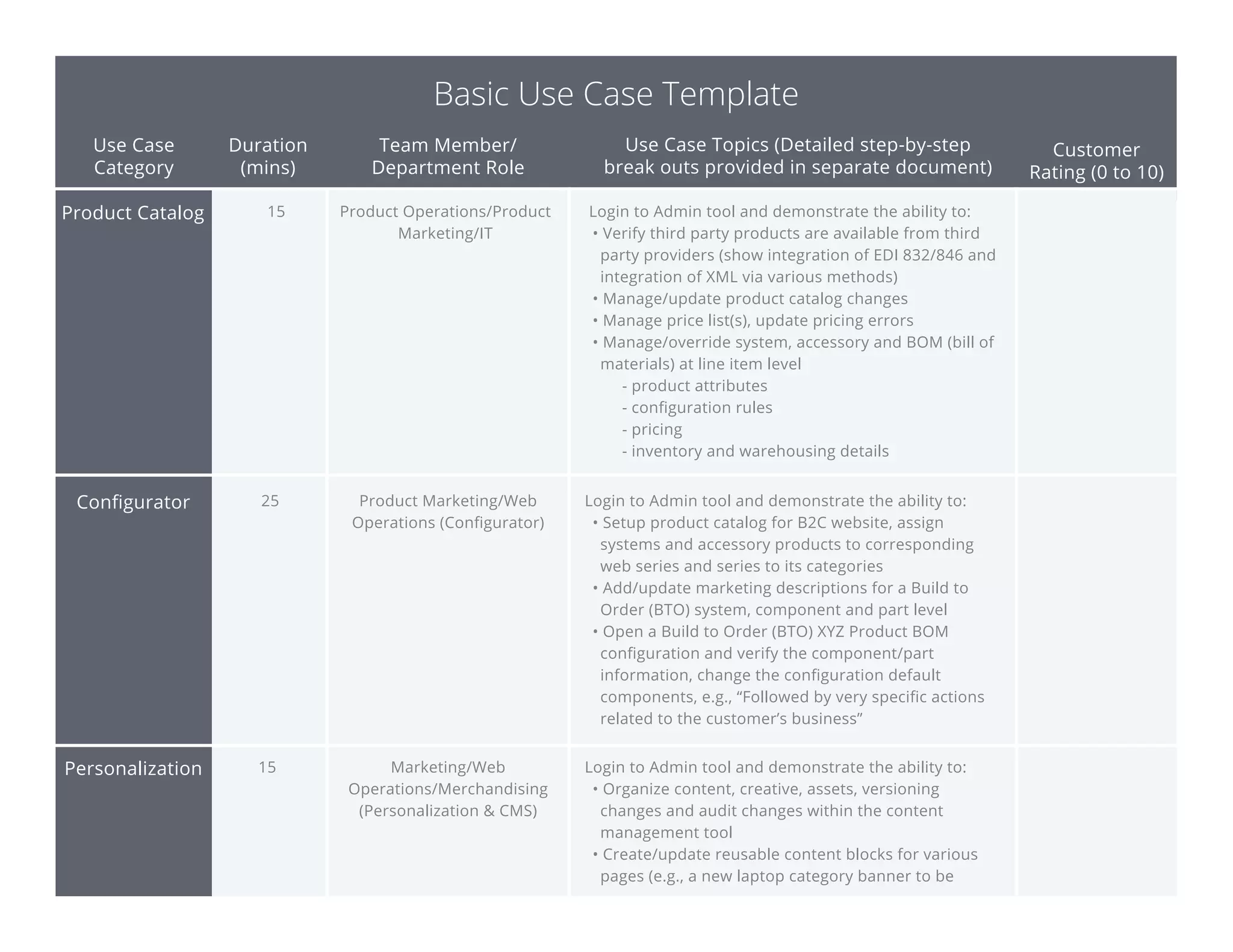
Product Catalog
Personalization
Configurator
Basic Use Case Template
Duration
(mins)
Team Member/
Department Role
Use Case Topics (Detailed step-by-step
break outs provided in separate document)
Customer
Rating (0 to 10)
15
25
Product Operations/Product
Marketing/IT
Product Marketing/Web
Operations (Configurator)
Login to Admin tool and demonstrate the ability to:
• Verify third party products are available from third
party providers (show integration of EDI 832/846 and
integration of XML via various methods)
• Manage/update product catalog changes
• Manage price list(s), update pricing errors
• Manage/override system, accessory and BOM (bill of
materials) at line item level
- product attributes
- configuration rules
- pricing
- inventory and warehousing details
Login to Admin tool and demonstrate the ability to:
• Setup product catalog for B2C website, assign
systems and accessory products to corresponding
web series and series to its categories
• Add/update marketing descriptions for a Build to
Order (BTO) system, component and part level
• Open a Build to Order (BTO) XYZ Product BOM
configuration and verify the component/part
information, change the configuration default
components, e.g., “Followed by very specific actions
related to the customer’s business”
15 Marketing/Web
Operations/Merchandising
(Personalization & CMS)
Login to Admin tool and demonstrate the ability to:
• Organize content, creative, assets, versioning
changes and audit changes within the content
management tool
• Create/update reusable content blocks for various
pages (e.g., a new laptop category banner to be
Use Case
Category
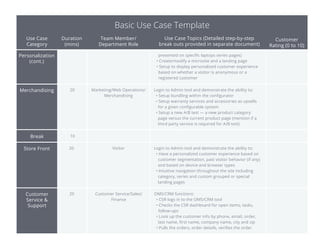
Personalization
(cont.)
Store Front
Merchandising
Basic Use Case Template
Duration
(mins)
Team Member/
Department Role
Use Case Topics (Detailed step-by-step
break outs provided in separate document)
Customer
Rating (0 to 10)
20 Marketing/Web Operations/
Merchandising
Login to Admin tool and demonstrate the ability to:
• Setup bundling within the configurator
• Setup warranty services and accessories as upsells
for a given configurable system
• Setup a new A/B test — a new product category
page versus the current product page (mention if a
third party service is required for A/B test)
20 Visitor Login to Admin tool and demonstrate the ability to:
• Have a personalized customer experience based on
customer segmentation, past visitor behavior (if any)
and based on device and browser types
• Intuitive navigation throughout the site including
category, series and custom grouped or special
landing pages
presented on specific laptops series pages)
• Create/modify a microsite and a landing page
• Setup to display personalized customer experience
based on whether a visitor is anonymous or a
registered customer
Break 10
Customer
Service &
Support
20 Customer Service/Sales/
Finance
OMS/CRM functions:
• CSR logs in to the OMS/CRM tool
• Checks the CSR dashboard for open items, tasks,
follow-ups
• Look up the customer info by phone, email, order,
last name, first name, company name, city and zip
• Pulls the orders, order details, verifies the order
Use Case
Category
Customer
Service &
Support (cont.)
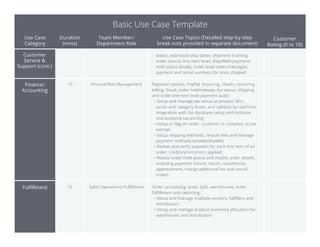
Finance/
Accounting
Basic Use Case Template
Duration
(mins)
Team Member/
Department Role
Use Case Topics (Detailed step-by-step
break outs provided in separate document)
Customer
Rating (0 to 10)
15 Finance/Risk Management Payment options, PayPal, financing, checks, recurring
billing, fraud, order hold/release, tax nexus, shipping
and order line item level payment audit:
• Setup and manage tax nexus at product SKU,
series and category levels, and validate by real time
integration with tax database setup and inclusive
and exclusive tax pricing
• Setup or flag an order, customer or company as tax
exempt
• Setup shipping methods, recycle fees and manage
payment methods (enable/disable)
• Review and verify payment for each line item of an
order, credits/promotions applied
• Review order hold queue and modify order details,
including payment refund, return, reauthorize,
appeasement, charge additional fee and cancel
orders
Fulfillment 15 Sales Operations/Fulfillment Order processing, order split, warehouses, order
fulfillment and reporting:
• Setup and manage multiple vendors, fulfillers and
distributors
• Setup and manage product inventory allocation for
warehouses and distributors
status, estimated ship dates, shipment tracking,
order source, line item level, ship/RMA/payment/
hold status details, order level notes/messages,
payment and serial numbers for units shipped
Use Case
Category
B2B
Basic Use Case Template
Duration
(mins)
Team Member/
Department Role
Use Case Topics (Detailed step-by-step
break outs provided in separate document)
Customer
Rating (0 to 10)
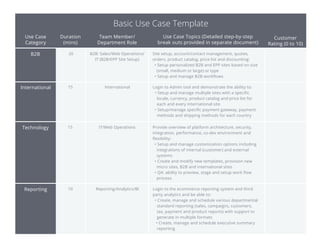
International 15 International Login to Admin tool and demonstrate the ability to:
• Setup and manage multiple sites with a specific
locale, currency, product catalog and price list for
each and every international site
• Setup/manage specific payment gateway, payment
methods and shipping methods for each country
Site setup, account/contact management, quotes,
orders, product catalog, price list and discounting:
• Setup personalized B2B and EPP sites based on size
(small, medium or large) or type
• Setup and manage B2B workflows
20 B2B: Sales/Web Operations/
IT (B2B/EPP Site Setup)
Technology 15 IT/Web Operations Provide overview of platform architecture, security,
integration, performance, co-dev environment and
flexibility:
• Setup and manage customization options including
integrations of internal (customer) and external
systems
• Create and modify new templates, provision new
micro sites, B2B and international sites
• QA: ability to preview, stage and setup work flow
process
Reporting 10 Reporting/Analytics/BI Login to the ecommerce reporting system and third
party analytics and be able to:
• Create, manage and schedule various departmental
standard reporting (sales, campaigns, customers,
tax, payment and product reports) with support to
generate in multiple formats
• Create, manage and schedule executive summary
reporting
Use Case
Category
Vendor Unique
Features
Basic Use Case Template
Duration
(mins)
Team Member/
Department Role
Use Case Topics (Detailed step-by-step
break outs provided in separate document)
Customer
Rating (0 to 10)
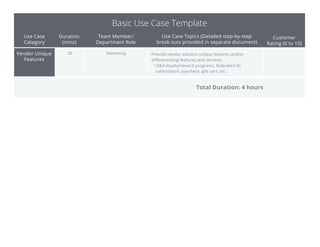
20 Marketing Provide vendor solution unique features and/or
differentiating features and services:
• Q&A loyalty/reward programs, federated ID,
subscription, paycheck, gift card, etc.
Total Duration: 4 hours

Ecommerce Replatforming Basic Use Case

  • 1.
    Use Case Category Product Catalog Personalization Configurator BasicUse Case Template Duration (mins) Team Member/ Department Role Use Case Topics (Detailed step-by-step break outs provided in separate document) Customer Rating (0 to 10) 15 25 Product Operations/Product Marketing/IT Product Marketing/Web Operations (Configurator) Login to Admin tool and demonstrate the ability to: • Verify third party products are available from third party providers (show integration of EDI 832/846 and integration of XML via various methods) • Manage/update product catalog changes • Manage price list(s), update pricing errors • Manage/override system, accessory and BOM (bill of materials) at line item level - product attributes - configuration rules - pricing - inventory and warehousing details Login to Admin tool and demonstrate the ability to: • Setup product catalog for B2C website, assign systems and accessory products to corresponding web series and series to its categories • Add/update marketing descriptions for a Build to Order (BTO) system, component and part level • Open a Build to Order (BTO) XYZ Product BOM configuration and verify the component/part information, change the configuration default components, e.g., “Followed by very specific actions related to the customer’s business” 15 Marketing/Web Operations/Merchandising (Personalization & CMS) Login to Admin tool and demonstrate the ability to: • Organize content, creative, assets, versioning changes and audit changes within the content management tool • Create/update reusable content blocks for various pages (e.g., a new laptop category banner to be
  • 2.
    Use Case Category Personalization (cont.) Store Front Merchandising BasicUse Case Template Duration (mins) Team Member/ Department Role Use Case Topics (Detailed step-by-step break outs provided in separate document) Customer Rating (0 to 10) 20 Marketing/Web Operations/ Merchandising Login to Admin tool and demonstrate the ability to: • Setup bundling within the configurator • Setup warranty services and accessories as upsells for a given configurable system • Setup a new A/B test — a new product category page versus the current product page (mention if a third party service is required for A/B test) 20 Visitor Login to Admin tool and demonstrate the ability to: • Have a personalized customer experience based on customer segmentation, past visitor behavior (if any) and based on device and browser types • Intuitive navigation throughout the site including category, series and custom grouped or special landing pages presented on specific laptops series pages) • Create/modify a microsite and a landing page • Setup to display personalized customer experience based on whether a visitor is anonymous or a registered customer Break 10 Customer Service & Support 20 Customer Service/Sales/ Finance OMS/CRM functions: • CSR logs in to the OMS/CRM tool • Checks the CSR dashboard for open items, tasks, follow-ups • Look up the customer info by phone, email, order, last name, first name, company name, city and zip • Pulls the orders, order details, verifies the order
  • 3.
    Use Case Category Customer Service & Support(cont.) Finance/ Accounting Basic Use Case Template Duration (mins) Team Member/ Department Role Use Case Topics (Detailed step-by-step break outs provided in separate document) Customer Rating (0 to 10) 15 Finance/Risk Management Payment options, PayPal, financing, checks, recurring billing, fraud, order hold/release, tax nexus, shipping and order line item level payment audit: • Setup and manage tax nexus at product SKU, series and category levels, and validate by real time integration with tax database setup and inclusive and exclusive tax pricing • Setup or flag an order, customer or company as tax exempt • Setup shipping methods, recycle fees and manage payment methods (enable/disable) • Review and verify payment for each line item of an order, credits/promotions applied • Review order hold queue and modify order details, including payment refund, return, reauthorize, appeasement, charge additional fee and cancel orders Fulfillment 15 Sales Operations/Fulfillment Order processing, order split, warehouses, order fulfillment and reporting: • Setup and manage multiple vendors, fulfillers and distributors • Setup and manage product inventory allocation for warehouses and distributors status, estimated ship dates, shipment tracking, order source, line item level, ship/RMA/payment/ hold status details, order level notes/messages, payment and serial numbers for units shipped
  • 4.
    Use Case Category B2B Basic UseCase Template Duration (mins) Team Member/ Department Role Use Case Topics (Detailed step-by-step break outs provided in separate document) Customer Rating (0 to 10) International 15 International Login to Admin tool and demonstrate the ability to: • Setup and manage multiple sites with a specific locale, currency, product catalog and price list for each and every international site • Setup/manage specific payment gateway, payment methods and shipping methods for each country Site setup, account/contact management, quotes, orders, product catalog, price list and discounting: • Setup personalized B2B and EPP sites based on size (small, medium or large) or type • Setup and manage B2B workflows 20 B2B: Sales/Web Operations/ IT (B2B/EPP Site Setup) Technology 15 IT/Web Operations Provide overview of platform architecture, security, integration, performance, co-dev environment and flexibility: • Setup and manage customization options including integrations of internal (customer) and external systems • Create and modify new templates, provision new micro sites, B2B and international sites • QA: ability to preview, stage and setup work flow process Reporting 10 Reporting/Analytics/BI Login to the ecommerce reporting system and third party analytics and be able to: • Create, manage and schedule various departmental standard reporting (sales, campaigns, customers, tax, payment and product reports) with support to generate in multiple formats • Create, manage and schedule executive summary reporting
  • 5.
    Use Case Category Vendor Unique Features BasicUse Case Template Duration (mins) Team Member/ Department Role Use Case Topics (Detailed step-by-step break outs provided in separate document) Customer Rating (0 to 10) 20 Marketing Provide vendor solution unique features and/or differentiating features and services: • Q&A loyalty/reward programs, federated ID, subscription, paycheck, gift card, etc. Total Duration: 4 hours