What is ECDIS?
An
Electronic
Chart
Display
and
Information System (ECDIS) is a computerbased navigation system that complies with
IMO regulations and can be used as an
alternative to paper navigation charts. It is
an automated decision aid capable of
continuously
determining
a
vessel’s
position in relation to land, charted objects,
navigation aids and unseen hazards.
An ECDIS includes electronic navigational
charts (ENC) and position information from
the Global Positioning System (GPS) and
other navigational sensors, such as radar,
and automatic identification systems (AIS).

IMO - Solas Chapter V
The IMO’s Maritime Safety Committee
approved
new
regulations
for
the
mandatory carriage requirements of ECDIS.
All ships irrespective of size shall have:
 Nautical
charts
and
nautical
publications to plan and display the
ship’s route for the intended voyage
and to plot and monitor positions
throughout the voyage; an Electronic
Chart Display and Information
System (ECDIS) may be accepted as
meeting
the
chart
carriage
requirements
ELECTRONIC CHARTS
There are two basic types of electronic chart
systems. Those that comply with the IMO
requirements for SOLAS class vessels,
known as the Electronic Chart Display
and Information System (ECDIS), and all
other types of electronic chart systems,
regarded generically as Electronic Chart
Systems (ECS). If an ECS is carried on
board, the continuous use of up-to-date
paper charts remains essential for safe
navigation
and
to
fulfill
carriage
requirements.

To satisfy the chart carriage requirements
of SOLAS Chapter V, ECDIS must use
Electronic Navigational Charts( ENCs).
These are vector charts produced to
International Hydrographic Organization
standards
S57 - ENC product specification
S52 – ENC symbols
S61 – guidelines for production of raster
charts
Future standard for ENC will be defined
in the publication S100
The ENC contains all the chart information
necessary for safe navigation, and may
contain supplementary information in
addition to that contained in the paper
chart (e.g. sailing directions) which may be
considered necessary for safe navigation.
ENC data must be used where it is
available, but, where ENC data is not
available; Raster Navigational Charts (RNC)
may be used with the ECDIS in the Raster
Chart Display System (RCDS) mode.
However, when operating in RCDS mode,
the RCDS must be used in
conjunction with an appropriate folio of upto-date paper charts.
Further guidance on the use of ECDIS with
ENC or RNC data is contained in Annex 14 of
theMCA SOLAS V publication and Marine
Guidance Note currently MGN 285
ENCs
ECS is the charting software system for
presentation of electronic chart data on a
computer screen.
The ENC is a database of individual items
of chart data which can be displayed as a
chart. ENCs of appropriate detail are
provided for different navigational purposes
such as coastal navigation, harbour
approach and berthing.
RNCs (Raster Navigational charts)
These are charts that conform to IHO
specifications and are produced by
converting paper charts to digital
image by scanner. The image is
similar to digital camera pictures,
which could be zoomed in for more
detailed information
The Raster Chart Display System (RCDS)
uses RNCs. However, the RCDS mode does
not have the full functionality of ECDIS.

(important)
As per the IMO circular 207;
The
mariners' attention is therefore drawn to
the following limitations of the RCDS mode:

unlike ECDIS where there are no
chart boundaries, RCDS is a chartbased system similar to a paper
charts;

Raster navigational chart (RNC)
data,
itself,
will
not
trigger
automatic
alarms(e.g.
antigrounding). However, some alarms
can be generated by the RCDS from
user-inserted information. These
can include:
- ship safety contour lines
- isolated dangers
- danger areas










chart features cannot be simplified
or removed to suit a particular
navigational
circumstance.
This
could affect the superimposition of
radar/ARPA;
it may not be possible to interrogate
RNC features to gain additional
information about charted objects;
it is not possible to display a ship's
safety contour or safety depth and
highlight it on the display, unless
these features are manually entered
during route planning;
depending on the source of the
RNC, different colours may be used
to show similar chart information.
There may also be differences in
colours used during day and
nighttime;
an RNC should be displayed at the
scale of the paper chart. Excessive
zooming in or zooming out can
seriously degrade RCDS capability

how will u plan a passage
using
the
ECDIS
onboard?
During the installation of an ECDIS, the
supplier should have entered vessel data
such as the length and beam. The
manoeuvring characteristics of the ship
should also have been entered during
installation and once set, this information
cannot normally be altered by the operator.
Preliminary set up:






Before commencing a passage the
navigator must check the ECDIS for
the proposed passage, firstly to
ensure that the vessel has licenses
for all the ENC charts and secondly
to ensure that these are up to date
with the latest corrections that are
supplied, either by CD ROM or via
an Internet connection.
Assuming that all the passage
licenses are in order and up to date,
navigator needs to enter the ship’s
draft and air draft and establish the
safety contour based on draft and
the required Under keel Clearance
(UKC). For example, with a vessel of
6m draft the depth contour could be
chosen as 8m. However, since most
ENC data is supplied with preset
contours, typically at 5m intervals
the display will default to the next
deepest contour which in this case
would be 10m. All areas of less than
10m will show as blue and areas
deeper than 10 will be displayed as
white. So as long as the ship
remains in the white area, she is, in
theory, safe!
. In addition to the safety contour,
this same depth of 8m can be set as
the safety depth. In this case, if the
navigator sets the ECDIS to display
depths then all depths of less than
8m will show in bold type and those
deeper than 8 will be a pale grey.
This means that a depth of 9m,
although within the 10m blue safety
contour it will displayed in pale grey
text whereas a depth of 7m will be
displayed in bold black. The whole
safety of the passage is dependent
on this information being correct


the next task is to set up a safety
domain. IMO specifications require
ECDIS to trigger alarms in the
following circumstances:

1. when the ship will cross the safety
contour

2. When the specified cross track limit
from the planned route is exceeded
3. If continuing on its present course,
the ship will pass closer than a
user-specified distance from a
danger (eg obstruction wreck or
rock) that is shallower than the
mariner’s contour or an aid-to
navigation.
In order for these requirements to be met
the navigator has to input the parameters
for both depth and beam clearances and
once set, upon checking any passage, if any
hazards are present along the proposed
route then alarms will be generated.

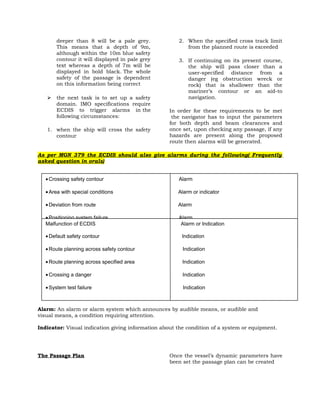
As per MGN 379 the ECDIS should also give alarms during the following( Frequently
asked question in orals)
• Crossing safety contour

Alarm

• Area with special conditions

Alarm or indicator

• Deviation from route

Alarm

• Positioning system failure
Malfunction of ECDIS
• Approach to critical point
• Default safety contour
• Different geodetic datum
• Route planning across safety contour

Alarm
Alarm or Indication
Alarm
Indication
Alarm
Indication

• Route planning across specified area

Indication

• Crossing a danger

Indication

• System test failure

Indication

Alarm: An alarm or alarm system which announces by audible means, or audible and
visual means, a condition requiring attention.
Indicator: Visual indication giving information about the condition of a system or equipment.

The Passage Plan

Once the vessel’s dynamic parameters have
been set the passage plan can be created




check whether waypoints for that
passage already exist in the ECDIS
database. If so it can be uploaded
for re-use and by running an initial
check the ECDIS will verify if the
plan is safe for the parameters
previously set.
If there is no existing passage in the
ECDIS database then the navigator
will have to create one.



If no pre-loaded waypoint list exists
for the passage then the navigator
will have to make one. The
advantage of the ECDIS is that by
putting in the departure and arrival
points any obstructions will be
identified and the navigator can
then move waypoints and re-check
the outline route. For longer ocean
passages
the
ECDIS
instantaneously offer a great circle
or Rhumb line route or a
combination of both.



Once a outline passage has been
established it is then essential to
check the whole route in detail
using the zooming and scrolling
facilities.

Whilst all the planning is going on the
navigator must never forget that he is
working on a computer and he should save
the plan at regular intervals to avoid totally
losing all the detail in the case of a “crash”.
So once the plan has been completed and
fully verified it needs to be exported to the
primary unit. This is increasingly done via a
data link cable between the two systems.
Getting Underway
Once the plan has been saved and exported
to the main ECDIS unit at the conning
position the passage can commence
The performance standards require ECDIS
units to have three display modes: Base,
Standard and full
Base Display: This displays the absolute
minimum information considered necessary

for navigation such as the coastline, fixed
structures and the safety contour. It is not
recommended for navigation .
Standard Display: This is the display for
normal navigation .In addition to the
information of the base display this mode
contains the drying lines, buoys and other
navigation marks, prohibited and restricted
areas, separation and traffic routing and
precautionary
area ( but not the
notes!) Despite being the recommended
display, this display doesn’t provide the
same information as a paper chart with
information such as buoy names and
characteristics, anchorages, submarine
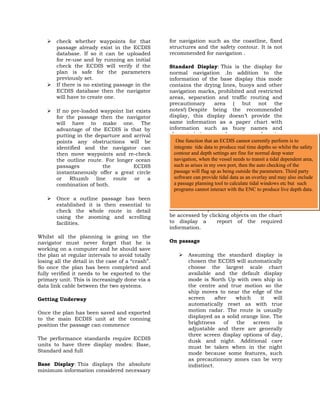
cablesfunction that an ECDIS cannot currently perform is to
One etc
integrate tide data to produce real time depths so whilst the safety
contour and depth This contains all the
Full Display: settings are fine for normal deep water
navigation, contained within the ENC but
informationwhen the vessel needs to transit a tidal dependent area,
such as arises in my own port, this mode tends
due to the amount of datathen the auto checking of the
topassage will flag up as being outside the parameters. Third party
overload the typical small screens with
software can provide and concealing other
text overwriting tidal data as an overlay and may also include
a passage planning the calculate tidal windows etc
objects except on tool tolargest scales and so but such
programs cannot interact with the ENC to produce live depth data.
again
isn’t
recommended
for
navigation. Note that even on this full
display mode much of the paper chart
detail such as precautionary notes can only
be accessed by clicking objects on the chart
to display a
report of the required
information.
On passage


Assuming the standard display is
chosen the ECDIS will automatically
choose the largest scale chart
available and the default display
mode is North Up with own ship in
the centre and true motion so the
ship moves to near the edge of the
screen
after
which
it
will
automatically reset as with true
motion radar. The route is usually
displayed as a solid orange line. The
brightness
of
the
screen
is
adjustable and there are generally
three screen display options of day,
dusk and night. Additional care
must be taken when in the night
mode because some features, such
as precautionary zones can be very
indistinct.


Information from other systems
such as radar and AIS can be
overlaid on the ECDIS display and
this facility can be very useful. In
particular the radar image can
provide a valuable verification of the
accuracy of the GPS input in coastal
water in that the radar land image
should align with the chart display.

On normal passages the ECDIS provides an
instant visual position check and alarms
sound when a waypoint approaches or if
the vessel wanders off track outside the
pre-set safety domain
How would one come to know if the
ECDIS onboard is approved




The vessel should be in possession
of the type approval certificate of the
ecdis
The equipment should be entered in
the safety equipment certificate



The ENC charts to be updated



The system should comprise of 2
systems with independent power
supply and back up, complete ENC
charts for the voyage



The vessel should be in possession
of the flag state certificate for
compliance
with
IMOA817(19)/MSC232 (82), stamps
of the IHO, IMO and IEC


Information from other systems
such as radar and AIS can be
overlaid on the ECDIS display and
this facility can be very useful. In
particular the radar image can
provide a valuable verification of the
accuracy of the GPS input in coastal
water in that the radar land image
should align with the chart display.

On normal passages the ECDIS provides an
instant visual position check and alarms
sound when a waypoint approaches or if
the vessel wanders off track outside the
pre-set safety domain
How would one come to know if the
ECDIS onboard is approved




The vessel should be in possession
of the type approval certificate of the
ecdis
The equipment should be entered in
the safety equipment certificate



The ENC charts to be updated



The system should comprise of 2
systems with independent power
supply and back up, complete ENC
charts for the voyage



The vessel should be in possession
of the flag state certificate for
compliance
with
IMOA817(19)/MSC232 (82), stamps
of the IHO, IMO and IEC

Ecdis

  • 1.
    What is ECDIS? An Electronic Chart Display and InformationSystem (ECDIS) is a computerbased navigation system that complies with IMO regulations and can be used as an alternative to paper navigation charts. It is an automated decision aid capable of continuously determining a vessel’s position in relation to land, charted objects, navigation aids and unseen hazards. An ECDIS includes electronic navigational charts (ENC) and position information from the Global Positioning System (GPS) and other navigational sensors, such as radar, and automatic identification systems (AIS). IMO - Solas Chapter V The IMO’s Maritime Safety Committee approved new regulations for the mandatory carriage requirements of ECDIS. All ships irrespective of size shall have:  Nautical charts and nautical publications to plan and display the ship’s route for the intended voyage and to plot and monitor positions throughout the voyage; an Electronic Chart Display and Information System (ECDIS) may be accepted as meeting the chart carriage requirements ELECTRONIC CHARTS There are two basic types of electronic chart systems. Those that comply with the IMO requirements for SOLAS class vessels, known as the Electronic Chart Display and Information System (ECDIS), and all other types of electronic chart systems, regarded generically as Electronic Chart Systems (ECS). If an ECS is carried on board, the continuous use of up-to-date paper charts remains essential for safe navigation and to fulfill carriage requirements. To satisfy the chart carriage requirements of SOLAS Chapter V, ECDIS must use Electronic Navigational Charts( ENCs). These are vector charts produced to International Hydrographic Organization standards S57 - ENC product specification S52 – ENC symbols S61 – guidelines for production of raster charts Future standard for ENC will be defined in the publication S100 The ENC contains all the chart information necessary for safe navigation, and may contain supplementary information in addition to that contained in the paper chart (e.g. sailing directions) which may be considered necessary for safe navigation. ENC data must be used where it is available, but, where ENC data is not available; Raster Navigational Charts (RNC) may be used with the ECDIS in the Raster Chart Display System (RCDS) mode. However, when operating in RCDS mode, the RCDS must be used in conjunction with an appropriate folio of upto-date paper charts. Further guidance on the use of ECDIS with ENC or RNC data is contained in Annex 14 of theMCA SOLAS V publication and Marine Guidance Note currently MGN 285 ENCs ECS is the charting software system for presentation of electronic chart data on a computer screen. The ENC is a database of individual items of chart data which can be displayed as a chart. ENCs of appropriate detail are provided for different navigational purposes such as coastal navigation, harbour approach and berthing. RNCs (Raster Navigational charts) These are charts that conform to IHO specifications and are produced by converting paper charts to digital image by scanner. The image is similar to digital camera pictures, which could be zoomed in for more detailed information
  • 2.
    The Raster ChartDisplay System (RCDS) uses RNCs. However, the RCDS mode does not have the full functionality of ECDIS. (important) As per the IMO circular 207; The mariners' attention is therefore drawn to the following limitations of the RCDS mode:  unlike ECDIS where there are no chart boundaries, RCDS is a chartbased system similar to a paper charts;  Raster navigational chart (RNC) data, itself, will not trigger automatic alarms(e.g. antigrounding). However, some alarms can be generated by the RCDS from user-inserted information. These can include: - ship safety contour lines - isolated dangers - danger areas      chart features cannot be simplified or removed to suit a particular navigational circumstance. This could affect the superimposition of radar/ARPA; it may not be possible to interrogate RNC features to gain additional information about charted objects; it is not possible to display a ship's safety contour or safety depth and highlight it on the display, unless these features are manually entered during route planning; depending on the source of the RNC, different colours may be used to show similar chart information. There may also be differences in colours used during day and nighttime; an RNC should be displayed at the scale of the paper chart. Excessive zooming in or zooming out can seriously degrade RCDS capability how will u plan a passage using the ECDIS onboard? During the installation of an ECDIS, the supplier should have entered vessel data such as the length and beam. The manoeuvring characteristics of the ship should also have been entered during installation and once set, this information cannot normally be altered by the operator. Preliminary set up:    Before commencing a passage the navigator must check the ECDIS for the proposed passage, firstly to ensure that the vessel has licenses for all the ENC charts and secondly to ensure that these are up to date with the latest corrections that are supplied, either by CD ROM or via an Internet connection. Assuming that all the passage licenses are in order and up to date, navigator needs to enter the ship’s draft and air draft and establish the safety contour based on draft and the required Under keel Clearance (UKC). For example, with a vessel of 6m draft the depth contour could be chosen as 8m. However, since most ENC data is supplied with preset contours, typically at 5m intervals the display will default to the next deepest contour which in this case would be 10m. All areas of less than 10m will show as blue and areas deeper than 10 will be displayed as white. So as long as the ship remains in the white area, she is, in theory, safe! . In addition to the safety contour, this same depth of 8m can be set as the safety depth. In this case, if the navigator sets the ECDIS to display depths then all depths of less than 8m will show in bold type and those
  • 3.
    deeper than 8will be a pale grey. This means that a depth of 9m, although within the 10m blue safety contour it will displayed in pale grey text whereas a depth of 7m will be displayed in bold black. The whole safety of the passage is dependent on this information being correct  the next task is to set up a safety domain. IMO specifications require ECDIS to trigger alarms in the following circumstances: 1. when the ship will cross the safety contour 2. When the specified cross track limit from the planned route is exceeded 3. If continuing on its present course, the ship will pass closer than a user-specified distance from a danger (eg obstruction wreck or rock) that is shallower than the mariner’s contour or an aid-to navigation. In order for these requirements to be met the navigator has to input the parameters for both depth and beam clearances and once set, upon checking any passage, if any hazards are present along the proposed route then alarms will be generated. As per MGN 379 the ECDIS should also give alarms during the following( Frequently asked question in orals) • Crossing safety contour Alarm • Area with special conditions Alarm or indicator • Deviation from route Alarm • Positioning system failure Malfunction of ECDIS • Approach to critical point • Default safety contour • Different geodetic datum • Route planning across safety contour Alarm Alarm or Indication Alarm Indication Alarm Indication • Route planning across specified area Indication • Crossing a danger Indication • System test failure Indication Alarm: An alarm or alarm system which announces by audible means, or audible and visual means, a condition requiring attention. Indicator: Visual indication giving information about the condition of a system or equipment. The Passage Plan Once the vessel’s dynamic parameters have been set the passage plan can be created
  • 4.
      check whether waypointsfor that passage already exist in the ECDIS database. If so it can be uploaded for re-use and by running an initial check the ECDIS will verify if the plan is safe for the parameters previously set. If there is no existing passage in the ECDIS database then the navigator will have to create one.  If no pre-loaded waypoint list exists for the passage then the navigator will have to make one. The advantage of the ECDIS is that by putting in the departure and arrival points any obstructions will be identified and the navigator can then move waypoints and re-check the outline route. For longer ocean passages the ECDIS instantaneously offer a great circle or Rhumb line route or a combination of both.  Once a outline passage has been established it is then essential to check the whole route in detail using the zooming and scrolling facilities. Whilst all the planning is going on the navigator must never forget that he is working on a computer and he should save the plan at regular intervals to avoid totally losing all the detail in the case of a “crash”. So once the plan has been completed and fully verified it needs to be exported to the primary unit. This is increasingly done via a data link cable between the two systems. Getting Underway Once the plan has been saved and exported to the main ECDIS unit at the conning position the passage can commence The performance standards require ECDIS units to have three display modes: Base, Standard and full Base Display: This displays the absolute minimum information considered necessary for navigation such as the coastline, fixed structures and the safety contour. It is not recommended for navigation . Standard Display: This is the display for normal navigation .In addition to the information of the base display this mode contains the drying lines, buoys and other navigation marks, prohibited and restricted areas, separation and traffic routing and precautionary area ( but not the notes!) Despite being the recommended display, this display doesn’t provide the same information as a paper chart with information such as buoy names and characteristics, anchorages, submarine cablesfunction that an ECDIS cannot currently perform is to One etc integrate tide data to produce real time depths so whilst the safety contour and depth This contains all the Full Display: settings are fine for normal deep water navigation, contained within the ENC but informationwhen the vessel needs to transit a tidal dependent area, such as arises in my own port, this mode tends due to the amount of datathen the auto checking of the topassage will flag up as being outside the parameters. Third party overload the typical small screens with software can provide and concealing other text overwriting tidal data as an overlay and may also include a passage planning the calculate tidal windows etc objects except on tool tolargest scales and so but such programs cannot interact with the ENC to produce live depth data. again isn’t recommended for navigation. Note that even on this full display mode much of the paper chart detail such as precautionary notes can only be accessed by clicking objects on the chart to display a report of the required information. On passage  Assuming the standard display is chosen the ECDIS will automatically choose the largest scale chart available and the default display mode is North Up with own ship in the centre and true motion so the ship moves to near the edge of the screen after which it will automatically reset as with true motion radar. The route is usually displayed as a solid orange line. The brightness of the screen is adjustable and there are generally three screen display options of day, dusk and night. Additional care must be taken when in the night mode because some features, such as precautionary zones can be very indistinct.
  • 5.
     Information from othersystems such as radar and AIS can be overlaid on the ECDIS display and this facility can be very useful. In particular the radar image can provide a valuable verification of the accuracy of the GPS input in coastal water in that the radar land image should align with the chart display. On normal passages the ECDIS provides an instant visual position check and alarms sound when a waypoint approaches or if the vessel wanders off track outside the pre-set safety domain How would one come to know if the ECDIS onboard is approved   The vessel should be in possession of the type approval certificate of the ecdis The equipment should be entered in the safety equipment certificate  The ENC charts to be updated  The system should comprise of 2 systems with independent power supply and back up, complete ENC charts for the voyage  The vessel should be in possession of the flag state certificate for compliance with IMOA817(19)/MSC232 (82), stamps of the IHO, IMO and IEC
  • 6.
     Information from othersystems such as radar and AIS can be overlaid on the ECDIS display and this facility can be very useful. In particular the radar image can provide a valuable verification of the accuracy of the GPS input in coastal water in that the radar land image should align with the chart display. On normal passages the ECDIS provides an instant visual position check and alarms sound when a waypoint approaches or if the vessel wanders off track outside the pre-set safety domain How would one come to know if the ECDIS onboard is approved   The vessel should be in possession of the type approval certificate of the ecdis The equipment should be entered in the safety equipment certificate  The ENC charts to be updated  The system should comprise of 2 systems with independent power supply and back up, complete ENC charts for the voyage  The vessel should be in possession of the flag state certificate for compliance with IMOA817(19)/MSC232 (82), stamps of the IHO, IMO and IEC