EBOOK
SPLUNK® AND THE CIS CRITICAL
SECURITY CONTROLS
Mapping Splunk Software to the CIS 20 CSC Version 6.0
EBOOK
2Splunk and the CIS Critical Security Controls
Copyright © 2016 by Splunk Inc.
All rights reserved. Splunk, Splunk>, Listen to Your Data, The Engine for Machine Data, Hunk, Splunk
Cloud, Splunk Storm and SPL are trademarks and registered trademarks of Splunk Inc. in the United
States and other countries. All other brand names, product names, or trademarks belong to their
respective owners.
The CIS controls guidelines are licensed under a Creative Commons Attribution-NoDerivs
3.0 Unported License. For details: https://www.cisecurity.org/critical-controls/faqs.cfm
Authorization to photocopy items for internal or personal use is granted by
Splunk Inc. No other copying may occur without the express written consent of Splunk Inc.
Published by Splunk Inc., 250 Brannan St., San Francisco, CA 94107
Editor/Analyst: Splunk Inc.
Copyeditor: Splunk Inc.
Production Editor: Splunk Inc.
Cover: Splunk Inc.
Graphics: Splunk Inc.
Second Edition: January 2016
While every precaution has been taken in the preparation of this book, the publisher and author
assume no responsibility for errors or omissions or for damages resulting from the use of the
information contained herein.
Disclaimer
This book is intended as a text and reference book for reading purposes only. The actual use of
Splunk’s software products must be in accordance with their corresponding software license
agreements and not with anything written in this book. The documentation provided for Splunk’s
software products, and not this book, is the definitive source for information on how to use these
products. Although great care has been taken to ensure the accuracy and timeliness of the
information in this book, Splunk does not give any warranty or guarantee of the accuracy or
timeliness of the information and Splunk does not assume any liability in connection with any use
or result from the use of the information in this book. The reader should check at docs.splunk.com
for definitive descriptions of Splunk’s features and functionality.
EBOOK
3Splunk and the CIS Critical Security Controls
Abstract											4
Introduction											5
	Why are the CIS CSC Important?							7
	 How Splunk Software Maps to the CIS CSC: Four Approaches			 8
	 How Customers Use Splunk for Security						 8
	The Big Picture									10
	A Note about “Quick Wins”								10
The CIS CSC	 										11
	 Control 1: Inventory of Authorized and Unauthorized Devices				 12
	 Control 2: Inventory of Authorized and Unauthorized Software			 15
	 Control 3: Secure Configurations for Hardware and Software on
	 Mobile Devices, Laptops, Workstations and Servers					 18
	 Control 4: Continuous Vulnerability Assessment and Remediation			 21
	 Control 5: Controlled Use of Administrative Privileges					 24
	 Control 6: Maintenance, Monitoring and Analysis of Audit Logs			 27
	 Control 7: Email and Web Browser Protections					 29
	Control 8: Malware Defense								33
	 Control 9: Limitation and Control of Network Ports, Protocols and Switches		 37
	Control 10: Data Recovery Capability							41
	 Control 11: Secure Configurations for Network Devices such as Firewalls,
	 Routers and Switches								 43
	Control 12: Boundary Defense								45
	Control 13: Data Protection								47
	 Control 14: Controlled Access Based on the Need to Know				 50
	Control 15: Wireless Access Control							52
	 Control 16: Account Monitoring and Control						 54
	Control 17: Security Skills Assessment							57
	Control 18: Application Software Security						60
	 Control 19: Incident Response and Management					 63
	 Control 20: Pen Testing and Red Team Exercises					 64
Conclusion											65
 
EBOOK
4Splunk and the CIS Critical Security Controls
Abstract
Splunk provides a single, integrated, security intelligence platform that allows today’s security
professionals to ensure that their organizations are meeting Critical Security Controls requirements.
The software can verify incoming data, execute the requirements needed, or support human activities
associated with a control. Security professionals find Splunk software uniquely suited to support these
controls in a number of ways, including: universal data ingestion with no specific vendor preference;
a real-time schema-less architecture; unparalleled scaling capabilities for big data; and an agile and
flexible reporting interface. This document version updates the first edition publication from April 2014
to refresh the mapping of Splunk software capabilities to the latest version of the CSC 20.
 
EBOOK
5Splunk and the CIS Critical Security Controls
INTRODUCTION
SPLUNK SOFTWARE AND THE
CIS CRITICAL SECURITY CONTROLS
EBOOK
6Splunk and the CIS Critical Security Controls
The CIS Critical Security Controls (CSC) are a time-proven, prioritized, “what works” list of 20 controls
that can be used to minimize security risks to enterprise systems and the critical data they maintain.
These controls are derived from and “cross-walked” to controls in NIST Special Publication 800-53.
They are also known as the Consensus Audit Guidelines (CAG).
The list was originally authored by the U.S. National Security Agency (NSA) in 2008, and has
since been revised by a consortium of U.S. and international agencies such as the Center for the
Protection of National Infrastructure in the U.K., the Australian government’s Department of Defense
and experts from private industry. Formerly managed by SANS and the Council on CyberSecurity,
the CIS CSC are currently governed by the Center for Internet Security (CIS) and are considered
the “de facto yardstick by which corporate security programs can be measured,” according to the
Cybersecurity Law Institute. The current version of the controls is 6.0 as of January 2016.
These controls function across security processes, products, architectures and services, and have
been proven in real-world scenarios. According to surveys conducted by the U.S. State Department,
organizations that fully implement, automate and measure themselves against the CIS CSC can
reduce risk by up to 94 percent.
For more information on the history of the CIS CSC, please see:
http://www.sans.org/critical-security-controls/history
The CIS CSC are ranked in order of overall importance and application to a corporate security strategy.
For example, the first two controls, surrounding known inventory, are at the top of the list and are
foundational in nature, ranking “very high” for attack mitigation. Conversely, the final item on the list,
surrounding pen testing and “red team” exercises, ranks “low” for attack mitigation. More information
and deep analysis on each control can be found here:
http://www.sans.org/critical-security-controls/guidelines
For version 6.0, various changes have been made within the CIS CSC to better reflect a “hunting” strategy
rather than one of purely “defense.” Notably, the former control 19 – Secure Network Engineering –
has been removed. This made room for the new control 7 – Email and Web Browser Protections.
Also, some of the controls have been re-prioritized – Malware Defense has been demoted to position 8,
while Controlled Use of Administrative Privileges and Maintenance, Monitoring, and Analysis of Audit Logs
have moved ahead of it to positions 5 and 6, respectively. Other controls have changed positions, too.
INTRODUCTION
SPLUNK SOFTWARE AND THE
CIS CRITICAL SECURITY CONTROLS
EBOOK
7Splunk and the CIS Critical Security Controls
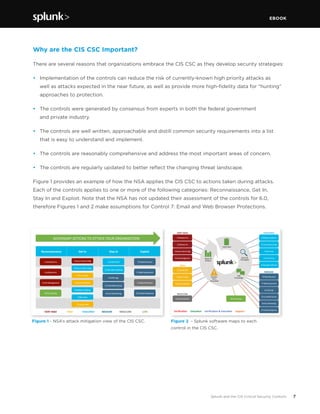
Figure 1 - NSA’s attack mitigation view of the CIS CSC.
Why are the CIS CSC Important?
There are several reasons that organizations embrace the CIS CSC as they develop security strategies:
•	 Implementation of the controls can reduce the risk of currently-known high priority attacks as
well as attacks expected in the near future, as well as provide more high-fidelity data for “hunting”
approaches to protection.
•	 The controls were generated by consensus from experts in both the federal government
and private industry.
•	 The controls are well written, approachable and distill common security requirements into a list
that is easy to understand and implement.
•	 The controls are reasonably comprehensive and address the most important areas of concern.
•	 The controls are regularly updated to better reflect the changing threat landscape.
Figure 1 provides an example of how the NSA applies the CIS CSC to actions taken during attacks.
Each of the controls applies to one or more of the following categories: Reconnaissance, Get In,
Stay In and Exploit. Note that the NSA has not updated their assessment of the controls for 6.0,
therefore Figures 1 and 2 make assumptions for Control 7: Email and Web Browser Protections.
Figure 2 - Splunk software maps to each
control in the CIS CSC.
Reconnaissance	 Get	In	 Stay	In	 Exploit	
1	Hardware	Inv	
2	So/ware	Inv	
3	Secure	Host	Config	
4	Vuln	Management	
8	Malware	Defense	
6	Secure	Apps	
15	Secure	Wireless	
10	Data	Recovery	
10	Secure	Net	Config	
9	Net	Limits	
5	Control	Privs	
12	Boundary	Defense	
17	Skills	Assessment	
6	Audit	Logs	
14	Controlled	Access	
16	Acct	Monitoring	
13	Data	ProtecPon	
19	Incident	Response	20	Pen	TesPng	
VERY	HIGH	 HIGH	 LOW	MED/LOW	HIGH/MED	 MEDIUM	
ADVERSARY	ACTIONS	TO	ATTACK	YOUR	ORGANIZATION	
7	Email	&	Web
EBOOK
8Splunk and the CIS Critical Security Controls
How Splunk Software Maps to the CIS CSC: Four Approaches
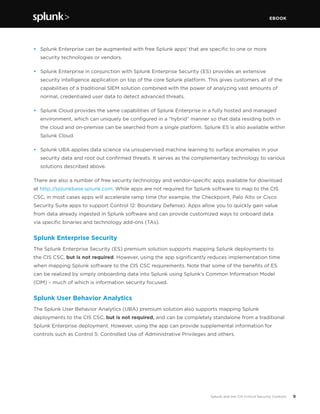
Splunk software maps to each control in the CIS CSC (see Figure 2). There are four major ways in
which the Splunk platform supports the controls:
Verification
Verification & Execution
Execution
Support
As Splunk software ingests data, it can
generate reports and dashboards that
show compliance or non-compliance with
controls. Incidents of non-compliance can
generate alerts to SOC personnel.
Data from third-party sources can be
correlated with data ingested in Splunk
software to meet the control.
In the case of an attack or non-compliance,
Splunk software can carry out recommended
actions to meet controls. With version 6.0 of
the CIS CSC, Splunk software becomes even
more critical, since control 14 surrounding
audit logs has been promoted to position 6.
The Splunk platform provides flexible
features that help security professionals
with controls that are largely policy and
process based.
How Customers Use Splunk for Security
Splunk Enterprise®, the platform for machine-generated data, supports security use cases in a
number of ways:
•	 Splunk Enterprise:
		 - Indexes data from any machine data source
				 - 	 Searches through machine data from a centralized console
				 - 	Allows the security professional to add tags, create event types and correlate the 		
			 incoming data with business context
				 - 	Proactively monitors and alerts on security incidents, with automatic remediation of 		
			 security issues—for example, changing a firewall rule in response to Splunk search results
				 - 	Allows for the creation of reports, dashboards and other forms of analytics to 			
			 communicate security information throughout the organization
EBOOK
9Splunk and the CIS Critical Security Controls
•	 Splunk Enterprise can be augmented with free Splunk apps1
that are specific to one or more
security technologies or vendors.
•	 Splunk Enterprise in conjunction with Splunk Enterprise Security (ES) provides an extensive
security intelligence application on top of the core Splunk platform. This gives customers all of the
capabilities of a traditional SIEM solution combined with the power of analyzing vast amounts of
normal, credentialed user data to detect advanced threats.
•	 Splunk Cloud provides the same capabilities of Splunk Enterprise in a fully hosted and managed
environment, which can uniquely be configured in a “hybrid” manner so that data residing both in
the cloud and on-premise can be searched from a single platform. Splunk ES is also available within
Splunk Cloud.
•	 Splunk UBA applies data science via unsupervised machine learning to surface anomalies in your
security data and root out confirmed threats. It serves as the complementary technology to various
solutions described above.
There are also a number of free security technology and vendor-specific apps available for download
at http://splunkbase.splunk.com. While apps are not required for Splunk software to map to the CIS
CSC, in most cases apps will accelerate ramp time (for example, the Checkpoint, Palo Alto or Cisco
Security Suite apps to support Control 12: Boundary Defense). Apps allow you to quickly gain value
from data already ingested in Splunk software and can provide customized ways to onboard data
via specific binaries and technology add-ons (TAs).
Splunk Enterprise Security
The Splunk Enterprise Security (ES) premium solution supports mapping Splunk deployments to
the CIS CSC, but is not required. However, using the app significantly reduces implementation time
when mapping Splunk software to the CIS CSC requirements. Note that some of the benefits of ES
can be realized by simply onboarding data into Splunk using Splunk’s Common Information Model
(CIM) – much of which is information security focused.
Splunk User Behavior Analytics
The Splunk User Behavior Analytics (UBA) premium solution also supports mapping Splunk
deployments to the CIS CSC, but is not required, and can be completely standalone from a traditional
Splunk Enterprise deployment. However, using the app can provide supplemental information for
controls such as Control 5: Controlled Use of Administrative Privileges and others.
EBOOK
10Splunk and the CIS Critical Security Controls
The Big Picture
What makes the Splunk platform unique for organizations that need to implement the CIS CSC?
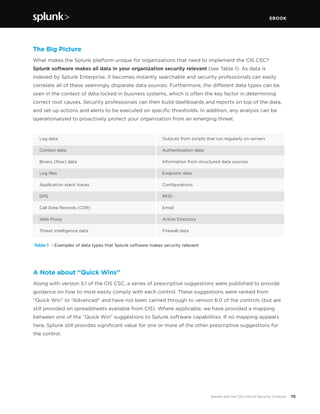
Splunk software makes all data in your organization security relevant (see Table 1). As data is
indexed by Splunk Enterprise, it becomes instantly searchable and security professionals can easily
correlate all of these seemingly disparate data sources. Furthermore, the different data types can be
seen in the context of data locked in business systems, which is often the key factor in determining
correct root causes. Security professionals can then build dashboards and reports on top of the data,
and set up actions and alerts to be executed on specific thresholds. In addition, any analysis can be
operationalized to proactively protect your organization from an emerging threat.
 
Table 1 - Examples of data types that Splunk software makes security relevant
Outputs from scripts that run regularly on servers
Authentication data
Information from structured data sources
Endpoint data
Configurations
RFID
Email
Active Directory
Firewall data
Log data			
Context data 		
Binary (flow) data 	
Log files 			
Application stack traces 	
GPS			
Call Data Records (CDR)	
Web Proxy		
Threat intelligence data	
A Note about “Quick Wins”
Along with version 5.1 of the CIS CSC, a series of prescriptive suggestions were published to provide
guidance on how to most easily comply with each control. These suggestions were ranked from
“Quick Win” to “Advanced” and have not been carried through to version 6.0 of the controls (but are
still provided on spreadsheets available from CIS). Where applicable, we have provided a mapping
between one of the “Quick Win” suggestions to Splunk software capabilities. If no mapping appears
here, Splunk still provides significant value for one or more of the other prescriptive suggestions for
the control.
EBOOK
11Splunk and the CIS Critical Security Controls
THE CIS CSC
HOW SPLUNK SOFTWARE
SUPPORTS THE 20 CIS CSC
WHITE PAPER
12
CONTROL 1
Inventory of Authorized and Unauthorized Devices
Associated NIST Special Publication 800-53, Revision 4
CA-7; CM-8; IA-3; SA-4; SI-4; PM-5
Associated NSA Manageable Network Plan Milestones
Map Your Network
Baseline Management
Document Your Network
Personal Electronic Device Management
Network Access Control
Log Management
Reduce the ability of attackers to find and exploit unauthorized and unprotected systems: use active
monitoring and configuration management to maintain an up-to-date inventory of devices connected
to the enterprise network, including servers, workstations, laptops and remote devices.
Role of Splunk Software: VERIFICATION
An inventory of authorized and unauthorized devices is primarily accomplished with discovery
and vulnerability management tools such as Nmap, Nessus, RedSeal, Qualys, IP360, and Nexpose.
Traditional and next generation configuration management database (CMDB) products with discovery
engines, such as ServiceNow, IBM TADDM and BMC Atrium Discovery, can also be used here.
• Splunk software accepts regularly generated reports from any discovery or vulnerability
management tool. These reports are usually in XML, CSV or similar formats and they contain
timestamps for each entry, providing in-depth analysis of what was discovered.
• TA or app support is provided for the following:
		 - Splunk Add-on for Nessus
	 - Nmap
	- Tripwire IP360
	 - Qualys
	 - Rapid7 Nexpose
	 - 	 Other VA/VM/discovery applications can easily be integrated into Splunk software via log 	
		 file/report ingestion, API integration, database integration, and other methods.
•	 The Splunk for Asset Discovery app is also available and leverages Nmap.
•	 By ingesting these data sources, a record of each discovered device is kept in Splunk Enterprise.
EBOOK
13Splunk and the CIS Critical Security Controls
Every time a new scan is run, information is deposited into Splunk software and it is easy to find the
deltas between scans to find new or different devices.
•	 With Splunk software, it is simple to correlate inventory data with other data sources. Two examples
are a CMDB that contains a list of authorized devices or a maintained list of MAC addresses that
“should not appear” on the network.
•	 It is also easy to correlate other important data types, including audit logs, change logs, traffic
patterns or the output of malware detection solutions, against unauthorized devices found.
Control 1: Using Splunk Enterprise Security
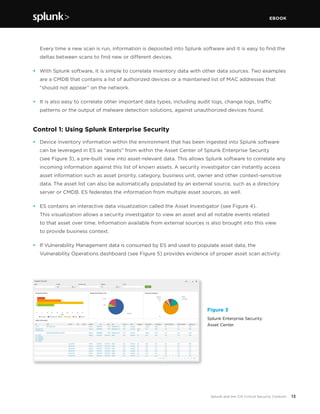
•	 Device inventory information within the environment that has been ingested into Splunk software
can be leveraged in ES as “assets” from within the Asset Center of Splunk Enterprise Security
(see Figure 3), a pre-built view into asset-relevant data. This allows Splunk software to correlate any
incoming information against this list of known assets. A security investigator can instantly access
asset information such as asset priority, category, business unit, owner and other context-sensitive
data. The asset list can also be automatically populated by an external source, such as a directory
server or CMDB. ES federates the information from multiple asset sources, as well.
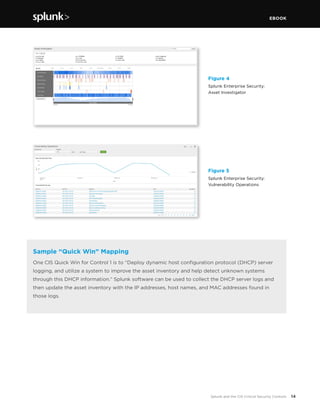
•	 ES contains an interactive data visualization called the Asset Investigator (see Figure 4).
This visualization allows a security investigator to view an asset and all notable events related
to that asset over time. Information available from external sources is also brought into this view
to provide business context.
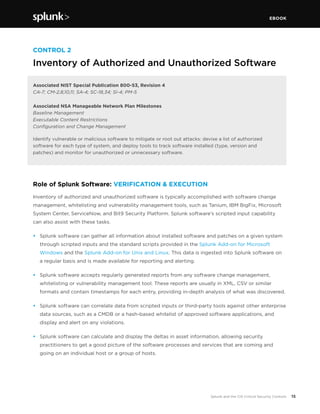
•	 If Vulnerability Management data is consumed by ES and used to populate asset data, the
Vulnerability Operations dashboard (see Figure 5) provides evidence of proper asset scan activity.
Figure 3
Splunk Enterprise Security:
Asset Center
EBOOK
14Splunk and the CIS Critical Security Controls
Figure 4
Splunk Enterprise Security:
Asset Investigator
Figure 5
Splunk Enterprise Security:
Vulnerability Operations
Sample “Quick Win” Mapping
One CIS Quick Win for Control 1 is to “Deploy dynamic host configuration protocol (DHCP) server
logging, and utilize a system to improve the asset inventory and help detect unknown systems
through this DHCP information.” Splunk software can be used to collect the DHCP server logs and
then update the asset inventory with the IP addresses, host names, and MAC addresses found in
those logs.
EBOOK
15Splunk and the CIS Critical Security Controls
CONTROL 2
Inventory of Authorized and Unauthorized Software
Associated NIST Special Publication 800-53, Revision 4
CA-7; CM-2,8,10,11; SA-4; SC-18,34; SI-4; PM-5
Associated NSA Manageable Network Plan Milestones
Baseline Management
Executable Content Restrictions
Configuration and Change Management
Identify vulnerable or malicious software to mitigate or root out attacks: devise a list of authorized
software for each type of system, and deploy tools to track software installed (type, version and
patches) and monitor for unauthorized or unnecessary software.
Role of Splunk Software: VERIFICATION & EXECUTION	
Inventory of authorized and unauthorized software is typically accomplished with software change
management, whitelisting and vulnerability management tools, such as Tanium, IBM BigFix, Microsoft
System Center, ServiceNow, and Bit9 Security Platform. Splunk software’s scripted input capability
can also assist with these tasks.
•	 Splunk software can gather all information about installed software and patches on a given system
through scripted inputs and the standard scripts provided in the Splunk Add-on for Microsoft
Windows and the Splunk Add-on for Unix and Linux. This data is ingested into Splunk software on
a regular basis and is made available for reporting and alerting.
•	 Splunk software accepts regularly generated reports from any software change management,
whitelisting or vulnerability management tool. These reports are usually in XML, CSV or similar
formats and contain timestamps for each entry, providing in-depth analysis of what was discovered.
•	 Splunk software can correlate data from scripted inputs or third-party tools against other enterprise
data sources, such as a CMDB or a hash-based whitelist of approved software applications, and
display and alert on any violations.
•	 Splunk software can calculate and display the deltas in asset information, allowing security
practitioners to get a good picture of the software processes and services that are coming and
going on an individual host or a group of hosts.
EBOOK
16Splunk and the CIS Critical Security Controls
Control 2: Using Splunk Enterprise Security
•	 ES provides ways of defining “interesting” processes and services within your environment via
lookup files that can be statically or dynamically populated. Lookup files can define processes that
are either whitelisted or blacklisted, such as adding fields like “is_secure” and “is_prohibited.”
When data containing the specific process or service name is processed, it is correlated against these
lists so that a security investigator can instantly know if a given piece of software is authorized.
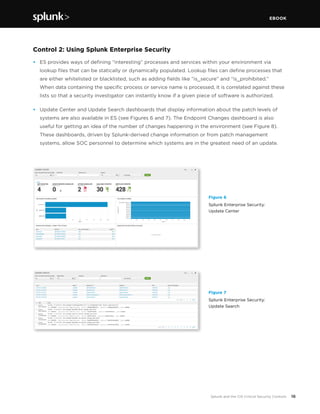
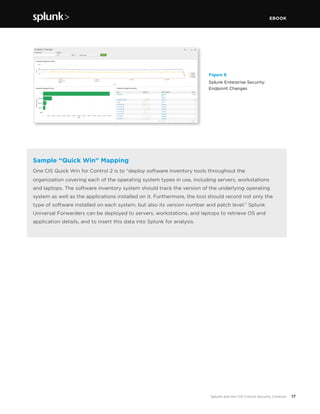
•	 Update Center and Update Search dashboards that display information about the patch levels of
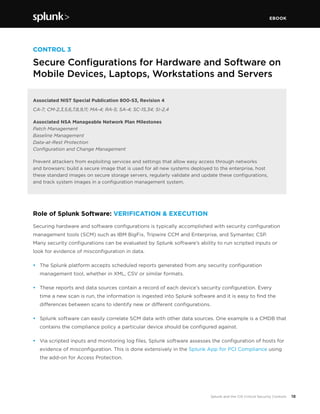
systems are also available in ES (see Figures 6 and 7). The Endpoint Changes dashboard is also
useful for getting an idea of the number of changes happening in the environment (see Figure 8).
These dashboards, driven by Splunk-derived change information or from patch management
systems, allow SOC personnel to determine which systems are in the greatest need of an update.
Figure 6
Splunk Enterprise Security:
Update Center
Figure 7
Splunk Enterprise Security:
Update Search
EBOOK
17Splunk and the CIS Critical Security Controls
Figure 8
Splunk Enterprise Security:
Endpoint Changes
Sample “Quick Win” Mapping
One CIS Quick Win for Control 2 is to “deploy software inventory tools throughout the
organization covering each of the operating system types in use, including servers, workstations
and laptops. The software inventory system should track the version of the underlying operating
system as well as the applications installed on it. Furthermore, the tool should record not only the
type of software installed on each system, but also its version number and patch level.” Splunk
Universal Forwarders can be deployed to servers, workstations, and laptops to retrieve OS and
application details, and to insert this data into Splunk for analysis.
EBOOK
18Splunk and the CIS Critical Security Controls
CONTROL 3
Secure Configurations for Hardware and Software on
Mobile Devices, Laptops, Workstations and Servers
Associated NIST Special Publication 800-53, Revision 4
CA-7; CM-2,3,5,6,7,8,9,11; MA-4; RA-5; SA-4; SC-15,34; SI-2,4
Associated NSA Manageable Network Plan Milestones
Patch Management
Baseline Management
Data-at-Rest Protection
Configuration and Change Management
Prevent attackers from exploiting services and settings that allow easy access through networks
and
browsers: build a secure image that is used for all new systems deployed to the enterprise, host
these standard images on secure storage servers, regularly validate and update these configurations,
and track system images
in a configuration management system.
Role of Splunk Software: VERIFICATION & EXECUTION
Securing hardware and software configurations is typically accomplished with security configuration
management tools (SCM) such as IBM BigFix, Tripwire CCM and Enterprise, and Symantec CSP.
Many security configurations can be evaluated by Splunk software’s ability to run scripted inputs or
look for evidence of misconfiguration in data.
•	 The Splunk platform accepts scheduled reports generated from any security configuration
management tool, whether in XML, CSV or similar formats.
•	 These reports and data sources contain a record of each device’s security configuration. Every
time a new scan is run, the information is ingested into Splunk software and it is easy to find the
differences between scans to identify new or different configurations.
•	 Splunk software can easily correlate SCM data with other data sources. One example is a CMDB that
contains the compliance policy a particular device should be configured against.
•	 Via scripted inputs and monitoring log files, Splunk software assesses the configuration of hosts for
evidence of misconfiguration. This is done extensively in the Splunk App for PCI Compliance using
the add-on for Access Protection.
EBOOK
19Splunk and the CIS Critical Security Controls
•	 Splunk software can look for evidence of systems not meeting standards. For example, if a desktop
machine within the network suddenly starts to generate web requests with a non-compliant user
agent (available by analyzing proxy logs) or by communicating on unusual network ports (available
by analyzing wire data) then an alert or a notable event can be generated.
Control 3: Using Splunk Enterprise Security
•	 When misconfigured services and settings are exploited, there is generally anomalous behavior
in the environment that can be tied back to rogue services, processes or other kinds of
misconfigurations. ES contains correlation rules to identify this behavior and misconfigurations
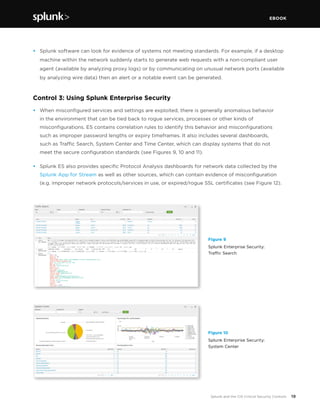
such as improper password lengths or expiry timeframes. It also includes several dashboards,
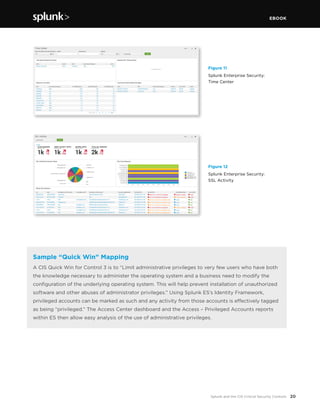
such as Traffic Search, System Center and Time Center, which can display systems that do not
meet the secure configuration standards (see Figures 9, 10 and 11).
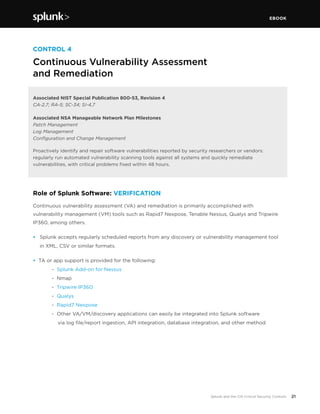
•	 Splunk ES also provides specific Protocol Analysis dashboards for network data collected by the
Splunk App for Stream as well as other sources, which can contain evidence of misconfiguration
(e.g. improper network protocols/services in use, or expired/rogue SSL certificates (see Figure 12).
Figure 9
Splunk Enterprise Security:
Traffic Search
Figure 10
Splunk Enterprise Security:
System Center
EBOOK
20Splunk and the CIS Critical Security Controls
Figure 11
Splunk Enterprise Security:
Time Center
Figure 12
Splunk Enterprise Security:
SSL Activity
Sample “Quick Win” Mapping
A CIS Quick Win for Control 3 is to “Limit administrative privileges to very few users who have both
the knowledge necessary to administer the operating system and a business need to modify the
configuration of the underlying operating system. This will help prevent installation of unauthorized
software and other abuses of administrator privileges.” Using Splunk ES’s Identity Framework,
privileged accounts can be marked as such and any activity from those accounts is effectively tagged
as being “privileged.” The Access Center dashboard and the Access – Privileged Accounts reports
within ES then allow easy analysis of the use of administrative privileges.
EBOOK
21Splunk and the CIS Critical Security Controls
CONTROL 4
Continuous Vulnerability Assessment
and Remediation
Associated NIST Special Publication 800-53, Revision 4
CA-2,7; RA-5; SC-34; SI-4,7
Associated NSA Manageable Network Plan Milestones
Patch Management
Log Management
Configuration and Change Management
Proactively identify and repair software vulnerabilities reported by security researchers or vendors:
regularly run automated vulnerability scanning tools against all systems and quickly remediate
vulnerabilities, with critical problems fixed within 48 hours.
Role of Splunk Software: VERIFICATION
Continuous vulnerability assessment (VA) and remediation is primarily accomplished with
vulnerability management (VM) tools such as Rapid7 Nexpose, Tenable Nessus, Qualys and Tripwire
IP360, among others.
•	 Splunk accepts regularly scheduled reports from any discovery or vulnerability management tool
in XML, CSV or similar formats.
• TA or app support is provided for the following:
	 - Splunk Add-on for Nessus
	 - Nmap
	 - Tripwire IP360
	 - Qualys
	 - Rapid7 Nexpose
	 - Other VA/VM/discovery applications can easily be integrated into Splunk software
	 via log file/report ingestion, API integration, database integration, and other method
EBOOK
22Splunk and the CIS Critical Security Controls
Control 4: Using Splunk Enterprise Security
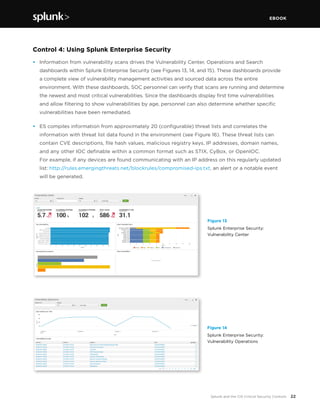
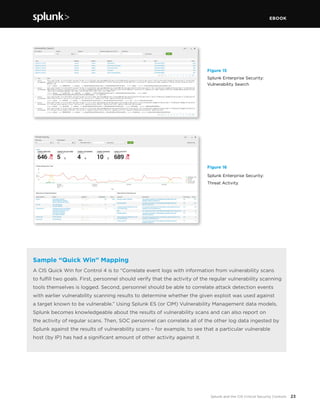
•	 Information from vulnerability scans drives the Vulnerability Center, Operations and Search
dashboards within Splunk Enterprise Security (see Figures 13, 14, and 15). These dashboards provide
a complete view of vulnerability management activities and sourced data across the entire
environment. With these dashboards, SOC personnel can verify that scans are running and determine
the newest and most critical vulnerabilities. Since the dashboards display first time vulnerabilities
and allow filtering to show vulnerabilities by age, personnel can also determine whether specific
vulnerabilities have been remediated.
• 	 ES compiles information from approximately 20 (configurable) threat lists and correlates the
information with threat list data found in the environment (see Figure 16). These threat lists can
contain CVE descriptions, file hash values, malicious registry keys, IP addresses, domain names,
and any other IOC definable within a common format such as STIX, CyBox, or OpenIOC.
For example, if any devices are found communicating with an IP address on this regularly updated
list: http://rules.emergingthreats.net/blockrules/compromised-ips.txt, an alert or a notable event
will be generated.
Figure 13
Splunk Enterprise Security:
Vulnerability Center
Figure 14
Splunk Enterprise Security:
Vulnerability Operations
EBOOK
23Splunk and the CIS Critical Security Controls
Figure 16
Splunk Enterprise Security:
Threat Activity
Figure 15
Splunk Enterprise Security:
Vulnerability Search
Sample “Quick Win” Mapping
A CIS Quick Win for Control 4 is to “Correlate event logs with information from vulnerability scans
to fulfill two goals. First, personnel should verify that the activity of the regular vulnerability scanning
tools themselves is logged. Second, personnel should be able to correlate attack detection events
with earlier vulnerability scanning results to determine whether the given exploit was used against
a target known to be vulnerable.” Using Splunk ES (or CIM) Vulnerability Management data models,
Splunk becomes knowledgeable about the results of vulnerability scans and can also report on
the activity of regular scans. Then, SOC personnel can correlate all of the other log data ingested by
Splunk against the results of vulnerability scans – for example, to see that a particular vulnerable
host (by IP) has had a significant amount of other activity against it.
EBOOK
24Splunk and the CIS Critical Security Controls
CONTROL 5
Controlled Use of Administrative Privileges
Associated NIST Special Publication 800-53, Revision 4
AC-2,6,17,19; CA-7; IA-4; IA-5; SI-4
Associated NSA Manageable Network Plan Milestones
User Access
Baseline Management
Log Management
Protect and validate administrative accounts on desktops, laptops and servers to prevent two common

types of attack: (1) enticing users to open a malicious email, attachment or file, or to visit a malicious
website; and (2) cracking an administrative password and thereby gaining access to a target machine.
Use robust 
passwords that follow Federal Desktop Core Configuration (FDCC) standards.
Role of Splunk Software: VERIFICATION
Controlled use of admin privileges can be accomplished with a number of toolsets that restrict the
use of administrative accounts. The simplest methods are OS-level tools, like sudo, and controls that
can be put in place with vendor-supplied tools like Active Directory. There are also commercial
applications that search for misconfigurations, such as enabled guest accounts, too-lenient sudo
configurations, and failure to rename administrative or default accounts.
•	 Splunk consumes authentication logs from across the technology environment that detail account
activity, including how accounts are being accessed and from where. Authentication logs come
from, but are not limited to: host devices, domain controllers, directory servers, network devices,
Radius, TACACS, application logs and many others. All of this machine data will be ingested into
Splunk software for searching and correlation.
•	 Any use of known administrative accounts like “Administrator” and “root” and “sa” can easily be
searched across the entire environment and reported or alerted upon.
EBOOK
25Splunk and the CIS Critical Security Controls
Control 5: Using Splunk Enterprise Security
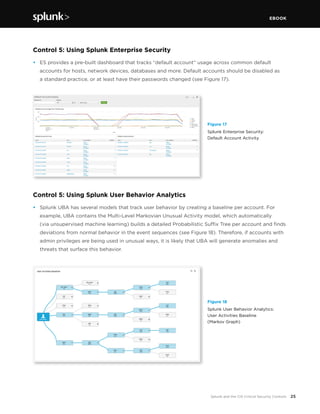
•	 ES provides a pre-built dashboard that tracks “default account” usage across common default
accounts for hosts, network devices, databases and more. Default accounts should be disabled as
a standard practice, or at least have their passwords changed (see Figure 17).
Control 5: Using Splunk User Behavior Analytics
•	 Splunk UBA has several models that track user behavior by creating a baseline per account. For
example, UBA contains the Multi-Level Markovian Unusual Activity model, which automatically
(via unsupervised machine learning) builds a detailed Probabilistic Suffix Tree per account and finds
deviations from normal behavior in the event sequences (see Figure 18). Therefore, if accounts with
admin privileges are being used in unusual ways, it is likely that UBA will generate anomalies and
threats that surface this behavior.
Figure 17
Splunk Enterprise Security:
Default Account Activity
Figure 18
Splunk User Behavior Analytics:
User Activities Baseline
(Markov Graph)
EBOOK
26Splunk and the CIS Critical Security Controls
Sample “Quick Win” Mapping
A CIS Quick Win for Control 5 is to “Minimize administrative privileges and only use administrative
accounts when they are required. Implement focused auditing on the use of administrative
privileged functions and monitor for anomalous behavior.” Using Splunk Enterprise Security’s
Identity Framework, privileged accounts can be marked as such and any activity from those
accounts is effectively tagged as being “privileged.” The Access Center dashboard and the
Access – Privileged Accounts reports within ES then allow easy analysis of the use of
administrative privileges.
EBOOK
27Splunk and the CIS Critical Security Controls
CONTROL 6
Maintenance, Monitoring and Analysis of Audit Logs
Associated NIST Special Publication 800-53, Revision 4
AC-23; AU-2,3,4,5,6,7,8,9,10,11,12,13,14; CA-7; IA-10; SI-4
Associated NSA Manageable Network Plan Milestones
Log Management
Use detailed logs to identify and uncover the details of an attack, including the location, malicious
software
deployed and activity on victim machines: generate standardized logs for each hardware device
and the software installed on it, including date, time stamp, source addresses, destination addresses and
other information about each packet and/or transaction. Store logs on dedicated servers and run biweekly
reports to identify and
document anomalies.
Role of Splunk Software: EXECUTION
Maintenance, monitoring and analysis of audit logs are a core competency of Splunk software. The
Splunk platform consumes logs from any source within an enterprise architecture, regardless of the
format, frequency or volume, and safely and efficiently indexes the data into a series of centralized,
high-performance flat files. The indexed data is immediately searchable, reportable and can be alerted
upon to any number of security investigators in an organization.
•	 Log data can be delivered to Splunk software in flat-file format, Windows Event Logs, syslog,
direct REST API ingestion and a multitude of other methods.
•	 Logs can be delivered in a compressed and optionally encrypted manner.
•	 Tools are provided to ensure the security and tamper-proof nature of the centralized log store.
•	 Splunk software allows the security investigator to apply security and audit logic at will, with
options for real-time or historical modes.
•	 Security and audit logic can be converted into reports, alerts, dashboards, feeds and actions—for
example, creating an incident in a security workflow system.
•	 Logs can be analyzed in full fidelity and can be kept as long as necessary, provided you have the
disk space—there is no data “rollup,” so you do not lose any granularity.
In version 6.3 and later of Splunk Enterprise, a Data Integrity feature allows Splunk administrators
to optionally audit any changes to the underlying Splunk data stores, in order to ensure that they
are protected from tampering. More information on this feature is available here:
http://blogs.splunk.com/2015/10/28/data-integrity-is-back-baby/.
EBOOK
28Splunk and the CIS Critical Security Controls
Control 6: Using Splunk Enterprise Security
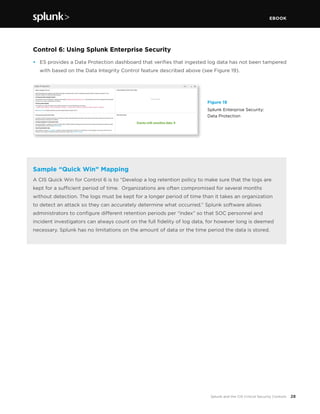
•	 ES provides a Data Protection dashboard that verifies that ingested log data has not been tampered
with based on the Data Integrity Control feature described above (see Figure 19).
Figure 19
Splunk Enterprise Security:
Data Protection
Sample “Quick Win” Mapping
A CIS Quick Win for Control 6 is to “Develop a log retention policy to make sure that the logs are
kept for a sufficient period of time. Organizations are often compromised for several months
without detection. The logs must be kept for a longer period of time than it takes an organization
to detect an attack so they can accurately determine what occurred.” Splunk software allows
administrators to configure different retention periods per “index” so that SOC personnel and
incident investigators can always count on the full fidelity of log data, for however long is deemed
necessary. Splunk has no limitations on the amount of data or the time period the data is stored.
EBOOK
29Splunk and the CIS Critical Security Controls
CONTROL 7
Email and Web Browser Protections
Associated NIST Special Publication 800-53, Revision 4
CA-7; CM-2,3,5,6,7,8,9,11; MA-4, RA-5, SA-4, SC-15, SC-34, SI-2,4
Associated NSA Manageable Network Plan Milestones
Patch Management
Baseline Management
Data-at-Rest Protection
Configuration and Change Management
Minimize the attack surface and the opportunities for attackers to manipulate human behavior through
their interaction with web browsers and email systems. Ensure that only fully supported web browsers and
email clients are allowed to execute in the organization, ideally using the latest version of the browsers.
Uninstall or disable unnecessary or unauthorized plugins. Limit unnecessary scripting languages. Log all
URL requests from each of the organization’s systems. Scan and block email attachments if they contain
malicious code.
Role of Splunk Software: VERIFICATION & EXECUTION
Email and web browser protections are accomplished through secure configurations on endpoints and
appropriate scanning and blocking appliances/systems installed at the organization’s email gateway.
On the endpoints, web browsers should be configured against a secure standard, and all web requests
should go through a proxy or a next-generation firewall that can log the URL requests. Within the mail
gateways, details about scanning and blocking activity and update activity can be logged as well.
•	 Splunk software can be installed on most endpoints to watch for changes to secure configurations
that affect registry entries or installed applications, bringing them out of compliance. Alternatively,
any system that audits endpoint configuration can be configured to log these results to Splunk.
		 - Security Configuration Management solutions such as those described in Control 3
are helpful here.
•	 Splunk software can be used to collect access logs from proxy and/or next generation firewalls,
allowing for the analysis of URL requests to identify potentially malicious activity. For example,
unapproved browser useragents can quickly be isolated and acted upon. The Splunk App for
Stream, or other sources of wire data, can be used as well to surface details of email transactions
and activity from rogue browser useragents.
•	 Most mail appliances/scanning technology can output log data to Splunk for analysis of allowed/
blocked attachments, allowing identification of potentially malicious activity.
EBOOK
30Splunk and the CIS Critical Security Controls
Control 7: Using Splunk Enterprise Security
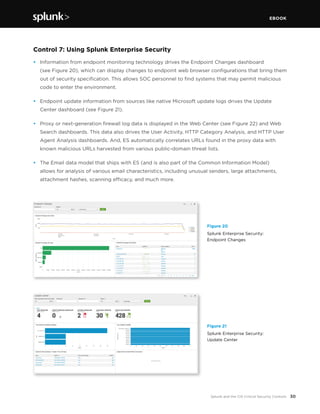
•	 Information from endpoint monitoring technology drives the Endpoint Changes dashboard
(see Figure 20), which can display changes to endpoint web browser configurations that bring them
out of security specification. This allows SOC personnel to find systems that may permit malicious
code to enter the environment.
•	 Endpoint update information from sources like native Microsoft update logs drives the Update
Center dashboard (see Figure 21).
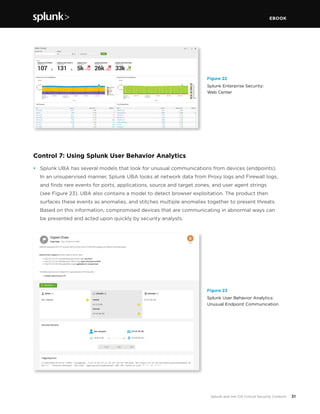
•	 Proxy or next-generation firewall log data is displayed in the Web Center (see Figure 22) and Web
Search dashboards. This data also drives the User Activity, HTTP Category Analysis, and HTTP User
Agent Analysis dashboards. And, ES automatically correlates URLs found in the proxy data with
known malicious URLs harvested from various public-domain threat lists.
•	 The Email data model that ships with ES (and is also part of the Common Information Model)
allows for analysis of various email characteristics, including unusual senders, large attachments,
attachment hashes, scanning efficacy, and much more.
Figure 20
Splunk Enterprise Security:
Endpoint Changes
Figure 21
Splunk Enterprise Security:
Update Center
EBOOK
31Splunk and the CIS Critical Security Controls
Figure 22
Splunk Enterprise Security:
Web Center
Figure 23
Splunk User Behavior Analytics:
Unusual Endpoint Communication
Control 7: Using Splunk User Behavior Analytics
•	 Splunk UBA has several models that look for unusual communications from devices (endpoints).
In an unsupervised manner, Splunk UBA looks at network data from Proxy logs and Firewall logs,
and finds rare events for ports, applications, source and target zones, and user agent strings
(see Figure 23). UBA also contains a model to detect browser exploitation. The product then
surfaces these events as anomalies, and stitches multiple anomalies together to present threats.
Based on this information, compromised devices that are communicating in abnormal ways can
be presented and acted upon quickly by security analysts.
EBOOK
32Splunk and the CIS Critical Security Controls
Sample “Quick Win” Mapping
A CIS Quick Win for Control 7 is to “Log all URL requests from each of the organization’s systems,
whether onsite or a mobile device, in order to identify potentially malicious activity and assist
incident handlers with identifying potentially compromised systems.” This is an extremely common
Splunk software use case, as web proxy/next generation firewall data is logged to Splunk for
reporting and analysis purposes, usually directly from these devices. Within Splunk Enterprise
Security, the Web data model is used to quickly provide value from these data sources.
EBOOK
33Splunk and the CIS Critical Security Controls
CONTROL 8
Malware Defense
Associated NIST Special Publication 800-53, Revision 4
CA-7; SC-39,44; SI-3,4,8
Associated NSA Manageable Network Plan Milestones
Device Accessibility
Virus Scanners and Host Intrusion Prevention Systems (HIPS)
Security Gateways, Proxies and Firewalls
Network Security Monitoring
Log Management
Block malicious code from tampering with system settings or contents, capturing sensitive data or spreading:
use automated anti-virus and anti-spyware software to continuously monitor and protect workstations, servers
and mobile devices. Automatically update such anti-malware tools on all machines on a daily basis. Prevent
network devices from using auto-run programs to access removable media.
Role of Splunk Software: VERIFICATION & EXECUTION
Malware defense is accomplished with endpoint protection programs from vendors like McAfee,
Symantec, Sophos and others. Whitelisting products from vendors like Bit9 also play a supporting
role. However, the monitoring of removable media activity can be accomplished by monitoring the
appropriate log files, registry or both settings with Splunk software. Splunk can also confirm that
anti-virus software is running and is installed based on process or log file monitoring.
•	 Splunk software parses log files from any anti-virus or anti-malware management tool.
These log files are often in syslog or Windows Event Log formats and contain timestamps for
each entry, providing in-depth information on the status of malware discovery and quarantine
activities on individual hosts. Several technology add-ons are available for free download from
http://splunkbase.splunk.com, supporting popular anti-virus products like Sophos, Trend Micro,
and Symantec Endpoint Protection and Antivirus.
•	 Splunk software can access anti-virus scan information in vendor-specific databases. These
databases contain individual workstation information and provide malware discovery and
quarantine activities on specific hosts. One example of a Splunk technology add-on that works
in this manner and leverages Splunk DB Connect is the App for McAfee Web Gateway (Epolicy
Orchestrator and IDS).
EBOOK
34Splunk and the CIS Critical Security Controls
•	 Through the use of scripted inputs and monitoring of log files, Splunk software can assess the
configuration of a particular server and look for evidence that the system has mounted removable
storage or if changes have been made to the system to allow for removable storage.
•	 Splunk software can also use scripted inputs to ensure that the appropriate anti-virus or
anti-malware executables and services are running.
Control 8: Using Splunk Enterprise Security
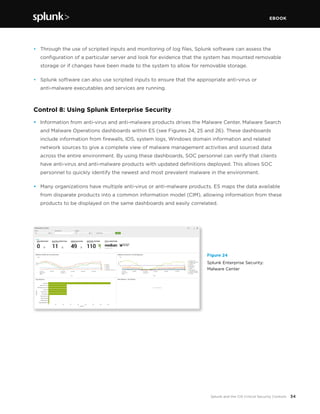
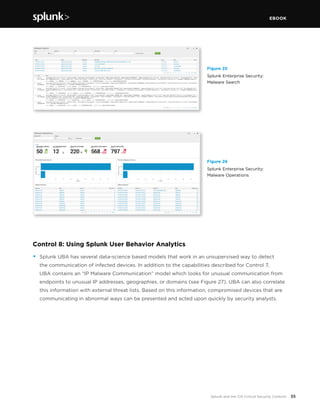
•	 Information from anti-virus and anti-malware products drives the Malware Center, Malware Search
and Malware Operations dashboards within ES (see Figures 24, 25 and 26). These dashboards
include information from firewalls, IDS, system logs, Windows domain information and related
network sources to give a complete view of malware management activities and sourced data
across the entire environment. By using these dashboards, SOC personnel can verify that clients
have anti-virus and anti-malware products with updated definitions deployed. This allows SOC
personnel to quickly identify the newest and most prevalent malware in the environment.
•	 Many organizations have multiple anti-virus or anti-malware products. ES maps the data available
from disparate products into a common information model (CIM), allowing information from these
products to be displayed on the same dashboards and easily correlated.
Figure 24
Splunk Enterprise Security:
Malware Center
EBOOK
35Splunk and the CIS Critical Security Controls
Control 8: Using Splunk User Behavior Analytics
•	 Splunk UBA has several data-science based models that work in an unsupervised way to detect
the communication of infected devices. In addition to the capabilities described for Control 7,
UBA contains an “IP Malware Communication” model which looks for unusual communication from
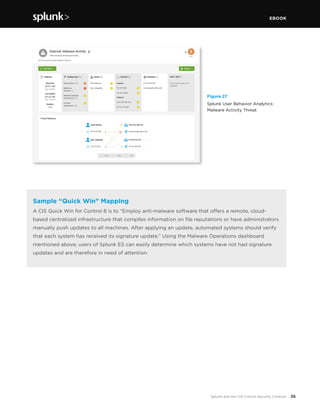
endpoints to unusual IP addresses, geographies, or domains (see Figure 27). UBA can also correlate
this information with external threat lists. Based on this information, compromised devices that are
communicating in abnormal ways can be presented and acted upon quickly by security analysts.
Figure 26
Splunk Enterprise Security:
Malware Operations
Figure 25
Splunk Enterprise Security:
Malware Search
EBOOK
36Splunk and the CIS Critical Security Controls
Sample “Quick Win” Mapping
A CIS Quick Win for Control 8 is to “Employ anti-malware software that offers a remote, cloud-
based centralized infrastructure that compiles information on file reputations or have administrators
manually push updates to all machines. After applying an update, automated systems should verify
that each system has received its signature update.” Using the Malware Operations dashboard
mentioned above, users of Splunk ES can easily determine which systems have not had signature
updates and are therefore in need of attention.
Figure 27
Splunk User Behavior Analytics:
Malware Activity Threat
EBOOK
37Splunk and the CIS Critical Security Controls
CONTROL 9
Limitation and Control of Network Ports,
Protocols and Switches
Associated NIST Special Publication 800-53, Revision 4
AT-1,2,3,4; SA-11,16; PM-13,14,16
Associated NSA Manageable Network Plan Milestones
Baseline Management
Configuration and Change Management
Allow remote access only to legitimate users and services: apply host-based firewalls and port-filtering
and
scanning tools to block traffic that is not explicitly allowed. Properly configure web servers, mail
servers, file and print services, and domain name system (DNS) servers to limit remote access. Disable
automatic installation of unnecessary software components. Move servers inside the firewall unless
remote access is required for
business purposes.
Role of Splunk Software: VERIFICATION
Limitation and control of network ports is primarily accomplished with discovery and vulnerability
management tools such as Nmap, Nessus, RedSeal, Qualys and Nexpose.
•	 Splunk software accepts regularly generated reports from any discovery or vulnerability
management tool. This data often includes descriptions of network ports and protocols found.
•	 Technical add-on or app support is provided for the following:
	 - 	Splunk Add-on for Nessus
	 - 	Nmap
	 - 	Tripwire IP360
	 - 	Other VA/VM/discovery applications can easily be integrated into Splunk via log file
		 and report ingestion.
•	 Once discovery and vulnerability data has been ingested, a record of each discovered protocol and
port is kept in Splunk. As new data is ingested, Splunk software makes it easy to identify changes
made between scans.
•	 Splunk software can correlate discovered port and protocol data with other data sources,
such as a lookup table that contains a list of authorized ports or a maintained list of protocols
that should not appear on the network.
EBOOK
38Splunk and the CIS Critical Security Controls
•	 Splunk software can ingest converted network capture data from sources like NetFlow and PCAP
data. Splunk Enterprise Security supports v5 and v9 of NetFlow and captures data from Bro IDS.
This data can also be analyzed for unauthorized ports and protocols. Another useful application for
the collection of network data is the Splunk App for Stream, which can allow any Splunk Universal
Forwarder to capture wire data from the local interface in promiscuous mode. This data is then
ingested in real time in Splunk for further analysis.
Control 9: Using Splunk Enterprise Security
•	 ES contains various lookups, correlation searches and dashboards that can assist in detecting
improper and unauthorized ports, protocols and traffic on your network.
•	 ES contains two add-ons for network protection and threat intelligence. These add-ons include
lookup files for application protocols, ports of interest and prohibited processes. Splunk software’s
correlation searches and dashboards consult these lists to determine whether ports, protocols and
services seen in the environment are authorized or unauthorized. These lookups can be populated
manually or automatically via an existing data source.
•	 Correlation searches within ES that detect unusual or unauthorized network activity include, but are
not limited to:
	 -	 High Volume of Traffic from Critical Host
	 -	 Network Change Detected
	 -	 SANS Block List Activity Detected
	 -	 Substantial Increase in Network Events
	 -	 Substantial Increase in Port Activity
	 -	 Unapproved Port Activity Detected
	 -	 Unusual Volume of Network Activity
•	 Dashboards specific to port and protocol activity include Traffic Center and Traffic Search
(see Figures 28 and 29) and three vulnerability dashboards. There is also a Port & Protocol
Tracker Dashboard.
•	 Another dashboard that can be used to find anomalous network behavior is the Traffic Size analysis
dashboard (see Figure 30). This finds connections with large byte counts per request, as well as
devices with lots of connection attempts but small byte sizes. Unusual activity showing up on this
dashboard can be indicative of data loss problems.
EBOOK
39Splunk and the CIS Critical Security Controls
Control 9: Using Splunk User Behavior Analytics
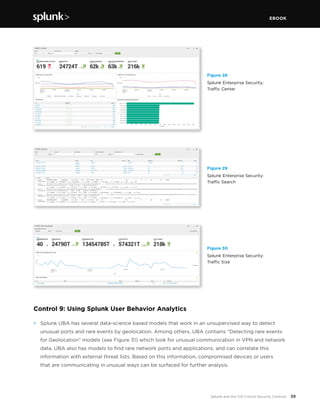
•	 Splunk UBA has several data-science based models that work in an unsupervised way to detect
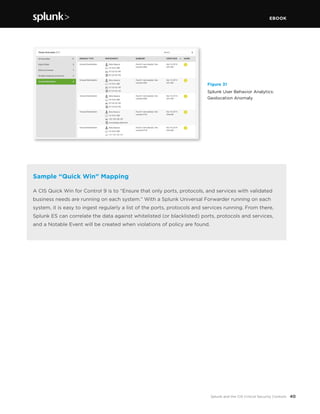
unusual ports and rare events by geolocation. Among others, UBA contains “Detecting rare events
for Geolocation” models (see Figure 31) which look for unusual communication in VPN and network
data. UBA also has models to find rare network ports and applications, and can correlate this
information with external threat lists. Based on this information, compromised devices or users
that are communicating in unusual ways can be surfaced for further analysis.
Figure 28
Splunk Enterprise Security:
Traffic Center
Figure 29
Splunk Enterprise Security:
Traffic Search
Figure 30
Splunk Enterprise Security:
Traffic Size
EBOOK
40Splunk and the CIS Critical Security Controls
Sample “Quick Win” Mapping
A CIS Quick Win for Control 9 is to “Ensure that only ports, protocols, and services with validated
business needs are running on each system.” With a Splunk Universal Forwarder running on each
system, it is easy to ingest regularly a list of the ports, protocols and services running. From there,
Splunk ES can correlate the data against whitelisted (or blacklisted) ports, protocols and services,
and a Notable Event will be created when violations of policy are found.
 
Figure 31
Splunk User Behavior Analytics:
Geolocation Anomaly
EBOOK
41Splunk and the CIS Critical Security Controls
CONTROL 10
Recovery Capability
Associated NIST Special Publication 800-53, Revision 4
CP-9,10; MP-4
Associated NSA Manageable Network Plan Milestones
Backup Strategy
Minimize the damage from an attack: implement a trustworthy plan for removing all traces of an
attack. Automatically back up all information required to fully restore each system, including the
operating system, application software and data. Back up all systems at least weekly; back up sensitive
systems more often. Regularly test the restoration process.
Role of Splunk Software: VERIFICATION
Data recovery is accomplished with enterprise backup solutions. Most backup solutions create
detailed logs of all of their activity. Splunk software can monitor the log file output from these tools
and leverages the information in searches and dashboards to confirm that critical systems are being
backed up. Alerts can be generated if expected backup activity is not seen.
•	 Splunk software can consume regular backup activity logs from any backup solution. Popular
solutions include products from vendors like EMC, IBM, CommVault, Symantec and HP.
•	 Dashboards can be created to display critical and sensitive systems (for example, those designated
as containing or processing cardholder data) and their backup status.
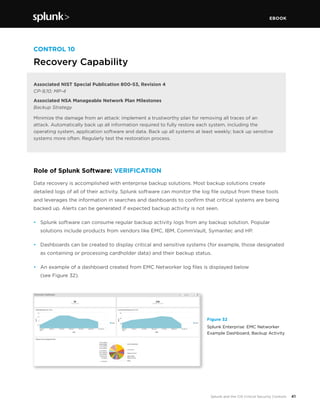
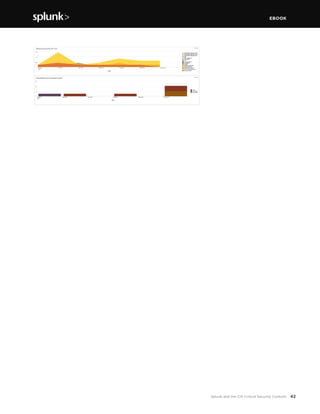
•	 An example of a dashboard created from EMC Networker log files is displayed below
(see Figure 32).
Figure 32
Splunk Enterprise: EMC Networker
Example Dashboard, Backup Activity
EBOOK
42Splunk and the CIS Critical Security Controls
EBOOK
43Splunk and the CIS Critical Security Controls
CONTROL 11
Secure Configurations for Network Devices such as
Firewalls, Routers and Switches
Associated NIST Special Publication 800-53, Revision 4
AC-4; CA-3,7,9; CM-2,3,5,6,8; MA-4; SC-24; SI-4
Associated NSA Manageable Network Plan Milestones
Map Your Network
Patch Management
Baseline Management
Document Your Network
Security Gateways, Proxies, and Firewalls
Configuration and Change Management
Preclude electronic holes from forming at connection points with the Internet, other organizations
and
internal network segments: compare firewall, router and switch configurations against standards for
each type of network device. Ensure that any deviations from the standard configurations are documented
and approved and that any temporary deviations are undone when the business need abates.
Role of Splunk Software: VERIFICATION & EXECUTION
Maintaining secure configurations is accomplished with network policy management tools (NPM)
such as Tripwire Enterprise, Firemon, RedSeal, AlgoSec, and native ACS logs from subsystems like
Cisco TACACS+. Splunk software can support security configurations by identifying evidence of
misconfiguration in log data, traffic on ports or from addresses that are unauthorized.
•	 Splunk software accepts regularly generated reports from any network policy management tools.
•	 By ingesting these data sources, a record of each device’s security configuration is kept in Splunk
software. This makes it easy for Splunk software to see changes between scans to identify new or
different configurations.
•	 Splunk software can correlate NPM data with other data sources, such as a CMDB containing the
compliance policy that a particular device should be configured against.
•	 By monitoring log files, Splunk software can assess the configuration of devices for evidence of
misconfiguration.
EBOOK
44Splunk and the CIS Critical Security Controls
•	 Splunk software can help provide evidence of systems not meeting standards. For example, if a
network device suddenly has telnet enabled (determined by analyzing vulnerability management
logs), then an alert or a notable event can be generated.
Control 11: Using Splunk Enterprise Security
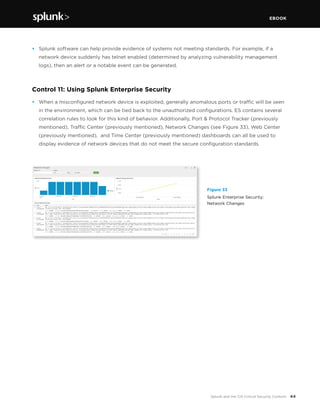
•	 When a misconfigured network device is exploited, generally anomalous ports or traffic will be seen
in the environment, which can be tied back to the unauthorized configurations. ES contains several
correlation rules to look for this kind of behavior. Additionally, Port & Protocol Tracker (previously
mentioned), Traffic Center (previously mentioned), Network Changes (see Figure 33), Web Center
(previously mentioned), and Time Center (previously mentioned) dashboards can all be used to
display evidence of network devices that do not meet the secure configuration standards.
Figure 33
Splunk Enterprise Security:
Network Changes
EBOOK
45Splunk and the CIS Critical Security Controls
CONTROL 12
Boundary Defense
Associated NIST Special Publication 800-53, Revision 4
AC-4,17,20; CA-3,7,9; CM-2; SA-9; SC-7,4; SI-4
Associated NSA Manageable Network Plan Milestones
Map Your Network
Network Architecture
Baseline Management
Personal Electronic Device Management
Document Your Network
Security Gateways, Proxies, and Firewalls
Remote Access Security
Network Security Monitoring
Log Management
Control the flow of traffic through network borders and police content by looking for attacks and

evidence of compromised machines: establish multilayered boundary defenses by relying on firewalls,
proxies, demilitarized zone (DMZ) perimeter networks and other network-based tools. Filter inbound
and outbound traffic, including traffic through business partner networks (“extranets”).
Role of Splunk Software: VERIFICATION
Boundary defense can be accomplished with properly configured firewalls augmented with intrusion
detection and prevention systems (IDS/IPS). Common firewall vendors include Cisco, Palo Alto,
Fortinet and Checkpoint. Common IDS/IPS include managed next-gen firewalls, HP TippingPoint,
Snort, Sourcefire and FireEye.
•	 Firewalls and IDS/IPS produce vast amounts of log data that Splunk can easily ingest. Most com-
monly, this data arrives at Splunk in the form of syslog data, but some firewalls, such as Checkpoint,
have proprietary logging mechanisms that Splunk software can also use. There are a number of free
apps available on splunkbase.splunk.com that support common firewall vendors including Cisco,
Palo Alto and Fortinet.
•	 IDS/IPS is supported by free technology add-ons and apps as well. Apps and add-ons are available
for FireEye, Snort, Sourcefire, TippingPoint and others. Furthermore, if a device or application can
get log data into Splunk software in some way, an add-on or app is not necessary.
•	 Proxy servers, such as BlueCoat, also generate a significant amount of log data that can be con-
sumed and analyzed by Splunk software to get a good feel for an organization’s web traffic.
EBOOK
46Splunk and the CIS Critical Security Controls
•	 Splunk software can analyze traffic for possible exfiltration to dump servers or communication with
command and control machines (C&C machines), which are often registered with new, transient
domain names. Control 13 covers this in further detail.
Control 12: Using Splunk Enterprise Security
•	 ES normalizes all machine data coming from firewalls, proxy servers and IDS/IPS against the
Splunk Common Information Model, which standardizes field names across the data, even if it
came from multiple vendors. From there, Splunk software can use the common field names to drive
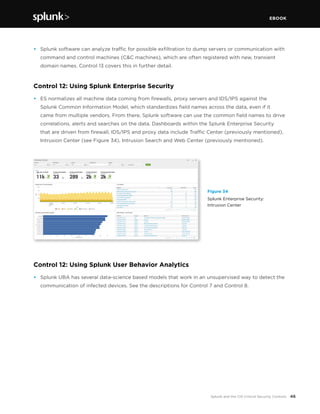
correlations, alerts and searches on the data. Dashboards within the Splunk Enterprise Security
that are driven from firewall, IDS/IPS and proxy data include Traffic Center (previously mentioned),
Intrusion Center (see Figure 34), Intrusion Search and Web Center (previously mentioned).
Figure 34
Splunk Enterprise Security:
Intrusion Center
Control 12: Using Splunk User Behavior Analytics
•	 Splunk UBA has several data-science based models that work in an unsupervised way to detect the
communication of infected devices. See the descriptions for Control 7 and Control 8.
EBOOK
47Splunk and the CIS Critical Security Controls
CONTROL 13
Data Protection
Associated NIST Special Publication 800-53, Revision 4,
AC-3,4,23; CA-7,9; IR-9; MP-5; SA-18; SC-8,28,31,41; SI-4
Associated NSA Manageable Network Plan Milestones
Network Architecture
Device Accessibility
Security Gateways, Proxies, and Firewalls
Network Security Monitoring
Stop unauthorized transfer of sensitive data through network attacks and physical theft: scrutinize the
movement of data across network boundaries, both electronically and physically, to minimize the exposure
to attackers. Monitor people, processes and systems using a centralized management framework.
Role of Splunk Software: VERIFICATION
Data loss prevention (DLP) is generally accomplished by a DLP system (for electronic monitoring) with
surveillance methods and physical security measures for physical monitoring. However, DLP solutions
are not a panacea. Proprietary information crossing from one internal host to another on the same
network segment is not detectable if DLP has been implemented at the perimeter. Host-based DLP
can be remotely disabled by malicious code in a BYOD environment. This may go undetected outside a
corporate network.
•	 By ingesting firewall logs, proxy logs and flow data (usually via syslog and a dedicated flow
collector), Splunk software has a good picture of the overall traffic flows inside and outside of the
organization’s network boundaries. Once this data is ingested, it can be analyzed in an automated
fashion for such anomalous behavior as:
		 -	 New or rare addresses or communication to unauthorized geographies
		 -	 New or rare ports appearing in the traffic patterns
		 -	 A critical host sending out lots of data when it normally doesn’t
		 -	 Host communicating with a host listed within a threat list
		 -	 Host communicating with a recently registered DNS domain
•	 Splunk software automatically extracts source, destination and port information, as well as byte
counts where available. If Splunk Enterprise Security is set to ingest flow and packet data, Splunk
software can provide even more detail for network traffic data searches.
•	 Splunk software can help investigators understand the scope of a data leakage.
EBOOK
48Splunk and the CIS Critical Security Controls
•	 Splunk software can watch for the usage of removable media via standard host log file and registry
monitoring, and alert or report when removable media is detected.
•	 The Splunk platform can consume data concerning physical security systems, such as motion
detectors, pressure pad sensors, proximity badge access logs and other “non IT” sources of data
to provide insight into user location and time of access. This information can be correlated with
other data within Splunk—for example, an authorized employee badges into a secure area and then
accesses systems outside of the secure area.
Control 13: Using Splunk Enterprise Security
•	 ES includes various correlation searches that are directly applicable to Control 17 and can assist in
finding attempts to exfiltrate data, such as:
		 -	 High Volume of Traffic from High or
		 -	 Critical Host Observed
		 -	 Substantial Increase in Network Events
		 -	 Substantial Increase in Port Activity
		 -	 Unusual Volume of Network Activity
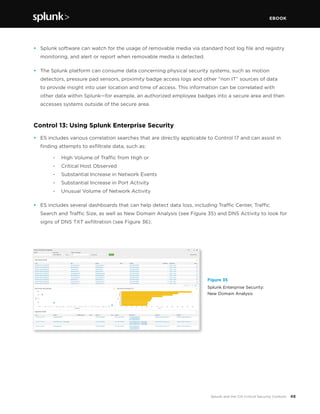
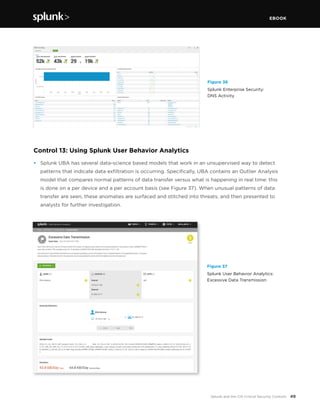
•	 ES includes several dashboards that can help detect data loss, including Traffic Center, Traffic
Search and Traffic Size, as well as New Domain Analysis (see Figure 35) and DNS Activity to look for
signs of DNS TXT exfiltration (see Figure 36).
Figure 35
Splunk Enterprise Security:
New Domain Analysis
EBOOK
49Splunk and the CIS Critical Security Controls
Control 13: Using Splunk User Behavior Analytics
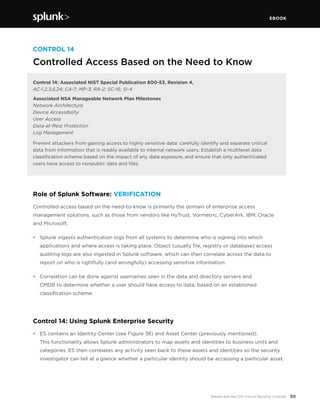
•	 Splunk UBA has several data-science based models that work in an unsupervised way to detect
patterns that indicate data exfiltration is occurring. Specifically, UBA contains an Outlier Analysis
model that compares normal patterns of data transfer versus what is happening in real time: this
is done on a per device and a per account basis (see Figure 37). When unusual patterns of data
transfer are seen, these anomalies are surfaced and stitched into threats, and then presented to
analysts for further investigation. 
Figure 36
Splunk Enterprise Security:
DNS Activity
Figure 37
Splunk User Behavior Analytics:
Excessive Data Transmission
EBOOK
50Splunk and the CIS Critical Security Controls
CONTROL 14
Controlled Access Based on the Need to Know
Control 14: Associated NIST Special Publication 800-53, Revision 4,
AC-1,2,3,6,24; CA-7; MP-3; RA-2; SC-16; SI-4
Associated NSA Manageable Network Plan Milestones
Network Architecture
Device Accessibility
User Access
Data-at-Rest Protection
Log Management
Prevent attackers from gaining access to highly sensitive data: carefully identify and separate critical
data
from information that is readily available to internal network users. Establish a multilevel data
classification scheme based on the impact of any data exposure, and ensure that only authenticated
users have access to nonpublic data and files.
Role of Splunk Software: VERIFICATION
Controlled access based on the need-to-know is primarily the domain of enterprise access
management solutions, such as those from vendors like HyTrust, Vormetric, CyberArk, IBM, Oracle
and Microsoft.
•	 Splunk ingests authentication logs from all systems to determine who is signing into which
applications and where access is taking place. Object (usually file, registry or database) access
auditing logs are also ingested in Splunk software, which can then correlate across the data to
report on who is rightfully (and wrongfully) accessing sensitive information.
•	 Correlation can be done against usernames seen in the data and directory servers and
CMDB to determine whether a user should have access to data, based on an established
classification scheme.
Control 14: Using Splunk Enterprise Security
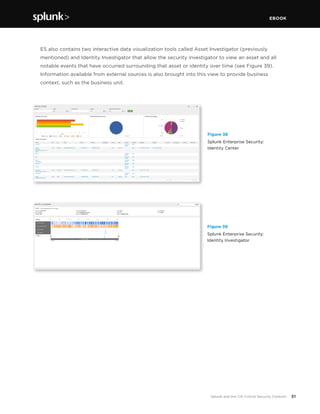
•	 ES contains an Identity Center (see Figure 38) and Asset Center (previously mentioned).
This functionality allows Splunk administrators to map assets and identities to business units and
categories. ES then correlates any activity seen back to these assets and identities so the security
investigator can tell at a glance whether a particular identity should be accessing a particular asset.
EBOOK
51Splunk and the CIS Critical Security Controls
	 ES also contains two interactive data visualization tools called Asset Investigator (previously
mentioned) and Identity Investigator that allow the security investigator to view an asset and all
notable events that have occurred surrounding that asset or identity over time (see Figure 39).
Information available from external sources is also brought into this view to provide business
context, such as the business unit.
Figure 38
Splunk Enterprise Security:
Identity Center
Figure 39
Splunk Enterprise Security:
Identity Investigator
EBOOK
52Splunk and the CIS Critical Security Controls
CONTROL 15
Wireless Access Control
Associated NIST Special Publication 800-53, Revision 4,
AC-18,19; CA-3,7; CM-2, IA-3; SC-8,17,40; SI-4
Associated NSA Manageable Network Plan Milestones
Map Your Network
Baseline Management
Document Your Network
Personal Electronic Device Management
Network Access Control
Protect the security perimeter against unauthorized wireless access: allow wireless devices to connect

to the network only if they match an authorized configuration and security profile and have a
documented owner and defined business need. Ensure that all wireless access points are manageable
using enterprise
management tools. Configure scanning tools to detect wireless access points.
Role of Splunk Software: VERIFICATION
Wireless access control is accomplished with wireless-protection specific tools (WIPS) or generic
tools that scan networks for new and unknown devices, such as IDS/IPS systems, network discovery
tools or network access control (NAC) logs. Splunk software can monitor the log file output from
these tools and leverage the information in correlation searches to alert about rogue access points.
•	 Splunk software accepts regularly generated log files from WIPS tools and has free technology
add-ons for specific WIPS, such as Motorola AirDefense, available in Splunk Enterprise Security.
•	 When a wireless access point is detected, Splunk software can correlate the MAC address with an
asset database to ensure that it is an authorized device. If the CMDB contains the management
status of the device, Splunk can correlate that information as well.
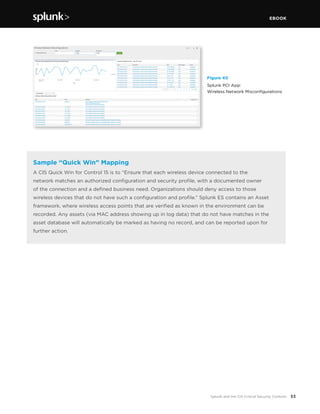
•	 The Splunk App for PCI-DSS contains a Wireless Network Misconfigurations dashboard (see Figure
40). This report can be easily copied to Splunk Enterprise or to Splunk Enterprise Security.
EBOOK
53Splunk and the CIS Critical Security Controls
Figure 40
Splunk PCI App:
Wireless Network Misconfigurations
Sample “Quick Win” Mapping
A CIS Quick Win for Control 15 is to “Ensure that each wireless device connected to the
network matches an authorized configuration and security profile, with a documented owner
of the connection and a defined business need. Organizations should deny access to those
wireless devices that do not have such a configuration and profile.” Splunk ES contains an Asset
framework, where wireless access points that are verified as known in the environment can be
recorded. Any assets (via MAC address showing up in log data) that do not have matches in the
asset database will automatically be marked as having no record, and can be reported upon for
further action.
EBOOK
54Splunk and the CIS Critical Security Controls
CONTROL 16
Account Monitoring and Control
Associated NIST Special Publication 800-53, Revision 4,
AC-2,3,7,11,12; CA-7; IA-5,10; SC-17,23; SI-4
Associated NSA Manageable Network Plan Milestones
User Access
Baseline Management
Log Management
Keep attackers from impersonating legitimate users: review all system accounts and disable any that are
not associated with a business process and owner. Immediately revoke system access for terminated
employees or contractors. Disable dormant accounts and encrypt and isolate any files associated with
Ssuch accounts. Use robust passwords that conform to FDCC standards.
Role of Splunk Software: VERIFICATION
Account monitoring and control is generally accomplished with identity management solutions and the
proper use of built-in authentication mechanisms.
•	 Splunk software ingests authentication logs from all systems to determine who is logging into which
applications and where access is taking place. Splunk software can then correlate across the data
to report on when accounts are being used that are not on a whitelist. Other interesting correlations
include being able to determine:
		 -	 Whether multiple accounts are accessing data all using one IP address
		 -	 Whether an account that belongs to an “expired” user is being used
		 -	 Whether an account that has long been dormant is suddenly showing activity
		 -	 Whether new accounts are being used to access critical resources
		 -	 Whether accounts are being used to access critical resources that are associated
		 with users that have had a change in life status (marital, death in family) or that have
		 been placed on a performance plan or termination list
EBOOK
55Splunk and the CIS Critical Security Controls
Control 16: Using Splunk Enterprise Security
•	 ES contains several correlation searches that are directly applicable to this control, including:
		 -	 Activity from Expired User Identity
		 -	 Completely Inactive Account
		 -	 Inactive Account Activity Detected
•	 ES contains the Account Management dashboard, which allows the security investigator to see
overall account management activities across the environment (see Figure 41).
•	 ES contains the Access Tracker dashboard (see Figure 42) which helps monitor and correlate user
activities across multiple user names often prevalent in organizations without a single-sign-on
(SSO) solution.
Figure 41
Splunk Enterprise Security:
Account Management
Figure 42
Splunk Enterprise Security:
Access Tracker
EBOOK
56Splunk and the CIS Critical Security Controls
Control 16: Using Splunk User Behavior Analytics
•	 Splunk UBA has several data-science based models that work in an unsupervised way to detect
patterns that indicate accounts that are being used in ways that deviate from normal. Specifically,
UBA contains an Outlier Analysis model that compares normal patterns of account usage vs. what
is happening in real time: This is done on a per account basis. When unusual patterns of account
usage are seen, these anomalies are surfaced and stitched into threats, and then presented to
analysts for further investigation.
Sample “Quick Win” Mapping
A CIS Quick Win for Control 16 is to “Ensure that all accounts have an expiration date associated
with the account.” Splunk ES contains an Identity framework, where account expiry dates are
expected to be recorded. When identities show up in the data ingested by Splunk, this expiry date
is automatically consulted, and if the account expired on a previous day, that activity will show
up in a report, on a dashboard, or as the basis for a notable event.
EBOOK
57Splunk and the CIS Critical Security Controls
CONTROL 17
Security Skills Assessment
Associated NIST Special Publication 800-53, Revision 4
AT-1,2,3,4; SA-11,16; PM-13,14,16
Associated NSA Manageable Network Plan Milestones
Training
Find knowledge gaps and fill them with exercises and training: develop a security skills assessment
program, map training against the skills required for each job and use the results to allocate resources
effectively to improve security practices.
Role of Splunk Software: VERIFICATION & EXECUTION
A security skills assessment is generally accomplished via manual processes executed by staff
resources. Policies need to be put in place to generate security awareness across the organization.
These policies are usually carried out by the HR department, with support from information security
staff. However, Splunk software can assist in the gap analysis to determine where security training is
required, and then assess its effectiveness.
•	 Splunk software can be used to assess user behavior and determine which populations of users
require security awareness training. For example, by looking at the following types of behavior
available from Splunk searches against activity and web access/proxy logs, additional required
training can be identified:
		 -	 Which users are accessing inappropriate websites?
		 -	 Which users are accessing resources with default/shared account names?
		 -	 Which users are using unapproved web browsers?
		 -	 Which users clicked on a link in a fake phishing email?
		 -	 Which users are putting the company at risk with long VPN sessions?
•	 If data regarding security awareness and other security-specific training is placed in a corporate
directory, Splunk software can access this data for correlation purposes. A Splunk search detecting
improper system access, for example, can be correlated against the identity of a user, and whether
or not the user has attended security awareness training.
•	 When an organization tests security awareness, Splunk software can identify which employees have
taken the test and roll up this information into reports organized by agency or business unit for
accountability and transparency.
EBOOK
58Splunk and the CIS Critical Security Controls
•	 Once security awareness training has been rolled out, Splunk software can be used to assess
behavior and identify users who are not following guidelines. These individuals may need to be
subject to corrective action.
Control 17: Using Splunk Enterprise Security
•	 ES contains several dashboards that assist in understanding access patterns across the corporate
environment. The Session Center dashboard is very useful for identifying users with long VPN
sessions (see Figure 43).
•	 Identity information ingested into Splunk can be used in ES as an “identity” within Identity
Center (see Figure 44) and Splunk software can correlate any incoming information against this
list of known identities. This enables a security investigator to instantly access identity information
such as name, phone, business unit, category, email, manager and so forth. This asset list can be
automatically populated by an external source, such as a directory server or CMDB, and it also
compensates for multiple username formats via identity matching.
•	 ES contains the Access Center dashboard (see Figure 45) which also assists with tracking normal
and non-privileged access across an environment.
Figure 43
Splunk Enterprise Security:
Session Center
Figure 44
Splunk Enterprise Security:
Identity Center
EBOOK
59Splunk and the CIS Critical Security Controls
Control 17: Using Splunk User Behavior Analytics
•	 Splunk UBA has several data-science based models that work in an unsupervised way to detect
patterns that indicate accounts that are being used in ways that deviate from normal. Specifically,
UBA contains an Outlier Analysis model that compares normal patterns of account usage vs. what
is happening in real time; this is done on a per account basis. When unusual patterns of account
usage are seen, these anomalies are surfaced and stitched into threats, and then presented to
analysts for further investigation (see Figure 46).
Figure 46
Splunk User Behavior Analytics:
Account Takeover
Figure 45
Splunk Enterprise Security:
Access Center
EBOOK
60Splunk and the CIS Critical Security Controls
CONTROL 18
Application Software Security
Associated NIST Special Publication 800-53, Revision 4,
SA-13,15,16,17,20,21; SC-39; SI-10,11,15,16
Associated NSA Manageable Network Plan Milestones
Training
Neutralize vulnerabilities in web-based and other application software: carefully test internally
developed and
third-party application software for security flaws, including coding errors and malware.
Deploy web application firewalls that inspect all traffic and explicitly check for errors in all user input
(including by size and data type).
Role of Splunk Software: VERIFICATION & EXECUTION
Application software security is usually accomplished with tools that perform static and dynamic
application security testing, such as web application scanners like QualysGuard WAS, Whitehat
Sentinel and Tripwire Webapp360. Web application firewalls include products like Imperva
SecureSphere, Barracuda WAF Vx and Cisco ACE. Most of these tools focus on the OWASP Top 10
Vulnerabilities and others. Splunk software can monitor the log file output from these tools as well
as traffic inspection firewalls, and can analyze user input coming into web applications in real time.
•	 Splunk accepts regularly generated reports from any application scanner. These reports are
usually in XML, CSV or similar formats.
•	 Web application firewalls provide web firewall, access, audit and system logs, all of which can be
gathered in Splunk software for analysis.
•	 During application development, penetration testing is often part of the QA cycle. Developers
should use Splunk software to analyze the application logs during this process and to
understand how the application responds to the scans, allowing them to identify vulnerabilities
before production.
•	 Once an application is in production, Splunk software can help detect common application
attacks, such as SQL injection and cross-site scripting. With SQL injection, for example, there
are many different sources that Splunk software can consume in real time to help detect this
activity, including:
EBOOK
61Splunk and the CIS Critical Security Controls
•	 IDS/IPS logs
		 - 		Web vulnerability scanners
	 -	 	Network capture
	 -	 	Application logs
	 -	 	Authentication logs
	 -		Database error logs
•	 When monitoring for SQL injection, searching your web application logs for patterns of misuse,
evidence of the semicolon or the word JOIN or UNION within “GET” and “POST” requests in a
web access log are grounds for investigation. Extensive information on Splunk and SQL injection
detection can be viewed here.
Control 18: Using Splunk Enterprise Security
•	 ES contains several correlation searches and dashboards to assist with finding vulnerabilities in and
attacks against web-based applications. Two examples are the HTTP User Agent Analysis and URL
Length Analysis dashboards (see Figures 47 and 48). With the HTTP User Agent Analysis, unusual
user agents (based on standard deviation and Z score) are easily discovered. These user agent
strings can then be evaluated for evidence of SQL injection and other threats. With the URL Length
Analysis, any information in Splunk that contains URL strings can be discovered, again based on
standard deviation and Z score. URLs that have abnormal length can often include evidence of
embedded SQL, XSS and more.
 
Figure 47
Splunk Enterprise Security:
HTTP User Agent Analysis
EBOOK
62Splunk and the CIS Critical Security Controls
Figure 48
Splunk Enterprise Security:
URL Length Analysis
EBOOK
63Splunk and the CIS Critical Security Controls
CONTROL 19
Incident Response and Management
Associated NIST Special Publication 800-53, Revision 4
IR-1,2,3,4,5,6,7,8,10
Associated NSA Manageable Network Plan Milestones
Incident Response and Disaster Recovery Plans
Protect the organization’s reputation as well as its information: develop an incident response plan
with clearly delineated roles and responsibilities for quickly discovering an attack and then effectively
containing the damage, eradicating the attacker’s presence and restoring the integrity of the network
and systems.
Role of Splunk Software: SUPPORT
Incident response and management are focused on policies and procedures that are instituted in your
organization, rather than a direct technical requirement. However, during an incident, it is important to
be able to quickly detect the incident, get to the root cause and respond.
•	 Splunk software’s ability to quickly search through mountains of security and non-security related
data and apply business context to it is invaluable when time is of the essence and false positives
cannot be tolerated.
•	 Security professionals need to have all data at their fingertips when investigating an incident.
By having all of the information centralized and searchable, Splunk software allows individuals and
teams to respond quickly and accurately, limiting the organization’s exposure.
Control 19: Using Splunk Enterprise Security
•	 There are a number of dashboards and visualizations within ES, highlighted throughout this
document, which can be viewed in real time, instantly providing feedback to security professionals
during an incident.
EBOOK
64Splunk and the CIS Critical Security Controls
CONTROL 20
Pen Testing and Red Team Exercises
Associated NIST Special Publication 800-53, Revision 4
CA-2,5,6,8; RA-6; SI-6; PM-6,14
Associated NSA Manageable Network Plan Milestones
Audit Strategy
Use simulated attacks to improve organizational readiness: conduct regular internal and external
penetration tests that mimic an attack to identify vulnerabilities and gauge the potential damage.
Use periodic red team exercises—all-out attempts to gain access to critical data and systems to test
existing defenses and response capabilities.
Role of Splunk Software: SUPPORT
Pen testing and red team exercises are meant to ensure that your organization is prepared to respond
in the case of an attack. These exercises do not have a direct technical requirement.
•	 During penetration tests, Splunk software gives team members significant information about the
environment. Splunk software provides deep granularity into real-time and historical (often a year or
more is available online for instant searching) data. Using this data, pen testers/red team members
can better plan a target list or create new target lists from dashboards such as Traffic Analysis.
•	 During pen testing and red team activities, Splunk software can display the status of any successful
or failed breach attempts.
•	 Accounts associated with successful or failed breach attempts found during pen testing and red
team activities can be fed back into Splunk software to understand how the account has been
used historically.
Control 20: Using Splunk Enterprise Security
•	 ES contains Asset Center and Identity Center capabilities, where known information about assets
and identities is centralized into a series of lookup tables. Pen testers and red team members can
use this information after activities are carried out to understand which assets or identities are of
high value to the organization.
EBOOK
65Splunk and the CIS Critical Security Controls
Conclusion
Throughout this document, we have shown how Splunk software can assist your organization with
executing requirements confirming or supporting activities surrounding each of the CIS Critical
Security Controls. The Splunk platform is a flexible and versatile solution and plays an integral role
in protecting your organization from known, advanced and emerging cyber threats.
Specific to Version 6.0 of the CIS CSC, Splunk software is even more important as the controls
now focus on enabling the “hunters” in your security organization rather than the old standards of
layered prevention. This is a uniquely powerful benefit of the flexibility, scalability, and configurability
of Splunk. Also, recent advancements in Splunk software including Splunk Enterprise Security, Splunk
App for Stream and Splunk User Behavior Analytics provide even tighter support for the CIS CSC.
Splunk Enterprise is a software-based solution that can be up and running within minutes in your
organization, allowing you to index, explore and analyze your security data like never before. For more
information, please contact your local Splunk sales team, or email us at sales@splunk.com.

Ebook: Splunk SANS - CIS Top 20 Critical Security Controls

  • 1.
    EBOOK SPLUNK® AND THECIS CRITICAL SECURITY CONTROLS Mapping Splunk Software to the CIS 20 CSC Version 6.0
  • 2.
    EBOOK 2Splunk and theCIS Critical Security Controls Copyright © 2016 by Splunk Inc. All rights reserved. Splunk, Splunk>, Listen to Your Data, The Engine for Machine Data, Hunk, Splunk Cloud, Splunk Storm and SPL are trademarks and registered trademarks of Splunk Inc. in the United States and other countries. All other brand names, product names, or trademarks belong to their respective owners. The CIS controls guidelines are licensed under a Creative Commons Attribution-NoDerivs 3.0 Unported License. For details: https://www.cisecurity.org/critical-controls/faqs.cfm Authorization to photocopy items for internal or personal use is granted by Splunk Inc. No other copying may occur without the express written consent of Splunk Inc. Published by Splunk Inc., 250 Brannan St., San Francisco, CA 94107 Editor/Analyst: Splunk Inc. Copyeditor: Splunk Inc. Production Editor: Splunk Inc. Cover: Splunk Inc. Graphics: Splunk Inc. Second Edition: January 2016 While every precaution has been taken in the preparation of this book, the publisher and author assume no responsibility for errors or omissions or for damages resulting from the use of the information contained herein. Disclaimer This book is intended as a text and reference book for reading purposes only. The actual use of Splunk’s software products must be in accordance with their corresponding software license agreements and not with anything written in this book. The documentation provided for Splunk’s software products, and not this book, is the definitive source for information on how to use these products. Although great care has been taken to ensure the accuracy and timeliness of the information in this book, Splunk does not give any warranty or guarantee of the accuracy or timeliness of the information and Splunk does not assume any liability in connection with any use or result from the use of the information in this book. The reader should check at docs.splunk.com for definitive descriptions of Splunk’s features and functionality.
  • 3.
    EBOOK 3Splunk and theCIS Critical Security Controls Abstract 4 Introduction 5 Why are the CIS CSC Important? 7 How Splunk Software Maps to the CIS CSC: Four Approaches 8 How Customers Use Splunk for Security 8 The Big Picture 10 A Note about “Quick Wins” 10 The CIS CSC 11 Control 1: Inventory of Authorized and Unauthorized Devices 12 Control 2: Inventory of Authorized and Unauthorized Software 15 Control 3: Secure Configurations for Hardware and Software on Mobile Devices, Laptops, Workstations and Servers 18 Control 4: Continuous Vulnerability Assessment and Remediation 21 Control 5: Controlled Use of Administrative Privileges 24 Control 6: Maintenance, Monitoring and Analysis of Audit Logs 27 Control 7: Email and Web Browser Protections 29 Control 8: Malware Defense 33 Control 9: Limitation and Control of Network Ports, Protocols and Switches 37 Control 10: Data Recovery Capability 41 Control 11: Secure Configurations for Network Devices such as Firewalls, Routers and Switches 43 Control 12: Boundary Defense 45 Control 13: Data Protection 47 Control 14: Controlled Access Based on the Need to Know 50 Control 15: Wireless Access Control 52 Control 16: Account Monitoring and Control 54 Control 17: Security Skills Assessment 57 Control 18: Application Software Security 60 Control 19: Incident Response and Management 63 Control 20: Pen Testing and Red Team Exercises 64 Conclusion 65  
  • 4.
    EBOOK 4Splunk and theCIS Critical Security Controls Abstract Splunk provides a single, integrated, security intelligence platform that allows today’s security professionals to ensure that their organizations are meeting Critical Security Controls requirements. The software can verify incoming data, execute the requirements needed, or support human activities associated with a control. Security professionals find Splunk software uniquely suited to support these controls in a number of ways, including: universal data ingestion with no specific vendor preference; a real-time schema-less architecture; unparalleled scaling capabilities for big data; and an agile and flexible reporting interface. This document version updates the first edition publication from April 2014 to refresh the mapping of Splunk software capabilities to the latest version of the CSC 20.  
  • 5.
    EBOOK 5Splunk and theCIS Critical Security Controls INTRODUCTION SPLUNK SOFTWARE AND THE CIS CRITICAL SECURITY CONTROLS
  • 6.
    EBOOK 6Splunk and theCIS Critical Security Controls The CIS Critical Security Controls (CSC) are a time-proven, prioritized, “what works” list of 20 controls that can be used to minimize security risks to enterprise systems and the critical data they maintain. These controls are derived from and “cross-walked” to controls in NIST Special Publication 800-53. They are also known as the Consensus Audit Guidelines (CAG). The list was originally authored by the U.S. National Security Agency (NSA) in 2008, and has since been revised by a consortium of U.S. and international agencies such as the Center for the Protection of National Infrastructure in the U.K., the Australian government’s Department of Defense and experts from private industry. Formerly managed by SANS and the Council on CyberSecurity, the CIS CSC are currently governed by the Center for Internet Security (CIS) and are considered the “de facto yardstick by which corporate security programs can be measured,” according to the Cybersecurity Law Institute. The current version of the controls is 6.0 as of January 2016. These controls function across security processes, products, architectures and services, and have been proven in real-world scenarios. According to surveys conducted by the U.S. State Department, organizations that fully implement, automate and measure themselves against the CIS CSC can reduce risk by up to 94 percent. For more information on the history of the CIS CSC, please see: http://www.sans.org/critical-security-controls/history The CIS CSC are ranked in order of overall importance and application to a corporate security strategy. For example, the first two controls, surrounding known inventory, are at the top of the list and are foundational in nature, ranking “very high” for attack mitigation. Conversely, the final item on the list, surrounding pen testing and “red team” exercises, ranks “low” for attack mitigation. More information and deep analysis on each control can be found here: http://www.sans.org/critical-security-controls/guidelines For version 6.0, various changes have been made within the CIS CSC to better reflect a “hunting” strategy rather than one of purely “defense.” Notably, the former control 19 – Secure Network Engineering – has been removed. This made room for the new control 7 – Email and Web Browser Protections. Also, some of the controls have been re-prioritized – Malware Defense has been demoted to position 8, while Controlled Use of Administrative Privileges and Maintenance, Monitoring, and Analysis of Audit Logs have moved ahead of it to positions 5 and 6, respectively. Other controls have changed positions, too. INTRODUCTION SPLUNK SOFTWARE AND THE CIS CRITICAL SECURITY CONTROLS
  • 7.
    EBOOK 7Splunk and theCIS Critical Security Controls Figure 1 - NSA’s attack mitigation view of the CIS CSC. Why are the CIS CSC Important? There are several reasons that organizations embrace the CIS CSC as they develop security strategies: • Implementation of the controls can reduce the risk of currently-known high priority attacks as well as attacks expected in the near future, as well as provide more high-fidelity data for “hunting” approaches to protection. • The controls were generated by consensus from experts in both the federal government and private industry. • The controls are well written, approachable and distill common security requirements into a list that is easy to understand and implement. • The controls are reasonably comprehensive and address the most important areas of concern. • The controls are regularly updated to better reflect the changing threat landscape. Figure 1 provides an example of how the NSA applies the CIS CSC to actions taken during attacks. Each of the controls applies to one or more of the following categories: Reconnaissance, Get In, Stay In and Exploit. Note that the NSA has not updated their assessment of the controls for 6.0, therefore Figures 1 and 2 make assumptions for Control 7: Email and Web Browser Protections. Figure 2 - Splunk software maps to each control in the CIS CSC. Reconnaissance Get In Stay In Exploit 1 Hardware Inv 2 So/ware Inv 3 Secure Host Config 4 Vuln Management 8 Malware Defense 6 Secure Apps 15 Secure Wireless 10 Data Recovery 10 Secure Net Config 9 Net Limits 5 Control Privs 12 Boundary Defense 17 Skills Assessment 6 Audit Logs 14 Controlled Access 16 Acct Monitoring 13 Data ProtecPon 19 Incident Response 20 Pen TesPng VERY HIGH HIGH LOW MED/LOW HIGH/MED MEDIUM ADVERSARY ACTIONS TO ATTACK YOUR ORGANIZATION 7 Email & Web
  • 8.
    EBOOK 8Splunk and theCIS Critical Security Controls How Splunk Software Maps to the CIS CSC: Four Approaches Splunk software maps to each control in the CIS CSC (see Figure 2). There are four major ways in which the Splunk platform supports the controls: Verification Verification & Execution Execution Support As Splunk software ingests data, it can generate reports and dashboards that show compliance or non-compliance with controls. Incidents of non-compliance can generate alerts to SOC personnel. Data from third-party sources can be correlated with data ingested in Splunk software to meet the control. In the case of an attack or non-compliance, Splunk software can carry out recommended actions to meet controls. With version 6.0 of the CIS CSC, Splunk software becomes even more critical, since control 14 surrounding audit logs has been promoted to position 6. The Splunk platform provides flexible features that help security professionals with controls that are largely policy and process based. How Customers Use Splunk for Security Splunk Enterprise®, the platform for machine-generated data, supports security use cases in a number of ways: • Splunk Enterprise: - Indexes data from any machine data source - Searches through machine data from a centralized console - Allows the security professional to add tags, create event types and correlate the incoming data with business context - Proactively monitors and alerts on security incidents, with automatic remediation of security issues—for example, changing a firewall rule in response to Splunk search results - Allows for the creation of reports, dashboards and other forms of analytics to communicate security information throughout the organization
  • 9.
    EBOOK 9Splunk and theCIS Critical Security Controls • Splunk Enterprise can be augmented with free Splunk apps1 that are specific to one or more security technologies or vendors. • Splunk Enterprise in conjunction with Splunk Enterprise Security (ES) provides an extensive security intelligence application on top of the core Splunk platform. This gives customers all of the capabilities of a traditional SIEM solution combined with the power of analyzing vast amounts of normal, credentialed user data to detect advanced threats. • Splunk Cloud provides the same capabilities of Splunk Enterprise in a fully hosted and managed environment, which can uniquely be configured in a “hybrid” manner so that data residing both in the cloud and on-premise can be searched from a single platform. Splunk ES is also available within Splunk Cloud. • Splunk UBA applies data science via unsupervised machine learning to surface anomalies in your security data and root out confirmed threats. It serves as the complementary technology to various solutions described above. There are also a number of free security technology and vendor-specific apps available for download at http://splunkbase.splunk.com. While apps are not required for Splunk software to map to the CIS CSC, in most cases apps will accelerate ramp time (for example, the Checkpoint, Palo Alto or Cisco Security Suite apps to support Control 12: Boundary Defense). Apps allow you to quickly gain value from data already ingested in Splunk software and can provide customized ways to onboard data via specific binaries and technology add-ons (TAs). Splunk Enterprise Security The Splunk Enterprise Security (ES) premium solution supports mapping Splunk deployments to the CIS CSC, but is not required. However, using the app significantly reduces implementation time when mapping Splunk software to the CIS CSC requirements. Note that some of the benefits of ES can be realized by simply onboarding data into Splunk using Splunk’s Common Information Model (CIM) – much of which is information security focused. Splunk User Behavior Analytics The Splunk User Behavior Analytics (UBA) premium solution also supports mapping Splunk deployments to the CIS CSC, but is not required, and can be completely standalone from a traditional Splunk Enterprise deployment. However, using the app can provide supplemental information for controls such as Control 5: Controlled Use of Administrative Privileges and others.
  • 10.
    EBOOK 10Splunk and theCIS Critical Security Controls The Big Picture What makes the Splunk platform unique for organizations that need to implement the CIS CSC? Splunk software makes all data in your organization security relevant (see Table 1). As data is indexed by Splunk Enterprise, it becomes instantly searchable and security professionals can easily correlate all of these seemingly disparate data sources. Furthermore, the different data types can be seen in the context of data locked in business systems, which is often the key factor in determining correct root causes. Security professionals can then build dashboards and reports on top of the data, and set up actions and alerts to be executed on specific thresholds. In addition, any analysis can be operationalized to proactively protect your organization from an emerging threat.   Table 1 - Examples of data types that Splunk software makes security relevant Outputs from scripts that run regularly on servers Authentication data Information from structured data sources Endpoint data Configurations RFID Email Active Directory Firewall data Log data Context data Binary (flow) data Log files Application stack traces GPS Call Data Records (CDR) Web Proxy Threat intelligence data A Note about “Quick Wins” Along with version 5.1 of the CIS CSC, a series of prescriptive suggestions were published to provide guidance on how to most easily comply with each control. These suggestions were ranked from “Quick Win” to “Advanced” and have not been carried through to version 6.0 of the controls (but are still provided on spreadsheets available from CIS). Where applicable, we have provided a mapping between one of the “Quick Win” suggestions to Splunk software capabilities. If no mapping appears here, Splunk still provides significant value for one or more of the other prescriptive suggestions for the control.
  • 11.
    EBOOK 11Splunk and theCIS Critical Security Controls THE CIS CSC HOW SPLUNK SOFTWARE SUPPORTS THE 20 CIS CSC
  • 12.
    WHITE PAPER 12 CONTROL 1 Inventoryof Authorized and Unauthorized Devices Associated NIST Special Publication 800-53, Revision 4 CA-7; CM-8; IA-3; SA-4; SI-4; PM-5 Associated NSA Manageable Network Plan Milestones Map Your Network Baseline Management Document Your Network Personal Electronic Device Management Network Access Control Log Management Reduce the ability of attackers to find and exploit unauthorized and unprotected systems: use active monitoring and configuration management to maintain an up-to-date inventory of devices connected to the enterprise network, including servers, workstations, laptops and remote devices. Role of Splunk Software: VERIFICATION An inventory of authorized and unauthorized devices is primarily accomplished with discovery and vulnerability management tools such as Nmap, Nessus, RedSeal, Qualys, IP360, and Nexpose. Traditional and next generation configuration management database (CMDB) products with discovery engines, such as ServiceNow, IBM TADDM and BMC Atrium Discovery, can also be used here. • Splunk software accepts regularly generated reports from any discovery or vulnerability management tool. These reports are usually in XML, CSV or similar formats and they contain timestamps for each entry, providing in-depth analysis of what was discovered. • TA or app support is provided for the following: - Splunk Add-on for Nessus - Nmap - Tripwire IP360 - Qualys - Rapid7 Nexpose - Other VA/VM/discovery applications can easily be integrated into Splunk software via log file/report ingestion, API integration, database integration, and other methods. • The Splunk for Asset Discovery app is also available and leverages Nmap. • By ingesting these data sources, a record of each discovered device is kept in Splunk Enterprise.
  • 13.
    EBOOK 13Splunk and theCIS Critical Security Controls Every time a new scan is run, information is deposited into Splunk software and it is easy to find the deltas between scans to find new or different devices. • With Splunk software, it is simple to correlate inventory data with other data sources. Two examples are a CMDB that contains a list of authorized devices or a maintained list of MAC addresses that “should not appear” on the network. • It is also easy to correlate other important data types, including audit logs, change logs, traffic patterns or the output of malware detection solutions, against unauthorized devices found. Control 1: Using Splunk Enterprise Security • Device inventory information within the environment that has been ingested into Splunk software can be leveraged in ES as “assets” from within the Asset Center of Splunk Enterprise Security (see Figure 3), a pre-built view into asset-relevant data. This allows Splunk software to correlate any incoming information against this list of known assets. A security investigator can instantly access asset information such as asset priority, category, business unit, owner and other context-sensitive data. The asset list can also be automatically populated by an external source, such as a directory server or CMDB. ES federates the information from multiple asset sources, as well. • ES contains an interactive data visualization called the Asset Investigator (see Figure 4). This visualization allows a security investigator to view an asset and all notable events related to that asset over time. Information available from external sources is also brought into this view to provide business context. • If Vulnerability Management data is consumed by ES and used to populate asset data, the Vulnerability Operations dashboard (see Figure 5) provides evidence of proper asset scan activity. Figure 3 Splunk Enterprise Security: Asset Center
  • 14.
    EBOOK 14Splunk and theCIS Critical Security Controls Figure 4 Splunk Enterprise Security: Asset Investigator Figure 5 Splunk Enterprise Security: Vulnerability Operations Sample “Quick Win” Mapping One CIS Quick Win for Control 1 is to “Deploy dynamic host configuration protocol (DHCP) server logging, and utilize a system to improve the asset inventory and help detect unknown systems through this DHCP information.” Splunk software can be used to collect the DHCP server logs and then update the asset inventory with the IP addresses, host names, and MAC addresses found in those logs.
  • 15.
    EBOOK 15Splunk and theCIS Critical Security Controls CONTROL 2 Inventory of Authorized and Unauthorized Software Associated NIST Special Publication 800-53, Revision 4 CA-7; CM-2,8,10,11; SA-4; SC-18,34; SI-4; PM-5 Associated NSA Manageable Network Plan Milestones Baseline Management Executable Content Restrictions Configuration and Change Management Identify vulnerable or malicious software to mitigate or root out attacks: devise a list of authorized software for each type of system, and deploy tools to track software installed (type, version and patches) and monitor for unauthorized or unnecessary software. Role of Splunk Software: VERIFICATION & EXECUTION Inventory of authorized and unauthorized software is typically accomplished with software change management, whitelisting and vulnerability management tools, such as Tanium, IBM BigFix, Microsoft System Center, ServiceNow, and Bit9 Security Platform. Splunk software’s scripted input capability can also assist with these tasks. • Splunk software can gather all information about installed software and patches on a given system through scripted inputs and the standard scripts provided in the Splunk Add-on for Microsoft Windows and the Splunk Add-on for Unix and Linux. This data is ingested into Splunk software on a regular basis and is made available for reporting and alerting. • Splunk software accepts regularly generated reports from any software change management, whitelisting or vulnerability management tool. These reports are usually in XML, CSV or similar formats and contain timestamps for each entry, providing in-depth analysis of what was discovered. • Splunk software can correlate data from scripted inputs or third-party tools against other enterprise data sources, such as a CMDB or a hash-based whitelist of approved software applications, and display and alert on any violations. • Splunk software can calculate and display the deltas in asset information, allowing security practitioners to get a good picture of the software processes and services that are coming and going on an individual host or a group of hosts.
  • 16.
    EBOOK 16Splunk and theCIS Critical Security Controls Control 2: Using Splunk Enterprise Security • ES provides ways of defining “interesting” processes and services within your environment via lookup files that can be statically or dynamically populated. Lookup files can define processes that are either whitelisted or blacklisted, such as adding fields like “is_secure” and “is_prohibited.” When data containing the specific process or service name is processed, it is correlated against these lists so that a security investigator can instantly know if a given piece of software is authorized. • Update Center and Update Search dashboards that display information about the patch levels of systems are also available in ES (see Figures 6 and 7). The Endpoint Changes dashboard is also useful for getting an idea of the number of changes happening in the environment (see Figure 8). These dashboards, driven by Splunk-derived change information or from patch management systems, allow SOC personnel to determine which systems are in the greatest need of an update. Figure 6 Splunk Enterprise Security: Update Center Figure 7 Splunk Enterprise Security: Update Search
  • 17.
    EBOOK 17Splunk and theCIS Critical Security Controls Figure 8 Splunk Enterprise Security: Endpoint Changes Sample “Quick Win” Mapping One CIS Quick Win for Control 2 is to “deploy software inventory tools throughout the organization covering each of the operating system types in use, including servers, workstations and laptops. The software inventory system should track the version of the underlying operating system as well as the applications installed on it. Furthermore, the tool should record not only the type of software installed on each system, but also its version number and patch level.” Splunk Universal Forwarders can be deployed to servers, workstations, and laptops to retrieve OS and application details, and to insert this data into Splunk for analysis.
  • 18.
    EBOOK 18Splunk and theCIS Critical Security Controls CONTROL 3 Secure Configurations for Hardware and Software on Mobile Devices, Laptops, Workstations and Servers Associated NIST Special Publication 800-53, Revision 4 CA-7; CM-2,3,5,6,7,8,9,11; MA-4; RA-5; SA-4; SC-15,34; SI-2,4 Associated NSA Manageable Network Plan Milestones Patch Management Baseline Management Data-at-Rest Protection Configuration and Change Management Prevent attackers from exploiting services and settings that allow easy access through networks and
browsers: build a secure image that is used for all new systems deployed to the enterprise, host these standard images on secure storage servers, regularly validate and update these configurations, and track system images
in a configuration management system. Role of Splunk Software: VERIFICATION & EXECUTION Securing hardware and software configurations is typically accomplished with security configuration management tools (SCM) such as IBM BigFix, Tripwire CCM and Enterprise, and Symantec CSP. Many security configurations can be evaluated by Splunk software’s ability to run scripted inputs or look for evidence of misconfiguration in data. • The Splunk platform accepts scheduled reports generated from any security configuration management tool, whether in XML, CSV or similar formats. • These reports and data sources contain a record of each device’s security configuration. Every time a new scan is run, the information is ingested into Splunk software and it is easy to find the differences between scans to identify new or different configurations. • Splunk software can easily correlate SCM data with other data sources. One example is a CMDB that contains the compliance policy a particular device should be configured against. • Via scripted inputs and monitoring log files, Splunk software assesses the configuration of hosts for evidence of misconfiguration. This is done extensively in the Splunk App for PCI Compliance using the add-on for Access Protection.
  • 19.
    EBOOK 19Splunk and theCIS Critical Security Controls • Splunk software can look for evidence of systems not meeting standards. For example, if a desktop machine within the network suddenly starts to generate web requests with a non-compliant user agent (available by analyzing proxy logs) or by communicating on unusual network ports (available by analyzing wire data) then an alert or a notable event can be generated. Control 3: Using Splunk Enterprise Security • When misconfigured services and settings are exploited, there is generally anomalous behavior in the environment that can be tied back to rogue services, processes or other kinds of misconfigurations. ES contains correlation rules to identify this behavior and misconfigurations such as improper password lengths or expiry timeframes. It also includes several dashboards, such as Traffic Search, System Center and Time Center, which can display systems that do not meet the secure configuration standards (see Figures 9, 10 and 11). • Splunk ES also provides specific Protocol Analysis dashboards for network data collected by the Splunk App for Stream as well as other sources, which can contain evidence of misconfiguration (e.g. improper network protocols/services in use, or expired/rogue SSL certificates (see Figure 12). Figure 9 Splunk Enterprise Security: Traffic Search Figure 10 Splunk Enterprise Security: System Center
  • 20.
    EBOOK 20Splunk and theCIS Critical Security Controls Figure 11 Splunk Enterprise Security: Time Center Figure 12 Splunk Enterprise Security: SSL Activity Sample “Quick Win” Mapping A CIS Quick Win for Control 3 is to “Limit administrative privileges to very few users who have both the knowledge necessary to administer the operating system and a business need to modify the configuration of the underlying operating system. This will help prevent installation of unauthorized software and other abuses of administrator privileges.” Using Splunk ES’s Identity Framework, privileged accounts can be marked as such and any activity from those accounts is effectively tagged as being “privileged.” The Access Center dashboard and the Access – Privileged Accounts reports within ES then allow easy analysis of the use of administrative privileges.
  • 21.
    EBOOK 21Splunk and theCIS Critical Security Controls CONTROL 4 Continuous Vulnerability Assessment and Remediation Associated NIST Special Publication 800-53, Revision 4 CA-2,7; RA-5; SC-34; SI-4,7 Associated NSA Manageable Network Plan Milestones Patch Management Log Management Configuration and Change Management Proactively identify and repair software vulnerabilities reported by security researchers or vendors: regularly run automated vulnerability scanning tools against all systems and quickly remediate vulnerabilities, with critical problems fixed within 48 hours. Role of Splunk Software: VERIFICATION Continuous vulnerability assessment (VA) and remediation is primarily accomplished with vulnerability management (VM) tools such as Rapid7 Nexpose, Tenable Nessus, Qualys and Tripwire IP360, among others. • Splunk accepts regularly scheduled reports from any discovery or vulnerability management tool in XML, CSV or similar formats. • TA or app support is provided for the following: - Splunk Add-on for Nessus - Nmap - Tripwire IP360 - Qualys - Rapid7 Nexpose - Other VA/VM/discovery applications can easily be integrated into Splunk software via log file/report ingestion, API integration, database integration, and other method
  • 22.
    EBOOK 22Splunk and theCIS Critical Security Controls Control 4: Using Splunk Enterprise Security • Information from vulnerability scans drives the Vulnerability Center, Operations and Search dashboards within Splunk Enterprise Security (see Figures 13, 14, and 15). These dashboards provide a complete view of vulnerability management activities and sourced data across the entire environment. With these dashboards, SOC personnel can verify that scans are running and determine the newest and most critical vulnerabilities. Since the dashboards display first time vulnerabilities and allow filtering to show vulnerabilities by age, personnel can also determine whether specific vulnerabilities have been remediated. • ES compiles information from approximately 20 (configurable) threat lists and correlates the information with threat list data found in the environment (see Figure 16). These threat lists can contain CVE descriptions, file hash values, malicious registry keys, IP addresses, domain names, and any other IOC definable within a common format such as STIX, CyBox, or OpenIOC. For example, if any devices are found communicating with an IP address on this regularly updated list: http://rules.emergingthreats.net/blockrules/compromised-ips.txt, an alert or a notable event will be generated. Figure 13 Splunk Enterprise Security: Vulnerability Center Figure 14 Splunk Enterprise Security: Vulnerability Operations
  • 23.
    EBOOK 23Splunk and theCIS Critical Security Controls Figure 16 Splunk Enterprise Security: Threat Activity Figure 15 Splunk Enterprise Security: Vulnerability Search Sample “Quick Win” Mapping A CIS Quick Win for Control 4 is to “Correlate event logs with information from vulnerability scans to fulfill two goals. First, personnel should verify that the activity of the regular vulnerability scanning tools themselves is logged. Second, personnel should be able to correlate attack detection events with earlier vulnerability scanning results to determine whether the given exploit was used against a target known to be vulnerable.” Using Splunk ES (or CIM) Vulnerability Management data models, Splunk becomes knowledgeable about the results of vulnerability scans and can also report on the activity of regular scans. Then, SOC personnel can correlate all of the other log data ingested by Splunk against the results of vulnerability scans – for example, to see that a particular vulnerable host (by IP) has had a significant amount of other activity against it.
  • 24.
    EBOOK 24Splunk and theCIS Critical Security Controls CONTROL 5 Controlled Use of Administrative Privileges Associated NIST Special Publication 800-53, Revision 4 AC-2,6,17,19; CA-7; IA-4; IA-5; SI-4 Associated NSA Manageable Network Plan Milestones User Access Baseline Management Log Management Protect and validate administrative accounts on desktops, laptops and servers to prevent two common
 types of attack: (1) enticing users to open a malicious email, attachment or file, or to visit a malicious website; and (2) cracking an administrative password and thereby gaining access to a target machine. Use robust 
passwords that follow Federal Desktop Core Configuration (FDCC) standards. Role of Splunk Software: VERIFICATION Controlled use of admin privileges can be accomplished with a number of toolsets that restrict the use of administrative accounts. The simplest methods are OS-level tools, like sudo, and controls that can be put in place with vendor-supplied tools like Active Directory. There are also commercial applications that search for misconfigurations, such as enabled guest accounts, too-lenient sudo configurations, and failure to rename administrative or default accounts. • Splunk consumes authentication logs from across the technology environment that detail account activity, including how accounts are being accessed and from where. Authentication logs come from, but are not limited to: host devices, domain controllers, directory servers, network devices, Radius, TACACS, application logs and many others. All of this machine data will be ingested into Splunk software for searching and correlation. • Any use of known administrative accounts like “Administrator” and “root” and “sa” can easily be searched across the entire environment and reported or alerted upon.
  • 25.
    EBOOK 25Splunk and theCIS Critical Security Controls Control 5: Using Splunk Enterprise Security • ES provides a pre-built dashboard that tracks “default account” usage across common default accounts for hosts, network devices, databases and more. Default accounts should be disabled as a standard practice, or at least have their passwords changed (see Figure 17). Control 5: Using Splunk User Behavior Analytics • Splunk UBA has several models that track user behavior by creating a baseline per account. For example, UBA contains the Multi-Level Markovian Unusual Activity model, which automatically (via unsupervised machine learning) builds a detailed Probabilistic Suffix Tree per account and finds deviations from normal behavior in the event sequences (see Figure 18). Therefore, if accounts with admin privileges are being used in unusual ways, it is likely that UBA will generate anomalies and threats that surface this behavior. Figure 17 Splunk Enterprise Security: Default Account Activity Figure 18 Splunk User Behavior Analytics: User Activities Baseline (Markov Graph)
  • 26.
    EBOOK 26Splunk and theCIS Critical Security Controls Sample “Quick Win” Mapping A CIS Quick Win for Control 5 is to “Minimize administrative privileges and only use administrative accounts when they are required. Implement focused auditing on the use of administrative privileged functions and monitor for anomalous behavior.” Using Splunk Enterprise Security’s Identity Framework, privileged accounts can be marked as such and any activity from those accounts is effectively tagged as being “privileged.” The Access Center dashboard and the Access – Privileged Accounts reports within ES then allow easy analysis of the use of administrative privileges.
  • 27.
    EBOOK 27Splunk and theCIS Critical Security Controls CONTROL 6 Maintenance, Monitoring and Analysis of Audit Logs Associated NIST Special Publication 800-53, Revision 4 AC-23; AU-2,3,4,5,6,7,8,9,10,11,12,13,14; CA-7; IA-10; SI-4 Associated NSA Manageable Network Plan Milestones Log Management Use detailed logs to identify and uncover the details of an attack, including the location, malicious software
deployed and activity on victim machines: generate standardized logs for each hardware device and the software installed on it, including date, time stamp, source addresses, destination addresses and other information about each packet and/or transaction. Store logs on dedicated servers and run biweekly reports to identify and
document anomalies. Role of Splunk Software: EXECUTION Maintenance, monitoring and analysis of audit logs are a core competency of Splunk software. The Splunk platform consumes logs from any source within an enterprise architecture, regardless of the format, frequency or volume, and safely and efficiently indexes the data into a series of centralized, high-performance flat files. The indexed data is immediately searchable, reportable and can be alerted upon to any number of security investigators in an organization. • Log data can be delivered to Splunk software in flat-file format, Windows Event Logs, syslog, direct REST API ingestion and a multitude of other methods. • Logs can be delivered in a compressed and optionally encrypted manner. • Tools are provided to ensure the security and tamper-proof nature of the centralized log store. • Splunk software allows the security investigator to apply security and audit logic at will, with options for real-time or historical modes. • Security and audit logic can be converted into reports, alerts, dashboards, feeds and actions—for example, creating an incident in a security workflow system. • Logs can be analyzed in full fidelity and can be kept as long as necessary, provided you have the disk space—there is no data “rollup,” so you do not lose any granularity. In version 6.3 and later of Splunk Enterprise, a Data Integrity feature allows Splunk administrators to optionally audit any changes to the underlying Splunk data stores, in order to ensure that they are protected from tampering. More information on this feature is available here: http://blogs.splunk.com/2015/10/28/data-integrity-is-back-baby/.
  • 28.
    EBOOK 28Splunk and theCIS Critical Security Controls Control 6: Using Splunk Enterprise Security • ES provides a Data Protection dashboard that verifies that ingested log data has not been tampered with based on the Data Integrity Control feature described above (see Figure 19). Figure 19 Splunk Enterprise Security: Data Protection Sample “Quick Win” Mapping A CIS Quick Win for Control 6 is to “Develop a log retention policy to make sure that the logs are kept for a sufficient period of time. Organizations are often compromised for several months without detection. The logs must be kept for a longer period of time than it takes an organization to detect an attack so they can accurately determine what occurred.” Splunk software allows administrators to configure different retention periods per “index” so that SOC personnel and incident investigators can always count on the full fidelity of log data, for however long is deemed necessary. Splunk has no limitations on the amount of data or the time period the data is stored.
  • 29.
    EBOOK 29Splunk and theCIS Critical Security Controls CONTROL 7 Email and Web Browser Protections Associated NIST Special Publication 800-53, Revision 4 CA-7; CM-2,3,5,6,7,8,9,11; MA-4, RA-5, SA-4, SC-15, SC-34, SI-2,4 Associated NSA Manageable Network Plan Milestones Patch Management Baseline Management Data-at-Rest Protection Configuration and Change Management Minimize the attack surface and the opportunities for attackers to manipulate human behavior through their interaction with web browsers and email systems. Ensure that only fully supported web browsers and email clients are allowed to execute in the organization, ideally using the latest version of the browsers. Uninstall or disable unnecessary or unauthorized plugins. Limit unnecessary scripting languages. Log all URL requests from each of the organization’s systems. Scan and block email attachments if they contain malicious code. Role of Splunk Software: VERIFICATION & EXECUTION Email and web browser protections are accomplished through secure configurations on endpoints and appropriate scanning and blocking appliances/systems installed at the organization’s email gateway. On the endpoints, web browsers should be configured against a secure standard, and all web requests should go through a proxy or a next-generation firewall that can log the URL requests. Within the mail gateways, details about scanning and blocking activity and update activity can be logged as well. • Splunk software can be installed on most endpoints to watch for changes to secure configurations that affect registry entries or installed applications, bringing them out of compliance. Alternatively, any system that audits endpoint configuration can be configured to log these results to Splunk. - Security Configuration Management solutions such as those described in Control 3 are helpful here. • Splunk software can be used to collect access logs from proxy and/or next generation firewalls, allowing for the analysis of URL requests to identify potentially malicious activity. For example, unapproved browser useragents can quickly be isolated and acted upon. The Splunk App for Stream, or other sources of wire data, can be used as well to surface details of email transactions and activity from rogue browser useragents. • Most mail appliances/scanning technology can output log data to Splunk for analysis of allowed/ blocked attachments, allowing identification of potentially malicious activity.
  • 30.
    EBOOK 30Splunk and theCIS Critical Security Controls Control 7: Using Splunk Enterprise Security • Information from endpoint monitoring technology drives the Endpoint Changes dashboard (see Figure 20), which can display changes to endpoint web browser configurations that bring them out of security specification. This allows SOC personnel to find systems that may permit malicious code to enter the environment. • Endpoint update information from sources like native Microsoft update logs drives the Update Center dashboard (see Figure 21). • Proxy or next-generation firewall log data is displayed in the Web Center (see Figure 22) and Web Search dashboards. This data also drives the User Activity, HTTP Category Analysis, and HTTP User Agent Analysis dashboards. And, ES automatically correlates URLs found in the proxy data with known malicious URLs harvested from various public-domain threat lists. • The Email data model that ships with ES (and is also part of the Common Information Model) allows for analysis of various email characteristics, including unusual senders, large attachments, attachment hashes, scanning efficacy, and much more. Figure 20 Splunk Enterprise Security: Endpoint Changes Figure 21 Splunk Enterprise Security: Update Center
  • 31.
    EBOOK 31Splunk and theCIS Critical Security Controls Figure 22 Splunk Enterprise Security: Web Center Figure 23 Splunk User Behavior Analytics: Unusual Endpoint Communication Control 7: Using Splunk User Behavior Analytics • Splunk UBA has several models that look for unusual communications from devices (endpoints). In an unsupervised manner, Splunk UBA looks at network data from Proxy logs and Firewall logs, and finds rare events for ports, applications, source and target zones, and user agent strings (see Figure 23). UBA also contains a model to detect browser exploitation. The product then surfaces these events as anomalies, and stitches multiple anomalies together to present threats. Based on this information, compromised devices that are communicating in abnormal ways can be presented and acted upon quickly by security analysts.
  • 32.
    EBOOK 32Splunk and theCIS Critical Security Controls Sample “Quick Win” Mapping A CIS Quick Win for Control 7 is to “Log all URL requests from each of the organization’s systems, whether onsite or a mobile device, in order to identify potentially malicious activity and assist incident handlers with identifying potentially compromised systems.” This is an extremely common Splunk software use case, as web proxy/next generation firewall data is logged to Splunk for reporting and analysis purposes, usually directly from these devices. Within Splunk Enterprise Security, the Web data model is used to quickly provide value from these data sources.
  • 33.
    EBOOK 33Splunk and theCIS Critical Security Controls CONTROL 8 Malware Defense Associated NIST Special Publication 800-53, Revision 4 CA-7; SC-39,44; SI-3,4,8 Associated NSA Manageable Network Plan Milestones Device Accessibility Virus Scanners and Host Intrusion Prevention Systems (HIPS) Security Gateways, Proxies and Firewalls Network Security Monitoring Log Management Block malicious code from tampering with system settings or contents, capturing sensitive data or spreading: use automated anti-virus and anti-spyware software to continuously monitor and protect workstations, servers and mobile devices. Automatically update such anti-malware tools on all machines on a daily basis. Prevent network devices from using auto-run programs to access removable media. Role of Splunk Software: VERIFICATION & EXECUTION Malware defense is accomplished with endpoint protection programs from vendors like McAfee, Symantec, Sophos and others. Whitelisting products from vendors like Bit9 also play a supporting role. However, the monitoring of removable media activity can be accomplished by monitoring the appropriate log files, registry or both settings with Splunk software. Splunk can also confirm that anti-virus software is running and is installed based on process or log file monitoring. • Splunk software parses log files from any anti-virus or anti-malware management tool. These log files are often in syslog or Windows Event Log formats and contain timestamps for each entry, providing in-depth information on the status of malware discovery and quarantine activities on individual hosts. Several technology add-ons are available for free download from http://splunkbase.splunk.com, supporting popular anti-virus products like Sophos, Trend Micro, and Symantec Endpoint Protection and Antivirus. • Splunk software can access anti-virus scan information in vendor-specific databases. These databases contain individual workstation information and provide malware discovery and quarantine activities on specific hosts. One example of a Splunk technology add-on that works in this manner and leverages Splunk DB Connect is the App for McAfee Web Gateway (Epolicy Orchestrator and IDS).
  • 34.
    EBOOK 34Splunk and theCIS Critical Security Controls • Through the use of scripted inputs and monitoring of log files, Splunk software can assess the configuration of a particular server and look for evidence that the system has mounted removable storage or if changes have been made to the system to allow for removable storage. • Splunk software can also use scripted inputs to ensure that the appropriate anti-virus or anti-malware executables and services are running. Control 8: Using Splunk Enterprise Security • Information from anti-virus and anti-malware products drives the Malware Center, Malware Search and Malware Operations dashboards within ES (see Figures 24, 25 and 26). These dashboards include information from firewalls, IDS, system logs, Windows domain information and related network sources to give a complete view of malware management activities and sourced data across the entire environment. By using these dashboards, SOC personnel can verify that clients have anti-virus and anti-malware products with updated definitions deployed. This allows SOC personnel to quickly identify the newest and most prevalent malware in the environment. • Many organizations have multiple anti-virus or anti-malware products. ES maps the data available from disparate products into a common information model (CIM), allowing information from these products to be displayed on the same dashboards and easily correlated. Figure 24 Splunk Enterprise Security: Malware Center
  • 35.
    EBOOK 35Splunk and theCIS Critical Security Controls Control 8: Using Splunk User Behavior Analytics • Splunk UBA has several data-science based models that work in an unsupervised way to detect the communication of infected devices. In addition to the capabilities described for Control 7, UBA contains an “IP Malware Communication” model which looks for unusual communication from endpoints to unusual IP addresses, geographies, or domains (see Figure 27). UBA can also correlate this information with external threat lists. Based on this information, compromised devices that are communicating in abnormal ways can be presented and acted upon quickly by security analysts. Figure 26 Splunk Enterprise Security: Malware Operations Figure 25 Splunk Enterprise Security: Malware Search
  • 36.
    EBOOK 36Splunk and theCIS Critical Security Controls Sample “Quick Win” Mapping A CIS Quick Win for Control 8 is to “Employ anti-malware software that offers a remote, cloud- based centralized infrastructure that compiles information on file reputations or have administrators manually push updates to all machines. After applying an update, automated systems should verify that each system has received its signature update.” Using the Malware Operations dashboard mentioned above, users of Splunk ES can easily determine which systems have not had signature updates and are therefore in need of attention. Figure 27 Splunk User Behavior Analytics: Malware Activity Threat
  • 37.
    EBOOK 37Splunk and theCIS Critical Security Controls CONTROL 9 Limitation and Control of Network Ports, Protocols and Switches Associated NIST Special Publication 800-53, Revision 4 AT-1,2,3,4; SA-11,16; PM-13,14,16 Associated NSA Manageable Network Plan Milestones Baseline Management Configuration and Change Management Allow remote access only to legitimate users and services: apply host-based firewalls and port-filtering and
scanning tools to block traffic that is not explicitly allowed. Properly configure web servers, mail servers, file and print services, and domain name system (DNS) servers to limit remote access. Disable automatic installation of unnecessary software components. Move servers inside the firewall unless remote access is required for
business purposes. Role of Splunk Software: VERIFICATION Limitation and control of network ports is primarily accomplished with discovery and vulnerability management tools such as Nmap, Nessus, RedSeal, Qualys and Nexpose. • Splunk software accepts regularly generated reports from any discovery or vulnerability management tool. This data often includes descriptions of network ports and protocols found. • Technical add-on or app support is provided for the following: - Splunk Add-on for Nessus - Nmap - Tripwire IP360 - Other VA/VM/discovery applications can easily be integrated into Splunk via log file and report ingestion. • Once discovery and vulnerability data has been ingested, a record of each discovered protocol and port is kept in Splunk. As new data is ingested, Splunk software makes it easy to identify changes made between scans. • Splunk software can correlate discovered port and protocol data with other data sources, such as a lookup table that contains a list of authorized ports or a maintained list of protocols that should not appear on the network.
  • 38.
    EBOOK 38Splunk and theCIS Critical Security Controls • Splunk software can ingest converted network capture data from sources like NetFlow and PCAP data. Splunk Enterprise Security supports v5 and v9 of NetFlow and captures data from Bro IDS. This data can also be analyzed for unauthorized ports and protocols. Another useful application for the collection of network data is the Splunk App for Stream, which can allow any Splunk Universal Forwarder to capture wire data from the local interface in promiscuous mode. This data is then ingested in real time in Splunk for further analysis. Control 9: Using Splunk Enterprise Security • ES contains various lookups, correlation searches and dashboards that can assist in detecting improper and unauthorized ports, protocols and traffic on your network. • ES contains two add-ons for network protection and threat intelligence. These add-ons include lookup files for application protocols, ports of interest and prohibited processes. Splunk software’s correlation searches and dashboards consult these lists to determine whether ports, protocols and services seen in the environment are authorized or unauthorized. These lookups can be populated manually or automatically via an existing data source. • Correlation searches within ES that detect unusual or unauthorized network activity include, but are not limited to: - High Volume of Traffic from Critical Host - Network Change Detected - SANS Block List Activity Detected - Substantial Increase in Network Events - Substantial Increase in Port Activity - Unapproved Port Activity Detected - Unusual Volume of Network Activity • Dashboards specific to port and protocol activity include Traffic Center and Traffic Search (see Figures 28 and 29) and three vulnerability dashboards. There is also a Port & Protocol Tracker Dashboard. • Another dashboard that can be used to find anomalous network behavior is the Traffic Size analysis dashboard (see Figure 30). This finds connections with large byte counts per request, as well as devices with lots of connection attempts but small byte sizes. Unusual activity showing up on this dashboard can be indicative of data loss problems.
  • 39.
    EBOOK 39Splunk and theCIS Critical Security Controls Control 9: Using Splunk User Behavior Analytics • Splunk UBA has several data-science based models that work in an unsupervised way to detect unusual ports and rare events by geolocation. Among others, UBA contains “Detecting rare events for Geolocation” models (see Figure 31) which look for unusual communication in VPN and network data. UBA also has models to find rare network ports and applications, and can correlate this information with external threat lists. Based on this information, compromised devices or users that are communicating in unusual ways can be surfaced for further analysis. Figure 28 Splunk Enterprise Security: Traffic Center Figure 29 Splunk Enterprise Security: Traffic Search Figure 30 Splunk Enterprise Security: Traffic Size
  • 40.
    EBOOK 40Splunk and theCIS Critical Security Controls Sample “Quick Win” Mapping A CIS Quick Win for Control 9 is to “Ensure that only ports, protocols, and services with validated business needs are running on each system.” With a Splunk Universal Forwarder running on each system, it is easy to ingest regularly a list of the ports, protocols and services running. From there, Splunk ES can correlate the data against whitelisted (or blacklisted) ports, protocols and services, and a Notable Event will be created when violations of policy are found.   Figure 31 Splunk User Behavior Analytics: Geolocation Anomaly
  • 41.
    EBOOK 41Splunk and theCIS Critical Security Controls CONTROL 10 Recovery Capability Associated NIST Special Publication 800-53, Revision 4 CP-9,10; MP-4 Associated NSA Manageable Network Plan Milestones Backup Strategy Minimize the damage from an attack: implement a trustworthy plan for removing all traces of an attack. Automatically back up all information required to fully restore each system, including the operating system, application software and data. Back up all systems at least weekly; back up sensitive systems more often. Regularly test the restoration process. Role of Splunk Software: VERIFICATION Data recovery is accomplished with enterprise backup solutions. Most backup solutions create detailed logs of all of their activity. Splunk software can monitor the log file output from these tools and leverages the information in searches and dashboards to confirm that critical systems are being backed up. Alerts can be generated if expected backup activity is not seen. • Splunk software can consume regular backup activity logs from any backup solution. Popular solutions include products from vendors like EMC, IBM, CommVault, Symantec and HP. • Dashboards can be created to display critical and sensitive systems (for example, those designated as containing or processing cardholder data) and their backup status. • An example of a dashboard created from EMC Networker log files is displayed below (see Figure 32). Figure 32 Splunk Enterprise: EMC Networker Example Dashboard, Backup Activity
  • 42.
    EBOOK 42Splunk and theCIS Critical Security Controls
  • 43.
    EBOOK 43Splunk and theCIS Critical Security Controls CONTROL 11 Secure Configurations for Network Devices such as Firewalls, Routers and Switches Associated NIST Special Publication 800-53, Revision 4 AC-4; CA-3,7,9; CM-2,3,5,6,8; MA-4; SC-24; SI-4 Associated NSA Manageable Network Plan Milestones Map Your Network Patch Management Baseline Management Document Your Network Security Gateways, Proxies, and Firewalls Configuration and Change Management Preclude electronic holes from forming at connection points with the Internet, other organizations and
internal network segments: compare firewall, router and switch configurations against standards for each type of network device. Ensure that any deviations from the standard configurations are documented and approved and that any temporary deviations are undone when the business need abates. Role of Splunk Software: VERIFICATION & EXECUTION Maintaining secure configurations is accomplished with network policy management tools (NPM) such as Tripwire Enterprise, Firemon, RedSeal, AlgoSec, and native ACS logs from subsystems like Cisco TACACS+. Splunk software can support security configurations by identifying evidence of misconfiguration in log data, traffic on ports or from addresses that are unauthorized. • Splunk software accepts regularly generated reports from any network policy management tools. • By ingesting these data sources, a record of each device’s security configuration is kept in Splunk software. This makes it easy for Splunk software to see changes between scans to identify new or different configurations. • Splunk software can correlate NPM data with other data sources, such as a CMDB containing the compliance policy that a particular device should be configured against. • By monitoring log files, Splunk software can assess the configuration of devices for evidence of misconfiguration.
  • 44.
    EBOOK 44Splunk and theCIS Critical Security Controls • Splunk software can help provide evidence of systems not meeting standards. For example, if a network device suddenly has telnet enabled (determined by analyzing vulnerability management logs), then an alert or a notable event can be generated. Control 11: Using Splunk Enterprise Security • When a misconfigured network device is exploited, generally anomalous ports or traffic will be seen in the environment, which can be tied back to the unauthorized configurations. ES contains several correlation rules to look for this kind of behavior. Additionally, Port & Protocol Tracker (previously mentioned), Traffic Center (previously mentioned), Network Changes (see Figure 33), Web Center (previously mentioned), and Time Center (previously mentioned) dashboards can all be used to display evidence of network devices that do not meet the secure configuration standards. Figure 33 Splunk Enterprise Security: Network Changes
  • 45.
    EBOOK 45Splunk and theCIS Critical Security Controls CONTROL 12 Boundary Defense Associated NIST Special Publication 800-53, Revision 4 AC-4,17,20; CA-3,7,9; CM-2; SA-9; SC-7,4; SI-4 Associated NSA Manageable Network Plan Milestones Map Your Network Network Architecture Baseline Management Personal Electronic Device Management Document Your Network Security Gateways, Proxies, and Firewalls Remote Access Security Network Security Monitoring Log Management Control the flow of traffic through network borders and police content by looking for attacks and
 evidence of compromised machines: establish multilayered boundary defenses by relying on firewalls, proxies, demilitarized zone (DMZ) perimeter networks and other network-based tools. Filter inbound and outbound traffic, including traffic through business partner networks (“extranets”). Role of Splunk Software: VERIFICATION Boundary defense can be accomplished with properly configured firewalls augmented with intrusion detection and prevention systems (IDS/IPS). Common firewall vendors include Cisco, Palo Alto, Fortinet and Checkpoint. Common IDS/IPS include managed next-gen firewalls, HP TippingPoint, Snort, Sourcefire and FireEye. • Firewalls and IDS/IPS produce vast amounts of log data that Splunk can easily ingest. Most com- monly, this data arrives at Splunk in the form of syslog data, but some firewalls, such as Checkpoint, have proprietary logging mechanisms that Splunk software can also use. There are a number of free apps available on splunkbase.splunk.com that support common firewall vendors including Cisco, Palo Alto and Fortinet. • IDS/IPS is supported by free technology add-ons and apps as well. Apps and add-ons are available for FireEye, Snort, Sourcefire, TippingPoint and others. Furthermore, if a device or application can get log data into Splunk software in some way, an add-on or app is not necessary. • Proxy servers, such as BlueCoat, also generate a significant amount of log data that can be con- sumed and analyzed by Splunk software to get a good feel for an organization’s web traffic.
  • 46.
    EBOOK 46Splunk and theCIS Critical Security Controls • Splunk software can analyze traffic for possible exfiltration to dump servers or communication with command and control machines (C&C machines), which are often registered with new, transient domain names. Control 13 covers this in further detail. Control 12: Using Splunk Enterprise Security • ES normalizes all machine data coming from firewalls, proxy servers and IDS/IPS against the Splunk Common Information Model, which standardizes field names across the data, even if it came from multiple vendors. From there, Splunk software can use the common field names to drive correlations, alerts and searches on the data. Dashboards within the Splunk Enterprise Security that are driven from firewall, IDS/IPS and proxy data include Traffic Center (previously mentioned), Intrusion Center (see Figure 34), Intrusion Search and Web Center (previously mentioned). Figure 34 Splunk Enterprise Security: Intrusion Center Control 12: Using Splunk User Behavior Analytics • Splunk UBA has several data-science based models that work in an unsupervised way to detect the communication of infected devices. See the descriptions for Control 7 and Control 8.
  • 47.
    EBOOK 47Splunk and theCIS Critical Security Controls CONTROL 13 Data Protection Associated NIST Special Publication 800-53, Revision 4, AC-3,4,23; CA-7,9; IR-9; MP-5; SA-18; SC-8,28,31,41; SI-4 Associated NSA Manageable Network Plan Milestones Network Architecture Device Accessibility Security Gateways, Proxies, and Firewalls Network Security Monitoring Stop unauthorized transfer of sensitive data through network attacks and physical theft: scrutinize the movement of data across network boundaries, both electronically and physically, to minimize the exposure to attackers. Monitor people, processes and systems using a centralized management framework. Role of Splunk Software: VERIFICATION Data loss prevention (DLP) is generally accomplished by a DLP system (for electronic monitoring) with surveillance methods and physical security measures for physical monitoring. However, DLP solutions are not a panacea. Proprietary information crossing from one internal host to another on the same network segment is not detectable if DLP has been implemented at the perimeter. Host-based DLP can be remotely disabled by malicious code in a BYOD environment. This may go undetected outside a corporate network. • By ingesting firewall logs, proxy logs and flow data (usually via syslog and a dedicated flow collector), Splunk software has a good picture of the overall traffic flows inside and outside of the organization’s network boundaries. Once this data is ingested, it can be analyzed in an automated fashion for such anomalous behavior as: - New or rare addresses or communication to unauthorized geographies - New or rare ports appearing in the traffic patterns - A critical host sending out lots of data when it normally doesn’t - Host communicating with a host listed within a threat list - Host communicating with a recently registered DNS domain • Splunk software automatically extracts source, destination and port information, as well as byte counts where available. If Splunk Enterprise Security is set to ingest flow and packet data, Splunk software can provide even more detail for network traffic data searches. • Splunk software can help investigators understand the scope of a data leakage.
  • 48.
    EBOOK 48Splunk and theCIS Critical Security Controls • Splunk software can watch for the usage of removable media via standard host log file and registry monitoring, and alert or report when removable media is detected. • The Splunk platform can consume data concerning physical security systems, such as motion detectors, pressure pad sensors, proximity badge access logs and other “non IT” sources of data to provide insight into user location and time of access. This information can be correlated with other data within Splunk—for example, an authorized employee badges into a secure area and then accesses systems outside of the secure area. Control 13: Using Splunk Enterprise Security • ES includes various correlation searches that are directly applicable to Control 17 and can assist in finding attempts to exfiltrate data, such as: - High Volume of Traffic from High or - Critical Host Observed - Substantial Increase in Network Events - Substantial Increase in Port Activity - Unusual Volume of Network Activity • ES includes several dashboards that can help detect data loss, including Traffic Center, Traffic Search and Traffic Size, as well as New Domain Analysis (see Figure 35) and DNS Activity to look for signs of DNS TXT exfiltration (see Figure 36). Figure 35 Splunk Enterprise Security: New Domain Analysis
  • 49.
    EBOOK 49Splunk and theCIS Critical Security Controls Control 13: Using Splunk User Behavior Analytics • Splunk UBA has several data-science based models that work in an unsupervised way to detect patterns that indicate data exfiltration is occurring. Specifically, UBA contains an Outlier Analysis model that compares normal patterns of data transfer versus what is happening in real time: this is done on a per device and a per account basis (see Figure 37). When unusual patterns of data transfer are seen, these anomalies are surfaced and stitched into threats, and then presented to analysts for further investigation.  Figure 36 Splunk Enterprise Security: DNS Activity Figure 37 Splunk User Behavior Analytics: Excessive Data Transmission
  • 50.
    EBOOK 50Splunk and theCIS Critical Security Controls CONTROL 14 Controlled Access Based on the Need to Know Control 14: Associated NIST Special Publication 800-53, Revision 4, AC-1,2,3,6,24; CA-7; MP-3; RA-2; SC-16; SI-4 Associated NSA Manageable Network Plan Milestones Network Architecture Device Accessibility User Access Data-at-Rest Protection Log Management Prevent attackers from gaining access to highly sensitive data: carefully identify and separate critical data
from information that is readily available to internal network users. Establish a multilevel data classification scheme based on the impact of any data exposure, and ensure that only authenticated users have access to nonpublic data and files. Role of Splunk Software: VERIFICATION Controlled access based on the need-to-know is primarily the domain of enterprise access management solutions, such as those from vendors like HyTrust, Vormetric, CyberArk, IBM, Oracle and Microsoft. • Splunk ingests authentication logs from all systems to determine who is signing into which applications and where access is taking place. Object (usually file, registry or database) access auditing logs are also ingested in Splunk software, which can then correlate across the data to report on who is rightfully (and wrongfully) accessing sensitive information. • Correlation can be done against usernames seen in the data and directory servers and CMDB to determine whether a user should have access to data, based on an established classification scheme. Control 14: Using Splunk Enterprise Security • ES contains an Identity Center (see Figure 38) and Asset Center (previously mentioned). This functionality allows Splunk administrators to map assets and identities to business units and categories. ES then correlates any activity seen back to these assets and identities so the security investigator can tell at a glance whether a particular identity should be accessing a particular asset.
  • 51.
    EBOOK 51Splunk and theCIS Critical Security Controls ES also contains two interactive data visualization tools called Asset Investigator (previously mentioned) and Identity Investigator that allow the security investigator to view an asset and all notable events that have occurred surrounding that asset or identity over time (see Figure 39). Information available from external sources is also brought into this view to provide business context, such as the business unit. Figure 38 Splunk Enterprise Security: Identity Center Figure 39 Splunk Enterprise Security: Identity Investigator
  • 52.
    EBOOK 52Splunk and theCIS Critical Security Controls CONTROL 15 Wireless Access Control Associated NIST Special Publication 800-53, Revision 4, AC-18,19; CA-3,7; CM-2, IA-3; SC-8,17,40; SI-4 Associated NSA Manageable Network Plan Milestones Map Your Network Baseline Management Document Your Network Personal Electronic Device Management Network Access Control Protect the security perimeter against unauthorized wireless access: allow wireless devices to connect
 to the network only if they match an authorized configuration and security profile and have a documented owner and defined business need. Ensure that all wireless access points are manageable using enterprise
management tools. Configure scanning tools to detect wireless access points. Role of Splunk Software: VERIFICATION Wireless access control is accomplished with wireless-protection specific tools (WIPS) or generic tools that scan networks for new and unknown devices, such as IDS/IPS systems, network discovery tools or network access control (NAC) logs. Splunk software can monitor the log file output from these tools and leverage the information in correlation searches to alert about rogue access points. • Splunk software accepts regularly generated log files from WIPS tools and has free technology add-ons for specific WIPS, such as Motorola AirDefense, available in Splunk Enterprise Security. • When a wireless access point is detected, Splunk software can correlate the MAC address with an asset database to ensure that it is an authorized device. If the CMDB contains the management status of the device, Splunk can correlate that information as well. • The Splunk App for PCI-DSS contains a Wireless Network Misconfigurations dashboard (see Figure 40). This report can be easily copied to Splunk Enterprise or to Splunk Enterprise Security.
  • 53.
    EBOOK 53Splunk and theCIS Critical Security Controls Figure 40 Splunk PCI App: Wireless Network Misconfigurations Sample “Quick Win” Mapping A CIS Quick Win for Control 15 is to “Ensure that each wireless device connected to the network matches an authorized configuration and security profile, with a documented owner of the connection and a defined business need. Organizations should deny access to those wireless devices that do not have such a configuration and profile.” Splunk ES contains an Asset framework, where wireless access points that are verified as known in the environment can be recorded. Any assets (via MAC address showing up in log data) that do not have matches in the asset database will automatically be marked as having no record, and can be reported upon for further action.
  • 54.
    EBOOK 54Splunk and theCIS Critical Security Controls CONTROL 16 Account Monitoring and Control Associated NIST Special Publication 800-53, Revision 4, AC-2,3,7,11,12; CA-7; IA-5,10; SC-17,23; SI-4 Associated NSA Manageable Network Plan Milestones User Access Baseline Management Log Management Keep attackers from impersonating legitimate users: review all system accounts and disable any that are not associated with a business process and owner. Immediately revoke system access for terminated employees or contractors. Disable dormant accounts and encrypt and isolate any files associated with Ssuch accounts. Use robust passwords that conform to FDCC standards. Role of Splunk Software: VERIFICATION Account monitoring and control is generally accomplished with identity management solutions and the proper use of built-in authentication mechanisms. • Splunk software ingests authentication logs from all systems to determine who is logging into which applications and where access is taking place. Splunk software can then correlate across the data to report on when accounts are being used that are not on a whitelist. Other interesting correlations include being able to determine: - Whether multiple accounts are accessing data all using one IP address - Whether an account that belongs to an “expired” user is being used - Whether an account that has long been dormant is suddenly showing activity - Whether new accounts are being used to access critical resources - Whether accounts are being used to access critical resources that are associated with users that have had a change in life status (marital, death in family) or that have been placed on a performance plan or termination list
  • 55.
    EBOOK 55Splunk and theCIS Critical Security Controls Control 16: Using Splunk Enterprise Security • ES contains several correlation searches that are directly applicable to this control, including: - Activity from Expired User Identity - Completely Inactive Account - Inactive Account Activity Detected • ES contains the Account Management dashboard, which allows the security investigator to see overall account management activities across the environment (see Figure 41). • ES contains the Access Tracker dashboard (see Figure 42) which helps monitor and correlate user activities across multiple user names often prevalent in organizations without a single-sign-on (SSO) solution. Figure 41 Splunk Enterprise Security: Account Management Figure 42 Splunk Enterprise Security: Access Tracker
  • 56.
    EBOOK 56Splunk and theCIS Critical Security Controls Control 16: Using Splunk User Behavior Analytics • Splunk UBA has several data-science based models that work in an unsupervised way to detect patterns that indicate accounts that are being used in ways that deviate from normal. Specifically, UBA contains an Outlier Analysis model that compares normal patterns of account usage vs. what is happening in real time: This is done on a per account basis. When unusual patterns of account usage are seen, these anomalies are surfaced and stitched into threats, and then presented to analysts for further investigation. Sample “Quick Win” Mapping A CIS Quick Win for Control 16 is to “Ensure that all accounts have an expiration date associated with the account.” Splunk ES contains an Identity framework, where account expiry dates are expected to be recorded. When identities show up in the data ingested by Splunk, this expiry date is automatically consulted, and if the account expired on a previous day, that activity will show up in a report, on a dashboard, or as the basis for a notable event.
  • 57.
    EBOOK 57Splunk and theCIS Critical Security Controls CONTROL 17 Security Skills Assessment Associated NIST Special Publication 800-53, Revision 4 AT-1,2,3,4; SA-11,16; PM-13,14,16 Associated NSA Manageable Network Plan Milestones Training Find knowledge gaps and fill them with exercises and training: develop a security skills assessment program, map training against the skills required for each job and use the results to allocate resources effectively to improve security practices. Role of Splunk Software: VERIFICATION & EXECUTION A security skills assessment is generally accomplished via manual processes executed by staff resources. Policies need to be put in place to generate security awareness across the organization. These policies are usually carried out by the HR department, with support from information security staff. However, Splunk software can assist in the gap analysis to determine where security training is required, and then assess its effectiveness. • Splunk software can be used to assess user behavior and determine which populations of users require security awareness training. For example, by looking at the following types of behavior available from Splunk searches against activity and web access/proxy logs, additional required training can be identified: - Which users are accessing inappropriate websites? - Which users are accessing resources with default/shared account names? - Which users are using unapproved web browsers? - Which users clicked on a link in a fake phishing email? - Which users are putting the company at risk with long VPN sessions? • If data regarding security awareness and other security-specific training is placed in a corporate directory, Splunk software can access this data for correlation purposes. A Splunk search detecting improper system access, for example, can be correlated against the identity of a user, and whether or not the user has attended security awareness training. • When an organization tests security awareness, Splunk software can identify which employees have taken the test and roll up this information into reports organized by agency or business unit for accountability and transparency.
  • 58.
    EBOOK 58Splunk and theCIS Critical Security Controls • Once security awareness training has been rolled out, Splunk software can be used to assess behavior and identify users who are not following guidelines. These individuals may need to be subject to corrective action. Control 17: Using Splunk Enterprise Security • ES contains several dashboards that assist in understanding access patterns across the corporate environment. The Session Center dashboard is very useful for identifying users with long VPN sessions (see Figure 43). • Identity information ingested into Splunk can be used in ES as an “identity” within Identity Center (see Figure 44) and Splunk software can correlate any incoming information against this list of known identities. This enables a security investigator to instantly access identity information such as name, phone, business unit, category, email, manager and so forth. This asset list can be automatically populated by an external source, such as a directory server or CMDB, and it also compensates for multiple username formats via identity matching. • ES contains the Access Center dashboard (see Figure 45) which also assists with tracking normal and non-privileged access across an environment. Figure 43 Splunk Enterprise Security: Session Center Figure 44 Splunk Enterprise Security: Identity Center
  • 59.
    EBOOK 59Splunk and theCIS Critical Security Controls Control 17: Using Splunk User Behavior Analytics • Splunk UBA has several data-science based models that work in an unsupervised way to detect patterns that indicate accounts that are being used in ways that deviate from normal. Specifically, UBA contains an Outlier Analysis model that compares normal patterns of account usage vs. what is happening in real time; this is done on a per account basis. When unusual patterns of account usage are seen, these anomalies are surfaced and stitched into threats, and then presented to analysts for further investigation (see Figure 46). Figure 46 Splunk User Behavior Analytics: Account Takeover Figure 45 Splunk Enterprise Security: Access Center
  • 60.
    EBOOK 60Splunk and theCIS Critical Security Controls CONTROL 18 Application Software Security Associated NIST Special Publication 800-53, Revision 4, SA-13,15,16,17,20,21; SC-39; SI-10,11,15,16 Associated NSA Manageable Network Plan Milestones Training Neutralize vulnerabilities in web-based and other application software: carefully test internally developed and
third-party application software for security flaws, including coding errors and malware. Deploy web application firewalls that inspect all traffic and explicitly check for errors in all user input (including by size and data type). Role of Splunk Software: VERIFICATION & EXECUTION Application software security is usually accomplished with tools that perform static and dynamic application security testing, such as web application scanners like QualysGuard WAS, Whitehat Sentinel and Tripwire Webapp360. Web application firewalls include products like Imperva SecureSphere, Barracuda WAF Vx and Cisco ACE. Most of these tools focus on the OWASP Top 10 Vulnerabilities and others. Splunk software can monitor the log file output from these tools as well as traffic inspection firewalls, and can analyze user input coming into web applications in real time. • Splunk accepts regularly generated reports from any application scanner. These reports are usually in XML, CSV or similar formats. • Web application firewalls provide web firewall, access, audit and system logs, all of which can be gathered in Splunk software for analysis. • During application development, penetration testing is often part of the QA cycle. Developers should use Splunk software to analyze the application logs during this process and to understand how the application responds to the scans, allowing them to identify vulnerabilities before production. • Once an application is in production, Splunk software can help detect common application attacks, such as SQL injection and cross-site scripting. With SQL injection, for example, there are many different sources that Splunk software can consume in real time to help detect this activity, including:
  • 61.
    EBOOK 61Splunk and theCIS Critical Security Controls • IDS/IPS logs - Web vulnerability scanners - Network capture - Application logs - Authentication logs - Database error logs • When monitoring for SQL injection, searching your web application logs for patterns of misuse, evidence of the semicolon or the word JOIN or UNION within “GET” and “POST” requests in a web access log are grounds for investigation. Extensive information on Splunk and SQL injection detection can be viewed here. Control 18: Using Splunk Enterprise Security • ES contains several correlation searches and dashboards to assist with finding vulnerabilities in and attacks against web-based applications. Two examples are the HTTP User Agent Analysis and URL Length Analysis dashboards (see Figures 47 and 48). With the HTTP User Agent Analysis, unusual user agents (based on standard deviation and Z score) are easily discovered. These user agent strings can then be evaluated for evidence of SQL injection and other threats. With the URL Length Analysis, any information in Splunk that contains URL strings can be discovered, again based on standard deviation and Z score. URLs that have abnormal length can often include evidence of embedded SQL, XSS and more.   Figure 47 Splunk Enterprise Security: HTTP User Agent Analysis
  • 62.
    EBOOK 62Splunk and theCIS Critical Security Controls Figure 48 Splunk Enterprise Security: URL Length Analysis
  • 63.
    EBOOK 63Splunk and theCIS Critical Security Controls CONTROL 19 Incident Response and Management Associated NIST Special Publication 800-53, Revision 4 IR-1,2,3,4,5,6,7,8,10 Associated NSA Manageable Network Plan Milestones Incident Response and Disaster Recovery Plans Protect the organization’s reputation as well as its information: develop an incident response plan with clearly delineated roles and responsibilities for quickly discovering an attack and then effectively containing the damage, eradicating the attacker’s presence and restoring the integrity of the network and systems. Role of Splunk Software: SUPPORT Incident response and management are focused on policies and procedures that are instituted in your organization, rather than a direct technical requirement. However, during an incident, it is important to be able to quickly detect the incident, get to the root cause and respond. • Splunk software’s ability to quickly search through mountains of security and non-security related data and apply business context to it is invaluable when time is of the essence and false positives cannot be tolerated. • Security professionals need to have all data at their fingertips when investigating an incident. By having all of the information centralized and searchable, Splunk software allows individuals and teams to respond quickly and accurately, limiting the organization’s exposure. Control 19: Using Splunk Enterprise Security • There are a number of dashboards and visualizations within ES, highlighted throughout this document, which can be viewed in real time, instantly providing feedback to security professionals during an incident.
  • 64.
    EBOOK 64Splunk and theCIS Critical Security Controls CONTROL 20 Pen Testing and Red Team Exercises Associated NIST Special Publication 800-53, Revision 4 CA-2,5,6,8; RA-6; SI-6; PM-6,14 Associated NSA Manageable Network Plan Milestones Audit Strategy Use simulated attacks to improve organizational readiness: conduct regular internal and external penetration tests that mimic an attack to identify vulnerabilities and gauge the potential damage. Use periodic red team exercises—all-out attempts to gain access to critical data and systems to test existing defenses and response capabilities. Role of Splunk Software: SUPPORT Pen testing and red team exercises are meant to ensure that your organization is prepared to respond in the case of an attack. These exercises do not have a direct technical requirement. • During penetration tests, Splunk software gives team members significant information about the environment. Splunk software provides deep granularity into real-time and historical (often a year or more is available online for instant searching) data. Using this data, pen testers/red team members can better plan a target list or create new target lists from dashboards such as Traffic Analysis. • During pen testing and red team activities, Splunk software can display the status of any successful or failed breach attempts. • Accounts associated with successful or failed breach attempts found during pen testing and red team activities can be fed back into Splunk software to understand how the account has been used historically. Control 20: Using Splunk Enterprise Security • ES contains Asset Center and Identity Center capabilities, where known information about assets and identities is centralized into a series of lookup tables. Pen testers and red team members can use this information after activities are carried out to understand which assets or identities are of high value to the organization.
  • 65.
    EBOOK 65Splunk and theCIS Critical Security Controls Conclusion Throughout this document, we have shown how Splunk software can assist your organization with executing requirements confirming or supporting activities surrounding each of the CIS Critical Security Controls. The Splunk platform is a flexible and versatile solution and plays an integral role in protecting your organization from known, advanced and emerging cyber threats. Specific to Version 6.0 of the CIS CSC, Splunk software is even more important as the controls now focus on enabling the “hunters” in your security organization rather than the old standards of layered prevention. This is a uniquely powerful benefit of the flexibility, scalability, and configurability of Splunk. Also, recent advancements in Splunk software including Splunk Enterprise Security, Splunk App for Stream and Splunk User Behavior Analytics provide even tighter support for the CIS CSC. Splunk Enterprise is a software-based solution that can be up and running within minutes in your organization, allowing you to index, explore and analyze your security data like never before. For more information, please contact your local Splunk sales team, or email us at sales@splunk.com.